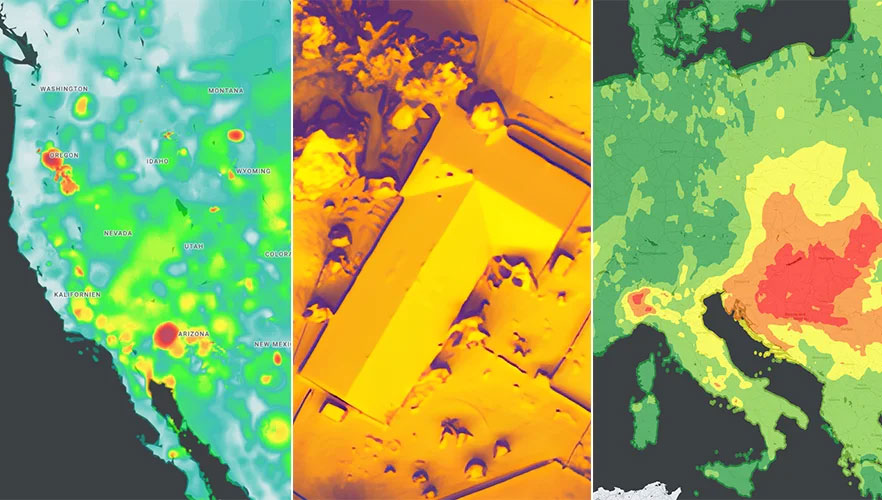
Google has released three Google Maps application programming interfaces (APIs) for developers to map solar potential, air quality and pollen levels. The three APIs apply artificial intelligence (AI) and machine learning, along with aerial imagery and environmental data, to provide up-to-date information about these three variables, enabling developers, businesses, and organizations to build tools that map and mitigate environmental impact.
The Solar API utilizes mapping and computing resources to design detailed rooftop solar potential data available for more than 320 million buildings across 40 countries including the United States, France and Japan. To obtain this data, the AI model extracts 3D information about roof geometry from aerial imagery, while considering past weather patterns and energy costs, enabling quicker installation of solar panels.
The Air Quality API shows air quality data, pollution heatmaps, and pollutant details for more than 100 countries around the world. The API validates and organizes several terabytes of data an hour from multiple data sources — including government monitoring stations, meteorological data, sensors and satellites — to provide a local and universal index.
Google Maps uses machine learning and live traffic information to predict different pollutants in an area at a given time. The Air Quality API offers companies in healthcare, the automotive market and other forms of transportation the ability to provide accurate and timely air quality information to their users.
The Pollen API shows current pollen information for common allergens in more than 65 countries. The API provides localized pollen count data, heatmap visualizations, detailed plant allergen information, and actionable tips for allergy-sufferers to limit exposure. To obtain this information, Google Maps uses machine learning to determine where specific pollen-producing plants are located.
uAvionix has introduced truSky ADS-B spoofing detection for its SkyLine uncrewed aircraft system (UAS) beyond visual line of sight (BVLOS) services.
The uAvionix truSky validation process uses a network of low-profile deployed dual-frequency ADS-B ground receivers to evaluate each signal transmitted from the aircraft. The system then compares the received signals to confirm that the signal originated from the aircraft’s position.
When used within the uAvionix SkyLine platform, each aircraft track point is color-coded based on its confidence score. The validation score is then transmitted along with the position updates of the aircraft using SkyLine API.
TruSky is being piloted in numerous locations in the United States and is available as a component of uAvionix’s SkyLine UAS BVLOS service or as an API for integration into uas GCS, UTM, or ATM platforms.
Bird uses the ARCore Geospatial API to enable a scooter parking app. (Image: Bird)
Google has launched the ARCore Geospatial API in ARCore software development kits (SDKs) for Android and iOS across all compatible ARCore-enabled devices.
The application programming interface (API) is available at no cost to download and opens up nearly 15 years of Google Maps data to help developers build more useful and immersive augmented reality (AR) experiences.
“The Geospatial API provides access to global localization — the same technology that has been powering Live View in Google Maps since 2019, providing people with helpful AR-powered arrows and turn-by-turn directions,” explains a Google blog.
“Based on the Visual Positioning Service (VPS) with tens of billions of images in Street View, developers can now anchor content by latitude, longitude and altitude in more than 87 countries, without being there or having to scan the physical space, saving significant time and resources.
“For end users, discovering and interacting with AR is faster and more accurate as images from the scanned environment are instantaneously matched against our model of the world,” the blog states. “This model is built using advanced machine-learning techniques, which extract trillions of 3D points from Street View images that are then used to compute a device’s position and orientation in less than a second.
“In other words, users can be anywhere Street View is available, and just by pointing their camera, their device understands exactly where it is, which way it is pointed and where the AR content should appear, almost immediately.”
Early-access partners include the NBA, Snap and Lyft, who are exploring and building applications in areas such as education, entertainment and utilities. For example, micromobility companies Bird, Lime and WeMo are using the API to remove friction from parking e-scooters and e-bikes, adding pinpoint accuracy so that riders know exactly when their vehicle is in a valid parking spot. Lime has been piloting its app in London, Paris, Tel Aviv, Bordeaux, Madrid and San Diego.
Hyper Precise Location (HPL), a real-time kinematics (RTK) service, is now available via Verizon ThingSpace to customers and application developers in more than 100 U.S. markets. When paired with Verizon’s 5G Edge capabilities, HPL provides precise positioning data for emerging cellular-vehicle-to-everything (C-V2X) technology, which is necessary for certain safety applications.
Verizon recently teamed with automakers to demonstrate vehicle-pedestrian safety scenarios made possible through HPL, 5G Edge and C-V2X.
HPL is software as a service (SaaS) that provides a stream of real-time GNSS correction data to device receivers, enabling location accuracy within 1-2 centimeters, for users on 5G and 4G networks. This can enable high-scale, low-cost, centimeter-level location capabilities for industries such as automotive, HD mapping, robotics, construction, and smart agriculture (AgriTech). Designed and deployed in a privacy-protective manner, HPL does not store or share user location data.
HPL embraces open delivery standards including RTCM for its data streams, with others to be added on a rolling basis. IoT devices using HPL can be accessed and managed through a user API and the ThingSpace IoT management platform. Support resources on ThingSpace will detail API integration, coverage availability, and more.
“Hyper Precise Location stands to boost or enable next-gen technologies across industries, from intelligent-driving to drone delivery to highly automated operations within construction, agriculture, and much more,” said TJ Fox, SVP of Industrial IoT and automotive for Verizon Business. “HPL’s fast expanding coverage area, API friendliness, privacy protection, and use of open-delivery standards make it ideal for developers and customers demanding precision and flexibility.”
In August, Verizon announced it is also developing HPL next-gen road safety and highly advanced driving solutions through partnerships with location and mapping expert HERE Technologies (HERE) and Renovo, the automotive software company. HPL can also support other emerging technologies that depend on high-level location accuracy, such as delivery drones, and advanced IoT applications, such as infrastructure monitoring, critical asset tracking, and high value shipping.
Originally posted in the Android Developers Blog, the following is reprinted with permission from authors Frank van Diggelen, principal engineer, and Jennifer Wang, product manager, Google.
At Android, we want to make it as easy as possible for developers to create the most helpful apps for their users. That’s why we aim to provide the best location experience with our APIs like the Fused Location Provider API (FLP). However, we’ve heard from many of you that the biggest location issue is inaccuracy in dense urban areas, such as wrong-side-of-the-street and even wrong-city-block errors.
This is particularly critical for the most-used location apps, such as rideshare and navigation. For instance, when users request a rideshare vehicle in a city, apps cannot easily locate them because of the GPS errors.
The last great unsolved GPS problem
This wrong-side-of-the-street position error is caused by reflected GPS signals in cities, and we embarked on an ambitious project to help solve this great problem in GPS. Our solution uses 3D mapping aided corrections, and is only feasible to be done at scale by Google because it comprises 3D building models, raw GPS measurements, and machine learning.
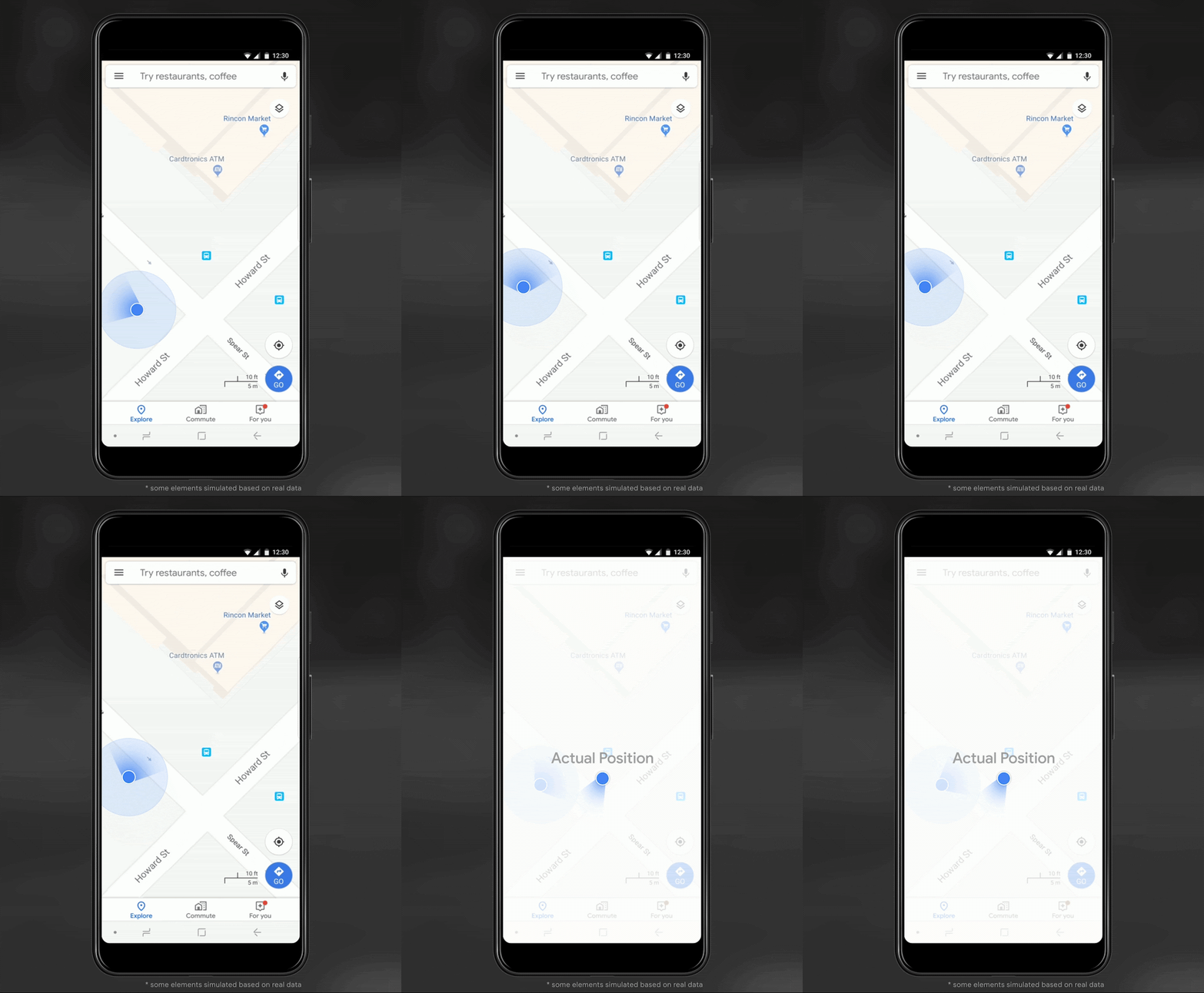
The December Pixel Feature Drop adds 3D mapping aided GPS corrections to Pixel 5 and Pixel 4a (5G). With a system API that provides feedback to the Qualcomm Snapdragon 5G Mobile Platform that powers Pixel, the accuracy in cities (urban canyons) improves spectacularly.
Image: Frank van DiggelenImage: Frank van Diggelen
Pictures above show a pedestrian test, with Pixel 5 phone, walking along one side of the street, then the other. Yellow = Path followed, Red = without 3D mapping aided corrections, Blue = with 3D mapping aided corrections.
Why hasn’t this been solved before?
The problem is that GPS constructively locates you in the wrong place when you are in a city. This is because all GPS systems are based on line-of-sight operation from satellites. But in big cities, most or all signals reach you through non line-of-sight reflections, because the direct signals are blocked by the buildings.
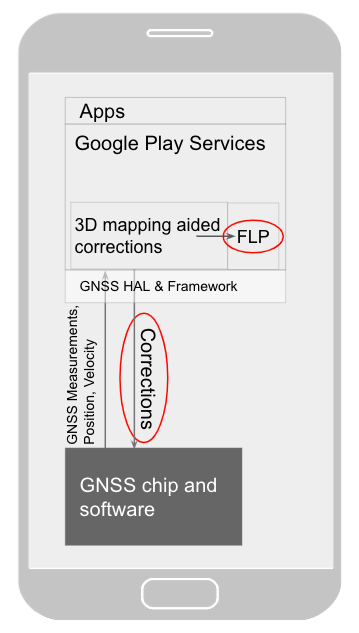
Diagram of the 3D mapping aided corrections module in Google Play services, with corrections feeding into the FLP API. 3D mapping aided corrections are also fed into the GNSS chip and software, which in turn provides GNSS measurements, position, and velocity back to the module. (Image: Frank van Diggelen)Image: Frank van Diggelen
The GPS chip assumes that the signal is line-of-sight and therefore introduces error when it calculates the excess path length that the signals traveled. The most common side effect is that your position appears on the wrong side of the street, although your position can also appear on the wrong city block, especially in very large cities with many skyscrapers.
There have been attempts to address this problem for more than a decade. But no solution existed at scale, until 3D mapping aided corrections were launched on Android.
How 3D mapping aided corrections work
Image: Frank van Diggelen
The 3D mapping aided corrections module, in Google Play services, includes tiles of 3D building models that Google has for more than 3,850 cities around the world. Google Play services 3D mapping aided corrections currently supports pedestrian use-cases only. When you use your device’s GPS while walking, Android’s Activity Recognition API will recognize that you are a pedestrian, and if you are in one of the 3,850+ cities, tiles with 3D models will be downloaded and cached on the phone for that city. Cache size is approximately 20MB, which is about the same size as 6 photographs.
Inside the module, the 3D mapping aided corrections algorithms solve the chicken-and-egg problem, which is: if the GPS position is not in the right place, then how do you know which buildings are blocking or reflecting the signals? Having solved this problem, 3D mapping aided corrections provide a set of corrected positions to the FLP. A system API then provides this information to the GPS chip to help the chip improve the accuracy of the next GPS fix.
With this December Pixel feature drop, we are releasing version 2 of 3D mapping aided corrections on Pixel 5 and Pixel 4a (5G). This reduces wrong-side-of-street occurrences by approximately 75%. Other Android phones, using Android 8 or later, have version 1 implemented in the FLP, which reduces wrong-side-of-street occurrences by approximately 50%. Version 2 will be available to the entire Android ecosystem (Android 8 or later) in early 2021.
Android’s 3D mapping aided corrections work with signals from the USA’s GPS as well as other GNSS: GLONASS, Galileo, BeiDou, and QZSS.
Our GPS chip partners shared the importance of this work for their technologies.
Francesco Grilli, vice president of product management at Qualcomm Technologies Inc.:
“Consumers rely on the accuracy of the positioning and navigation capabilities of their mobile phones. Location technology is at the heart of ensuring you find your favorite restaurant and you get your rideshare service in a timely manner. Qualcomm Technologies is leading the charge to improve consumer experiences with its newest Qualcomm Location Suite technology featuring integration with Google’s 3D mapping aided corrections. This collaboration with Google is an important milestone toward sidewalk-level location accuracy.”
Charles Abraham, senior director of engineering, Broadcom Inc.:
“Broadcom has integrated Google’s 3D mapping aided corrections into the navigation engine of the BCM47765 dual-frequency GNSS chip. The combination of dual frequency L1 and L5 signals plus 3D mapping aided corrections provides unprecedented accuracy in urban canyons. L5 plus Google’s corrections are a game-changer for GNSS use in cities.”
Yenchi Lee, deputy general manager of MediaTek’s Wireless Communications Business Unit:
“Google’s 3D mapping aided corrections is a major advancement in personal location accuracy for smartphone users when walking in urban environments. MediaTek’s Dimensity 5G family enables 3D mapping aided corrections in addition to its highly accurate dual-band GNSS and industry-leading dead reckoning performance to give the most accurate global positioning ever for 5G smartphone users.”
How to access 3D mapping aided corrections
Android’s 3D mapping aided corrections automatically works when the GPS is being used by a pedestrian in any of the 3850+ cities, on any phone that runs Android 8 or later. The best way for developers to take advantage of the improvement is to use FLP to get location information. The further 3D mapping aided corrections in the GPS chip are available to Pixel 5 and Pixel 4a (5G) today, and will be rolled out to the rest of the Android ecosystem (Android 8 or later) in the next several weeks. We will also soon support more modes including driving.
Android’s 3D mapping aided corrections cover more than 3850 cities, including:
North America: All major cities in USA, Canada, Mexico.
Europe: All major cities. (100%, except Russia & Ukraine)
Asia: All major cities in Japan and Taiwan.
Rest of the world: All major cities in Brazil, Argentina, Australia, New Zealand, and South Africa.
As our Google Earth 3D models expand, so will 3D mapping aided corrections coverage.
Google Maps is also getting updates that will provide more street level detail for pedestrians in select cities, such as sidewalks, crosswalks, and pedestrian islands. In 2021, you can get these updates for your app using the Google Maps Platform. Along with the improved location accuracy from 3D mapping aided corrections, we hope we can help developers like you better support use cases for the world’s 2B pedestrians that use Android.
Continuously making location better
In addition to 3D mapping aided corrections, we continue to work hard to make location as accurate and useful as possible. Below are the latest improvements to the Fused Location Provider API (FLP):
Developers wanted an easier way to retrieve the current location. With the new getCurrentLocation() API, developers can get the current location in a single request, rather than having to subscribe to ongoing location changes. By allowing developers to request location only when needed (and automatically timing out and closing open location requests), this new API also improves battery life. Check out our latest Kotlin sample.
Android 11’s Data Access Auditing API provides more transparency into how your app and its dependencies access private data (like location) from users. With the new support for the API’s attribution tags in the FusedLocationProviderClient, developers can more easily audit their apps’ location subscriptions in addition to regular location requests. Check out this Kotlin sample to learn more.
Qualcomm and Snapdragon are trademarks or registered trademarks of Qualcomm Incorporated. Qualcomm Snapdragon and Qualcomm Location Suite are products of Qualcomm Technologies Inc. and/or its subsidiaries.
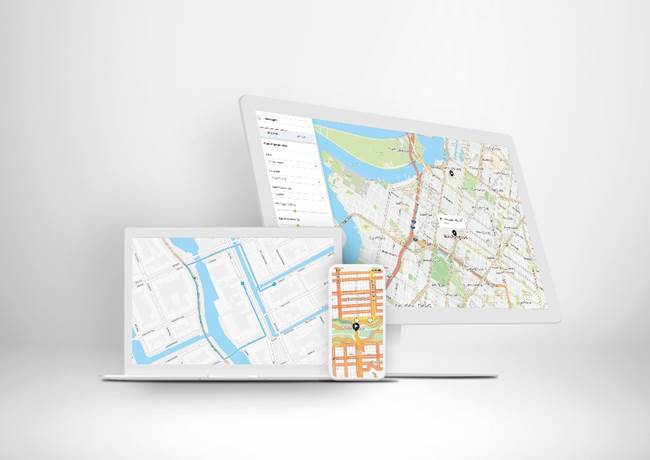
Verizon will integrate TomTom’s Maps application programming interfaces (API) and software development kits (SDK) into its location-services offering, making it easier for the developer community to build upon and integrate the platform. The developers’ portal is available at developer.tomtom.com. More information from
The agreement is an expansion of the existing TomTom and Verizon agreement, where TomTom provides location-based services to enhance Verizon’s current suite of location-based data, navigation, and intelligence.
“We look forward to continuing to build upon and evolve our product suite with TomTom’s technology,” said Jeff Frantz, executive director, Verizon Location Services. “By expanding our agreement, we are furthering our commitment to providing best-in-breed location technology for Verizon and our customers.”
“We’re determined to make it as easy as possible for developers to have access to our Maps APIs and SDKs so we’re delighted that Verizon is offering TomTom products to their location-services customers,” said Anders Truelsen, managing director, TomTom Enterprise.
5G and HD Maps. In the last quarter of 2019, the companies also announced an innovation project using Verizon 5G Ultra Wideband and TomTom HD Maps to help make intersections safer for emergency vehicles.
New hardware-in-the-loop application programming interface (API) for GNSS simulators enables greater accuracy, integrity and control for growing sensor fusion testing needs
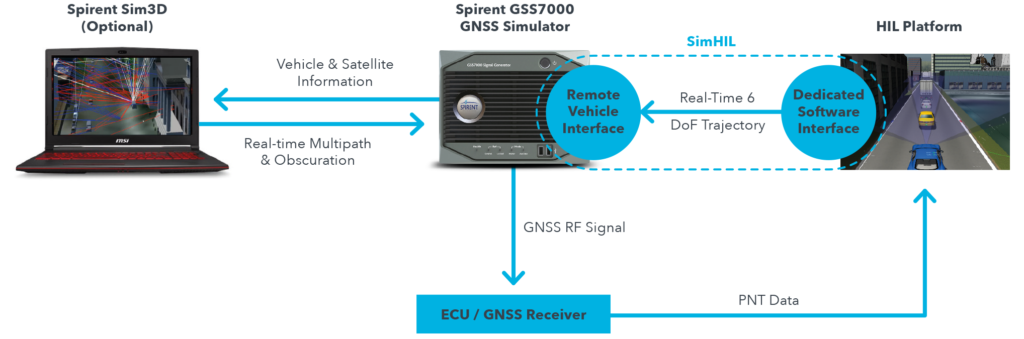
Spirent Communications plc has released SimHIL, an integrated hardware-in-the-loop (HIL) testing software API for Spirent GNSS simulators.
SimHIL brings high-fidelity GNSS signal simulation with low latency to automotive industry HIL testbeds, the company said.
Image: Spirent
Spirent’s SimHIL software has been developed to meet the automotive industry’s growing need for realistic positioning, navigation and timing (PNT) testing for sensor fusion. As customers apply increasing pressure on car manufacturers for more advanced driver-assistance system (ADAS) features and advanced infotainment systems, test labs need to be able to combine Wi-Fi, camera, lidar, radar, inertial and GNSS data that power these advanced automotive systems.
SimHIL helps test engineers bring accurate, controlled and coherent data from GNSS and inertial sensors to their sensor-fusion algorithms within HIL test environments. Facilitating the ultra-low latency, complete control, enhanced realism, and ease of use and setup of Spirent GSS7000 and GSS9000 GNSS simulators, SimHIL is suitable for OEMs and tier-one suppliers developing ADAS, V2X and sensor-fusion engines.
The new SimHIL API enables:
external motion input – real-time direct motion and trajectory data input from simulators
sensor fusion – introducing GNSS signals into sensor-fusion engines
V2X testing – validation and performance benchmarking of V2X applications
infotainment system testing – real-time scenario feedback to system and driver responses
vehicle-in-the-loop (VIL) – final production form product testing
accurate testing – reliable results supported by ultra-low latency simulation. Criticality of ADAS features, such as lane assist and automatic braking, mean that 3+ metres of uncertainty introduced by higher latency systems is not sufficient.
“With our SimHIL software and GNSS simulators, test engineers can bring realistic, controlled GNSS simulation to their HIL testing environments – a vital requirement in a world where ADAS features are relying more heavily and critically on accurate positioning,” said Martin Foulger, general manager of Spirent’s PNT business.
Spirent has worked with leading suppliers to ensure SimHIL is compatible with their HIL platforms, and because of its open API, there’s broad scope for additional custom third-party integrations.
“When used with our GSS7000, SimHIL latency is less than 40 ms from motion command to RF output and supports all GNSS and SBAS signals,” said Ricardo Verdeguer Moreno, product manager for Connected and Autonomous Vehicles at Spirent. “SimHIL is also compatible with all the options and features available in Spirent’s GNSS simulators, including ionospheric and tropospheric modeling, antenna patterns, date and time settings, and obscuration and multipath effects via Sim3D.”
Users can easily configure and control both the GNSS scenarios, and signal generation and vehicle motion from within the HIL simulator graphical user interface — saving time and the possibility of error.
Spirent is also offering three service packages alongside SimHIL to help customers mitigate project risk and reduce the time from delivery to useful deployment.
For more information about Spirent’s SimHIL integrated testing for Spirent GNSS simulators, visit the SimHIL information page.
Microsoft Azure customers now have access to HERE Location Services within its self-hosted Azure environments. HERE is providing a new set of application programming interfaces (APIs) for developers to build location-aware applications.
Microsoft Azure is a cloud computing service for building, testing, deploying and managing applications and services through Microsoft-managed data centers.
According to HERE, HERE Location Services such as Routing, Geocoding and Map Tiles APIs offer developers useful tools while ensuring high performance for an application’s most critical processes.
Software developers rely on the accuracy and scale of HERE Location Services to incorporate core location-oriented components into the enterprise-grade applications they build and manage, the company said.
The HERE Location Services available for self-hosting in Azure Virtual Machine environments are:
Routing – provides access to and use of global, real-time and historical traffic information.
Forward Geocoder and Reverse Geocoder – provides comprehensive coverage in 196 countries and several territories with a high-precision mapping of geo-coordinates or addresses.
Map Tiles– shows fresh day-time map tiles in multiple styles (for example, base and aerial) including rendered live-traffic tiles for flow overlay.
Applications for HERE Location Services include the following.
Fleet management and emergency services
Create safe and efficient routing solutions for multiple vehicle types
Provide the most efficient routing options based on real-time traffic conditions
Seamless mobility
Provide routing options for pedestrians and public transportation
Help cities run more smoothly with improved traffic flow and transportation network usage
Business intelligence:
Understand trends and behavior of citizens in relation to their location and mobility patterns
Understand shifting market dynamics to inform real-estate investments
Verify insurance claims and authenticate transactions
HERE Location Services are available to Azure customers who want to manage and deliver highly available location-based services. The self-hosted architecture ensures maximum availability and resiliency for Azure customers running critical business applications that rely on “always-on” location services.
“Location anchors our connected world and HERE Location Services enable industries to solve complex challenges while delivering valuable new products and experiences,” said Mithun Dhar, General Manager, Developer Relations at HERE Technologies. “Demands on business require flexibility in software architecture, and HERE is proud to offer robust and high-quality location services to customers operating across public cloud, self-hosted or hybrid environments.”
HERE Location Services are also available as Serverless Functions on the Azure Marketplace. For the latest Azure developer content, go to HERE | Azure Marketplace.
Spire Global has released the company’s first product from Spire Aviation with the launch of its new AirSafe API (application program interface).
Spire Aviation’s AirSafe product uses low-Earth orbit ADS-B technology combined with ground-based collection to provide detail on global aircraft position reports for the world’s aircraft fleet operations.
With more than 70 million position reports every day and growing, AirSafe is positioned to provide best-in-class data over land and the world’s oceans.
The AirSafe product solves the industry’s need for flight tracking data covering both land and oceans at a competitive cost, illuminating trends in aircraft operations, the company said.
Airsafe enables a fixed-based operator to analyze historical data to safely increase productivity by better positioning resources in the future, and then using real-time data to create a proactive alerting system for diversion or air turnbacks.
Spire Aviation is building towards full surveillance of all remote areas of the globe and continues to grow its satellite constellation. Spire’s aggressive roadmap includes launch campaigns to ultimately provide an equatorial ICAO 4D/15 compliant method of aircraft tracking (+/- 15 degrees latitude) and global coverage enabled by inter-satellite links. These satellite launches will produce the an advanced nanosatellite constellation for aviation ADS-B and aviation weather forecasting.
Spire AirSafe also offers Spire’s proprietary weather forecasting products, enabling customers to benefit from fused aircraft location positional data and global winds aloft (Every 1,000 feet MSL) and clear air turbulence forecast.
Learn more about the benefits of working with Global ADS-B data and Spire’s Aviation Weather Forecast during an upcoming webinar.
The tools connect directly to TomTom Maps APIs (Application Programming Interfaces) for location, tracking and mapping data services, accelerating product development, and reducing time-to-market and development costs for developers, the companies said.
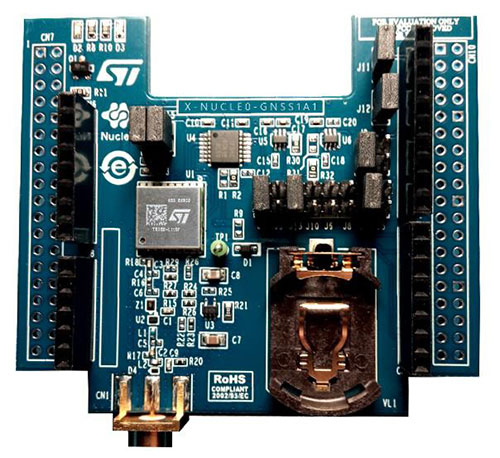
The X-NUCLEO-GNSS1A1 expansion board is based on the Teseo-LIV3F tiny GNSS module. (Photo: STMicroelectronics)
The development package consists of an STM32 Discovery host board for 2G/3G cellular-to-cloud connectivity, a GNSS expansion board based on ST’s Teseo satellite navigation technology, and a software Function Pack that connects an internet-of-things (IoT) node via a cellular network to a range of TomTom Maps APIs.
With this hardware and software package and a TomTom developer account, developers can quickly add location-based services to their IoT and smart city applications.
Among these services are the translation of GPS coordinates into a street address inside a map (Reverse Geocoding), retrieval of nearby point of interests, and the production of accurate navigation directions.
“We have combined TomTom’s industry-leading location-based and mapmaking technologies with ST’s unrivaled combination of silicon and system expertise to create a unique offering that provides easy access to TomTom’s Maps APIs to empower developers to create groundbreaking, location-aware applications faster and more efficiently,” said Anders Truelsen, managing director of TomTom’s Enterprise Business Unit.
“Supporting our efforts to facilitate location-based product development, our collaboration with TomTom has built on each company’s strengths to assemble a tailored package of hardware and software tools that is already fully integrated with TomTom cloud services, around the popular STM32 development ecosystem,” said Alessandro Cremonesi, group vice president at STMicroelectronics. “These tools enable native STM32-based location services to accelerate application development of Geo-IoT solutions for fleet management, item tracking, and many other services that depend on fast, accurate location detection.”
In addition to the STM32 family of Arm Cortex-M core microcontrollers, the development tools leverage ST’s market-proven multi-constellation Teseo positioning-receiver technology to perform all positioning operations including tracking, acquisition, navigation and data output.
Recent changes in hardware and standards make one-meter accuracy possible, in some cases as soon as this year. The transcript of a talk given to Android developers earlier this year, this article gives a short overview of location in smartphones, introduces Wi-Fi round-trip time technology and standards, and then explains the Wi-Fi application programming interfaces.
ByFrank van Diggelen, Roy Want and Wei Wang, Android Location, Google
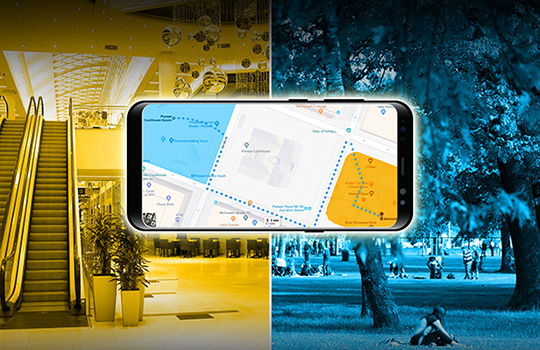
Image: GPS World; outdoor, Andriy Solovyov/Shutterstock.com; indoor, Rade Kovac/Shutterstock.com
It’s a great time for location applications because technology hardware standards and Android application programming interfaces (APIs) are all evolving simultaneously to enable an improved location accuracy that has not previously been possible when using smartphones.
Eventually, this means high accuracy for everyone, but we want to take you under the hood of location because we want to give you the opportunity to get a head start on the future. We also want to highlight the need to protect and respect the user. The more people who use location, the more careful we and you have to be. We will highlight where you must get user permissions and we’ll close with some guidelines for making great location apps.
Where are we today with indoor location accuracy? If you’ve noticed that your phone seems to be more accurate when you’re inside shopping malls and office blocks than it was a few years ago, you’re not imagining it. With each release of the fused location provider, we have had steady improvement of the Android algorithms and machine learning for Wi-Fi locations.
There continues to be improvement, and you’ll see indoor accuracy of better than 10 meters, but round-trip time (RTT) is the technology that will take us to the one-meter level.
Meanwhile, what about GPS? In terms of GPS accuracy in the open sky, there has not been much change in the last few years. If you’re outside and can see the open sky, the GPS accuracy from your phone is about five meters, and that’s been constant for a while. But with raw GNSS measurements from the phones, this can now improve, and with changes in satellite and receiver hardware, the improvements can be dramatic.
Everyone’s familiar with the blue dot, but to get the blue dot you need a location provider, and to get location you need measurements — specifically, range measurements from Wi-Fi access points or from GPS satellites. We’ll show you how one-meter measurement accuracy can be made available in smartphones. The key technologies are Wi-Fi RTT, GPS dual-frequency and carrier phase measurements.
If you want to wait a year or two, this will find its way into the worldwide ecosystem and the Android fused location provider API, but we want to give you a chance for a one- to two-year lead by taking accurate measurements and turning them into accurate location. We want to work with you to accelerate development and bring the present closer to the future.
You might wonder, why do I need better location accuracy anyway? Let’s look at two instances where existing apps could use much better location accuracy.
For indoor routing or navigation of the kind that you’re used to in your cars, you need much better accuracy than you have outdoors: you need one-meter accuracy, because indoor features like cubes or aisles are only a few meters wide. Even for the most loved outdoor applications such as map directions and finding alternate routes in traffic, we could benefit from higher accuracy than we have now.
For example, when you came here this morning in a car, you probably had your arrival time estimated using the average speed of the traffic. What you really want is the traffic speed in the lane that you’re in, so that you could ask, how much faster would it be if I took the carpool lane instead? There are, of course, many other use cases and we’ll mention a few. But the important thing is that we are sure that you will have many more ideas than we have, and that’s the beauty of the open Android ecosystem.
Wi-Fi Round-Trip Time
Wi-Fi RTT ranging and indoor position estimation is based on making measurements of the time of flight of RF signals, and can be used to estimate your indoor position to an accuracy of one to two meters.
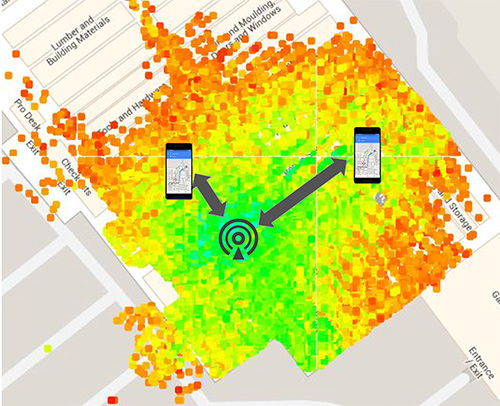
Before we get into the details of Wi-Fi RTT, we want to tell you how we currently calculate an indoor location. At this time, we use Wi-Fi received signal strength indication (RSSI). Basically, we can calculate distance as a function of signal strength. Figure 1, with the access point in the center, shows a heat map of the signal strength around a Wi-Fi access point (AP).
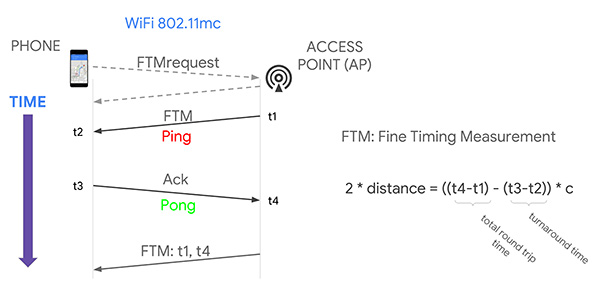
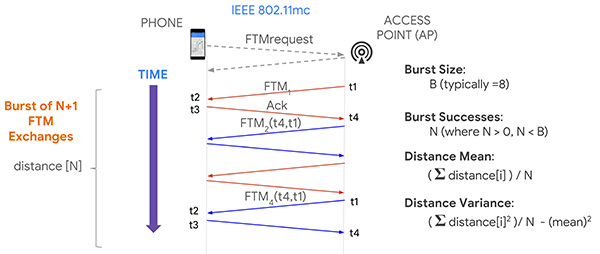
Figure 1. Wi-Fi receive signal strength indication (RSSI) non-isotropic signal propagation. (Image: Frank van Diggelen, Roy Want and Wei Wang)Figure 2. Wi-Fi RTT principles, basic concept.(Image: Frank van Diggelen, Roy Want and Wei Wang)Figure 3. Wi-Fi RTT principles in practice. (Image: authors)
The green is the strongest signal, near the AP and the red is the weakest, measured toward the edges. I’ve placed two phones on this diagram at the transition between the weak and the strong. Notice that the phone on the right is further away from the access point than the phone on the left. The signal strength can therefore vary at the same distance, which unfortunately makes it very hard to make accurate range measurements based on this type of measurement. There are lots of algorithms and tricks that can be used to improve this, but the greatest improvement can be achieved using a new Wi-Fi technology.
That’s where Wi-Fi RTT comes into play. It uses time-of-flight instead of signal strength. It measures the time it takes to send a Wi-Fi RF packet from an access point to a phone and back again. Because radio signals travel at the same speed as visible light, if we multiply the total round-trip time of a Wi-Fi packet by the speed of light and divide by two, we get distance, and therefore the range from the phone to the access point. That’s the basic principle.
If you want to use several ranges to nearby access points to calculate your position, we have to use a process called multi-lateration. The key thing to think about here is that the more ranges you have, the more accurate the position you can estimate. If you can use at least four ranges, then we think you can achieve a location accuracy of about one to two meters in most buildings.
Why are we telling you about Wi-Fi RTT today? Why not last year or before? Because 2018 is the year of Wi-Fi RTT in Android. We are releasing a public API in Android P based on the IEEE 802.11mc ranging protocol. Furthermore, we’re also integrating aspects of this protocol into the fused location provider, which is the main location API that developers use to put a blue dot on a map. So, in the near future, any time there are RTT access points in the vicinity of a phone, the estimated position accuracy will be greater.
History. The 802.11 standard was ratified in December 2016, and in early 2017 the Wi-Fi Alliance started an interop program for silicon vendors to make sure the chips followed the protocol. That’s when we started doing a lot of work to validate its operation and understand how it could be integrated into Android. By the fall of this year, we will release the public API so that you can all have access to this capability and can build your own applications around the technology.
Principles of Wi-Fi RTT Operation
The ranging process starts with a standard Wi-Fi scan. The phone discovers the access points that are nearby, and, based on certain bits in information elements (IEs) contained in the Wi-Fi beacons and the probe responses, we can figure out which of those access points are RTT-capable, and the phone can choose one of them to range to. It starts by making a request to the access point; as a result, the access point will start a ping-pong protocol in response. The ping sent to the phone is called a fine timing measurement (FTM) packet, and the pong sent back to the access point is an acknowledgment of that packet.
The arrival and departure time stamps are recorded at each end of the transaction, but for the phone to calculate the total round-trip time, it needs to have all four of those times. So the access point sends one more packet to the phone, and this third message contains the missing times. The phone then simply calculates the round-trip time by subtracting the time stamps from the AP, and subtracting its own packet turnaround timestamps. The difference between these times leaves just the packet time-of-flight. We multiply this by the speed of light to get distance, and divide by two to get the range that we are trying to measure.
Now, it turns out if you execute this process multiple times, you will in fact get more accuracy, and so that’s what the protocol allows for, enabling a burst of FTM packets. We’re typically doing a burst of about eight of these of these transactions and, as a consequence, the system can calculate ranging statistics, such as the mean and the variance. This allows us to more accurately plot a position on a map, and knowing the accuracy also allows us to more easily calculate a trajectory.
Now that you have ranges, how do you get a position? One way, similar to GPS positioning, is you take four ranges to four separate access points; if those ranges were accurate, they would define four circles that would intersect at a single point. In practice, because of error in each range, a maximum likelihood position is calculated using a least squares multilateration algorithm.
You can then further refine this position by repeating the process, particularly as the phone moves, and then calculate trajectory using filtering techniques, such as Kalman filtering, to optimize the estimate.
Like any new technology, there are challenges, and we’ve experienced some of these early on. What we find is that sometimes there is a constant range calibration offset that may be as much as half a meter. Sometimes you also see multipath effects where a packet on the non-line-of-sight path from the access point to the phone is received rather than on the line-of-sight path, making the range appear longer. That problem can be solved by the vendor using something called antenna diversity, but all of these issues are related to algorithms, which the vendors are improving.
Basically, we need to go through a sort of teething process to get rid of these bugs, and Google can help in this process by providing reference platforms and reference applications. Vendors can then calibrate their own platforms before you guys even get to use them, which will be the ideal situation.
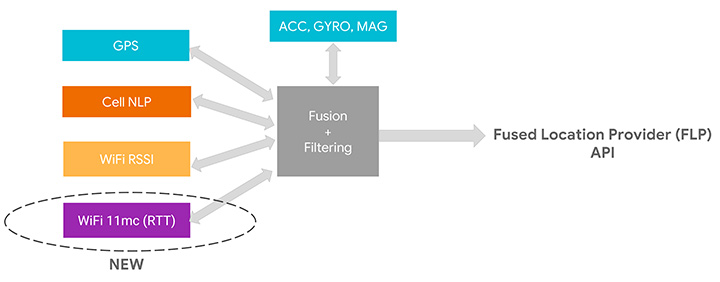
We’ve assumed that as early adopters you want to start using this API, but as we move into the relatively near future, we expect you to just use the Fused Location Provider because we’re going to be integrating the RTT capability into it. At the moment, the Fused Location Provider uses GPS (when it’s available), cell-tower signal strength and Wi-Fi RSSI, and fuses all this with the onboard sensors: inertial navigation from the accelerometer, gyro and compass. Now we’re adding Wi-Fi RTT into that mix, and it will increase the accuracy of the Fused Location Provider whenever RTT-capable access points are available nearby.
One other thing to remember is that if you are calculating the Wi-Fi RTT position yourself, you also had to know the position of the access points. In the Fused Location Provider, we will calculate those positions for you automatically: we’ll crowd-source those positions so you won’t have to worry about that, and it will make life a lot easier for you to write applications.
RTT APIs
Let’s walk you through the RTT APIs in P to see how you can add RTT in your own application. As we mentioned, RTT measures the round-trip time between two Wi-Fi devices so both your mobile phone and your access points need to support the 802.11mc protocol. As you saw, RTT can give you very fine location estimates down to one-meter accuracy, so your application needs to declare the ACCESS_FINE_LOCATION permission. Of course, both location and Wi-Fi scanning need to be enabled on the mobile device.
How do you know whether your mobile phone supports RTT? In P, we added a new system feature called FEATURE_WIFI_RTT so you can simply check whether this returns true on your mobile device. Our pixel phones running P DP2, and above, will support RTT. How do you know whether your access points support RTT? As usual, you will need to do a Wi-Fi scan and get a list of Wi-Fi scan results. Then iterate through the scan results and check for each scan result whether the method is80211mcRepsonder() returns true. This will tell you whether the access points support RTT.
After you get a list of RTT-enabled APs, simply add them to the ScanRequest Builder to build a scan request. RTT is carried out by the WiFiRTTManager, which you can get access to by getting the system service WIFI_RTT_RANGING_SERVICE. Now we’re ready to start RTT ranging by sending the RTT request to the RTTManager with a ranging result callback. Usually RTT takes only a few hundreds of milliseconds, and when it finishes, you will get a list of information including the status — an RTT may fail, the MAC address — which AP you have just ranged, and most importantly, the distance between the mobile phone and the access point.
Here is the list of information you can get from RTT ranging results: the distance, the distance standard deviation, which is the standard deviation from multiple ranges in multiple FTMs, and the number of attempted FTM measurements and number of successful measurements. The ratio of successful measurements over attempted measurements will give you an idea of how good the Wi-Fi environment is for RTT ranging.
We mentioned all Pixel devices support RTT. How about access points? We are beginning to see access points supporting the 11mc protocol in production. We are also very excited to let you know Google Wi-Fi will soon support the 11mc protocol. By the end of this year, off-the-shelf Google Wi-Fi will have RTT enabled by default. Worldwide, we’re also beginning to see the deployment of RTT APs. South Korea is actually leading the deployment of RTT APs.
Of course, this is just the beginning of the long journey. We’re very eager to see a larger penetration rate of RTT APs in the coming years.
Figure 4. Integrating RTT with Android location.(Image: Frank van Diggelen, Roy Want and Wei Wang)
GPS and the Great Outdoors
Carrier-phase precision has been in commercial GPS receivers since the 1980s. What is new is the availability of these carrier-phase measurements from phones and dual-frequency measurements in phones. Right now, all of your smart phones, all smart phones everywhere, have GPS or GNSS on one frequency band only. It’s known as L1. But there’s a new frequency in town called L5, and it’s supported by all these GNSS systems: GPS, Galileo, BeiDou QZSS and IRNSS. The availability of a second frequency means that you get much faster convergence to carrier-phase accuracy.
What about hardware? In the last few months, several companies that produce consumer GPS chips have announced the availability of dual-frequency L1/L5 GPS chips both for the automobile market and for the phone market. These chips are now being designed into cars and phones.
Let’s talk about the measurements themselves and the APIs. The phone must support the GNSS measurements API. Your app is going to need the ACCESS_FINE_LOCATION permission, and location needs to be on.
How do you know if a particular phone supports these measurements? At a high level, you can just go to a website that we maintain, g.co/GNSSTools, as part of the Android developer site. A table there lists phones that support the GNSS measurements and also which characteristics they support. It’ll tell you which phones support the measurements and which of those support the carrier-phase measurements.
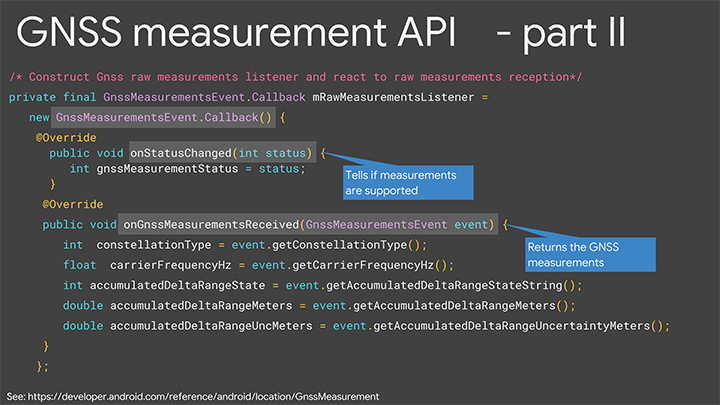
Programmatically, you do this as follows: You call the method onStatusChanged and it will return an integer that tells you the capability of the phone, either if the phone just does not support the measurements at all or if it supports it but location is off, or if it supports it and location is on; in that case, you’re good to go.
Let’s get into some details of the APIs. The most relevant methods for what we’re talking about here are the following three:
getConstellationType() tells you which of the different GNSS constellations a particular satellite belongs to.
getCarrierFrequencyHz() tells you whether you’re on the L1 or the L5 band for a particular signal.
Most importantly,
getAccumulatedDeltaRangeMeters() tells how far along that carrier wave the receiver has tracked you since it began tracking the signal.
There’s something else that we need to explain, which is duty cycling. Right now when you’re navigating with your phone and you see the blue dot moving along, you might think that the GPS is on continuously. It’s actually not. What’s happening in the phone is that GPS will, by default, be on for a fraction of a second and then off for the remaining fraction of a second, and then repeat. This is to save battery. You perceive that the GPS is on all the time because the blue dot will move along continually, but actually it’s duty cycling internally.
For this carrier-phase processing, you have to continually track the carrier wave because the carrier wave is like a finely graduated ruler or tape measure with no numbers on it. So if the GPS was on and your receiver measured your phase and you get the data from the reference station, you’d start processing. If the GPS then goes off for a fraction of a second, you’ve lost where you were. It’ll start again, you’ll reacquire, you’ll be at a different phase on the reacquisition, you’ll start again — well, you’ll never solve the problem. You need the tape measure to stay out and you need to process, and to do that you need to disable duty cycling. You can do that in Android P with a developer option.
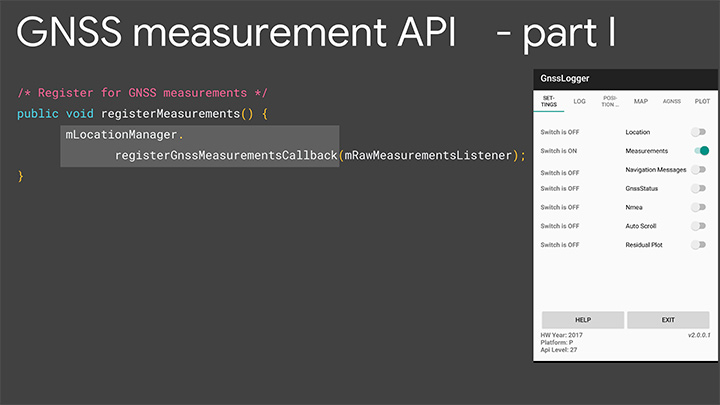
Details of the API. Figures 5 and 6 are screenshots of an application that we’ve put out called GNSS Logger. This enables you to log the raw measurements in the phone. The nice thing about this app is it’s a reference app: the code is open source and available to you on Github, so when you build your app, please make use of our code.
Figure 5. Screenshot of GNSS Logger. (Image: Frank van Diggelen, Roy Want and Wei Wang)Figure 6. Sample code for getting GNSS raw measurements. (Image: Frank van Diggelen, Roy Want and Wei Wang)
When you build an app that needs raw measurement, you will need the Android location manager API with the method registerGnssMeasurementsCallback. This method requires you to pass it a GnssMeasurementsEvent callback shown here. You construct this callback, and then override the method onStatusChanged, and that will give you the integer status that we discussed to tell you if measurements are supported.
If they are, you then override the method onGnssMeasurementsReceived, and this allows you to receive a GnssMeasurementEvent every epoch, for example, every second. This event gives you the values we’ve been talking about: constellation type, carrier frequency and accumulated Delta range. For duty cycling, that’s a developer option, so you access that through the developer page on your phone as you see there on P. This allows you to disable the duty cycling.
Keep in mind this introduces a trade-off between getting the continuous measurements and battery life. There will be an impact on battery life. How much? Well even when GPS is on continually, it will use less than 20% of the power that screen-on uses, so that gives you a feel for the magnitude. This is a developer option precisely because it’s a trade-off involving battery life, and we’re very concerned about maximizing battery life, but if you and our team together can prove that there’s value in this option and people want it, then it will be upgraded to a fully supported API in the future.
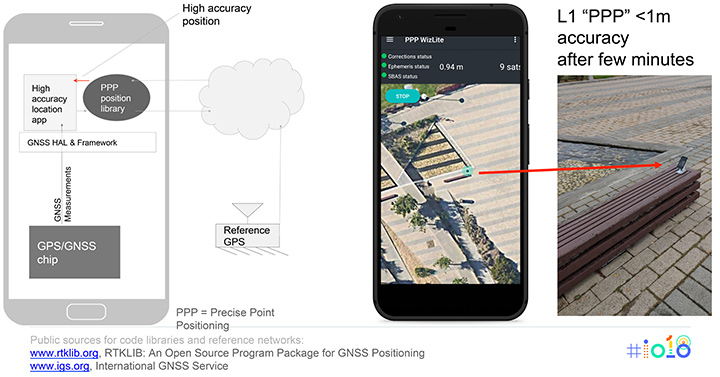
Figure 7 shows the basic architecture that we expect if you implement an app for high accuracy. On the bottom of the block diagram on the left you’ve got the GPS/GNSS chip. The GNSS measurements come up through the APIs we’ve just described, and then your app lives at the top in the application layer. You’re going to need access to a reference network to get the data that the reference stations are tracking. There are publicly available reference networks. I’ve listed one at the bottom: the International GNSS Service. You can get data from them free.
Figure 7. Apps for high-accuracy GPS.(Image: Frank van Diggelen, Roy Want and Wei Wang)
Then you need to process that data in some kind of position library, and that does all the carrier-phase processing, and that too is available as open-source code. RTKLib.com has an open-source package for precise positioning. Then you’re good to go.
We mentioned that dual frequency gives you much faster convergence to the high accuracy, but you don’t have to wait until the dual-frequency phones come out. You can start doing this with single-frequency phones. Here’s an example of someone who’s already done that. This is an app created by the French Space Agency, and they’re doing exactly what we show on the block diagram on the left and they’re achieving sub-meter accuracy after a few minutes of convergence.
Here’s some more external analysis that’s been done in a similar way. This is from a paper called “Positioning with Android GNSS.” This is using one of those chips that we showed you, the chip that goes in cell phones that does dual frequency. What’s been shown here is the cumulative results over many different starts of the GPS and what you see is that most of the time the accuracy is better than a meter. You see that on the vertical axis, which is 0 to 1 meters, the accuracy gets to better than a meter in less than one minute and then continues to converge as long as the phone continues to track that carrier phase continuously.
Here’s a another similar but different paper. This is using one of the chips that’s meant for cars. This was tested in a car driving around that track there, and what the plot here shows is the accuracy after the initial convergence while the car was driving. You see with GNSS alone the accuracy is 1 to 2 meters, and with this carrier-phase processing it’s at a couple of decimeters.
For you to build this, what are you going to need? Of course you need the device location to be enabled and your app has to have location permissions, so that’s going to come from the user. You need the basic GNSS measurements, that’s been available since Android N. You also need this continuous carrier phase I’ve been talking about and that’s available in P with the developer option. It would be nice to have dual frequency for fast convergence and that’s coming soon. You need a reference network such as the one we already mentioned; there are also commercial reference networks out there and commercially available software to do the same thing, but we recommend you start with the free stuff and go from there.
Finally there’s the app from you.
In summary, everything we’ve been showing you here is based on indoor and outdoor technology that’s been evolving kind of in parallel. In each case we have a new technology and Android P gives you a way to access it.
Indoors Again
The new technology is Wi-Fi RTT and round-trip time-enabled access points. We give you a public API to access these measurements, but you need access point infrastructure. This is where some of you can move ahead this year, because if you have a customer who owns or controls a venue, they can upgrade their access points — sometimes just a firmware upgrade — and then you have the infrastructure. Android P comes out later this year, and you can implement something and have indoor navigation, or create any other type of context-aware app.
For example, someone goes in a store: where’s the milk? You can make the world a better place for all of us by saving us from the tyranny of having to ask directions from strangers. And if you’re not one of those people who has access to this now, in a few years the infrastructure will naturally evolve as access points upgrade to RTT, and one-meter location will be automatically available from the Fused Location Provider.
Now Outdoors
For this carrier-phase process, it’s not just outdoors, but outdoors with open sky. What do you need? Dual frequency and continuous carrier phase. We give you the API and the developer option to make use of that. You will need reference-station access as we mentioned, and then applications.
What can you do outdoors with open sky? We already mentioned the traffic example. There are many others that readily come to mind where existing GPS accuracy doesn’t cut it. For example geocaching, where people look for treasures; it would be nice to have one-meter accuracy. Precision sports monitoring. Imagine a snowboarder who wants to measure her tracks very precisely after the fact. Five-meter location is not good enough. One meter would be great.
Speaking of sports, there are more and more drone apps where you have a kind of “follow me” capability, and the drone will fly along and video you. Well it would be nice if it videos you and not the person next to you. And so on. There are hundreds of apps, and you’re probably thinking of some right now, and that’s the whole point.
We want you to write those apps, and together we’ll bend the arc of technology history closer to the present. I’m really looking forward to next year to see you back here and see what you’ve created.
Finally, we want to leave you with a couple of pointers. When you build location apps, please build great location apps. You must have user trust. Please provide the user with transparency and control. You’re going to have to ask for location permissions for this. Explain to them what you’re doing, how it benefits them. When things go wrong, make your app recover gracefully. If these measurements are unavailable for some moment or something goes wrong, you can fall back to the Fused Location Provider location.
Think about that and, finally, respect the battery life trade-offs that we’ve discussed.
FRANK VAN DIGGELEN is a principal engineer in the Android location team, leading high-accuracy location including Wi-Fi and GPS. He holds more than 90 U.S. patents on GPS, and is the author of A-GPS, a textbook on Assisted-GPS. He has a Ph.D. from Cambridge University and teaches a GPS class at Stanford.
ROY WANT received his doctorate in computer science from Cambridge University and is a research scientist at Google. His interests include mobile and ubiquitous computing. He is an IEEE Fellow and secretary for IEEE Task Group 802.11az (Next-Generation Positioning). To date, he holds 100+ issued patents in this area.
WEI WANG s a software engineer in the Android location and context team. He works on the Fused Location Provider API. His main focus is reducing battery consumption of location, as well increasing location accuracy. He received a master’s degree in information security from Carnegie Mellon University and a master’s degree from Southeast University in China.
Featured image: Frank van Diggelen, Roy Want and Wei Wang
AT&T will be a major participant during CTIA’s Super Mobility Week in Las Vegas next week. Connected car, connected home and wearables will all be on display throughout AT&T’s activities:
The first AT&T Hackathon to take place at CTIA will give developers access to new APIs for the car and home.
A 60-foot x 40-foot booth showcasing the latest Connected Life products.
AT&T is kicking off the week’s events with its very first CTIA Hackathon, Code for Car and the Home, which will match developers with companies, tools and services to innovate in the connected car and automated home marketplace. Developers will turn ideas into apps using APIs and other technology resources from 30-plus industry sponsors. More than 300 developers are expected to compete in the two-day Hackathon which begins at 10 a.m. PT on Saturday, September 6, in the Chelsea Theater at the Cosmopolitan Hotel. More than $100,000 in cash and prizes are available.
Connected Life Booth
When the Super Mobility Week show floor opens at 11 a.m. PT on Tuesday, September 9, AT&T will showcase the latest in wearables, connected cars and homes. Volvo and Audi will demo their connected car experiences and a simulator will be on-site to showcase AT&T Drive, the company’s connected car platform. AT&T Drive is a modular, global solution that allows automakers to pick and choose what services and capabilities are important to them in order to differentiate their solutions in the marketplace.
Attendees can also explore how to stay connected to the home by visiting the AT&T Digital Life station. Digital Life is an all-digital, all-wireless automation and home security platform that equips customers with control of their homes from virtually anywhere. On-site activations will include demos such as augmented reality so visitors can learn about the Digital Life service and products, an interactive wall to experience the simple, easy to use Digital Life app and a hologram home to showcase how Digital Life integrates everything you need in one place, to help make your life safer and easier, and provide you with more freedom to live your life.
AT&T is the leader in emerging devices and will showcase the latest wearables from Fitbit, Jawbone, LG, Martian and Pebble. Additionally, Timex, the first authentic watch brand to enter the smartwatch space, will be on-site showcasing the new Timex Ironman One GPS+. The new smartwatch is the first GPS-connected fitness watch to connect to the mobile internet wirelessly, transmitting performance data, location, messages and more.
Also on display will be the AT&T EverThere and FiLIP safety devices. AT&T EverThere is a small wearable device that can detect falls and quickly identify location, automatically connecting the user to a 24/7 call center for response and support. FiLIP is a smart locater for kids that keeps parents and kids in touch at the push of a button.
The booth, number 4423, will be in the Connected Life section of the show floor at the Sands Expo and Convention Center. Visitors can locate the booth by using the interactive floor plan.
Connected Car Keynote
On Wednesday, Sept.10, Ralph de la Vega, president and CEO, AT&T Mobile and Business Solutions and Glenn Lurie, president and CEO, AT&T Mobility, will wrap up the show when they take the stage to discuss the Future of Connected Car.
The following guest panelists will join them on stage to discuss this rapidly growing landscape:
Mary Chan, President, Global Connected Consumer, General Motors
Arun Bhikshesvaran, CMO, Ericsson
Mike Kennewick, Co-Founder and CEO, VoiceBox
Diarmuid O’Connell, VP, Business Development, Tesla Motors