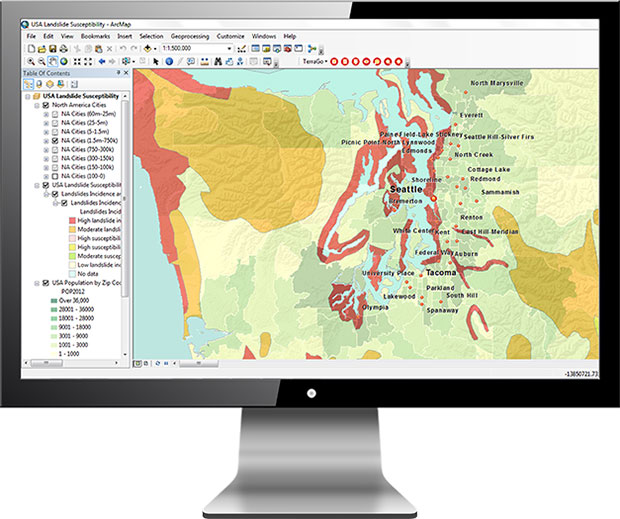
TerraGo unveiled Publisher for Raster, an application for publishing geospatial raster maps and imagery as GeoPDF documents for use with TerraGo Toolbar.
According to TerraGo, information otherwise locked away in arcane geospatial raster formats can be made available to a much wider audience as GeoPDF documents that can be measured, analyzed and annotated with TerraGo Toolbar.
The new release, version 7.1.0, features an improved output naming scheme when processing CADRG and other RPF formats with multiple images. It also reports the same application version number for the online help, processing data using the command prompt, using version, user interface and the installer. Finally, it now pulls the WKT from the GCP tag when the WKT is not listed in the standard
tag.
Version 7.0.4 adds support for Windows Server 2016 and Server 2019. It also addresses installation and license activation issues seen on some systems, TerraGo said.
TerraGo has released TerraGo Publisher for ArcGIS version 7.4, which includes the ability to create and share GeoPDFs that convey important changes over time for an area of interest, with any type of map or imagery. The time-enabled visualization can animate geographic changes over time with interactive maps that can be shared with anyone using free Adobe Reader, the company said.
“Our customers can share these time-series map layers as a universally available GeoPDF, enabling non-GIS users to measure past conditions, assess changes over time, analyze trends and even project future scenarios,” said Scott Lee, director of federal programs at TerraGo. “Time-enabled GeoPDFs can help deliver important geographic analysis to the widest audience possible, which is incredibly valuable for sharing information with policy makers, agencies, stakeholders and constituents.”
Time-enabled, interactive maps can be used in any number of different geographic analysis use cases. Here are a few examples.
coastal populations impacted by rising sea levels
progress of recovery efforts for a hurricane disaster zone
forestry and environmental impacts due to policy change
shifting crime patterns in different types of city zones
satellite imagery showing impact of regional military conflicts on local populations
Version 7.4 includes additional enhancements and improvements including support for ArcGIS version 10.6.0.
TerraGo will also be showcasing the latest features at GEOINT 2018, the United States Geospatial Intelligence Foundation Symposium, which takes place April 22-25 in Tampa, Florida.
TerraGo is exhibiting at Intergeo 2017, which is taking place Sept 26-28 in Berlin, Germany.
“Intergeo brings together the global leaders of the industry and creates an exceptional forum for interpersonal collaboration and the opportunity to show the industry’s only zero-code platform to visitors from nearly 100 countries,” said Stuart Miller, international sales manager at TerraGo. “The event gives us a chance to dialogue and understand our visitors’ goals before we demonstrate our technology. Then by understanding their specific objectives, we can show them how to customize geospatial apps for their unique requirements.”
TerraGo’s GeoPDF products enable free, lightweight GIS applications and have evolved into a de facto standard around the globe, helping organizations get more value — for more users — from their current investments in GIS and imagery platforms, the company said.
Also, TerraGo Magic enables end users without development skills to build custom apps that enable high-accuracy, survey-grade GNSS with advanced GIS and mapping features on Android and iOS devices.
TerraGo’s exhibition will be located at the UK Pavilion, Hall 1.1, Booth D1.016. Click this link to schedule a time for a live demonstration.
TerraGo demonstrated at Intergeo the latest capabilities of its line of GeoPDF products as well as survey-grade, mobile GPS and GIS data collection with its TerraGo Edge and TerraGo Magic platforms geospatial collaboration and mobility software.
GeoPDF products enable free, lightweight GIS applications, helping organizations get more value from their current investments in GIS and imagery platforms.
TerraGo Edge and TerraGo Magic are GPS data collection devices combining high-accuracy, survey-grade GPS with advanced mapping and mobile collaboration on Android and iOS devices. With TerraGo Magic, customers and partners can build their own mobile apps, fully customized with their branding and features, without coding.
TerraGo Edge v3.9.6 includes sample code for all REST API end points, automated note name options, enhanced cloud-based publishing of maps and forms and high-volume imagery and map to mobile processing. It includes:
New tools to support ArcGIS and enterprise integration: ArcGIS and enterprise integration using the TerraGo Edge REST API with the addition of sample code for every Edge REST endpoint via Postman API utility.
Automated note names with custom form fields: Configure the one-click QuickNote in any notebook to name notes by a specific form field, enabling speed in the field and user-friendly data management and searching.
Attach maps and forms to multiple notebooks simultaneously.
Import multiple GeoPDFs and GeoTIFFs at the same time: Select or drag & drop many GeoPDFs/GeoTIFFs at the same time for user-friendly, high-volume parallel processing of aerial imagery or offline basemaps.
New media filenames to help associate media to projects, includingnotebook name, note name, and a time and date stamp, to identify, search and sort media files.
GeoPDF. The latest Version 7 of TerraGo GeoPDF includes tools for publishing GeoPDF, including TerraGo Publisher for ArcGIS, TerraGo Publisher for ArcGIS Server, TerraGo Composer, TerraGo GeoPDF Platform Toolkit, TerraGo Publisher for Raster and TerraGo Toolbar.
Features in this release include:
PubPy: Extends and enhances integration into ArcGIS ArcPy to enable on-demand web services and GIS portals.
OpenGeoPDF: Adds Open Geospatial Consortium (OGC) GeoPackage to GeoPDF documents to enable GIS-Lite applications using TerraGo Toolbar Version 7.0.
Mobile: Extends and enhances its support of TerraGo Edge and private-label apps created from TerraGo Magic with capabilities to create notebooks, maps, and applications for mobile workflows.
Advanced Layer Control: Implements of a number of features to improve flexibility and ease of use in production contexts.
Remote Desktop: Enables end users to access TerraGo Publisher and TerraGo Composer on their desktop from remote location.
Compatibility: Supports the latest versions of ArcGIS including the recently released ArcGIS 10.4.1.
Licensing: Implements a new license management system to reduce the complexity and burden of license management, especially in enterprise software management.
For years, when I was the GIS manager for the Atlanta Regional Commission (ARC), I’d get an annual visit from the Layton Graphics sales rep trying to sell me something. Layton Graphics was an Atlanta blueprint company. I never needed blueprint services so I politely listened and sent the sales rep on his way. In 2005 that changed when the sale rep demonstrated his company’s eye-opener GeoPDF, a significant leap in GIS-enabled map publishing. With the invention of the GeoPDF, the company was reformed as TerraGo, and the rest, shall we say, is history.
Screenshot of Edge on an iPhone showing data capture points in red and current location in blue.
Until GeoPDFs, we published our GIS data as Shapefiles on CDs and relied on users to display the data correctly using their own GIS software. Since many new GIS users had no cartographic training the resultant maps frequently looked terrible or, even worse, completely misrepresented the data. As the publishers of the raw data, we frequently got blamed for some very crappy-looking maps- including those created by our own ARC transportation and land-use planners. GeoPDFs changed that since the cartography remained intact. Not until Esri’s Map Publisher, now ArcGIS Publisher, and subsequent cartographic tools was cartography preserved as the originator intended.
A GeoPDF was a single Adobe document that bundled GIS data, imagery and resultant maps into one compact file with no lost data files, no improperly displayed data and no incorrect data pointers. The Acrobat file was, in effect, an interactive GIS map display that permitted a user to pan, zoom, turn layers on and off, view, import social media and navigate 3D models and many other functions in one single compact file. GeoPDFs proved so valuable that they became the Army’s and other federal agencies’ geospatial publication method of choice.
The Next Geospatial Leap
Recently, TerraGo made another geospatial technology leap, doing for geospatial data collection what the company did for geospatial data display. TerraGo streamlined and sped up geospatial data collection with its new product, TerraGo Edge. TerraGo Edge is a cloud-based application that works on PCs, tablets and even smartphones. A user downloads the app and can then build a data-collection environment that is completely tailored to the needs of an organization. Field personnel can then rapidly collect enterprise data using a PC, tablet or smartphone with very little training and no additional software. The application permits the collection of tabular data, photographs, video clips and more that are georeferenced using the mobile device’s built-in GPS to locate each data point. All data is saved in the cloud and instantly shareable with designated users.
Now the even better news: If the network connection is lost or weak, the field collection can continue in the disconnected environment. The collected data is stored locally, then automatically synced when the connection is restored. The simplicity of the system and disconnected use may help make the Army’s Future Combat Systems vision, in which each soldier is a data user and data collector, a cost-effective reality.
Field Test
Bryan Burns of TerraGo collects data with his iPhone and Bluetooth-connected Bad Elf GPS.
I had to see the system in actual operation, so I paid a visit to the TerraGo Atlanta offices last week. Scott Lee and Bryan Burns of TerraGo gave me a full demo. I previously loaded the TerraGo trial app on my iPhone, which you can also do by going to your app store and downloading the free trial application. The software is fairly intuitive, and I was able to shoot a georeferenced picture and record some notes on my own. Bryan and Scott demonstrated the more advanced Edge features, especially the creation of custom collection forms that greatly speed data collection by field users.
Form creation is an important aspect of Edge, because it not only speeds data collection, it also reduces the chance of errors. As most of you know, sloppy data capture can really corrupt a database. Poor spelling, missed keystrokes, etc., can make database searches difficult and even result in missed records. Developers have found that entry errors can be minimized and collection speed enhanced with several simple data collection tools and techniques that are part of TerraGo Edge. Some of these include the use of pull-down menus for frequently used terms, numeric/alphanumeric entry key restrictions, checkboxes, the use of “radio buttons” for multiple choices, and others. As a result, field users can collect data as quickly as they can walk from one location to another with minimal data entry errors or corruption.
How Much Does It Cost?
$360 per year, with up to three devices. If you want TerraGo to host your operation, storing and backing up your data, that’s another $360 per year. The only additional cost, assuming you already have a smartphone, is additional GPS hardware to achieve better accuracy than the native 5 meters of a smartphone. The additional hardware cost depends on your accuracy needs. A Bad Elf plug-in device gives you 2-meter accuracy for $300 and 1-meter accuracy for $600. Better is a sub-meter accuracy iSX Blue II for $2,000, and even an RTK centimeter system, the EOS Arrow 200, for $6,000. This graph shows the hardware comparisons.
Keep in mind that the GPS units permit data collection even if disconnected, and all available GPS metadata is captured with each fix, so additional post-processing could be done at a later date if needed. The system also comes with a ton of GeoPDF maps, vector data such as OpenStreetMap, WMS feeds and imagery to serve as a backdrop for your data collection. As you would expect, the data you collect can be saved and exported in popular formats such as Esri Shapefiles, KML and GeoPackage, the new OGC handheld standard being supported by AGC and NGA.
How Good Is It?
This image shows the water fountain in front of the TerraGo offices. The green dots show the data points I captured with the Bad Elf Bluetooth GPS.
We then went outside for a short data-collection test using the Bad Elf Bluetooth GPS. It was easy to pair the Bad Elf to my iPhone, and I was able to collect data as fast as I could walk from one location to another. Since this was a short test in the open, I couldn’t judge how quick data collection would be in less than ideal conditions such as building canyons or tree canopy cover. I’d certainly want to spend a day collecting under different conditions to get an accurate feel for the speed, accuracy and reliability of each hardware option in a production environment.
Go to the TerraGo website for a much deeper dive. Edge looks like it will give the competition a real run for the money, not to mention the very significant smartphone accuracy improvements being tested in the labs. So, in short, you can have in your hand a networked GPS datalogger with up to cm accuracy that can operate in a disconnected environment. It seems like smartphones are slowly replacing our stand-alone devices — watches, media players, digital/video cameras, car navigation, compass, level, PC and flashlight. I can even use my iPhone as a magnetometer. Now, even high-end GPS dataloggers are in the smartphone crosshairs.
A good way to see TerraGo Edge in action will be the GPS World webinar at 1300 EDT May 28. Registration is free.
P.S. With Mother’s Day and Memorial Day coming up soon, I’d like to call your attention to my column last year. We frequently read about the bravery and hardships of our military, but the families at home not so much. The mother in the column was so selfless I can’t forget her. You won’t either.
Roy Nelson of Ball Aerospace discusses real-time 3D models created with flash LIDAR. See video below.
GEOINT 2013* – Day Three
I had the opportunity to interview Keith Masback, CEO of USGIF, about GEOINT 2013*. He discusses new technology, future combat systems, and plans for the 2015 conference. Watch the interview here:
I spent a good part of the day touring the GEOINT EXPO. Here are a few video clips that show technology I found especially interesting, from these exhibitors. (Scroll down to see each video.):
Ball Aerospace: Roy Nelson of Ball Aerospace discusses real-time 3D models created with flash LIDAR.
Consolidated Resource Imaging (CRI): Dr. Gregg Wildes discusses the company’s system of wide-area surveillance, including the WAMI, or wide-area motion imagery system.
Solid Terrain Modeling: Mark Fisher talks about how his company creates 3D models of terrain using geospatial data sets with its special inkjet printer.
TerraGo: Scott Lee shows off new developments with GEOPDFs on a mobile device, using the Terrago Edge application.
Thermopylae Sciences & Technology: Jamel Monroe, engineer at Thermopylae, demonstrates the Occulus Rift 3D virtual reality glasses, with the game Half-Life 2.