Tag: Google Earth

  • ArcGIS Earth: Google Earth, GIS style

    For most GIS professionals, Esri’s new ArcGIS Earth will replace the soon-to-be-discontinued Google Earth Enterprise. I take a tour through the new software, which is much like Google Earth with a few added features. Plus: Q&A from our December UAV webinar.

    In early 2015, Google announced that Google Earth Enterprise is being deprecated. In the software world, deprecated means the software is heading towards obsolescence and the vendor isn’t going to develop it further.

    Google’s announcement stated that Google Earth Enterprise was being deprecated as of March 20, 2015, but will be supported through March 22, 2017. According to Esri, Google will continue to provide map and location services APIs as well as content.

    Here comes Esri, introducing ArcGIS Earth.

    At the Esri User Conference last summer, Jack Dangermond announced Esri is working on ArcGIS Earth. Last week, Esri announced the introduction of ArcGIS Earth 1.0. You can download ArcGIS Earth for free.

    GSS-Jan-1

    The opening screen looks a lot like Google Earth, but clearly with an Esri touch via the toolbar in the upper left corner.

    GSS-Jan-2

    You can connect to ArcGIS Online and access its library of data, or import SHP and KML data (no TIF/TFW import, though).

    GSS-Jan-3

    Here are the convenient editing and querying tools (measure).

    GSS-Jan-4

    I imported a KML file containing an orthophoto I created from a UAV flight. Sorry for the orthophoto offset (darned horizontal datum thing).

    GSS-Jan-5

    As it stands now, ArcGIS Earth 1.0 is much like Google Earth with a few added features. However, based on what I perceive Jack Dangermond’s mantra to be, ArcGIS Earth is going to evolve into a powerful mapping tool and platform for consumerizing feature-rich GIS data, much like Google Earth did in the past 10 years, but in a much more GIS way. I look forward to that.

    December’s UAV webinar

    Speaking of imagery, Google Earth and UAVs, in December I participated in a webinar entitled “Introduction to Using UAVs for Mapping” along with my colleagues from Applanix and C-ASTRAL. If you missed the webinar, you can still view it by signing up here.

    It was a solid, 60-minute discussion about the basics of mapping using UAVs. We had a few questions that we didn’t have time to address during the webinar, so I provide answers below. Also, I added some questions that may have been answered, but deserve mention again.

    How significant is the quality of GNSS sensors for UAV mapping performance?

    In my experience so far, you need precision GNSS measurements either in the air or on the ground if you want high-accuracy results. If you want to use a consumer UAV that has a consumer GNSS receiver in it, you’ll need to use more ground-control points that are mapped with high-precision GNSS receivers. On a wide-open 150-acre site (think agriculture field), that means setting 10-15 ground-control targets. On the other hand, if your UAV has an RTK GNSS receiver in it, you can get by with very few ground-control points. The type of topography also has a significant impact. For example, heavy tree cover, water bodies and other homogenous terrain (such as snow) make it more difficult for image-processing software to process the images.

    How accurate can volumes be obtained on stockpiles?

    I plan on running some tests and compare volumes computed using terrestrial measurement techniques vs. volumes computed by low-cost UAV images. Based on my experience, I’m willing to wager that the results will be very close.

    What are the reasonable accuracies achievable with UAV mapping these days?

    With a low-cost UAV (12MP camera), I’m collecting images with a 2-cm/pixel resolution. Horizontal accuracy (with RTK ground control points) is 30 cm or better. Thirty centimeter (30 cm) elevation contours are achievable, and possibly better than that. I’m still exploring how far we can push low-cost UAVs.

    Can we use a UAV with our own GPS-RTK base station?

    The best use of your GPS-RTK base station is to use it to set RTK ground control for image processing. It’s likely not feasible that you can send corrections from your GPS-RTK base to the UAV unless the UAV is specifically designed to accept those corrections.

    Can you tell us the benefits of fixed wing vs. rotary UAVs for mapping work (such as considerations of weather conditions and the benefits of a gimbal-based camera versus a non-gimbal camera typical in fixed-wing UAVs)?

    A fixed-wing UAV can cover a much greater area per battery than a rotary UAV, but if you’re located in the U.S., you are restricted to line-of-sight operations. That severely limits the value of a fixed-wing UAV. Fixed-wing UAVs also require a much larger landing area and are trickier to land. It takes much more training to land a fixed-wing UAV than a rotary UAV. I can’t answer your question about gimbal vs. non-gimbal, except that the rotary UAV that I operate has a gimbal for dampening the effects of vibration. With it, vibration doesn’t seem to be an issue.

    In forestry, one of the real challenges is stitching the photos together. Did I hear right that RTK will ensure stitching will be greatly improved?

    In my limited experience with flying over heavy tree canopy, the best way to handle this scenario is to fly with a heavy overlap (such as 90 percent) or fly at a higher elevation. Since most commercial authorizations in the U.S. limit flight elevation to 200 feet, there’s not a choice to fly higher, so you must fly with a higher overlap.

    Eric, could you change the camera to a near infrared camera?

    Mine is a consumer UAV, so there’s little support for customization unless I want to really tear it apart myself. There is some after-market support for NDVI and NIR sensors on consumer UAVs, but I’m not knowledgeable about the quality of those. I think that after-market and manufacturer support of various sensors (cameras, NIR, NDVI, lidar) will become more popular on higher-end consumer UAVs.

    Eric, the contours seem to capture the curbs in the upper right. Is that correct?

    Correct, it’s pretty impressive for a consumer UAV. Granted, I set a dozen or so RTK ground-control points on a 5-acre site, but I’m pretty sure I could cut that in half and achieve the same result. By the way, I should smooth the elevation contours next time.

    UAV-GE-Contours1-W

    What software was used to create DEM?

    I used Agisoft PhotoScan Pro.

    Currently, the use of UAVs seems to be limited to a relatively small project area and required line of sight. Within the natural resource sector, what is the critical barrier at this point to expanding the project size and thus the range of flight — is it technology or air traffic regulations?

    In the U.S., the limitation is a regulatory one. The FAA requires visual line-of-sight at all times when operating the UAV. The FAA is testing beyond visual line-of-sight (BVLOS), and we hope that someday BVLOS rules will be issued for commercial operators. For now, you are correct in that UAVs are limited to relatively small areas.

    How do the new FAA drone registration rules affect commercial mapping?

    According to the FAA, you need to apply for a Section 333 Exemption and CoA (Certificate of Authorization or Waiver) from the FAA to fly UAVs for commercial purposes. This applies even if you want to fly above your own land or even if you don’t charge for flying. If you fly for any other purpose than as a hobby, it gets complicated very quickly.

    Look for more content on UAVs in the near future. I’m pushing consumer UAVs to the maximum to see what we can reliably expect from them.

    See you next month.

    Follow me on Twitter.

  • Boxes and Boxes of Professional-Grade Tools

    Geospatial data is everywhere. Many times I’ve shown the following photo I shot at the Esri User Conference several years ago. At the Field Technology Conference in November, I talked about this. Actually, I believe I’ve talked about the topic at nearly every Field Technology Conference since the inaugural event in 2010. Geospatial data long ago left the user domain of thousands and is rapidly headed toward billions.

    GeospatialConsciousness

    One of the many developments driving that growth was the appearance of Google Earth in 2004, sprung from Google’s acquisition of Keyhole. Suddenly there was easy-to-use software to visualize geospatial data. At about the same time, Navteq (now HERE) and TeleAtlas (now TomTom) — two of the premiere geospatial data companies at the time — were gaining tremendous momentum in the exploding GPS car navigation market because they were, and still are, the two companies that provide the vast majority of the map data to the Garmins and TomToms (and others) of the world.

    Professional Mapping

    Today, Google Earth and Google Maps are still the defacto standard for “desktop mapping” by the general consumer. Google Earth Pro, the company’s offering to the high-end mapping market, formerly available on a subscription basis, will soon be free, as of January 2016. Previously the user received the following, and one supposes the same will continue to hold true:

    • Advanced measurements: Polygon area measurement. Determine affected radius.
    • High-resolution printing: Print images up to 4800 x 3200 pixels.
    • Pro data layers: Demographics, parcels, traffic count.
    • Import spreadsheet data: Import up to 2,500 addresses at a time.
    • Import Esri and MapInfo-formatted data: Import .shp and .tab files.
    • Make HD movies: Make Windows Media and QuickTime HD movies.

    To download Google Earth Pro, register for a license key and download for Windows or Mac.

    Creating 3D Visualizations

    Trimble offers another cool geospatial tool that was once part of the Google portfolio.  SketchUp is a powerful software for creating 3D visualizations (think 3D structures and objects).

    Sketchup
    Building that was modeled in SketchUp and overlaid in Google Earth

    Both free SketchUp and fee-based SketchUp Pro versions are available. If your work includes generating renderings for clients, the latter can be valuable. You can download a free trial version here.

    SketchUp pro is designed for architects, engineers, and design and construction professionals, as well as members of the global maker community.  Its capabilities include:

    • Professional Drafting: Using a 2D drawing and documentation tool, users can manage drawings and display data from their information models, applying object classifications and accessing that info with an annotation tool.
    • Modeling Tools: With a 3-point arc tool, users can draw arced edges four different ways. A rotated rectangle tool allows for drawing precise rectangles unbound by default axes.
    • 3D Warehouse: Models of popular brand-name building products are among a broad free content offering, more than 2.5 million models.

    Integrating with Other Geospatial Tools

    In coordination with Google, Esri has prepared a transition offer to ArcGIS for Google Earth Enterprise and Google Maps Engine customers and partners. ArcGIS provides 2D and 3D mapping and analysis in desktop, server and hosted environments. The system provides an infrastructure for making maps and geographic information available throughout an organization, across a community and openly on the Web.

    Among its features:

    • Geoprocessing: a 3D analyst incorporating a LAS dataset toolset and visibility toolset; and conversion, data management, multi-dimension and spatial analyst toolboxes.
    • Geodata: connections to read-only databases or geodatabases in Oracle.
    • Extensions: 3d analayst and spatial analyst extensions.

    Esri will provide no-cost software to replace Google Earth Enterprise or Google Maps Engine technology, and will include no-cost training in ArcGIS.

    Realizing the value and momentum of Google Earth to reach the consumer users of geospatial technology, Esri has also announced ArcGIS Earth, and its website says it is accepting beta testers.

    At Play in the Fields of Google Earth Pro

    For just a quick-and-dirty exercise, I imported some unsmoothed, 1-foot contour lines generated from a UAV flight and overlaid them in Google Earth Pro.

    Planimetric-W
    Planimetric view

    Then, in true Google Earth fashion, I zoomed in to have an oblique ground view (with Mt. Hood in the background, some 74 kilometers in the distance).

    UAV-GE-GroundView1-W
    Zoomed in oblique ground view

    Finally, following is the UAV imagery overlaid in Google Earth Pro.

    UAV-GE1-W
    Screenshot of the UAV imagery overlaid in Google Earth Pro

    Actually, the Google Earth Pro imagery looks pretty good, but you start to see the differences as you zoom in. It’s hard to beat UAV orthophoto resolution.

    UAV-GE-CloseUP1_Track
    Google Earth imagery
    UAV-CloseUP1_Track
    UAV imagery shot with a 12-megapixel camera at 200 feet AGL (above ground level.)

    Last month, I wrote that I’d post the presentations from the Field Technology Conference. Well, they aren’t quite ready, so we’ll have them for next month. There’s a great mix of presentations on GPS/GNSS, mobile devices, UAVs for mapping, laser rangefinders, various sensors and GIS software.

    Happy Holidays and cheers to a prosperous New Year!

    See you next month.

    Follow me on Twitter at @GPSGIS_Eric.

  • Esri, NT Concepts Help Transition Google Earth Enterprise Customers

    In coordination with Google, Esri is providing replacement software and training to customers and partners using Google’s enterprise geospatial technology.

    NT Concepts, an experienced Google integrator, is announcing a new partnership with Esri to help customers that have implemented Google Earth Enterprise and Google Maps Engine make a smooth transition to the ArcGIS platform with minimal interruptions to their operations.

    Esri is a longtime provider of geospatial solutions to the defense and intelligence communities and has developed more than 40 specialized applications for their use.

    “NT Concepts has mapped the functionality of Google to Esri’s ArcGIS platform. The current users of Google’s enterprise geospatial products will find the Esri platform to be a key option for meeting their geospatial requirements,” said Chris Powell, chief technology officer at NT Concepts.

    For Google Earth customers that would like to transition to the ArcGIS platform, Esri is offering the new ArcGIS 10.3.1 for Server and related client/app technology. In addition to other advanced functionality, these will allow users to publish 2D data, 3D buildings, and KML files throughout the enterprise.

    “Esri is delighted to have NT Concepts as our trusted partner for this important work,” said Patty Mims, Esri director for intelligence. “The company provides key skills needed to work with both Esri and Google technology.”

  • ClearTerra’s Locate XT GIS Software Extracts, Outputs Spatial Data

    ClearTerra‘s Jeff Wilson gives a snapshot of the company’s Locate XT software while at the 2015 Esri Federal GIS Conference, held Feb. 9-10 in Washington D.C. The LocateXT software extracts unstructured textual documents into structured spatial output for GIS and spatial viewing platforms, including Esri ArcGIS and Google Earth.

  • Google Releases 3D Imagery on Google Earth for Android

    Google announced, via its Lat Lon Blog, 3D imagery on their latest version of Google Earth for Android.

    Google announced with 3D imagery, there is now a new way to explore the world, right from the palm of your hand with a 3D view of your favorite metropolitan area. Now you can soar above your favorite cities in 3D, with Google Earth for mobile.

    Google reports they recently shared a preview of this striking new 3D imagery and starting today, users can take flight with their latest version of Google Earth for Android. An updated version of Google Earth for iOS will be also be available soon.

    According to the announcement, creating the comprehensive 3D experience is possible due to advanced image processing. Using 45-degree aerial imagery, Google said its able to automatically recreate entire metropolitan areas in 3D. This means every building (not just the famous landmarks), the terrain, and any surrounding landscape of trees are included to provide a much more accurate and realistic experience.


    Initial 3D imagery cities are: Boulder, Boston, Santa Cruz, San Diego, Los Angeles, Long Beach, San Antonio, Charlotte, Tucson, Lawrence, Portland, Tampa, Rome or the San Francisco Bay Area (including the Peninsula and East Bay). Google said it will continue to release new 3D imagery for places around the world over the coming months; by the end of the year, they aim to have new 3D coverage for metropolitan areas with a combined population of 300 million people.

    Download the latest Google Earth for Android here.


  • Going 3D

    Personal Nav and LBS

    To enrich user experience of location-based services and personal navigation, three-dimensional models such as those used in urban planning are added to a smartphone platform, without the requirement of additional hardware.

    Most current map applications for smartphones and other devices providing location-based services (LBS) are based on two-dimensional maps. Three-dimensional (3D) city models are widely used in applications such as engineering design, environmental modeling, and urban planning. Adapting such models for use in smartphones would make it possible to render 3D scenes in real time, enriching contents and user experience for personal navigation and LBS. A delimited yet large-scale event such as the upcoming 2010 World Exposition in Shanghai provides a promising area for system development and testing.

    3D visualization consumes a large amount of computing power, and most of the current successful applications run in a PC environment, as does the Google Earth 3D application. It is still a very challenging task to implement 3D visualization in an embedded system such as a smartphone.

    This article presents an entire 3D personal navigation system based on a smartphone platform, the Nokia S60 platform. The study covers the following aspects:

    • 3D personal navigation and LBS service in a smartphone
    • 3D city modelling, and
    • multi-sensor positioning.

    The objectives of the work include prototyping an entire handset-based 3D personal navigation and LBS system utilizing WLAN/Bluetooth positioning technologies, handset built-in GPS/AGPS, and 3D modeling and visualization (basic demonstration scenario), as well as presenting a multi-sensor positioning (MSP) platform in addition to the handset software (advanced demonstration scenario).

    3D Personal Navigation and LBS

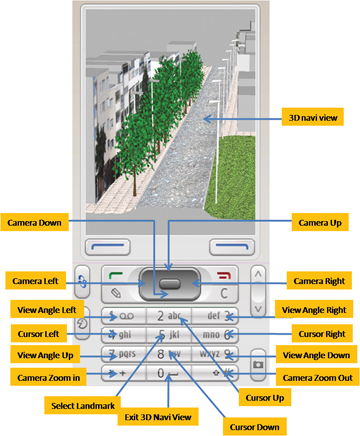
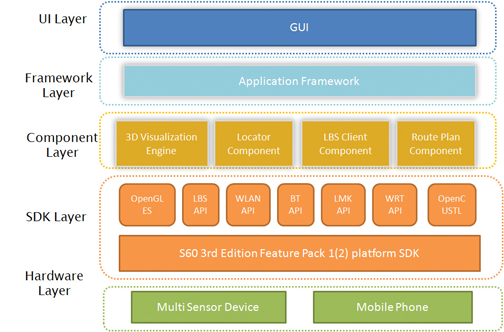
    No additional hardware is added to the Nokia Series 60 (S60) smartphone platform to achieve the 3D visualizations or other functions in the software. Figure 1 demonstrates the functionalities and features available in the 3D viewing of the LBS software. Figure 2 shows the general architecture of the software.

    FIGURE 1.  Functionalities of the 3D LBS software
    FIGURE 1. Functionalities of the 3D LBS software
    FIGURE 2.  General architecture of the 3D personal navigation and LBS software
    FIGURE 2. General architecture of the 3D personal navigation and LBS software

    The software development work focuses on the UI layer, framework layer, and component layer. The software mainly includes the following components:

    • the 3D visualization engine based on OpenGL ES,
    • the route plan component,
    • the locator component,
    • the LBS client component, and
    • UI and framework.

    Most of the challenging tasks are included in the development of the elements in the component layer, especially in the development of the 3D visualization engine based on the OpenGL ES API that is available from the S60 platform SDK (Software Development Kit). The high-level 3D visualization engine architecture covers the interface layer, the core engine layer, and the data management layer. The first one is responsible for cross-component functional communication, request handling, and data exchange. It provides users with the 3D scene visualization functionalities to access the core engine layer via a single class called NaviSceneControl, which includes all the operations of the 3D visualization: scene zooming, view angle rotating, scene and cursor moving, and selecting route planning and virtual navigation.

    The core engine layer takes care of the 3D scene visualization computation and model object management. To enable the 3D visualization for a large region, the objects in the scene are classified into two categories in this layer. One is the 3D models like buildings, trees and poles, while the other is texture of land surface, which consist of ortho-rectified digital aerial photos. All the objects are processed as tiles according to the incoming parameters from the interface layer. Therefore only a small subset is loaded dynamically instead of the whole data.

    The data management layer accesses the 3D models and ground-texture images persistent on the flash disk of the mobile phone through an independent thread. To reduce the data size of the 3D models, the original .3ds file created from 3D Max Studio software is compressed to fulfill the requirements of the mobile device.

    A simple route plan component is implemented in the software to enable to the user to find and view the route to his or her destination. In order to be able to show the entire route, the calculated route will be displayed on top of a 3D view with a downward camera at a high altitude. The 3D scene in this case looks like an orthoimage. An orthoimage shows objects in the perpendicular view to the projection plane of the objects.

    The locator component aggregates the positioning information either from the built-in positioning sensors in the smartphone, a GPS receiver, and a WLAN (Wireless Local Area Network) or a Bluetooth chip, or any external positioning device, such as also the multi-sensor positioning (MSP) device developed in this project. It forwards the positioning information including the location and heading information to the route plan component and the 3D visualization engine to accomplish the navigation functions.

    The purpose of the LBS client component in the handset software is to access the LBS server.

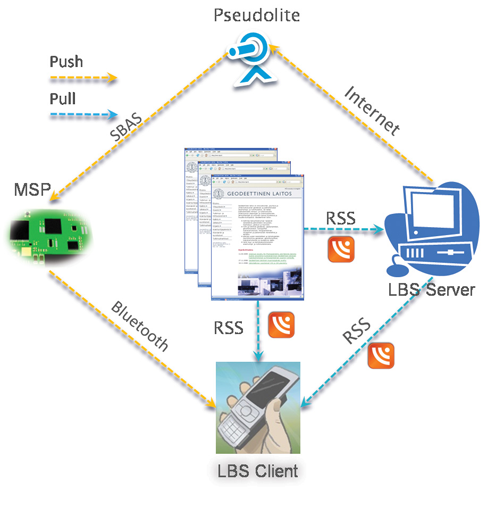
    Figure 3 shows the overview of the mechanism for delivering the location-based services. The services are classified into two categories: the static services and the dynamic services. The static services include those services that are not changing in time. For example, POIs (points of interest) belong to this category of service. The static services are stored in a database that can be downloaded from the Internet by the users in advance. The users can store the database in the memory card of the phone before running the 3D personal navigation and LBS software. With this approach, it saves the data transmission fee for the end-users when accessing the LBS. The dynamic services cover those services that change in time. For example, a piece of real-time news is one of the typical dynamic LBS. For accessing the dynamic LBS, the Really Simple Syndication (RSS) technology is adapted in our implementation.

    FIGURE 3. Mechanism for delivering location-based services and information
    FIGURE 3. Mechanism for delivering location-based services and information

    The LBS client component is implemented so that the handset will pull automatically the news in the background in real time via a widget reader embedded in the LBS client component. Whenever new information is uploaded to the LBS server or to the registered web pages, mobile users will be notified.

    In addition to RSS technology, another approach to broadcast LBS information is considered in the system: to disseminate the LBS information via an SBAS (satellite-based augmentation system) pseudolite. The dynamic LBS information (e.g., a short message) can be first encoded into a user-defined SBAS message. The message encoded is then sent to a pseudolite from which the message is broadcast. The corresponding SBAS message can, in fact, be received by any SBAS-enabled receiver located within radio coverage area of the pseudolite. However, the encoded LBS message can be decoded only with the receiver that has a special firmware, developed in this case by the Finnish Geodetic Institute (FGI). Having received and decoded the LBS messages transmitted from the pseudolite with a dedicated receiver, for example the MSP device part of the more advanced demonstration scenario of the project, the content of the message is then encoded to a user-defined NMEA (National Marine Electronics Association) message and transmitted to a mobile phone in the vicinity via a Bluetooth connection as shown in Figure 3. This solution of LBS data distribution is available only to a very limited number of users with receivers carting a special firmware developed by FGI.

    3D City Modeling

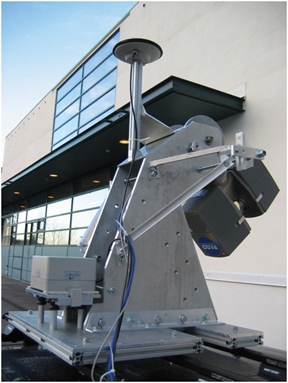
    Due to the memory limitations of a mobile phone, there are certain requirements for the 3D models applied. In our study, a test scene for model reconstruction is focused on a street in Espoo, Finland, in an ordinary residential area. A vehicle-borne mobile mapping system ROAMER (see photo) developed by FGI performed the data acquisition. It consists of a carrying platform, a positioning and navigation system, and a 3D laser scanner system. With the ROAMER system, visible objects can be measured with an accuracy of a few decimeters with a maximum vehicle speed of 50–60 km/hour, and the data for the desired objects can be collected within the range of several tens of meters.

    ROAMER vehicle-based mobile mapping system
    ROAMER vehicle-based mobile mapping system.

    A large amount of data is produced from the system, and noise and outlier points are needed to be removed. Valid data is classified into different point groups using an automatic algorithm developed by FGI. These point groups include buildings, trees, roads, and poles. Models are then reconstructed based on these classified point groups.

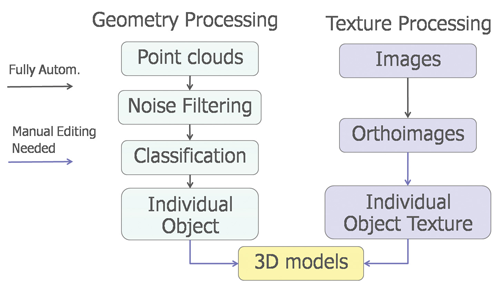
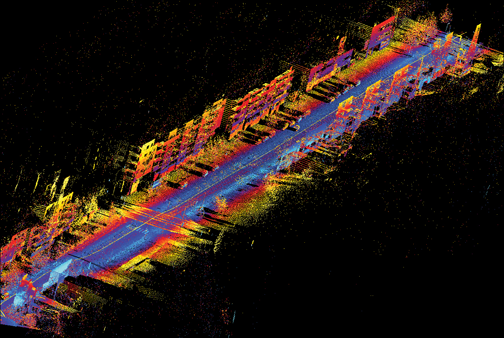
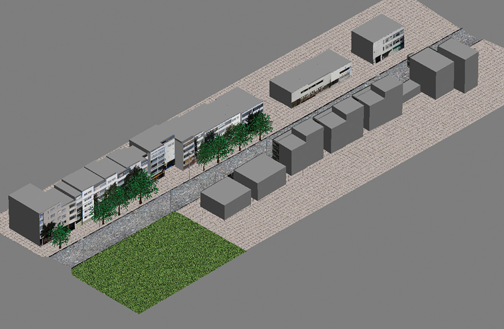
    Modeling methods are developed to meet the application requirements of personal navigation: small model size, high accuracy, and good visual appearance. Small model size is achieved by simplified object geometry and reduced texture resolution. Model accuracy is controled by extracting building outlines from a classified point cloud and overlapping with the final 3D model. The model completeness is checked by comparing the resulting model with original images. Good visual effect is realized by applying photo-realistic texture. Photo-realistic texture provides rich information for the 3D scene reconstructed. Figure 4 presents the total process of the 3D modeling, in which only the individual object texture and the final model constructions require manual editing. Figure 5 shows the raw data retrieved and Figure 6 presents the final 3D models of the test area.

    FIGURE  4. The process of 3D modeling
    FIGURE  4. The process of 3D modeling
    FIGURE  5. Raw data retrieved from the test area with FGI’s ROAMER system
    FIGURE  5. Raw data retrieved from the test area with FGI’s ROAMER system
    FIGURE  6. Reconstructed 3D scene of the test area
    FIGURE  6. Reconstructed 3D scene of the test area

    To import the final 3D models to a mobile phone, the size of an individual model is restricted to less than 100 kb. To optimize model size, a row of buildings is divided into several building blocks.

    Multi-Sensor Positioning

    As long as open-sky satellite-signal conditions are available, there are no problems to locate a mobile user with the built-in GPS receiver of a smartphone with a positioning accuracy of a few meters. However, most popular location-based services occur in GNSS-degraded environments such as in indoor environments and urban canyons. Locating a mobile user seamlessly any time anywhere under any circumstance is still a very challenging task, especially to implement such an indoor/outdoor positioning solution in a digital signal processor (DSP) platform.

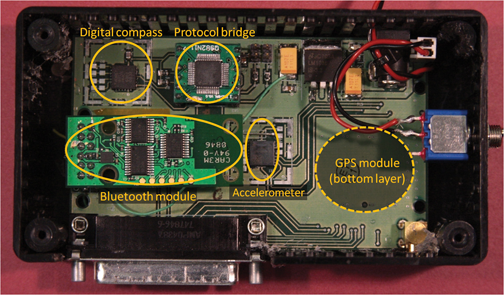
    FGI is now developing a DSP-based multi-sensor positioning platform to approach a seamless indoor/outdoor locating solution. The platform consists of a GPS module, a 3D accelerometer, and a 2D digital compass (Figure 7). A DSP is embedded in the GPS module. All sensors are integrated to the DSP that hosts a core software for real-time sensor data acquisition and real-time processing to estimate user’s location.

    FIGURE  7. Hardware platform
    FIGURE  7. Hardware platform

    The multi-sensor platform provides opportunities to investigate the positioning solutions with a GPS/Reduced-INS (Inertial Navigation System) combination or GPS/PDR (Pedestrian Dead Reckoning) combination. The Reduced-INS combination is defined as a combination of a 3D accelerometer and a 2D digital compass, and is a very low-cost approach of sensor augmentation. The GPS/Reduced-INS implementation is implemented in a loosely coupled Kalman filter, while the GPS/PDR algorithm is based on pedestrian-targeted dead reckoning, with heading error and step length estimation methodology.

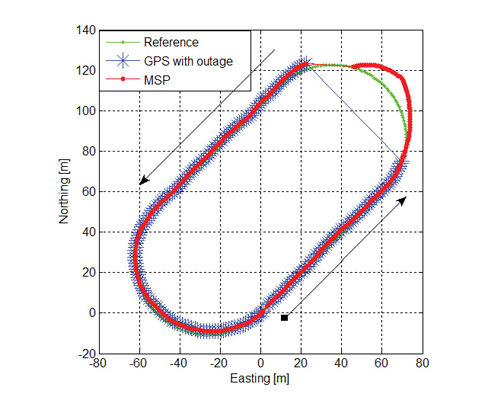
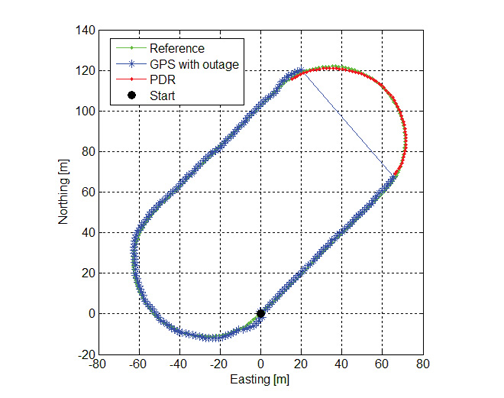
    Preliminary tests analyzing both GPS/Reduced-INS and GPS/PDR solutions have been carried out in a sports field on a 400-meter running track. In order to simulate a GPS outage situation, the GPS measurements were ignored for one minute. During this one minute “outage,” the traveling trajectories are estimated with the Reduced-INS solution and the PDR solution. Figure 8 shows the trajectory of the Reduced-INS solution, while Figure 9 shows that of the PDR solution.

     FIGURE  8. Trajectory estimation for the 1-minute GPS outage using Reduced-INS approach
    FIGURE  8. Trajectory estimation for the 1-minute GPS outage using Reduced-INS approach
    FIGURE  9. Trajectory estimation for the 1-minute GPS outage using the PDR approach
    FIGURE  9. Trajectory estimation for the 1-minute GPS outage using the PDR approach

    The Reduced-INS approach provides a reasonable result with a positioning accuracy of about 20 meters at the end of the forced 1-minute GPS outage. The PDR approach provides a better prediction in this case, resulting in only a couple of meters of error after the 1-minute outage of absolute location input from the GPS, because the heading errors are modeled carefully utilizing previous training with data from a previous run along the same track as well as accurate step detection estimation.

    Conclusions

    The prototype system will be tested and demonstrated at the 2010 World Expo in Shanghai, implemented with a smartphone software package: anyone with a Nokia phone (S60 with built-in GPS and WLAN/BT) can experience the 3D personal navigation and LBS service in the Expo area by downloading and installing the 3D models. The prototype has so far met these challenges: the high performance required of real-time 3D visualization in a smartphone; high positioning availability with acceptable accuracy in indoor and outdoor environments; and the demanding requirements of the 3D models for a small phone, including small model size, high accuracy, and good visual appearance.

    Manufacturers

    The multi-sensor positioning platform consists of a Fastrax iTrax03 GPS module, a VTI SCA3000-D1 3D accelerometer, and a Honeywell HMC6352 2D digital compass. The ROAMER mobile mapping system consists of a Faro LS 880HE80 terrestrial laser scanner, two AVT Oscar F-810C cameras, and a NovAtel SPAN geo-reference system.


    RUIZHI CHEN is a professor and head of the Department of Navigation and Positioning at the Finnish Geodetic Institute, where Heidi Kuusniemi is a specialist research scientist, Juha Hyyppä is a professor and head of the Department of Remote Sensing and Photogrammetry, Risto Kuittinen is director general, Yuwei Chen is a specialist research scientist, and Ling Pei, Lingli Zhu and Jingbin Liu are senior research scientists.

    JIXIAN ZHANG is a professor and president of the Chinese Academy of Surveying and Mapping, where Yan Qin and Zhengjun Liu also work as the director of the Department of Research and Development and the group leader in the Institute of Photogrammetry and Remote Sensing, respectively.

    JARMO TAKALA is a professor and head of the Department of Computer Systems at Tampere University of Technology in Finland, where Helena Leppäkoski is a researcher.

    JIANYU WANG is a professor at the Shanghai Institute of Technical Physics, Chinese Academy of Sciences.


  • TITAN: The Geospatial Babel Fish

    About 10 years ago PBS aired a very funny science fiction comedy called The Hitchhiker’s Guide to the Galaxy, written by Douglas Adams. The serial radio programs, which originated in Great Britain, were about two characters who traveled the universe by bumming rides on spacecraft. One curiosity highlighted in the second episode was the Tower of Babel-inspired “Babel fish,” which was described as (spoken with an authoritative British accent):

    Small, yellow, and leech-like, and probably the oddest thing in the Universe. It feeds on brainwave energy received not from its own carrier but from those around it. It absorbs all unconscious mental frequencies from this brainwave energy to nourish itself with. It then excretes into the mind of its carrier a telepathic matrix formed by combining the conscious thought frequencies with nerve signals picked up from the speech centers of the brain which has supplied them. The practical upshot of all this is that if you stick a Babel fish in your ear you can instantly understand anything said to you in any form of language.

    We’ve all been looking for a Babel fish for geospatial data. In the early years of GIS, sharing data was very painful. The most glaring difficulty was the issue of projections. You had to know the datum and projection the data were created in and modify it — or your GIS environment — to match. More recently, thanks to that uncomfortable word “metadata” and more advanced GIS software such as ArcGIS, users were able to import GIS data and re-project it on the fly.

    This was a much easier method, but still messy on occasion. ArcGIS opened the door to importing and sharing spatial data across networks, and even the Web. You could actually create GIS projects that accessed data layers from remote servers and sources, ensuring that you had the latest version every time you opened a project. But this was still an environment for GIS professionals and not easy to do.

    Recently, Google Earth changed the picture by creating a very easy-to-use spatial viewing environment. This really opened the eyes of the world and introduced non-GIS people to the world of spatial data. The Google environment was simple to understand, but somewhat limited to viewing spatial data and imagery with no real spatial analysis capability. It was especially good at organizing spatial data for visualization.

    ESRI soon followed, offering a more robust viewer that could be best described as a professional version of Google Earth with spatial analysis capability. However, one still had to suffer through the zoom-in globe. As good as life became with both Google Earth and ArcExplorer, there was still room for improvement. Then, several months ago, I saw a demonstration of ERDAS TITAN (formerly known as Leica TITAN).

    TITAN takes spatial data sharing, viewing, and publishing to a new level. It seems to magically ingest almost any spatial data format, read it, use it, and publish it back out in any format — and do so quickly. It does for spatial data what the Babel fish did for language and speech. A universal translator designed for sharing and the sharing environment is completely controllable via permissions, so you don’t lose data ownership. TITAN delivers data via geospatial Web services, such as Web Map Services (WMS), permitting you to view spatial data without actually getting access to the source dataset.

    Most early adopters seem to be data providers and emergency response organizations, because this new globe solves their most critical problem: publishing data with permissions while retaining digital ownership rights (data providers) and ingesting, organizing, and using spatial data from many disparate sources very quickly (emergency management). With TITAN, emergency management organizations and workers have ready access to real-time data appropriate for situational awareness and response management. Communication using chat and collaboration via 3D interactive presentations is easily implemented for disaster participants. Key decision-makers have access to the same common operational picture with up-to-date information.

    The datasets are searchable, accessible, and viewable by a broad spectrum of disaster workers using a broad array of applications. Data creators can publish geo-products with permissions from the field for direct and rapid delivery without format translation problems. Licensed data is controlled with participants accessing current content as well as historic and pre-disaster data.

     A screen shot of the TITAN environment, showing the Geospatial Instant Messenger chat window. Image courtesy of ERDAS.
    A screenshot of the TITAN environment, showing the Geospatial Instant Messenger chat window. Image courtesy of ERDAS.

    Picture2

    Amy Zeller of ERDAS shared some of the features and applications of TITAN, specifically:

    • TITAN is a scalable, dynamic, rapidly deployable, online, real-time data sharing solution, supporting data publishing and delivery into many geospatial applications.
    • TITAN enables “real-time” shared viewing of a common operating picture vital to effective communication during an emergency response.
    • Users can create and share a “MyWorld,” a geographically enabled space to upload data, set permissions, and share content with other network users. This “geospatial presentation space” means sharing crucial geospatial data, notations, images, and other location-based content in a collaborative, interactive 3D space with thousands of users across the globe. This feature, plus instant messenger chat, enables real-time, effective communication and collaboration among disaster participants within a common operational picture.
    • By using TITAN, authors of data become servers of data, publishing geo-products immediately with permissions and from the field.
    • Data publishing is facilitated while digital ownership rights are protected. TITAN enables ingestion of data in various file formats and delivers data via different means, including geospatial Web services (e.g., WMS), which means that only a portrayal of the data is distributed and the data owner still has full control over the actual dataset.
    • Data consumers can rapidly pull data from unlimited public and private sources, directly into a variety of applications including Google Earth, Microsoft Virtual Earth, ERDAS IMAGINE, ArcMap, ArcGIS Explorer, MapInfo, GeoMedia, and AutoCad.
    • TITAN is interoperable and can be used in conjunction with static, centralized data stores and solutions — but it does not need to rely only on static, centralized data stores!
    • A TITAN GeoHub enables internal and external permission-based data distribution for disaster management. With a GeoHub, stakeholders can rapidly be enabled to participate in publishing and consuming data. A GeoHub is ideal for implementation at a local government operations center or state EOC, yet flexible and sturdy enough to be set up and configured quickly and run from a field office.
    • The TITAN solution is a scalable solution and provides support for large numbers of users over a broad geography.
    • Users can connect to ERDAS TITAN via a cell phone, aircard, and laptop.

    You may remember that my February article was about Virtual Alabama, which is a Google-based state emergency response spatial visual collaboration environment. Virtual Alabama has received national interest, and the evolution of VA will be a plenary session topic at the DOJ, DHS, and DOD-sponsored Critical Incident Preparedness Conference in October. Virtual Alabama was the first application that came to mind when I saw the potential of TITAN. In addition to enabling access to current, rapidly developing content in disaster situations, TITAN ties into historic and pre-disaster data and content that is already made available via various data management and delivery solutions.

    This entire data sharing and delivery environment is very complex, with connectivity issues, security concerns, and nuances of performance. I know that there are many software products and custom applications that accomplish what TITAN does, but I haven’t seen an off-the-shelf product that matches TITAN’s capability. Let me know if you have seen one, so I can share it with our readers. In the meantime, TITAN deserves a serious look.