Tag: GPS on Bench Marks Program

  • Using the new interactive ‘GPS on Bench Marks’ map

    Using the new interactive ‘GPS on Bench Marks’ map

    The National Geodetic Survey (NGS) is now developing the 2022 transformation model. Once again, NGS requests the assistance of the surveying and mapping community. This column provides examples to explain the symbology and use of the new version of the GPS on Bench Marks program for developing the 2022 transformation tool.

    My last column discussed the results of the Beta hybrid Geoid18 model, and the differences between the Beta model and the official hybrid geoid model, Geoid12B. It provided examples to explain the symbology of the Beta Geoid18 Web Map. It was noted that NGS analysts rejected stations based on pre- and post-modeled residuals but many times there wasn’t enough redundant information available to ensure the station should be rejected or used in the creation of the hybrid geoid model. As I have mentioned before, users should be commended for their participation in the GPS on Bench Marks program. The Geoid18 model is still in “Beta” so, hopefully, users will continue their support by evaluating the Beta hybrid geoid model and reporting their issues to NGS. Saying that, NGS’ GPS on Bench Marks program is now in a different phase.

    NGS held a webinar in July on the latest GPS on Bench Marks program for developing the 2022 Transformation tool. The webinar was recorded and users can find the presentation here.  This was an excellent webinar and explained the functions of the web map. I would encourage readers to watch the webinar. It is an hour long but is worth while watching. See Figure 1 for information on the webinar.
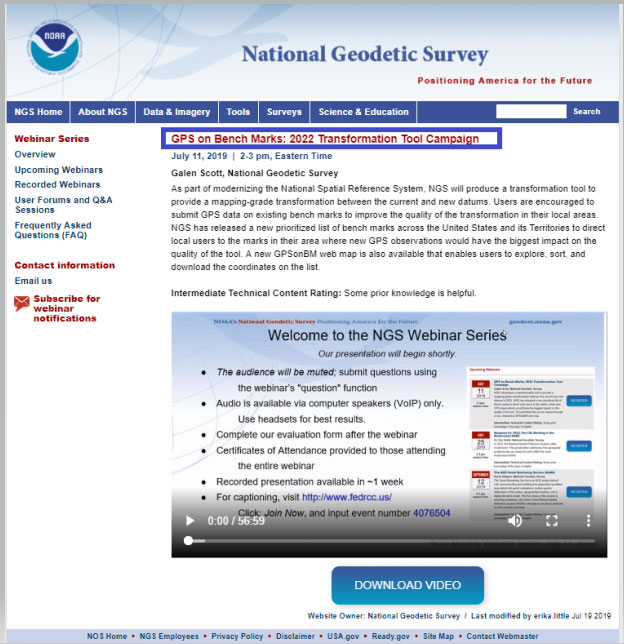
    Figure 1: GPS on Bench Marks:2022 Transformation Tool Campaign Webinar. (Photo: National Geodetic Survey)
    Figure 1: GPS on Bench Marks:2022 Transformation Tool Campaign Webinar (Photo: National Geodetic Survey)

    As in the past, the NGS on Bench Marks program can be accessed from NGS’ web page (see Figure 2). The user clicks on the “GPS on Bench Marks” button to access the program’s web page.
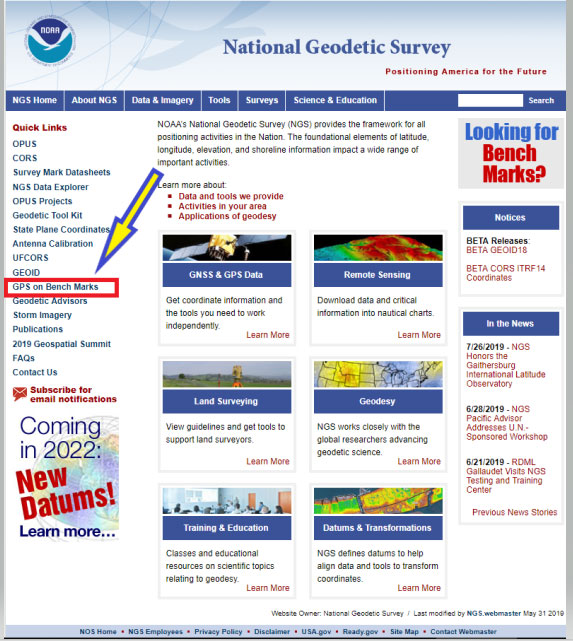
    Figure 2: NGS Home Web Page (Photo: National Geodetic Survey)
    Figure 2: NGS Home Web Page (Photo: National Geodetic Survey)

    Figure 3 depicts the home web page of the GPS on Bench Marks Program.
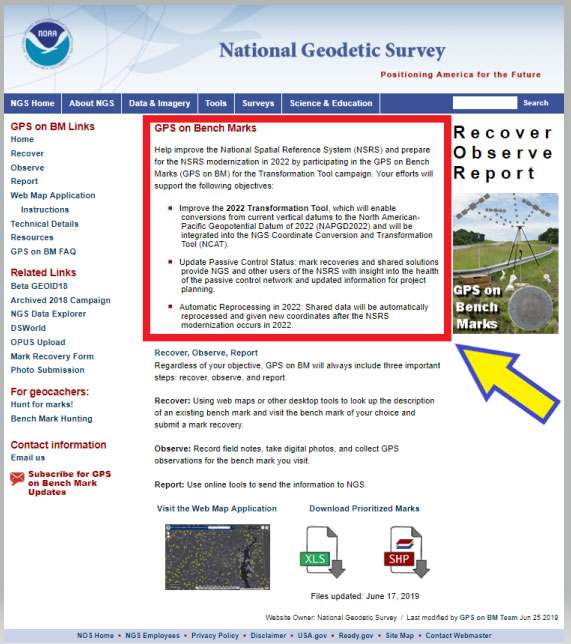
    Figure 3: GPS on Bench Marks Home Web Page (Photo: National Geodetic Survey)
    Figure 3: GPS on Bench Marks Home Web Page (Photo: National Geodetic Survey)

    The web page provides several reasons why users should continue to participate in the GPS on Bench Marks program. Figure 4 lists three reasons for helping NGS develop the 2022 Transformation Tool.

    Figure 4: Excerpt from GPS on Bench Marks Home Web Page

    GPS on Bench Marks

    Help improve the National Spatial Reference System (NSRS) and prepare for the NSRS modernization in 2022 by participating in the GPS on Bench Marks (GPS on BM) for the Transformation Tool campaign. Your efforts will support the following objectives:

    • Improve the 2022 Transformation Tool, >which will enable conversions from current vertical datums to the North American-Pacific Geopotential Datum of 2022 (NAPGD2022) and will be integrated into the NGS Coordinate Conversion and Transformation Tool (NCAT).

    • Update Passive Control Status: mark recoveries and shared solutions provide NGS and other users of the NSRS with insight into the health of the passive control network and updated information for project planning.

    • Automatic Reprocessing in 2022: Shared data will be automatically reprocessed and given new coordinates after the NSRS modernization occurs in 2022.

    I’d like to highlight a few of the benefits for participating in the GPS on Bench Marks program.

    (1) Improve the 2022 Transformation Tool, which will enable conversions from current vertical datums to the North American-Pacific Geopotential Datum of 2022 (NAPGD2022) and will be integrated into the NGS Coordinate Conversion and Transformation Tool (NCAT).

    > A goal of the transformation tool is to provide a model that will allow users to convert from the current North American Vertical Datum of 1988 (NAVD 88) to the new North American – Pacific Geopotential Datum of 2022 (NAPGD2022). The more bench marks that are occupied by GNSS and included in OPUS Shared solutions will enable NGS to generate a more detailed relationship between NAVD 88 and NAPGD2022. This will provide an accurate transformation tool in local areas which will facilitate the implementation of NAPGD2022 in surveying and mapping products and services.

    (2) Update Passive Control Status: mark recoveries and shared solutions provide NGS and other users of the NSRS with insight into the health of the passive control network and updated information for project planning.

    > An important part of the GPS on Bench Marks program is that it provides an indication of the status of the station. The last time a bench mark was leveled to varies greatly across the Nation. Many of stations in NGS’ Integrated Dataset haven’t been visited in over 50 years. The GPS on Bench Mark program can be useful to identify stations that have moved since the last time it was part of a leveling project. The mark recoveries will provide the latest status of a station which will help others in future project planning. More important, in my opinion, is that the OPUS shared solutions will identify stations that no longer have valid NAVD 88 published heights, and should be used with caution and flagged with a warning

    (3) Automatic Reprocessing in 2022: Shared data will be automatically reprocessed and given new coordinates after the NSRS modernization occurs in 2022.

    >> Any station that is part of the GPS on Bench Marks program and included in the OPUS Shared solution database will be given 2022 coordinates. This means that users will not have to resubmit their data to obtain the new coordinates in the new 2022 reference frames. This information will be useful during the implementation phase of the 2022 reference frames.

    As in the past, NGS is developing web-based products and services to facilitate users incorporating their data into the National Spatial Reference System (NSRS). They have developed a GPS on Bench Marks Web Map Application to inform users which stations they would like occupied by GNSS equipment. They realize that everyone is busy so they are trying to provide information, in near real time, on stations that have been occupied to reduce users occupying a station that already has two occupations. Figure 5 depicts the buttons that will connect the user to an interactive web map application. There are several ways the user can access the application: (1) click on the link titled “Web Map Application” – the red rectangle and arrow in the box titled “GPS on Bench Marks Web Map Application Site,” (2) click on the figure of the web based application – see the blue ellipse and blue arrow in the box, and (3) download the prioritized marks in XLS or Shape file format – see the green pentagon and green arrow in the box.
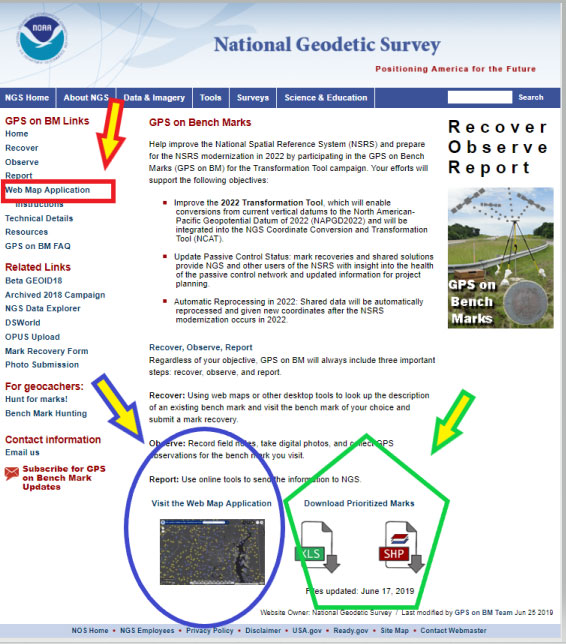
    Figure 5: GPS on Bench Marks Web Map Application Site (Photo: National Geodetic Survey)
    Figure 5: GPS on Bench Marks Web Map Application Site (Photo: National Geodetic Survey)

    Clicking on the Web Map Application button or picture will direct the user to a new website. It informs the user that they are leaving a U.S. Government Web Site for another site. See Figure 6. The user can either click on the statement or just wait until they are redirected the website. (See Figure 7.)
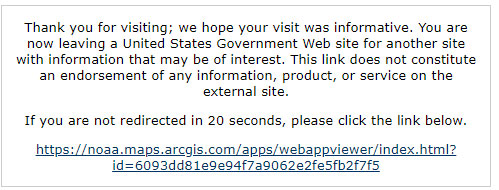
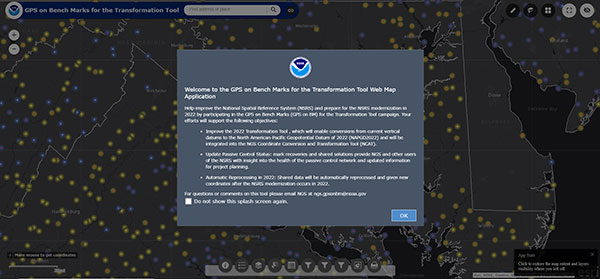
    Figure 6: Clicking on the Web Map Application Button or Picture (Photo: National Geodetic Survey)
    Figure 6: Clicking on the Web Map Application Button or Picture (Photo: National Geodetic Survey)
    Figure 7: GPS on Bench Marks For the Transformation Tool Interactive Web Map (Photo: National Geodetic Survey)
    Figure 7: GPS on Bench Marks For the Transformation Tool Interactive Web Map (Photo: National Geodetic Survey)

    Just click on the “OK” button to remove the splash screen. You can click the button “Do not show this splash screen again” so it doesn’t show up every time you access the web page. At the bottom of the web map is a legend that provides information about the map and allows the user to select various options. Figure 8 provides an example of legend buttons. The information box appears by clicking on a particular icon in the legend bar (the arrows indicate the icon and information box for that icon).
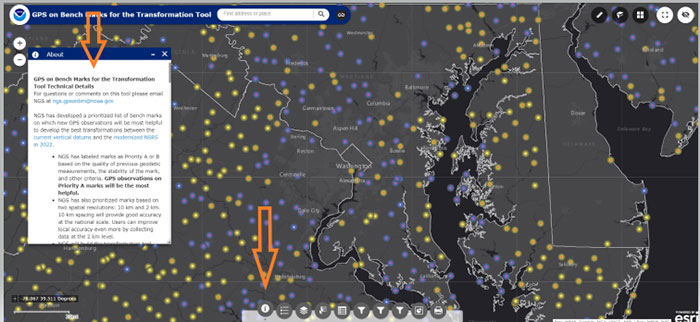
    Figure 8: Legend on GPS on Bench Marks Web Map Application Site (Photo: National Geodetic Survey)
    Figure 8: Legend on GPS on Bench Marks Web Map Application Site (Photo: National Geodetic Survey)

    There’s a lot of information provided in the information box. There’s a scroll bar on the right side of the box that provides the entire write up. Figure 9 provides several sections of the write up. I’ve highlighted sections in the write up to emphasis what NGS is trying to accomplish. NGS’ goal is to minimize the amount of work performed by users and maximize the amount of GNSS data provided to the development of the 2022 transformation tool.

    First, NGS has prioritized marks at two spatial resolutions: 10 km and 2 km. They want to reach a 10 km density to provide good national accuracy and a 2 km level to improve local accuracy. The Interactive Web Map allows users to zoom down to a level to identify individual stations selected by NGS. A 10-kilometer hexagonal lattice was developed to define the desired data density on the ground. For each hexagon, the goal was to identify a primary mark and a list of up to 4 secondary marks. The primary mark for each hexagon was added to the priority mark list. Secondary marks are listed and should be observed in cases where the primary mark cannot be found or is unobservable.

    To reduce duplication, when a single mark within a 10 km hexagon has two GPS observations that meet NGS requirements, that hexagon is marked as done and the station is removed from the prioritized list. This will help to reduce the number of surveyors occupying the same station over and over again, and increase the number of prioritized stations occupied with GNSS. After a 10-kilometer hexagon is marked as done, a group of up to thirteen 2 km hexagons is generated to define the opportunities to densify the model with additional marks.

    To assist in the selection of stations to be part of the GPS on Bench Marks program, NGS has prioritized stations as Priority A and B. Priority A being more important than priority B for the development of the 2022 transformation tool.

    Figure 9: Excerpts from GPS on Bench Marks for the Transformation Tool Technical Details

    For questions or comments on this tool please email NGS at [email protected].

    NGS has developed a prioritized list of bench marks on which new GPS observations will be most helpful to develop the best transformations between the current vertical datums and the modernized NSRS in 2022.

    • NGS has labeled marks as Priority A or B based on the quality of previous geodetic measurements, the stability of the mark, and other criteria. GPS observations on Priority A marks will be the most helpful.

    • NGS has also prioritized marks based on two spatial resolutions: 10 km and 2 km. 10 km spacing will provide good accuracy at the national scale. Users can improve local accuracy even more by collecting data at the 2 km level.

    • NGS will build the transformation tool with data submitted by December 31, 2021. The tool will interpolate over areas without GPSonBM data, meaning that the transformations will be less accurate in those areas.

    Priorities A and B

    Priority A
    Priority A marks meet the following specific criteria from their datasheets and are most likely to be used to create the transformation tools:
    • Vertical Order: FIRST, SECOND
    • Stability: A, B, C
    • Satellite: USEABLE
    • Last Recovery Condition: excluding “MARK NOT FOUND”

    Priority B
    Priority B marks are lower quality marks that will only be considered for use in the transformation tool to fill data gaps if no other data exists in the region.

    Spatial Resolution
    NGS has also prioritized marks at two spatial resolutions: 10 km and 2 km. NGS wants to reach a 10 km density to provide good national accuracy. Additionally, users can help improve local accuracy by collecting data at the 2 km level.

    To prioritize marks based on the two spatial resolutions, NGS created the following system:
    A 10-kilometer hexagonal lattice was developed to define the desired data density on the ground and help select appropriate marks within those areas throughout the U.S. and territories.
    • Hexagons with appropriate bench marks were identified.
    For each hexagon, a primary mark was selected and a list of up to 4 secondary marks — if available — were identified. The primary mark for each hexagon was added to the priority mark list. Secondary marks are listed and should be observed in cases where the primary mark cannot be found or is unobservable.
    To communicate when observations in a hexagon have been completed, the following process was developed:
    Once a single mark within a 10 km hexagon has two GPS observations that meet the requirements, that hexagon is marked as done and the observed mark is removed from the prioritized list.

    Once a 10 km hexagon is marked as done, a group of up to thirteen 2 km hexagons is generated to define the opportunities to densify the model with additional marks.
    In each of the 2 km hexagons, a primary mark is identified and a list of secondary marks is provided in case the primary mark cannot be found or is not observable. The new primary marks are added to the priority mark list. The number of 2 km hexagons will vary since not all areas have bench marks inside the 2 km lattice. See graphic below:

    Clicking on the Web Map Applications “Instructions” button will provide a summary of all of the tools available on the Web Map. See the arrow in Figure 10. The instruction page provides a lot of information and explains the function of each tool.
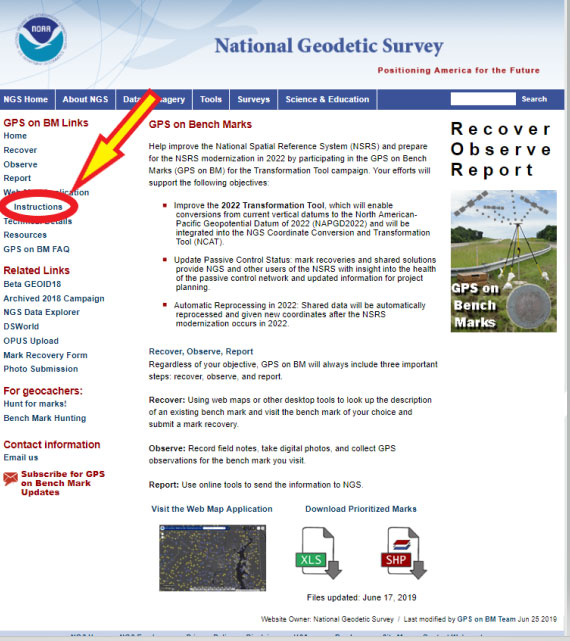
    Figure 10: GPS on Bench Marks Web Map Instructions Site (Photo: National Geodetic Survey)
    Figure 10: GPS on Bench Marks Web Map Instructions Site (Photo: National Geodetic Survey)

    Figure 11 provides an excerpt from that web page. All of the icons on the Web Map are explained on a mock up of a sample map in the beginning of the Instruction web page.
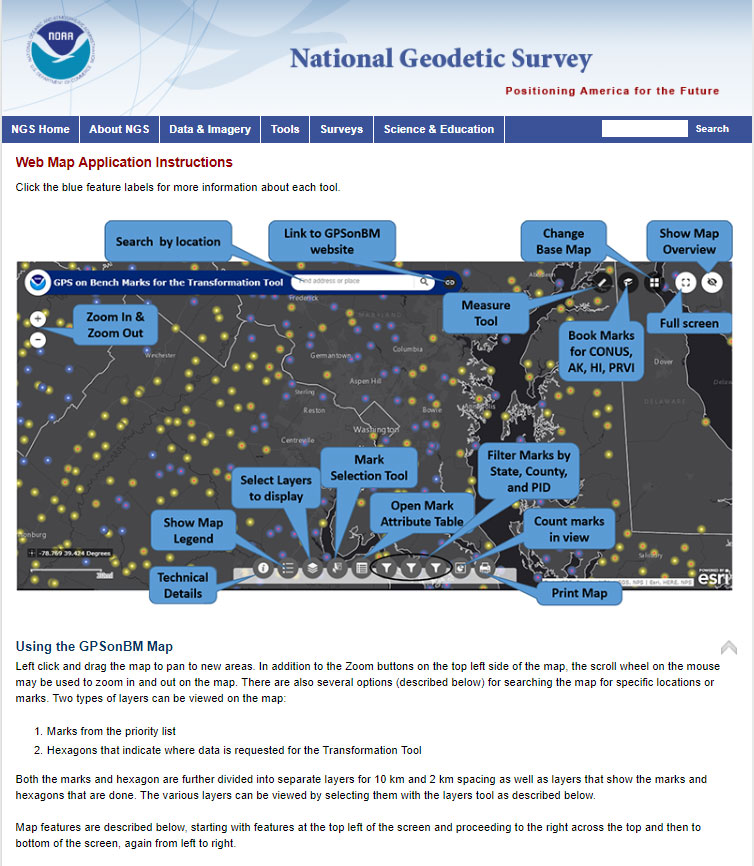
    Figure 11: GPS on Bench Marks Web Map Instructions List of Tools (Photo: National Geodetic Survey)
    Figure 11: GPS on Bench Marks Web Map Instructions List of Tools (Photo: National Geodetic Survey)

    The list of detailed descriptions of the tool is fairly long so I’ve provided some of the descriptions in Figure 12. The reader is referred to this page for the descriptions of all of the tools.

    Figure 12: Partial List of Descriptions of GPS on Bench Marks Web Map Instructions Tools

    Legend
    Clicking this button will display the legend for all of the active layers displayed on the map.

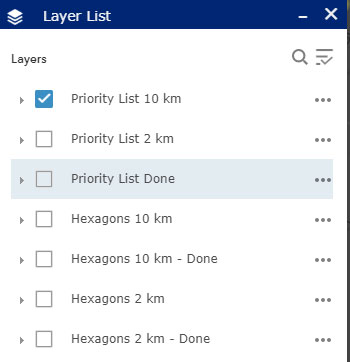
    Layer List
    Clicking this button will bring up the list of available layers to display on the map. By default, only the Priority List of marks at 10 km spacing appears. Users can select other layers to display on the map by clicking on the box to the left of the layer name. Once clicked, the box will show a check mark, and all layers with check marks are displayed on the map.


    Layer Descriptions:
    • Priority List 10 km – Marks requested for national coverage
    • Priority List 2 km – Marks requested to densify local areas
    • Priority List Done – All marks with enough observations to be considered for use in the Transformation Tool.
    • Hexagons 10 km – Areas where GPSonBM data is still requested to complete broad national coverage
    • Hexagons 10 km – Done – Areas where sufficient data exists
    • Hexagons 2 km -Areas where GPSonBM data may still be submitted to increase local accuracy of the transformation tool.
    • Hexagons 2 km – Done – Areas where sufficient data exists.

    Image: National Geodetic Survey
    Image: National Geodetic Survey

    Working with the Layer List
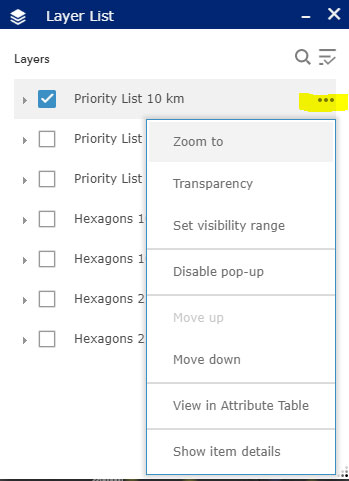
    Clicking on the ellipsis to the right of each layer opens a window with actions for that layer. Set visibility range allows the user to set the zoom level at which each layer appears. By default the visibility ranges are set to prevent too much data from being plotted at once which would slow down the application. Users with fast internet connections can change the visibility range to allow data to be displayed when zoomed out far enough to see the extents of larger states.

    Image: National Geodetic Survey
    Image: National Geodetic Survey

    Mark Selection Tool:

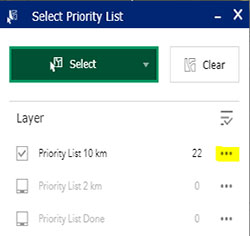
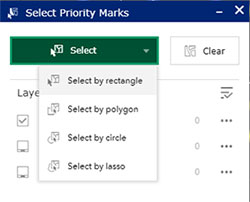
    This tool provides several options for selecting marks. First, change the layer to select from, click in the box to the left of the layer name. Click the green Select box and choose a selection method, then use the mouse to left-click on the map to draw the selection region. Selected marks’ icons will turn blue. Once marks are selected, click on the ellipsis to the right of the layer to open menu of actions that can be performed with selected marks. Using this menu, selected marks can be exported into csv, JSON, and GeoJSON formats.
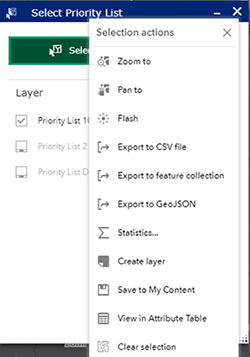
    Image: National Geodetic Survey
    Image: National Geodetic Survey

    Attribute Table
    This button opens a table at the bottom of the screen that displays all the information available on each mark.

    Image: National Geodetic Survey
    Image: National Geodetic Survey
    Image: National Geodetic Survey
    Image: National Geodetic Survey

    Filters

    By State, County, and PID: This tool allows the user to filter the marks on the map down to specific states, counties, or PIDS. After selecting the filter option, click on the switch at the top right of the filter box and the map will pan and zoom to the selected area. If the marks do not appear on the map, try zooming in until they appear.

    Figure 13 provides four different options of the icons on the bottom of the web map. They include the “Legend,” Layer List,” Select Priority List,” and Filter by State. These options help the user focus on a particular area of interest. I would encourage the user to familiar themselves with each of these options because they help will make it easier to navigate the map and identify priority stations.
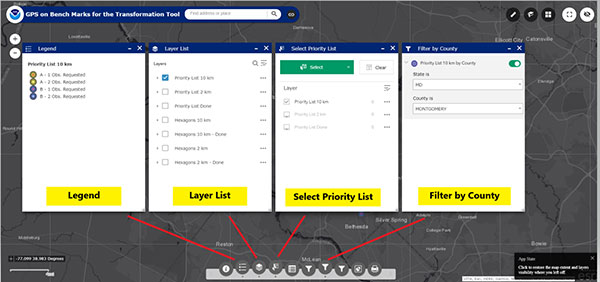
    Figure 13: Example of Several Options on the Legend on GPS on Bench Marks Web Map Application Site (Photo: National Geodetic Survey)
    Figure 13: Example of Several Options on the Legend on GPS on Bench Marks Web Map Application Site. Examples below are for the “Legend,” Layer List,” Select Priority List,” and Filter by County.” (Photo: National Geodetic Survey)

    Another important icon located at the bottom of the Web Map opens an attribute table of the bench marks. (See Figure 14). Once you open the Attribute table tool (see the red arrow in the box), a table of attributes of the stations appears at the bottom of the screen. If you click on a station in the table, the station gets highlighted on the map (see the blue arrow in the box). NGS’ Web Map Application makes it very easy to locate potential stations in a user’s area of interest.
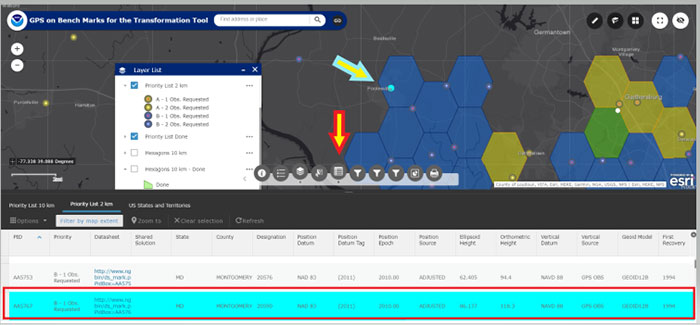
    Figure 14: Example of the Attribute Table on the Legend on GPS on Bench Marks Web Map Application Site (Photo: National Geodetic Survey)
    Figure 14: Example of the Attribute Table on the Legend on GPS on Bench Marks Web Map Application Site (Photo: National Geodetic Survey)

    When the user clicks on the Layer List tool, they can select which priority list they would like to see plotted on the map. They can click on the “More Info” button to obtain the latest NGS Datasheet. Figure 15 provides an example of A and B stations from the 10 km priority list in the Loudoun County, Virginia, region. The map highlights priority A and B stations; the user can than find more information about a specific station by clicking on the map.
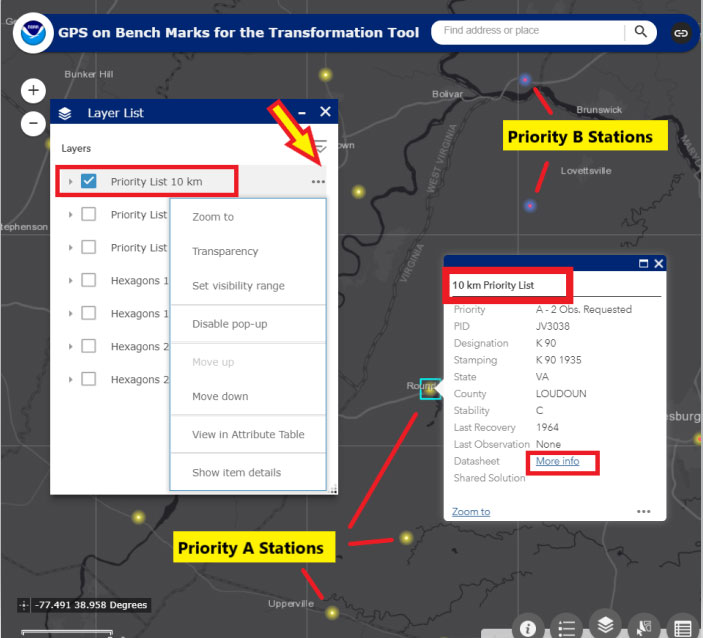
    Figure 15: Excerpt from GPS on Bench Marks Web Map Layer List - Priority List 10 km (Photo: National Geodetic Survey)
    Figure 15: Excerpt from GPS on Bench Marks Web Map Layer List – Priority List 10 km (Photo: National Geodetic Survey)

    A very interesting feature is that once a station is classified as done in a 10 km hexagon, the hexagon is colored green and flagged as done. There is no longer a requirement to occupy a station in that hexagon to assist the 2022 transformation tool for the National level of accuracy. See Figure 16 to see a 10-km hexagon labeled as “Done.” Note that the station considered “Done” is labeled with a white circle.
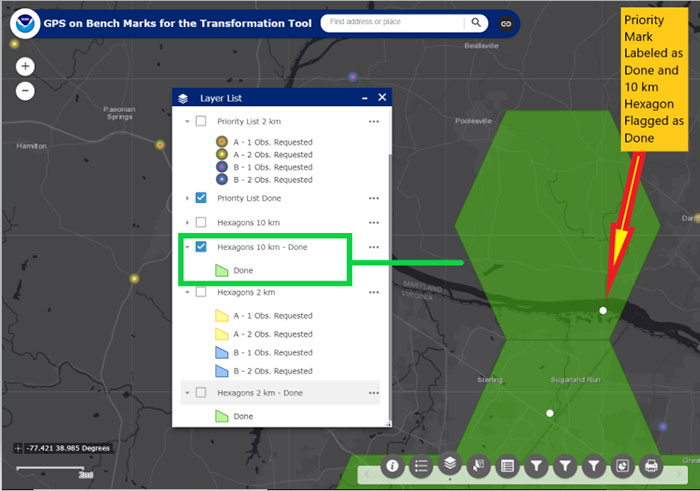
    Figure 16: An Example of a 10-km Hexagon in the Montgomery County, Maryland, and Loudoun County, Virginia, Region (Photo: National Geodetic Survey)
    Figure 16: An Example of a 10-km Hexagon in the Montgomery County, Maryland, and Loudoun County, Virginia, Region (Photo: National Geodetic Survey)

    Now the user can focus on the 2-km hexagon boxes to identify stations to improve the local accuracy of the 2022 transformation tool in their area of interest. Figure 17 provides an example of the 2-km hexagons with priority marks plotted within each 2-km hexagon. Once again, the symbology indicates A and B stations, and the 2-km hexagons that need more observations and the hexagons that are labeled as “Done.”
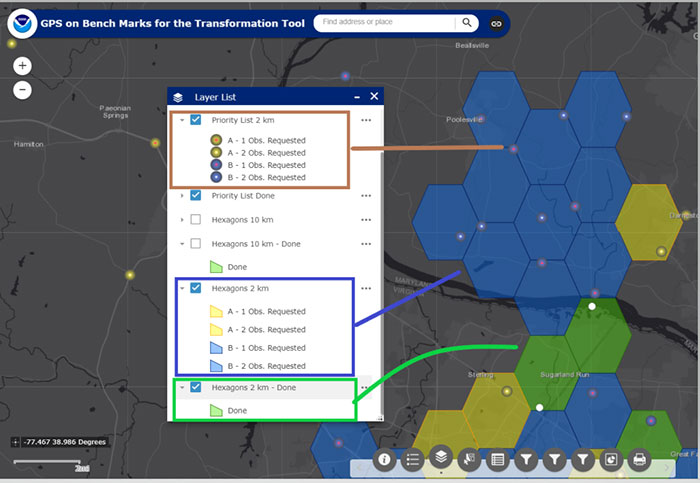
    Figure 17: An Example of 2-km Hexagons in the Montgomery County, Maryland, and Loudoun County, Virginia, Region (Photo: National Geodetic Survey)
    Figure 17: An Example of 2-km Hexagons in the Montgomery County, Maryland, and Loudoun County, Virginia, Region (Photo: National Geodetic Survey)

    NGS’ goal is to update the Interactive Web Map in “Near Real Time.” Of course, there’s always going to be some lag time from the time the user uploads their data into the OPUS Shared solution database to when the NGS 2022 Transformation Team reviews the data to ensure the results meet NGS’ criteria. Once again, NGS wants to minimize the amount of duplicate work performed by surveyors and maximize the number of stations contributing to the development of the 2022 transformation tool.

    This newsletter highlighted the next phase of NGS’ GPS on Bench Marks program; that is, the development of the 2022 transformation model. The newsletter provided examples to explain the symbology and use of the new version of the GPS on Bench Marks program. It provided web links to material explaining the new GPS on Bench Marks program such as NGS’ July 2019 webinar on the latest GPS on Bench Marks program for developing the 2022 Transformation tool. NGS has done a tremendous job of explaining the importance, process, and results of the GPS on Bench Marks Program. Several of my previous newsletters have highlighted the NGS GPS on Bench Marks program and how users have supported the development of the hybrid Geoid18 model: Hopefully, this support will continue to develop the best possible 2022 Transformation Tool.
  • NGS 2018 GPS on BMs program in support of NAPGD2022 — Part 7

    NGS 2018 GPS on BMs program in support of NAPGD2022 — Part 7

    My last column described the National Geodetic Survey’s (NGS) GPS on Bench Marks (BM) 2018 interactive web map, and provided an update and status report on stations observed in support of the 2018 GPS on BMs Program. It mentioned that all new data received by the cut-off date of Aug. 31 will be analyzed by NGS and, if appropriate, the results will be included in the next hybrid geoid model. This is a great opportunity to provide data that will help to improve the hybrid geoid model in your region. This column will provide an update and status report on stations observed in support of the 2018 GPS on BMs program and provide an example of how OPUS-shared results identified a station that may have moved since it was last leveled.

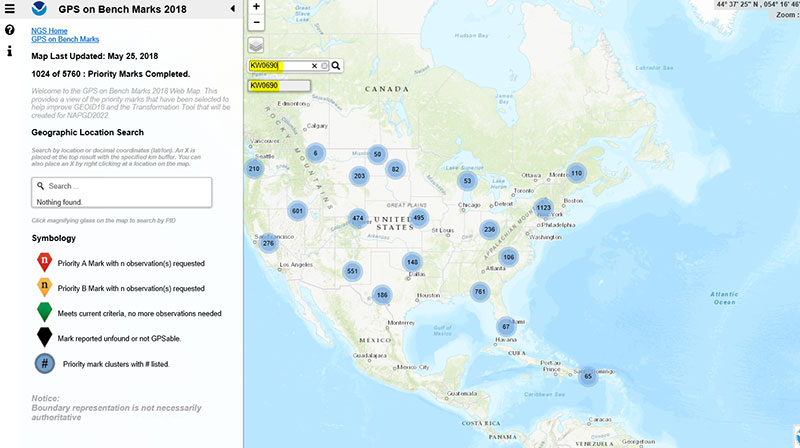
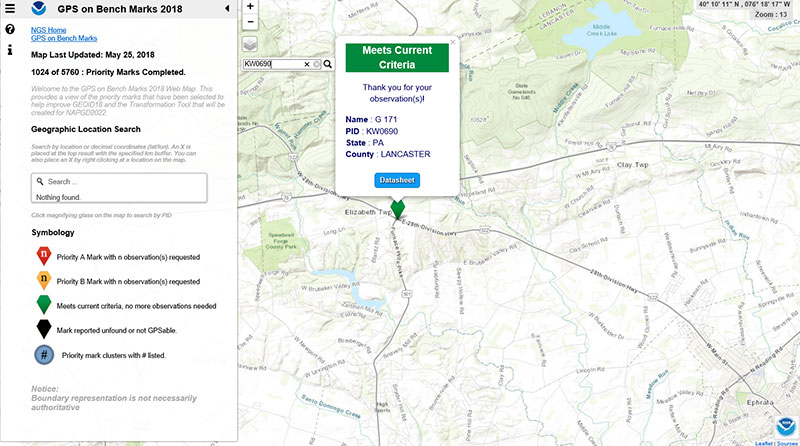
    As mentioned in the last column, the GPS on BMs 2018 web page contains a link to a web map where users can determine which bench marks NGS would like users to occupy before the August 31, 2018, deadline. The web map also provides a list of the stations observed to date to ensure users are not wasting their time observing stations that already have enough repeat observations. NGS is updating the map weekly to reduce users occupying stations that already have enough redundant observations. The box titled “2018 Web Map” depicts the map update of May 25, 2018. The web map has a search feature so if the user knew a station’s PID, they could locate the station on the map. The box titled “An Example of Using the Web Map Search Feature” depicts the search feature using PID AW0690 (see highlighted section in the box).

    2018 Web Map

    Click to enlarge.

    The box titled “Map After Searching for PID KW0690” depicts the map after searching for PID KW0690. As indicated by the symbol, the station meets the current criteria. That is, it has two GNSS-derived ellipsoid heights that agree within NGS’ criteria for use in evaluating and generating the next hybrid geoid model.

    Map After Searching for PID KW0690

    Click to enlarge.

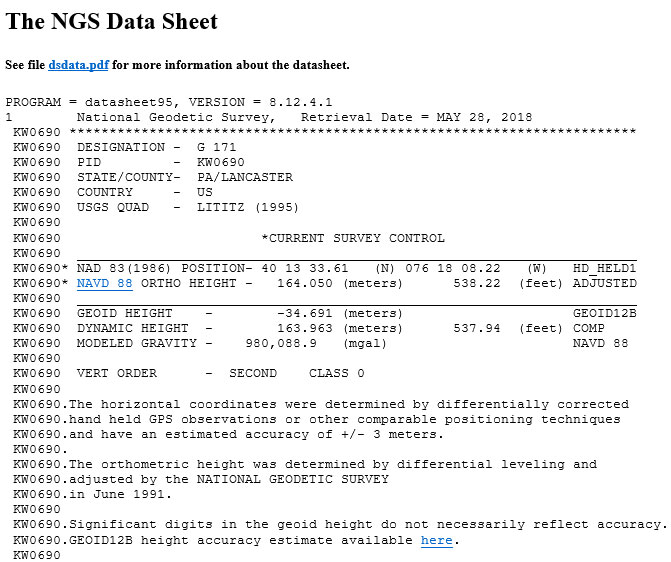
    The user can continue to check on the link labeled “Datasheet” to obtain the latest data sheet for the station (see the box titled “NGS Data Sheet for KW0690”).

    NGS Data Sheet for KW0690

    Click to enlarge.

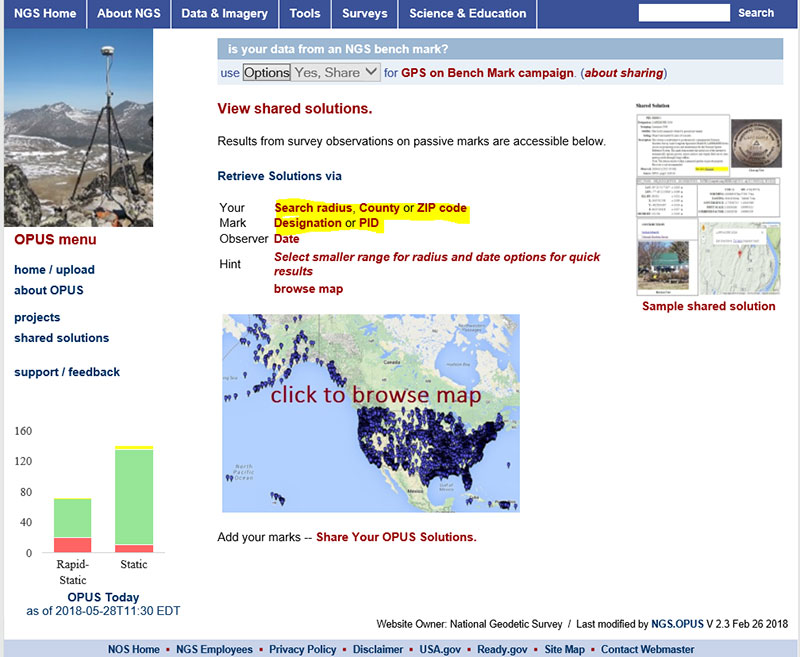
    Next, let’s look at the OPUS shared results for the station (KW0690 – G 171). OPUS shared solutions can be found at this website. (see box tilted “OPUS Shared Solutions Web Page”).

    OPUS Shared Solutions Web Page

    Click to enlarge.

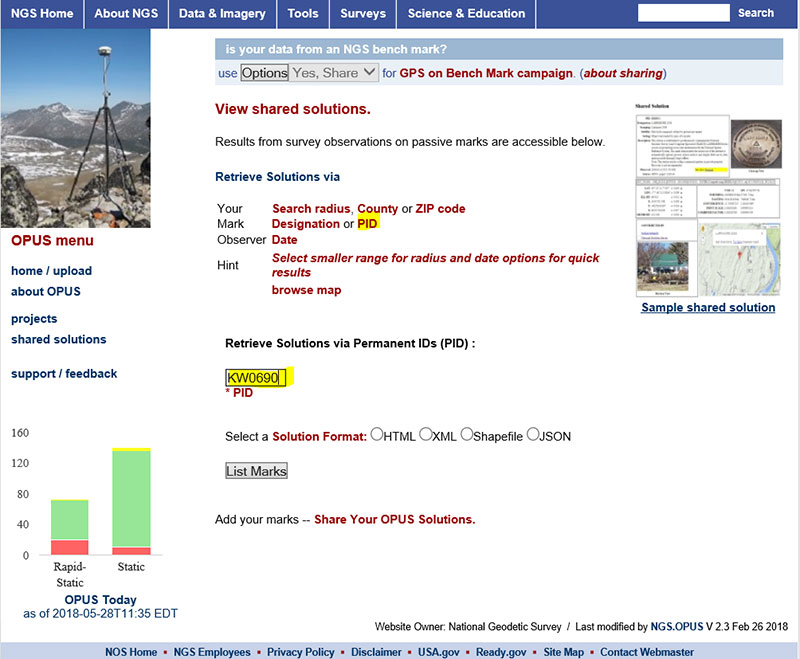
    The user can search for a particular OPUS shared solution by checking on the PID option (see highlighted section on the box titled “Web Page After Clicking on PID Option.”

    Web Page After Clicking on PID Option

    Click to enlarge.

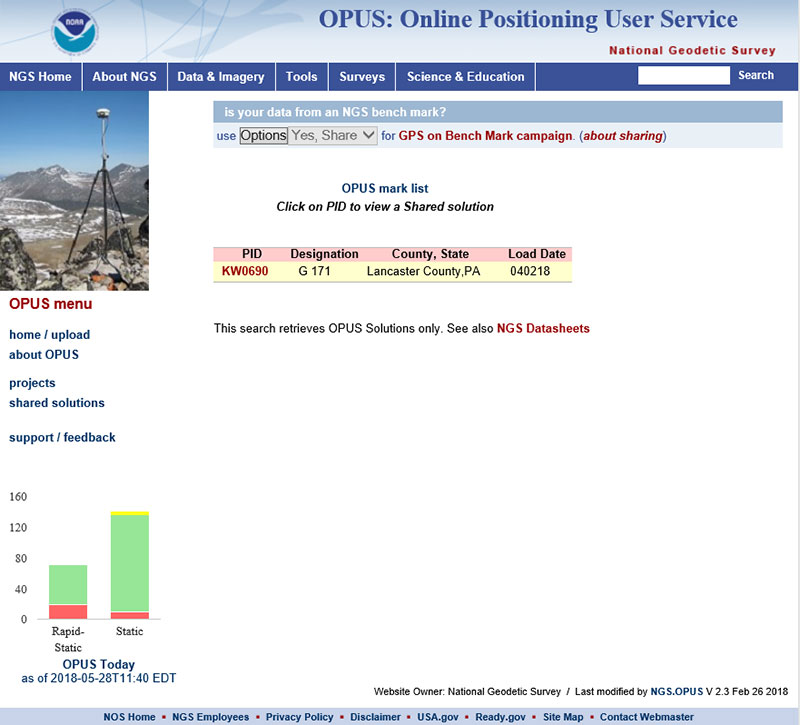
    The box titled “An Example of Selecting an OPUS Shared Solution for a PID” depicts the output after clicking on the button labeled “List Marks.”

    An Example of Selecting an OPUS Shared Solution for a PID

    Click to enlarge.

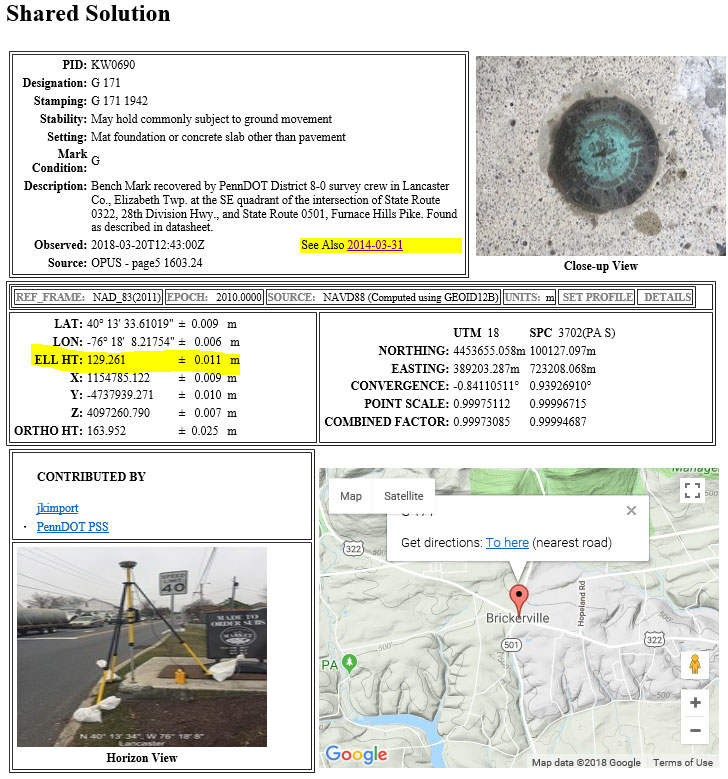
    The box titled “The OPUS Shared Solution for KW0690 (2018-03-20)” provides the OPUS Shared solution for station KW0690 performed on March 20, 2018. The output provides the NAD 83 (2011) 2010.0 coordinates with error estimates.

    The OPUS Shared Solution for KW0690 (2018-03-20)

    Click to enlarge.

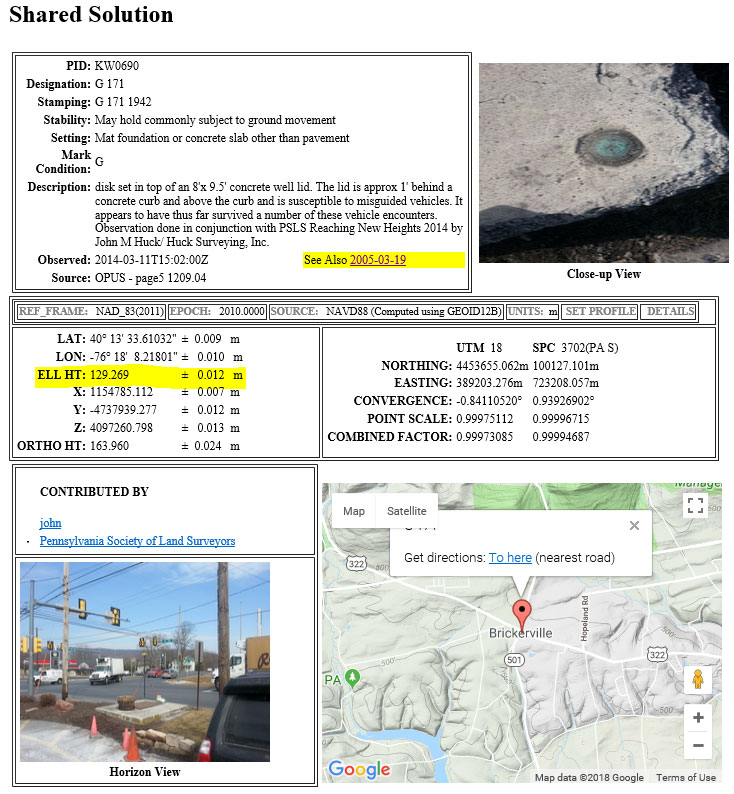
    When there is more than one observation, the output file provides a link to the other observations. In this case, there was another shared solution on March 31, 2014 (see box titled “The OPUS Shared Solution for KW0690 (2014-03-31).”) The two solutions indicate the ellipsoid heights agree to 8 mm (129.269 m – 129.261 m). This is an indication that the station is a valid candidate to be considered for the development of the hybrid geoid model.

    The OPUS Shared Solution for KW0690 (2014-03-31)

    Click to enlarge.

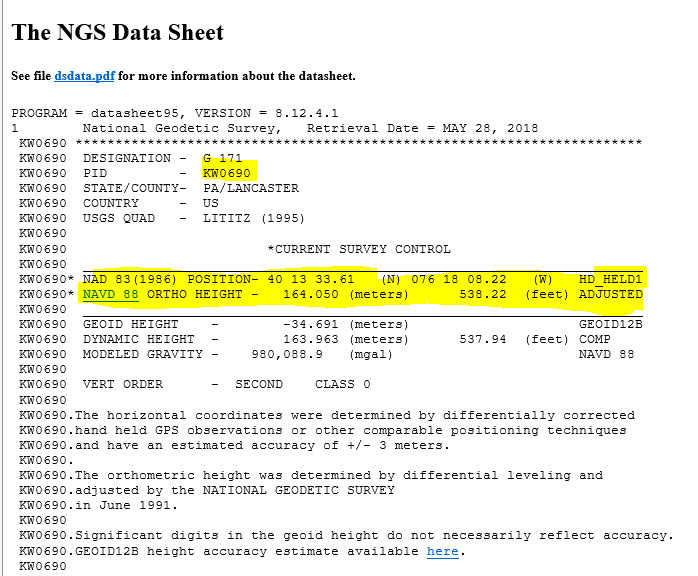
    The second OPUS Shared solution also indicates that there is a third observation (2005-03-19). Clicking on that link provides the NGS data sheet (see box titled “Excerpt from NGS Data Sheet for KW0690”).

    Excerpt from NGS Data Sheet for KW0690

    Click to enlarge.

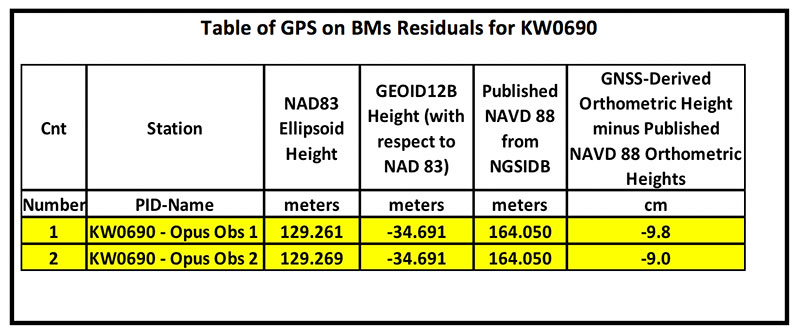
    It should be noted that this station doesn’t have a published NAD 83 (2011) coordinate. The OPUS shared solutions provide the NAD 83 (2011) ellipsoid height and the NGS data sheet provides the published NAVD 88 orthometric height. Comparing the GNSS-derived orthometric height using the OPUS shared ellipsoid heights and GEOID12B indicate the station is inconsistent with published NAVD 88 orthometric height. The box titled “Table of GPS on BMs Residuals for KW0690” provides the GPS on BMs residuals based on using the latest hybrid geoid model GEOID12B. It was noted that the two ellipsoid heights agree to within 8 mm but the GNSS-derived orthometric heights using GEOID12B indicate that the two stations disagree with the published NAVD 88 height by almost 10 cm. This may be an indication that the station may have moved since the last time it was leveled. The question that needs to be addressed is should this station be used in the development of the next hybrid geoid model. In my mind, there are basically two school of thought on this topic. One, users that have used this individual station as control would like the hybrid geoid model to provide a GNSS-derived orthometric heights consistent with the published height of this station. If a surveyor followed the appropriate precise leveling procedures to check the validity of the station, that is, performed at least a two-mark leveling tie to ensure that the monument did not move, then they would want the model to be consistent with the published value. Two, if the station moved since it was last leveled, the hybrid geoid model would not provide the most accurate NAVD 88 height.

    Table of GPS on BMs Residuals for KW0690

    Click to enlarge.

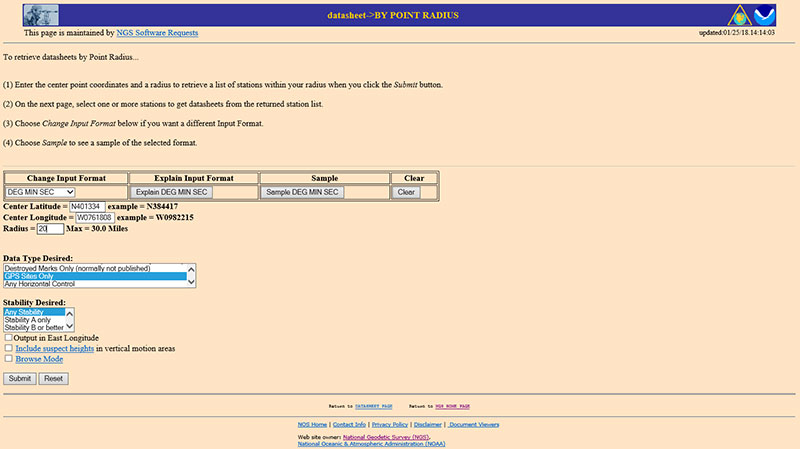
    The next step is to analyze the GNSS-derived orthometric height using the latest experimental geoid model. Evaluating GPS on BMs stations nearby station KW0690 will help in determining if the station KW0690 has moved since the last time it was leveled. One way that users can determine stations nearby is to use NGS data sheet retrieval program using the option to retrieve stations by point radius. See box titled “Using NGS Data Sheet Point Radius Retrieval Option for KW0690.” The user enters a latitude and longitude value and a radius search in miles.

    Using NGS Data Sheet Point Radius Retrieval Option for KW0690

    Click to enlarge.

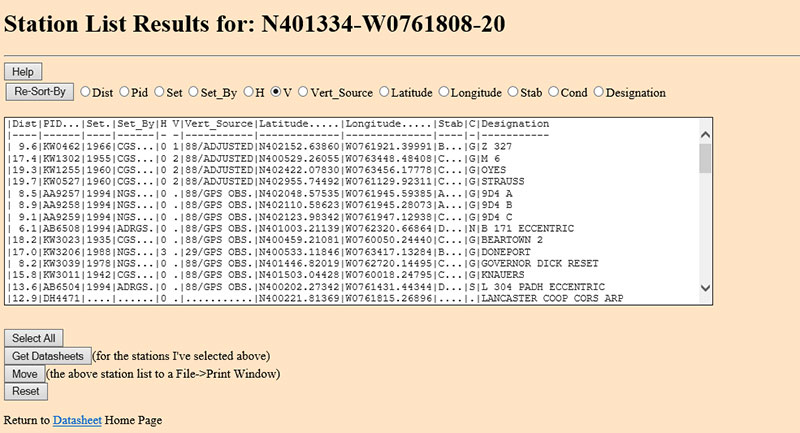
    In this case, I entered the latitude and longitude of station KW0690, a radius of 20 miles (approximately 30 kilometers) and selected the option “GPS Stations Only.” The box titled “Output of NGS Data Sheet Point Radius Retrieval Option for KW0690” provides the output of the search. I sorted the stations by vertical control (“V”)

    Output of NGS Data Sheet Point Radius Retrieval Option for KW0690

    Click to enlarge.

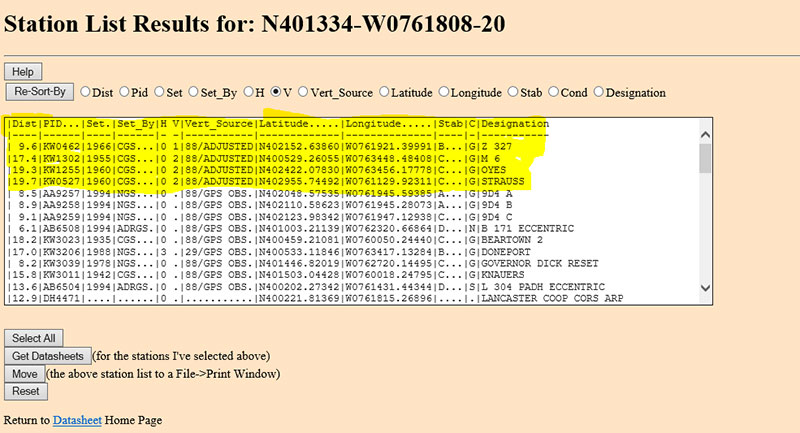
    The four bench marks that also have GNSS-derived heights are highlighted in yellow in the box titled “Select the Bench Marks Based on NGS Data Sheet Point Radius Retrieval.” They are all within 20 miles (approximately 30 km) of the station KW0690. By analyzing the GPS on BMs residuals of these nearby stations we can determine if station KW0690 is consistent with its neighbors.

    Select the Bench Marks Based on NGS Data Sheet Point Radius Retrieval

    Click to enlarge.

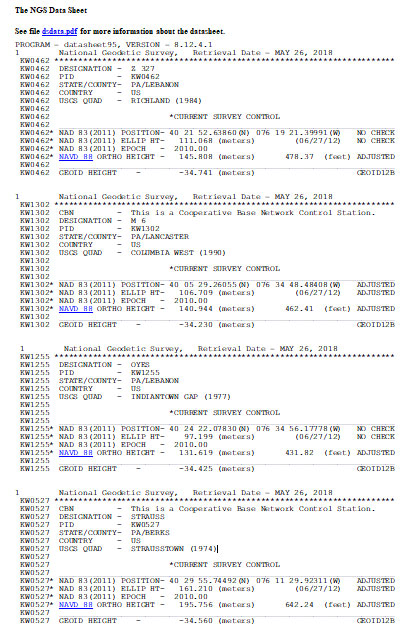
    I retrieved the data sheets so I could get their published coordinates for the xGeoid17 web tool. See box titled “Excerpts from Data Sheets Based on NGS Data Sheet Point Radius Retrieval” for the data sheets.
    Excerpts from Data Sheets Based on NGS Data Sheet Point Radius Retrieval

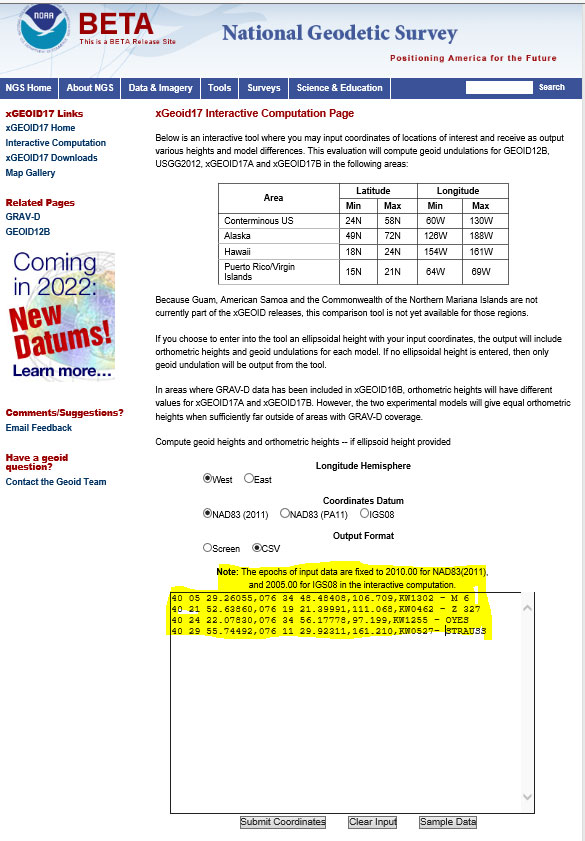
    Once you have the stations that are located near the station you’re interested in you can proceed to the xGeoid17 website to obtain the latest information based on the scientific geoid model. I described this procedure in a previous column. See box titled “Using the xGeoid17 Web tool for Stations Nearby KW0690” for an example of the input to the tool.
    Using the xGeoid17 Web tool for Stations Nearby KW0690

    Click to enlarge.

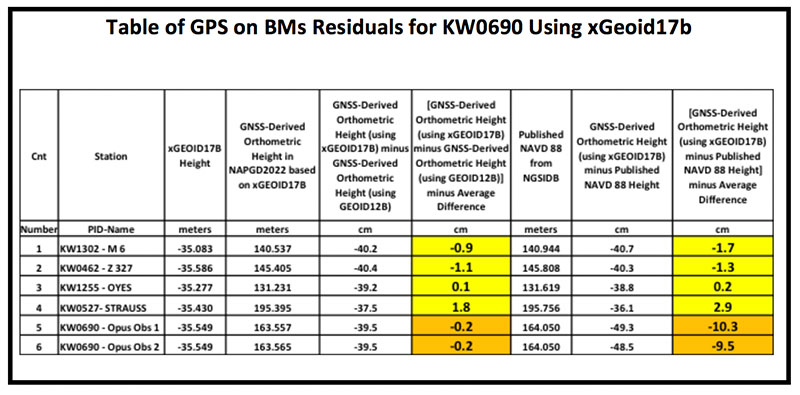
    The table titled “Table of GPS on BMs Residuals for KW0690 Using xGeoid17b” provides a summary of the results from the xGeoid17 web page. The procedure used to compute the GPS on BMs residuals has been described in a previous column.

    Table of GPS on BMs Residuals for KW0690 Using xGeoid17b

    Click to enlarge.

    Looking at the column labeled “[GNSS-Derived Orthometric Height (using xGEOID17B) minus Published NAVD 88 Height] minus Average Difference” indicate that the large difference that we noticed using GEOID12B at station KW0690 is also seen using the latest experimental geoid model xGeoid17b. Once again, this is an indication that the station may have moved since it was last leveled.

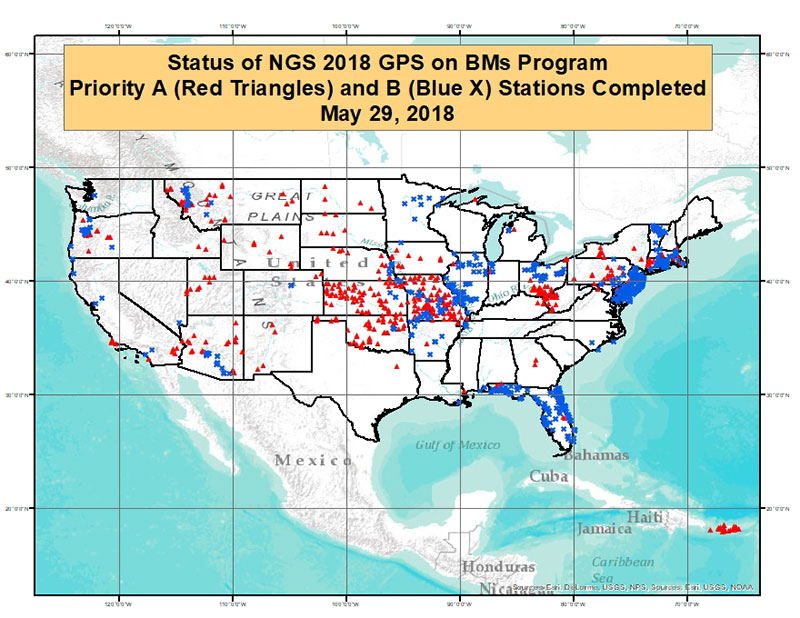
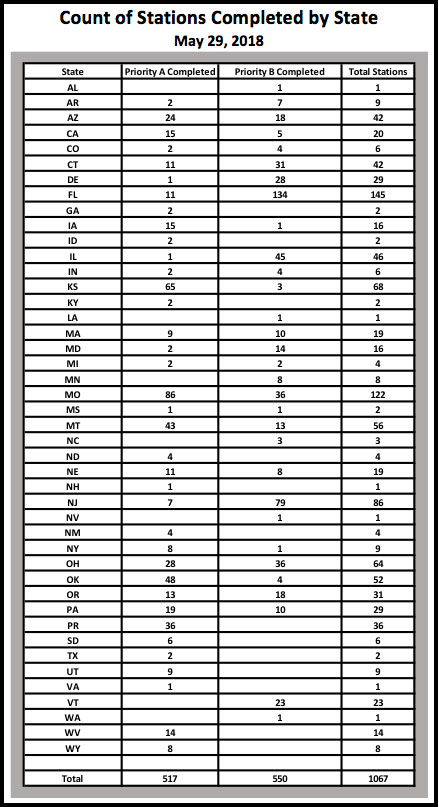
    As of May 29, 2018, 1067 of the 5760 priority marks were completed. The box title “Status of NGS 2018 GPS on BMs Program as of May 29, 2018“ is a plot the stations that are labeled as completed and the box titled “Count of Stations Completed by State “ provides the number of stations completed by state. The red triangles are priority A stations completed and the blue “X” are priority B stations labeled as completed.

    Status of NGS 2018 GPS on BMs Program as of May 29, 2018

    Click to enlarge.

    Count of Stations Completed by State
    May 29, 2018

    The number of stations completed as of May 29, 2018, represents about 18.5 percent of the total number of stations that need to be observed. August 31, 2018, is only two months away. According to my latest search of the NGS website (June 3, 2018), 1098 stations are considered done. Hopefully, the number of completed stations will significantly increase during the next last two months. As I have explained in previous columns, there are many invalid GPS on BMs stations that may be used in the next hybrid geoid model unless more bench marks with valid NAVD 88 heights are observed with GNSS. This column provided an update and status report on stations observed in support of the 2018 GPS on BMs program and provided an example of how the OPUS Shared results as identified a station that may have moved since it was last leveled. This is your opportunity to help develop a current, valid hybrid geoid model in your area, and identify NAVD 88 bench marks that have moved since they were last leveled.

  • NGS 2018 GPS on BMs program in support of NAPGD2022 — Part 5

    NGS 2018 GPS on BMs program in support of NAPGD2022 — Part 5

    My last column highlighted two components of the North American-Pacific Vertical Datum of 2022 (NAPGD2022) — the geoid undulation model of GEOID2022 and gravity model of GRAV2022. It expressed that these two models will be very important to future surveyors and mappers that are incorporating geodetic data into NAPGD2022. The last column also emphasized the significant differences between NAPGD2022 and the U.S. National Vertical Datums of NAVD 88 and NGVD 29. A year ago, my February 2017 column provided information on strategically occupying benchmarks to support NGS 2017 GPS on BM Program. The column focused on addressing the following questions: (1) Is the large GPS on BM residual due to an issue with the NAVD 88 orthometric height or the NAD 83 (2011) ellipsoid height? and (2) Should stations with large GMS on BM residuals be included in the development of NGS’ hybrid geoid models? The column provided suggestions on how users can assist NGS in determining the reason for the large difference between the modeled hybrid geoid value and computed GNSS/leveling geoid computed value. My October 2016 column demonstrated how to use the GPS on BMs dataset to identify potential issues in published NAVD 88 and NAD 83 (2011) heights. It focused on analyzing the NGS’ GPS on BM data set that was used to create NGS’ GEOID12B hybrid geoid model. It provided procedures that users could employ when analyzing the differences between the modeled geoid values and the computed geoid values using GNSS/Leveling data (GNSS-derived ellipsoid height minus leveling-derived orthometric height). The October 2016 column provided several examples of large relative differences in residuals between neighboring stations.
    It should be noted that many of these large GPS on BM residuals could be due to an invalid NAVD 88 published height because the bench mark moved since the last time the height of the bench mark was adjusted and published, and/or an undetected error in an ellipsoid height due to a weak GNSS project design. Either way, in my opinion, most of these stations with large GPS on BMs residuals don’t accurately represent a bench mark with a current NAVD 88 height (or what I call a valid NAVD 88 height). When performing a geodetic survey, these stations would be identified as bench marks with invalid heights when following the appropriate Federal geodetic survey guidelines, procedures, and specifications. These bench marks should not be used in the hybrid geoid model just like they would not be used in controlling geodetic surveys. NGS’ goal is to create a hybrid geoid model that is consistent with published valid NAVD 88 values. User participation in NGS’ GPS on BMs Program is critical to creating a hybrid geoid model consistent with a current NAVD 88.

    Recently, NGS performed a detailed analysis of the latest GPS on BMs data file using the published NAD83 (2011) ellipsoid heights, NAVD 88 orthometric heights, and the latest experimental geoid model height, xGeoid17b, to compute a new set of GPS on BMs residuals. At this time, the analysis has only included the 48 conterminous States, District of Columbia, Puerto Rico, and Virgin Islands. These data included NAD 83 (2011) ellipsoid heights from all submitted GNSS projects and OPUS Shared results. The goal of the detailed analysis was to create a statistical ranking of the marks based on a quantitative analysis of the leveling and GPS data. The following attributes were considered during the analysis:

    • Total number of GPS observations to and from the station
    • Date of last GPS observation to and from the station
    • Whether or not the GPS station has repeat baselines between closely spaced neighboring GPS on BMs stations
    • Total number of times the mark has been leveled to
    • Date of latest leveling
    • Quality of leveling (single run; double run; or single run, double simultaneous)

    The analysis of this data set was used to identify stations that should not be used in the creation of a hybrid geoid model or a NAPGD2022 Transformation tool. The stations identified as outliers and labeled as “Do Not Use” in a hybrid geoid model were based on issues associated with the NAVD 88 published orthometric height and/or the NAD83 (2011) ellipsoid height. I have described some of these issues in previous columns (August 2015 column, June 2016 column, October 2016 column and February 2017 column) so I won’t go into details in this column. NGS used the detailed analysis of the latest GPS on BMs dataset to: (1) generate a prototype hybrid geoid model to evaluate the residuals at stations not used in the hybrid geoid model, (2) confirm that the stations recommended for re-observations should be observed again, and (3) identify void areas that need additional observations.

    Since GEOID12B was created, users have been instrumental in providing OPUS results on bench marks in areas NGS said that they needed additional stations. Saying that, NGS realizes that everyone is busy and has limited resources to collect GNSS data on bench marks to support the next hybrid geoid model. NGS has used the detailed analysis to prepare material to assist users on strategically occupying stations to help support the GPS on Bench Marks Program, and create a hybrid geoid model that accurately represents a current NAVD 88. To eliminate confusion of where NGS would like new observations, NGS’ material contains a specific list of stations that they would like occupied with GNSS during the 2018 GPS on BMs program. This column provides a summary of the latest details of NGS’ 2018 GPS on BMs campaign which will be used to create the next hybrid geoid model in 2019 (see box titled “Personal Communication received from Galen Scott, Project Lead of NGS’ GPS in BM Program.”).


    Personal Communication received from Galen Scott, Project Lead of NGS’ GPS on BM Program

    In early 2019, NOAA’s National Geodetic Survey (NGS) will replace GEOID12B with GEOID18, a new hybrid geoid model to deliver improved GPS-derived NAVD 88-equivalent orthometric heights. This new model will serve as the official means for obtaining NAVD 88-equivalent heights via GPS. It will be the last hybrid geoid model that NGS will create before NAVD 88 is replaced by NAPGD2022.NGS will use available GPS on bench mark data to create the new model. Recent analysis of existing GPS on bench mark data and a prototype of the new hybrid geoid model created using that data has highlighted areas where additional data is needed to either confirm or update the local relationships between the ellipsoid, orthometric, and geoid heights.

    This email provides a prioritized list of bench marks for which additional GPS data is needed to improve the hybrid model. Data submitted on these marks will also support the development of the transformation tools that will be developed as part of the transition to the new datums.

    Data to support the hybrid geoid model will be accepted through August 31, 2018. NGS will continue to accept data to support the transformation tools through 2020. New prioritized lists of marks to support the transformation tools will be made available over the next few years as analysis of data requirements progresses.

    For the marks included in the attached document, NGS is requesting support in two ways:

    1. Attempt to locate the marks on the list and submit a mark recovery through DS World. Check this NGS page for more information on mark recovery.
    2. Collect 4 or more hours (more is better) of GNSS data on the mark following NGS guidelines, submit the data to OPUS and select the option to Share.

    More information, including training material, is available on the NGS GPS on Bench Marks (GPS on BM) website. Two matching, independent GPS observations are required for each mark. The list indicates how many observations we have so far on each mark (obs_cnt column). A tracking map showing the currently prioritized marks and the number of observations we have on each will be added to the GPS on BM website in the near future. To maximize efficiency, please check this map before observing a mark to ensure that the required data has not already been submitted.

    Please note: Marks on this list may be inaccessible, destroyed, or not GPS’able. If this is the case, please locate and observe another nearby NAVD 88 mark, within ~10 km.

    The mark list is provided in three file formats, but all contain the same information, so choose the format you are most comfortable with: excel spreadsheet, esri shapefile, and Google Earth kmz.

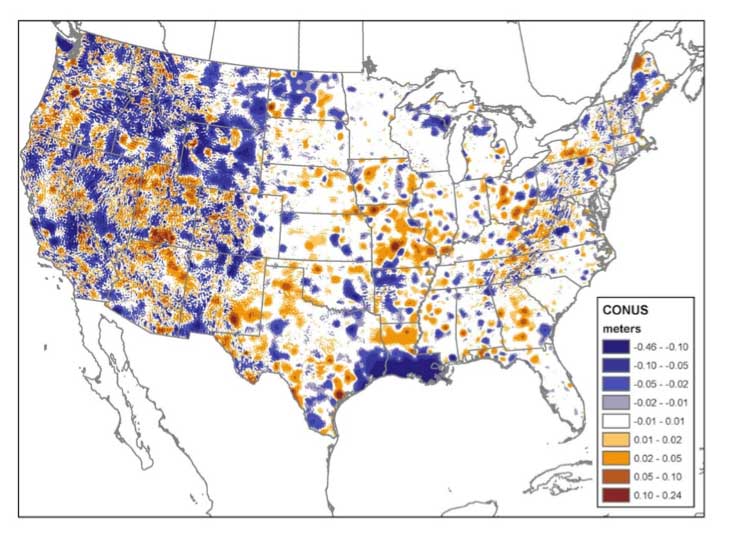
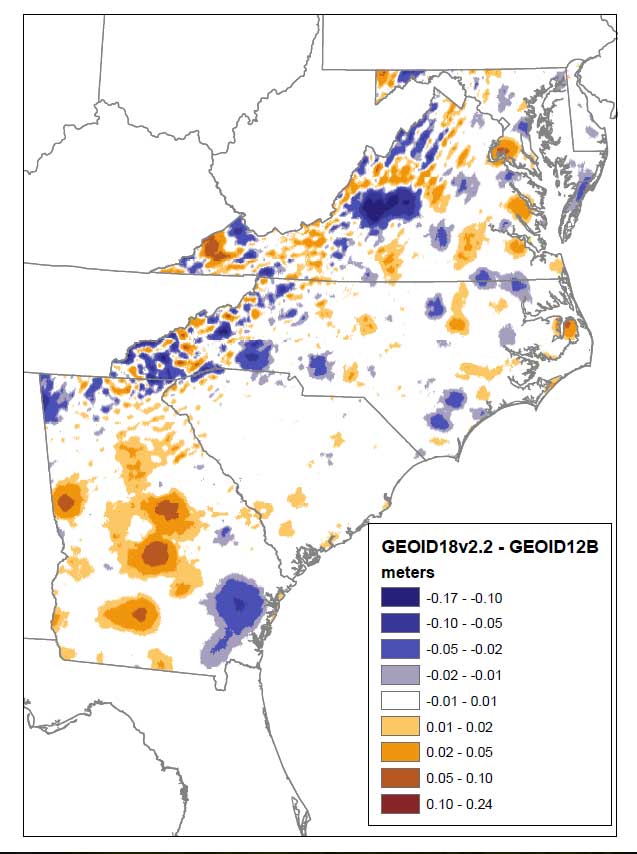
    The image below shows the changes between GEOID12B and the prototype hybrid geoid model. While data is needed on all the marks in the list, you may further focus your data collection efforts by looking for areas in this image that show large changes in your region.

    It is important for users to understand that NGS needs to have a high level of confidence that the OPUS Share results are accurate; therefore, they are requiring that “two matching, independent GPS observations are required for each mark.” The list of stations that they would like observed includes a count of the number of times that station has already been observed. NGS will be updating a website as stations are submitted so participants will not be wasting resources observing a station that has already been observed by someone else. It should be noted that if a station is only occupied once, it will still be useful for validating the hybrid geoid model; but stations occupied twice can be used in defining the hybrid geoid model.

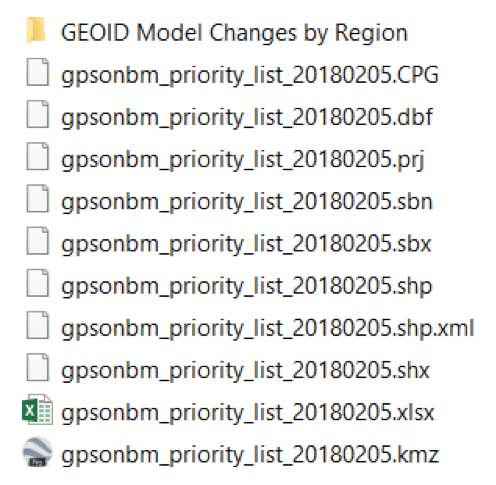
    The attached file includes the list of stations that NGS would like observed to support the next geoid model. The information is provided in three different formats — excel spreadsheet, esri shapefile, and Google Earth kmz (See the box titled “List of Files for the 2018 GPS on BMs Program.”)


    List of Files for the 2018 GPS on BMs Program

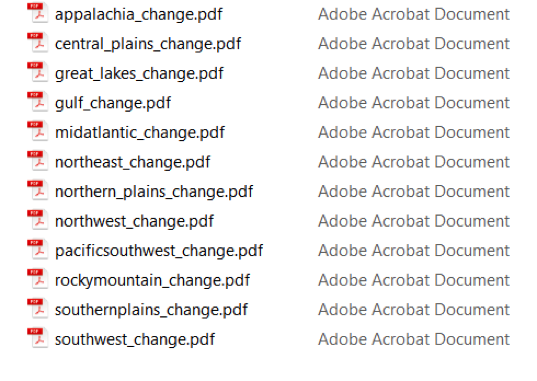
    The data set also contains a folder titled “GEOID Model Changes by Region” which contains plots that depict changes between GEOID12B and the Prototype Hybrid Geoid Model (Note: at this time, NGS is denoting this prototype hybrid geoid model as GEOID18v2.2).


    List of Files from Folder Titled “GEOID Model Changes by Region”


    Figure 1 is a plot of the change between the prototype GEOID18v2.2 and GEOID12B in the Mid-Atlantic States. Looking at figure 1, the reader can see that there are some significant differences between the prototype hybrid geoid model values and the published GEOID12B values. On figure 1, all of the dark blue values are differences at the -10 cm level and the dark orange values are differences at the 10 cm level. There are several reasons for these changes including newly observed gravity data observations (especially in area with new GRAV-D data), improved data and models from satellites programs, new and improved algorithms for processing gravity data and estimating topographic effects, additional OPUS Share results in areas where GEOID12B didn’t have observations, and differences based on stations that were included in GEOID12B but rejected in the prototype model based on the latest detailed analysis.

    Figure 1 – Changes between Prototype GEOID18v2.2 and GEOID12B in the Mid-Atlantic States (units = meters).

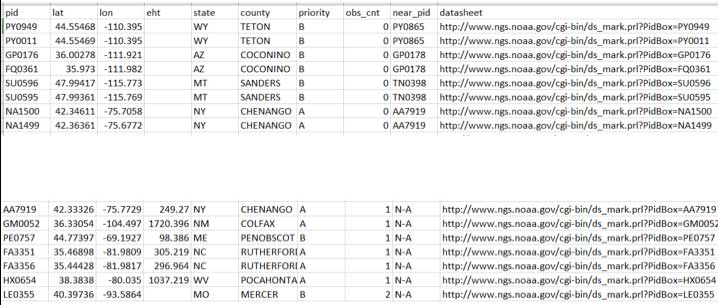
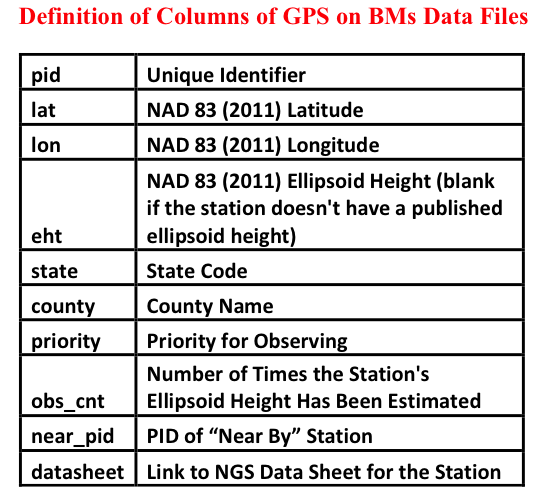
    As previously mentioned, the list of stations that NGS would like observed with GNSS are provided in three formats: excel spreadsheet, esri shapefile, and Google Earth kmz. The box titled “Sample Data Elements Extracted from the Excel File Titled “gpsonbm_priority_list_20180205.xlsx” provides a sample of the data from the excel file. The box titled “Definition of Columns of GPS on BMs data file” provide the columns and a brief definition of the data field.

    Sample Data Elements Extracted from the Excel File Titled “gpsonbm_priority_list_20180205.xlsx”

    The priority column has two entries – A or B. Priority A is more important than priority B. In other words, if the user has to make a choice, NGS would like the priority A station observed first. The obs_cnt field will be updated as users submit their OPUS Shared results. Remember, NGS is requiring two matching, independent GPS observations for the station to be included in the development of the hybrid geoid and transformation tool.

    The near_pid provides the pid of the station that is near the original station. The selection of the near_pid was based on the original station’s position and a search of the NGS database for a station within 5 to 15 kilometers of the original station. NGS’ analysis indicated that the original GPS on BMs station may have moved so an additional observation on the same station will not help to generate a hybrid geoid model that represents the current NAVD 88. It would warp the geoid model to fit the published NAVD 88 height but if the station moved since it was last leveled to, then it does not have a valid NAVD 88 height. As previously stated, when performing a geodetic survey, these stations would be identified as bench marks with invalid heights when following the appropriate Federal geodetic survey guidelines, procedures, and specifications. The surveyor would then level to another bench mark until they met the survey’s specifications. These bench marks with invalid heights should not be used in the hybrid geoid model just like they would not be used in controlling geodetic surveys. If the near_pid column is “n-a” then NGS would like the original station observed.

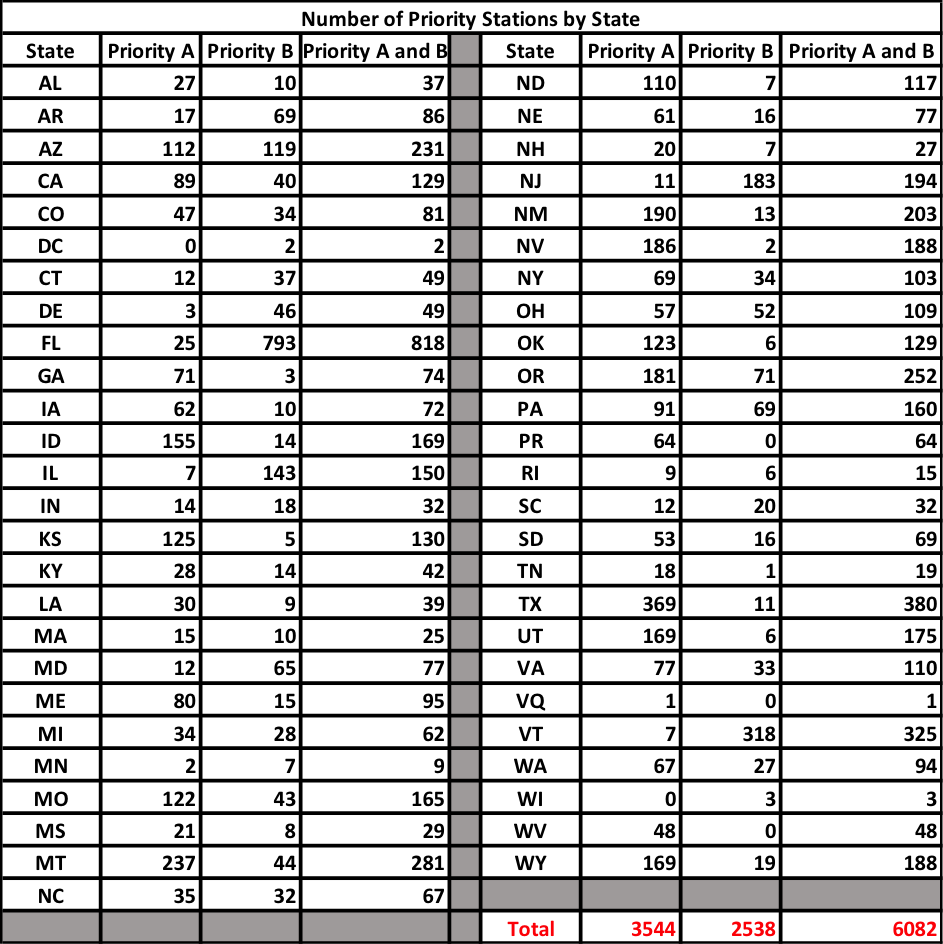
    The box titled “Number of Priority Stations in Each State” provides the number of priority A and B stations for every State in the lower 48, the District of Columbia, Puerto Rico, and the Virgin Islands. Overall, there are 6082 stations in the list – 3544 Priority A stations and 2538 Priority B stations.

    Number of Priority Station in Each State

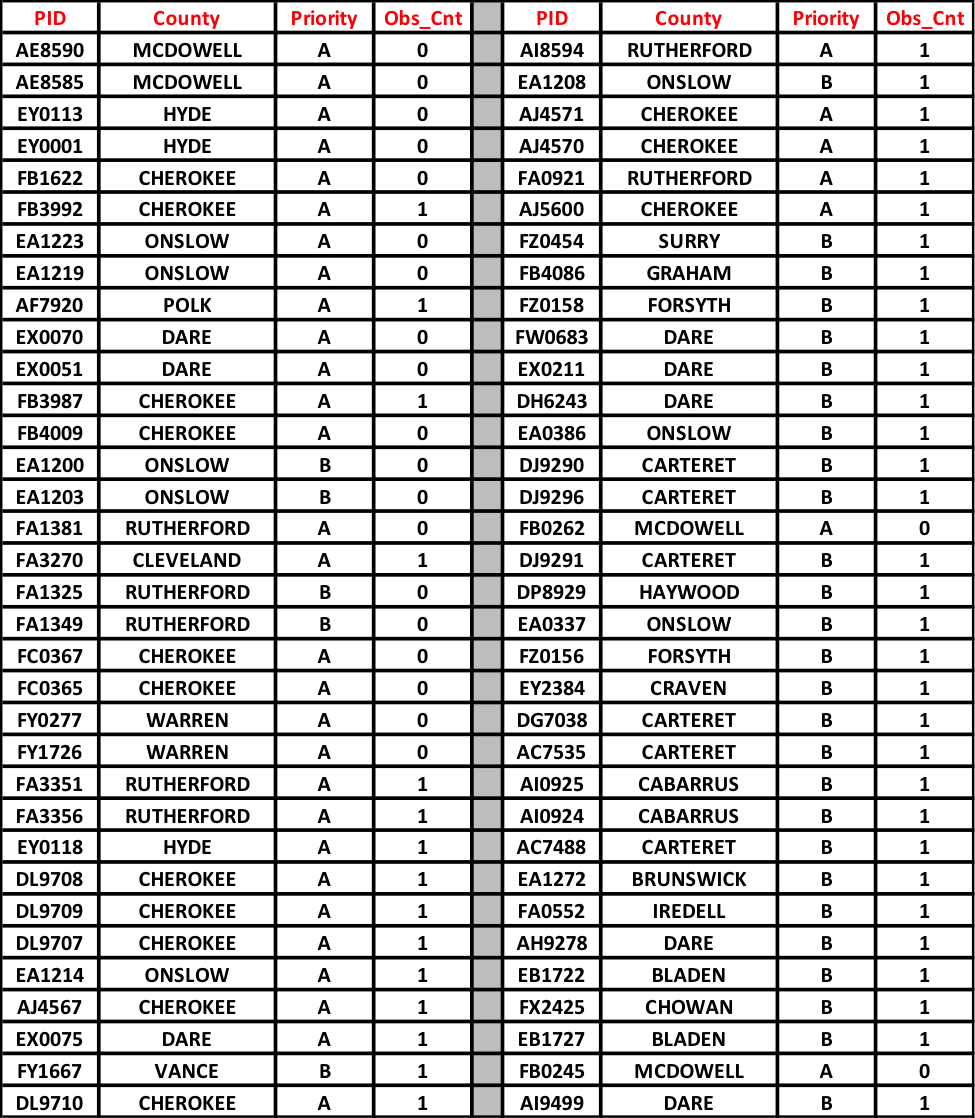
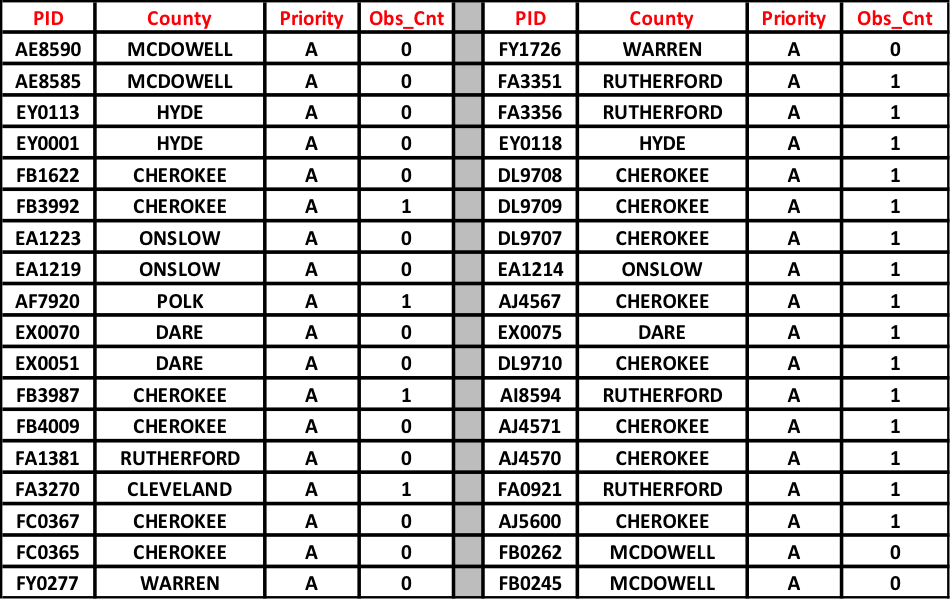
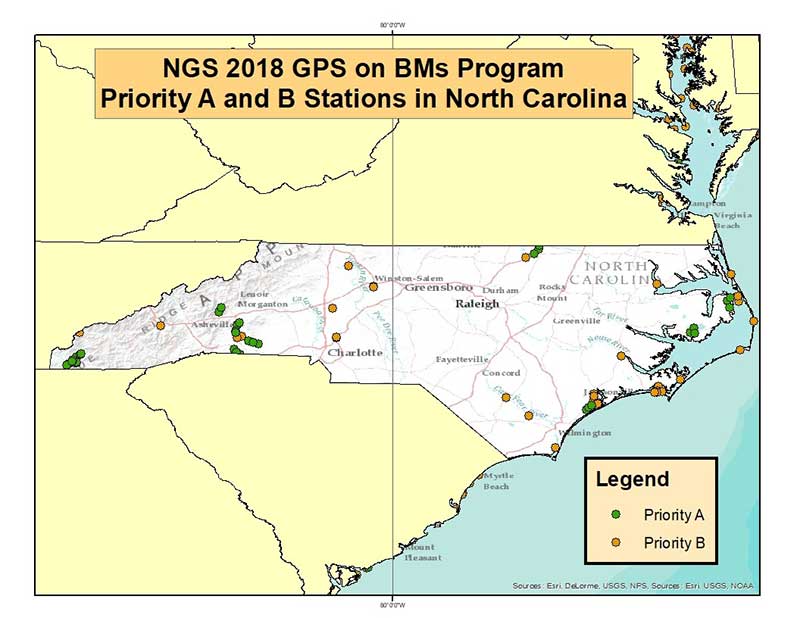
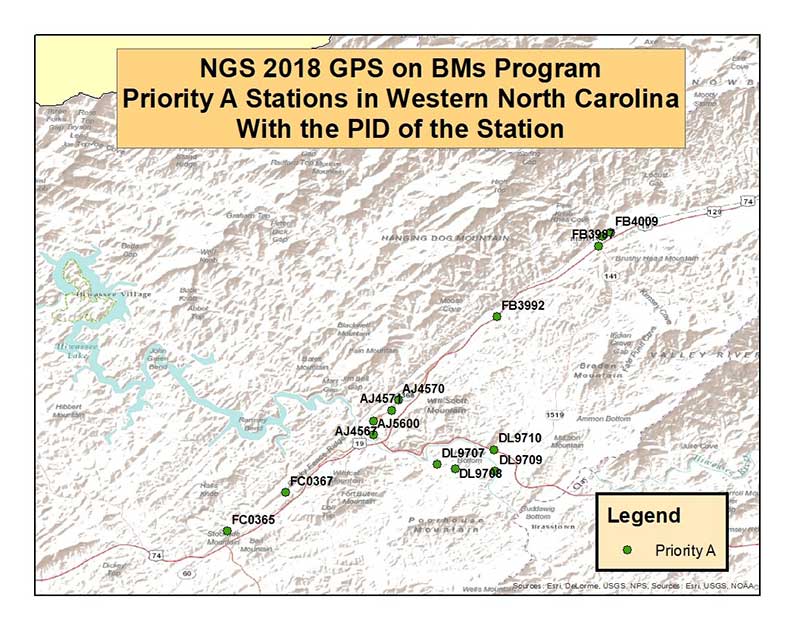
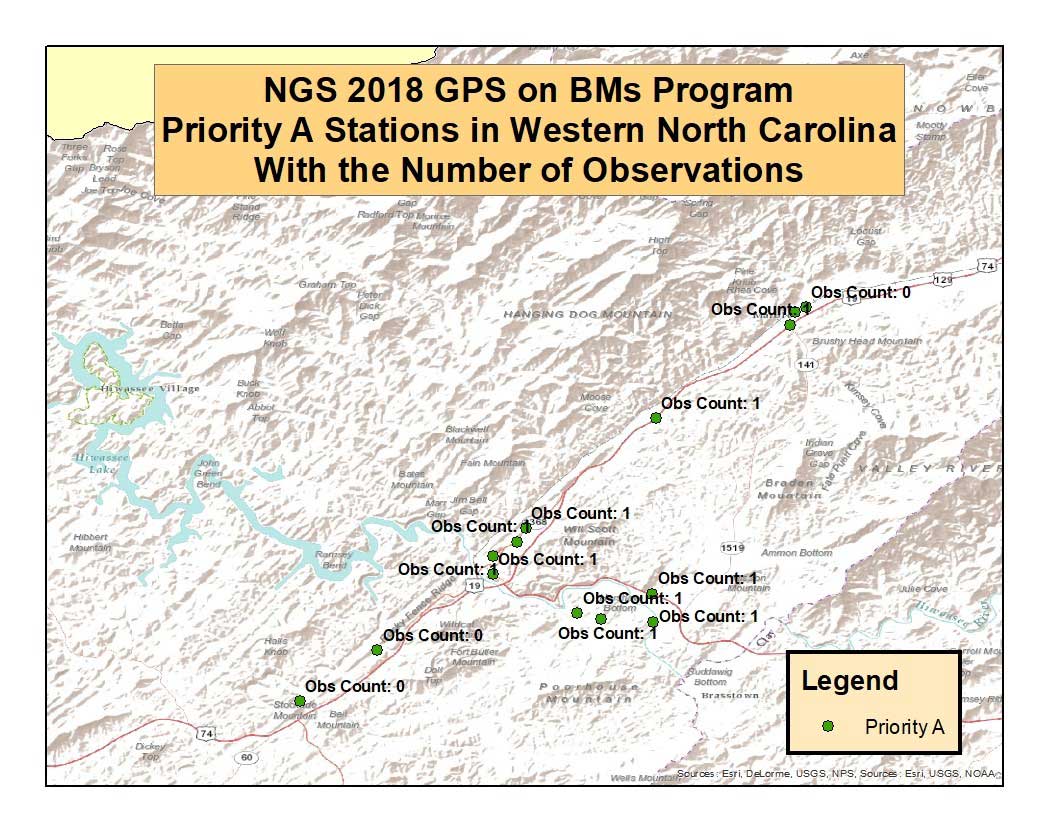
    As an example of a State in eastern United States, the box titled “List of PIDs of Priority “A” and “B” Stations in North Carolina” provides the list of priority A and B stations that need to be observed in North Carolina. The box titled “List of PIDs of Priority “A” Stations in North Carolina” provides the list of priority A stations in North Carolina. Figure 2, titled “NGS 2018 GPS on BMs Program, Priority A and B Stations in North Carolina,” depicts the locations of these stations. Figure 3 depicts the location and PID of the priority A stations in western North Carolina. Figure 4 depicts the same stations with their Obs_Cnt value.

    List of PIDs of Priority “A” and “B” Stations in North Carolina That Need to be Observed
    Information extracted from Excel File Titled “full_priority_list.csv”

    (Note: The stations in this table may not be the final list of priority A and B. The attached zip file contains the latest list of stations. The latest list was received too late to modify the table.)

    List of PIDs of Priority “A” Stations in North Carolina

    (Note: The stations in this table may not be the final list of priority A and B. The attached zip file contains the latest list of stations. The latest list was received too late to modify the table.)

    Figure 2 – NGS 2018 GPS on BMs Program – Priority A and B Stations in North Carolina.
    Figure 3 – NGS 2018 GPS on BMs Program – Priority A Stations in Western North Carolina With the PID of the Station.


    Figure 4 – NGS 2018 GPS on BMs Program – Priority A Stations in Western North Carolina With the Number of Observations.

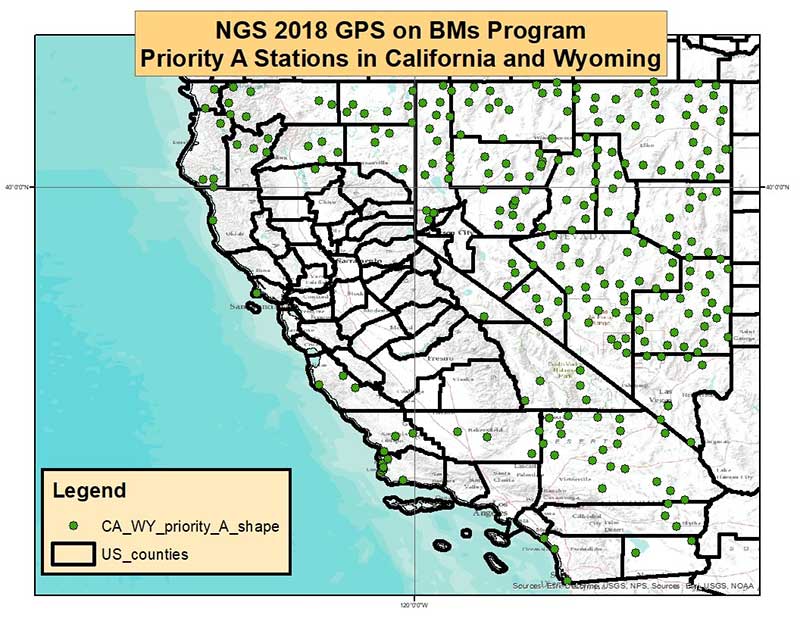
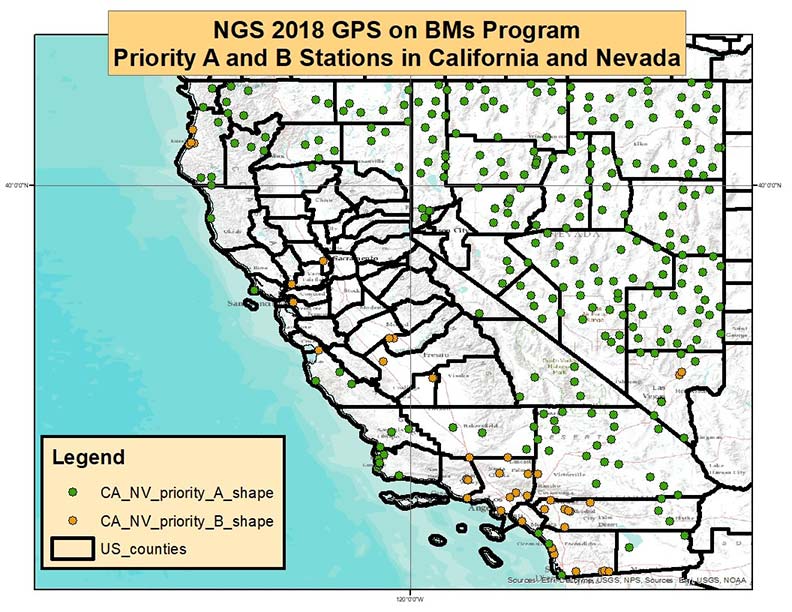
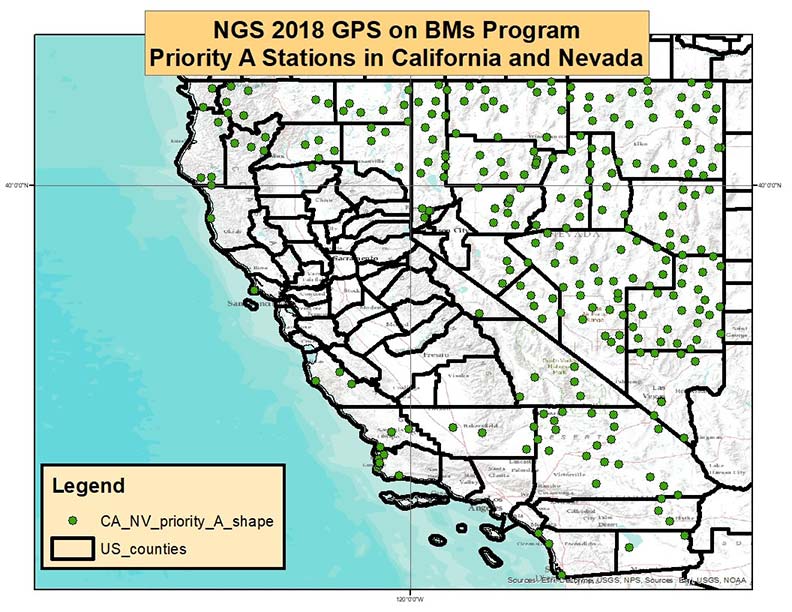
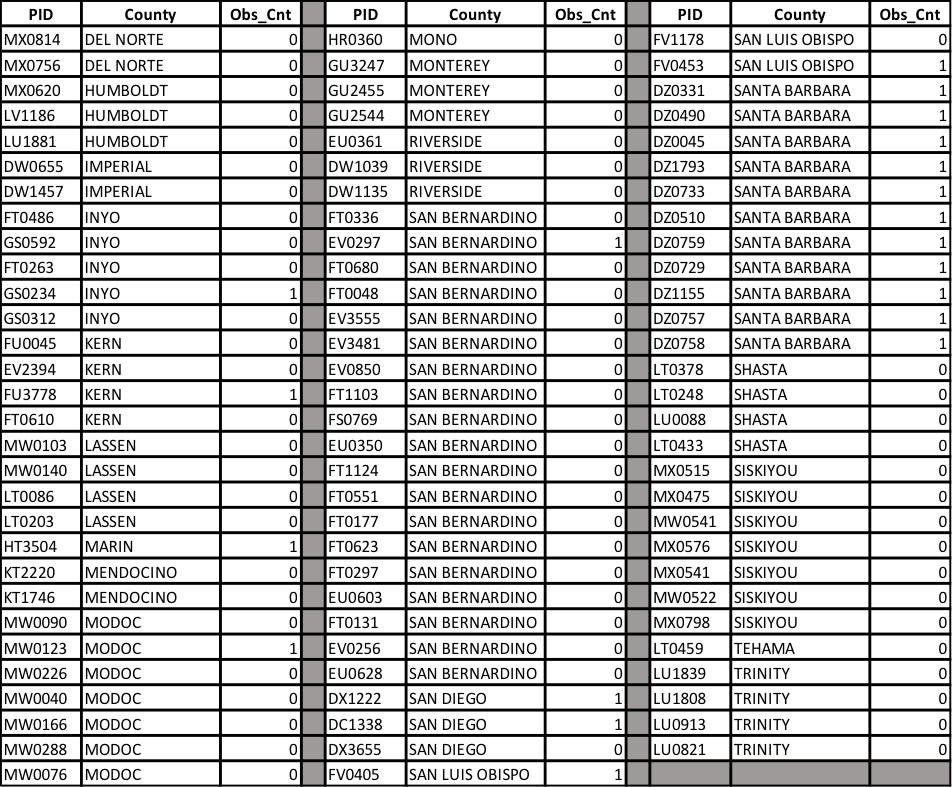
    For completeness, I will provide an example of a region in the western United States – California and Nevada. They are larger States than North Carolina and have more Priority A stations that need to be observed. Figure 5 depicts the Priority A and B stations in California and Nevada, and figure 6 depicts the Priority A stations in California and Nevada. It is recognized by NGS that managing how these stations are observed and who does what is a monumental task. Some state agency may undertake observing all of the Priority A stations; for example, Gary Thompson, Chief of the North Carolina Geodetic Survey, has committed to observing all of the Priority A stations (personal communication). Other States have County and City surveyors that will help observe and manage the process. All of the information provided in the 2018 GPS on BMs allow individuals to sort the data in ways that meet their needs. For example, the box titled “List of Priority “A” Stations by County in California” provide the list of stations in California by county.

    Figure 5 – NGS 2018 GPS on BMs Program – Priority A and B Stations in California and Nevada.
    Figure 6 – NGS 2018 GPS on BMs Program – Priority A Stations in California and Nevada.

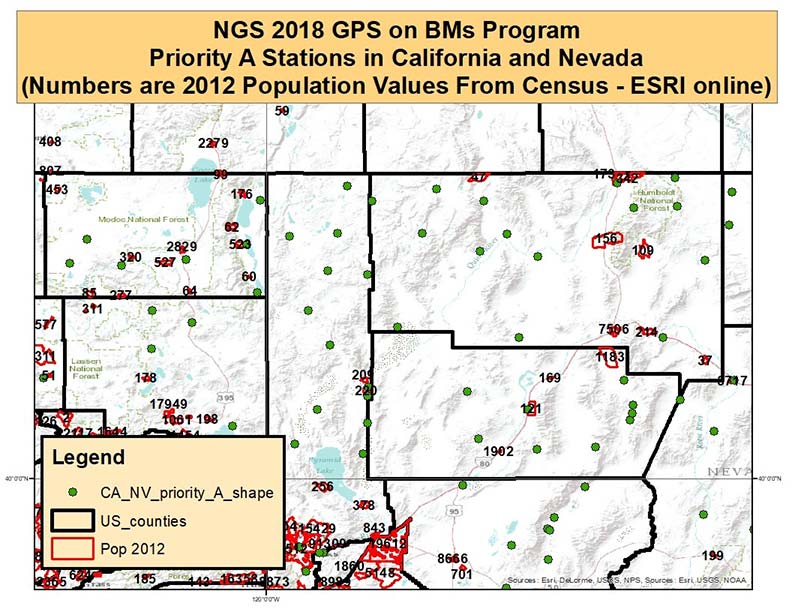
    It should be noted that NGS identified the priority stations based on hybrid geoid requirements. The NGS geoid team would desire a valid GPS on BMs observation every 30 km. Therefore, some of the priority A stations are in areas void of any GPS on BMs stations. There may be many reasons for this but, most likely, it’s because it’s located in an unpopulated or mountainous region of the county. Either way, it may be difficult to obtain observations at these stations. The new hybrid geoid model will be created using whatever data are available. In these void areas, the geoid will be controlled by the nearest GPS on BMs stations. There is nothing wrong with this approach. The only issue will be that it will not be possible to evaluate the relation of the hybrid geoid model and NAVD 88 in these void areas. Figure 7 depicts the priority A stations and the population of cities in Northwestern Nevada and Northeastern California. The figure indicates that these priority A stations are located in an unpopulated region of Nevada. It’s obvious why there’s no GPS on BMs in this region since nobody lives there but the geoid doesn’t depend on population. In any event, if the user can obtain an observation in these regions it will really help in creating an accurate hybrid geoid model.

    List of Priority “A” Stations by County in California

    (Note: The stations in this table may not be the final list of priority A and B. The attached zip file contains the latest list of stations. The latest list was received too late to modify the table.)


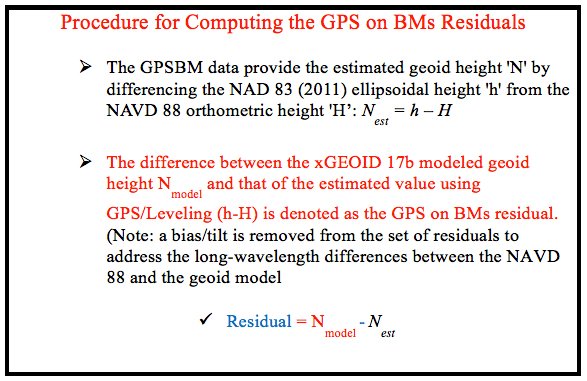
    NGS’ process for determining which stations were outliers and which stations should be re-observed involved analyzing both GNSS and leveling data from NGS’ database. The GPS on BMs residuals were computed using the procedure described in the box titled “Procedure for Computing the GPS on BMs Residuals.”

    Figure 7 – NGS 2018 GPS on BMs Program – Priority A Stations in California and Nevada. (Numbers are 2012 Population Values from Census – ESRI online)

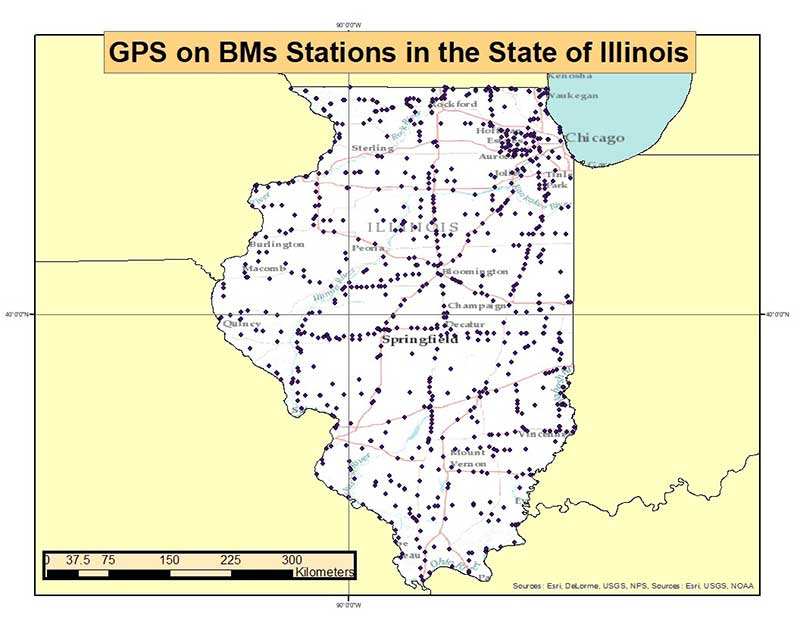
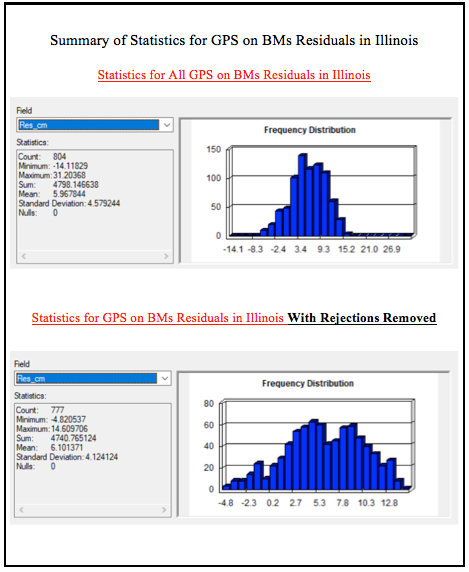
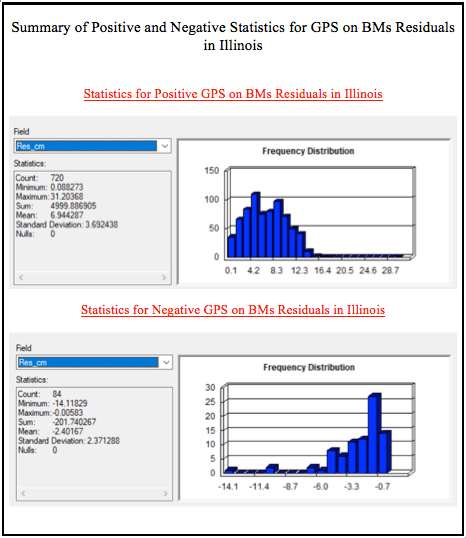
    Figure 8 depicts the location of the GPS on BMs stations in Illinois. The box titled “Summary of Statistics for GPS on BMs Residuals in Illinois” provides a summary of the GPS on BMs residuals for the State of Illinois. The results indicate that there are 804 GPS on BMs in Illinois and the residuals range between -14.1 cm to 31.2 cm. They have a mean of 6.0 cm with a standard deviation of 4.6 cm. The table titled “Statistics for GPS on BMs Residuals in Illinois With Rejections Removed” indicates that most residuals fall between 2 and 10 cm. The box titled “Summary of Positive and Negative Statistics for GPS on BMs Residuals in Illinois” provides a summary of the statistics for the positive and negative set of residuals.

    Figure 8 – GPS on BMs Stations in the State of Illinois.

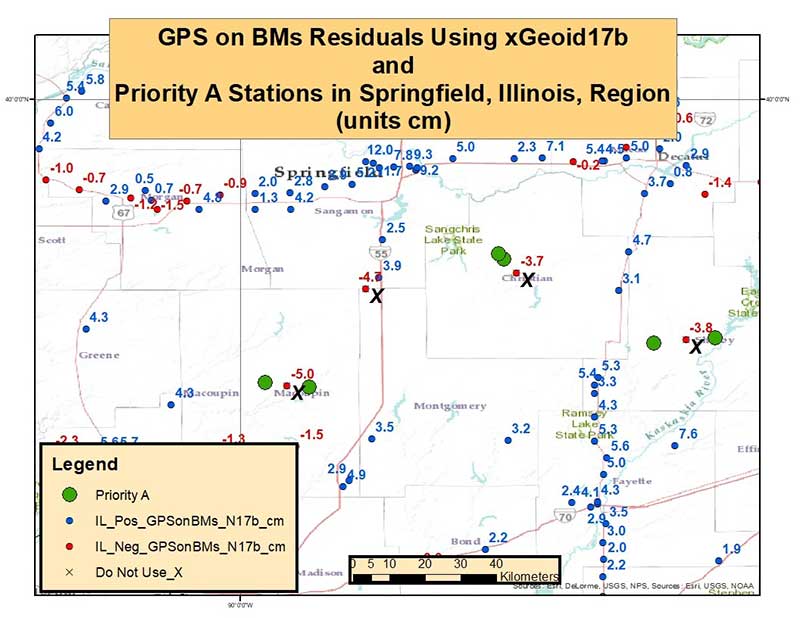
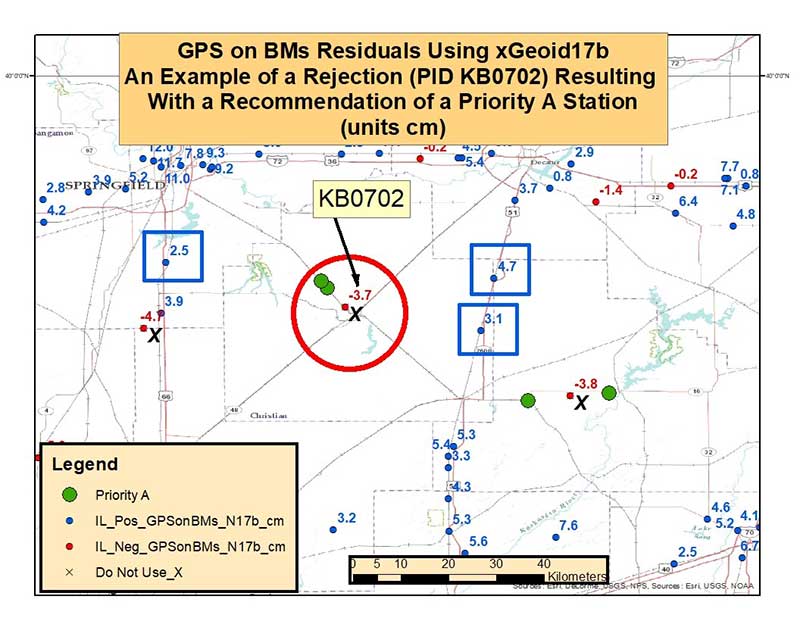
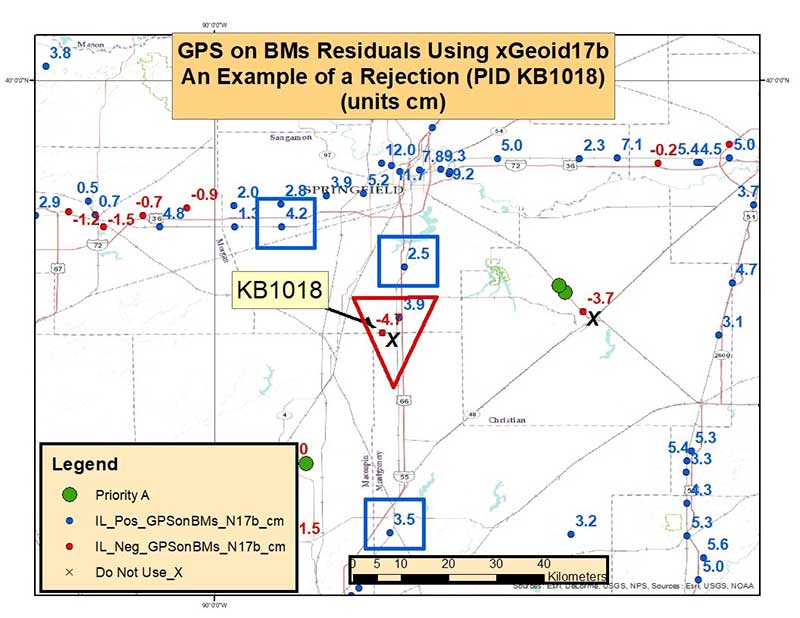
    Figure 9 depicts the GPS on BMs residuals in the Springfield, Illinois, Region. During the detailed analysis of the latest GPS on BMs dataset, the analysts identified outliers that appeared to be large relative to their neighbors. Figure 9 depicts these outliers with a “X.” Stations designated with a “X” are stations that were designated as DO NOT USE in the creation of the hybrid geoid model. Figure 9 also indicates were the analyst recommended that a station should be observed before the creation of the next hybrid geoid model. These stations are labeled as Priority A stations on figure 9. Figure 10 is an enlargement of the same area that depicts a station that was recommended to be rejected in the hybrid geoid model (PID KB0702). The stations surrounding PID KB0702 all seem to be consistent with each other (residuals in smaller blue squares) so the analyst recommended that station KB0702 be rejected. At the same time, by rejecting this station, this creates a void area that needs to be filled. Therefore, the analyst also recommended that a new station be observed here; hence, the two priority A station plotted near the rejected station. Figure 11 is a plot of another rejected station (KB1018) in the same region but, in this case, the analyst did not recommend an additional observation in the area because there was another nearby station (station in red triangle) that was consistent with its neighbors (residuals in smaller blue squares).

    Figure 9 – GPS on BMs Residuals Using xGeoid17b and Priority A Stations in Springfield, Illinois, Region (unit cm).
    Figure 10 – GPS on BMs Residuals Using xGeoid17b – An Example of a Rejection (PID KB0702) Resulting with a Recommendation of a Priority A Station (units cm).

    As previously mentioned, and provided in the box titled “Attributes Considered During Analysis,” several attributes were analyzed before making the recommendations but, typically, GPS on BMs residuals between +/- 5 cm were used to identify which stations needed to be investigated.

    Attributes Considered During Analysis

    ➢ Total number of GPS observations
    ➢ Date of last GPS observation
    ➢ Whether or not the GPS station has repeat baselines
    ➢ Total number of times the mark has been leveled to
    ➢ Date of latest leveling
    ➢ Quality of leveling

    Figure 11 – GPS on BMs Residuals Using xGeoid17b – An Example of a Rejection (PID KB1018) of an Outlier (units cm).

    This analysis is the first cut at identifying stations that should not be used in a hybrid geoid model and providing a list of specific stations that could help improve the hybrid geoid model. All new data received by the cut-off date of August 31, 2018, will be analyzed by NGS and, if appropriate, the results will be included in the next hybrid geoid model. This is a great opportunity to provide data that will help to improve the hybrid geoid model in your region. My next column will provide a status report on the 2018 GPS on BMs Program.