
Tag: GPSTrackIt

  • GPSTrackIt.com Adds Playback Feature to Fleet Manager

    gpstrackit_logoGPSTrackIt.com has enhanced Fleet Manager, its vehicle tracking and fleet management system, with new features that control how vehicles are displayed. Fleet Manager can now provide simultaneous playback of multiple vehicle trails as well as controls to turn on and off the display of landmark clusters on the map.

    The playback of multiple vehicle trails makes it possible for fleet managers to visually assess their routes to determine if there are overlaps where one driver’s route is encroaching on another’s. Routes can then be modified to increase operational efficiency.

    If a single vehicle is driven by multiple drivers during the course of a day this feature can display each shift by using different colors.

    “This was another suggestion from one of our customers,” said Eddie Bermudez, GPSTrackIt’s product development manager, in a news release. “We thought it was a great idea and immediately put it into development.”

    Another suggested enhancement from a customer was the ability to turn on and off the display of landmark clusters on the map.

    “We pride ourselves in being responsive to requests for enhancements from customers,” Bermudez said. “This just gives our customers that much more flexibility in configuring how objects on the map are displayed.
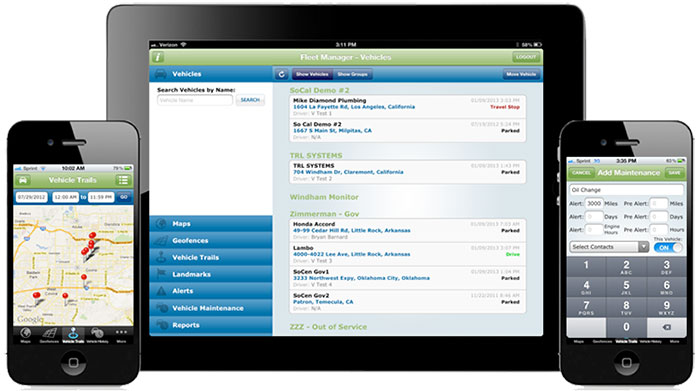
  • GPSTrackIt Offers Android Apps for Mobile Workforce

    Two new products from GPSTrackIt.com offer users of their Fleet Manager vehicle tracking, fleet and workforce management system new tools for navigating, routing and communication.

    Field Service Manager provides access to Fleet Manager’s route planning and navigation system. New stops can be pushed out to the tablets from dispatch. It enables drivers to add stops to their route on the fly. Push notifications also alert the driver to incoming messages, regardless of which page in the app they are currently viewing.

    GPSTrackIt Forms takes the communications component of the FSM to a new level. This tool provides the ability to quickly create forms to capture everything from text to photographs to signatures.

    “The new forms tool is really powerful,” said Eddie Bermudez, GPSTrackIt.com’s product development manager. “Part of it’s power is the ease of use. The different field types are created by clicking a button and adding a field label. It’s that easy.”

    GPSTrackIt Forms provides unlimited forms. Form data can be captured offline and updated later. The tool provides 24 preset field types, including text, video and a document viewer.

    “The forms aren’t just dumb collectors, either,” added Bermudez. “There’s a rules engine that facilitates skip logic and branching. And the forms can have embedded formulas and perform advanced calculations, including formula-based form scoring.”

    The form tool can also export data to Excel, PDF, CSV, and JSON formats. “These two tools combined provide drivers and the back office with an amazing array of opportunities to collect data about their customers, as well as their own customer service,” Bermudez said.

  • GPSTrackIt.com Fleet Manager Now Supports Multiple Vehicle Groups

    Photo: GPSTrackIt.com
    Photo: GPSTrackIt.com

    GPSTrackIt.com has added the ability to allow vehicles in Fleet Manager, its fleet and mobile workforce management system, to simultaneously belong to multiple groups. The feature enables groups to be “nested,” expanding the reporting and alerting capabilities of Fleet Manager.

    “A vehicle belonging to more than a single group now appears in the list for each group selected,” said Eddie Bermudez, GPSTrackIt.com’s product development manager. “Units in two groups will appear twice, once in each group.”

    Vehicle membership in multiple groups can be seen in the following changes to Fleet Manager:

    • The Vehicle Status page has been augmented with a selection/filter list for groups.
    • On the Map page, the information bubble for the unit displays all group tags.
    • The Analytics Dashboard can now compare two groups containing the same unit.
    • Scheduled Reports can be run using multiple groups.

    “This enables the creation of ‘nested’ or vehicle sub-groups,” Bermudez said. “Say there are sales teams at local offices. Each office has a ‘sales team’ vehicle group. But the regional sales manager is responsible for five locations, so the vehicles are also in the ‘regional sales team’ group.”

  • GPSTrackIt Monitors Fleet Health With Vehicle Diagnostics

    GPSTrackIt now offers Vehicle Diagnostics through its Fleet Manager dashboard to give fleet operators information about a fleet’s health in real time. The information is the same as that used by professional mechanics to identify why a check engine light is on.

    Since 1996, vehicles sold in the United States have been equipped with an On Board Diagnostics (OBDII) port. Mechanics plug a handheld computer into the port to read the codes produced by the on-board computer. GPSTrackIt offers two ways to gain the benefits of vehicle diagnostics — with its new CP3000V plug-and-play device or the L2000V adapter cable.

    The vehicle diagnostic codes received are used to determine the health of the various systems (ABS, Airbags, etc.) throughout the entire vehicle. In addition to the engine codes themselves, the system reports on a variety of indicators and parameters related to the codes.

    “A key feature is that this engine diagnostic data can be used to trigger SMS text or email alerts,” said Eddie Bermudez, GPSTrackIt’s Product Development Manager. “These alerts would be sent to designated personnel. Being able to identify problems early helps reduce and often times eliminate costly repairs.”

  • GPSTrackIt.com Adds Hard Turns to Driver Safety Alerts

    GPSTrackIt.com has introduced a new Driver Safety Alert that tracks hard turns. Driver Safety Alerts already track and report driving behaviors like rapid acceleration, hard braking, and seatbelt usage. GPSTrackIt engineers have now added the ability to identify “hard turns” to the alert list.

    Driver Safety Alerts are used by businesses across the country to help dispatchers and managers understand how drivers are doing in the field.  Businesses ranging from small-to-medium sized service companies to large transportation companies with fleets of hundreds of vehicles are able to help drivers understand the importance of safe driving behaviors.

    “Drivers represent their employers to the public,” said Eddie Bermudez, GPSTrackit.com’s product development manager.  “A vehicle that is driven badly or, more to the point, dangerously, does not reflect well on that employer.  These alerts notify managers and dispatchers via email or SMS text messages when their drivers are driving in a potentially aggressive manner.”

    Rapid acceleration and hard braking are indicators of bad driving behaviors that also impact a vehicle’s mileage.  Seat belt alerts indicate that the vehicle is moving while the driver’s seat belt is unfastened.  Statistics show that wearing a seatbelt dramatically reduces deaths and injuries from collisions.

    “Hard turns are another driving behavior that puts the driver and vehicle at additional risk,” continued Bermudez.  “It also puts additional wear on a vehicle.  We were able to utilize the accelerometer and gyroscope technologies built into the GPS tracking devices in a similar manner to the hard braking alert.”

    According to the National Transportation Highway Safety Administration’s 2008 report to Congress, “National Motor Vehicle Causation Crash Survey,” about 36 percent of vehicles involved in collisions were turning or crossing at intersections just prior to the crashes.

    “When we’re making a turn, we become more vulnerable,” added Bermudez. “Clearly in a left turn situation you’re putting your vehicle in the path of oncoming traffic.  But right turns can be hazardous as well to both pedestrians and drivers. Turn too soon and you clip the curb, which doesn’t do much for your wheel alignment.  Turn too late and you could end up making a wide turn.  If the device on the vehicle transmits a hard turn event, Fleet Manager checks if an alert is configured for that vehicle.  If so, it sends the time, date, and location information to the email and/or text recipients.”

  • GPSTrackIt Announces New Analytics Dashboard

    GPSTrackit’s Fleet Manager Software now features an Analytics Dashboard that enables fleet managers to monitor and review fleet performance by reviewing historical data in a series of charts and graphs. Fleet Manager is a robust application providing fleet owners and managers with a comprehensive suite of integrated tools, GPSTrackIt said.  The system delivers real-time GPS vehicle tracking, vehicle maintenance scheduling, and a wide range of alerts. The Analytics Dashboard brings to the system a new array of powerful and flexible capabilities.

    “It puts the information fleet managers and owners need at their fingertips,” said Eddie Bermudez, GPSTrackIt’s product manager.  “We already provide all the historical data via the reports system. This new feature brings that data to life with dynamic graphics.”

    The dashboard displays up to six charts, which can be configured as bar charts or pie charts. Each chart can focus on particular issues important to fleet owners, managers and dispatchers: Idle Time, Drive Time, Stop Time, Speeding and Mileage.

    “The charts can be configured to show data for all units or a single group,” explained Bermudez. “Or a chart can compare groups by displaying their data side-by-side using different colors.”

    In addition, three composite charts are available; Engine Time, which monitors idle time and driving time; Driving Overview, which monitors idle time and driving time and stop time; Idle Stop, which monitors idle time and stop time. The time metric determines which historical data is used. Options available are week, month, quarter, and year.

    “Charts can be rearranged on the dashboard by dragging and dropping,” added Bermudez.  “And there are several additional options that can be configured. Chart labels of up to 25 characters can be added. The start of day can be set to any of the 24 hours. For bar charts, the average value can be shown superimposed on the graph.”

    Bermudez continues, “The Analytics Dashboard can also display the highest or lowest values for a given graph. This can be configured to show values from one to 20. Selecting Highest and a numerical value of five on an Idle Time chart, for example, displays the five vehicles with the highest values for idle time.”

    “This is important for fleet managers to know because of added fuel consumption, as well as vehicle wear,” according to Bermudez.  ”Selecting Lowest and a numerical value of ten on a Speeding chart shows the ten vehicles with the lowest incidence of speeding.”

  • GPSTrackIt Announces Financial Incentives for Acquiring Fleet Tracking Systems

    GPSTrackIt announces new financing options that significantly reduce the initial cost of implementing its Fleet Manager system and GPS tracking devices. The new “No Pay Until 2014” financing plan program postpones hardware payments until January. This includes documentation fees and the monthly payment, reducing the cost of entry to a flat $24.99 per unit for service. This offer applies to deals of $2,500 or more. Credit must approve the transaction and any term length over 36 months.

    Also, the Internal Revenue Service’s Section 179 offers tax incentives for businesses, enabling owners to deduct equipment costs and by providing rebates. The deduction limit for Section 179 is now $500,000. The 2013 Section 179 deduction threshold for total amount of equipment that can be purchased is now $2,000,000. Most new and used equipment, as well as some software, qualify for the Section 179 deduction. Only new equipment purchased in 2013 qualifies for the “50% Bonus Depreciation.”

    For more information about GPSTrackIt, their new financing options, or their Fleet Manager vehicle tracking system, visit their website at gpstrackit.com.

  • GPSTrackIt Adds Features to Fleet Manager System

    Two new features have been added to GPSTrackIt’s Fleet Manager vehicle tracking system. Route Optimization evaluates the stops in a route and rearranges them to produce the most efficient ordering of the stops. In addition, fleet managers and dispatchers can now compare a route with the actual vehicle trail recorded by the system.

    “Route Optimization has several benefits,” according to Eddie Bermudez, GPSTrackIt’s product manager. “It streamlines the route, which means less time is spent driving around. That saves fuel, which helps you run a greener fleet. It also saves money and improves customer service. Optimizing a route may allow for additional stops to be added.”

    While optimizing a route on the system is one thing, it’s another whether the driver actually drove the route assigned. Fleet Manager’s Vehicle Trails feature can map out Ignition On/Off, Travel Start/Stop, and Drive events for a set date and period. The software has been modified with a route selection list and a button that displays the route superimposed over the vehicle trail.

    “This enables a dispatcher or fleet manager to compare a driver’s plotted route to their vehicle trail,” Bermudez added. “Managers can determine whether drivers are making unscheduled or unauthorized stops.”

    For more information about GPSTrackIt, their new features, or their Fleet Manager vehicle tracking system, visit the website.

  • GPSTrackIt’s Driver Key Fob Aid in Timekeeping, Driver Accountability

    A small device the size of a flash drive brings a new level of accountability to fleet drivers, providing a tool for timekeeping that will help the back office by verifying driver time sheet information, according to GPSTrackIt.

    “The device itself is simple,” explained Eddie Ramirez, GPSTrackIt’s product manager. “Each device is an electromagnetic ‘key’. The driver must seat the face of the key in a receptacle wired into the vehicle’s electrical system so that it can be read.”

    The device has a 16-digit code, or hex number, associated with it. The number is embossed across the face of the device. That number is the device’s electronic signature.

    “When the key fob is seated in the reader the system checks the hex number encoded on it,” Bermudez continued. “It uses the key number to identify the driver. This enables fleet managers to have multiple drivers assigned to the same vehicle, optimizing their use of fleet resources. And it increases driver accountability — reports can be run to evaluate the behaviors of specific drivers.”

    It also helps out in the back office when it comes to verifying time cards, according to the company. When the driver uses the key fob to identify himself, it also registers a “clock in” on the system’s time clock. Drivers use the key fob at the end of their shift to clock out. If a driver forgets to clock out, the clock-in by the next driver automatically clocks the previous driver out.

  • GPSTrackIt Releases Fleet Productivity Tool for Tablets

    GPSTrackIt has released a fleet management tool called Driver, a website that enables drivers using tablet devices such as iPads and Androids to send and receive messages and plan routes.

    The site provides drivers with two-way communication by chat or forms with dispatchers and fleet managers. It also provides them with route management and timekeeping utilities. Driver compliments GPSTrackIt’s recent releases for smartphones and tablet apps for dispatchers and fleet managers.

    According to Eddie Bermudez, product manager, GPSTrackIt’s vehicle tracking system has been enhanced with Field Service Manager (FSM). “The FSM is the control center for all of the mobile workforce management tools available through the Driver website. Dispatchers and fleet managers use the Field Service Manager to create and send messages. The can build Quick Messages and Quick Responses that drivers can select from a list. They can also create forms with multiple questions, and multiple choice answers that streamline the communications process.”

    Dispatchers enter stops and build routes using the FSM. The routes can be rearranged as new stops are added, saving drivers time and reducing the need for them to call in. The routes are pushed out to the drivers, who can then display them on maps and list out the directions. They can also use a third-party navigation app to render true turn-by-turn directions.

    Soon Driver will provide route optimization. “Driver will look at all the stops and do the arranging for you,” said Bermudez. “It will evaluate the relative distances and calculate the most efficient route.”

    In addition, the FSM also provides a mobile time clock. “This enables drivers to clock in and out using the tablet,” Bermudez said. “That data, as with the chats, stops, and forms, can be reported on using Fleet Manager’s reports. It provides fleet managers with a verification tool for employee timekeeping.”

    One of the other advantages to using a tablet device is that it offers users a wide variety of useful mobile apps.

    “Tablet devices provide our customers with a platform that not only connects them to the Fleet Manager system, but many other productivity tools,” adds John Stull, President and founder of GPSTrackIt. “Drivers can make use of other apps and peripherals to do credit card transactions, scan and transmit contracts, and perform many other important tasks.”