Tag: MicroSurvey

  • MicroSurvey CAD 2020 released

    MicroSurvey CAD 2020 released

    Photo: MicroSurvey
    Photo: MicroSurvey

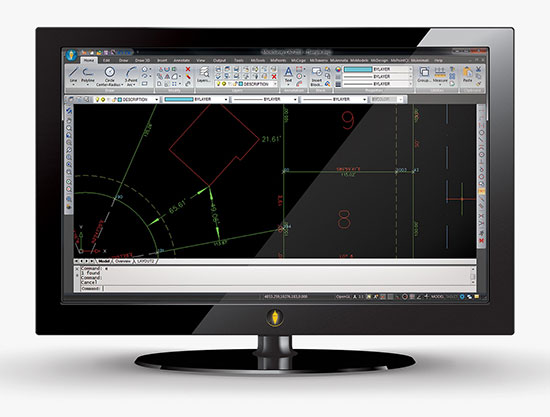
    MicroSurvey has released MicroSurvey CAD 2020. MicroSurvey CAD is powered by the latest IntelliCAD 9.2 engine, providing users with unencumbered survey drafting and calculation workflows, including COGO, point tools for gridline-based projects, traverse input and adjustment, misclosure reporting, common data collector support, 3D surface representation and computation, corridor design, point cloud management and more.

    MicroSurvey CAD is perpetually licensed and is powered by IntelliCAD, which is compatible with AutoCAD drawing files. With five available feature levels — Basic, Standard, Premium, Ultimate and Studio — MicroSurvey CAD gives users the choice between several tiers of features to ensure they are getting precisely the tools and price point they need.

    Notable improvements in MicroSurvey CAD 2020 include:

    • IntelliCAD 9.2 which includes full support for AutoCAD 2018-2020 .dwg files, performance enhancements, new BIM tools, a block editor, start page, drawing cleanup tools, selection cycling, digital signatures, and much more;
    • Arc Labels have been drastically improved to utilize ArcAlignedText objects, which can be slid along an arc or polyline arc, in/out from the radius point, flipped upside down, and detected in the Lot Closure routine. Text on Arc also utilizes the ArcAlignedText objects to be editable as a single entity;
    • Upgraded CSMap Library includes over 125 new coordinate systems for Africa, Asia, Europe, Australasia and the U.S.

    Details are available in the MicroSurvey CAD 2020 Release Notes.

  • MicroSurvey releases FieldGenius for Android

    MicroSurvey releases FieldGenius for Android

    FieldGenius for Android, v1. (Image; Hexagon)
    FieldGenius for Android, v1. (Image: Hexagon)

    MicroSurvey Software, part of Hexagon, has released its new field data-collection software platform for Android users.

    FieldGenius for Android, version 1.0, is first release of the company’s new multi-platform field software built on the Android platform. It supports most popular GNSS sensors on the market today.

    FieldGenius is third-party, brand-neutral data-collection software used by many surveyors. The new release builds on decades of innovation MicroSurvey has invested into the original FieldGenius software, providing users with an easy-to-use and intuitive mobile data-collection software package for the next generation.

    New features include dynamic data panels synchronized with the map views. A fresh user interface provides familiarity for existing FieldGenius users while offering new tools, simplified workflows and readily available data that surveyors require at the point of work to make informed decisions in the field.

    “Surveyors, dealers, and distributors from every corner of the world have been demanding an Android based version of MicroSurvey FieldGenius for years,” said Marc Veinotte, global sales and OEM manager at MicroSurvey. “This is the first release of our new multi-platform field data collection software that will provide a consistent user experience across a wide cross section of data collection devices. MicroSurvey continues its hardware neutrality strategy offering support for almost every brand of popular and upcoming GNSS receiver on the market today.”

    Early adopters of FieldGenius for Android will receive additional benefits and participate in the newly created MicroSurvey Technology Innovation Group (MTIG).

  • MicroSurvey CAD 2016 provides new capabilities for survey

    MicroSurvey CAD 2016 provides new capabilities for survey

    Photo; MicroSurvey CAD

    MicroSurvey Software has released MicroSurvey CAD 2016, the newest generation of its desktop survey and design program for land surveyors and civil engineers. Powered by a new IntelliCAD 8.1a engine and enhanced with a suite of new point-cloud management tools, the software makes high-impact drafting and design fast and intuitive, the company said.

    Users on multi-core computers will experience up to 300 percent faster performance compared to previous versions, which substantially improves productivity. Navigation has been enhanced through a new ribbon interface with high-resolution icons that provide easy access to frequently used tools. The newest version of the software is also able to open and export DGN files, handle annotation scaling, and publish drawings as DWF/DWFX, PNG and JPG files.

    Point Clouds. The new release includes significant enhancements for working with point clouds. The Ultimate and Studio versions of the software are now powered by the same point-cloud engine that drives Leica Cyclone and CloudWorx software, making it possible to directly import Leica Cyclone and Leica JetStream databases using Cyclone dialogs.

    Users can view panoramic photographs captured by the laser scanner and snap to points directly from the photographs in a TruSpace window. Point-cloud data is now displayed directly within the CAD model space, and users can snap to the point-cloud points using standard CAD tools.

    MicroSurvey CAD is compatible with field data from all major total stations and data collectors and is fully compatible with AutoCAD. It includes complete survey drafting, COGO, DTM, traversing, volumes, contouring, point-cloud manipulation and data-collection interfacing. No plug-ins or modules are necessary. Both a 64-bit version and a 32-bit version of the software are available.

  • MicroSurvey FieldGenius 8 Provides Control in Field Data Collection

    The newest version of MicroSurvey FieldGenius delivers expanded toolsets and enhanced capabilities for fast, accurate and complete field data collection, according to maker MicroSurvey Software. FieldGenius 8 was developed through close market collaboration and feedback from users, and provides tight control over crucial aspects of field data collection through expanded toolsets and an enhanced user experience, the company said.

    Benefits of the new release include:

    • Easy GNSS Local Transformation. A redesigned interface provides a streamlined workflow along with the ability to export/import localization files and use Helmert transformation.
    • Enhanced DXF Support. Blocks, extrusion vectors, circles, and other entities are now supported in DXF file format for faster and easier drawing import.
    • Advanced Point Averaging.­ The routine allows users to take multiple GNSS and/or TPS temporary measurements of a point and calculate an averaged position for increased accuracy and reliability.
    • All-New Electronic Bubble. Integrated inertial sensors are now supported, which enables tilt compensated surveying on selected receivers and improves efficiency at difficult job sites.
    • Native Unicode Support.­ Unicode character encoding has been implemented throughout the program. International users can now use their own language for data entry inside FieldGenius.
    • Simplified GIS Mapping.­ GIS attributes can now be easily added to figures. In addition, users can quickly access default/previous values for both points and figures to make mapping tasks even easier.

    FieldGenius 8 also includes improvements to road alignments, an onboard basic measurement mode, dynamic screen rotation, and expanded ASCII export options. Additionally, supported coordinate systems, geoids, instruments, and data collectors has been expanded, making it easier to integrate into existing survey operations.

  • MicroSurvey CAD 2015 Update Released

    MicroSurvey has released MicroSurvey CAD 2015, a major update to its desktop survey and design program for land surveyors and civil engineers.

    The latest release is powered by the all-new IntelliCAD 8 engine and is the first 64-bit version of MicroSurvey CAD. According to Brian Sloman, development manager at MicroSurvey, “The 64-bit architecture allows MicroSurvey CAD 2015 to access and use more system resources, and in a more efficient manner, unlocking the incredible potential of a modern workstation. With the 64-bit version of MicroSurvey CAD 2015, users will experience faster and smoother drafting and calculation operations, and can work with larger drawings and more points.”

    MicroSurvey CAD 2015 can read and write the latest .dwg files for compatibility with AutoCAD 2015 and has improved object enablers for drawings from Civil 3D. It also includes several new capabilities driven by requests submitted by users through MicroSurvey’s online feature request system. For example,  layer filters and layer states have been integrated directly into the IntelliCAD Explorer; a dynamic licensing system makes it easy to switch product levels; the AutoMAP Library, which controls how points and figures are presented, has been enhanced with new capabilities; bearings and azimuths of lines can now be instantly viewed in alternate reference systems; the point clusters tool lets you draw exaggerated error vectors for visually comparing coordinate changes between design and as-built points or during deformation studies; additional point cloud data formats are supported; and much more. (Watch the videos here.)

    MicroSurvey CAD is compatible with field data from all major total stations and data collectors and is fully compatible with AutoCAD. It includes complete survey drafting, COGO, DTM, traversing, volumes, contouring, point cloud manipulation and data collection interfacing. No plug-ins or modules are necessary. In addition to the 64-bit version, a 32-bit version of the software is also available.

    To learn more or download a free demo, visit www.microsurvey.com.

  • MicroSurvey Releases 2014 Survey Drafting Software

    MicroSurvey embeddedCAD 2014.
    MicroSurvey embeddedCAD 2014.

    MicroSurvey announces the release of MicroSurvey inCAD 2014 and MicroSurvey embeddedCAD 2014.

    MicroSurvey inCAD 2014 is a plugin that transforms AutoCAD into a survey and design powerhouse, MicroSroSurvey said. It adds the MicroSurvey feature set to the latest Autodesk software — including AutoCAD 2014, AutoCAD Civil 3D 2014, and AutoCAD Map 3D 2014 — to offer a complete survey drafting toolkit, including COGO, DTM, traversing, adjustments, volumes, contouring and more.

    MicroSurvey embeddedCAD 2014 is a standalone application powered with Autodesk technology that includes the latest AutoCAD OEM 2014 enhanced with the suite of MicroSurvey tools. Like inCAD 2014, it incorporates the full suite of survey drafting tools. MicroSurvey embeddedCAD 2014 includes a licensed copy of AutoCAD OEM 2014, and it opens and saves AutoCAD 2014 drawing files, so implementing it in existing AutoCAD environments is without conflicts.

    Both releases are built specifically for the demanding needs of land surveyors, contractors and civil engineers, and include many new features requested directly from customers. “Several years ago we implemented a transparent and easy to use online feedback forum where our customers could submit their ideas and suggestions for improvements to our products,” said Darcy Detlor, president of MicroSurvey. “The feedback system lets our users propose their feature requests and allows them to cast votes on any request that has been submitted. Requests with the most votes are given the highest priority and get our attention, ensuring that we are working on features that our customers really want.”

    MicroSurvey focused its development efforts on adding several new geodetic tools, hundreds of new coordinate systems, and geoid files. Users can now store and edit points using their latitude and longitude values, view combined scale factors and convergence angles at any point in their drawing or project database, and transform between ellipsoidal and orthometric elevations using geoid files. Other powerful new productivity tools include a 2D draw mode for creating a 2D drawing while maintaining 3D elevation data, as well as rescaling tools for changing the base drawing unit of an entire drawing or specific text.

    Both MicroSurvey inCAD 2014 and MicroSurvey embeddedCAD 2014 are available in two feature levels — Premium and Standard — giving users the choice between two tiers of features to ensure they are getting precisely what they need.

    Free trial versions of the software can be downloaded from the MicroSurvey website.