Macy’s added Shopkick indoor location beacons in preparation for holiday shopping. (Photo by Nicholas Eckhart is licensed under CC BY 2.0.)
This year was filled with hope and some success for the location industry. In what was probably the biggest deal, Qualcomm bought United Kingdom-based CSR for $2.5 billion — at the same time, spinning off its own location beacon company, Gimbal. While the connected car continued to get a lot of press at the biggest trade shows, indoor location technology matured to a point that many retailers are believing it’s a way to get consumers back into the stores — and away from their computers.
As we come to the end of 2014, many industry observers view indoor technology and markets to be like where outdoor location was in the early 1990s: many technologies and providers all pushing different solutions. However, the gap between the beneficiaries of the market, the retailers and brands, and the indoor location technology providers is narrowing as tests become more prevalent.
Such retailers as Walgreens, Home Depot, Lowe’s, Macy’s and CVS have rolled out, or planning to launch, tests that include indoor mapping and a product locator.
“iBeacons and other beacons proved to be the fastest location-proximity technologies that are being deployed full scale by Macy’s, CVS and other retailers for a first quarter 2015 rollout,” said Kris Kolodziej, an indoor location-based services advisor. “I see more acquisitions like the one of Groupon acquiring Swarm Mobile, a beacon platform for smaller tier-two retailers and businesses. In addition, we will see more partnerships like the one between Gimbal and Urban Airship to provide a holistic outdoor-indoor solution for geofencing and engagement platforms.”
Location companies paid attention to mobile carriers’ focus on launching and advancing their LTE services in 2014, said Keith Bhatia, TeleCommunication Systems vice president, business development.
“2014 has been the year of transitioning location-based services from 2G to 3G to complete 2G-3G-4G platforms,” he said. “The other significant location market event for TCS during 2014 has been growth of user plane services by (over-the-top) apps. The operators who have chosen to compete with OTT players have seen location requests exponentially expand.”
TCS believes that the location market, in the next five years, will evolve to a machine-to-machine and Internet of Things (IoT) concepts that will expand into consumers’ everyday lives, Bhatia said. “From the connected car to telemedicine, health devices, connected home and smart cities, all mobile connected devices will benefit from location-based services,” he said. “We believe that location services will continue its rapid growth for years to come.”
Selling retails on the promise of indoor positioning and proximity marketing has been tough in the past few years — and some providers have focused on the wrong message, Bhatia said. “As mobile device adoption continues to surge, indoor positioning and proximity marketing will become an important tool for many retailers. A significant barrier so far has been too much focus on coupon delivery,” he said. “We believe the retailers will find real benefits in terms of understanding layout, traffic and congregation of users. Combining this location information with their retail data will provide early insights into trends and early indications of potential challenges.”
Dave Hutingford, CSR director of product line for location, believes the big selling point for retailers is striking the balance between what benefits they obtain from the app versus what benefits the consumer gets — what he calls the equity balance.
“Too many irrelevant notifications while walking around the shop will result in people not wanting to run the app, and can potentially harm consumer acceptance of retail applications. The interest is already there from the retailers’ side as the benefits are somewhat obvious, but the question is what do you give back to an increasingly technology-smart consumer?” he said.
Overall, the indoor location market is attracting major interest from retailers — which is refreshing to many industry observers after seeing online sales cut into brick-and-mortar stores’ profits.
“Removing the need for dedicated infrastructure to run indoor location was a big hurdle removed from the ecosystem. Certainly we expect to see good pick-up of the solution over the next few months for a wide variety of location services, and being handset-agnostic is a big benefit for any developer,” Hutingford said. “However, if you are looking for accuracy down in the meter range, you will need to add infrastructure to supplement the location calculation, which can come in many forms.”
Connected-Car Market Made Headlines in 2014
If an industry executive attended any of the bigger trade shows this year — CES, CTIA in Las Vegas, or the Mobile World Congress in Spain, it was the same thing — connected vehicles are the big story. Adoption by automotive manufacturers, as a number of analysts have pointed out this year, was the most important news story for the connected-car industry in 2014, said John Horn, Kore Telematics executive vice president and chief strategy officer.
“Essentially every vehicle that rolls off the assembly line in 2015 will have an element of connectivity built into it. To keep up with the level of demand, we are starting to see scale and scope really start to matter to the companies that power this type of connectivity,” he said. “2015 will prove to be another huge year for industry consolidation, which will be necessary to keep up with the global demand for connected-car technologies.”
The biggest trend in 2014 connected-car technology was the emergence of infotainment content for connected cars, said Scott Frank, Airbiquity vice president, marketing. “Before 2014, the most an average consumer would expect out of a high-end vehicle head unit were features like navigation, basic cell-phone connectivity, and hands-free calling,” he said. “Today, drivers are able to get a wide-variety of apps in their vehicles to do things like stream music and keep up with their social media channels. User experience advancements were also made to provide a seamless transition for digitally oriented drivers as they moved from office, to car, to home, and back again. For example, with the NissanConnect Mobile Apps system, someone listening to a streaming music app like Pandora on their PC in the office can put it on hold, get into their car for the drive home, and pick up the song right where they left off — as well as see their favorite playlists, album selections, and cover art.”
However, as with any industry that experiences quick growth, there will be growing pains, Horn said. “The automotive world has already started to experience some of those pains as connected technologies continue to advance at a rapid pace. We saw how the analog shutdown left many OnStar customers stranded with obsolete hardware,” he said. “We’ll likely see similarities as 2G, 3G, and 4G networks are eventually turned down in favor of more advanced technologies. I’ve been saying this for years, but now is really the time for the removable module. Connected technologies will turn over much faster than cars, and the only way I can see to future-proof against this is through the removable module.”
Airbiquity’s Frank said that there are definitely consumer acceptance and technology barriers for the automotive industry going forward related to connected car as we know it today and autonomous car as its being forecast going forward.
Like waves of technology that have come before, functional consumer awareness and adoption will follow the technology adoption curve, Frank said. “Certain generations and user types will be early adopters and more likely to accept new and evolving connected-car technology and features — and the user experiences and value that come with it — the minute it’s made available,” he said. “While others will be either blissfully unaware of the technology built into their car — and the value it could bring them — or are simply satisfied with traditional technology like basic AM-FM and satellite radio. One thing for sure is there’s a correlation between early adopters of technology like smartphones and early adopters of connected-car technology and related features.”
Frank quoted a recent Parks Associates study that found 48 percent of vehicle owners that own smartphones are very interested in the ability to view maps — or receive directions in their cars. This compares to 37 percent of vehicle owners that own/don’t own smartphones. “Like flip-phone users that transitioned to smartphones after understanding the end benefits, consumers will increasingly become aware of and use their connected-car systems,” he said. “We’re seeing evidence of the connected-car adoption curve in the increasing activation rates and time of usage for our customer’s connected-car programs.”
Horn, who headed RacoWireless, which was acquired by Kore for an undisclosed amount this year, said in 2015 industry will start to see the connected car become much more easily monetized. “We’ve seen this first hand, as we have just rolled out some new features with AT&T and Audi. Now, your Audi Connect subscription can be part of your AT&T Mobile Share plan and treated just like another line,” he said. “It is going to be easier than ever to consume in-vehicle connectivity and the business model will advance to the point that makes it appealing for both the consumer and the solution provider.”
In 2015, driving-centric apps and services will begin to appear and eventually become as important as infotainment content in the consumer purchasing process, Frank said. “The current automotive manufacturers’ focus on providing infotainment delivery reflects their desire to meet the expectations of digital lifestyle consumers who are heavy users of smartphones and want to use their favorite apps and services inside their cars,” he said. “This is a logical first step, but these savvy consumers will increasingly value apps that are truly useful and relative to the driving experience. An example is an app that proactively and dynamically recommends modifications to a driver’s high-frequency routes to help them optimize fuel consumption, lower CO2 emissions, minimize engine wear, and avoid road hazards. As a result, apps that don’t add to the consumer experience relative to driving will eventually die off from lack of use, and automotive manufacturers will replace them with more and more driving-centric apps to satisfy their customers and differentiate themselves from competitors.”
The rise of autonomous vehicles, a derivative from connected-car technology, will keep automakers, carriers, suppliers and government agencies busy for decades.
“When it comes to autonomous vehicles, we expect the adoption curve to be more extended than what we’ll see for the connected car, given the increased consumer concerns about safety and adapting to the new fangled idea of riding in a car without a human driver,” Frank said. “Consumers will not only want to know what this fancy new technology is and how it works, they will also need to feel confident that it will run perfectly and not put themselves, their passengers, or other people and property in harm’s way. Consumers will also have concerns about who will be legally and financially liable if an accident occurs.”
In other location news:
Two Trimble companies, PeopleNet and ALK, recently provided real-time tracking of the 2014 Capitol Christmas Tree’s cross-country journey from the Chippewa National Forest in Minnesota to the front lawn of the U.S. Capitol Building in Washington. The companies used enterprise products for routing, mileage, mapping and visualization to track the tree.
LBS Insider’s Kevin Dennehy will be attending the 2015 Consumer Electronics Show in Las Vegas next month. Please contact him at [email protected] with your story ideas.
A number of factors are holding the proximity marketing/indoor positioning markets back: standardization issues, consumer acceptance/privacy, retailer awareness and the technology itself. However, as one location executive put it, it may be the one way that retailers with brick and mortar stores can compete with Amazon and other online giants.
Indoor location and proximity marketing may be the way large and small brick and mortar stores can compete with online retailers in the future, said panelists at the New York Place conference, held July 22. But all of this indoor location market talk doesn’t mean much if consumers don’t find a need for it.
“I am in an aisle at a grocery store and you sent me a coupon for cat food, and I don’t have a cat, I am not going to be interested. The retailer gets to own the data by providing a great experience to the consumer, not the spontaneous ‘you are in a store — here’s some information,’” said John Dempsey, Datalogix head of mobile and video.
While having a broad picture of a consumer’s “mobile moment” is important, there is something to be said about bombarding a consumer with too many location-based applications, said Doug Kilponen, Wanderful Media chief operating officer. “There are a limited number of apps consumers are willing to have, but not 200 different ones. It’s one thing to have an app for say, Target, but trying to find out what is broadly available during shopping makes shopping too much work,” he said. “Trying to find out what’s available becomes too much work as there are too many options [for the consumer].”
From a retailer’s perspective, they want consumer’s data, and will share it with partners, but they also want control, said Catherine Lindner, Shelfbucks chief marketing and merchant officer, who was an executive at Walgreens. “If you think about your own shopping behavior, there is only a few places you actually go to and spend money — a grocer, drug store. That retailer wants your data, and it makes sense,” she said. “How do we spend the money to grow the business? The idea that there is one bucket of money to transfer is not going to happen.”
One company says that consumers don’t want to be “advertazed” by retailers. “Their job is to show you Calvin Klein, but sometimes there is not enough information or context. They hijack moments, rather than create them,” said Scott Townsend, Urban Airstrip director of agency programs.
Still, retailers are increasingly using indoor location as part of their mobile strategies. Jewelry chain Alex and Ani has three beacons in their Boston and New York stores, said Ryan Bonifacino, Alex and Ani vice president, digital strategy. “We really want to prove that this [indoor location] can really work. We really want to get in front of people who wouldn’t have discovered us,” he said.
Indoor Location Standardization? What Standardization?
Like any new technology and market, industry standardization will have growing pains, and a lot of the problem may be with the retailers, said panel members. “There are issues with standardization. If Walmart puts a [indoor positioning] in to its store — they don’t care if it works anywhere else,” said Don Dodge, Google developer advocate.
Indoor location is the classic chicken-before-the-egg situation, said Chris Goodall, Trusted Positioning founder and CEO. “There currently are no standards for indoor [positioning], maybe we need it. Databases are not standardized,” he said.
A lot of the reason that standardization has not be resolved is that no big application, the old killer app, has appeared. “Indoor is something that has not emerged yet, it’s a long tail story,” said Dan Ryan, ByteLight co-founder and CEO. “Every location company is trying to build a network — and naturally attract developers.”
Making Proximity and Indoor Location Relevant to Retailers
Some retail chains like Walgreens have used indoor positioning technology for years and are considered some of the major early adopters. However, making consumer-purchasing behavior data relevant to retailers is the only way for indoor marketing to take off.
The concept of geofencing each store has been tested in several locations. One company envisions an image of a celebrity greeting consumers in a store with an offer. “Walgreens focused on not invading people’s privacy. But they basically asked users, what’s important to them when they walk into a store,” said aisle411 founder and CEO Nathan Pettyjohn. “[Bluetooth Low Energy] beacons can do this very elegantly. When a consumer walks through a store, perhaps they see a celebrity popping out to greet them.”
In many successful mobile marketing campaigns, all have a common theme — proximity components always enhance sales, said James Smith, Verve chief revenue officer. “Every one of our studies says it drives sales. Sometimes we hear that geofences don’t work — my answer to that is they are in the wrong places,” he said. “A person can go into a place 15 days later and a beacon locks on them — the retailer is happy because it works. Consumers are more empowered because they have a research device in their hand to go where they want to go.”
Case Study: Walkbase
A Finland-based company is delivering market research to retailers that examines consumers’ in-store shopping behavior and loyalty patterns. Walkbase, which signed a deal with Helsinki airport operator Finavia, started in 2007 when it spun off from an indoor location company.
“It’s a retail tool that analyzes indoor performance of marketing campaigns and [sales] conversion. It measures when consumers come into a store — do they bounce out or are they engaged?” said Juha Mattsson, Walkbase vice president, sales and marketing. “A retailer can launch a campaign that is affected by a consumer’s indoor journey. Whether that is through coupons, or not, as some retailers don’t want that.”
Mattsson says that the company is operating primarily in Europe — and is waiting for what indoor technologies will win. “It is just a matter of time before the market takes off. Retailers are very interested in these types of consumer spending analytics,” he said. “We will be launching a U.S. white paper on in-store optimization as it’s all about education. We also are rolling out a version 2.0 of our product in the third quarter.”
In other LBS news:
According to published reports, Michael Halbherr, CEO of Nokia’s HERE mapping unit, will be stepping down. Halbherr, who is based in Berlin, steps down after eight years at the company. As recently as 2012, HERE, then called Navteq, had been losing money but had stabilized recently. Cliff Fox, HERE senior vice president, will be acting CEO until a replacement is found.
I will be covering CTIA’s Super Mobility Week in Las Vegas, Sept. 8-11. To arrange an interview with me for Wireless LBS Insider, or to submit press releases, contact me at [email protected].
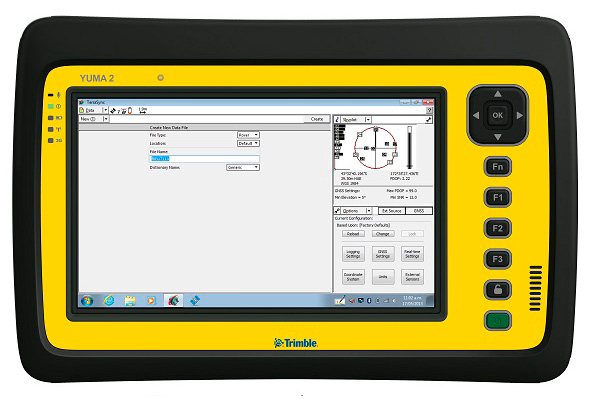
My original review of the first Yuma rugged tablet from Trimble MCS (Mobile Computing Solutions) was penned in August of 2011. My original plan was to have the review of the new Yuma 2 ready to go exactly two years later. But, as we all know, man plans and God laughs.
Actually, the problem, I must admit, is a bit more personal in nature; you see, I have been enjoying the Yuma 2 to such a degree that it was difficult to write about it because then I have to send it back. I have been selfish too long — read on for the review of the new Trimble Yuma 2 rugged tablet computer that is perfect for fieldwork, especially fieldwork involving GPS and GIS applications. Indeed, one Trimble marketing quote states:
“Bring Your Office to the Field for Efficient GPS/ GIS Data Management — The Trimble Yuma 2 rugged tablet computer is designed for ease of use and high performance mobility. Great for GIS applications — it’s like bringing a complete PC out into the field.”
While I totally agree with this assessment, the Yuma 2 is really so much more. It is not limited in any important function I could determine. As an example, I am typing part of this review on the Yuma 2 via a wireless Bluetooth keyboard and a high-definition Sony monitor hooked to the Yuma 2 via the new HDMI connector. Sweet!
Over the years, it has frequently occurred to me that oftentimes manufacturers have no idea of all the ways their equipment will be utilized in the field — although Trimble does a great job giving users ideas through the Trimble Dimensions showcase that will take place at the Mirage Hotel in Las Vegas November 3-5, 2014. If you are into rugged devices, GIS and GPS, or any of the areas listed at the Trimble Dimensions website, don’t miss this show. You will see the Yuma 2 and other Trimble devices and software put to the test and used in ways you could never imagine.
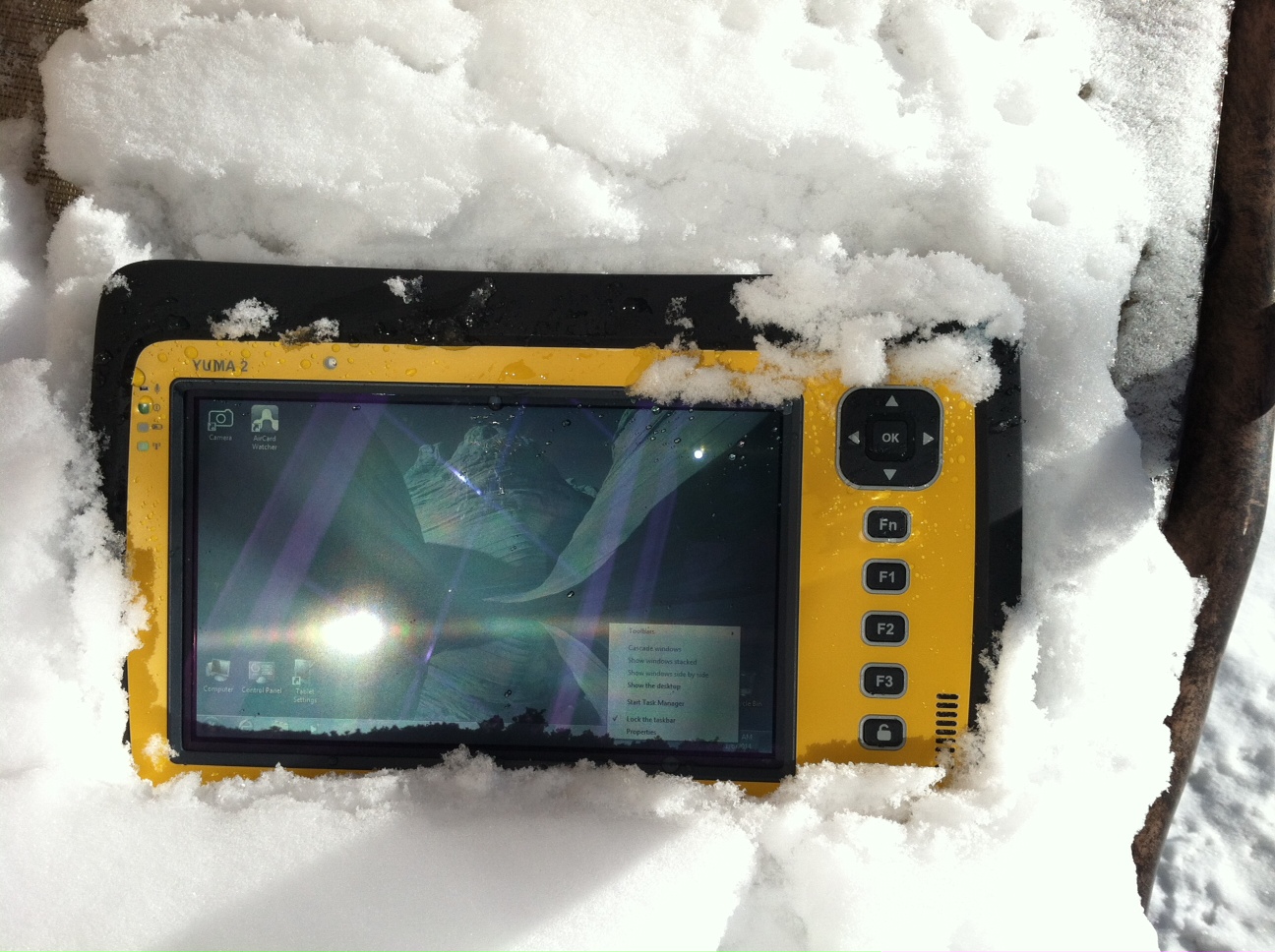
But, as usual, I digress. Let’s get back on topic and the Yuma 2 review. I put the Yuma 2 through all the normal wear-and-tear scenarios, which here in the foothills of the Rocky Mountains means severe cold (-20° F true temperature), snow, ice and altitude.
The Yuma 2 withstands tough conditions, including snow and ice.
During the six months I tested and evaluated the Yuma 2, I continued to receive several emails from users of the original Yuma rugged tablet. Three of those emails came from users in the Great Smoky Mountains. All three users operate the original Yuma in their business dealings, as well as for navigating around the Great Smoky Mountains and for recreational geocaching. One user, who would only agree to be identified as “Bailey” (he assured me that although he is retired military, his first name is not Beetle), intrigued me with his assertion that he has a crucial usability test he routinely performs on his GPS devices that I cannot easily conduct here in the Rocky Mountains. Beetle and other members of the Great Smoky Mountain Geocaching Society usually perform their Great Smoky Mountain Humidity and Fog tests at or around Clingmans Dome.
Clingmans Dome in the Great Smoky Mountains.
The National Park Service describes the 6,643-foot Clingmans Dome as being the highest point in Great Smoky Mountains National Park. It is the highest point in Tennessee, and the third highest mountain east of the Mississippi. Only Mt. Mitchell (6,684 feet) and Mt. Craig (6,647 feet) — both located in Mt. Mitchell State Park in western North Carolina — rise higher. Additionally, the cool, wet conditions at the summit of Clingmans Dome make the spruce-fir forest that grows there a coniferous rainforest. By now, you are probably saying, so what?
The “so what” is that Bailey says the humidity is sometimes so high that when geocachers hit the cooler temperatures and high humidity of Clingmans Dome, some devices have water streaming from inside the device, which is never a good thing. I checked with Trimble, and indeed their devices are made to survive these conditions and much worse, such as in many mountain jungles around the world. So Bailey, have no fear, your Yuma 2 will continue to work just fine in your moist environment. Consider that the Yuma 2 was designed and built at Trimble’s MCS facility in Corvallis, Oregon, which is just due East of a rainforest along Highway 1 on the Oregon West Coast. So you can bet the Yuma 2 is tested and rated for high humidity levels. Indeed, here are the humidity specifications: Cycles between -22° F to 144° F (-30° C to +60° C) at 90% RH (relative humidity), MIL-STD-810G, Method 507.5, Procedure II (Humidity Aggravated Cycle).
While we are detailing specs, let’s list all the formal specifications, and then we can delve into more detail about how we tested the Yuma 2 and how well it performed.
Physical
Size: (LxWxH) 9.6 in x 6.3 in x 1.5 in (246 mm x 160 mm x 40 mm)
Weight: 2.6 lb (1.2 kg) with standard batteries or 3.0 lb (1.4 kg) with extended batteries
Colors: Yellow, Gray, and Gray with Yellow border
Keys: Seven keys (OK, Logon, Power, Function, 3 user-programmable function keys) and 5-way directional keypad
Hardware Specifications
Processor: 1.6 GHz Intel Atom N2600 dual-core processor
Memory: 4 GB DDR3 DRAM of volatile memory
Storage: 64 GB or 128 GB SSD-Solid State Drive (Enhanced GPS: 128 GB SSD only)
Display: 7” 1024 x 600 hybrid reflective transmissive (transflective) with capacitive touch screen
Battery Options: Smart batteries with LED power indicators – Standard battery: Two 7.5v, 3000 mAh, 21.6 Wh or optional extended battery: Two 7.5v, 6000 mAh, 43.2 Wh
I/O: 3.5 mm audio jack, USB Host (2), HDMI, docking station I/O plate, DC input power
GPS Receiver: 1-2 meter accuracy (with SBAS) or 2-4 meter accuracy (with SBAS)
Radios: Bluetooth 4.0; Wi-Fi b/g/n
WWAN: Penta-band GSM 3.75 Data only module
Standard Features
• Transflective technology (TFT) direct sunlight readable color display
• Microsoft Windows 7 Professional OS
• Intel Atom N2600 dual-core 1.6 GHz processor
• 4 GB DDR3 DRAM volatile memory
• 64 or 128 GB solid-state drive
• Multi-touch capacitive touchscreen
• Rugged design certified to IP65 and MIL-STD-810G
• 3.5 mm audio jack and integrated microphone and speaker
• Outward facing autofocus 5 MP camera with LED Flash, photo and video recording capable
• Integrated Bluetooth 4.0
• Integrated Wi-Fi b/g/n and Wi-Fi Alliance Certified
• CCX (Version 4)
• GPS receiver, Enhanced 1-2 meter accuracy or 2 – 4 meter accuracy with SBAS
• Kensington security slot
• Accelerometer and Electronic Compass
• 3.75 G WWAN data connectivity optional
• Status LEDs for power, battery charging, Wi-Fi and 3G Data
• 12-month manufacturer warranty
Standard Software
• Microsoft Windows 7 Professional with Internet Explorer
• Camera software with geo-tagging
• Trimble GPS Information receiver control software
Standard Accessories
• Standard battery set (5+ hour)
• International AC Charging Kit with 4 adapters
• Capacitive Stylus with Tether
• Hand Strap and Display Cleaning Microfiber Cloth
Now that you have all the specifications and promises from Trimble, let’s look at how it compares to the original Yuma and then let’s get into how it works in everyday life as well as the not-so-routine scenarios.
Comparative Summary of Yuma and Yuma 2 Attribute
Yuma
Yuma 2
Touchscreen
Resistive dual touch
Capacitive multi-touch
Display Technology Sunlight Readability
Very Good
Excellent
Processor
1.6 GHz single core
1.6 GHz dual core
RAM
1 GB
4 GB
Solid State Drive
32 GB then 80 GB
Choice of 64 GB or 128 GB
GPS Accuracy
4 – 6 meter
2 – 4 meter
Battery Life3
4 hours with standard batteries8 hours with extended batteries
8 hours with standard batteries16 hours with extended batteries
Digital Connectivity
ExpressCard Modules
3.75G dual-mode (CDMA and GSM) option with SIM Card and Auto Carrier Recognition.
IP Rating
IP67
IP65
Pricing
$3999 Market Price for base configuration
$2999 Market Price for base configuration
First Impressions
The first thing most people notice about the Yuma 2 is its size. It is 1.5 inches shorter than a full-size iPad, while the high-definition screen is the same size and almost the same resolution as the iPad mini. With the ingenuous hand-strap attached to the back, the Yuma 2 is very maneuverable and easy to carry with you in most any situation. With the security cable, you can also attach it to a vest, backpack or even a belt loop for security. I tried all three options and it works well. For warfighters and first responders, this is ideal, as those users don’t need to worry about what happens if they should drop it. The Yuma 2 is IP65 MilSpec rugged, and I am frankly amazed at the punishment my demo unit survived. Just like the old Timex commercial — “It takes a licking and keeps on ticking.”
Attention Getter
I carried the Yuma 2 everywhere for more than six months, and it garnered a great deal of attention from military and medical personnel of all descriptions: policemen, firefighters, delivery drivers, utility workers, and several park rangers. Even our local refuse haulers spent time looking over the Yuma 2. It is just simply hard to ignore. Interestingly, something they all had in common is that initially they were all very dubious and nervous about dropping it, even on thick carpet, grass, ice or snow. But once they saw me do it, they all wanted to have a go and they did. My demo unit has easily been dropped more than 100 times from various heights, usually from about four feet onto almost any surface you can name, and it continues to perform like the pro-gear it is and was designed to be. It was even dropped twice, unintentionally of course, with the camera in video mode and the LED flash active. I have to admit that initially gave me pause, but the Yuma 2 came through without a hitch. Camera, video and flash all still function perfectly.
Field Capability and New Test
With the Yuma 2, I had an opportunity to test an application I have never run before, but which will now be a standard in my repertoire of applications — the functionality of an audio headset along with Dragon Speaking software.
Long story short, my daughter is a PsyD, or Doctor of Psychology, in private practice, and together we have been testing various software programs that convert her spoken notes into the written word. This is a more difficult task than you might imagine, given all the specialized medical and psychological terms employed in her everyday vocabulary. But the latest professional version of Dragon Speaking was absolutely up to the task, as was the Yuma 2. I installed the Dragon software and went through the brief training routine with the headset and microphone, and the result is the paragraph you are reading. What a great way to write an article.
Now my daughter and I are Apple aficionados. We have more than 21 Apple devices in our homes, and my daughter uses a 13-inch Apple MacBook Pro with a retina display in the office, which, while it is an awesome device, is not something you want to take into the field or into a first-responder situation, whereas the Yuma 2 fulfills the same functions and fits the “rugged” bill perfectly.
While the built-in speaker on the Yuma 2 is certainly adequate for voice recognition and for GPS commands, it is not something with which you will want to listen to iTunes, so I highly recommend the optional audio headset with microphone offered by Trimble and several other suppliers. For me, the new Bose headset model with microphone works extremely well, while remaining affordable, and the resulting fidelity is…well…certainly Bose quality — what more can I say!?f you want audiophile-quality music and speech-to-text transcription capability in the field, then the Bose headset and Yuma 2 combination can’t be beat.
Docking Station and HP ePrint
The unit we tested did not arrive with the optional docking station. However, we quickly determined that if you are going to be constantly, even daily, making the transition from field to office computer and want to work on the same computer, then a docking station is a must. Next time, say for the Yuma 3 review, for instance, we will request a docking station as part of the review hardware. There were so many times we wanted to print directly from the Yuma 2 that I wished fervently for a docking station. Then I found that the HP ePrint software worked just great on the Yuma 2 as long as you are in range of a printer capable of receiving the signal.
If you are on the road and need to print, you can do that via the cloud and ePrint no matter where you are. You can also print your documents to the nearest HP Public Print Locations, which include national chain locations for FedEx Office stores, UPS stores, Walgreens, numerous hotels, airport lounges, and more. Prices vary widely per page, but if you really need a hard copy, this is an amazing option that works well with the Yuma 2.
We tested this print option at our local Walgreens, and they were not initially aware they had the capability until we printed a test page and out it popped. Now they advertise the capability. We also tried printing from the parking lot of a local FedEx store, and since I have a FedEx account (we receive a lot of packages, as you can imagine), the page was waiting for us when we walked in the door and the bill was automatically charged to our FedEx account. It was an incredibly quick and painless process.
Camera and Flash
The 5 MP (megapixel) camera with automatic geotagging and LED flash work as advertised, although with the Yuma 2 we were also able to record a short video that played back flawlessly on the Yuma 2 and via the email attachment on my Apple iMac. The only caution here is that you are definitely capable of recording a video that, due to its size, may never work its way through the normal email system. Fortunately, the GPS World magazine servers and my “other office” servers are “unlimited,” so this was not a problem for us. However, when we attempted to send a 20-MB video file to a friend, his system would not initially authorize it. When we compressed the file, it went without a hitch. So, if you are going to be shooting a lot of video in the field, a good video software compression program is highly recommended. We tried no less than five different free video compression algorithms, and they all worked without a glitch. Note: Some programs, but not all, require the same software be resident on the receiving computer as well.
Power and Data Connectors
Fortunately, the power connector on the Yuma 2 device is heavy duty. It is reminiscent of the old serial port (RS232C) connectors with the screw receptacles on the port. Consequently, you will never have to worry about the power cables being disconnected, at least not on the Yuma 2 side. There is also an USB-RS232C dongle available that comes in handy for data logging from external sensors.
GPS Applications and Accuracy
While Trimble MSC is not publishing much about the GPS specifics, from a technical point of view in the Yuma 2, Trimbe is shouting from the rooftops that you can have nominal 2-4 meter accuracy or enhanced 1-2 meter accuracy (both with SBAS or Space Based Augmentation System – in the U.S., think WAAS or Wide Area Augmentation System) depending on your requirements. There is an option for an external GPS antenna, and while the three different RTK programs we ran on the Yuma 2 produced excellent and consistent sub-meter accuracies, RTK programs can be expensive. So with the Yuma 2 you should be capable of deriving accuracies anywhere from 4 meters to 4 cm, depending on your timing requirements, how much you want to spend, and sometimes your altitude.
Altitude
Which reminds me: I really got a kick out of the correspondence from the three geocaching Trimble Yuma users in the Great Smoky Mountains, mentioned at the beginning of this column, because all three made such a big fuss about the 6,000+ feet of altitude they routinely encounter when geocaching. My initial reaction to that concern is akin to that of the old codger mountain man in the great movie Continental Divide with John Belushi and Blair Brown in 1981.
John’s city-bred character mentions that being a smoker the high altitude in the Rocky Mountains is beginning to bother him, at which point the heretofore reticent old mountain man indignantly replies, “Mountains? These here are foothills, just bumps in the ground, these ain’t mountains!” Therefore, since my home sits at an altitude 1,000 feet or more higher than any of the Great Smoky Mountain peaks, and I can be at 14,000+ feet within a 20-minute drive and cross the Continental Divide in under an hour’s driving time, I understand the old mountain man’s consternation and directly relate it to the users’ concerns about the Great Smoky Mountains, which when compared to the Rocky Mountains in Colorado, are indeed bumps in the ground. I mention this only because at 7,500 feet with no obstructions, the Yuma 2 routinely processes 8-12 GPS satellites and reports accuracies far superior to those publicized by Trimble. So, while you should not necessarily expect the same level of accuracy I have reported here, you should probably expect accuracies in between what Trimble publicizes and the sub-meter performance we observe on a regular basis.
Software
I have frankly lost count of the multiple GIS and GPS software programs I ran on the Yuma 2, but they all basically ran flawlessly, both the free apps and the more costly programs. The only issue I encountered is that some GPS programs require utilizing different ports and transmission speeds. However, since these parameters are user definable on the Yuma 2, it never presented any serious obstacles. Caveat emptor, for here I will remind users of the old axiom, “You get what you pay for!” The free GPS and GIS apps work fine, but the amount of metadata and accuracy provided by some of the more costly applications is nothing short of amazing. If you plan to use the Yuma 2 for scientific applications and desire onboard processing, then the more costly software programs are the applications I would recommend. If the Yuma 2 is just a data logger or positioning device, then the free applications work well.
Bottom Line
The Yuma 2 is an amazing machine. It is everything a high-end laptop should be and more in a ruggedized format with a Gorilla Glass high-definition display touchscreen that should be reassuring to users in the field.
For government users, the rugged Yuma 2 tablet with a Selective Availability Anti-Spoofing Module or SAASM option would be the perfect choice, and far superior to anything else in the field today, especially for our military. My sources tell me there are thousands of Yuma and Yuma 2 tablets in the field today, and the addition of a SAASM module would make them more secure and usable by our military users for all their tasks. Imagine one secure tablet that meets all your needs. I think our warfighters deserve the best, don’t you?
If you currently accomplish fieldwork and transfer data between two computers, and make use of GIS and GPS data, then the Yuma 2 is the machine of choice for you because it will do the work of both computers and display/output data through the HDMI interface or through the wireless ePrint capability, especially if you opt for the optional docking station. The SSD (solid state drives) are super fast, and since there are no moving parts on the Yuma 2, you may well find it is faster and more dependable than your current office laptop or even desktop computer. I highly recommend it.
Until next time, happy navigating and take a rugged computer out for a spin.
Walgreens, the largest U.S. drugstore chain, announced a partnership with in-store mapping and search startup aisle411. As a result of this partnership shoppers can use their iPhone or Android smartphones to view maps of any of the 7,907 Walgreens stores and locate products down to a particular section of each aisle. Walgreens is said to be the first U.S. national retailer with all of its stores mapped in a mobile application.