Tag: Windows Mobile

  • Mobile Device Operating System Wars: Ver. 2.0

    It’s been two years since I wrote a column entitled Mobile Device Operating system wars: Android vs. iOS vs. Windows Mobile. After traveling and attending countless conferences and listening to a large number of mobile device users in the geospatial user community, I think it’s time to touch on this subject again, and what a crazy and confusing landscape it is. First of all, let’s frame the discussion in terms of the geospatial users, because that’s the soup we swim in.

    At the end of the day, we are driven by the geospatial software we use, so this limits the type of mobile device we can select from. For example, Esri’s ArcPad runs on Windows Mobile and Windows desktop. If that’s the software you want to use, then you can’t use an Android device, an iPad, or a Windows Phone device. In another example, AutoCAD 360 for mobile, which I used a few weeks ago in the field, runs only on Android and iOS devices, not on Windows Mobile devices.

    MobileOperatingSystems_2014

    Chart Source: The Wall Street Journal, Gartner

    While it appears Android is the dominant mobile operating system of the future, it depends on who you talk to. Right or wrong, some (maybe a lot of) enterprise organizations are scared of Android. They are scared because of one word: security, or more specifically, the perception of the lack of security. Android is open source, and it scares the heck out of enterprise IT (information technology) departments. It scares some to the point that they are shutting down projects that are proposing to deploy Android devices in the field. Is the fear justified? It’s probably more hyped up than it deserves, but IT folks are pretty conservative these days.

    Where does that leave the enterprise organizations? iOS or Windows?

    Some organizations are going with iOS, but the number of enterprise geospatial apps for iOS is very limited, and most of those that exist aren’t very powerful. They can’t even deal with datum transformations. That means the hardcore iOS enterprise users are left developing their own software, which some are doing. The other limitation of iOS is the hardware device selection. Since Apple doesn’t license iOS to anyone, you have the iPad and the iPhone and that’s about it. Not much selection.

    That leaves us where we started…Microsoft Windows.

    Dell Venue Tablet
    Dell Venue Tablet

    My gut tells me that Windows is making a comeback among geospatial users, even though Windows operating system market share is minuscule compared to Android and iOS on mobile devices. Part of the reason is a plethora of high-quality, Windows-based tablets and pads. Recently, I’ve had the chance to handle some Windows-based tablets such as Dell Venue tablet and Panasonic ToughPad. They are nice tablets for field use. Thank Apple for driving manufacturers to produce good quality tablets at a reasonable price. The other part of the reason, and the major driver, is security. IT departments simply trust the security features that Microsoft provides more than iOS and Android. In the age of security breaches such as the recent Heartbleed bug, the emphasis on computer security is at an all-time high.

    Panasonic ToughPad
    Panasonic ToughPad

    Security may be the catalyst that pushes Windows back into the forefront of operating systems for the enterprise geospatial user. That’s good news for geospatial software developers. Pressure has been mounting for geospatial software manufacturers to introduce Android- and iOS-compatible versions of their software. Now, with the security issue at the forefront and the availability of high-quality Windows-based tablets at reasonable prices, developers may have some breathing space.

    But wait: Which version of Windows?

    Windows Mobile? Windows Phone? Windows Embedded Handheld? Windows Desktop? Windows RT?

    They aren’t all the same, and they all don’t run the same software. For example, software built for Windows Mobile won’t run on Windows Phone or Windows Desktop.

    Microsoft’s mobile operating system strategy has been confusing at best. In past years, it’s been clear that mobile devices run Windows Mobile. It’s not so clear any longer. Microsoft discontinued mainstream support for Windows Mobile 6.1 and 6.5 in January 2013. It’s not as bad as it sounds because in the three years I’ve owned a Win Mobile 6.5 Pro device, an update was never issued. But what it does say is that Microsoft is done with it. No new devices will be designed with Windows Mobile 6.5. However, that’s not to say that Windows Mobile devices are going away. Microsoft just renamed it to Windows Embedded Handheld 6.5, which Microsoft says it will provide extended support for until January 2020. So, all is well, just a different name.

    Microsoft’s mobile strategy has turned off manufacturers, and it shows. Given that Microsoft has stopped supporting new devices running Windows Mobile since January 2013, how many devices have you seen introduced since then that support Windows Embedded Handheld? The answer is, not that many, and the ones that do support it are handhelds selling at a premium price, upwards of $1,500 or more. That’s tough to justify when you can buy a tablet or pad for equal or less. And…..the tablets and pads are running full Windows, not the mobile, handheld or phone version so they’re able to run a greater number of off-the-shelf software programs.

    Given the above, I feel the tide is turning, at least for the geospatial user community. Windows is going to make a comeback and be the go-to operating system for mobile devices, at least for tablet and pad devices. Don’t misunderstand me though: Android and iOS will still dominate the market share numbers by far, but that’s the consumer user community, not the enterprise geospatial user community. Windows Mobile devices will still have a niche place in the geospatial user community, but I have to wonder if software makers will continue to support that environment if the sales aren’t significant enough.

    Sidebar: For those of you who feel I’ve errantly left out the discussion about ruggedized devices vs. non-ruggedized or semi-rugged consumer devices, I’ll say this. Whenever I’ve encountered an enterprise that has deployed consumer mobile devices in an industrial environment (such as iPad), it invariably answers the question about device reliability with “We’ve had very few problems.” The reality seems to be that enterprise users are taking special care of these devices in the field. Program managers are saying, “Even if each person breaks one per year, it’s still half the price of industrial devices.” The reality is that small percentages are failing.

    However, one can’t ignore the outdoor usability issue. The displays on some consumer devices don’t handle sunlight very well, and if the display isn’t sunlight readable, the device is severely limited in the field. The same can be said for wide temperature ranges. Both extreme heat and extreme cold can torture a mobile device that isn’t built to withstand that environment. Test before you deploy. Heat it up in your oven, cool it down in your freezer, and see how it behaves.

    There’s certainly a niche market for ruggedized mobile devices, but the significant price difference between those devices and consumer devices are making enterprise organizations think twice about where to spend their money. Lastly, many consumer devices are trending towards semi-rugged as manufacturers are discovering this is one way to differentiate them from the ultra-price-competitive mobile device market.

    Thanks, and see you next time.

    Follow me on Twitter at https://twitter.com/GPSGIS_Eric
  • CoPilot Brings GPS Navigation to Windows Phone 8

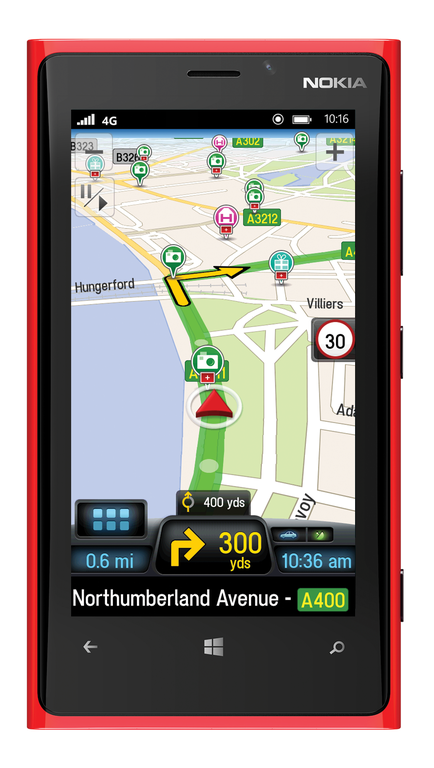
    lumia-920-copilot-ukALK Technologies, provider of navigation and GeoLogistics software, announced at the Mobile World Congress that its CoPilot GPS navigation apps for smartphones and tablets will be available for Windows Phone 8 and Windows 8. The Mobile World Congress is being held in Barcelona, Spain, this week.

    Designed as an alternative to traditional in-vehicle systems, the app provides voice-guided GPS navigation, with turn-by-turn guidance, comprehensive trip planning and automotive-grade street maps stored on-board the device for offline use. Integral real-time services include ActiveTraffic, Yelp, Wikipedia and Google Search to keep drivers fully informed on the road.

    “We’ve always been fans of Microsoft’s mobile solutions,” said David Quin, head of consumer applications at ALK Technologies. “CoPilot was originally developed for Microsoft’s Pocket PC and pioneered mobile navigation on Windows Mobile, so we are delighted to announce a new app for Windows Phone 8 and Windows 8. The Windows family of mobile devices is rapidly gaining momentum as an alternative to Android and iOS, and provides an ideal platform for us to deliver a full-featured and driver friendly CoPilot navigation experience.”

    “Windows Phone is backed by a vibrant app ecosystem with a variety of quality titles, like CoPilot, which help people enjoy a smartphone that is uniquely theirs,” said Todd Brix, general manager, Windows Phone Apps, Microsoft Corp. “CoPilot is a great example of the rich applications that people can enjoy on their Windows Phones.”

    CoPilot for Windows Phone 8 and Windows 8 provides a suite of advanced navigation features, including:

    • Clear, non-distracting 3D map views with lane arrows and signpost display.
    • ActiveTraffic, which calculates the fastest routes and accurate arrival times based on live traffic flow information.
    • CoPilot ClearTurn for navigating complex junctions.
    • On-screen speed limit indicator and excess speed warnings.
    • Advanced trip planning with a choice of three routes and drag-and-drop route editing.
    • Comprehensive local search with integrated Yelp, Wikipedia and Google.
    • Global map regions available to purchase and store on the device as required.

    CoPilot is expected to launch on the Windows Phone Store and Windows Store in summer 2013 with the following versions: CoPilot Premium, a paid app which includes turn-by-turn navigation and 12 months ActiveTraffic; CoPilot GPS, a free offline trip-planning and maps app with in-app purchase for turn-by turn navigation; and CoPilot Truck for truck-specific GPS navigation. Pricing will be in-line with existing CoPilot apps for iOS and Android.

  • ArcGIS for Windows Mobile Simplifies Field Data Collection

    Esri has released ArcGIS for Windows Mobile 3.1, coinciding with the release of Trimble Positions field collection software. The Trimble Positions software suite extends the ArcGIS for Windows Mobile application and software developer kit (SDK) with support for high-accuracy GNSS mobile GIS data collection.

    The Trimble Positions software suite is designed for users who require high-accuracy data collection workflows using Esri’s ArcGIS for Windows Mobile technology. The latest version of ArcGIS for Windows Mobile, combined with Trimble Positions software, simplifies field collection activities and requires little to no GNSS or GIS data collection experience, Esri said. ArcGIS for Windows Mobile and Trimble Positions support both real-time and postprocessing workflows, streamlining the process of collecting GPS data.

    With ArcGIS for Windows Mobile, data collected with Trimble Positions can be automatically synced to an enterprise server when Trimble Positions Desktop is used to manage data from incoming field crews. Office administrators can easily check for new sessions, differentially correct the data, and verify that it meets accuracy requirements before updating the enterprise database at the touch of a button, Esri said.

  • Esri Releases ArcGIS for Windows Mobile 3.0

    Esri announced the release of ArcGIS for Windows Mobile 3.0 and its availability for download from the Esri Customer Care site.

    According to the announcement, with a new name and a new version number, ArcGIS for Windows Mobile 3.0 includes significant enhancements and improvements to the user experience, architecture and deployment of mobile solutions.
     
     
    Here are a just a few highlights of 3.0:
     
    Creating and Managing Field Projects
     
    • Simplified Project Management – with the 3.0 release you can include mobile caches, basemaps and project extensions inside the mobile projects you create. So all you need to do is pull or push the project to your device and it will unpack and manage the offline data content as well as any and all extensions.
    • Project and Service Validation – the Mobile Project Center includes a validation framework that will ensure the integrity of your field projects by detecting, notifying and recommending changes before you publish out to your field workers.
    • Qualify Map Layers for Synchronization – 3.0 simplifies the way you synchronize changes between the client and server. You can fully qualify the behavior of map layers inside of the project so your field workers need not worry about the details of synchronizing edits/changes.

    Using the ArcGIS Application (Windows Mobile)

    • GPS – the integration and use of GPS has improved considerably. First time install walks you through a process of configuring GPS for use with your device, now you can view GPS position info on top of the map using the GPS info bar, navigate to a feature using a GPS compass, auto-populate GPS information when creating new features, and create new features using a simplified collection process (single shot GPS collection).
    • Attachments – now you can attach media to your features. Using Geodatabase Attachments you can capture many photos per feature and you can attach other media types to features that are both editable and read-only (pdfs, docs, videos, etc). Attachments are fully supported for offline use on your device and special consideration is taken during the synchronization process as well.
    • Feature Editing – now you can update the location of existing features and in a field-savvy way! Explore new workflows for data capture/editing with the ability to extend a line or replace the portion of a feature using GPS.
    • Auto-populate and user identity – with 3.0 you can greatly simplify the collection of attributes by automatically populating values such as GPS information, the user identity and date/time of capture, and more.
    According to the ArcGIS Resource Center Blog, ArcGIS for Windows Mobile 3.0 is a really big release and there is a lot to discuss. Look for more articles on focused enhancements, workflow improvements and more coming soon. For a list of what is new, check out the documentation available on the Resource Center.
  • Mobile Device Operating System Wars: Android vs. iOS vs. Windows Mobile

    Following up on my” Mobile Devices Galore” column a couple of weeks ago, one predominant question I hear reverberating across all industries with geospatial apps on mobile devices is “what is the mobile device operating system of the future?”

    After years of relatively benign evolution, the mobile device market (smart phone, tablet, handheld) is changing really quickly, and it’s really making geospatial users think hard about which device and operating system to deploy.

    I think it’s safe to say that if there were enough apps available for the Android platform, Android would clearly be the geospatial operating system of choice. There are a myriad of smart phones and cheap tablet computers running Android that consumers are eating up and geospatial users are salivating over. Unlike Apple with their iOS, Google will license Android to almost anyone so hardware manufacturers like Samsung are flocking to Android. One would think this might be déjà vu for Apple a la Microsoft Windows.

    However, the fact is that there’s not much in the way of geospatial apps for Android, yet.

    Almost all geospatial apps in existence today are built for Windows Mobile, but most people I’ve spoken to aren’t convinced that Microsoft is committed to Windows Mobile. The follow on to Windows Mobile 6.5 called Windows Embedded Handheld. You might think that Windows Phone 7 is the follow-on to Windows Mobile 6.5, but the problem is that apps have to be re-written for Windows Phone 7 while the software development environment for Windows Embedded Handheld is the same/similar as/to Windows Mobile 6.5. Following is a video explaining Microsoft’s mobile device strategy for Windows:

    Almost all geospatial apps in existence today are built for Windows Mobile, but most people I’ve spoken to aren’t convinced that Microsoft is committed to Windows Mobile. The follow on to Windows Mobile 6.5 called Windows Embedded Handheld. You might think that Windows Phone 7 is the follow-on to Windows Mobile 6.5, but the problem is that apps have to be re-written for Windows Phone 7 while the software development environment for Windows Embedded Handheld is the same/similar as/to Windows Mobile 6.5. Following is a video explaining Microsoft’s mobile device strategy for Windows:

    Dual Boot?

    We have a problem. We need mobile devices to support Windows Mobile, for now, due to the wide number of apps available for that operating system. However, we aren’t sure of Microsoft’s committment to Windows Mobile in the future and it seems Android has a tremendous amount of momentum, How many IT people have you seen with dual boot Windows/Linux? It makes me think about a dual boot mobile device…Windows Mobile and Android. But, that could get ugly pretty quickly since average consumer is not going to be interested in this. Without the benefit of consumer acceptance of what we use for a mobile device, we are back to where we started, stuck with a few niche suppliers that produce high-priced mobile devices specifically for the geospatial industries.

    I can dream about dual boot, but I doubt it will happen.

    Which Mobile Device Operating systems will survive and flourish?

    Earlier this month, technology research firm Gartner, Inc. issued a report detailing the results of their research on tablet computer operating systems. While it’s not completely indicative of smart phone and handheld operating systems, I think it’s a very good indicator of where things are headed.

    Following is a table summarizing the results of their research by operating system.

    Worldwide Sales of Media Tablets to End Users by OS (Thousands of Units):
    OS 2011 2012 2013 2016
    iOS 39,998 72,988 99,553 169,652
    Android 17,292 37,878 61,684 137,657
    Microsoft 0 4,863 14,547 43,648
    QNX (RIM) 807 2,643 6,036 17,836
    Other OS 1,919 510 637 464
    Total 60,017 118,883 182,457 369,258

    If you’d like to read a detailed article about their results and report, click here.

    Is Apple’s iOS really going to continue to dominate?

    I wish I would have bought Apple stock a few years ago. Apple is a serious cash machine, earning more profit than even ExxonMobile, thus becoming the most profitable company in the world.

    However, with their closed system, it smacks of the Mac vs. Windows battle of 20+ years ago of which Apple clearly lost. Can a closed operating system like iOS maintain its dominance? I doubt it, I really doubt it. Apple has been on a great run, but even from the table above, one can clearly see that Android is projected to grow faster.

    While I’m reasonably sure iOS isn’t going to be a long-term dominator, I’m not so sure about Android vs. Windows Embedded. As we saw with Microsoft’s Internet Explorer going from zero to hero in a short period of time, Microsoft has the ability to focus a tremendous amount of resources to tackle a market if they choose. They could do it with Windows Embedded, if they choose.

    Thanks, and see you next week.

    Follow me on Twitter at http://twitter.com/GPSGIS_Eric