Trimble has entered into a definitive agreement to acquire privately held Building Data based in Rocklin, California. Building Data’s managed content and software solutions enable mechanical, electrical and plumbing (MEP) contractors and engineers to produce intelligent, constructible models by including manufacturing-specific content from a proprietary database of more than 6 million 3D data components.
The combination of Building Data’s experience in Building Information Modeling (BIM) content paired with Trimble’s leadership in providing software and hardware solutions for building construction will empower contractors and engineers to gain efficiencies throughout the building lifecycle. The transaction is expected to close in the fourth quarter of 2016.
MEP contractors face an enormous challenge to develop and maintain the data needed to design, estimate, build and manage projects. Trimble’s pricing and content services, combined with Building Data’s 3D solutions, will fill the need for timely, accurate and structured information to drive the key processes of design and construction. Building Data’s managed content and its SysQue software extend the capabilities of existing 3D CAD platforms to enable MEP contractors and engineers to increase productivity by developing constructible models that enable accurate pre-fabrication and field layout.
“With the addition of Building Data, Trimble continues to reinforce its commitment to providing data and analytics solutions to the construction industry. Building Data’s strength lies in its ability to provide structured and highly accurate 3D content that will be connected to Trimble’s existing product and pricing services,” said Pat Bohle, general manager of Trimble’s MEP Division. “This wealth of content will enable MEP contractors and engineers to use their models to improve estimating, detailing, fabrication, purchasing, manufacturing and installation processes.”
“Building Data’s solutions are dedicated to improving the productivity of the building contractor and engineer,” said Jim Reis, chief operating officer of Building Data. “We are already integrated with several of Trimble’s industry-leading software solutions including their fabrication software, field layout solutions and pricing services. We are excited to provide an even greater integrated office workflow for the building contractor and engineer by joining with Trimble.”
The Building Data business will be reported as part of the Engineering and Construction Segment. Financial terms were not disclosed.
Like thousands of water utilities across the U.S., the City of Sebring, Fla., Utilities Department is tasked with providing a safe and reliable water supply, while managing all the dispersed assets of the water distribution and wastewater systems. This means regularly locating, mapping and inspecting assets to maintain service levels and operations.
This City of Sebring storm drain runs down the center of a street. (Photo: TerraGo)
When Sebring evaluated this approach, the city received a quote for geographic information system (GIS) software that was more than $30,000 and bids for surveying services that were as high as $300,000, which didn’t include the mobile tools to collect the data or integration with the existing CAD system.
“We could see the traditional GIS and GPS approach was going to eat us alive cost-wise,” said Mark Kretz, water plant operations, Sebring Utilities.
Sebring Utilities then researched mobile products to see if other organizations had field success using iPads and iPhones to do the work. Sebring still needed to achieve survey-grade accuracy — sub-meter, centimeter-level in some cases. This is impossible with an iPhone or iPad out of the box, which delivers 5 meters at best.
Installation of a storm drain in Sebring. (Photo: TerraGo)
Some tasks, such as mapping an underground valve, need sub-foot or better accuracy. Other tasks, such as locating an aboveground valve, could be seen within 3 to 5 meters, so just the iPad would work.
Mark Kretz, Water Plant Operations, City of Sebring, conducts water asset inspections and maintenance. (Photo: City of Sebring)
CAD integration. Sebring also needed to be able to utilize computer-aided design (CAD) diagrams on its mobile devices to identify and locate valves and other assets in the field. In the past, the utility relied on printed CAD drawings, a cumbersome and costly solution. Plus, with time of the essence when containing a leak, workers wanted on-demand access on their mobile devices.
With the multitude of assets from fire hydrants to valves to sewers, the data collection and maintenance work varied greatly. Sebring needed a way to create custom forms and workflow processes, and be able to modify them over time or create new ones when needed.
In the end, the city opted to deploy TerraGo Edge on iPads. With TerraGo Edge, Sebring was able to integrate with GPS receivers that pair to iPads or iPhones via Bluetooth because the product is fully integrated at the software level with Apple-certified GPS receivers. This enabled the city to cut costs, bring surveys in-house and improve response times for repairs. TerraGo Edge also delivers custom forms, CAD diagrams and survey-grade accuracy.
“On a day-to-day basis, the biggest benefit is that we get the ease of use of an iPad, and didn’t have to buy and use proprietary GPS handhelds, which are more complex and vastly more expensive,” Kretz said.
CAD on iPhone with TerraGo Edge. (Image: TerraGo)
Edge benefits
Cost savings of 90 percent over traditional GIS and GPS systems
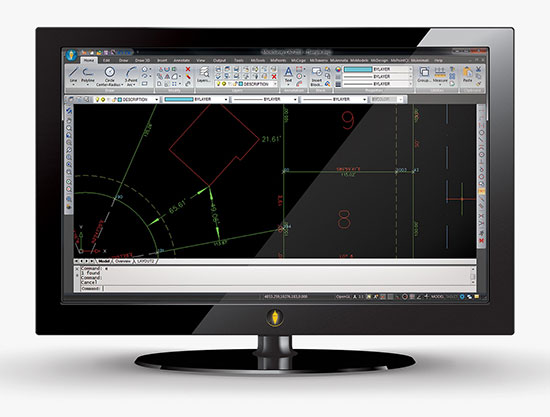
MicroSurvey Software has released MicroSurvey CAD 2016, the newest generation of its desktop survey and design program for land surveyors and civil engineers. Powered by a new IntelliCAD 8.1a engine and enhanced with a suite of new point-cloud management tools, the software makes high-impact drafting and design fast and intuitive, the company said.
Users on multi-core computers will experience up to 300 percent faster performance compared to previous versions, which substantially improves productivity. Navigation has been enhanced through a new ribbon interface with high-resolution icons that provide easy access to frequently used tools. The newest version of the software is also able to open and export DGN files, handle annotation scaling, and publish drawings as DWF/DWFX, PNG and JPG files.
Point Clouds. The new release includes significant enhancements for working with point clouds. The Ultimate and Studio versions of the software are now powered by the same point-cloud engine that drives Leica Cyclone and CloudWorx software, making it possible to directly import Leica Cyclone and Leica JetStream databases using Cyclone dialogs.
Users can view panoramic photographs captured by the laser scanner and snap to points directly from the photographs in a TruSpace window. Point-cloud data is now displayed directly within the CAD model space.
MicroSurvey CAD is compatible with field data from all major total stations and data collectors and is fully compatible with AutoCAD; 64-bit and 32-bit versions are available.
MicroSurvey Software has released MicroSurvey CAD 2016, the newest generation of its desktop survey and design program for land surveyors and civil engineers. Powered by a new IntelliCAD 8.1a engine and enhanced with a suite of new point-cloud management tools, the software makes high-impact drafting and design fast and intuitive, the company said.
Users on multi-core computers will experience up to 300 percent faster performance compared to previous versions, which substantially improves productivity. Navigation has been enhanced through a new ribbon interface with high-resolution icons that provide easy access to frequently used tools. The newest version of the software is also able to open and export DGN files, handle annotation scaling, and publish drawings as DWF/DWFX, PNG and JPG files.
Point Clouds. The new release includes significant enhancements for working with point clouds. The Ultimate and Studio versions of the software are now powered by the same point-cloud engine that drives Leica Cyclone and CloudWorx software, making it possible to directly import Leica Cyclone and Leica JetStream databases using Cyclone dialogs.
Users can view panoramic photographs captured by the laser scanner and snap to points directly from the photographs in a TruSpace window. Point-cloud data is now displayed directly within the CAD model space, and users can snap to the point-cloud points using standard CAD tools.
MicroSurvey CAD is compatible with field data from all major total stations and data collectors and is fully compatible with AutoCAD. It includes complete survey drafting, COGO, DTM, traversing, volumes, contouring, point-cloud manipulation and data-collection interfacing. No plug-ins or modules are necessary. Both a 64-bit version and a 32-bit version of the software are available.
Bentley Systems’ latest infrastructure products are now available. They include SewerGEMS, SewerCAD, StormCAD and CivilStorm V8i (SELECTseries 5) products for the analysis and design of wastewater and stormwater systems. All of the V8i (SELECTseries 5) sewer and stormwater products can be used as stand-alone products, or be run on CAD and GIS platforms.
They can also now be used from within the V8i (SELECTseries 4) versions of OpenRoads-based products — combining 3D design and hydraulic analysis capabilities in the same platform. The resulting comprehensive civil solution eliminates the need for extra import/export steps or file conversions, Bentley Systems said.
“The integration of Bentley’s OpenRoads civil design functionality with the advanced capabilities of Bentley’s storm and sewer analysis products will be a huge benefit to productivity and quality for our highway drainage design workflows,” said Chris Haines, senior civil engineer and PAR-BIM technical lead, Drainage and Utilities, Parsons.
Terrain model elevations on profiles.
“With these new releases, the automated hydraulic design functionality of our sewer and storm products can be effortlessly combined with the 3D physical design and terrain modeling capabilities of Bentley’s other civil products,” said Gregg Herrin, Bentley Systems director of product management, hydraulics and hydrology. “From an information mobility standpoint, this has a direct and substantial positive impact on roadway, site and municipal work where hydraulic engineering is just one part of a much larger project.”
Bentley’s SewerGEMS, SewerCAD, StormCAD and CivilStorm V8i (SELECTseries 5) products provide the following capabilities:
Ground elevations from terrain models may be used during automated design runs to consider “cover” along a pipe’s length, improving decision making related to system design.
Terrain model elevations can also now be added to profiles, improving the resulting visualization and the user’s understanding of the physical network.
New low-impact development (LID) elements are now available, making it easier to model a wider range of controls for stormwater management.
With the new lateral link element, engineers can include lateral pipes in their hydraulic analysis without creating “fake” elements where the laterals connect to the main pipe.
Easy access to the Bentley Communities professional networking site is embedded within the applications, facilitating communications between users and Bentley’s hydraulic modeling experts.
Users of any of these SELECTseries 5 releases now benefit from the products’ support of MicroStation V8i (SELECTseries 3), OpenRoads V8i (SELECTseries 4), AutoCAD 2015 and 2016, and ArcGIS 10.2 and 10.3 (SewerGEMS only), giving them the ability to model from within the latest MicroStation, OpenRoads, AutoCAD or ArcGIS version.
The latest version of the TerraGo Edge includes enhanced polygon and polyline capabilities, enriched mapping features, expanded GPS receiver integration and adds KML import and export formats. View the video above for an on-demand demo of the latest features in TerraGo Edge v3.6.
The latest version of the TerraGo Edge includes enhanced polygon and polyline capabilities, enriched mapping features, expanded GPS receiver integration and adds KML import and export formats. View the video above for an on-demand demo of the latest features in TerraGo Edge v3.6.
For those of you who haven’t been looking over the cubicle wall, there is a quiet revolution occurring in the CAD world that is affecting the GIS community. That revolution is BIM (building information modeling). BIM was developed in the mid-90s by the American Institute of Architects (AIA) to bring building design into the 21st century, but BIM is much more than just a building design model. Very simply put, it combines the best capabilities of CAD software with the best capabilities of GIS in a 3D environment.
For years, many designers understood that the primary limitation of CAD software is that CAD drawings consist of points, lines, and polygons, with no topology and no link to a database — just object ID numbers. CAD traditionally focused on the quality and detail of the drawing, with a strong focus on 3D visualizations.
Conversely, GIS is a topological model of points, lines, and polygons that’s linked to a database. Because of topology, a GIS understands relationships and can perform analyses such as what object is next to another, what object is within another, and what object intersects another, and display the results graphically or within the linked database.
CAD drawings can look very good, because the software was designed to that end. GIS also draws points, lines, and polygons, but the tools were not designed to do sophisticated renderings. The best analogy I can think of is Microsoft Office. You could draft a letter in Excel, but it would be awkward and probably not look as good as one prepared in Word. Likewise, you could create a spreadsheet-style document in Word, but it wouldn’t have all the mathematical functionality of an Excel spreadsheet.
Family Factions
The CAD and GIS communities have, for the most part, lived separate lives, even in my own family. For years, while I was the GIS manager of the Atlanta Regional Commission (ARC), I taught ArcView classes. I offered to teach my son and daughter this entry-level GIS so they would have one more tool to put on their resume, but neither was interested in “that GIS stuff.” My son Alex was an electrical engineering major, and he learned CAD software as part of his program. Two years ago he received an internship with CH2MHILL doing CAD work. After he graduated, CH2MHILL grabbed him full-time, and he continued working on electrical design projects.
Six months ago I was chatting with Alex about his new job and budding career. He was excited, explaining that he was now doing much more sophisticated work. He described a new software program that permitted him to link the elements of CAD drawings with a database that could then be searched spatially or through the database. With a tilt of my head I asked, “Do you realize that you’ve just perfectly described a GIS?” He said, with a look of revelation, “Is that what you’ve been doing all these years!” We both laughed, realizing that — unknowingly — the apple didn’t fall too far from the tree.
My son “gets it” and understands the broad capability of BIM, but he’s in the minority. If you read some of the CAD blogs regarding BIM, most CAD people don’t get it yet. Many still view BIM as just a new kind of 3D model and miss the entire concept of topology and linked databases. This presents a huge opportunity for GIS professionals, since you already understand and have been performing spatial analysis in this topological environment.
BIM of a Pantex Plant during initial design phase. Note building components, conduit, piping. Image courtesy of CH2MHILL.Images courtesy of CH2MHILL.BIM showing complex system of piping, ventilation, electrical and other building and equipment components. Courtesy of CH2MHILL, Atlanta, GA.
John Przybyla of Woolpert, who has worked in both disciplines for years, cautions us GIS people not to underestimate or downplay CAD projects. He used a simple wall as an example. In a GIS a wall may be represented as one or two lines, but the detailed CAD drawing could contain more than six layers of data: paint, drywall, framing, blocking, fire stops, insulation, etc. So there will be a learning process on both sides as we evolve. On the other hand, Przybyla wishes that GIS had more robust 3D modeling.
Putting BIM to Work
The 500-pound gorilla in BIM software is Autodesk’s Revit. Bentley BIM and Oracle are big players, and ESRI is working hard to be a contender in the BIM environment too. At the ESRI International User Conference, the plenary session included a demo of work being done at M.I.T. Michael Parkin demonstrated a 3D GIS model of the Cambridge campus that he created. Using the model, he was able to spatially identify by horizontal and vertical location each laboratory that was sensitive to noise and vibration. Parkin then created an intersecting 3D sphere of influence that would result from a planned construction project. This would help campus officials minimize the interference by changing schedules, or even moving some labs.
Parkin also mapped, in 3D space, the location of campus parking spots and of the offices of assigned users. This helped the school assign spots closer to the users’ workplaces — something of a 3D trade area analysis for parking garage customers. Also at the conference were numerous presentations on building models and facility management (FM), even though most were not using the term BIM. ESRI has a team of people dedicated to all aspects of BIM, headed by Matt Davis of the Boston regional office and John Young of the Charlotte office. Both are good points of contact regarding BIM and GIS.
We must all understand that BIM is much bigger than just building models. The AIA designed BIM as a full life cycle management tool that captures and uses the continuous stream of data, from construction to day-to-day operations to ultimate demolition. It’s the in-between area that will affect so many more users than just architects and builders. That wealth of data will be a boon to new users who will also add to the database.
David Fouche of CH2MHILL worked on the development of early BIM software such as Bentley MicroStation and TriForma, as well as the more current Bentley BIM. He indicated that there is still much confusion and jockeying for position. He stated that use of BIM in design work is a given, but there is still much discussion as to where BIM will fit into the big picture of building life cycle management. Fouche indicated that when one considers the total cost of a facility, roughly 0.5 percent goes into design, 10 percent goes into construction, and the remaining cost is in life cycle management. Obviously there is a huge potential for efficiency and savings with the proper application of BIM tools.
Fouche also mentioned that complex facilities such as oil refineries and other processing plants have been using BIM-like models for years, combining CAD and GIS tools to manage the facilities in a 3D model. GIS software such as Network Analyst is a natural for this kind of work. I remember seeing a poster at an ESRI User Conference years ago that showed the human circulatory system built with ArcView and Network Analyst. This was an eye opener, and I thought to myself, “Of course — a network is a network whether it’s a highway, oil pipes, or the blood supply system.”
I remember that when ARC moved into a new facility in 2000, we took the building CAD drawings and brought them into ArcView 3.3. We then attached attributes to each room, including the occupant, furniture, computers, phone/data ports, etc. We then used ArcView to manage our facility, including the allocation of square footage to each department.
One Step Forward, Two Steps Back
Large FM companies like ARCHIBUS, Woolpert, and Penobscot Bay Media “get it,” and have a foot in both the CAD and GIS communities. All were exhibitors and heavy participants at the ESRI User Conference this year. They see where the world is evolving and plan on being there.
But all is not rosy. On the federal side, the Army Corps of Engineers (ACE) is involved with BIM in a big way, but has changed the name of its CADD/GIS Technology Center to the CAD/BIM Technology Center. (Some of us GIS people look at that as one step forward and two steps back.) Looking at the ACE CAD/BIM Web site, I was surprised by how little attention is devoted to GIS and spatial analysis tools. The majority of material seems focused on BIM and CAD drawings, with little or no mention of GIS and spatial analysis. (We GISPs have a lot of educating to do.)
ACE is working with all DOD agencies to establish standards and common data formats for BIM. A recent posting by ACE staff indicates that many military construction projects will require BIM models as a project deliverable. Most believe that BIM will become a nationwide federal requirement soon.
Keep in mind that BIM models are spatially searchable or database-searchable 3D models, not just pretty 3D renderings. Again, think of CAD drawings combined with GIS spatial capability in a 3D model. As one considers the potential uses, including links to traditional GIS tasks and even temporal models, the list grows significantly. Some are already using BIM models with traditional GIS for energy management based on interior usage and building loading, measurement of water runoff and impermeable surfaces, and even links to transportation demand models and visualizations.
An example of lifecycle management using GIS and BIMs. This shows Carbon Monoxide concentrations in one floor of a building. Courtesy of Penobscot Bay Media, New York.
The application of BIM models that could be especially critical is their potential use by first responders. Currently most fire departments maintain pre-plan data in the form of building blueprints and large paper ledgers that list hazardous materials, fire hose connections, etc. Imagine firefighters accessing BIM models that were created when a building was designed and updated throughout the life of a building. Additionally, picture how quickly they could view the complex systems as interactive 3D models, especially if they were presented as oblique views.
A map of hazardous materials inside a building, including both location and description for emergency responders. Image courtesy of George MacBeth and Brad Peterson of ARCHIBUS, Inc.
It was interesting to note that CH2MHILL also used 3D PDFs as a quick way of sharing the models with many staff members. This proved to be a valuable collaboration tool and way to get input from many designers involved in the project. Some users are even enhancing the BIM models with photo-accurate surfaces or photo-accurate 3D models.
A photo-accurate Precision Light Works 3D model using Pictometry oblique imagery. Image courtesy of Precision Light Works and Pictometry International.
The playing field is still very unsettled, with many groups pushing their own data standards, approaches, and naming conventions. The names BIM, CAD, and GIS could evolve, but the basic functionality will still be there and smell just as sweet. BIM is here to stay, along with its parents CAD and GIS. Look for BIM to become a requirement — and a huge opportunity — in your future work.