In association with Times Higher Education, Esri published an interactive map of world university rankings for the school year 2013-2014. Click on the image below to view the map.

In association with Times Higher Education, Esri published an interactive map of world university rankings for the school year 2013-2014. Click on the image below to view the map.
Esri announced the release of ArcGIS for Electric and ArcGIS for Gas—ready-to-use maps and apps designed for utilities. Both are freely available to Esri customers. Developers and utility experts at Esri spent years studying industry needs and trends to come up with solutions that help utilities quickly respond to outages and engage with customers.
“It’s never been easier to geoenable your utility,” said Bill Meehan, Esri’s director of utility solutions. “ArcGIS for Electric and ArcGIS for Gas will help utilities get much more value from their data. More than that, this is a chance for utilities to truly revolutionize their business.”
ArcGIS for Electric includes damage assessment and streetlight problem apps, along with a public outage viewer to help utilities communicate with customers during an outage. ArcGIS for Gas includes damage assessment apps and an exposed pipe collector app. Both applications also help Esri customers get started quickly with ArcGIS Online, where they can create and share interactive maps and apps. They can also access ready-to-use content, apps, and templates available for the web, smartphones, and tablets.
Esri published an interactive track map of Typhoon Haiyan, likely one of the strongest storms in recorded history.
According to Esri, users can see the real-time effects of the storm via social media posts. To change the search terms, go to the Social menu, click the settings icon, and update the keyword.

When looking at geospatial technology, I like to use the analogy that GIS software is the engine and GIS data is the fuel. We have many choices of powerful GIS software engines (Esri, Intergraph, QGIS, GlobalMapper, MapInfo, etc.). That technology remains relatively unchanged. Before the software vendors harp on me, yes, I get that new bells and whistles are added to software every year to enhance software functionality. Yes, maybe there’s a new database technology that indexes massive databases significantly faster. Yes, maybe there’s a new software tool that makes generating 3D visualizations or augmented reality much easier and faster. But just like your automobile, motorcycle, train, airplane, etc., they all need fuel to run. Data is the fuel.
The analogy doesn’t fit perfectly. After fossil fuels are used once, they are not reusable. Obviously, that’s not the same for GIS data. Some GIS data, like street data, is used daily over and over again by millions of people around the world in their Garmin, TomTom, and Magellan auto navigation units. However, in the fossil-fuel world, engines and fuel are matched reasonably well. In the geospatial world, the engines and fuel aren’t matched. The GIS fuel (data) is far behind the engine (software). In other words, GIS software is starving for data. There are so many applications for GIS yet to be realized, and vast majority of the unrealized apps are due to the lack of data.
For example, imagine carrying your iPad (or other tablet) in the street and pointing it down at pavement. Imagine, on the screen of your iPad, being able to “see” all of the infrastructure underneath the pavement such as water lines, sewer lines, and communications lines. What’s keeping those types of apps from being deployed today? The answer: the lack of accurate geospatial data.
The lack of geospatial data is no more apparent than at the 2013 Esri International User Conference in July and the Intergeo conference in Germany earlier this month.
In the exhibition areas, three trends were clearly apparent:
1. Mobile devices
2. UAVs
3. High-precision GNSS receivers
Clearly, all three of these are related to collecting GIS data.
Following are some comments and photos of each trend.
A few short years ago, mobile devices suitable for GIS data collection were a specialty item, and we had a few limited choices. Ever since the smartphone explosion and Apple introducing the iPad, it’s been mobile devices galore. A tremendous number of consumer mobile devices have been introduced. Most have failed, but the trend has generated a tremendous amount of R&D effort that manufacturers have leveraged to make industrial mobile devices for the geospatial community, such as the following:


Most, if not all, of these devices are designed and manufactured in China.

UAVs
There’s no denying that UAVs are going to play a large role in geospatial applications. In some geographic regions of the world, they are already being deployed for mining, agriculture, accident reconstruction and other mapping applications. The low-cost and and quick, convenient deployment make it a very attractive technology for time-sensitive and cost-sensitive applications that require imagery.
In the U.S., it is illegal to use UAVs for commercial applications unless you have a Certificate of Authorization from the Federal Aviation Administration (FAA), which are only granted to some universities and some government agencies. President Obama ordered the FAA to generating guidelines for integrating the use of commercial UAVs into the U.S. airspace by 2015. For the latest FAA progress on matters regarding UAVs, you can visit this FAA web page.
The current FAA rules are a bit odd. In the U.S., you are allowed to fly “hobby” UAVs up to 400 feet above the ground if you’re at least 1/4 mile away from an airport. If you take that same UAV and abide by the same restrictions as hobbyists, but use it for commercial purposes, it’s illegal. Take a look at this article by NBC News.


I’ve been writing about this for awhile, but it’s worth mentioning that RTK GNSS receivers are getting cheaper and cheaper. Whereas in the past, there have only been a handful of RTK GNSS receiver vendors, there are now at least twice as many as before, and increasing every year. This is good for the user community because it increases competition. The result is better products at lower prices. This trend will continue.


Last week, I was a guest along with David Doyle (retired NGS Geodesist) on the NSPS Radio Hour discussing a variety of GNSS-related items such as the U.S. federal government shutdown and LightSquared. A recording of the radio show is available in MP3 format. You can listen or download it here.
Thanks, and see you next time.
Get the latest news by following me on Twitter at https://twitter.com/GPSGIS_Eric.
Photos: Eric Gakstatter
Esri published an interactive map that allows viewers to explore the top 10 metropolitan areas that could be impacted by the government shutdown based on the percentage of wages that goes to federal employees, according to Trulia.com. Click here to experience the interactive map.

Photo: Esri
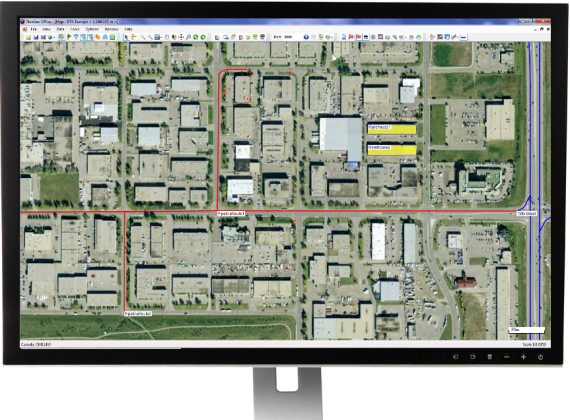
Nexteq Navigation has officially released the next version (V2.0) of its GIS data collection suite, NexGeo. The suite consists of a mobile application for GNSS handhelds to collect and organize GIS data, as well as a desktop application used to customize and organize projects, manage field crews, and integrate with other data formats.
NexGeo aims to provide a complete solution, from augmenting accuracy to a user-friendly, efficient data-collection tool. An improved user interface provides seamless access to Nexteq’s positioning algorithms, notably in the PPP field, including SBAS-based Freedom algorithm, Internet-based i-PPP global services, and traditional RTK, all available in the field as well as post processed where necessary.
The latest version of the software contains a slew of improvements and new features, Nexteq Navigation said. NexGeo Mobile on the handheld is redesigned to provide intuitive shortcuts to the software’s main functions directly on the dashboard, simultaneously presenting a panoramic view of working mode, data quality, and handheld status. Improvements of NexGeo Mobile include pausing and resuming features, quick navigation to preset waypoints with compass or map view, offset feature collection using data from a laser rangefinder, and enhanced options of Feature Cloning, Filtering, and Updating.
When managing projects, post processing the data and tracking the field operation in NexGeo Office, the new interface, including comparison and review tools to customize results, significantly improve the capability of project management and post data analysis. A new coordinate system manager offers an easy way to set up customized coordinate systems.
Besides all the functional changes made to NexGeo, the software suite has received a complete interface overhaul, as well as improvements to loading times and performance. Experienced users will remain at home with the NexGeo feel, as the backbone of the software suite has not changed. All existing projects are compatible with the new versions.
In keeping with Nexteq’s commitment, NexGeo v2.0 is available for free download for all existing authorized clients. For users interested in trying out the NexGeo experience, demonstrations can be provided by contacting [email protected].
Esri announced in a blog post that they have released an Android-based mapping app, based built entirely on the ArcGIS Runtime SDK for Android V 10.1.1, to the open source community.
Today we are proud to announce the app has been released to the open source community on Github. There have been some design changes and updates to the app since it’s debut including some of the following:
This is a great starting point for developers who want to create mobile mapping apps like Google Maps & MapQuest. Some features available now include:
And there is more to come. We encourage developers to collaborate with us as we use Github to continue developing this app together with our developer community. Anyone and everyone are welcome to contribute. We will review/accept pull requests, submit/fix issues, & use milestones for updates. Four things you can do now include:
Esri released the new version of ArcGIS, marking a major milestone in the history of the Esri platform. With ArcGIS 10.2, Esri has taken advantage of the significant changes in IT that magnify the power and accessibility of GIS. The new release improves ease of use, real-time data access, and integration with existing infrastructure. It allows people to more easily deploy web GIS—the key component for implementing GIS as a platform. Web GIS helps users organize their work and simplifies geographic information discovery, access, sharing, and collaboration.

More Online Analysis Tools
According to the announcement, ArcGIS 10.2 extends the analytic functionality of GIS to everyone via ArcGIS Online. Advanced analysis tools have been added to ArcGIS Online for investigating geographic relationships, patterns, and trends within data. New tools in ArcGIS Online include overlay layers for combining two or more layers into one single layer; enhanced hot-spot analysis; and data enrichment resources to glean information about the people, places, and businesses in a specific area or drive time.
ArcGIS Online Access
To ensure that ArcGIS for Desktop users have access to ArcGIS Online capabilities, Esri entitles every customer organization that has ArcGIS for Desktop (Basic, Standard, or Advanced) to receive an ArcGIS Online subscription. The number of named users will be equal to the total number of ArcGIS for Desktop licenses current on maintenance. This will enable users to easily get started with ArcGIS Online. It will also give access to all Esri apps—such as Esri Maps for Office, Collector for ArcGIS, and Operations Dashboard for ArcGIS—as well as numerous app templates hosted in ArcGIS Online. Esri will notify ArcGIS for Desktop customers about the details of this new entitlement in the coming weeks.
Portal for ArcGIS
At ArcGIS 10.2, Esri gives people the ability to deploy ArcGIS Online capabilities on-premises for tighter content security and control. Portal for ArcGIS provides a secure front end for ArcGIS for Server, with dozens of easy-to-use apps and full integration with ArcGIS for Desktop. It includes geographic viewers and analysis tools designed for people without any GIS knowledge. Experienced GIS users can connect to Portal for ArcGIS from ArcGIS for Desktop, developer APIs, and other Esri applications. The Portal for ArcGIS extension software is included with ArcGIS for Server Advanced (Enterprise or Workgroup) and is licensed and priced based on the number of named users.
Real-Time Data Access
Esri’s new release of ArcGIS introduces a number of new technologies that enable the real-time collection and sharing of data with GIS. It includes ArcGIS GeoEvent Processor for Server, a new ArcGIS for Server extension that gives users the power to access live data streams. People can analyze and send processed results to other users or into other systems. This capability transforms GIS applications into powerful frontline decision tools, refining data quickly for consumption and enabling fast response in any situation.
Expanded Business Intelligence Support
With business intelligence (BI) being relied on even more in an increasingly competitive marketplace, the new ArcGIS release expands Esri’s support for major BI systems. ArcGIS 10.2 includes new MicroStrategy BI and Microsoft Dynamics Customer Relationship Management tools, allowing users of those platforms to perform location analytics on their business data and focus their marketing. Core BI tools Esri Community Analyst and Esri Business Analyst Online also get productivity-enhancing face-lifts and major customization capability.
For more information on the dozens of other improvements in the latest release of ArcGIS, visit esri.com/whatsnew.
OpenGeo announced their plans to support QGIS and the open source community behind it. According to the announcement, QGIS is the most widely available open source GIS tool with a proven track record and an extensive plug-in ecosystem. It is widely regarded to have achieved feature parity with proprietary tools while being more stable, easier to use.
OpenGeo’s flagship product, the OpenGeo Suite, is a complete set of standards-based geospatial software that offers the fastest and easiest way to publish geospatial information on the web. The addition of QGIS incorporates a strong desktop tool into OpenGeo’s solid server offerings. Users of the OpenGeo Suite will now have a complete solution for creating, analyzing, publishing and consuming geospatial data and services without requiring any proprietary software.
Juan Marin, OpenGeo’s CTO, outlined the following areas of development:
Marin noted, “QGIS offers a truly open alternative that lowers barriers to entry and total cost of ownership. It’s also operating system agnostic and has no license fees. We feel it fits perfectly with our mission of extending the availability of geospatial open source software. But we’re not only impressed with the software, we respect the community that has built it and we look forward to supporting them however we can.”
OpenGeo, a commercial open source geospatial company, launched Mapmeter beta, its server analytics console, while at FOSS4G-North America 2013.

According to the announcement, Mapmeter is a full administration and management tool for analyzing GeoServer systems. Formerly dubbed “The Enterprise Console,” Mapmeter sits on top of GeoServer, either within the OpenGeo Suite or standalone, and makes it possible for organizations to monitor production geospatial deployments. OpenGeo’s flagship product, The OpenGeo Suite is commercial open source software that gives customers access, control, customization and more while also providing standards compliance and expert support. With the addition of Mapmeter, spatial monitoring and reporting merge into a complete IT workflow.
For more information on Mapmeter and the potential of server analytics for spatial deployments, visit Mapmeter.com.
OpenStreetMap, the user-created map used by many of the biggest sites on the web, has today unveiled an entirely new editor that makes it easier to contribute than ever before.
According to the announcement, the new editor, codenamed ‘iD’, boasts an intuitive interface and clear walk-throughs that make editing much easier for new mappers. By lowering the barrier to contributions, we believe that more people can contribute their local knowledge to the map – the crucial factor that sets OSM apart from closed-source commercial maps.

To accompany the expected growth in OSM’s contributor base, the OpenStreetMap Foundation is launching an appeal to fund new hardware for the project. The appeal aims to make the editing experience more resilient, so that the OSM community can continue producing the most extensive and up-to-date map of the world. You can donate online at donate.openstreetmap.org.
“OpenStreetMap’s growth in the past two years has been phenomenal,” explained Simon Poole, chairman of the OSM Foundation. “We’ve seen an explosion in the amount of local knowledge our mappers contribute to the map. This has encouraged more and more big-name websites and apps to switch to OpenStreetMap, while also enabling map hackers and geo enthusiasts the world over to build startling, imaginative visualisations from our open data.”
“Now, with the new editor and our plans for new hardware, we’re stepping up another level to make OpenStreetMap, not Google, the default choice for mapping and map data.”
OpenStreetMap reports that the new iD editor is a pure HTML5 experience, using the cutting-edge D3 visualisation library. Behind the clear design and intuitive interface is a sophisticated back-end that automatically recommends the most popular ‘tagging’ conventions used by the OSM community.
According to the announcement, development began as a community project in July 2012, and has since been taken forward thanks to a $575,000 grant from the Knight Foundation, with development being co-ordinated by MapBox – one of several companies which offer commercial services on OpenStreetMap’s open data.
From later today, new OpenStreetMap reports that users with a modern browser will automatically use the new iD editor. Users can switch between this and the existing Flash-based Potlatch 2 editor (which is being refocused as a tool for intermediate users) using their settings page or the drop-down ‘Edit’ menu. Advanced desktop-based editors are also available.
The editor software is entirely open source, with code available on github under an ultra-permissive licence.
Esri announced the latest release of ArcGIS for AutoCAD plug-in, Esri’s free AutoCAD plug-in, improves the ability to exchange data and information between the ArcGIS and AutoCAD platforms. ArcGIS for AutoCAD users with read/write access to ArcGIS for Server feature services can now edit geodatabases through AutoCAD. This enables easier data dissemination between CAD and GIS users across the enterprise, reduces the duplication of work, and increases efficiency.
According to the announcement, CAD professionals can use the free downloadable application to add, create, and edit GIS data within AutoCAD drawings. For example, users can add maps and map services from enterprise or cloud servers, such as ArcGIS Online, to their drawings, giving the design a geographic context and a common operating picture for the organization.
“ArcGIS for AutoCAD is the interface to the ArcGIS system and all of its rich data content, sharing, and data management,” states Esri CAD product manager Don Kuehne. “The possibilities presented by the combination of AutoCAD and ArcGIS services to automate editing and data maintenance workflows are going to result in an exponential leap in value for those who take advantage of them.”
The new release also includes access to image services and a geolocation service for navigating within an AutoCAD drawing. AutoCAD 2010/2011/2012 (32-bit and 64-bit) systems are supported. To learn more about or to download the new release of ArcGIS for AutoCAD, visit esri.com/autocadapp.