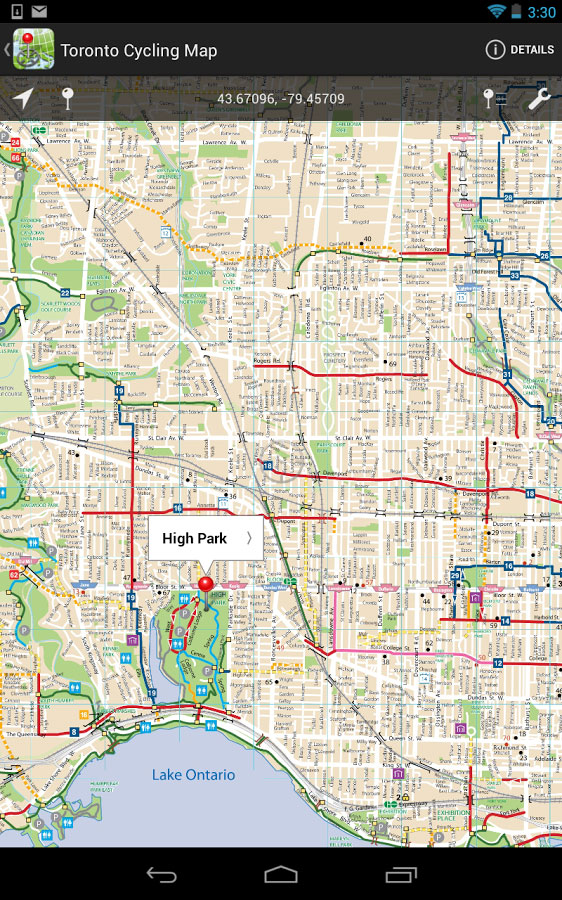
Tag: PDF Maps

  • Avenza launches PDF Maps affiliate program

    Avenza Systems Inc., a developer of cartographic software — such as MAPublisher for Adobe Illustrator and Geographic Imager geospatial tools for Adobe Photoshop — has launched its affiliate program for PDF Maps, its consumer and enterprise mobile map app.

    Any retailer or business, including both online and physical stores, blogs, portals and information sites, can now earn revenue by promoting and selling maps directly to its customers using affiliate links on websites or by using signage with QR codes. Each map sale conducted in this manner will earn the affiliate a share of the revenue.

    The PDF Maps Affiliate program is free to join with no application or setup fees or ongoing costs. Existing PDF Maps Store vendors can opt-in to the affiliate program and earn commission in addition to their normal revenue share.

    “This is a great opportunity for Avenza to increase our marketing efforts and broaden our brand awareness of the PDF Maps platform,” said sales and marketing director, Doug Smith.

    “We are currently working with a number of key map publishers and brands to roll out the affiliate program, and the interest and excitement we’ve seen so far is significant. There has been substantial growth in the use of the PDF Maps app not only as an outdoor recreation tool, but also as a solution for travelers, business people, enterprises and professionals,” Smith said.

    Because of this, examples of affiliate businesses include but are not limited to, outdoor recreation stores, hotels, car rental companies, book stores, and even bloggers,” said Ted Florence, president of Avenza Systems. “Moreover, the PDF Maps Affiliate program seeks to embrace and connect brick and mortar retailers  that cater to outdoor recreation and whose customers may be interested in maps — to the digital economy, instead of excluding them as has been done in the past with music, books and videos.”

    Retailers and businesses interested in joining the affiliate program can sign up for free and can get in contact with the PDF Maps team.

    The PDF Maps app is available now on the iTunes App Store and Google Play Store free of charge for personal recreational use. A Windows version is in public beta release. Commercial, government and academic use licensing is available for a nominal annual fee. Pricing of each map is set by the publisher and free maps remain free to users through the PDF Maps in-app store. Commercial use licensing starts at US$49 per year and drops on a per-device basis as deployment numbers increase.
  • U.S. Forest Service Deploys Avenza PDF Maps App for Firefighting

    U.S. Forest Service Deploys Avenza PDF Maps App for Firefighting

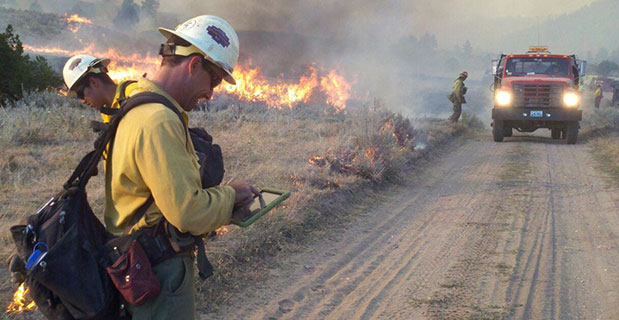
    A San Juan interagency hotshot crew member refers to a map on his iPad as he coordinates execution of their burnout operation.  (Photo credit: Esther Godson)
    A San Juan interagency hotshot crew member refers to a map on his iPad as he coordinates execution of their burnout operation.  (Photo credit: Esther Godson)

    Every year thousands of acres of forests are engulfed in fires. Recognizing the benefits of geospatial technology, the United States Forest Service (USFS) Geospatial Management Office (GMO) is using Avenza System Inc.’s award-winning PDF Maps mobile app to deliver interactive digital maps to firefighters and emergency response teams situated in forests across the United States and its territories.

    The USFS fights wildfires and other natural disasters in more than 155 national forests and 20 national grasslands, totaling an estimated 193 million acres or 30 percent of all federally managed lands. The USFS GMO is responsible for the implementation of the Forest Service geospatial program which includes using technologies such as GIS, remote sensing, cartography, geodesy and GPS.

    The centered blue GPS position on an operations map pinpoints the user’s location. (Photo credit: Carl Beyerhelm)
    The centered blue GPS position on an operations map pinpoints the user’s location. (Photo credit: Carl Beyerhelm)

    With increased use of digital solutions, the USFS benefits from Avenza’s PDF Maps app geospatial technology in enabling its thousands of firefighters and support personnel. The PDF Maps app aids emergency response teams who use digital devices for work in the field.

    The app provides constant access to geographic information and points of interest, with additional interactive features such as measuring, place marking and location tagging. The app operates without the risk of lost reception due to cell tower proximity and does not rely on an Internet connection to use map data. It uses GPS to obtain and display an accurate position on the ground regardless of network connectivity.

    A hardcopy map is compared to its digital counterpart cached on a smartphone. (photo credit: Kari Greer)
    A hardcopy map is compared to its digital counterpart cached on a smartphone. (photo credit: Kari Greer)

    “Accessing maps on mobile devices ensure responders have accurate and current geographic information while they’re out in the field,” said Carl Zulick, Geospatial Information Officer, USFS. “Avenza’s PDF Maps app makes it possible for teams to use any map digitally without requiring a data connection while involved in an emergency situation. Since the maps are location-aware and interactive, we can capture real-time data, photos, and locations. This data can be shared to assess the situation and make necessary strategic changes and improve situational awareness.”

    The PDF Maps app is available now on the iTunes App Store and Google Play Store free of charge for personal recreational use. A Windows version is currently in public beta release. Commercial, government and academic use licensing is available for a nominal annual fee. Pricing of each map is set by the publisher and free maps remain free to users through the PDF Maps app in-app store. Commercial use licensing starts at US$49 per year and drops on a per-device basis as deployment numbers increase.

    Mobile maps help air-tanker pilots avoid the mapped yellow areas, where application of aerial fire retardant is restricted. (Photo credit: Max Wahlberg) 
    Mobile maps help air-tanker pilots avoid the mapped yellow areas, where application of aerial fire retardant is restricted. (Photo credit: Max Wahlberg)
  • U.S. Forest Service deploys Avenza PDF Maps app for firefighting

    A San Juan interagency hotshot crew member refers to a map on his iPad as he coordinates execution of their burnout operation.  (Photo credit: Esther Godson)
    A San Juan interagency hotshot crew member refers to a map on his iPad as he coordinates execution of their burnout operation.  (Photo credit: Esther Godson)

    Every year thousands of acres of forests are engulfed in fires. Recognizing the benefits of geospatial technology, the United States Forest Service (USFS) Geospatial Management Office (GMO) is using Avenza System Inc.’s award-winning PDF Maps mobile app to deliver interactive digital maps to firefighters and emergency response teams situated in forests across the United States and its territories.

    The USFS fights wildfires and other natural disasters in more than 155 national forests and 20 national grasslands, totaling an estimated 193 million acres or 30 percent of all federally managed lands. The USFS GMO is responsible for the implementation of the Forest Service geospatial program which includes using technologies such as GIS, remote sensing, cartography, geodesy and GPS.

    The centered blue GPS position on an operations map pinpoints the user’s location. (Photo credit: Carl Beyerhelm)
    The centered blue GPS position on an operations map pinpoints the user’s location. (Photo credit: Carl Beyerhelm)

    With increased use of digital solutions, the USFS benefits from Avenza’s PDF Maps app geospatial technology in enabling its thousands of firefighters and support personnel. The PDF Maps app aids emergency response teams who use digital devices for work in the field.

    The app provides constant access to geographic information and points of interest, with additional interactive features such as measuring, place marking and location tagging. The app operates without the risk of lost reception due to cell tower proximity and does not rely on an Internet connection to use map data. It uses GPS to obtain and display an accurate position on the ground regardless of network connectivity.

    A hardcopy map is compared to its digital counterpart cached on a smartphone. (photo credit: Kari Greer)
    A hardcopy map is compared to its digital counterpart cached on a smartphone. (photo credit: Kari Greer)

    “Accessing maps on mobile devices ensure responders have accurate and current geographic information while they’re out in the field,” said Carl Zulick, Geospatial Information Officer, USFS. “Avenza’s PDF Maps app makes it possible for teams to use any map digitally without requiring a data connection while involved in an emergency situation. Since the maps are location-aware and interactive, we can capture real-time data, photos, and locations. This data can be shared to assess the situation and make necessary strategic changes and improve situational awareness.”

    The PDF Maps app is available now on the iTunes App Store and Google Play Store free of charge for personal recreational use. A Windows version is currently in public beta release. Commercial, government and academic use licensing is available for a nominal annual fee. Pricing of each map is set by the publisher and free maps remain free to users through the PDF Maps app in-app store. Commercial use licensing starts at US$49 per year and drops on a per-device basis as deployment numbers increase.

    Mobile maps help air-tanker pilots avoid the mapped yellow areas, where application of aerial fire retardant is restricted. (Photo credit: Max Wahlberg) 
    Mobile maps help air-tanker pilots avoid the mapped yellow areas, where application of aerial fire retardant is restricted. (Photo credit: Max Wahlberg)
  • Avenza Adds USGS US Topo Maps to PDF Maps App

    Thumbnail image of the 2015 Tupelo, Mississippi 7.5 minute series quadrangle (1:24,000-scale), US Topo map (orthoimage layer off)The United States Geological Survey (USGS) continues to support the delivery of its digital maps through Avenza Systems Inc.‘s PDF Maps app. It has widened the selection to more than 120,000 US Topo topographic maps on its digital mapping platform, which provides digital users access to USGS’ rich map content and extends its reach with a growing base of mobile consumers.

    The app currently aids a growing number of people who reference digital devices for work or recreation. Travelers, scientists and conservation and environmental decision makers already make use of USGS topo maps, but the expanded use of the maps via the PDF Maps app provides current USGS topo map users the ability to digitally access maps in areas with little to no internet reception and input notes and images within the map all while tracking current position.

    The USGS produces US Topo maps on a continuous basis with more than 18,000 revised quadrangles produced every year. Currently, thousands of maps from USGS’s extensive library are now available in Avenza’s PDF Maps database, including the most current variations that reflect the changing landscape of the country.

    Many historical maps can also be accessed, with thousands more dating back 130 years being added in the near future, according to Avenza. The app provides constant access to geographic information and points of interest, with additional interactive features such as measuring, place marking and location tagging. Avenza’s PDF Maps app operates without the risk of lost reception due to cell tower proximity, making it the ultimate traveling tool since it does not rely on an internet connection to use map data and obtain and display location.

    “Distinguished map publishers like the USGS fully recognize the shift to digital and how consumers are accessing and consuming information that was once static and digitally implementing it into their daily lives and making it more interactive,” said Ted Florence, president of Avenza Systems Inc. “Avenza’s PDF Maps app is an example of how a digital tool can expand the utility of a map beyond location guidance; it is also a tool to capture an experience in real-time. As the industry continues to evolve to fit into the world of a mobile consumer, we look forward to strengthening our ties with groups like the USGS.

    PDF Maps app 2.6 is available on the iTunes App Store free of charge for personal and private use. PDF Maps app is also available for use with Android devices in the Google Play Store free of charge for personal non-commercial use. A Windows version is currently in public beta targeted for a release later this year.

  • Avenza Releases Geographic Imager 5.0 for Adobe Photoshop

    Avenza Systems Inc., producers of MAPublisher cartographic software for Adobe Illustrator and the PDF Maps mobile app, has released Geographic Imager 5.0 for Adobe Photoshop. This latest release is compatible with Adobe Photoshop Creative Cloud 2015 for both Windows and Mac.

    Among the new features, the Georeference tool has been redesigned to provide more flexibility and interactivity when referencing and rectifying images. This release also introduces map package export compatible with the PDF Maps mobile app and the upload of map packages directly to the PDF Maps digital map store.

    “We’ve been working diligently on this release of Geographic Imager to allow users to work with their spatial imagery and data in Adobe Photoshop Creative Cloud 2015,” said Ted Florence, president of Avenza. “Geographic Imager is an excellent add-on to Photoshop and proves to be a competitive geospatial image editing platform for many GIS professionals in the industry. We’re looking forward to continuing to develop new tools for the Creative Cloud platform to improve productivity and to streamline workflows.”

    Additional Geographic Imager 5.0 Features

    • Fully compatible with Adobe Photoshop CC 2015
    • Redesigned Georeference tool: reference with online maps, coordinate system detection, and improved rectification process
    • New export DEM formats: ArcInfo ASCII Grid and BIL
    • New online help and help integrated into dialogs
    • New ability to export a PDF Maps package and upload it directly to the PDF Maps digital map store
    • New ability to record operations, errors, and messages to event log
    • New mosaic options including ability to apply blending mode and place mosaic layers above destination layer
    • Optimized Export to Web Tiles and now includes image interpolation methods and support for OpenStreetMap and TileMill
    • Enhanced scripting support now includes WMS import
    • New Preferences interface and options
    • Various other bug fixes and user experience enhancements

    Geographic Imager software for Adobe Photoshop leverages the superior image editing capabilities of the world’s premier raster-based image editing software and transforms it into a powerful geospatial production tool. Work with satellite imagery, aerial photography, orthophotos, and DEMs in GeoTIFF and other major GIS image formats using Adobe Photoshop features such as transparencies, filters, and image adjustments while maintaining georeferencing and support for hundreds of coordinate systems and projections.

    Geographic Imager 5.0 is immediately available and free of charge to all current Geographic Imager Maintenance Program members and at US$319 for non-maintenance upgrades. New fixed licenses start at US$699. Geographic Imager Basic licenses start at US$99. Academic, floating and volume license pricing are also available. Geographic Imager 5.0 is compatible with Adobe Photoshop CS6, CC 2014 and CC 2015. Adobe Photoshop CS5 and CC are supported but deprecated in this release.

  • Avenza PDF Maps v2.5 for iOS Highlights Pan and Zoom

    pdfmaps-ipad-tools-WAvenza Systems Inc., a developer of cartographic software — including MAPublisher for Adobe Illustrator and Geographic Imager geospatial tools for Adobe Photoshop — has released PDF Maps app 2.5 for iOS devices with enhanced features.

    Avenza’s PDF Maps app and mobile solution is used for both personal and commercial purposes and incorporates more detailed functions commonly needed when tracking, plotting points, navigating and collecting data in areas where Internet service is unavailable. To date, Avenza’s PDF Maps app has grown its commercial side to more than 30,000 regular users.

    Paired with mobile devices that use GPS, such as a smartphone or tablet, the PDF Maps app provides constant access to geographic locations without the risk of losing reception due to cell-tower proximity. Over the years, the app initially attracted the attention of recreational users such as hikers who traveled through rugged areas.

    Today, PDF Maps app has developed a growing list of commercial users globally, including the military, wild fire units, search and rescue teams, and conservation groups that use the app to record data, document with images and share detailed navigation points with others quickly and easily. Based on the various types of environments the app is being applied in, Avenza has further developed its latest features based on the feedback and specifications of its users. These include:

    • Enhanced navigation: ability to establish both GPS position and compass.
    • Measurement: tools to calculate distances, size and areas.
    • Map use: capable of overlaying search engine results on any map for offline use.
    • Map Collections: convenient map searching tools including the ability to pan and zoom between maps.
    • Personalization: ability to load a user’s own geospatial PDF, GeoPDF, GeoTIFF, JPG and TIFF maps and imagery from a file system, Dropbox, URL or email.

    pdfmaps-placemarks-W“Avenza’s PDF Maps app has always been popular with the recreational groups who often use the free app for use while in the air, on land or sea excursions. The mapping resource has helped many novice and expert outdoor enthusiasts navigate through areas where most digital maps fail in the details,” said Ted Florence, president, Avenza Systems Inc. “Recently, the popularity experienced on the recreational side is now being felt on the commercial end as many organizations that work in remote areas, and require use of their own custom maps and drawings on smartphones or tablets, need the ability to locate themselves and make notations and share information on detailed maps quickly. Avenza is excited to see the growth of PDF Maps, not just as a product, but as a valuable tool that is aiding commercial users such as conservation teams and similar groups. We hope the latest features of PDF Maps app 2.5 helps make a difference in their work.”

    Currently, Avenza’s vast PDF Maps app library covering maps for domestic and international destinations includes more than 100,000 maps organized by country, state and area. All maps available through the in-app iTunes-like map store offer the following capabilities:

    • Access and load maps through in-app purchase, iTunes File Sharing, Wi-Fi or cellular network to read maps anytime.
    • Access and interact with saved maps without the need for a live network connection (offline).
    • View your location on the PDF map using the built-in GPS device or via Wi-Fi triangulation.
    • Find coordinate of any location in the map, including the ability to type in a coordinate to search.
    • Display coordinates as Lat/Long (WGS84), Lat/Long (Map Default), Northing/Easting, or Military Grid Reference System (MGRS/United States National Grid (USNG).
    • Support for GeoTIFF files to create tiles similar to how a geospatial PDF is tiled.
    • Map rendering in higher resolution.
    • Overlay Google search results.
    • Add waypoints and collect/record information about locations, including photos.
    • Measure distances and areas.
    • Open current map extents in the Maps app.
    • Quickly view, zoom and pan maps using gestures (pinch, drag and flick, double tap).
    • Change pin colors, position and label names.

    PDF Maps app 2.5 is available now on the iTunes App Store free of charge for personal and private use. PDF Maps app is also available for use with Android devices in the Google Play Store free of charge for personal non-commercial use. A Windows version is currently in public beta targeted for a release later this year. Commercial, government and academic use licensing is available for a nominal annual fee.

    For more information about PDF Maps, visit the Avenza website or the PDF Maps website. Pricing of each map is set by the publisher and free maps remain free to users through the PDF Maps app in-app store.

  • Avenza Releases MAPublisher 9.4 for Adobe Illustrator

    mapublisher-adobe-O

    Avenza Systems Inc., producers of the PDF Maps app for mobile and geospatial plugins for Adobe Creative Suite, including Geographic Imager for Adobe Photoshop, has released MAPublisher 9.4 for Adobe Illustrator. This latest update includes new  features such as streamlined import, support for additional formats when exporting a document to web tiles, and a new image attribute type to support images imported from the PDF Maps app on both iOS and Android platforms.

    “We’re excited to release MAPublisher 9.4 because of its continued evolution to make it even easier to create great looking maps with enhanced cartography tools,” said Ted Florence, President of Avenza. “The enhancements and features in this release have been developed from customer feedback with significant improvements to import and export interoperability. The primary focus of this release is to increase productivity for cartographers and GIS professionals by enabling them to easily and quickly import data, create high-quality map products, and easily publish or export to print and digital formats.”

    Enhancements and new features of MAPublisher 9.4 include:

    • Streamlined data import: Import (formerly Simple Import) and Multiple Data Import (formerly known as Advanced Import). Improved interface provides additional coordinate system information and easier access to format specific Adobe Illustrator options that affect how data is imported.
    • New image attribute type to store an image for each record in a layer’s MAP Attribute table. Image attributes are supported when importing from the PDF Maps app (in KMZ format) and exporting to Google Earth (in KMZ format).
    • Export Document to Web Tiles now supports MapBox and Tile Map Service map providers. A new anti-aliasing option to optimize art or type is now available.
    • New ability to export a coordinate system file for non-geospatial image formats.
    • New ability to specify grid constraints to limit the geographical extent of a Measured Grid. In addition, a new option is available for ticks to follow the line at the grid boundary.
    • New file export option to assign metadata for TAB/MIF and KML/KMZ formats. The metadata assignment option allows layer attributes to be assigned to format specific metadata fields.
    • Improved preview quality makes it easier to see how settings affect the scale bar.
    • Newly designed MAP Layer icons and feature type icons.
    • Various user interface and performance enhancements to improve usability.

    MAPublisher for Adobe Illustrator is powerful map production software for creating cartographic-quality maps from GIS data. MAPublisher tools leverage the superior graphics design capabilities of Adobe Illustrator to manipulate GIS data and to produce high-quality maps with accuracy and efficiency.

    MAPublisher 9.4 for Adobe Illustrator is available free of charge to all MAPublisher users with an active maintenance subscription and as an upgrade for non-maintenance users at US$599. New licenses start at US$1399. MAPublisher FME Auto and MAPublisher LabelPro are also available as add-ons to MAPublisher 9.4 at prices starting at US$399 per license. Academic, floating and volume pricing are also available. Prices include one year of full maintenance.

  • Avenza’s PDF Maps App Launches on Google Play Store

    Avenza' PDF Maps app is now available at the Google Play Store.
    Avenza’ PDF Maps app is now available at the Google Play Store.

    Avenza Systems Inc., producers of MAPublisher cartographic software for Adobe Illustrator and Geographic Imager geospatial tools for Adobe Photoshop, announce that PDF Maps app is now available on the Google Play Store.  The first and only geospatial PDF and GeoTIFF reader for Android devices, Avenza said, the PDF Maps app is unique to the space due to its extensive collection of more than 100,000 detailed maps sourced from well-established publishers, cartographers, government agencies and aficionados of outdoor recreational activities, all of which are downloadable directly from within the app.

    PDF Maps take advantage of geospatial technology that allows consumers to view maps and measure real world distances and areas. Paired together with mobile devices that use GPS such as Androids, the PDF Maps app provides constant access to geographic locations and even points of interest without the risk of losing reception due to cell tower proximity.

    Designed with its audience of travelers and outdoor enthusiasts in mind, Avenza’s PDF Maps app has already garnered accolades from the International Map Industry Association (IMIA) and Geospatial World for its innovative use of technology on the iOS platform in 2011 and 2012.  Since then, its versatility for recreational or business purposes out in the field has been recognized across several industries and it’s gaining momentum.

    “The market is currently saturated with map apps that are limited in map data, or too simplified to be functional for offline navigating.  We wanted to address those issues by providing a free navigational app that catered to a segment of users who needed something more substantial than the average turn-by-turn digital maps offered today, while providing map-publishers with an iTunes-like environment for distributing their maps direct to devices” said Ted Florence, President of Avenza Systems Inc.

    “With Avenza’s PDF Maps app Android users can do more than just view their location.  PDF Maps provides a meaningful interface to measure distances, drop placemarks and share personal recorded data in various formats.  It’s more than just a viewing tool, but will provide the Android market the best of both worlds — access to maps from well-known paper map publishers that work in tandem with the functionality of GPS devices.  We’re thrilled to finally make it available to a new market.”

    Unlike other map apps that provide one view of a location using GPS coordinates as most maps do, Avenza’s PDF Maps app expands a traveler’s choices, allowing them to access detailed geography or points of interest created by specific map publishers for use on land, sea or air.  PDF Maps app for Android allows consumers to access information while at a destination, providing users an opportunity to make the most of their time experiencing their environment rather than searching for cell reception to access directions.

    Currently, Avenza’s vast PDF Maps app library covers maps for domestic and international travel organized by state and area.  Android users will appreciate the breadth of tool management features available.  All maps — free and purchased — are accessible through the in-app map store and offer the following capabilities:

    • Add maps from the file system, Dropbox, a URL, email, or Map Store
    • Browse, purchase, and download maps from the Avenza Map Store (existing iOS PDF Maps accounts are compatible)”
    • Show GPS position on maps
    • Add Placemarks
    • Import and export KML
    • Find Coordinates
    • Measure Distance or Area
    • Open current view in Google Maps

    Avenza’s PDF Maps in-app Map Store features a variety of publishers that focus on recreational activities as well as all segments of the map-use market.  Below is a small sampling of maps available:

    • Camping and hiking including National Park Service maps and other regions of the world
    • Nautical and marine navigation including NOAA and FAA charts for North America and other regions of the world
    • Topographic use including USGS and Canadian Topographic maps and other regions of the world
    • Maps for tourists, transit, travel, special events, historic and much more

    PDF Maps is available now in the Google Play Store free of charge. For more information about PDF Maps, visit the Avenza website at www.avenza.com/pdf-maps. Pricing of each map is set by the publisher and free maps remain free to users through the PDF Maps app in-app store.

  • Avenza Launches PDF Maps App 2.0 on iOS

    Avenza Systems, Inc., developer of cartographic software — such as MAPublisher for Adobe Illustrator and Geographic Imager geospatial tools for Adobe Photoshop — announced the launch of PDF Maps app 2.0 for iOS devices.

    The enhanced version incorporates suggestions from consumers that currently use the geospatial PDF and GeoTIFF reader on Apple iOS for travel, outdoor activities or business purposes out in the field. Based on the needs of its primary consumers, PDF Maps app 2.0 provides iPhone, iPad and iPod Touch users the ability to track speed and elevation in real time, and import and export data more succinctly.

    The PDF Maps app takes advantage of geospatial technology that allows travelers to view and measure real-world locations and attributes. Paired together with mobile devices that utilize GPS, such as an iPhone, the PDF Maps app provides constant access to geographic locations and even points of interest without the risk of losing reception due to cell tower proximity — making it the ultimate travel accessory for any activity in areas where Internet bandwidth is not available or while roaming outside one’s data zone, Avenza said. Features include:

    • Tracking real-time movement with GPS which includes noting speed and elevation statistics
    • Saving, exporting and importing tracks in KML format
    • Saving measurements to line data as well as importing and exporting lines in KML format
    • “Map Features” list for easy organization of placemarks, lines and tracks including folder enhancements
    • Improved export accuracy

    “When we first launched PDF Maps app in 2011, we knew there was a segment of digital map users that needed something more robust than the turn-by-turn digital maps that were useful in an internet-laden urban environment, and more accessible than the expensive GPS devices that could be used offline. PDF Maps app filled that gap, and since then, we’ve grown a dedicated following that understands we’ve created a tool that supports how they want to travel, work and play…offline,” said Ted Florence, President of Avenza Systems Inc. “Today, we’ve come to a point where we can take consumer feedback and refine it in a way that benefits everyone which has been an invaluable experience for us, and we’re excited to introduce the latest version of Avenza’s PDF Maps app 2.0 to the map users that have provided their own insight to help create it.”

    Avenza’s PDF Maps app expands a traveler’s choices, allowing them to access detailed geography or points of interest created by specific map publishers for use on land, sea or air. PDF Maps app 2.0 allows consumers to access information while at a destination, providing users an opportunity to make the most of their time experiencing their environment rather than searching for cell reception to access directions.

    Avenza’s vast PDF Maps app library covering maps for domestic and international travel includes more than 100,000 maps organized by state and area. All maps available through the in-app iTunes-like map store offer the following capabilities:

    • Access and load maps through in-app purchase, iTunes File Sharing, Wi-Fi or cellular network to read maps anytime
    • Access and interact with saved maps without the need for a live network connection (offline)
    • View your location on the PDF map using the built-in GPS device or via Wi-Fi triangulation
    • Find coordinate of any location in the map, including the ability to type in a coordinate to search
    • Display coordinates as Lat/Long (WGS84), Lat/Long (Map Default), Northing/Easting, or Military Grid Reference System (MGRS/United States National Grid (USNG)
    • Support for GeoTIFF files to create tiles similar to how a geospatial PDF is tiled
    • Map rendering in higher resolution
    • Overlay Google search results
    • Add waypoints and collect/record information about locations, including photos
    • Measure distances and areas
    • Open current map extents in the Maps app
    • Quickly view, zoom and pan maps using gestures (pinch, drag and flick, double tap)
    • Change pin colors, position and label names

    PDF Maps app 2.0 is available now on the iTunes App Store free of charge for personal and private use. Commerical, government and academic use licensing is available for a nominal fee.