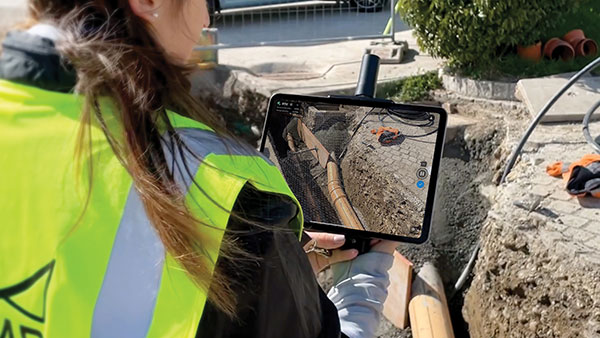
Pix4D is now offering a real-time kinematic (RTK) rover for use with iOS devices.
The Pix4D viDoc RTK handheld rover attaches to iOS devices to bring RTK accuracy to terrestrial scanning on iPhones and iPads.
When paired with the PIX4Dcatch mobile app, the viDoc rover can replace survey tools such as RTK GNSS rovers and terrestrial scanners, the company said.
Together, the products create a workflow that turns iPhones or iPads into an accurate terrestrial scanning device, with centimeter-accurate RTK positioning from an existing NTRIP network.
The tools can be used to 3D model small areas or structures.
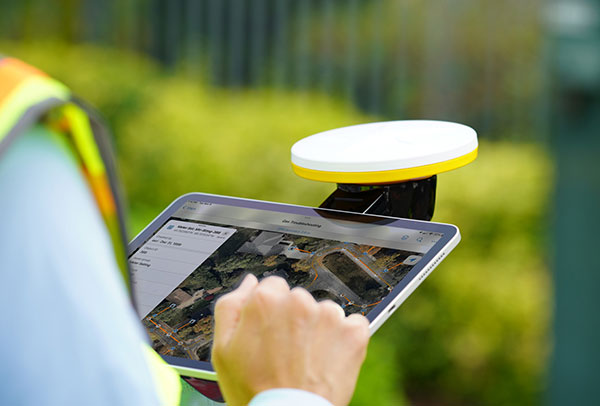
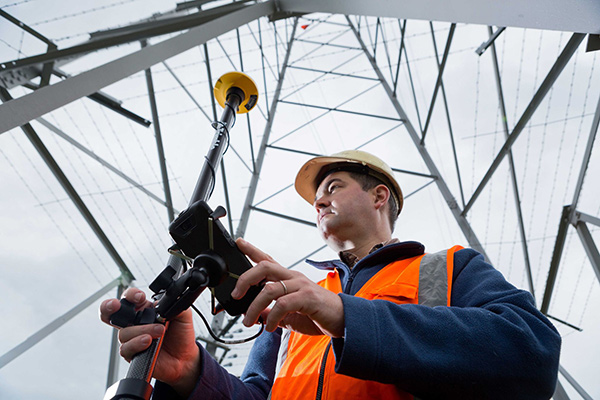
Trimble has introduced the Trimble Catalyst handle, which adds a new level of flexibility to accessing GNSS data. The lightweight, ergonomic handle provides a convenient way to carry Trimble’s Catalyst-enabled mapping and field data-collection workflows.
Users can:
choose their device, whether iOS or Android, which turns any smartphone or tablet into a Trimble-quality handheld positioning system
swap out a device at any time, whenever an upgrade is needed
adjust accuracy level as requirements change by switching the accuracy-based Catalyst subscription
affix a monopole when decimeter-level or better positions are crucial.
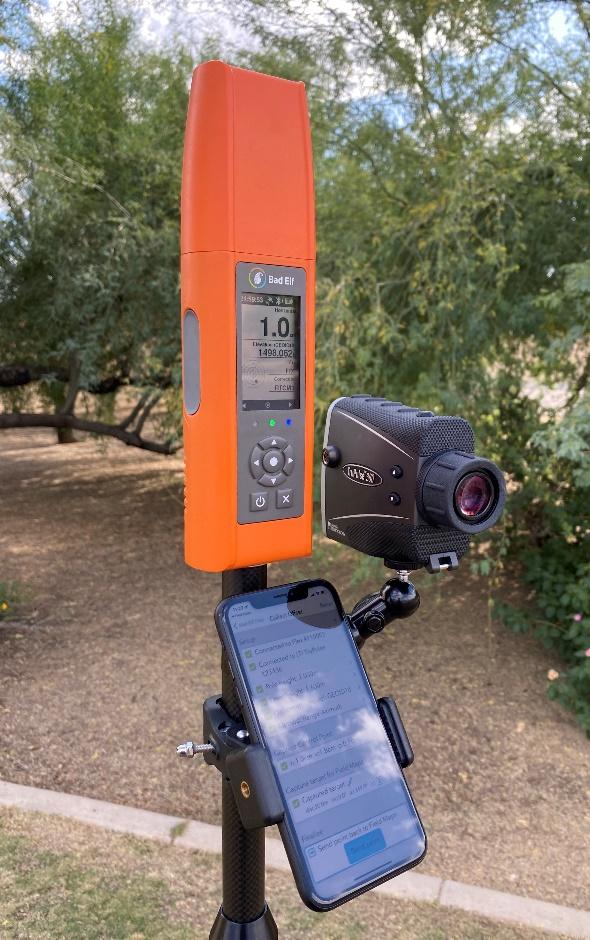
Bad Elf LLC now provides an integrated laser-offset workflow for acquiring high-accuracy field data in GNSS-challenged environments using Esri ArcGIS Field Maps for Android.
The workflow integrates Bad Elf and Laser Tech (LTI) hardware in collaboration with ArcGIS technology from Esri.
“Extending compatibility to the Android mobile operating systems further promotes our commitment to the bring-your-own-device (BYOD) professional,” said Larry Fox, vice president of marketing and business development at Bad Elf. “As a member of the Esri Partner Network, we are pleased to collaborate with Esri in offering this capability to our Android customers.”
The Bad Elf Flex connects to any LTI TruPulse rangefinder over a wired or Bluetooth connection to deliver high-accuracy location data to Esri ArcGIS Field Maps. Mobile workers can efficiently complete position and height data collection in access-limited situations, saving time, money and effort.
“With the inclusion of Android support, Bad Elf introduces a powerful and innovative solution for accurate location offset and height data capture that extends the capabilities of ArcGIS Field Maps across all supported platforms,” Esri Product Lead Jeff Shaner said.
Bad Elf’s app workflow focuses on enhancing productivity, reducing field collection difficulties, and mitigating quality issues. The Bad Elf app workflow runs on Android and iOS. Connection versatility minimizes operating system limitations and allows for app-based or standalone operation.
Bad Elf also provides free tools for Esri ArcGIS Desktop and ArcGIS Pro for configuring offset-enabled point-feature capture using the ArcGIS Field Maps on iOS and Android.
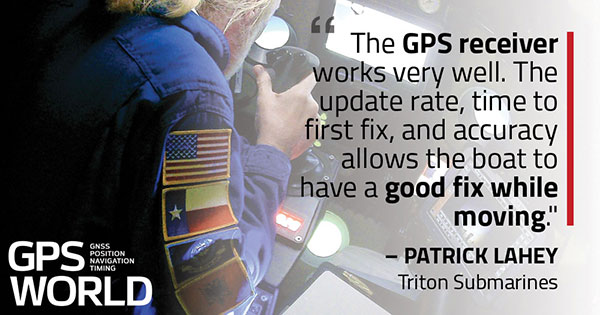
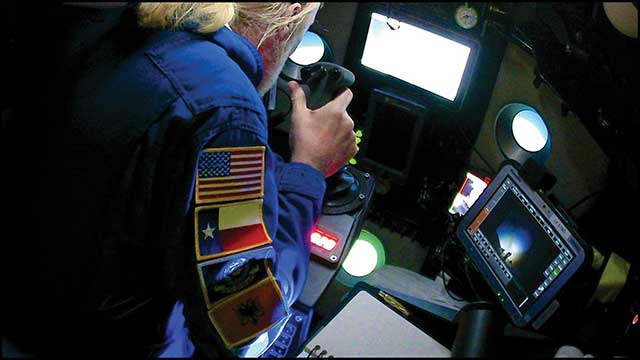
Triton Submarines — famous for underwater explorations including that of the Titanic — has replaced large, outdated computers onboard with rugged tablets. Each sub is equipped with two Panasonic Toughpad FZ-G1 tablets to monitor depth, light, voltage, gases and alarms, as well as input data and run analytic software. On the surface, a Toughbook 54 is used for tracking and communication.
Photo: Caladan Oceanic
Integrated GPS receivers simplify mapping, allowing teams to plot the location of a vessel in real time. “We use the GPS receiver inside the Toughbook 54 for positioning of the surface boat to aid in tracking of the sub,” said Patrick Lahey, president of Triton Submarines. “The GPS receiver works very well. The update rate, time to first fix, and accuracy allows the boat to have a good fix while moving, and for a quick restart during operations at sea.”
Photo: Caladan Oceanic
Once the sub is submerged, it loses all radio communications including GPS. An underwater positioning system based on acoustics is used instead, Lahey explained. The USBL system uses a surface base station mounted on a boat and GPS to determine its location. Then, using an array of acoustic transducers, it sends a ping to the sub and the sub pings back. The surface unit then measures the travel time to each transducer to find the sub’s position.
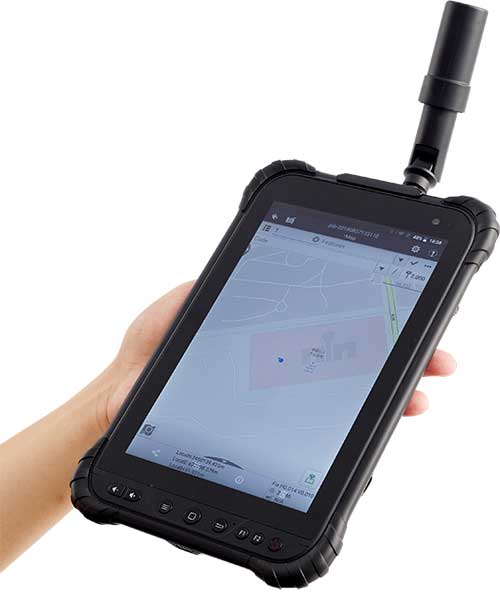
CHC Navigation has launched its LT700H RTK Android tablet, designed to increase efficiency and productivity of the mobile field workforce in applications requiring centimeter-to-decimeter positioning accuracy.
Photo: CHC Navigation
Portable, rugged and versatile, the LT700H enables precision GIS data collection, forensic mapping, construction site layout, environmental surveys, landscaping and earthmoving jobs.
Powered by 184-channel high-performance GPS, GLONASS, Galileo and BeiDou module and a superior tracking GNSS helical antenna, the LT700H provides position availability in demanding environments. Its integrated 4G modem ensures seamless communication from field-to-office and robust connectivity to GNSS real-time kinematic (RTK) networks corrections.
“With the LT700H RTK Tablet, we are offering a professional and accurate GNSS solution to any mobile applications requiring high-portability,” said George Zhao, CEO of CHC Navigation. “The LT700H enables further use of GNSS technology, from single operator to companies with large field crew.”
Combined with CHCNAV Landstar 7 field data-collection software, the LT700H has a vibrant 8-inch IPS sunlight-viewable screen that perfectly displays GIS data tables, vector and raster maps or high-resolution pictures.
The LT700H Google GMS certification guarantees compatibility with any common GIS and mapping Android applications.
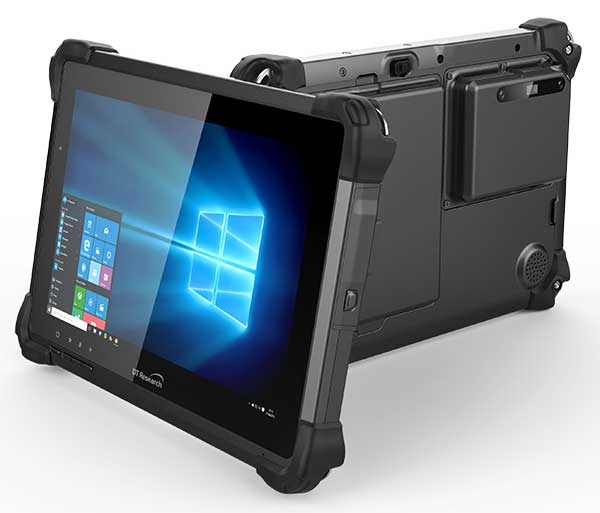
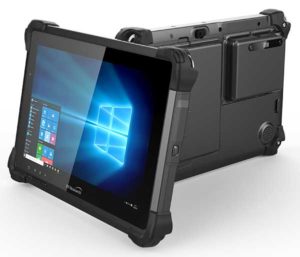
DT Research has designed a new rugged tablet with 3D imaging that is purpose-built for 3D mapping with a built-in GNSS module.
The DT301X has an Intel RealSense Depth camera that provides real-time 3D imaging combined with dual-frequency GNSS module for real-time mapping and positioning. The digital images are better than high-definition standard, and are suitable for construction building information management (BIM) graphics.
The DT301X rugged tablet is compatible with existing applications with Microsoft Windows 10 IoT Enterprise operating systems for flexible integration, and it brings together the advanced workflow for data capture, accurate positioning and data transmitting.
Key features of the DT301X
Highly durable. IP65 and MIL-STD-810G rated tablet in a slim case offers the versatility to be used in the field, office and vehicles.
Indoor/outdoor display. A high brightness 10.1-inch touchscreen offers flexible viewing in a wide range of lighting.
Wi-Fi and Bluetooth. Long-range Bluetooth for 1000-foot range and 4G LTE mobile broadband for the latest in high-speed communications.
High performance. Intel 8th-generation Core i5 or i7 processor offers high-performance while still being energy efficient.
Hot-swappable batteries. With high-capacity 60- or 90-watt hot-swappable batteries, the DT301X keeps working continuously.
BRING YOUR OWN DEVICE (BYOD) is not just an industry buzzword. It can change the way professional surveyors work every day. The idea of using a smartphone or tablet instead of a dedicated device is appealing. But is it good enough?
Surveyors and mappers are challenged with the arduous task of data collection that meets accuracy and precision standards and provides adequate attribute information for the project. Before the invention of the electronic data collector, handwritten notes in field books were the norm. Every note keeper’s style varied in content, neatness and thoroughness. Calculations for determining survey data values were completed longhand on paper and were very time consuming.
Like its personal computer counterpart, the electronic data collector was introduced in the late 1970s with minimal adoption by the average surveyor because of cost and complexity. Storage methods for the era included magnetic modules and tape; both forms of media were expensive and fragile with little storage for the cost.
Data collection was limited to numeric values only, with horizontal and vertical angles, slope distance, point number and point code being the extent of the information. Couple this process with the limited availability of printers and plotters capable of depicting the data for the surveyor’s use, and one can see why few practitioners invested in these systems.
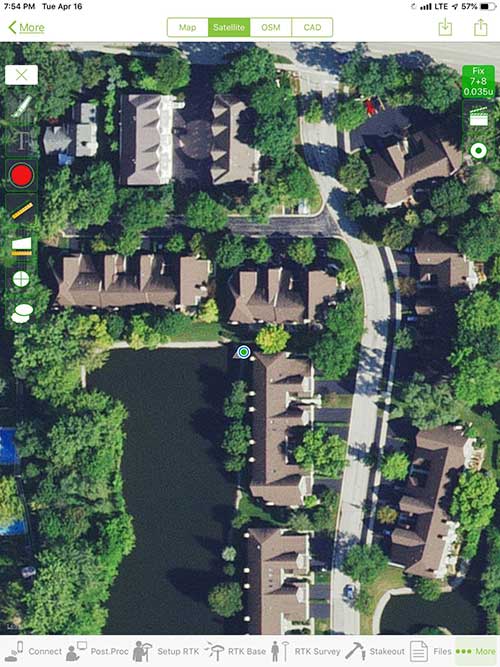
iOS aerial viewer. (Screenshot: Tim Burch)
The 1980s and 1990s brought significant changes to surveying with the advancing technology of electronic computing and measuring. The introduction of robotic total stations, various methods of GNSS, and even leveling took advantage of significant computer power and measuring processes, and the data collector stayed in lockstep with the advancing instrumentation. Almost every equipment manufacturer developed their own proprietary data collector and software system because of the unique design and programming of their systems.
In the 2000s and later, third-party manufacturers began producing data collectors with advanced computing power and the ability to connect to varying brands of equipment. Most of the programming for these collectors are still proprietary in nature to this day.
Also during the 2000s, a new wave in mobile communications was taking place. Cellular phone and data signals were now being used to transmit an abundance of information between users.
The rapid development of handheld communication devices has led to the meteoric rise of two specific mobile operating systems: one by a radical startup that concentrated on dominating the search engine market, and the other by an avant garde computer company looking to expand its unique customer base.
By the end of the decade, the world had been introduced to the Android operating system by Google, and the iOS operating system by Apple. The combined market share for the two operating systems at press time was just under 98 percent of all mobile devices worldwide.
Trending Away from Proprietary Data Collectors
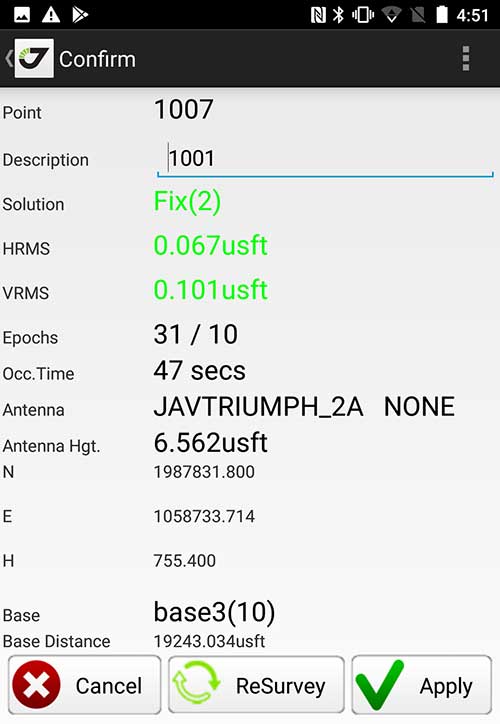
Android Point Info: Confirmation of collected data, including equipment and base station. (Screenshot: Tim Burch)
Because data collection by surveyors and mappers have traditionally been performed on proprietary systems designed and produced by equipment manufacturers for use with only their instruments, these collectors, while very powerful and robust, are costly for the equipment manufacturers to produce because of the limited market of surveyors and mappers.
Many suppliers, before the introduction of the iPhone and Android operating systems, attempted to adapt their data-collection platforms to wider recognized mobile operating systems (for example, Windows CE/Pocket PC/Mobile) on a bevy of mobile devices (HP/iPAQ, Sony Eriksson, HTC) with little success. Various versions of Windows are still being used today by GNSS equipment manufacturers’ proprietary data collectors, including Trimble, Hemisphere GNSS, Topcon and CHC Navigation.
However, the field of operating environments has become more crowded as technology continues to advance. The proliferation of Windows-based data collectors are now on the decline.
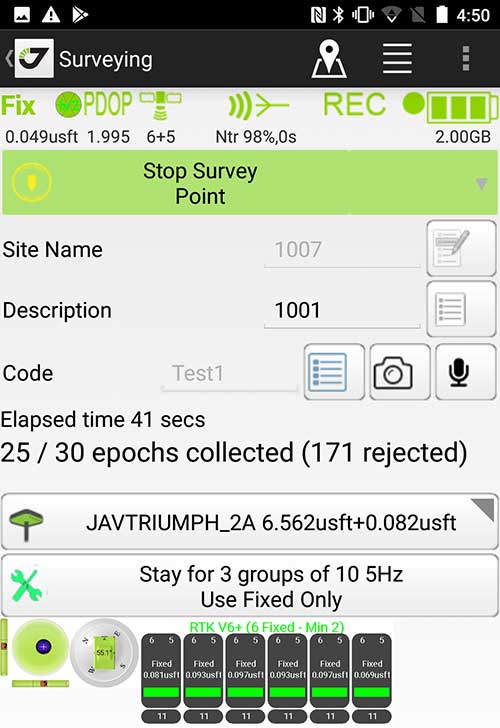
Survey Point: Status of survey data collection and GNSS engine signal reception. (Screenshot: Tim Burch)
Enter Android and iOS. Driving the decline of the previously popular Windows mobile platform is the rapid adoption of the iOS and Android operating systems. These two environments have also led to a substantial number of devices and applications for users.
Part of the reason for the speedy acceptance of the devices and operating systems has been the ease of programming. It is estimated that each operating system has more than two million applications in their respective online stores, with more being introduced daily.
Because of the proliferation of smartphones, nearly everyone is familiar with the look, feel and operation of touchscreen devices and their various applications. This familiarity is driving a new trend in data collection: the concept of “bring your own device” (otherwise known in IT security circles as “BYOD”). BYOD is being introduced by several surveying and mapping equipment manufacturers as an alternative to their proprietary data-collection devices.
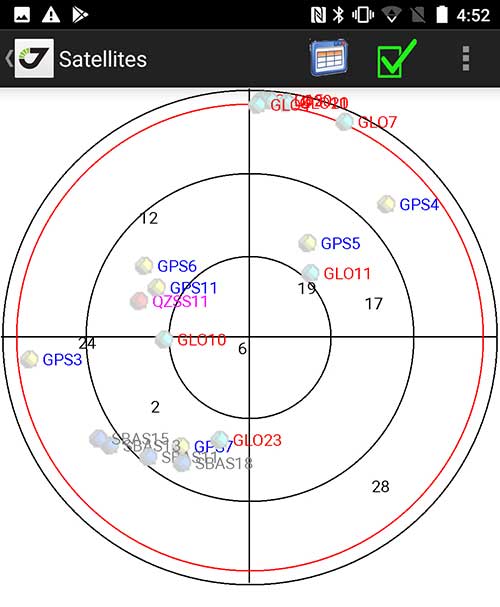
Sky Plot: Where the ‘birds’ are in the sky. (Screenshot: Tim Burch)
These manufacturers are pairing iOS and Android developers with their hardware and firmware specialists to create a user-friendly interface that will function on most of the most popular handheld devices on the market today. From Apple iPhones and iPads to Samsung Galaxy phones and tablets, these applications give the surveyor the best of two worlds — sophisticated data-collection capability on a well-known and reliable mobile operating system platform.
The Android platform is becoming especially popular in the handheld mapping market segment. Current users of this environment include Hemisphere GNSS, CHC Navigation, Tersus GNSS and Trimble.
The iOS applications, while not quite as prevalent as Android, are being embraced by several significant GNSS manufacturers, including JAVAD GNSS and Eos Positioning Systems.
These companies are creating iOS and Android apps that embrace the BYOD market, providing their users with affordability and creating a comfort level simply because of the familiarity of the device and its environment.
How Good Is It?
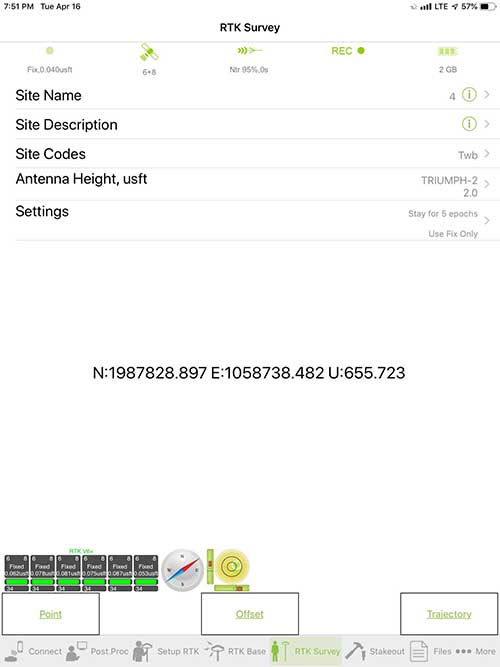
iOS Position. Status of survey data collection and GNSS engine signal reception. (Screenshot: Tim Burch)
For the surveyor to be satisfied with the operation, the collection process must be efficient, cost-effective and easy to use. For this explanation of key items within a well-rounded data-collection application, we are using the JAVAD Mobile Tools (now J-Mobile) application built specifically for the Android and iOS operating systems.
The Android system (Version 7.0) was installed on a rugged CAT S41 cellphone made Bullitt Group from the United Kingdom, while the iOS app was used on the author’s iPad Air 2 running Version 12.2. Both apps were utilized in conjunction with the JAVAD Triumph-2 GNSS receiver.
After putting both versions through trial testing and checking against values on known monuments, here is the results of our findings:
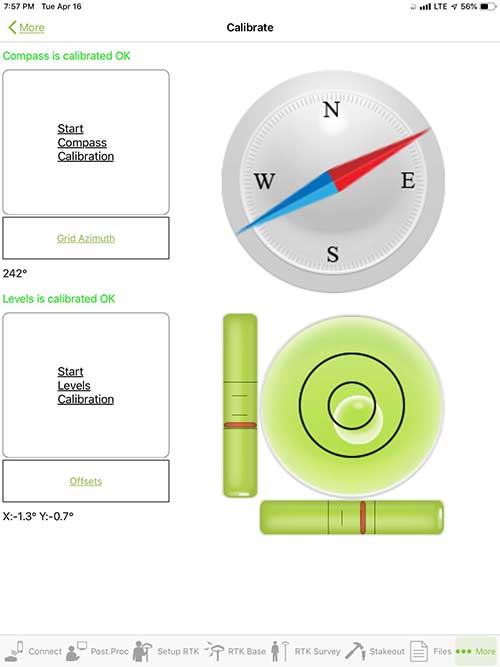
Receiver Setup. Visual reference for leveling and direction of GNSS receiver. (Screenshot: Tim Burch)
Data Organization. Easy to comprehend and flexible for most naming conventions.
Corrections and Sources. Easily connects to base receiver and radio or available NTRIP correction service for real-time network (RTN) capability.
Sky Plot. Because the Triumph-2 is equipped to receive most of the available satellites in service, the Sky Plot feature is beneficial to the user for assessing potential interference.
File Management, Import and Export. Covers the typical file management and transfer functions used by the surveyor.
RTK Survey Operations. Robust telemetry keeps the users informed of specific satellite data and correction status.
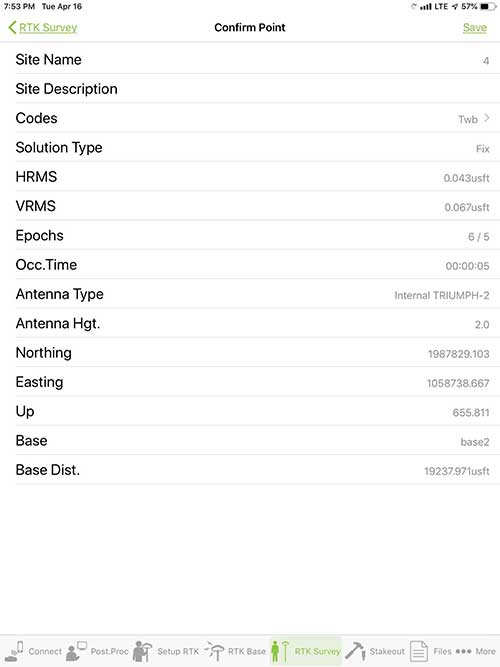
Point Confirmation. Survey point information with metadata and equipment listing. (Screenshot: Tim Burch)
Coordinate Systems. All standard coordinate systems are included with features to allow the user to customize their own systems.
Localization. Creation of a local coordinate system is a simple routine, providing strong quality checks for data integrity.
Lift and Tilt. This feature provides the user with a useful procedure to end data collection without the need to press a button. This feature significantly increases the user’s productivity.
Compass and Level Calibration. With the Triumph-2 having an internal compass and level system, status of the receiver is graphically displayed to help the user keep a close watch on the accuracy of the survey point.
Survey Points and Linework. Most point naming systems and line-coding procedures are easily adapted. Total Station Point Transfer. The creation of control point files for transfer to total stations is simple and easy to use.
Stakeout. Graphical status screens provide the user with simple plotting capability of the desired stakeout point to increase efficiency and accuracy.
These apps are good at providing the surveyor with a solid tool for data collection and staking capability. They are especially good when paired with a real-time kinematic
(RTK) base station or NTRIP correction service.
But what happens when cell service is not readily available, or there are no published monument coordinates to establish site control? These apps have the surveyor covered for that situation as well.
Post-Processing (OPUS and DPOS)
Today’s surveyor works in an environment where geographic-based data is a key component to the services they render to their clients. While most of the world’s developed nations have access to cellular networks in which most GNSS receivers can communicate with an RTN providing corrective solutions, the places where this is not possible relies on other means of data correction.
In the U.S. we rely on OPUS (Online Post-Processing User System) to provide that service. But, as good as it is, it has limitations. Currently, it only utilizes GPS satellite data from the U.S. Department of Defense and is subject to sporadic government shutdowns.
Other services, from both public and private sources, are in place around the world to provide a service similar to OPUS. These include, but are not limited to:
AUSPOS. Geoscience Australia (free)
APPS. Jet Propulsion Laboratory at California Institute of Technology (free)
CSRS-PPP. Natural Resources Canada (free)
GAPS. University of New Brunswick (free)
magicGNSS. GMV (free)
Centerpoint RTX Post Processing. Trimble (free)
JAVAD Data Processing Service (DPOS). JAVAD (free, processes any JAVAD GNSS jps file)
These correction services utilize other satellite constellations (GLONASS, Galileo, BeiDou and QZSS) for their solutions and can provide additional coverage, depending on the location of the user. Because of these services, geographic-based data is at the fingertips of surveyors worldwide.
JAVAD’s DPOS system is has the ability to collect static survey data and send it to the proprietary service for establishing new coordinate values for base-station use. This process is a function of the app and can be completed in a few short steps.
Once the base station values are calculated, the surveyor can make use of this information for establishing a base station for correction broadcasting.
Do You Need a Base Station?
The establishment of RTNs has greatly enhanced surveying capability as cellular service has increased in coverage and speed. However, there are still instances and locales that do not allow for the reliable use of cell signals to provide those corrections accurately.
Various manufacturers’ tests have proven the accuracy of using an RTN subscription versus the traditional GNSS base and rover RTK setup. But cell-signal strength can be an Achilles heel, crippling those who choose not to set up a base station.
The UHF radio, even in its reduced power state from regulatory changes, is still more powerful and reliable than most cell services. 5G technology and coverage is anticipated to revolutionize cellular service, but it has yet to be realized.
Adaptation of the Industry
Other GNSS manufacturers (including NovAtel, Navcom, ComNav, Unicore, Emcore, Suzhou, TeleOrbit and Geneq) are producing receivers that can be adapted to a variety of existing data collectors and connect to iOS/Android mobile devices through various software developers.
The future of communications remains the smartphone or tablet device, with foldable units expected to be the next big thing.
As processors get more powerful, as chip memory becomes more abundant, and as more satellite constellations orbit in our sky, surveyors and their data collectors will continue to evolve. The future remains bright for technology and the surveyor has a front-row seat.
TIM BURCH is GPS World’s contributing editor for Survey. A professional land surveyor with more than 30 years of experience, he is director of surveying at SPACECO Inc. in the Chicago area. For several years he has been secretary and was recently named vice-president of the Board of Directors of the National Society of Professional Surveyors. He writes a bi-monthly column in the Survey Scene e-newsletter. Subscribe free at env-gpsworld-integration.kinsta.cloud/subscribe.
Receiver, Software Ready for Mobile
Photo: ComNav
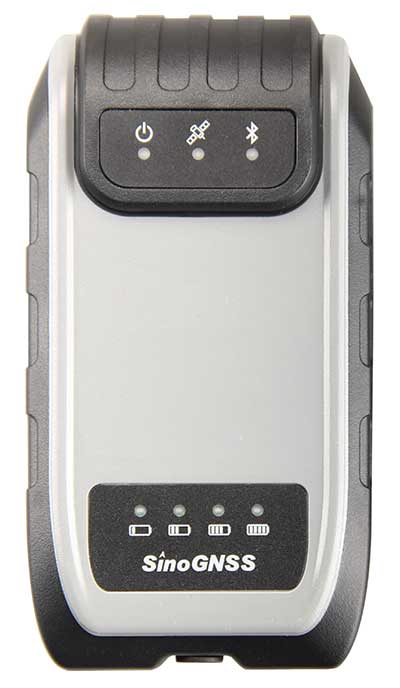
ComNav receivers offer multiple data-collection device choices via Bluetooth connection, as well as an Android app.
For instance, the G200 provides centimeter-accuracy positioning to any connected mobile devices for RTK field surveying. It is able to delivery robust survey workflows with the SinoGNSS Android-based Survey Master, so that surveyors can collect quality high-accuracy positions no matter what mobile device they are using.
The G200 is a rugged, compact, wearable GNSS receiver. Combined with the high-performance SinoGNSS OEM board tracking GPS L1/L2, BeiDou B1/B2, GLONASS L1/L2, Galileo and QZSS, the G200 enables reliable high-precision GNSS performance for land survey tasks anywhere in the world.
TerraStar Gives Assist to RTK
Photo: Leica Geosystems
NovAtel offers several levels of corrections via its TerraStar service. For surveying applications, the RTK Assist service provides correction data to bridge surveyors through any real-time kinematic (RTK) correction outages. TerraStar services work on NovAtel’s OEM6 and OEM7 receivers..
RTK Assist, available on OEM6/OEM7 receivers, provides 20 minutes of RTK assistance, enabling surveyors to maintain centimeter-level accuracy. A higher service level, RTK Assist Pro, is available on OEM7 receivers. It provides unlimited RTK assistance with stand-alone centimeter-level positioning when RTK is not available.
Trimble Offers Web-Based Post-Processing
Photo: Trimble
Trimble’s CenterPoint RTX Post-Processing Service is a free, web-based solution that provides rigorous processing of GNSS data for users around the globe.
Powered by advanced algorithms for processing static observations, CenterPoint RTX Post-Processing supports data including GPS, GLONASS, Galileo, BeiDou and QZSS. With the service, users can upload GNSS data using Trimble formats or industry-standard RINEX 2 and RINEX 3. The service supports all dual-frequency GNSS receivers and more than 400 different antennas.
The post-processing service computes single-station static observation sessions ranging in length from 10 minutes up to 24 hours, with longer observation sessions recommended to produce the highest accuracy. Using data from the global RTX tracking network, the CenterPoint RTX Post-Processing service computes the position of the observed point with centimeter accuracy.
Results are delivered via email in ITRF coordinates at the current epoch and can be transformed to a fixed epoch by use of a standard tectonic-plate model.
Atlas Corrections Ready for BYOD
The Atlas GNSS global correction service, offered by Hemisphere GNSS, provides correction data for GPS, GLONASS, BeiDou and Galileo constellations. Its global L-band corrections allow for accuracies ranging from sub-meter to sub-decimeter levels. The network has more than 200 reference stations worldwide and covers virtually the entire globe.
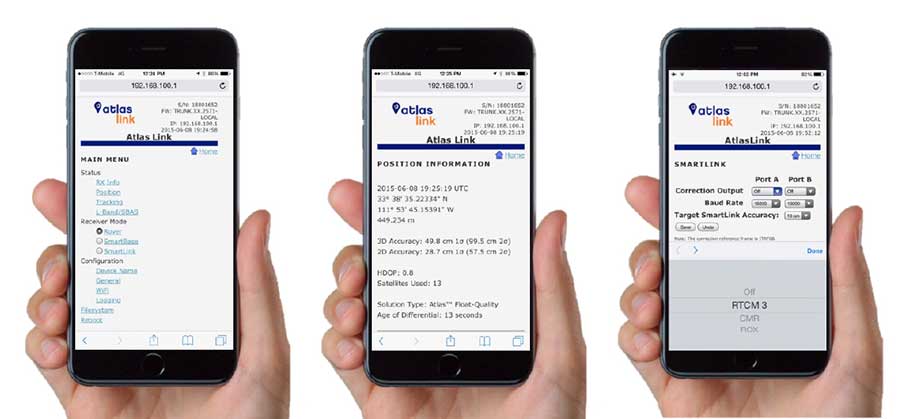
Examples of how the AtlasLink webUI looks on a smartphone. (Image: Hemisphere GNSS)
The Atlas platform was conceived to enable as many people as possible to have access to the correction service technology, either as an end-user or as part of their business. Several features are designed to enable customers who use non-Hemisphere positioning systems to have access to Atlas.
For instance, Hemisphere’s SmartLink technology allows an AtlasLink GNSS smart antenna to be used as an Atlas signal extension for any GNSS system compliant with open communication standards.
Hemisphere’s GNSS smart antennas including AtlasLink, A326, C321+ and S321+ offer a user-friendly web user interface (WebUI) that can be used to configure, monitor and manage the receiver from virtually any modern computing device, including computers, phones and tablets.
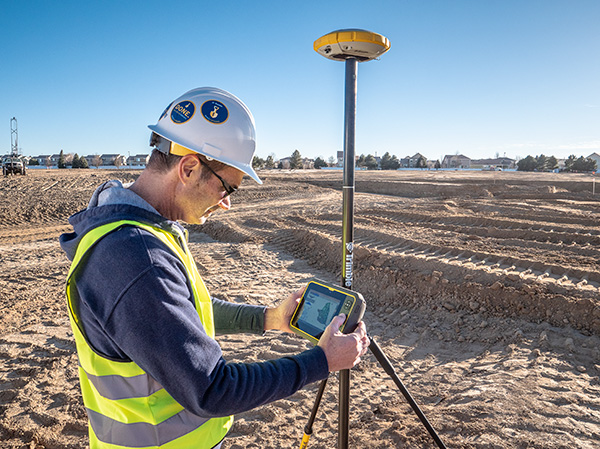
Trimble has introduced its T7 Tablet, a rugged, lightweight and versatile device designed for construction surveying applications.
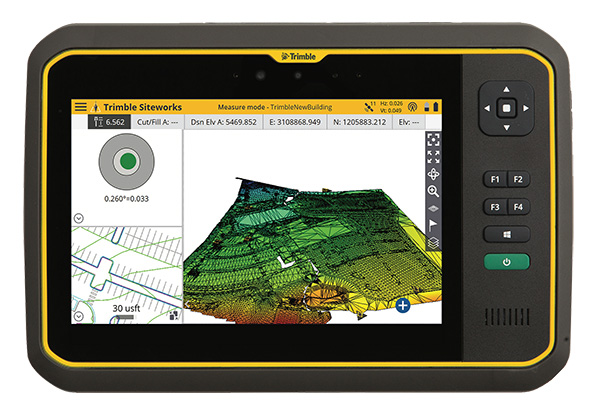
Using Trimble Siteworks Software for construction surveying, the Trimble T7 provides real-time data to visualize cut/fill levels, calculate material volumes, check grade and communicate work orders to increase productivity and enable better decision-making.
The T7 brings powerful processing to the field — a sunlight readable 7-inch touchscreen that supports pinch, tap and slide gestures and a digital keyboard. Users can interact with the T7 intuitively — zooming, panning and selecting items on the touchscreen.
The T7 also leverages the power of Windows 10 Professional, driven by an Intel Pentium 64-bit quad-core processor. The processor and operating system make it easy to process data in spreadsheets and run office software programs. Using third-party apps, front- and rear-facing cameras allow contractors to video conference from the field for on-the-job support and capture of high-definition videos and images, the company said.
The Trimble T7 tablet. (Photo: Trimble)
The lightweight T7 is built to withstand the wear-and-tear of daily construction work in various weather conditions. It meets stringent MIL-STD-810G for drops, vibration, immersion and temperature extremes and with IP65 and IP68 ratings, is sealed against water and dust. The full-color, 7-inch screen uses a Gorilla Glass display that is scratch and impact resistant.
“The Trimble T7 Tablet is the next step in the evolution of our data collection portfolio,” said Scott Crozier, general manager for Trimble’s Civil Engineering and Construction Division. “Surveyors, supervisors and inspectors can complete tasks with less downtime, combining Trimble reliability with the flexibility to adapt to a variety of configurations and jobsite conditions.”
Optional, user-interchangeable Trimble Empower modules make the T7 a flexible solution for a variety of applications. The Empower platform is a modular expansion system that gives users the power to customize their mobile computing solution to their workflow. Optional modules such as barcode imager, a barcode imager/RFID combo and sub-meter GNSS give users the confidence of knowing that that their investment is scalable for future needs.
The T7 is optimized for use with Trimble Siteworks Software, survey software tailored for construction workflows. Siteworks Software features an interface optimized for ease-of-use and productivity. Configurable views, colorful graphics and natural interactions and gestures make Siteworks Software intuitive and easy to learn. The release of the T7 increases the available hardware configuration options for Siteworks users.
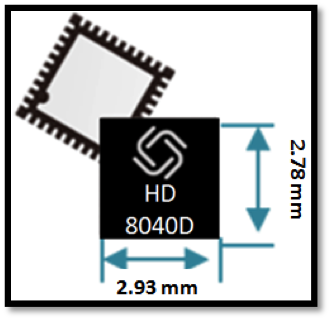
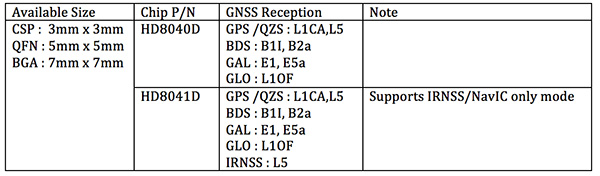
Allystar Technology Co. Ltd. has launched a multi-band, multi-GNSS system on chip, the HD8040 series, to help portable devices save size and weight. The HD8040 offered in wafer-level chip-scale packaging (WLCSP).
The HD8040 series of chipsets fully supports all civil signals on the L5 band, said Shi Xian Yang, Allystar high-precision product manager at Allystar. Besides GPS, other constellations with L1/L5 signals include Galileo, BeiDou, the Indian NavIC system and Japanese QZSS.
Besides L1 band, HD8040D supports L5/B2a/E5a signals, which are expected to have lower noise and be better in multipath mitigation mainly due to the higher chipping rate of L5 signals relative to L1 C/A code.
HD8041D supports IRNSS (NavIC), which makes it suitable for navigation in urban areas in India and the Middle East, where seven NavIC satellites have a higher elevation than both GPS and Galileo satellites. This means IRNSS (NavIC) would provide greater accuracy, precision and available measurements.
With the features of small size (3 x 3 millimeters) and low power consumption, the HD8040 series is suitable for smartphones, tablets and other portable devices.
The architecture integrates floating-point arithmetic units based on ARM CortexM4, 160 KB RAM, 32 KB backup RAM with VBAT, and 384 KB embedded Flash memory. Besides basic peripheral interfaces UART, I2C, SPI and GPIO, it supports the CAN interface for automotive applications, too.
Customer samples of the HD8040D and HD8041D are available now.
The Trimble Catalyst software-defined GNSS receiver for Android phones and tablets has been updated to support GLONASS. The update demonstrates the advantages of software GNSS for delivering new functionality faster and easier, according to Trimble.
Access to the GLONASS constellation increases the number of GNSS satellites visible when working in the field. As a result, it improves the ability to maintain lock on enough satellites to keep working when sky visibility is limited or obstructed, such as under tree canopy and in urban high-rise environments, Trimble said. Users also spend less time waiting for the receiver to achieve an accurate position, and convergence time is faster and more reliable.
Trimble Catalyst provides users with positioning-as-a-service to collect highly accurate location data with Trimble or third-party apps on Android smartphones and tablets. When combined with a small, lightweight, plug-and-play DA1 digital antenna and Catalyst subscription, the receiver provides on-demand GNSS positioning capabilities, and transforms consumer devices into centimeter-accurate mobile data collection systems.
“Adding GLONASS to Trimble Catalyst provides productivity improvements and more robust positioning for Catalyst users,” said Gareth Gibson, Catalyst business development manager at Trimble. “In addition, since the service is provided via an Android app, performance updates are available through the Google Play store. As a user, receiving updates is easy and automatic.”
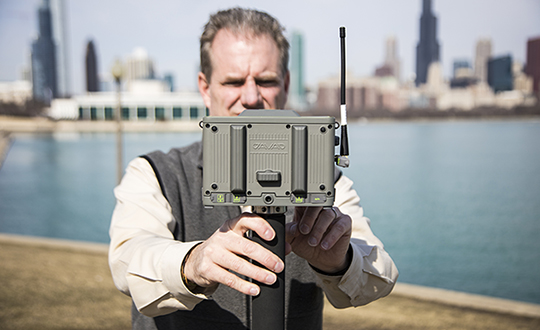
Tersus GNSS is now offering its David real-time kinematic (RTK) GNSS receiver with seven new base/rover kits.
Tersus GNSS is a provider of centimeter-accuracy GNSS RTK solutions. The Tersus David GNSS receiver with its components create an affordable solution delivering high-precision signal reception, integrated in a small, and lightweight package.
The David GNSS receiver supports GPS L1/L2, GLONASS G1/G2 and BeiDou B1/B2. With David, surveyors users can take full advantages of common platforms such as smartphones, tablets or traditional handheld modules to collect data.
Coupled with an external antenna, the Survey App and post-processing software, the David GNSS receiver is a low-cost solution for all survey applications, including real-time RTK positioning and data collection for PPK.
Four (4) GB on board an embedded multimedia card (eMMC) makes it easy to save data for post processing. The compact, IP67-rated enclosure and versatile accessories alleviate most inconveniences encountered in field work.
“The launch of David GNSS Receiver marks a major step forward for Tersus as well as for surveying professionals,” said Xiaohua Wen, founder and CEO of Tersus. “The David is a cost-efficient and palm-sized GNSS receiver. Tersus is constantly working to make each surveying task easier and more productive by providing high-quality GNSS RTK surveying equipment. Our focus is on enabling surveying professionals make data collection more convenient, post (data collection) processing more accurate, and better equipping them to do surveying in the field.”
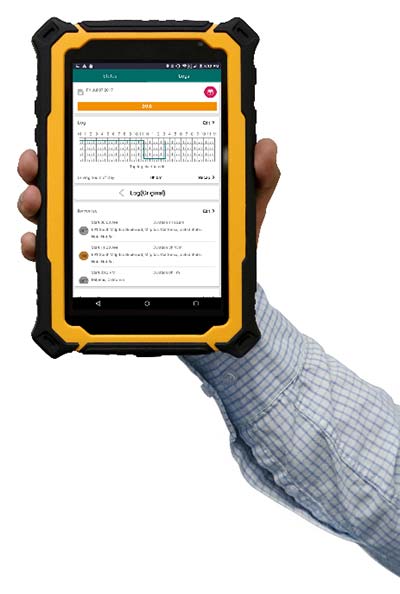
FleetUp Trace is a ruggedized tablet designed for fleet drivers required to display Records of Duty Status (RODS) upon request instead of printing out hard copies with the new Electronic Logging Device (ELD) mandate. Tim provides thoughts on the product hardware, ease-of-use and various app features.
Photo: FleetUp-Trace
By Tim Spence
Sometimes, there is great anticipation when buying a new electronic gadget. The look, the feel and the flashy presentation is what many products on the market rely on to make their product the best. With ELDs though, drivers and fleets managers are thinking about these products a bit differently. Thoughts like:
Will this satisfy our need for compliance?
How much training will this take?
How many drivers am I going to lose?
Is this even going to work?
When powering up the FleetUp Trace tablet for the first time and opening the Hours of Service (HOS) app, it was evident that a lot of thought went into fulfilling these needs. Here is a first look at FleetUp Trace, a ruggedized tablet designed for fleet drivers required to display Records of Duty Status (RODS), as part of the FMCSA ELD mandate.
Unboxing
When removing the FleetUp Trace case from the box, you will notice that it is quite unique and will not easily be lost among other items because of that. The case was durable and tough but soft as well. When unzipped it revealed the Android tablet, a couple of short manuals and various accessories for charging and memory.
The Tablet
Safety orange is the key color with this tablet and since it is a popular color in our industry, it definitely catches the eye. In addition, the protective case fits the tablet so well, it looks to be a part of the product (if you have ever purchased a tablet and tried to find a durable hard case that fits well, you know).
Booting the tablet, a brilliant orange screen for FleetUp appears and then four preloaded apps on the home screen: FleetUp’s HOS app, FleetUp’s CamVue app, Camscanner (a very reliable document scanner) and a preset version of Teamviewer QuickSupport, which provides an ID and easy instructions to show the FleetUp screen to another device.
HOS app tutorial
Starting the app and logging in, the Voice Over HOS greets you by name, gives you the current date, tells your current duty status, how many hours you have left in the 70-hour cycle, and how many on-duty hours you have before you are required to take a break. It then tells you to select a vehicle. After selecting a vehicle and confirming, you are told to tap the HOS button.
The app automatically uses a tutorial showing each feature. One button at a time, the app guides you to the next feature prompted by your action of pressing the “GOT IT” button. This tutorial is available on each section of the device and can be turned off on the main menu that slides over from the left. That is a great feature not only because you wouldn’t want to go through the tutorial EVERY SINGLE TIME but just in case you forget how to use a certain section, like driver vehicle inspection report (DVIR), you can manually slide open the main menu and turn it back on to REINFORCE YOUR LEARNING. After going through the tutorial for each section, you will find a lot of reasons (mainly regulatory) why this is valuable.
Using the HOS app
After going through the tutorial once, even if you have years of experience on paper logs, you will find that many of the basics of logging are easy to find or figure out. It is very comfortable operating without the Voice Over HOS or Tutorial features. On the “Status” tab, you can see your current status and log graph, as well as change your status and check your available hours. On the “LOGS” tab, you can fill out a pre-trip or post-trip inspection and edit your time (except for driving time, of course). This section also allows you to enter shipping document information, edit any equipment information and certify your logs by signing with your finger (no special pen needed).
Features that make the difference
Tutorial mode. While this feature may sound simplistic, it has the capability to answer a driver’s question with the flip of a switch. Just the fact that you can turn it on whenever you need to be reminded is so valuable. It is beneficial to know that this feature does work best in the portrait or vertical mode.
Voice over HOS. This feature reminds you of the actions that many drivers forget. If you have ever used ELDs in the past as a driver or fleet manager, you understand. Along with the text prompts, it reminds the driver to do things such as certifying the log at the end of the day, sign the DVIR, release the vehicle, etc. All the voice and text prompts work hard to keep the driver in compliance. Even when you want to LOG OUT, the app asks you if you still need to complete unfinished actions.
Easy-to-read availability. Many electronic logging devices make it very challenging to understand what hours are left for a driver. With FleetUp, there is no confusion at all because it is stated in text and graph.
Big buttons to change status. No more calibrating screens or needing a stylus just to change your status. Just touch a big button with your finger, enter the note under the GPS-enabled address entry, and tap “Yes.” It is that easy.
On top of everything else, FleetUp Trace and the HOS app are extremely user-friendly. This should be the key to it all because if the device and app are not user-friendly and easy to operate, there is no reason for it to exist.
FleetUp has accomplished a great feat by making the transition to E-Logs painless and smooth while complying with a multitude of regulations. Whether you’re looking for a simple way to track internal records of duty status (RODS) or to ensure HOS compliance and DVIR with a simple, hands-free gadget, FleetUp is one provider that clearly committed a lot of thought into what drivers are going to go through on the road, and offers plenty of features for an all-encompassing solution to the ELD mandate.
Tim Spence, creator of Apps4truckers, is an app consultant, writer and safety manager in Birmingham, Alabama.