Tag: technology

  • OpenGeo Launches Mapmeter Analytics Console

    OpenGeo, a commercial open source geospatial company, launched Mapmeter beta, its server analytics console, while at FOSS4G-North America 2013.

    MapMeter

    According to the announcement, Mapmeter is a full administration and management tool for analyzing GeoServer systems. Formerly dubbed “The Enterprise Console,” Mapmeter sits on top of GeoServer, either within the OpenGeo Suite or standalone, and makes it possible for organizations to monitor production geospatial deployments. OpenGeo’s flagship product, The OpenGeo Suite is commercial open source software that gives customers access, control, customization and more while also providing standards compliance and expert support. With the addition of Mapmeter, spatial monitoring and reporting merge into a complete IT workflow.

    For more information on Mapmeter and the potential of server analytics for spatial deployments, visit Mapmeter.com.

  • GIS Cloud Introduces Mobile Data Collection App

    GIS Cloud introduced a  GIS Cloud Mobile Data Collection application for Android and iOS devices. The application is free and available for immediate download on Google Play and Apple’s App Store.

    According to the announcement, GIS Cloud Mobile Data Collection is a tool for today’s mobile devices which enables you to collect data and conduct field surveys faster and easier than ever before. Combined with powerful new custom mobile and web forms, the new Mobile Data Collection app can also be highly tailored for your mobile workforce and a wide variety of applications without any programming.  Many GIS Cloud users have already tested the beta version of the app which helped GIS Cloud to develop a full featured mobile app that suits the need to collaborate across today’s distributed and mobile workforce.The application has been tested across a diverse range of segments including transportation, utilities, municipal and local government, as well as other owners of geo-located assets.

    GISCloudForms

    GIS Cloud reports that the Mobile Data Collection app is a natural extension of the GIS Cloud Enterprise Location App Platform and reflects its commitment to a ‘mobile first’ priority to help enterprises leverage today’s modern computing devices. With the addition of this app, enterprises can instantly create media rich, mobile applications that manage, analyze, share and publish field data and make it instantly available to co-workers on other job sites on tablets, supervisors in the field on laptops, or managers in the office at their desk.

    GIS Cloud Mobile App features:

    • Offline data capture
    • Media (photos & audio) enriched location information
    • Dropdowns, lists, input boxes and comments based on custom forms
    • Review data attributes directly in the app
    • Listen to audio and view images
    • Real time GPS location
    • View and explore maps in the field

    Office app features:

    • Cloud based web apps
    • Custom forms editor
    • Rich GIS symbology and visualization
    • Data editing and exporting
    • One-click map and data sharing
    • Real time collaboration
    • Map publishing
    • Spatial Queries & Analysis
    • Account administration
  • New gvSIG 2.0 Extension Available for Accessing OpenStreetMap Data

    The gvSIG Community introduced a gvSIG 2.0 extension that allows access to OpenStreetMap (OSM) layers.

    According to the announcement, for installing this plug-in,  the user must open the Add-ons Manager in gvSIG 2.0 and select the “By URL” option and “http://downloads.gvsig.org/download/gvsig-desktop/“. The user must select the “Formats: OpenStreetMap raster tiles support” package. In the next few days, the link will be available on the other gvSIG repositories.

    The plug-in includes basic access to the OSM layers for viewing. There are four servers configured by default that show the Map Quest, Map Quest Open Aerial, Open cycle Map and Mapnik layers. In the “Add layer” interface it is possible to add new servers.

  • Trimble Introduces SketchUp 2013

    Trimble introduced SketchUp 2013, the latest version of the 3D modeling platform used by millions around the world, including architects, engineers, building and design professionals and members of the fast-growing maker community. Featuring new capabilities for professional users, an Extension Warehouse for add-on tools and a rebranding of the software’s free version as SketchUp Make, the new release marks the first major update since Trimble’s acquisition of SketchUp from Google in April 2012. The enhancements underscore SketchUp’s strategic value as part of Trimble Buildings, a group formed in 2012 to offer hardware, software and service offerings for streamlined communication throughout the Design-Build-Operate (DBO) lifecycle of construction.

    Sketchup2013

    “Trimble has always recognized that one of the biggest challenges facing the construction industry today is ensuring effective, clear and consistent collaboration between professionals involved in all phases of a construction project,” said Chris Keating, director of Trimble Buildings’ Architecture Division. “SketchUp is an important tool to address this industry need. That’s why Trimble has already implemented several SketchUp integrations with Trimble’s data modeling and project management tools. SketchUp 2013 marks the first step in a continuous technology investment that will benefit SketchUp’s existing user community and other Trimble customers across the construction industry.”

    According to the announcement, SketchUp Pro 2013 provides professional users with more powerful tools to easily explore, modify and share design ideas in 3D. As in previous versions, users can quickly design and visualize in 3D, import CAD plans, photos, aerial imagery, and then use SketchUp Pro’s documentation tools to develop communication and planning deliverables. For example, architects can quickly evolve design ideas and document modeling work to reflect changing project requirements. SketchUp Pro also enables engineers, general contractors and building owners to drive design discussions and generate commercial deliverables such as conceptual estimates, construction drawings, RFI’s and full-screen digital presentations.

    The new release includes several improvements to SketchUp Pro’s 2D documentation capabilities, including enhanced vector drawing tools, faster rendering and zooming, and customizable hatching styles. These updates make SketchUp Pro more powerful, precise and customizable for detailing, dimensioning and organizing models in professional documents.

    In addition to serving the commercial market with SketchUp Pro, Trimble will continue to provide a free, entry-level, 3D drawing tool—now named SketchUp Make—enabling makers and hobbyists of all kinds to bring their ideas to life.

    The company reports that since 2004, third-party developers have been using SketchUp’s open and free API to build custom tools for SketchUp users. This plugin ecosystem grew throughout SketchUp’s years at Google and now—in Trimble’s first update—dedicated developers and their valuable modeling tools finally have a home within SketchUp. The Extension Warehouse makes it easier than ever for users to search, find and install SketchUp extensions. As developers begin using the Extension Warehouse to manage, market and support their extensions, SketchUp users can expect to have easy access to more and more task-specific tools.

    “We may have changed companies, but our commitment to delivering smart and efficient design tools is stronger than ever,” said John Bacus, director of SketchUp product management at Trimble. “We noticed that a big percentage of our professional users were using plugins, so part of making SketchUp more efficient is making it easier for them to find the tools they need, when they need them. We often say that SketchUp is better off because of the work done by our developer communitynow, SketchUp users are better off too.”

    Illustration: Trimble

  • Blue Marble Releases Global Mapper 14.2

    Blue Marble Geographics announces the release of Global Mapper version 14.2. This update to the company’s desktop GIS software offers many new and improved features and functions. Some of the major improvements include several scripting updates, improved Volume Measurement tools, new right-click option to the vector data Search dialog, many LiDAR enhancements and of course many new formats. Blue Marble’s geospatial data manipulation, visualization and conversion solutions are used worldwide by thousands of GIS analysts at software, oil and gas, mining, civil engineering, surveying, and technology companies, as well as governmental and university organizations.

    GlobalMapper_Augusta_LiDAR

    According to the announcement, the Global Mapper 14.2 release introduces many scripting updates and additions, including support for calculating attributes, splitting layers, interactively prompting users for files and folders, to name just a few. Global Mapper is a great tool for behind the scenes processing, whether it is simply batch data conversion or complex extract, transform and load processes such as attribute or geometry merging, clipping or editing. Users can find scripting samples with Global Mapper documentation, with the ability to edit and create them in any text editor. To make this work more easily, Global Mapper workspace files also can be saved as scripts.

    The company reports that the 14.2 release also includes many LiDAR enhancements such as search by elevations and the ability to color by return value, which allows users to easily see when there are multiple return values. This feature is excellent for performing vegetation analysis. There are also new point loading slider bar and reporting tools for point cloud density. 14.2 also has improved import and export options as well as support for exporting point clouds to DXF and DWG format files. 14.2 also introduces support for the new MrSID format files and exporting XYZI (XYZ + Intensity) files, typically from LiDAR data.

    “Certainly we are focused on continuing to expand our support for LiDAR and more geospatial formats,” stated Blue Marble President Patrick Cunningham. “But this release has some great new scripting capabilities and we like to remind our users that Global Mapper is a powerful extract, transform and load tool as well.”

  • Humboldt State University Publishes the Geography of Hate Map Based on Tweets

    Homophobic

    Editor’s Note: The following is a blog post from a Humboldt State University Geography Lecturer Monica Stephens describing her students’ (Amelia Egle, Miles Ross, Matthew Eiben) tweet mapping project. While mapping Twitter content for disaster response is becoming commonplace, mapping cultural values is not. It’s a fascinating example of using GIS to map specific Twitter content.

    —————————————————————————————————————————————————-

    The Geography of Hate

    UPDATE (5/13/13 @ 10:45pm): We have written and published a FAQ to respond to some of the questions and concerns raised in the comments here and elsewhere. Please review our comments there before commenting or emailing.Following the 2012 US Presidential election, we created a map of tweets that referred to President Obama using a variety of racist slurs. In the wake of that map, we received a number of criticisms – some constructive, others not – about how we were measuring what we determined to be racist sentiments. In that work, we showed that the states with the highest relative amount of racist content referencing President Obama – Mississippi and Alabama – were notable not only for being starkly anti-Obama in their voting patterns, but also for their problematic histories of racism. That is, even a fairly crude and cursory analysis can show how contemporary expressions of racism on social media can be tied to any number of contextual factors which explain their persistence.The prominence of debates around online bullying and the censorship of hate speech prompted us to examine how social media has become an important conduit for hate speech, and how particular terminology used to degrade a given minority group is expressed geographically. As we’ve documented in a variety of cases, the virtual spaces of social media are intensely tied to particular socio-spatial contexts in the offline world, and as this work shows, the geography of online hate speech is no different.

    Rather than focusing just on hate directed towards a single individual at a single point in time, we wanted to analyze a broader swath of discriminatory speech in social media, including the usage of racist, homophobic and ableist slurs.

    Using DOLLY to search for all geotagged tweets in North America between June 2012 and April 2013, we discovered 41,306 tweets containing the word ‘nigger’, 95,123 referenced ‘homo’, among other terms. In order to address one of the earlier criticisms of our map of racism directed at Obama, students at Humboldt State manually read and coded the sentiment of each tweet to determine if the given word was used in a positive, negative or neutral manner. This allowed us to avoid using any algorithmic sentiment analysis or natural language processing, as many algorithms would have simply classified a tweet as ‘negative’ when the word was used in a neutral or positive way. For example the phrase ‘dyke’, while often negative when referring to an individual person, was also used in positive ways (e.g. “dykes on bikes #SFPride”). The students were able to discern which were negative, neutral, or positive. Only those tweets used in an explicitly negative way are included in the map.

    Tweets negatively referring to “Dyke”
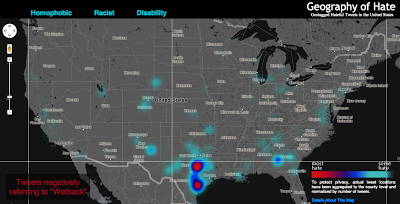
    All together, the students determined over 150,000 geotagged tweets with a hateful slur to be negative. Hateful tweets were aggregated to the county level and then normalized by the total number of tweets in each county. This then shows a comparison of places with disproportionately high amounts of a particular hate word relative to all tweeting activity. For example, Orange County, California has the highest absolute number of tweets mentioning many of the slurs, but because of its significant overall Twitter activity, such hateful tweets are less prominent and therefore do not appear as prominently on our map. So when viewing the map at a broad scale, it’s best not to be covered with the blue smog of hate, as even the lower end of the scale includes the presence of hateful tweeting activity.
    Even when normalized, many of the slurs included in our analysis display little meaningful spatial distribution. For example, tweets referencing ‘nigger’ are not concentrated in any single place or region in the United States; instead, quite depressingly, there are a number of pockets of concentration that demonstrate heavy usage of the word. In addition to looking at the density of hateful words, we also examined how many unique users were tweeting these words. For example in the Quad Cities (East Iowa) 31 unique Twitter users tweeted the word “nigger” in a hateful way 41 times. There are two likely reasons for higher proportion of such slurs in rural areas: demographic differences and differing social practices with regard to the use of Twitter. We will be testing the clusters of hate speech against the demographic composition of an area in a later phase of this project.
    Hotspots for “wetback” Tweets

    Perhaps the most interesting concentration comes for references to ‘wetback’, a slur meant to degrade Latino immigrants to the US by tying them to ‘illegal’ immigration. Ultimately, this term is used most in different areas of Texas, showing the state’s centrality to debates about immigration in the US. But the areas with significant concentrations aren’t necessarily that close to the border, and neither do other border states who feature prominently in debates about immigration contain significant concentrations.

    Ultimately, some of the slurs included in our analysis might not have particularly revealing spatial distributions. But, unfortunately, they show the significant persistence of hatred in the United States and the ways that the open platforms of social media have been adopted and appropriated to allow for these ideas to be propagated.

    Funding for this map was provided by the University Research and Creative Activities Fellowship at HSU. Geography students Amelia Egle, Miles Ross and Matthew Eiben at Humboldt State University coded tweets and created this map.

    The full interactive map is available here:http://users.humboldt.edu/mstephens/hate/hate_map.html

    Photo: Humboldt State University

  • Autodesk to Acquire Tinkercad

    Autodesk has signed a definitive agreement to acquire Tinkercad, an easy-to-use browser-based 3D design tool. The addition of Tinkercad to Autodesk will help broaden the popular Autodesk 123D family of apps and supports Autodesk’s vision to help anybody imagine, design and create anything. The acquisition will also revive the Tinkercad service and community, despite a previously announced shutdown by its founders and creators.

    “Tinkercad is a natural extension of the Autodesk 123D family as well as our other apps and services for consumers, as it is already used alongside Autodesk products”
    “We are excited to have reached an agreement with Autodesk that will provide a solid home and bright future for Tinkercad,” said Kai Backman, founder of Tinkercad. “We found in Autodesk a shared vision for empowering students, makers and designers with accessible and easy to use software, and with their global reach and expertise in democratizing design, we’re confident in their ability to introduce Tinkercad to new audiences around the world.”

    According to the announcement, Autodesk intends for the Tinkercad service to remain available as part of its consumer portfolio. The company also intends to incorporate elements of the Tinkercad technology and user experience into the Autodesk 123D family of products as part of its ongoing effort to make 3D design easier and more accessible to everyone. The transaction is expected to close within the next 30 days.

    “Tinkercad is a natural extension of the Autodesk 123D family as well as our other apps and services for consumers, as it is already used alongside Autodesk products,” said Samir Hanna, Autodesk vice president, consumer products. “We look forward to welcoming the Tinkercad community to Autodesk and to continuing their mission of accessible 3D design for all.”

  • Skobbler Introduces GPS Navigation and Maps App for Android

    The Berlin-based software company skobbler introduces GPS Navigation & Maps for Android. Available starting today, Skobbler’s Android app is the first on-and offline-enabled mapping and navigation app for Android smartphones and tablets. Skobblertypisch is offered at a competitive price. For only one euro customers receive the full global online functionality and a whole country of choice for offline installation, which it is available without an Internet connection. Owners of the full version can expand additional areas offline at any time. OpenStreetMap maps used in the app can be stored locally on the smartphone or deleted and available online after purchase – depending on requirements and storage capacity of the mobile device.

    Skobbler1


    The features of GPS Navigation & Maps at a glance:

    – Fully-fledged navigation with voice guidance for car navigation (turn-by-turn)
    – Fully interactive OpenStreetMap Map
    – A single card with worldwide coverage
    – Hybrid: Full functionality with and (after installation) without internet connection (online + offline)
    – Installability whole countries included the City Maps (WiFi recommended)
    – super fast reloading the map – zoom, rotate, etc. without reloading
    – Continuous free map updates
    – Powerful card technology (NGx)
    – route display (cars, pedestrians)
    – Convenient route options for adequate routing (fastest, shortest, most efficient route )
    – Multiple map styles (day, night, outdoor) for the best possible user experience in any situation
    – 2D and 3D view (with navigation)
    – Various search options (address search, category search, proximity search)
    – IdeaLog for feedback to the developers
    – Comfortable favorites lists
    – Optional Synchronization of favorites with the web portal maps.skobbler.com
    – “avoid highway” function
    – “Avoid toll roads” function
    – App works in portrait and landscape format
    – Full compatibility with smart phones and tablets
    – one land card with purchase already included

    “Our users can rejoice: Instead of having to fumble around with annoying hundreds of individual maps, GPS Navigation & Maps offers the whole world as a map and navigation from within an app,” said Marcus Thiel King of skobbler.

    Photos: Skobbler

  • OpenStreetMap Launches Enhanced Map Editor

    OpenStreetMap, the user-created map used by many of the biggest sites on the web, has today unveiled an entirely new editor that makes it easier to contribute than ever before.

    According to the announcement, the new editor, codenamed ‘iD’, boasts an intuitive interface and clear walk-throughs that make editing much easier for new mappers. By lowering the barrier to contributions, we believe that more people can contribute their local knowledge to the map – the crucial factor that sets OSM apart from closed-source commercial maps.

    OSM_id_animated

    To accompany the expected growth in OSM’s contributor base, the OpenStreetMap Foundation is launching an appeal to fund new hardware for the project. The appeal aims to make the editing experience more resilient, so that the OSM community can continue producing the most extensive and up-to-date map of the world. You can donate online at donate.openstreetmap.org.

    “OpenStreetMap’s growth in the past two years has been phenomenal,” explained Simon Poole, chairman of the OSM Foundation. “We’ve seen an explosion in the amount of local knowledge our mappers contribute to the map. This has encouraged more and more big-name websites and apps to switch to OpenStreetMap, while also enabling map hackers and geo enthusiasts the world over to build startling, imaginative visualisations from our open data.”

    “Now, with the new editor and our plans for new hardware, we’re stepping up another level to make OpenStreetMap, not Google, the default choice for mapping and map data.”

    OpenStreetMap reports that the new iD editor is a pure HTML5 experience, using the cutting-edge D3 visualisation library. Behind the clear design and intuitive interface is a sophisticated back-end that automatically recommends the most popular ‘tagging’ conventions used by the OSM community.

    According to the announcement, development began as a community project in July 2012, and has since been taken forward thanks to a $575,000 grant from the Knight Foundation, with development being co-ordinated by MapBox – one of several companies which offer commercial services on OpenStreetMap’s open data.

    From later today, new OpenStreetMap reports that users with a modern browser will automatically use the new iD editor. Users can switch between this and the existing Flash-based Potlatch 2 editor (which is being refocused as a tool for intermediate users) using their settings page or the drop-down ‘Edit’ menu. Advanced desktop-based editors are also available.

    The editor software is entirely open source, with code available on github under an ultra-permissive licence.

  • Critigen Announces Medicare Mapper App

    Demonstrating how location analytics can use big data, Critigen LLC along with partners Social & Scientific Systems, Inc., and Esri, has developed an informative Medicare application called Medicare Mapper. Just released in the Apple App Store, it is a free download for the iPad. Based on a publicly available data set from the U.S. Department of Health & Human Services’ Centers for Medicare & Medicaid Services (CMS), the application allows consumers to see where people in their area are going for Medicare services, and service providers to see where their patients live along with the relative amount of services they received. It quickly and easily illustrates geographic patterns in Medicare hospital inpatient expenditures and exemplifies the power of location analytics for healthcare.

    Critigen_comparison

    According to the announcement, based on the 2011 version of the Hospital Service Area file, the application makes anonymous data available on health services, service providers, utilization, and costs in an intuitive tablet interface. A total of 990,455 records, represented by a string of numbers, were decoded and geo-enabled with help from the U.S. Census Bureau’s ZIP code file and population data from Esri. It describes every Medicare Hospital Inpatient Admission that occurred in the country in 2011. Included is the residency (ZIP code) of the beneficiary, the hospital provider that received the reimbursement, the total amount of the reimbursement, the total length of stay, and the total number of cases that originated from within the respective ZIP code. Using the totals described by the data, two more categories of data were averaged and included for each record.

    Critigen reported that users can select a specific hospital and display its impact in terms of which ZIP codes their 2011 Medicare beneficiaries came from. If a ZIP code is selected, pins appear on the map to show what facilities were used by the beneficiaries living there. Another built-in capability compares two hospitals or two ZIP codes in a side-by-side manner. The differences of each category can then be viewed numerically or by percentage. These capabilities enable users to build the stories they need to produce understanding, build knowledge, research, or manage.

    Medicare Mapper follows the 2012 release of Critigen’s Health Indicators app.

  • Smartphone/Tablet Users Spend Less Time with Laptops, Digital Cameras

    Smartphone and tablet owners are spending less time using standalone consumer electronics (CE) devices according to new research study, “A Tale of Two Techs – Smartphone and Tablet Adoption and Usage,” released by the Consumer Electronics Association (CEA). The study shows consumers continue to use standalone electronic devices, such as digital cameras, but are reducing their usage time as a result of owning a smartphone or tablet.

    According to the announcement, in households that own laptops, 43 percent of smartphone owners and 46 percent of tablet owners report spending less time with their laptops. However, very few users indicate they have stopped using their laptop computers altogether (one percent among smartphone owners, two percent tablet owners).

    Compared to most standalone devices – with the exception of laptops – smartphones and tablets are being used more often and for more activities. Smartphones have become the primary device for taking pictures (78 percent), recording videos (74 percent), getting directions (69 percent), reading e-books (62 percent), listening to music (59 percent) and playing games (39 percent). Laptops and desktops remain the primary device smartphone and tablet owners use to browse the Internet, shop online, watch videos and view/edit documents.

    The devices consumers indicate they are most likely to stop using altogether as a result of owning a smartphone and/or tablet are camcorders, portable audio/MP3 players, portable game devices, GPS or navigation devices and dedicated e-readers.

    “Smartphones and tablets have enriched, diversified and transformed the ecosystem of consumer electronics,” said Rhonda Daniel, senior manager, market research, CEA. “As a result, mobile device owners are re-proportioning the time they spend using other standalone CE devices. While many single-function devices continue to play a distinct and relevant role in our digital lives, consumers are gravitating toward connected mobile devices able to perform multiple functions.”

    An overwhelming majority of consumers are adopting smartphones and tablets in order to access the Internet. The study found that 85 percent of smartphone owners browse the Web and 89 percent check email on their devices. Among tablet owners, 92 percent browse the Web and 83 percent use their tablets to check email.

    In addition, smartphones are frequently being used to take pictures (92 percent), make voice calls (91 percent) and navigate (76 percent). Conversely, tablets are used for more leisurely activities such as playing games (78 percent), watching videos (66 percent) and reading e-books (61 percent).

  • Autodesk Introduces ReCap, a Free Tool to Create 3D Images from Digital Photos

    Autodesk announces ReCap, a free, key addition to the complete 2014 portfolio of Suites which is a family software and services on the desktop and in the cloud to create intelligent 3D data from captured photos and laser scans in a streamlined workflow. Autodesk ReCap brings together laser scanning and photogrammetry into one streamlined process. In addition, it provides the visualization quality and scalability to handle extremely large data sets.

    AutodeskReCap

    According to the announcement, the Autodesk ReCap product line comprises two main offerings – Autodesk ReCap Studio and Autodesk ReCap Photo. Autodesk ReCap Studio makes it easy to clean, organize and visualize massive datasets captured from reality. Autodesk ReCap Photo helps users create high-resolution textured 3D models from photos using the power of cloud computing. Rather than beginning with a blank screen, Autodesk ReCap now enables any designer, architect or engineer to add, modify, validate and document their design process in context from existing environments.

    For example, a civil engineer can bypass an existing bridge or expand the road underneath digitally and test feasibility. At construction phase, builders can run clash detection to understand if utilities will be in the way. Urban planners can get answers to specific design questions about large areas, such as how much building roof surface is covered by shadow or vegetation.

    ReCap Studio is a data preparation environment that runs on the desktop. Users can import captured data directly into Autodesk design solutions, such as AutoCAD, Autodesk Revit, Autodesk Inventor, etc., to conduct QA and verification of data. The data can come from non-intelligent, black and white sparse point clouds to intelligent, visually high appealing content. ReCap Studio will ship in Autodesk product and suite installers or be available for free on the Autodesk Exchange Apps store.

    ReCap Photo is an Autodesk 360 service designed to create high resolution 3D data from photos to enable users to visualize and share 3D data. By leveraging the power of the cloud to process and store massive data files, users can upload images on Autodesk 360 and instantly create a 3D mesh model. ReCap Photo is available with Standard Suites entitlement and higher.

    Key features of Autodesk ReCap include:

    Visualize and edit massive datasets: On the desktop, ReCap users can view and edit billions of points to prepare them for use in Autodesk portfolio products to enable realistic in context design work
    Professional-Grade Photo to 3D Features: ReCap unlocks the power of ubiquitous cameras to capture high-quality 3D models, bringing reality capture within reach of anyone with a camera. ReCap supports objects of any size and range, full resolution for high-density meshes, survey points and multiple file exports.
    Photo and Laser: ReCap incorporates the best of both photo and laser data capture so that customers can use photos to fill in holes or augment laser scan data. Users can both increase photos scene accuracy with laser points and add photo-realistic detail to laser scans. Create point clouds from photos, align scans and photos and convert professional grade photo to 3D models.
    Autodesk continues to invest in developing sophisticated, easy-to-use reality capture technologies. The company has made several key acquisitions including Alice Labs and Allpoint Systems as well as applied its own research and development resources to accelerate the mainstream adoption of these technologies. As customers are looking for ways to easily and accurately capture the world around them, Autodesk ReCap streamlines Reality Capture workflows, making working with Reality Capture data easy, quick and cost effective.

    Autodesk reports that it combines laser scanning data and photogrammetry into one product family to address and streamline the entire workflow. Whereas traditional point clouds appear as dots, Autodesk technology can now visualize truly massive point clouds as realistic surfaces. Unique to Autodesk is that users can interact with these huge data sets doing CAD-like operations such as selection, tagging, moving, measuring, clash detection, and object extraction, all with native points. Laser scanning and photogrammetry are historically very expensive and data intensive. Autodesk’s goal is to democratize the process of reality capture so that anyone can capture the world around them to create high quality 3D models.