Apple co-founder Steve Wozniak will join Trimble CEO Rob Painter on the stage for the 2022 Trimble Dimensions+ keynote presentation.
Trimble Dimensions+ is a three-day user conference providing education, showcasing innovation and offering networking opportunities with Trimble users, customers and product experts from around the world. This year, the conference will be held in-person for the first time since 2018, and will be held Nov.7-9 at The Venetian in Las Vegas.
Wozniak and Painter to Present
CEO Rob Painter will kick off the conference with an inside look at how Trimble’s Connect & Scale strategy is enabling customers to do their work faster, better, safer, cheaper and greener. Connect & Scale provides innovative solutions to better connect people, technology, tasks, data, processes and industry lifecycles.
Painter will showcase transformative technologies that have had a positive impact on industries, projects and people.
Rob Painter
Painter will be joined on the main stage by Steve Wozniak, who exemplifies Trimble’s passion for innovation and technology. Like Charlie Trimble, the company’s founder, Wozniak began his career in Silicon Valley in the 1970s when he and Steve Jobs formed Apple Computer Inc.. This was was followed by the development of Apple I and II — Apple’s first line of products and integral to launching the personal computer industry.
On the Trimble stage, Wozniak will share his famed journey from computer geek to cult icon, entrepreneur and philanthropist.
The keynote will end with remarks from Aviad Almagor, vice president of Technology Innovation, who will provide a sneak peek at emerging technologies being developed at Trimble — including robotics, autonomy and artificial intelligence — and discuss how they are reshaping the future of engineering and construction.
About Trimble Dimensions
Trimble Dimensions+ user conference is a three-day, in-person event where attendees can better connect as a community for education, inspiration and innovation. The conference provides insight into how Trimble’s industrial technology can transform the way professionals work to succeed and drive sustainability.
Highlights include educational sessions and specialized tracks to advance career objectives, with many sessions qualifying for Professional Development Hour (PDH) credits and Continuing Professional Education (CPE) credits.
The conference includes
the Offsite Experience
hands-on training opportunities
keynote and executive-level presentations
an interactive Expo.
In addition to the in-person event, Dimensions also features the virtual, on-demand Spotlight Series that focuses on industry trends. The series is delivered by experts on technology transforming the way we work.
Trimble has opened its Call for Speakers for the Trimble Dimensions+ 2022 User Conference to be held November 7-9 at the Venetian Resort in Las Vegas.
The Dimensions+ User Conference will promote a variety of sessions highlighting groundbreaking technology that can be used to transform work and push for a sustainable future. Speakers will have the opportunity to share their industry experiences and insights with peers from around the globe. The conference will also provide an Offsite Experience where attendees can learn how professionals are using the latest technologies to create a safer, greener and more productive work environment.
Session topics will include autonomy; building design, construction and operation; civil engineering and infrastructure; forensics; forestry; local, state and federal government; land administration; mapping and GIS; marine construction; mobile mapping; monitoring; photogrammetry and remote sensing; scanning; surveying; utilities; sustainability and more.
Proposals for speakers will be accepted through March 31, 2022 and notifications of acceptance will be made in the following months. Proposals can be submitted here.
To register for the conference or learn about sponsorship opportunities, visit Trimble’s website.
Times have changed, and the technology landscape is much, much different today than it was as recently as ten years ago when GPS was the driving-force technology for geospatial users and geospatial equipment, and the exclusive concern of many companies in the industry. In that era, their challenges were to design the best performing receiver in terms of accuracy, size, weight, ruggedness and so on.
Now, GPS technology has been commoditized in mobile devices (the GNSS chip in your smartphone costs about $1.50), and high-precision GNSS is heading in that direction. It’s hard to make a living designing “GPS boxes.”
Sure, GPS is still a core technology offered in most hardware products that geospatial professionals use, but it’s not the centerpiece. It’s all about system solutions, of which software (and hardware besides GPS) is a major component.
As just one example of this overall industry trend, let’s look at how the message of system solutions was abundantly clear last week at the Trimble Dimensions User Conference in Las Vegas. This event reportedly drew 4,400 attendees from more than 80 countries.
More than 4.400 attended Trimble Dimensions at the Venetian Hotel.
Virtual/Augmented(AR/VR) Reality
The Trimble Dimensions general plenary discussion didn’t feature the latest GNSS technology. In fact, there was barely a mention of GNSS. Nonetheless, the cool factor was present, with the highlight being a live demonstration of virtually reality using Microsoft HoloLens goggles and Trimble SketchUp software.
Over the years I’ve written quite a bit about augmented and virtual reality. This technology has a bright future for locating hidden assets (think underground and inside wall infrastructure) and visualizing design ideas. For this technology to work, it’s not just about having a set of goggles. One needs software and an accurate geo-database.
During the plenary, architect Greg Lynn demonstrated the value of virtual reality technology by “displaying” a building concept on an empty table on the stage. Lynn and a colleague donned HoloLens goggles while a camera was set up with HoloLens goggles to display what they were “seeing” through the HoloLens.
AR/VR reality are a step closer to being a practical technology to deploy in the field. In a way, AR/VR technology seems to be taking the same path as tablet computers. Tablet computers existed way before the iPad was introduced. They were expensive, and history is littered with failed tablet computer ventures, just like Google Glass failed in the AR/VR world.
I remember paying ~$2,500 for a Fujitsu Stylistic tablet about 10 years ago for my work. Like the Stylistic, HoloLens isn’t cheap. It’s $3,000 for a development kit and $5,000 for the commercial version. It’s not priced for the average consumer, but the attraction is undeniable and due to the price tag; industrial markets will pick it up before the consumer market will.
It might take a Steve Jobs-like push to punch it through the finish line, but it’s just a matter of time before AR/VR technology is commonplace.
Solutions
Hardware isn’t sticky. Software is. Even better, hardware and software bundled tightly together is the sweet spot. Dimensions showed how, more and more, geospatial technique is geared around solutions, not boxes.
Trimble partner solutions area at Trimble Dimensions 2016.Trimble solutions area at Trimble Dimensions 2016.
One case in point: I took a 45-minute ride from the Venetian Hotel on the Vegas Strip to the outdoor demonstration site in the desert east of Las Vegas.
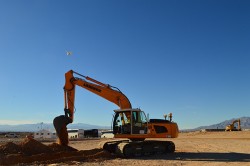
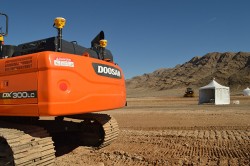
The demonstration site was a playground for heavy equipment utilizing Trimble hardware and software — from tractors to scrapers to bulldozers and paving machines. It’s difficult to imagine the scale of the outdoor demonstration site, so following are a few images.
Demonstration site facing south with the Las Vegas Strip to the southwest.
I caught a ride in a fully autonomous tractor that was outfitted with guidance technology (GNSS using RTX satellite correction service), collision avoidance sensor and display console. It repeatedly stayed within the track defined by the orange cones you see in the above image.
What good is autonomous guidance without collision avoidance? A sensor on the front of the tractor senses objects and either avoids them, slows down or stops. Trimble says they are working on perfecting the turns at the end of each line where traditionally a driver had to take control. This is a difficult task when the tractor is pulling an implement such as a planter or sprayer.
In the not-too-distant future, tractors will be completely hands-free from start to finish.
Wi-Fi radio.
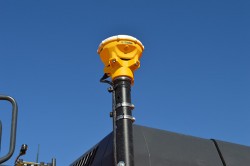
Back inside the Venetian Hotel, I saw this little beast. No, it’s not a funky GNSS antenna. It’s an industrial Wi-Fi radio. Yes, Trimble owns some pretty cool outdoor Wi-Fi technology vis-à-vis Fidelity Comtech, a company that Trimble acquired in 2015.
I’ve set up outdoor Wi-Fi infrastructure before in relatively benign environments (think agriculture), but I didn’t use anything like this. This equipment is built to propagate outdoor, long-range Wi-Fi connectivity in nasty, noisy environments like shipping terminals and construction sites. It can reshape the antenna pattern on the fly in microseconds, and shape the beam width/range to cover a specific geographic area.
GNSS Gear
Even though I’ve been talking about how this isn’t a just a GPS or GNSS environment anymore, I can’t leave without investigating the latest GNSS gear.
Check this out.
Trimble Catalyst software GNSS receiver.
In the past, I’ve written about GNSS software receivers. They exist, but require some serious computing power. Well, some smartphones have powerful CPUs, such as the Samsung Galaxy 6 and 7. Trimble has developed a software GNSS receiver called the Trimble Catalyst that uses the CPU of a Samsung smartphone as the GNSS receiver…dual frequency. The antenna on the range pole is just an antenna, albeit an L1/L2 antenna. Using an RTK network, Trimble says it can deliver centimeter accuracy. Wow.
To be fair, it’s got some significant limitations such as it only uses GPS and Galileo, only runs on certain Android devices (it will likely never run on iOS devices), and eats up the smartphone battery. And although Trimble said it shares resources in a friendly manner, I must think that a rogue app or update might cause things to slow down. Although it won’t behave as snappy as RTK on an R10 and won’t recover as quickly from obstructions like trees, terrain and buildings, it most certainly could bring high-precision GNSS to a wide-array of previously non-RTK users.
Times have changed, and the technology landscape is much, much different today than it was as recently as ten years ago when GPS was the driving-force technology for geospatial users and geospatial equipment, and the exclusive concern of many companies in the industry. In that era, their challenges were to design the best performing receiver in terms of accuracy, size, weight, ruggedness and so on.
Now, GPS technology has been commoditized in mobile devices (the GNSS chip in your smartphone costs about $1.50), and high-precision GNSS is heading in that direction. It’s hard to make a living designing “GPS boxes.”
Sure, GPS is still a core technology offered in most hardware products that geospatial professionals use, but it’s not the centerpiece. It’s all about system solutions, of which software (and hardware besides GPS) is a major component.
As just one example of this overall industry trend, let’s look at how the message of system solutions was abundantly clear last week at the Trimble Dimensions User Conference in Las Vegas. This event reportedly drew 4,400 attendees from more than 80 countries.
More than 4.400 attended Trimble Dimensions at the Venetian Hotel.
Virtual/Augmented(AR/VR) Reality
The Trimble Dimensions general plenary discussion didn’t feature the latest GNSS technology. In fact, there was barely a mention of GNSS. Nonetheless, the cool factor was present, with the highlight being a live demonstration of virtually reality using Microsoft HoloLens goggles and Trimble SketchUp software.
Over the years I’ve written quite a bit about augmented and virtual reality. This technology has a bright future for locating hidden assets (think underground and inside wall infrastructure) and visualizing design ideas. For this technology to work, it’s not just about having a set of goggles. One needs software and an accurate geo-database.
During the plenary, architect Greg Lynn demonstrated the value of virtual reality technology by “displaying” a building concept on an empty table on the stage. Lynn and a colleague donned HoloLens goggles while a camera was set up with HoloLens goggles to display what they were “seeing” through the HoloLens.
AR/VR reality are a step closer to being a practical technology to deploy in the field. In a way, AR/VR technology seems to be taking the same path as tablet computers. Tablet computers existed way before the iPad was introduced. They were expensive, and history is littered with failed tablet computer ventures, just like Google Glass failed in the AR/VR world.
I remember paying ~$2,500 for a Fujitsu Stylistic tablet about 10 years ago for my work. Like the Stylistic, HoloLens isn’t cheap. It’s $3,000 for a development kit and $5,000 for the commercial version. It’s not priced for the average consumer, but the attraction is undeniable and due to the price tag; industrial markets will pick it up before the consumer market will.
It might take a Steve Jobs-like push to punch it through the finish line, but it’s just a matter of time before AR/VR technology is commonplace.
Solutions
Hardware isn’t sticky. Software is. Even better, hardware and software bundled tightly together is the sweet spot. Dimensions showed how, more and more, geospatial technique is geared around solutions, not boxes.
Trimble partner solutions area at Trimble Dimensions 2016.Trimble solutions area at Trimble Dimensions 2016.
One case in point: I took a 45-minute ride from the Venetian Hotel on the Vegas Strip to the outdoor demonstration site in the desert east of Las Vegas.
The demonstration site was a playground for heavy equipment utilizing Trimble hardware and software — from tractors to scrapers to bulldozers and paving machines. It’s difficult to imagine the scale of the outdoor demonstration site, so following are a few images.
Demonstration site facing south with the Las Vegas Strip to the southwest.
I caught a ride in a fully autonomous tractor that was outfitted with guidance technology (GNSS using RTX satellite correction service), collision avoidance sensor and display console. It repeatedly stayed within the track defined by the orange cones you see in the above image.
What good is autonomous guidance without collision avoidance? A sensor on the front of the tractor senses objects and either avoids them, slows down or stops. Trimble says they are working on perfecting the turns at the end of each line where traditionally a driver had to take control. This is a difficult task when the tractor is pulling an implement such as a planter or sprayer.
In the not-too-distant future, tractors will be completely hands-free from start to finish.
Wi-Fi radio.
Back inside the Venetian Hotel, I saw this little beast. No, it’s not a funky GNSS antenna. It’s an industrial Wi-Fi radio. Yes, Trimble owns some pretty cool outdoor Wi-Fi technology vis-à-vis Fidelity Comtech, a company that Trimble acquired in 2015.
I’ve set up outdoor Wi-Fi infrastructure before in relatively benign environments (think agriculture), but I didn’t use anything like this. This equipment is built to propagate outdoor, long-range Wi-Fi connectivity in nasty, noisy environments like shipping terminals and construction sites. It can reshape the antenna pattern on the fly in microseconds, and shape the beam width/range to cover a specific geographic area.
GNSS Gear
Even though I’ve been talking about how this isn’t a just a GPS or GNSS environment anymore, I can’t leave without investigating the latest GNSS gear.
Check this out.
Trimble Catalyst software GNSS receiver.
In the past, I’ve written about GNSS software receivers. They exist, but require some serious computing power. Well, some smartphones have powerful CPUs, such as the Samsung Galaxy 6 and 7. Trimble has developed a software GNSS receiver called the Trimble Catalyst that uses the CPU of a Samsung smartphone as the GNSS receiver…dual frequency. The antenna on the range pole is just an antenna, albeit an L1/L2 antenna. Using an RTK network, Trimble says it can deliver centimeter accuracy. Wow.
To be fair, it’s got some significant limitations such as it only uses GPS and Galileo, only runs on certain Android devices (it will likely never run on iOS devices), and eats up the smartphone battery. And although Trimble said it shares resources in a friendly manner, I must think that a rogue app or update might cause things to slow down. Although it won’t behave as snappy as RTK on an R10 and won’t recover as quickly from obstructions like trees, terrain and buildings, it most certainly could bring high-precision GNSS to a wide-array of previously non-RTK users.
Boris Skopliak, product manager for Trimble, gives an overview of the Trimble UX5 while at the 2014 Trimble Dimensions User Conference, held Nov. 3-5 in Las Vegas, Nevada. The UX5 unmanned aircraft system (UAS) for mapping and surveying captures imagery and can generate point clouds, digital terrain models and orthomosaics.
The 2014 Trimble Dimensions User Conference is being held in Las Vegas this week. Photo: Trimble
With more than 4,000 attendees, this year’s Trimble Dimensions User Conference was the largest ever and, I must say, a well-organized event chock full of technical content — enough to squelch the most intense geospatial hunger pangs you might have.
One could write a book on all the technology and market segments that Trimble is pursuing and offering solutions for. In addition to a wide range of GNSS, geospatial, construction, control, and data management systems previously offered, Trimble boasted a USB stick full of press releases with new product and service announced at Dimensions. So, the challenge is deciding what to write about without writing a little bit about everything.
After my first day at Dimensions, it became clear to me what I needed to do. Among the many product and service announcements was a new GNSS correction service named Viewpoint RTX. While I’ve tried to stay up to speed on Trimble’s various GNSS real-time correction services, this one was the straw that broke the camel’s back for me. I decided I needed to get a solid grip on the range of real-time GNSS correction services that Trimble offers because the picture was getting fuzzier, at least to me, with each new real-time correction service introduced. It used to be pretty simple to decipher; not so much any longer. So I had a conversation with Patty Boothe, general manager of Positioning Services at Trimble. Patty, a 15-year Trimble veteran, was appointed GM of the newly formed group three years ago. Here’s the low-down on the services.
Remember, Trimble acquired the land portion of OmniSTAR’s business a few years ago. For years, OmniSTAR has been one of the two dominant commercial satellite-based, real-time GNSS correction services (the other being John Deere’s Starfire service, as well as new entrant Terrastar). The OmniSTAR acquisition was Trimble’s entry into the satellite-based, real-time GNSS correction services business. Since then, Trimble has introduced the RTX (not to be confused with RTK) range of GNSS correction services. You might say that OmniSTAR and RTX are competitive services within Trimble. They are, to a certain extent, and I’ll attempt to clarify that below.
Following is a list of Trimble’s real-time GNSS correction services, starting with the OmniSTAR services:
OmniSTAR VBS: Satellite-based, real-time submeter service. The VBS service has been made obsolete largely by free public satellite-based augmentation systems (SBAS) such as WAAS/EGNOS/MSAS/GAGAN/SDCM. It is still used in geographic regions where free public SBAS don’t exist, primarily South America, Central and Southern Africa, and Australia. GPS-only service. Requires single-frequency receiver (L1).
OmniSTAR XP: Satellite-based, real-time 15-cm service based on Jet Propulsion Lab (JPL) technology and delivered to users on the ground via OmniSTAR’s geosynchronous satellite network. GPS-only service. Requires dual frequency (L1 and L2).
OmniSTAR HP: Satellite-based, real-time 10-cm service based on OmniSTAR’s reference station network and delivered to users on the ground via OmniSTAR’s geosynchronous satellite network. GPS-only service. Requires dual frequency (L1 and L2).
OmniSTAR G2: Satellite-based, real-time 10-cm service based on Jet Propulsion Lab (JPL) technology and delivered to users on the ground via OmniSTAR’s geosynchronous satellite network. GPS+GLONASS service. Requires dual frequency, dual constellation (L1 and L2).
To use OmniSTAR services, one must have an OmniSTAR-enabled GNSS receiver. There are a several receiver manufacturers that support OmniSTAR GNSS correction services, such as NovAtel and Hemisphere GNSS, in addition to Trimble.
After, or at nearly the same time, Trimble acquired OmniSTAR, the company launched its RTX GNSS correction service. RTX’s infrastructure consists of ~110 GNSS reference stations around the world working to create high-precision corrections on a near global scale. The first significant differentiator is that Trimble RTX services are only offered on Trimble GNSS receivers, so you’ve got to be “all in” with Trimble to utilize RTX.
Viewpoint RTX: Internet-based (notice I didn’t write satellite-based), real-time submeter service. This is a new service introduced this week at Dimensions for the new Leap GNSS receiver and the Geo7 GNSS handheld. GPS+GLONASS service. Requires single-frequency receiver (L1).
The above are the three RTX services. There are some options for the above, but let’s talk about satellite-based GNSS correction services for a minute.
The advantage of satellite correction services is that, because GNSS corrections are delivered via satellite, your receiver doesn’t need to be connected to the Internet or have any other sort of terrestrial radio communications to receive data from the GNSS reference station(s). Because delivery is by satellite, you could be in the middle of a desert with no mobile phone coverage within 100 km, and you could still use OmniSTAR or RTX services. The only requirement is that your receiver needs to have direct, continuous line-of-sight to the OmniSTAR/RTX geosynchronous satellite (both services use the same geosynchronous satellites to broadcast the corrections).
The primary disadvantage of OmniStar and RTX services is the “convergence” time required to achieve the stated accuracy service levels. With the exception of OmniSTAR VBS (sub-meter), Viewpoint RTX (sub-meter) and Rangepoint RTX (50-cm) services, the OmniSTAR and RTX centimeter and decimeter services require tens of minutes of initialization time to converge to the stated accuracy. For example, if you want to use the 4-cm Centerpoint RTX service, you may have wait up to 30 minutes for it to converge to 4-cm accuracy.
Now, there are a couple of ways to reduce the convergence time:
Start on a known point. For example, if you’re using Centerpoint RTX on a tractor for planting and you shut down for the evening, you can start it up the next morning (assuming you didn’t move the tractor), and it will converge nearly immediately.
Trimble offers a fast convergence option ($) in some geographic areas where it augments RTX with local RTK reference stations. Currently, Trimble offers this service in five U.S. “corn belt” states.
For OmniStar XP, HP and G2 services, the only way to reduce convergence time is number one above, start on a known point.
It’s important to note that all of the centimeter and decimenter satellite-based services described above are based on real-time Precise Point Positioning (PPP) technology, which is different than RTK technology. The fundamental difference is that real-time PPP technology relies on a global, distributed network of reference stations. For example, Trimble has ~110 reference stations to cover the globe (mostly) with its RTX service. On the other hand, RTK requires a much more dense network of GNSS reference stations. For example, in Washington State there are ~100 GNSS reference stations that comprise the state-wide RTK network.
Lastly, Trimble offers a hybird RTK/RTX service called XFill. The idea is that for RTK users who lose communications to their RTK base or RTK network can use the Centerpoint RTX as a “seamless” back-up, maintaining RTK-level accuracy (1-2cm) for the first five minutes of RTX service, and then degrading to Centerpoint RTX accuracy after 20 minutes. Trimble reports there is no convergence time when transitioning from RTK to RTX, like you would if you were starting RTX right away. Standard XFill is included with certain Trimble RTK receivers and allows up to five minutes of RTX satellite time. Last month at the INTERGEO conference, Trimble introduced Expanded XFill which is a subscription service for those users who want more than five minutes of RTX time. For those users, Patty said that users can buy blocks of RTX time starting at 10 hours.
So, you might ask how Trimble handles the horizontal datum differences between RTK and RTX since they are likely not referenced to the same horizontal datum. For example, in the US, Trimble VRS RTK infrastructure is typically referenced to NAD83/2011 while Trimble RTX is referenced to ITRF08. There’s about 1 meter difference between the two. After finding the correct Trimble person, he said that Trimble does a 3-parameter local shift (dX, dY, dZ) on the fly when in RTK mode so that when there’s a transition from RTK to RTX, the horizontal datum difference is already resolved.
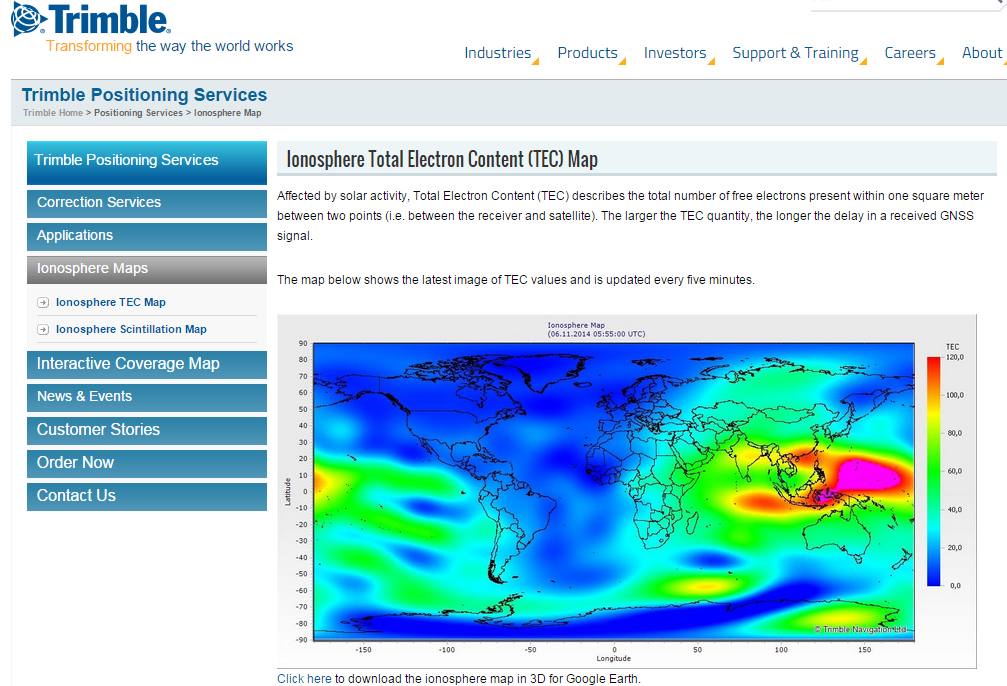
A by-product of Trimble’s ~110 global GNSS reference station network is a real-time, world-wide TEC (Total Electron Content) map. Since real-time PPP GNSS correction services (and public SBAS like WAAS/EGNOS/MSAS/GAGAN) rely on accurate models of the TEC in the ionosphere to account for the GNSS measurement delay, real-time TEC maps give users an indication of how the ionosphere’s TEC is behaving. This sort of map is particularly useful in attempting to predict the understand single frequency receivers using services such as public SBAS, OmniStar VBS, and Viewpoint RTX. The next time you here about an impending solar storm, take a look a the map using this link and see the TEC hotspots around the globe. Notice the more intense activity near the geomagnetic equator.
TEC map from Trimble’s ~110 global GNSS receivers. Photo: Trimble
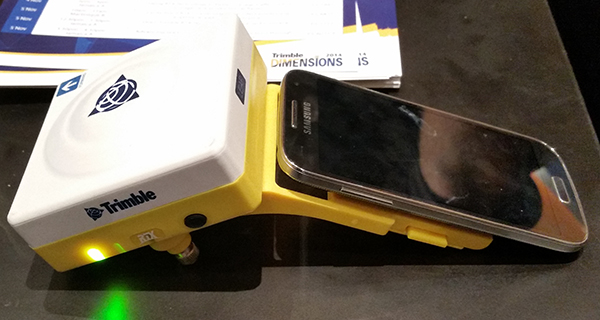
Shifting gears slightly, at the conference, Trimble also introduced a new mobile phone GNSS add-in product called Leap, which uses the Viewpoint RTX service.
Trimble Leap GNSS Receiver with a Samsung Galaxy Phone. Photo: Trimble
Registration is open for Trimble’s International User Conference, Trimble Dimensions, being held November 3-5 at the Mirage and the Treasure Island Hotels in Las Vegas. The conference addresses innovations in agriculture, construction, civil infrastructure, engineering, government, mapping, natural resources, surveying, telecommunications, transportation, logistics and utilities.
Trimble Dimensions provides insight into how information technology can transform the way professionals work by using integrated workflows to increase productivity, the company said. Participants can hear how industry colleagues use Trimble’s end-to-end technology to transform data into intelligent, usable information. Attendees will see first-hand how new tools, processes and ideas can help make a positive impact on their business.
Throughout the conference, attendees will have a variety of opportunities to network with key industry players, nurture existing business relationships, build partnerships, and discover how to overcome challenges in today’s competitive business environment.
Highlights include more than 400 educational sessions, including both on-site and off-site immersive training, more than 30 specialized tracks to advance career objectives with many sessions qualifying for Professional Development Hour (PDH) hours, and on-site product demonstrations.
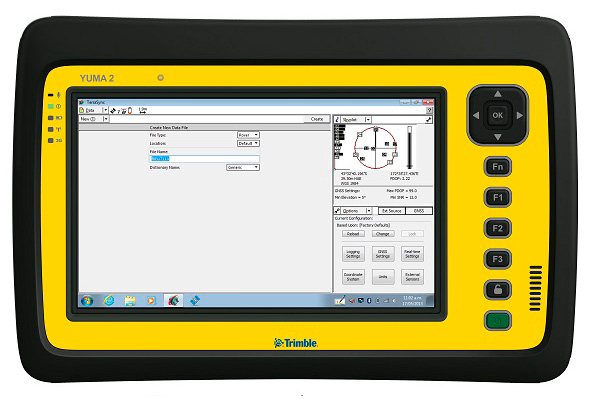
My original review of the first Yuma rugged tablet from Trimble MCS (Mobile Computing Solutions) was penned in August of 2011. My original plan was to have the review of the new Yuma 2 ready to go exactly two years later. But, as we all know, man plans and God laughs.
Actually, the problem, I must admit, is a bit more personal in nature; you see, I have been enjoying the Yuma 2 to such a degree that it was difficult to write about it because then I have to send it back. I have been selfish too long — read on for the review of the new Trimble Yuma 2 rugged tablet computer that is perfect for fieldwork, especially fieldwork involving GPS and GIS applications. Indeed, one Trimble marketing quote states:
“Bring Your Office to the Field for Efficient GPS/ GIS Data Management — The Trimble Yuma 2 rugged tablet computer is designed for ease of use and high performance mobility. Great for GIS applications — it’s like bringing a complete PC out into the field.”
While I totally agree with this assessment, the Yuma 2 is really so much more. It is not limited in any important function I could determine. As an example, I am typing part of this review on the Yuma 2 via a wireless Bluetooth keyboard and a high-definition Sony monitor hooked to the Yuma 2 via the new HDMI connector. Sweet!
Over the years, it has frequently occurred to me that oftentimes manufacturers have no idea of all the ways their equipment will be utilized in the field — although Trimble does a great job giving users ideas through the Trimble Dimensions showcase that will take place at the Mirage Hotel in Las Vegas November 3-5, 2014. If you are into rugged devices, GIS and GPS, or any of the areas listed at the Trimble Dimensions website, don’t miss this show. You will see the Yuma 2 and other Trimble devices and software put to the test and used in ways you could never imagine.
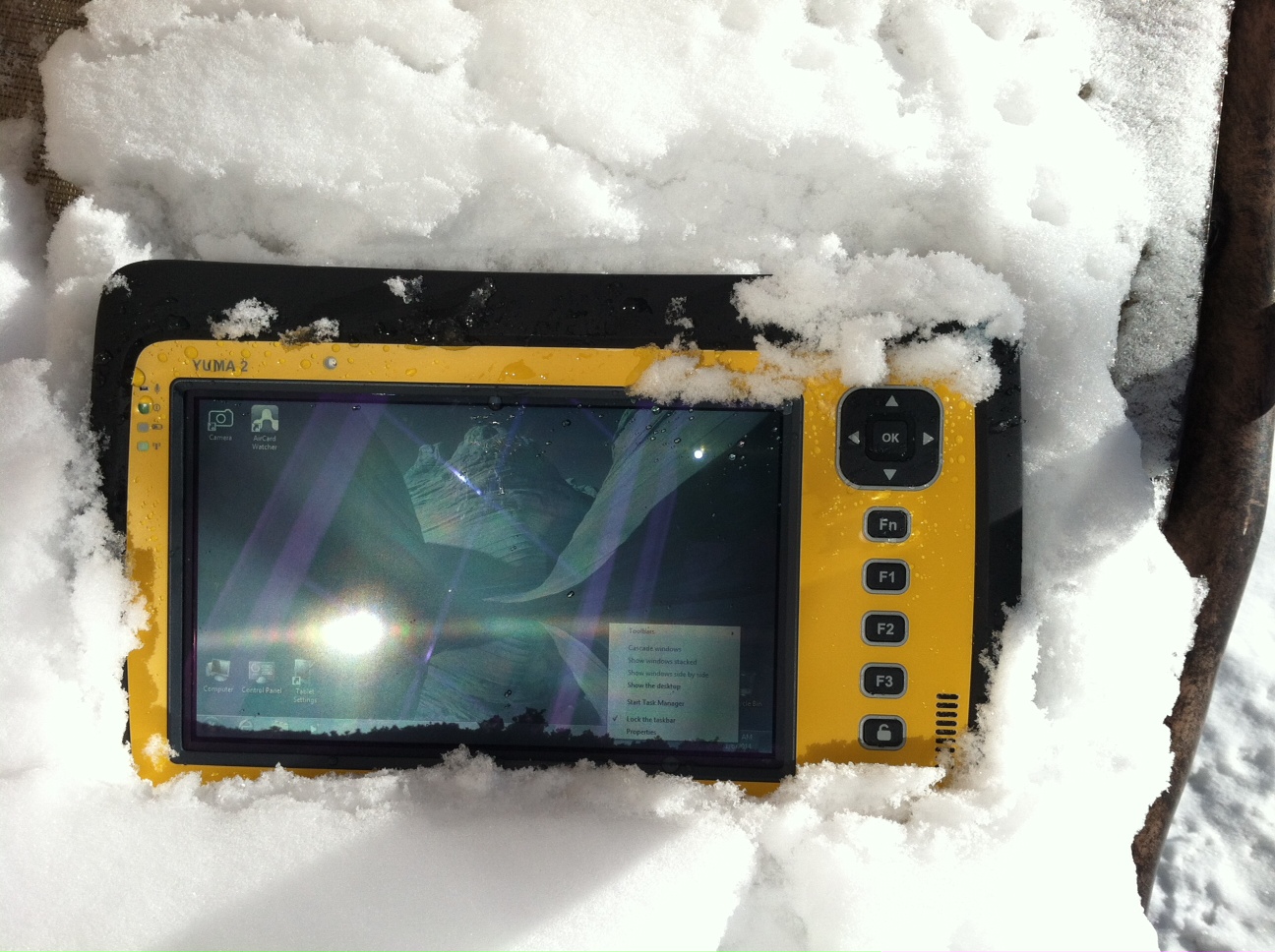
But, as usual, I digress. Let’s get back on topic and the Yuma 2 review. I put the Yuma 2 through all the normal wear-and-tear scenarios, which here in the foothills of the Rocky Mountains means severe cold (-20° F true temperature), snow, ice and altitude.
The Yuma 2 withstands tough conditions, including snow and ice.
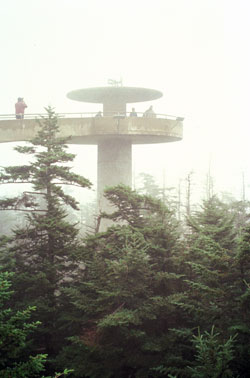
During the six months I tested and evaluated the Yuma 2, I continued to receive several emails from users of the original Yuma rugged tablet. Three of those emails came from users in the Great Smoky Mountains. All three users operate the original Yuma in their business dealings, as well as for navigating around the Great Smoky Mountains and for recreational geocaching. One user, who would only agree to be identified as “Bailey” (he assured me that although he is retired military, his first name is not Beetle), intrigued me with his assertion that he has a crucial usability test he routinely performs on his GPS devices that I cannot easily conduct here in the Rocky Mountains. Beetle and other members of the Great Smoky Mountain Geocaching Society usually perform their Great Smoky Mountain Humidity and Fog tests at or around Clingmans Dome.
Clingmans Dome in the Great Smoky Mountains.
The National Park Service describes the 6,643-foot Clingmans Dome as being the highest point in Great Smoky Mountains National Park. It is the highest point in Tennessee, and the third highest mountain east of the Mississippi. Only Mt. Mitchell (6,684 feet) and Mt. Craig (6,647 feet) — both located in Mt. Mitchell State Park in western North Carolina — rise higher. Additionally, the cool, wet conditions at the summit of Clingmans Dome make the spruce-fir forest that grows there a coniferous rainforest. By now, you are probably saying, so what?
The “so what” is that Bailey says the humidity is sometimes so high that when geocachers hit the cooler temperatures and high humidity of Clingmans Dome, some devices have water streaming from inside the device, which is never a good thing. I checked with Trimble, and indeed their devices are made to survive these conditions and much worse, such as in many mountain jungles around the world. So Bailey, have no fear, your Yuma 2 will continue to work just fine in your moist environment. Consider that the Yuma 2 was designed and built at Trimble’s MCS facility in Corvallis, Oregon, which is just due East of a rainforest along Highway 1 on the Oregon West Coast. So you can bet the Yuma 2 is tested and rated for high humidity levels. Indeed, here are the humidity specifications: Cycles between -22° F to 144° F (-30° C to +60° C) at 90% RH (relative humidity), MIL-STD-810G, Method 507.5, Procedure II (Humidity Aggravated Cycle).
While we are detailing specs, let’s list all the formal specifications, and then we can delve into more detail about how we tested the Yuma 2 and how well it performed.
Physical
Size: (LxWxH) 9.6 in x 6.3 in x 1.5 in (246 mm x 160 mm x 40 mm)
Weight: 2.6 lb (1.2 kg) with standard batteries or 3.0 lb (1.4 kg) with extended batteries
Colors: Yellow, Gray, and Gray with Yellow border
Keys: Seven keys (OK, Logon, Power, Function, 3 user-programmable function keys) and 5-way directional keypad
Hardware Specifications
Processor: 1.6 GHz Intel Atom N2600 dual-core processor
Memory: 4 GB DDR3 DRAM of volatile memory
Storage: 64 GB or 128 GB SSD-Solid State Drive (Enhanced GPS: 128 GB SSD only)
Display: 7” 1024 x 600 hybrid reflective transmissive (transflective) with capacitive touch screen
Battery Options: Smart batteries with LED power indicators – Standard battery: Two 7.5v, 3000 mAh, 21.6 Wh or optional extended battery: Two 7.5v, 6000 mAh, 43.2 Wh
I/O: 3.5 mm audio jack, USB Host (2), HDMI, docking station I/O plate, DC input power
GPS Receiver: 1-2 meter accuracy (with SBAS) or 2-4 meter accuracy (with SBAS)
Radios: Bluetooth 4.0; Wi-Fi b/g/n
WWAN: Penta-band GSM 3.75 Data only module
Standard Features
• Transflective technology (TFT) direct sunlight readable color display
• Microsoft Windows 7 Professional OS
• Intel Atom N2600 dual-core 1.6 GHz processor
• 4 GB DDR3 DRAM volatile memory
• 64 or 128 GB solid-state drive
• Multi-touch capacitive touchscreen
• Rugged design certified to IP65 and MIL-STD-810G
• 3.5 mm audio jack and integrated microphone and speaker
• Outward facing autofocus 5 MP camera with LED Flash, photo and video recording capable
• Integrated Bluetooth 4.0
• Integrated Wi-Fi b/g/n and Wi-Fi Alliance Certified
• CCX (Version 4)
• GPS receiver, Enhanced 1-2 meter accuracy or 2 – 4 meter accuracy with SBAS
• Kensington security slot
• Accelerometer and Electronic Compass
• 3.75 G WWAN data connectivity optional
• Status LEDs for power, battery charging, Wi-Fi and 3G Data
• 12-month manufacturer warranty
Standard Software
• Microsoft Windows 7 Professional with Internet Explorer
• Camera software with geo-tagging
• Trimble GPS Information receiver control software
Standard Accessories
• Standard battery set (5+ hour)
• International AC Charging Kit with 4 adapters
• Capacitive Stylus with Tether
• Hand Strap and Display Cleaning Microfiber Cloth
Now that you have all the specifications and promises from Trimble, let’s look at how it compares to the original Yuma and then let’s get into how it works in everyday life as well as the not-so-routine scenarios.
Comparative Summary of Yuma and Yuma 2 Attribute
Yuma
Yuma 2
Touchscreen
Resistive dual touch
Capacitive multi-touch
Display Technology Sunlight Readability
Very Good
Excellent
Processor
1.6 GHz single core
1.6 GHz dual core
RAM
1 GB
4 GB
Solid State Drive
32 GB then 80 GB
Choice of 64 GB or 128 GB
GPS Accuracy
4 – 6 meter
2 – 4 meter
Battery Life3
4 hours with standard batteries8 hours with extended batteries
8 hours with standard batteries16 hours with extended batteries
Digital Connectivity
ExpressCard Modules
3.75G dual-mode (CDMA and GSM) option with SIM Card and Auto Carrier Recognition.
IP Rating
IP67
IP65
Pricing
$3999 Market Price for base configuration
$2999 Market Price for base configuration
First Impressions
The first thing most people notice about the Yuma 2 is its size. It is 1.5 inches shorter than a full-size iPad, while the high-definition screen is the same size and almost the same resolution as the iPad mini. With the ingenuous hand-strap attached to the back, the Yuma 2 is very maneuverable and easy to carry with you in most any situation. With the security cable, you can also attach it to a vest, backpack or even a belt loop for security. I tried all three options and it works well. For warfighters and first responders, this is ideal, as those users don’t need to worry about what happens if they should drop it. The Yuma 2 is IP65 MilSpec rugged, and I am frankly amazed at the punishment my demo unit survived. Just like the old Timex commercial — “It takes a licking and keeps on ticking.”
Attention Getter
I carried the Yuma 2 everywhere for more than six months, and it garnered a great deal of attention from military and medical personnel of all descriptions: policemen, firefighters, delivery drivers, utility workers, and several park rangers. Even our local refuse haulers spent time looking over the Yuma 2. It is just simply hard to ignore. Interestingly, something they all had in common is that initially they were all very dubious and nervous about dropping it, even on thick carpet, grass, ice or snow. But once they saw me do it, they all wanted to have a go and they did. My demo unit has easily been dropped more than 100 times from various heights, usually from about four feet onto almost any surface you can name, and it continues to perform like the pro-gear it is and was designed to be. It was even dropped twice, unintentionally of course, with the camera in video mode and the LED flash active. I have to admit that initially gave me pause, but the Yuma 2 came through without a hitch. Camera, video and flash all still function perfectly.
Field Capability and New Test
With the Yuma 2, I had an opportunity to test an application I have never run before, but which will now be a standard in my repertoire of applications — the functionality of an audio headset along with Dragon Speaking software.
Long story short, my daughter is a PsyD, or Doctor of Psychology, in private practice, and together we have been testing various software programs that convert her spoken notes into the written word. This is a more difficult task than you might imagine, given all the specialized medical and psychological terms employed in her everyday vocabulary. But the latest professional version of Dragon Speaking was absolutely up to the task, as was the Yuma 2. I installed the Dragon software and went through the brief training routine with the headset and microphone, and the result is the paragraph you are reading. What a great way to write an article.
Now my daughter and I are Apple aficionados. We have more than 21 Apple devices in our homes, and my daughter uses a 13-inch Apple MacBook Pro with a retina display in the office, which, while it is an awesome device, is not something you want to take into the field or into a first-responder situation, whereas the Yuma 2 fulfills the same functions and fits the “rugged” bill perfectly.
While the built-in speaker on the Yuma 2 is certainly adequate for voice recognition and for GPS commands, it is not something with which you will want to listen to iTunes, so I highly recommend the optional audio headset with microphone offered by Trimble and several other suppliers. For me, the new Bose headset model with microphone works extremely well, while remaining affordable, and the resulting fidelity is…well…certainly Bose quality — what more can I say!?f you want audiophile-quality music and speech-to-text transcription capability in the field, then the Bose headset and Yuma 2 combination can’t be beat.
Docking Station and HP ePrint
The unit we tested did not arrive with the optional docking station. However, we quickly determined that if you are going to be constantly, even daily, making the transition from field to office computer and want to work on the same computer, then a docking station is a must. Next time, say for the Yuma 3 review, for instance, we will request a docking station as part of the review hardware. There were so many times we wanted to print directly from the Yuma 2 that I wished fervently for a docking station. Then I found that the HP ePrint software worked just great on the Yuma 2 as long as you are in range of a printer capable of receiving the signal.
If you are on the road and need to print, you can do that via the cloud and ePrint no matter where you are. You can also print your documents to the nearest HP Public Print Locations, which include national chain locations for FedEx Office stores, UPS stores, Walgreens, numerous hotels, airport lounges, and more. Prices vary widely per page, but if you really need a hard copy, this is an amazing option that works well with the Yuma 2.
We tested this print option at our local Walgreens, and they were not initially aware they had the capability until we printed a test page and out it popped. Now they advertise the capability. We also tried printing from the parking lot of a local FedEx store, and since I have a FedEx account (we receive a lot of packages, as you can imagine), the page was waiting for us when we walked in the door and the bill was automatically charged to our FedEx account. It was an incredibly quick and painless process.
Camera and Flash
The 5 MP (megapixel) camera with automatic geotagging and LED flash work as advertised, although with the Yuma 2 we were also able to record a short video that played back flawlessly on the Yuma 2 and via the email attachment on my Apple iMac. The only caution here is that you are definitely capable of recording a video that, due to its size, may never work its way through the normal email system. Fortunately, the GPS World magazine servers and my “other office” servers are “unlimited,” so this was not a problem for us. However, when we attempted to send a 20-MB video file to a friend, his system would not initially authorize it. When we compressed the file, it went without a hitch. So, if you are going to be shooting a lot of video in the field, a good video software compression program is highly recommended. We tried no less than five different free video compression algorithms, and they all worked without a glitch. Note: Some programs, but not all, require the same software be resident on the receiving computer as well.
Power and Data Connectors
Fortunately, the power connector on the Yuma 2 device is heavy duty. It is reminiscent of the old serial port (RS232C) connectors with the screw receptacles on the port. Consequently, you will never have to worry about the power cables being disconnected, at least not on the Yuma 2 side. There is also an USB-RS232C dongle available that comes in handy for data logging from external sensors.
GPS Applications and Accuracy
While Trimble MSC is not publishing much about the GPS specifics, from a technical point of view in the Yuma 2, Trimbe is shouting from the rooftops that you can have nominal 2-4 meter accuracy or enhanced 1-2 meter accuracy (both with SBAS or Space Based Augmentation System – in the U.S., think WAAS or Wide Area Augmentation System) depending on your requirements. There is an option for an external GPS antenna, and while the three different RTK programs we ran on the Yuma 2 produced excellent and consistent sub-meter accuracies, RTK programs can be expensive. So with the Yuma 2 you should be capable of deriving accuracies anywhere from 4 meters to 4 cm, depending on your timing requirements, how much you want to spend, and sometimes your altitude.
Altitude
Which reminds me: I really got a kick out of the correspondence from the three geocaching Trimble Yuma users in the Great Smoky Mountains, mentioned at the beginning of this column, because all three made such a big fuss about the 6,000+ feet of altitude they routinely encounter when geocaching. My initial reaction to that concern is akin to that of the old codger mountain man in the great movie Continental Divide with John Belushi and Blair Brown in 1981.
John’s city-bred character mentions that being a smoker the high altitude in the Rocky Mountains is beginning to bother him, at which point the heretofore reticent old mountain man indignantly replies, “Mountains? These here are foothills, just bumps in the ground, these ain’t mountains!” Therefore, since my home sits at an altitude 1,000 feet or more higher than any of the Great Smoky Mountain peaks, and I can be at 14,000+ feet within a 20-minute drive and cross the Continental Divide in under an hour’s driving time, I understand the old mountain man’s consternation and directly relate it to the users’ concerns about the Great Smoky Mountains, which when compared to the Rocky Mountains in Colorado, are indeed bumps in the ground. I mention this only because at 7,500 feet with no obstructions, the Yuma 2 routinely processes 8-12 GPS satellites and reports accuracies far superior to those publicized by Trimble. So, while you should not necessarily expect the same level of accuracy I have reported here, you should probably expect accuracies in between what Trimble publicizes and the sub-meter performance we observe on a regular basis.
Software
I have frankly lost count of the multiple GIS and GPS software programs I ran on the Yuma 2, but they all basically ran flawlessly, both the free apps and the more costly programs. The only issue I encountered is that some GPS programs require utilizing different ports and transmission speeds. However, since these parameters are user definable on the Yuma 2, it never presented any serious obstacles. Caveat emptor, for here I will remind users of the old axiom, “You get what you pay for!” The free GPS and GIS apps work fine, but the amount of metadata and accuracy provided by some of the more costly applications is nothing short of amazing. If you plan to use the Yuma 2 for scientific applications and desire onboard processing, then the more costly software programs are the applications I would recommend. If the Yuma 2 is just a data logger or positioning device, then the free applications work well.
Bottom Line
The Yuma 2 is an amazing machine. It is everything a high-end laptop should be and more in a ruggedized format with a Gorilla Glass high-definition display touchscreen that should be reassuring to users in the field.
For government users, the rugged Yuma 2 tablet with a Selective Availability Anti-Spoofing Module or SAASM option would be the perfect choice, and far superior to anything else in the field today, especially for our military. My sources tell me there are thousands of Yuma and Yuma 2 tablets in the field today, and the addition of a SAASM module would make them more secure and usable by our military users for all their tasks. Imagine one secure tablet that meets all your needs. I think our warfighters deserve the best, don’t you?
If you currently accomplish fieldwork and transfer data between two computers, and make use of GIS and GPS data, then the Yuma 2 is the machine of choice for you because it will do the work of both computers and display/output data through the HDMI interface or through the wireless ePrint capability, especially if you opt for the optional docking station. The SSD (solid state drives) are super fast, and since there are no moving parts on the Yuma 2, you may well find it is faster and more dependable than your current office laptop or even desktop computer. I highly recommend it.
Until next time, happy navigating and take a rugged computer out for a spin.
Trimble has expanded coverage of its satellite-delivered Trimble RTX technology for surveyors to most of the world. Trimble has also introduced post-processing capability for its CenterPoint RTX positioning service for farmers. Both announcements were made at the Trimble Dimensions 2012 conference being held in Las Vegas this week.
RTX technology enables Trimble xFill, a new technique in RTK and VRS surveying that allows surveyors to continue working in the event the primary RTK or VRS correction stream is not available.
Trimble RTX technology, first introduced in 2011, combines real-time data and positioning algorithms to deliver centimeter accuracy around the world. While RTX technology is available worldwide via IP and cellular delivery methods, Trimble RTX has been available via satellite L-Band only in North and South America. Now, the expanded satellite coverage includes most of Europe, Russia, and the Commonwealth of Independent States (CIS), Africa, Asia, and Australasia.
Powered by Trimble RTX technology, Trimble xFill, a feature integrated into the new Trimble R10 GNSS Receiver, enables a new and innovative technique in RTK surveying, according to Trimble. It seamlessly “fills in” for RTK or VRS corrections for up to five minutes in the event of a temporary connection outage with the primary correction source. Minimizing downtime, Trimble xFill enables higher productivity for field survey crews, allowing them to continue working until radio or cellular connectivity is restored, Trimble said.
“The expanded coverage of satellite-delivered Trimble RTX technology further extends our commitment to providing different ways of realizing high accuracy positioning solutions,” said Patricia Boothe, general manager of Trimble’s Positioning Services Division. “The power of RTX is proven. Trimble RTX is the backbone of Trimble’s latest positioning innovations including the Trimble CenterPoint RTX service for farmers, the Trimble Pivot RTX App, and Trimble Pivot RTX-PP App infrastructure solutions and now, the Trimble xFill feature for surveyors.”
Trimble xFill feature allows satellite corrections to be delivered directly to the receiver with no need for additional equipment such as radios and antennas. With its built-in capability, the Trimble R10 automatically tracks these corrections and will use them when needed. Trimble xFill across the expanded satellite coverage area is expected to be available by late November 2012.
CenterPoint RTX Positioning Services. Enabled by Trimble RTX technology, CenterPoint RTX provides centimeter level positions in real time via satellite L-band and IP/cellular. The new post-processing capability delivers better than one-centimeter accuracy and is available worldwide.
Trimble CenterPoint RTX post-processing is a cloud-based service accessed through www.TrimbleRTX.com, allowing users around the globe to upload static GNSS observation data and receive positioning corrections calculated in the well-defined ITRF 2008 reference frame. The post-processed solution can be transformed to a variety of regional reference frames by selecting a coordinate system and tectonic plate.
“With the introduction of post-processing capability to the CenterPoint RTX portfolio, we continue to extend the breadth of the service,” said Patricia Boothe, general manager of Trimble’s Positioning Services Division. “CenterPoint RTX post-processing gives geospatial professionals another tool for their toolbox, utilizing Trimble’s globally available RTX technology to enable higher-accuracy positioning solutions.”
The open service allows any user to post process 10 data sessions per month.
Trimble’s conference will provide insight into how information technology can transform the way surveying, engineering, construction, mapping, GIS, geospatial, utilities and field service management professionals work. It will be held November 5–7, 2012, in Las Vegas, Nevada.