Tag: workflow

  • V6 of Virtual Surveyor provides streamlined workflows with drones

    V6 of Virtual Surveyor provides streamlined workflows with drones

    Image: Virtual Surveyor
    Image: Virtual Surveyor

    The newly released version 6 of the Virtual Surveyor drone surveying software offers a faster, more efficient workflow and better overall user experience in a more stable platform, according to the software maker.

    Version 6 offers new capabilities, an improved licensing system and an extended free application.

    “Surveyors who have used the Virtual Surveyor package in the past will be amazed at how easily they can manipulate data and how quickly the software renders results of even the most complex topographies,” said Tom Op ‘t Eyndt, managing director of Virtual Surveyor nv in Belgium.

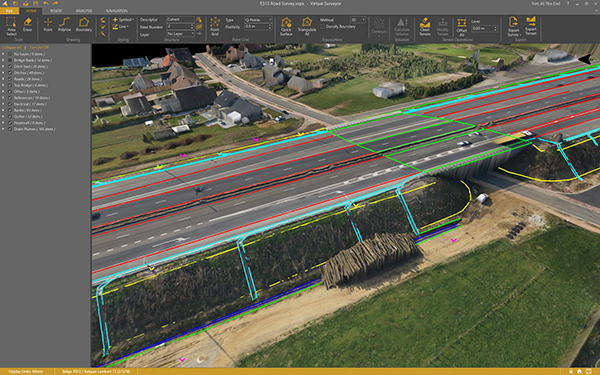
    Virtual Surveyor leverages the expertise and interpretation skill of a land surveyor and combines it with the computing power of the computer, the company said.The software generates an interactive onscreen environment through orthophotos and digital surface models, generated from the unmanned aerial vehicle (UAV), where the surveyor selects survey points and breaklines to define the topography.
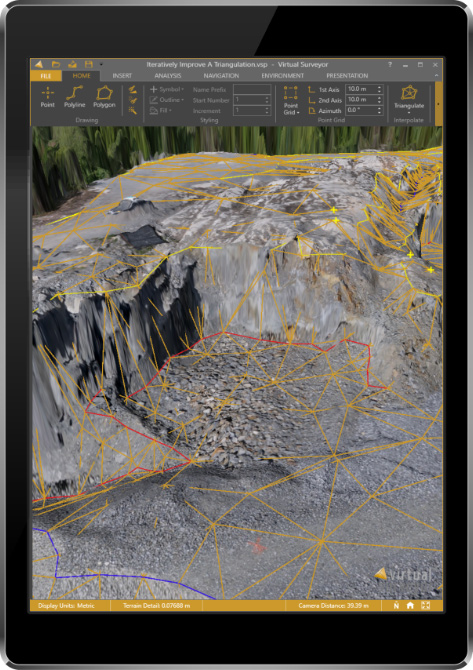
    Image: Virtual Surveyor
    Image: Virtual Surveyor

    Virtual Surveyor enables land surveyors to complement traditional fieldwork with UAV imagery to generate highly accurate topographic products up to five times faster than otherwise possible. It bridges the gap between UAV photogrammetric processing software and engineering computer-aided design (CAD) packages.

    “The focus of Version 6 development has been to streamline the workflow — from the importing of drone data to exporting topo information into CAD — to make the surveyor more productive,” Op ‘t Eyndt said.

    Key enhancements in Virtual Surveyor 6 include the following:

    • Easier editing – The new editing functions allows users to quickly select, delete or move individual point and lines placed by the computer during the automated creation of elevation points. The associated Undo/Redo function allows reversing all edit operations.
    • Better CAD integration – The addition of Descriptor functionality means that point descriptions remain with the point during export to CAD, working the same way as the land surveyor collects data in the field.
    • 3D geometry retained – All points, lines and other data imported into the software, either from a UAV or field surveyed data, retain elevation values and integrate seamlessly into the merged scene. This allows a surveyor, for example, to collect point values from a ditch bottom that may be obscured by vegetation in the drone image and have the bottom points accurately represented in the topography.
    • Improved drawing tools – Users can now densify (drape) lines and boundaries to map current surface conditions. Individual vertices are now adjustable in all directions and exact X, Y and Z locations can be specified as well. Sub-surface modeling is now possible with these new improvements. Created features can then be exported to CAD for profile or alignment creation.
    • Extended free plan – Referred to as the Valley version, the free Virtual Surveyor suite has added functionality, including the ability to import photogrammetric data.
    • Improved licensing – We better honor our principle: “The license follows the user”. With an improved licensing system based on a Virtual Surveyor Identity (email) the user will be able to work where he or she wants.

    “The enhanced user experience will continue to appeal to professional land surveyors, who are our core client base,” said Op ‘t Eyndt. “And the seamless integration with CAD and advanced drawing tools will make Virtual Surveyor more attractive to design engineers.”

    Virtual Surveyor is available in a free 14-day trial.

  • Wyzelink IoT workflow app now on Geotab Marketplace

    Wyzelink Systems’ IoT workflow-automation application, WyzeTask, is now available in the Geotab Marketplace. WyzeTask is the newest application in the marketplace and is a complement to the MyGeotab platform, which serves more than 14,000 Geotab customers.

    WyzeTask maximizes employee productivity by automating task tracking and job completion processes, freeing workers from paperwork and manual data entry. Automation also maximizes record accuracy by avoiding the errors that come with manual entry.

    The WyzeTask solution includes the WyzeBeacon, a wearable device that uses Bluetooth Low Energy (BLE) to transmit data to a nearby BLE scanner, which can be a Geotab IOX-BT hub or a smartphone/tablet running the WyzeTask application. Employees simply click a button on their WyzeBeacon to have it log and share information such as their task status, time and GPS location.

    Designed for field workers in public works, construction and manufacturing, WyzeTask leverages Geotab’s IOX-BT hub to reliably transmit data even when they’re away from their smartphone or IOX-BT-enabled vehicle.

    WyzeTask includes an easy-to-navigate Geotab webAdd-in with an interactive map that allows administrators to view task progress and other key information. A mobile app also lets supervisors assign and change worker’s tasks from the job site or remotely.

    “Wyzelink creates intelligent solutions for workforces outside of a typical office building with wireless IoT technology, smart sensors and wireless applications,” said Brian Barry, Wyzelink Systems CEO. “By closely tracking workforce tasks, businesses can cut through the tedious paperwork process and focus on core responsibilities while improving efficiency, productivity and workplace safety.”

    “The addition of Wyzelink provides increased IoT capability as we continue to create an impressively connected ecosystem for Geotab’s Marketplace customers,” said Joey Marlow, Geotab executive vice president of U.S. operations. “Through Geotab’s IOX Bluetooth hub, telematics tracking and data collected from WyzeTask, management now has the ability to collect and analyze workforce data to deliver business intelligence.”

    The Geotab Marketplace provides an extensive ecosystem of valuable business focused applications and Add-Ons, helping customers add value to their Geotab fleet management solution. Launched in 2015 as a complement to the MyGeotab platform, the marketplace is used by more than 14,000 Geotab customers.

  • Kansas utility finds new workflow solutions

    Water, Water, Where?

    WaterOne found itself stuck in the past. The independent public utility knew that its workflow for collecting geospatial data was broken.

    WaterOne serves a 272-square-mile area on the Kansas side of the Kansas City, Missouri, metropolitan area, which has a population of 420,000, 145,000 metered accounts and 2,685 miles of water pipes. The survey/geospatial staff consisted of three analysts, two editors, one programmer and one GPS collector. By 2016, less than 40 percent of the water features had been captured with GPS.

    The staff was using legacy GNSS handhelds — operators had to return to the office every night and physically download their data.

    Besides being time-consuming, the operators would become frustrated by the antiquated system. Sometimes the handhelds wouldn’t sync to the computer, or files for download would be hard to find. Also, the GNSS handhelds had a tiny screen, making it difficult for operators to see background data in the field. The handhelds’ limited computing power meant the entire water system couldn’t be loaded onto it.

    WaterOne turned to a new workflow using Panasonic ToughPad tablet computers and Eos Positioning Systems’ Arrow 200 RTK GNSS receivers mounted on a range pole (see photo).

    The Arrow 200 receiver connects to the Panasonic ToughPad via wireless Bluetooth link. The ToughPad has a Verizon SIM card for internet connectivity, used for two purposes:

    • Connecting to the Missouri Department of Transportation RTK network to receive RTK corrections for centimeter accuracy;
    • Connecting to the WaterOne ArcGIS server in real time from the field.

    Whenever the field tech collects data, the data syncs up with ArcGIS server. This eliminates the task of having to physically download the data at the end of the day.

    The new workflow also provides near real-time updates to WaterOne’s geospatial information system. This means that if five techs are in the field collecting data, they can each see the map updated in near real time.

    The ToughPad tablets have a large, sunlight-readable 10-inch display. The large displays combined with the new data-collection software allows the field techs to view the entire GIS water system on the tablets. The field tech can now “see” all of the water system assets — pipes, valves, fittings, hydrants — around them. This significantly improves productivity over the legacy GNSS handhelds.

    Street maps and aerial photos were loaded on the ToughPad to give the field techs a choice of background data to view.

    The result? Compared to the 1,767 GPS points collected in 2016, the WaterOne team has collected 5,770 just in the first four months of 2017.