Tag: ArcGIS Online

  • Improved 1Data Gateway provides new localization options

    Improved 1Data Gateway provides new localization options

    1Spatial logo1Spatial is improving its platform, adding a new language option and user experience enhancements to its data submission portal 1Data Gateway.

    Features in 1Data Gateway 2.5 are designed to make it easier for data contributors to submit their data. An Optional Data Submission feature allows contributors to submit exceptions to validations, and new integration with Esri ArcGIS Online adds a simple method of user authentication and authorization.

    A new Welsh-language option and updated support for 1Integrate 3.2 are included. Areas improved include schema mapping, allowing contributors to see the target schema and easily select attributes from dropdown menus.

    “This release is great for data contributors and streamlining our processes,” said Michael Martin, director of Consultancy at 1Spatial Inc. “We’re using new email notifications to receive an email upon successful submission, or for submissions that need my attention. Authenticating and authorizing via ArcGIS Online makes user-group maintenance easier, and the new Schema mapping is now also so much quicker, with easy selection of attributes from the target schema. Overall, this release is a huge time saver.”

    “This new release comes with many improvements to the user interface,” said Ricardo Cifres, senior product manager for 1Data Gateway. “The possibility of copying assignments as well as deleting projects, specifications and assignments makes the administrators’ lives even easier, and new PDF reports provide clear and concise information. We’ve also continued expanding our localization options, adding Welsh language to support a national project, and we have more languages in the pipeline. 1Data Gateway truly brings our rules-based technology to a worldwide audience.”

    1Data Gateway is used with 1Integrate to ensure compliance of data for use across the enterprise and provides automated data validation, cleaning, transformation and enhancement. It enables users to assess the quality of data to ensure it meets defined specifications and is fit for purpose.
  • Eos Positioning announces new high-accuracy GNSS releases at 2020 Esri UC

    Eos Positioning announces new high-accuracy GNSS releases at 2020 Esri UC

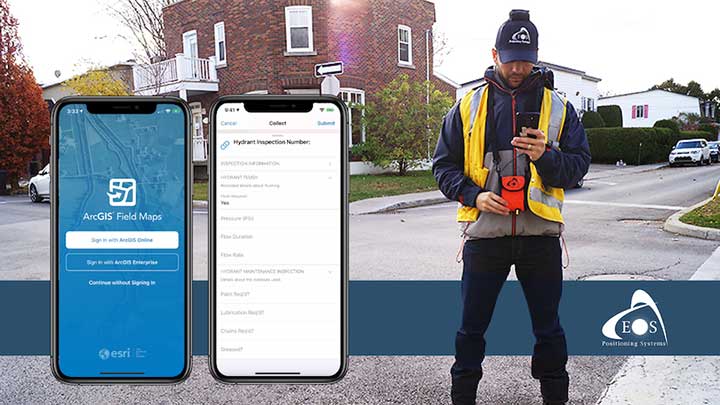
    Eos will announce compatibility of its Arrow GNSS receivers with the inaugural ArcGIS Field Maps beta release, the expansion of Eos Locate underground mapping locator-device compatibility, as well more exciting updates for users of high-accuracy GPS with ArcGIS apps.

    Eos Positioning Systems, manufacturer of the high-accuracy Arrow Series GNSS receivers for the GIS market, has announced several new releases ahead of the 2020 virtual Esri User Conference.

    The announcements include the expansion of the availability of the Eos Locate
    underground mapping solution, compatibility with the new ArcGIS Field Maps, the inaugural release of Eos Tools Pro for Windows, and a “special surprise” for virtual attendees of the 2020 Esri UC.

    Image: Eos Positioning
    Image: Eos Positioning

    Expansion of Eos Locate

    Eos Locate is a high-accuracy, real-time underground mapping solution for Esri
    ArcGIS apps users. It allows organizations to accurately map already-buried assets straight to ArcGIS Online via either ArcGIS Collector or ArcGIS Field Maps.
    Eos has expanded Eos Locate compatibility with additional models from Vivax-Metrotech, Subsite and Radiodetection.

    Compatibility with ArcGIS Field Maps beta

    ArcGIS Field Maps is the newest Esri mobile application, which combines the functionality of several existing Esri mobile applications, such as ArcGIS Collector, ArcGIS Explorer, and ArcGIS Tracker.

    The ArcGIS Field Maps beta release this month is already fully compatible with Arrow GNSS receivers (all models). This means organizations with Arrow GNSS receivers can immediately start taking advantage of survey-grade Arrow GNSS locations and metadata within ArcGIS Field Maps for data collection, markups, read-only routine field work (e.g., utility locates), GPS tracking, and more.

    In addition, two Eos solutions previously exclusive only to Collector also already work with ArcGIS Field Maps. These include:

    1. Eos Locate for underground asset mapping
    2. Eos laser mapping (laser offsets) for collecting assets from afar

    Inaugural release of Eos Tools Pro for Windows

    Eos Tools Pro is a free GNSS monitoring application for Arrow GNSS receivers. For the first time, this app is now available for Windows 10 users.

    Eos Tools Pro allows fieldworkers to:

    • Connect to an RTK network or base station via NTRIP
    • Get elevations in orthometric heights via geoid model conversions in real time, in the field (directly into an Esri app)
    • Apply a simple X, Y, Z datum shift to the current location to match any local datum
    • Set a vast number of audible alarms

    In addition, developers using Windows 10 will now be able to access the wide array of Arrow GNSS metadata while eliminating the task of parsing NMEA data.
    Finally, Eos Tools Pro features a built-in duo of virtual Com Port and TCP/IP server to output streams of standard NMEA sentences. This enables multiple apps to have simultaneous access to the Arrow GNSS location and metadata.

    Special surprise for eligible 2020 Esri UC attendees

    In support of the inaugural virtual Esri UC, Eos is offering a one-time-only chance to win an Arrow 100 submeter GNSS receiver. To enter to win, eligible attendees must both

    1. Complete a meeting with an authorized Eos representative during the 2020 Esri UC (July 13-16), which can be achieved by visiting the Eos virtual booth (V103), and
    2. Fill out a special contest contact form made available by that representative.
      Both the meeting and special contest contact form submission must be completed no later than July 16.

    The following people are not eligible to win: Employees of Eos and Eos distributors, employees of Esri and Esri distributors, employees of other exhibiting/sponsoring companies, employees of other GPS manufacturers or vendors, registered media, and others whom we deem to have a similar affiliation.

    Visit the Eos virtual booth (V103) to talk with sales, marketing, and technical support staff during the event expo hours.

  • Taking to the field during the coronavirus pandemic

    Taking to the field during the coronavirus pandemic

    City officials in Sarasota, Florida, kept their staff actively working during COVID-19 social distancing mandates by training and tasking them with mapping utility data in the field.

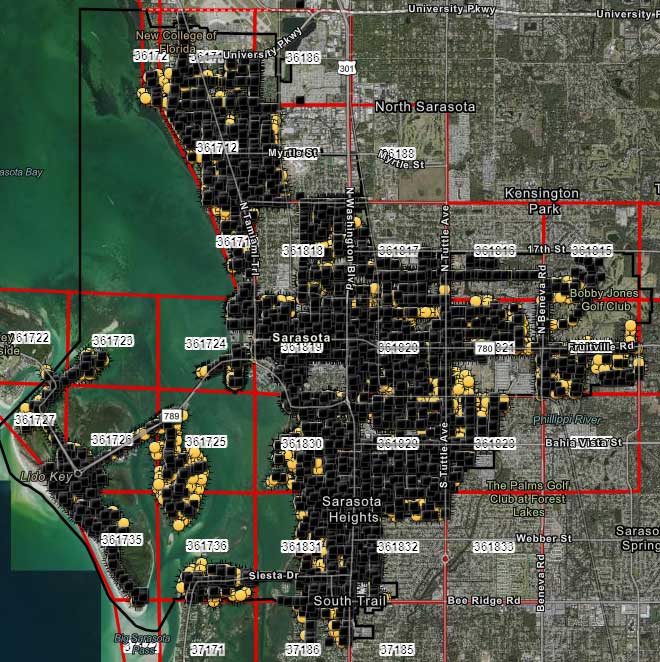
    The city’s plan to rebuild its GIS database had an estimated five-year timeline. GIS Coordinator William Rockwell suggested to city manager Tom Barwin that those unable to work from home be trained to collect the data. Rockwell worked with Sarasota IT Director Herminio Rodriguez to calculate the cost of acquiring enough GNSS receivers for the idle staff to use, and discovered a substantial cost savings.

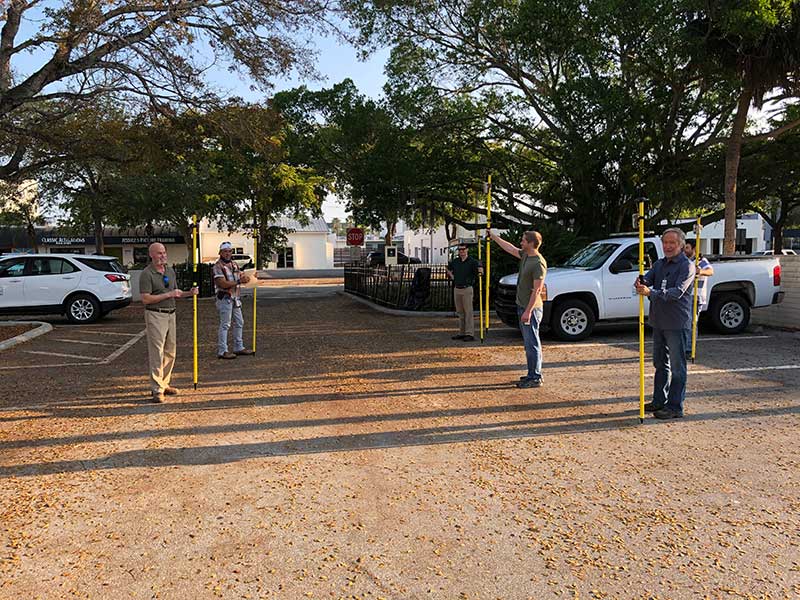
    Hands-on training took place in the Sarasota City Hall parking lot, with trainees practicing social distancing. (Photo: Eos Positioning)
    Hands-on training took place in the Sarasota City Hall parking lot, with trainees practicing social distancing. (Photo: Eos Positioning)

    “By implementing this project, we not only keep city staff productive, but we’ll also be collecting data that would otherwise cost hundreds of thousands of dollars if we outsourced the work,” Rockwell said.

    Training from a Distance. Rockwell obtained affordable Arrow 100 GNSS receivers from an Eos Positioning distributor and hosted small-group training sessions in the city hall parking lot. Employees from a multitude of different departments were trained, such as a parking enforcement officer and a transportation planner.

    All employees were carefully kept six feet apart. From a maintained distance, Rockwell explained the basic concept of data collection using high-accuracy Arrow 100 receivers with ArcGIS Collector.

    The new team mapped 93% of street lights and road signs in one month. (Photo: Eos Positioning)
    The new team mapped 93% of street lights and road signs in one month. (Photo: Eos Positioning)

    The employees took turns collecting sample data so Rockwell could address any initial concerns. He also gave each of them a printed map series, created in ArcGIS Pro, that showed the city divided into 28 grids. This allowed the team members to easily mark off where they collected data each day.

    At the end of each day, the workers synced their data, collected by the Arrow 100s, to ArcGIS Online, which allowed Rockwell to monitor progress.

    To date, 14 field workers have collected 93% of the city’s 6,000 street lights and 16,000 road signs. Although the 30-day project pilot has finished, the city plans to collect the remaining lights and signs, as well as the city’s 35,000 trees, later this year. High-accuracy GIS data collection has received encouraging feedback from management.

    “I’m thrilled the city is supporting this initiative,” Rodriguez said. “To be able to take employees doing very, very different jobs and put them in the field — this wouldn’t have been possible in a normal environment. We are excited that everyone is chipping in.”

  • 3DR announces Site Scan Esri Edition for Esri users

    3DR announces Site Scan Esri Edition for Esri users

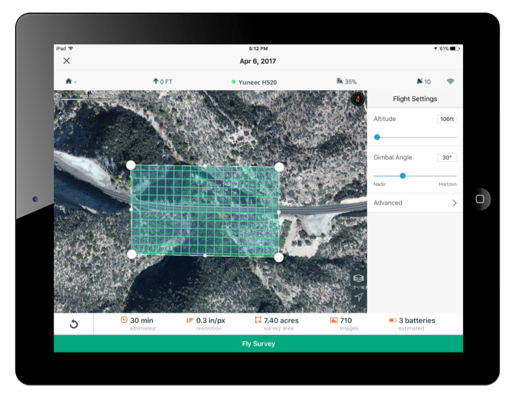
    3DR, makers of Site Scan, has partnered with Esri to develop Site Scan Esri Edition, a custom version of its iOS app for drone flight planning and data capture that works seamlessly with Esri’s ArcGIS Online and Drone2Map for ArcGIS.

    The Site Scan Esri Edition app will complement Esri’s Drone2Map for ArcGIS software by providing full drone project mission planning and a simple workflow for transferring drone captured data into the Esri ArcGIS ecosystem.

    Screenshot: 3DR and Esri
    Screenshot: 3DR and Esri

    Users will be able to connect to ArcGIS Online with an Esri sign-in. The app will allow users to directly use Esri data layers from ArcGIS Online — including custom data layers from the user’s FedRAMP authorized ArcGIS Online organization account — as base and reference data for their drone flight planning mission.

    Esri customers can use any drone currently supported by Site Scan, including a variety of DJI drones. Site Scan also supports a custom version of the new Yuneec H520 commercial drone by 3D, which is based on the Dronecode PX4 software and designed to be an open and secure drone option for use on U.S. government projects.

    “I’m thrilled that we’ve been able to work with Esri to provide its users with flight planning and drone capture tools,” said Chris Anderson, CEO of 3DR.

    “3DR has been a leader in the drone industry, and we are excited to support this development effort,” said Cody Benkelman, imagery product manager at Esri. “A drone flight planning app that connects directly to ArcGIS Online will provide great value to Esri’s worldwide customer base, and simplify the process of ensuring successful projects using Drone2Map.”

    Site Scan Esri Edition app will be available on the Esri Marketplace in late September for free to ArcGIS customers.

  • Esri location intelligence to integrate with SAP HANA Spatial Services

    Esri location intelligence to integrate with SAP HANA Spatial Services

    Esri’s ArcGIS software is being integrated into SAP’s latest cloud-based offering, SAP HANA spatial services, to help customers create location-aware business applications faster, according to spatial analytics company Esri.

    Based on SAP Cloud Platform, the new offering enables businesses to process location data such as complex imagery, as well as visualize and analyze their authoritative data in a geospatial context.

    The new geo-enabled solution from SAP will allow users to deliver their data through consumer-friendly maps and integrate the results into custom business applications, the company said. Customers using SAP software will also be able to create custom models that efficiently process streams of Earth observation data such as water content or soil temperatures and see this data on high-quality basemaps provided by Esri’s ArcGIS Online.

    Most business objectives — such as increasing revenue growth, reducing operational costs or improving customer service — rely on some sort of location data. Unfortunately, many executives lack an accurate and up-to-date understanding of where performance is going well and where improvements need to be made.

    This new offering from SAP, which leverages Esri technology, lets organizations extract high-value business information from satellite, drone and open data sources and then easily discover and share location-based insights.

    “As an SAP global technology partner, we are very excited about this offering, as it demonstrates that SAP and Esri products work better together,” said Chris Cappelli, director of strategic business development at Esri. “Users of SAP HANA spatial services can now achieve native integration of spatial and enterprise data across all business processes. By putting the power of location information into the hands of key stakeholders, businesses can make better-informed decisions with their own data.”

    The integration follows SAP’s announcement on Jan. 24 that Esri supports SAP HANA as an enterprise geodatabase with the release of ArcGIS 10.6 and ArcGIS Pro 2.1.

    Esri and SAP customers can benefit from enhanced performance and scalability as well as full integration of both enterprise and spatial data. Both Esri and SAP continue to deliver new innovations that help lower total cost of ownership and administration costs brought on by the tight integration of IT and geospatial landscapes, Esri said.

    Esri will showcase its new integration of location intelligence technology with SAP HANA spatial services at SAPPHIRE NOW and ASUG Annual Conference in booth #1239.

  • Esri publishes textbook on how to use ArcGIS Pro

    esri-publishes-a-textbook-on-how-to-use-arcgis-pro-WEsri has released GIS Tutorial 1 for ArcGIS Pro: A Platform Workbook, which teaches all the elements of creating and managing data; designing maps; performing spatial analysis; creating 3D scenes; and sharing projects using ArcGIS Pro, Esri’s professional desktop geographic information system (GIS) application.

    The textbook primarily focuses on working with ArcGIS Pro but also offers instruction on using ArcGIS Online and apps such as Collector for ArcGIS, Esri Story Maps, and Operations Dashboard for ArcGIS. The book teaches students how to do the following:

    • Use, design, and share maps
    • Work with file geodatabases, spatial data, and geoprocessing tools plus learn digitizing skills and geocoding
    • Conduct spatial analysis using tools such as ArcGIS Network Analyst; work with raster datasets; and use 3D GIS technology to create scenes, buildings, and bridges
    • Manage operational systems using GIS, and complete a real-world project that provides hands-on experience in setting up and managing graffiti mapping and graffiti removal systems

    Designed for use in a university classroom setting, this workbook includes step-by-step instructions, On Your Own exercises, and in-depth assignments. Instructors can access teaching materials. Self-learners will find this textbook to be an excellent introduction in how to use ArcGIS Pro. Each tutorial includes easy-to follow, step-by-step instructions.

    GIS Tutorial 1 for ArcGIS Pro: A Platform Workbook was written by Wilpen L. Gorr and Kristen S. Kurland, the authors of other highly regarded tutorials including GIS Tutorial 1: Basic Workbook, GIS Tutorial for Health and GIS Tutorial for Crime Analysis.

    Gorr is a professor of public policy and management information systems at the School of Public Policy and Management, H. John Heinz III College, Carnegie Mellon University, where he teaches and researches GIS applications.

    Kurland is a professor of architecture, information systems, and public policy at Carnegie Mellon University’s H. John Heinz III College and School of Architecture. There, she teaches GIS, computer-aided design (CAD), building information modeling (BIM), 3D visualization, and infrastructure management.

    GIS Tutorial 1 for ArcGIS Pro: A Platform Workbook is available in print (ISBN: 9781589484665, 480 pages, US$99.99) and as an e-book (ISBN: 9781589484931, 480 pages, US$99.99). The print and e-book editions of the book can be obtained from online retailers worldwide, at esri.com/esripress, or by calling 1-800-447-9778.

    Outside the United States, visit esri.com/esripressorders for complete ordering options, or visit esri.com/distributors to contact your local Esri distributor. Interested retailers can contact Esri Press book distributor Ingram Publisher Services.

  • Trimble Unity Software for Water Utilities Adds Support for Esri ArcGIS Online

    Trimble has introduced the latest version of its smart water mapping and work management cloud software — Trimble Unity version 2.0. The version adds new capabilities to support complex water, wastewater and stormwater industry asset maintenance planning and work execution workflows, support for Bring Your Own Device (BYOD) GNSS mapping receivers for smart devices and cloud-based single sign-on integration with Esri ArcGIS Online.

    Trimble Unity version 2.0 features advanced asset maintenance capabilities that allow utility customers to quickly search and group various types of utility assets, including meters, pipelines, valves and hydrants, into prioritized collections of work that can be easily assigned to crews for completion. The new features enable utilities to reduce the time and cost associated with water asset repair and installation work.

    Version 2.0 adds support for the latest Trimble and Spectra Precision BYOD GNSS mapping receivers to provide customers with new options for mapping and locating utility assets and keeping their GIS up-to-date and accurate using iOS, Android or Windows mobile handhelds, smart phones and tablets. Utility mobile workers can now connect their mobile devices via Bluetooth technology to the Trimble R1 GNSS receiver, a BYOD GNSS receiver with sub-meter accuracy, or the Spectra Precision MobileMapper 300 receiver that supports up to centimeter-level accuracy.

    In addition, Trimble Unity version 2.0 leverages the Esri ArcGIS platform across the product. It provides support for Esri Web map technology and adds single sign-on functionality that enables licensed Esri ArcGIS Online customers to use their Esri login credentials to sign-in and use the full capabilities of their Trimble Unity version 2.0 software.

    “Water utility workers in the field have a wide variety of products they use on a daily basis, so we’ve designed Trimble Unity version 2.0 to be compatible with a broad range of devices—including Trimble handhelds and iOS, Android and Windows smartphones and tablets. The new version allows customers to use their mobile device of choice with a robust software solution for asset maintenance workflows that supports high-accuracy mapping and location. The addition of the Esri ArcGIS Web map and single sign-on integration also enables customers using Esri GIS to leverage their GIS investment and easily deploy Trimble Unity throughout their organization,” said Rami Naber, product manager for Trimble Water. 

    Trimble Unity Software

    Trimble Unity offers a unified cloud-based and mobile collaboration platform for smart water mapping and work management. The software is designed to automate a variety of industry workflows through individual “apps” offered within the software suite, enabling utilities to deploy smart meters, assess the condition of assets, repair leaks and reduce non-revenue water (NRW), and locate and map critical infrastructure using Trimble high-accuracy GNSS mapping technologies. The software can also assist utilities in reducing spills and environmental damage, extending the life of aging assets and enabling improve worker safety and productivity.

    Trimble R1 GNSS Receiver

    The Trimble R1 GNSS receiver is a rugged, pocket-sized GNSS receiver that provides sub-meter precision to users of any Bluetooth connected mobile device, including iOS, Android and Windows mobile smartphones, tablets, or more traditional integrated data collection tools such as a Trimble handheld computer. The R1 GNSS receiver supports multiple GNSS constellations, including GPS, GLONASS, Galileo, QZSS and BeiDou, to provide a truly global solution. The R1 GNSS receiver includes the ability to utilize Satellite Based Augmentation Services (SBAS), Trimble ViewPoint RTX or, Virtual Reference Station (VRS) correction sources to suit the location and business requirements.

    Spectra Precision MobileMapper 300

    The Spectra Precision MobileMapper 300 GNSS receiver is controlled with a wide variety of Android smartphones, tablets or notebook computers and allows users to collect high-accuracy location information, which is significantly more accurate than the device’s internal GPS. The MobileMapper 300 is available in three levels of precision, so users can determine the best value for their project requirement. A full-precision model is available that uses Real-Time Kinematic (RTK) or Virtual Reference Station (VRS) technology to achieve centimeter positioning in 3D. This is a powerful solution for mapping gravity-networks such as storm and wastewater systems.

  • Esri Releases ArcGIS 10.3.1 with Smart Mapping, 3D Content Sharing

    Complex-3D-objects
    3D Web Scenes.

    Esri has released ArcGIS 10.3.1, bringing new capabilities.

    Smart Mapping is an innovative approach for creating maps that is available through ArcGIS Online. Users can quickly style the features of a map to create useful and visually stunning maps every time, Esri said.

    3D Web Scenes allow users to view, create, and share 3D web scenes in a browser. Available in ArcGIS for Server and Portal for ArcGIS, users can share these scenes within their own infrastructure or make them public.

    With the ArcGIS 10.3.1 release, ArcGIS for Server with Portal for ArcGIS can now host web scenes and layers that include multipatch–based 3D models and symbology, such as photo-realistic buildings, trees, and visibility domes.

    For more details about what’s new in ArcGIS 10.3.1, visit the ArcGIS blog.

  • Esri CityEngine 2015 Provides Advanced 3D City Design

    esri-cityengine-2015-provides-advanced-3d-city-design-lg
    Modern layer management and enhanced real-time shadows based on daytime and location are available in the latest release of CityEngine.

    The release of Esri CityEngine 2015 allows GIS professionals, architects, planners, and urban designers to create 3D city models faster and share them easily via ArcGIS Online. These new features open the use of 3D models for every day, real-world simulation, emergency response, urban planning, and entertainment scenarios.

    “CityEngine 2015 is faster, sports higher-quality visuals, and introduces an innovative and unique 3D design experience. The latter is possible with Procedural Handles, a novel user interface for the intuitive editing of 3D models. We worked very hard on this and are excited to release it,” said Pascal Mueller, director of the Esri R&D Center, Zurich AG.

    Companies like Esri partner SmarterBetterCities use CityEngine to help clients view and investigate building development proposals in a true 3D environment.

    “CityEngine provides decision makers with the opportunity to do more advanced planning than when they are using a typical CAD or spreadsheet system,” said Antje Kunze, CEO, SmarterBetterCities. “We are now able to help our clients better visualize rules and regulations and perform analytics that no one has been able to address in the past.”

    Advancements from user requests—including a modern editor for managing layers, real-time shadows based on daytime and location, faster data export, and improved publishing workflows—have been implemented. More information can be found in the release notes.

    “With CityEngine 2015, we made a huge step forward in user experience and speed, resulting in less coding and more designing,” said Dominik Tarolli, director of international business development for 3D geodesign at Esri.

    CityEngine 2015 is available for Windows, Mac, and Linux platforms. A free 30-day trial with full export capabilities can be downloaded at esri.com/cityengine.

    Esri-CityEngine-O
    Credit: Esri website.
  • MB&G Upgrades MobileMap App for GIS Data Organization

    MB&G_MobileMap

    Mason, Bruce & Girard Inc. (MB&G), a natural resource consulting firm, has released version 2.0 of its mobile mapping application, MobileMap.

    MB&G MobileMap provides GIS capabilities to field staff. It focuses on supporting large datasets and integrating information from diverse sources. The app provides data visualization, analysis and editing while operating in disconnected environments.

    MobileMap supports an unlimited number of base maps and feature types, and allows users to quickly switch between data by turning layers on and off. Version 2.0 of MobileMap provides flexibility in how data is organized on a device, and by supporting Esri’s shapefile format, users can define the map symbology of shapefiles.

    By targeting the Android platform, MobileMap takes advantage of a large range of device options as well as capabilities unique to Android such as support for MicroSD cards, which greatly enhance storage capacity while dramatically reducing data transfer speeds for large datasets.

    A major component of this release is improved data sync capabilities. MobileMap leverages enterprise GIS technology from Esri by enabling seamless sync with ArcGIS Server and ArcGIS Online feature services. Users will always have data that is backed up and up-to-date. By establishing a Wi-Fi connection, data can be synced to a secured service. In order to provide greater control over this process, MobileMap allows users to separate sync into separate upload and download tasks.

    According to MB&G, MobileMap 2.0 provides improved measurement and navigation capabilities; users can now measure both distance and area of features and can choose the appropriate map units for each parameter.

    MobileMap 2.0 displays the distance and direction to any selected feature, allowing field staff to navigate to management areas, survey plots or specific assets. Another new capability is the ability to perform offline search of features. While other mapping tools use internet connections to search for relevant data, MobileMap supports the ability to search offline data to identify where particular attributes or conditions exist in the landscape. When features are discovered, they are highlighted and the map zooms to their extent. These capabilities provide field staff with a valuable tool for discovering data and locating areas of interest.

    MobileMap’s data capture also has been improved. Previous versions supported GPS tracking of a travel path and the ability to define new features using GPS coordinates, or by tapping to create points or vertices in lines and polygons. Users now can collect lines and polygons by tracing the desired shape in a single motion.

    Data entry has been improved by supporting additional business rules, such as range domains and required fields. Data managers can carefully specify data integrity rules using Esri data models, and MobileMap will respect and enforce those rules in the field. This functionality helps to ensure that MobileMap users will collect high quality data thereby minimizing the need for data editing back in the office.

  • Esri Explorer for ArcGIS Hits Android

    Esri-Explorer-Android-O

    Esri today released its highly anticipated Android version of Explorer for ArcGIS. The native Android app offers access anywhere to data-rich, visually stunning maps. It combines Esri mapping software with the popular mobile-device platform Android.

    Governments, utilities, natural resources, and other commercial businesses have already used Explorer for ArcGIS on iOS and OS X to brief stakeholders, tell stories, and find assets. A sketch function enables highlighting and collaborating. In addition, presentation features make map slides easy to navigate and allow teams to interact with mapped information.

    The app intelligently scales to device size. Any owner of an Android smartphone or tablet (version 4.0 and up) can explore Esri public maps from anywhere. Examples of public maps users can view include data-rich views of the Bakken oil fields of North Dakota, Alaska’s glacial retreats, and life expectancy by country.

    Users with an ArcGIS Online subscription or Portal for ArcGIS account can use the full power of the app, gaining access to their own and their organization’s maps and data.

    Explorer for ArcGIS draws on its native Android operating system with sharing capabilities, including e-mail, text messaging, and push notifications.

    A Windows version of Explorer is set to be released next year. It will add to Esri’s growing suite of mobile apps that puts intelligent maps into the hands of people with zero to high GIS experience.

    Android users can test-drive Explorer for ArcGIS by downloading it for free from the Google Play Store. Learn more about Explorer for ArcGIS at esri.com/explorerapp.

  • LizardTech Launches GeoGofer for Image Searching and Sorting

    LizardTech, a provider of software solutions for managing and distributing geospatial content, has launched GeoGofer, a new addition to its product line. GeoGofer is a software solution for finding geospatial imagery quickly and efficiently, regardless of where it is located.

    GeoGofer was designed to streamline the process of finding, organizing, and tracking geospatial imagery. To that end, GeoGofer comes with powerful search and filter features that can be used to find imagery by keyword, by projection, by file format and more.

    “Our customers will never again have to struggle to find their geospatial images,” said Jon Skiffington, director of product management at LizardTech. “Our product preview demonstrations have received overwhelmingly positive feedback from existing LizardTech customers and from a sampling of Esri User Conference attendees.”

    With GeoGofer, users can browse all of their imagery on a single map, tag images for later use, and perform powerful queries using simple tools. Users can search by modification date, by number of bands, or by resolution to find the imagery they need.

    GeoGofer integrates fully with trusted Esri technology. GeoGofer uses an existing ArcGIS Online subscription to store and query image information. Additionally, if users have ArcMap installed on the same machine that runs GeoGofer, they can open images directly in ArcMap.

    More product information, purchase options, and a free 14-day trial are available at the website.