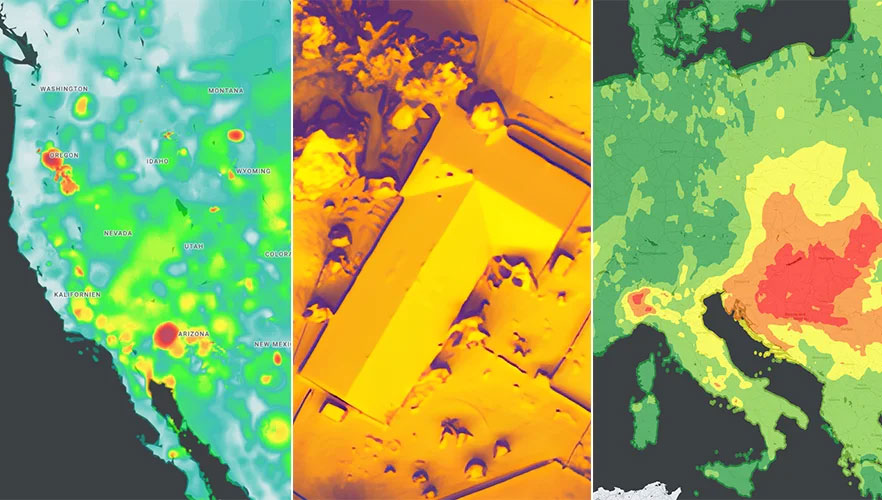
Google has released three Google Maps application programming interfaces (APIs) for developers to map solar potential, air quality and pollen levels. The three APIs apply artificial intelligence (AI) and machine learning, along with aerial imagery and environmental data, to provide up-to-date information about these three variables, enabling developers, businesses, and organizations to build tools that map and mitigate environmental impact.
The Solar API utilizes mapping and computing resources to design detailed rooftop solar potential data available for more than 320 million buildings across 40 countries including the United States, France and Japan. To obtain this data, the AI model extracts 3D information about roof geometry from aerial imagery, while considering past weather patterns and energy costs, enabling quicker installation of solar panels.
The Air Quality API shows air quality data, pollution heatmaps, and pollutant details for more than 100 countries around the world. The API validates and organizes several terabytes of data an hour from multiple data sources — including government monitoring stations, meteorological data, sensors and satellites — to provide a local and universal index.
Google Maps uses machine learning and live traffic information to predict different pollutants in an area at a given time. The Air Quality API offers companies in healthcare, the automotive market and other forms of transportation the ability to provide accurate and timely air quality information to their users.
The Pollen API shows current pollen information for common allergens in more than 65 countries. The API provides localized pollen count data, heatmap visualizations, detailed plant allergen information, and actionable tips for allergy-sufferers to limit exposure. To obtain this information, Google Maps uses machine learning to determine where specific pollen-producing plants are located.
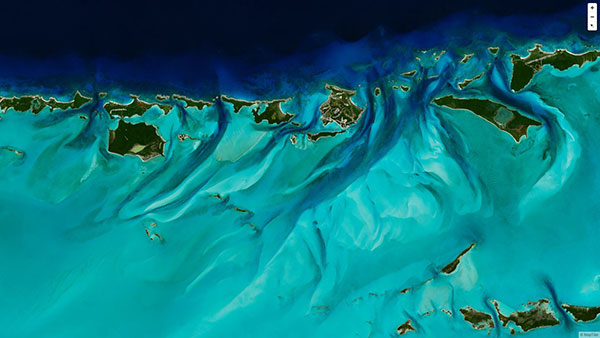
To create the world image, satellite imagery was processed to remove clouds and balance shades and tones, and then carefully stitched together to create a seamless map layer with beautiful colors. The input data is recent, from 2020 and 2021, and rendered as one tiled file with zoom levels 0-13 for use in web applications.
Crafted by a small Swiss/Czech team, it is a viable, up-to-date alternative to Google maps for software developers, without privacy issues. It is available including seamlessly merged, super-high resolution aerial images for selected countries. The imagery provides more detail when users zoom beyond the satellite data.
The map’s cloud-free satellite imagery is useful for real-estate websites, mobile apps, globes, games, virtual worlds, in airplane infotainment systems, and for TV news and weather. In addition, scientists and artists can download it for their own innovations and creations.
In all, 180 terabytes of imagery have been crunched to fit on a 512-gigabyte USB stick.
MapTiler has a history of collaborating with the European Space Agency (ESA) and its Copernicus Earth observation project, and has won two Copernicus Masters Awards. Working in ESA’s Business Incubation Center also boosted the company’s ability to adapt satellite imagery into useful data.
“Seen & Heard” is a monthly feature of GPS World magazine, traveling the world to capture interesting and unusual news stories involving the GNSS/PNT industry.
There’s an app for that
For 17 years, Kersey Valley Attractions in Archdale, N.C., created its annual corn maze by using a GPS-enabled tractor to cut paths out of grown corn. Instead of being limited by a tractor’s turning radius, this year’s “Maize Adventure” used a GPS planter programmed with a maze design from the MazePlay app. Based in Idaho, MazePlay provides maze design and cutting services throughout North America. The Apollo 11 example here is from Richardson Adventure Farm in Spring Grove, Illinois.
Photo: BMW
Just hit it already!
To speed play, officials for the PGA European Tour are using a GPS tracking system. Tracking devices were placed on one golf bag in each group in the BMW Championship, held Sept. 19–22 in Surrey, UK. When a group completed a hole, the information was sent to officials and displayed at five holes. Next year, all 18 holes will have displays, which include player names and indicate if the group is behind. The tour plans to increase fines for pace-of-play violations.
Photo: iStock.com/gchapel
GPS makes it (too?) easy
Animal rights groups are suing California over rules that allow animals to be hunted with the aid of hunting dogs wearing GPS tracking devices on their collars. The Animal Legal Defense Fund called the hunting method “unusually cruel and unfair” because tracking devices allow dogs to chase prey to the point of exhaustion, and then hunters follow the GPS signal to find an animal that can no longer flee and is easily shot. The lawsuit says the commission violated state environmental law by failing to conduct an assessment of how the use would affect wildlife.
Photo: Google
Google Maps come alive
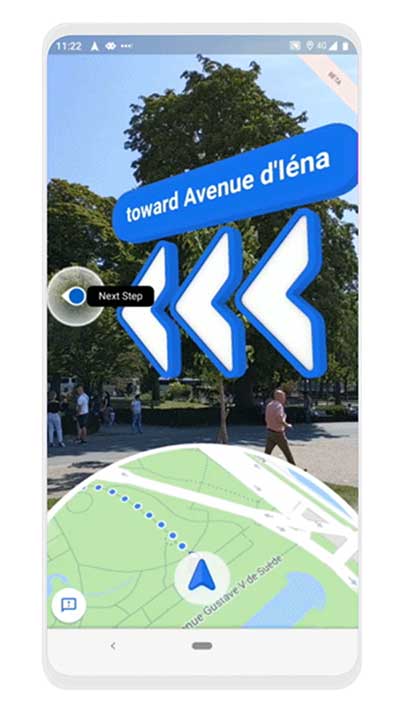
Google Maps is beta testing a new Live View feature, allowing travelers to use augmented reality (AR) to better see which way to go. Arrows and directions are placed in the real world to guide the walker. Google has tested Live View with its Local Guides and Pixel community for several months, and has now expanded the beta to Android and iOS devices that support ARCore and ARKit.
“Connect your compatible smartphone to the center display to access select apps, your calendar and playlists or navigate with Google Maps.”
That’s the description of the navigation offering on the official Chevrolet Bolt website. One of General Motor’s (GM) most advanced vehicles, the electric Bolt doesn’t offer native GPS navigation as an option.
As H. Kesteloo of Electrek blogs, almost all new vehicles for sale in the United States either come with GPS navigation or offer it as an option. GM is betting that Bolt drivers will prefer their smartphones over built-in GPS systems.
Is it a risk? Probably not, considering that apps such as Waze, Google Maps or Apple Maps are more frequently updated, offer real-time traffic information and are often easier to use than factory-installed systems. Plus, the apps are free (with a data plan, of course) compared to a feature that once cost as much as $2,000 on a new car.
Instead, Chevrolet is offering Android Auto and Apple’s CarPlay, which seamlessly integrate the Apple and Google built-in maps apps — all of which assumes the driver has a smartphone charged, ready and in range of a wirelss connection.
“Will this be the beginning of a new trend?” Kesteloo asks. “Are we going to see more vehicles without integrated GPS navigation offerings? Perhaps offering a built-in $300 iPad Mini makes sense — the Bolt already has its own wireless internet connection.
“With a future of self-driving cars quickly approaching, native GPS will still be a critical component,” he notes.
AT&T’s Fleet Complete, a North American provider of fleet telematics and mobile workforce technology, has upgraded its browser-based mapping to Google Maps.
Fleet Complete with Google Maps includes the ability to visualize real-time asset locations and deliver pertinent vehicle data such as speed, idle time and start/stop times.
The addition of Google Maps allows businesses to track vehicles, assets and mobile workforce with detailed hybrid satellite/street name views, improved traffic reports, terrain views and a powerful zoom feature, helping users make intelligent location-based decisions and maximize efficiencies.
Reasons Cited Include Privacy, Lack of Retail Support
Kevin Dennehy
Google Here, a proposed beacon-based location service operating within Google Maps, was reportedly cancelled due to a concern by Alphabet CEO Larry Page’s that it would be too invasive by the users of his mapping service. When the location industry has such a dominant player pull out of a nascent, and potentially lucrative, proximity service, does it mean that consumers will now have to wait for a full-scale rollout? Google will remain a major player with its Google Maps app, but where does it go from there?
Citing privacy issues and lack of retail partners for support, Google scraped its Google Here location service that would have used the company’s Maps technology to send notifications to users when they entered a specific location.
In a recent Fortune article, Alphabet CEO Larry Page said the company killed the project because it was too invasive to consumers, and the company was uncertain whether retail partners could have helped to roll out the service. Besides being in conflict with an existing location Here name (such as the former Nokia, and now German consortium, mapping service), the service included partnerships with retailers — and would have been available to more than 350 million Android users earlier this year.
Google makes money off of advertising through its Maps app, but the Fortune article said that the proposed Here location service would have made it even more valuable to advertisers.
So what does the location industry make of one of the largest players not rolling out a location service? To at least one analyst, it’s a “so what” report considering Google in July rolled out a new agnostic beacon service called Eddystone. “Somewhat curiously, the company appears to be moving forward with location-based advertising under the guise of the Eddystone project, so beacons and their use in location-based advertising seem still of interest — just not beacons combined with messaging that might make Google Maps an uncontrollable nag about shopping opportunities,” said Mike Dobson, Telemapics president.
Eddystone, a new format for Bluetooth Low Energy beacons, works with Google’s Android operating system along with Apple’s iOS and other platforms that connect through BLE.
Overall, Dobson believes that Google is approaching middle-age in terms of corporate development. “It is both developing a conscience about how its services really operate, as well as imposing economic constraints limiting how much the company is willing to spend to determine whether a potential market might be a big hit,” he said. “More specifically, it is my opinion that Google is slowly reining in the spending on new innovations for Google Maps, as well as the expenses associated with supporting the lakes in the data reservoir associated with their mapping product. Google may have finally realized that maintaining spatial data is expensive and a cost that is never going to decrease.”
Dobson also said that the Google Here program was going to be an expensive proposition. “My understanding of the Google Here program was that Google would provide the beacons and infrastructure and control delivery of the service through Google Maps. That’s a lot of beacons and associated support — in other words, more money,” he said. “Conversely, Eddystone appears to offer a standardized, industry-supported approach that is beneficial for Google and companies interested in testing the concept.”
Dobson said the name “Here” could have caused problems for Google. “Two other issues crossed my mind when I heard the news of the cancellation. First, who at Google forgot trademark law and thought they could combine the name of the well-known mapping company Here with Google?” he said. “Second, if I owned an application as successful as Google Maps is on mobile phones, I sure would not want to push my users to consider switching to a less-invasive mapping app. You know, that Larry Page guy sure seems to know his Alphabet.”
Big Competitors Getting into Beacons, with Huge Market Expected
Recent Allied Business Intelligence reports indicate that BLE beacon shipments will exceed 400 million units by 2020. While optimistic, and only five years away, ABI said that pure beacon shipment revenues will break $1 billion this year.
Google’s July entry into the location-beacon space is significant, if not surprising, to heat up the location market. However, competition is fierce as Apple, Facebook and Twitter now have dedicated BLE resources.
The location-beacon market is heating up as Gimbal, the Qualcomm spin-off company, installed approximately 1,300 BLE beacons in areas at South by Southwest. Gimbal said it was making its technology available to enable any BLE device to act as a dedicated location beacon.
Google plans to improve its own products and services through the Eddystone beacon technology, according to a company blog. Earlier this year, the company launched beacon-based transit notifications in Portland that enable users to get faster access to schedules for specific locations.
With rise in commercial location-based beacon technology comes a cross-over movement in public safety markets. TeleCommunication Systems, which bought Loctronix in July, is developing the indoor public safety and emergency market, along with Longmont, Colo.-based Intrado.
As detailed in last month’s Wireless LBS Insider column, beacons and Wi-Fi seem to be the lead technologies in use for emergency indoor location. Intrado installed 65 Apple iBeacons at the Washington Convention Center to showcase its developing indoor positioning technology at the APCO trade show.
It’s not all about beacons in this proximity/contextual location market. The analytical data derived from the beacon information will grow into a huge market. As we reported this summer, a new location analytics product is hitting the market in a more and more crowded indoor-positioning field.
Such companies as Cloud4Wi, with its Fogsense product, is tailored to retail outlets, coffee shops, restaurant chains and shopping malls with presence analytics and location-based services.
The device, which contains Broadcom’s WICED chip, features BLE technology in the new version in (the fourth quarter), said Elena Briola, Cloud4Wi’s chief marketing officer. The new BLE version will enable Apple iBeacon and location-aware mobile applications, the company said.
The narrow streets of the historic city of Prague. (Photo by Eric Gakstatter)
I’ve spent the past couple of weeks running around in Europe working on some GIS and GNSS projects. I usually travel outside of the USA two or three times a year to Europe or other destinations. For me, probably the single greatest challenge while traveling outside the U.S .is mobile phone connectivity. I don’t think I travel enough to justify an international plan. I’m probably a bit too cheap and could justify it, but I also sort of like the challenge. When I was in Prague, Czech Republic, last week, I sent the following tweet:
“If u want a reminder of what a great productivity tool ur smartphone is, go 2 where it doesn’t work n see how much time u spend on logistics”
Please excuse the abbreviations and general butchering of the English language, but staying within 140 characters can be challenging when trying to make a point. The point was clear in the tweet. Your smartphone is a tremendous productivity tool. If your life is anything like mine, you’re trying to get from one place to another as efficiently as possible, coordinate with colleagues, and generally optimize your time. Texting, emailing and navigating (directions) are three key components in keeping my life running smoothly, especially when I’m in an unfamiliar city. Further complicating things is when I’m in a city where English is not the primary language and where street signs and other directional help is little or no help.
Primarily through periodic moments of desperation, I’ve discovered some tools and methods that have helped me in some tight spots when I had to be somewhere and my smartphone wasn’t connected to its familiar Sprint towers (BTW, Sprint doesn’t operate in any country other than the USA).
When I find myself outside of the U.S. and want to light up my Sprint Samsung Galaxy 5, the first order of business is finding a Wi-Fi hotspot. In the U.S., it’s pretty easy. In other countries, it’s not so easy and most of the time they want to charge you for Wi-Fi access. Whenever I book a hotel room, I always make sure offers Wi-Fi service.
Skype for iOS, Android, Windows.
If your smartphone isn’t connected to a wireless network (sans Wi-Fi), you can’t send text messages. The best way (and most universal) to solve this is by installing Skype on your smartphone. Skype is free universal messaging software for your smartphone that allows you to call any other Skype user in the world for free, as long as you have an Internet connection (Wi-Fi). Of course, Apple has its own messaging software, but Skype is cross-platform. It runs the same on iOS, Android and Windows phones, as well as desktops. You can also run conference calls and video calls. I use it every day, more so on my notebook computer than smartphone, except when I’m traveling somewhere without wireless coverage (such as Prague). Then I use Skype a lot on my phone, mostly the messaging function. It’s just like text messaging.
With Wi-Fi + Skype, I can call any other Skype member in the world for free, and the app is free. Now, I pay Skype ~$130/year to be able to call any landline in North America from anywhere in the world, so I make free calls home from anywhere. It’s a powerful combination.
Triposo Main Screen
My second favorite smartphone tool for international traveling is not Google Maps, but a rather unknown app called Triposo.
Triposo is designed to be an app for the leisure traveler, but it’s a powerful app for the business traveler. There are Triposo apps for countries and even for individual cities. The apps are huge in size (100+ MB) for each city or country, so it’s not practical to download every city and country app. When I arrive at an unfamiliar city outside of the U.S., one of the first things I’ll do is download the Triposo app for that city using the hotel Wi-Fi.
From a business perspective, there are two things I love about Triposo. First, the download includes a map of the city that you can access offline. This is very similar to how the navigation system works in your car. The app uses the GPS receiver in your phone and plots your location on the map. Sometimes, knowing precisely where you are is half the battle. While it doesn’t have turn-by-turn navigation functionality like your car navigation system, it will provide you navigating instructions in text form and show you where you are on the map and where you need to go. As you move, your location is updated on the map in real-time. Crude, yet very effective.
Triposo Map screen. The purple icon is the GPS position.
Secondly, Triposo is a great tool for finding nearby restaurants and other places of interest. Sure, you can use Google for this too, but Triposo serves up this information a lot quicker and with less fumbling than Google Maps does. Since Triposo is built for the leisure traveler, it also provides interesting information about local landmarks, bus and subway routes, as well as plenty of other useful information for efficiently moving around the city.
My third travel tool is Google Maps. While it groans and chokes when the wireless connection is slow, and it doesn’t do well with the lack of connectivity, it has saved my behind at least once. I was on a project in the boonies in another country, about an hour from a large city where I was going to drop the rental car and board an airplane to come home. When I’d picked up the rental car, I had a local person with me who provided me directions to the project site. However, on the return trip, no one was available to ride with me. I thought I’d “wing it” and figure it out myself. I looked briefly at Google Maps in the office to estimate about the time I would need to exit as well as the exit name. I knew I wasn’t fully prepared with detailed directions, but I thought I had enough information to complete the journey even though Google Maps said something about the maps in the area possibly not being accurate.
I began my journey towards the city (pop. ~5 million). As expected, it was uneventful for the first half hour of the journey, since I was only following the main freeway. Then it became complicated. Lots of Y intersections, lots of speeding traffic, lots of exits, and lots of signage I couldn’t interpret quickly enough while moving along with the traffic. At some point, I figured out that I missed my exit and was heading for the city center. Not good, and approaching rush hour. If you’ve ever been to a large city in a developing country during rush hour, you can get hung up for a while.
I found an exit and was able to switch directions, now heading the opposite direction, southbound. I figured I would go south of the exit I was supposed to take then head northbound again and pay more attention to catch the exit. Nothing. I didn’t see the exit name I was looking for and was again heading towards the city center. At this point, I was becoming concerned. While I’d left myself a bit of a time buffer, by the time I found myself heading towards city center again, my time buffer was nearly exhausted. So here’s where I’m at:
No GPS navigation system in the car.
No mobile phone service so I could call the office for help.
No Internet connectivity to take a fresh look at the directions.
Can’t speak the local language.
For some reason I don’t recall, I booted up Google Maps on my mobile phone to see if I could derive any valuable information from it. Viola!
I learned about a valuable feature (the hard way) in Google Maps. It saves a cached map of your previous actions (not sure how far back). It just so happens that I had been looking at Google Maps on my phone at the airport when I rented the car about a week earlier. I also saw that if I turned on Location Services on my phone, my GPS location was displayed on the map. Granted, without connectivity I couldn’t zoom in on the map and it wouldn’t give me turn-by-turn directions, but I could see my position move on the map as I drove along the highway so I knew where I should be exiting (which, by the way, wasn’t named anything close to what I had read on the map during my preparation at the office).
Now, maybe I’m a slow learner, because when I mentioned this to some colleagues, they exclaimed “Oh, yeah, I knew that.” And, since my experience (I think), Google has provided a method of downloading maps for offline use. Or, it’s possible it was already there but I didn’t understand how to use it. :-(
So, those are my foreign country road-warrior tools. They may not be pretty, but they are free and effective. By the way, Google Navigator really isn’t that good for navigating in cities. Even with GPS and GLONASS satellites being tracked by my Samsung Galaxy 5, urban canyon drives it nuts. Although Triposo didn’t have as fancy of a navigation interface or street-level resolution, it is much less flaky in urban canyon environments than Google Navigator is.
The Street View Trekker on a zipline in the Amazon Rainforest.
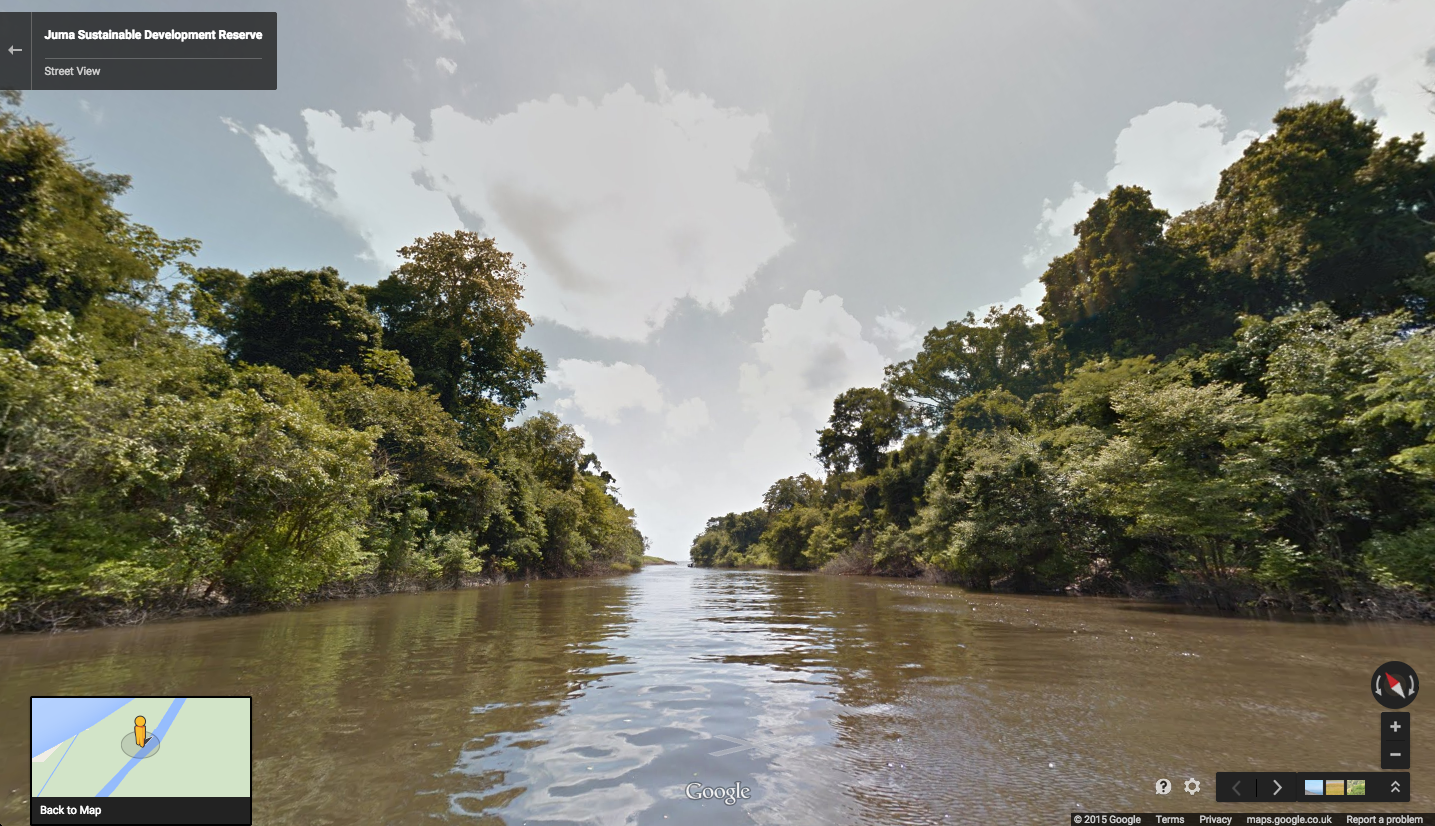
New imagery of the highest canopy in the Amazon rainforest is now available on Google Maps. The Amazon rainforest is one of the most diverse ecosystems in the world, with many species high in the canopies of the forest still undiscovered.
“Starting today, with the help of our partners at the Amazonas Sustainable Foundation (FAS), you can begin to unlock some of the wonders of the forest, by traveling from the upper canopy to the forest floor with Google Maps’ first zipline Street View collection,” wrote Karin Tuxen-Bettman, program manager, Google Earth Outreach on a March 1 blog.
The project is part of Google’s partnership with FAS, who three years ago invited Google Maps to the Rio Negro Sustainable Development Reserve. “Their hope is that sharing the imagery of their local communities, rain forests and rivers with the world will raise awareness and support for their efforts to conserve these areas,” Tuxen-Bettman writes.
The imagery was collected through Google Map’s Trekker Loan Program, which loans out the Street View camera and technology to tourism boards, non-profits, universities, and research organizations to help collect imagery of remote places.
The Amazon map imagery was gathered through boat travels on 500 kilometers of rivers, hiking on 20 kilometers of forest trails and ziplining through forest canopies.
“We hope it inspires you to embark on your own virtual expedition of the Amazon (you can leave the bug repellent at home!),” Tuxen-Bettman writes.
The map on this page shows where Google Maps has yet to collect Street View imagery.
The Street View Trekker on a zipline in the Amazon Rainforest. (Photo credit: Google Maps)
New imagery of the highest canopy in the Amazon rainforest is now available on Google Maps. The Amazon rainforest is one of the most diverse ecosystems in the world, with many species high in the canopies of the forest still undiscovered.
“Starting today, with the help of our partners at the Amazonas Sustainable Foundation (FAS), you can begin to unlock some of the wonders of the forest, by traveling from the upper canopy to the forest floor with Google Maps’ first zipline Street View collection,” wrote Karin Tuxen-Bettman, program manager, Google Earth Outreach on a March 1 blog.
The project is part of Google’s partnership with FAS, who three years ago invited Google Maps to the Rio Negro Sustainable Development Reserve. “Their hope is that sharing the imagery of their local communities, rain forests and rivers with the world will raise awareness and support for their efforts to conserve these areas,” Tuxen-Bettman writes.
The imagery was collected through Google Map’s Trekker Loan Program, which loans out the Street View camera and technology to tourism boards, non-profits, universities, and research organizations to help collect imagery of remote places.
The Amazon map imagery was gathered through boat travels on 500 kilometers of rivers, hiking on 20 kilometers of forest trails and ziplining through forest canopies.
“We hope it inspires you to embark on your own virtual expedition of the Amazon (you can leave the bug repellent at home!),” Tuxen-Bettman writes.
The map on this page shows where Google Maps has yet to collect Street View imagery.
Rio Mariepauá, Brazil. (Photo credit: Google Maps)
Editor’s Note: Janice Partyka is principal of JGP Services, a consulting practice. She is GPS World’s editor for wireless, writing a monthly column for the Wireless LBS Insider newsletter. The views expressed are her own.
Hard to believe, we have only now reached the 10th anniversary of Google Maps. As important as digital maps have become, their purpose is much the same as the printed and drawn maps that preceded them. Digital maps emerged in the 1960s with the Census Bureau’s DIME maps. These first digital maps were used for analysis of place-specific data, such as populations within census tracts or cities. Digital maps in turn led to geographic information systems (GIS) for spatial analysis. Though GIS had uses in fields like city planning, the main stimulus for digital maps came in the 1990s with the convergence of the completion of GPS infrastructure, and affordable and portable computers.
Naturally, just knowing where you are doesn’t have huge value, but if that information can be fused with a digital map, which could generate a route to the destination of your choice, or access information on the places that surround you, then you have something. This is why companies like Etak, Tele Atlas and Navteq began the painstaking process of converting satellite images, printed topographic maps and data that could only be observed with one’s eyes (such as street signs, addresses, speed limits, and turn restrictions) into digital form.
One of my projects during the 1990s was to compare the accuracy of competing digital maps. It was a tedious process, entailing two-person driving crews traveling each street. The passenger recorded all relevant information and made periodic readings with a large, costly GPS receiver. At the time, digital maps could only be accessed by complicated GIS programs which restricted their usefulness.
Since then, digital maps have grown in significance due to the advent of smartphones, a growing suite of digital-map-enabled applications, and of course Google Maps. Google has made maps friendlier to developers through its application program interfaces (APIs), which also improved the user experience for scrolling across locations from a map view.
Google has mastered the process of data capture from roadways. Rather than rely on the eyes of people in the field, sensors and cameras collect mapping data. Image-processing software extracts and geo-codes textual data, automating and enhancing map creation. And Google has incorporated overhead and street-level photographic images into maps, adding substantial value.
We will never arrive at having a perfect digital map. The work to keep mapping accurate and give it more context will be ongoing. The next challenge in digital mapping is making it work offline and creating accurate maps of the indoors. These next innovations will not be led by GPS, but by sensors, including beacons. GPS has already done the heavy lifting.
Computer security company Absolute Software Corporation is extending its products to use Google Maps to provide improved device geolocation tracking in its Absolute Computrace product. The partnership will provide Absolute customers with improved global coverage and more accurate geolocations.
“The location of a device is an important factor in assessing the risk of a data loss event and measuring compliance with corporate policies. The accuracy of the geolocation data we present in our products is critical to our customers,” said Bill Gordon, vice president, engineering and development at Absolute Software. “Using Google Maps technology allows our customers to track devices and be alerted of risks with the highest accuracy.”
The geolocation capabilities of Absolute Computrace include recent and historical location information for a device, as well as the ability to build geofences to contain devices within a specific geographical area. If a device goes beyond the bounds of a geofence, IT is alerted so they can investigate and determine if the device and the data on it is at risk.
“Our customers rely on our solutions to provide timely and accurate information regarding the health and safety of their endpoints and the data they contain,” said Geoff Haydon, CEO of Absolute Software. “Google Maps will ensure we are delivering the most accurate results, from every device, for all of our customers worldwide.”
Advanced Search Engine Replaces Google Local Search in 122 Countries
deCarta, Inc., an independent LBS platform company, is now providing the local search function for a worldwide, top-five mobile handset manufacturer. deCarta has been hosting and running the search service since August 7 using its advanced geosearch engine — L2 — and has replaced the search service previously provided by Google. The service delivers millions of responses per day to this handset manufacturer’s local search and mapping application to users in 122 countries.
deCarta’s L2 is a high-performance, scalable local search engine with single line input and intuitive user interface. deCarta sources and indexes map and POI (points of interest) content from a wide variety of sources globally but also enables customers to easily index, control and search on their own content. The customer service announced utilizes TomTom map and POI content.
deCarta’s L2 can be used as a pure geocoder for address search, or for POI search, or simultaneously as a combination of the two mixed in a single-line search query — with the additional ability to tune this behavior at runtime. This gives developers maximum flexibility and creativity in producing their applications. deCarta recently expanded country coverage to enable its customers to offer global services.
The L2 Search engine is an integral component of deCarta’s LBS platform which provides specialized geospatial technologies for maps, routing, navigation, geocoding, local search and geo-data integration and processing. deCarta provides its white-label LBS platform to companies that wish to offer their own customized, branded LBS services as opposed to utilizing industry standard services such as Bing or Google.
deCarta has two deployment options for its platform: a hosted LBS Platform Service (PaaS) or, alternatively, customers can self-host either on-premise or in a cloud service such as Amazon’s AWS. Both approaches utilize deCarta’s REST API architecture and can scale to support billions of maps and searches and millions of users per month.
“We are quite happy with the market reaction to L2 since its introduction last year,” said J. Kim Fennell, CEO of deCarta. “We’re seeing large mobile, telematics and automotive customers switch to L2 in competition against other local search engines and geocoders such as Google, Bing, Nokia/Here and Pitney Bowes. Customers appreciate L2’s technology advantages, customization capabilities, flexible content offerings, less restrictive license terms and our superior customer service — all of which creates a more satisfied end customer experience.”
L2 enables deCarta’s customers to offer flexible, advanced local search capabilities that are on par with Google Maps but beyond other search engines. Examples include:
Single line entry of POI or address or both
Fast typeahead, predictive entry – ideal for mobile devices
High tolerance for misspellings and partial entries
Random ordering of address parameters
Search for a POI near a POI such as “ATMs near AMC Theater” or “Parking near SFO”
Search for POI near a specific address, i.e. “Parking near 1234 Main Street”
Furthermore, L2 can be integrated with deCarta’s patented “Search Along A Route” technology. This combined with the ability to index custom content and boost result rankings gives automotive OEMs and service providers the ability to offer more advanced and helpful “driver-centric” connected car services.