Author: Eric Gakstatter

  • Conferences and Drones: What Else?

    Great view of the Pentagon while departing from the U.S. Hydro conference held in Washington, D.C.
    Great view of the Pentagon while departing from the U.S. Hydro conference held in Washington, D.C.

    I’ve attended five conferences in the past couple of months; Esri Water Conference (first one!), Esri Partner Conference, US Hydro 2015, APSG (Association of Petroleum Surveying & Geomatics) and the Esri Petroleum User Group (PUG) conference. It may look Esri-heavy, but the fact is that Esri is doing a really good job of organizing vertical market GIS conferences, and people are showing up. Even with crude oil prices in the cellar (relatively speaking), 1,200 people still showed up at the PUG.

    There were a lot of good presentations at these conferences, and I’ll post links to some of them below. Not surprisingly, drones are a major topic of discussion at most GIS conferences. There was even a drone demo (I missed) at the Esri Partner conference showing Esri’s workflow in working with drone-collected data.

    If you don’t follow me on Twitter, you might consider it. Twitter is easy and free. When I’m at a conference, I send tweets (most with a photo) in near real-time when I see something of interest. For example, I tweeted when Jack Dangermond showed up at the Esri PUG (he usually doesn’t, but did this year because it was the 25th annual conference) and had something interesting to say (read below). You can sign up for Twitter here, and then choose to follow me at https://twitter.com/GPSGIS_Eric. I get that you may be hesitant to invest any time in this, but it looks like Twitter is becoming the standard for near real-time news (as opposed to other social media such as Facebook or LinkedIn.)

    Of all the new technology I’ve heard about over the past few months at these conferences, two subjects continue to excite me.

    Drone Mapping. Of course, one of them is drone technology for mapping. It seems like I’ve beat this horse to death over the past few months, but it continues to get juicier and juicier. Technology development in this industry is moving really fast. It seems like new drones are being announced as frequently as new smartphones, maybe more so.

    Other ancillary technologies are being developed to support commercial drone operations. For example, in my hometown (Portland, Ore.), a company called Skyward just raised $4+ million in venture capital funding to provide “professional services for UAV operations.” Essentially, the company’s software helps drone operators stay within FAA regulatory compliance.

    Last year, the Oregon Unmanned Systems Business Enterprise was formed “with a two-year $882,000 state grant from the Oregon Business Development Department and the Oregon Innovation Council and will be working to match the government money with private investment and other grants.” The organization will award grants up to $75,000. The point is, the money is flowing and it’s a wide-open market.

    The drone market is so wide open, in fact, that most drone companies are just buying common airframes and associated parts, putting their brand name on them, and selling them. Perhaps oversimplified, but the point is there’s not much “special sauce” (technology) being added. The manufacturers that aren’t innovating and adding valuable “special sauce” will eventually disappear. Essentially, following are the parts needed for a fixed-wing drone for mapping:

    Aircraft components:

    • Airframe (off the shelf)
    • Motor (off the shelf)
    • Servos (off the shelf)
    • Propeller (off the shelf)
    • Radio (off the shelf)
    • GPS (off the shelf)
    • Autopilot (off the shelf)
    • Batteries (off the shelf)
    • Camera trigger (off the shelf)
    • Camera (off the shelf)

    Ground compoments:

    • 900-MHz controller (off the shelf)
    • Battery chargers (off the shelf)
    • Mission planning software (off the shelf)
    • Propeller balancer (off the shelf)

    As you can see, all of these components are available off the shelf. You can order each component (maybe all of them from Amazon!), have them shipped to you, and assemble your own UAS for mapping. That said, someone who has gone through the process of building, flying and producing a valuable deliverable that you can make decisions from can add value. But, as competition increases, there’s no doubt that the companies that don’t offer much added value will not be able to operate a sustainable business.

    Finally, the U.S. Federal Aviation Administration (FAA) is being surprisingly nimble, approving “333 Exemption” requests at record pace and moving towards using a “summary grant” process to issue bulk approvals of 333 Exemption requests for commercial operations.

    APSG Meeting

    On a related note, at the APSG meeting in Houston earlier this month, Cynthia Lyle from the Lone Star UAS initiative at Texas A&M University made an informative presentation on UAS. Texas A&M is one the six FAA-designated UAS test sites in the US.

    UAS presentation from Texas A&M University, one of six FAA-designated UAS test sites.
    UAS presentation from Texas A&M University, one of six FAA-designated UAS test sites.

    You may want to take a look at some of the other presentations at the APSG meeting. They were very good. Here’s a quick summary of each by Jon Stigant, long-time member of APSG:

    Aerial, Mobile and Terrestrial LIDAR – Bob Williams, SAM LLC

    This was a primer in LiDAR technology and methodology — while most of the paper is well understood in the survey community, it is and excellent overview. A reminder for some and a way to fill in the gaps for those not so close to this technology.

    Integration of UAVs into O&G Operations — Stacey Lyle, BP (presentation forthcoming)

    Stacey provided a valuable summary of the direction in which the FAA is going to regulate the emerging UAV technology. A “must read” for any company that intends to either provide or use this technology. As with most government regulation there is a lot of detail, the devil is in them. Stacey recommended that the APSG engage by developing some standards for the oil and gas industry.

    UAVs 3D Laser Scanning and High-Resolution Imagery — Bringing Reality into the Geospatial Mix — Ron Hughes, SANE

    Ron Hughes theme is massive data and managing it — also something of a common theme for all the talks. He focused on automating data processing and recommended a concept of doing this in an automated way with 80 percent of the data. This requires careful procedural development in collaboration with a given client’s business workflows. He gave an example of a large utility company, and how the development of an enterprise metadata server had functional impact for individual business units, but also had the knock on impact of improving inter-functional/inter-community collaboration within the enterprise.

    Geiger-Mode LIDAR vs Traditional Linear LiDAR Sensors — Mike Fuller, Harris Corp.

    Mike provided input on Geiger mode LiDAR, differentiating Harris’ approach from the more regular LiDAR methodology. The major difference is in data density, data frequency, volume and speed used from higher flying aircraft covering a larger area faster. Providing 10-cm accuracy and expecting 7-cm acuracy development using a/c at 25,000-ft height. Focus on fast processing of immense data volumes (pedabytes) – 24-hour delivery using Harris proprietary processing. Achieve higher density at lower cost.

    Common Operating Picture, Video and DATA Integration in GIS — Mark Stevens, Oceaneering

    Mark introduced developments in GIS associated with Common Operating Picture (COP), focusing on the combining of video and data in GIS system. DPFOS mnemonic: Data Management, Planning & Analysis, Field Mobility, Operational Awareness, Stakeholder Engagement. A new SIMOPS (SIMultaneous OperationS). The key is a single source of approved data. Examples of data required in COP from specific disciplines are provided — ROVs, shore clean-up, life of field data, asset and material tracking, live/recorded video, RT data and weather integration, “in the field’” vessel implementation.

    GIS, Geospatial, Geomatics…Organizational Capability Evolution — Brian Boulmay, BP (presentation forthcoming)

    Rethinking Geospatial Data Management at a major operator. One Map program — not physical, one-way provision. Focus on users vs. geospatial specialists. Users business driven, specialists IT and S driven. Geospatial data integrity and analytics – people, processes and technology. ID goals — massive deployment worldwide — has to be automated. Federated system — regions only have to deal with their own regional data, not be overwhelmed by whole enterprise on their doorstep. IT has the role of providing/maintaining a worldwide solution.

    GNSS Technology Update — Eric Gakstatter, GPS World, Geospatial Solutions

    Update on Spring 2014 APSG meeting — All major networks launching satellites. Very soon will have 30 live in-view satellites (U.S., Russia, Europe and China). RTK coverage in China is the best due to BeiDou, supplemented by both Indian and Japanese systems SBAS. $100 RTK on cell phone giving centimeter accuracy eventually, and changing the commercial dynamic!

    LiDAR-Based Terrain Modeling, Analysis and Simulation — Kris Bergland, Blue Marble

    Set up for managing and analyzing LiDAR data in Global Mapper. Workflows: terrain modeling, visibility, biomass (change monitoring); asset: inspect and maintain pipelines, as-built modeling, simulation. High-accuracy at relatively low cost, outpacing regulatory management. Much public data available — earthexplorer.usgs.gov. xyz values — minimum height threshold, dense RGB point cloud (almost photographic).

    Improved ROW Inspection and Pilot Safety through Geospatial Technology — Sony Beech, GIS Inc.

    Automated dashboard approach, reducing pilot distraction risk, speeding up RT transfer and operational activity reporting.

    Esri Conferences

    Here are a couple of neat things from the Esri conferences.

    First, Jack Dangermond was his usual visionary self at the Esri PUG conference, making his appearance for the 25th annual PUG. He is a master at communicating his GIS vision.

    The Evolution of GIS.
    The Evolution of GIS.

    In speaking about the evolution of GIS, Mr. Dangermond spoke about the far-reaching impact of email and stated that eventually web-based GIS will be deployed organization-wide, just like email. I agree with this vision. I believe the only question is timing. Is it two years from now? Five years from now? 10 years?

    Onto the less visionary and more tactical tidbits…

    Of particular interest to me is high-precision GNSS in the Esri environment. A lot of people I talk to are screaming for this. What does high-precision GNSS in the Esri environment mean?

    • support for high-precision metadata in ArcGIS Collector (ArcPad already supports this).
    • support for high-precision horizontal (eventually vertical) datum transformations in ArcGIS Collector.

    This is important because Esri is supporting ArcGIS Collector across all mobile platforms (Android, iOS and eventually Windows), and people want to use their smartphones and tablets. ArcPad will never run on iOS or Android, so Collector is the GIS collection tool of choice, at least for the Esri environment. It needs to support high-precision GNSS, and by the looks of the following slide, it will. It’s just a matter of timing…

    ArcGIS Collector to support high-precision GNSS.
    ArcGIS Collector to support high-precision GNSS.

    The other potentially neat product Esri announced was Navigator for ArcGIS. Imagine trying to guide a work crew to a buried valve across town (or in the next neighborhood). Displaying a system or region-wide map of valves would not be an efficient way of driving your way across town to find the valve. However, giving a crew turn-by-turn street directions to the street-level, then displaying the valves on that street section, might be a very efficient way of finding the valve.

    Navigator for ArcGIS.
    Navigator for ArcGIS.

    Thanks, and see you next month.

    Following me on Twitter at https://twitter.com/GPSGIS_Eric

  • FAA Warns Drone Hobbyist and YouTuber

    So, you know it’s illegal to fly drones in the United States for commercial purposes unless you have a Federal Aviation Administration (FAA) exemption and Certificate of Authorization and Waiver (CoA), right?

    That means you can’t fly drones if it’s related to business, no matter if you charge a fee or not. But, you can fly drones in the United States as a “hobbyist” as long as you adhere to certain rules (such as flying lower than 400 feet above the ground).

    In a new twist, the FAA has cracked down on at least one person who posted a drone video on YouTube because YouTube generates revenue, reports the website Motherboard. Even though it appears the drone was being flown by a hobbyist for recreational purposes, it smells to the FAA like a commercial use of drone. Even though the hobbyist isn’t generating revenue from it, Google is.

    Jason Hanes' Youtube Channel
    Jason Hanes’ YouTube channel.

    While it appears the U.S. drone community is going nuts using drones for all kinds of non-commercial and commercial purposes, despite the FAA rules, it appears there are too many violators for the FAA to chase after since enforcement notices sent by the FAA have been few and far between. In this case, safety concerns may have been the prompt. The FAA says it’s now looking further into how its safety inspectors send letters like this. Read more about the case at the Motherboard website.

    Geospatial Data Interest Crosses Political Party Lines

    Senator’s Mark Warner (D-Va.) and Orrin Hatch (R-Utah) introduced the Geospatial Reform Act, targeted at leveraging geospatial data acquired by the U.S. federal government. This bill argues that the federal government is the largest purchaser of geospatial data, yet agencies aren’t required to report details of geospatial data purchased. The bill aims to change that.

    “Geospatial data has endless possibilities for transforming both the private and public sectors — from helping local governments develop emergency preparedness plans to fueling the creation of apps that let you find parking spots, restaurants, and even homes for sale based on where you’re standing,” said Sen. Warner. “The federal government is the largest purchaser of geospatial data but some very basic questions about how and where agencies are already investing in this data can’t be answered. Our bill would bring transparency and accountability to the collection of this data and ensure that taxpayer dollars are not being wasted on duplicative efforts.”

    Sen. Warner and Hatch issued a joint statement about the bill.

    DigitalGlobe Offers Commercial 30-cm Resolution Satellite Imagery

    In what DigitalGlobe claims is a world’s first, the company began offering commercial 30-cm satellite imagery via its WorldView-3 satellite, which was launched August 13, 2014. DigitalGlobe announced that the imagery is available worldwide (with some restrictions). As part of its press release, DigitalGlobe offered the following quote from PhotoSat, a consumer of imagery.

    “DigitalGlobe’s WorldView-3 satellite data is the highest quality satellite photo data that PhotoSat has ever processed,” said Gerry Mitchell, President of PhotoSat, a leading satellite elevation mapping provider for energy, mining, and engineering firms. “In one test, an elevation mapping grid extracted from stereo WorldView-3 satellite photos matched a highly accurate LiDAR elevation grid to better than 15 cm in elevation. This result takes satellite elevation mapping into the engineering design and construction markets and directly competes with LiDAR and high resolution air photo mapping for applications like flood plain monitoring.”

    According to DigitalGlobe, WorldView-3 is the first and only commercial imaging satellite capable of collecting imagery with 30-cm ground sample distance, and claims it is five times the detail of the company’s nearest competitor. See a sample by clicking here.

    Satellite imagery is approaching aerial photogrammetry quality. I recall Lawrie Jordan, founder of ERDAS (sold to Leica) and now director of imagery at Esri, saying that eventually every square inch of the earth will be imaged constantly by satellite.

    Esri and Drone Data Up until now, you haven’t heard the words “Esri” and “drone” mentioned in the same sentence very often. Last week at the Esri Developer Summit in Palm Springs, Esri provided a live map-creation demo using a small quadcopter.

    Look for a follow-up article, data example and possibly a video of the event.

    Thanks, and see you next month.

    Follow me on Twitter at https://twitter.com/GPSGIS_Eric

  • In a Surprising Move, the FAA Proposes Lightweight Commercial Rules for Small UAS

    JAVAD_GNSS_TRIUMPH-F1-clouds-1-O

    After much criticism in the mainstream and technology media about the commercial use of UAS (unmanned aerial systems), the Federal Aviation Administration (FAA) has been remarkably proactive in integrating the commercial use of UAS in the United States National Airspace System (NAS) the past two months. Just last summer, media like the Washington Post, fueled by a government audit, were reporting that the FAA will miss the September 2015 deadline, which is spelled out in the FAA Reauthorization and Reform Act of 2012, to integrate commercial UAS usage into the NAS.

    By proactive, I mean the rate at which the FAA is issuing UAS exemptions for commercial use. Two weeks ago, the FAA issued eight more commercial UAS exemptions, bringing the total to 24 since June 2014, with the vast majority of those being issued in the last two months. The latest exemptions issued were for aerial mapping, motion picture and television production, and bridge inspection. You can view the entire list of exemptions and the intended applications here. All of the exemptions have more than 30 conditions and limitations the operator must follow, of which a FAA private pilot (or better) certificate and a FAA third-class medical certificate is required, as well as a second person, the Visual Observer (VO). That’s fine. There’s nothing new on that front since I last reported on this.

    However, earlier this week, the FAA issued an NPRM (Notice of Proposed Rule Making) for commercial operations of “small” UAS, with surprisingly lightweight conditions compared to the exemptions granted thus far. Following are the key points of the NPRM:

    • Pilot must be 17 years of age or older.
    • Pass an FAA-approved aeronautical knowledge test and retest every two years.
    • Obtain an unmanned aircraft operator certificate with a small UAS rating.
    • Obtain an FAA Class II airman medical certificate.
    • Be vetted by the Transportation Security Agency (TSA).
    • Maintain visual line of sight without aids (except corrective lenses).
    • Not operate over any person who is not part of the mission.
    • Maximum UAS weight is 55 pounds.
    • Maximum airspeed of 100 mph.
    • Maximum altitude of 500 feet above ground level.
    • Minimum weather visibility of three miles.
    • Yield right-of-way to other manned and unmanned aircraft.
    • Contact air traffic control or airport operator when flying within five miles of an airport.

    These conditions are certainly lighter than the conditions imposed on the exemptions issued thus far. However, instead of requiring an FAA private pilot certificate, the FAA proposes creating a new type of certificate named an “unmanned aircraft operator certificate.” Digging into the documentation, the new “small UAS pilot certificate” consists generally of the following:

    • At least 17 years of age, although the FAA seems open to reducing it to 16 years of age.
    • Read, write, speak English (with exceptions).
    • Pass an initial aeronautical knowledge test, which tests the applicant’s understanding of FAA regulations, airspace, flight restrictions, collision avoidance, weather/meteorology, weight/balance calculations, emergency response, aeronautical decision-making, airport operations, and drug/alcohol impairment.
    • Demonstrate flight proficiency and aeronautical experience. The FAA is asking for suggestions on these two.

    For a summary description of the proposed Small UAS Limitations and Certifications, click here.

    For a detailed description of the proposed requirements for the FAA small UAS pilot certificate, click here.

    The FAA Class II Airman medical certificate requirement is somewhat surprising because it’s more stringent than the Class III medical certificate required in the exemptions issued thus far. Perhaps the FAA is rethinking this because of the line-0f-sight requirement that puts a premium on sharp vision for UAS pilots. Class II requires distance vision of 20/20 in each eye separately while Class III only requires distance vision of 20/40 in each eye separately. Click here to see the requirements for Class I, II and III medical certificates. To give you some idea, I had an FAA Class III medical exam completed last month. It took about an hour. Although I have an FAA private pilot certificate, one is not needed to obtain an FAA medical certificate.

    FAA Class III Medical Certificate
    FAA Class III Medical Certificate

    Perhaps a bigger challenge than passing the FAA medical exam, which wasn’t difficult, was finding a certified FAA medical examiner near you. You can search for an examiner near you by clicking here.

    So, it seems the FAA is making progress, and we should give them credit for that. But, we are still very early in the process, and as the mainstream and other media predict, the FAA will likely burn through the September 2015 deadline well into next year, albeit chipping away and issuing exemptions on a regular basis as they have been for the past two months. You can bet that exemption applications are piling up. To view the growing list of exemption applications, click here. In reading the FAA Reauthorization and Reform Act of 2012, it states “The FAA is required to initiate a Notice of Proposed Rulemaking (NPRM) for site integration of UAS within 18 months of the date of enactment of the integration plan.” Hmmm, 18 months from now = October 2016, and this NPRM is for small UAS only. Stay tuned….

    Thanks, and see you next month.

    Follow me on Twitter at https://twitter.com/GPSGIS_Eric

  • What exactly is GPS NMEA data?

    What exactly is GPS NMEA data?

    You may have heard about “NMEA data” with respect to GPS.

    NMEA is an acronym for the National Marine Electronics Association. NMEA existed well before GPS was invented. According to the NMEA website, the association was formed in 1957 by a group of electronic dealers to create better communications with manufacturers. Today in the world of GPS, NMEA is a standard data format supported by all GPS manufacturers, much like ASCII is the standard for digital computer characters in the computer world.

    The purpose of NMEA is to give equipment users the ability to mix and match hardware and software. NMEA-formatted GPS data also makes life easier for software developers to write software for a wide variety of GPS receivers instead of having to write a custom interface for each GPS receiver. For example, VisualGPS software (free), accepts NMEA-formatted data from any GPS receiver and graphically displays it. Without a standard such as NMEA, it would be time-consuming and expensive to write and maintain such software.

    What makes NMEA a bit confusing is that there are quite a few “NMEA” messages, not just one. So, just like there are all kinds of GPS receivers with different capabilities, there are many different types of NMEA messages with different capabilities. Furthermore, NMEA data can be transmitted via different types of communications interfaces such as RS-232, USB, Bluetooth, Wi-Fi, UHF and many others.

    NMEA Message Structure

    To understand the NMEA message structure, let’s examine the popular $GPGGA message. This particular message was output from an RTK GPS receiver:

    $GPGGA,181908.00,3404.7041778,N,07044.3966270,
    W,4,13,1.00,495.144,M,29.200,M,0.10,0000*40

    All NMEA messages start with the $ character, and each data field is separated by a comma.

    GP represent that it is a GPS position (GL would denote GLONASS).

    181908.00 is the time stamp: UTC time in hours, minutes and seconds.

    3404.7041778 is the latitude in the DDMM.MMMMM format. Decimal places are variable.

    N denotes north latitude.

    07044.3966270 is the longitude in the DDDMM.MMMMM format. Decimal places are variable.

    W denotes west longitude.

    4 denotes the Quality Indicator:

    1 = Uncorrected coordinate

    2 = Differentially correct coordinate (e.g., WAAS, DGPS)

    4 = RTK Fix coordinate (centimeter precision)

    5 = RTK Float (decimeter precision

    13 denotes number of satellites used in the coordinate

    1.0 denotes the HDOP (horizontal dilution of precision)

    495.144 denotes altitude of the antenna

    M denotes units of altitude (eg. meters or feet)

    29.200 denotes the geoidal separation (subtract this from the altitude of the antenna to arrive at the Height Above Ellipsoid (HAE).

    M denotes the units used by the geoidal separation

    1.0 denotes the age of the correction (if any)

    0000 denotes the correction station ID (if any)

    *40 denotes the checksum

    The $GPGGA is a basic GPS NMEA message. There are alternative and companion NMEA messages that provide similar or additional information.

    Here are a couple of popular NMEA messages similar to the $GPGGA message with GPS coordinates in them (these can possibly be used as an alternative to the $GPGGA message):

    $GPGLL, $GPRMC

    In addition to NMEA messages that contain a GPS coordinate, several companion NMEA messages offer additional information besides the GPS coordinate. Following are some of the common ones:

    $GPGSA – Detailed GPS DOP and detailed satellite tracking information (eg. individual satellite numbers). $GNGSA for GNSS receivers.

    $GPGSV – Detailed GPS satellite information such as azimuth and elevation of each satellite being tracked. $GNGSV for GNSS receivers.

    $GPVTG – Speed over ground and tracking offset.

    $GPGST – Estimated horizontal and vertical precision. $GNGST for GNSS receivers.

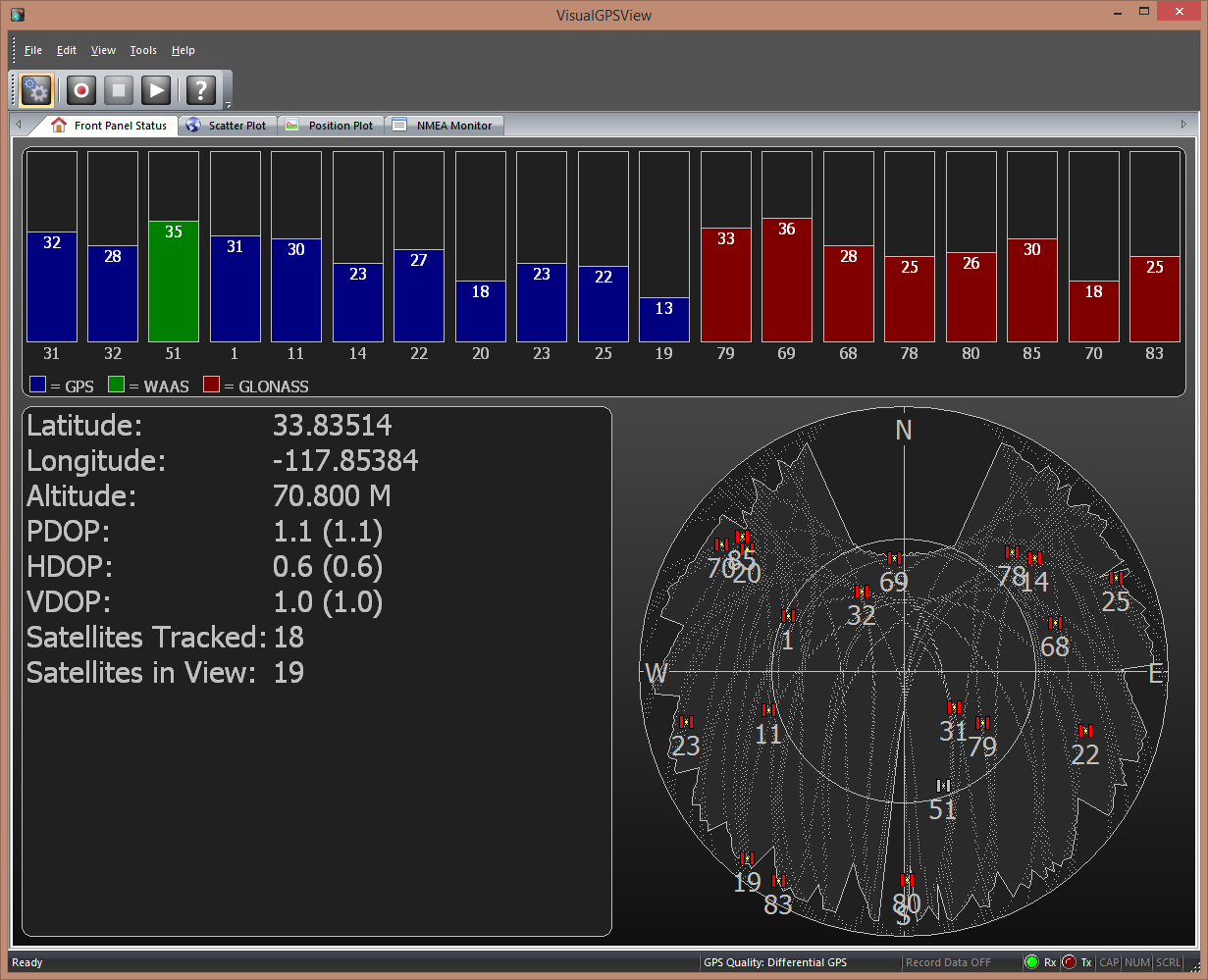
    Rarely does the $GPGGA message have enough information by itself. For example, the following screen requires: $GPGGA, $GPGSA, $GPGSV.

    VisualGPSView screenshot. (Photo: VisualGPC LLC.)
    VisualGPSView screenshot. (Photo: VisualGPC LLC)

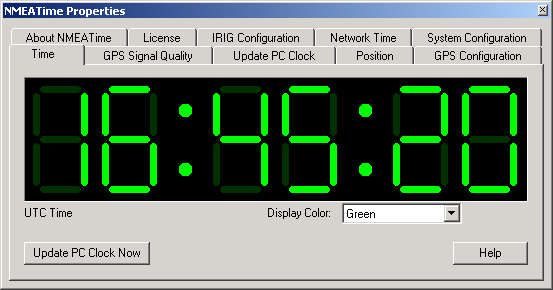
    The following screen, focused on the time capabilities of GPS, requires a slightly different set of NMEA messages: $GPGGA or $GPRMC or $GPZDA, $GPGSA, $GPGSV.

    NMEATime. (Photo: VisualGPC LLC)
    NMEATime. (Photo: VisualGPC LLC)

    The above screenshot examples are useful for the general GPS user. The $GPGST message is particularly useful for high-precision GPS mapping and surveying. In fact, I would say it’s a requirement for high-precision users. The reason is that GPS metadata is very important for the high-precision user as a method of assisting in determining the quality of a particular GPS coordinate. Typical GPS real-time metadata used in understanding the quality of the GPS coordinate include: PDOP, number of satellites tracked, correction method and horizontal/vertical standard deviation values. If a GPS receiver user has the ability to see this information in the field during data collection, they have a level of confidence in the precision of the GPS data they are collecting. If you’ve used RTK before, you probably recall the familiar horizontal RMS (HRMS) and vertical RMS (VRMS) values displayed on your data collection device. The $GPGST message generates those values.

    DD.MMMMMMM, DDMM.MMMMM, or DDMMSS.SSSSS

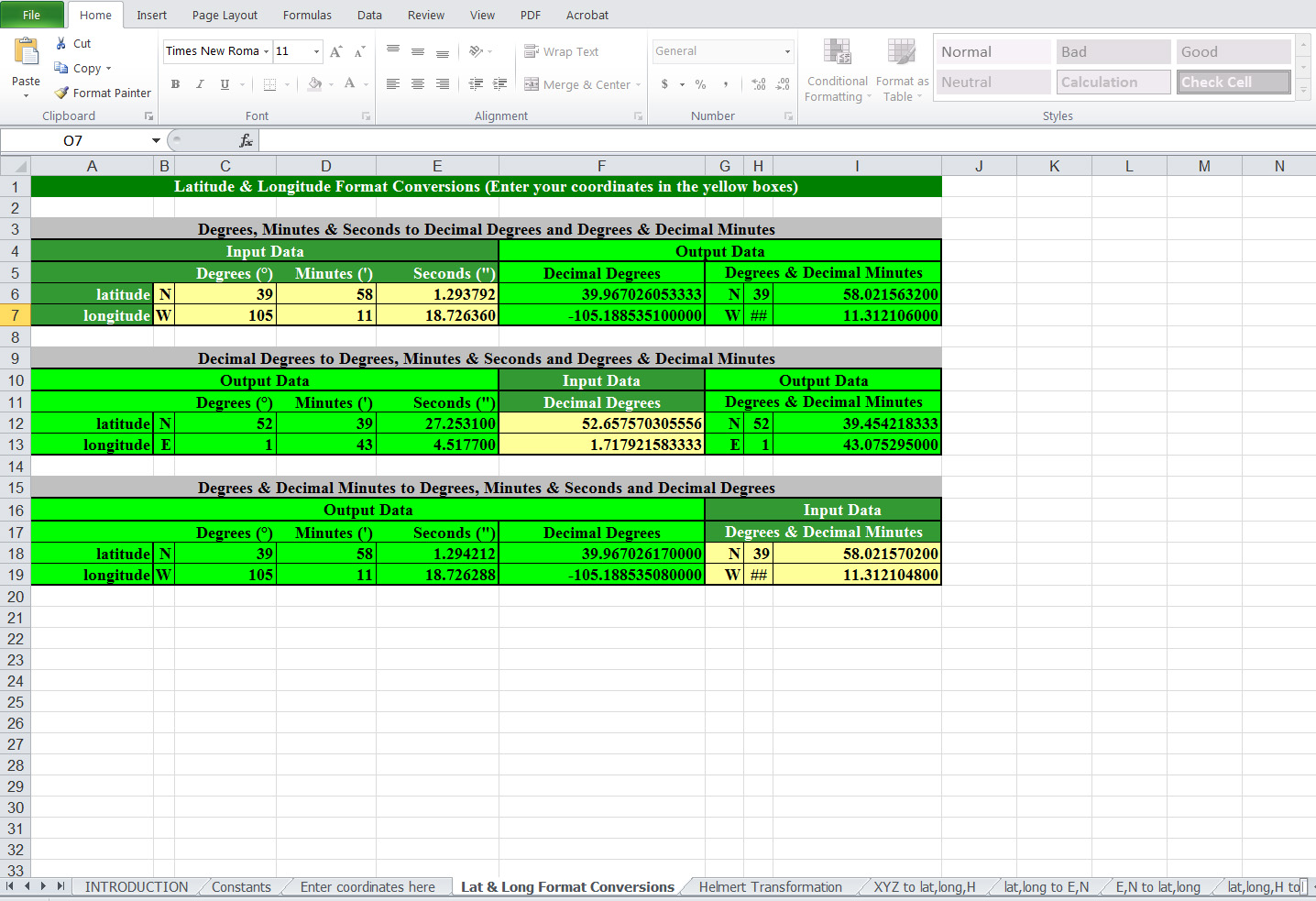
    One of the challenges in dealing with raw NMEA data (data not using a software like VisualGPS to decode it for you) is the format of the GPS coordinate. It’s not user-friendly. It’s expressed in DDMM.MMMMM; degrees, minutes and decimal minutes. To display the coordinate in a different format, there’s a useful Excel spreadsheet published by the UK Ordnance Survey.

    UK Ordnance Survey Coordinate Calculator
    UK Ordnance Survey Coordinate Calculator

    To use the spreadsheet, simply enter the GPS coordinate in the format you have, and the spreadsheet will calculate and display the GPS coordinate in the other two formats.

    Click here to download the UK Ordnance Survey Excel spreadsheet coordinate calculator.

    Thanks, and see you next time.


    Follow me on Twitter at https://twitter.com/GPSGIS_Eric
  • FAA Issues More UAS Exemptions

    The Trimble UX5.
    The Trimble UX5.

    In December, I wrote about the five new commercial UAS (Unmanned Aerial System) exemptions issued by the Federal Aviation Administration (FAA), with one commercial exemption being issued to Trimble Navigation for its UX5 mapping UAS. The precedent was a major step towards integrating commercial UAS operations into the United States airspace. This month, the FAA issued two more commercial UAS exemptions, one of them opening a new world of commercial UAS operations.

    Speaking of exemptions, there’s a pile of commercial UAS exemption requests awaiting review by the FAA. From Amazon.com, who garnered lots of UAS attention when television news magazine 60 Minutes interviewed Amazon CEO Jeff Bezos about its drone delivery concept, to Agribusiness giant Wilbur-Ellis Co. If you’d like to view the list of requestors as well as read their submissions, click here. How much time does it take from submission to a exemption approval? The FAA doesn’t provide that estimate, but I’ve spoken to several organizations that have been granted exemptions and Certificates of Waiver or Authorization (COA). The quickest timeline I’ve heard is three months.

    The Phantom 2 Vision+ UAS
    The Phantom 2 Vision+ UAS

    As I mentioned above, two new commercial UAS exemptions were issued earlier this month. One went to Advanced Aviation Solutions LLC, who was granted an exemption to fly the Swiss-made eBee Ag UAS for precision agriculture. At US$25,000 each, the eBee Ag is for the serious drone connoisseur.

    The other commercial UAS exemption was issued to a realtor in Tucson, Arizona. This exemption is interesting because it’s the first one issued that makes use of the DJI Phantom II Vision+ quad copter UAS. The Phantom II Vision + sells for well under US$2,000 and is generally considered a consumer UAS rather than one purpose-built for commercial users. However, it clearly has the capability of being used by realtors, and thanks to support by Pix4D, a Swiss-based commercial UAS imagery software maker, it can be used for capturing imagery for mapping and generating 3D models.


    At well under $2,000, the DJI Phantom II Vision+ price point is affordable for even the most basic commercial UAS application. The cost is relatively insignificant compared to the cost of image processing software from PIX4D, which at US$7,500 is more than five times the cost of the Phantom.

    No matter which model UAS is being approved in the exemptions, the FAA expects all operators to adhere to many rules in common. One is that the Pilot in Command (PIC) must possess at least an FAA Private Pilot certificate. What does it take to qualify for an FAA Private Pilot Certificate? It’s not a small or inexpensive undertaking. Generally speaking, you need to:

    1. Pass a written knowledge test after completing ground school.
    2. Accumulate 40 hours of flight instruction and solo flight time.
    3. Possess an FAA third-class medical certificate.
    4. Pass a flight test administered by an FAA examiner.

    In terms of cost, a typical small aircraft (Cessna 152) suitable for training will cost you upwards of $90/hour to rent (including fuel). Add all the other costs in and you’re looking at spending more than $10,000. This doesn’t include the time you will spend studying, and there’s a lot to study, from weather phenomena to instruments to aircraft performance to maps.

    Now, the FAA exemptions don’t specify that the exemption holder must have a Private Pilot certificate. If you possess such an exemption, you can hire a Private Pilot to act as Pilot in Command (PIC) of the UAS, but costs start adding up quickly if you have to hire a PIC and also have a Visual Observer (VO) present, which the exemptions are requiring.

    Things are certainly heating up in the commercial UAS world. I have to commend the FAA for stepping up to the plate and taking action to allow commercial UAS operations (however limited) well before the U.S. Congress-imposed deadline of September 2015 for releasing rules for integrating commercial UAS into the United States airspace.

    Thanks, and see you next month.

    Follow me on Twitter at https://twitter.com/GPSGIS_Eric
  • GNSS: The New GPS

    GNSS: The New GPS

    First of all, on behalf of all of us here at GPS World magazine, allow me to welcome you to 2015. We wish you a healthy and prosperous new year!

    I’d like to start out the new year stating the obvious for some of you, maybe most of you…perhaps all of you: GNSS is the new GPS.

    In the high-precision GNSS community, I think this is already our mindset, and has been for quite some time. The benefit of using signals from as many satellite navigation systems to the high-precision user is obvious. We saw this with the adoption of GLONASS more than a decade ago. It’s to the point now that even many consumer receivers (such as my Samsung Galaxy S5) utilize both GPS and GLONASS satellites.

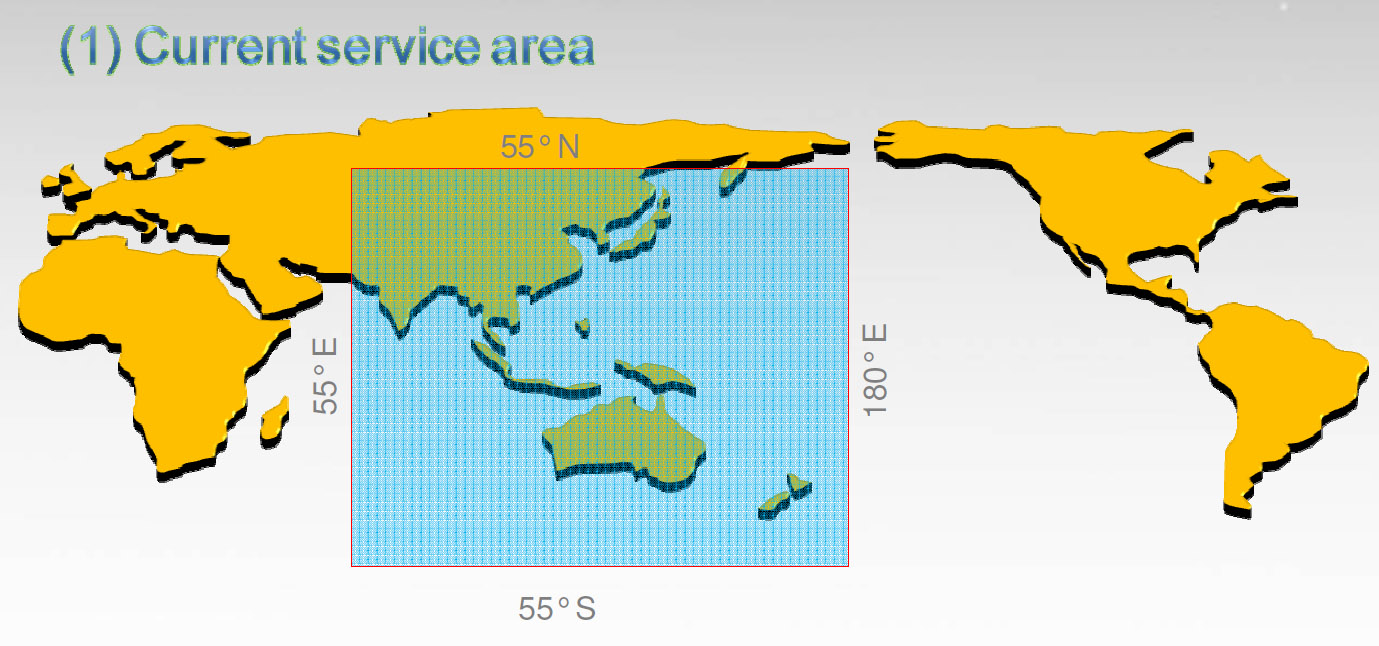
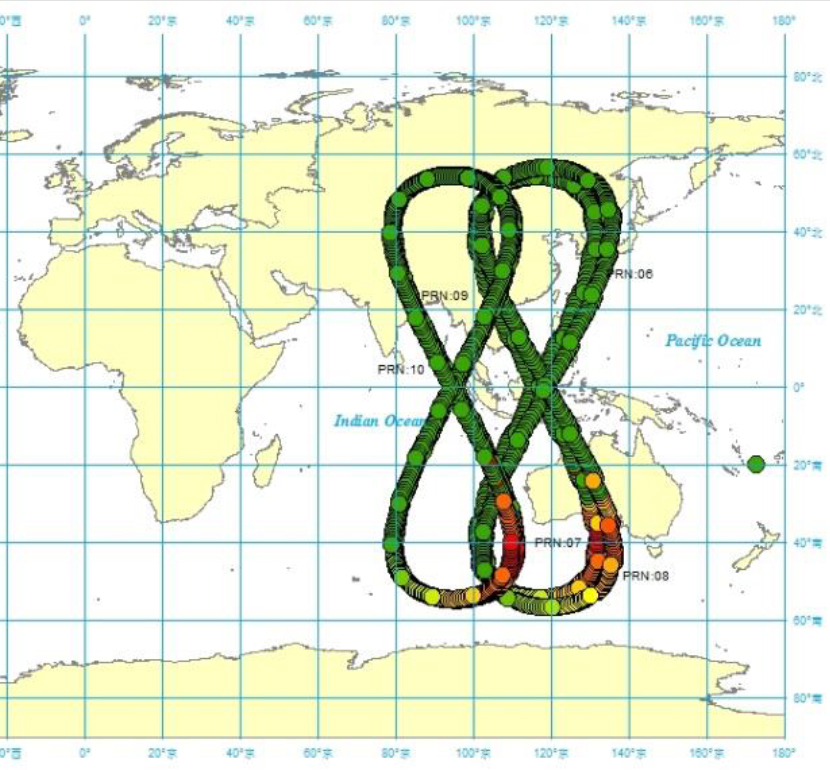
    I think it’s pretty obvious we’ll see the same phenomenon with Galileo (Europe) and BDS (China’s BeiDou system). It’s exciting to think about what high-precision GNSS positioning is going to look like just 2-3 years from now. Think about how much better RTK positioning will be with 30+ satellites in view. By the way, that’s already a reality in China where BDS has 14 regional satellites in addition to GPS and GLONASS. It’s the best place in the world for RTK positioning due to the number of satellites in view at any one time, and it might be the reason that China consumes more RTK receivers than the rest of the world combined.

    BDS coverage area
    BDS coverage area.


    BDS satellite orbit map
    BDS satellite orbit map.

    I certainly look forward to the deployment of Galileo and BDS. It will only make us more productive in accomplishing our work. Yet I’m reminded frequently when reading mainstream news headlines that Galileo, BDS, and GLONASS compete with GPS. Even some of those who hold GPS dear to their hearts, such as those who were involved in the development, promotion and deployment of GPS, view the other satellite systems as competition.

    Maybe that’s not a bad thing because competitors push each other to perform better. However, where it might hurt is when it comes to support, such as funding. Galileo, in particular, because it’s funded with civil funds instead of defense funds like GPS and GLONASS, has been criticized as a wasteful use of resources because GPS already exists. What more can it add, they ask? The mainstream media doesn’t have a clue that the satellite navigation systems are complementary rather than competitive. You and I know that more satellites generally equates to increased productivity no matter who owns/operates the satellite that is sending the signal. I cringe when I read these headlines:

    News Headlines

    GPS and its Three Main Competitors: Galileo, Beidou, GLONASS

    GPS vs. Galileo; Where Are They Headed?

    China Spreads Alternative To U.S. GPS System

    China’s Beidou Navigation Satellite System More Precise than GPS in Certain Areas

    GPS vs GLONASS: Which Is Best for Tracking Applications?

    Generally, I dismiss the mainstream media in the GNSS arena, but these misleading articles can have an impact on funding of the various GNSS, such as Galileo. Politicians and various purse-string holders can be influenced by these stories.

    Galileo Moving Forward

    The Europeans are pushing forward after the recent hiccup when the first two Full Operation Capability (FOC) Galileo satellites were inserted in the incorrect orbits due to an improper fuel line installation on the rocket launcher resulting in the satellites being inserted in an orbit far below its intended orbit (an elliptical orbit, 49.8 degrees at 26,200 km, vs. the intended circular orbit, 55 degrees at 29,900 km).

    In October 2014, shortly after the faulty launch, the outlook for the two satellites was bleak. The consensus was that there was no feasible method to move the satellites to their intended orbits. The good news was that besides the fact that they were in New York instead of Los Angeles :-), they checked out healthy, were properly oriented to the sun, and were “thermally stable.” Would they join GPS SVN-49 in being demoted to permanent test mode status, never being allowed to join the operational constellation, further delaying the deployment of Galileo? Not so.

    In late October, flight engineers used a series of fuel burns, using more than 75 percent of its fuel payload, to boost the satellite 3,500 km further into space, into a more circular orbit. While the original, incorrect orbit “prevented their use for navigation services because they were too low during part of their orbit to sense the horizon and correctly determine their own position,” the new orbit, not quite the intended orbit, seems sufficient to allow the satellite to perform most of its intended duties, including being incorporated into Galileo’s operational constellation.

    The first live test was completed on December 9, 2014, when the satellite was one of four Galileo satellites that delivered a position fix of better than two meters. Furthermore, in a January 1 article published on GPS World’s website, Peter Steigenberger and André Hauschild of the German Aerospace Center wrote that the rogue Galileo FOC satellites can likely be used by commercial, multi-frequency, high-precision GNSS receivers for carrier-phase positioning. One drawback is that because the satellite’s orbit doesn’t fall within the limits of the standard Galileo almanac, it may take receivers longer to begin tracking the satellite.

    Flight engineers are now working on maneuvering the second rogue Galileo satellite in the same manner, hoping for the same result.

    All in all, this is about as good of a result that could possibly be expected. My hat’s off to the folks who made this happen.

    Meanwhile, the next four Galileo FOC satellites are moving through the production process. Originally slated for a December launch, I suspect last year’s launch anomaly had the Galileo folks double-triple-quadruple checking, dotting i’s and crossing T’s, so make sure the next launch has the best chance of success. They haven’t announced a new launch schedule yet, but I would guess it’s likely in the next six months, with quarterly launches resuming if things goes smoothly. If all goes well, we could be benefiting from 10 healthy Galileo satellites by the end of the year.

    Thanks, and see you next time.

    Follow me on Twitter at https://twitter.com/GPSGIS_Eric
  • Five New FAA Commercial UAV Exemptions — What Do They Mean?

    Aeryon SkyRanger
    The Aeryon SkyRanger.

    UPDATE: 1 p.m. US Pacific Time, Dec. 12. See statement from Trimble Navigation below.

    In a major step towards allowing unmanned aerial systems (UAS, UAV, drones) to be used for commercial purposes in the United States, the Federal Aviation Administration (FAA) granted five exemptions to four companies this week, allowing commercial UAS operation with an extensive list of conditions and limitations.

    If you recall from previous articles such as this one, the FAA says it’s illegal to operate a UAS for commercial purposes in the United States.

    But, take a look at this article: FAA Says Commercial Drone Operations Are Illegal… Public Says So What?

    Then, when the FAA attempted an enforcement action against a person (Pirker) using a UAS for commercial purposes, an NTSB (National Transportation Safety Board) administrative law judge sided with the person, not the FAA.

    Clear as mud?

    Of course, the FAA appealed the NTSB opinion v. Pirker, and won. Click here to see the documents explaining the decision. Essentially, the NTSB ruled that a UAS is considered close enough to a manned aircraft that UAS fall under similar rules, and that the FAA is within its rights to apply the rules of careless or reckless operations to UAS as it does with manned aircraft.

    So, after some legal wrangling, the rules seem to be as the FAA has stated: no commercial UAS operations. However, under order from the Obama Administration, the FAA is working on developing rules to allow commercial UAS operation in the U.S. The deadline for those rules to be released is September 2015, but there is much speculation that this deadline will not be met.

    That said, the FAA is not waiting until September 2015.

    Airbotix-T

    In June 2014, the FAA issued the first UAS commercial use CoA (Certificate of Waiver or Authorization) to BP (British Petroleum) to allow commercial use of a particular UAS for surveying roads, pipelines and equipment in Alaska.

    Then, in September 2014, the FAA issued CoAs to six aerial photo and video production companies in the film and television industry.

    It should be noted that each CoA includes an extensive list of conditions and limitations, which are not necessarily the same, but similar (more on that below).

    That brings us to yesterday, December 10, 2014. On that day, the FAA announced it has issued exemptions to four companies for commercial UAS operations: Trimble Navigation, VDOS Global LLC, Clayco, and Woolpert.

    Looking at these four companies, it’s interesting that three of them are service providers and one is a manufacturer of UAS: Trimble. One might assume that, since Trimble is a manufacturer of UAS, the FAA exemption might carry over to its customers. After checking in with several people on this, the exemption appears to be only for Trimble owned-and-operated UAS, not customers. However, it doesn’t appear that the operator must be a Trimble employee (as opposed to a contractor). In that case, Trimble, as a manufacturer, could potentially deploy UAS under this exemption and have contract pilots operating Trimble-owned UAS.


    Following is a statement from Todd Steiner, Trimble’s marketing director for geospatial imaging solutions:

    “In the near term, Trimble will use this exemption to begin conducting research activities, sales demonstrations, and flight training with our partners and customers within the U.S. We will also initiate commercial activity as we pursue follow on steps with the FAA.

    “In addition, we are working to determine how this exemption might be further leveraged to help our partners and customers. With Trimble’s authorization in place, we can directly support their needs where that is appropriate. Our customers and partners will also be able to apply for authorization to operate our UAS under the conditions of our exemption.

    “We believe that these authorizations will be available on a more streamlined basis now that Trimble has received its exemption. We will communicate to our partners and customers as more information is available.”


    The exemptions are valid until December 31, 2016, unless rescinded or superceded.

    Conditions and Limitations

    For each FAA exemption granted, there’s a long list of conditions and limitations for each grantee. You can read the detailed list of these at the bottom of each document issued to the specific company.

    Trimble

    VDOS Global LLC

    Clayco

    Woolpert #1, Woolpert #2

    Although the conditions and limitations vary with each exemption issued, there are some common to all:

    • UAS must operate below 400 feet above ground level.
    • UAS must obey the speed limit (varies by UAS).
    • UAS must be within VLOS (visual line of sight) at all times by pilot in command.
    • All operations must have a second person, a VO (visual observer).
    • Pilot in command must possess at least an FAA private pilot certificate (some exemptions require a commercial certificate) and a third-class airman medical certificate.

    There are many more conditions and limitations, but this gives you an idea of what is required. The Trimble exemption contains 35 such items, so before you get too excited, take a look at the complete list of conditions and limitations. It’s not a simple endeavor.

    On a positive note, the FAA is making an effort and making progress. For an agency that has a reputation of moving very slowly and methodically, this is near lightning speed.

    Thanks, and see you next month.

    Happy Holidays!

    Follow me on Twitter at https://twitter.com/GPSGIS_Eric

  • What Happened to Piksi, the $995 RTK GNSS Receiver on Kickstarter?

    What Happened to Piksi, the $995 RTK GNSS Receiver on Kickstarter?

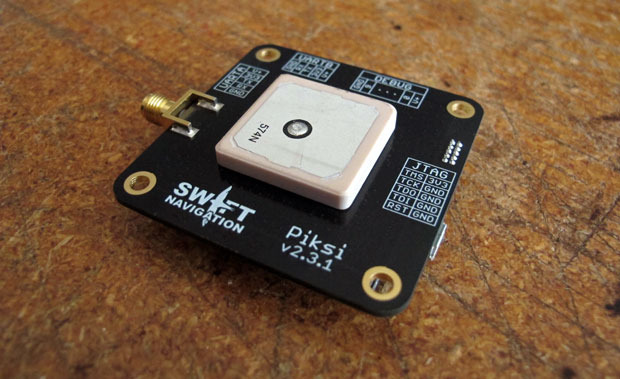
    Piksi
    Photo: Piksi

    A little more than a year ago, Swift Navigation started a Kickstarter campaign for a $995 RTK GNSS receiver named Piksi. The goal was to raise $14,000 for the project. By the time the Kickstarter campaign was ended, Swift raised $166,097 from 303 backers.

    I wrote an article about the Swift’s Kickstarter campaign in September 2013, a few days before the fundraising period ended. Following is a two-minute Kickstarter promotional video describing Piksi.

    At the time, the $995 price for the Piksi raised a lot of eyebrows and generated conversations in the high-precision GNSS user community about inexpensive RTK technology.

    This week, I took the opportunity to catch up with Swift to see how the project is going and where the company is headed.

    I spoke with Tim Harris, CEO of Swift, and Fergus Noble, chief technology officer. Tim said they delivered most systems to their backers in April (2014) as well as issuing “very few” refunds, which is not unusual for Kickstarter projects. As of today, Tim said there are about 1,000 units in the field among 350+ users. He said they still consider the Piksi to be in beta testing phase and expect production units to start shipping next year.

    “We are in RTK reliability mode now” — Fergus Noble

    Fergus said that the hardware design is stable and hasn’t changed since they shipped Piksi last spring. He said the focus has been on refining the RTK firmware to make it robust and reliable for professional use. He admits that “covering all corners” has been a challenge and, according to Swift’s blog, “The RTK software has been a tougher nut to crack than we originally anticipated.” This is especially ambitious, since Swift said they developed the RTK firmware based on published academic technical papers, combined with their own techniques (preparing patent applications) to run on a low-power hardware platform. Basically, they started from scratch, and without any RTK veterans on their team. You gotta love their guts.

    Apparently, the venture capital world liked what they saw. A few months ago, Swift, based in San Francisco, secured $2.6m in seed funding from Fall Line Capital, Felicis Ventures, Kal Vepuri, Lemnos Labs, Qualcomm Ventures and VegasTechFund. With the additional funding, Swift has increased its headcount from 4 to 9.5.

    The Devil Is in the Details

    Swift Navigation Lodestar
    Swift Navigation Lodestar. Photo: Swift Navigation

    Start-ups like these are a cool story, but at some point the rubber has to hit the road. Piksi is a long way from being an RTK product that you and I use for GIS and surveying, and Tim/Fergus are humble enough to admit this. The founders see the Unmanned Aerial Systems (UAS) market as their key customer base due to Piksi’s micro-size and low cost. They say this is reflected in their current customer base, which is comprised largely of UAS users, then surveying and agriculture, with the remaining 20 percent being a variety of apps like augmented reality. I agree that UAS is the right segment for them to focus on. At this point, the limitations for general surveying and GIS use are too great:

    • Must use a Piksi RTK base due to the proprietary protocol. In other words, not compatible with existing RTK base stations or networks.
    • Baseline length (distance between the RTK base and rover) must be very short. They haven’t done much testing even with a one-mile baseline.
    • RTK initialization is spec’d at 15 minutes, although Fergus said it’s typically 7-10 minutes.

    Since Piksi is only a single-frequency receiver (L1), it has the same limitations as other L1 RTK systems we’ve seen marketed over the past few years — short baselines and long initialization times compared to dual-frequency receivers. While these limitations are significant for surveying and GIS users, they aren’t as significant for UAS users, since UAS users require line of sight to the aircraft at all times and UAS are operated in a clear-sky environment.

    Communications

    If you’ve used RTK, you are aware of the importance of data communications between the base and rover. As part of its kit, Swift supplies license-free, 915MHz frequency-hopping radios to facilitate communications between the base and rover for testing. However, the founderse make it clear that they aren’t in the data radio business. They expect that most Piksi users will incorporate their own communications technology. Swift is discussing incorporating GSM (mobile phone) modem capabilities in the future.

    Future

    In 2015, Swift plans to roll out the Piksi in production quantities, so Fergus said their focus is on creating a robust and professional RTK system. Of course, the burning question is if/when Swift will incorporate a second GPS frequency into its receiver to take advantage of the faster RTK initialization and longer baseline distances that a dual-frequency receiver offers. Swift isn’t willing to talk about that right now. Said Tim, “We’re holding our plans close to our chest.”

    Thanks, and see you next month.

    Follow me on Twitter at https://twitter.com/GPSGIS_Eric

  • Whatever Happened to SketchUp? — Trimble Dimensions

    Earlier this month, I attended the Trimble Dimensions conference in Las Vegas. More than 4,000 attendees made it the largest Dimensions conference to date. Since Trimble has been on a corporate acquisition binge for the last 10+ years, one has to pick an area of interest to focus on; otherwise, it’s easy to be overwhelmed with their wide offering of geospatial technology. In my Survey Scene newsletter earlier this month, I focused on Trimble’s satellite-based GNSS augmentation services. In this month’s GSS Monthly newsletter, I’d like to touch on Trimble’s activities in the geospatial software arena.

    If you recall, Trimble bought SketchUp from Google a couple of years ago. SketchUp is software for 3D modeling used for a wide range of apps from interior/exterior architectural design to video game design. It’s not hard to understand why Google would want to sell SketchUp. Google products like Google Earth and Gmail are everyday consumer-friendly products that have mass appeal to a huge audience. SketchUp is a product that takes a higher level of geospatial user knowledge and time investment to use. It seems to be a perfect fit for a geospatial-oriented company like Trimble.

    I used to be involved in a lot of 3D modeling projects in the landscape architecture area. I know how labor-intensive it is to generate high-quality 3D models and 3D video fly-throughs. I also understand the value that 3D models offer in bringing a proposed design to life. For example, look at the following photo taken of an unimproved site:

    SH12_BeforeSH12_BeforeSH12_Before_Small-SketchUp-W

    To visualize the golf course architect’s design, following is a 3D model of a proposed golf hole overlaid on an image of the unimproved land:


    SH12_Small-SketchUp-W

    Imagine how much more effective it is to show a client this sort of visualization, rather than trying to explain this using a 2D set of architectural or engineering plans.

    This is the kind of visualization that SketchUp is designed to address, but more structure (building) oriented. The impact on the the client is the same, bringing 3D and color to design ideas. In fact, SketchUp goes further than just helping designers visualize their ideas for their clients. In some cases, it can produce a list of materials to construct the building. At a short briefing I received at Dimensions, Trimble said that the following structure was designed, and a list of building materials was generated, using SketchUp.


    SketchUp_Dome-W

    OK, it’s not a high-rise building and SketchUp can handle more complex designs than this, but this illustrates where the technology is headed and that the fundamental workflow exists. Also, it shows that this type of technology is becoming available to a wider audience. I recall that 10 years ago, we needed a lot of computing horsepower, sophisticated software (such as 3D Studio Max), very specialized technicians, and a lot of time to generate 3D visualizations. SketchUp brings this capability to a wider audience.

    For geospatial professionals, there’s obviously a lot of applications for SketchUp. A simple, yet powerful task is bringing Google Map imagery and topography data into SketchUp to give your buildings context. Following is a five-minute video describing how to import a Google Map into SketchUp:

    To learn more about SketchUp (free and Pro versions), a number of YouTube videos are available, as well as videos of SketchUp’s annual conference called SketchUp 3D Basecamp.

    Seven Best New Features of SketchUp 2014 (five-minute video):

    Lastly, following is a collection of YouTube videos from SketchUp 3DBasecamp 2014 (60 minutes) for you to peruse if you’re interested:


    Unmanned Aerial Systems (UAS)

    Of course, UAS are still all the rage. While Trimble showed off its UAS product lineup (a la its 2012 acquisition of GateWing), last month in Reno, Nevada, there was a conference entitled UAS Mapping 2014 that was focused on UAS for mapping. More than 500 geospatial professionals attended to view the UAS technology demonstrations. We’ll have a report on this conference in next month’s GSS Monthly newsletter. UAS technology is still in the early stages of development (and, of course, still not legal to use commercially in the U.S., according to the Federal Aviation Administration) so a lot is happening.

    There’s certainly a push toward using low-end UAS for GIS mapping. The UAVs themselves are becoming so inexpensive that the image-processing software ends up costing more than the UAV. For example, one image-processing company I hear about quite a bit is Pix4D. The company recently announced its Pix4Dmapping app that will turn a $900 DJI Phantom 2 Vision UAV into a 2D mapping and 3D modeling system. If you’re interested in the capabilities of this low-cost UAV mapping system, take a peek at the following 60-minute webinar from Pix4D.

    Thanks, and see you next month.

    Follow me on Twitter at https://twitter.com/GPSGIS_Eric
  • Trimble Dimensions Provides Focus on Range of Satellite-Based Correction Services

    The 2014 Trimble Dimensions User Conference is being held in Las Vegas this week. Photo: Trimble
    The 2014 Trimble Dimensions User Conference is being held in Las Vegas this week. Photo: Trimble

    With more than 4,000 attendees, this year’s Trimble Dimensions User Conference was the largest ever and, I must say, a well-organized event chock full of technical content — enough to squelch the most intense geospatial hunger pangs you might have.

    One could write a book on all the technology and market segments that Trimble is pursuing and offering solutions for. In addition to a wide range of GNSS, geospatial, construction, control, and data management systems previously offered, Trimble boasted a USB stick full of press releases with new product and service announced at Dimensions. So, the challenge is deciding what to write about without writing a little bit about everything.

    After my first day at Dimensions, it became clear to me what I needed to do. Among the many product and service announcements was a new GNSS correction service named Viewpoint RTX. While I’ve tried to stay up to speed on Trimble’s various GNSS real-time correction services, this one was the straw that broke the camel’s back for me. I decided I needed to get a solid grip on the range of real-time GNSS correction services that Trimble offers because the picture was getting fuzzier, at least to me, with each new real-time correction service introduced. It used to be pretty simple to decipher; not so much any longer. So I had a conversation with Patty Boothe, general manager of Positioning Services at Trimble. Patty, a 15-year Trimble veteran, was appointed GM of the newly formed group three years ago. Here’s the low-down on the services.

    Remember, Trimble acquired the land portion of OmniSTAR’s business a few years ago. For years, OmniSTAR has been one of the two dominant commercial satellite-based, real-time GNSS correction services (the other being John Deere’s Starfire service, as well as new entrant Terrastar). The OmniSTAR acquisition was Trimble’s entry into the satellite-based, real-time GNSS correction services business. Since then, Trimble has introduced the RTX (not to be confused with RTK) range of GNSS correction services. You might say that OmniSTAR and RTX are competitive services within Trimble. They are, to a certain extent, and I’ll attempt to clarify that below.

    Following is a list of Trimble’s real-time GNSS correction services, starting with the OmniSTAR services:

    OmniSTAR VBS: Satellite-based, real-time submeter service. The VBS service has been made obsolete largely by free public satellite-based augmentation systems (SBAS) such as WAAS/EGNOS/MSAS/GAGAN/SDCM. It is still used in geographic regions where free public SBAS don’t exist, primarily South America, Central and Southern Africa, and Australia. GPS-only service. Requires single-frequency receiver (L1).

    OmniSTAR XP: Satellite-based, real-time 15-cm service based on Jet Propulsion Lab (JPL) technology and delivered to users on the ground via OmniSTAR’s geosynchronous satellite network. GPS-only service. Requires dual frequency (L1 and L2).

    OmniSTAR HP: Satellite-based, real-time 10-cm service based on OmniSTAR’s reference station network and delivered to users on the ground via OmniSTAR’s geosynchronous satellite network. GPS-only service. Requires dual frequency (L1 and L2).

    OmniSTAR G2: Satellite-based, real-time 10-cm service based on Jet Propulsion Lab (JPL) technology and delivered to users on the ground via OmniSTAR’s geosynchronous satellite network. GPS+GLONASS service. Requires dual frequency, dual constellation (L1 and L2).

    To use OmniSTAR services, one must have an OmniSTAR-enabled GNSS receiver. There are a several receiver manufacturers that support OmniSTAR GNSS correction services, such as NovAtel and Hemisphere GNSS, in addition to Trimble.

    After, or at nearly the same time, Trimble acquired OmniSTAR, the company launched its RTX GNSS correction service. RTX’s infrastructure consists of ~110 GNSS reference stations around the world working to create high-precision corrections on a near global scale. The first significant differentiator is that Trimble RTX services are only offered on Trimble GNSS receivers, so you’ve got to be “all in” with Trimble to utilize RTX.

    Viewpoint RTX: Internet-based (notice I didn’t write satellite-based), real-time submeter service. This is a new service introduced this week at Dimensions for the new Leap GNSS receiver and the Geo7 GNSS handheld. GPS+GLONASS service. Requires single-frequency receiver (L1).

    Rangepoint RTX: Satellite-based, real-time 50-cm service. GPS+GLONASS service. Requires dual-frequency receiver (L1 and L2).

    Centerpoint RTX: Satellite-based, real-time 4-cm service. GPS+GLONASS service. Requires dual-frequency receiver (L1 and L2).

    The above are the three RTX services. There are some options for the above, but let’s talk about satellite-based GNSS correction services for a minute.

    The advantage of satellite correction services is that, because GNSS corrections are delivered via satellite, your receiver doesn’t need to be connected to the Internet or have any other sort of terrestrial radio communications to receive data from the GNSS reference station(s). Because delivery is by satellite, you could be in the middle of a desert with no mobile phone coverage within 100 km, and you could still use OmniSTAR or RTX services. The only requirement is that your receiver needs to have direct, continuous line-of-sight to the OmniSTAR/RTX geosynchronous satellite (both services use the same geosynchronous satellites to broadcast the corrections).

    The primary disadvantage of OmniStar and RTX services is the “convergence” time required to achieve the stated accuracy service levels. With the exception of OmniSTAR VBS (sub-meter), Viewpoint RTX (sub-meter) and Rangepoint RTX (50-cm) services, the OmniSTAR and RTX centimeter and decimeter services require tens of minutes of initialization time to converge to the stated accuracy. For example, if you want to use the 4-cm Centerpoint RTX service, you may have wait up to 30 minutes for it to converge to 4-cm accuracy.

    Now, there are a couple of ways to reduce the convergence time:

    1. Start on a known point. For example, if you’re using Centerpoint RTX on a tractor for planting and you shut down for the evening, you can start it up the next morning (assuming you didn’t move the tractor), and it will converge nearly immediately.
    2. Trimble offers a fast convergence option ($) in some geographic areas where it augments RTX with local RTK reference stations. Currently, Trimble offers this service in five U.S. “corn belt” states.

    For OmniStar XP, HP and G2 services, the only way to reduce convergence time is number one above, start on a known point.

    It’s important to note that all of the centimeter and decimenter satellite-based services described above are based on real-time Precise Point Positioning (PPP) technology, which is different than RTK technology. The fundamental difference is that real-time PPP technology relies on a global, distributed network of reference stations. For example, Trimble has ~110 reference stations to cover the globe (mostly) with its RTX service. On the other hand, RTK requires a much more dense network of GNSS reference stations. For example, in Washington State there are ~100 GNSS reference stations that comprise the state-wide RTK network.

    Lastly, Trimble offers a hybird RTK/RTX service called XFill. The idea is that for RTK users who lose communications to their RTK base or RTK network can use the Centerpoint RTX as a “seamless” back-up, maintaining RTK-level accuracy (1-2cm) for the first five minutes of RTX service, and then degrading to Centerpoint RTX accuracy after 20 minutes. Trimble reports there is no convergence time when transitioning from RTK to RTX, like you would if you were starting RTX right away. Standard XFill is included with certain Trimble RTK receivers and allows up to five minutes of RTX satellite time. Last month at the INTERGEO conference, Trimble introduced Expanded XFill which is a subscription service for those users who want more than five minutes of RTX time. For those users, Patty said that users can buy blocks of RTX time starting at 10 hours.

    So, you might ask how Trimble handles the horizontal datum differences between RTK and RTX since they are likely not referenced to the same horizontal datum. For example, in the US, Trimble VRS RTK infrastructure is typically referenced to NAD83/2011 while Trimble RTX is referenced to ITRF08. There’s about 1 meter difference between the two. After finding the correct Trimble person, he said that Trimble does a 3-parameter local shift (dX, dY, dZ) on the fly when in RTK mode so that when there’s a transition from RTK to RTX, the horizontal datum difference is already resolved.

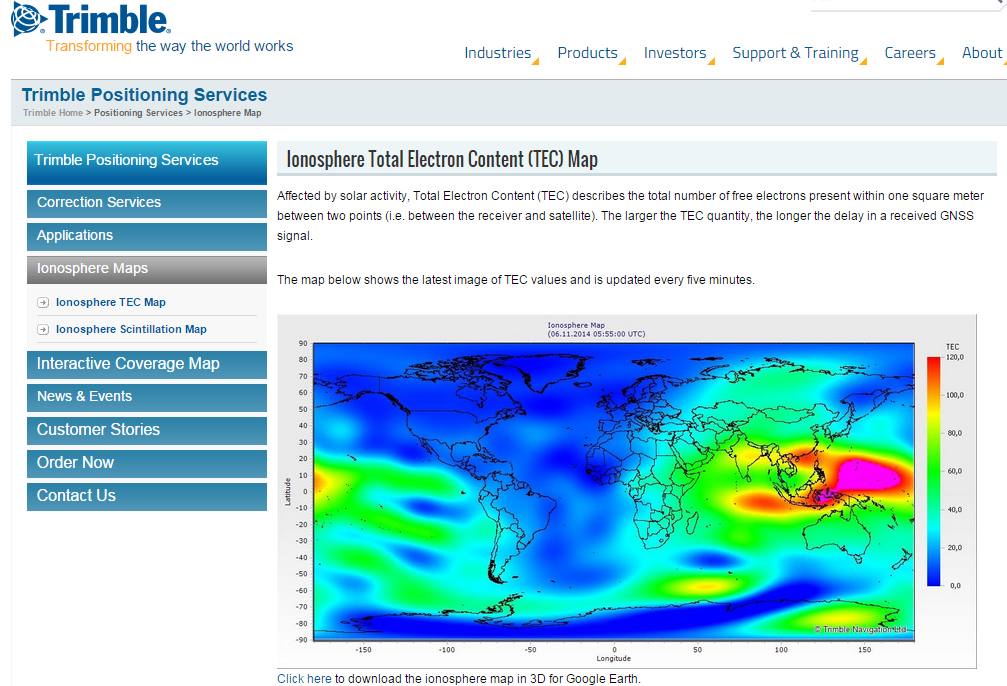
    A by-product of Trimble’s ~110 global GNSS reference station network is a real-time, world-wide  TEC (Total Electron Content) map. Since real-time PPP GNSS correction services (and public SBAS like WAAS/EGNOS/MSAS/GAGAN) rely on accurate models of the TEC in the ionosphere to account for the GNSS measurement delay, real-time TEC maps give users an indication of how the ionosphere’s TEC is behaving. This sort of map is particularly useful in attempting to predict the understand single frequency receivers using services such as public SBAS, OmniStar VBS, and Viewpoint RTX. The next time you here about an impending solar storm, take a look a the map using this link and see the TEC hotspots around the globe. Notice the more intense activity near the geomagnetic equator.

    TEC Map from Trimble's ~110 Global GNSS Receivers Photo: Trimble
    TEC map from Trimble’s ~110 global GNSS receivers. Photo: Trimble

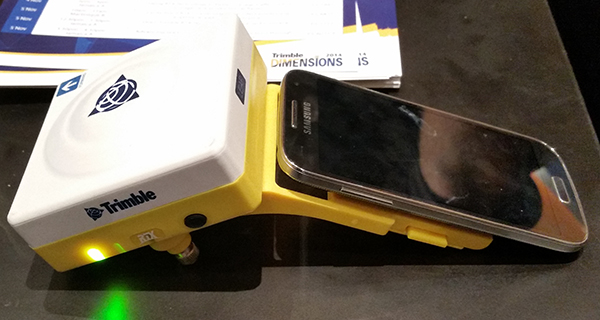
    Shifting gears slightly, at the conference, Trimble also introduced a new mobile phone GNSS add-in product called Leap, which uses the Viewpoint RTX service.

    Trimble Leap GNSS Receiver with a Samsung Galaxy Phone. Photo: Trimble
    Trimble Leap GNSS Receiver with a Samsung Galaxy Phone. Photo: Trimble

    Thanks, and see you next month.

    Follow me on Twitter at https://twitter.com/GPSGIS_Eric
  • Eric Gakstatter Gives InterGeo 2014 Synopsis

    Eric Gakstatter, contributing editor for GPS World and Geospatial Solutions, gives an overview of InterGeo 2014, held October 7-9 in Berlin.

  • Unmanned Systems Buzz at InterGeo, Plus: Webinar Follow-Up

    The world’s largest geospatial conference took place earlier this month in Germany. InterGeo is located in Germany every year, changing cities. More than 16,000 people attend the conference annually, mostly from Europe (83%) and only a small percentage from North and South America (~5%). I’ve promoted to the organizers that a similar conference is needed in the West because the most significantly attended geospatial conferences in the West are organized by specific vendors (Esri, Autodesk, Hexagon, Trimble, etc.) rather than being vendor-agnostic. The result is that Westerners only see a sliver of the geospatial products and services that are available.

    InterGgeo-GerMAP-UAS-WInterGeo is always a lot of fun, with a myriad of geospatial hardware and software. Every year, I look for a specific technology that stands out. In the past couple of years, it’s been unmanned aerial systems (UAS). This year, I attended a vendor presentation, and I think they summarized it best: “Positioning is becoming a commodity.”

    Whether it’s RTK GNSS, UAS, optical instruments or imaging instruments, it’s getting easier and less expensive to collect high-precision data. A good example of this is the Topcon LN-100W (sorry for the lack of audio during the video) introduced at InterGeo. It’s an instrument designed for BIM (Building Information Modeling) layout and mapping. It self-levels and works within about a 100-meter radius.

    Then, of course, there’s the new wave of RTK GNSS receivers. South Survey Instrument Co. introduced a palm-sized RTK GNSS receiver, as well as Sokkia, Altus, Comnav, Geneq, CHCNav, Trimble, Carlson, Eos, Stonex, and I’m sure I missed a few others. As I’ve written before on several occasions, the increased availability of RTK GNSS receivers at increasingly lower cost puts centimeter accuracy in the hands of a wide geospatial audience, not just specialists.

    Intergeo-Eric-Riegl-WThen, there’s UAS. UAS, UAVs, drones, or whatever you want to call them, have been hyped to the point that they may be over-hyped. Whereas I saw only a handful of UAS at InterGeo a few short years ago, now there are many tens, maybe a hundred, UAS on display. In fact, there was an outdoor UAS flight demonstration area. We shot a video of the new Reigl RiCopter, which Reigl claims is the first UAS with a LIDAR sensor on board.

    Lastly, VectorNav introduced a great example of sensor fusion. It’s a very small device (4.5 x 4.4 x 1.1 cm) weighing less than 30 grams. It contains two u-blox GNSS receivers (capable of L1 RTK) as well as VectorNav’s MEMS technology (3-axis accelerometers, 3-axis gyros, 3-axis magnetometers) resulting in a high-precision, inertial navigation system that doesn’t rely on magnetic sensors. One of the primary target markets? ….UAS.

    Intergeo-autodesk-eric-WThe week following the InterGeo show, Alan Cameron and I conducted a webinar as a follow-up. You can view the webinar recording by signing up here. It contains good information about the current status of UAS for commercial use in the United States. You can visit the FAA’s UAS webpage to read the latest information it has released. During the webinar, we conducted three audience polls. You might be interested in the results, so here they are.

    Poll 1: Do you currently use a UAS for geospatial work?

    Do you currently use a UAS for geospatial work? (54 votes)
    Do you currently use a UAS for geospatial work? (54 votes)

    Comment: I’m not surprised by this poll result, especially given the lack of regulations for commercial UAS operations that exist.

    Poll 2: Do you anticipate using a UAS in your geospatial work in the future?

    Do you anticipate using a UAS in your geospatial work in the future? (64 votes)
    Do you anticipate using a UAS in your geospatial work in the future? (64 votes)

    Comment: This poll result doesn’t surprise me either. There are a broad range of applications for UAS for geospatial users, from agriculture to accident reconstruction and remote inspection. Furthermore, if a geospatial user isn’t directly operating a UAS, he or she will eventually likely be using data that was generated from a UAS.

    Poll 3: If you were to purchase a UAS for geospatial work, how much would you be willing to spend on a system?

    If you were to purchase a UAS for geospatial work, how much would you be willing to spend on a system? (56 votes)
    If you were to purchase a UAS for geospatial work, how much would you be willing to spend on a system? (56 votes)

    Comment: This poll result surprises me. It says a lot about the belief and confidence that geospatial users have in the geospatial value of UAS. In other words, about 40% of the audience is willing to spend more than $10,000 on a UAS. Clearly, this means those users see the value that UAS bring and believe they can keep one busy enough to make the capital investment.

    Thanks, and see you next month.

    Follow me on Twitter at https://twitter.com/GPSGIS_Eric