Author: Eric Gakstatter

  • Which Industry Will Be the Largest Consumer of RTK Technology?

    Which Industry Will Be the Largest Consumer of RTK Technology?

    In September, I attended the Institute of Navigation (ION) GNSS+ conference in Tampa, Florida.

    Downtown Tampa, FL Location of the 2014 ION GNSS+ Photo: GPS World
    Downtown Tampa, location of the 2014 ION GNSS+. Photo: GPS World

    The ION GNSS+ conference is a gathering where many of the GNSS scientists from around the world come to share their successes, trials and tribulations. It gives one a view into the future of where GNSS positioning might go. Granted, most of the ideas and concepts presented won’t ever be introduced in a commercial product, but it’s great to see that engineers are pushing the technology envelope to see how much they can squeeze from receivers.

    As I was perusing the ION GNSS+ conference agenda, I was looking for presentations and other subject matter relevant to RTK GNSS technology. (Yes, I’ve been obsessed with low-cost RTK receivers this past year, if you haven’t been following).

    I’d like to tell you about two presentations I attended. The first was sort of unexpected, and the second was every bit of what I hoped it would be.

    The first was a presentation by SubCarrier Systems Corp (SCSC), a small consultancy focused on ITS (Intelligent Transportation Systems) technology. It just so happens, according to David Kelley of SCSC, that RTK receivers and RTK networks will play a critical role in the future of ITS and, as a result, help drive down the cost of RTK technology.

    How is RTK relevant to ITS?

    In ITS, I’ve been told there are three levels of accuracy that drive particular ITS applications. The accuracy terms are expressed in transportation terms:

    • Which Road?, Which Lane? and Where in the Lane?

    Translated into GPS accuracy terms:

    • Which Road? = Autonomous GPS — 5-meter accuracy
    • Which Lane? = WAAS (or SBAS)-corrected GPS — 1-meter accuracy
    • Where in the Lane? = RTK — 2-cm accuracy
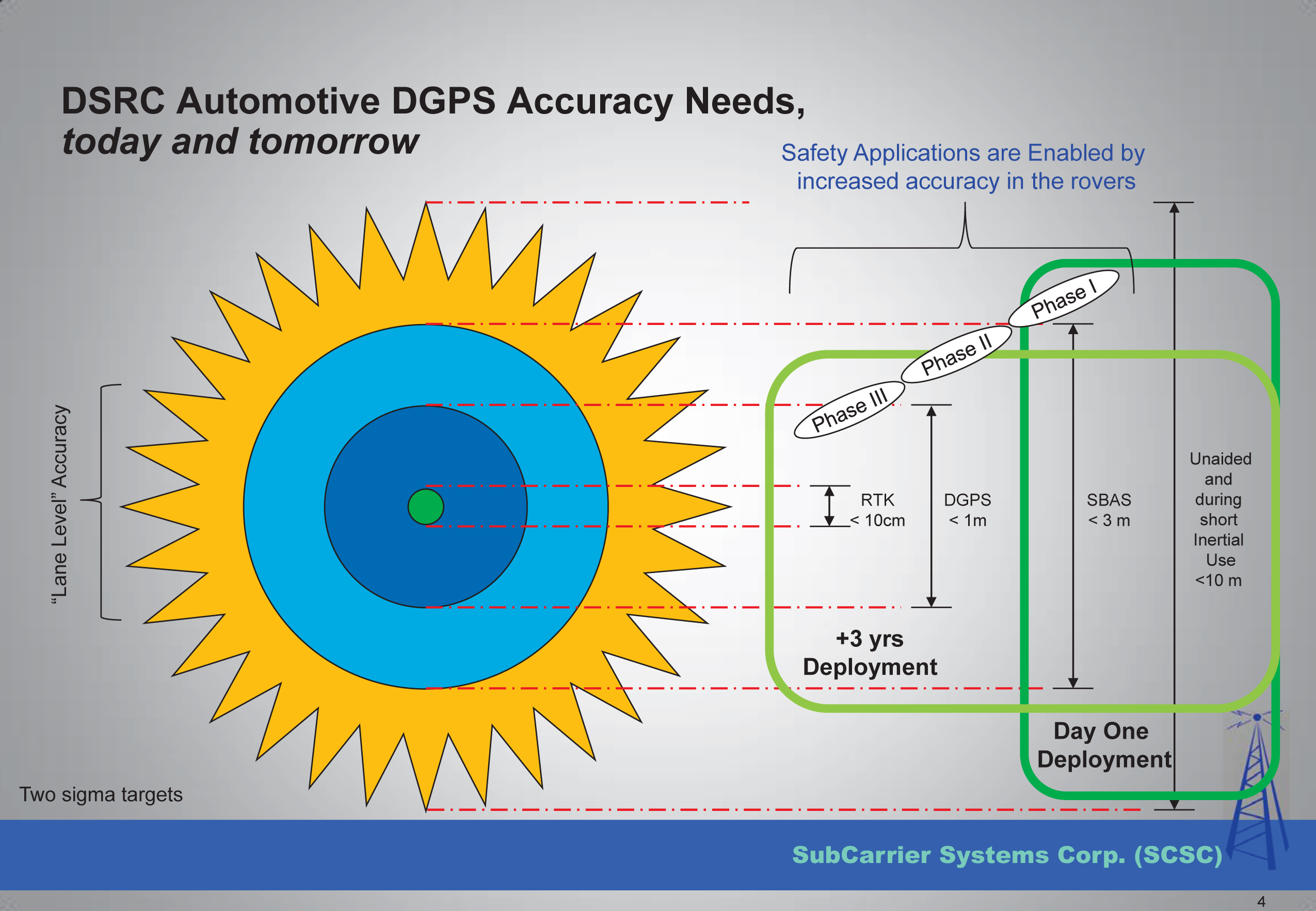
    "Safety Applications are Enabled by increased accuracy in the rovers"

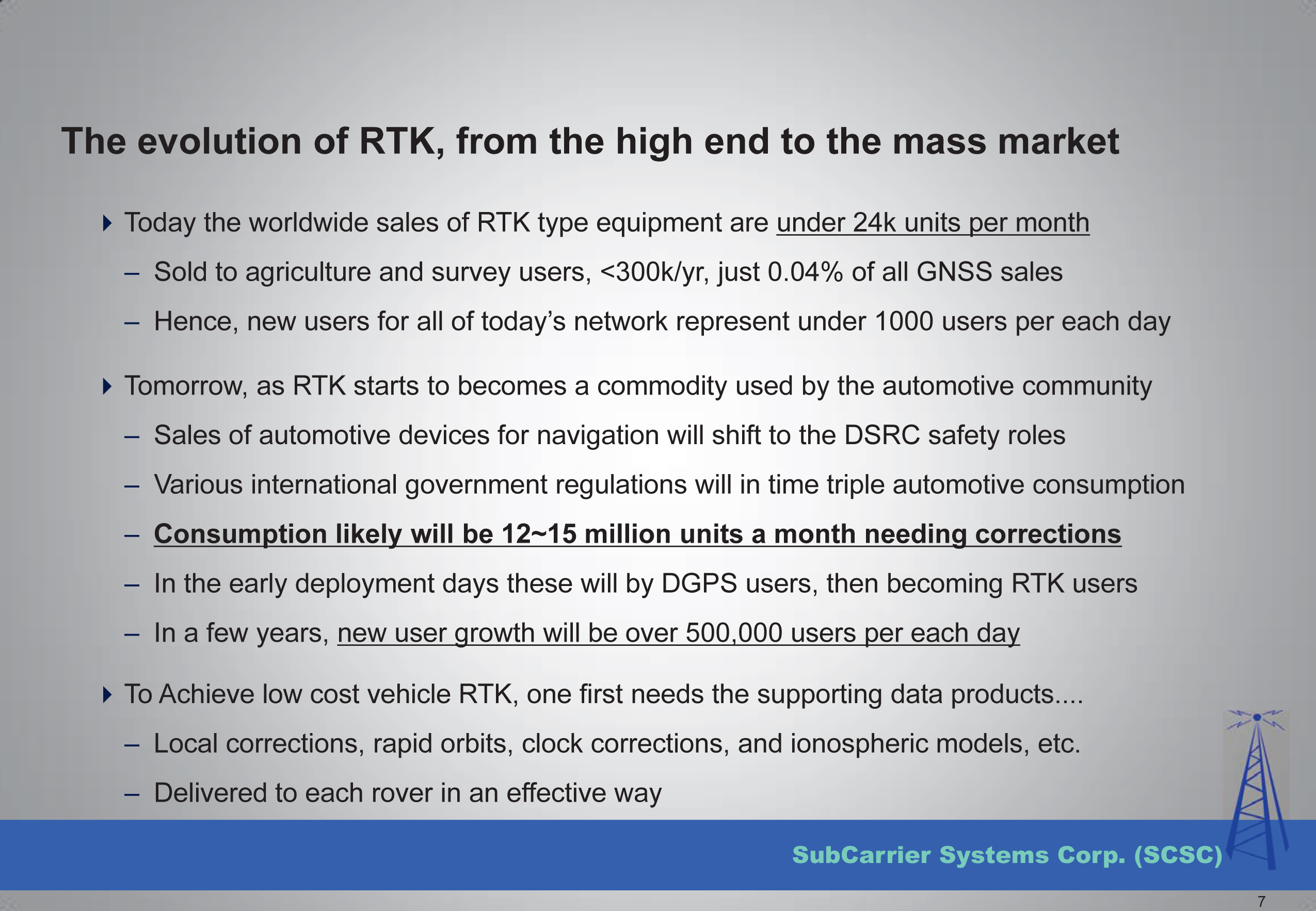
    Mr. Kelley further presented that transportation applications of RTK technology will drive mass-market adoption (commoditization) of RTK technology and into the millions of units sold.
    The Automotive Sector: Extending State Networks to Support Vehic

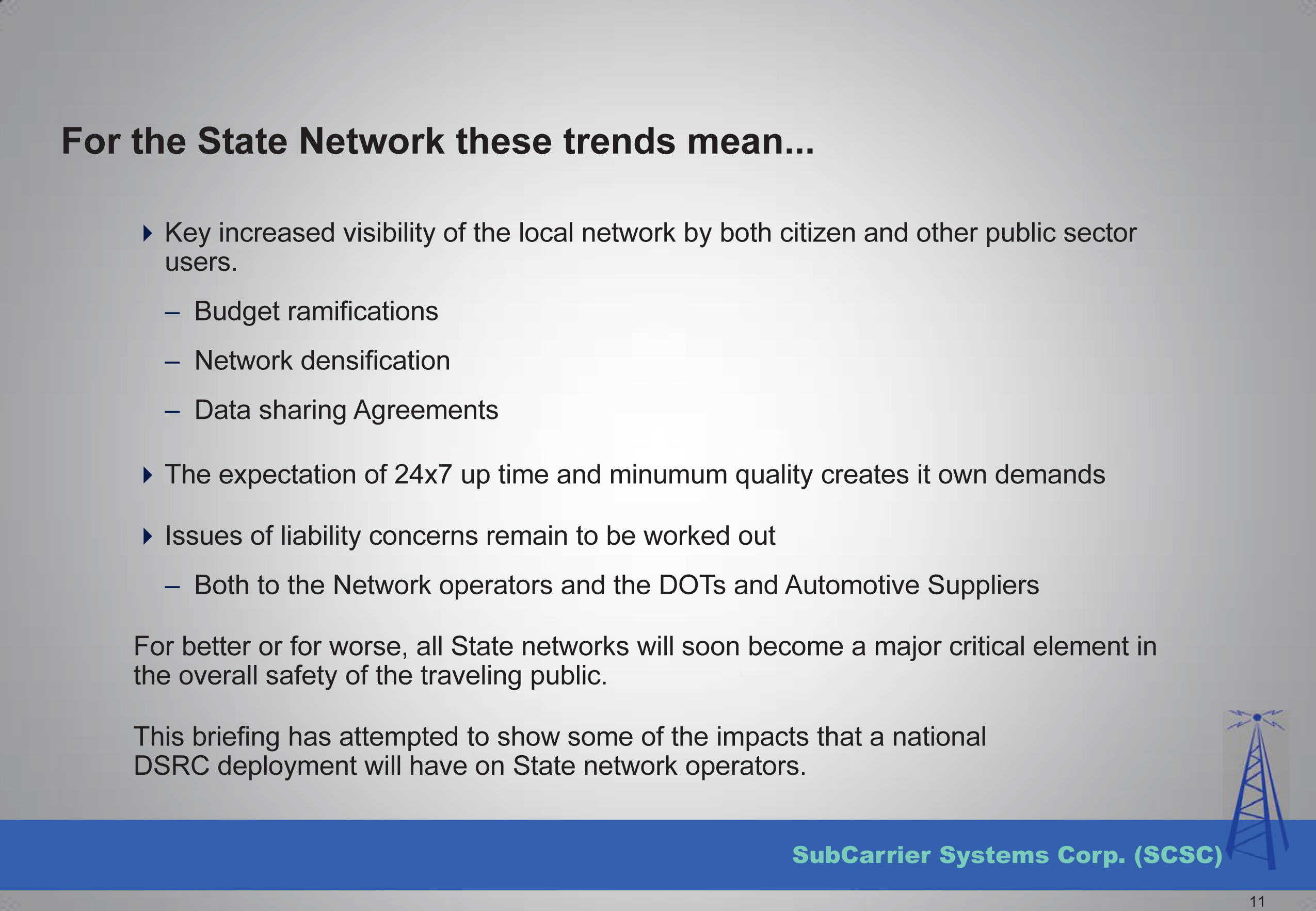
    Lastly, he discussed the strain that such massive deployment of RTK technology in transportation might place on existing RTK networks run by state agencies.
    The Automotive Sector: Extending State Networks to Support Vehic

    To view the entire presentation from Mr. Kelley, you can click here.


    The second RTK-centric presentation I attended at the conference was a moderated discussion panel entitled “High-Precision GNSS — What Will It Look Like in 2020?”

    If you’ve followed my articles over the past couple of years, you have to know I was looking forward to attending this discussion panel with great anticipation.

    Discussion Panel Members: High Precision GNSS - What will it Look Like in 2020?  Photo: GPS World
    Discussion Panel Members:
    High Precision GNSS – What will it Look Like in 2020? Photo: GPS World

    The discussion panel members were (from right to left):

    • Gian Gherardo Calini – European GNSS Agency
    • Ivan Di Federico, Chief Strategy Office and EVP, Topcon Positioning
    • Bernhard Richter, GNSS Business Director,  Leica Geosystems, Switzerland
    • Elmar H. Lenz, General Manager – Geospatial GNSS, Geospatial Division, Trimble Navigation Ltd.
    • Jan Van Hees, Director of Business Development, Altus Positioning Systems
    • Shaowei Han, Co-founder and CEO/President, Wuhan Navigation and LBS, Inc., China

    The discussion began with a short presentation by Gavin Schrock, who, among other things, administers the Washington State Reference Network, a state-wide RTK network, to frame the discussion.

    Next, each panel member commented on the presentation and provided some of their own thoughts. The thoughts by the mainstream manufacturers were largely what you’d expect, since they do not look forward to the day that RTK technology becomes a commodity.

    I’ll cut to the chase and just say that the gentleman from China, Dr. Han, stunned the audience with his claim that RTK GNSS chips will eventually be sold for $20 each. OK, to be fair, he also said RTK GNSS modules (an RTK GNSS chip on a circuit board with supporting components) will sell for $100. At first, these numbers seemed somewhat shocking to the audience, and one might dismiss it as being a speculative pipe-dream to disrupt the current RTK receiver competitive landscape. But then, when questioned, he dropped the reality bomb with a sort of puzzling look at the audience, being a little surprised why they didn’t understand. He said, and I’m paraphrasing, that $100 for an RTK module in 2020 doesn’t seem to be a stretch at all if you consider that RTK GNSS modules in China are selling for only $400 today. BOOM! He dropped the hammer. I admit, the $400 number even surprised me a bit. I thought it was more like $800.

    The reason for the low price is the number of RTK GNSS receivers sold in China is more than 100,000 per year now, and growing. That’s more than the rest of the world combined. What’s driving the demand for RTK GNSS receivers? You guessed it — transportation. While the mainstream RTK GNSS manufacturers are still talking about RTK GNSS technology for niche markets like surveying, engineering, GIS, construction, and agriculture, Dr. Han was talking about RTK GNSS technology being used by everyday consumers for everyday activities. He’s talking about the commoditization of RTK GNSS, and he’s right. The only question that remains is how soon it will arrive.

    Thanks, and see you next month.

    Following me on Twitter at https://twitter.com/GPSGIS_Eric


  • InterGeo: The Worldwide GIS Showcase

    Did you know the largest GIS conference in the world is held in Germany every year? Last October, more than 16,000 geospatial geeks traveled to Germany to attend the InterGeo Conference. In just a few short weeks, Geospatial Solutions’ staff will travel to Berlin and mix it up with the world’s leading geogeeks. If you want to see the latest and greatest GIS technology, both hardware and software, it is the best show in the world, bar none.

    The second largest GIS conference in the world is the Esri International User Conference. It’s a great conference, with one major caveat; it’s a user conference for Esri users. Competitors and perceived competitors are not invited.

    InterGeo is open to any company that can afford an exhibit booth. That’s one major difference. The other major difference is that there are very few technical sessions. That means all 16,000+ attendees are wandering around the exhibits. The exhibit aisles are packed with people, all the time for all three days, and the energy is fantastic.

    The InterGeo conference is an eye-opener for North Americans who attend for the first time. This is because they will see a much wider variety of brands than they are exposed to in North America and, in many cases, they will see products with lower price points. It’s all about marketing. The African, Asian and European markets won’t pay as much for products as North Americans will, and seeing how 83% of the InterGeo attendees are from Europe, you can imagine how the products are marketed. Only 2.4% of the 2013 attendees were from North America. Following is a map illustrating where last year’s attendees traveled from:

    INTERGEO 2013 Attendance
    InterGeo 2013 attendance.

    Not only are there commercial exhibits, but also technology displays such as this mapping machine from the 19th century that was displayed during the 2012 InterGeo Conference.

    MappingMachine-W

    At this year’s show, we expect to see a lot of UAVs. Last year, there were 25 exhibits showing UAVs. This year, I expect that number to double as new UAVs are being introduced almost weekly and, unlike in the U.S., UAVs are legal to fly in many countries of the world.

    I also expect to see a wider variety of RTK GNSS receivers, at more competitive prices than last year.

    Stay tuned to Geospatial Solutions and GPS World magazine staff as we descend into Berlin in a couple of weeks. Expect lots of photos, video recordings and write-ups of the event. Remember to follow me on Twitter for real-time news and photos.

  • All Eyes on Galileo

    The year 2014 is most certainly the Year of Galileo.

    After rising up from near elimination in 2008 due to much confusion about how to fund it, the European Union, that same year, decided to allocate 3.4 billion euros to fund the ground infrastructure and the initial satellites. Unlike the U.S. GPS and Russian GLONASS systems, Galileo is civilian-funded as opposed to being funded primarily from defense budgets, which makes it politically much more difficult to gain funding. But, they did it.

    That was six years ago.

    Since then, ground infrastructure has been designed and built. Six test satellites have been designed, built and successfully launched into orbit. In early 2013, the first position fix using only Galileo satellites was achieved. With all the necessary test satellites launched and systems tested, the anticipation of FOC (Full Operational Capability) satellite launches has been high, because it would signal the rapid deployment of the Galileo navigation system that would so complement GPS and so benefit the high-precision GNSS user community.

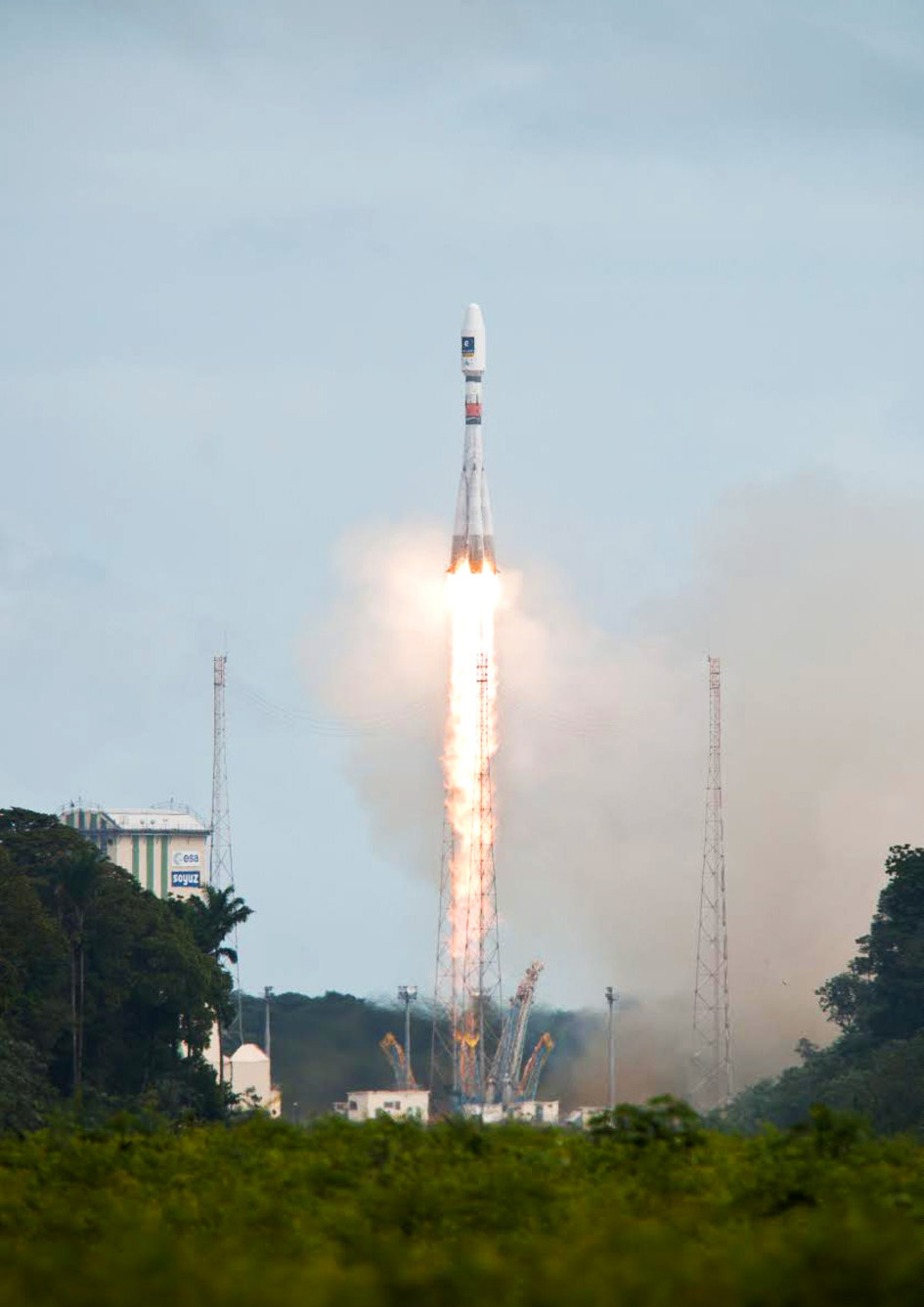
    Soyuz Flight VS09, carrying Europe's fifth and sixth Galileo satellites, lifts off from Europe's Spaceport in Kourou, French Guiana.
    Soyuz Flight VS09, carrying Europe’s fifth and sixth Galileo satellites, lifts off from Europe’s Spaceport in Kourou, French Guiana.

    That moment arrived last month, on August 22, with the launch of the first two Galileo FOC satellites. The significance of the first FOC launch is that it would trigger an aggressive launch schedule comprised of one launch every three months, at two satellites per launch — equaling eight satellites launched per year. With four test satellites already in orbit being converted to operational satellites, one can envision 16 Galileo satellites in orbit by the end of next year. While not a complete constellation at that point, it would offer plenty of upside — worldwide I might add, as I’ve written about in the past — by adding more satellites in view and accelerating the adoption of the new L5 signal, which is also supported by GPS.

    Between Europe deploying Galileo and China deploying its BDS (BeiDou) system, the world of high-precision GNSS is going to change a lot in the next couple of years. There will be more receiver choices at much lower prices for RTK receivers.

    But, the satellite navigation business is not a forgiving one. The devil is in the details, and the number of details has got to be overwhelming. Consequently, there have been many casualties.

    The Russians have taken their lumps, losing a total of seven GLONASS satellites to faulty rocket launches in just the past four years.

    In 2009, the U.S. placed into orbit a GPS satellite, SVN-49, that never has been set healthy, rendering it a “$100M test satellite.”

    Now, the Europeans have joined the club.

    The “pucker factor” during the satellite launches is always high, so on August 22, when two Galileo satellites mounted on a Russian Soyuz rocket at the Arianespace launch pad in French Guiana were pushed up into space, there must have been a sigh of relief that the launch seemed to go smoothly. Even I was excited, Tweeting “#Galileo Launch Successful, Satellites Deployed. Booyah!”, shortly after the launch.

    However, looks can be deceiving.

    It turns out that somehow, some way, the two Galileo satellites, after years of planning, were inserted into the wrong orbits.

    The liftoff and first part of the mission proceeded nominally, reports Arianespace, leading to release of the satellites according to the planned timetable, and reception of signals from the satellites. However, the targeted orbit was circular, inclined at 55 degrees with a semi major axis of 29,900 kilometers. The satellites are now in an elliptical orbit, with excentricity of 0.23, a semi major axis of 26,200 km and inclined at 49.8 degrees.

    With navigation satellites, we’ve seen disastrous launch failures and defective satellites placed in orbit, but I can’t recall ever hearing about navigation satellites being inserted into the wrong orbits. It’s difficult not wonder how such a seemingly simple error could occur, yet sympathize with the Galileo program managers given the complexity of the task, but also appreciate the consistency and reliability of GPS satellite deployments.

    Galileo satellites fastened to upper stage.
    Galileo satellites fastened to upper stage.

    The Russians quickly commented on the satellite deployment anomaly since it was a Russian Soyuz rocket launcher, speculating that it was a software bug. The Russian newspaper Izvestia quoted an unnamed source from the Russian Space Agency Roscosmos that “the failure of the European Union’s Galileo satellites to reach their intended orbital position was likely caused by software errors in the Fregat-MT rocket’s upper stage.”

    It’s too early to say if the Galileo satellites will ever become serviceable. The Monday following the launch, an independent inquiry commission was formed to “establish the circumstances of the anomaly, to identify the root causes and associated aggravating factors, and make recommendations to correct the identified defect and to allow for a safe return to flight for all Soyuz launches from the Guiana Space Center (CSG).”

    Despite being in the wrong orbit, it seems that the satellites are under full control and ready to proceed with the next stage of the launch and early operations phase activities. However, one option is not using on-board fuel to propel the satellites into a higher orbit.

    This subject will certainly be a hot topic at the Institute of Navigation (ION) GNSS conference being held next week in Tampa, Florida. A full staff of GPS World editors and administration folks will be attending, including yours truly. It’s the premiere GNSS technical event of the year, so I’m sure there will be plenty of scientists and program managers commenting and speculating on the future of these two satellites.

    If you’d like the latest news on this and other GNSS-related subjects during the conference next week, follow me on Twitter at https://twitter.com/GPSGIS_Eric. There are lots of interesting subjects at the ION GNSS+ conference. Take a look at the conference agenda here. I’ll be attending many of the presentations related to high-precision GNSS and report to you in next month’s newsletter. To give you a flavor, following are some of the presentations that I’m going to try to attend.

    • The Triple-frequency Multi-system RTK Engine for Challenging Environments
    • Mobile Mapping Using Smartphone
    • Analysis of Using Smartphones for Indoor Mobile Mapping
    •  GPS Program update
    • Galileo Program Update
    • Glonass Program update
    • BDS Program update
    • GLONASS Only and BeiDou Only RTK Positioning
    • Comparing Multi-constellation and Multi-frequency Based on GPS/Beidou RTK Positioning
    • Combined GPS+BDS+Galileo+QZSS for long single-baseline RTK positioning
    • Real-time PPP with Galileo, Paving the Way to European High Accuracy Positioning
    • High-Precision GNSS — What will it Look Like in 2020?

    See you next month.

  • The No. 1 Question I Was Asked 20 Years Ago Is Still No. 1

    On the tail of the Esri International User Conference (UC) and the first-ever live event webinar we’ve ever conducted, I’d like to revisit a subject I’ve pounded hard for the past couple of years. It’s a subject that still, after my 25 years in the geospatial industry, is still the most common problem that geospatial users ask me about.

    First, however, the live event webinar at the Esri UC. What a blast it was to broadcast live from San Diego with people walking by and the buzz of 14,000+ conference attendees in the air! I’ll definitely be looking for more opportunities to broadcast live from events like this. The webinar was great. It touched primarily on high-precision GNSS on mobile devices. If you weren’t able to attend and would like to listen to it, register here and you’ll be sent a web link. Then, just last week I conducted a follow-up webinar that dug further into the details of how to use RTK (real-time 1-2 cm accuracy) on almost any mobile device. If you missed it and would like to listen to it, register here and you’ll be sent a web link.

    So, what is the #1 question I was asked 20 years ago and is still the #1 question I’m asked about today?

    “Why doesn’t my GPS data line up?”

    Part of the reason that the question has been a consistent perennial favorite is that low- to medium-cost GPS (now more commonly referred to as GNSS) receivers have become more accurate, so our expectations for better accuracy have increased. It used to be that 2-5 meters (after post-process differential correction) was about what you could expect from a $10,000 GPS receiver. Today, you can buy a real-time, submeter receiver for under $2,000 and an RTK receiver capable of 1-2 cm accuracy for two to three times that.

    So, “why doesn’t my GPS data line up?”

    I wrote two articles that attempted to summarize the problem. The two-part series was entitled “Nightmare on GIS Street.”

    Nightmare on GIS Street: Accuracy, Datums, and Geospatial Data

    Part2 Nightmare on GIS Street: Accuracy, Datums, and Geospatial Data

    Horizontal datums, and changing horizontal datums, are the root of the problem. Lack of user knowledge and GIS software vendors’ improper implementation of horizontal datum transformations exacerbate the problem.

    There are a few common horizontal datums used, at least in the U.S.. Outside of the U.S., there a myriad of datums with associated transformation algorithms. A few common ones are:

    ITRF08 – International Terrestrial Reference Frame of 2008. ITRF08 is world-wide datum with no epoch (time stamp) associated with it.

    WGS-84 (G1674) – World Geodetic System of 1984. WGS-84 has changed substantially over the years. G1674 is the latest revision (actually, I think G1762 is out but I’ll leave that for now). At epoch 2005.0 (January 1, 2005), WGS-84 (G1674) and ITRF08 are within a centimeter of each other.

    NAD83/2011 – North American Datum of 1983. As with WGS-84 and ITRF, NAD83 has undergone significant changes over time. The current version is NAD83/2011 with an epoch date of 2010.0 (January 1, 2010).

    Now, it would be great if all of our geospatial data was referenced to the same datum. In that case, all of our geospatial data would line up perfectly. But, it’s not that easy. In fact, not only is data published in all three of the above datums (and more), but also a lot of legacy geospatial data is published in earlier versions of the datums above, which can significantly differ from the current revision of the same datum.

    For example, if you received geospatial data that is reported to be referenced to NAD83? What does that mean? Is it the original version of NAD83 or is it the latest revision of NAD83 (2011) or somewhere in between?

    Let’s take a practical and very common example.

    Assume you’ve got a high-precision handheld GNSS receiver. Unless you’re connected to a RTK network or post-processing, you’re likely using WAAS as a source of GPS corrections, which is a very common setup.

    Let’s say that your GIS database is referenced to NAD83/2011, another very common setup.

    WAAS is referenced to ITRF08 current year epoch.

    ITRF08 differs from NAD83/2011 from 2 to 4.5 feet in the U.S. depending on the geographic region you work in. So, if you don’t adjust your incoming data to match NAD83/2011, the data you add to your GIS database will be offset by 2 to 4.5 feet. Following is a graphic from Michael Dennis of the National Geodetic Survey that illustrates the difference between NAD83/2011 and WGS-84/G1672.

    Source: National Geodetic Survey
    Source: National Geodetic Survey

    What’s really important to note about the slide above is the epoch date. I write about the time variable of datums in Part2 Nightmare on GIS Street: Accuracy, Datums, and Geospatial Data. The bottom line is that the ground we walk on moves. It’s only very slightly, unless there’s an event like an earthquake, but it’s constantly moving, and generally in the same direction and rate. In the midwestern U.S., for example, the ground may only be moving a few millimeters per year. In some places in California, the ground moves 4 cm per year. If you’re using RTK to achieve 1-2 cm precision, 4 cm is a big number and can’t be ignored. If you located a point five years ago with RTK to the 1-2 cm level and revisited it today, the difference would be 20 cm, well over a half foot.

    What methods are available to adjust for the difference between the two datums?

    There are at least three ways I can think of. Of course, the easiest one is if the data-collection software you use is smart enough to deal with this. Unfortunately, this is not likely. Surprisingly, even mainstream GIS data collection software sold today doesn’t address this problem.

    1. Some data collection software (ArcPad, SurvCE, FieldCE) have the functionality to define the GPS datum and apply a datum transformation in real time (in the field) so it’s transformed to NAD83/2011 before it’s stored in the GIS database. Note, however, that even fewer are able to deal with crustal movement. For example, take a coordinate time-stamped 2008 and “move” it to 2014.
    2. Apply the datum transformation after the data is collected.
    3. If your GIS software doesn’t have the correct datum transformation functionality built in, use a tool such as HTDP (Horizontal Time Dependent Positioning) to determine a precise offset distance and direction in and apply the offset to all of the data collected in that geographic region. Since WAAS precision is 50 cm at best, this type of offset correction is perfectly suitable.

    As I mentioned in  no. 1 above, several software packages can transform between datums, but very few can take into account the time component of datum transformations. In other words, they don’t take into account the fact that the ground we stand on is moving.

    Some people are beginning to take note that addressing the time component of datum transformations is just a matter of time, which it is. For example, Geomobile Innovations just introduced a plug-in for ArcPad that adds extensive datum transformation functionality to ArcPad, including accounting for the ground movement. It turns ArcPad into a true high-precision data-collection tool.

    More good news is that the big dog is starting to wake up. At the Esri UC last month, I heard from a reliable source that Esri has made dealing with this issue an active project, and is working on the logic and user interface to implement a time-dependent datum transformation model (commonly known as a 14-parameter transformation). As someone who used to design GIS data-collection logic and user interfaces, I can appreciate the challenge of implementing this model. What happens when a road/pipeline/transmission line crosses from one tectonic plate to another when the two plates are not moving the same direction and velocity? How does one make accounting for that easy to use yet technically correct?

    Thanks, and see you next month.

    Follow me on Twitter at https://twitter.com/GPSGIS_Eric

  • Live Event Webinar Follow-up: Answering Your Questions from the 2014 Esri Conference

    Live Event Webinar Follow-up: Answering Your Questions from the 2014 Esri Conference

    Booth2

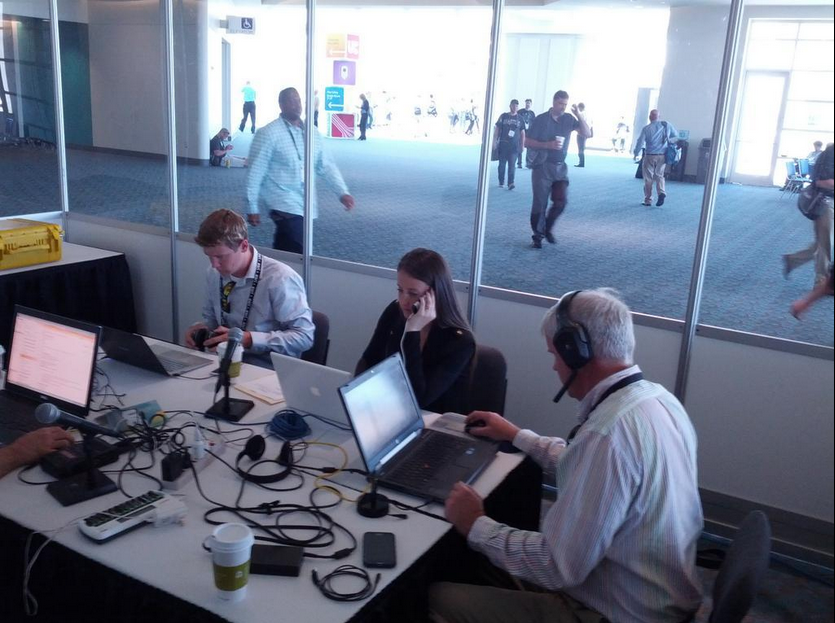
    A few weeks ago at the Esri 2014 International User conference in San Diego, California, we conducted our first live event webinar from a Plexiglas booth sitting among many of the 14,000+ attendees buzzing around inside the San Diego Convention Center.

    The webinar focused on high-precision GNSS on mobile devices (iOS/Android/Windows), unmanned aerial systems (UAS), and real-time GIS transactions. These are hot topics in the geospatial world, and that was confirmed when I received about 100 pre-webinar questions and more than 100 post-webinar questions.

    In my article this month, I’ll do my best to provide answers to the questions asked. If I don’t get to your question, or if you have another, please email me at [email protected].

    First of all, if you didn’t attend the webinar and would like to view the recording, you can register here and you’ll be provided a link to view it. It’s a great, interactive discussion. I grabbed Sharad Garg, iOS consultant, from the Esri show floor to talk about the intricacies and complexities of using GNSS receivers on iPads and iPhones. 

    Without further delay, following are some of the more popular pre- and post-webinar questions I received.

    Mobile Devices

    First, I’ll start with the questions about mobile devices and high-precision GNSS.

    1. Will Android be the dominant mobile tablet platform in the Enterprise?

    It’s hard to say. I recently met with a group of enterprise IT professionals and we were discussing this issue. Basically, the group was equally divided into thirds. One third were using Android. one third were using iOS, and one third were using Windows.

    Android advantages: Lots of mobile devices available that run Android.
    Android disadvantages: Open source = non-standard implementations, so app software may not run on every device; security concerns.

    iOS advantages: Consistent user interface, consistent software development environment, popularity of iPad and iPhone.
    iOS disadvantages: Closed ecosystem (very limited number of tablets); doesn’t interface to devices (such as GNSS) that haven’t been through the Apple certification process; security concerns.

    Windows advantages: Security; lots of legacy apps and utilities written for Windows.
    Windows disadvantages: Limited number of tablets being deployed based on Windows.

    For enterprise organizations, data security is a huge concern. Since Android is open source and gaining the most market share (at least in the consumer market), it’s got a target on its back for hackers. That’s the biggest concern I hear from corporate IT professionals. How will Android device developers address that, or will they? The consumer market for Android devices is exploding regardless of security. Do they even care about the enterprise market? Apparently Apple does as it recently signed an agreement with IBM to address the enterprise market, with IBM committing to deploying more than 100 enterprise solutions for iOS.

    Booth1
    Site of the webinar broadcast from the Esri UC.

    2. Which mobile platform is the most universal/easy to integrate with GNSS receivers?

    Out of the box, Windows and Windows Mobile devices are still the easiest to interface to external GNSS receivers for the average consumer. Using Bluetooth, serial or USB, NMEA (or proprietary binary) data flows easily via the device com port or virtual com port. If you’re using a Bluetooth interface, there is some inconsistency among mobile devices due to the different versions of Bluetooth management software used on mobile devices, but it’s workable, and worst case you can buy an inexpensive third-party Bluetooth software manager like BlueSoleil.

    With the use of an app such as Bluetooth GPS that allows you to select an external GNSS receiver, connecting your Android device to an external Bluetooth GNSS receiver is relatively painless.

    Apple products are the toughest to integrate with external GNSS receivers via Bluetooth. Each GNSS receiver has to be specifically designed with an Apple Bluetooth authentication chip and be subjected to the Apple certification process, which can be lengthy and costly. This is the reason why you see very few Bluetooth GNSS receivers available for Apple products. The good news is that once the GNSS receiver is approved, the Bluetooth connection happens automatically when the GNSS receiver is in range of the Apple device. No com port config, no baud rate to worry about, etc.

    3. What is available on Android that will make my smartphone a practical and useable tool that can assist in collecting professional data?

    First of all, you need to find a high-precision Bluetooth receiver to connect to your Android device. Then, establish the Bluetooth partnership between the Android and GNSS receiver (scan for Bluetooth devices, enter passcode, etc). Once you have that, download the Bluetooth GPS utility I mentioned above and it will allow you to select which GNSS device to use (external vs. internal). Once you’ve selected the external GNSS receiver and connected to it via Bluetooth, every location app on your Android device will use the high-precision GNSS receiver for location.

    This applies to an Android tablet or Samsung Galaxy phone. Take a look at this article to see how I ran RTK on a Samsung Galaxy using a Bluetooth RTK receiver.

    Today’s challenge is finding “professional” GIS data collection apps that run in the Android environment. There are a few, but the selection is limited. Esri has its Collector for ArcGIS app that runs on Android, but it requires an ArcGIS server backend or ArcGIS Online account. Other data collection apps like Fulcrum and Amigocloud run on Android as cloud-based services.

    4. Is there an actual GPS receiver within smartphones, or are they triangulating off of cell towers?

    There’s a GNSS receiver in virtually every smartphone manufactured. The GNSS chips are so cheap (a few dollars) compared to the functionality gained that it wouldn’t make sense not to design a GNSS receiver in a smartphone. Now, just because there’s a GNSS chip in each smartphone doesn’t mean it’s the only technology used for location. For example, Apple iOS uses multiple data sources to determine the location at any given time. It will use a combination of cellular triangulation, Wi-Fi IP address, and internal GNSS receiver and external GNSS.

    5. Which applications do you see requiring RTK accuracy within the mass-market applications?

    A couple of years ago at the GPS World Leadership Dinner at the ION GNSS conference in Nashville, Dr. Todd Humphreys of the University of Texas at Austin predicted that you’ll have RTK (real-time centimeter accuracy) capability on your smartphone by the year 2020. I agree with his prediction, and I think we’ll see inexpensive Bluetooth RTK “pucks” well before 2020, as I’ve written before.

    Often, I get the question raised above. Who needs RTK on a mobile phone?

    I can’t tell you any more than that in the early 1970s when GPS was first being conceived, not one could tell you what GPS would be used for today. I love the following quote from Steve Jobs: “People don’t know what they want until you show it to them.”

    6. Since many devices are complete systems with GNSS inside, do you see the direction of the industry moving towards remote “add-ons” like Bluetooth receivers?

    Bluetooth receivers are certainly trending, and it’s primarily driven by the explosion of powerful yet inexpensive tablets and smartphones in the past five years, starting with the iPad/iPhone, and now with Android devices and smartphones in general. People want to use their consumer devices in a professional capacity and some need high-precision GNSS receivers, so that’s driving the demand for “add-ons” like Bluetooth GNSS receivers, laser rangefinders, and more.

    Unmanned Aerial Systems

    Ok, let’s transition to some questions on UAS (such as UAV, drones).

    1. Do you see the FAA allowing simple operations for very low altitude UAV-sensors?

    It’s difficult to speculate what the FAA will implement, but I have to think, based on its past behavior, that the initial rules will be super-conservative with minimum requirements being that a licensed pilot will be required to operate the UAS in addition to strict equipment requirements.

    What’s going to be interesting to observe is what the FAA will do about the hundreds (maybe thousands) of UAS operators who will attempt (or are attempting) to “fly under the radar” and skirt the FAA rules. We’ve seen the FAA attempt (sometimes successfully and sometimes not) to crack down on some UAS operators whom it believes are violating the rules, but there have only been a handful of those cases.

    2. When do you think the FAA will release rules for commercial UAV users?

    The U.S. Congress-mandated deadline is September 2015. Some sources are doubting the FAA can meet that deadline.  The FAA UAS Integration Manager says they will.

    I wouldn’t be surprised if the FAA issued some guidelines in September 2015, but I seriously doubt they will publish the full set of rules by then.

    By the way, I attended an interesting UAS presentation at the AEC Summit prior to the Esri UC. You can see my write-up of it here.


    That’s it for now. I’ve got many more questions from the audience that I’ll address in upcoming newsletters. Stay tuned and feel free to email me directly at [email protected].

    Thanks and see you next time.

    Follow me on Twitter at https://twitter.com/GPSGIS_Eric
     

  • Report from the 2014 Esri International User Conference

    Live from Esri in San Diego: The Hottest Mapping Trends

    If you’d like to experience an industry first, I think, I’ll be participating in a live webinar being held during the Esri conference at the San Diego Convention Center on Thursday, July 17, at 10:00 a.m. U.S. Pacific time. I’ll have some planned guests, and perhaps drop-in guests, discussing the complexities of integrating mobile devices with disparate operating systems (Android, iOS, Windows, Windows Mobile, Windows Phone) into your GIS workflow. If you’re at the conference and would like to see us in action, stop by the podcast booth near Room 27 of the convention center. If you’d like to tune in live via the Internet, please sign up by clicking here.


    This week is the mecca of GIS, at least in the U.S.; the Esri International User Conference (UC) in San Diego, California, and I’m swimming in GIS up to my ears.

    There’s always a myriad of Esri-centric meetings and events during the weekend prior to the UC, and this year was no exception. During the weekend prior, I attended the AEC Summit, formerly named the Survey Summit. The AEC Summit bills itself as the “Forum for High-Accuracy” GIS.

    The dominant technology discussed at the AEC Summit was UAS (aka UAVs, Drones). There was lots of discussion about the forthcoming Federal Aviation Administration rules (due September 30, 2015) and “potential” UAS applications. However, one presentation gave the audience a practical look at the value of a UAS. Burns & McDonnell, in association with the University of Connecticut, reported their company worked nine months to gain approval (Certificate of Authorization) from the Federal Aviation Administration (FAA) to conduct a transmission line inspection using a rotary-wing aircraft.

    Steven Santovasi, GISP at Burns & McDonnell, gave a summary presentation of their experience with UAS technology. He started with this slide that frames the UAS device market, divided into three device segments: fixed-wing, rotary craft, and a hybrid version with the hover features of a rotary UAS but the speed and stability performance of a fixed-wing UAS.

    Types of UAS used for Mapping
    Types of UAS used for Mapping

    Santovasi reported that using the rotary UAS allowed his company to perform an inspection that he thought couldn’t be performed by a manned aircraft. He said that the UAS was able to get within five feet of the structure and take detailed, high-resolution photos. In fact, he said his team was able to identify a failing bolt that may have caused a significant power outage. He reported that a representative of the transmission line owner said that the discovery of the failing bolt “paid for the project.” The transmission line is strung on a 250-foot-tall tower.

    Following is a photo of the bolt (and accompanying structure) taken by the rotary craft UAS. There’s actually a much higher-resolution an close-up photo of the bolt I’ll try to obtain and update in this article.

    Failing Bolt Identified by High-Resolution Photo Captured from a UAS
    Failing Bolt Identified by High-Resolution Photo Captured from a UAS at Close Range

    There was some discussion in the audience that the FAA may not make the September 30, 2015, deadline, or that it will issue a partial set of rules. Last month, a Washington Post article reported the same. If that happens, it’s going to be really interesting. It seems like with each day that goes by, the heat gets turned up a little more for the FAA to act. More frequently, perhaps fueled by the FAA vs. Pirker case where the FAA was slapped by a NTSB judge for not having enforceable rules to punish “violators,” there are media reports that individuals and companies are using UASs for commercial purposes regardless of the FAA’s position. For example,

    However, the FAA is not giving up in its attempt to assert its rules despite the ruling by the NTSB judge. On June 23, the FAA issued a press release offering “guidance to Model Aircraft Operators” in an attempt to squelch commercial UAS operators from believing they can fly under modeler rules.

    User Conference Plenary

    Every year, I look forward to Esri President Jack Dangermond’s keynote at the plenary. I love that Esri is still a privately held corporation, having only to answer to themselves. They don’t have to worry about Wall Street quarterly reports as publicly-traded companies do, so they can choose to change strategy or take on projects that may not appeal to public shareholders. Given that, you really never know what Mr. Dangermond might decide to do, or say, so it’s always interesting to listen to his thoughts on Monday morning.

    Of course, there were tons of ideas shared, some new products introduced, and some impressive fourth-graders speaking to a crowd the size that 99.5% of us will never have the opportunity to address. But, after listening to the plenary, watching Twitter, reading blogs and news releases, etc., I can boil it down to one word where this technology is headed…real-time (or is that two words hyphenated? :-) ). I want current information, and I want information as events occur. That is the definition of real-time. I was struck by the City of Rancho Cucamonga’s  presentation, which won Esri’s President’s Award. The city has deployed a GIS that allows it to “see” events as they happen, whether it be a traffic accident, fire or other public emergency. Of course, you can easily extrapolate that to include public works nuisances like potholes, traffic signal outages, and street closures, then further extrapolate to society where you have something like Waze, a mobile phone app that allows millions of drivers to share real-time information about traffic conditions.

    City of Rancho Cucamonga Executive Dashboard for Monitoring Municipal Gov't Activity
    City of Rancho Cucamonga Executive Dashboard for Monitoring Municipal Gov’t Activity

    In geographic regions where there is solid wireless connectivity, there’s no reason we can’t or shouldn’t have access to real-time information on a broad scale, in a very accessible manner. And of course, geographic location is a super-important part of that real-time information. Accurate, real-time information allows us to make accurate, real-time decisions.

    The real-time theme bubbles and oozes from GIS, and GIS is begging to be a real-time technology. This is largely driven by mobile devices and sensors. It’s not like the real-time “transaction,” as Mr. Dangermond has coined in past Esri UC conferences, is a new concept. That concept hasn’t changed. What has changed is the proliferation of mobile devices and sensors that enable us to carry the power of GIS in our pockets. They are the technology enablers of real-time GIS, and the trend is crystal clear. It is what people want, and they will get it because GIS, mobile devices and sensor technologies are converging, and to a price point that is very affordable. This year, Mr. Dangermond mentioned the Internet of Things during the general plenary. This is exactly what I’m referring to. Devices and sensors will each have an IP address, or some method of making themselves known on a network. Some people call this Big Data. Regardless, we’re seeing this transformation beginning.

    I saw a great example of the transition from labor-intensive transactions to real-time transactions at a Esri UC presentation this week. It’s a utility company that was using a data check-in/check-out workflow to collect high-precision GPS data for its infrastructure (e.g., valves, meters, etc.). The company was spending a significant amount of time dealing with the data check-in/check-out procedure and  data post-processing. Some downsides of the data check-in/check-out workflow listed were:

    • many opportunities for human or technical error
    • clunky and arduous QA/QC process
    • slow and expensive workflow that is difficult to scale
    • software maintenance cost and overhead

    In the past six months, the company transitioned to a real-time data collection process that posts high-precision GPS transactions in real-time within SDE in ArcMap. Some of the benefits listed were:

    • GPS points update in real-time within SDE
    • laterals and fittings draw and populate automatically
    • support for a wider variety of software data collection tools like ArcGIS Mobile, ArcPad (either SDE or ArcGIS Online) or Collector
    • simple design for tablet use (either online or offline)
    • software cost reduction (unlimited seats of ArcGIS Mobile w/Server, Collector free through ArcGIS Online)

    Perhaps the words that best describe the company’s transition to a real-time GIS transaction workflow were contained in the summary page of the presentation.

    Time: Our Most Precious Resource

    ‘ Nuf said.

    Plenary Opening Keynote by Mr. Dangermond

    If you want to take a look Mr. Dangermond’s opening keynote, including the presentation by the City of Rancho Cucamonga, following is a 22-minute video that’s worth a look.

    Thanks, and see you next time.

    Following me on Twitter at https://twitter.com/GPSGIS_Eric

  • Esri Introduces ArcGIS Explorer for Apple Mac

    Esri has released Explorer for ArcGIS on the Mac, a native OS X application to discover, view, and share maps. The ready-to-use app joins Esri’s family of mapping apps, including Collector for ArcGIS, Dashboard for ArcGIS, and Explorer for ArcGIS on iOS. It can be downloaded from the Mac App Store and Esri ArcGIS Marketplace.

    Explorer for ArcGIS running on OSX
    Explorer for ArcGIS running on OSX

    According to the announcement, with Explorer for ArcGIS, users can access maps, search for and visualize data, and brief stakeholders. In the new Mac version, users also have the ability to open and view multiple maps at once, dock and undock pop-up windows, and go full screen — taking advantage of Apple’s Retina technology on MacBook and Thunderbolt displays.

    Esri reports that Explorer for ArcGIS is one of many ready-to-use apps to access maps authored by users or others within their organizations, and share them from Macs or iOS devices. The app is designed for anyone who needs to explore data in a geographic context and use maps to make more informed decisions. With an elegant and intuitive interface, it requires no GIS experience to operate.

    Anyone using a Mac desktop or iOS device can download and try the sample maps included in the app. ArcGIS Online subscribers, trial users, and those with a Portal for ArcGIS account can simply download the app, sign in, and begin exploring their maps and data. An Android version of the Explorer for ArcGIS app will be available in a later release.

  • FAA Issues First Commercial UAS Authorization over Land

    FAA Issues First Commercial UAS Authorization over Land

    Like it or not, as a person who works with geospatial data, UAS (unmanned aerial systems such as drones and UAVs) are in your future. The upside of said technology for “quick and dirty” mapping is undeniable.

    GNSS plays a key role with UAS, just like it plays a key role in classical photogrammetry. In fact, UAS may even push GNSS technology into areas where it hasn’t gone. For example, L1 RTK. I wrote about L1 RTK technology several years ago, and while several products attempted to exploit it, L1 RTK never was adopted in any significant numbers, primarily due to the short baseline, clear sky, and longer initialization requirements. However, UAS may change that because, by their nature, they work with short baselines, clear sky environments and require some setup time, at least enough for L1 RTK initialization.

    However, before we get ahead of ourselves, the regulatory machine (the Federal Aviation Administration) must publish regulations that provide guidelines on the use of UAS for commercial operations. In June, amidst its recent enforcement actions, the FAA issued its first commercial authorization for mapping UAS over land in the U.S. The FAA issued a Certificate of Waiver or Authorization (CoA) to BP to conduct aerial surveys in Prudhoe Bay, Alaska. According to the FAA, the first flights took place on June 8 and used a AeroEnvironment 13.5 lb. Puma AE fixed-wing UAS with a nine-foot wingspan.

    AeroEnvironment Puma AE UAS. 9.2' Wingspan. 13.5 lbs.
    AeroEnvironment Puma AE UAS. 9.2′ Wingspan. 13.5 lbs.

    According to a Wall Street Journal article, AeroEnvironment spokesman Steve Gitlin said it took about a year and considerable financial investment to win FAA approval for the BP project. Curt Smith, a director in BP’s technology office, said that manned aircraft are sometimes less expensive per flight than the AeroVironment devices, but that the drones will gather far more data, enabling BP to operate “more effectively, more safely, and at a lower cost.”

    The FAA announced that last summer that it issued restricted category type certificates to the Puma and Insitu’s Scan Eagle, another small UAS. The certificates were limited to aerial surveillance only over Arctic waters. The FAA recently modified the data sheet of the Puma’s restricted category type certificate to allow operations over land after AeroVironment showed that the Puma could perform such flights safely.

    Texas A&M University Becomes Fourth Operational UAS Test Site

    In further UAS news, the FAA announced on June 20 that Texas A&M University – Corpus Christi became the fourth of six UAS test sites to become operational. The FAA issued a CoA for the university to use an 85 lb AAAI RS-16 UAS with a ~13-foot wingspan. The other five UAS test sites are Griffiss (NY) International Airport, North Dakota Department of Commerce, State of Nevada, University of Alaska, and Virginia Polytechnic Institute and State University.

    American Aerospace RS-16 UAS. 12'11" Wingspan. 85 lbs.
    American Aerospace RS-16 UAS. 12’11” Wingspan. 85 lbs.

    The FAA UAS Legal Stuff

    Despite its setback when an NTSB administrative law judge ruled against the FAA in March 2013, the FAA sternly maintains its position that commercial operations of UAS in the U.S. are strictly prohibited without a CoA. In fact, just this week (June 23), the FAA issued a press release about a Federal Register Notice the FAA published of its interpretation of UAS rules for model aircraft in the FAA Modernization and Reform Act of 2012. In the Act, the Sec. 336 Special Rule for Model Aircraft reads:

    SEC. 336. SPECIAL RULE FOR MODEL AIRCRAFT

    (a) IN GENERAL.—Notwithstanding any other provision of law relating to the incorporation of unmanned aircraft systems into Federal Aviation Administration plans and policies, including this subtitle, the Administrator of the Federal Aviation Administration may not promulgate any rule or regulation regarding a model aircraft, or an aircraft being developed as a model aircraft, if—

    (1) the aircraft is flown strictly for hobby or recreational use;

    (2) the aircraft is operated in accordance with a community-based set of safety guidelines and within the programming of a nationwide community-based organization;

    (3) the aircraft is limited to not more than 55 pounds unless otherwise certified through a design,  construction, inspection, flight test, and operational safety program administered by a community-based organization;

    (4) the aircraft is operated in a manner that does not interfere with and gives way to any manned aircraft; and

    (5) when flown within 5 miles of an airport, the operator of the aircraft provides the airport operator and the airport air traffic control tower (when an air traffic facility is located at the airport) with prior notice of the operation (model aircraft operators flying from a permanent location within 5 miles of an airport should establish a mutually-agreed upon operating procedure with the airport operator and the airport air traffic control tower (when an air traffic facility is located at the airport)).

    (b) STATUTORY CONSTRUCTION.—Nothing in this section shall be construed to limit the authority of the Administrator to pursue enforcement action against persons operating model aircraft who endanger the safety of the national airspace system.

    (c) MODEL AIRCRAFT DEFINED.—In this section, the term ‘‘model aircraft’’ means an unmanned aircraft that is—

    (1)    capable of sustained flight in the atmosphere;

    (2)    flown within visual line of sight of the person operating

    (3)    the aircraft; and

    (4)    flown for hobby or recreational purposes.

    You can read more (lots more) about the FAA’s interpretation of the Act here. You can submit a comment on the FAA’s interpretation of the Act here. The comment period ends July 25.

    More FAA UAS Legal Stuff

    On June 25, the FAA issued a press release announcing that seven aerial photo and video production companies requested regulatory exemptions from the FAA to operate UAS before the FAA UAS rule-making is finalized. According to the FAA, “the Motion Picture Association of America facilitated the exemption requests on behalf of their membership. The firms that filed the petitions are all independent aerial cinematography professionals who collectively developed the exemption requests as a requirement to satisfy the safety and public interest concerns of the FAA, MPAA, and the public at large.”

    From the FAA press release, “The FAA published a brief summary of the petition from Astraeus Aerial in the Federal Register. The agency opted to ask for comments only on the Astraeus petition because that company’s request came in first, and the petitions from the other six companies ask for identical exemptions.”

    Interestingly enough, the FAA is soliciting public comment before it makes a ruling on the MPAA request, clearly highlighting the tremendous pressure the FAA is under to integrate commercial use of UAS in the U.S.

    More Commercial Use of UAS Despite what the FAA Says

    Back in February, I wrote an article entitled FAA Says Commercial Drone Operations Are Illegal… Public Says So What? discussing the expanding use of UAS in the commercial sector before the FAA rule-making on UAS was completed. To compound the FAA’s challenge, in March an NTSB Administrative Law Judge ruled against the FAA in an enforcement action the FAA attempted to impose on Rafael Pirker: a fine of $10,000 for commercial use of UAS and other violations.

    The NTSB ruling against the FAA fueled the commercial UAS fire and certainly gave commercial UAS operators, operating illegally according to the FAA, more confidence that the FAA may not pursue them. That might be the case in an incident publicized last week in Seattle, Washington, where a woman called police after she saw a UAS buzzing around outside of her apartment building, believing it was spying on her 26th-floor apartment. The Portland, Oregon-based UAS operator, Skyris Imaging, was interviewed by Portland’s KATU news.

    “It was not our intent to view anything other than the views from a 20-story office building that will be built across the street,” said Skyris’s Joe Vaughn. Vaughn told KATU that a Seattle-based developer hired Vaughn’s company to use one of his drones equipped with cameras to take photos of the view for a new 20-story building.

    Vaughn told KATU that his company has a fleet of six drones he says he responsibly flies. He told KATU that his company has strict guidelines to never fly for a third party, over crowds, above 400 feet, or beyond visual range. Click below to view the KATU interview.

    Live Webinar at the Esri International User Conference

    In a GPS World first, we’ll be producing a live webinar from the Esri International User Conference on Thursday, July 17, @ 10 a.m. Pacific Time in the exhibit hall at the San Diego Convention Center. Of course, the webinar will be focused on one of the hottest topics: high-precision mobile GIS. It will cover high-precision GNSS on mobile devices, from iPads to Android tablets to smartphones.

    Tune in or join us live from the exhibit hall floor! Register here.

    Thanks, and see you next month.

    Follow me on Twitter at https://twitter.com/GPSGIS_Eric

  • Intel’s Mini-PC: A Cheap Server for an RTK Base

    I’ve written this many, many times in the past eight years that I’ve written for GPS World magazine, but I have to write it again — this is an exciting time for GNSS!

    For me, high-precision GNSS is particularly exciting. I’ve been traveling like crazy, and involved in a number of really fun projects that incorporate high-precision GNSS. Of course, on these various projects I usually incorporate many types of technologies that support GNSS, such as computing, communications, power, and mechanical.

    Along those lines, I find myself more and more frequently setting up custom RTK bases for companies because they’re getting cheaper and cheaper, regardless of the fact that  there are an increasing number of publicly available real-time kinematic (RTK) base stations. Setting one up doesn’t just involve plugging power into a RTK base receiver and hitting the on/off switch. As I mentioned above, setting up an RTK base involves several different types of technologies. Sometimes, I set up a desktop computer next to the RTK base to act as a server to manage the RTK GNSS base and communications (both network and RTK communications) equipment.

    In your mind, when you think of a desktop computer, you probably envision something that occupies 2-3 square feet (~one square meter) of desktop space, along with a keyboard and monitor. So, a consideration when deploying an RTK base is finding desk space somewhere in the user’s office to accommodate the desktop PC and other equipment.

    Recently, I took a different approach. I found (actually, my client found) an incredibly small computer to be our server. Just as high-precision GNSS receivers are getting smaller and smaller, so are computers. The Intel Mini-PC measures 4 inches x 4 inches (10.16 x 10.16 centimeters) and has no hard disk. It uses solid-state drive (SSD) memory for storage. SSD technology is still somewhat expensive ($1+ per gigabyte), but it is small compared to a classical disk drive, and doesn’t have any moving parts. Furthermore, the Mini-PC has ethernet ports: when we connect a network cable to it, we could access the Mini-PC via Remote Desktop. That meant we didn’t need a keyboard or monitor. The Mini-PC had all the power we needed, and we could load any sort of control software on it because it runs the standard Windows 7 (or 8) operating system. Last but not least, the Mini-PC costs only $149. However, you need to add memory, SSD, and so on, so the real cost is ~$400 depending on your configuration. While not cheaper than similarly performing “boxes” available, it’s certainly one of the smallest.

    Intel Mini-PC Measuring 4" x 4"
    Intel Mini-PC Measuring 4″ x 4″

    In fact, it’s so small that we stuffed it inside a 14” x 12” electronics enclosure box along with the RTK GNSS base and other network equipment, and hung it out of sight on a closet wall. No desktop space required. Without stretching your mind much, you can see where desktop computing is headed; very small and inexpensive enough to be dedicated to specific tasks. Think about this and then consider the Internet of Things concept. It’s very exciting.

    More RTK on Mobile Devices

    Later this week I’ll be experimenting with RTK on mobile devices with the CRTN (California Real Time Network), a collection of 330 RTK bases located throughout California. I’ll be using a Panasonic ToughPad running ArcGIS Mobile (and maybe ArcPad) and an iPad using a cloud-based mapping service. The latter is particularly interesting because there are lots of cloud-based GIS data collection apps on the market and under development. Specifically, there’s a lot of subscription-based, cloud-based software. The challenge is that they are even less geodesy-intelligent than the “professional grade” GIS data collection software on the market. In other words, they read coordinates (NMEA format) from GNSS receivers and feed them directly into their app. No datum transformations are provided, neither horizontal nor vertical. That’s going to be a problem.

    FCC Levies Record Fine Against Chinese Supplier of GPS and Mobile Phone Jammers

    The Federal Communications Commission (FCC) announced that it plans to issue the largest fine in its history against C.T.S. Technology Co., Limited, a Chinese electronics manufacturer and online retailer, for allegedly marketing 285 models of signal jamming devices to U.S. consumers for more than two years. The FCC plans to levy a $34.9 million fine against CTS. The FCC reported that CTS sold 10 high-powered signal jammers to undercover FCC personnel.

    The FCC is asking people to report the sale or use of an illegal jammer by contacting the FCC Enforcement Bureau through the FCC online complaint portal, or by calling 1-888-CALL-FCC (or 1-888-225-5322). To voluntarily relinquish a signal jammer, e-mail [email protected]. Additional information, including the FCC Consumer Alert on the jamming prohibitions and the FCC Enforcement Advisory to retailers regarding the marketing of illegal signal jammers, is available at www.fcc.gov/jammers.

    You can view the FCC enforcement action against C.T.S. here.

    Satellite Launch Pads are Warming Up

    Two GPS Block IIF satellites, one launched in February and one launched in May, were set healthy in the past three weeks, making a total of six IIF GPS satellites in orbit broadcasting on three civil frequencies; L1, L2C, L5.

    On July 31, the seventh GPS IIF satellite is scheduled for launch, followed by an October 2014 scheduled launch of the eighth GPS IIF satellite.

    On June 14, Russia launched a GLONASS-M satellite. It has not been set healthy yet. There are a total of 24 healthy GLONASS satellites in orbit. You can check the current status of GLONASS satellites here.

    On August 22, Europe is scheduled to launch the first two Galileo FOC (Full Operational Capability) satellites to add to the four test satellites in orbit that will be integrated into the final operational constellation. A second pair of Galileo satellites is scheduled for launch in November 2014. These are projected dates and subject to slippage.

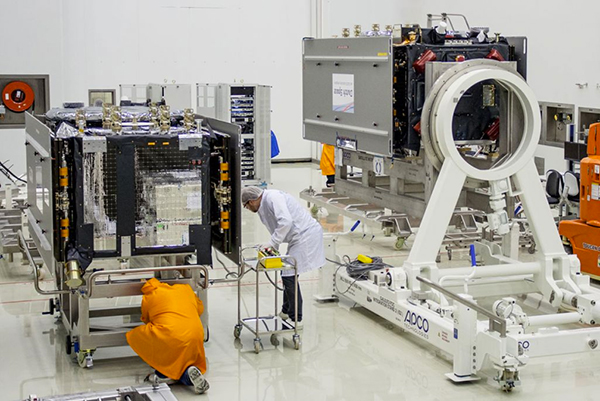
    Dorese and Milena rest side by side in  clean room S1A.
    Galileo Satellites in the Clean Room

    Live Webinar from the Esri International User Conference on July 17

    In a GPS World first, we’ll be producing a live Webinar from the Esri International User Conference next month on Thursday, July 17 @ 10 am Pacific Time in the exhibit hall at the San Diego Convention Center. Of course, the webinar will be focus on one of the hottest topics, high-precision GNSS on mobile devices; from iPads to Android tablets to smartphones.

    Tune in or join us live from the exhibit hall floor! Register here.

    Thanks, and see you next month.

    Follow me on Twitter at https://twitter.com/GPSGIS_Eric
  • New Signals, New Launches, and Faulty GPS Receivers

    New Signals, New Launches, and Faulty GPS Receivers

    There has been a lot of GNSS-related news in the past month, so I thought I’d do a quick review of the importance (and possibly unimportance), of news you may have heard about.

    L2C and L5 CNAV Messages Turned On

    On April 25, the U.S. Air Force announced it would start broadcasting CNAV (Civil Navigation) messages for L2C and L5. In the short term, it should have no impact on the behavior of your GNSS receiver.

    Just because some GPS satellites weren’t broadcasting CNAV on L2C and L5 doesn’t mean your receiver isn’t using L2C or L5. On the contrary, if your receiver was designed to handle L2C and L5, it’s likely already been using them. The CNAV is just the message being transmitted on the L2C and L5 carrier along with the code. If your receiver tracks L2C and L5, it’s likely already using the carrier (phase) observations. However, even then there are only a limited number of satellites broadcasting L2C and L5 carriers. Specifically, there are 11 satellites broadcasting L2C and four broadcasting L5, meaning that your receiver is roughly tracking one L5 satellite at any one time during the day and several satellites broadcasting L2C.

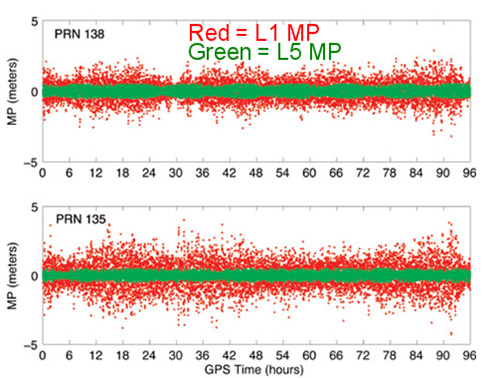
    The C/A code (NAV) message on L1 that your receiver already uses today is good enough. Your receiver doesn’t need the CNAV message on L2C or L5 to utilize the L2C or L5 carrier observations. That’s not to say there’s no benefit to CNAV on L2C and L5, but for RTK or post-processing, the value is largely in the carrier observations. In the future, when L2C and L5 are fully deployed (or near fully deployed), the L5 CNAV does have some distinct advantages, but that’s a few years down the road. To give you an idea of the benefit of L5 when there are enough GPS satellites broadcasting L5 , take a look at the following illustration published by Dr. Richard Langley from the University of New Brunswick comparing the reduction of code multipath on L1 and L5 of two WAAS GEO satellites.

    Reduction of code multipath from WAAS L1 and  L5 Richard B. Langley, Hyunho Rho
    Reduction of code multipath using L1 and L5 on WAAS GEO
    Richard B. Langley, Hyunho Rho

    For the  full text of the Langley/Rho article on L5 and WAAS that appeared in the May 2009 issue of GPS World magazine, click here.

    Second GPS IIF Satellite of 2014 Launched May 16

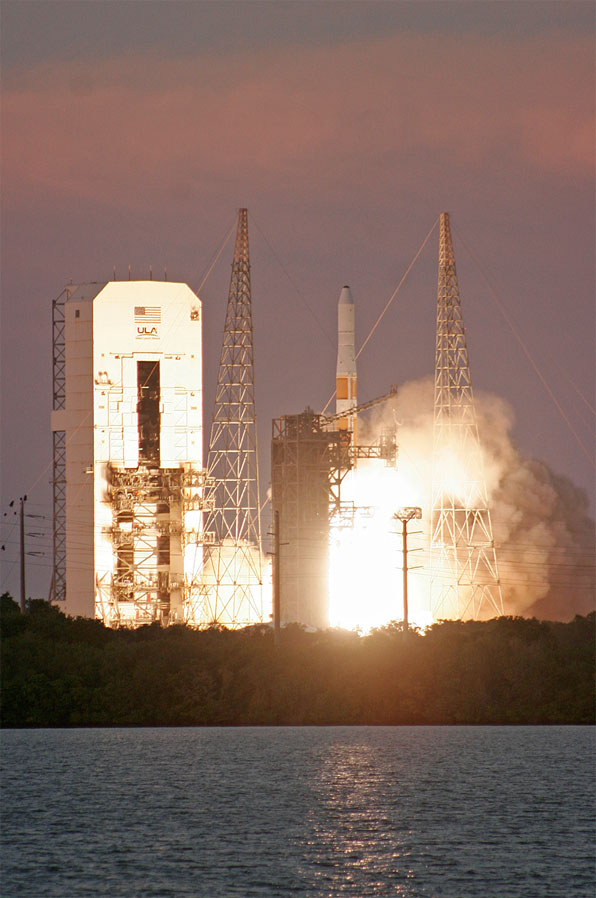
    On May 16, the second GPS satellite of 2014 was launched successfully from Cape Canaveral in Florida. It was the sixth model IIF GPS satellite, of which 12 are being built, before transitioning to the next-generation model GPS satellite named GPS III. It began transmitting on May 21, 2014, but is not yet set healthy.

    Photo credit: Spaceflight Now.
    Photo credit: Spaceflight Now.

    The GPS model IIF satellite broadcasts the legacy GPS signals as well as the new civilian L2C and L5 signals.

    Normally, a launched GPS satellite is set healthy (and automatically begin being used by your GPS receiver) within 30 days of launch, sometimes much sooner. However, the IIF GPS satellite launched in February of this year still hasn’t been set healthy, the reason reportedly being an extended navigation test reported here.

    A third GPS IIF satellite is scheduled for launch this year on July 31.

    During the post-launch interview last Friday, the Air Force stated that the remaining GPS IIF satellites (six) will be launched by the end of 2016. From previous conversations I’ve had with Air Force officials, they’ve stated that there could be an overlap between IIF and III satellite launches. In other words, the first GPS III satellite could be launched before all IIFs have been launched.

    Faulty GPS Receivers Blamed for GPS “Outage”

    The Civil GPS Service Interface Committee (CGSIC) announced that the U.S. government investigated outage reports from many GPS users recently and found that some GPS receivers are ignoring the health status broadcast by each GPS satellite.

    “Since March 15, 2014, the Air Force has been conducting functional checkout on a GPS satellite, designated Space Vehicle Number (SVN) 64. SVN-64 broadcasts a data message that clearly indicates SVN-64 is unusable for navigation. Nevertheless, the U.S. government has confirmed that certain GPS receivers are using data from SVN-64, in violation of GPS interface specifications, resulting in outages or corrupted, inaccurate position calculations.”

    CGSIC reports that the GPS continues to operate and is fully functional.

    In Australia, faulty GPS receivers on roughly 1,000 fleet vehicles caused an apparent GPS “outage” about a month ago.

    The U.S. Air Force GPS Operations Center reported that in mid-May tests, “PRN 30 [was] broadcasting almanac datasets that do not reflect constellation changes that occurred since it was last uploaded with navigation message data.  [. . . ] The utilization of these almanacs in a manner that regards the time of week, but neglects or mishandles the week number (effectively executing as if the current week number is the week number associated with these almanac parameters), will result in an increasing error in visibility determination and other almanac based estimations (elevation/azimuth, Doppler shift, SV clock offset from GPS time, etc) as the dataset’s actual week offset from the current week increases.”

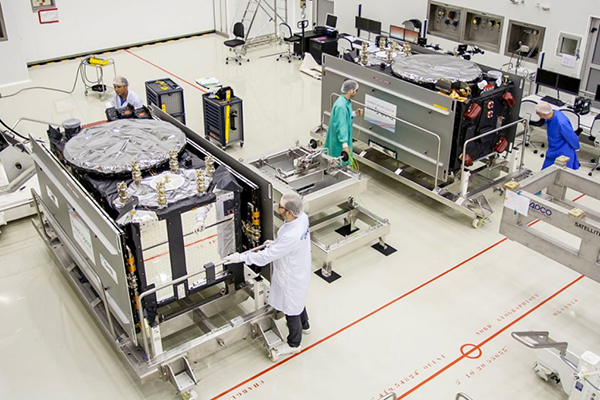
    First Two FOC Galileo Satellites Arrive in French Guiana for Launch Preparation

    The first two Fully Operational Capability (FOC) Galileo satellites arrived in the French Guiana in preparation for launch this summer. When launched into orbit, they will join four IOV (In-Orbit Validation) Galileo satellites launched in 2011 and 2012.

    The first FOC satellite launch may signal the beginning of Galileo “production” launches of one pair per quarter. Giuliano Gatti, Head of ESA’s Galileo Space Segment Procurement Office, stated that “A steady stream of satellites is foreseen, coming from OHB to ESTEC for acceptance testing and then on to French Guiana. Thanks to the preparatory work done with these pioneer satellites, future Galileos will be processed more rapidly.”

    OHB is the prime contractor for a total of 22 FOC Galileo satellites. Those are in addition to the four IOV Galileo satellites.

    The two Galileo satellites in the clean room.
    The two Galileo satellites in the clean room.

    Massive GLONASS System Failure

    On April 1, the entire GLONASS system was inoperable for about 11 hours. A second, partial failure involving eight GLONASS satellites occurred on April 14 and lasted for about 30 minutes. There were many reports of RTK receivers not operating properly, and some manufacturers instructed their users to “turn off” GLONASS tracking capability on their receivers.

    Subsequently, mathematical mistakes were blamed for the failures. The head of the Russian Space Agency, Oleg Ostapenko, stated that the problem would be fully resolved by mid-May and that there is almost no chance of a similar failure happening again.

    Russian Threatens to Disrupt GPS

    In response to U.S. sanctions and possibly related to last years’ U.S. refusal to grant Russia permission to locate GLONASS monitoring stations on U.S. soil, Russia has threatened to shut off certain stationary GPS receivers located in Russia.

    Some news media are reporting that such an action by Russia would have an effect on GPS.

    It would not.

    What they’re talking about is discontinuing operations of some or all IGS (International GNSS Service) GPS stations in Russia. Those stations have nothing to do with the operation of GPS. They are simply CORS (Continually Operating Reference Stations). If anything, it will hurt Russian scientists (and scientists from other countries) more than anyone else.

    Russian Rocket Launch Failure

    Last week, Russia suffered its fifth rocket launch crash in the past four years. Fortunately for the GNSS user community, the rocket was not carrying any GLONASS satellites.

    However, it raises serious concerns about the reliability of Russian rockets and launch procedures. Europe’s Galileo satellites are launched using Russian Soyuz rockets at Europe’s space port in French Guiana.

    Last July, three GLONASS satellites were lost when a Russian Proton-M rocket crashed soon after lift-off.

    Thanks, and see you next time.

    Follow me on Twitter at https://twitter.com/GPSGIS_Eric

  • Mobile Device Operating System Wars: Ver. 2.0

    It’s been two years since I wrote a column entitled Mobile Device Operating system wars: Android vs. iOS vs. Windows Mobile. After traveling and attending countless conferences and listening to a large number of mobile device users in the geospatial user community, I think it’s time to touch on this subject again, and what a crazy and confusing landscape it is. First of all, let’s frame the discussion in terms of the geospatial users, because that’s the soup we swim in.

    At the end of the day, we are driven by the geospatial software we use, so this limits the type of mobile device we can select from. For example, Esri’s ArcPad runs on Windows Mobile and Windows desktop. If that’s the software you want to use, then you can’t use an Android device, an iPad, or a Windows Phone device. In another example, AutoCAD 360 for mobile, which I used a few weeks ago in the field, runs only on Android and iOS devices, not on Windows Mobile devices.

    MobileOperatingSystems_2014

    Chart Source: The Wall Street Journal, Gartner

    While it appears Android is the dominant mobile operating system of the future, it depends on who you talk to. Right or wrong, some (maybe a lot of) enterprise organizations are scared of Android. They are scared because of one word: security, or more specifically, the perception of the lack of security. Android is open source, and it scares the heck out of enterprise IT (information technology) departments. It scares some to the point that they are shutting down projects that are proposing to deploy Android devices in the field. Is the fear justified? It’s probably more hyped up than it deserves, but IT folks are pretty conservative these days.

    Where does that leave the enterprise organizations? iOS or Windows?

    Some organizations are going with iOS, but the number of enterprise geospatial apps for iOS is very limited, and most of those that exist aren’t very powerful. They can’t even deal with datum transformations. That means the hardcore iOS enterprise users are left developing their own software, which some are doing. The other limitation of iOS is the hardware device selection. Since Apple doesn’t license iOS to anyone, you have the iPad and the iPhone and that’s about it. Not much selection.

    That leaves us where we started…Microsoft Windows.

    Dell Venue Tablet
    Dell Venue Tablet

    My gut tells me that Windows is making a comeback among geospatial users, even though Windows operating system market share is minuscule compared to Android and iOS on mobile devices. Part of the reason is a plethora of high-quality, Windows-based tablets and pads. Recently, I’ve had the chance to handle some Windows-based tablets such as Dell Venue tablet and Panasonic ToughPad. They are nice tablets for field use. Thank Apple for driving manufacturers to produce good quality tablets at a reasonable price. The other part of the reason, and the major driver, is security. IT departments simply trust the security features that Microsoft provides more than iOS and Android. In the age of security breaches such as the recent Heartbleed bug, the emphasis on computer security is at an all-time high.

    Panasonic ToughPad
    Panasonic ToughPad

    Security may be the catalyst that pushes Windows back into the forefront of operating systems for the enterprise geospatial user. That’s good news for geospatial software developers. Pressure has been mounting for geospatial software manufacturers to introduce Android- and iOS-compatible versions of their software. Now, with the security issue at the forefront and the availability of high-quality Windows-based tablets at reasonable prices, developers may have some breathing space.

    But wait: Which version of Windows?

    Windows Mobile? Windows Phone? Windows Embedded Handheld? Windows Desktop? Windows RT?

    They aren’t all the same, and they all don’t run the same software. For example, software built for Windows Mobile won’t run on Windows Phone or Windows Desktop.

    Microsoft’s mobile operating system strategy has been confusing at best. In past years, it’s been clear that mobile devices run Windows Mobile. It’s not so clear any longer. Microsoft discontinued mainstream support for Windows Mobile 6.1 and 6.5 in January 2013. It’s not as bad as it sounds because in the three years I’ve owned a Win Mobile 6.5 Pro device, an update was never issued. But what it does say is that Microsoft is done with it. No new devices will be designed with Windows Mobile 6.5. However, that’s not to say that Windows Mobile devices are going away. Microsoft just renamed it to Windows Embedded Handheld 6.5, which Microsoft says it will provide extended support for until January 2020. So, all is well, just a different name.

    Microsoft’s mobile strategy has turned off manufacturers, and it shows. Given that Microsoft has stopped supporting new devices running Windows Mobile since January 2013, how many devices have you seen introduced since then that support Windows Embedded Handheld? The answer is, not that many, and the ones that do support it are handhelds selling at a premium price, upwards of $1,500 or more. That’s tough to justify when you can buy a tablet or pad for equal or less. And…..the tablets and pads are running full Windows, not the mobile, handheld or phone version so they’re able to run a greater number of off-the-shelf software programs.

    Given the above, I feel the tide is turning, at least for the geospatial user community. Windows is going to make a comeback and be the go-to operating system for mobile devices, at least for tablet and pad devices. Don’t misunderstand me though: Android and iOS will still dominate the market share numbers by far, but that’s the consumer user community, not the enterprise geospatial user community. Windows Mobile devices will still have a niche place in the geospatial user community, but I have to wonder if software makers will continue to support that environment if the sales aren’t significant enough.

    Sidebar: For those of you who feel I’ve errantly left out the discussion about ruggedized devices vs. non-ruggedized or semi-rugged consumer devices, I’ll say this. Whenever I’ve encountered an enterprise that has deployed consumer mobile devices in an industrial environment (such as iPad), it invariably answers the question about device reliability with “We’ve had very few problems.” The reality seems to be that enterprise users are taking special care of these devices in the field. Program managers are saying, “Even if each person breaks one per year, it’s still half the price of industrial devices.” The reality is that small percentages are failing.

    However, one can’t ignore the outdoor usability issue. The displays on some consumer devices don’t handle sunlight very well, and if the display isn’t sunlight readable, the device is severely limited in the field. The same can be said for wide temperature ranges. Both extreme heat and extreme cold can torture a mobile device that isn’t built to withstand that environment. Test before you deploy. Heat it up in your oven, cool it down in your freezer, and see how it behaves.

    There’s certainly a niche market for ruggedized mobile devices, but the significant price difference between those devices and consumer devices are making enterprise organizations think twice about where to spend their money. Lastly, many consumer devices are trending towards semi-rugged as manufacturers are discovering this is one way to differentiate them from the ultra-price-competitive mobile device market.

    Thanks, and see you next time.

    Follow me on Twitter at https://twitter.com/GPSGIS_Eric

  • RTK on a Smartphone Running AutoCAD: I Did It Last Week

    Last week was spring break (for high school and college) for my kids. We decided to drive to San Francisco and the surrounding area to do a little sightseeing. It’s a beautiful place. This is a view from our 3rd floor room in the hotel, looking over the bay.

    SF_Panorama


    Of course, while traveling, I usually manage to work in some GNSS activities.

    The first stop was Autodesk, the makers of AutoCAD and other engineering, design and visualization software in downtown San Francisco. AutoCAD occupies 100,000+ square feet at One Market St. in downtown San Francisco and another 20,000+ square feet at Pier 9 right on the Bay. How anyone gets work done with an office on a San Francisco Pier is beyond me. It’s buzzing with people and activity, including a shuttle to the famous Alcatraz Prison, which we enjoyed.

    The Autodesk meeting is deserving of an article in itself, but I’ll keep it short with bullet points for the purposes of this article:

    • AutoCAD 2014 includes a datum/coordinate system library for mapping/surveying users. This is new in AutoCAD.
    • Infraworks (introduced last year) was built from the ground up with a new workflow for engineers and planners (and surveyors). Most people have never heard of it. It can do things that AutoCAD can’t, such as managing surveying data for large-scale projects. Think BIM (Building Information Modeling).
    • Model Builder (just introduced), is a tool to build quick and dirty 3D visualizations using data from Autodesk’s cloud service.
    • Autodesk 123. This is a really cool free app you can use to create 3D models using your own images. The images can come from smartphone pictures or images you already have. It’s a really cool app.
    20140325_153149
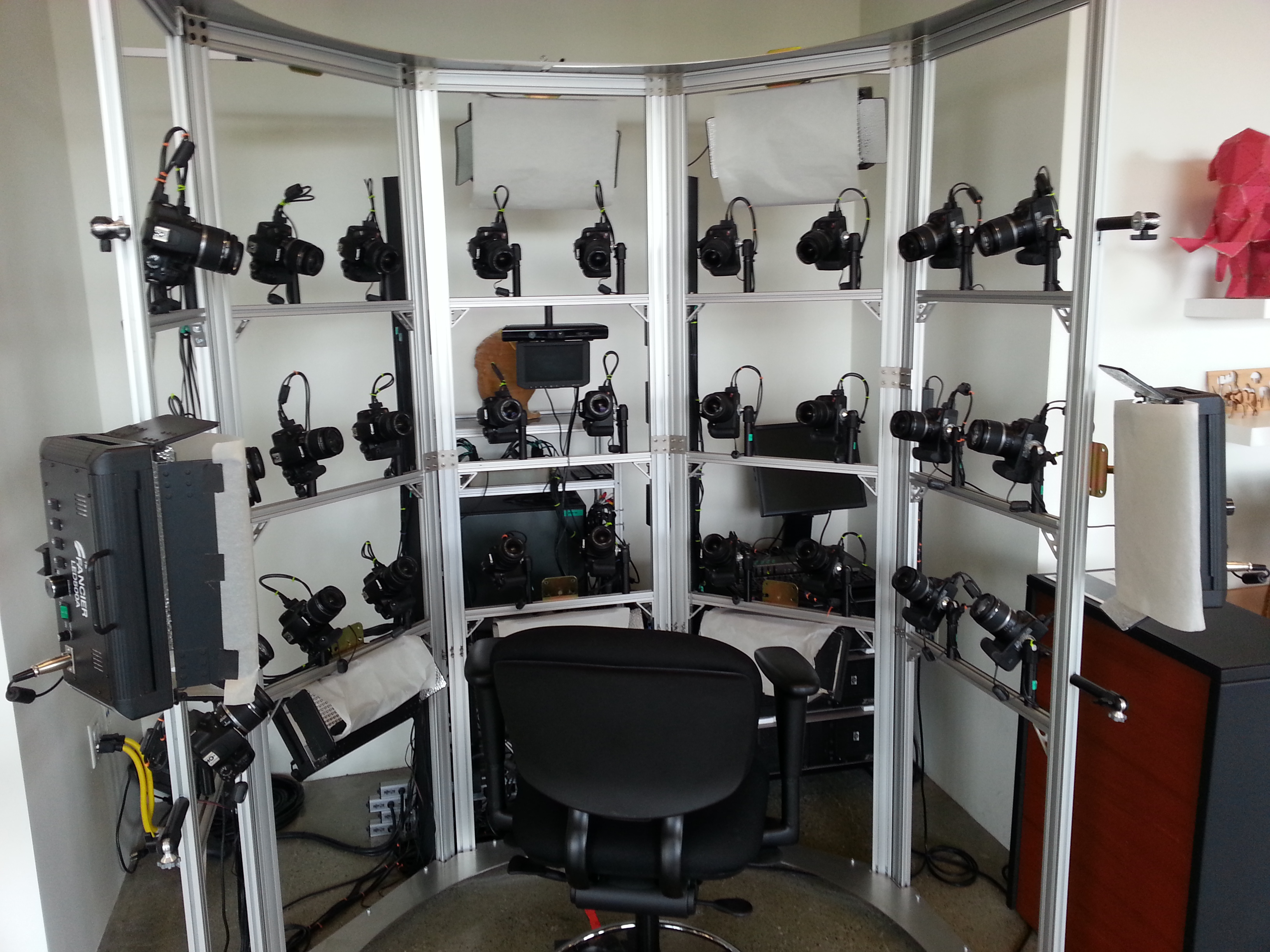
    Photogrammetry Chair in the Autodesk Gallery at One Market St. in downtown San Francisco.
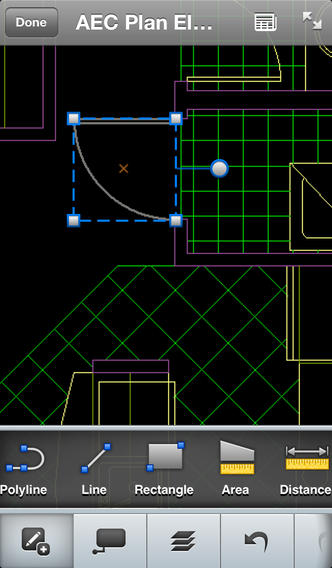
    • AutoCAD 360 (formerly AutoCAD WS). First of all, any Autodesk product with 360 in the name is a cloud app, whether it’s mobile or desktop. I’ll focus on the mobile apps. There are two AutoCAD 360 mobile apps: one for Android and one for iOS. The mobile apps are free tools that allow you to take AutoCAD drawings in the field. There are also Pro versions available on a subscription basis.
    Screenshot of AutoCAD 360 on iPad/iPhone
    Screenshot of AutoCAD 360 on the Apple iPad.

    Last week, I had a chance to use AutoCAD 360 in the field with RTK. It was a last-minute exercise that I hadn’t planned on, so my expectations were set so that even if I couldn’t get it to work, at least it would be a solid learning experience.

    The goal was to receive 1-2 cm RTK GNSS positions on an Android smartphone running AutoCAD 360 using a public (free) RTK base station. I knew I could access the free RTK base via PBO real-time streaming because I’ve done that before. However, I didn’t know, or have experience in two areas:

    • Accessing RTK base data via NTRIP on an Android device.
    • The ability of AutoCAD 360 mobile app to consume GPS data.

    For the Android device, we used a Samsung Galaxy Note. It’s a smartphone, but also a tablet with a 5.7-inch color touchscreen.

    Samsung Galaxy Note with a 5.7" color touchscreen
    Samsung Galaxy Note with a 5.7-inch color touchscreen.

    The first challenge was the Android utility software needed to access the RTK base. NTRIP (Networked Transport of RTCM via Internet Protocol). As I’ve written in previous articles, there are lots of free RTK base stations (330+) in California. To access them, all you need is internet connectivity and an NTRIP program to manage the connection to the RTK base. For Windows and Windows Mobile, there are several free NTRIP software programs. For Android, it’s limited (but growing). I found a free Android NTRIP utility on the Google Play store. It’s very easy to install and set up. If you have your RTK base credentials (IP address, port#, login, password), if you have a Bluetooth RTK receiver,  you can install the program and be running RTK within a few minutes.

    Android NTRIP Utility (Lefebure Design)
    Android NTRIP Utility (Lefebure Design)

    Once I entered the RTK login credentials, I was presented with a list of RTK bases. The list of PBO RTK bases are all single-baseline RTK bases (not networked) so I needed to select the closest one to the project site. In this case, it was P178 (see the screen shot above). It was about five miles from the project site. At this point, I can see the RTK base data streaming on the Samsung Note tablet. I didn’t mention before, but I had already Bluetoothed the Samsung to a small RTK GNSS receiver. Once the RTK base data starts streaming, the RTK GNSS receiver goes into FLOAT mode and heading for FIX (1-2cm precision).

    At that point, we (I wasn’t operating AutoCAD 360 on the Samsung) started AutoCAD 360 on the Samsung Note tablet and loaded a drawing that we’d planned to use. Following are a couple of screen shots from our exercise.

    AutoCAD3603
    AutoCAD 360 running on a Samsung Note Tablet/smartphone
    AutoCAD3601
    AutoCAD 360 running on a Samsung Note Tablet/smartphone.

    It took a minute to figure out how to”turn on” GPS in AutoCAD 360 (we were all newbies), but once we did, our position showed up on the drawing where we expected it. By this time, we were getting an RTK FIX position from the RTK GNSS receiver. We were getting 1-2 cm precision in a native AutoCAD drawing, in real-time, in the field, on an Android smartphone. I was impressed.

    We were ready to start our accuracy testing. Our accuracy testing consisted of two parts:

    1. To test precision, take RTK shots on two points and measure the distance between the two with a tape measure. We did this several times.

    The results were as follows:

    • P1 – P2. Measured distance: 20′ 9.75″. RTK distance: 20′ 9.0″.
    • P2 – P3. Measured distance: 21′ 11.5″. RTK distance: 21′ 11.75″
    • P1, P2, P3 were about 12 feet east of a 18-20 foot high concrete wall.
    • B1-1 – B1-2. Measured distance: 6′ 3.0″. RTK distance: 6′ 2.25″.
    • B1-1 and B1-2 were 15-18 feet from the 18-20 foot high concrete wall.
    • Lt-1 – Lt-2. Measured distance: 12′ 2.0″. RTK distance: 12′ 3.0″
    • Lt-1 and Lt-2 were on top of a platform with no substantial obstructions.

    Lastly, we took a shot underneath a platform with greater than 50% of the skyview obstructed. It didn’t hold RTK in that environment and I didn’t expect it to. The precision was 5 feet (DGPS).

    2. The second test was to test accuracy by taking an RTK shot on a survey marker that had published State Plane Coordinates in NAD83/2007 epoch 2007.0

    After recording an RTK FIX shot on the marker (albeit I was holding the antenna so I expected a little slop), we compared our result to the survey marker coordinates. Not good…3.0 feet difference.

    My first suspicion was that the RTK base was referenced to ITRF, so there would be significant difference between the two coordinate values. No dice. I adjusted the RTK GNSS coordinate to NAD83/2007 (2007.0) assuming it was referenced to ITRF08. The adjusted coordinate was further than the original (6.95 feet). That wasn’t the problem.

    My second thought was to double-check what the PBO folks used for a reference position for there RTK bases. They confirmed ITRF08 current epoch. However, after talking to a few people familiar with PBO sites (RTK Network operator and Mark Silver), they suggested to run an OPUS solution on the PBO RTK base and compare it to the reference coordinate being used by the PBO RTK base. Sure enough, there’s a 6.40 feet difference between the 24 hour OPUS ITRF08 coordinate and the ITRF08 reference coordinate being used by the P178 RTK base.

    It still doesn’t reconcile the difference we saw between the RTK GNSS coordinate and the survey mark, but I’m still trying to confirm which epoch date the PBO RTK base is using. In California, tectonic plate movement is significant. In that area, the ground is moving 1.7 cm north and 3.4 cm west each year, so the epoch date of the coordinate is significant, especially if the epoch date is 1997.0 or 2002.0. However, that doesn’t prevent you from using RTK Bases like P178 and “localizing” to NAD83/2007 or whichever datum your data is referenced to.

    Thanks, and see you next time.

    Follow me on Twitter at https://twitter.com/GPSGIS_Eric