Tag: Esri ArcGIS

  • Esri, DigitalGlobe partner to expand World Imagery Map

    DigitalGlobe Inc., Earth imagery and information company, today announced an agreement to make more current satellite imagery of the entire world available to users of Esri’s ArcGIS product family.

    The new long-term partnership with Esri will enhance the World Imagery Map and give ArcGIS Online and ArcGIS Data Appliance users access to current and complete high-resolution satellite imagery mosaics. The World Imagery Map is foundational to Esri’s vision of connecting people with maps, data and apps through geographic information systems (GIS).

    The multi-year subscription features DigitalGlobe’s Basemap +Vivid and Basemap +Metro products, which will be refreshed with the latest content throughout the contract term. New imagery will start flowing into the World Imagery Map later this year.

    In addition, the two companies will work together over the coming months to explore new ways to connect Esri’s ArcGIS Online and marketplace to DigitalGlobe’s Geospatial Big Data platform, GBDX, allowing users to perform advanced analytics at scale against a 15-year time-lapse image library to solve complex problems.

    “Esri’s global user base can now create even more powerful and effective products that enable decisions to be made with confidence and improve our collective understanding of the world,” said Jeffrey R. Tarr, DigitalGlobe president and chief executive officer.

    “We have enjoyed collaborating with DigitalGlobe and look forward to a long-term partnership,” said Jack Dangermond, Esri president and founder. “Their superior quality imagery will benefit Esri and our users.”

  • LandWorks introduces spatial alignment tool at Esri UC

    LandWorks Inc., developer of land management software, has advanced its integration with Esri technology by creating a new Spatial Alignment Tool that runs as an ArcGIS Desktop extension and automates polygon editing tasks for land mapping professionals and land asset managers.

    LandWorks will demonstrate the product at booth #2404 at the 2016 Esri User Conference, June 27-July 1, at the San Diego Convention Center.

    The new software can be used in any country and in any industry that maps land boundary polygons using Esri’s ArcGIS Platform.

    Previously, when a more accurate version of land grid (Public Land Survey sections, Texas abstracts, etc.) or tax parcel data was made available by a data vendor, any polygons in an updated area of the grid had to be manually realigned to snap to the more accurate grid. With LandWorks’ Spatial Alignment Tool, manual realignment is no longer necessary.

    “Land grid and parcel data providers typically deliver quarterly updates to customers. The labor intensive task of realigning mapped land polygons to the updated version has been a long-term challenge that many companies choose to forgo rather than implementing the more accurate version of the land grid or parcel data,” said Jerry Bramwell, President and CEO of LandWorks. “With our new Spatial Alignment Tool, what once required months to complete now takes hours, resulting in more accurate land agreement polygon boundaries without the high cost of manually snapping them to the updated grid or parcel data.”


    The Spatial Alignment Tool works with any vector land grid or parcel data. Users need an original source land/parcel grid and an updated source land/parcel grid. The tool detects vertex movements between the original land/parcel grid and the corresponding updated layers, then automatically aligns the selected polygons based on those detected changes.

    Users can easily adjust the tolerance and alignment settings if not satisfied with the results. Once the alignment process is complete, users can review the aligned polygons before committing them to the enterprise geodatabase.

    In addition to easily maintaining the accuracy of GIS data for better analysis, the new software also saves companies significant time and money if they choose to switch land grid or parcel data suppliers for quality, supply or budgetary reasons.

    “Traditionally, companies have been hesitant to change land grid or parcel data vendors because of the seemingly Herculean task of transferring the polygons from one land grid or parcel layer to another,” said Bramwell. “Automating this task using the Spatial Alignment Tool now makes switching suppliers a viable option.”

  • New Esri App Enables Users to Create, Deploy and Analyze Surveys

    A new app from Esri Labs is designed for developing and deploying surveys for fieldworkers using mobile devices. With Survey123 for ArcGIS, users can create form-based surveys, including polls and questionnaires, and share them with employees or volunteers. They can use the surveys to collect data in the field, even when offline. Later, they can visualize and analyze that data using Esri ArcGIS.

    Survey123 for ArcGIS provides a complete workflow for creating, sharing, and analyzing smart-form-based surveys. Users can

    • create intuitive, form-based surveys and publish them.
    • share the surveys with fieldworkers, who will use them to capture data, online or offline.
    • visualize survey data on a map and analyze the data to better understand conditions in the field and detect patterns.
  • New Esri App Enables Users to Create, Deploy and Analyze Surveys

    A new app from Esri Labs is designed for developing and deploying surveys for fieldworkers using mobile devices. With Survey123 for ArcGIS, users can create form-based surveys, including polls and questionnaires, and share them with employees or volunteers. They can use the surveys to collect data in the field, even when offline. Later, they can visualize and analyze that data using Esri ArcGIS.

    Survey123 for ArcGIS provides a complete workflow for creating, sharing, and analyzing smart-form-based surveys. Users can

    • create intuitive, form-based surveys and publish them.
    • share the surveys with fieldworkers, who will use them to capture data, online or offline.
    • visualize survey data on a map and analyze the data to better understand conditions in the field and detect patterns.
  • FlightAware Partners with Esri on Flight Tracking and Status Data Mapping

    flightaware-partner-extensive-flight-tracking-status-data-mapping-initiative-W

    Esri and FlightAware have partnered to combine the power of a flight tracking and status company with the ArcGIS mapping platform. The partnership features the ability to view and analyze large amounts of accurate, live-aviation data in one powerful spatial system.

    FlightAware aggregates live flight tracking data from more than 50 government air traffic control authorities, satellite data link partners such as Garmin and ARINCDirect, and FlightAware’s own in-house ADS-B receiver network, consisting of more than 3,400 receivers in more than 100 countries.

    “Esri has the tools and expertise to visualize data in a proven GIS environment,” FlightAware business development manager Max Tribolet said. “FlightAware data is the perfect addition. We’re the largest flight tracking company in the world, based on how many disparate data feeds we have coming into our system. So it’s pretty powerful when you pull our data into GIS.”

    “This is a really good way to provide an additional option to our existing and potential customers, who might not have an easy way to consume larger volumes of flight tracking data,” Tribolet said. “A stand-alone app like Esri’s ArcGIS is adept at handling large quantities of data and is able to visualize it. This relationship with Esri allows FlightAware to focus on what we do best: constantly adding and aggregating quality flight tracking data and providing it to the industry.”

    Airports and agencies have started exploring opportunities to use FlightAware data in GIS to improve proactive noise monitoring and airspace design as well as monitoring airspace congestion in real time. FlightAware visualizes live and historic data — such as altitude, longitude, latitude, ground speed, and estimated and actual schedule times—in 2D, 3D, and even 4D maps.

    “The ability to fuse FlightAware data within the ArcGIS platform unlocks a host of new and innovative capabilities with regard to visualization, analysis and collaboration,” Esri aviation business development lead Stephen Willer said. “That results in a higher level of operational intelligence. We’re excited to bring this to our users across the globe. Real-time information access like this is essential not only today but also to our future air traffic systems.”

  • Esri Field Notes App Answers Questions with Geography

    mobile-app-puts-power-of-place-in-peoples-hands-lg

    Smartphone users now have access to Field Notes—Earth, a new mobile app from Esri that employs the power of geography to answer questions about locations throughout the world. Built using Esri’s AppStudio for ArcGIS, the free app allows anyone to discover interesting facts about population, nature and physical landscapes for any location on Earth.

    “Field Notes—Earth leverages the tremendous capabilities of geographic information to describe the world in detail,” said Esri president, Jack Dangermond. “Tools like these update and transform our understanding and expectations in ways that help us be wiser citizens of the planet.”

    With an intuitive design available on Android and iOS devices, the app gives users the option to discover answers to questions about their hometown, current residence, or any place of interest. It lets them compare these findings to an additional location.

    After selecting an initial place via current location, search, or by dropping a pin on a map, the app reveals geographic insights for three categories — Natural, Physicaland People. Sample questions include:

    • How crowded is it in this location?
    • How close am I to a recent earthquake area?
    • What is the predicted 2050 change in average temperature?

    “Whether you are relocating, are an educator looking for a new teaching resource, or just curious about the world around you, the app reveals insights into the complexity of humanity’s relationship with Earth for everyone to enjoy,” said Sean Breyer, ArcGIS content program manager at Esri.

    In addition to exploring 18 questions, users can click on any answer for more details and to learn how the selected locations relate to the rest of the world’s landscape and populations. The app reveals, for example, that the majority of people live in very hot climates and more than 40 percent of the Earth’s soil is poor for most crops.

    Field Notes—Earth uses maps from Esri’s Living Atlas of the World, including the World Ecological Land Units map that shows the Earth’s complex ecosystems; the new World Seafloor Geomorphology map that reveals the complex role oceans play in Earth systems; and the World Population Estimate map that shows where people live.

    Esri’s Content Team created the app using AppStudio for ArcGIS, which lets you build an app once and have it automatically ready for Android, iOS, Windows, OS X, and Linux.

    The app is available for free download in the Apple App Store and Google Play.

  • Frozen Assets: GeoDecisions Platform Tracks Icebergs

    Frozen Assets: GeoDecisions Platform Tracks Icebergs

    Drifting tabular icebergs viewed from the Amundsen. (Photo courtesy of Greg McCullough, University of Manitoba)
    Drifting tabular icebergs viewed from the Amundsen. (Photo courtesy of Greg McCullough, University of Manitoba)

    A Canadian expedition team used GeoDecisions’ GeoILS platform to help track icebergs during a voyage to better understand how icebergs drift. An intelligent location server using the Esri ArcGIS platform, GeoILS enables users to monitor and locate assets and facilitate quick and coordinated responses.

    GeoDecisions, an information technology company specializing in geospatial solutions, partnered with Solara Remote Data Delivery Incorporated, Canada’s Carleton University and Esri during the project.

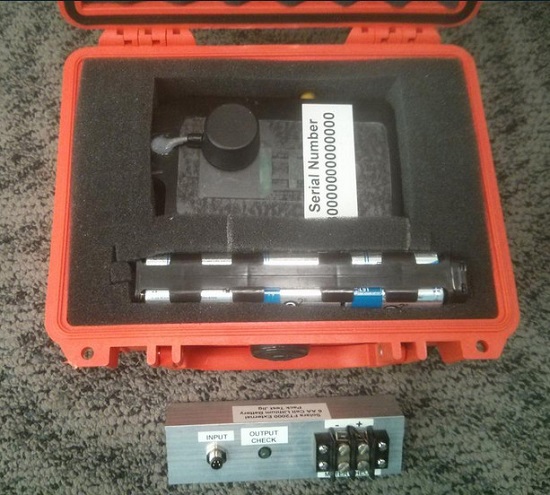
    The FT2000IB Solara tracker. (Photo by Tom Tessier)
    The FT2000IB Solara tracker. (Photo by Tom Tessier)

    Led by University of Manitoba Scientist David Barber, the crew of Canadian Coast Guard icebreaker Amundsen sailed off the coast of Newfoundland and Labrador to research ice hazard mitigation, the effects of climate change, and polar region technology requirements. GeoILS location intelligence helped crew members visualize, analyze, and leverage project-pertinent data.

    “During the expedition, researchers and scientists used GeoILS to assess drifting through sensor monitors attached to the icebergs,” said Brian Smith, vice president of commercial solutions with GeoDecisions. “In addition to reporting and notifications, GeoILS provided the project team with maps that were tailored by selecting desired iceberg information and the geographic area of interest based on user-defined criteria.”

    GeoDecisions’ data portal was used with Iridium Solara tracking devices during the iceberg research project. Two icebergs were outfitted with FT2000IB Solara trackers, explained Derek Mueller, assistant professor and physical geography program supervisor with Carleton University.

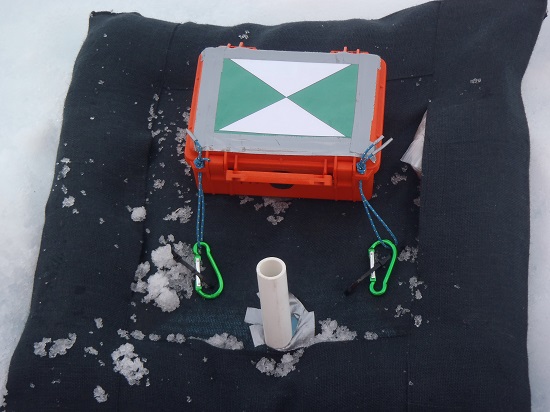
    THE GROUND control point and beacon. (Photo by Derek Mueller)
    THE GROUND control point and beacon. (Photo by Derek Mueller)

    For each iceberg, two beacons were attached for redundancy and to determine the iceberg’s rotation. Holes were drilled and stakes inserted, then GeoDecisions Platform Tracks Icebergs the trackers attached to the stakes.

    The trackers were also used as ground control points for photogrammetry, specifically the structure from motion ranging imaging technique.

    “GeoILS and the satellite tracking beacons worked very well during this project,” Mueller said. “Thanks to our partners’ efforts, we now have a great new suite of tools for examining our data.”

    “We are excited to provide tools to scientists who are gaining critical insights into the behavior of icebergs and global climate change,” said Tom Tessier, president of Solara Remote Data Delivery Incorporated.

    The last tracker stopped transmitting on June 13. “The others ended earlier, likely because the iceberg rolled or broke up,” Mueller said.

    The data will eventually be made public on the Polar Data Catalogue.

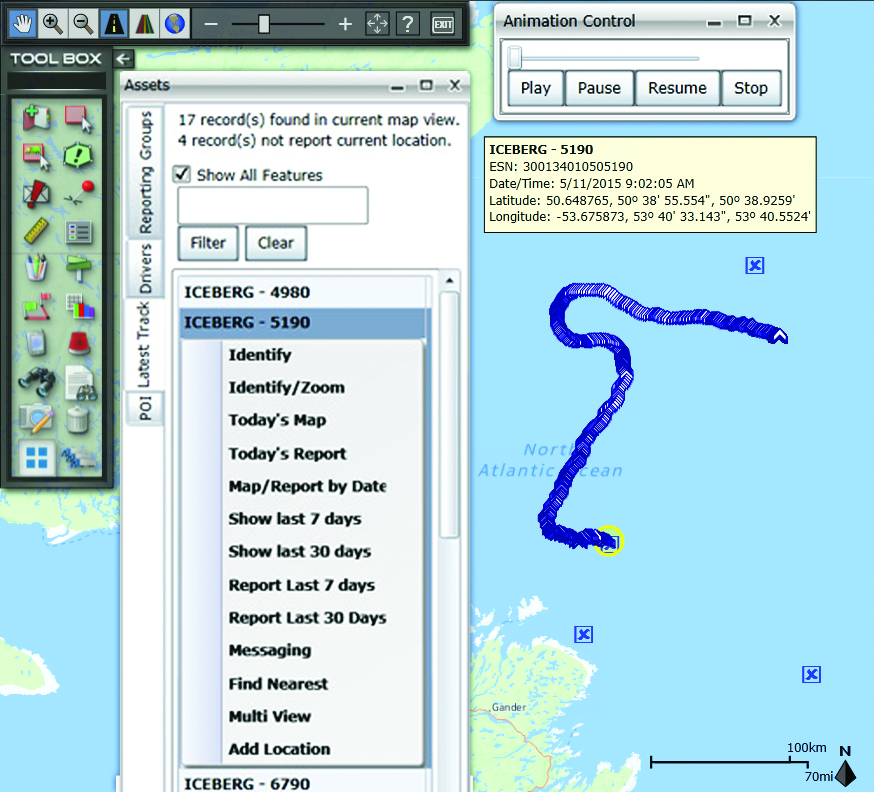
    A representative snapshot of GeoILS’ features and range of functionality used during the Canadian iceberg expedition.
    A representative snapshot of GeoILS’ features and range of functionality used during the Canadian iceberg expedition.
  • Esri and Leica Geosystems Combine for Mobile Data Collection

    The Leica Geosystems ZenoCollector2 comes with Esri Collector for ArcGIS.
    The Leica Geosystems ZenoCollector2 comes with Esri Collector for ArcGIS.

    Esri Collector for ArcGIS, a configurable mobile app for collecting and editing data in the field, has combined with the Zeno 20, Leica Geosystems’ ultra-rugged Android-based professional-grade handheld, in a new solution called ZenoCollector. ZenoCollector uses Collector for ArcGIS as its main user interface and comes bundled with an ArcGIS Online organizational subscription for one year.

    “Esri and Leica Geosystems recognize that enterprises may have particular field data collection challenges that smartphones can’t ideally meet,” said Esri president Jack Dangermond. “We’re excited to combine Collector for ArcGIS with Leica Geosystems’ industry-standard surveying units to create a more rugged and accurate solution for the more exacting needs of organizations.”

    ArcGIS Online connects ZenoCollector to the ArcGIS platform, automatically syncing field changes to enterprise information and giving everyone access to the latest data gathered in the field. Collector for ArcGIS also supports offline data collection. Any updates will be synchronized with the map once the user is reconnected.

    “We’re excited to raise mobile data collection solutions to the next level of precision and interoperability through rigorous connectivity between our survey-grade Leica Zeno series and Esri’s GIS solutions,” said Hexagon Geosystems President Juergen Dold. “This industry collaboration between Leica Geosystems and Esri is another joint commitment to make it easier for professionals around the world to capture, manage, and share their data, regardless if they’re in the office or the field, without sacrificing precision or interoperability.”

    Although Collector for ArcGIS is most often used on smartphones, field crews may need higher precision that only a dedicated survey device can deliver. ZenoCollector contains a professional-grade GNSS receiver that provides significantly higher position accuracies than GPS receivers on smartphones and other handheld GIS devices on the market.

    Leica’s Zeno series devices are also waterproof, even with the latch open, suiting the requirements of organizations operating in wet environments that would stress the tolerances of consumer-grade mobile devices.

    The announcement was made at the Esri User Conference, being held this week in San Diego.


  • Trimble Unity Software for Water Utilities Adds Support for Esri ArcGIS Online

    Trimble has introduced the latest version of its smart water mapping and work management cloud software — Trimble Unity version 2.0. The version adds new capabilities to support complex water, wastewater and stormwater industry asset maintenance planning and work execution workflows, support for Bring Your Own Device (BYOD) GNSS mapping receivers for smart devices and cloud-based single sign-on integration with Esri ArcGIS Online.

    Trimble Unity version 2.0 features advanced asset maintenance capabilities that allow utility customers to quickly search and group various types of utility assets, including meters, pipelines, valves and hydrants, into prioritized collections of work that can be easily assigned to crews for completion. The new features enable utilities to reduce the time and cost associated with water asset repair and installation work.

    Version 2.0 adds support for the latest Trimble and Spectra Precision BYOD GNSS mapping receivers to provide customers with new options for mapping and locating utility assets and keeping their GIS up-to-date and accurate using iOS, Android or Windows mobile handhelds, smart phones and tablets. Utility mobile workers can now connect their mobile devices via Bluetooth technology to the Trimble R1 GNSS receiver, a BYOD GNSS receiver with sub-meter accuracy, or the Spectra Precision MobileMapper 300 receiver that supports up to centimeter-level accuracy.

    In addition, Trimble Unity version 2.0 leverages the Esri ArcGIS platform across the product. It provides support for Esri Web map technology and adds single sign-on functionality that enables licensed Esri ArcGIS Online customers to use their Esri login credentials to sign-in and use the full capabilities of their Trimble Unity version 2.0 software.

    “Water utility workers in the field have a wide variety of products they use on a daily basis, so we’ve designed Trimble Unity version 2.0 to be compatible with a broad range of devices—including Trimble handhelds and iOS, Android and Windows smartphones and tablets. The new version allows customers to use their mobile device of choice with a robust software solution for asset maintenance workflows that supports high-accuracy mapping and location. The addition of the Esri ArcGIS Web map and single sign-on integration also enables customers using Esri GIS to leverage their GIS investment and easily deploy Trimble Unity throughout their organization,” said Rami Naber, product manager for Trimble Water. 

    Trimble Unity Software

    Trimble Unity offers a unified cloud-based and mobile collaboration platform for smart water mapping and work management. The software is designed to automate a variety of industry workflows through individual “apps” offered within the software suite, enabling utilities to deploy smart meters, assess the condition of assets, repair leaks and reduce non-revenue water (NRW), and locate and map critical infrastructure using Trimble high-accuracy GNSS mapping technologies. The software can also assist utilities in reducing spills and environmental damage, extending the life of aging assets and enabling improve worker safety and productivity.

    Trimble R1 GNSS Receiver

    The Trimble R1 GNSS receiver is a rugged, pocket-sized GNSS receiver that provides sub-meter precision to users of any Bluetooth connected mobile device, including iOS, Android and Windows mobile smartphones, tablets, or more traditional integrated data collection tools such as a Trimble handheld computer. The R1 GNSS receiver supports multiple GNSS constellations, including GPS, GLONASS, Galileo, QZSS and BeiDou, to provide a truly global solution. The R1 GNSS receiver includes the ability to utilize Satellite Based Augmentation Services (SBAS), Trimble ViewPoint RTX or, Virtual Reference Station (VRS) correction sources to suit the location and business requirements.

    Spectra Precision MobileMapper 300

    The Spectra Precision MobileMapper 300 GNSS receiver is controlled with a wide variety of Android smartphones, tablets or notebook computers and allows users to collect high-accuracy location information, which is significantly more accurate than the device’s internal GPS. The MobileMapper 300 is available in three levels of precision, so users can determine the best value for their project requirement. A full-precision model is available that uses Real-Time Kinematic (RTK) or Virtual Reference Station (VRS) technology to achieve centimeter positioning in 3D. This is a powerful solution for mapping gravity-networks such as storm and wastewater systems.

  • Art Kalinski Reports from GEOINT 2015

    GEOINT-2015

    Editor’s Note:This week, Geointelligence Insider’s Art Kalinski reports from GEOINT 2015, being held in Washington, D.C., June 22-25.

    GEOINT 2015 is not your daddy’s geospatial conference. If there is a common theme to this convention, it’s the problem of too much data and not enough analysts, so there are many exhibitors addressing the issue with automated systems that merge the “man and machine,” taking advantage of the best capabilities of each.

    Introduction

     NGA Director Robert Cardillo on the Agency’s Strategy

    NGA Director Robert Cardillo discusses the agency’s new strategy at GEOINT 2015. Cardillo became the sixth director of the National Geospatial-Intelligence Agency in October 2014.

    A Demonstration of Esri’s ArcGIS Full Motion Video Add-In

    Geointelligence Insider’s Art Kalinski talks with Craig Cleveland, Esri solution engineer, about the ability to geo-register full motion video inside an ArcMap.

    Thad Allen Discusses eLoran at GEOINT 2015

    In this interview Admiral Thad Allen, former commandant of the U.S. Coast Guard, discusses PNT alternatives to GPS for navigation, including eLoran and the activation June 19 of a signal on an eLoran tower in preparation for a timing signal trial.

    Allan is an executive vice president at Booz Allen Hamilton, and a leader in the firm’s Departments of Justice and Homeland Security business in the civil market. In 2010, President Obama selected him to serve as the National Incident Commander for the unified response to the Deepwater Horizon oil spill in the Gulf of Mexico.

    Geoweb 3D Demonstration at GEOINT 2015

    Vincent Autieri, vice president and CEO of Geoweb 3D, explains the company’s 3D mapping engine.

    CACI Predictive Tool Using Social Media Discussed at GEOINT 2015

    Andrew Doyle, engineering senior manager of CACI, describes the EMBERS system, which uses social media to predict socially significant events such as protests or disease outbreaks.

  • Esri, NT Concepts Help Transition Google Earth Enterprise Customers

    In coordination with Google, Esri is providing replacement software and training to customers and partners using Google’s enterprise geospatial technology.

    NT Concepts, an experienced Google integrator, is announcing a new partnership with Esri to help customers that have implemented Google Earth Enterprise and Google Maps Engine make a smooth transition to the ArcGIS platform with minimal interruptions to their operations.

    Esri is a longtime provider of geospatial solutions to the defense and intelligence communities and has developed more than 40 specialized applications for their use.

    “NT Concepts has mapped the functionality of Google to Esri’s ArcGIS platform. The current users of Google’s enterprise geospatial products will find the Esri platform to be a key option for meeting their geospatial requirements,” said Chris Powell, chief technology officer at NT Concepts.

    For Google Earth customers that would like to transition to the ArcGIS platform, Esri is offering the new ArcGIS 10.3.1 for Server and related client/app technology. In addition to other advanced functionality, these will allow users to publish 2D data, 3D buildings, and KML files throughout the enterprise.

    “Esri is delighted to have NT Concepts as our trusted partner for this important work,” said Patty Mims, Esri director for intelligence. “The company provides key skills needed to work with both Esri and Google technology.”

  • Remote Geosystems Releases Full-Motion Video Tools

    Remote GeoSystems, Inc., an Esri Emerging Business Partner, has released two new Esri-based Geospatial Full Motion Video (FMV) Inspection & Reporting Solutions: LineVision Esri ArcGIS and LineVision Esri ArcMap Add-In.

    LineVision Esri ArcGIS and LineVision Esri ArcMap Add-In are open and versatile geospatial video analysis and inspection data reporting tools for the Esri platform. Both LineVision Esri versions will accept properly formatted video from a variety of consumer GPS video cameras, UAV/UAS platforms, gyro-stabilized camera systems and specialized geospatial DVRs; including the Remote GeoSystems geoDVR.

    LineVision Esri ArcGIS and LineVision Esri ArcMap Add-In enables users to geospatially “navigate” a video recording by simply clicking a location along a GPS track positioned over an Esri-based map. As the video plays, a cursor moves along the GPS track, constantly indicating where the current video view was captured. If something of interest is detected in the video, users may pause and capture a geo-tagged still photo from the video.

    The software can play up to four geospatially-synchronized videos at once, enhancing the capabilities of modern airborne multi-sensor HD/IR/UV gimbal cameras and terrestrial mobile mapping systems.

    In addition to geo-tagged video, LineVision Esri ArcGIS and LineVision Esri ArcMap Add-in also support geospatial positioning of still photos, audio, annotations and any other digital documents. Along with the video, all these media files can be saved as a .geoProject™ file for the ultimate in data portability and simple delivery to clients.

    LineVision Esri ArcGIS. LineVision Esri ArcGIS is a “stand-alone” desktop software that leverages the Esri ArcGIS platform to map, analyze and package geospatial full motion video (FMV), photos, annotations, documents, SHP files and raster imagery. It is designed for rapid adoption and ease-of-use so now anyone without GIS experience can easily view this valuable asset location-based multimedia using enterprise maps and imagery provided by ArcGIS for Server, ArcGIS for Desktop or ArcGIS Online. Users do not need to have other Esri software installed.

    LineVision Esri ArcMap Add-in. LineVision Esri ArcMap Add-In offers all the same capabilities as LineVision Esri ArcGIS but as a “traditional ArcMap Add-In,” leveraging Esri’s powerful desktop GIS environment. Users will need to have Esri ArcMap software installed.

    “Esri customers have been asking for a solution that simplifies post-mission geospatial video analysis and project reporting while leveraging the enterprise GIS capabilities and data available from ArcGIS Online, ArcGIS for Server and ArcGIS for Desktop. We’re excited to see that utilizing the resources available from Esri’s Startup Program, Remote Geo was able to quickly migrate their LineVision software to the ArcGIS platform,” said Kurt Daradics, EsriEmerging Business Group Manager.

    “LineVision Esri ArcGIS and ArcMap Add-In are the first of many solutions to align our geoDVR, LineVision and geoProject capabilities with Esri’s technology stack,” said Jeff Dahlke, Remote GeoSystems Managing Director. “Geospatially-intelligent video is now being recognized as a corporate asset that reduces real risks and costs. Offering solutions that leverage Esri is critical as we roll out our enterprise geospatial video management offerings.”

    Key features include:

    • Multi-channel Geo-referenced HD Video Playback
    • Snap Geo-tagged Still Photos from Video
    • Use Waypoint Navigator to Quickly Jump to POIs Identified In-mission
    • Mark Locations with Annotations and Attach Any Document or File
    • Add Local Shapefiles & Raster Data
    • Connect to ArcGIS Online & ArcGIS for Server
    • Add & Edit Documents and Files Right on the Map
    • Create Portable .geoProject File Packages

    Pro & Viewer Editions Available

    Both LineVision Esri ArcGIS and LineVision Esri ArcMap Add-In are available in Pro (Professional) and Viewer editions. The primary difference between the two versions is Pro will allow you to create and save information-rich, immersive geoProject reports with all related files, whereas Viewer is primarily designed for viewing and interacting with previously-saved geoProjects.