Tag: ArcGIS

  • Seeing the unseen: How AI-powered geospatial tech is transforming utility safety

    Seeing the unseen: How AI-powered geospatial tech is transforming utility safety

    Every six minutes, somewhere in the United States, an underground utility line is damaged by careless excavation. Such incidents not only disrupt electrical, gas, and other services but also create serious environmental hazards. For example, a broken gas line could trigger an explosion that puts people and property at risk. Utilities and local distribution companies (LDCs) are embracing geospatial analytics and artificial intelligence (AI) to prevent or limit damage to buried cables and pipelines.

    The Common Ground Alliance (CGA) estimates that in 2019, excavation damage cost U.S. utilities $30 billion, including the cost of lost service, emergency response, and repairs. The Pipeline and Hazardous Materials Safety Administration (PHMSA) estimates that pipeline excavation incidents continue to rise, averaging 1.45 per day in 2024.

    Despite local regulations and 811 lines to “call before you dig,” excavation breaches continue to grow due to a lack of visibility and up-to-date information about underground lines. Utilities can’t give contractors and excavation crews accurate information about buried assets that are invisible from the surface.

    Satellite imaging and spectral sensing technology provide utilities with the means to monitor rights-of-way, identify excavation threats, and troubleshoot problems such as gas and water leaks. AI-powered geospatial analytics are the modern canary in the coal mine for hazardous leaks and service disruptions.

    Keeping Track of Buried Service Assets

    Keeping track of underground assets is an ongoing challenge for pipeline operators, utilities, and LDCs. The traditional method of tracking buried assets is periodic field observations. Right-of-way inspections and 811 locate ticket programs are typically initiated before third-party excavations, but these manual methods leave a dangerous visibility gap.

    Inspections are needed every 30 to 90 days, which is costly since they require rolling trucks with human inspectors. Manual inspections can also provide only limited coverage, particularly in remote and hard-to-access areas. Even with regularly scheduled inspections, encroachments may go undetected for weeks or months. The result is a vulnerability window between inspections.

    The CGA reports that failure to notify 811 and inaccurate location information are among the top contributors to excavation incidents. Even when appropriate dig notices are filed, construction grading or trenching often begins before infrastructure owners can respond to dig requests.

    Advances in remote sensing, AI, and GIS now enable utilities to monitor rights-of-way from 270 miles up. Using satellite imaging and AI algorithms, utilities can continuously monitor pipeline and cable corridors and help close the visibility gap. Commercial satellite images from providers such as Airbus and Vantor (formerly known as Maxar) can provide high-resolution imagery for cloud-based AI processing that can detect changes as small as 30 centimeters, about the size of a dinner plate. Using satellite imaging is also faster and more cost-effective than using drones or aircraft, because cloud computing resources can analyze images in hours, rather than days or weeks.
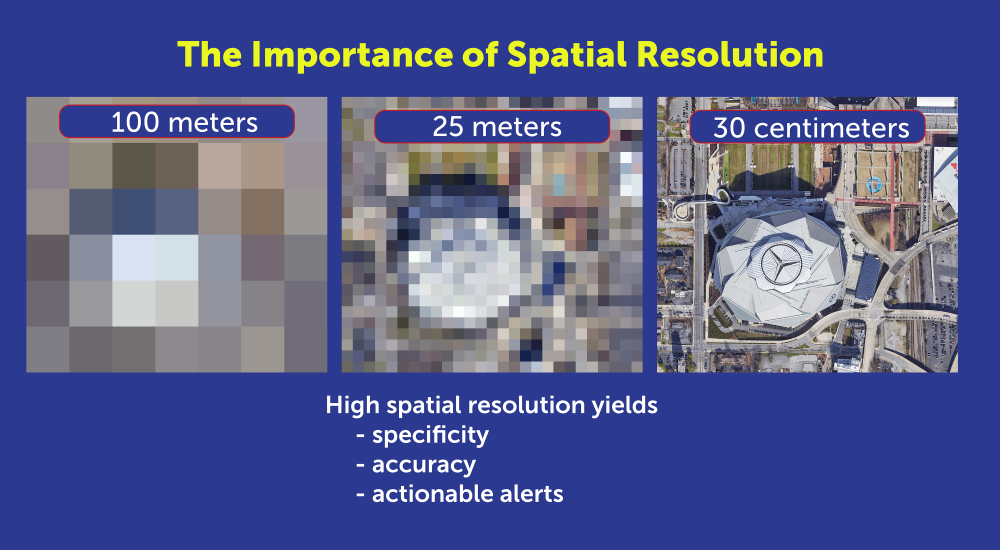
    High-resolution imagery is necessary for specific, accurate alerts. (Photo: Satelytics)
    High-resolution imagery is necessary for specific, accurate alerts. (Photo: Satelytics)

    To power geospatial analytics, remote sensing technology (RST) captures multispectral and hyperspectral data from high-resolution satellite sensors, then uses AI-powered algorithms to analyze spectral signatures. Spectral imaging can detect a wide range of surface activity, including soil disturbances, vegetation changes, soil grading and trenching, new construction starts, heavy equipment use, new access roads, and encroachment on utility easements; activities that could indicate a risk to buried cables and pipelines.

    Integrating Geospatial AI with ArcGIS

    To make potential problems easier to identify, high-resolution images and geospatial analyses can be fused with GIS asset layers and corridor models to pinpoint anomalies that could indicate excavations or construction that interfere with utility rights-of-way.

    Utilities that already use ArcGIS as their system of record can readily integrate results from geospatial analytics into existing workflows. For example, users can visualize and detect disturbed layers using ArcGIS Pro, tracking surface risk trends and KPIs with ArcGIS dashboards.
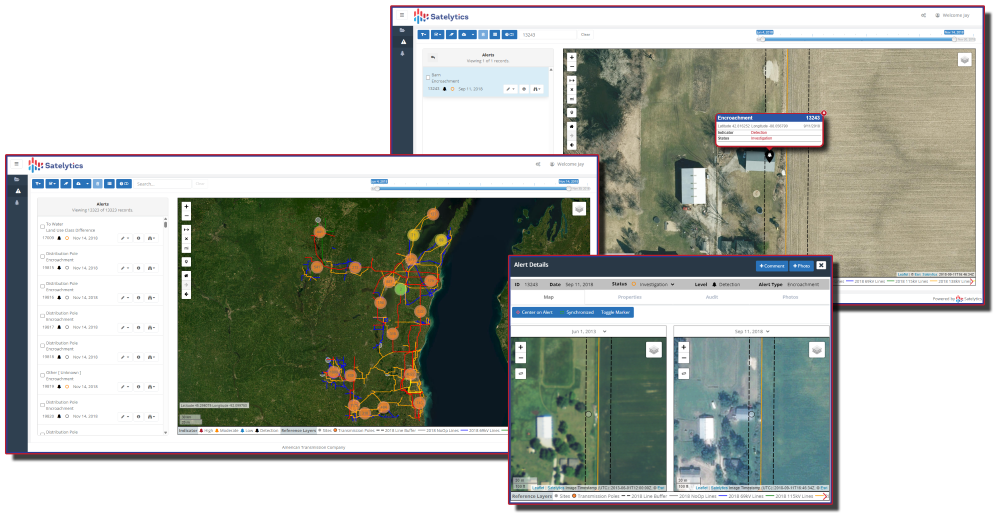
    Monitoring the utility corridor for unwanted structures. (Image: Satelytics)
    Monitoring the utility corridor for unwanted structures. (Image: Satelytics)

    To show how this works, Southern Company, which owns Georgia Power, Alabama Power and Mississippi Power, needed to identify new construction along its service corridors to detect potential encroachments before construction. Southern Company established a quarterly monitoring schedule with Satelytics, a provider of cloud-based geospatial analytics software.

    Using data from the Pleiades 1A and 1B satellites, Satelytics captured multispectral imagery at 50-centimeter resolution, then used AI-poweredanalytics to detect changes, such as new barns, parking lots, or other construction. Encroachment alerts were delivered through the Satelytics web portal, and the geospatial data was transferred directly to Southern Company’s ArcGIS system via application programming interfaces (APIs).

    Southern Company then compared items flagged in the satellite images with field visits to fine-tune the AI models. Following the pilot program, the AI models were refined to flag only those encroachments that posed a danger or a problem.
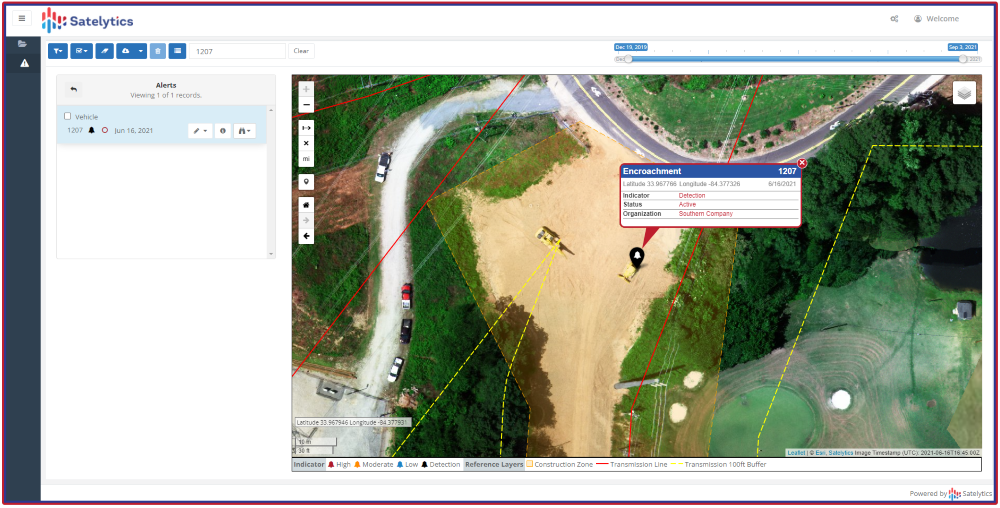
    Flagging encroachment risks from space. (Image:: Satelytics)
    Flagging encroachment risks from space. (Image:: Satelytics)

    AI-powered geospatial analytics strengthens Enhanced Positive Response (EPR) by documenting risk locations, including map layers and images, and providing evidence of corridor conflicts and surface changes. While AI accelerates detection, ground truthing remains essential. As shown in our Southern Company example, on-site validation is required to improve machine learning algorithms to increase accuracy. Integrating Field Maps and Survey 123 into AI workflows can verify findings and prioritize responses.

    Using AI and GIS for Predictive Dig Safety

    Geospatial AI technology is becoming an essential tool for more than just excavation monitoring. Using AI to analyze satellite images offers other benefits, such as measuring gas leaks or tracking water and oil leaks. Combining AI, GIS, and historical data will soon be used for predictive excavation risk management, identifying high-risk areas in advance of filing an excavation permit.

    Predictive analytics will continue to play a larger role in excavation monitoring. AI analytics will provide construction forecasts and enable permit intelligence layers in GIS. The same data can power dynamic risk scoring dashboards and support three-dimensional corridor safety twins.

    As new building construction continues to boom, utilities are harnessing the latest technology to prevent excavation incidents and protect underground assets. Combining satellite imagery, AI, and GIS provides the advanced tools needed to maintain continuous asset awareness, closing the visibility gap for underground cables and pipelines. Pipeline operators, electric utilities, and LDCs are reducing operating costs and minimizing environmental impact by leveraging geospatial analytics powered by artificial intelligence.

    Sean Donegan is CEO of Satelytics, a company that uses cloud-based, geospatial analytics to analyze multispectral and hyperspectral imagery to identify pipeline leaks and other environmental issues. Donegan has over 30 years of experience building technology and software companies.
  • Tennessee leverages GIS technology to streamline septic permits amid rapid population growth

    Tennessee leverages GIS technology to streamline septic permits amid rapid population growth

    Throw a dart at a map of Tennessee. You will probably hit somewhere that is growing. Nashville’s outskirts are projected to add a quarter to their population in the next 15 years. The Ford Motor Company has begun construction on the BlueOval City manufacturing plant outside of Memphis. A multibillion-dollar uranium enrichment facility has broken ground in the Knoxville exurbs.

    Tennessee growing at double the rate of the rest of the U.S. does not surprise anyone who issues residential building permits in the state. Inspectors at the Tennessee Department of Environment and Conservation (TDEC) saw requests for subsurface sewage disposal system services jump 18% in one year. “It’s a monumental, staggering rate to grow,” said Steve Owens, the TDEC environmental consultant tasked with expediting service delivery across the state.

    Owens, a meteorologist by training, hydrologist by virtue, and self-taught geographic information system (GIS) engineer by practice, streamlined the work of TDEC inspectors with enterprise GIS technology. With it, a team of fewer than 100 inspectors processed over 23,000 requests last year in Tennessee’s rural fringe communities.
    Designing a System Around How Inspectors Work

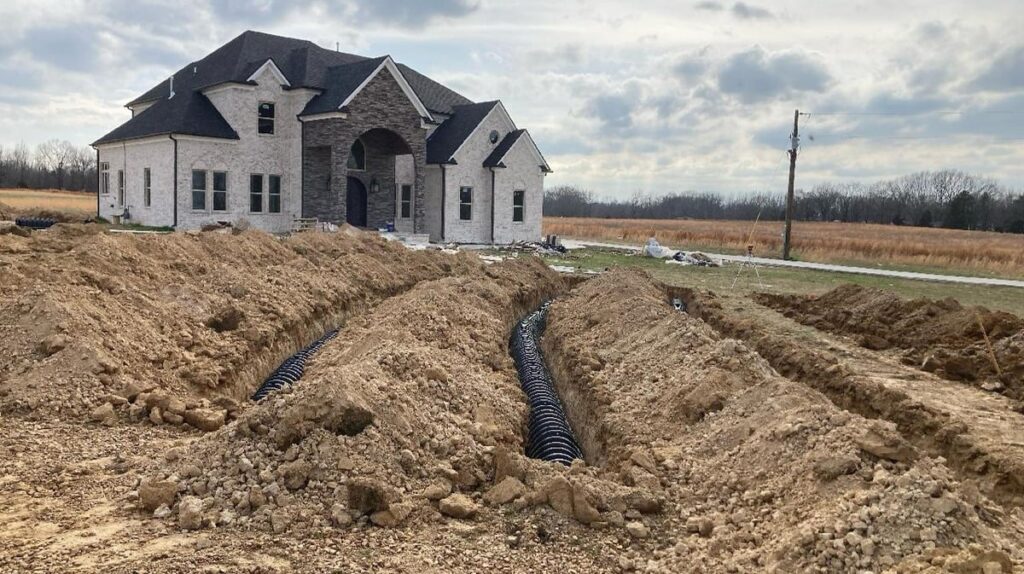
    About one in five Americans lives in a home that relies on a septic system. They are built in remote areas too far to connect to municipal sewage systems, which happen to be the places where Tennessee is growing the fastest. High demand for housing created a sense of urgency to issue permits as swiftly — and as safely — as possible.

    Owens spent his early career in a truck as a septic permit inspector. “It’s hard work,” he said from his Memphis office. “You’re dealing with outdoor conditions all day and you’re never working fast enough.”

    Inspectors often eat lunch in their trucks while driving to their next site. The septic systems that they design, permit and inspect treat wastewater from homes and businesses. These systems must be well suited to the specific soil conditions of the land to work properly. When evaluating proposed subdivisions, inspectors conduct a range of fieldwork assessments — such as soil profiles, percolation data, and absorption rates — all while answering calls from the public.
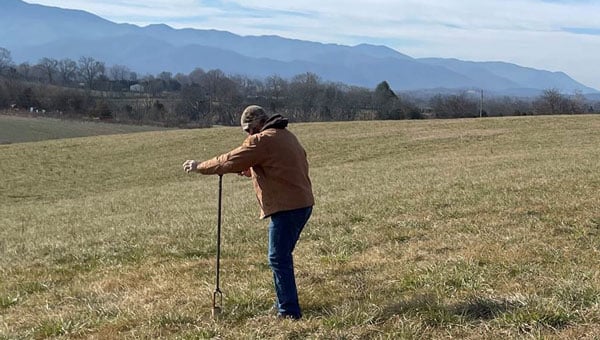
    Inspectors assess whether a new septic drain field meets state regulations before the property can be occupied.
    Inspectors assess whether a new septic drain field meets state regulations before the property can be occupied.

    A malfunctioning or ill-fitted septic system can pollute wells of drinking water and springs. Foul-smelling sewage can pool on the surface, creating a breeding ground for parasites, mosquitoes and other vectors that can spread pathogens to neighbors and pets.
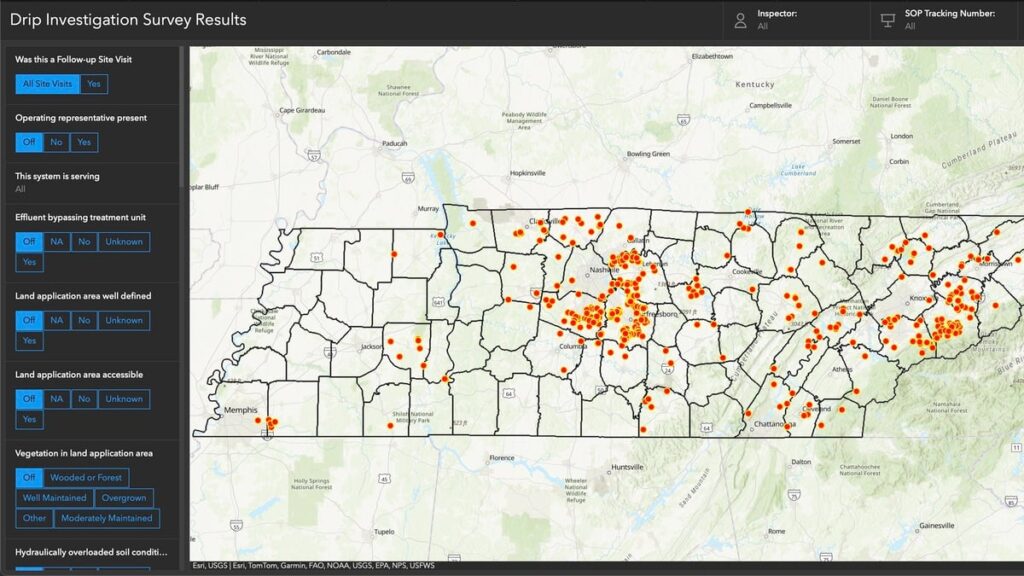
    June 2024 TDEC audit of drip dispersal systems documented more than 400 site visits in a short time frame. Inspectors used an ArcGIS enterprise program to compare standard observations and record site-specific notes and photographs at each site. Results are filtered and displayed on an interactive map.

    The audit represents a fraction of the work that TDEC permit inspectors do. Complaint investigations, repair designs, and expansion assessments are among the 13 different types of services inspectors deliver each day. To modernize, Owens configured an enterprise GIS to manage the full scope of operational data for those services—from how residents make requests, to how inspectors execute the work and get documentation to the customer, to how management reports progress.

    “It’s different from the typical mapping and analysis you might associate with GIS,” Owens said. “We’re utilizing ArcGIS Survey123 and ArcGIS Dashboards to create an efficient ecosystem for what we do with our work and how to get that work out to the public.”

    The drip dispersal system audit documented all results from more than 400 site visits.
    The drip dispersal system audit documented all results from more than 400 site visits.

    A “Flintstones to Jetsons” Digital Transformation

    As recently as seven years ago, Tennessee septic permit data existed entirely on paper. Pulling a permit meant driving to a state office in the county seat and making photocopies. Digitization came with an announcement from the governor that made headlines across the state. Trucks hauled away filing cabinets full of septic records, and technicians scanned their contents to create a FileNet public document system of record. “We have gone from Flintstones to Jetsons in the last decade,” Owens said.

    In the past, permit requests came to TDEC inspectors as a list of addresses and contact information. Inspectors started each day punching addresses into online mapping sites, guessing at an efficient route. Their days ended back at the office to log their time, update templates, and input data into various spreadsheets.

    In high-growth counties, where multiple inspectors collaborate to tackle a significant workload, they often duplicated efforts. “It would not be uncommon for someone to go out to a site on Wednesday, and the next guy would go out there on Friday and not know the work had already been done,” Owens said.

    Owens considered the extensive manual processes involved in permit inspections. Having used GIS technology for environmental impact assessments for other TDEC projects, he knew the work could be automated. “We had already been using mobile GIS tools for some time at that point, so staff were used to it,” Owens explained. “I thought we could utilize a lot of the tools that Esri already has built in and customize it a little bit to meet our needs.”

    Conversations with TDEC managers confirmed the hunch. Inspectors were spending up to two hours each day planning their routes and logging what they had done. “It ended up being somewhere about 34,000 hours a calendar year just figuring out where we’re going and tracking what we do,” Owens said.

    The project to upgrade the workflow with GIS would pay for itself in eight months if they could cut the tracking and logging time in half.

    Automating Data Editing and Management Workflows

    Owens envisioned a system that would link service requests to jobsite workflows. He designed configurable applications for inspectors to use for data collection. Permit and inspection data would integrate into an enterprise geodatabase that serves as a source of truth for TDEC septic service requests. The database would sync to the public document viewer.

    In the new GIS-based system, residents and developers make permit service requests by filling out an online application. The system then locates the request, assigns an inspector, and sends the appropriate form that guides the inspection work. Inspectors check the boxes, record the test results, upload photos and drawings, and issue letters and certificates—all from tablets in the field.

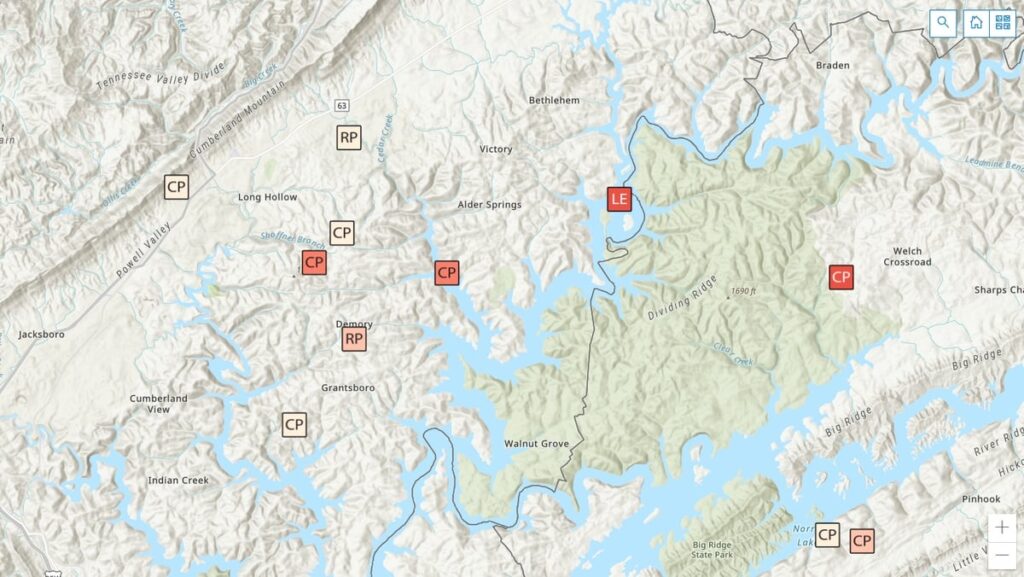
    Inspections in the queue now appear on a shared map.
    Inspections in the queue now appear on a shared map.

    Submitting the completed permit or inspection through ArcGIS Survey123 generates PDFs that automatically go to the applicant, TDEC staff, and the database that syncs to the public site.

    “The real gem is for staff to be able to plan their day by using a map instead of entering all that data into online map tools and seeing what they come up with for their route,” Owens said. The map is part of a real-time operations dashboard with hundreds of requests dotted across Tennessee.

    Points colored with darker hues alert inspectors to older requests—fees are waived if they are not completed within 45 days. All the related information—requester contact, location data, violations, resolutions, test results, and historical records—is organized by location. “This used to be done in spreadsheets and file cabinets so it’s a huge time-saver,” Owens said.

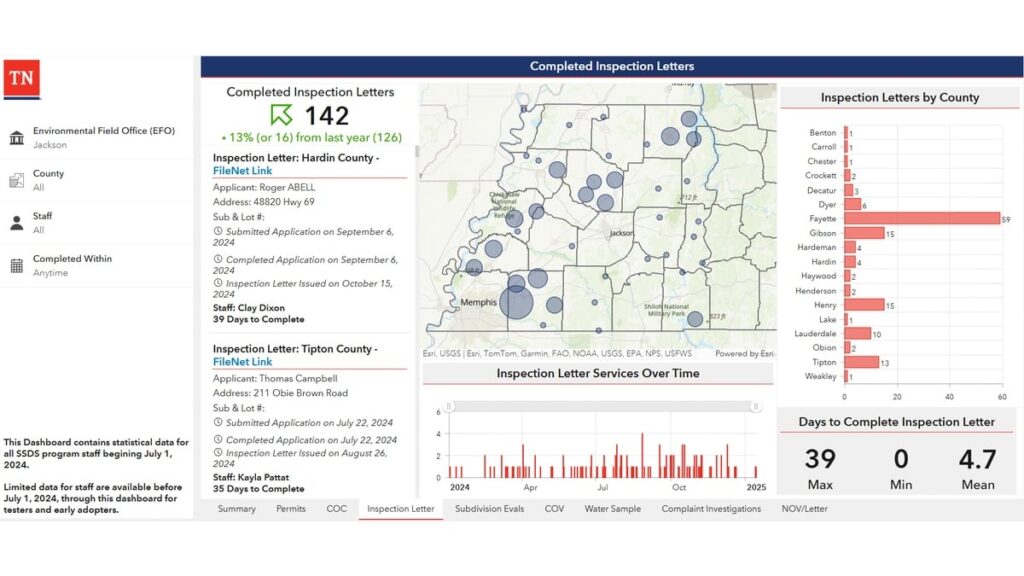
    TDEC staff now have a completed inspection report that details their work across the state and allows managers to keep an eye on the completion rate.
    TDEC staff now have a completed inspection report that details their work across the state and allows managers to keep an eye on the completion rate.

    When management sees clusters of requests on the map, they know it is time to reallocate resources. “They can pull in inspectors from other counties to get the work done, and then go back to normal workload,” Owens added.

    Management watches a splash page that tabulates completed work to keep a pulse on field staff and avoid backlogs. They can drill down on how long specific tasks are taking, and view performance metrics for individual staff members. They pay close attention to the average number of days it takes to issue permits. If the times go up, they have the data to bring to the budget office to justify hiring more inspectors.

    Amid Tennessee’s building boom, officials face intense pressure to keep pace and deliver high-quality results. Modernizing their permitting and inspection system has provided TDEC with tangible efficiency gains to present to legislators and the public.

    “This was a major investment in our division, and we want to let them know that, ‘we hear you,’” Owens said. “We can show how much work that we have done to address those concerns, and the output speaks for itself.”

    This year, TDEC was awarded honorable mention by the Environmental Council of the States (ECOS) in the State Innovation category for their septic permitting modernization project.

    Learn more about how state and local governments use GIS to empower environmental compliance.


    This article originally appeared at Esri Blog.

  • TomTom and Esri deliver advanced location analytics

    TomTom and Esri deliver advanced location analytics

    TomTom and Esri have partnered to integrate TomTom’s global map and traffic data into ArcGIS, Esri’s comprehensive geospatial platform.

    This collaboration aims to provide businesses and governments with location-based insights for various applications, including infrastructure maintenance, traffic flow analysis and retail site optimization. Esri is a prominent provider of geographic information system (GIS) technology, offering mapping and spatial analysis applications that facilitate efficient data collection, management and analysis. Organizations across various sectors — including governments, educational institutions, non-profits and businesses —can utilize the software.

    In February 2023, Esri joined the Overture Maps Foundation, a collaborative effort initiated by Amazon Web Services, Meta, Microsoft and TomTom. This foundation aims to establish a location data standard and promote a data-sharing ecosystem to enhance maps, location technology applications and location-based insights.

  • Launchpad: handheld mapping, excavator guidance, cesium clock

    Launchpad: handheld mapping, excavator guidance, cesium clock

    A roundup of recent products in the GNSS and inertial positioning industry from the September 2022 issue of GPS World magazine.


    OEM

    Receiver Upgrade

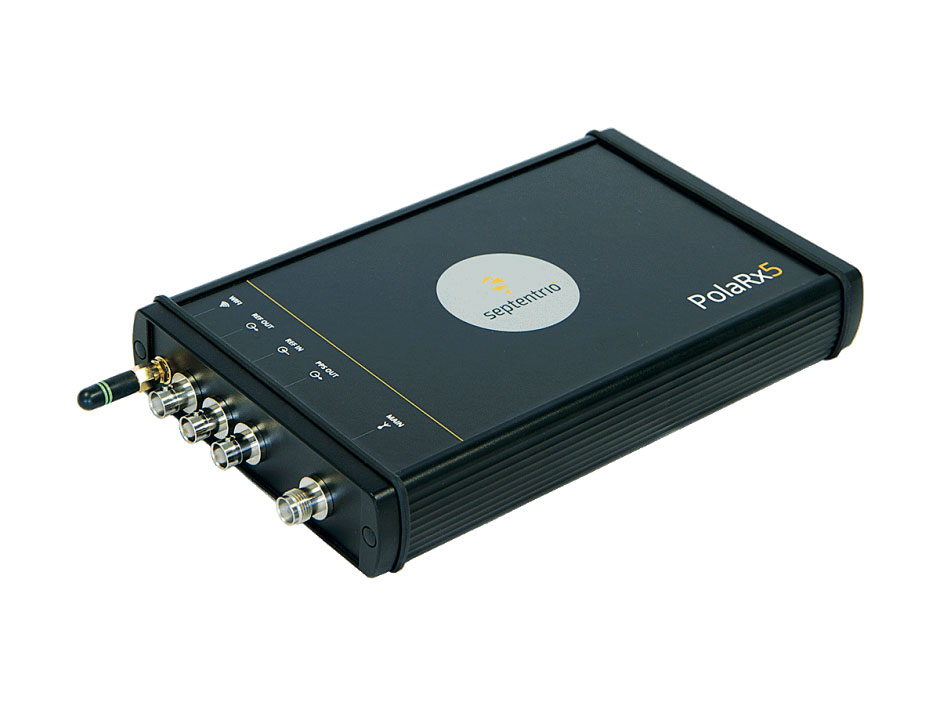
    OSNMA anti-spoofing tech now on PolaRx5 GNSS reference receivers

    Photo: Septentrio
    Photo: Septentrio

    Open Service Navigation Message Authentication (OSNMA) is now available on the high-end PolaRx5 reference receiver series. OSNMA offers end-to-end authentication on Galileo’s civilian signals, protecting receivers from GNSS spoofing attacks. OSNMA adds another layer of security to the receivers’ existing AIM+ anti-jamming and anti-spoofing technology. The PolaRx5 product range also now supports RINEX format versions 3.05 and 4.0.

    Septentrio, septentrio.com

    Anti-Jam Antennas

    Developed with the United States military

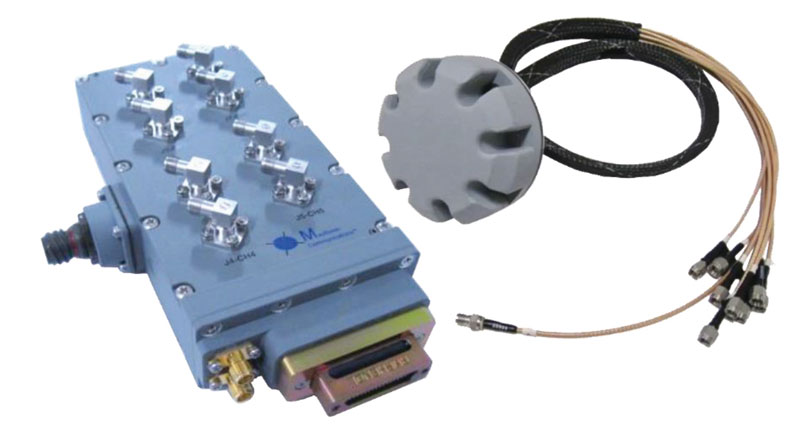
    Photo: Mayflower Communications
    Photo: Mayflower Communications

    The MAGNA-F and MAGNA-I GPS anti-jam antennas provide simultaneous L1/L2 protection and can protect commercial and military GPS receivers on aircraft. The MAGNA products were developed with sponsorship by the U.S. Navy and further improved by the U.S. Army to support GPS protection requirements for air, sea and ground platforms, such as fixed-wing/rotary aircraft, ships, UAVs and tactical vehicles. The MAGNA-F uses a 3.5-inch-diameter controlled reception pattern antenna (CRPA) compatible with existing fixed radiation pattern antenna (FRPA) footprints. The MAGNA-I (NavGuard 730) is a high-performance yet small GPS anti-jam integrated solution with a 4.5-inch diameter FRPA-compatible footprint.

    Mayflower Communications, mayflowercom.com

    Single-board computer

    Centimeter-level GNSS for mass-market applications

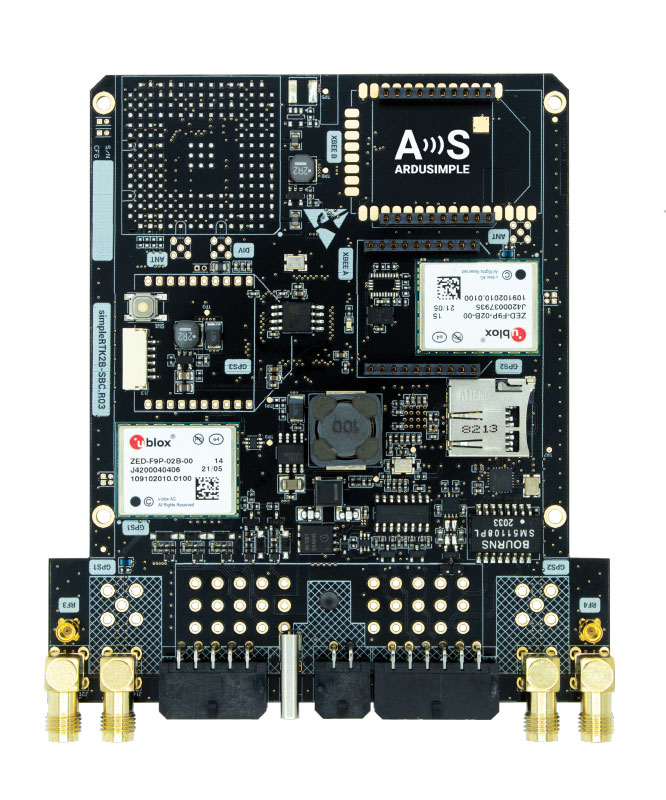
    Photo: ArduSimple
    Photo: ArduSimple

    The SimpleRTK2B single-board computer (SBC) is built around up to three u-blox ZED-F9P high-precision GNSS receivers. It simplifies development of centimeter-level positioning solutions supporting real-time kinematics (RTK), making the technology accessible to broader audiences. The SimpleRTK2B-SBC was developed to make RTK technology as close to plug-and-play as possible. In addition to working as a stand-alone solution, customers can program their own applications with the company’s microPython API. The SimpleRTK2B-SBC delivers mechanical integration with centimeter position on three axes (heading, pitch and roll), outputting on NMEA, RTCM, RS232 and CANBus interfaces via Ethernet, Bluetooth, Wi-Fi and 2G/3G/4G communication. It offers configurable input/output and an inertial measurement unit.

    u-blox, u-blox.com; ArduSimple, ardusimple.com

    Optical cesium clock

    For assured positioning, navigation and timing (PNT)

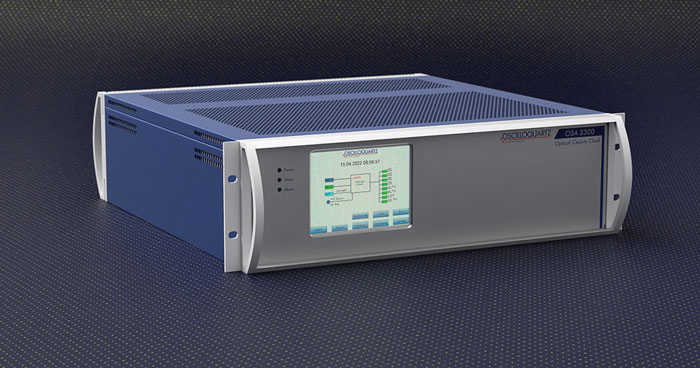
    Photo: ADVA
    Photo: ADVA

    The OSA 3300-HP is a high-performance optical cesium clock with a 10-year lifetime compared to the five-year lifetimes of high-performance magnetic clocks. It provides the resilience required for PNT assurance in critical infrastructure and empowers service providers to deliver differentiated service-level-agreement timing offerings with integrated GNSS backup. The OSA 3300-HP has embedded Ethernet- and IP-based management as well as a user-friendly touchscreen graphical user interface.

    ADVA, adva.com

    Vehicle Navigation System

    With M-Code capabilities and upgrade paths for other GNSS systems

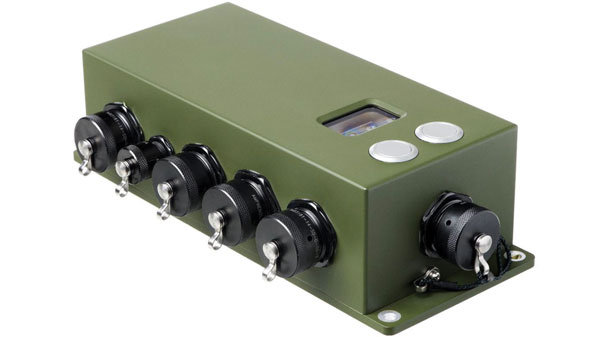
    Photo: Collins Aerospace
    Photo: Collins Aerospace

    NavHub-200M is a vehicle navigation system for the international market with military code (M-code) receiver capabilities. NavHub-200M provides assured positioning, navigation and timing (APNT) while improving overall resistance to threats to GPS, such as jamming and spoofing. Its message formats and signal modulation techniques ensure faster and more accurate performance for ground vehicles on the connected battlespace, while advanced security features prevent unauthorized access or exploitation. NavHub-200M also includes the open interface standards and sensor-fusion capabilities required for a GNSS upgrade path, such as that for Europe’s Galileo constellation, as well as the ability to interface with key vehicle sensors such as the inertial measurement unit (IMU) and odometer.

    Collins Aerospace, collinsaerospace.com


    MAPPING

    Mapping Handheld

    High-performance data collector

    Photo: Trimble
    Photo: Trimble

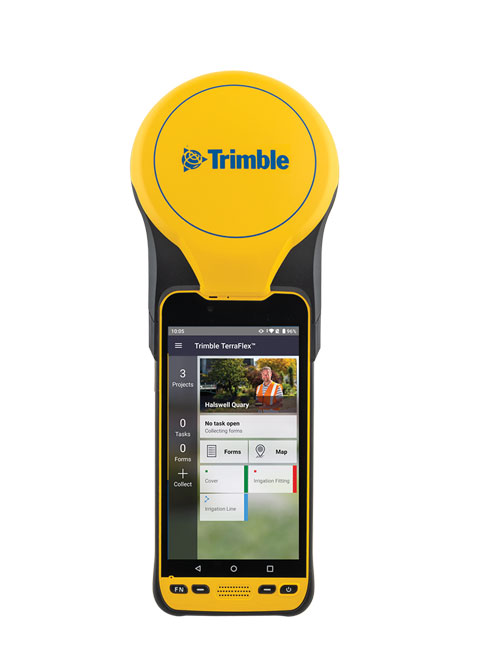
    The Trimble TDC650 handheld is built for data collection, inspection and asset management activities. The rugged solution provides scalable high-accuracy GNSS positioning for professional field workflows, including apps such as Esri ArcGIS Field Maps and Trimble TerraFlex software. The TDC650 is scalable, allowing customers to choose their desired accuracy down to the centimeter level.

    Trimble, trimble.com

    Lidar Scanner

    Powerful solution for manned and unmanned aircraft

    Photo: YellowScan
    Photo: YellowScan

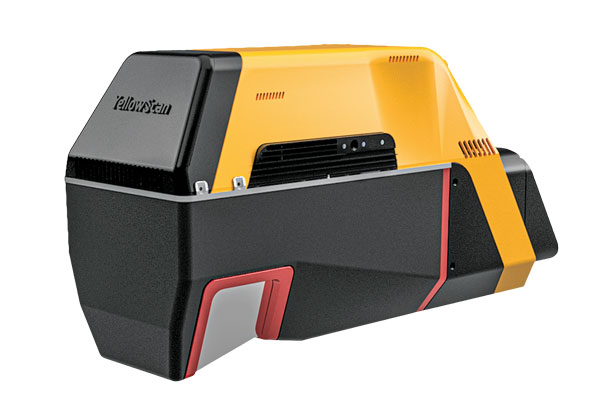
    The Voyager long-range lidar scanner has a wide field of view, with all points collected oriented toward the ground so there is no loss of points. In all, 1.5 million points per second will be usable. Voyager combines a Riegl VUX-120 laser scanner with a Trimble Applanix AP+ 50 AIR or Applanix AP+ 30 AIR GNSS-inertial board, providing a precision of 0.5 cm and an accuracy of 1 cm. Voyager’s detection and processing of up to 15 target echoes per laser pulse allows for excellent vegetation penetration. It has an extremely fast data-acquisition rate of up to 1,800 kHz, suitable for projects requiring the highest point density. The laser scanner’s specifications can be customized and can be combined with YellowScan’s software solutions.

    YellowScan, yellowscan-lidar.com

    ArcGIS Pro Add-In

    Extends 3D Tiles Next workflow into Esri ArcGIS Pro

    Photo: ArcGIS
    Photo: ArcGIS

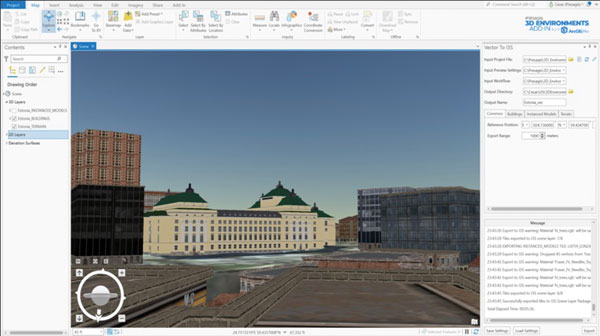
    The 3D Environments Add-In application for Esri ArcGIS Pro allows ArcGIS users to rapidly transform 3D Tiles Next data formats, such as One World Terrain, into ArcGIS Pro projects to create 3D scenes from 2D vector data and 3D models. The add-in leverages Presagis’ building templates and texture libraries that analysts use to create enhanced 3D visualizations of GIS environments, helping increase collaboration across the enterprise. The 3D Environments Add-In contains tools to create, transform and extract a wide variety of 3D formats to provide seamless interoperability between ArcGIS Pro and modeling and simulation applications. It is available on the Esri ArcGIS Marketplace.

    Presagis, presagis.com

    Cloud-Based GIS

    Energy performance data helps tackle climate change

    Photo: XMAP
    Photo: XMAP

    Municipal geographic information system XMAP can now incorporate the energy-performance ratings of individual properties to help local authorities tackle climate change, improve housing standards, and ensure landlords comply with legislation. The Energy Performance Certificate (EPC) data layer uses a rating system similar to the one used on new appliances, ranging from A (very efficient) to G (inefficient). It allows tenants and house buyers to make informed decisions. In addition to a color-coded visualization of current ratings, the XMAP EPC layer contains enhanced analysis including generalized ratings and the potential for improvement. Bath and North East Somerset Council, UK (pictured), has embraced this resource and is looking at how the data can be used to raise housing standards.

    XMAP, xmap.geoxphere.com

    Caged Drone

    For mapping and inspection in dangerous areas

    Photo: Flyability
    Photo: Flyability

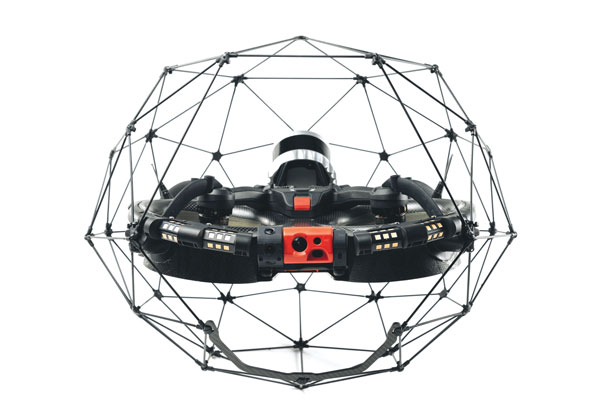
    The Elios 3 is a collision-tolerant drone equipped with a lidar sensor for indoor 3D mapping. The drone is powered by a new SLAM engine called FlyAware that lets it create 3D models as it flies. It also hosts a new version of Flyability’s software for inspectors, Inspector 4.0. The Elios 3 comes with an Ouster OS0-32 lidar sensor, allowing inspectors to collect data for the creation of survey-grade 3D models using Connect software from Flyability’s partner GeoSLAM. Protected by a cage, the Elios 3 has advanced collision-tolerance features that allow inspectors to fly it inside dangerous confined spaces such as boilers, pressure vessels and mines.

    Flyability, flyability.com


    SURVEYING

    Data Collector

    Ergonomic yet rugged for fieldwork

    Photo: ComNav
    Photo: ComNav

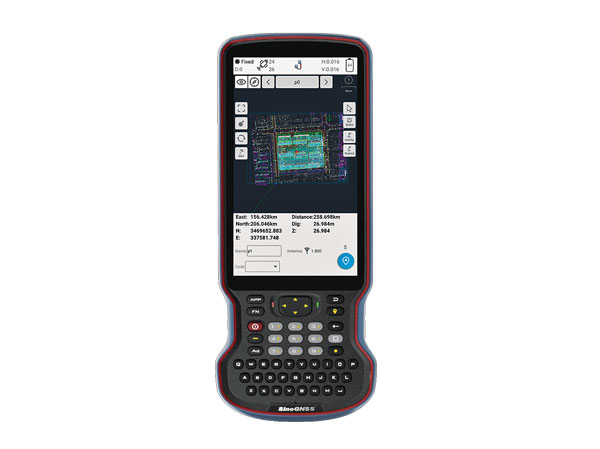
    The R60 is a powerful handheld with an ergonomic design. It runs on Android 12 OS, providing a suitable workhorse for surveying professionals in the field. Survey Master field software works seamlessly on the R60, which features a Qualcomm 8-core processor for massive data processing. Its 64-GB memory allows ample data storage and enables the opening of CAD drawings in seconds. Other features include a QWERTY keyboard, a 5.5-inch sunlight-readable high-resolution screen, an IP67 rating (dustproof and waterproof), and a 9,000 mA Li-ion battery for more than 30 hours of continuous functioning.

    ComNav Technology, comnavtech.com

    Base Station

    Mobile station provides cm positioning

    Photo: HYFIX
    Photo: HYFIX

    The Mobile Centimeter (MobileCM) Space Weather Station is a ready-to-use GNSS device that will act as a real-time kinematic (RTK) base station and collect space weather data. The device is pre-configured to securely connect with the Global Earth Observation Decentralized Network (GEODNET) using a home Wi-Fi network. The full four-constellation GNSS base station has built-in NTRIP server functionality and is packaged with a survey-grade triple-band roof antenna and required cables.

    HYFIX, hyfix.ai


    MACHINE CONTROL

    Guidance System

    Upgradeable for precision agriculture

    Photo: SingularXYZ
    Photo: SingularXYZ

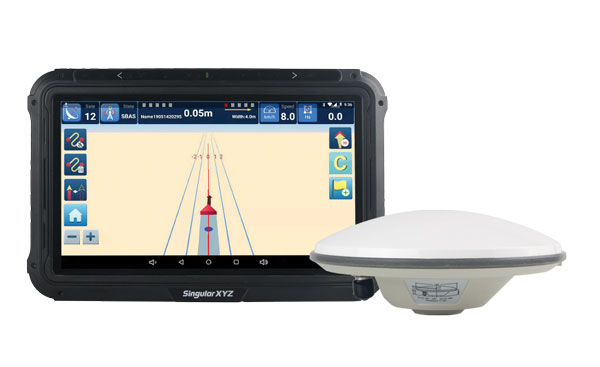
    The SAgro10 GNSS guidance system is an entry-level guidance system for precision agriculture, providing users with higher navigation precision and higher productivity, which can be upgraded to an automatic steering system. Embedded with a high-precision GNSS module, the SAgro10 system tracks all four global constellations. For users with network coverage or a UHF base station, the system provides centimeter-level accuracy navigation in real-time kinematic mode. In the absence of base stations, the SAgro10 system provides sub-meter navigation accuracy in single-point smoothing mode. Compatible with most agricultural tractors, its components can be installed within 15 minutes. The 10-inch sunlight-readable touchscreen has a clear and simple graphic interface.

    SingularXYZ, singularxyz.com

    Excavator Guidance

    Brings 3D mapping to small sites

    Photo: iDig
    Photo: iDig

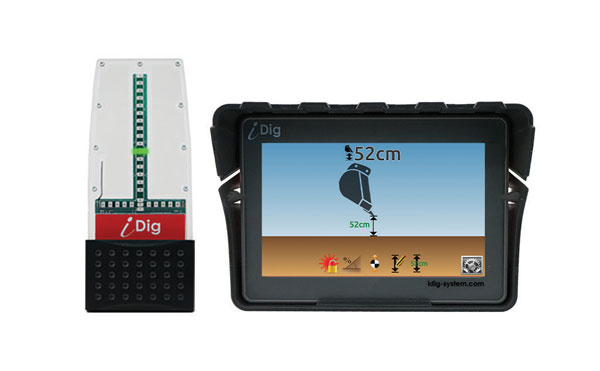
    iDig 3D Connect is a solar-powered excavator guidance system with a GNSS receiver that can be removed and used as a rover, rather than permanently installed on the machine. 3D excavator guidance has seldom been used for small projects such as house foundations because of the need for a surveyor to stake out points and map a site. The removable receiver enables contractors to complete these tasks. The software provided creates a GNSS-generated site map, enabling precision digging relative to the area and making the process quicker, simpler and more eco-friendly than with 2D.

    iDig, idig-system.com


    MOBILE

    Asset Tracking

    Cloud-based service uses GNSS and Wi-Fi

    Photo: onurdongel/iStock/Getty Images Plus/Getty images
    Photo: onurdongel/iStock/Getty Images Plus/Getty images

    The Cloud Locator service takes data from LoRa Edge-enabled devices and uses Semtech’s LoRa Cloud Geolocation and Modem services for asset tracking both indoors and outdoors. It features built-in serverless technology and enables testing of ultra-low-power asset tracking on either a private or public LoRaWAN network. It is designed to work with trackers using Semtech’s LoRa Edge LR-series chips. The LR-series chips combine Wi-Fi and GNSS to obtain the latitude and longitude of devices in any indoor or outdoor location. Once configured on the service, together with Semtech’s LoRa wireless radio frequency technology for transmission to the cloud, customers can view the tracker location on a map in less than 15 minutes.

    Semtech, semtech.com & locator.loracloud.com

    Bike Computer

    Features multi-band GNSS receiver

    Photo: Garmin
    Photo: Garmin

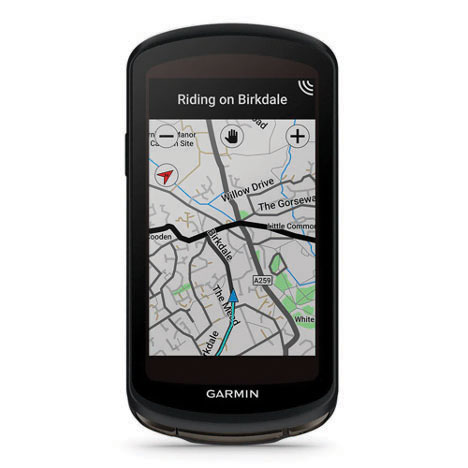
    The Edge 1040 bike computer features solar charging and multi-band GNSS technology. Its multi-band GNSS receiver (GPS, GLONASS and Galileo) provides accurate positioning in challenging ride environments, such as dense urban areas or under deep tree cover. Advanced navigational tools help cyclists stay on track, such as turn-by-turn navigation and alerts that notify riders of sharp curves ahead. Route guidance and off-course notifications can be paused for exploring and turned back on for return to the original route. When using the Trailforks app, Forksight mode automatically displays upcoming forks in the route and where a rider is within a trail network.

    Garmin, garmin.com


    SIMULATORS

    Simulator Upgrade

    Features advanced hardware-in-the-loop testing

    Photo: Orolia
    Photo: Orolia

    Skydel 22.5 is a significant software upgrade to the Skydel simulation product line. It features advanced hardware-in-the-loop (HIL) testing solutions providing very low to zero effective latency. Enhanced visualization tools can monitor internal latency through real-time curves showing when the data is generated and sent to the RF signal. Users can also review the transmission of HIL packets for optimizing the entire network’s latency, checking its stability (jitter), and that data is available and used at the right time in Skydel. HIL testing is an essential step in the verification process of the model-based design approach because it involves all the hardware and software that will be used operationally.

    Orolia, orolia.com

    Synchronizer and Simulator

    Contained in an easily deployable suitcase

    Photo: Focus Telecom
    Photo: Focus Telecom

    The Time-Loader is designed for defense and mission-critical applications, for deployment in environments where GNSS signals are denied or disrupted. It supports any ground, naval or airborne system that needs real time of day (TOD) and 1PPS external synchronization aligned to the UTC or GNSS. It generates a GPS L1 C/A code RF output as if the signal were coming from a live-sky GPS antenna. It provides full-constellation GPS output and is compatible with external GNSS receivers. Its GPS-disciplined oscillator (GPSDO) is the Microsemi MAC-SA53/55, which provides excellent UTC accuracy with outstanding hold-over rubidium clock performance. A self-contained, miniature GPS simulator provides real-time extremely accurate signals. The 18-channel full-constellation simulator stores location/time/date data in internal memory and stores complex vector data to simulate dynamic scenarios. The simulator also can be used to transcode NMEA or SCPI position/ velocity/time (PVT) data into GPS RF signals.

    Focus Telecom, focus-telecom.com

  • New Eos Bridge makes instruments iOS compatible

    New Eos Bridge makes instruments iOS compatible

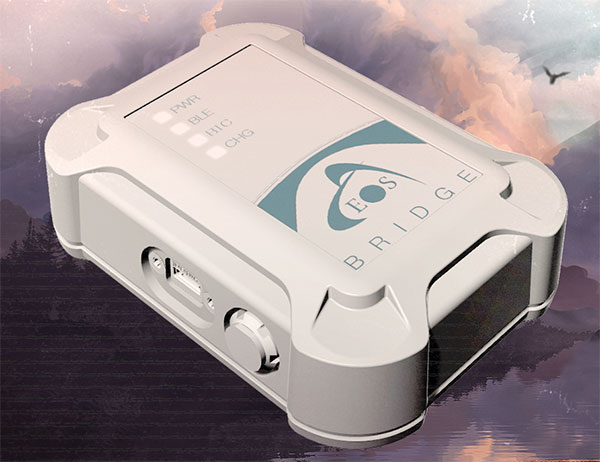
    Eos Positioning Systems, the global manufacturer of Arrow Series GNSS receivers, has released Eos Bridge, which enables almost any instrument to become iOS Bluetooth compatible.

    Photo: Eos Positioning
    Photo: Eos Positioning

    The Eos Bridge is a small, pocket-sized device that connects to instruments via Bluetooth Classic or serial port, and transmits data from them to any Apple iOS device, such as iPhone or iPad, Android device or Windows mobile device.

    The Eos Bridge offers two connectivity methods to virtually hundreds of instruments:

    First Method: Bluetooth Classic to Apple iOS Bluetooth

    Instruments that are equipped with non-iOS Bluetooth are now able to connect to Apple iOS devices using the Eos Bridge, including laser rangefinders and utility-locating instruments.

    Second Method: Serial port to iOS, Android and Windows devices

    With the Eos Bridge, instruments whose only connectivity option is a serial port may now be connected to any iOS, Android or Windows device via Bluetooth. This includes any instrument or sensor with an RS-232 serial port, for example.

    The Eos Bridge is lightweight, at approximately 150 grams (about 5.3 ounces). It can be worn clipped to a belt, stored in a pocket, or mounted to an instrument or sensor. The battery lasts 48 to 72 hours.

    The Eos Bridge expands the potential pairings of legacy instruments and sensors by making them Bluetooth compatible with modern mobile devices and Arrow GNSS receivers. Two immediate applications for current Arrow GNSS users include Eos Laser Mapping for ArcGIS offset data-collection, and Eos Locate for ArcGIS for underground utility mapping. Both solutions are available on iOS.

  • Esri releases latest edition of ArcGIS Desktop handbook

    Esri releases latest edition of ArcGIS Desktop handbook

    Book cover: Esri
    Book cover: Esri

    Esri has published a new handbook, Getting to Know ArcGIS Desktop 10.8.

    In the latest edition of this classroom textbook, Getting to Know ArcGIS Desktop 10.8 guides students and professionals through the fundamentals of making maps and analyzing data using the latest Esri ArcGIS Desktop software.

    The comprehensive, hands-on tutorial, moves readers from basic GIS concepts to sophisticated GIS analysis. Readers gain practical knowledge about ArcGIS Desktop tools and functionality. Exercises address querying map data, making map layouts, symbolizing and labeling maps, setting map projections, creating and sharing web maps, building and editing geodatabases, and analyzing geospatial data.

    Data for completing the exercises and a 180-day free trial of ArcGIS are also available for download.

    Getting to Know ArcGIS Desktop 10.8 is available as an e-book (ISBN: 9781589485785, US$99.99) from online retailers worldwide.

  • ArcGIS web app incorporates datasets, NGS data layers for surveyors

    ArcGIS web app incorporates datasets, NGS data layers for surveyors

    My last column described a new National Geodetic Survey (NGS) webtool for obtaining geodetic information about a passive mark in their database. The column highlighted some features that may be of interest to GNSS users. It provides all of the information about a station in a more user-friendly format. This column highlights an ArcGIS web application that incorporates various California specific datasets and NGS data layers to assist surveyors planning vertical control surveys. The GNSS Leveling Web Application was provided to me by Jay Satalich, chief, Office of Surveys, Caltrans (see box titled “Linkedin Notification from Jay Satalich).

    Linkedin Notification from Jay Satalich

    Supervising Transportation Survey (Chief, Office of Surveys) at State of California, Department of Transportation:

    “GNSS Leveling Web Application” [is] an Esri ArcGIS online web app created for my “GNSS Leveling” students at College of the Canyons. Designed as a practical tool when planning vertical control surveys using GNSS. National datasets include: National Spatial Reference System (layers: satellite visibility, stability, and vertical control source), geology, and GEOID18 (layers: GEOID18 height, difference between GEOID18 and GEOID12B, and GEOID18 uncertainty). California-specific datasets include: oil/gas/fracking/injection wells, fault lines, oil fields, groundwater basins, and landslide areas. The NOAA National Geodetic Survey data layers were created and published by Brian Shaw. People who influenced development of this app include Dave Zilkoski, Kevin M Kelly, Ken Hudnut, David D Jackson, Ross S. Stein, and Arthur Sylvester.

    Go to the app here.

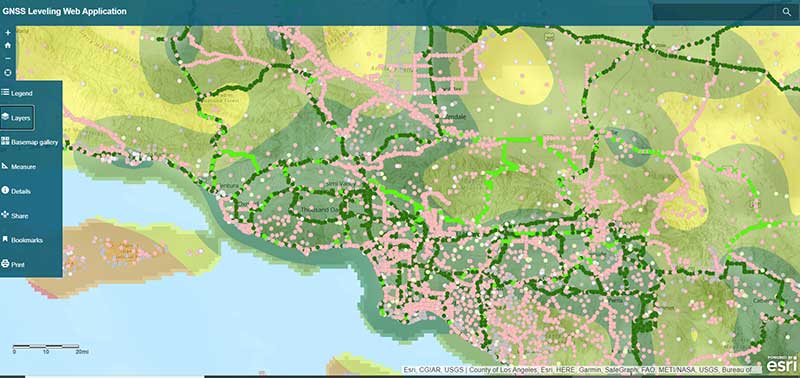
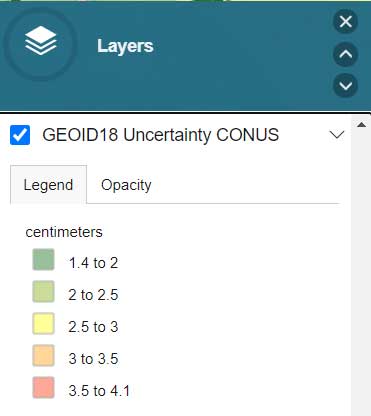
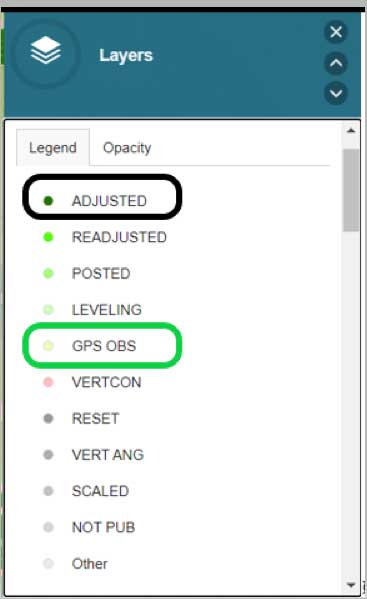
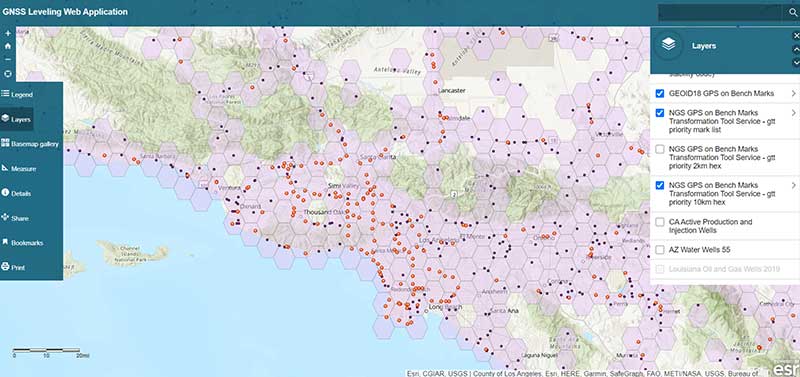
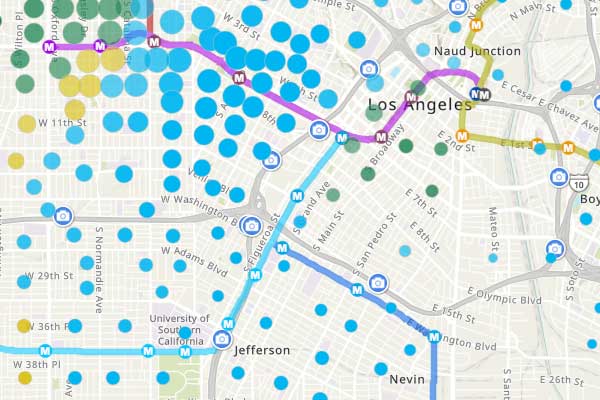
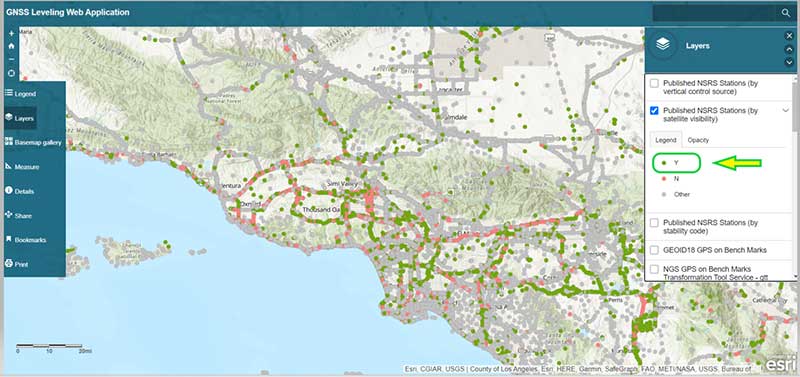
    The box titled “GNSS Leveling Web Application” depicts a map of the Los Angeles area that provides the list of published marks in NGS’ database with an overlay of the uncertainty of NGS’ hybrid geoid model GEOID18. Plotting the published marks from NGS’ database is very useful for surveyors reconning marks for a GNSS survey project. The attributes allow users to quickly identify stations that have published heights from leveling adjustments projects (labeled as ADJUSTED) and those that have heights published from GNSS adjustments projects (labeled as GPS OBS). (See here for definition of attributes.)

    GNSS Leveling Web Application

    (https://www.arcgis.com/apps)

    Source: Esri ArcGIS GNSS Leveling Web Application
    Source: Esri ArcGIS GNSS Leveling Web Application

    Source: Esri ArcGIS GNSS Leveling Web Application
    Source: Esri ArcGIS GNSS Leveling Web Application

    Source: Esri ArcGIS GNSS Leveling Web Application
    Source: Esri ArcGIS GNSS Leveling Web Application

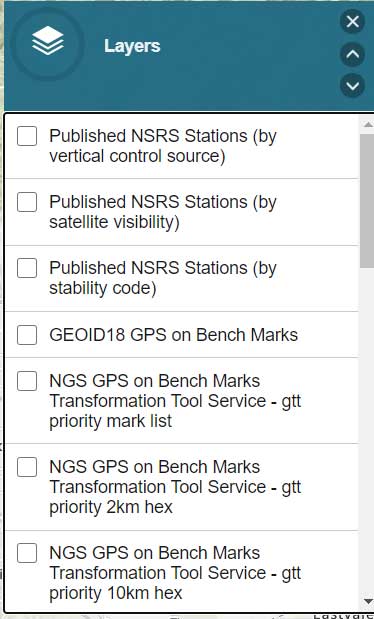
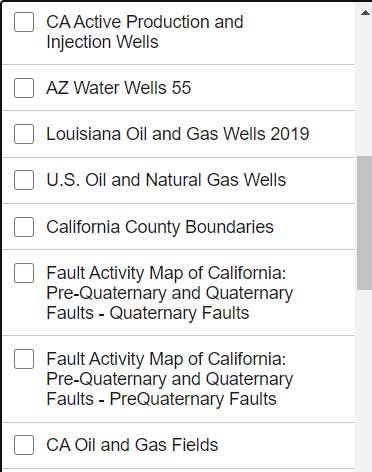
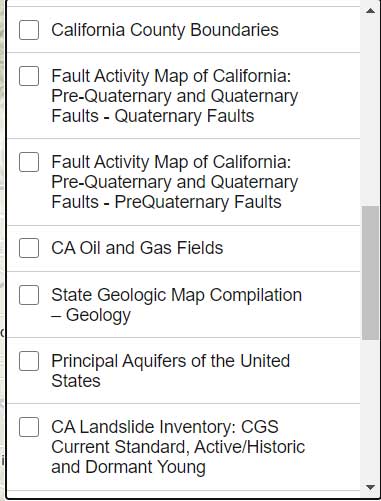
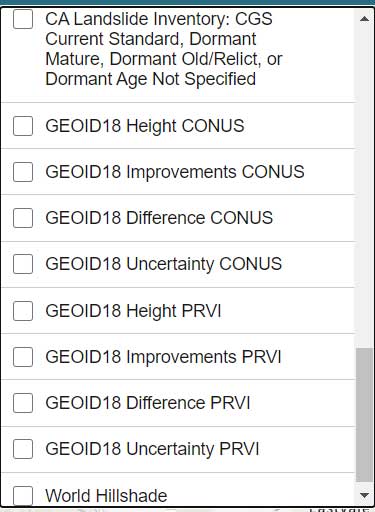
    The list all of the layers of the web application are provided in the box titled “GNSS Leveling Web Application Layers.” (Note: After you open up the web application, click on the Layers icon to obtain the list of available layers.)

    GNSS Leveling Web Application Layers

    Source: Esri ArcGIS GNSS Leveling Web Application
    Source: Esri ArcGIS GNSS Leveling Web Application

    Source: Esri ArcGIS GNSS Leveling Web Application
    Source: Esri ArcGIS GNSS Leveling Web Application

    Source: Esri ArcGIS GNSS Leveling Web Application
    Source: Esri ArcGIS GNSS Leveling Web Application

    Source: Esri ArcGIS GNSS Leveling Web Application
    Source: Esri ArcGIS GNSS Leveling Web Application

    As you can see from the list of layers, the web application enables users to select the layers that are pertinent to their survey project requirements. The application is designed for California surveyors but the concept is transferable to other States. For example, the following layers are not just for California surveyors: Arizona water wells, Louisiana oil and gas well, U.S. oil and natural gas wells, Principal Aquifers of the United States, and, of course, all of the NOAA NGS data layers.

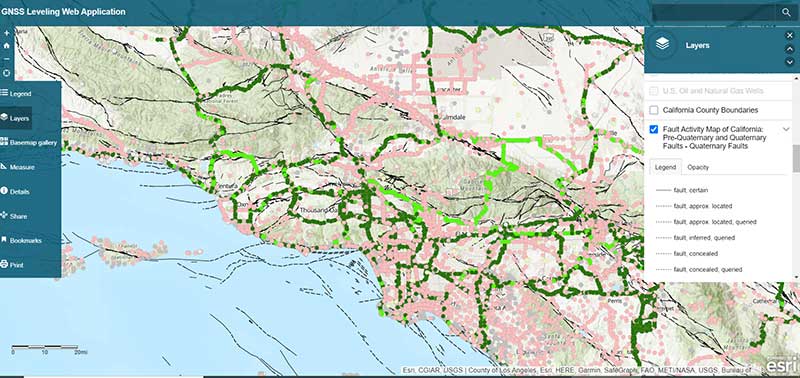
    One layer that is very important to California users is the layer that provides the fault activity in their region. The box titled “Fault Activity Map of California: Pre-Quaternary and Quaternary Faults – Quaternary Faults” depicts the list of published marks in NGS’ database with an overlay of the fault activity map.

    Fault Activity Map of California: Pre-Quaternary and Quaternary Faults — Quaternary Faults

    Source: Esri ArcGIS GNSS Leveling Web Application
    Source: Esri ArcGIS GNSS Leveling Web Application

    Another great feature of the application is that it has a layer providing the satellite visibility code for published NSRS marks (see the box titled “Published NSRS Stations (by satellite visibility”). Once again, a great feature for field personnel performing reconnaissance.

    Published NSRS Stations (by satellite visibility)

    Source: Esri ArcGIS GNSS Leveling Web Application
    Source: Esri ArcGIS GNSS Leveling Web Application

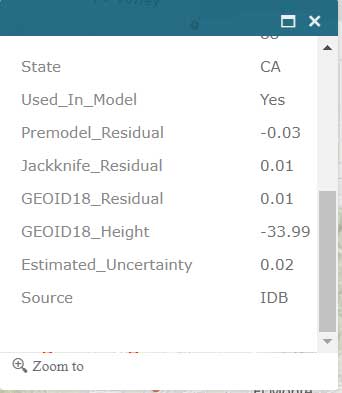
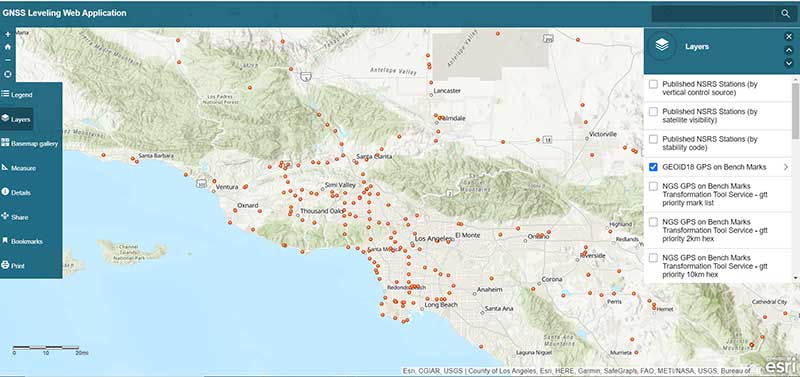
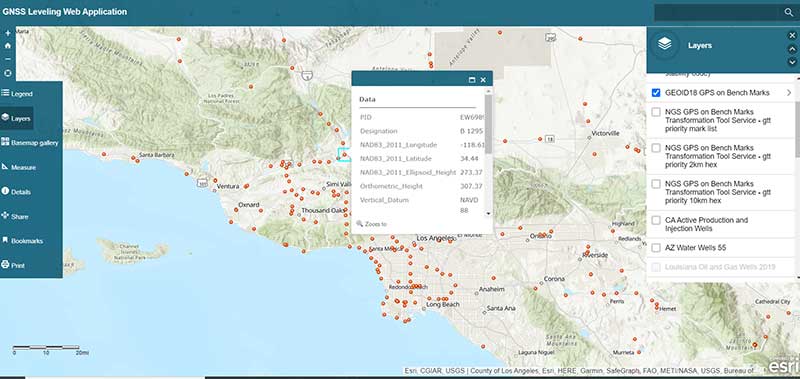
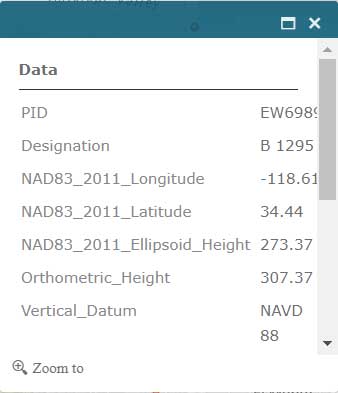
    The application also has a feature that lists the marks that were involved in the development of NGS’ hybrid geoid model GEOID18. (see the box titled “GNSS Leveling Web Application GEOID18 GPS on Bench Mark Layer”). Clicking on a mark’s icon provides information and statistics about the mark (see boxes titled “GEOID18 GPS on Bench Mark Layer — PID EW6989” and “Information for GPS on Bench Mark for PID EW6989”). This is one of the layers that provides information for the entire CONUS region. All this information is available from NGS’ website but this application incorporates all of NGS’s data as well as the local information in one application. This web application is very useful to a surveyor planning a survey project and/or providing information to a field reconnaissance team.

    GNSS Leveling Web Application GEOID18 GPS on Bench Mark Layer

    Source: Esri ArcGIS GNSS Leveling Web Application
    Source: Esri ArcGIS GNSS Leveling Web Application

    GEOID18 GPS on Bench Mark Layer — PID EW6989

    Source: Esri ArcGIS GNSS Leveling Web Application
    Source: Esri ArcGIS GNSS Leveling Web Application

    Information for GPS on Bench Mark for PID EW6989

    Source: Esri ArcGIS GNSS Leveling Web Application
    Source: Esri ArcGIS GNSS Leveling Web Application

    Source: Esri ArcGIS GNSS Leveling Web Application
    Source: Esri ArcGIS GNSS Leveling Web Application

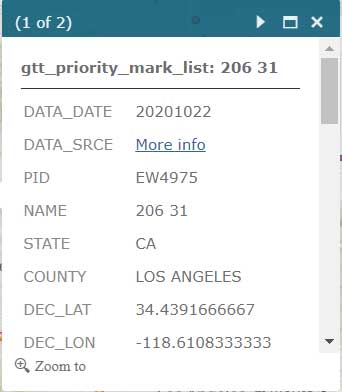
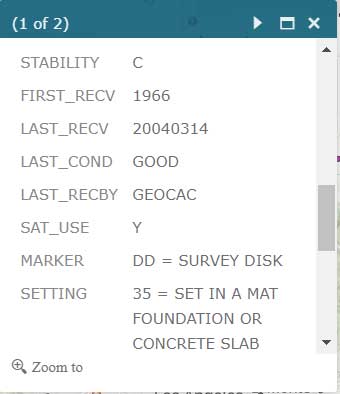
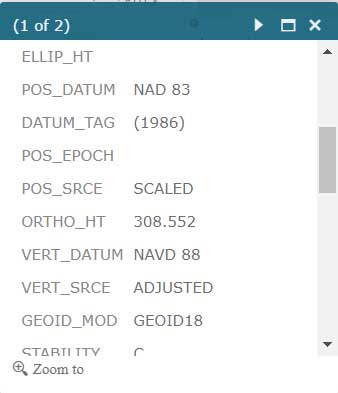
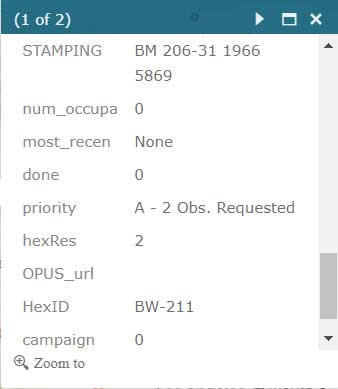
    Users that are participating in NGS’ GPS on Bench Mark program can click on the layer for “NGS GPS on Bench Marks Transformation Service Tool, priority 10 km hex” to determine marks that need to be occupied by GNSS to improve a transformation tool being developed by NGS. See boxes titled “NGS GPS on Bench Marks Transformation Service Tool, priority 10 km hex” and “Information for GPS on Bench Mark Priority List for PID EW6989.” There’s also layers that depict the priority mark list for the GPS on Bench Marks program (“NGS GPS on Bench Marks Transformation Tool Service — priority mark list”) and the 2 km hexagon priority grid (“NGS GPS on Bench Marks Transformation Tool Service — priority 2km hex”).

    NGS GPS on Bench Marks Transformation Service Tool, priority 10 km hex

    Source: Esri ArcGIS GNSS Leveling Web Application
    Source: Esri ArcGIS GNSS Leveling Web Application

    Information for GPS on Bench Mark Priority List for PID EW6989

    Source: Esri ArcGIS GNSS Leveling Web Application
    Source: Esri ArcGIS GNSS Leveling Web Application

    Source: Esri ArcGIS GNSS Leveling Web Application
    Source: Esri ArcGIS GNSS Leveling Web Application

    Source: Esri ArcGIS GNSS Leveling Web Application
    Source: Esri ArcGIS GNSS Leveling Web Application

    Source: Esri ArcGIS GNSS Leveling Web Application
    Source: Esri ArcGIS GNSS Leveling Web Application

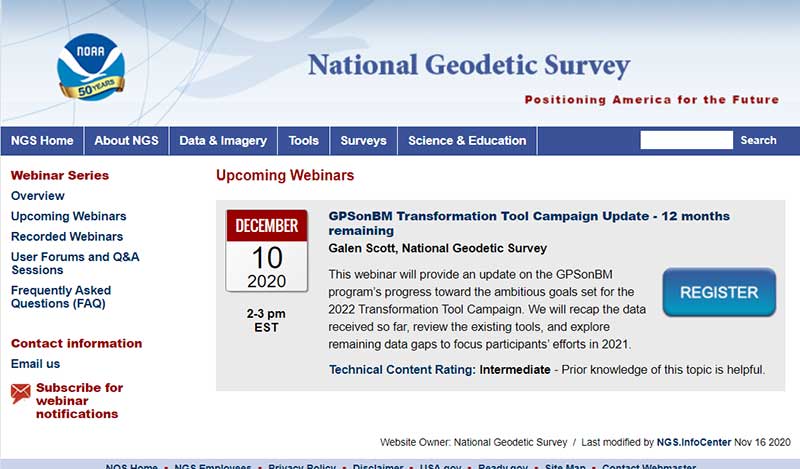
    Individuals interested in participating in NGS’ GPS on Bench Mark program should register for NGS’ Dec. 10 webinar, which will discuss the status of the program. See the box titled “GPSonBM Transformation Tool Campaign Update — 12 months remaining” for the information on the webinar. Users can register for the webinar here. I would encourage all users to access the web application tool developed by Jay and/or NGS’ website before participating in the next NGS GPS on Bench Mark webinar.

    GPSonBM Transformation Tool Campaign Update — 12 months remaining

    (NGS webinar series)

    Screenshot: National Geodetic Survey
    Screenshot: National Geodetic Survey

    Almost all of my columns have focused on establishing accurate GNSS heights. Most of my 45 years of working in the field of geodesy has been focused on heights; that is, leveling-derived orthometric heights, GNSS-derived orthometric heights, and geoid heights. Gravity is very important to estimating all of these types of heights. Recently, a colleague sent me a video proving Galileo’s famous gravity experiment. It’s an older video (November 2014), but it’s really fascinating. You can see the entire video here. Another individual pointed me toward the same experiment performed on the Moon during the Apollo 15 mission. What’s amazing to me is that over 400 years ago an individual spent time studying the effects of gravity and developing the concept of acceleration due to gravity. I wonder what the world would look like today if Galileo would have just accepted Aristotle’s theory of gravity (which states that objects fall at speed proportional to their mass) and decided to focus on other tasks. Saying that, I am amazed that most geospatial users do not realize the importance of gravity (and physical geodesy) in the development of the geospatial products and services that they use daily; and, how critical it is that more research is required to meet future geospatial needs. The advancements in satellites and computers have enabled geodesy to expand into many different disciplines. Geodetic science and technology now underpin many sciences, large areas of engineering (such as driverless vehicles and drones), navigation, precision agriculture, smart cities, cellular telephones, and location-based services. (See the GPS World First Fix column about the shortage of American geodesists).

    When I end one of my presentations, I always emphasize that Geodesy Provides the Foundation for all Geospatial Products and Services, and Integrated and Collaborative Organizations Create Geospatial Solutions. Geodesy is just as important today as it was 400 years ago.

    I hope everyone stays safe during this COVID-19 pandemic and enjoys the holidays.

  • Esri Site Scan, Auterion drone help meet regulations

    Esri Site Scan, Auterion drone help meet regulations

    Freefly Astro drone. (Photo: Auterion)
    Freefly Astro drone. (Photo: Auterion)

    Esri is offering two major capabilities in Site Scan for ArcGIS that will enable governments and critical infrastructure organizations to meet hardware and software regulations in the United States and Europe. Site Scan is Esri’s unmanned aerial systems flight planning and processing solution.

    Through an established partnership with Auterion, creator of an open-source drone autopilot operating system, security-conscious U.S. organizations will be able to use Site Scan to plan and execute missions with Auterion’s Freefly Astro drone.

    In Europe, data from publicly funded or critical infrastructure projects cannot leave the European Union (EU). For these organizations, a new and fully independent instance of Site Scan for ArcGIS has been deployed to a server cluster in Ireland, ensuring that organizational data resides within the region.

    Site Scan for ArcGIS is used by organizations that require drone imagery for visual inspections, site monitoring, asset management and situational awareness. It’s an all-in-one, cloud-based drone mapping solution for managing fleets and collecting, processing, analyzing, and sharing data products. Industries using this solution include architecture, engineering, construction, natural resources, infrastructure and government.

    Freefly Astro uses U.S. Department of Defense-approved Blue sUAS software architecture from Auterion, and is fully supported by Site Scan. The first vehicle integrates the software with the Freefly Astro, with more vehicles becoming available.

    Auterion’s secure, integrated workflow for mapping uses the Freefly Astro drone, Sony A7R4 camera and Esri Site Scan within a single platform.

    The Freefly Astro and Site Scan integration will be available by December. The European deployment of Site Scan is available now.

  • Esri acquires nFrames for 3D capabilities

    Esri acquires nFrames for 3D capabilities

    Esri has acquired nFrames, a technology company that develops SURE, an imagery and lidar 3D surface reconstruction software.

    According to Esri, this will enable the fusion of imagery with 3D GIS, allowing nFrames and Esri users to seamlessly capture and analyze 3D data from aerial, drone and ground-based sensors in an automated end-to-end process.

    SURE scales 3D data creation to large city and countrywide airborne image datasets and projects. According to nFrames, it gives professional photogrammetry workflows improved precision, speed and simplicity on premises or in the cloud. SURE can be used for a number of industries, including those in government; national mapping; insurance; and architecture, engineering, and construction (AEC).

    Through this acquisition, Esri gains a robust production engine that transforms imagery and lidar data into point clouds, phototextured 3D meshes and true orthos, Esri said.

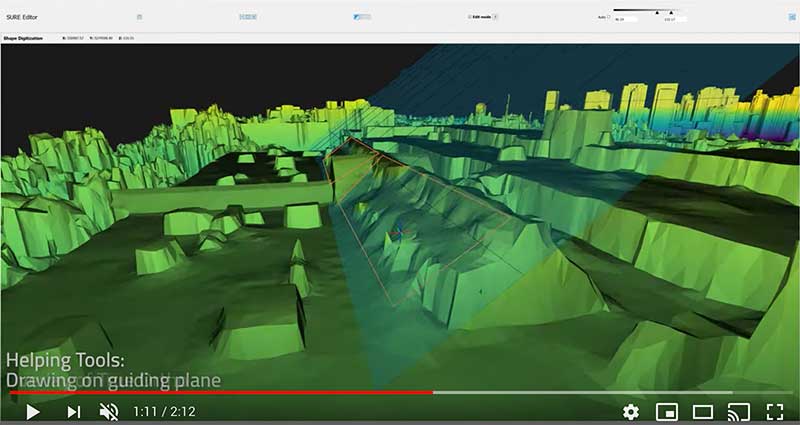
    SURE software editor (Screenshot: nFrames)
    SURE software editor (Screenshot: nFrames)

    In addition, SURE allows its users to generate 3D maps at scales from individual construction sites to entire cities and countries. These maps are fully automated at high resolution and repetition rates, nFrames added.

    “nFrames is a leading provider of 3D image reconstruction software and services, and I am excited to welcome the company to the Esri family,” said Jack Dangermond, Esri founder and president. “As Esri continues down its path of innovation to create a multidimensional experience, this acquisition enhances our ability to create extremely high-quality 3D data from imagery, which is critical for our customers in the municipal, planning and AEC industries.”

    SURE software will become a part of Esri’s ArcGIS platform. According to Esri, it will make SURE capabilities available in ArcGIS Drone2Map and Site Scan for ArcGIS so users can create better meshes, point clouds and true orthos from their drone imagery.

    “Together with Esri, we will be able to unlock the full value of 3D surface data through GIS by connecting geometry with metainformation to provide spatial context,” said Konrad Wenzel, CEO and co-founder of nFrames. “This fully automatic chain from data capture to analytics will enable smarter decision-making.”

    The nFrames headquarters will now serve as a new Esri research and development center based in Stuttgart, Germany.

  • Esri releases ArcGIS QuickCapture for one-touch field data-collection

    New app gives field crews a fast, easy way to record information while mobile

    Esri has released ArcGIS QuickCapture, a mobile app designed for rapid and at-speed field data-collection workflows.

    Data can be collected from a moving vehicle with the touch of a button and sent back to the office for real-time analysis, leading to faster and more effective decision-making. The new app is designed for road inspections, aerial surveys, monitoring vegetation encroachment and more.

    ArcGIS QuickCapture allows users to configure a customized interface that suits their specific project requirements, eliminating unnecessary features and options. This personalization helps users take advantage of the single-tap, big-button system to capture details and photos as they go. The app is intuitive and user-friendly, eliminating the need for extensive crew training.

    The new app integrates with the user’s existing IT infrastructure and ArcGIS platform, which simplifies implementation. It uses the existing GPS and camera on smartphones and tablets, and it is compatible with iOS, Android and Windows devices.

    For high-accuracy data collection workflows, QuickCapture is also compatible with external GNSS receivers.

    “ArcGIS QuickCapture builds upon and enhances our existing field data collection offerings in ArcGIS,” said Ismael Chivite, senior product manager at Esri. “Field crews are demanding user experiences that are tailored to the way they work. QuickCapture is designed to capture GIS data with the tap of a button, while on the go. At-speed road asset inventories and quick damage assessments are examples of workflows where QuickCapture excels.”

    To learn more about ArcGIS QuickCapture, visit go.esri.com/quick.

  • Geocortex adds support for Arcade scripting and ArcGIS Online smart mapping

    Geocortex adds support for Arcade scripting and ArcGIS Online smart mapping

    Photo: Latitude Geographics
    Photo: Latitude Geographics

    Latitude Geographics (a VertiGIS company) has released the 4.12 version of its flagship product Geocortex Essentials to make it easier for developers of mapping applications to take advantage of Esri’s ArcGIS technology.

    Smart mapping. Using Esri’s smart-mapping functionality, GIS departments around the world are creating eye-catching, informative maps in ArcGIS Online. Smart mapping allows analysts to visualize and review their data in unique ways to discover trends and solve complex problems. By styling data and displaying it in a thematic map, hidden meaning can be found.

    For example, a map can now be created that uses clustering, opacity and varying color schemes to display:

    • the most prevalent level of education in a county by neighborhood,
    • the incidence of that level of education in that neighborhood, and
    • the variance from that mean level of education in that neighborhood.

    Web maps output from ArcGIS Online can now be imported into Geocortex Viewer for HTML5 (GVH) exactly as they are, meaning that all smart mapping symbology, legends and other information will be preserved and appear in GVH in the same format.

    Scripting. The Arcade expression language adds powerful scripting capabilities to the ArcGIS platform. By writing simple scripts, users can manipulate their map data on the fly in several ways.

    For example, a user could use an Arcade script to set up an identify parcel operation that also returns a summary of both the population density and communications infrastructure in the area, along with any other variables of interest. The portability of these scripts allows them to now be used within Geocortex applications.

    “The new functionality added in this release provides even stronger support for developers using the ArcGIS platform, particularly those familiar with creating smart maps in ArcGIS Online,” said Drew Millen, chief technology officer for Geocortex. “It’s now easier than ever to build a mapping application that pulls data from various sources and uses it creatively to improve decision making.”

    To learn more about the latest version of Geocortex Essentials, visit the company’s product release page.

  • Esri, Jane Goodall Institute partner to protect ecosystems

    Esri is partnering with the Jane Goodall Institute to develop a set of tools that will help communities map and manage the ecosystems around them through a collaborative design and planning approach, aided by GIS software.

    According to the partners, these tools will help communities map, monitor, and better manage their natural resources from community forests and wildlife reserves, to water catchment and flood control areas, as well as human settlement, agriculture and agroforestry spaces.

    The Jane Goodall Institute’s community-centered conservation approach — Tacare — partners local communities and governments to create sustainable livelihoods while planning for and advancing environmental protection. The Tacare approach also achieves conservation results and addresses environmental threats — including incompatible expansion of agriculture, human settlements, harvesting forest products, disease, wildlife trafficking and illegal bushmeat trade — by consulting communities about their needs and priorities, and working together to collaboratively plan for and implement land use practices that enable their own development.

    “A key component of our success is that we work to help villagers find ways to make livelihoods that do not destroy the environment, and help them understand that protecting the environment not only conserves wildlife, but their own future,” said Dr. Jane Goodall, DBE, founder of the Jane Goodall Institute and United Nations Messenger of Peace.

    The Jane Goodall Institute uses Esri’s ArcGIS platform and Survey123 mobile app to help communities and governments in western Tanzania, Uganda and other countries in Africa to plan, monitor and protect chimpanzee populations in local protected forests outside designated national parks.

    “Conservation at the community level is essential to sustaining our natural world,” said Jack Dangermond, Esri founder and president. “Protecting global ecosystems cannot work on a global scale unless it starts locally, which is why we are honored to work with our friend and partner, the Jane Goodall Institute, on this collaboration, leveraging their years of experience working at the local scale in pursuit of conservation, balanced with the needs of human communities.”