Author: Tracy Cozzens

  • CoreLogic: Top 25 Zip Codes in NYC at Risk of Property Damage from Hurricane Sandy


    Note to Readers: The CoreLogic storm-surge analysis provided below was developed based on the projected path of Hurricane Sandy as of 12:30 p.m. ET Monday, October 29.

    CoreLogic has released data showing the top 25 zip codes in New York City-Northern New Jersey-Long Island that are at risk of exposure to residential property damage from hurricane-driven storm-surge flooding when Hurricane Sandy hits the Atlantic coast later today. Massapequa, located on the South Shore of Long Island, holds the top spot with more than $4.6 billion in total structure value at risk.

    In a report issued Saturday, CoreLogic also provided an estimate of the total number of residential properties at risk among the coastal Mid-Atlantic states, assuming Sandy hits the coast as a Category 1 hurricane. Within that seven-state region, nearly 284,000 total residential properties valued at almost $88 billion stand at risk:

    According to CoreLogic, the number of residential properties in eight major metro areas and their respective potential exposure to damage are as follows:

    CoreLogic reports that hurricane-driven storm-surge flooding can cause significant property damage when high winds and low pressure causes water to amass inside the storm, releasing a powerful rush over land when the hurricane moves on shore. The CoreLogic analysis measures damage from storm surge and does not include potential damage from wind and rain associated with hurricanes.

    To view a map showing hurricane-driven storm-surge risk through Google Earth, visit here. To download the map as a KML file, visit here. Static maps depicting storm surge in the Northeast are available upon request.

    For more information on CoreLogic storm-surge methodology, data and analysis, download a copy of the more in-depth 2012 CoreLogic Storm Surge report at http://cl.internal.cvic.com/corelogic/url.php?cin=2d2e1y1w2c2c.

  • $3.7 Billion Reasons Why GIS Technology is The Future

    Editor’s note: Although GIS adoption is certainly on the rise, it hasn’t reached critical mass for widespread adoption so I think 2012 is too early to be seen as the Year of GIS. When it does, it will be fueled by widespread location apps in smartphones and adoption of mainstream office apps like Maps for Office.


    When technology historians look back on 2012, they might look at this as the GIS year says Dr. Stephen McElroy, GIS program chair at American Sentinel University.

    “2012 is the year of GIS,” says Dr. Stephen McElroy, GIS program chair at American Sentinel University. “The desire to know where everything is located fuels the current trend in location-based services. As GIS is more accessible and consumable on the Web through a variety of mobile devices, the average person is becoming increasingly impacted by the power of GIS. Soon it will become a pervasive technology that is consumed by a wider audience than ever before.”

    The proof is in a new report from Pike Research. Findings indicate that spending on GIS services, software and tools will increase steadily over the next five years, reaching $3.7 billion in 2017.

    This industry momentum toward GIS is what led to K-12 schools in North Carolina to sign a statewide license for unlimited classroom use of Esri’s ArcGIS software.

    According to Dr. McElroy, K-12 educators are increasingly aware that geospatial competencies must now be included among the core proficiencies of reading, writing and arithmetic. He points out that some schools are undertaking initiatives to incorporate geospatial competencies across the curriculum by adding geospatial exercises and experiences into the standard curriculum. The concept of GIS across the curriculum is a trend that is just now beginning to blossom and illustrates the long-term presence of geospatial thinking at the national, state and local levels.

    To demonstrate just how important GIS is to the U.S. government, Esri, the world’s leading provider of GIS software recently released a new book, ‘Mapping the Nation: Government and Technology Making a Difference.’ It includes more than 100 full-color maps produced by 40 government agencies, showing how GIS technology can be used to evaluate and respond to social, economic and environmental concerns at local, regional, national and global levels.

    “Geography is a common denominator in everything the federal government supports,” says Christopher Thomas, director, government markets – federal, state, local at Esri. “The maps in this book attest to the limitless power of geography and GIS technology. They show how government agencies rely on GIS analysis to facilitate initiatives, improve transparency and deliver strong business models.”

    Add this momentum to the fact that new products are released nearly every week, including CHC’s new LT30 series GPS/GIS handheld collector. The LT30 GPS/GIS is a multi-functional solution that includes built-in GPRS phone and data transmission, Bluetooth and Wi-Fi connectivity, a 3.2 megapixel camera with autofocus and a versatile RS232 interface to connect to legacy devices.

    Smart Grids Lead the Charge

    Leading the charge for this GIS enthusiasm is the smart grid.

    According to the Pike report, spatial data underlies everything an electric utility does. An intelligent power grid requires deep situational awareness of power generation, transmission, distribution and customer assets in order to optimize performance and to meet reliability commitments.

    Land-based and street-level data, ownership/real estate, vegetation, network topology, GPS location data, census data, and many other forms of geospatial information are critical to the successful performance of the smart grid.

    GIS is a foundational technology linking every activity of an electric utility – including design and construction, asset management, workforce management, outage management, and increasingly, real-time grid operations.

    “The smart grid has energized electric utilities to think creatively about how to improve the delivery of electrical power and the business and workflow processes that enable it,” says Pike Research vice president Bob Gohn. “As the deployment of intelligent field equipment, particularly advanced metering infrastructure, has surged, the applications leveraging this infrastructure are increasingly dependent on GIS-based data for critical real-time performance.”

    Public and private utility providers will need a comprehensive GIS that they can utilize to make key decisions about system-critical issues such as customer database management, streamlined meter reading and blending of renewable (solar, wind, hydro and geothermal) and non-renewable energy resources from coal and nuclear facilities.

    “These industries are looking for people who understand GIS technology, making it an excellent time to make yourself more marketable and consider an online bachelor’s or master’s degree in GIS technology,” says Dr. McElroy.

    The market for GIS professionals at all skill levels has never been better.

    The Bureau of Labor Statistics indicates that the job outlook (2010-2020) for geographers is growing by 35 percent (much faster than average). For Cartographers and photogrammetrists, the outlook is 22 percent growth (faster than average). For surveying and mapping technicians, the outlook is 16 percent and all of these occupations are expected to grow by 14 percent.

  • USGS Crowdsourcing: Looking at New Ways to Map Structures in Colorado

    The United States Geological Survey (USGS) announced that in light of swiftly changing technical landscapes and increasing uses of social networking, the USGS is exploring a new approach to the volunteer program, and is launching a project to test options for volunteer participation in providing data to The National Map.

    The project involves mapping man-made structures and facilities, such as schools and fire stations, in the state of Colorado. Using an internet mapping application, volunteers can help the USGS update The National Map by correcting or adding information about structures.

    “Even members of the public who can’t tell a sandstone from a rhyolite but have internet access can now help the USGS keep its popular maps up to date through our new experiment in crowd sourcing,” said USGS Director Marcia McNutt. “Correctly locating and identifying fire stations, police stations, schools, and hospitals not only makes USGS maps more useful, but can literally save a life.”

    Over the past two decades, the USGS National Geospatial Program sponsored various forms of volunteer map data collection projects. Volunteers helped the USGS improve its maps during this period, by annotating paper maps, collecting data using GPS units, and submitting data using a web-based tool. However, in 2008, the volunteer mapping program was suspended as new methods for using volunteer data were being studied.

    In recent years, new web- and mobile-based technologies have made it easier to create, combine, and share maps. Recent events have shown how well these technologies support the rapid and relevant production of geographic information.

    If the Colorado pilot project is successful in attracting volunteers and capturing data for use in The National Map, the program may be expanded to other areas in the future.

    This project offers volunteers an opportunity to participate in providing data to The National Map and US Topo map products. For more information, interested Colorado volunteers can visit the National Map Corps website.

  • URISA Announces 2012 GIS Hall of Fame Inductees

    URISA (Urban and Regional Information Systems Association) announced their 2012 GIS Hall of Fame inductees. URISA established the GIS Hall of Fame in 2005 to recognize and honor the most esteemed leaders of the geospatial community. To be considered for the GIS Hall of Fame, an individual’s or an organization’s record of contribution to the advancement of the industry demonstrates creative thinking and actions, vision and innovation, inspiring leadership, perseverance, and community mindedness. Hall of Fame inductees are individuals or organizations whose contributions and accomplishments have moved the geospatial industry and user community in a better, stronger direction.

    This year, the GIS Hall of Fame Nomination Committee, composed of URISA Past Presidents, proposed five federal agencies that have made substantial contributions to the GIS community and profession. The URISA Board of Directors unanimously approved each nominee.  URISA is pleased to announce the 2012 GIS Hall of Fame inductees:

    • National Aeronautics and Space Administration
    • Natural Resources Canada
    • Statistics Canada
    • United States Census Bureau
    • United States Geological Survey

    Representatives from each agency will be in attendance at URISA’s 50th Annual Conference in Portland, Oregon, where each will be inducted into the URISA GIS Hall of Fame during the Awards Ceremony on Wednesday, October 3, 2012.

    “The United States Geological Survey (USGS) is thrilled to be receiving this award from URISA and is immensely proud of the many USGS employees who have pioneered the application of GIS in the programs we carry out on behalf of the U.S. Department of the Interior and the citizens of our Nation”. — Mark DeMulder, Director, USGS National Geospatial Program

    “NASA is honored by this recognition from a leader in the use of geospatial data and tools across sectors.  This honor is truly a tribute to the many people who design and operate the Earth-observing satellite missions, process and deliver the data, and analyze the measurements to benefit all humankind.” — Michael H. Freilich, Director of the NASA Earth Science Division

    “Statistics Canada is honored to be recognized by the URISA GIS Hall of Fame for its leadership role in advancing GIS technology for the production and dissemination of statistical data in Canada. The Agency is most proud of its staff who have partnered with organizations in Canada and internationally to develop and adopt innovative GIS solutions to meet increasing and evolving user needs.” — Rosemary Bender, Assistant Chief Statistician, Informatics and Methodology, Statistics Canada

    “The U.S. Census Bureau is honored to be inducted into the URISA GIS Hall of Fame, which recognizes the achievements of Census Bureau staff for its technological innovations for making GIS data available to the nation.” —  Thomas L. Mesenbourg, Acting Director, Census Bureau

    “Natural Resources Canada is proud to be recognized for its scientific and technological accomplishments in geomatics. This honour is a reflection of the dedication and professionalism of our staff and partners who have advanced geomatics innovation in Canada and beyond.” —  The Honourable Joe Oliver, P.C., M.P., Minister, Natural Resources Canada

    The 2012 inductees will join the following esteemed members of URISA’s GIS Hall of Fame, each of which is profiled online:

    • 2005 Inductees: Edgar Horwood, Ian McHarg, Roger Tomlinson, Jack Dangermond, Nancy Tosta, and the Harvard Lab
    • 2006 Inductee: Gary Hunter
    • 2007 Inductees: Don Cooke and Michael Goodchild
    • 2009 Inductees: Will Craig and Carl Reed
    • 2010 Inductee: C. Dana Tomlin
    • 2011 Inductees: William Huxhold and Barry Wellar
  • Esri Releases New Version of ArcGIS for AutoCAD Plug-in

    Esri announced the latest release of ArcGIS for AutoCAD plug-in, Esri’s free AutoCAD plug-in, improves the ability to exchange data and information between the ArcGIS and AutoCAD platforms. ArcGIS for AutoCAD users with read/write access to ArcGIS for Server feature services can now edit geodatabases through AutoCAD. This enables easier data dissemination between CAD and GIS users across the enterprise, reduces the duplication of work, and increases efficiency.

    According to the announcement, CAD professionals can use the free downloadable application to add, create, and edit GIS data within AutoCAD drawings. For example, users can add maps and map services from enterprise or cloud servers, such as ArcGIS Online, to their drawings, giving the design a geographic context and a common operating picture for the organization.

    “ArcGIS for AutoCAD is the interface to the ArcGIS system and all of its rich data content, sharing, and data management,” states Esri CAD product manager Don Kuehne. “The possibilities presented by the combination of AutoCAD and ArcGIS services to automate editing and data maintenance workflows are going to result in an exponential leap in value for those who take advantage of them.”

    The new release also includes access to image services and a geolocation service for navigating within an AutoCAD drawing. AutoCAD 2010/2011/2012 (32-bit and 64-bit) systems are supported. To learn more about or to download the new release of ArcGIS for AutoCAD, visit esri.com/autocadapp.

  • Esri Acquires ArcPad Developer Maptel

    Esri announced that it has acquired Maptel, the developer of Esri-branded ArcPad and a mobile application development company based in Melbourne, Australia. The addition of Maptel, who has been the developer for Esri’s ArcPad software for several years, will strengthen Esri’s field data collection capabilities and its overall mobile platform.

    “We have worked side-by-side with Esri for many years,” said Elvin Slavik, lead developer and co-founder, Maptel. “We look forward to growing our relationship, and we are excited about delivering reliable geospatial solutions that empower mobile crews and their organizations.”

    “Maptel’s proven talent and experience in mobile application development will be a valuable asset to Esri,” said Euan Cameron, CTO of Apps and Runtime development, Esri. “Merging our teams will help us better serve ArcPad users and advance our entire range of mobile solutions.”

    According to the announcement, Maptel staff will supplement Esri’s global development team from their existing facilities in Melbourne, Australia. They will continue to develop and support ArcPad with a focus on enhancing integration with the ArcGIS system.

  • Golden Software Releases Surfer 11

    Golden Software, Inc. announces the release of Surfer 11, a powerful, user-friendly software package which accurately transforms data into presentation-ready maps.

    According to the announcement, Surfer 11 offers twelve different gridding methods, including Kriging with variograms, to convert irregularly spaced XYZ data into a uniform grid. Display a grid or digital elevation model in one of eight fully customizable 2D and 3D map types: contour, watershed, image, shaded relief, 1-grid and 2-grid vector, 3D wireframe, and 3D surface maps. Enhance the display by adding post, classed post and base maps. Contour and 3D maps generated with Surfer are known for their clarity, vibrancy and accuracy.

    Golden Software reports that one of the most popular new features in Surfer 11 is the ability to create watershed maps. Users can now load a grid file to create a watershed map and display catchment basins and stream lines based on the Z data in the grid file.

    In addition to creating watershed maps, users can now load and label base maps with attributes. This has been a top request from current users. Load features into Surfer with attributes, label the features with the attributes, edit the attributes, and export the feature and attribute information together to a new file.

    Golden Software reports that three other time-saving upgrades to Surfer 11 are automatic profiles, interactively measuring distance and area, and locking the position of an item on the page. Users can now simply draw a line on a map and a topographical profile is automatically created! Users can also measure lengths and areas by drawing a line or polygon on a map. The length and area measurements are displayed and updated immediately as the user is drawing the item. Locking the position of an item on the page allows users to create their project with the confidence that their maps, legends and items will stay in the exact same spot that they are laid out.

    Comments from Surfer 11 Beta Testers:

    “Surfer 11 is great, with many long-desired improvements” – John Vanderlaan, President / Geophysicist, Prism Geoimaging, Inc.

    “I fell out of my chair when I read that you can lock object positions!!!!! Love it. Thank you so much” – William E. Steinhart III, Senior Geophysicist Project Manager, Enviroscan, Inc.

  • Reader Response on Open Source and Mobile Devices

    I’ve received some great reader response from readers regarding my articles on open source GIS and mobile devices. I’ve included them in this week’s column along with my comments.

    Open Source GIS

    As you can read below, the comments are directed at my statement regarding technical support for open source GIS software. I wrote that, essentially, “you’re on your own” to find solutions to technical problems and implied that open source GIS software support is not as good as commercial GIS software due to the lack of accountability. These readers clearly disagree and are passionate about the responsiveness of the user community and commercial support for open source GIS software.

    By way of background, following are links to two articles I’ve written in the past two months on open source GIS that the readers are referring to:

    May 17, 2012 – Open Source GIS

    May 24, 2012 – Open Source GIS: Part II


    Hi, Eric.

    Thanks for your paper. Please avoid spreading old FUD such as:

    There’s no accountability, no priority tech support, no one to call when you can’t figure out why things aren’t working, etc. You’re on your own, sort of.

    Which is plainly false. e.g., for QGIS, there are a number of companies that provide first class support, of far higher quality (having access to source code) than you can get for proprietary software, at favourable rates.

    By spreading such wrong opinions you actually damage, even if unwillingly, our work, and the open source ecosystem.

    All the best.

    Paolo – Italy


    Hi there, Eric.

    I would just like to mention my own personal experience and view on your statement about being on my own when using Open Source GIS software.

    I am using both commercial and open source in my organization, I pay quite a bit for the commercial support in the form of an annual maintenance fee. I don’t pay anything for support for the open source products I use, not because there aren’t any offerings, but it is more difficult do convince my company´s hierarchy to buy the same kind of annual support contract for open source products.

    Now, even under these circumstances, I get more results from the “unofficial” open source support from mailing lists then from the commercial support contract.

    Let me give you some examples on commercial support:

    1. I discovered, to my surprise, the latest version of the commercial product didn’t support wms services on computers with international settings (comma instead of dot as decimal separator). I waited a year and a half for that)
    2. I have found that the commercial product is 100% slower (half the speed) with a supported database product than the open source equivalent. The support told me that it was the database’s fault (which was aggravating). I had to log the sql statements and prove them wrong. I’m still waiting for a solution. There is no guarantee this will be solved. I was informed an enhancement request was filled but it is not publicly viewable.

    On the other hand, I had some problems with the open source product, without any support contract. I’m seeing a quick release cycle that solves a good portion of known bugs and problems, almost always solving my problem in the process. But the best thing that happened to me is when my particular bug is fixed under 24h and I can immediately download the fixed version. I even had a situation where I needed a new feature and someone developed an initial version in a week. A day later, one of the main developers included a similar feature in the core of the program.

    So, really, stating you are on your own when using open source products is really just not true and really a disservice to your audience when you state that so firmly.

    From my own experience, I am convinced there is a problem with changing our usual procedures. Instead of buying a product that includes one year of some kind of support (many times ineffective), and  then paying a fee annually, we must switch to using a free product, whose cost is that when we change it for the better we contribute that back to the rest of the users. And we can and should buy commercial support when our usage pattern reaches the level when it makes sense to acquire this type of contract.

    Thank you for your article. Other than this particular point, I enjoyed reading it.

    Best regards,

    Duarte – Portugal


    Dear Mr. Gakstatter,

    It’s great to see open source GIS featured in gpsworld.com (env-gpsworld-integration.kinsta.cloud) but I cannot agree with the following statement:

    “there’s limited amount of technical support available to implement and maintain the apps”

    There are both very professional companies (redacted) and enthusiastic communities behind any of the graduated OSgeo projects.

    As you mentioned correctly, one main issue is “market awareness” concerning open source GIS. Another issue is the very limited marketing budgets which makes it difficult to push the message and articles claiming lacking support are unfortunately not encouraging the average user to look into open source.

    I really appreciate that you picked up the topic of open source, I’d just  hope that correct pointers the the many support possibilities would be included.

    Best wishes,

    Anita – Austria


     I just read your article on Open Source GIS, dated May 17, 2012. I agree that it will be interesting to see where FOSS GIS goes in the future, I have to question your view on support.  I have been a user of proprietary GIS and image processing software for 10 years (from ArcView 2 through present day ArcGIS 10.1, ERDAS IMAGINE, ENVI, MapInfo etc…) and I have to say that I have received MUCH better “technical support” the past two years with FOSS products than I ever had with the other proprietary products.  Many of the FOSS packages have excellent document and reference websites (could be because these are built by the developer s and users alike, and added to continuously.)  There are also a large number of blogs and other websites documenting steps in these packages.  Additionally, the email lists are incredible.  I can usually find what I need WITHOUT having to call someone!  In the past, I was a heavy user of ESRI Knowledge Forums, which I thought was great when I started. ESRI staffers did not post as much as you would like. Numerous questions would go months or years without an answer or post by ESRI. The numbers of qualified people posting to the ESRI forums and email lists were far outnumbered by the users and were less responsive when needed. Maybe there is also a factor that is you recived software and support for free, then you’re more willing to help others. As well, being a tech support person myself for many years, I can attest that many ESRI/ArcGIS users do not understand much about GIS and cannot answer may questions posted. There are of course, local user groups, but many are specific to their needs. IT was tough in the ESRi world to get support than in the FOSS world.

    One last comment is the adoption of gvSig. Quantum GIS has really taken off and is the primary FOSS GIS desktop people use. MapWindow also is becoming very popular and used heavily by US federal govt related groups. Both of which feel closer to traditional GIS. gvSig is also a little different in its feel and use.

    John – Delaware USA


    I’d like to thank these folks for taking the time to write about their experiences. I’m going to continue to investigate, understand, and start using open source GIS to gain a feel for it. Initially, my interest in open source GIS was focused on mobile apps, such as gvSig Mobile, but I also see there’s an effort to develop Quantum GIS Mobile for Android, which could be very interesting given the tremendous adoption of Android in mobile devices. Also, the website agenda doesn’t reflect it yet, but I’ve added a keynote speaker on open source GIS to the 2012 Field Technology Conference general plenary. It’s important for the GIS user community to understand what’s available.


    Operating System Wars: Android, iOS or Windows Mobile?

    I also received an email from a reader regarding my series on mobile devices and operating systems. I’ve written a few articles on this subject recently. In fact, an article titled “Expert Advice: Mobile Computing on the Rise” will be in the GPS World print magazine in the July issue, which is what the following reader email is referring to. For more background, refer to the following articles:

    April 27, 2012 – Mobile Device Operating System Wars: Android vs. iOS vs. Windows Mobile

    May 10, 2012 – Thoughts on Mobile Devices, UAVs, and Cheap Data-Collection Software

    July 4, 2012 – Mobile GIS Webinar Follow-up and the New Google Nexus 7 Tablet


    Eric,

    Just read your July 1 article “Expert Advice: Mobile Computing on the Rise.” Seems every time you write on mobile I feel compelled to send you an email follow up. This time’s no exception.
    I too remember the Grid computer days when a tablet’s heft was in tons, handwriting recognition involved mystical templates that helped you shape your letters just so with the stylus, screen visibility outdoors was essentially non-existent and battery life diminished at the same rapid rate as water evaporating in the southwestern desert sun on a 115 degree day. I absolute agree that WinMobile’s future is questionable and even if that OS does manage to avoid emulating dinosaurs it will likely remain relegated to professional uses only with high price points both for hardware to run that OS and for the software that makes owning a device powered by it marginally worthwhile. Ruggedized hardware is the best thing going for WinMobile in my mind and I believe that’s all that can save it from becoming fossilized. But that advantage is beginning to resemble the Garmin/TomTom legacy losing traction nowadays.
    Where we differ, however, is that I’m already willing to go WAY out on the limb and give the trophy for victory in the mobile war to Android devices. Here’s why.
    My first smartphone was an Apple iPhone 3GS and when it came time to move up to a new phone, I wrestled quite a long time between Samsung Android-based offerings and the very new at that time Apple 4s. If you guess that I went for the Android for my second smartphone and that’s why I’m emailing you, you’d be wrong. Although I absolutely hate several limitations of iOS-based phones (no removable battery, throttling back to near non-existence of Bluetooth by Apple, and zero removable storage specifically), I went iOS yet again primarily because of Siri (which I’ve not been that thrilled with) and the fact I already had many iOS apps that I’d paid for and understood how to use.
    But when it came time to buy my first non-Windows (… and I’m not talking WinMobile) tablet, I reversed course totally. I purchased a Toshiba Thrive which I really love. I don’t even bother to pack my Win7 laptop for most business trips nowadays. I have a small twelve inch laptop case with a Bluetooth mouse and keyboard and I just grab the Thrive and the case and I’m good to go. When I first got the Android OS tablet, many of the apps that were readily available in iOS were not there. By that I’m not talking about DropBox or the Weather Channel app … I’m taking specialized category level not there. I was blown away, for example, that I couldn’t find a camera app that geotagged photos taken with the Thrive. Over time, however, that gap has narrowed so it’s far less a factor and I really like the fact that I can take my 128 GB SDXC chip on which I have all my geospatial professional, university teaching and personal files and pop it out of my work Win7 laptop and into the Thrive and head out across the county. QuickOffice lets me read MS Office docs and make changes on the go. Right now, I’d not trade my year and a half old Thrive for a new retina display iPAD even if Apple paid me what the new IPAD costs if I had to give up my Thrive.
    Knowing that just my enthusiasm about someday being able to take a terabyte of geospatial data on an Android tablet with me to the field will probably not convince you to join my declaration of victory, I’ll finally get to the point of this email.
    The fact is that MANY vendors are introducing this summer ruggedized Google-based tablets. Contrast that to the fact that iPADs will always have to be encased in some kind of protective shell. That’s the piece of the story that I think you missed. To me this is a very big deal. A Panasonic Toughbook Android offering compared to the delicate iPAD for use in my geography is a no brainer. I also don’t expect to see too many daylight optimized iPAD screens coming out anytime soon from Apple.  Also MIA in your piece was easy of development.  Friends and I are building a new geospatial apps company and so we’ve been done a bit of development on both Android and iOS. So far we’ve used Flash Builder and created FLEX-based apps just by checking the two appropriate boxes for iOS and Android Mobile. Then it came time to test the apps. I can tell you that the venture capital sized fee required, the CDC DNA sample, TSA full body scan and NSA screening one must endure plus the length of Apple’s approval process to be able to just push a simple test app out to a few devices from iTunes compared to the far more pleasurable experience fielding a test Google app leave me never wanting to write again for iOS. And then there are the UDIDs for every darn iOS device you plan on testing your code on. Developing on iOS is a royal pain compared to Android. Pain of development is the second thing not in your write up.
    Yes I find the lack of being able to create a folder unifying programs of a general type (telecom apps, office apps, etc.) on one of the Thrive’s home screens to be a bit of a pain but I really like being able to switch out my Thrive’s battery when I need a new one or I need one that’s freshly charged to head out into the field.
    So … I predict loudly (because unlike you I have nothing to lose in doing so), Google will win the field mobile race beating Apple as you said but I’m thinking more like three years and I believe ruggedized hardware designed specifically for field use that cost more than a Thrive but far less than a Getac Win7 convertible or a Trimble GeoXT will be a key factor in that victory.  And if ArcPAD for Android or a Trimble GeoXT with Android comes out…best get out of the way ‘cause a Tsunami’s coming.
    Keep up the great articles and I hope you find my thinking interesting,
    Larry – West Virginia USA


    I largely agree with Larry. I think the mobile operating system war will likely be won by Android (market research predictions support this), and Windows Embedded Handheld might end up being the choice for “professional” users. Why? It’s all about the apps. Of course, there are tons of professional apps written for Windows Mobile (Windows Embedded Handheld will run them) and we’re starting to see geospatial apps being written for Android. Yes, there are geospatial apps written for iOS too, but if you look at the potential upside, I keep hearing that Apple just isn’t a developer-friendly environment, and as Larry mentions, Apple will always be focused on the consumer market, so don’t expect a ruggedized version of the iPad anytime soon. However, on the flip side, one Apple developer relayed to me that it’s very helpful that Apple retains strict control over app development for iOS devices:

    “When Apple upgrades IOS, it is pushed out to all devices (pad/pod/phone) and the updates are very well documented in terms of what changed. He said users just agree and they all get it, very rarely does someone say no to the upgrade. So, you have basically one version to program for/test at a time. Long story short, you only have to program the different screens and the rest is standardized. The info is there to tell you what the device is, so it is easy to have one app look diff or add something for a pad w/larger screen than on the phone.

    For android, the OS is open, so every manufacturer and/or provider and every different phone from them can have a different/unique OS. It starts out the same but some add features others don’t and most modify the code to suit their needs. Then, upgrades only happen if the manufacturer and/or provider decide they want to upgrade them and which ones (old phones might not get upgraded for example).  So, lots of Androids out there are not on the same/most current OS. Users can’t just do upgrade themselves, a generic version might not work right on their phone and most people don’t look for upgrades anyway.”

    Over the next six months, it’s going to be really interesting to watch what kid of geospatial apps are introduced for iOS and Android. That will be the main driver behind the adoption of mobile devices based on iOS and Android. It will also be interesting to watch how many new devices are introduced that are running Windows Embedded Handheld/Windows Mobile.


    Again, thanks to the readers for taking time to write and stimulate further discussion on this fascinating subject.


    Thanks, and see you next week.

    Follow me on Twitter at http://twitter.com/GPSGIS_Eric


  • GeoSpatial Experts Unveils Android Version of GeoJot App

    GeoSpatial Experts released the Android version of its popular GeoJot app for mobile devices. In addition, the GeoJot mobile app and its companion PC-based GPS-Photo Link software have been enhanced to offer automatic wireless data transfer via the cloud, easier attribute collection, and more flexible reporting functions.

    “Used together, GPS-Photo Link and GeoJot comprise an end-to-end system that takes users from field data collection to generating final reports in one seamless process,” said GeoSpatial Experts President Rick Bobbitt.
    According to the announcement, GeoJot apps for Android are available for purchase from the Google Play store. GeoJot for the Apple iPhone and iPad may be purchased from the Apple App Store. GeoSpatial Experts will work with customers directly for larger enterprise licenses of GeoJot and GPS-Photo Link.
    “We are excited to be offering GeoJot for Android, which we created in response to the many Android users who were looking for a simple data collection tool for their field teams,” said Bobbitt.  “Feedback from over 100 beta testers has also helped us to further improve GeoJot on both operating systems making it even more robust and easier to use – particularly for large field teams.”
    In addition to expanding into the Android operating system, GeoSpatial Experts has added to following upgrades GeoJot and GPS-Photo Link:
    • Automatic Data Transfer Using the Cloud — Automatically push photos up to Dropbox as they are taken. Data can then be downloaded on a PC for processing in GPS-Photo Link.
    • Advanced Features for Data Management – New advanced data management features include the ability to select the size of the photos being captured and the ability to create specific storage folders automatically using attributes collected in the field.
    • Barcode/QR Code Reading — Available exclusively for the GeoJot Android version is the ability to scan barcodes and QR codes and save them as attribute values.
    • Attribute List (Form) Creation on the PC– GeoJot users may now compose attribute lists (forms) on their personal computers in GPS-Photo Link rather than on the mobile device. Lists can be locked, specific items can be required, and lists can be emailed to field teams.
    • Review and Improve Data– Through the attribute editor in GPS-Photo Link, QA and QC field data before adding it into spatial and relational database systems.
    • Custom Printed Report Formatting — GPS-Photo Link customers can now further customize the format and presentation of photographs and attributes included in printed reports. Now, one, four or eight photos can be printed on one page with attribute information.
  • Esri Releases ArcGIS for Maritime to Promote Better Chart Production and Data Management

    Esri announced it has released a new solution to support users in port management, maritime transport, coastal management, offshore energy, nautical chart production, and maritime defense. ArcGIS for Maritime: Charting and ArcGIS for Maritime: Bathymetry are part of the ArcGIS system and enable users to create, manage, and share maritime-related data and metadata. Together, these solutions provide a comprehensive geospatial platform for nautical chart production and bathymetric data management.

    “ArcGIS for Maritime will save time and money for organizations that use bathymetric and nautical data,” said Timothy Kearns, maritime program manager, Esri. “In conjunction with Esri partner Quality Positioning Systems [QPS], this solution provides the market with the only end-to-end capability from collecting sensor data to publishing it in the cloud.”

    According to the announcement, ArcGIS for Maritime: Charting (previously Esri Nautical Solution) improves, standardizes, and increases data and workflow management by allowing nautical data to be captured, maintained, and managed in a centralized database. Users can produce electronic, paper, raster, and custom charts as well as integrate their nautical data with other spatial information. Sharing with other groups, including the public, is one of the many advantages of this approach. ArcGIS for Maritime: Charting provides the ability to do the following:

    • Manage data and products in both enterprise and desktop environments
    • Integrate with other spatial information to create custom charts for a variety of industries
    • Publish data and metadata internally or to the public through web services

    ArcGIS for Maritime: Bathymetry solves challenges traditionally found in the hydrographic community such as the creation of nonstandard metadata and data duplication that leads to massive amounts of stored data. Now, bathymetric data and metadata can be indexed, searched, and modeled for more efficient management. ArcGIS for Maritime: Bathymetry allows organizations to do the following:

    • Visualize bathymetric data by querying and filtering entire data holdings on the fly based on metadata and spatial location
    • Compose multiple datasets into a seamless bathymetric surface model in real time without data duplication
    • Harness the power of GIS technology for analysis, production, and sharing
  • On the Edge: Sensing the Rivers

    Photo courtesy of Jérôme Thai
    UC Berkeley researchers have developed a method to provide real-time, high-resolution data in hard-to-map waterways, using GPS. Tossing a robot is Andrew Tinka, with Kevin Weekly. (Photo courtesy of Jérôme Thai.)

    By Tracy Cozzens

    A fleet of 100 robots equipped with GPS and sensors were released May 9 into California rivers to measure water flow, salinty levels, and pollution. The Floating Sensor Network is a project by the University of California, Berkeley, to improve the way water quality and flows are monitored.

    About two-thirds of California’s fresh water is in the Sacramento-San Joaquin river system where the test took place. This water supplies about two-thirds of the state’s population with drinking water and irrigation. The initiative is led by associate professor Alexandre Bayen at the Center for Informatin Technology Research in the Interest of Society (CITRIS).

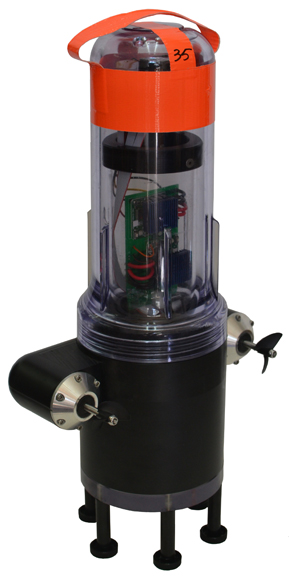
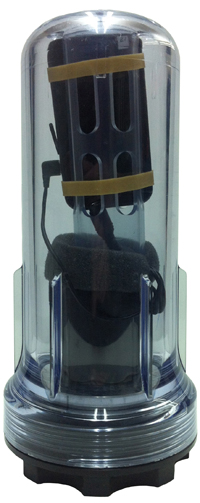
    The robots each have a sensor to test salinity and a GPS unit from a smartphone. Some have propellers so they can maneuver around obstacles and reach specific destinations. The robots also sent Tweets to @fsnandroid61.

    The robots drifted through the area of the river being measured, then were retrieved by boat. “One advantage of our real-time communication system is that we can see where all our sensors are on a map, which makes it very easy to chase them down and retrieve them,” said graduate student researcher Andrew Tinka.

    With the first test completed, the team’s efforts over the summer have two priorities, Tinka explained. “First, we’re using the flow data that we gathered on May 9 to understand how this ‘mobile’ data can be best used for river hydrodynamics studies. We’re learning how to turn the individual traces of water that each sensor gives us into a big-picture view of the entire river region, sort of how like meteorologists take the data from a few weather stations and turn it into an overall view of what the weather is doing over a large area. Second, we’re working with other hydrodynamics research groups to expand the use of this kind of mobile sensor. We’re loaning our equipment to other groups, doing pilot projects with others, and basically trying to get these sensors into researchers’ toolboxes throughout the water community.”

    There are two types of devices in the fleet, active and passive. The active sensors have a twin-propeller drive system that lets them move through the water to avoid obstacles or stay in the correct region of the river. “We developed the internal electronics for this device ourselves,” Tinka said. “We integrated a Magellan AC12 GPS receiver along with a Gumstix embedded computer and a Motorola GSM module. Our passive sensors don’t have a propulsion system; they do exactly what the water does. We developed this system with a focus on cost and ease of assembly.” The team used a waterproof consumer smartphone, the Motorola Defy, for the GPS positioning, computation, and comunications.

    So far, the test has proven the usefulness of such a network. The devices were developed to be easily deployable, especially where a lot of flexibility is needed, such as in disaster response. “The ability to quickly and easily put these sensors into new inland environments, by just about any method (throw them from a boat, drop them from a helicopter, toss them from a dock or a bridge) makes them a really useful new tool,” Tinka said.

    photos courtesy of Jonathan Beard
    photos courtesy of Jonathan Beard
    photos courtesy of Jonathan Beard
    photos courtesy of Jonathan Beard

    A hundred robots, 40 with propellers, were released into the Sacramento River near Walnut Grove (photos courtesy of Jonathan Beard).


  • On the Edge: Southwest Shakes

    By Tracy Cozzens

    Using a large network of GPS stations, a team of researchers has found that the Rio Valley Rift in the Southwest United States — previously suspected to be dead — is slowly expanding, at a rate of about 0.1 millimeter per year.

    The Rio Grande Rift extends from Colorado’s central Rocky Mountains to Mexico.

    The study was conducted by scientists at the Cooperative Institute for Research in the Environmental Sciences (CIRES) at the University of Colorado at Boulder, in collaboration with the University of New Mexico, New Mexico Tech, Utah State University, and UNAVCO.

    “We don’t expect to see a lot of earthquakes, or big ones, but we will have some earthquakes,” said study author Anne Sheehan, CIRES Fellow and associate director of CIRES Solid Earth Sciences Division. “We use continuous measurements of GPS sites from across the Rio Grande Rift, Great Plains, and Colorado Plateau to estimate present-day surface velocities and strain rates,” Sheehan said.

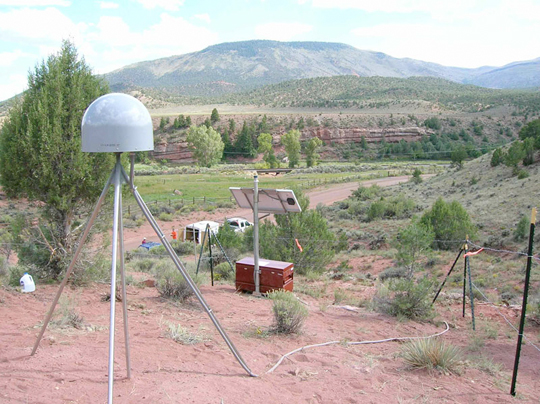
    Using GPS instruments at 25 sites in Colorado and New Mexico, the team tracked the rift’s miniscule movements from 2006 to 2011. The team found an average strain rate of 1.2 nanostrain each year across the experimental area. A nanostrain is a change in length of one part per billion, thus 1.2 nanostrain per year is equivalent to 1.2 millimeter per year extension over a 1000-kilometer length.“If you picked two points in New Mexico, and one of them lies 100 kilometers to the west of the other, then they would be moving apart at a rate of 0.1 millimeter per year,” explained researcher Henry Berglund.

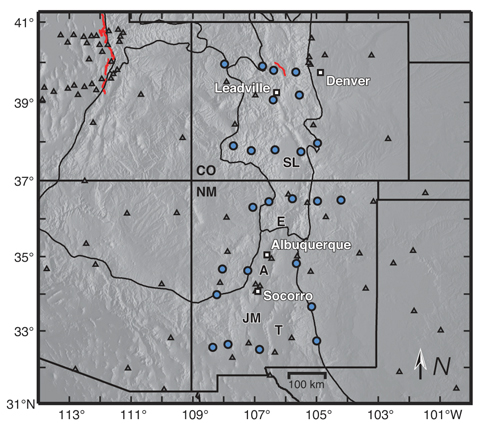
     Researchers used data from 25 continuous GPS stations installed as part of the EarthScope Rio Grande Rift GPS experiment, supplemented by data from other GPS monuments in the southwestern U.S., resulting in a data set of daily position estimates of 284 GPS monuments for the years 2006 through 2010.  Credit: Tracy Cozzens
    Researchers used data from 25 continuous GPS stations installed as part of the EarthScope Rio Grande Rift GPS experiment, supplemented by data from other GPS monuments in the southwestern U.S., resulting in a data set of daily position estimates of 284 GPS monuments for the years 2006 through 2010.

    “It is lower than we thought but it does exist,” Sheehan said. “Some people thought it was zero but we are seeing things are extending slowly.”

    The slow rates of motion made previous attempts to determine tectonic activity difficult. Previously, geologists had estimated the rift had spread apart by up to 5 millimeters each year but the errors introduced by the measuring instrumentations were significant. “The GPS has reduced the uncertainty dramatically,” Sheehan said. “This is the most comprehensive and accurate set of geodetic measurements in this area to date.”

    The extensional deformation is not concentrated in a narrow zone centered on the Rio Grande Rift. Instead, it is distributed broadly from the western edge of the Colorado Plateau into the western Great Plains — a span of more than 370 miles. “This unexpected pattern of broadly distributed deformation at the surface has important implications for our understanding of how low strain-rate deformation within continental interiors is accommodated,” Sheehan said. “Questions we wanted to answer are: how is the Rio Grande Rift deforming? Is it alive or dead? Is it opening or not?”

    Along the rift, spreading motion in the crust has caused magma to rise to the surface, creating long basins susceptible to earthquakes. “The rift is still active,” Sheehan said.

    The team plans to continue monitoring the Rio Grande Rift, and may attempt to determine vertical as well as horizontal activity to determine whether the Rocky Mountains are still uplifting.

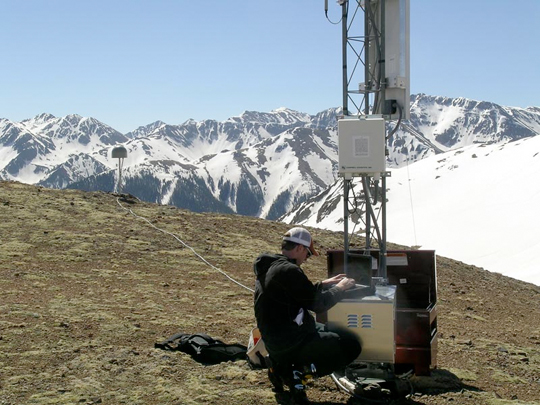
     University of Colorado (Boulder) student Henry Berglund services GPS site RG20 west of Silverton, Colorado.  Credit: Tracy Cozzens
    University of Colorado (Boulder) student Henry Berglund services GPS site RG20 west of Silverton, Colorado.

    The study’s findings shed light on how continents deform away from plate boundaries, Sheehan said. At plate boundaries scientists can clearly see what is going on. “Things move past each other and crash into each other. At active plate boundaries, the rates of motion detected by GPS can be centimeters per year. Compare that with the fraction of a millimeter per year that we have measured for the Rio Grande Rift.”

    “Present day measurements of deformation within continental interiors have been difficult to capture due to the typically slow rates of deformation within them,” Berglund said. “Now, with the recent advances in space geodesy, we are finding some very surprising results in these previously unresolved areas.”

    The National Science Foundation funded the study. EarthScope and UNAVCO provided instruments, equipment, and engineering services. Results of the study were published in the January 2012 issue of Geology magazine.

     GPS monuments in the vicinity of the Rio Grande Rift and southern Rocky Mountains. The study included construction of 25 GPS monuments (blue circles) in Colorado and New Mexico in 2006 and 2007. Regional EarthScope Plate Boundary Observatory and Continuously Operating Reference Station monuments are shown by gray triangles. Credit: Tracy Cozzens
    GPS monuments in the vicinity of the Rio Grande Rift and southern Rocky Mountains. The study included construction of 25 GPS monuments (blue circles) in Colorado and New Mexico in 2006 and 2007. Regional EarthScope Plate Boundary Observatory and Continuously Operating Reference Station monuments are shown by gray triangles.