Category: Survey

  • Using the new interactive ‘GPS on Bench Marks’ map

    Using the new interactive ‘GPS on Bench Marks’ map

    The National Geodetic Survey (NGS) is now developing the 2022 transformation model. Once again, NGS requests the assistance of the surveying and mapping community. This column provides examples to explain the symbology and use of the new version of the GPS on Bench Marks program for developing the 2022 transformation tool.

    My last column discussed the results of the Beta hybrid Geoid18 model, and the differences between the Beta model and the official hybrid geoid model, Geoid12B. It provided examples to explain the symbology of the Beta Geoid18 Web Map. It was noted that NGS analysts rejected stations based on pre- and post-modeled residuals but many times there wasn’t enough redundant information available to ensure the station should be rejected or used in the creation of the hybrid geoid model. As I have mentioned before, users should be commended for their participation in the GPS on Bench Marks program. The Geoid18 model is still in “Beta” so, hopefully, users will continue their support by evaluating the Beta hybrid geoid model and reporting their issues to NGS. Saying that, NGS’ GPS on Bench Marks program is now in a different phase.

    NGS held a webinar in July on the latest GPS on Bench Marks program for developing the 2022 Transformation tool. The webinar was recorded and users can find the presentation here.  This was an excellent webinar and explained the functions of the web map. I would encourage readers to watch the webinar. It is an hour long but is worth while watching. See Figure 1 for information on the webinar.
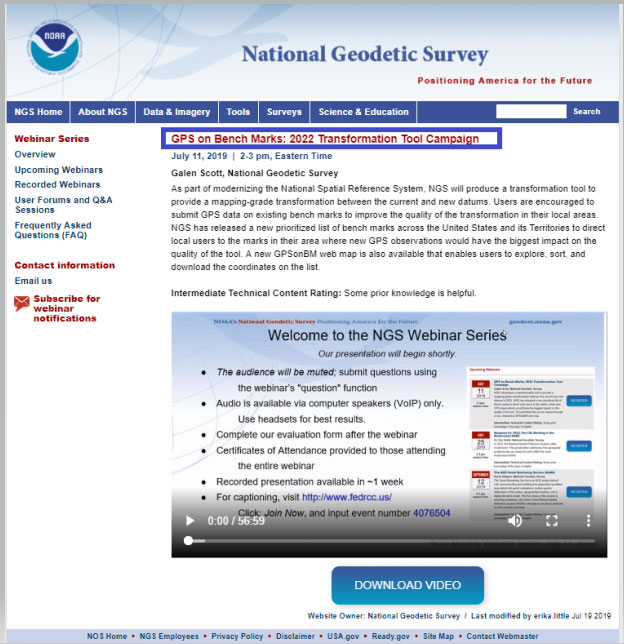
    Figure 1: GPS on Bench Marks:2022 Transformation Tool Campaign Webinar. (Photo: National Geodetic Survey)
    Figure 1: GPS on Bench Marks:2022 Transformation Tool Campaign Webinar (Photo: National Geodetic Survey)

    As in the past, the NGS on Bench Marks program can be accessed from NGS’ web page (see Figure 2). The user clicks on the “GPS on Bench Marks” button to access the program’s web page.
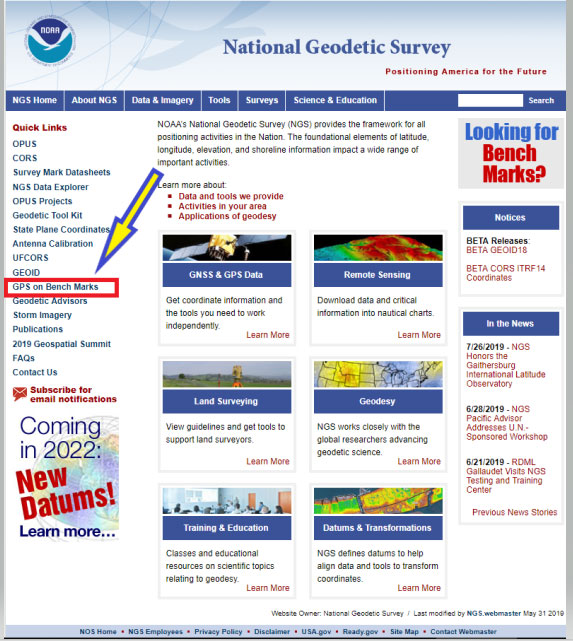
    Figure 2: NGS Home Web Page (Photo: National Geodetic Survey)
    Figure 2: NGS Home Web Page (Photo: National Geodetic Survey)

    Figure 3 depicts the home web page of the GPS on Bench Marks Program.
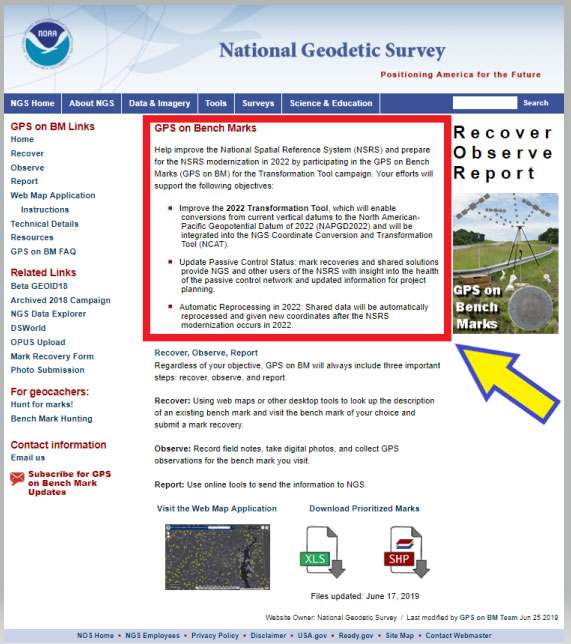
    Figure 3: GPS on Bench Marks Home Web Page (Photo: National Geodetic Survey)
    Figure 3: GPS on Bench Marks Home Web Page (Photo: National Geodetic Survey)

    The web page provides several reasons why users should continue to participate in the GPS on Bench Marks program. Figure 4 lists three reasons for helping NGS develop the 2022 Transformation Tool.

    Figure 4: Excerpt from GPS on Bench Marks Home Web Page

    GPS on Bench Marks

    Help improve the National Spatial Reference System (NSRS) and prepare for the NSRS modernization in 2022 by participating in the GPS on Bench Marks (GPS on BM) for the Transformation Tool campaign. Your efforts will support the following objectives:

    • Improve the 2022 Transformation Tool, >which will enable conversions from current vertical datums to the North American-Pacific Geopotential Datum of 2022 (NAPGD2022) and will be integrated into the NGS Coordinate Conversion and Transformation Tool (NCAT).

    • Update Passive Control Status: mark recoveries and shared solutions provide NGS and other users of the NSRS with insight into the health of the passive control network and updated information for project planning.

    • Automatic Reprocessing in 2022: Shared data will be automatically reprocessed and given new coordinates after the NSRS modernization occurs in 2022.

    I’d like to highlight a few of the benefits for participating in the GPS on Bench Marks program.

    (1) Improve the 2022 Transformation Tool, which will enable conversions from current vertical datums to the North American-Pacific Geopotential Datum of 2022 (NAPGD2022) and will be integrated into the NGS Coordinate Conversion and Transformation Tool (NCAT).

    > A goal of the transformation tool is to provide a model that will allow users to convert from the current North American Vertical Datum of 1988 (NAVD 88) to the new North American – Pacific Geopotential Datum of 2022 (NAPGD2022). The more bench marks that are occupied by GNSS and included in OPUS Shared solutions will enable NGS to generate a more detailed relationship between NAVD 88 and NAPGD2022. This will provide an accurate transformation tool in local areas which will facilitate the implementation of NAPGD2022 in surveying and mapping products and services.

    (2) Update Passive Control Status: mark recoveries and shared solutions provide NGS and other users of the NSRS with insight into the health of the passive control network and updated information for project planning.

    > An important part of the GPS on Bench Marks program is that it provides an indication of the status of the station. The last time a bench mark was leveled to varies greatly across the Nation. Many of stations in NGS’ Integrated Dataset haven’t been visited in over 50 years. The GPS on Bench Mark program can be useful to identify stations that have moved since the last time it was part of a leveling project. The mark recoveries will provide the latest status of a station which will help others in future project planning. More important, in my opinion, is that the OPUS shared solutions will identify stations that no longer have valid NAVD 88 published heights, and should be used with caution and flagged with a warning

    (3) Automatic Reprocessing in 2022: Shared data will be automatically reprocessed and given new coordinates after the NSRS modernization occurs in 2022.

    >> Any station that is part of the GPS on Bench Marks program and included in the OPUS Shared solution database will be given 2022 coordinates. This means that users will not have to resubmit their data to obtain the new coordinates in the new 2022 reference frames. This information will be useful during the implementation phase of the 2022 reference frames.

    As in the past, NGS is developing web-based products and services to facilitate users incorporating their data into the National Spatial Reference System (NSRS). They have developed a GPS on Bench Marks Web Map Application to inform users which stations they would like occupied by GNSS equipment. They realize that everyone is busy so they are trying to provide information, in near real time, on stations that have been occupied to reduce users occupying a station that already has two occupations. Figure 5 depicts the buttons that will connect the user to an interactive web map application. There are several ways the user can access the application: (1) click on the link titled “Web Map Application” – the red rectangle and arrow in the box titled “GPS on Bench Marks Web Map Application Site,” (2) click on the figure of the web based application – see the blue ellipse and blue arrow in the box, and (3) download the prioritized marks in XLS or Shape file format – see the green pentagon and green arrow in the box.
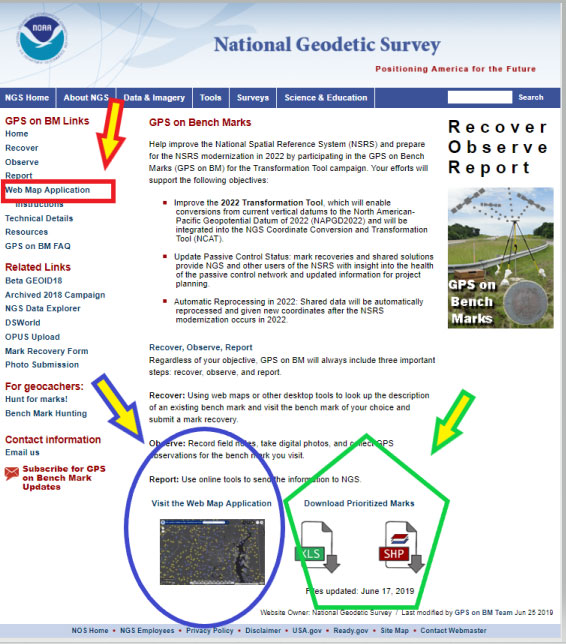
    Figure 5: GPS on Bench Marks Web Map Application Site (Photo: National Geodetic Survey)
    Figure 5: GPS on Bench Marks Web Map Application Site (Photo: National Geodetic Survey)

    Clicking on the Web Map Application button or picture will direct the user to a new website. It informs the user that they are leaving a U.S. Government Web Site for another site. See Figure 6. The user can either click on the statement or just wait until they are redirected the website. (See Figure 7.)
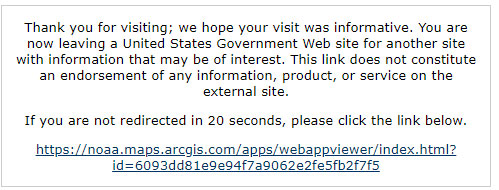
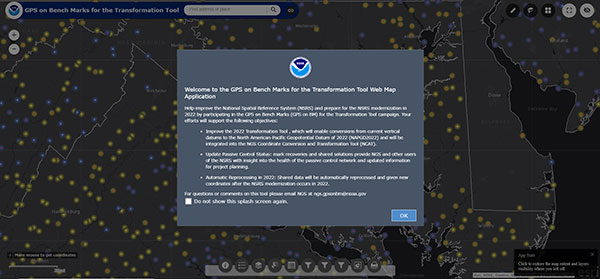
    Figure 6: Clicking on the Web Map Application Button or Picture (Photo: National Geodetic Survey)
    Figure 6: Clicking on the Web Map Application Button or Picture (Photo: National Geodetic Survey)
    Figure 7: GPS on Bench Marks For the Transformation Tool Interactive Web Map (Photo: National Geodetic Survey)
    Figure 7: GPS on Bench Marks For the Transformation Tool Interactive Web Map (Photo: National Geodetic Survey)

    Just click on the “OK” button to remove the splash screen. You can click the button “Do not show this splash screen again” so it doesn’t show up every time you access the web page. At the bottom of the web map is a legend that provides information about the map and allows the user to select various options. Figure 8 provides an example of legend buttons. The information box appears by clicking on a particular icon in the legend bar (the arrows indicate the icon and information box for that icon).
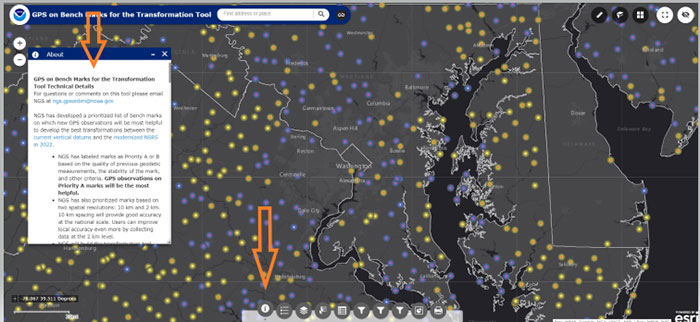
    Figure 8: Legend on GPS on Bench Marks Web Map Application Site (Photo: National Geodetic Survey)
    Figure 8: Legend on GPS on Bench Marks Web Map Application Site (Photo: National Geodetic Survey)

    There’s a lot of information provided in the information box. There’s a scroll bar on the right side of the box that provides the entire write up. Figure 9 provides several sections of the write up. I’ve highlighted sections in the write up to emphasis what NGS is trying to accomplish. NGS’ goal is to minimize the amount of work performed by users and maximize the amount of GNSS data provided to the development of the 2022 transformation tool.

    First, NGS has prioritized marks at two spatial resolutions: 10 km and 2 km. They want to reach a 10 km density to provide good national accuracy and a 2 km level to improve local accuracy. The Interactive Web Map allows users to zoom down to a level to identify individual stations selected by NGS. A 10-kilometer hexagonal lattice was developed to define the desired data density on the ground. For each hexagon, the goal was to identify a primary mark and a list of up to 4 secondary marks. The primary mark for each hexagon was added to the priority mark list. Secondary marks are listed and should be observed in cases where the primary mark cannot be found or is unobservable.

    To reduce duplication, when a single mark within a 10 km hexagon has two GPS observations that meet NGS requirements, that hexagon is marked as done and the station is removed from the prioritized list. This will help to reduce the number of surveyors occupying the same station over and over again, and increase the number of prioritized stations occupied with GNSS. After a 10-kilometer hexagon is marked as done, a group of up to thirteen 2 km hexagons is generated to define the opportunities to densify the model with additional marks.

    To assist in the selection of stations to be part of the GPS on Bench Marks program, NGS has prioritized stations as Priority A and B. Priority A being more important than priority B for the development of the 2022 transformation tool.

    Figure 9: Excerpts from GPS on Bench Marks for the Transformation Tool Technical Details

    For questions or comments on this tool please email NGS at [email protected].

    NGS has developed a prioritized list of bench marks on which new GPS observations will be most helpful to develop the best transformations between the current vertical datums and the modernized NSRS in 2022.

    • NGS has labeled marks as Priority A or B based on the quality of previous geodetic measurements, the stability of the mark, and other criteria. GPS observations on Priority A marks will be the most helpful.

    • NGS has also prioritized marks based on two spatial resolutions: 10 km and 2 km. 10 km spacing will provide good accuracy at the national scale. Users can improve local accuracy even more by collecting data at the 2 km level.

    • NGS will build the transformation tool with data submitted by December 31, 2021. The tool will interpolate over areas without GPSonBM data, meaning that the transformations will be less accurate in those areas.

    Priorities A and B

    Priority A
    Priority A marks meet the following specific criteria from their datasheets and are most likely to be used to create the transformation tools:
    • Vertical Order: FIRST, SECOND
    • Stability: A, B, C
    • Satellite: USEABLE
    • Last Recovery Condition: excluding “MARK NOT FOUND”

    Priority B
    Priority B marks are lower quality marks that will only be considered for use in the transformation tool to fill data gaps if no other data exists in the region.

    Spatial Resolution
    NGS has also prioritized marks at two spatial resolutions: 10 km and 2 km. NGS wants to reach a 10 km density to provide good national accuracy. Additionally, users can help improve local accuracy by collecting data at the 2 km level.

    To prioritize marks based on the two spatial resolutions, NGS created the following system:
    A 10-kilometer hexagonal lattice was developed to define the desired data density on the ground and help select appropriate marks within those areas throughout the U.S. and territories.
    • Hexagons with appropriate bench marks were identified.
    For each hexagon, a primary mark was selected and a list of up to 4 secondary marks — if available — were identified. The primary mark for each hexagon was added to the priority mark list. Secondary marks are listed and should be observed in cases where the primary mark cannot be found or is unobservable.
    To communicate when observations in a hexagon have been completed, the following process was developed:
    Once a single mark within a 10 km hexagon has two GPS observations that meet the requirements, that hexagon is marked as done and the observed mark is removed from the prioritized list.

    Once a 10 km hexagon is marked as done, a group of up to thirteen 2 km hexagons is generated to define the opportunities to densify the model with additional marks.
    In each of the 2 km hexagons, a primary mark is identified and a list of secondary marks is provided in case the primary mark cannot be found or is not observable. The new primary marks are added to the priority mark list. The number of 2 km hexagons will vary since not all areas have bench marks inside the 2 km lattice. See graphic below:

    Clicking on the Web Map Applications “Instructions” button will provide a summary of all of the tools available on the Web Map. See the arrow in Figure 10. The instruction page provides a lot of information and explains the function of each tool.
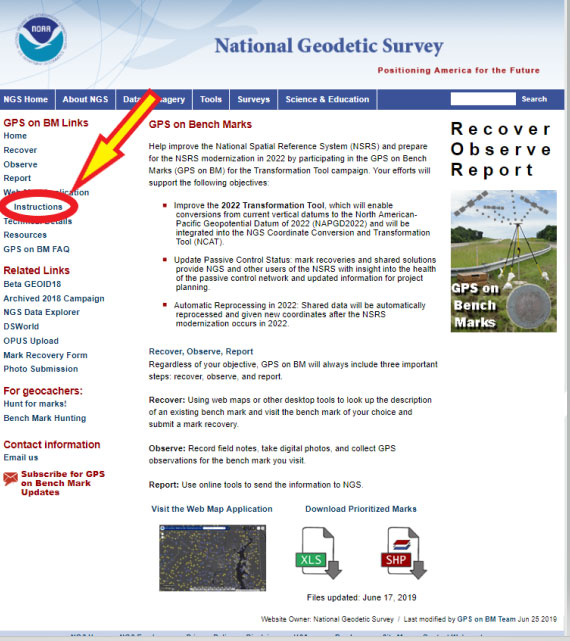
    Figure 10: GPS on Bench Marks Web Map Instructions Site (Photo: National Geodetic Survey)
    Figure 10: GPS on Bench Marks Web Map Instructions Site (Photo: National Geodetic Survey)

    Figure 11 provides an excerpt from that web page. All of the icons on the Web Map are explained on a mock up of a sample map in the beginning of the Instruction web page.
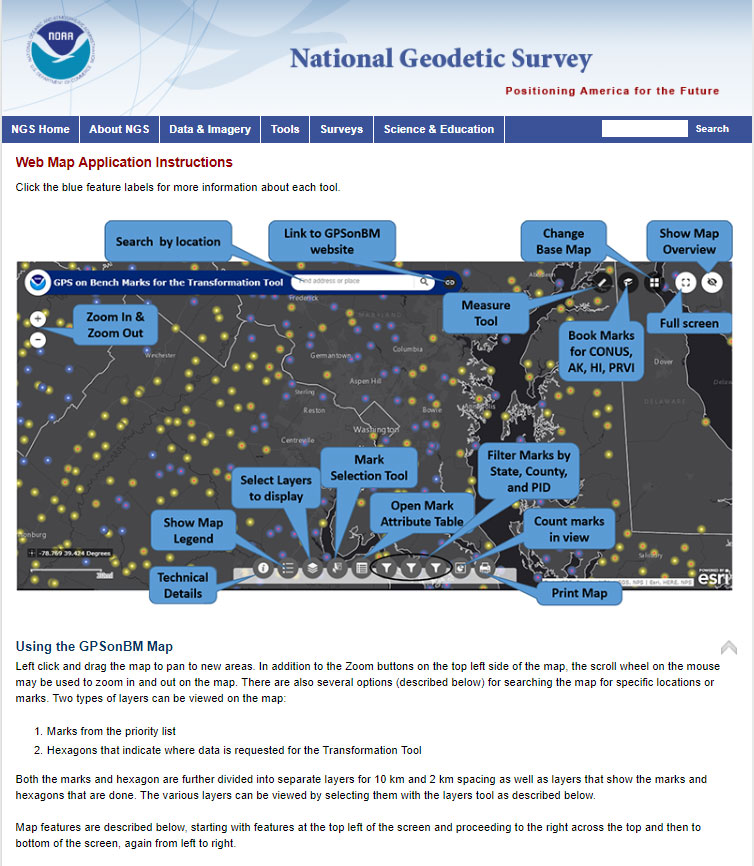
    Figure 11: GPS on Bench Marks Web Map Instructions List of Tools (Photo: National Geodetic Survey)
    Figure 11: GPS on Bench Marks Web Map Instructions List of Tools (Photo: National Geodetic Survey)

    The list of detailed descriptions of the tool is fairly long so I’ve provided some of the descriptions in Figure 12. The reader is referred to this page for the descriptions of all of the tools.

    Figure 12: Partial List of Descriptions of GPS on Bench Marks Web Map Instructions Tools

    Legend
    Clicking this button will display the legend for all of the active layers displayed on the map.

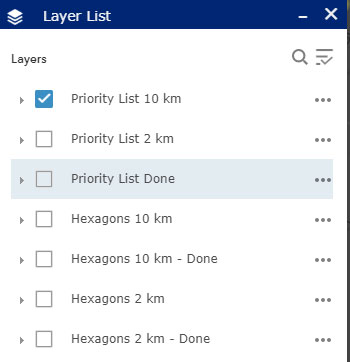
    Layer List
    Clicking this button will bring up the list of available layers to display on the map. By default, only the Priority List of marks at 10 km spacing appears. Users can select other layers to display on the map by clicking on the box to the left of the layer name. Once clicked, the box will show a check mark, and all layers with check marks are displayed on the map.


    Layer Descriptions:
    • Priority List 10 km – Marks requested for national coverage
    • Priority List 2 km – Marks requested to densify local areas
    • Priority List Done – All marks with enough observations to be considered for use in the Transformation Tool.
    • Hexagons 10 km – Areas where GPSonBM data is still requested to complete broad national coverage
    • Hexagons 10 km – Done – Areas where sufficient data exists
    • Hexagons 2 km -Areas where GPSonBM data may still be submitted to increase local accuracy of the transformation tool.
    • Hexagons 2 km – Done – Areas where sufficient data exists.

    Image: National Geodetic Survey
    Image: National Geodetic Survey

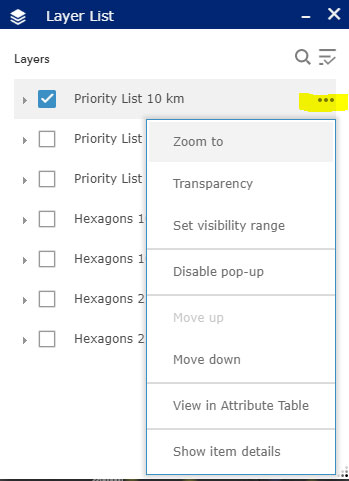
    Working with the Layer List
    Clicking on the ellipsis to the right of each layer opens a window with actions for that layer. Set visibility range allows the user to set the zoom level at which each layer appears. By default the visibility ranges are set to prevent too much data from being plotted at once which would slow down the application. Users with fast internet connections can change the visibility range to allow data to be displayed when zoomed out far enough to see the extents of larger states.

    Image: National Geodetic Survey
    Image: National Geodetic Survey

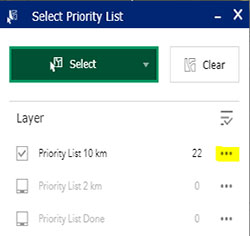
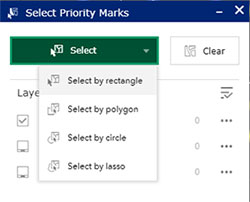
    Mark Selection Tool:

    This tool provides several options for selecting marks. First, change the layer to select from, click in the box to the left of the layer name. Click the green Select box and choose a selection method, then use the mouse to left-click on the map to draw the selection region. Selected marks’ icons will turn blue. Once marks are selected, click on the ellipsis to the right of the layer to open menu of actions that can be performed with selected marks. Using this menu, selected marks can be exported into csv, JSON, and GeoJSON formats.
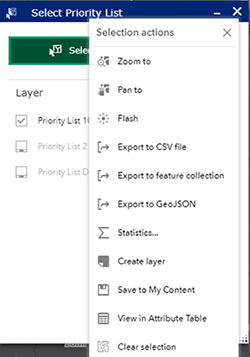
    Image: National Geodetic Survey
    Image: National Geodetic Survey

    Attribute Table
    This button opens a table at the bottom of the screen that displays all the information available on each mark.

    Image: National Geodetic Survey
    Image: National Geodetic Survey
    Image: National Geodetic Survey
    Image: National Geodetic Survey

    Filters

    By State, County, and PID: This tool allows the user to filter the marks on the map down to specific states, counties, or PIDS. After selecting the filter option, click on the switch at the top right of the filter box and the map will pan and zoom to the selected area. If the marks do not appear on the map, try zooming in until they appear.

    Figure 13 provides four different options of the icons on the bottom of the web map. They include the “Legend,” Layer List,” Select Priority List,” and Filter by State. These options help the user focus on a particular area of interest. I would encourage the user to familiar themselves with each of these options because they help will make it easier to navigate the map and identify priority stations.
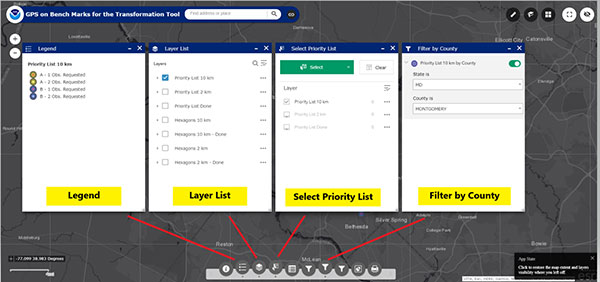
    Figure 13: Example of Several Options on the Legend on GPS on Bench Marks Web Map Application Site (Photo: National Geodetic Survey)
    Figure 13: Example of Several Options on the Legend on GPS on Bench Marks Web Map Application Site. Examples below are for the “Legend,” Layer List,” Select Priority List,” and Filter by County.” (Photo: National Geodetic Survey)

    Another important icon located at the bottom of the Web Map opens an attribute table of the bench marks. (See Figure 14). Once you open the Attribute table tool (see the red arrow in the box), a table of attributes of the stations appears at the bottom of the screen. If you click on a station in the table, the station gets highlighted on the map (see the blue arrow in the box). NGS’ Web Map Application makes it very easy to locate potential stations in a user’s area of interest.
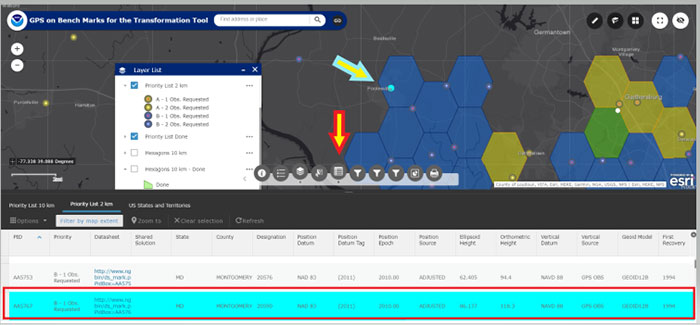
    Figure 14: Example of the Attribute Table on the Legend on GPS on Bench Marks Web Map Application Site (Photo: National Geodetic Survey)
    Figure 14: Example of the Attribute Table on the Legend on GPS on Bench Marks Web Map Application Site (Photo: National Geodetic Survey)

    When the user clicks on the Layer List tool, they can select which priority list they would like to see plotted on the map. They can click on the “More Info” button to obtain the latest NGS Datasheet. Figure 15 provides an example of A and B stations from the 10 km priority list in the Loudoun County, Virginia, region. The map highlights priority A and B stations; the user can than find more information about a specific station by clicking on the map.
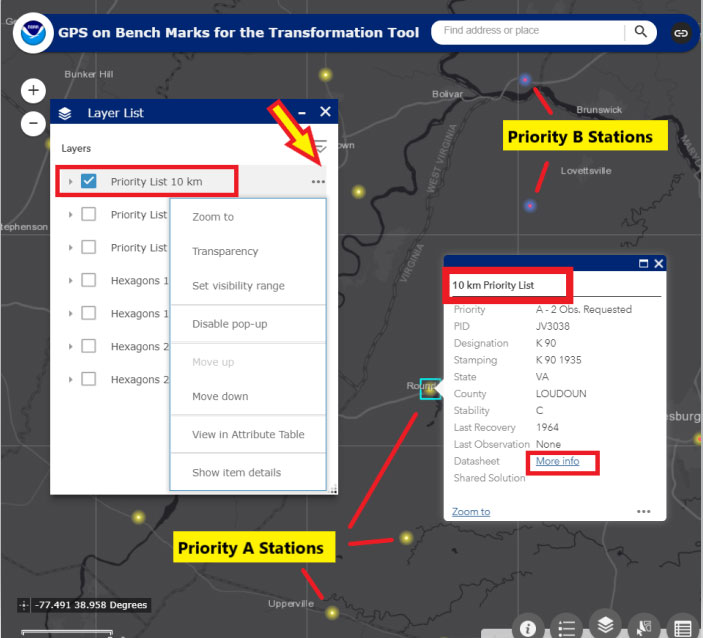
    Figure 15: Excerpt from GPS on Bench Marks Web Map Layer List - Priority List 10 km (Photo: National Geodetic Survey)
    Figure 15: Excerpt from GPS on Bench Marks Web Map Layer List – Priority List 10 km (Photo: National Geodetic Survey)

    A very interesting feature is that once a station is classified as done in a 10 km hexagon, the hexagon is colored green and flagged as done. There is no longer a requirement to occupy a station in that hexagon to assist the 2022 transformation tool for the National level of accuracy. See Figure 16 to see a 10-km hexagon labeled as “Done.” Note that the station considered “Done” is labeled with a white circle.
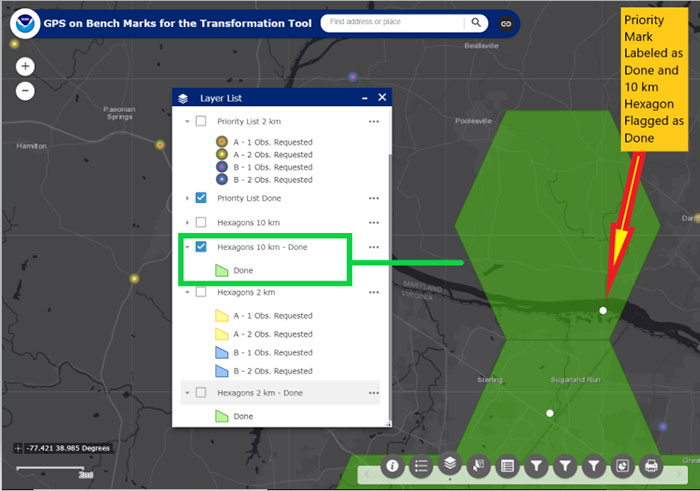
    Figure 16: An Example of a 10-km Hexagon in the Montgomery County, Maryland, and Loudoun County, Virginia, Region (Photo: National Geodetic Survey)
    Figure 16: An Example of a 10-km Hexagon in the Montgomery County, Maryland, and Loudoun County, Virginia, Region (Photo: National Geodetic Survey)

    Now the user can focus on the 2-km hexagon boxes to identify stations to improve the local accuracy of the 2022 transformation tool in their area of interest. Figure 17 provides an example of the 2-km hexagons with priority marks plotted within each 2-km hexagon. Once again, the symbology indicates A and B stations, and the 2-km hexagons that need more observations and the hexagons that are labeled as “Done.”
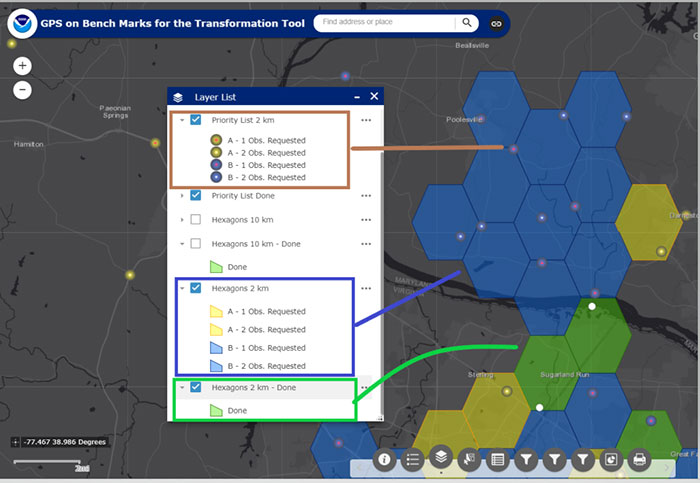
    Figure 17: An Example of 2-km Hexagons in the Montgomery County, Maryland, and Loudoun County, Virginia, Region (Photo: National Geodetic Survey)
    Figure 17: An Example of 2-km Hexagons in the Montgomery County, Maryland, and Loudoun County, Virginia, Region (Photo: National Geodetic Survey)

    NGS’ goal is to update the Interactive Web Map in “Near Real Time.” Of course, there’s always going to be some lag time from the time the user uploads their data into the OPUS Shared solution database to when the NGS 2022 Transformation Team reviews the data to ensure the results meet NGS’ criteria. Once again, NGS wants to minimize the amount of duplicate work performed by surveyors and maximize the number of stations contributing to the development of the 2022 transformation tool.

    This newsletter highlighted the next phase of NGS’ GPS on Bench Marks program; that is, the development of the 2022 transformation model. The newsletter provided examples to explain the symbology and use of the new version of the GPS on Bench Marks program. It provided web links to material explaining the new GPS on Bench Marks program such as NGS’ July 2019 webinar on the latest GPS on Bench Marks program for developing the 2022 Transformation tool. NGS has done a tremendous job of explaining the importance, process, and results of the GPS on Bench Marks Program. Several of my previous newsletters have highlighted the NGS GPS on Bench Marks program and how users have supported the development of the hybrid Geoid18 model: Hopefully, this support will continue to develop the best possible 2022 Transformation Tool.
  • Rugged tablet offers 3D imaging for field work

    Rugged tablet offers 3D imaging for field work

    Photo: DT Research
    Photo: DT Research

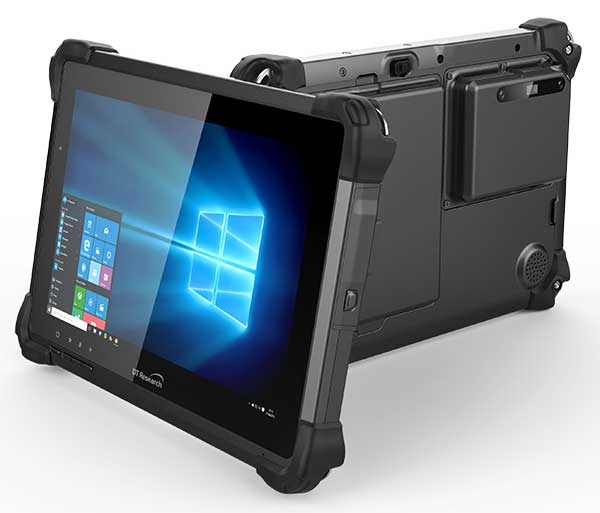
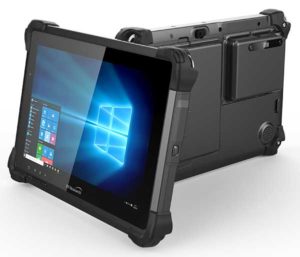
    DT Research has designed a new rugged tablet with 3D imaging that is purpose-built for 3D mapping with a built-in GNSS module.

    The DT301X has an Intel RealSense Depth camera that provides real-time 3D imaging combined with dual-frequency GNSS module for real-time mapping and positioning. The digital images are better than high-definition standard, and are suitable for construction building information management (BIM) graphics.

    The DT301X rugged tablet is compatible with existing applications with Microsoft Windows 10 IoT Enterprise operating systems for flexible integration, and it brings together the advanced workflow for data capture, accurate positioning and data transmitting.

    Key features of the DT301X

    • Highly durable. IP65 and MIL-STD-810G rated tablet in a slim case offers the versatility to be used in the field, office and vehicles.
    • Indoor/outdoor display. A high brightness 10.1-inch touchscreen offers flexible viewing in a wide range of lighting.
    • Wi-Fi and Bluetooth. Long-range Bluetooth for 1000-foot range and 4G LTE mobile broadband for the latest in high-speed communications.
    • High performance. Intel 8th-generation Core i5 or i7 processor offers high-performance while still being energy efficient.
    • Hot-swappable batteries. With high-capacity 60- or 90-watt hot-swappable batteries, the DT301X keeps working continuously.
  • What Gen X means for the future of surveying

    What Gen X means for the future of surveying

    Photo: iStock.com/Georgijevic
    Photo: iStock.com/Georgijevic

    The surveying profession has come to a crossroads, and is divided amongst itself to boot. A gap exists within the profession, and yes it is a generation gap, based on how technology has evolved and how the different generations experience it differently. In this column I explore the histories both of the generations and the technology to reach conclusions on how best to move forward — together.

    Surveyors now have more tools than ever before available to them to perform their tasks. But surveyors of different ages regard these tools differently. Not to put too fine a point on it, the younger porfessionals among us feel their creativity and desire to further the profession is being stifled by the group who is supposed to be leading and mentoring them.

    Why is this crucial to consider? Because these are the future users, purchasers and adopters of geospatial equipment and software, and the future setters of industry standards. All involved, from manufacturers to distributors to surveyors themselves, would do well to think deeply upon this.

    As we enter the final stretch of the 21st century’s second decade, many things have changed since the Y2K scare and the proliferation of the Interweb. From deregulation of the surveying profession to changing coordinate systems and datums, the surveying profession faces many challenges in 2019. One of the biggest challenges we face has nothing — yet everything — to do with technology.

    Talented people are necessary to grow our profession. We are falling well short of having enough to keep up with demand. Sounds like a simple problem; just hire more surveyors and technicians. This sounds easy, but several roadblocks confront us.

    A select few still invest in their surveying future by going to college to get a degree and eventually become a licensed surveyor. These individuals find, however, that the road to success has lots of potholes along the way, just as their elder predecessors did.

    Recently, I participated in a group discussion with the National Society of Professional Surveyors (NSPS) Young Surveyors Network to discuss surveying, technology and the young surveyor’s role in promoting future career opportunities. This discussion was part of Network’s series of meetings and seminars held in parallel with the main NSPS Spring Business Meetings.

    It was great to see the higher proportion of women in the young surveyor group than in the typical professional society meeting. Their feedback was consistent with that of the young men in the group. All together, their perspectives led me to write this article.

    While I think of myself as still “young-ish” (in my early 50s), being the oldest participant in that group was intimidating, to say the least. These young technicians and surveyors are driven and focused, yet they seek the same feedback and mentoring that I desired when I was their age.

    In the weeks after that meeting, some of the items discussed continued to resonate with me and forced me to reflect on my own experiences and career path. To be fair to them and truly understand their views on today’s surveying profession, I needed to look beyond the profession, policies and procedures to which I hold fast in my ethical approach to the craft. These younger generations have been exposed to a completely different world than the one I remember fondly, and the world they grew up in has subjected them to challenges to which I cannot relate. To help explain the conundrum of trying to find a way to relate, we need to take a step back and look at not just generational values but how the many industrial revolutions have affected us as well.
    TALKING ‘BOUT MY GENERATION

    The first part of my research to help me find a way to step into the shoes of these young surveyors was to look at past generations and how they relate to each other. Going back to the turn of the 19th century, we get the following breakdown:

    Traditionalists or Silent Generation: Born before 1945

    This timeframe contains sub-groups including the “lost generation of 1914,” the “interbellum” and the “greatest generation.” Alaska and Hawaii were not included in the United States during this period. Most of the country west of the Colonial states was subject to the government Public Land Survey System started in the early 1800s. The Great Depression took its toll on much of the population, and previously rapid expansion slowed to a standstill.

    Baby Boomers: Born 1946 – 1964

    World War II changed the world. Soldiers returning from military duty to start or resume families accelerated population growth and a departure from traditional social attitudes. Two-income families emerged, and prosperity ruled for many years. Surveyors, teaming with civil engineers, helped fuel an unprecedented explosion of real estate expansion through planned developments across the country.

    Generation X: Born 1965 – 1976

    The children of the fast and free-living Baby Boomers grew up to become the Gen Xers. They were the first “latchkey” kids, more likely to be raised by divorced or remarried parents. As young adults, in their effort to enhance their lifestyle more than their parents, they did many things to the extreme with no consideration of cost. This led to massive real estate developments, “McMansions” and increased debt. Surveying continued to flourish but most growth was enjoyed by engineering firms who absorbed surveyors to expand their services.

    Millennials or Gen Y: Born 1977 – 1995

    This group is often labeled as the “Peter Pan” generation for its predisposition to put off typical adulthood norms like marriage, having children and buying real estate. They have a propensity to be more mobile and nomadic, as they take advantage of technology and rapidly changing environmental factors. With this generation we find the slowdown in career choices towards surveying, even though technology and spatial data acquisition have exploded with potential.

    Gen Z, iGen, or Centennials: Born 1996 – Current

    This generation was born into technology, and it affects everything they do. From infancy they were experienced soothing music, dancing screens, interactive toys, and dolls teaching them new skills. This generation doesn’t know of a world without computers, cellphones, GPS-based maps or high-speed internet. Surveying has also benefitted from the technology explosion but it hasn’t captured the imagination of this generation sufficiently to develop future practitioners.

    YOU SAY YOU WANT A REVOLUTION. WELL, YOU KNOW…

    The generational differences only tell part of the story. Each one faced its own challenges when it came to technology (or lack thereof), societal standards, and other facets of their respective eras. A succession of several Industrial Revolutions brought new tools for completing a wide array of tasks and procedures. Here is a summary of each of them in chronological order:

    First Industrial Revolution (1784)

    Mechanical production via water and steam power led the way during the late 1700s and began a trend of radical changes in the ability to create larger items. The Gunter chain and surveyor’s compass, both invented in the 1600s, were the mainstay of measuring tools during this time period.

    Second Industrial Revolution (1870)

    Mass production and increases in labor opportunities coupled with the adaptation of electricity in many areas enabled people to flourish like no other time to date. The optical theodolite with horizontal angle measurement was introduced and then mass produced in the late 1800s to help surveyors make more progress westward.

    Third Industrial Revolution (1969)

    A significant leap forward in technology occurred with the invention of the microprocessor in the late 1950s, followed quickly by rapid development of electronic machines designed to follow manual instructions. Programmable controllers and devices were born from the fast-paced development of sophisticated miniaturized circuitry. These developments were used to create measurement devices for sending infrared and visible light waves across long distances. In the late 1970s, technological advancements led to the development of electronic theodolites or total stations. These instruments were the first to be able to electronically determine the horizontal and vertical angles normally read manually by the operator, and to combine this data with electronic distance measurement. Further development created methods of storing this data electronically for input into computer calculation and drafting programs.

    Fourth Industrial Revolution (Current)

    Industry experts differ as to when the Fourth Revolution began, but all agree we have turned the corner and are now fully entrenched into a new realm. Further miniaturization of computer chips, advanced sensors and storage, and robotic mechanisms have introduced a new reality for everyone, including the surveyor. Today’s practitioner has many sophisticated tools available for work, including GNSS receivers, laser or LiDAR scanners, UAVs with a multitude of sensors, hydrographic vehicles with single and multi-beam fathometers, and many more instruments currently under development.

    Surveyors now have more tools than ever available to perform their tasks. Now we must cross-reference these revolutions with the practitioners from the various generations to help us understand upon which road the profession is headed.

    TECHNOLOGY MEETS GENERATIONAL DIFFERENCES; WHAT COULD GO WRONG?

    One thing that stood out in my aforementioned discussion with the young surveyors’ group was how much they were embracing technology not just in their every day lives and communication, but how they understood the enhanced abilities of the latest tech and instruments for surveying. They see the value in large data, point clouds and BIM (building information modeling) needed for industry use.

    The general consensus from this group was that my generation (Gen X) and earlier (Baby Boomers) are easily dismissive of their enthusiasm for incorporating these new technologies into our workflow simply as ways to shortcut old methods done by more labor-intensive means. While I initially tried, myself, to dismiss this suggestion, further research has only proven their point: their creativity and desire to further the profession is indeed being stifled by the group that should be leading and mentoring them.

    Cross-correlating the generations with their various personalities and quirks with the amalgamations of industrial revolutions turns up some interesting results. Gen Xers and earlier surveyors were strictly taught by their managers and mentors that both historical data and original monuments are sacred and not to be denied. This information was derived from the most basic of survey instruments and measuring equipment, with accuracy that is not acceptable by today’s standards.

    But the tradition remained: if it was good enough for our forefathers to establish the early frontier, then more accurate measuring devices are simply overkill. New sophisticated robotic total stations, GNSS receivers and robust data collectors available as a result of the Third Industrial Revolution are shiny objects that stand in the way of “good surveying,” in the opinion of the elder surveyors.

    Millennial surveyors, meanwhile, look at the world with a different vision and much different solutions. Most of them were not exposed to televisions with just three channels, telephones mounted on walls, or kitchens without microwave ovens, to just to name a few “antiquities.” Their families have always owned a computer and the library is a place where you go to study. Research isn’t looking in an encyclopedia; you Google. They embracw cellphones with a multitude of apps and functions, including location services within a few feet, practically as extensions of themselves.

    The equipment produced for surveyors today is well within their wheelhouse as it maps a multitude of points and features in a blink of an eye. Accuracy and detail are no longer an issue — but adapting that data to legacy deeds and maps is where us old timers can help bridge the gap.

    Another problem that has proven to be a yawning void between the generations is the remnants of the economic slowdown of 2007-2012. Many Baby Boomer and Gen X surveyors learned to do more with less. Times were tough and we couldn’t afford to upgrade to the latest versions of total stations, GNSS, software, or invest in new technologies like laser scanning. There was also an exodus of technicians simply because there was no work in surveying for the time period, and they found employment in other professions. That left a void in who was doing the work (now being completed by upper level surveyors with older skill sets), and having no younger personnel to train and groom for future career growth.

    There were many technological advancements during that time frame but overall the industry suffered because of the economic downturn. The Millennials, most of whom were too young to be employed during this period, now are faced with working for an older profession that couldn’t afford to stay current with technology and who have trouble relating to the motivations of the younger generation.

    CAN’T WE ALL JUST GET ALONG?

    I believe the surveying profession is at a crossroads, one based upon the gap caused by the generation / technology combination described above. Steps must be taken to rectify this. Here are a few of the pathways to closing the gap and becoming a solid profession for the future:

    1. Embrace the mentor/mentee relationship, but be open to reversing the roles. The younger generations have a handle on the latest technology, so us old timers need to be more willing to close our mouths and open our ears and minds.
    2. Create more opportunities for younger surveyors to participate in organizations so they can also be influencers. Keep in mind that they don’t typically like to “belong” to an organization, so adapt our professional groups and keep their interests in mind.
    3. Change the way we communicate. Many Baby Boomers / Gen X members are critical of the younger generations and social media, yet this trend shows no sign, at all, of stopping. Smartphones are here to stay, so let’s learn to adapt, to remain in step with the youngsters.
    4. Be willing to invest in new and emerging technology. Who know where the next radical survey technique will come from if you don’t have an open mind and checkbook? Invest not only in equipment but your young staff’s future.
    5. Encourage younger staff to get involved in something. Anything. Social interaction can lead to better communication skills and expose them to more business situations. Don’t push them in over their head,s but get them to be “uncomfortable” occasionally. They will thank you for it.

    Many professions and occupations will suffer in the next 3–5 years because of attrition through retirement, incapacitation and death. These workforces will lose 20–40% of their workers. Those left will have to pick up the slack and then some. We need to either

    A) hire a lot more surveyors, or

    B) figure out how to make it work with less bodies.

    The conversation that took place in that meeting room with the young surveyors has made a deep impression on me and has changed my focus on the future of surveying. How does this apply to an article in a geospatial publication? Simple: these are the future users, purchasers and adopters of geospatial equipment and software, and the setters of industry standards.

    The younger generation understands how to use today’s technology, and the surveying profession overall needs to embrace that fact. The technology won’t mean a thing if we don’t have the bright minds to use it to its full potential.

    So I ask you again to embrace, encourage and listen to the young surveyors; they will thank you for it.

  • Tersus launches dual-antenna GNSS receiver with heading

    Tersus GNSS Inc. has launched the David Plus — a dual-antenna GNSS receiver that offers centimeter-accurate positioning and heading. It is designed for intelligent transportation, construction, machine control, precision agriculture and navigation applications.

    David Plus is designed for efficient and rapid integration. The compact, lightweight receiver tracks GPS, GLONASS and BeiDou signals: GPS L1/L2, GLONASS L1/L2, BeiDou B1/B2 from the primary antenna, and GPS L1/GLONASS L1 or GPS L1/BeiDou B1 from the secondary antenna.

    The modular and flexible design can provide robust positioning and heading accuracy in a compact footprint for UAVs and other smaller autonomous projects.

    The David Plus GNSS receiver is built for outdoor environments with IP67-rated enclosure. Its compact palm-sized design makes it easy to integrate with various application systems.

    Four gigabytes of in-built memory are available to record data for post-processing.

    The David Plus GNSS receiver supports RTK positioning mode or RTK positioning + heading mode. It supports 384 channels. It’s easy to connect an external powerful radio for long range communication.

  • CHC Navigation offers 8-inch professional tablet

    CHC Navigation offers 8-inch professional tablet

    Photo: CHC Navigation
    Photo: CHC Navigation

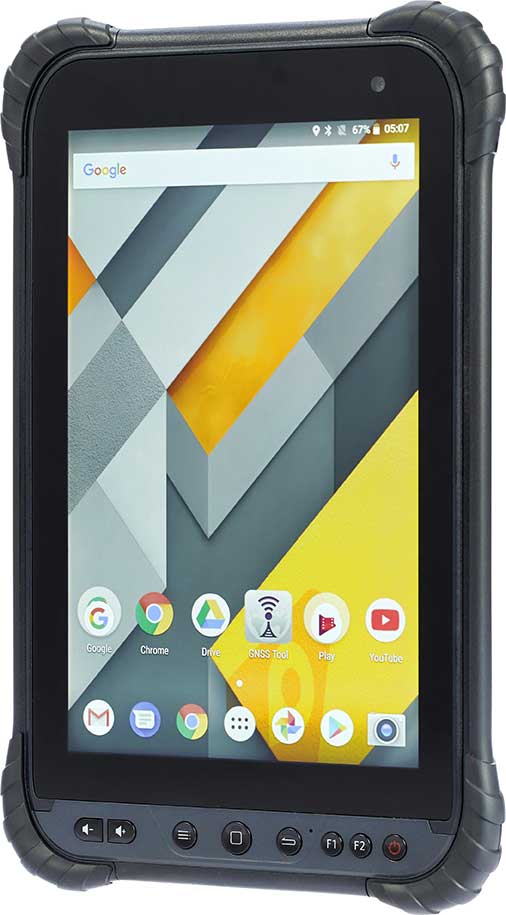
    CHC Navigation has launched its LT700 rugged Android tablet. The LT700 is designed to increase the efficiency and productivity of the mobile workforce in different industries and applications.

    An integrated GNSS module (GPS/GLONASS/BDS/SBAS) provides robust positioning performance. The LT700 dual-SIM 4G modem ensures fast and reliable connection with mobile teams.

    The LT700 tablet features an 8-inch sunlight-viewable touchscreen. It displays geospatial information system (GIS) data tables, complex vector and raster maps, or high-resolution pictures in direct sunshine and high-bright areas, CHC Navigation said.

    Unlike consumer-grade tablets, the L700 is intended for mobile field workers. Its industrial IP67 design withstands all-day use in harsh environments and conditions, and is protected from dust, rain, extreme temperatures and accidental drops from 1.2 meters. Rugged design, soft corner bumpers and long battery life provide the LT700 with the capability to perform uninterrupted for a complete working day.

    The LT700’s octa-core 2.2-GHz CPU supports running large maps and datasets without any lag or slowdown. Driven by Android 8.1 and bearing the GMS (Google Mobile Service) certification, the LT700 runs seamlessly the most common professional data collection applications available from the Google Play store.


  • How to use the NGS Beta GEOID18 web map

    How to use the NGS Beta GEOID18 web map

    This column discusses the results of the National Geodetic Survey (NGS) beta hybrid Geoid18 model and the differences between the beta model and the official hybrid geoid model, Geoid12B. It provides examples to explain the symbology of the Beta Geoid18 Web Map. GEOID18 will be the last hybrid geoid model that NGS will create before NAVD 88 is replaced by the North American-Pacific Geopotential Datum of 2022 (NAPGD2022). I encourage users to access, investigate and become familiar with the web map.

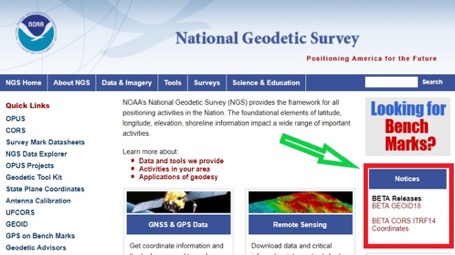
    My last column included links to the NGS website that provides the beta coordinates and information about the latest Multi-Year CORS solution (MYCS 2). The column also noted that in late February 2019, NGS released a beta version of the latest hybrid geoid model. See Figure 1,National Geodetic Survey’s Home Web Page.” This column discusses the Beta Geoid18 Web Map, the results of the hybrid Geoid18 model, and the differences between the beta model and the official hybrid model, Geoid12B.

    Figure 1. National Geodetic Survey’s Home Web Page. (Screenshot: National Geodetic Survey)
    Figure 1. National Geodetic Survey’s Home Web Page. (Screenshot: National Geodetic Survey)

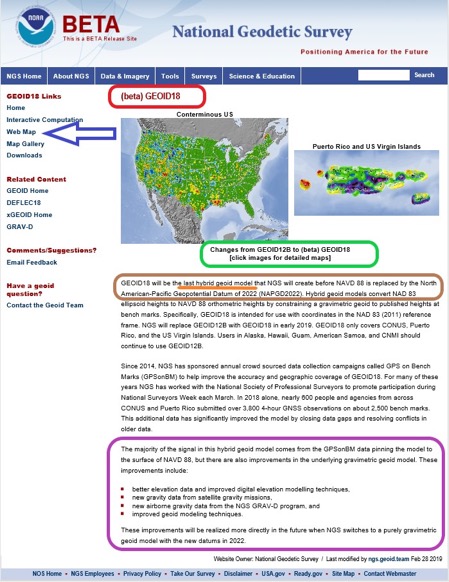
    The Geoid18 hybrid geoid model can be accessed here. See Figure 2, Excerpt from Beta Geoid18 Website. The site provides an opportunity for users to compute a Beta Geoid18 value for a particular station. I would encourage all users to obtain an understanding of the new hybrid model. Once again, it should be noted that this model is a beta model for users to test their workflows and should never be used for official or production work. This allows users to identifies potential issues and differences between Geoid12B and Geoid18, and then contact NGS if they have a question. NGS has done a tremendous job of explaining the Geoid18 process and results, and would appreciate users helping to evaluate the new hybrid model. Several of my previous columns have highlighted the NGS GPS on Bench Marks (GPS on BMs) program and how users have supported the development of the hybrid Geoid18 model: Part 5, Part 6, Part 7, Part 8 and Part 9.

    The NGS Beta Geoid18 website provides access to GIS tools that allow users to identify changes between Geoid12B and Geoid18 in their area of interest. The site also states that the hybrid geoid model, Geoid18, will be the last hybrid geoid model that will be created before the new geopotential datum, NAPGD2022, is adopted as the official datum. This is the opportunity for users to be involved in the analysis of the Beta hybrid geoid model. NGS will consider changes to the Beta model until it becomes an official published product. This hybrid geoid model is slightly different from the previous hybrid geoid model, Geoid12B. Similar to Geoid12B, the majority of the design of the hybrid model comes from the relationship between the NGS’ GNSS-derived ellipsoid-derived heights and the leveling- derived orthometric NAVD 88 heights. In other words, the hybrid model is designed to fit to the NAVD 88 orthometric heights.

    That said, since the creation of hybrid Geoid12b, there have been improvements in the underlying gravimetric geoid model used in Geoid18. These improvements include:

    • Better elevation data and improved digital elevation modelling techniques,
    • New gravity data from satellite gravity missions,
    • New airborne gravity data from the NGS GRAV-D program, and
    • Improved geoid modeling techniques.

    My previous columns have focused on procedures and routines for establishing GNSS-derived orthometric heights. As I’ve mentioned in these columns, there are many ways to analyze and investigate GNSS data and adjustment results. I have provided basic concepts that I believe are important for users to understand. My October 2016 column focused on the NGS “GPS on BMS (GPSBM)” dataset that was used to create the last hybrid geoid model, Geoid12B.

    As mentioned in my October 2015 column, the hybrid geoid model is designed to fit the published NAVD 88 leveling-derived orthometric heights. I highlighted that the GPS on BMs dataset can be used to identify potential issues in the NAVD 88 published orthometric heights. The October 2016 column provided tools and routines that can be used to identify potential issues in NAVD 88 heights and/or NAD83 (2011) published ellipsoid heights. In support of the Beta Geoid18, NGS performed a detailed analysis of the GPS on BMs stations that were used in the creation of Geoid18.

    Excerpt from Beta Geoid18 Website (Image: National Geodetic Survey)
    Figure 2. Excerpt from Beta Geoid18 Website. (Image: National Geodetic Survey)

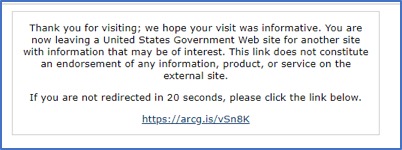
    If you click on the “Web Map button” on the Geoid18 web page (see arrow in Figure 2), you may see the statement highlighted in Figure 3. Clicking on the link will redirect you to the correct web site (see Figure 4.).

    Result of Clicking on Web Map Button
    Figure 3. Result of Clicking on Web Map Button (Screenshot: National Geodetic Survey)

    Web Map Option
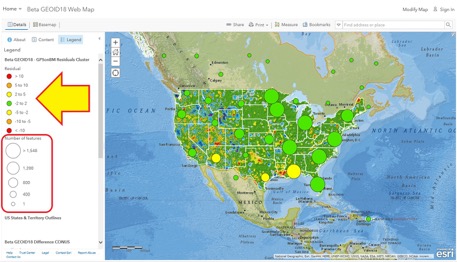
    Figure 4. Web Map Option – Results after clicking https://arcg.is/vSn8K (Top Level of Beta Geoid18 Map) [Screenshot: National Geographic, Esri, Garmin, HERE, UNEP-WCMC, USGS, NASA, ESA, METI, NRCAN, GEBCO, NOAA, increment P Corp. | National Oceanic and Atmospheric Administration (NOAA), National Ocean Service (NOS), National Geodetic Survey (NGS)]
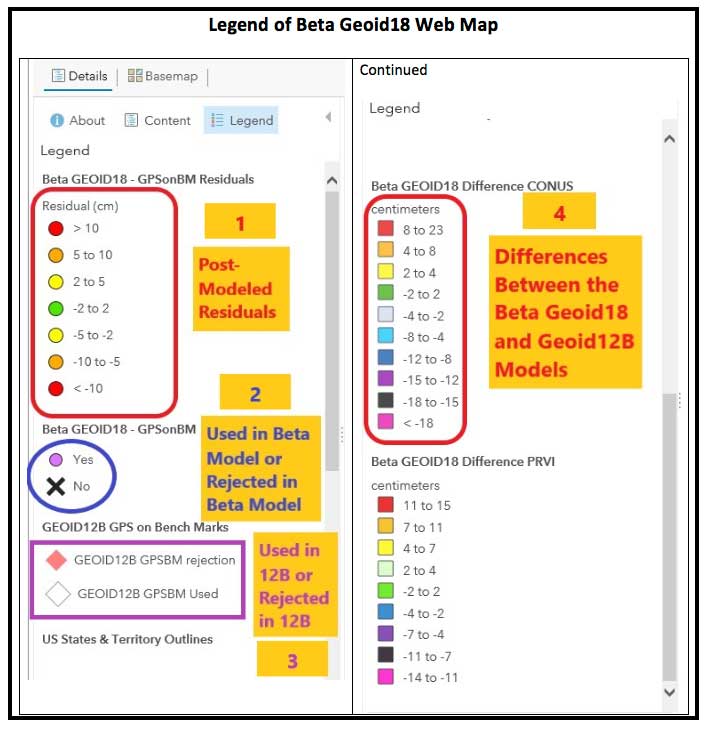
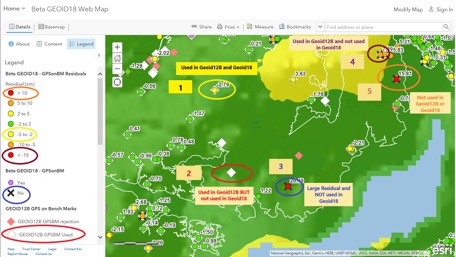
    This data layer provides the value of the post-modeled residuals for all of the GPS on Bench Marks that were part of the evaluation of the Beta GEOID18 model. This Feature Layer is used to populate several layers in the Beta GEOID18 Web Map including the layers called Residuals and GPSonBM. The data for this web map can be found here.The top level of the Beta Geoid18 Map depicts a high-level picture of the residuals. The residuals are in centimeters and represented by different colors. The larger green and yellow circles represent the number of features in the region. The individual GPS on BMs station information appear as the user zooms down. There is a lot of information provided on the Web Map site. The legend changes to provide more detailed information as the user zooms down on the map. I have highlighted four sections on the legend in Figure 5 and provided an explanation of the layers below:

    1. This data layer provides the value of the post-modeled residuals for all of the GPS on Bench Marks that were part of the evaluation of the Beta GEOID18 model. This Feature Layer is used to populate several layers in the Beta GEOID18 Web Map including the layers called Residuals and GPSonBM. The data for this web map can be found here.
    2. This data layer denotes whether the GPS on Bench Mark was used or rejected in the development of the Beta hybrid geoid GEOID18. The data for this web map can be found here.
    3. This data layer denotes whether the GPS on Bench Mark was used or rejected in the development of the hybrid geoid GEOID12B. This has all of the same attributes as the spreadsheet provided on the NGS GEOID12B web page. More information can be found here.
    4. This is a tile package that displays the difference between GEOID18 and GEOID12B in CONUS. It contains two overlayed raster files, one of which is the estimated error and the other is its hill shade. The data for this web map can be found here.
    Figure 5. Legend of Beta Geoid18 Web Map (Screenshot: National Geodetic Survey)
    Figure 5. Legend of Beta Geoid18 Web Map (Screenshot: National Geodetic Survey)

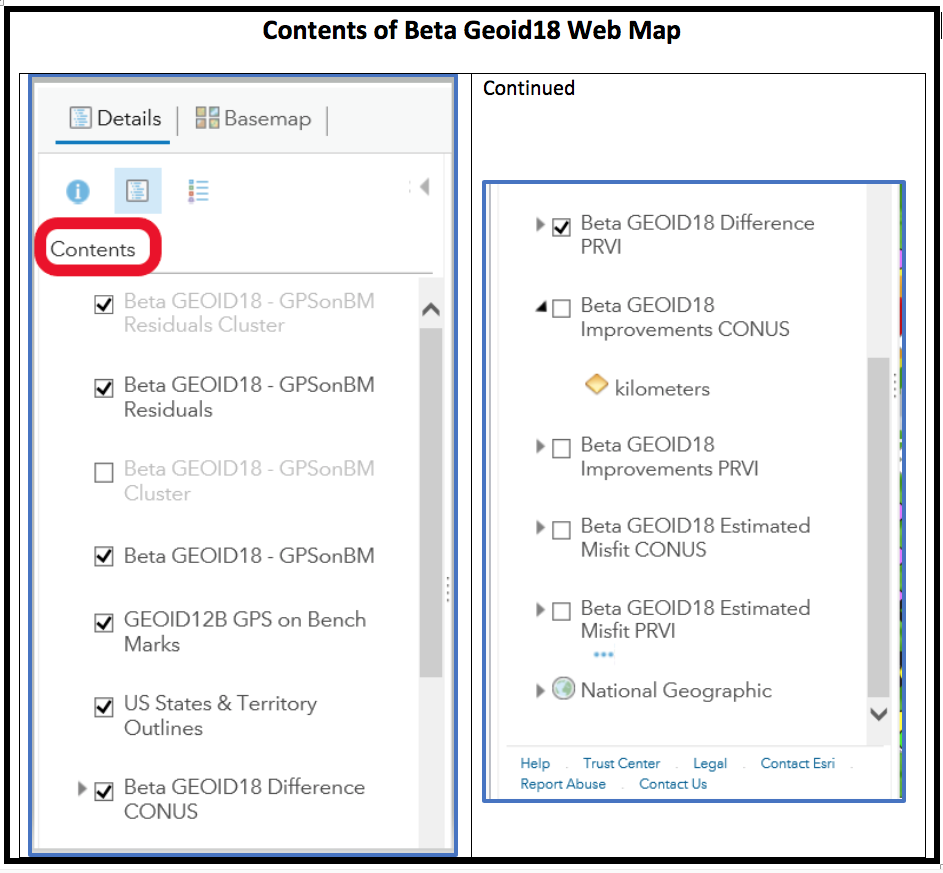
    Clicking on the “Content” link provides the data layers (see Figure 6). The user can turn these layers on and off depending on what they’re interested in analyzing.

    Contents of Beta Geoid18 Web Map
    Figure 6. Contents of Beta Geoid18 Web Map (Screenshot: National Geodetic Survey)

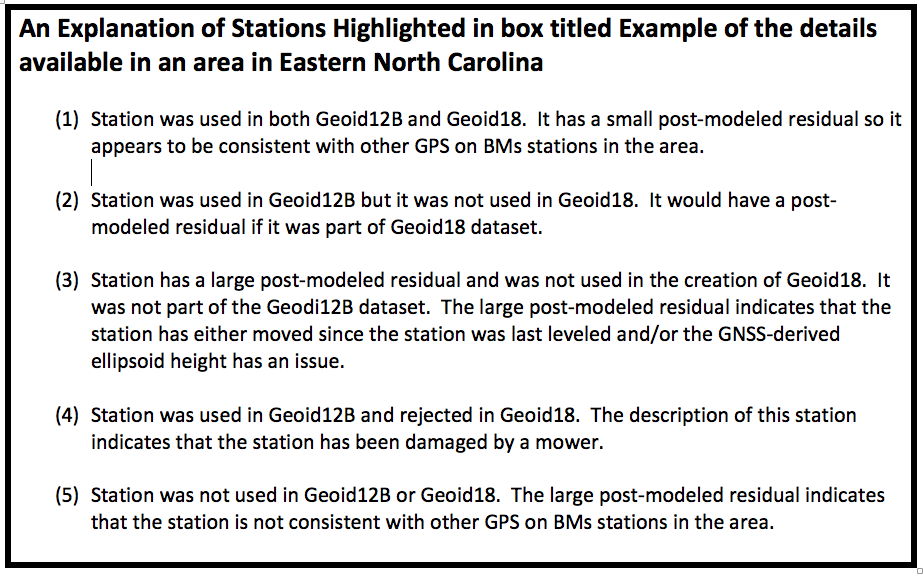
    As previously stated, additional details are available as the user zooms into an area of interest (see Figure 7). Five stations have been highlighted in this figure to explain the symbology used on the Web Map site. See Figure 8 for these explanations.

    Example of the details available in an area in Eastern North Carolina
    Figure 7. Example of the details available in an area in Eastern North Carolina (Screenshot: National Geodetic Survey)

    An Explanation of Stations Highlighted in box titled Example of the details available in an area in Eastern North Carolina

    Figure 8. An Explanation of Stations Highlighted in box titled Example of the details available in an area in Eastern North Carolina (Screenshot: National Geodetic Survey)

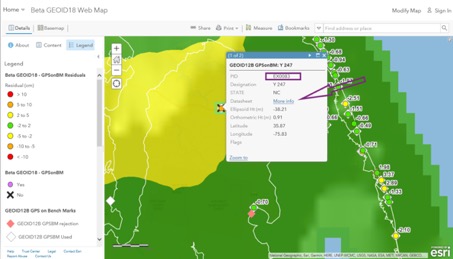
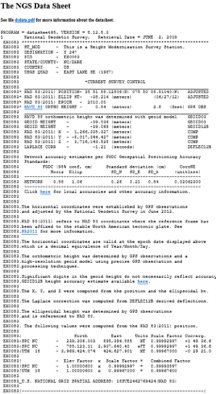
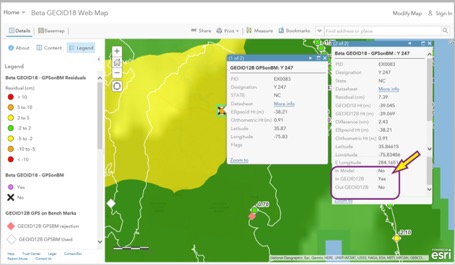
    When the user clicks on a station’s icon, another window appears that provides specific information about that station. See Figure 9. If the user clicks on the “More Info” button, the routine retrieves the NGS datasheet from the NGSIDB (see Figure 10). As the NGS datasheet states at the end of the description for station Y 247, the station has been obliterated by a mower, which is why it probably was not used in Geoid18.

    Example of Information Available for Individual Stations
    Figure 9. Example of Information Available for Individual Stations (Screenshot: National Geodetic Survey)


    NGS Datasheet for Station Y 247 (PID EX0083)
    Figure 10. NGS Datasheet for Station Y 247 (PID EX0083) (Screenshot: National Geodetic Survey)


    Figure 11
    provides all the information available for station Y 247. It should be noted that the station was used in Geoid12B and not used in Geoid18. This means that there will be differences between Geoid12B and Geoid18 in areas where a station was used in Geoid12B but not used in Geoid18. The amount of the difference will depend on the size of the post-modeled residual. In this example, the post-model residual is 7.39 cm.

    Example of Geoid18 Information Available for Station Y 247
    Figure 11. Example of Geoid18 Information Available for Station Y 247 (Screenshot: National Geodetic Survey)

    GPS on BMs data are usually based on different epochs of data; that is, the leveling data is usually observed at a different epoch than the GNSS data. This means, if the station has moved since the last time it was leveled, then the GNSS-derived ellipsoid height minus the leveling-derived orthometric height will not be equal to the geoid height. The procedure for computing GPS on BMs residuals was described in my February 2018 column. To determine if a bench mark had moved since it was last leveled, the analyst needs several nearby bench marks occupied by GNSS.Users have been very important to the development of Geoid18 by participating in NGS’ GPS on BMs program. These data have been used to improve the reliability of the hybrid geoid model. Users can now help by evaluating areas that have large changes between Geoid12B and Geoid18 (see box titled Figure 12). To help ensure that the appropriate stations were used to create the hybrid geoid model Geoid18, users could occupy nearby stations in the area to evaluate the reliability of the model. This will help NGS improve the reliability of the model in that region.

    Example of a Large Difference Between Geoid12B and Geoid18 in Western North Carolina
    Figure 12. Example of a Large Difference Between Geoid12B and Geoid18 in Western North Carolina (Screenshot: National Geodetic Survey)

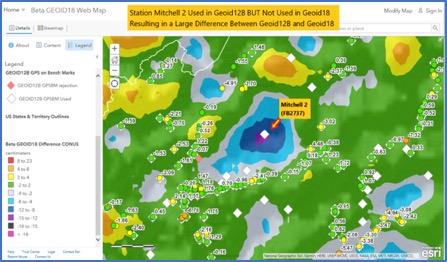
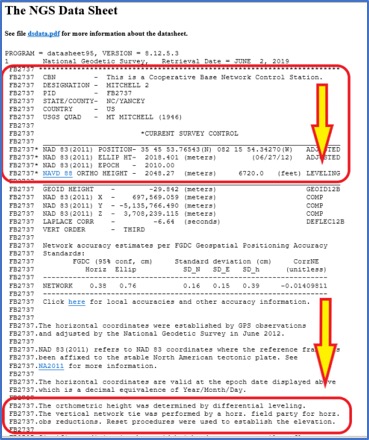
    I described the NGS’ published height codes in my October 2016 column. In the case of Mitchell 2, there’s no leveling data in NGS’ database in the area surrounding Mitchell 2. There may be leveling projects that have been performed by other agencies such as the USGS but the leveling data have not been processed and loaded into NGS’ database. Users could help by performing GNSS observations on bench marks in the region that are in NGS’ database and/or by performing leveling observations between the GPS on BMs station and the nearest bench mark that has leveling data in NGS’ database.In the example of a large difference between Geoid12B and Geoid18 in Western North Carolina, station Mitchell 2 (PID FB2737) was used in Geoid12B but not used in Geoid18. It wasn’t used in Geoid18 because the NAVD 88 height was not based on an adjustment. According to the description, the leveling tie was performed by a field party that was performing a horizontal survey project (see Figure 13). The field party performed the appropriate leveling procedures but, in this case, the leveling data have not been placed in computer-readable form, so the orthometric height cannot be verified.

    NGS Data Sheet for Station Michell 2 (PID FB2737)
    Figure 13. NGS Data Sheet for Station Michell 2 (PID FB2737) (Screenshot: National Geodetic Survey)

    I encourage users to access the web map and investigate stations that have large post-modeled residuals and/or stations that were used in Geoid12B but were not used in Geoid18. The NGS analyst rejected stations based on pre- and post-modeled residuals but many times there wasn’t enough redundant information available to ensure the station should be rejected or used in the creation of the hybrid geoid model. Users should be commended for their participation in the GPS on BMs program. Hopefully, users will continue their support by evaluating the beta hybrid geoid model.

  • Topcon launches rotary-wing UAV flight-planning software

    Topcon launches rotary-wing UAV flight-planning software

    Screenshot: Topcon
    Screenshot: Topcon

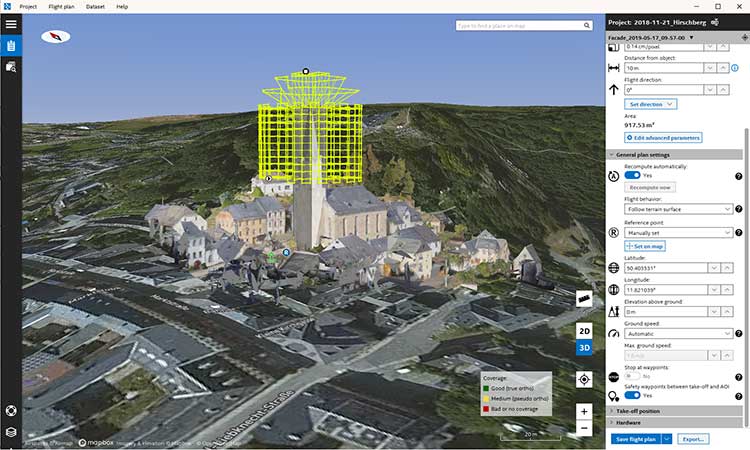
    Topcon Positioning Group has released its next-generation flight-planning system for its rotary-wing aerial UAV offering.

    The new Intel Mission Control Software is designed to facilitate automated flight planning, managing missions and data handling for the Intel Falcon 8+ drone – Topcon Edition and its available payload options.

    The software is designed to increase accuracy with advanced mapping features that allow operators to easily set project parameters and prepare missions using presets for 2D areas such as polygon, corridor and city grid, as well as 3D structures like towers, buildings and facades.

    “Operators can take advantage of 2D and 3D map views with the ability to import more precise project details and parameters, including restricted airspace, and support to adapt flight planning over difficult terrain,” said Charles Rihner, vice president of planning for Topcon Emerging Business.

    “It features the ability to import elevation, KML, GeoTIFF and Shapefiles for real life visualizations targeted for accurate planning. Plus, expanded preset options support automated flight including circle of interest, panorama, and 2D and 3D missions with automatic elevation and terrain adoption,” Rihner said.

    Additionally, the software includes automatic pre-flight safety and system checks while in mission planning. “Operators will receive detailed communication such as estimated battery life, airspace integration, ground and object safety limits, maximum dive and climb rate, minimum and maximum altitude, camera speed, number of images, camera storage, GSD check, and target photo coverage and quality,” Rihner said.

    The flight-planning software is also designed to improve data handling and export to support easier data processing.

    “It includes automated image matching and geotagging of images during data import, for increased time saving. Operators can preview and inspect the quality of the collected data, including individual images, as well as an overview of data coverage. Then, they can quickly and easily access and export flight data, and filter datasets for easier processing,” Rihner said.

  • Nepali survey team collects Everest height data

    The survey team set up the base station in Everest base camp. (Photo: Tshiring Jangbu Sherpa via Nepal24hours.com)
    The survey team set up the base station in Everest base camp. (Photo: Tshiring Jangbu Sherpa via Nepal24hours.com)

    A Nepali survey team made a successful ascent of Mount Everest to measure its official height.

    This is the first height survey conducted by the government of Nepal. The precise height of Mount Everest — now listed as 29,029 feet, or 8,848 meters — has been contested since the first survey by British officers in 1849.

    Nepal plans to end the controversy and declare both snow and rock height of the world’s tallest mountain.

    Chief Survey Officer Khimlal Gautam and surveyor Rabin Karki reached the peak of Mt. Everest on May 22 at 3 a.m. local time and collected data from a Trimble R10 GNSS receiver gifted from New Zealand.

    The surveyors stayed atop the peak for about 1 hour, 16 minutes, according to Nepal24hours.com.

    The final result of the official height measurement of Mt.Everest is expected within the next six months.

    “To make the observation of data on GNSS we spent one hour and 16 minutes in the summit which was a very challenging and trying time for us,” Gautam said. “We faced extreme difficulty mainly while descending from the summit.”

    According to Tshering Janbu Sherpa, guide leader of the survey team, the team faced difficulties because of the exhaustion of oxygen of one member, who was rescued during the descent.

    Besides a GNSS survey at the summit, teams conducted precise leveling, trigonometric leveling and gravity surveys. The GNSS survey will cover 285 points with 12 different observation stations, nine of which are in hills of Sankhuwasava, Bhojpur and Solukhumbu districts.

  • Tell us the future: State of the Industry survey open for input

    Tell us the future: State of the Industry survey open for input

    What technical and business challenges are getting your attention this year?

    What are the most important benefits of, and the key challenges posed by, new modernized GNSS signals? How are you driving business in today’s economy?

    What issues are you concerned about?  What solutions hold the most promise for positioning, navigation and timing (PNT) in challenged and indoor environments — regardless of which technology provides them?

    We want to know, and so does the rest of the industry.

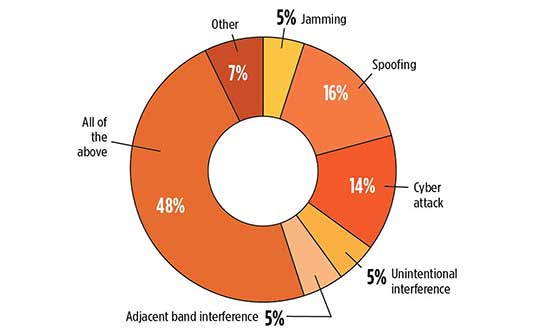
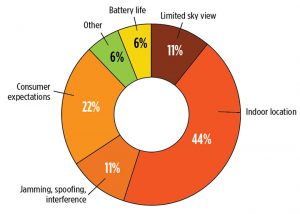
    What is the key challenge for positioning and navigation in the wireless and consumer space? (Source: GPS World 2018 State of the GNSS Industry survey)
    What is the key challenge for positioning and navigation in the wireless and consumer space? (Source: GPS World 2018 State of the GNSS Industry survey)

    GPS World is asking PNT professionals about the developing technology frontiers, the state of their business, the economic climate for products and services, driving market factors, the effects of jamming, the Issue of the Year — and more! Please give us your opinions in the 2019 State of the Industry survey. It should take less than 10 minutes, and your responses are confidential.

    A handful of lucky participants drawn at random will win TWO $100 gift cards good (virtually) anywhere.

    Complete the survey by June 30. Then look for a complete report of our findings in the September issue of GPS World.

    Thank you for taking the time to share your feedback and help us improve our magazine content, industry awareness — and your own business!

    While asking questions that have appeared in past State of the Industry surveys, to reveal industry changes that have taken place over the last five years, the 2019 Survey presents these new issues for your consideration:

    • With multiple constellations, signals and services now beginning to emerge, what are the challenges to keeping open and seamless access to these in the international marketplace ? 

    • Among the many benefits of modernized signals, which is the most important in your field of work?

    • Among the key challenges in utilizing modernized signals, which gets most of your attention? 

    The question above offers such answer choices as: increases die size without ability to increase chip cost; longer code sequences are difficult to acquire; increases RAM/ROM; increases number of RF channels; increases number of digital channels; higher CPU processing required; and software complexity with many signal types. 

    What one word would you use to describe your company’s No. 1 opportunity to grow in 2020? 

    What one word would you use to describe your company’s No. 1 obstacle to growth in 2020?

    Overall, the 2019 Survey covers such topics as:

    • Technology Trends.  PNT is rapidly diversifying among a number of complementary technologies, as GNSS looks to inertial, lidar, laser, cellular, WiFi and other beacons, signals of opportunity, low-Earth orbit satellite constellations and more. Different market sectors have, naturally, different requirements, and these lead to different integration combinations. Where do you see the most promise?
    • The Global Economy and how it affects business in your sector. Customers’ availability of capital to invest is top-of-mind for most industry professionals, whether designers, manufacturers, integrators, suppliers/dealers, or end users.
    • Industry Confidence in the road ahead. Sound business navigation requires a fluid, responsive combination of technology, capital, investment, and often most important, human capital. .
    • Issues of Concern. To what extent do industry leaders take into account the following as well as further factors?
      • Pricing and competitive issues;
      • GNSS jamming, spoofing, other RF interference;
      • Developing compatibility and interoperability of GNSS: GPS, GLONASS, BeiDou, Galileo;
      • Advantages and drawbacks of other positioning and navigation technologies.

    The survey report, complete with insightful articles and infographics, will appear in the September issue. Look for it!

    Please click here to begin the survey.

  • Trimble TDC600 integrates smartphone and GIS data collector

    Trimble TDC600 integrates smartphone and GIS data collector

    Photo: Trimble
    Photo: Trimble

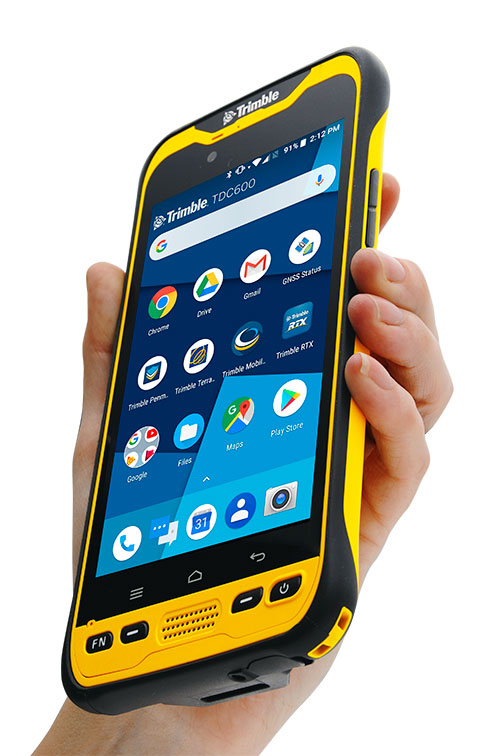
    Trimble has introduced the TDC600 handheld, an ultra-rugged, all-in-one smartphone and GNSS data collector for geographic information system (GIS) and field inspection applications.

    The next-generation smartphone data collector runs on an Android 8.0 operating system. It has a bright sunlight-readable 6-inch display, 2.2-GHz processor, 4-GB memory and an enhanced capacity all-day battery.

    More powerful and with a longer lasting battery than its predecessor, the TDC600 handheld supports the Trimble Catalyst GNSS positioning service that delivers subscription-based accuracy on demand for Android devices.

    In addition, the TDC600 can be used with external receivers such as the Trimble R2 and R1 GNSS receivers, and also features a built-in GNSS receiver that supports GPS, GLONASS and BeiDou constellations plus satellite-based augmentation system (SBAS) capabilities for real-time positioning.

    The TDC600 is built for GIS users in organizations across a variety of industries —environmental management, utilities and government agencies. With Wi-Fi, Bluetooth 4.1 and 4G LTE cellular connectivity that supports data and voice calls, field workers are able to use the TDC600 as they would any consumer smartphone, communicating between the field and office, sending emails and texting.

    Featuring a slim, lightweight and ergonomic pocket-size form factor, the TDC600 fits in a user’s hand with a fitted strap providing extra security. Constructed to meet military (MIL-STD-810G) specifications, the durable design absorbs drops and shocks, and works in harsh weather conditions, without the need for a protective case.

    The TDC600 integrates seamlessly with Trimble’s data collection applications —Trimble TerraFlex] software and Trimble Penmap for Android software — as well as third-party apps such as Esri Collector for ArcGIS.

    With its Google Mobile Services certification, users can run Google core applications and access apps on the Google Play Store to personalize their device.

    “The global mobile workforce is growing, and field personnel are constantly tasked with capturing and computing large amounts of data in more places with greater accuracy, requiring powerful and reliable data collection methods,” said Rachel Blair-Winkler, business area manager for Trimble Mapping & GIS.

    “A professional turnkey solution such as the TDC600 handheld running Trimble data collection apps paired with the Trimble Catalyst service fulfills this requirement,” Blair-Winkler said. “Our customers now have a powerful, comprehensive and cost-effective entry-level system to collect and retrieve highly accurate GIS data virtually anywhere in the world.”

  • Surveying and BYOD: Yes, you can use your smartphone

    Surveying and BYOD: Yes, you can use your smartphone

    BRING YOUR OWN DEVICE (BYOD) is not just an industry buzzword. It can change the way professional surveyors work every day. The idea of using a smartphone or tablet instead of a dedicated device is appealing. But is it good enough?

    Surveyors and mappers are challenged with the arduous task of data collection that meets accuracy and precision standards and provides adequate attribute information for the project. Before the invention of the electronic data collector, handwritten notes in field books were the norm. Every note keeper’s style varied in content, neatness and thoroughness. Calculations for determining survey data values were completed longhand on paper and were very time consuming.


    Index

    Click on a headline and be automatically directed to it.
    History of Surveyors and Data Collectors
    Trending Away from Proprietary Data Collectors
    How Good Is It?
    Post-Processing (OPUS and DPOS)
    Do You Need a Base Station?
    Adaptation of the Industry
    Receiver, Software Ready for Mobile
    TerraStar Gives Assist to RTK
    Trimble Offers Web-Based Post-Processing
    Atlas Corrections Ready for BYOD


    History of Surveyors and Data Collectors

    Like its personal computer counterpart, the electronic data collector was introduced in the late 1970s with minimal adoption by the average surveyor because of cost and complexity. Storage methods for the era included magnetic modules and tape; both forms of media were expensive and fragile with little storage for the cost.

    Data collection was limited to numeric values only, with horizontal and vertical angles, slope distance, point number and point code being the extent of the information. Couple this process with the limited availability of printers and plotters capable of depicting the data for the surveyor’s use, and one can see why few practitioners invested in these systems.

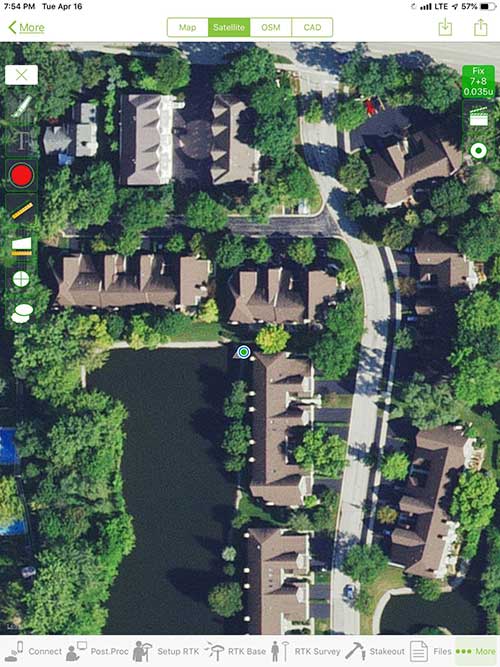
    iOS aerial viewer. (Screenshot: Tim Burch)Photo:
    iOS aerial viewer. (Screenshot: Tim Burch)

    The 1980s and 1990s brought significant changes to surveying with the advancing technology of electronic computing and measuring. The introduction of robotic total stations, various methods of GNSS, and even leveling took advantage of significant computer power and measuring processes, and the data collector stayed in lockstep with the advancing instrumentation. Almost every equipment manufacturer developed their own proprietary data collector and software system because of the unique design and programming of their systems.

    In the 2000s and later, third-party manufacturers began producing data collectors with advanced computing power and the ability to connect to varying brands of equipment. Most of the programming for these collectors are still proprietary in nature to this day.

    Also during the 2000s, a new wave in mobile communications was taking place. Cellular phone and data signals were now being used to transmit an abundance of information between users.

    The rapid development of handheld communication devices has led to the meteoric rise of two specific mobile operating systems: one by a radical startup that concentrated on dominating the search engine market, and the other by an avant garde computer company looking to expand its unique customer base.

    By the end of the decade, the world had been introduced to the Android operating system by Google, and the iOS operating system by Apple. The combined market share for the two operating systems at press time was just under 98 percent of all mobile devices worldwide.

    Trending Away from Proprietary Data Collectors

    Android Point Info: Confirmation of collected data, including equipment and base station. (Screenshot: Tim Burch)
    Android Point Info: Confirmation of collected data, including equipment and base station. (Screenshot: Tim Burch)

    Because data collection by surveyors and mappers have traditionally been performed on proprietary systems designed and produced by equipment manufacturers for use with only their instruments, these collectors, while very powerful and robust, are costly for the equipment manufacturers to produce because of the limited market of surveyors and mappers.

    Many suppliers, before the introduction of the iPhone and Android operating systems, attempted to adapt their data-collection platforms to wider recognized mobile operating systems (for example, Windows CE/Pocket PC/Mobile) on a bevy of mobile devices (HP/iPAQ, Sony Eriksson, HTC) with little success. Various versions of Windows are still being used today by GNSS equipment manufacturers’ proprietary data collectors, including Trimble, Hemisphere GNSS, Topcon and CHC Navigation.

    However, the field of operating environments has become more crowded as technology continues to advance. The proliferation of Windows-based data collectors are now on the decline.

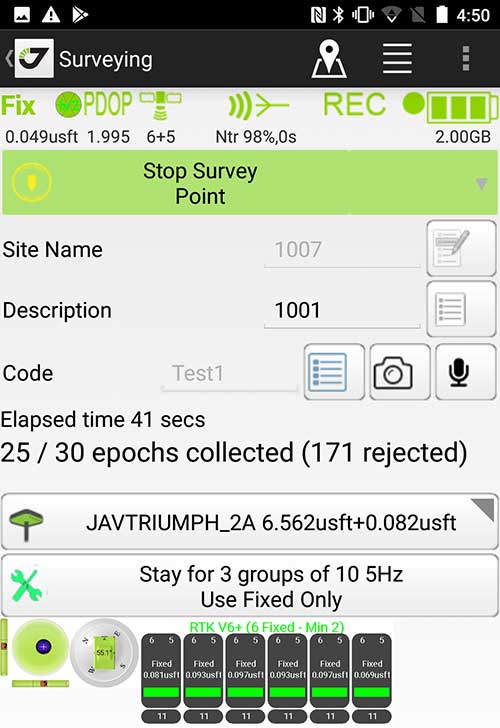
    Survey Point: Status of survey data collection and GNSS engine signal reception. (Screenshot: Tim Burch)
    Survey Point: Status of survey data collection and GNSS engine signal reception. (Screenshot: Tim Burch)

    Enter Android and iOS. Driving the decline of the previously popular Windows mobile platform is the rapid adoption of the iOS and Android operating systems. These two environments have also led to a substantial number of devices and applications for users.

    Part of the reason for the speedy acceptance of the devices and operating systems has been the ease of programming. It is estimated that each operating system has more than two million applications in their respective online stores, with more being introduced daily.

    Because of the proliferation of smartphones, nearly everyone is familiar with the look, feel and operation of touchscreen devices and their various applications. This familiarity is driving a new trend in data collection: the concept of “bring your own device” (otherwise known in IT security circles as “BYOD”). BYOD is being introduced by several surveying and mapping equipment manufacturers as an alternative to their proprietary data-collection devices.

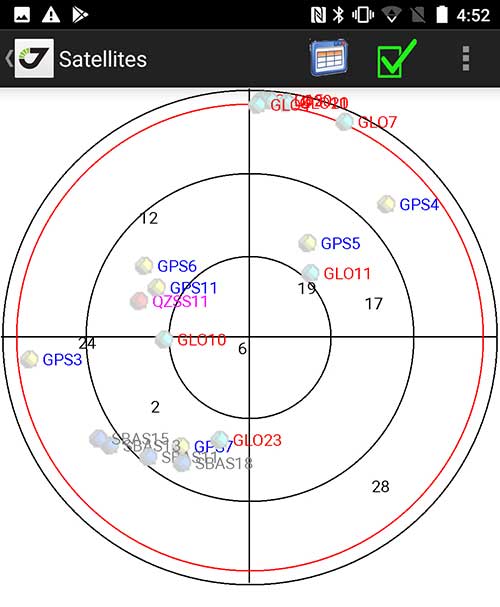
    Sky Plot: Where the ‘birds’ are in the sky. (Screenshot: Tim Burch)
    Sky Plot: Where the ‘birds’ are in the sky. (Screenshot: Tim Burch)

    These manufacturers are pairing iOS and Android developers with their hardware and firmware specialists to create a user-friendly interface that will function on most of the most popular handheld devices on the market today. From Apple iPhones and iPads to Samsung Galaxy phones and tablets, these applications give the surveyor the best of two worlds — sophisticated data-collection capability on a well-known and reliable mobile operating system platform.

    The Android platform is becoming especially popular in the handheld mapping market segment. Current users of this environment include Hemisphere GNSS, CHC Navigation, Tersus GNSS and Trimble.

    The iOS applications, while not quite as prevalent as Android, are being embraced by several significant GNSS manufacturers, including JAVAD GNSS and Eos Positioning Systems.

    These companies are creating iOS and Android apps that embrace the BYOD market, providing their users with affordability and creating a comfort level simply because of the familiarity of the device and its environment.

    How Good Is It?

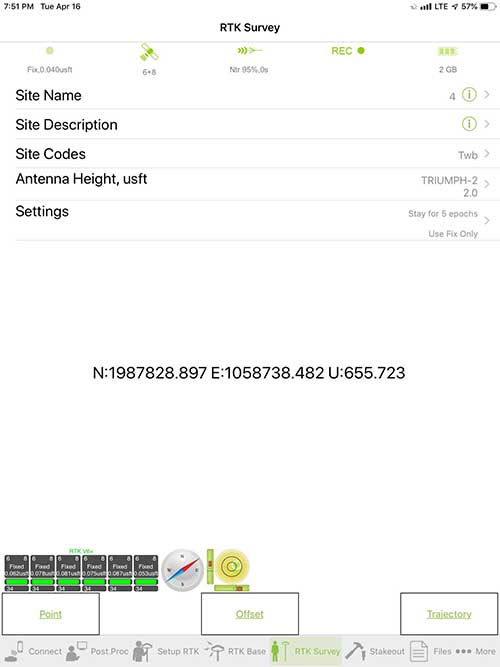
    iOS Position. Status of survey data collection and GNSS engine signal reception. (Screenshot: Tim Burch)
    iOS Position. Status of survey data collection and GNSS engine signal reception. (Screenshot: Tim Burch)

    For the surveyor to be satisfied with the operation, the collection process must be efficient, cost-effective and easy to use. For this explanation of key items within a well-rounded data-collection application, we are using the JAVAD Mobile Tools (now J-Mobile) application built specifically for the Android and iOS operating systems.

    The Android system (Version 7.0) was installed on a rugged CAT S41 cellphone made Bullitt Group from the United Kingdom, while the iOS app was used on the author’s iPad Air 2 running Version 12.2. Both apps were utilized in conjunction with the JAVAD Triumph-2 GNSS receiver.

    After putting both versions through trial testing and checking against values on known monuments, here is the results of our findings:

    Receiver Setup. Visual reference for leveling and direction of GNSS receiver. (Screenshot: Tim Burch)
    Receiver Setup. Visual reference for leveling and direction of GNSS receiver. (Screenshot: Tim Burch)

    Data Organization. Easy to comprehend and flexible for most naming conventions.
    Corrections and Sources. Easily connects to base receiver and radio or available NTRIP correction service for real-time network (RTN) capability.

    Sky Plot. Because the Triumph-2 is equipped to receive most of the available satellites in service, the Sky Plot feature is beneficial to the user for assessing potential interference.

    File Management, Import and Export. Covers the typical file management and transfer functions used by the surveyor.

    RTK Survey Operations. Robust telemetry keeps the users informed of specific satellite data and correction status.

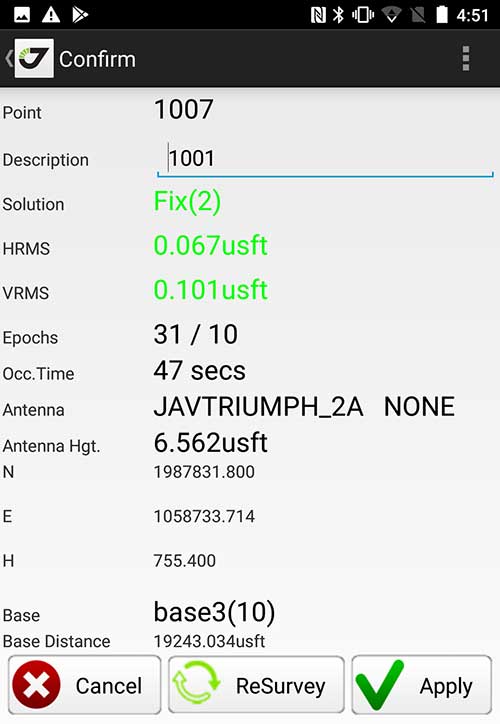
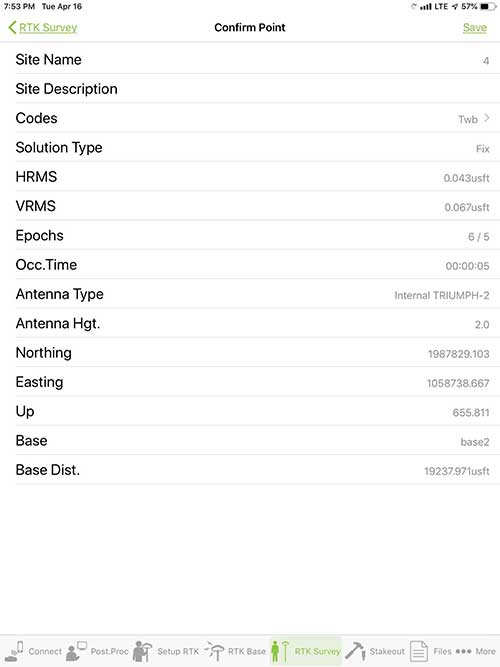
    Point Confirmation. Survey point information with metadata and equipment listing. (Screenshot: Tim Burch)
    Point Confirmation. Survey point information with metadata and equipment listing. (Screenshot: Tim Burch)

    Coordinate Systems. All standard coordinate systems are included with features to allow the user to customize their own systems.

    Localization. Creation of a local coordinate system is a simple routine, providing strong quality checks for data integrity.

    Lift and Tilt. This feature provides the user with a useful procedure to end data collection without the need to press a button. This feature significantly increases the user’s productivity.

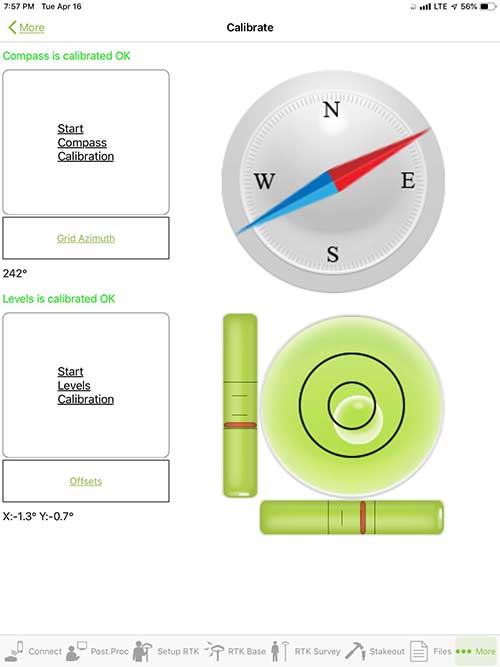
    Compass and Level Calibration. With the Triumph-2 having an internal compass and level system, status of the receiver is graphically displayed to help the user keep a close watch on the accuracy of the survey point.

    Survey Points and Linework. Most point naming systems and line-coding procedures are easily adapted.
Total Station Point Transfer. The creation of control point files for transfer to total stations is simple and easy to use.

    Stakeout. Graphical status screens provide the user with simple plotting capability of the desired stakeout point to increase efficiency and accuracy.

    These apps are good at providing the surveyor with a solid tool for data collection and staking capability. They are especially good when paired with a real-time kinematic
    (RTK) base station or NTRIP correction service.

    But what happens when cell service is not readily available, or there are no published monument coordinates to establish site control? These apps have the surveyor covered for that situation as well.

    Post-Processing (OPUS and DPOS)

    Today’s surveyor works in an environment where geographic-based data is a key component to the services they render to their clients. While most of the world’s developed nations have access to cellular networks in which most GNSS receivers can communicate with an RTN providing corrective solutions, the places where this is not possible relies on other means of data correction.

    In the U.S. we rely on OPUS (Online Post-Processing User System) to provide that service. But, as good as it is, it has limitations. Currently, it only utilizes GPS satellite data from the U.S. Department of Defense and is subject to sporadic government shutdowns.

    Other services, from both public and private sources, are in place around the world to provide a service similar to OPUS. These include, but are not limited to:

    • AUSPOS. Geoscience Australia (free)
    • APPS. Jet Propulsion Laboratory at California Institute of Technology (free)
    • CSRS-PPP. Natural Resources Canada (free)
    • GAPS. University of New Brunswick (free)
    • magicGNSS. GMV (free)
    • Centerpoint RTX Post Processing. Trimble (free)
    • JAVAD Data Processing Service (DPOS). JAVAD (free, processes any JAVAD GNSS jps file)

    These correction services utilize other satellite constellations (GLONASS, Galileo, BeiDou and QZSS) for their solutions and can provide additional coverage, depending on the location of the user. Because of these services, geographic-based data is at the fingertips of surveyors worldwide.

    JAVAD’s DPOS system is has the ability to collect static survey data and send it to the proprietary service for establishing new coordinate values for base-station use. This process is a function of the app and can be completed in a few short steps.

    Once the base station values are calculated, the surveyor can make use of this information for establishing a base station for correction broadcasting.

    Do You Need a Base Station?

    The establishment of RTNs has greatly enhanced surveying capability as cellular service has increased in coverage and speed. However, there are still instances and locales that do not allow for the reliable use of cell signals to provide those corrections accurately.

    Various manufacturers’ tests have proven the accuracy of using an RTN subscription versus the traditional GNSS base and rover RTK setup. But cell-signal strength can be an Achilles heel, crippling those who choose not to set up a base station.

    The UHF radio, even in its reduced power state from regulatory changes, is still more powerful and reliable than most cell services. 5G technology and coverage is anticipated to revolutionize cellular service, but it has yet to be realized.

    Adaptation of the Industry

    Other GNSS manufacturers (including NovAtel, Navcom, ComNav, Unicore, Emcore, Suzhou, TeleOrbit and Geneq) are producing receivers that can be adapted to a variety of existing data collectors and connect to iOS/Android mobile devices through various software developers.

    The future of communications remains the smartphone or tablet device, with foldable units expected to be the next big thing.

    As processors get more powerful, as chip memory becomes more abundant, and as more satellite constellations orbit in our sky, surveyors and their data collectors will continue to evolve. The future remains bright for technology and the surveyor has a front-row seat.


    TIM BURCH is GPS World’s contributing editor for Survey. A professional land surveyor with more than 30 years of experience, he is director of surveying at SPACECO Inc. in the Chicago area. For several years he has been secretary and was recently named vice-president of the Board of Directors of the National Society of Professional Surveyors. He writes a bi-monthly column in the Survey Scene e-newsletter. Subscribe free at env-gpsworld-integration.kinsta.cloud/subscribe.


    Receiver, Software Ready for Mobile

    Photo: ComNav
    Photo: ComNav

    ComNav receivers offer multiple data-collection device choices via Bluetooth connection, as well as an Android app.

    For instance, the G200 provides centimeter-accuracy positioning to any connected mobile devices for RTK field surveying. It is able to delivery robust survey workflows with the SinoGNSS Android-based Survey Master, so that surveyors can collect quality high-accuracy positions no matter what mobile device they are using.

    The G200 is a rugged, compact, wearable GNSS receiver. Combined with the high-performance SinoGNSS OEM board tracking GPS L1/L2, BeiDou B1/B2, GLONASS L1/L2, Galileo and QZSS, the G200 enables reliable high-precision GNSS performance for land survey tasks anywhere in the world.

    TerraStar Gives Assist to RTK

    Photo: Leica Geosystems
    Photo: Leica Geosystems

    NovAtel offers several levels of corrections via its TerraStar service. For surveying applications, the RTK Assist service provides correction data to bridge surveyors through any real-time kinematic (RTK) correction outages. TerraStar services work on NovAtel’s OEM6 and OEM7 receivers..

    RTK Assist, available on OEM6/OEM7 receivers, provides 20 minutes of RTK assistance, enabling surveyors to maintain centimeter-level accuracy. A higher service level, RTK Assist Pro, is available on OEM7 receivers. It provides unlimited RTK assistance with stand-alone centimeter-level positioning when RTK is not available.

    Trimble Offers Web-Based Post-Processing

    Photo: Trimble
    Photo: Trimble

    Trimble’s CenterPoint RTX Post-Processing Service is a free, web-based solution that provides rigorous processing of GNSS data for users around the globe.

    Powered by advanced algorithms for processing static observations, CenterPoint RTX Post-Processing supports data including GPS, GLONASS, Galileo, BeiDou and QZSS. With the service, users can upload GNSS data using Trimble formats or industry-standard RINEX 2 and RINEX 3. The service supports all dual-frequency GNSS receivers and more than 400 different antennas.

    The post-processing service computes single-station static observation sessions ranging in length from 10 minutes up to 24 hours, with longer observation sessions recommended to produce the highest accuracy. Using data from the global RTX tracking network, the CenterPoint RTX Post-Processing service computes the position of the observed point with centimeter accuracy.

    Results are delivered via email in ITRF coordinates at the current epoch and can be transformed to a fixed epoch by use of a standard tectonic-plate model.

    Atlas Corrections Ready for BYOD

    The Atlas GNSS global correction service, offered by Hemisphere GNSS, provides correction data for GPS, GLONASS, BeiDou and Galileo constellations. Its global L-band corrections allow for accuracies ranging from sub-meter to sub-decimeter levels. The network has more than 200 reference stations worldwide and covers virtually the entire globe.

    Examples of how the AtlasLink webUI looks on a smartphone. (Image: Hemisphere GNSS)
    Examples of how the AtlasLink webUI looks on a smartphone. (Image: Hemisphere GNSS)

    The Atlas platform was conceived to enable as many people as possible to have access to the correction service technology, either as an end-user or as part of their business. Several features are designed to enable customers who use non-Hemisphere positioning systems to have access to Atlas.

    For instance, Hemisphere’s SmartLink technology allows an AtlasLink GNSS smart antenna to be used as an Atlas signal extension for any GNSS system compliant with open communication standards.

    Hemisphere’s GNSS smart antennas including AtlasLink, A326, C321+ and S321+ offer a user-friendly web user interface (WebUI) that can be used to configure, monitor and manage the receiver from virtually any modern computing device, including computers, phones and tablets.

  • Anatomy of a centimeter-level precise point positioning service

    Anatomy of a centimeter-level precise point positioning service

    By Markus Brandl, Xiaoming Chen, Herbert Landau, Carlos Rodriguez-Solano and Ulrich Weinbach

    This article updates a July 2012 feature in GPS World, “Real-Time Extended GNSS Positioning: A New Generation of Centimeter-Accurate Networks.”

    The Trimble CenterPoint RTX correction service, enabling centimeter-level absolute positioning around the world without the need for RTK reference-station infrastructure, is now available to many users, including integrators of professional high-precision equipment and consumer products such as in the automotive sector. Access is provided via a software library compatible with any GNSS device. The corrections now contain detailed integrity information for safety-critical applications.

    The RTX infrastructure is made up of approximately 120 globally distributed RTX reference stations. Receivers at these stations transmit measurement data at 1 Hz to the RTX server centers, where the correction data is computed. For redundancy purposes, multiple servers in the United States and Europe are operated. A failsafe architecture avoiding any single point of failure in the processing chain has produced a very high availability of corrections. Today the system supports GPS, GLONASS, Galileo, BeiDou and QZSS satellites. It is a multi-frequency system supporting two or more frequencies for each satellite system.

    The correction stream is available to users using L-band signals broadcast via geostationary satellites and IP connections. The L-band transmitted RTX data stream uses a bandwidth of 600–2400 baud, and a highly compressed data format with a resolution of 1 millimeter, with an average latency of 8 seconds in L-band mode and 5 seconds in IP mode. The data stream is encrypted via an Advanced Encryption Standard (AES) with a key length of 256 bits to guarantee safe transmission. Data transmission integrity is assured with a 32-bit cyclic redundancy check attached to every message. The RTX correction stream provides information on satellite position, satellite clock, ionospheric and tropospheric models, and code and phase biases.

    The orbit determination is done in real time using a reduced dynamic approach with dynamic models and exploiting the accuracy of the phase measurements after ambiguity fixing. Based on the computed orbits, the satellite clocks are estimated at 1 Hz, where integer ambiguity fixing is performed for the different satellite systems.

    Next, a single-layer global ionospheric model is computed and represented through spherical harmonics. There are currently two areas with a denser network than the global network; these cover Europe and the mainland U.S. with more than 1,000 base stations. Using these stations, regional ionospheric and tropospheric models are computed, which then provide a fast convergence (RTX-Fast service).

    The satellite position and clock information has centimeter accuracy and allows the client to compute precise point positioning (PPP) with carrier-phase ambiguity resolution. Table 1 shows service accuracy.

    Table 1. Accuracy of the RTX corrections from more than three years (June 2015–July 2018) of residuals computation in the European RTX-Fast network. (Table data: authors)
    Table 1. Accuracy of the RTX corrections from more than three years (June 2015–July 2018) of residuals computation in the European RTX-Fast network. (Table data: authors)

    Once the ambiguities are resolved, the position solution is accurate to a few centimeters. The global RTX-Standard service provides convergence times of 7 minutes to 20 centimeters (cm) horizontal error (95%) and to 2.5 cm (95%) in 13 minutes as shown in Figure 2. The regional RTX-Fast service (U.S., Europe) provides convergence times of less than a minute with centimeter accuracy. The warmstart convergence time is approximately 13 seconds.

    Figure 2. Global convergence of RTX out of 52 globally distributed stations covering one month of data. (Image: Trimble)
    Figure 2. Global convergence of RTX out of 52 globally distributed stations covering one month of data. (Image: Trimble)

    The accuracies specified are achievable with precise Trimble GNSS positioning hardware. For integration into non-Trimble devices, an RTX software library is offered, which gives the user real-time access to the individual data in the RTX correction stream. For use of this library in safety-critical systems such as advanced driving-assisted systems (ADAS) or semi-automated driving, this library was certified to follow the ASIL-B ISO 26262 standard and the automotive ASPICE standard. This library is available for easy integration into third-party applications.

    In addition to the real-time RTX solution, a web-based post-processing solution is available for public use free of charge. It is possible to upload static Trimble or RINEX files to the server, post-process the measurement data, and retrieve a precise position in various coordinate frames.

    Service integrity is continuously monitored at independent stations from the RTX tracking networks in Europe and the US. The integrity of the service is provided at the correction data domain. The integrity monitoring part of the RTX system minimizes the risk due to events such as unplanned satellite maneuvers or wrong broadcast ephemeris; satellite signal or clock anomalies; ionospheric storms; or problems in transmitting the RTX correction stream.

    The monitoring stations compute phase observation residuals (with ambiguity fixing) using the station measurements and the received RTX corrections. These residuals represent the actual errors of the corrections as seen by the monitoring stations at the line-of-sight (Table 1). The thresholds at which corrections are considered as faulty are the following: 0.5 m + QI (quality indicator) for orbit + clock corrections and regional tropospheric models, and 1.0 m + QI for regional ionospheric models.

    The integrity monitoring consists of two steps (Figure 1): a pre-broadcast check, where potentially faulty corrections are detected and filtered out before leaving the computing server, and a post-broadcast check, where additional errors in the transmission channel are detected and alarms are issued to the users.

    Figure 1. Generation and transmission of RTX global and regional corrections, including pre- and post-broadcast integrity monitoring. (Image: Trimble)
    Figure 1. Generation and transmission of RTX global and regional corrections, including pre- and post-broadcast integrity monitoring. (Image: Trimble)

    Integrity flags and alarms are constantly inserted into the correction stream and output by the RTX client library. The integrity information notifies clients of the presence of integrity monitoring and provides timely alerts in case of detected correction-data integrity violations. The time-to-alert limit goals are 17 seconds for L-band transmission and 13 seconds for IP transmission for the RTX service.

    The RTX corrections includes quality indicators. In particular, the quality indicator for the satellite clock includes a “DoNotUse” flag to indicate potential problems with the given satellite. This flag prevents the use of the satellite for positioning when received by the user. The quality indicators of the corrections are indeed a first integrity layer. In 2017 the pre-broadcast integrity monitoring was added to act as a second layer. In 2019, with the addition of the post-broadcast integrity monitoring, a third integrity layer was added to the RTX correction data stream.

    The RTX system provides access to centimeter-level corrections allowing centimeter positioning on a global basis. RTX-Fast services are available in Europe and the U.S. with pre- and post-broadcast integrity monitoring currently being deployed.


    The authors are engineers with Trimble Terrasat GmbH, Germany.