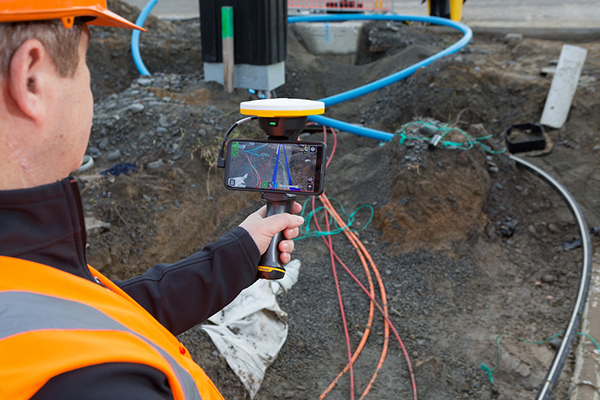
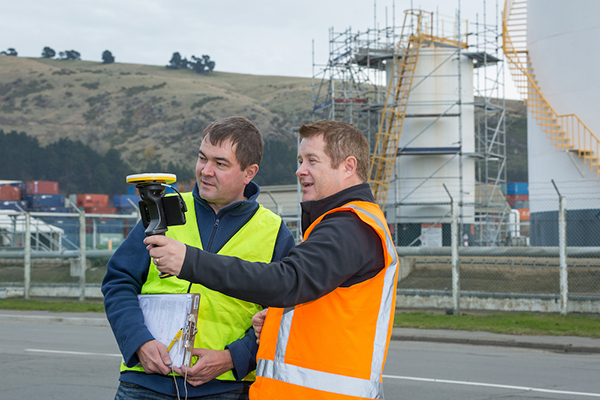
Trimble has introduced its Trimble SiteVision system, an outdoor augmented reality (AR) solution that enables users to visualize 2D and 3D data on virtually any project site with cellular or internet connectivity for easier and more efficient planning, collaboration and reporting.
Combining hardware and software in an integrated, lightweight handheld or pole-mounted solution, users can view 3D models and assets in a real-world environment at a 1:1 scale, from any angle or position.
The system consists of:
Hardware: The Trimble SiteVision integrated positioning system integrates the Trimble Catalyst DA1 antenna, electronic distance measurement (EDM) rangefinder and power management into a lightweight, handheld device that connects to a user-supplied Android mobile phone.
Software Subscription: Available to single users on a monthly or yearly basis. The SiteVision software subscription combines Trimble’s high-accuracy positioning services and cloud-based processing technology to create a centimeter-accurate AR system. The system leverages Trimble cloud-based processing to manage and deliver data and design models.
SiteVision enables users to visualize digital models from a wide range of data collection, design and constructible modeling tools in open industry-standard formats including IFC and LandXML.
For civil projects, SiteVision accurately visualizes data from Trimble’s Quantm, Business Center and Novapoint; design data from Civil 3D and Bentley OpenRoads; and GIS data from Esri ArcGIS software.
Photo: Trimble
SiteVision powers building information modeling (BIM) projects with open data from Trimble’s Constructible BIM solutions including SketchUp and Tekla, and BIM data from Autodesk Revit and AutoCAD software. For utility companies, PLS-CADD power line design, Distribution Design Studio (DDS) and other industry-specific design data is also supported.
Using Trimble Connect cloud-based hosting, SiteVision can access models from all stages of the lifecycle of infrastructure and buildings—from initial concepts of roads or buildings through the operations and maintenance phase of the assets—to increase collaboration, enhance work accuracy and ultimately improve operations and utilization.
SiteVision simplifies complex concepts by allowing users to blend digital content with real-world environments. For example, city planners can visualize a new building design in the exact spot it is to be erected, a work crew could identify the exact position of underground cables or pipes before digging, an electric utility can confirm placement of poles and lines with customers and crews, or a construction supervisor could assess the progress of heavy equipment by visualizing actual work performed against the site plan.
“It’s easier to understand complex ideas when we can see them in a real-world context,” said Mark Nichols, general manager at Trimble. “SiteVision improves our understanding of projects and worksites with a handheld device that is accessible to a wide range of users. Augmented reality is now ready for everyday use in a wide range of applications.”
Trimble SiteVision is available to order now through Trimble’s authorized distribution channels for Civil Engineering and Construction, Geospatial and Buildings.
Trimble’s Stephanie Michaud discusses the company’s SiteVision augmented reality system at the 2019 Esri User Conference in San Diego. According to the company, SiteVision uses Trimble’s Catalyst softGNSS receiver, combined with Google ARCore technology, to produce a handheld high accuracy outdoor augmented reality system.
Abom, a company that designs sophisticated commercial goggles, has launched new augmented reality (AR) goggles.
Designed for safety, industrial and military markets, Abom’s P3 augmented reality goggles feature accurate tracking of orientation, velocity and positioning using IMU/GPS-GNSS/INS receiver capability.
Other features include 3D spatial mapping and tracking, integrated VX Inc. CNED display technology, and an array of integrated image sensors and advanced embedded electronics. The goggles’ stereoscopic dual displays have an ultra-high-brightness output with adjustable control and 1080p output.
The goggles are optimized with a military-ballistics-rated lens (MIL-PRF 32432A) that complies with the Military Compliance Eye Protection (MCEP) program, meeting many challenging elements of the U.S. Army’s IVAS specification (HUD 3.0).
For industrial applications, the P3 also meets ANSI Z87.1+ high-mass impact rating and IP-55 ingress protection against water and dust, which opens the door for supporting National Safety Council technology initiatives and requirements for meeting extreme IP-67 rating compliance.
The P3 goggles are field-use ready and designed for extreme environmental durability and cold-weather climate conditions where demanding ruggedized performance is critical. It has advanced thermal image sensors, and embedded within the Goggle Chassis is an ultra-high-performance depth camera supported by two infrared cameras optimized for low-light conditions up to 10 meters.
The goggles incorporate Abom’s patented ultra-low power thin-film technology, making it impossible for fog to survive on the inner surface of the eyewear, according to the company.
“Abom’s award-winning heated goggle technology, now military approved, has made integration and optimization with immersive, augmented reality display technology the perfect solution for highly ruggedized extreme use-cases that exceed industry standards for both quality and performance,” said Jack Cornelius, Abom CEO.
“Abom’s development partner for the P3 Goggle, VX Inc., has pushed the limits of mechanical and electrical engineering design performance,” Cornelius said.
Geographic information systems and augmented reality are a part of our daily lives, so much so, we hardly notice them. GPS World columnist William Tewelow explores how these technologies will continue to change our lives.
Geographical information systems (GIS) and augmented reality (AR) have become a part of our daily lives, so much so that we hardly notice them. Those of us in the profession make our living by them; millions, soon billions more in the consumer world benefit from them without even realizing they are there.
The world is filled with data. Using AR, that data can be draped in front of us in a tapestry based upon our individual needs and interests. Applications multiply daily.Many physical tools now in use will become virtual tools; workspaces, living spaces and the commutes between them (if they even exist at all) will change almost unrecognizably.
The world is poised to become an amazing and magical place.
Before we jump whole hog into the future — something that AR assuredly enables us to do — a glance back at the past can fill out our understanding of these great tools, GIS and AR — each great in and of its own, but virtually invincible when combined. Come with me down the corridors of history . . .
When Great Swords Clash
World War II was a fight against global domination — mankind’s greatest struggle for survival. Tyranny or freedom hung in the balance. The greatest minds raced to harness the powers of nature and science, plying them towards victory. This culminated in the invention of the ultimate weapon, The Great Sword, able to lay waste entire cities and ending the Second Great War in 1945, the year the world returned to peace. Freedom reclaimed the throne, euphoria spread — but the celebration was short-lived.
Kazakhstan. (Map: CIA archives)
In the summer of 1949, the world split in half. In the United States, families gathered around the radio for comedy and drama before putting the children to bed, but on the other side of the world, deep in the center of a faraway, unknown land, on a cool Monday morning as the sun lazily rose over a barren terrain, a second blazing sun rose into the sky. The Soviet Union unsheathed and brandished its own Great Sword, making remote Kazakhstan the center of the world in that brief moment. The sound of the bomb was heard in Washington, D.C., and phones throughout the city rang into the night. Russian spies had stolen America’s atomic secrets. Nuclear annihilation was a reality. The Cold War had begun.
The threat of nuclear weapons in Soviet hands was too great a risk. The United States had to know the extent of the threat. Satellites did not yet exist. Airplanes had limited capabilities. The only way to know what was going on inside the Iron Curtain was intelligence assets on the ground, but the Soviets controlled the ground.
Play Your Aces High
Penetrating the skies over the Soviet Union became the top priority. In 1954 Operation AQUATONE began to build the first U-2 spy plane to fly at an altitude above the limits of enemy air defenses.
U-2 spy plane. (Photo: U.S. Air Force)
But Operation Aquatone was only half the challenge. In the vacuum-tube and wet-film era, building a camera small enough to fit on the U-2 and able to take pictures at the required resolution from so high an altitude was needed. These two efforts took place simultaneously on opposite sides of the country. Operation Aquatone took place in the Mojave Desert at what is now famously known as Area 51, and Operation HTAUTOMAT, the photogrammetry and photo-interpreters effort took place in Boston, Massachusetts and Washington, D.C. Both programs came together successfully in 1956 and the U-2 made its first reconnaissance flight over Eastern Europe.
Almost immediately, the demand for photo intelligence skyrocketed. In 1957 the Soviets launched Sputnik, the first manmade satellite to circle the Earth. Sputnik’s beeps could be understood in every language. Each of the beeps said, I am here above you no matter where on Earth you are, ultimately asking the question, What if I was a nuclear warhead? This elevated the need to surveil Khrushchev’s nuclear weapons capabilities. The Space Race had begun.
Five of a Kind Beats a Straight Flush
Satellite imagery from Discoverer XIV. (Photo: National Reconnaissance Office)
The U-2 flew unimpeded anywhere in the world for four years. But that ended in May 1960 when Captain Gary Powers, the U-2 pilot was shot down 300 miles east of Moscow. In August that same year the world sat transfixed watching the Soviet show trial of the captured U-2 pilot. President Eisenhower took full advantage of the diversion to launch the Discoverer XIV satellite, the first fully operational reconnaissance satellite under the CORONA program. A day later the satellite dropped its first payload, a 20-pound capsule of film. It was retrieved over the Pacific by a C-119 Flying Boxcar. It contained 1.6 million square miles of Soviet territory, providing more imagery than the entire U-2 program combined.
The Photo Interpreters Division (PID) was established to deal with the huge volume of imagery. It was renamed the National Photographic Interpretation Center (NPIC). NPIC used an ALWAC III computer, advanced for its time, but it ran on vacuum tubes and punch cards. It could calculate size and distance in imagery. Over 12 years, the CORONA program collected 2.1 million feet of film, but its processing could not keep pace with the flood of incoming imagery.
Development of the TX-2 computer in 1959 altered this picture, but two problems persisted. First, computers’ limitations prevented an analyst from working directly with imagery. Additionally, finding something noteworthy in an image was only half the problem; the other half was piecing together where on a map the feature belonged. Interior maps of the Soviet Union were vast, featureless, and not well developed.
Let Your Wild Horses Run
MIT graduate student Ivan Southerland solved the first problem, inventing a graphical user interface (GUI) on a TX-2 computer for his doctoral thesis, thereby revolutionizing computer graphics, computer-generated imagery (CGI), and computer-aided design (CAD). Southerland soon found himself heading the government’s Advanced Research Projects Agency (ARPA) to further develop the GUI. His innovations greatly advanced programs such as NPIC, allowing photo-interpreters to work directly with imagery displayed on a computer screen.
A visionary, Southerland saw computer-generated synthetic worlds merging man and computer; he created what became known as the Sword of Damocles, the first augmented-reality (AR) headset. It was so heavy it had to be suspended from the ceiling on cables in a big swindling contraption, hence its name. The Sword of Damocles evolved into the helmet-mounted display that military pilots use today, and became the foundation for development of Google Glass, Oculus Rift, Microsoft’s HoloLens and Meta.
Several years later, Southerland went to Harvard as an associate professor, continuing his work with computer graphics. During his tenure, a student working in Southerland’s computer graphics and spatial analysis lab saw the potential of combining CGI and CAD with his own knowledge of environmental science and landscape architecture. That student was Jack Dangermond, who created Esri in 1969.
Solitaire Takes Two
Thanks to Jack Dangermond and Ivan Southerland, GIS and AR are a part of our daily lives, so much so, we hardly notice them. They have changed how we watch sports. Long gone are the days of John Madden with an electronic pen scribbling out plays with great wit but terrible penmanship. Now, football shows a red scrimmage line on every play and the first down line in blue. We wonder why they have to take out the chains to measure the down because we can clearly see it on screen, but on the field they don’t have the luxury of AR.
Game highlights show a player encircled in a column of light for the commentator’s in-depth coverage. Live imagery projects the commentator into the image of the replay as if he or she is on the field in the midst of the action. Further back, advertisements appear on sideboards of the stadium stands, but only to television viewers. To those physically present at the game, the advertisements do not exist. You can observe this during an instant replay. Take notice of the sideboards during the game and then look at them during the replay. It is a blank, green board — same with baseball.
AR makes it easier to watch a hockey puck with a blurred red tail as it zips across the ice. In golf, a light green glow surrounds the ball on long drives enhancing our entertainment experience.
AR works by knowing where the observer is and where the observer is looking and integrating that information with line-of-sight data. Smartphones provide that capability, ushering in the age of personal AR apps. My personal favorite is FlightAware to track airplanes by aiming a phone’s viewfinder at the aircraft to know the altitude, speed and other information.
For identifying celestial objects, SkyMap helps find a planet, star or constellation. Real-world AR gaming is upon us, the most famous being PokemonGo. A more interesting game is Ingress, which uses real-world landmarks (featured in Nov 2017 article, Game-based learning improves training, engagement). MapBox has a location-based AR platform to support gaming.
Figments of Imagination
Museums consider AR the next frontier. Imagine putting on a pair of AR glasses and seeing things come alive. Stand on the Moon or Mars, or fly in the cockpit of an X-1B, the first supersonic aircraft. Go to an art museum and step into Van Gogh’s painting, Starry Night; the world around you becomes iridescent, globular, and thickly swirled in bold colors. (See Alex Mayhew’s exhibit, ReBlink at the Art Gallery of Ontario).
Walk through a park and statues become human, blink their eyes and speak to you. Dinosaurs, typically static monoliths, roar to life. It is no longer imagination. The Smithsonian’s National Museum of Natural History has an exhibit using your phone to do that very thing. It might seem as if AR is the future, but it is also revealing the past. Archaeology is using AR to see ancient cities as they once were. Those experiences enhance our learning, but what about more practical daily uses?
The world is filled with data. Using AR, that data can be draped in front of us in a tapestry based upon our individual needs and interests. That data can be passive, like location information such as place names appearing in the field of view as icons helping guide you where to go. No more looking down at a smartphone trying to figure out which way to walk. A light blue transparent dotted walking path will lie before you, leading to the icon above the door of the place you are going. Active AR, on the other hand, try to engage you, such as advertisements. A box will seemingly glitter and glow mesmerizing a person into buying it. Another will have tiny figures dancing on it enticing a customer. Look at a menu and the items will appear real for you to inspect before you order. The world is about to become an amazing and magical place.
How about workstations? They’ll be a thing of the past. No need for a monitor in the physical sense. It can be created as large as needed and placed anywhere as well a virtual keyboard. Interface directly and more naturally with the world around you.
Many of the physical tools now in use will become virtual tools, such as a measuring tape, a ruler, a laser level, a GPS receiver, and even pen and paper to some degree. They will just be apps in your smartglasses, call it AR-ware — mere programs, what we used to call figments of our imagination. Grab an AR-ware pen and paper and the handwriting appears perfectly normal but it is just digital text: save it, email it, or print it. Make up new tools or download tools as we do apps on our smartphones. Imagination will be the limiting factor.
Upload CAD blueprints and schematics into an AR generator and look around the house with x-ray vision and see inside or through walls and floors. A plumber can see pipes in the wall, their sizes and what they are made of. An electrician can see the wiring, frames, and pass-through holes. An insurance adjuster can look at damage, take notes in AR then pass everything along to the company who passes it on to the contractor.
Take that same scenario and scale it up to the size of a city. AR allows companies to see the vast network of utilities and assets hidden in the subsurface. The water company can know exactly where its water and sewer lines are located, as well as what other utilities are nearby? Contractors can see exactly where to dig, and just as importantly, where not to dig. INTUS Inc. is a leader in the rapidly growing field of subsurface assets using GIS and AR technology. INTUS’s CEO, Dimitris Agouridis, calls it “intelligent infrastructure.” He goes on to say the technology supports the Call Before You Dig law, and helps avoid costly mistakes that can destroy property, the environment and people’s lives. It saves time, money and resources, and reduces outages due to repairs that inconvenience residents. It also increases a city’s resiliency after a disaster.
The fascinating reality ahead of us is mere moments away measured in months and years. We will walk into museums and experience them in new ways. We will stand in an ancient place and see it reconstructed to its former glory from eons ago. We will work using smartglasses in ways we can only begin to imagine. Road crews will do precision repairs. One day, I will write this article, but not on a laptop, and instead sitting in a world part real, part virtual tied together by a perfect symmetry of place and time. A magical future awaits us created by merging GIS and AR.
My next column, coming in March, will go further into augmented reality and other emerging technologies that rely upon geographic information to build the next generation of intelligent infrastructure.
Experts from all over the world will discuss positioning, navigation and timing (PNT) and their role for augmented/mixed reality at the Munich Satellite Navigation Summit 2019. The summit will take place March 25-27, 2019, at the Alte Kongresshalle in Munich, Germany.
“Augment Yourself with GNSS…” is the theme of the 2019 summit. The organizing Institute of Space Technology and Space Applications (ISTA) of the Universitaet der Bundeswehr Muenchen will invite experts to talk about the latest GNSS and PNT news and their role for augmented/mixed reality as well as other up-to-date technologies.
The conference starts on March 25 with the Exhibition Opening and Champagne Reception at 16:00 hours, followed by the Opening Plenary Panel at 16:45 hours. Afterwards, a reception provides opportunities for high-level networking with experts from industry, science and government.
Trending topics of the 2019 summit:
First- and second-generation of the European satellite navigation system Galileo
Modernization of the U.S. Global Positioning System
Status and modernization of the Russian Global Satellite Navigation System GLONASS
Developments of new global and regional systems like the Chinese Beidou (BDS), the Japanese QZSS and the Indian IRNSS
Augmented/mixed reality and the use of Android raw measurements
Autonomous systems
Civil use of the Public Regulated Service
GNSS satellites and the Space Service Volume
Legal aspects on selected topics in the field of GNSS.
Red Bull Air Race has selected the VectorNav VN-300 dual-antenna GNSS-aided inertial navigation system (INS) as its primary source of aircraft telemetry data for Master Class raceplanes participating in the Red Bull Air Race World Championship.
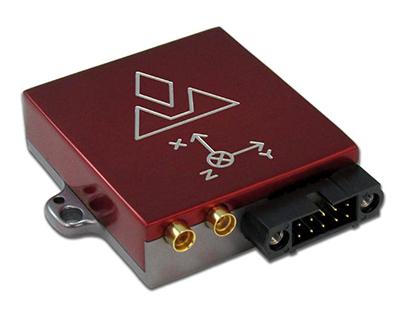
Weighing less than 30 grams, the VectorNav VN-300 is a tiny dual-antenna GNSS-aided INS. It is used in applications ranging from autonomous vehicles to antenna pointing for satellite communication and aerial surveillance applications.
The inaugural event of the 2018 season in Abu Dhabi saw the VN-300, manufactured by VectorNav Technologies, used for the first time in all 14 aircraft to provide real-time telemetry data used for judging, in-race simulation and virtual reality applications.
Created in 2003, the world championship has held more than 80 races around the globe. The motorsport competition combines speed, precision and skill.
U.S. pilot Michael Goulian performs during the finals at the first round of the Red Bull Air Race World Championship in Abu Dhabi on Feb. 3.(Photo: Andreas Langreiter, Red Bull Content Pool)
Using the fastest, most agile, lightweight racing planes, pilots hit speeds of 370 km/h while enduring forces of up to 10 G as they navigate a low-level slalom track marked by 25-meter-high, air-filled pylons. Pilots incur time penalties for hitting pylons, incorrectly passing through air gates or only exceeding 10 G for more than 0.6 seconds, among others.
Being an individual sport, spectators need a reference to see the difference between the pilots’ lines and speed through the racetrack. Red Bull Air Race Live TV uses an augmented reality (AR) solution known as the Ghost Plane to display the trajectory of the pilots’ runs for real-time comparison in the head-to-head rounds and the Final 4 that decides the winner of the race by time.
The Ghost Plane is driven by the position, velocity and attitude data gathered during flight from the onboard INS.
Critical to the success of the Ghost Plane is the accuracy of the telemetry data, which, given the high dynamics experienced during flight, is extremely difficult to obtain.
For example, as a plane races through a chicane and into a vertical turn maneuver, GPS signals are lost and the INS needs to rely solely on the inertial sensors to accurately estimate the position and velocity until GPS is fixed again in level flight.
The VectorNav VN-300. (Photo: VectorNav)
“We evaluated several different inertial navigation systems and struggled to find one that was able to perform in our dynamics,” said Alvaro Navas, sport technical manager for the Red Bull Air Race. “VectorNav’s VN-300 was the only product able to deliver the attitude, position and velocity data accuracy we require, and it did this out of the box, no customization was required. The sensor is really amazing.”
“We are really excited to be working with Red Bull Air Race,” said Gordon Hain, VectorNav product manager. “Not only are we able to provide accurate data for the race judges and spectators, but we are also able to provide valuable information to pilots and tacticians. With the VectorNav data in hand, they are able to compare actual flight trajectories with their simulations to find areas for improvement. We are looking forward to continued work with Red Bull Air Race in the 2018 season and beyond.”
Most of us know about serious games that teach real-world applications.
Flight simulators are the most well-known example. Learning to fly multi-million dollar aircraft is simply too costly and too dangerous to train in the real world. Pilots spend hundreds and thousands of hours in flight simulators going over basics and learning to deal with emergency situations.
Doctors are another profession that spends many hours doing simulated procedures.
The military is another.
So are police and emergency responders.
The risks are too great in those professions for real-world training. Immersive training in virtual, simulated environments is the only way to become fully proficient.
The term serious games describes a type of game-based learning, but serious games don’t have to be associated only with jobs that are high cost and high risk. Other examples of fields using serious games include fleet logistics operations, air traffic control, shipping port operations, unmanned aerial systems and driver training.
In all of those games, GIS is a crucial component because it allows game-based learning to transition from the virtual world to the real world.
Back to the Classroom
What was became what is because someone asked what if.
“What if,” two words the dogmatists abhor and the idealists herald. The idealists (aka visionaries and dreamers) drive change at an ever-increasing pace. There is never a respite.
I am admittedly a dreamer, but only in my waking hours. From midnight to sunrise I am very much a conservative (aka dogmatist and traditionalist), lest in my sleep I am overtaken by a swifter, stronger, more technically savvy idealist and awaken a dinosaur: Tewelowsaurus Rexus.
So it is in this age of disruption, an economic stalwart in one quarter and a bearish pariah in the next. The archeological rubble of traditional industries piles up.
The education system is such a behemoth, sluggish and dying, unable to compete with emerging technologies and immersive learning. Education RIP — another victim of the internet. But it is more than the battle of brick and mortar versus e-commerce. This extinction is happening because of style over substance.
Traditional schools simply are not attracting the generations of students who grew up in an increasingly connected digital age. What’s in it for me? Is now, what’s here, relates to me? We screamed when we were young and going through the system, but the alternatives were not there. Now, the alternatives are fascinating, engaging and wondrous. Students and the curious line up, wanting to participate.
To understand the difference between the two schools of thought, let’s consider a traditional subject: algebra — a favorite of millions of students year after year. Perhaps you too recall the joys of X over Y and the endless hours enraptured in sheer delight solving for “why,” as in why in tarnation does anyone need to know this?
If you were like me, then you too believed the title mathematician was synonymous with masochist, except that these instruments of mental torture were leaked to the government and, through public schools, were inflicted on innocent children posing as students.
But I digress. Probably due to latent psychosis: Post Algebraic Stress Disorder (PASD). It doesn’t have to be that way, except dogma dictates that our successors suffer the same.
A GIS Classroom Tale
The following example illustrates what a typical game-based learning environment might look like.
Professor Hamill, wearing a sports blazer over a dark blue T-shirt that reads “Data, the new bacon” and a comfortable pair of jeans, stands in front of the class. The Earth slowly rotates behind him on a large, multi-panel screen. It is the students’ second year of their Geospatial Science curriculum.
The professor addresses the students warmly and asks if anyone knows Xnite21? He explains it is his online gamertag and his GitHub user name. Most of the students, being coders and gamers with a background or an interest in GIS, immediately identify and begin calling out their own callsigns.
After a brief open discussion about favorite games and name familiarity, Professor Hamill explains their first assignment. They will be mapping all the trees in the campus commons — a typical task for an Applied GIS class, but this time is different.
The class is going to be using game-based learning. Each student is issued augmented reality (AR) glasses and a GPS-enabled tablet loaded with geospatial software. The students form into five six-person teams, each assigned a color. Each team has to geospatially tag unmarked trees by collecting attributes about the types and estimating height and diameter.
Looking through the AR glasses, if a tree has been tagged a translucent, colored column, the height and diameter taken from the attribute table will appear around the tree in the color of the team that captured it. When a total of all the tagged trees reaches 120, the assignment (game) is over.
Back in the classroom — converted to a command center — the students focused on a large, multi-panel screen showing the color-coded players as they moved around the campus and color-coded trees as they’re added. The overall score of each team is in the upper right corner. Individual stats on players are in the left.
The green team was ahead by a sizable lead. The red team and white team were fighting for second place, while the purple team trailed behind and the yellow team struggled to get started. The professor knew that he would have to spend some time with the students on the purple and yellow teams. The goal wasn’t to win, but to learn and have fun while doing it. By looking at the individual student’s metrics, the professor could see where the students were having challenges and then teach to improve those areas.
In the above example, the assignment usually takes five to six hours, but the gamification of the task cut the time in half. The students were more engaged, more motivated and had more fun; additionally, they learned leadership and teamwork and how to use the technology more creatively.
Students also develop camaraderie faster, usually beginning with the first assignment. Another added benefit is reduced absences. Students look forward to their assignments, and because they are usually part of a team, they feel a sense of interdependence that helps to motivate them to make it to class.
Because the students were able to finish the assignment faster than their traditional learning counterparts, they were given another assignment. Usually, that would be met with angst. But in game-based learning, as long as the assignment is fun, won’t take an inordinate amount of time, and has a relevant purpose, the students are more than often happy to do it.
After meeting with the class and going over the areas that the professor saw the students having the most difficulty, he sent out the same teams as before. This time they were tasked with sectioning off the student parking lot into five equal areas. Each of the teams were then to collect information on the each of the cars in their area: GPS location, make and model, and estimated value. After collecting the information, the students were then able to calculate the average value of all the vehicles, and thus, an average net worth. They were also able to run geospatial analytics to visually look for patterns and anomalies.
The students did not see the assignment as work so much as a game of discovery about themselves and their school, and appropriately enough how to apply GIS to everyday life.
The knowledge and experience acquired through game-based learning happens at a deeper level. The students are actively engaged in the learning process rather than passively engaged and emotionally charged with higher levels of energy.
Speaking with Giants
Phaedra Boinodiris
Writing this article gave me a great opportunity to interview Phaedra Boinodiris, a 20+ year leader in the game-based learning industry. She led IBM’s first serious gaming venture into a multi-million-dollar business unit. She is an expert in how to use game theory to promote user engagement and motivate students and employees to modify behavior toward more positive outcomes.
Phaedra is the author of the book Serious Games for Business: Using Gamification to Fully Engage Customers, Employees and Partners. Phaedra explained that elements of gaming are typically thought of as points, badges and leaderboards; but in reality, what motivates most people for long-term engagement is autonomy over their own lives, mastery of their craft and having a sense of purpose greater than themselves.
Phaedra also said that gaming is entering the workforce. It is beyond just training and education. Companies are already using game-based systems to engage employees. The return on investment (ROI) to the company is greater employee engagement, better moral, a more appealing workplace and higher retention rates, especially for Millennials and Gen-Xers.
Phaedra went on to say other advantages of game-based systems are the ability to curate user data to learn what motivates them. Knowing what drives a person means the system can hone the user’s experience.
Phaedra explained that game-based systems make data science actionable. She said what fascinates her the most is the intersection of artificial intelligence and play, and the advancements in human-computer interface. There is so much happening right now; it is an exciting time to be in the field.
See Phaedra Boinodiris at the 2014 gSummit in San Francisco speaking on gaming the workforce.
Nathan Elequin
In addition to interviewing Phaedra, I also had the opportunity to interview gamification specialist Nathan Elequin, a graduate research assistant at Syracuse University. Nathan’s primary interest is moving the education system toward a more robust learning experience using game-based design. He authors an online column, EduGames.
According to Nathan, training is most effective when game theory is applied to learning. Gaming is the synthesis of science, skill, behavioral psychology and art, and when done right allows a student to figure out problems on his or her own, ensuring the learning is experienced internally, and thus, to a much deeper level than rote and recall.
GIS in gaming is important because rich gaming environments deal with massive amounts of information, and GIS has already overcome that challenge by creating spatially aware interactions of different types of complex variables to visualize patterns.
In regard to GIS and gaming, Nathan shared that one of the most popular games of the past several years was Pokémon GO, which made national news several times. It is an augmented reality game built on a geospatial platform.
A far better game is Ingress, where players are in one of two teams battling for world domination. The whole world‚ the real world, is the gameboard.
Ingress is a geospatially augmented reality game. It is described as bringing a video game into real life. Seeing the world through the lens of Ingress is to see magical things in the world around us that otherwise would go unseen. It is a fascinating game; you can see the trailer here.
Nathan spoke about a fascinating future using a geospatial-like system described as an objective-based navigation system similar in design to a GPS-based navigation system that takes a person from point A to point B along a course the computer determines based upon available data.
The objective-based system helps steer a person towards their chosen objectives, or goals. The person selects their own objectives. Using an artificial intelligence-based information system similar in design to a GIS allows complicated and massive amounts of data to interact and plot a course of action, helping navigate the person towards their objective.
Let sleeping dogma lie. Awaken the lucid dreamers of tomorrow. We exist on the precipice of potential, and it only takes a few of us to turn what if into what is. Find ways to teach that are more active, more immersive, and more engaging.
If it’s worth learning, then it’s worth spending the extra time to gamify the experience. It’s a win-win for students and teachers. This is a future we need only open our hands and grasp, for it is within our reach.
So, let the games begin.
Encore: The Cutting-Room Floor
Games in School
Returning from her first day back to school her phone rang as she opened the door. The familiar voice of her friend Conner asked in a hopeful voice, “Hi Jill. Want to come over?”
Sadly, after a moment’s pause she had to decline. “I can’t, Conner. I’ve got so much math homework. I can’t believe how much they gave us.”
“I do too, Jill,” said Conner explaining he was in a game-based learning curriculum. “My homework is to finish level 1 called Euclidian Dreams. Some of my friends are over and we are all playing, plus we’re going online later to compete against the rest of the class to see who’ll be the champion tomorrow. I was hoping you could come over, too.”
Jill sighed. In her voice was a tinge of disappointment. “It sounds fun, Conner, but I don’t know how well you’re going to be able to learn algebra playing games.” Jill’s answer sounded more like what his mother or father might’ve replied. Or the more harsh, disgruntled criticism of his grandfather who would’ve added how the world is going to pot playing games instead of studying.
Dejected, Conner hung up with Jill. He knew there was more than just a “no” in Jill’s refusal to come over. It was accusatory, as if she were judging him to be a miscreant because he was in the test program.
Conner went on that evening to have a great time with friends playing the games that were teaching algebra without actually doing math. The game taught algebraic concepts using a storyline, puzzles and challenges. There were characters, of which Euclid was the main one, guiding the journey and revealing insights and clues to find and reach the Elements, Euclid’s treasure.
As Conner progressed through the course, the games incorporated races, battles, adventures, stories, philosophies and mysteries of the ancient mathematicians whom he had to come to know through the games. The great mathematicians became friendly figures as they guided him through games with names such as The Riddle of Archimedes, The Mystery of Cheops, Code of Pythagoras, Plane of Descartes, Newtonian Revelations and the Visions of Einstein.
By the time each level was completed, the formulas didn’t seem like math so much as they appeared to be keys to unlock the secrets of the world around us.
NOTE: The characters in the story are fictitious. The games mentioned in the story are not real, but are based on DragonBox’s educational games.
Please provide your feedback. Specifically, are you interested in more on this subject? Did you enjoy the article? What topics would you like to see covered? All feedback is appreciated. Thank you.
A telemedical drone system with holographic technology can quickly put emergency physicians and lifesaving medical supplies in the hands of disaster survivors. The Telemedical Drone Project, known as HiRO (Health Integrated Rescue Operations), is being tested to support the Mississippi Department of Emergency Management, Homeland Security, the National Guard and NATO.
Screenshot from HiRO video. (Courtesy of Paul Cooper)
It is expected to be production-ready in early 2018.
HiRO provides immediate access to a physician through a wireless video connection. When the portable critical care kit arrives, the doctor appears on a touchscreen display to direct treatment.
Smart glasses allow a person on scene to move away from the kit while maintaining audio and visual contact with the physician. Holographic technology lets the physician to see the disaster scene and direct care through a hands-free, motion-enabled augmented reality headset.
Osteopathic physicians Italo Subbarao and Paul Cooper partnered with Dennis Lott, director of the UAV program at Hinds Community College in Mississippi, to design and build a next-generation disaster drone.
“These drones have impressive lift and distance capability, and can be outfitted with a variety of sensors, such as infrared, to help locate victims,” Lott said.
HiRO drone and telemedical kit
Augmented reality (AR) operating on a Microsoft HoloLens headset enables a remote physician to treat multiple victims.
Automated medication bin allows remote physician to unlock specific compartments, giving bystanders safe access to medications and equipment supported by video guidance from the doctor.
Integrated holographic electronic health record system display helps remote physician monitor multiple patients in the field.
Advanced GPS navigation app Sygic has released its new augmented reality (AR) feature. More than 200 million Sygic users worldwide can engage with AR for an improved navigation experience on the road.
Sygic’s new AR feature uses a smartphone’s GPS and camera to implement its augmented reality-powered GPS navigation system. With the AR feature, the driver no longer needs to follow a map on their phone. Instead, they’re guided by a virtual path on the smartphone camera preview.
The AR feature is not only intuitive, but is also safer than traditional navigation apps. Drivers can rest assured they won’t miss anything crucial on roads or highways, as the real-time camera preview enables them to check conditions on the screen without impacting driving safety.
“We are so pleased to make Sygic’s AR feature available to users around the world. We understand the value of bringing the latest technology features into Sygic GPS Navigation, and to bringing smart life to your device,” said Michal Stencl, CEO of Sygic. “However, our new AR capability isn’t just a shiny new tool. Whether you’re in the car with your loved-ones, friends or by yourself, the AR featured is designed promote the highest form of road safety.”
The AR feature called Real View Navigation is available for all Android and iOS users as in app purchase for 9,99 EUR.
Sygic posted a video clip of the new feature on its Twitter account.
According to a 2015 Pew Research Center study, 67 percent of smartphone users surveyed said they occasionally use their phones for turn-by-turn navigation while driving. Even more, 31 percent said they frequently use navigation apps.
Sygic was described as one of the world’s most successful apps by the BBC.
“Sygic’s philosophy is to explore the boundaries of navigation, and we look forward to bringing more revolutionary tools and features to users later in 2017,” Stencl said.
The 5G network, augmented reality, machine learning and other innovations are delivering a wealth of options to rapidly advance the power of Smart Cities technology.
The Smart Cities Technology Roadmap helps city planners know what’s on the horizon for tomorrow so that they can start developing their technology vision today. The report is developed by the Alliance for Telecommunications Industry Solutions (ATIS), an organization that brings together the top global information and communication technology (ICT) companies.
The roadmap is the first ICT industry publication designed for city decision makers including CTOs, CIOs and technology advisors that provides an overview of the network-enabled technologies to have the greatest impact on the evolving Smart City.
The goal is to foster better budgeting, purchasing and staging decisions. The end result will be to position city decision makers to more effectively manage their upcoming technology investments as they create the connected cities of the future.
ATIS’ Smart Cities Technology Roadmap was developed through extensive discussions with city leaders, solution providers and manufacturers — all heavily invested in creating successful Smart Cities environments. It is available free of charge on the ATIS website.
“Rapidly advancing capabilities to collect and analyze constant real-time data are starting to help better manage many citizen-centric functions, improving traffic flow monitoring, public safety, and more,” said ATIS President and CEO Susan Miller. “The Roadmap is a much-needed focal point for dialogue between city planners and the ICT industry. It can enable planners to turn their Smart Cities projects into a comprehensive Smart Cities vision.”
Plans being made now will be more effective if they consider the introduction of 5G solutions in the next few years. These deliver the promise of high bandwidth, low-latency and pervasive connectivity offering Smart City ecosystems a new generation of applications.
The Roadmap helps planners look ahead to leverage advancements such as these. It provides an overview of Smart Cities technology challenges and benefits and offers a high-level technology framework and summary of key technology enablers.
The Roadmap also includes a deeper analysis on the current state of standards, a review of technology choices, and an assessment of critical factors that may impact future deployment.
Following publication of the guide, ATIS will gather feedback on collaborative activities that can advance Smart Cities technology investments. Input from city planners is welcome. ATIS is engaging cities to develop prioritized next steps, whether it be developing data exchanges, building on ATIS’ Internet of Things registry or another business framework. Opportunities are being explored to standardize foundation-level aspects of Smart City infrastructure, allowing customization and innovation to meet each city’s unique vision.
Companies participating in the roadmap include AT&T, Bell Canada, C-Spire, CenturyLink, Cisco, Cox Communications, Ericsson, Fujitsu, HPE, iconectiv, InterDigital, JMA Wireless, Motorola, NextNav, Nokia, Oracle, Qualcomm, Sprint, TELUS, Verizon, Viavi and West Safety Services.
HiScene, Inuitive and Heptagon have teamed up to take augmented reality (AR) another step forward with HiAR Glasses, HiScene’s next generation of AR glasses.
The companies worked together to develop a complete solution for advanced 3D depth sensing and AR/VR applications that delivers excellent performance even in changing light conditions and outdoors.
HiAR Glasses incorporate Inuitive’s NU3000 Computer Vision Processor and Heptagon’s advanced illumination. The combined technologies provide a superior and seamless user experience, marking a new standard in the current market.
The glasses’ AR operating system provides stereoscopic interactivity, 3D gesture perception, intelligent speech recognition, natural image recognition and inertial measurement unit (IMU) displayed with an improved 3D graphical user interface.
“We are committed to providing the best possible user experience to our customers, and for this reason we have partnered with Inuitive and Heptagon to create the most intelligent AR glasses available on the market,” said Chris Liao, CEO of HiScene. “The technologies implemented provide a seamless experience in a robust and compact format, without compromising on battery life.”
Inuitive’s NU3000 serves AR glasses by providing 3D depth sensing and computer vision capabilities. The solution acts also as a smart sensors hub to accurately time-stamp and synchronize multiple sensors in a manner that off-loads the application processor and shortens the development time.
“Inuitive’s solution allows Hiscene to provide the reliability, latency and performance its customers expect,” said Shlomo Gadot, CEO of Inuitive. “With Inuitive technology, AR products and applications can now be used outdoors without the sunlight interfering or damaging their efficacy thanks to cameras featuring depth perception.”
Heptagon provides infrared pattern illuminators, which were chosen to handle changing light conditions and plain surfaces. In addition, the range and field of illumination features of Heptagon’s LIMA stereo pattern projector ensure superior lighting and added texture for higher-quality images.
“Our wide field of illumination provides better gesture recognition, and our miniaturization technologies enable ultra-small, high-performance, low-power components for 3D AR/VR applications,” said Erik H. Volkerink, Heptagon’s chief business officer.
Trimble has launched its SketchUp Viewer for Microsoft HoloLens. The new mixed-reality solution allows users to virtually inhabit and experience their designs to improve quality, communication and efficiency in the design, construction and operation of buildings. SketchUp Viewer is the first extensible commercial HoloLens application available in the Windows Store.
SketchUp a widely used 3D modeling software for architects, engineers, design and construction professionals as well as members of the global maker community.
The announcement was made at Trimble Dimensions. During the Trimble Dimensions keynote, Trimble, Microsoft and architect Greg Lynn demonstrated how the SketchUp Viewer solution could improve design and construction processes. Using HoloLens, architects were able to experience SketchUp models in mixed reality, as holograms placed in the real world — enabling them to quickly analyze various “what if” design scenarios in the context of the physical environment. The demonstration also illustrated how using Trimble solutions with HoloLens holographic technology enables remote teams to effectively review and collaborate in order to resolve constructability issues in real time.
Greg Lynn leveraged Trimble’s mixed-reality solution and Microsoft HoloLens to re-imagine the Packard Plant—a historic, abandoned automobile factory in Detroit. The architectural project was commissioned as part of the U.S. Pavilion at the 2016 Venice Biennale exhibition in Italy.
“Trimble mixed-reality technology and Microsoft HoloLens bring the design to life and bridge the gap between the digital and physical. Using this technology I can make decisions at the moment of inception, shorten the design cycle and improve communication with my clients,” said Greg Lynn.
The emergence of mixed-reality technology is enabling new workflow processes for the Architecture, Engineering, Construction and Operations (AECO) market. Trimble’s mixed-reality solution gives users the ability to understand and communicate complex spatial conditions in one comprehensive and immersive experience. The combination of SketchUp with mixed reality ushers in a new paradigm: Experiential Design Review—the ability to inhabit and experience design and construction projects in the most natural way possible.
“Empowering people to design and communicate better in 3D is part of our DNA. Across the SketchUp platform, we are dedicated to the idea that technology should get out of the way of our users,” said Chris Keating, general manager of Trimble’s SketchUp. “With SketchUp Viewer, we are taking another big step toward delivering the ultimate experience for designers and their clients—the experience of inhabiting their own work.”
Microsoft HoloLens is a self-contained, holographic computer that provides a mixed-reality experience for a range of commercial and consumer applications. HoloLens extends interaction with 3D models beyond the confines of a 2D computer screen, creating new ways for the many stakeholders of complex, multi-phase construction projects to visualize, collaborate, share ideas and manage change.
“We are thrilled to work with Trimble to deliver new innovation to SketchUp, one of the most widely used applications in the architecture, engineering, construction and operations industry,” said Lorraine Bardeen, general manager of Microsoft HoloLens and Windows Experiences. “SketchUp Viewer for Microsoft HoloLens can dramatically improve collaboration, decision making, efficiency, quality, and safety by giving users the unique ability to bring digital content into the real world, real-time as part of their current workflow.”
With SketchUp Viewer, users can view models that have been published to their HoloLens device via the newly launched AR|VR Extension for SketchUp Desktop; they can browse and download models from Trimble’s 3D Warehouse or they can pull project files down from Trimble Connect, a cloud-based collaboration platform. Users then have the option to place a model within their physical environment.
In Tabletop mode, models can be scaled as needed to best fit the available space or specific design review requirements. While the experience is intended to mimic viewing a physical scale model, it maintains the flexibility and the dynamic nature of a digital model. Users can re-scale, move and rotate the model as desired. Models can be anchored and re-anchored in the physical environment, so designers and engineers can walk around the project and examine it from any vantage point.
Users can transition seamlessly to an immersive experience. Mixed reality enables unique opportunities to overlay physical models in real world environments; and as a completely untethered device, HoloLens allows users to move freely as they inhabit their digital surrounds.
In both Tabletop and Immersive mode, SketchUp Viewer allows users to do more than just look at the model. The application provides access to the most critical pieces of information for making vital project decisions and gaining consensus among project stakeholders. The Entity Info feature gives users access to important Building Information Modeling (BIM) data embedded within project components; and with the Tape Measure functionality, users can pull up dimensional information from the model. Users can also control the visibility of various aspects of the model by toggling layers on and off.
Real-time, remote and co-located collaboration are key elements to the experiential design review process in SketchUp Viewer. With multiple HoloLens devices, a group of users can load the same model, engaging a “see what I see” collaboration mode. Remote collaborators can communicate via real-time audio and use mixed-reality visualization “sight-guides” to better understand who in the group is looking at what.