Tag: data collection

  • Data-Collection Software

    Nexteq Navigation has release the newest version of its NexGeo software line-up: NexGeo Mobile, NexPos and NexGeo Office. Optimized for Nexteq handhelds, NexGeo Mobile integrates Nexteq Freedom, i-PPP, and RTK positioning augmentation technology into a more reliable, user-friendly data collection software, the company said. With easy display of features, background images, labeling and attributes, data is readily collected, accessed and edited. The tracking feature now allows for efficient communication and management between field workers and the office. Raw data recorded in NexGeo Mobile can be used for post processing in NexGeo Office.

    Those using third-party software with a Nexteq handheld are not left behind. NexPos was created with the intent of allowing freedom in benefitting from Nexteq position augmentation technology, the company said. The NexPos software acts as a bridge, applying Freedom, i-PPP, or RTK algorithms to GPS measurements. The final positions are transferred to third-party software via virtual COM port, allowing users to benefit from improved position accuracy while NexPos runs discreetly in the background. Raw data can also be recorded and used for post processing in NexGeo Office.

    On the desktop, NexGeo Office ties together collected data, attributes, and post-processing information to provide efficient project management capabilities, data organization, live field monitoring and integration with a wide variety of other software, Nexteq said. Building and maintaining a project specific database is easy using NexGeo Office: import existing data, build on the project using a Nexteq handheld and transfer it back to the office for editing. Exporting the project to ESRI or AutoCAD file formats allows for users to seamlessly continue expanding.

    NexGeo software suite is available and included with all Nexteq Navigation handhelds.

  • Nexteq Navigation Announces New Flagship Data Collector

    Photo: Nexteq Navigation

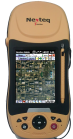
    Nexteq Navigation, based in Calgary, Alberta, Canada, has announced the T5A, its new flagship multifunctional GNSS handheld data collector. The device is a high-accuracy GPS unit capable of 2-centimeter accuracy using real-time kinematic (RTK) and 50-centimeters globally using Nexteq’s i-PPP technology. With the T5A, users can achieve extremely accurate and consistent results anywhere in the world with no loss in flexibility, Nexteq said, adding that the unit’s centimeter-level precision coupled with versatility allows for accurate data collection in the most diverse weather conditions.

    Suitable for projects in all-environments, the T5A has a professional quality internal GPS receiver that provides accurate real-time results. Using Nexteq’s Freedom, i-PPP, or RTK technologies, the T5A data collector can provide flexible and accurate positioning in all parts of the world, Nexteq Navigation said.

    The T5A has a 3.7-inch color touchscreen that is both waterproof and dustproof. The device includes features such as Bluetooth, Wi-Fi, digital cellular data and voice, microSD card slots, and a 3.0 megapixel digital camera.

    Like all Nexteq Navigation GPS handhelds, the T5A is a ruggedized and tough unit. The T5A has an IP66 rating with excellent dust and water resistance.

  • GeoSpatial Experts Announces Hamilton County Implements GeoJot iPad Data Collection App

    GeoExperts announced that Hamilton County, Ill., is using GeoSpatial Experts’ GeoJot field data collection app on an iPad to correlate street addresses with parcel coordinates. Initiated for tax assessment and E911 purposes, this photo project is creating the rural county’s first digital map database that matches property addresses to their correct geographic locations.

    “Most houses have been assigned streets addresses, but they’ve never been correlated to our county parcel database,” said Mark Becker, Hamilton County Supervisor of Assessments. “People still have to give their address verbally when they call 911 for assistance.”

    Hamilton County is rapidly updating its address and property database to meet E911 standards using the iPad and GeoSpatial Experts’ GeoJot application, according to Becker. GeoJot is an easy-to-use app that converts an iPad or iPhone into a field data collection device. Available from the Apple App Store, GeoJot is a companion application created for exclusive use with the PC-based GPS-Photo Link photo-mapping software. GPS-Photo Link is able to map photographs and accompanying attribute information captured with a GPS camera, smartphone with GPS, or any digital camera used in conjunction with any GPS unit. Digital map output includes Esri shapefiles and geodatabases as well as Google Earth files.

    In Hamilton County, college interns walk from house to house taking photos of each one with the iPad 2. They then key in the house number, street name and street direction to keep the Assessor’s tax database up to date. These attributes – along with the GPS coordinates – are permanently linked to the correct property photo by GeoJot. Back at the Assessor’s Office, the GeoJot files are uploaded to the GPS-Photo Link photo-mapping software running on a PC.

    “Mapping addresses will save money for Hamilton County by making its assessment activities more efficient,” said GeoSpatial Experts’ President Rick Bobbitt. “More importantly, an accurate address map is a necessity for timely E911 response to emergency calls.”

    In 2011, GeoSpatial Experts introduced GeoJot to leverage and maximize the built-in geotagging capabilities of the camera-equipped iPad and iPhone. These mobile devices use internal GPS chips to stamp each photo with location coordinates where the photo was taken. GeoJot maximizes the geotagging accuracy of the internal GPS chips by up to four times – putting it well within the accuracy specifications of many business-related photo-mapping applications.

  • GPS for GIS Data Collection – 101: Webinar Follow-up

    Thank you for making “GPS for GIS Data Collection – 101” one of the most well-attended webinars we’ve done. It’s the first that was co-hosted by GPS World magazine and Geospatial Solutions online. If you don’t subscribe to my Geospatial Solutions Weekly newsletter, you might want to consider it as I venture into GIS and broader issues that I don’t have the space to cover in this newsletter. Also, the webinar had a record number of sponsors. Thanks to Hemisphere GPS, Laser Technology, and First American. Those folks make it possible for us to bring these webinars to you free of charge.

    As customary, the newsletter after the webinar is dedicated to addressing some of the questions and posting the results from the polls I took during the webinar.

    Poll Results

    I conducted three polls during the webinar. I received some feedback that we aren’t giving folks enough time to respond to the polls. We’ll pay more attention to that in future webinars and allow more time. Following are the results:

    Poll #1: Do you currently use GPS for collecting GIS data?

    Yes:     68.5%
    No:     31.5%

    Total votes: 165

    Poll #2: What accuracy do you require in a GPS mapping system?

    cm-level:     28.4%
    One foot:     10.8%
    Sub-meter:    33.1%
    1-3 meters:    22.3%
    3-5 meters:    4.1%
    5+ meters:     1.4%

    Total votes: 148

    Poll #3: Select the three most important items to you in a GPS mapping system.

    Collect attribute data:    88.1%
    Cost:                71.4%
    Ergonomics:            7.9%
    Photo-geotagging:        19.8%
    Accuracy:            87.3%
    Laser offset points:        22.2%

    Total votes: 126

    Question #1: How many satellites are transmitting and how many are just for replacement purposes?

    Gakstatter: There are 30 operational GPS satellites. Currently, they are configured in a 24-satellite configuration so six of them are orbiting as “back-ups.” There are also three satellites, I believe, that are in inactive reserve that could be brought back into service if required.

    However, as covered in my last three newsletters, the DoD is transitioning the GPS constellation to a 27-satellite configuration to improve satellite visibility to users. The process of transitioning started in January will take up to two years to complete. Please see the following articles for details on the 24+3 configuration:

    The New GPS 24+3 Constellation: What Does it Mean to the Surveying and GIS User?

    GPS 24+3 Configuration: A Closer Look

    The Best and Final Look at the GPS 24+3 Configuration


    Question #2: I do have a question, but it will take too long right now. How do I contact you later?

    Gakstatter: Please feel free to e-mail me with questions any time…[email protected]. I learn a lot from your questions.


    Question #3: What about use of iPhones or Blackberries with GPS embedded in the device?

    Gakstatter: As smartphones become more powerful and prevalent, I think the use of them for GIS data collection will increase. I have two comments on this:


    • To this point, the ability to run GIS data collection software is hit or miss. Some smartphones just don’t have the resources (memory, processing speed) to handle running the more powerful data-collection software on the market. Of course, with technology advancing that may not be as much of an issue in the future, and it’s possible that GIS software manufacturers will write streamlined software specifically for smartphones.
    • The accuracy of GPS receivers built into smartphones will always be pretty rough. I’d put it in the 5+ meter category and I don’t think it will get much better, so adjust your expectation accordingly. However, using Bluetooth you might be able to “tether” the smartphone to a higher performance external GPS receiver.


    Question #4: Is there a place for consumer-grade receivers in GIS data collection?

    Gakstatter: Yes, I wrote an article on this last year. You can read it here…

    Consumer-Grade GPS Receivers for GIS Data Collection

    Please don’t hesitate to e-mail me more questions about this that may not be answered in the referenced article. I’ve been thinking about a follow-up article on this subject.
    Question #5: What accuracy would you expect to record from a GPS handheld unit?

    Gakstatter: There are high-performance handheld GPS receivers that can deliver centimeter-level positions and there are consumer-type handheld GPS receivers that delivery 5+ meter accuracy. This is typically a direct relationship between accuracy and cost (you’re not going to get sub-meter accuracy from a $200 receiver).

    The best way to approach this is to decide what accuracy you require (cm-level, one foot, sub-meter, 1-3 meters, 3-5 meters, 5+ meters) and look at the budget you have available. You might want to take a look at the webinar I conducted last year titled “A Buyer’s Guide to GPS/GIS Mapping Equipment” and a newsletter article I wrote around the same time titled GPS Receivers for GIS Data Collection.


    Question #6: We have a Topcon GMS-2 unit using an exteral antenna on a range pole similiar to one of the pictures you had in the presentation. How does the height of the range pole with the external antenna affect the X-Y position? Or does it? Thanks.

    Gakstatter: The value of the range pole is that it gives the GPS antenna a clear view of the sky (above your head and other local obstructions). It can only improve your X-Y position. I don’t know how many times I’ve seen users hold a handheld GPS receiver up against their chest, effectively eliminating the use (and degrading accuracy) of GPS satellites behind them.


    Question #7: For area determination which is preferred: static or dynamic?

    Gakstatter: Personally, I would use dynamic unless you’re talking about a very small parcel of land (less than an acre). I’ve seen a number of reports on this and I believe all of them used dynamic data collec
    tion with pretty reasonable results. In other words, I don’t think static buys you much in terms of acreage precision. However, I’ve been in circumstances where I used a combination of both such as when I know there’s a reasonably straight line between two vertices, but it would be very difficult to walk a direct line between them. In that case, I might use static for that leg of the traverse.


    Question #8: I thought that PDOP was Positional Dilution of Precision.

    Gakstatter: Several of you busted me on this. I mis-typed the presentation slide. I wrote Precision Dilution of Precision, which doesn’t make any sense. It should have been Position Dilution of Precision (PDOP). The horizontal component of PDOP is HDOP (Horizontal Dilution of Precision). The vertical component of PDOP is VDOP (Vertical Dilution of Precision).

    Click here for a Wikipedia link that provides a little more information on GPS DOPs.


    Question #9: Explain limitations of what type of project you cannot do if not a licensed surveyor.

    Gakstatter: Because local laws vary widely, it really depends on where you are working. Even within a country like the U.S., each state has its own statutes that define the roles of the land surveyor.

    In some areas, activities as simple as GIS data collection must be supervised by a licensed surveyor. In other areas, high-liability activities such as construction staking can be done by virtually anyone.


    Question #10: Could the steel plate in my head cause multipath or obstruct signals when I use the integrated antenna?

    Gakstatter: I can safely say (tongue in cheek) that in 20 years of GPS product development, conducting workshops/seminars, attending conferences, and performing GPS fieldwork, I’ve never heard this question. I’m speechless.  :-)


    Question #11: A presumption that we should avoid is that by default “GIS data collection” implies low accuracy. This is simply not true. Position accuracy is independent of GIS. GIS can handle any level of accuracy the user desires. There is no such thing as a “GIS-grade” or “GIS-accuracy” survey. What relationship does GIS have with accuracy?

    Gakstatter: I think Guest Commentator Craig Greenwald and I covered this well in the webinar, but it’s good to reinforce the point. I cringe when I hear someone say GIS stands for Get It Surveyed because it implies that the quality of a GIS is dependent on accuracy. It’s not. In some cases, +/- 500 feet. accuracy is perfectly fine for analysis in a GIS. The accuracy required by a GIS totally depends on the type of analysis you are conducting. Many surveyors typically think of GIS in terms of a land record (parcel) mapping system, but GIS is used for so much more than that. You don’t need cm-level accuracy to find the optimal location for the next McDonald’s restaurant within a city.


    Question #12: Do you plan on conducting a webinar that will discuss strictly GPS, i.e., RTK vs. static, data reduction, post processing, etc.

    Gakstatter: Yes, if you’re not subscribed to the Survey Scene newsletter, please sign up for that here as well as the Geospatial Solutions Weekly newsletter on the same sign-up page. The price is right…free. You can also look at the webinar archives where I have covered some of these subjects before. I’m also scheduled to conduct at least three more webinars this year (next one in May/June – topic not yet determined).


    There were many other questions and I’ll continue including answers to them in the mid-March Survey Scene newsletter. Also, I suggest you sign up for my Geospatial Solutions Weekly newsletter (GSS Weekly) as mentioned above as I tackle GPS/GIS-related issues there, too. Next week, in the GSS Weekly, I’ll continue my discussion on the roles of the surveyor and GIS professional.


    Thanks, and see you next time.

    Follow me on Twitter at http://twitter.com/GPSGIS_Eric


  • GPS Receivers for GIS Data Collection

    In my last issue, I proclaimed the start of GPS/GIS month, with a focus on the subject in three of my newsletters. This is the second in that series. The first column can be read here. Also, I’m hosting a webinar June 30 to discuss using GPS receivers and technology for GIS data collection. In my last newsletter I discussed the use of consumer GPS receivers for GIS data collection. Remember the analogy I used…a Volkswagen Beetle wasn’t designed to run in a Formula One race? This column is going to focus on the Formula One cars, not the Volkswagen Beetles. In other words, it will focus on the GPS receivers on the market that are designed for GIS data collection. I will refer to them as GPS/GIS receivers.

    What differentiates a GPS/GIS receiver from any other GPS receiver?

    The number-one differentiator is that GPS/GIS receivers are designed do a better job of optimizing tracking and accuracy in areas where GIS data collection is performed. The operative term is “are designed.” Specifically, engineers who designed GPS/GIS receivers do so with different design criteria than engineers who design consumer GPS receivers and even survey GPS receivers. For example, a GPS/GIS receiver must be designed to operate where GIS data is collected and with reasonable accuracy. On the other hand, consumer GPS receivers are designed to track in tough conditions, but at the expense of accuracy. Furthermore, survey GPS receivers hold accuracy as the number-one priority so they sacrifice the ability to track in many environments.

    The following matrix illustrates my point (1 = Highest priority design consideration, 5 = Lowest priority design consideration):

    There are thousands of designers of consumer GPS receivers (Garmin, TomTom, Magellan, etc.) and probably only 10 designers of GPS receivers for surveying (Trimble, Leica/NovAtel, Topcon, Magellan Professional, Septentrio, JAVAD GNSS, NavCom, etc.). There are even fewer designers of GPS/GIS receivers — less than 10 (Trimble, Magellan Professional, Topcon, Geneq, Sokkia, Hemisphere, JAVAD GNSS, ViaSat).

    The market for GPS/GIS receivers is a complicated one. That’s the primary reason why there are only a few manufacturers. Here are some of the reasons why it is complex:

    • Users require a GPS receiver that will work effectively in many different and challenging environments such as under trees, in mountainous areas and near buildings. There is not one product on the market that will meet every user’s requirements.
    • Users have various needs for the type of GIS data collected. For example, some only need two or three attributes for a utility pole and others may need to collect dynamic line segments such as speed zones and road lane types.
    • There is not an effective way for manufacturers to distribute such products. The traditional survey instrument dealers (not all) are not typically trained or experienced in GPS/GIS technology. Since there is not an effective distribution channel, the alternative is to create a grass-roots distribution channel, which is very time-consuming.

    There are many factors to consider when attempting to determine what sort of GPS/GIS data collection system best fits a user’s requirements. Here are some in order of priority:

    1. Budget. One could argue that data collection requirements should be #1. Maybe, but that depends on what stage of planning you’re in. If you are in the budget planning phase and are able to influence it, then I agree that user requirements should be the first priority. However, the vast majority of people I encounter are given an established budget to work within. In that case, budget should be #1 because it’s a waste of time to consider solutions outside of the budget constraint.
    2. Accuracy. When I ask a potential GPS/GIS user what their accuracy requirement is, the typical answer is “as accurate as I can get”. Of course, you can imagine the ensuing conversation…Me: Well, Ok, you can achieve results around a centimeter.
      Them: That’s great. A centimeter is perfect.
      Me: Ok, here are the cost and training requirements.
      Them: Wow, why is it so expensive???????
      Me: There is a direct relationship between accuracy and cost. The more accurate you want, the more expensive it’s going to be.
      Them: Well, Ok, we reeeeally only need to be within about three feet.
      Me: Do you need elevation values within three feet?
      Them (now leery of the response to their answers): Will those cost more?
      Me: Yes, probably quite a bit more.
      Them: No, we don’t need elevations.
    3. Data collection requirements. Essentially, consumer GPS receivers and survey GPS systems “think” in terms of points. More specifically, consumer GPS receivers operate in terms of waypoints and survey GPS systems operate in terms of point averaging.
      Some of the more sophisticated survey GPS systems offer Field-to-Finish (F2F) capability whereas points are automatically connected to form a line back in the office such as with curbs and property lines.GIS data collection systems are different. GIS “sees” the world in one of three ways; points, lines (or polylines) and areas (or polygons). All have some level of database information attached. For example, a fire hydrant is a point on a map but there is also information in the GIS about that fire hydrant such as condition, last inspection date, etc. A parcel is a polygon on a map but there is also information in the GIS about that parcel such as ownership, tax id, etc.
      Additionally, there are several methods to record all three.For example, a wetland biologist may be mapping the perimeter of a wetland area but wants to “take points” on certain habitat nests he/she sees while walking the perimeter. Some of the more powerful GIS data collection software is built so the biologist can temporarily suspend mapping the perimeter and be allowed to map the next site and resume mapping the perimeter when point recording is finished.

      Using the proper data collection software that matches the user requirements can save a significant amount of time and energy.


    4. Data collection conditions. This is the biggest “gotcha” for GPS/GIS receivers. A certain GPS receiver designed for GIS data collection may perform flawlessly in the open-sky and works perfectly well for uses such as agriculture or other open-sky environments. However, most uses consist of some or all work done in “less-than-ideal” GPS conditions. Tree canopy is the biggest culprit. In that scenario, receiver performance can differ significantly. Some won’t track at all in those environments and some will track very well, but accept excessively noisy satellite measurements (which significantly degrades accuracy). The best ones are designed with a keen balance of satellite tracking and accuracy – with settings the user can change depending on the environment.

    Why are GPS/GIS receivers so much more expensive than consumer GPS receivers?

    Part of the reason that consumer GPS receivers are adapted to GPS/GIS data collection is the significant difference in cost. A consumer GPS receive
    r can be purchased for well under US$200. The entry level price for a GPS receiver with comparable accuracy, but with GIS data collection features is four times that. Furthermore, the entry level price for a GPS/GIS receiver capable of sub-meter accuracy is about $2,000.

    There are several specific and justifiable reasons for the price difference, but suffice to say that significantly more design engineering, technical support and sales effort is involved with GPS/GIS receivers. Furthermore, the volume of GPS/GIS receivers is miniscule compared to consumer receivers. If there were tens of millions of GPS/GIS receivers manufactured and sold every year, the price would be under US$200 each. But the GIS market just isn’t that large. Therefore, GPS/GIS manufacturers have to charge more per unit to account for engineering, technical support and sales overhead.

    Lastly, as mentioned above, there are not very many manufacturers of GPS/GIS receivers. Lack of competition usually results in higher prices to the end user.

    What sources of GPS corrections are available?

    Autonomous (no differential correction applied) GPS is pretty accurate these days…on the order of a few meters. For this reason, consumer GPS receiver manufacturers tend to leave out information on GPS corrections in their specifications. Their rationale is that consumers don’t really care as long as they can navigate effectively.

    However, the GPS/GIS receiver market is much more concerned with accuracy. Therefore, some sort of GPS correction source is highly recommended and necessary to achieve the desired accuracy.

    There are essentially two types of GPS corrections: real-time and post-processing.

    Throughout the 1980s and 1990s, post-processing was the dominant method of correcting GPS data. Even then, 2-5 meter accuracy was the norm for GPS/GIS receivers after post-processing was applied. Sub-meter GPS technology (using GPS/GIS receivers) only became possible towards the end of the 1990’s. Users were accustomed to going through the post-processing exercise (downloading base station data, QAing post-processed data, etc.). At that time, the only option for using real-time corrections were commercial services such as OmniSTAR.

    In the mid-1990s, the U.S. Coast Guard (USCG) established the DGPS system that broadcast real-time GPS corrections free of charge along the US coastlines and major waterways. The user only needed to purchase equipment (beacon receiver) to receive the signal. The success of that program lead to the U.S. Department of Transportation (DOT) to expand the program to cover inland regions that were out of the USCG domain. That was the GPS/GIS user’s first taste of free DGPS corrections…and they liked it because it eliminated the time-consuming (and sometimes painful) process of post-processing.

    The break-out milestone for real-time corrections came in 2003 when the Federal Aviation Administration (FAA) declared the Wide Area Augmentation System (WAAS) operational. WAAS took real-time GPS corrections to another level of simplicity. Not only is WAAS free of charge to users, but unlike the USCG DGPS and commercial DGPS services, it’s broadcast on the same frequency as GPS. This means that no extra antenna or receiver is required to utilize the signal. Furthermore, it’s broadcast nation-wide in the US where ever the WAAS satellites are visible to the user. Due to the success of WAAS, several other regions in the world have deployed similar systems; EGNOS in Western Europe, MSAS in Japan/Korea and GAGAN in India.

    Finally, in the early part of this decade, local networks of reference stations began springing up. These are called RTK Networks. While built primarily for users of survey GPS receivers who require cm-level accuracy, there is a growing population of GPS/GIS users who are connecting their GPS/GIS receivers to these networks to obtain GPS corrections. However, the costs can be expensive. Some network operators charge a fee to access their network and the user must also have a data subscription with a wireless provider (GSM or CDMA) which has a monthly fee associated with it — similar to a mobile phone.

    The Future is Clear

    The trend is clearly towards using real-time GPS corrections no matter which source is used. The time consumed by post-processing and the expense of maintaining software and training requirements adds too much overhead in most applications for organizations to consider it.Although not the dominate correction technology any longer, post-processing in the GPS/GIS segment still has a niche – the so-called “sub-foot” niche. While the majority of GIS applications are satisfied with “sub-meter” (or even 1-3 meter) accuracy, there are certain applications where “sub-foot” accuracy is required. With these receivers, the users must post-process against several reference stations or tie into an RTK Network.

    Integrated “All-in-one” GPS/GIS receiver or separate stand-alone receiver?

    In the GPS/GIS receiver market, there are clearly two types of systems. The “All-in-one” receivers have the GPS receiver, antenna and data collector built into a hand-held format. These are products such as the Trimble GeoXT/XH, Magellan Mobile Mapper CX/6 and Topcon GMS-2.

    The “stand-alone” receivers are a “black box” which houses only the GPS receiver, GPS antenna and optionally a battery. Other devices such as PDAs, tablet computers and notebook computers receive GPS data from these stand-alone receivers typically via Bluetooth interface or cable connection. These are products such as the Trimble ProXT/XH, Geneq SX Blue, Sokkia GIR1600, Hemisphere A100 and Javad GISMore.

    There are advantages and disadvantages to both.

    “All-in-one” receivers house everything one needs in a single hand-held unit. The advantage is that the data collector, GPS receiver, antenna, battery system, etc. are all designed by one company to work together. On the other hand, designing all of these components into a single hand-held can make for a somewhat heavier unit. Also, PDA technology is evolving rapidly. “All-in-one” receivers aren’t updated nearly as fast as PDA technology so an “All-in-one” unit may have an out-dated operating system and/or processor if the design is a few years old.

    “Stand-alone” receivers are separate receivers that send GPS data to a PDA, tablet computer or notebook computer via wireless Bluetooth or cable connectio
    n. The advantage of these systems is flexibility. On one project, they can be interfaced to a PDA. On the next project, they can be interfaced to a notebook computer running different mapping software. They aren’t affected by the advancement of PDA, operating system or computer processor technology.

    The Final Analysis — GPS/GIS Receivers for GIS Data Collection

    There a myriad of GPS receiver technologies being used for GIS data collection. It’s a complex industry. Some receivers being used are purpose-built and others have been adapted from other industries like consumer GPS.

    There is no magic formula to determine which GPS receiver will work best because it really depends on the user’s requirements and in GIS, the user requirement vary greatly. “Try before you buy” is the best advice to follow when going through the equipment/software selection process.


    If you have time, I’m conducting a GPS/GIS receiver webinar on June 30 (next Tuesday) at 10:00 a.m. Pacific time. I will continue the discussion of GPS/GIS receiver selection. Register for the webinar here.


  • Consumer-Grade GPS Receivers for GIS Data Collection

    Consumer-Grade GPS Receivers for GIS Data Collection

    I hereby proclaim June GPS/GIS month (at least for me). I’m dedicating the next three newsletter columns (early June, mid-June, and early July) and a webinar (June 30) to discussing using GPS receivers and technology for GIS (geographic information systems) data collection. Why, you may ask?

    First of all, I realize my domain is typically the high-precision survey/construction arena, but the boundary isn’t so clear cut any longer. Many surveyors, engineers and construction crews use less accurate GPS receivers for activities such as GIS data collection, recon, and navigating — so the topic is relevant.

    Secondly, ’tis the season. The ESRI User Conference is in mid-July this year — about six weeks from now. Although high-precision GPS has a firm place there and is growing, the ESRI UC is the largest conference in the world where non-survey GPS is near center stage. It is one of the primary data-gathering tools that fuels a GIS.

    There have been some really significant changes in the last 10 years. GPS data-collection tools for GIS have expanded. At that time, consumer receivers couldn’t be used because Selective Availability (SA), the intentional degradation of GPS accuracy by the Department of Defense, was still active. Also, “submeter” GPS mapping systems were backpack-based, contained a “rat’s nest” of cables, required camcorder batteries to run, and were generally bulky. Data collectors were based on DOS instead of Windows. Lastly, users were primarily using post-processing to differentially correct their GPS data or using Marine DGPS/NDGPS in select locations or commercial DGPS services like OmniSTAR for real-time DGPS.

    Fast forward to today. Three categories of GPS are being used to populate GIS databases: consumer-grade receivers, GPS receivers designed specifically for GIS data collection, and survey receivers used for GIS data collection. In this column, I’ll discuss using consumer-grade receivers for GIS data collection. In my mid-June column, I’ll discuss the class of GPS receivers designed specifically for GIS data collection.

    Consumer-Grade Receivers

    Overnight, when SA was turned off in May 2000, consumer-grade GPS receivers became a viable option for GIS data collection where accuracy is not of the highest priority. Today, due to improvements to the GPS itself as well as GPS receiver technology and along with the maturation of WAAS/SBAS, consumer-grade GPS accuracy is even better.

    Thousands, maybe tens of thousands, of consumer-grade GPS receivers are being used to collect data used for GIS. They are easy to use and the price is attractive.

    Understanding the accuracy of a consumer-grade GPS receiver is not a simple task. In fact, if you’re not careful, you can be easily misled. For example, take a receiver out to the parking lot and wait for it to obtain enough satellites and a WAAS/SBAS correction. You may be impressed with its precision as it might be within a couple of meters or even better. There are two issues with this:

    • Repeatability…accuracy vs. precision. Precision is a group of points that are tightly clustered but not in the right place. For example, you may have a cluster of 10 points all within two meters of each other, but they are five meters from the true location. This is not necessarily desirable, but quite typical for consumer-grade GPS receivers. Some receivers offer an “EPE” (Estimated Positional Error) value on the display to provide you and indication of accuracy. Absolutely do not rely on this value in an attempt to estimate the position accuracy of the receiver. It is a rough guess at best.
    • Performance in less-than-desirable GPS conditions. Surprisingly, or not, users assume that performance in a grove of trees is going to be similar to performance in a parking lot with a wide open view of the sky. This is not the case.

    I’ll give you a real case study. Several years ago I was helping a company setup a GPS system to map utility poles. Their required accuracy was +/- 3 meters. A local survey equipment salesperson suggested they use a consumer-grade Compact Flash (CF) GPS receiver plugged into the top of a ruggedized PDA. The salesperson demonstrated the receiver in the client’s parking lot. The performance, in the client’s eyes, seemed like it would meet the +/- 3 meter requirement. The price was right at $250 per receiver and they need upwards of 15 receivers. There were a couple of alternative proposals that cost significantly higher per receiver ($2,000-$4,500 each). The price difference was too great for the client not to be tempted to try the $250 receiver so they purchased six of them. They ended up using them for only 60 days. The bottom line was that the receiver performed very poorly in the field in two areas. First, many of the utility poles were located in areas where there were many trees. The client found that the CF GPS receiver performed very poorly in that environment. Some positions were off by more than 50 meters. Secondly, the client found that the CF GPS receiver had a difficult time maintaining lock on the WAAS satellites used for corrections even in relatively wide open areas where this shouldn’t have been a problem.

    In this case, the lesson is to try the receiver in an environment where you will be using it. All GPS receivers will perform worse under tree canopy as compared to their performance in an open area. This is the Achilles heel of GPS. That being said, some GPS receivers perform better under tree canopy than others. The ones that do perform better under trees were designed to do so. Using a consumer-grade GPS in that environment is sort of like trying to compete in a Formula One race with a Volkswagen Beetle. The design criteria of the Beetle was fuel economy and low cost, not acceleration and cornering. The same applies to consumer GPS receivers. Accuracy is not one of the top criteria for consumer GPS receiver designers. They are much more concerned with low cost, low power consumption, small antenna size and fast satellite acquisition, as they should be. My wife, for example, really doesn’t care if it’s accurate to 15 meters vs. 1 meter as long as she arrives at the destination she plugs into the system. On the other hand, high-performance GPS receivers designed for GIS data collection sacrifice some features such as power consumption, antenna size, and small size in order to optimize accuracy.

    This is not to say that consumer GPS receivers have no place in GIS mapping. On the contrary, they have a very important place. My point is that your expectations should match reality when evaluating receivers to use for your project. The accuracy specifications on consumer GPS receiver datasheets are essentially meaningless. The only way to truly understand the performance of a particular receiver is to try it yourself.

    One final note on this. Many commercial (typically survey equipment dealers) and academic entities have published accuracy comparisons of different consumer GPS receivers. You really have to take these reports with a grain of salt. Sometimes the reports are intentionally biased and other times they are biased due to lack of knowledge or experience. They are also based on an environment that may not be similar to yours. “Heavy” tree canopy is a subjective term. Tree canopy in Oregon is different than tree canopy in Alberta and is different from tree canopy in Austria.

    The Final Analysis

    Upside:

    • Low cost
    • low power
    • user-friendly
    • small

    Downside:

    • Poor accuracy in challenging GPS conditions
    •  inconsistent accuracy in non-challenging GPS conditions
    • unable to post-process (with a few exceptions)
    • no on-board GIS data collection functionality