Tag: iOS

  • TerraGo Magic enables design of custom applications without coding

    TerraGo Magic enables design of custom applications without coding

    Magic-Create-Note-Android-TerraGo-WWhile change is constant, one thing that has become standard is the use of handheld mobile devices. Smartphones and tablets are used by almost everyone and the professional surveying community is no different. The process of data collection for specific purposes often needs to be tailored to each project type, yet traditional surveying methods are not flexible in allowing customization easily.

    TerraGo Magic, a custom app designed for both iOS and Android platforms, simplifies the process of designing a custom application for specific clients and needs.

    Surveying firms can install this tool in their mobile device to enable the specific collection and sharing of important data that can vary as needed. This data can overlay Google and Apple Maps and allow attachments of images and video. Overall, the app avoids the time-consuming coding process, and could significantly improve workflow for many firms.

    Distribution for the customized app is through the App Store for iOS and Play Store for Android.

    A free webinar on Thursday, May 25 covers the TerraGo Magic App Platform-as-a-Service, which enables anyone to rapidly build private-label, custom Trimble apps without the expense of traditional app development and without writing any code. Users don’t need hours of training or professional development skills to do it. Using a zero-code enterprise app platform, users can create, build and deploy custom mobile app for any industry or workflow in minutes.

    The webinar covers:

    • creating custom mobile apps with branding and selected features using a click app studio
    • integrating custom mobile apps with Trimble GNSS and many other enterprise platforms
    • publishing to the AppStore, Google Play and the cloud with
    • deploying cloud-based or private-hosted enterprise servers
    • reducing development costs

  • CartoPac software suite adds iOS support

    Image: CartoPac
    Image: CartoPac

    CartoPac International Inc. has added iOS mobile operating system support to its CartoPac software suite. CartoPac also supports Windows and Windows Mobile applications, but the company says the addition of iOS enables it to deliver advanced mobile functionality to a broad range of devices used for geospatial data collection.

    “Companies struggle to find single mobile software that supports the diverse requirements and robust functionality needed for both asset inventory and inspection workflows,” says Glenn Vlass, CartoPac’s vice president of marketing and product management, in a news release. “With the recent addition of mobile for iOS, our software gives organizations a single platform to author, publish, deploy and manage mobile solutions for their entire workforce.”

    Since its introduction in 2002, the company says the CartoPac suite has been adopted by energy companies, natural resource agencies and municipalities, as well as gas and electric utilities, to manage their assets. CartoPac applications are fully integrated with Esri GIS solutions.

    The suite has the ability to configure solutions that leverage data from both the GIS database and other enterprise databases, such as work order management systems.

    CartoPac Workflow Manager, a module in the suite, supports configured structured processes for bringing field data back to the enterprise. CartoPac also supports both fully integrated on premise deployments and complete hosted deployments using CartoPac Core.

    “Regardless of the field device, the captured or updated data will be complete, consistent and accurate,” Vlass says.

  • Datumate introduces new DatuFly release 

    Datumate introduces new DatuFly release 

    Datumate has launched a new version of DatuFly for iOS, a UAV app with industry-specific capabilities for surveying, construction and infrastructure companies.

    Photo: DatumateThe new version 1.1.1. includes:

    • DJI Inspire 1 Pro Support – Two new bundles were added to support DJI Inspire 1 Pro drones, one with the X5 camera and the other with the X3.
    • DJI Matrice 600 Support – A new bundle was added to support DJI Matrice 600 with X5 camera.
    • Speed Control for Vertical Missions – Control the drone speed when taking vertical images. This includes the option of taking images when the drone is hoovering.
    • Optional Automatic Takeoff and Landing – Application is set by default to “manual takeoff and landing” for safety purposes. The operator will need to turn it off to enable automatic takeoff and landing. With manual takeoff and landing option, the operator will be asked to manually elevate the drone to a certain height and then start the automatic mission. When the mission is completed the operator will be asked to manually bring the drone back.
    • More Flexible Control of Mission Altitude — The operator can flexibly set the mission altitude for both oblique and vertical missions.
    • Control the Camera Angle for Oblique Missions – The operator has the option to change the angle if needed for oblique mission.
    • Chinese language support – DatuFly has a Chinese user interface.

    The app is available through the Apple Store.


  • TerraGo includes Trimble GNSS Direct SDK in mobile products

    TerraGo has joined Trimble’s Developer Partner Program, bringing Trimble GNSS Direct SDK to TerraGo’s mobile solutions. TerraGo Edge and TerraGo Magic now include Direct SDK to deliver high-accuracy positioning data from Trimble survey-grade receivers to iOS and Android mobile devices.

    “We are excited that TerraGo is now part of our developer program. This relationship will enable TerraGo to embed Trimble technology into their products, and deliver GNSS position data that is fully integrated with TerraGo applications,” said Dan Colbert, manager of Partner Programs at Trimble. “The goal of this partnership is to create new opportunities and added value for TerraGo customers desiring to seamlessly bring Trimble GNSS receivers into their existing workflows by providing any level of accuracy they need for the job at hand.”

    “This is great news for customers, resellers and integration partners that want the highest levels of GNSS performance from Trimble combined with the ease of use of TerraGo’s iOS and Android apps,” said Dave Basil, vice president of Product Development at TerraGo. “Many TerraGo Edge customers need better accuracy and richer positioning data than can be achieved with consumer devices. Now they can get the best of both worlds with ‘out-of-the-box’ survey-grade accuracy for all types of demanding applications including survey, utilities, energy and engineering work. At the same time, TerraGo Magic enables organizations to build their own branded, customized apps in minutes that integrate with Trimble GNSS devices, without writing any code.”

    TerraGo Edge and TerraGo Magic including the Trimble GNSS Direct SDK are available today. Download the free iOS or Android app.

    TerraGo is offering a live demonstration of the Trimble GNSS Direct SDK with TerraGo Edge in a Dec. 13 webinar.

  • Eos Positioning launches Arrow Gold high-accuracy GNSS receiver

    Eos Positioning launches Arrow Gold high-accuracy GNSS receiver

    Eos Positioning Systems has announced its most advanced high-accuracy Bluetooth GNSS receiver, the Arrow Gold. The Arrow Gold is the first high-accuracy iOS, Android and Windows Bluetooth GNSS receiver to implement all four constellations (GPS, GLONASS, Galileo, BeiDou), three frequencies (L1, L2, L5) and satellite-assisted RTK.

    arrow-gold-perspective-shadow-wThe Arrow Gold provides 1-cm real-time accuracy in more places, and on all iOS, Android, and Windows devices. The palm-sized Arrow Gold works with any data-collection app designed for iOS, Android or Windows, which means that apps like Esri Collector, Esri ArcPad, Survey123 and others work with Arrow Gold right out of the box.

    The Arrow Gold introduces an innovative RTK feature for poor cellphone coverage areas — SafeRTK. The SafeRTK feature uses satellite corrections to fill in when the user’s RTK network connection is lost. Even in populated urban areas, wireless connectivity has dead spots. For traditional RTK receivers, this is a deal-breaker. For the Arrow Gold, SafeRTK takes over when wireless coverage fails, allowing users to continue working with centimeter accuracy for up to 20 minutes, free of charge.

    Another pioneering feature of the Arrow Gold is 8-cm real-time accuracy anywhere in the world, at a revolutionary price point. On all iOS, Android and Windows devices, the Arrow Gold Basic delivers 8-cm real-time accuracy anywhere in the world using all four satellite constellations and the Atlas satellite correction service.

    The Arrow Gold is built for tough environments. It is palm-sized, waterproof, dust-proof and weighs under one pound. It works in the rain, dust, dirt and in rugged environments. The user can mount the Arrow Gold on a range pole or slide it in a vest pocket. The Arrow Gold’s long-range, rock-solid Bluetooth radio stays connected to your mobile device up to 1,000 meters away, and it’s field-replaceable rechargeable battery pack lasts all day.

    Owing to its support of all global satellite constellations (GPS, GLONASS, Galileo, BeiDou) and all planned satellite signals, the Arrow Gold will provide cutting-edge, high accuracy for the next decade, providing a return on investment (ROI) that will serve its users for years to come, Eos Positioning said. It doesn’t matter if user decides to switch from iOS to Android to Windows during the same project or years from now, the Arrow Gold has universal Bluetooth compatibility that supports all mobile devices for the forseeable future.

    The Arrow Gold is targeted at high-accuracy applications such as GIS, environmental, agriculture, electric/gas/water/telecom utilities, surveying, machine control, and federal/state/local government.

  • Pokémon GO: Location-based app leads to accidents

    We have to stop. It’s a Jigglypuff!

    Common sense tells us not to hold a smartphone while driving. But a new game is so addicting, it’s causing people to forget that rule.

    Released July 6 for both Android and iOS, Pokémon GO instantly became the top free app and the top grossing app on Apple’s App Store, shattering social media records and shooting Nintendo stock through the roof. And it hasn’t even been introduced in Europe and Asia yet. (Japan, of course, is the birthplace of Pokémon.)

    The game uses augmented reality to place the coveted virtual monsters (Pokémon) into real-world locations, so users have to travel to add to their collections.

    However, much like in the early days of GPS navigation, when people ended up driving down railroad tracks or into ponds, the Pokémon GO app has led to accidents. Some users are playing the location-based game from inside their vehicles, stopping suddenly, while pedestrians are staring at device screens as they walk through busy cities, sometimes onto private property.

    In the first week:

    • A 28-year-old Auburn, New York, driver ran his vehicle off the road and crashed into a tree.
    • A Massachusetts man woke up to a garden full of wandering Pokémon players after his home  — once a church — had been marked as a “gym” (multi-player battleground).
    • A group of Missouri teenagers were arrested for armed robbery after allegedly using the app to anticipate secluded locations for holdups.

    Police departments around the country are warning that anyone caught using the app while driving or jaywalking could end up with a hefty fine.

    But there’s an upside, too. Gamers are going outside, getting exercise and making new social connections.

    And, apparently, helping police. One 19-year-old Wyoming woman, on a quest to catch a Pokémon from a natural water resource, instead discovered a dead body floating in the Big Wind River.

  • Eos offers sub-meter and RTK for Esri’s Collector 10.4 for iOS

    Eos offers sub-meter and RTK for Esri’s Collector 10.4 for iOS

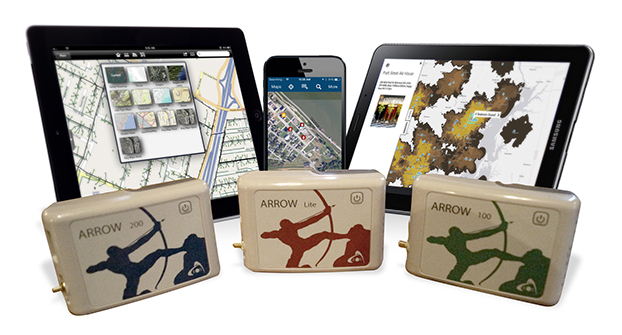
    Eos Positioning Systems has announced that its Arrow series of GNSS receivers is compatible with Esri’s Collector for ArcGIS running on iPads and iPhones. The Arrow receivers have been tested and certified as high-accuracy GNSS receivers compatible with Collector 10.4.0 for iOS.

    ipad-iphone-samsung-arrow-O

    The full range of Arrow GNSS receivers from sub-meter to decimeter to centimeter RTK accuracy all work flawlessly with Collector for ArcGIS running on all iPhones and iPads running iOS 8.x or later, according to the company. GNSS metadata — including estimated accuracy, correction status, correction age and number of satellites used — is displayed in real-time in Collector, so the user can monitor data quality in the field.

    “We worked closely with Esri during their development of Collector to ensure the best high-accuracy GNSS user experience with the Arrow GNSS series receivers, and I think we’ve achieved that,” said Eos CTO Jean-Yves Lauture. “Whether it’s our Arrow Lite, Arrow 100 or Arrow 200 receiver, they all work smoothly with Collector for iOS for sub-meter, sub-foot, decimeter and centimeter accuracy.”

    Eos Tools Pro.
    Eos Tools Pro.

    As a companion software to Collector, Eos offers a free iOS app called Eos Tools Pro that allows the user to connect to an RTK network and to set alarms for estimated accuracy, HDOP, correction age and others. If a threshold is exceeded (such as estimated accuracy greater than 10 centimeters), an alarm sounds on the iPhone or iPad to alert the user.

    “We have tested Arrow receivers and confirmed that Collector for ArcGIS (iOS) is completely compatible with the Arrow GNSS series receivers,” said Esri Product Manager Jeff Shaner. “The tight integration between Collector and Arrow GNSS receivers really enhances the high-accuracy user experience, and during our recent beta program, customers like Le-Ax Water District have shared their success using Collector and the Arrow receivers.”

    Collector for ArcGIS (iOS) is a geographic information systems (GIS) data collection program that runs on iPhone and iPads. It records data directly, in real time to ArcGIS Online, Portal for ArcGIS and ArcGIS Server at sub-meter, decimeter and centimeter accuracies when using the Arrow GNSS receivers. No post-processing or other specialty software is required.

    Collector 10.4.0 can be configured to automatically transform between horizontal datums on-the-fly, so no matter which datum the user’s GNSS data is referenced to, it can be configured to be compatible with the user’s geodatabase, and Esri provides scripts for transforming between vertical datums when back in the office.

    Eos GNSS Tools and Arrow receivers are targeted at high-accuracy applications such as GIS; environmental monitoring; agriculture; electric, gas, water utilities; surveying; machine control; and federal, state and local government.

  • Say Goodbye Proprietary GPS Devices, Hello TerraGo Edge

    Broadcast date: Thursday, May 28, 2015
    Sponsor: TerraGo
    Moderator: Alan Cameron, Editor-In-Chief and Publisher, GPS World
    Speaker: Michael Gundling, Vice President of Product Management, TerraGo
    Summary: Say goodbye to expensive, single-use GPS handheld devices. That’s not the way it works anymore. TerraGo Edge replaces single-use GPS handheld devices and enables mobile workers and field crews to easily collect field data, share that data with others in real-time using any iOS or Android device and sync that information with headquarters at a fraction of the cost. With TerraGo Edge, you can save a significant amount of money, increase the ROI on your current GIS investments and improve productivity.

  • myWorld Inspection & Survey v2 supports iOS, Android and Windows

    UbiSense-MyWorld_Survey-W

    Ubisense Group plc, an enterprise location-intelligence solution company, has released version 2 of myWorld Inspection & Survey. Version 2 of the software offers a host of new features to transform the way utility and telecommunications teams conduct inspections and surveys.

    myWorld Inspection & Survey enables field workers to collect inspection data on any mobile device, eliminating paper-based processes and is a dramatic improvement on first-generation software solutions, Ubisense said. Users now have the flexibility to run the system on iOS, Android or Windows and dynamically push both data and application code updates, significantly reducing IT management costs, UbiSense said.

    Based on discussions with existing customers, Ubisense has also incorporated a range of new workflow and data capture features to make day to day inspections and management even easier.  Users of myWorld Inspection & Survey are now able to:

    • Carry out multiple surveys concurrently, significantly improving productivity.
    • Assign multiple crews or surveyors to a single survey or inspection order, enabling support of a wider range of existing business processes without requiring any product customization.
    • Support for “dual pass” surveys, in which each survey item needs to be visited twice in order for the survey to be regarded as complete.
    • Enhanced map filtering, to allow users to only display items relevant to the survey(s) that they are currently working on.
    • Process checks to automatically turn off surveying when the vehicle speed exceeds a specified value, avoiding accidentally marking something as surveyed incorrectly.

    “We know that our customers want the flexibility to use any device in the field,” said Peter Batty, Geospatial CTO at Ubisense. “We allow them to run iOS, Android or Windows with a single application giving them more flexibility in device selection and future proofing their hardware decisions.”

  • Geneq announces new iSXBlue RTN RTK app for iOS

    Geneq announces new iSXBlue RTN RTK app for iOS

    iSXBlue-RTN-iPad-Pro-Mockup-Satellites-WGeneq has introduced a new NTRIP client app for iOS that works with iSXBlue receivers.

    iSXBlue RTN is used alongside other geospatial information systems (GIS) and surveying apps to obtain real-time centimeter accuracy on an iPhone or iPad.

    Key features include real-time kinematic (RTK) alarm configurations with NTRIP and DIP modes. The easy-to-use app allows users to update their receiver with the latest firmware, the company said.

    Other features include real-time map location with accuracy and satellite skyplot for GPS, GLONASS and SBAS. The app supports all current and future constellations such as BeiDou and Galileo, the company said.iSXBlue and SXBlue GPS Receiver users include GIS and surveying professionals in industries such as agriculture, environmental, government, mining, natural resources, surveying and utilities.

    isxblue_page_accueil
    iSXBlue for iOS
  • Aman Enterprises launches iOS Bluetooth adapter to connect GNSS receivers to iPhone, iPad

    Aman-bluetooth-nmea-W
    Photo: Aman Enterprises

    Aman Enterprises introduces NMEA-BT — a Bluetooth iOS adapter that enables any high-precision GNSS receiver with a serial port to connect to an iPad or iPhone.

    The NMEA-BT adapter is a small, weatherproof device that solves the problem of connecting non-iOS GNSS receivers and other field sensors to iOS devices. It connects to the iOS devices wirelessly using the native Bluetooth built into the iOS devices.

    GPS World reported on a Kickstarter campaign to develop the device in January 2015. The device is now shipping.

    By replacing the iOS device’s internal GPS location information with the location information from the intrinsically more accurate external GNSS devices used by mapping and survey professionals, NMEA-BT allows users to pair external GNSS devices to their location-enabled iPhone or iPad app. The patent-pending product helps preserve the user’s investment in sub-meter and centimeter GNSS receivers and other sensors while users migrate their workforce to iOS devices.

    A free app from the Apple iTunes App Store (NMEA Talker) enables the user to specify any required GPS connection parameters; connect to a local cellular RTK network (NTRIP) or a Direct IP (DIP) based correction service; and feed the corrections to the GNSS receiver, allowing for centimeter accuracy in real time in the field. The app can also be used to display error notifications like high PDOP, loss of an RTK correction, loss of satellite lock.

    In addition to connecting to GNSS devices, users can connect to other sensors like laser rangefinders, resistographs, underground cable locators, and commercial weigh scales that output NMEA-formatted data.

    For developers, they have full access to the entire raw NMEA stream of data from multiple devices without sacrificing app security or design architecture. No proprietary libraries are required to access the NMEA data stream.

    GPS/GNSS Receiver Compatibility

    The NMEA-BT has been tested with the following receivers:

    • John Deere StarFire
    • Trimble Pro 6, Geo Explorer, 372
    • Casel H372
    • Topcon HiPer series
    • Septentrio APS and NR series
    • Geneq SXBlue series
    • Ag Leader 6000 and 6500 series
    • Raven Industries – Envizio Pro series
    • Novatel

    The only requirement to interface the NMEA-BT adapter is that the GNSS receiver must output at least the $GPGGA and $GPRMC messages via serial port.

  • Topcon Releases iOS Version of MAGNET Construct App

    Topcon Releases iOS Version of MAGNET Construct App

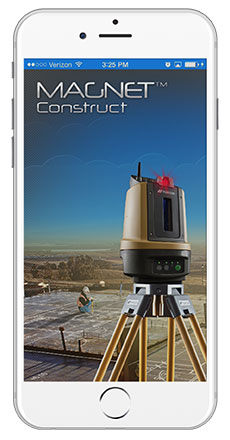
    Photo: MAGNET Construct AppTopcon Positioning Group announces cross-platform support for the MAGNET Construct app. The no-cost app is purpose built to drive the LN-100 Layout Navigator system and was initially released for the Android market.  This “out of the box productivity” is now available for Apple devices as well.

    “Whether you prefer Android devices or the latest Apple iPhone, iPad, or iPod Touch hardware, the free MAGNET Construct app offers intuitive options to wirelessly connect to and drive an LN-100 for fast as-built measurements as well as graphical guidance to your design data,” said David Ahl, director of software product management.

    “It’s an example of our focus to provide more options that cater to the preferences of end-users,” said Ahl. “This cross-platform compatibility of the MAGNET Construct app makes entry-level precise measurement solutions for diverse 3D layout applications even more accessible.”

    MAGNET Construct also offers secure connectivity to MAGNET Enterprise web services for real-time data exchange from active project sites to and from the office.

    MAGNET Construct is currently available on both the Apple App Store as well as Google Play.