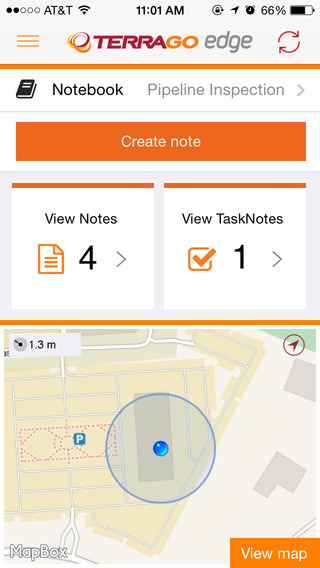
TerraGo Edge version 3.7, now available, includes new intelligent, responsive forms, as well as GPS and GIS enhancements designed to dramatically improve the speed, quality and efficiency of asset inspections, land surveys and any location-based data-collection project.
TerraGo Edge smart forms can accelerate the data-collection process by automating and accelerating user entries while eliminating unnecessary or redundant steps. Smart forms can be customized to meet the workflow requirements of customers in any industry.
New features in version 3.7 include:
Advanced Form Creation with New Smart Forms
Form groups – new form element to organize multiple related fields
Conditional fields – additional fields appear based on user entry of other fields
Barcode and QR code support – instantly scans codes to eliminate manual entry
Calculated fields – calculated result field based on other form field values
Multiple form attachments – ability to attach two or more forms to a single Note
Agency9, a provider of online 3D visualization, is extending its 3DMaps WebGL support to iOS and Android devices. Large, highly detailed 3D city models can now be streamed to web browsers on both tablets and smartphones with both high performance and visual quality, the company said.
Mobile support substantially improves reach in GIS and planning applications, Agency9 said. Using WebGL and HTML5 improves usability with plugin-free viewing of 3D directly in a web browser, eliminating the need to download and install dedicated apps.
Most WebGL 3D solutions on the market are pure “model viewers,” limited to show a CAD model and its closest surroundings or simple untextured LOD 1,2 models. Agency9 3DMaps is capable of smoothly visualizing large scale terrain and detailed textured building models on a national or global basis. For example, huge photorealistic 3D models created with tools such as Smart3DCapture by Acute3D, recently acquired by Bentley Systems, can now be published online using WebGL without limitation in size or resolution, the company said.
Agency9 3DMaps supports common 3D scenery in common GIS formats (including ArcGIS and CityGML) and is also validated with output from tools as Smart3DCapture, PhotoScan from AgiSoft, and StreetFactory from Airbus Defence and Space, as well as LiDAR/imagery tools from TerraSolid.
The Agency9 3DMaps developer platform enables the customization of portals as well as integration into existing applications to leverage ubiquitous support for streaming large 3D data to users across all formats including tablet, mobile, Windows and MacOS.
Rendering substantial 3D data sets in the browser using 3DMaps with advanced gaming effects such as ambient occlusion, real time sun and shadows, and god rays ensures the finest realism and user experience, the company said. 3DMaps also supports integration of spatial data and databases for intelligent models and visualisation of statistics. Visit the 3DMaps developer portal at http://developer.agency9.com.
Mobile support will also be available in Agency9 CityPlanner, the cloud service for creating and sharing 3D project information and citizen dialogues in urban development. Smart Cities can more easily reach citizens and stakeholders on the web with interactive visualisation of projects in 3D. An example of a large project model created in ESRI CityEngine and visualized in the huge photorealistic 3D scene above.
LizardTech, a provider of software solutions for managing and distributing geospatial content, has released an update to its free iOS GeoViewer application for viewing geospatial imagery and vector overlays. The release was announced at the Esri Fed GIS Conference, being held this week at the Walter E. Washington Convention Center in Washington, D.C.
GeoViewer for iOS enables iPad, iPhone, and iPod Touch users to view MrSID and JPEG 2000 imagery on their mobile devices. GeoViewer includes measurement tools, image band selection, and more.
The latest release includes free support for bookmarks and base maps. Users can purchase additional functionality such as displaying web map service (WMS) imagery, area measurement, and address search via a single in-app purchase of $4.99, which includes support for additional projection systems and tracking a user’s current location for measurement purposes.
To download GeoViewer for iOS, visit the LizardTech website or the iTunes Store.
Attendees at the conference can learn more at LizardTech’s booth, number 619.
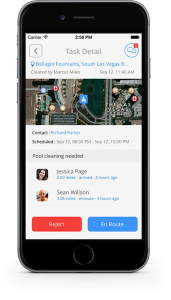
Mojio, an open platform for connecting cars, has announced a partnership with Dooing, a new team management platform for businesses that can dispatch jobs and track teams.
“With Dooing, any business can dispatch jobs and track teams on the move, from three people to thousands,” said David Barton-Grimley, a Mojio developer and co-founder of Dooing. “iOS and Android apps are used to manage field staff, assigning and tracking a job’s life cycle from start to finish with reports on key performance metrics. Enterprises and startups alike can build Dooing into their own products with our API.”
With the partnership Mojio says businesses can narrow down on fuel consumption, prevent breakdowns with diagnostics insights and track in real time.
“Mojio is the first platform we’ve integrated into Dooing, enabling Mojio customers to track jobs with live fleet data,” Barton-Grimley said. “Additionally, we’ve added to the ability to track and report on key metrics like fuel consumption and distance traveled down to the specific job.”
Mojio, the only open-platform connected car device — according to the company — has plans to continue growing its ecosystems of drivers, partners and developers.
Trimble has introduced Trimble TrimView Direct, a mobile application that leverages existing real-time data collected by Trimble’s TrimFleet Suite for the ready-mix concrete industry. Trimble has teamed with development partner, BCMI, to expand on how the data is viewed and used by top-level management.
By leveraging mobile technology, organizations have access to instantaneous information so managers no longer need to wait for paper reports to understand the state of their business. Using TrimView Direct, ready-mix producers and management across the organization have real-time access to critical data that impact their daily business decisions. The app collects information from existing systems and integrates it in a Web-based environment to deliver an accurate view of the company’s strengths, customer trends and opportunities for improvement on a mobile platform.
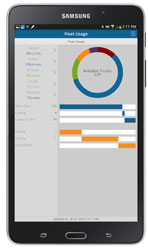
The app, available on iOS and Android devices, provides a dashboard of real-time data, including order status, ticket details, order timelines, fleet analytics and performance, vehicle location, trip status, signal health, driver hours and performance. The data can be filtered and viewed using maps, graphs, charts and timelines for a visual representation of critical information.
TrimView Direct is organized in modes: delivery, fleet and driver. Navigating using scrolling menus and toggle screens, users can tap or swipe the page to instantly find and record data.
For example, managers use the fleet dashboard to see average cycle miles, current fleet usage, average costs, signal health and delivery performance for a fleet, plant, truck or group of trucks. Sales and account managers who are on a customer site can reference data in the field, including order status, performance, timeline and ticket information.
“Our work with BCMI empowers today’s mobile worker,” said Glenn Bramer, director of marketing for Trimble Construction Logistics. “As we continue to develop solutions that transform the way work is done, we must look at how we can extend valuable information beyond desktop users and enable management to make smarter decisions anytime, anywhere. TrimView Direct is a bold step in this direction.”
“Coupling Trimble’s expertise in collecting real-time data for improved productivity with our movement to modernize the tools and processes for ready mix operations, we have enabled the entire concrete production chain, both human and machine, to interact with actionable, real-time information,” said Bernie Benson, co-founder of BCMI.
A kickstarter campaign has launched for an NMEA dongle that connects any existing GPS receiver to iOS devices. The device connects and communicates with high-accuracy GPS/GNSS devices and other field sensors that emit NMEA data to iOS devices over Bluetooth, allowing users to collect data on an iPad or iPhone using one or more sensors in the field.
Primary functions include:
overriding the internal GPS on iOS device with the location data coming from the external GPS so all existing apps using internal location services can benefit from the increased accuracy without any changes to the app.
providing the ability to connect with other field sensors that emit NMEA-format data (such as underground cable locators, lasers, resistographs, and audiographs) simultaneously with a GPS so data from multiple sensors can be incorporated into the data-collection application.
Garg explained the need for the dongle on his Kickstarter page: “The accuracy and precision of the internal GPS on iPads and iPhones is highly unreliable — it works fine for navigational purposes but fails miserably for mapping and asset management applications. The accuracy varies in range from a few meters to a few hundred meters depending on operating conditions, and there is no easy way to reliably ascertain that. Tests have proven that the accuracy rating on the location data returned by Apple is more of a general estimate than a reliable metric.”
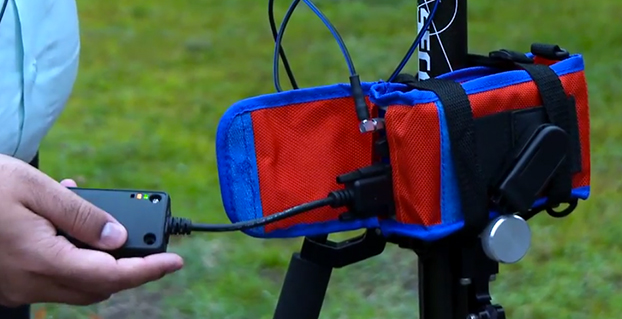
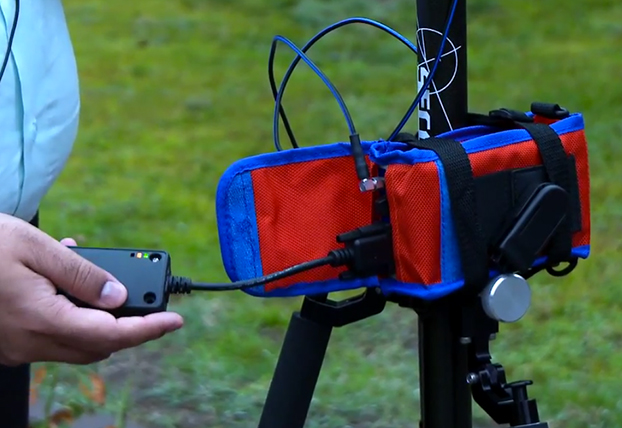
The NMEA dongle is business-card-sized, and has an internal battery and a long-range Bluetooth. The dongle plusg into an existing GPS receiver’s serial port or connects via bluetooth to transmit the GPS data to the iPad. This allows users to feed RTK/NTRIP data to their iOS device.
“We have tested our solution with most of the leading brands of GPS receivers available in U.S., including Trimble, Topcon, John Deere, Altus, Geneq, EOS, CHC,” developer Sharad Garg told GPS World, “on most of the popular networks that we could get access to, including the Leica, Trimble, MyWayRTK, a few state-run networks and of course Unavco. Our solution is compatible with all of them, so its a very generic product at this point compatible with just about all the different solutions out there.”
Garg said his team also designed the dongle so that it allows users to connect to sensors such as laser range finders, valve exercising machine, Resistographs or agricultural sensors that emit data in NMEA format. The National Marine Electronics Association (NMEA) specification defines the interface between various pieces of marine electronic equipment, a standard that permits marine electronics to send information to computers and to other marine equipment.
“We have actually improved the design very significantly to be very modular and be compatible with all sorts of GPS connections that might be offered by the different vendors out there,” Garg said.
This YouTube video shows the dongle’s RTK functionality.
GPS World published general articles on NMEA and RTK in Innovation:
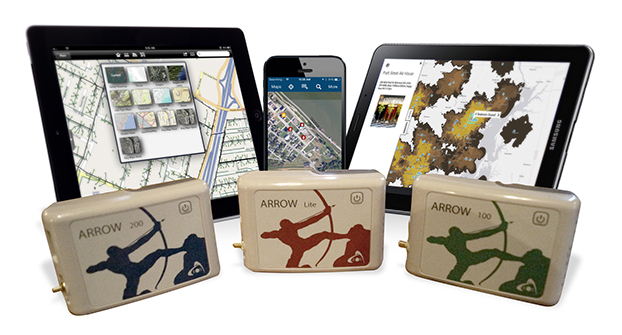
Eos Positioning Systems has introduced a new line of high-accuracy GNSS receivers for smartphones and tablet computers, including both sub-meter and RTK performance for all mobile platforms: iOS, Android, and Windows.
Eos’s entry-level product, the Arrow Lite, is Bluetooth compatible with all mobile devices.
The Arrow 100 is Eos’s advanced real-time, sub-meter GNSS receiver that utilizes both GPS and GLONASS, and is expandable to Galileo, Beidou and QZSS. It offers superior tracking under tree canopy, around buildings and in rugged terrain, the company said. In addition to supporting SBAS in North/Central America, Europe, Northern Africa, Japan, India and Russia, the Arrow 100 also supports OmniSTAR’s worldwide, real-time sub-meter service.
The most advanced Arrow receiver is the Arrow 200, a dual-frequency, multi-constellation RTK GNSS receiver capable of 1-cm accuracy in real time. The Arrow 200 is an iOS-compatible RTK and OmniSTAR receiver that works with all models of iPads and iPhones via wireless Bluetooth connection. An iOS NTRIP app that allows the user to log into any available RTK network. The Arrow 200 will provide quality RTK performance for years to come because it supports current and future satellite constellations: GPS, GLONASS, Galileo, BeiDou and QZSS, the company said. It also supports OmniSTAR’s G2, XP and HP real-time worldwide decimeter services.
“After spending more than 12 years designing high-accuracy Bluetooth GNSS receivers, I believe Eos has set the new standard for high- accuracy GNSS receivers that work across all mobile platforms, no matter if it’s iOS, Android or Windows,” said Chief Technology Officer Jean-Yves Lauture.
All Arrow receivers employ long-range (1-km) universal Bluetooth connectivity so the user can interface to any brand of smartphone or tablet, whether it’s iOS, Android, or Windows-based. A variable-power Bluetooth implementation allows the Arrow receivers to communicate up to one kilometer from the mobile device.
Arrow receivers have been optimized to run all day on battery power. The battery pack is field-replaceable and rechargeable separately. It contains smart charging logic so expensive battery chargers are not needed.
All Arrow receivers have been designed to meet IP-67 specifications for immersion in water and are completely dust-proof so they will survive in the harshest environments.
The Arrow receiver product line is targeted at high-accuracy applications like GIS, environmental, agriculture, electric/gas/water utilities, surveying, machine control, and federal/state/local government.
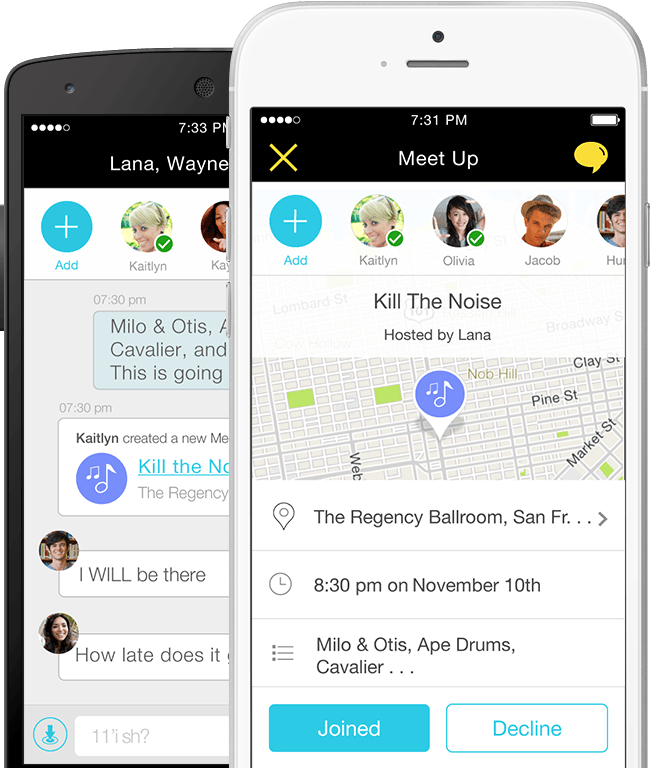
Location-based services company Telenav has announced new capabilities and updates to its free Scout mobile application that make the process of connecting and getting together easy and fun. Scout users can now manage the details of creating an event, contacting and inviting friends, choosing a location, communicating with the group and navigating, all within the updated Scout application. Scout is powered by OpenStreetMap.
For iOS devices, the new app experience will offer predictive, intuitive traffic push notifications for users’ everyday trips, eliminating the need to manually check for traffic delays. The newest version of Scout is now available from Google Play for Android and iTunes for iOS.
The results of a new survey from Telenav underscore the common pain points of planning events, meet-ups and meetings for consumers — especially Millennials — which Telenav is aiming to help alleviate with the updated Scout app. Nearly half (49 percent) of Millennials reported that they would find it useful to have a single solution that enables them to plan an event, communicate with attendees while they’re en route, and see each other’s estimated time of arrival.
“Mobile users have come to expect more out of their navigation devices and applications,” said Rohan Chandran, president and general manager of Telenav’s mobile division. “Navigation alone is critical, but it is a commoditized utility. We are looking to embrace the things that people really care about — the experiences in real life for which you navigate. Getting together should not be hard work, and we are trying to solve that. Scout is the new way people connect, get together, and go places in real life. It’s the only app that takes you all the way from chatting, to making event plans, to getting together in person, complete with voice-guided GPS along the way and everyone’s whereabouts and ETA pinpointed on the map.”
Scout’s new in-application features include:
Socialized Navigation Experience. In addition to offering invitees voice-guided, turn-by-turn directions to the event destination, Scout offers real-time location and ETA insights so guests are able to view the positioning of other guests on the navigation map. This prevents a barrage of “Where are you?” texts and calls while en route — and eliminates questions about where directionally challenged or perpetually tardy friends are.
Easier Meet-Up Invitations. Scout replaces what typically requires multiple applications by conveniently taking care of all the details of getting together, from inviting guests on their contact lists, to picking a day, time and location. “Did I get an invite?” and “what time is the event taking place?” are the last questions that organizers will be asked.
Group Chat. For the friend who is always left out, Scout users can now chat with all of the other event attendees directly within the app, allowing them to avoid juggling multiple text and phone conversations, and easily adjust and discuss the details of an event.
Predictive, Personalized Traffic Reports (iOS Devices Only). Users can schedule traffic report updates informing them of road conditions for their regular drives, and recommended alternate routes.
Trimble has announced three new asset inspection software solutions for heavy civil contractors—Trimble Inspector, Trimble Inspector Pro and Trimble Asset Manager.
Trimble Inspector is a free mobile app that allows equipment managers to easily inspect assets in real-time using their smartphone or tablet.
Trimble Inspector Pro, the premium, subscription version of Trimble Inspector, is used to wirelessly aggregate and share asset condition across multiple sites using Trimble Asset Manager office software.
Trimble Asset Manager software gives contractors the ability to store the inspection data of all assets in a centralized, Web-based database for accurate reporting and documentation.
“Contractors can achieve significant cost savings by proactively scheduling asset maintenance with Trimble’s new inspection solutions,” said Alan Sharp, business area director for Trimble Heavy Civil Construction. “Trimble takes the guesswork out of asset maintenance and puts the control back in the hands of the equipment manager.”
Trimble Inspector, a free mobile app, runs on both Android and iOS smartphones or tablets for daily, weekly and monthly visual inspections using a library of equipment, machine and vehicle types, makes and models, and inspection checklists. Reports containing current visual health status, hours, odometer reading and general condition can be promptly emailed to equipment and maintenance managers. The reports, along with photos, can then be retained for legal documentation of health and safety standards compliance, and for audit purposes. In addition, Trimble Inspector assists with scheduling maintenance to reduce equipment downtime and unplanned stoppages. The app is also ideal for trade-in or auction house inspections of used equipment.
Trimble Inspector Pro has all the functionality of Trimble Inspector, with the added benefits of customized inspection reports to meet health and safety requirements, and comprehensive maintenance reports for service crews. Equipment managers can record equipment service issues and notify site management staff of equipment status on multiple sites within seconds of the completed inspections. Trimble Inspector Pro requires a subscription to Trimble Asset Manager office software to access the additional functionality.
Trimble Asset Manager is a software as a service (SaaS) application used in the office to integrate, store and report asset condition data collected in the field by Trimble Inspector Pro. Asset information is kept in a secure, centralized online database accessible by authorized users in the company. Users can create asset records, document inspections and customize reports so managers get the data they need quickly and easily.
Trimble Inspector and Trimble Inspector Pro are available now worldwide from the Google Play Store or the Apple App Store. Trimble Asset Manager is available now globally through Trimble’s SITECH Technology Dealer Channel.
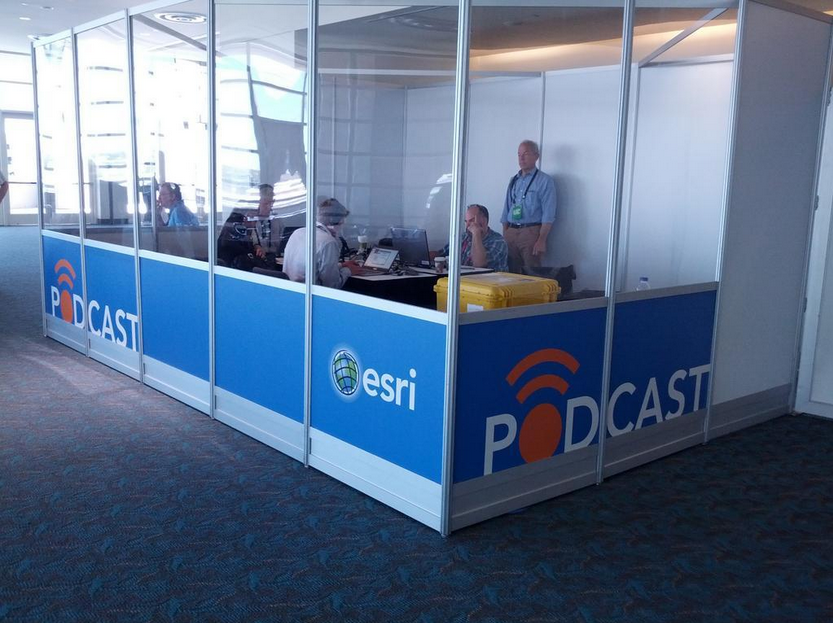
A few weeks ago at the Esri 2014 International User conference in San Diego, California, we conducted our first live event webinar from a Plexiglas booth sitting among many of the 14,000+ attendees buzzing around inside the San Diego Convention Center.
The webinar focused on high-precision GNSS on mobile devices (iOS/Android/Windows), unmanned aerial systems (UAS), and real-time GIS transactions. These are hot topics in the geospatial world, and that was confirmed when I received about 100 pre-webinar questions and more than 100 post-webinar questions.
In my article this month, I’ll do my best to provide answers to the questions asked. If I don’t get to your question, or if you have another, please email me at [email protected].
First of all, if you didn’t attend the webinar and would like to view the recording, you can register here and you’ll be provided a link to view it. It’s a great, interactive discussion. I grabbed Sharad Garg, iOS consultant, from the Esri show floor to talk about the intricacies and complexities of using GNSS receivers on iPads and iPhones.
Without further delay, following are some of the more popular pre- and post-webinar questions I received.
Mobile Devices
First, I’ll start with the questions about mobile devices and high-precision GNSS.
1. Will Android be the dominant mobile tablet platform in the Enterprise?
It’s hard to say. I recently met with a group of enterprise IT professionals and we were discussing this issue. Basically, the group was equally divided into thirds. One third were using Android. one third were using iOS, and one third were using Windows.
Android advantages: Lots of mobile devices available that run Android. Android disadvantages: Open source = non-standard implementations, so app software may not run on every device; security concerns.
iOS advantages: Consistent user interface, consistent software development environment, popularity of iPad and iPhone. iOS disadvantages: Closed ecosystem (very limited number of tablets); doesn’t interface to devices (such as GNSS) that haven’t been through the Apple certification process; security concerns.
Windows advantages: Security; lots of legacy apps and utilities written for Windows. Windows disadvantages: Limited number of tablets being deployed based on Windows.
For enterprise organizations, data security is a huge concern. Since Android is open source and gaining the most market share (at least in the consumer market), it’s got a target on its back for hackers. That’s the biggest concern I hear from corporate IT professionals. How will Android device developers address that, or will they? The consumer market for Android devices is exploding regardless of security. Do they even care about the enterprise market? Apparently Apple does as it recently signed an agreement with IBM to address the enterprise market, with IBM committing to deploying more than 100 enterprise solutions for iOS.
Site of the webinar broadcast from the Esri UC.
2. Which mobile platform is the most universal/easy to integrate with GNSS receivers?
Out of the box, Windows and Windows Mobile devices are still the easiest to interface to external GNSS receivers for the average consumer. Using Bluetooth, serial or USB, NMEA (or proprietary binary) data flows easily via the device com port or virtual com port. If you’re using a Bluetooth interface, there is some inconsistency among mobile devices due to the different versions of Bluetooth management software used on mobile devices, but it’s workable, and worst case you can buy an inexpensive third-party Bluetooth software manager like BlueSoleil.
With the use of an app such as Bluetooth GPS that allows you to select an external GNSS receiver, connecting your Android device to an external Bluetooth GNSS receiver is relatively painless.
Apple products are the toughest to integrate with external GNSS receivers via Bluetooth. Each GNSS receiver has to be specifically designed with an Apple Bluetooth authentication chip and be subjected to the Apple certification process, which can be lengthy and costly. This is the reason why you see very few Bluetooth GNSS receivers available for Apple products. The good news is that once the GNSS receiver is approved, the Bluetooth connection happens automatically when the GNSS receiver is in range of the Apple device. No com port config, no baud rate to worry about, etc.
3. What is available on Android that will make my smartphone a practical and useable tool that can assist in collecting professional data?
First of all, you need to find a high-precision Bluetooth receiver to connect to your Android device. Then, establish the Bluetooth partnership between the Android and GNSS receiver (scan for Bluetooth devices, enter passcode, etc). Once you have that, download the Bluetooth GPS utility I mentioned above and it will allow you to select which GNSS device to use (external vs. internal). Once you’ve selected the external GNSS receiver and connected to it via Bluetooth, every location app on your Android device will use the high-precision GNSS receiver for location.
This applies to an Android tablet or Samsung Galaxy phone. Take a look at this article to see how I ran RTK on a Samsung Galaxy using a Bluetooth RTK receiver.
Today’s challenge is finding “professional” GIS data collection apps that run in the Android environment. There are a few, but the selection is limited. Esri has its Collector for ArcGIS app that runs on Android, but it requires an ArcGIS server backend or ArcGIS Online account. Other data collection apps like Fulcrum and Amigocloud run on Android as cloud-based services.
4. Is there an actual GPS receiver within smartphones, or are they triangulating off of cell towers?
There’s a GNSS receiver in virtually every smartphone manufactured. The GNSS chips are so cheap (a few dollars) compared to the functionality gained that it wouldn’t make sense not to design a GNSS receiver in a smartphone. Now, just because there’s a GNSS chip in each smartphone doesn’t mean it’s the only technology used for location. For example, Apple iOS uses multiple data sources to determine the location at any given time. It will use a combination of cellular triangulation, Wi-Fi IP address, and internal GNSS receiver and external GNSS.
5. Which applications do you see requiring RTK accuracy within the mass-market applications?
A couple of years ago at the GPS World Leadership Dinner at the ION GNSS conference in Nashville, Dr. Todd Humphreys of the University of Texas at Austin predicted that you’ll have RTK (real-time centimeter accuracy) capability on your smartphone by the year 2020. I agree with his prediction, and I think we’ll see inexpensive Bluetooth RTK “pucks” well before 2020, as I’ve written before.
Often, I get the question raised above. Who needs RTK on a mobile phone?
I can’t tell you any more than that in the early 1970s when GPS was first being conceived, not one could tell you what GPS would be used for today. I love the following quote from Steve Jobs: “People don’t know what they want until you show it to them.”
6. Since many devices are complete systems with GNSS inside, do you see the direction of the industry moving towards remote “add-ons” like Bluetooth receivers?
Bluetooth receivers are certainly trending, and it’s primarily driven by the explosion of powerful yet inexpensive tablets and smartphones in the past five years, starting with the iPad/iPhone, and now with Android devices and smartphones in general. People want to use their consumer devices in a professional capacity and some need high-precision GNSS receivers, so that’s driving the demand for “add-ons” like Bluetooth GNSS receivers, laser rangefinders, and more.
Unmanned Aerial Systems
Ok, let’s transition to some questions on UAS (such as UAV, drones).
1. Do you see the FAA allowing simple operations for very low altitude UAV-sensors?
It’s difficult to speculate what the FAA will implement, but I have to think, based on its past behavior, that the initial rules will be super-conservative with minimum requirements being that a licensed pilot will be required to operate the UAS in addition to strict equipment requirements.
What’s going to be interesting to observe is what the FAA will do about the hundreds (maybe thousands) of UAS operators who will attempt (or are attempting) to “fly under the radar” and skirt the FAA rules. We’ve seen the FAA attempt (sometimes successfully and sometimes not) to crack down on some UAS operators whom it believes are violating the rules, but there have only been a handful of those cases.
2. When do you think the FAA will release rules for commercial UAV users?
I wouldn’t be surprised if the FAA issued some guidelines in September 2015, but I seriously doubt they will publish the full set of rules by then.
By the way, I attended an interesting UAS presentation at the AEC Summit prior to the Esri UC. You can see my write-up of it here.
That’s it for now. I’ve got many more questions from the audience that I’ll address in upcoming newsletters. Stay tuned and feel free to email me directly at [email protected].
CMTINC.COM (Corvallis Microtechnology, Inc.) has added a new dimension to its iOS-based GPS/GIS application software by releasing the Contour – Volume – Stakeout app for iPad and iPhone. Now that higher accuracy GPS receivers are available for use with iOS devices, it makes sense to develop GPS/GIS apps that utilize elevation values, the company said.
The Contour – Volume – Stakeout app will generate contour lines and a colored contour map based on elevations or on the values of any numeric variable of interest (such as the amount of fertilizer to apply). It can compute volumes (such as the amount of soil to move) based on the contour information. It also provides stakeout functions to let the GPS guide the user toward a point or along a line or area boundary.
The data to be contoured can be digitized and entered via the app itself, or it can be imported via Shapefiles or a text file. To aid data collection, the app provides a function to generate sampling grid points over an area. The contour map can be printed to PDF. The contour data can be exported to a text file. The Feature data can be exported to DXF and Shapefiles, and the contour data can be exported to a .CSV text file.
Supergeo Technologies, a provider of GIS software and solutions, has launched SuperSurv, a mobile GIS app, on the App Store and Google Play.
SuperSurv contains comprehensive GIS data-collection functions. Designed for both iOS and Android powered devices, it integrates with GIS and GPS technologies to provide functions in field survey, such as Map Display, Query, Measure, etc. With SuperSurv, the collected data can be saved as feature layer (point, line, polygon) in SHP or GEO format in offline mode. SuperSurv supports OpenStreetMap as the base map.
SuperSurv has been successfully applied in various industries worldwide, including environment protection, pollution prevention, and facility management. The free trial version is now available on Apple App Store and Google Play, allowing users to experience complete functions for seven days before purchase.
For users in North America, Supergeo has released the SuperSurv M3 version to provide easy-to-use and useful data collection and map display functions. SuperSurv M3 supports feature-layer display and offline editing functions. Furthermore, cached maps can be adopted as the base map to facilitate data capture tasks.
 TerraGo Edge version 3.7, now available, includes new intelligent, responsive forms, as well as GPS and GIS enhancements designed to dramatically improve the speed, quality and efficiency of asset inspections, land surveys and any location-based data-collection project.