SXblue, also known as Geneq, has introduced its SXblue ToolBox, an Android application for SXblue GNSS receivers.
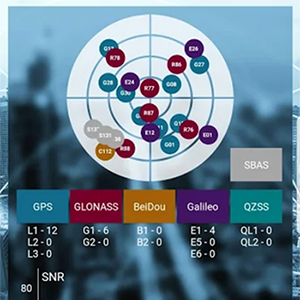
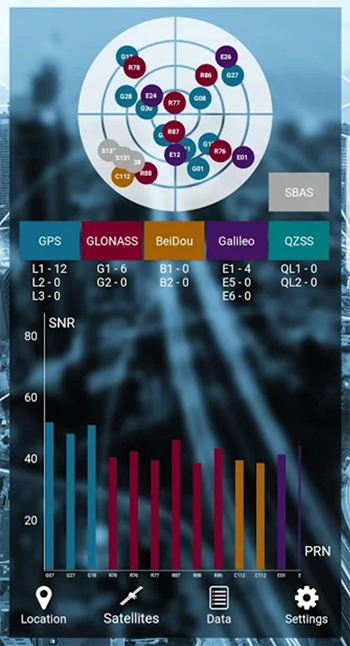
Using the SXblue ToolBox, receiver users can view and analyze the position data provided by the SXblue receiver and metadata related to its location. The user can send commands that enable or disable some features, including systems in use, mask angle or differential angle, and constellation in use, including GPS, GLONASS, Galileo, BeiDou and SBAS.
The SXblue ToolBox is also an NTRIP client capable of connecting to a NTRIP server for real-time kinematic (RTK) corrections and thus allow the receiver to issue very accurate location information. The application is able to record, save and transfer the raw data from the GNSS receiver, allowing post-processing activities on computers for surveying and geomatics professionals.
The application has been developed with special consideration for modern mobile device development and attention to user and dealer feedback, the company said.
The application includes a series of audible and visual alarms configurable by the user to determine the thresholds of the information provided by the SXblue GNSS receiver.
Main features of the SXblue ToolBox include:
Display of location information and quality of the position data
Skyplot of all-in-view constellations: GPS, GLONASS, Galileo, BeiDou, QZSS, SBAS
Log raw data
NTRIP/DIP client for receiving RTK corrections
Terminal to send commands and view the output data of the SXblue device
Audible and visual alarms
Activation of options and licenses via the application.
3DR, makers of the Site Scan drone software platform for construction and engineering professionals, has released 3DR GCP, an Android app enabled by the Trimble Catalyst on-demand GNSS service that makes it simpler for Site Scan users to capture and use ground control points (GCPs) on commercial drone projects.
Now, instead of having to export ground-control-point data files and manually upload them into Site Scan, 3DR customers can use 3DR GCP to quickly capture ground control points and automatically transfer them to their corresponding projects in the Site Scan cloud for georeferencing and processing. According to the company, this makes it easy for any Site Scan user to create accurate drone maps and models of their projects.
3DR GCP is enabled by Trimble Catalyst, a software-defined GNSS receiver and on-demand positioning service for Android phones and tablets. Developed by Trimble, the service uses a small, lightweight, plug-and-play digital antenna to deliver high-quality satellite data to the 3DR GCP app running on the user’s Android device.
The service is available as a monthly subscription, which unlocks a range of precision levels from meter to only a few centimeters. Customers simply go on-site, plug the Catalyst DA1 antenna into their Android device, launch 3DR GCP, and capture ground control points at the level of accuracy enabled by their Catalyst subscription.
“3DR GCP provides our customers an end-to-end, cloud-based ground control point workflow from the field to the office,” said Chris Anderson, CEO of 3DR. “With this app, we’ve closed the loop on ground control points by making one simple, connected workflow from start to finish.”
“Trimble is excited for 3DR to join our ecosystem with the launch of 3DR GCP,” said Gareth Gibson, business development manager for Trimble Catalyst. “With this innovative ground control app, 3DR is making it easier than ever for their customers across the world to create accurate, reliable drone maps and models and better capture their projects.”
3DR GCP can be purchased along with Site Scan subscriptions, and will require a Trimble DA1 antenna and Catalyst subscription.
Boundless Anywhere is a new mobile application for enterprises needing to collect and distribute location information from handheld devices and tablets, available for iOS or Android.
With Boundless Anywhere, organizations can collect data in the field and store it instantly in a database. Collected data can then be visualized on clients such as desktop GIS, web and mobile. With real-time access to location-based data, the entire organization can now accomplish work faster and more efficiently.
“Mobility is at the heart of today’s technology, and the rapid proliferation of smartphones and tablets in recent years has had a profound impact on the GIS industry,” said Anthony Calamito, chief geospatial officer at Boundless. “The ability to access all kinds of data — including location data — from the palm of our hands at any given time or place has become essential. With this extended offering, Boundless offers mobile capabilities that empower users to do more while on the move.”
With Boundless Anywhere, users of the Boundless enterprise GIS platform can collect geospatial data wherever they are and use maps to engage a community, validate data, make observations, report, respond and communicate in real-time. The new solution simplifies field collection workflows and improves the accuracy of geospatial data, saving time and money.
Users are able to capture new data and edit or delete existing data with or without an internet connection, and can sync instantly once they are back online. Updates and edits are instantly available on Boundless Exchange, where the entire team can analyze and share findings with the rest of the organization.
Key advantages:
Collaborate in real-time to make faster decisions. View mobile edits instantly on the web, making it easy to pull data into your GIS for mapping, analysis, and reporting.
Ground-truth data to improve accuracy. Take expensive transcription errors out of the equation. Mobile workflows modernize field collection away from clipboards and cameras, ensuring data collected on-location is current and accurate.
Empower responders to collect, even when offline. A good network connection is never guaranteed in the field – the Boundless Anywhere solution lets you edit GIS data in even the most remote areas and sync it when you’re back online.
GIS apps don’t have to be cumbersome. Collect GIS data and photos in a straightforward interface that’s easy to use and can turn your entire team into data collectors.
Boundless solutions are built on open GIS technology and APIs that generate actionable location intelligence across third-party apps, content services and plugins for enterprise applications.
Avenza Maps 3.4 for iOS and Android is now available. It contains new features and performance improvements, including the ability to add and manage new symbols to aid users in customizing their Avenza Maps experience with a built-in collection of U.S. National Park Service recreational symbols.
Release highlights include enhanced support for point symbology. Also, users can package their own PNG symbols as (KMZ) files, import and use them in the app.
Add and manage symbols. Avenza Maps Pro users can import and manage readily available collections of industry specific sets of symbols. such as the EMSINA Australasian All Hazards Symbology Set and the U.S. National Wildfire Coordinating Group GIS Standard Operating Procedures (GSTOP) Incidents Point Symbols. These symbol sets can be downloaded directly from the Avenza Support Centre.
Add placemark workflow improvements. Improved add placemark workflow and screen to accommodate symbol selection and make it easier to add photos. The Add Placemark screen now appears every time the Add Placemark icon is tapped from the map view screen.
This allows the user to conveniently change the symbol (or use the default one) as well as add any necessary information such as photos or collect data in a schema. Several of the most recently used symbols are listed for quick selection. A default symbol can still be set for the layer so one symbol can always be chosen.
It is the best of times, it is the worst of times. GPS modernization, once gasping for breath by the side of the track, is back in the race and pulling ahead. Relentless innovation in user equipment and newly opened software access mean that high-precision positioning may soon be available to owners of mere tablet computers. Spoofing counter-measures are growing in sophistication and availability. GPS continues to drive many sectors of the economy, with a benefit of as much as $65 billion per day to the U.S.
Yet there are a few flies in the modernization ointment. And GPS may soon collide, catastrophically, with that other U.S. military invention from the 1970s that also leaped the fence into the civic domain and life-changed billions of people around the world: the Internet.
Note: After this issue, we are temporarily suspending publication of the GNSS Design & Test e-newsletter. Subscribers who do not already receive the Navigate! Weekly e-newsletter will in 2018 find it in their inbox each Tuesday. Navigate! covers a broad range of GNSS and PNT industry news and all GNSS constellation and signal updates. You may freely unsubscribe if you wish. The final Navigate! newsletter of each month will carry my GNSS Design & Test column — so, I’m not going away!
— AC
Let’s open these boxes one by one.
Modernization. The first satellite GPS III satellite, declared available for launch in September, appears headed for a March 2018 lift-off. Both the GPS III digital navigation payload and the ground-control software programs are recovering momentum following earlier hiccups and delays. The first III satellite has successfully “talked” with the OCX system on the ground. Lockheed Marting is building 10 of the satellites for the Air Force. Harris Corporation delivered the fourth of 10 digital payloads to Lockheed, and said it would ship four more in 2018. Raytheon is the prime contractor for OCX.
The Government Accountability Office (GAO) projected that the current constellation of 31 GPS II satellites will remain operational until 2021, two years longer than previously estimated. This affords some breathing room for the seven GPS III satellites scheduled to be in orbit by then to start replacing the long-lived II generation. No longer need we fear the constellation gap, an alarm sounded by the same GAO back in 2009.
Problems Ahead. But this year’s GAO report also warns that GPS III’s increasing program complexity and upgrades required for new encrypted signals mean that it will take longer for ground infrastructure and user equipment to catch up in capability afforded by the new satellites.
Five programs are now encompassed under the rubric of GPS modernization: the satellites, next-generation ground control (OCX), military user equipment, contingency operations and military code (M-code) early use.
Just because the satellite schedule has regained its footing and is racing forward does not mean that M-code software and installing the receivers needed to acquire it aboard major U.S. weapon systems are keeping up pace with the pack. “Additional development is necessary to make M-code work with over 700 weapon systems that require it,” according to GAO analyst Christina Chaplain. Long message short: the new satellite constellation may be orbiting in the skies years before user equipment and software are in place. “War fighters will have to operate with a mix of older and newer receiver cards.”
Consumer Access to Precision. The January cover story in GPS World magazine will show the results of very promising new tests taking advantage of access to raw GNSS observables now possible thanks to Android. “For those who want high accuracy, but don’t need it full time, high-productivity dedicated professional solutions may not be cost-justified,” writes Stuart Riley along with his co-authors, all from Trimble. “In these cases, a positioning-as-a-service subscription could offer a viable use model. Achieving precision positioning with just a standard mobile device, a correction stream using the mobile device’s data connection and a high-accuracy positioning application produces a very low barrier to achieving high accuracy.”
One of the figures from “Positioning with Android.” Code RTX performance the dataset sampled Nov 20 and corresponding RTK and RTX phase solutions — cell-phone GNSS antenna.
“While we expect that dedicated system approaches employing a custom GNSS chipset and firmware and purpose-built precision applications will continue to be the right solution for industry professionals,” they continue, “it is clear that the ubiquity of consumer mobiles, with increasing compute power, ruggedness and an expanding feature set represents a fertile ground for new development of improved positioning systems that don’t have strict professional requirements.
“A range of new use models and applications will be enabled by consumer mobile phones with technology that improves positioning performance. The goal of the work presented here is to assess what level of performance can be achieved by using proprietary PVT (Position Velocity Time) engine(s) utilizing GNSS measurements from the Android GNSS measurement API.”
Look for the January issue in your mailbox by mid-next month.
Spoofing. This has been the hottest issue, by far, during the past year — maybe two — at technical conferences around the world. Its role has been speculated in some rather notorious seafaring accidents. Its potential to wreck many carefully wrought schemes of transport, finance, safety, security, defense, power supply and more has been resoundingly aired. But help is on the way. Javad Ashjaee in the January magazine’s Expert Opinion column lays out an anti-spoofing strategy that has been installed, as an option, in all OEM boards offered by JAVAD GNSS.
In its most basic form, it amounts to “it is vital that in areas that spoofing danger exists, users employ OEM boards that provide more satellite systems and more signals, rather than using a simple GPS C/A code, for example.”
Heartbreak Dead Ahead. Finally, the January issue contains a lengthy treatise by Brad Parkinson, variously the grandfather, godfather, or just plain father of GPS, on a burgeoning danger that threatens the whole system and the vast economic benefit it provides.
Widespread big data streaming, storage in the cloud, and the much-ballyhooed Internet-of-Things are accelerating the World Wide Web’s breakneck consumption of broadband. More, more, more is needed, and more again tomorrow. We are all complicit, to use a current term, in this.
Every single sliver of radio-frequency band is now worth billions. And this is neither an infinite nor a renewable resource. There’s only so much. No one’s talking about taking away the small radionav portion of the spectrum (yet), but serious, well-funded and well-friended efforts seek to park massive transmitters right next door to it and effectively obliterate the signal, not only of GPS but other GNSS as well.
LightSquared tried this once, in 2010-11, and failed. Now the company is back under a new name, and in the current political climate it has more than a fighting chance of knocking the RF legs out from under the PNT community and all who depend upon it. Which, again, is all of us.
Talk about conflicting priorities.
“I believe the concept of allowing the installation of transmitting towers that, by design, will interfere with normal GPS use at some distance away, opens the door to tacit approval of short-range (or not-so-short-range) GPS jammers,” writes Parkinson.
Well, let’s put all that trouble aside, just for a few more weeks. Enjoy, everyone out there, your winter holidays if you are lucky enough to have some, and we’ll return to business in January.
Trimble Earthworks for Excavators and Earthworks for Dozers brings integrated 3D aftermarket excavator automatics capability to machine control.
A new dozer configuration moves the receivers from the blade to the roof of the cab. Reengineered from the ground up, Trimble’s next-generation grade-control platform features intuitive software that runs on Android.
(Photo: Trimble)
Android System. The Trimble Earthworks grade-control application is built on the Android operating system. It was developed based on feedback from construction equipment operators, resulting in an interface optimized for productivity.
Colorful graphics, natural interactions and gestures, and self-discovery features make the software easy to learn. Each operator can personalize the interface to match their workflow, and a variety of configurable views make it easier to see the right perspective for maximum productivity, the company said.
Using Android, users can download other applications that provide the operator with useful tools inside the cab. Contractors can use the Trimble TD520 display or a third-party Android device.
Excavator Automatics. When the excavator is placed in Autos mode, the operator controls the stick, and Trimble Earthworks controls the boom and bucket to stay on grade, reduce overcut and increase production. This allows operators to achieve grade consistently, with high accuracy and in less time.
Mastless Dozer Configuration. Trimble Earthworks for Dozers mounts dual GNSS receivers on top of the cab to eliminate masts and cables traditionally located on the blade. The dual GNSS receivers are designed for steep slope work and complex designs with tight tolerances. According to Trimble, the new configuration keeps valuable receivers safer and can also save contractors time by reducing the time needed to remove and reinstall them each day.
Earthworks Highlights
Grade-control app runs on the 10-inch Trimble TD520 touchscreen
Android display.
Excavators can work semi-automatically, allowing operators to create smooth, flat or sloped surfaces more easily.
Software and hardware give operators of all skill levels the ability to
work faster and more productively.
Allows data files to be transferred to or from the office wirelessly and automatically, keeping designs current.
Trimble has introduced Penmap for Android, a cloud-connected application for field surveying and high-accuracy geographic information system (GIS) data collection that works on mobile handhelds, smartphones and tablets.
Trimble Penmap for Android focuses on core survey and mapping tasks such as cadastral and boundary surveys, as well as establishing local control, stake-outs, quality checks and asset management for utilities. It provides both professional surveyors and field workers with an intuitive, easy-to-use map-based interface to manage features and attributes for high-accuracy GIS and complete survey documentation.
The application is also ideal for use in the energy distribution industry for locating infrastructure and recording critical information on encroachments, clearways and existing monuments, the company said.
The application runs on a variety of Android devices, including the rugged Trimble TDC100 handheld, and supports full-featured Trimble GNSS receivers such as the Trimble R10, R8s and R2 receivers.
Trimble Penmap for Android is optimized to integrate with the new Trimble Catalyst service, a software-defined GNSS receiver that connects to the small, inexpensive plug-and-play DA1 antenna, and allows surveyors to choose an accuracy level from meter to centimeters to suit their application needs.
Together, Penmap and Trimble Catalyst — both purchased through a fixed monthly subscription — offer an on-demand, lightweight and low-cost professional surveying system that provides value, convenience and flexibility, the company added.
“The addition of Penmap expands our portfolio to address the needs of organizations that require a value-packed, flexible survey system,” said Matt Delano, general manager of Trimble’s Land Administration solutions. “Surveyors using the Penmap application with Trimble Catalyst can easily manage seasonal shifts in survey activity by scaling up or down without a capital investment. Survey managers will find it an efficient way to carry out field checks without tying up expensive equipment used by their field crews. They can simply use a phone, the Penmap application, a Catalyst subscription and the DA1 antenna.”
Trimble Penmap for Android includes the Penmap Project Manager, which is used to set up projects, create templates and add team members.
Penmap Project Manager works with the Trimble Connect platform for storing and transferring data between the field and office.
Trimble Connect, which is also included in the Penmap subscription, is a collaborative cloud-based platform that enables organizations to set up and deploy projects to their field users. Information collected in the field is synced back to the office in real-time where it is stored, managed and communicated to team members.
Data can also be exported from Penmap Project Manager into back-office systems in a variety of file formats for viewing and sharing.
Advanced GPS navigation app Sygic has released its new augmented reality (AR) feature. More than 200 million Sygic users worldwide can engage with AR for an improved navigation experience on the road.
Sygic’s new AR feature uses a smartphone’s GPS and camera to implement its augmented reality-powered GPS navigation system. With the AR feature, the driver no longer needs to follow a map on their phone. Instead, they’re guided by a virtual path on the smartphone camera preview.
The AR feature is not only intuitive, but is also safer than traditional navigation apps. Drivers can rest assured they won’t miss anything crucial on roads or highways, as the real-time camera preview enables them to check conditions on the screen without impacting driving safety.
“We are so pleased to make Sygic’s AR feature available to users around the world. We understand the value of bringing the latest technology features into Sygic GPS Navigation, and to bringing smart life to your device,” said Michal Stencl, CEO of Sygic. “However, our new AR capability isn’t just a shiny new tool. Whether you’re in the car with your loved-ones, friends or by yourself, the AR featured is designed promote the highest form of road safety.”
The AR feature called Real View Navigation is available for all Android and iOS users as in app purchase for 9,99 EUR.
Sygic posted a video clip of the new feature on its Twitter account.
According to a 2015 Pew Research Center study, 67 percent of smartphone users surveyed said they occasionally use their phones for turn-by-turn navigation while driving. Even more, 31 percent said they frequently use navigation apps.
Sygic was described as one of the world’s most successful apps by the BBC.
“Sygic’s philosophy is to explore the boundaries of navigation, and we look forward to bringing more revolutionary tools and features to users later in 2017,” Stencl said.
The Trimble Catalyst software-defined GNSS receiver for Android devices is now available through Trimble’s global distribution network.
Trimble Catalyst DA1 antenna attaches to a smartphone running a Catalyst-enabled app.
Through Catalyst and a special antenna, customers can access positioning-as-a-service to collect geolocation data with Trimble or third-party apps on smartphones, tablets and mobile handhelds.
When combined with a plug-and-play digital antenna and subscription to the Catalyst service, the receiver provides on-demand GNSS positioning capabilities to turn consumer Android devices into centimeter-accurate data-collection systems.
Catalyst requires only a few components:
Any location-enabled mobile app.
A Catalyst subscription, with accuracy options ranging from one meter to centimeter level.
Trimble’s small, lightweight DA1 antenna that plugs directly into Android smartphones and tablets.
“Our goal has always been to extend the accessibility of high-accuracy positioning to a broader base of geospatial and non-geospatial professionals,” said Ron Bisio, vice president of Trimble Geospatial. “Trimble Catalyst represents a new era of GNSS technology by making high-precision positioning a reality for new user segments around the world. With economical on-demand service, it puts high-accuracy in the palm of anyone’s hand — it’s revolutionary.”
Both Trimble and third-party development teams have produced a range of Catalyst-enabled applications for geographic information system (GIS) data acquisition, cadastral land management, topographic mapping and ground control for unmanned aircraft systems (UAVs).
Also, the Trimble Catalyst solution includes a software development kit (SDK) for building mobile applications with integrated professional workflows.
“Trimble is enabling us to deliver better solutions for our customers thanks to the level of integration that the SDK provides,” said Paul Brodin of Korec Group. “It allows us to provide sophisticated solutions that are innovative, easy to use and remove the technical complexity associated with high-accuracy workflows.”
Trimble Catalyst service subscriptions and the Catalyst DA1 antenna are now available through Trimble’s Authorized GIS Distribution Network. Catalyst availability, pricing, subscription and accuracy may vary by region. Catalyst-enabled apps for Android can be found in the Google Play Store.
Google’s annual developers conference in May, Google I/O, featured many announcements, accomplishments and 2017 plans. Of particular interest, the Android Location and Context Team’s talk “Android Sensors & Location: What’s New and Best Practices,” is available online.
This followed a keynote by CEO Sundar Pichai on solving problems at scale with deep neural networks, machine learning algorithms and artificial intelligence (AI). He also spoke about a shift from a mobile-first model to AI-first. Google is doing this across every product area, applying AI and machine learning. Other keynotes updated Assistant, Photos, YouTube, Superchat, Android and VR (virtual reality).
The Android Location and Context team — Marc Stogaitis, Wei Wang, Souvik Sen and myself — spoke about background location, location accuracy, activity recognition, Android sensor hub, Android sensors, and the future of location and context.
Discussing why battery life is so important, we showed detailed graphs on the costs of accessing different parts of the phone subsystems like WiFi, GNSS and making data connections.
Then we introduced Background Location Limitations (at the 4:30 point in the posted video) coming with Android’s latest operating system in Android O. These limits will prevent applications from misusing Android’s APIs in the background, thus saving its user’s battery. There were examples on how to make your app background ready for these upcoming changes.
We showed plans for location accuracy improvements (12:50) coming later this year and comparisons of existing vs. upcoming solutions for the positioning algorithm.
We covered the tools to help analyze GNSS measurements. How strong are the individual measurements? How accurate are the range measurements? With these tools, developers now have direct insight into the lowest layers of a GNSS receiver. Then came activity recognition algorithms (15:40) and how deep neural networks will improve the precision of these algorithms and help advance the field in activity recognition.
I spoke spoke about the Android Sensor Hub (20:27), how Google is leveraging the capabilities of an always-on low-power processor in Android phones. The sensor hub allows Google to port algorithms such as Activity Recognition, Geofencing and Gestures from the main application processor into the low-power sensor hub. We then went into detail around the new sensor features (25;55) and improvements around the compass (28:34).
Finally, we looked into the future (33:28). I covered Project Elevation, Accurate Indoor Location, and dual-frequency GNSS. Closing thoughts were around how more signals are going to be added into the low-power always-on compute domains so that the phone is more aware and intelligent, simplifying users’ interactions, augmenting human memory and knowledge, and assisting users understanding of themselves and the world around them.
Access to Raw GNSS Measurements
In related news, our new web page is up and operational! This site provides all the details around GNSS Raw measurements in Android along with our analysis tools for anyone to download. Our previous site was accessible to people who signed up as a partner with Google, but now we have opened up this site to everyone.
Android GNSS Analysis Tool: Shows how you can select and run the analysis on a per satellite basis. This tool now supports multi-constellation and dual frequency (L1+L5) by default
Android apps typically access GNSS chipsets through a filter, which improves the GNSS location output for the majority of use cases. Filters use additional sensors, such as motion sensors, to improve the end user experience. However, filtering is not appropriate for some applications used by professionals such as researchers and original equipment manufacturer (OEM) developers. The Android Framework provides access to raw GNSS measurements on some Android devices. The page lists Android devices that support raw GNSS measurements as well as tools that help you log and analyze GNSS data.
The profession of land surveying has taken advantage of many technological location and measuring advancements, yet most of the data collectors used today are still based upon aging proprietary data collectors and even older operating system platforms.
A common tool for most surveyors is the smartphone or tablet, so TerraGo developed an application that takes advantage of the nimble programming of iOS and Android.
The TerraGo Edge 4 mapping application utilizes all the best features of today’s mobile technology, according to TerraGo. Besides an intuitive interface, Edge 4 allows users to customize how their data is collected and presented, including overlays on Google and Apple maps.
Depending on the user’s needs, Edge 4 can use the device’s Bluetooth connection to an external GNSS receiver for greater accuracy.
Sharing is also easy with publishing and ArcGIS exporting plug-ins, all in a mobile environment most users are familiar with using every day, the company said.
GPS and GIS features include:
Sub-meter and centimeter precision
Real-time GPS monitor
Full NMEA GPS metadata display and capture
GPS accuracy settings
RTK support
Dynamic BT device list
Auto-record GPS Lines and Polygons
Import and export Esri file geodatabase, Shapefile, KML, CSV, JSON
TerraGo Edge version 4.0 offers a completely redesigned app based on customer feedback, field user observations and task-centered design cycles, as well as a host of new features including the addition of Google and Apple basemaps.
“The new interface is so much more than just a ‘look and feel’ change; it will allow us to more efficiently execute projects and improve data quality in less taps and less time, which is a force multiplier when you’re talking about thousands of data points per day,” said Scott Riccardella, director of oil and gas business development at Structural Integrity Associates. “Having the right tool is essential to getting any job done right, and TerraGo is ahead of the game when it comes to giving my field teams the best possible tool for the fastest, most accurate and highest-quality asset inspections.”
“We have completely rebuilt the mobile user interface from the ground up to improve all aspects of the app’s performance, and while users will notice the stunning graphics and aesthetics, the real value is that the feature or data you need is always just one tap away,” said Dave Basil, vice president of product development at TerraGo. “By incorporating the latest native design elements like tabbed navigation, responsive split screens and adaptive list views, we found ways to improve the speed and efficiency of the work our customers do every day.”
TerraGo Edge’s latest features include:
Reimagined user experience: Rebuild of the Edge mobile user interface incorporating both years of user feedback from the field and interactive design cycles with live users.
Google and Apple maps: Standard, satellite and hybrid maps are available for data collection and are paired with new precise location pin icons for a cutting edge data collection experience.
Tabbed app navigation: With the new, easier to reach tabbed navigation, it’s easier to collect data in the field.
Quick capture button: Allows users to create notes, complete forms, take photos, drop points and draw lines/polygons from virtually anywhere in the app, with only one tap.
Unlimited attachments: Now users can attach as many forms, photos or videos as you would like to a single note.
Responsive split screen view: When holding a tablet or larger mobile device in landscape mode, new split screens will automatically allow userse to view lists/maps or lists/details on one screen.
Detailed list view: The new detailed list view shows more of the important note data making it easier to find notes, and enables one-tap actions directly from the list.
One-tap forms and maps lists: Now users can view all the form templates, and instantly create notes using them, or view all your offline maps and directly access them, from one master list.
Precise location: Users can capture a more accurate location when creating notes by using the center crosshair target and coordinate level accuracy for dropping points and drawing lines/polygons.
Filter by map extent: This new feature keeps the notes on a map and in a list dynamically in sync.
Quick basemap preview: Preview online and offline basemaps in real-time from the selection screen to choose a map with one tap and no toggling back and forth.
Arc2Edge plug-in: ArcGIS Desktop users can directly share maps and features with mobile users, allowing them to roundtrip updates and new features from the field back to ArcGIS.
“Since then, we’ve made a lot of progress,” Steve Malkos, Google technical program manager, told GPS World.
Frank van Diggelen and Mohammed Khider joined Malkos in hosting a half-day tutorial at ION GNSS+ 2016 in September that detailed how to access and use GPS measurements from Android devices.
“We (Google) launched a new website around our efforts with GNSS Measurements that has the latest updates about all things GNSS, such as supported devices, collection tools and analysis tools,” Malkos said.
The Android GNSS Analysis Tool shows how users can select and run the analysis on a per-satellite basis. This tool now supports multi-constellation and dual frequency (L1 and L5) by default. (Credit: Google)
Also, many devices releasing this year will support multi-constellation raw GNSS measurements for the first time. The Phone section on Google’s website shows the latest phones that support multi-constellation measurements. “Google also has launched a device with this capability, one of the first in the world,” Malkos said.
Android O, the next version of Android, will include new GNSS measurement features, such as true multi-constellation support with GNSS measurements (API supported constellations include GPS, SBAS, GLONASS, QZSS, BeiDou and Galileo), measurement support on multiple frequencies (including L1 and L5) and reported AGC (accumulated gain control) jamming detector.
This plot shows the generated output from the Android GNSS Analysis Tool: Signals strengths for the top four satellites per constellation, Skyplots, C/N0 plots, clock continuity or discontinuity, WLS output, PRR and PRR residuals. (Credit: Google)
Google hosts ION GNSS tutorial
Google is hosting a full-day tutorial, “Raw GNSS Measurements from Android Phones,” at ION GNSS+ 2017, which will be held Sept. 25–29 in Portland, Oregon.
The interactive course covers:
The Android Software Stack. Learn how GNSS measurement data flows through the Android software stack. Google will also show attendees where to find the definitions of the different data structures and identify which ones are available at the Application layer.
Updates to Android O. Preview the new GPS-related changes that are slated for Android O.
Description of the available data. Review the data that is accessible in Android, the definitions of the different types of GNSS measurements, their physical meaning and how to use them for analysis and location.
Using the data. Collect GNSS measurements outside and download the data from a provided test device to do some processing. Google will provide software tools that allow participants to log data from an Android Nougat or Android O device, view the raw measurements, and complete basic measurement analysis and position computation.
Examples. Finally, Google will give those who attend specific examples of research projects and applications that users can develop with the tools and knowledge obtained in the class, such as how to build a GNSS data analysis app or how to build a crowd-sourced jammer detector.
To help the Android Measurements team tailor this tutorial to your needs, fill out this form with additional items you’d like covered in the class.


 We covered the tools to help analyze GNSS measurements. How strong are the individual measurements? How accurate are the range measurements? With these tools, developers now have direct insight into the lowest layers of a GNSS receiver. Then came activity recognition algorithms (15:40) and how deep neural networks will improve the precision of these algorithms and help advance the field in activity recognition.

