Google Maps is tightly integrated with the app to display the user’s location anywhere in the world, and detailed satellite information includes a skyplot tracking each visible satellite.
Eos Positioning Systems has introduced a comprehensive RTK NTRIP app for Android that works with its Arrow line of RTK GNSS receivers. An Arrow GNSS receiver combined with the NTRIP app turns an Android smartphone or tablet into a powerful data collector capable of recording 1-centimeter accurate GIS data in real-time.
“We designed Eos Tools Pro for the RTK user,” said Chief Technology Officer Jean-Yves Lauture. ”It is, by far, the most comprehensive NTRIP app for Android on the market today, turning smartphones and inexpensive Android tablets into powerful high-precision GNSS data collection devices.“
The app, named Eos Tools Pro, has user-configurable audible and visual alarms to alert the user of high PDOP, lost RTK correction, unacceptable correction age and several other important metrics. It supports all current and future constellations — GPS, GLONASS, Galileo and Beidou.
The Arrow 200 by Eos Positioning Systems.
To eliminate any confusion as to which GPS/GNSS device the user’s app is using, Eos Tools Pro features a dropdown menu so the user may select any receiver the Android device has been paired with.
“The Eos Tools Pro app enables Android devices running Esri’s Collector app on Android smartphones and tablets to collect data as accurate as 1cm when connected to an Arrow GNSS receiver,” said Esri Product Manager Jeff Shaner. “It’s a big leap forward to enable Collector to serve the high-precision GNSS user.”
Google Maps is tightly integrated with the app to display the user’s location anywhere in the world. Detailed satellite information such as a skyplot that plots each visible satellite, whether it’s being used or not, and signal strength bar graphs from each constellation are also displayed. Finally, a Terminal screen displays the NMEA data flowing and allows the user to send commands to the receiver.
Eos Tools Pro and Arrow receivers are targeted at high-accuracy applications like GIS; environmental; agriculture; electric, gas, water utilities; surveying; machine control; and federal, state, and local government.
Eos Positioning Systems has introduced a comprehensive RTK NTRIP app for Android that works with its Arrow line of RTK GNSS receivers. An Arrow GNSS receiver combined with the NTRIP app turns an Android smartphone or tablet into a powerful data collector capable of recording 1-centimeter accurate GIS data in real-time.
“We designed Eos Tools Pro for the RTK user,” said Chief Technology Officer Jean-Yves Lauture. “It is, by far, the most comprehensive NTRIP app for Android on the market today, turning smartphones and inexpensive Android tablets into powerful high-precision GNSS data collection devices.“
The app, named Eos Tools Pro, has user-configurable audible and visual alarms to alert the user of high PDOP, lost RTK correction, unacceptable correction age and several other important metrics. It supports all current and future constellations (GPS, GLONASS, Galileo and Beidou).
To eliminate any confusion as to which GPS/GNSS device the user’s app is using, Eos Tools Pro features a dropdown menu so the user may select any receiver the Android device has been paired with.
“The Eos Tools Pro app enables Android devices running Esri’s Collector app on Android smartphones and tablets to collect data as accurate as 1cm when connected to an Arrow GNSS receiver,” said Esri Product Manager Jeff Shaner. “It’s a big leap forward to enable Collector to serve the high-precision GNSS user.”
Google Maps is tightly integrated with the app to display the user’s location anywhere in the world. Detailed satellite information such as a skyplot that plots each visible satellite, whether it’s being used or not, and signal strength bar graphs from each constellation are also displayed. Finally, a Terminal screen displays the NMEA data flowing and allows the user to send commands to the receiver.
Eos Tools Pro and Arrow receivers are targeted at high-accuracy applications like GIS; environmental; agriculture; electric, gas, water utilities; surveying; machine control; and federal, state, and local government.
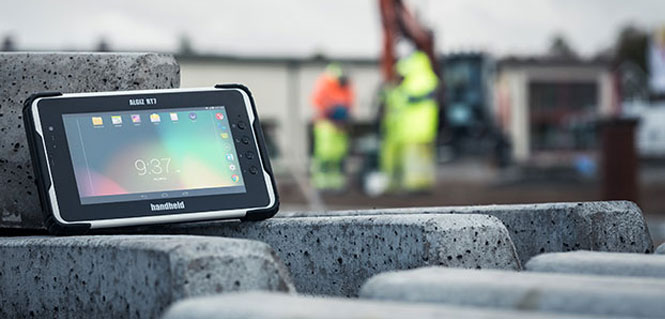
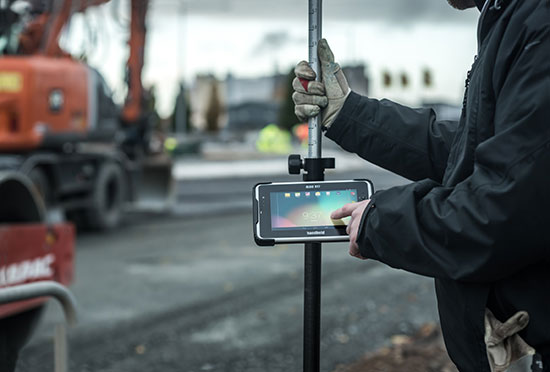
Handheld Group’s new Algiz RT7 tablet is designed for rugged use by mobile workers.
Handheld Group, a manufacturer of rugged mobile computers, today announced the launch of its new Android tablet, the Algiz RT7. The Algiz RT7 is a powerful, lightweight and ergonomic 7-inch tablet designed for reliable performance in demanding environments.
The Algiz RT7, which runs Android 5.1.1 (Lollipop), provides a range of features for mobile workforces, Handheld said. It’s fully rugged, meeting stringent MIL-STD-810G U.S. military standards for protection against drops, vibrations and extreme temperatures, and its IP65 rating means that it’s waterproof as well as fully sealed against sand and dust. Weighing just 650 grams, the Algiz RT7 is designed for mobility.
The Algiz RT7 comes with a built-in accelerometer, gyroscope and e-compass and a stand-alone u-blox EA-7M GPS receiver for navigation, along with built-in Qualcomm IZat location services.
A Qualcomm MSM8916 (Snapdragon) chipset and 1.2 GHz quad-core processor power the tablet, giving it processing speed, ultra-fast connectivity and long battery life. It comes standard with LTE data and voice capabilities as well as 802.11 b/g/n WLAN, BT Class 1 and Class 2, and NFC functionality. It also has dual cameras (8-megapixel rear-facing and 2-megapixel front-facing), as well as dual SIM-card slots.
Designed for the mobile worker, the Algiz RT7 sports a high-brightness 7-inch outdoor-viewable capacitive display that can handle true outdoor challenges. Battery performance is key for any mobile application, and the Algiz RT7 comes with a long-life 3.7V 6000mAh lithium-ion battery. Four programmable buttons allow users to launch and use applications in the field. To enhance data capture, users can choose an optional 2D imager or RFID plus 2D imager.
“Our new Algiz RT7 offers enterprises an exceptional value and is a highly requested product from both our end users and our extensive partner network,” said Jerker Hellström, Handheld Group CEO. “This ultra-rugged tablet delivers best-in-class performance to assist fieldworkers in their daily tasks. The Algiz RT7 is built for tough environments and delivers a streamlined Android experience with power and features appropriate for market demands.”
The Algiz RT7 can be ordered immediately. Shipping will start in December, with volume deliveries starting January 2016.
Two new products from GPSTrackIt.com offer users of their Fleet Manager vehicle tracking, fleet and workforce management system new tools for navigating, routing and communication.
Field Service Manager provides access to Fleet Manager’s route planning and navigation system. New stops can be pushed out to the tablets from dispatch. It enables drivers to add stops to their route on the fly. Push notifications also alert the driver to incoming messages, regardless of which page in the app they are currently viewing.
GPSTrackIt Forms takes the communications component of the FSM to a new level. This tool provides the ability to quickly create forms to capture everything from text to photographs to signatures.
“The new forms tool is really powerful,” said Eddie Bermudez, GPSTrackIt.com’s product development manager. “Part of it’s power is the ease of use. The different field types are created by clicking a button and adding a field label. It’s that easy.”
GPSTrackIt Forms provides unlimited forms. Form data can be captured offline and updated later. The tool provides 24 preset field types, including text, video and a document viewer.
“The forms aren’t just dumb collectors, either,” added Bermudez. “There’s a rules engine that facilitates skip logic and branching. And the forms can have embedded formulas and perform advanced calculations, including formula-based form scoring.”
The form tool can also export data to Excel, PDF, CSV, and JSON formats. “These two tools combined provide drivers and the back office with an amazing array of opportunities to collect data about their customers, as well as their own customer service,” Bermudez said.
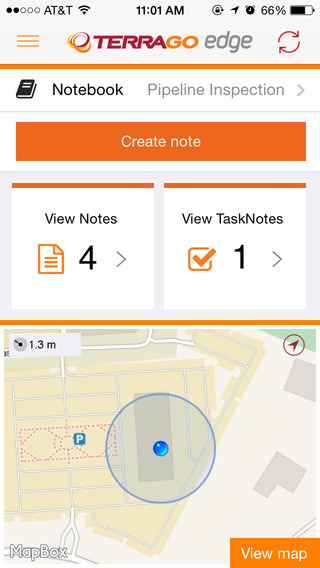
TerraGo Edge version 3.7, now available, includes new intelligent, responsive forms, as well as GPS and GIS enhancements designed to dramatically improve the speed, quality and efficiency of asset inspections, land surveys and any location-based data-collection project.
TerraGo Edge smart forms can accelerate the data-collection process by automating and accelerating user entries while eliminating unnecessary or redundant steps. Smart forms can be customized to meet the workflow requirements of customers in any industry.
New features in version 3.7 include:
Advanced Form Creation with New Smart Forms
Form groups – new form element to organize multiple related fields
Conditional fields – additional fields appear based on user entry of other fields
Barcode and QR code support – instantly scans codes to eliminate manual entry
Calculated fields – calculated result field based on other form field values
Multiple form attachments – ability to attach two or more forms to a single Note
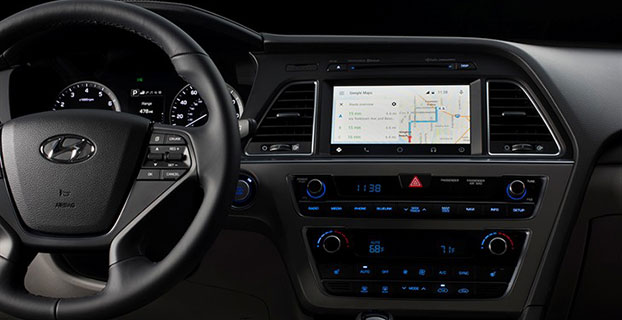
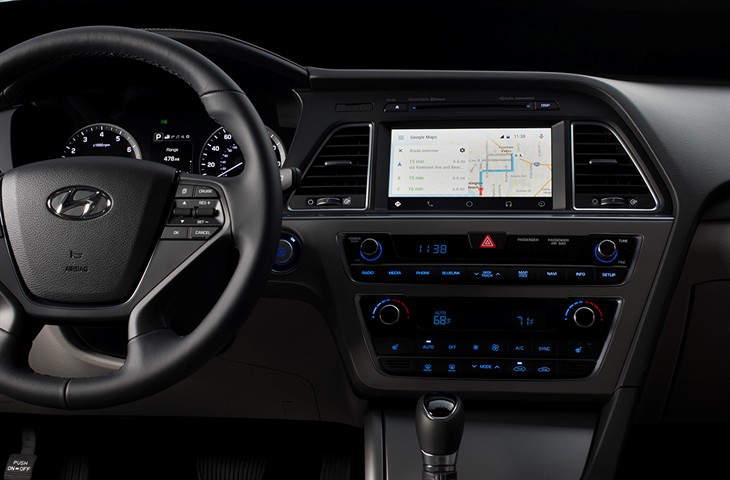
Android Auto in the 2015 Hyundai Sonata. (Photo: Hyundai)
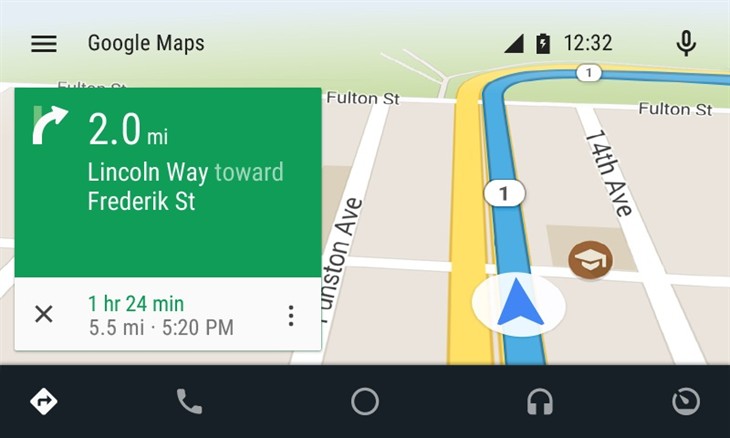
Hyundai has become the first car company to launch Android Auto on production vehicles. Android Auto is premiering on the 2015 Sonata with Navigation at dealerships nationwide, and will later become available on other Hyundai models.
“Android Auto aligns with Hyundai’s core interior design principles of safety, intuitiveness and simplicity,” said Dave Zuchowski, president and CEO, Hyundai Motor America. “We launched this highly anticipated feature on our best-selling Sonata, adding to our promise of value. With the launch of Android Auto, we provide more owners with the experience of cutting-edge technology.”
Android Auto not only brings a high technology experience to Hyundai owners, but also improves safety, Hyundai said. For example, at any given daylight moment across America, approximately 660,000 drivers are using cell phones or manipulating electronic devices while driving, a number that has held steady since 2010. Android Auto helps keep drivers’ eyes and attention on the road by integrating the advanced driving-related functions of the user’s smartphone with the familiar centralized screen, physical controls and microphone of their car.
Furthermore, the smartphone’s screen becomes “locked,” so drivers are not tempted to look down and interact with their phones directly while Android Auto is in use.
Hyundai lists these advantages to Android Auto:
The Google Now card-based experience provides suggested locations and travel times based on the user’s searches, calendar entries and home and office locations, as well as weather information and “now playing” information for music streamed via the phone
App software (navigation, streaming music, etc.) is automatically updated because the apps live on the phone
Natural voice recognition with Google voice actions
Owners can easily bring their personal reminders, suggested destinations, calendar appointments and music preferences with them when they get in their car
Android Auto automatically pairs with the Sonata for phone calls through Bluetooth when connected for the first time via USB
Android Auto has familiar interfaces that are easy to use and have almost no learning curve.
One of the marvels of the decade is crowdsourcing. This month I look at crowdsourcing for indoor-location positioning and report findings on GPS in smartphones that provide reliable earthquake warnings. Google has had some issues with mapping crowdsourcing, leading to the temporary suspension of Map Maker. If Google can’t block inappropriate content, it does give pause.
Next, I look at connected cars. Since this fall, four out of nearly 50 self-driving cars driving throughout California have gotten into accidents. With connected vehicles about to start popping out of dealerships, the legality of hands-free driving is belatedly being examined. And, last, INRIX has released an analytics platform that will use the massive data coming from connected vehicles.
Crowdsourcing Indoors. Crowdsourcing has worked for mapping, but what about for indoor location? Sensewhere thinks it can work. The company’s indoor positioning technology learns Wi-Fi mapping through crowdsourcing. The premise is that it gets better over time, with each user’s device adding to the Sensewhere database. For instance, Sensewhere’s ability to determine the location of an office door from the building’s lobby will improve with each trip down the corridor. Although other systems may be more accurate, Sensewhere requires no infrastructure. The company claims accuracy of 10 meters or better.
Sensewhere’s solution doesn’t require the Wi-Fi mapping labor that companies like Skyhook initially undertook. Skyhook engaged in “wardriving,” a peculiar term defined by Wikipedia as “the act of searching for Wi-Fi wireless networks by a person in a moving vehicle, using a portable computer, smartphone or personal digital assistant (PDA).” The term “wardriving” originated from “wardialing,” popularized by the 1983 film War Games in which the lead character, played by Matthew Broderick, has his computer automatically dial phone numbers in search of modems, perhaps the precursor to robocalling.
Crowdsourcing for Earthquakes? The GPS in smartphones can detect the earliest signs of a quake with at least a magnitude of 7. The challenge is to distinguish an earthquake from the usual bouncing and jarring every cell phone encounters. Scientists at the U.S. Geological Survey found that if 103 phones in a defined vicinity record the same displacement, there is an overwhelming likelihood that a quake is occurring. The amount of forewarning is very small and maybe only a few seconds, but it could be enough time for a surgeon to retract a scalpel or a person to take cover.
Is Automated Hands-Free Driving Legal? Given the batch of vehicles with automated driving about to land this year and next, you’d think that the answer would be a resounding yes. But it isn’t clear. Only one state, New York, requires drivers to have one hand on the wheel at all times. The law was enacted in 1967 without the impetus of connected vehicles. A handful of states have legalized automated driving in certain instances. It would be more practical for the federal government to step in to avoid a patchwork of regulation. The automotive industry and other boosters would argue that if automated driving isn’t specifically prohibited, it is legal. However, “drivers” of automated vehicles could find themselves ticketed by police, who could deem hands-free driving as “reckless driving.”
Tapping Big Data from Connected Vehicles. Where you go in your car and what you do in it will be used by INRIX in its new Insights analytics platform. Over the years, INRIX has transformed itself from a purveyor of traffic data to a sophisticated driving and traffic analytics player. The platform will use data from connected vehicles for urban planning, retail site selection and advertising usage, leveraging real-time GPS from a network of 250 million vehicles and devices. INRIX introduced InsightsTrips, a data-as-a-service application for understanding population movement across a metropolitan area. InsightsVolume provides information on how many vehicles typically pass a location.
Android Mascot Defacing Apple’s Logo. Not even Google is impervious to spam attacks and obscene edits. Google has temporarily disabled its crowdsourcing map editing tool, Map Maker. The tool, especially important in countries that lack detailed maps, allows maps to be updated with new geographical features and roads. In April, Google improved its spam detection system in response to escalating hacking, but the company’s efforts were not enough. One recent misdeed was the renaming of a business located near the White House to “Edwards Snow Den,” a play on Edward Snowden. However, the prank that seemed to precipitate Google taking Map Maker offline was an image of the Android mascot urinating on an Apple logo that appeared on a map.
The Android mascot could have used the crowdsourced app Sit or Squat to find a more appropriate venue. Crowdsourcing knows few boundaries.
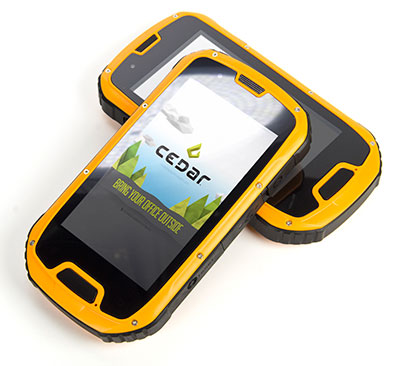
The CT4 and other rugged handhelds by Cedar Tree Technologies will now be available through Juniper Systems.
Juniper Systems is merging its subsidiary company, Cedar Tree Technologies, into Juniper Systems. The move will allow customers to purchase Cedar’s Android-operated rugged handhelds directly from Juniper Systems.
Juniper Systems launched Cedar Tree Technologies as a rugged handheld company in August 2014.
“With a reputation for top-of-the-line, ultra-rugged handheld computers, Juniper Systems aimed to expand its products to meet the needs of customers who may not need the outstanding level of ruggedness or support that Juniper handhelds provide. And that’s how Cedar Tree Technologies began. Cedar handhelds lie somewhere between consumer devices and Juniper Systems’ ultra-rugged handhelds, providing a mesh of both ruggedness and affordability,” said a statement from the company.
Cedar handhelds run on the Android operating system, offering access to thousands of business-ready apps and Google services via the Google Play Store. This provides users with an off-the-shelf product, eliminating the need to download third-party data collection software. Juniper Systems has published a blog post that outlines the differences between Cedar and Juniper handhelds.
The Cedar product line that Juniper Systems will now be carrying includes three new handheld devices:
CT7 Rugged Tablet. Featuring a large, 7-inch display, the CT7 tablet is IP67 waterproof and dustproof, and is priced at $899 USD.
CT4 Rugged Handheld. The CT4 handheld is a more compact device than the CT7. Featuring a 4.3-inch display and an IP68 waterproof and dustproof rating, it is priced at $489.
CMP1 Miniphone. The CMP1 Miniphone is rated IP65 (dustproof and resistant to water), and is ideal for swapping out a regular smartphone for outdoor excursions, for kids, or for use as an emergency phone. The CMP1 sells for $124.
The CT4 and other rugged handhelds by Cedar Tree Technologies will now be available through Juniper Systems.
Juniper Systems is merging its subsidiary company, Cedar Tree Technologies, into Juniper Systems. The move will allow customers to purchase Cedar’s Android-operated rugged handhelds directly from Juniper Systems.
Juniper Systems launched Cedar Tree Technologies as a rugged handheld company in August 2014.
“With a reputation for top-of-the-line, ultra-rugged handheld computers, Juniper Systems aimed to expand its products to meet the needs of customers who may not need the outstanding level of ruggedness or support that Juniper handhelds provide. And that’s how Cedar Tree Technologies began. Cedar handhelds lie somewhere between consumer devices and Juniper Systems’ ultra-rugged handhelds, providing a mesh of both ruggedness and affordability,” said a statement from the company.
Cedar handhelds run on the Android operating system, offering access to thousands of business-ready apps and Google services via the Google Play Store. This provides users with an off-the-shelf product, eliminating the need to download third-party data collection software. Juniper Systems has published a blog post that outlines the differences between Cedar and Juniper handhelds.
The Cedar product line that Juniper Systems will now be carrying includes three new handheld devices:
CT7 Rugged Tablet. Featuring a large, 7-inch display, the CT7 tablet is IP67 waterproof and dustproof, and is priced at $899 USD.
CT4 Rugged Handheld. The CT4 handheld is a more compact device than the CT7. Featuring a 4.3-inch display and an IP68 waterproof and dustproof rating, it is priced at $489.
CMP1 Miniphone. The CMP1 Miniphone is rated IP65 (dustproof and resistant to water), and is ideal for swapping out a regular smartphone for outdoor excursions, for kids, or for use as an emergency phone. The CMP1 sells for $124.
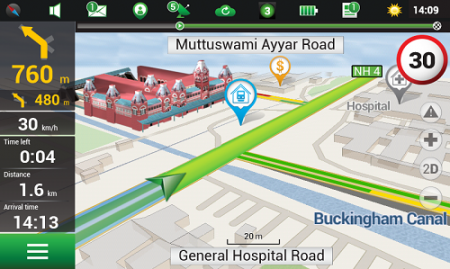
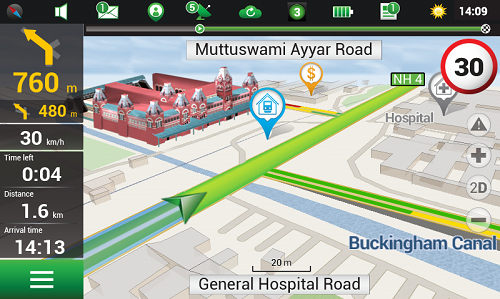
Navitel’s navigation map of India is now available for purchase, for use with the Navitel Navigator GPS & Maps app on Google Play. Navitel Navigator is a precise offline GPS navigation with free geosocial services and detailed maps of 59 countries, with 20 million downloads worldwide.
The map of India contains 2,092,013 km of road graph, 594 627 cities, towns, and other settlements, as well as 5,294,344 POI. Coupled with the address search in more than 6 000 residential and industrial areas of settlements, this map includes the detailed housing system data with due account for the number of floors, detailed road networks with all streets, roads, and indicated traffic direction, road interchanges, roundabouts, and other important road information.
The map contains 149 3D points of interest, including:
Gujarat – ISCON Mall, Satyam Centre, the Metropole Hotel, Kaizen Hospital.
Karnataka – Bangalore Palace, Software Technology Park of India, Jamia Masjid, Hotel Savannah Sarovar Premiere, Jawahar Bal Bhawan park.
TamilNadu – Chennai International Airport, Chennai Railway Station, Manorama Hotel, Lemon Tree Hotel.
Haryana – Vardhman Star Mall, YMCA University of Science and Technology, Mini Secretariat, Sarvodaya Hospital, Gurgaon Centre.
Chandigarh – Panjab University, Chandigarh College of Engineering & Technology, Haryana and Punjab Secretariat, Hotel Royal Plaza.
Details for Map of India, Q1 2015:
2,092,013 km of road graph;
594,627 settlements on the map;
6,614 settlements allowing the address search;
8,217,526 addresses;
149 3D points of interest;
5,294,344
Android OS device users can purchase a license key to the new product at Google Play and from the program menu by selecting “My Navitel” > “Purchase maps”.
The Q1 2015 map of India is compatible only with 9.1.0.0 and later versions of Navitel Navigator.
Agency9, a provider of online 3D visualization, is extending its 3DMaps WebGL support to iOS and Android devices. Large, highly detailed 3D city models can now be streamed to web browsers on both tablets and smartphones with both high performance and visual quality, the company said.
Mobile support substantially improves reach in GIS and planning applications, Agency9 said. Using WebGL and HTML5 improves usability with plugin-free viewing of 3D directly in a web browser, eliminating the need to download and install dedicated apps.
Most WebGL 3D solutions on the market are pure “model viewers,” limited to show a CAD model and its closest surroundings or simple untextured LOD 1,2 models. Agency9 3DMaps is capable of smoothly visualizing large scale terrain and detailed textured building models on a national or global basis. For example, huge photorealistic 3D models created with tools such as Smart3DCapture by Acute3D, recently acquired by Bentley Systems, can now be published online using WebGL without limitation in size or resolution, the company said.
Agency9 3DMaps supports common 3D scenery in common GIS formats (including ArcGIS and CityGML) and is also validated with output from tools as Smart3DCapture, PhotoScan from AgiSoft, and StreetFactory from Airbus Defence and Space, as well as LiDAR/imagery tools from TerraSolid.
The Agency9 3DMaps developer platform enables the customization of portals as well as integration into existing applications to leverage ubiquitous support for streaming large 3D data to users across all formats including tablet, mobile, Windows and MacOS.
Rendering substantial 3D data sets in the browser using 3DMaps with advanced gaming effects such as ambient occlusion, real time sun and shadows, and god rays ensures the finest realism and user experience, the company said. 3DMaps also supports integration of spatial data and databases for intelligent models and visualisation of statistics. Visit the 3DMaps developer portal at http://developer.agency9.com.
Mobile support will also be available in Agency9 CityPlanner, the cloud service for creating and sharing 3D project information and citizen dialogues in urban development. Smart Cities can more easily reach citizens and stakeholders on the web with interactive visualisation of projects in 3D. An example of a large project model created in ESRI CityEngine and visualized in the huge photorealistic 3D scene above.
Google has reaffirmed its commitment to Project Tango, moving it from the Advanced Technology and Projects Group (ATAP) to a new home inside the company itself, reports Digital Trends.
Project Tango, unveiled in 2014, aims to make it possible to create a 3D model of the space around a smartphone. For instance, a user can map an area, such as a home, by walking around with the phone.
ATAP is Google’s mobile-focused project development laboratory, and shifting Tango from there to a new base suggests Google is happy with the way the project is progressing and ready to take it to the next level, Digital Trends reports.
Google has been collaborating with universities, research labs, and industrial partners in nine countries to concentrate the past 10 years of research in robotics and computer vision into a mobile phone.
Project Tango devices contain customized hardware and software designed to track the full 3D motion of the device, while simultaneously creating a map of the environment. These sensors allow the device to make over a quarter million 3D measurements every second, updating its position and orientation in real-time, combining that data into a single 3D model of the space around you.
Early prototypes run Android and include development APIs to provide position, orientation, and depth data to standard Android applications written in Java, C/C++, as well as the Unity Game Engine.