Tag: Android

  • Putting the (ultra-low) Power in GeoFence

    Host-Offload GNSS Positioning

    By Miguel Torroja, Steve Malkos, and Christophe Verne

    Users of smartphones, tablets, and other devices expect position with the highest level of accuracy, always available, with the least amount of power consumed. One recent improvement fulfilling this demand involves operating-system services for location on smartphones, and the evolution towards lower power solutions.

    “Please connect to a charger — The battery is getting low: less than 15 percent remaining.”

    Handsets are battery-supplied devices, and a user’s tolerance for features is driven by battery consumption. There are many examples of technologies where users do not run certain hardware or features because it will consume the battery and make the phone useless within a short period of time.

    The application processor (AP) of a handset device is very powerful, and is the part that consumes most of the battery life. Today’s smartphone multicore application processor is faster than many desktop computers that are just a few years old. Whatever the application, when it uses the AP, it can draw up to hundreds of milliamperes (mAs).

    For the last few years, the trend for GNSS has been host-based positioning. Host-based designs have less logic on the GNSS integrated circuit (IC) and employ the host AP for a portion of the positioning computation. This strategy has three advantages:

    • Shares memory and code resources with the application processor.
    • Reduces the cost of the dedicated GNSS hardware.
    • Sharing the processor makes sense since it is already running.

    Traditionally, when the GNSS solution was running, a navigation application that utilized the AP was also running.

    However, when we only want to compute GNSS positions in the background, and we do not need a third-party application running on the AP, a host-based IC architecture is not the optimal solution with regard to system power consumption. This article explains some of the technologies used to compute a GNSS position using an ultra-low power (ULP) hybrid solution that combines the classic host-based GNSS architecture with a host-offload architecture that minimizes the use of the AP.

    We discuss here two applications that benefit from a host-offload architecture: geofencing and position batching.

    We will review the requirements for a platform to support a new hybrid GNSS positioning solution. Different host-offload technologies for geofence, such as GNSS, Wi-Fi, and Cell-ID, will be compared. Broadcom’s ultralow-power host-offload GNSS solution supports any operating system. We focus here on Android’s operating system because it is the most open OS.

    Always-on Applications

    Geofencing is an application that sends reports or triggers alarms when a predefined area is crossed. For example, users can be alerted to discounts with e-coupons when walking through a mall, or to “don’t forget the milk” — users can set their own reminder notifications based off of location; also, social networking. One example of location-based reminders is through Google Keep, which uses Android’s Geofence APIs on platforms that support hardware geofencing; this application will automatically take advantage of the hardware geofence solution.

    Geofencing applications run in the background for long periods of time, and their main task is to compute positions (fixes) without the need of assistance from other applications. An ultra-low-power GNSS position solution, or always-on positioning solution, is desirable for these scenarios. Typical applications require notifications when entering or exiting a geofence area, or require periodic reporting of user positions relative to the fence.

    Geofencing is not something new. API support has been provided in mobile OS for many years, but only now can it be used without draining the battery, thanks to this new host-offload architecture.

    Figure 1 shows a circular geofence boundary and an alarm. In that example, the alarm was triggered when entering the fence.
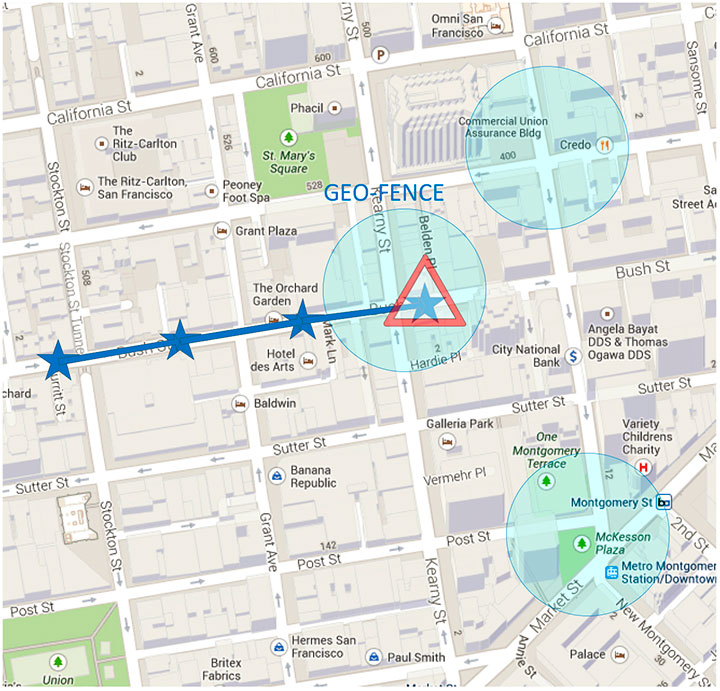
    Figure 1. Alarm when the vehicle enters a geofence area.
    Figure 1. Alarm when the vehicle enters a geofence area.

    Breadcrumbing or position batching pertains to storing of positions, referred to as crumbs, which are accumulated for a certain amount of time and then pushed all at once to the application. Examples would be fleet or asset tracking applications, or people that wants to track their position while they are running.

    Currently, Android does not support breadcrumbing as a native feature. There is some ongoing work, and APIs are being defined.

    GNSS Positioning Models

    Before smartphones, the dominant GNSS hardware architecture employed a system-on-chip solution. The position/velocity/time (PVT) comes directly from the hardware, and all the computations are done in the GNSS IC.

    On-Chip Positioning requires two things: a powerful-enough central processing unit (CPU) and lots of memory. The increase in CPU and memory performance are not free; they translate directly into more power and higher manufacturing costs.

    The RF block in Figure 2 is intentionally drawn with a similar size to the CPU and memory, to emphasize the need for higher resources for a complete on-chip solution.
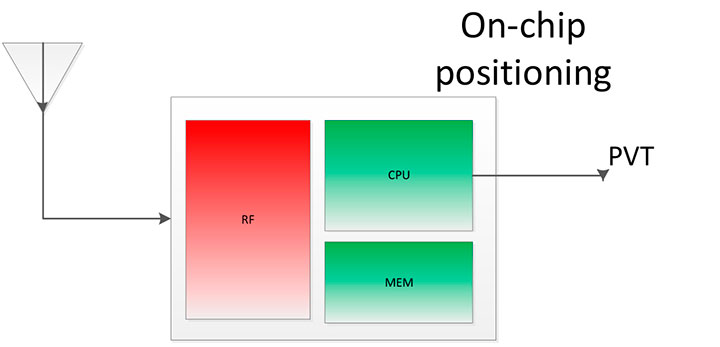
    Figure 2. On-chip solution.
    Figure 2. On-chip solution.

    Host-Based Solution. GNSS positioning requires dedicated hardware, complex software, and protocols. This complexity led GNSS providers to move parts of the software out of the IC to the AP.

    Using a mobile phone’s AP for position computation is one method of reducing the CPU and memory power footprint from the GNSS IC. At the same time, it also increases the power consumed by the platform needed to compute GNSS position, since part of the computation is not performed on the host-based IC. APs may consume approximately 100 mA just to be operational.

    Figure 3 shows a typical configuration with dedicated GNSS hardware and a generic AP. In host-based mode, both the AP and the GNSS IC run in parallel when computing positions. The AP controls the GNSS hardware.
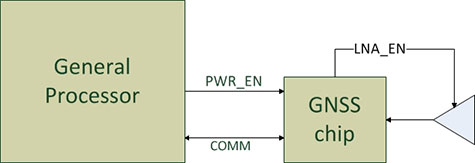
    Figure 3. I/O connections in on-host positioning.
    Figure 3. I/O connections in on-host positioning.

    With this type of shared architecture, shown in Figure 4, the CPU and the memory on the GNSS IC are reduced, shrinking the size of the chip and reducing power consumed by the chip. In Figure 4 we see that the AP is communicating with the dedicated hardware, and the final PVT is computed by the AP. This solution fits well in many applications, such as navigation, where the AP has to run a mapping application at the same time.
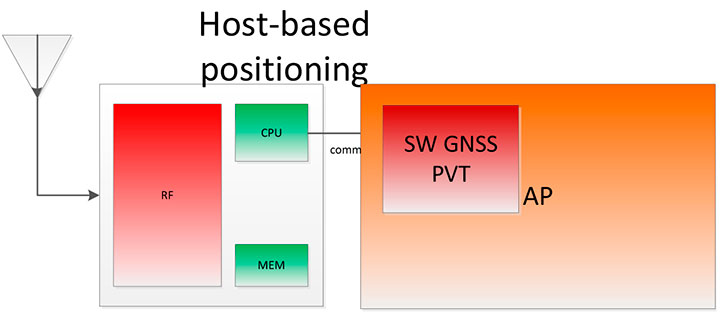
    Figure 4. Host-based solution.
    Figure 4. Host-based solution.

    Hybrid Positioning. For geofencing, we need a hybrid model, one which keeps GNSS IC complexity similar to the host-based architecture, but also offloads some of the host-based positioning so that the host can go to sleep.

    In Broadcom’s hybrid mode, the AP does not need to run when GNSS positions are computed. Broadcom’s hybrid IC does not invoke the host AP often, and thus achieves an even lower power footprint. The CPU on the GNSS IC used for computing position is a dedicated one. It needs to be carefully chosen because it has to be powerful enough to compute positions and be as power efficient as possible. All this is done while keeping the GNSS IC area size in mind, to control cost.

    Detailed analysis and steps were considered to ascertain the minimum requirements for the CPU and other resources to best accomplish the on-chip positioning task.

    Other considerations: the GNSS IC must be powered even when the AP is suspended, and the GNSS IC must be capable of waking up the AP. Figure 5 shows a possible implementation using a dedicated I/O signal controlled by the IC to wake up the host AP.
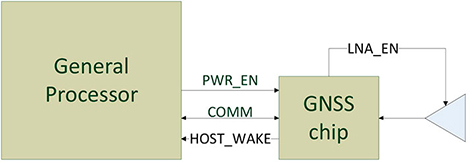
    Figure 5. I/O connections in hybrid positioning.
    Figure 5. I/O connections in hybrid positioning.

    With this architecture, the host AP will still be needed to provide some assistance data to the GNSS IC. The assistance provided allows the GNSS IC to not invoke the host AP often and thus achieve an even lower power footprint.

    Geofencing Methods

    Certain OS application APIs have been supporting geofencing for many years. Currently, we can find geofencing APIs in most of the mobile OSs in the market.

    There are four main types of geofencing: GNSS software geofencing, GNSS hardware geofencing, network software geofencing, and network hardware geofencing (Table 1).
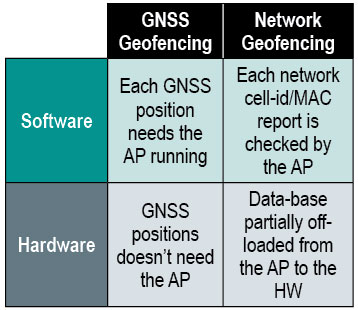
    Table 1. Geofencing methods.
    Table 1. Geofencing methods.

    GNSS Hardware Geofencing. In this method, the one described in detail in this article, the OS initiates a request and offloads the areas of interest to the hardware. After that, the AP can go to sleep and the hardware is responsible for computing positions and checking the areas of interest. This method basically relies on GNSS hardware to compute positions and check the programmed fences.

    GNSS Software Geofencing. Here, the OS initiates regular fixes to a host-based GNSS IC design. Then it invokes both the AP and the GNSS IC at the same time to check against the defined fence areas.

    Network Geofencing. In this method, the OS requests network IDs from the hardware (that is, baseband modem Cell-ID and Wi-Fi access points). The OS uses different positioning technologies to compute position. This usually requires a connection to a server to retrieve location information about the different IDs. The position is used to check the geofences.

    In network hardware geofencing, a set of network IDs is offloaded from the OS to the network hardware ICs. The hardware can poll for these IDs, and wake up the host when found.

    Network versus GNSS Geofencing

    A good geofencing solution combines both network and GNSS methods because each solution benefits from each other.

    GNSS positioning solutions compute positions in open-sky environments with accuracy to a few meters and have worldwide coverage. However, they cannot work in deep indoor spaces.

    Network geofencing using cell IDs is quite inaccurate, but works very well indoors. Network geofencing using a Wi-Fi access point provides reasonable accuracy, but location of the access points is not always known and it does not have full coverage.

    Geofencing in Android 4.3. The API for applications supports geofencing. Starting from the first version of Android, the application just initiates a proximity alarm and will get an event when its boundaries are crossed. The OS is responsible for notifying the application when such an event occurs, and can use any technologies it sees fit.

    The API that applications use is very simple. The monitoring is handled by the OS and is hidden to the application (for example, technologies, periodicity of checks, and accuracies).

    Software Geofence in Android. Software geofencing has been the default method until recently, as there was no native hardware support. In this mode, the host-based GNSS positioning engine is started like any other position request. The Android framework is the one dealing with the monitoring of the geofences, and therefore, the AP must run continuously to handle periodic position checks. That means the software-geofencing logic is mainly in the framework layer of Android (see basic layers diagram shown in Figure 6).
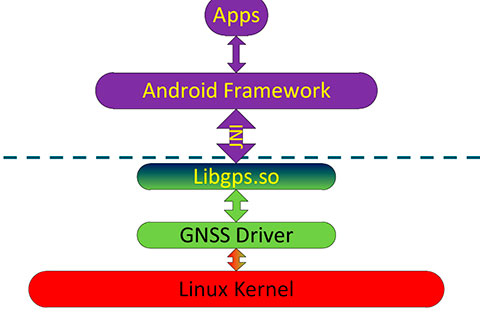
    Figure 6. Android framework.
    Figure 6. Android framework.

    More recent versions of Android dropped the support for software-based geofencing in favor of a host-based GNSS system, likely because of the big impact on the battery. Broadcom developed a low-power GNSS hardware solution for geofencing.

    Hardware Geofence in Android. Starting from Android 4.3, a new interface is available to use hardware geofencing. This interface is not visible to the application, and it is only used as a low-level interface. To support the new hardware-geofence interface, the native driver only has to register to a new GNSS interface defined in the native hardware abstraction layer (HAL) of Android.

    There are other protocols known to support geofencing. Table 2 provides a short list.
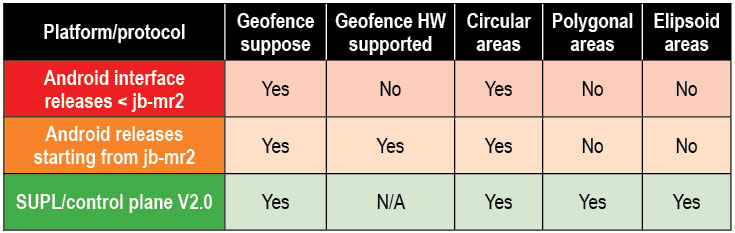
    Table 2. Geofencing support on different platforms.
    Table 2. Geofencing support on different platforms.

    Broadcom Hybrid Positioning

    Android defines interfaces to the hardware, referred to as the HAL.

    GNSS Host Software. GNSS providers need to comply to the HAL interface, which is at the Java native interface (JNI) level. Below the JNI lies the GNSS host software (Figure 7).
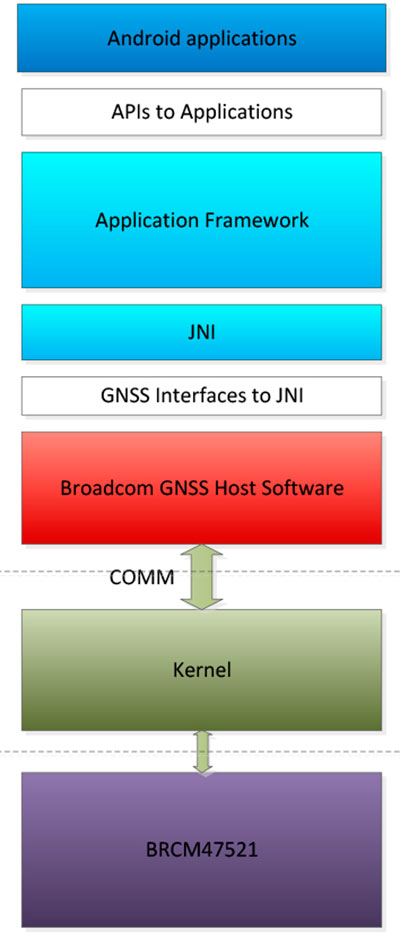
    Figure 7. Android detailed framework/native layers.
    Figure 7. Android detailed framework/native layers.

    For the host-based solution, the GNSS host software handles most of the heavy computing.

    For the hybrid solution, the GNSS host software does some of the heavy computing, but positions are computed inside the GNSS IC.

    To support this new hybrid solution, two main changes are required compared to the usual host-based solution, as described below.

    First, the hybrid GNSS IC must be autonomous while the host AP is sleeping. This implies that some power domains are maintained when the GNSS is in use. This typically means at least one of the outputs of the power management unit (PMU) should be dedicated to the GNSS only (Figure 8).
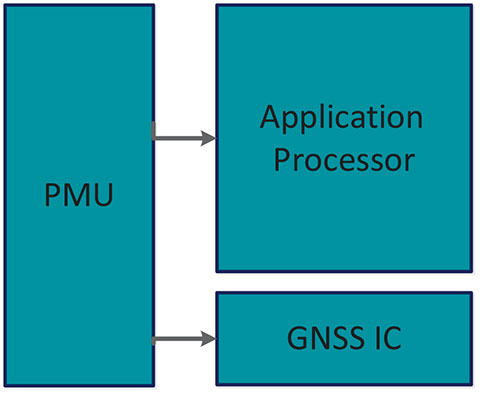
    Figure 8. Power domains.
    Figure 8. Power domains.

    Second, the GNSS IC must be able to wake up the host AP so as to send geofence notifications, or to request assistance data. This is usually done through a dedicated pin.

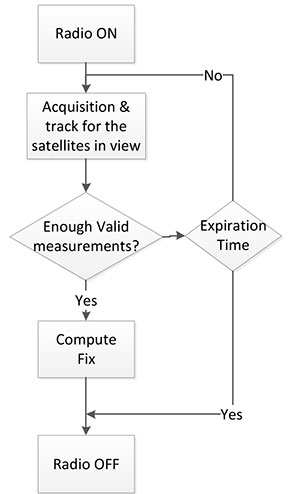
    Acquisition and Sleep Period. Most of the power in the GNSS IC is used by the radio and analog part. To reduce power, this part is switched on only during acquisition. As soon as enough measurements are observed, the radio part is switched off while the digital part computes a fix.

    After each computed position, the GNSS IC can go into a deep power-saving mode until the next acquisition. The distance to the closest fence in conjunction with the user speed is used to determine when to compute the next position (Figure 9):
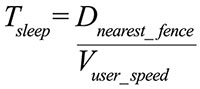
    M-E1

    Figure 9. Start fix decision logic.
    Figure 9. Start fix decision logic.

    Once the GNSS IC starts computing positions, the AP can go into sleep mode (Figure 10). Total power per position computed is reduced, and the time between fixes is no longer constant, as shown in Figure 11.
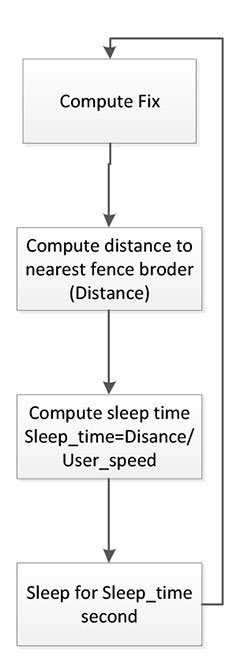
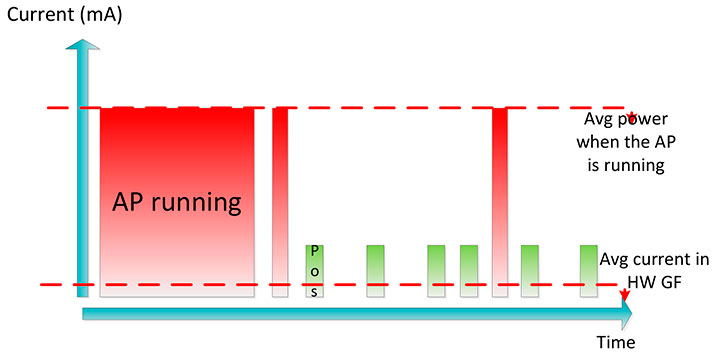
    Figure 10. Sleep time between fixes.
    Figure 10. Sleep time between fixes.
    Figure 11. Duty cycling.
    Figure 11. Duty cycling.

    In Figure 12, the lower square-shaped pattern corresponds to a position computation from the hardware GNSS IC. Once we have an alarm, the host has to be woken up and we can see the impact in power in the big peaks after a position is computed.
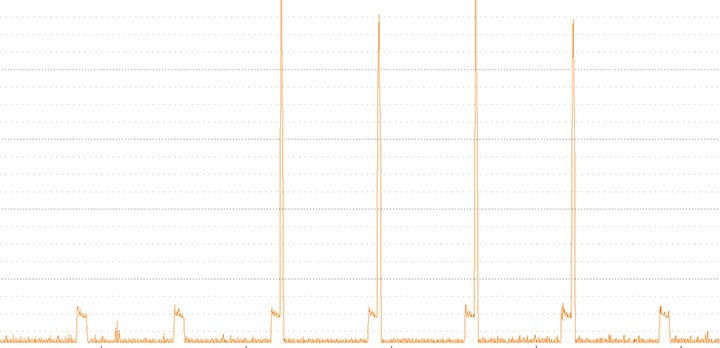
    Figure 12. Power graph.
    Figure 12. Power graph.

    Alarm Triggering

    When a geofence area is crossed, the GNSS IC needs to wake up the AP. This is achieved using a dedicated interrupt pin. After asserting it, an alarm and geofence status is sent to the AP.
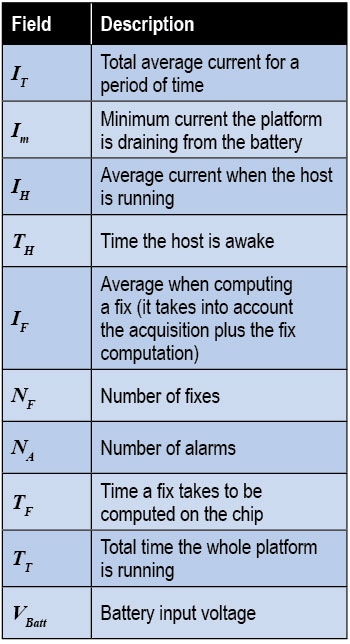
    M-ChartPower Consumption. We calculate the total average current by splitting it into three components, as shown in the following formula:
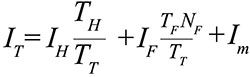
    M-E2

    Some of these parameters are set by the host: for example, how often the fix should be computed. The extra current drained by the GNSS IC is the one defined by
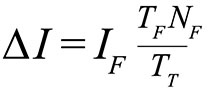
    M-E3

    ∆I is the change in current drain when computing positions.

    We can also express this formula based on the average number of position attempts:
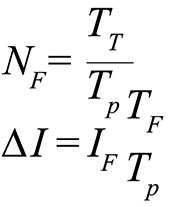
    M-E4

    where Tp is the average time between fixes (the time the GNSS IC stays in sleep).

    Table 3 illustrates some theoretical I current savings with respect to Tp.

    Conclusion

    As APs become faster and faster, their power consumption goes up. A novel hybrid GNSS receiver has been presented, which offloads some of the host-based processing into the GNSS hardware, offering ultra-low system power consumption versus the traditional methods. The new hybrid positioning solution is a good approach for always-on applications that need to have location information always available, without requiring the host to be running, as is the case with geofencing and breadcrumbing.

    References

    We would like to thank Jason Goldberg, Frank van Diggelen, and Manuel del Castillo, all of Broadcom, who reviewed this article and spent many hours with us discussing the topics point by point.


    Miguel Torroja is a principal software developer at Broadcom. He has an M.Sc. in electrical  engineering from Ramon Llull University, Barcelona. Since 2011, he has been working on the design and development of algorithms for optimizing power consumption in GNSS host-offload solutions.

    Steve Malkos is a senior program manager at Broadcom.  He has a B.S. in computer science from Purdue University.  He has been active in the development of A-GNSS technologies such as hybrid location services, long-term predicted orbits (LTO), Broadcom’s worldwide reference network (WWRN), and secure user-plane location (SUPL). He has five patents issued and 16 pending.

    Christophe Verne is a manager of software engineering at Broadcom. He has an M.S. in electrical engineering from Ecole Centrale, Paris. He has been involved in the development of GNSS and A-GNSS technologies at EADS, Sagem, Global Locate, and Broadcom, where he has been working on low-power host-offload positioning.
  • Every Computer a Mobile Computer

    Every Computer a Mobile Computer

    Fleming-opener
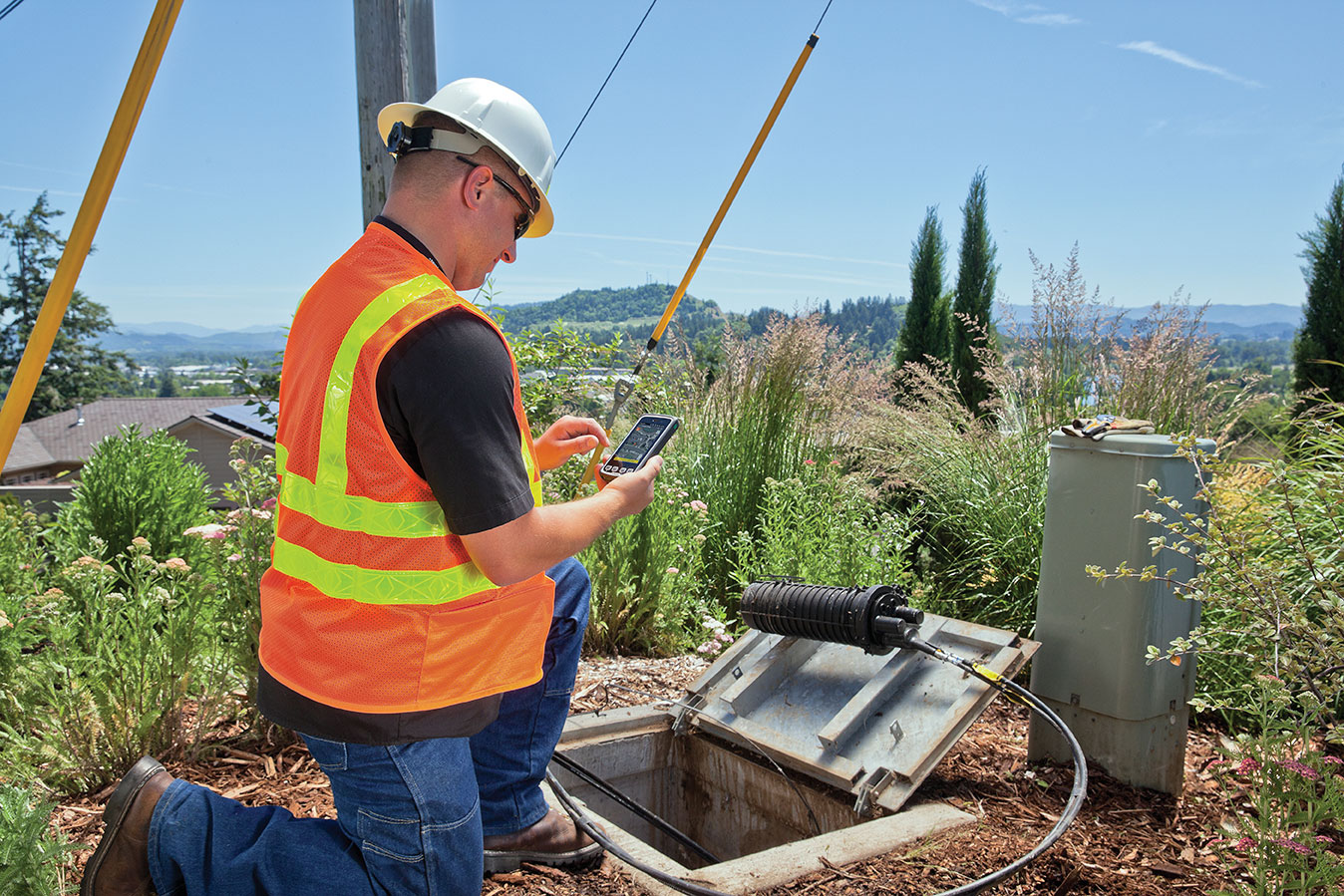
    Photo: Lee Ann Fleming

    Precise Location Moves with the Demands of Business

    Organizations across business and public sectors, and including the military, now expect a high degree and broad range of functionality in the palms of workers’ hands, wherever those workers may go, in any kind of hazardous, chaotic, demanding environment. Requirements for location accuracy rise consistently across the board. In the future — in other words, now — developers will be asked to write mobile software applications first, and desktop applications second.

    By Lee Ann Fleming

    It seems so long ago. In 1972, Hewlett-Packard engineers developed the HP-35, a scientific calculator that many claim was the world’s first handheld computer. Today, a calculator represents only a tiny fraction of the functionality the business world expects from any one of dozens of models of powerful handheld computers that travel in the billions to job sites around the globe.

    In 1989, Frito-Lay introduced a brick-sized handheld computer for real-time inventory management on its factory floors. The initiative helped make the company the most profitable segment of its parent Pepsico’s empire. By 1999 the company was also supplying handheld computers to its sales staff and claiming a $4 million annual return-on-investment from improved billing efficiencies alone.

    So, the idea of businesses using handheld computers in the field is not new by any means.

    What is new this decade is “a massive shift in the way we use the technology,” according to David Krebs, president of VDC Research. “Six years ago, the introduction of the Apple iPhone was a defining moment for the mobile computing industry. It introduced a more intuitive user interface and a multi-touch capacitive interface that was a complete revelation.”

    Fleming-capacitive-gloves
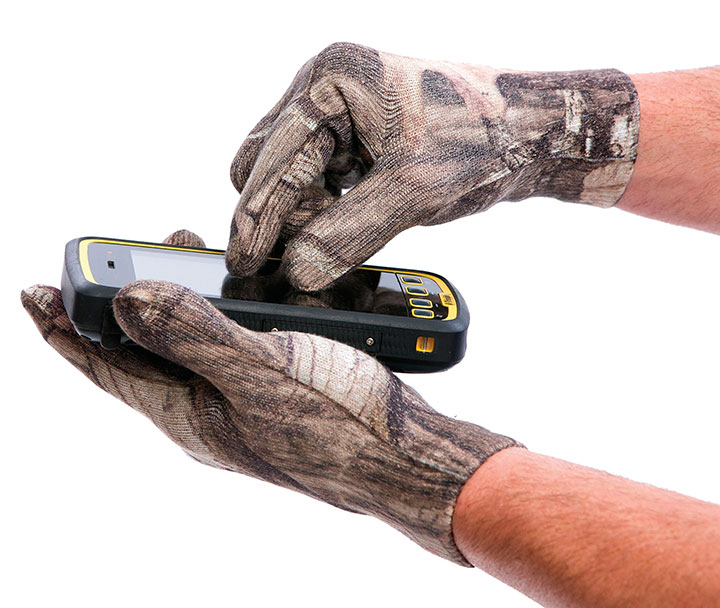
    Capacitive or Touchscreen gloves made with conductive material enable the wearer’s natural electric capacitance to operate capacitive touchscreens without removing protective work gloves. Photo: Lee Ann Fleming

    The iPhone changed forever the level of expectation of performance and usability for such devices. Widespread consumer adoption of smartphones and tablets has led workers to expect more from their work equipment, and if they don’t find it, they bring their own devices into the mix — and dare their employers to say no. Whether they are Apple users or Android or Microsoft Windows, the original innovation introduced by Steve Jobs has so altered the landscape of what is acceptable in a handheld computer in terms of ease of use that the world will never look back.

    Today experts estimate that a full third of the global workplace is “mobile” — that’s more than a billion people daily using small handheld computers, whether tablets or notebooks or smartphones, for work.

    Data shows that the average smartphone user reaches for his or her device 150 times per day — and only 22 of those occasions are to make or take a phone call. We now rely on smartphones as multi-function devices to manage our calendars, create memos, check email, find addresses, take and share photographs, monitor children, even store electronic boarding passes for airplane flights. Tablet computers allow us to stream videos, fill in forms, write documents, and view dashboards of information. The handheld form factors’ only limitations seem to be the lack of sufficient miniaturization to fit everything in, and the delicacy of many models that can be destroyed by a single drop onto a hard surface.

    As the cost of ownership has plummeted and the quality of features and functionality has improved, mobile computing has become the inevitable rule, no longer the notable exception. Businesses need mobile computers to remain competitive, just as they needed the new telephone device 100 years ago.

    BYOD Forces Enterprise’s Hand

    The phenomenon of “bring your own device” (BYOD) finds individual workers integrating their personal handhelds, both smartphones and tablets, into their daily workflow. Businesses recognize that employees are more connected, more efficient, and more invested in their work when they are allowed to use their own equipment. Consequently, the problem of data security in an environment where workers walk around 24/7 with mobile devices containing sensitive intellectual property has grown exponentially. The trade-off of higher productivity means companies are looking for security solutions. Meanwhile, developers rush to provide new applications for business, feeding more deployment by enterprise organizations in an ever-widening circle of inevitability.

    Broadband and voice carriers likewise hasten to bundle their services in handheld form factors with 3G or better data capability, setting up whole divisions to package, upgrade, manage, and monitor enterprise mobile deployments. Third-party device management has also increased acceptance in the wider enterprise world, where IT departments have been unwilling to take on the security risks internally.

    Fleming-south-pole
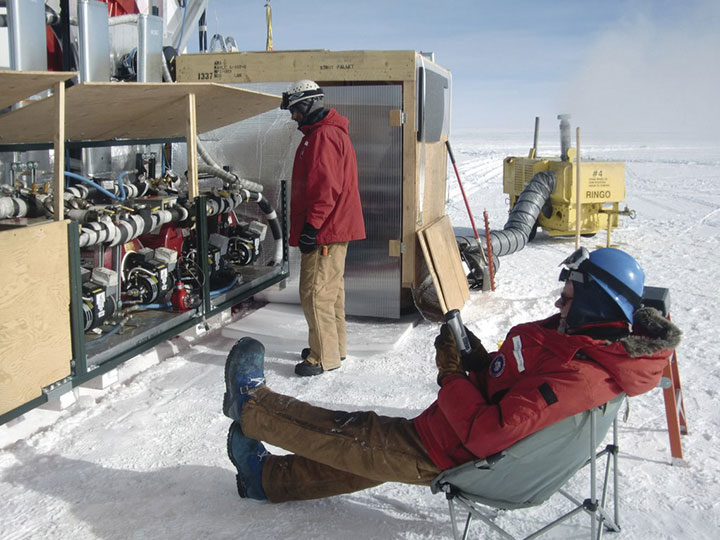
    Ice Cube Project at the South Pole records the interactions of a nearly massless sub-atomic particle called the neutrino (photo courtesy University of Wisconsin).

    GPS Data Acquisition

    Some handheld configurations now include high-accuracy GPS data acquisition and other specialized functions, either as integrated features or through add-on accessories. Functionality is also being added through apps such as bar-code scanning imagery programs that can bring a crucial business process into a single device. Geotagged high-resolution photographs that formerly might have been considered out of reach because of the cost of a special device can now routinely be added to workflows via handhelds’ built-in features.

    For examples of high-accuracy GPS use in handheld computers, see “In the Field” sidebar below.

    For design considerations affecting GPS integration into rugged handheld computers, see “GPS Product Design Challenges” sidebar below.

    For an explanation of what makes a handheld rugged, see “Mobile = Vulnerable” sidebar below.

    Functionality and Accessories

    Mobile computing has barely tapped the springs of creativity when it comes to add-ons and new integrated features that will arrive over the next few years.

    Manufacturers recognize that accessories make a big difference to enterprise customers and are bringing out more ways to ease adoption:

    • Smart office docks that allow for connections to larger monitors for presentations to co-workers,
    • capacitive gloves that protect workers’ hands while still enabling manipulation of a display screen outdoors,
    • mounts and connective docks for in-vehicle use.

    These have all aided workers’ efficiency and productivity and increased the likelihood of mobile computing adoption.

    Not all is roses. For enterprise, connective office and vehicle docks provide tremendous benefit and can make the difference to successful deployment, but they can also present problems for full integration and customer service.

    The direct monitoring of environmental conditions or the condition of key components (pipes, pumps, valves and so on), often in relatively inaccessible locations, is commonplace now. Ruggedized handheld devices grant technicians access to the full repository of historical and technical information when they conduct manual inspections or perform repairs. As the workforce demographic shifts from baby-boomer employees who have years of institutional (and location) memory in their heads to younger employees who are comfortable with handheld technology providing background knowledge and tutorials in the field, ruggedized computers with large memory and Internet connectivity become more and more valuable.

    Gaps and Third-Party Enablers

    While third-party device management, along with increased availability of specialized functionality, more accessories for ease of use, and choices in operating systems are clearly moving enterprise equipment into the mobile realm, major functionality and application gaps remain. Innovative companies are studying the business-to-business marketplace looking for ways to make adoption of mobile even more business-friendly.

    Most of the large third-party organizations such as carriers do not have the intimate market knowledge of other industry verticals to ensure they provide truly best-in-class service. Often the equipment they push into their enterprise clients’ hands is an OEM partner’s that may or may not be ideal for the actual vertical.

    Meanwhile, deployments designed around a specialized software solution or by a contract system integrator might be so specific as to be non-upgradable as operating systems (OS) and equipment innovate. Enterprise still feels itself groping in the dark in many areas when it comes to outsourcing mobile computing needs.

    Operating Systems

    One of the biggest concerns in linking mobile workers to the enterprise’s universe of data and communications is today’s plethora of operating systems that allow developers and IT leadership to connect legacy and proprietary programs into their mobile deployments. The most common OS options in the handheld world are Apple iOS, Android, and Microsoft Embedded Handheld. While a few others jockey for position, most major manufacturers’ field products use at least one, and often two, of the top three. Software development kits (SDKs) and customer service are provided so internal IT departments can easily implement applications.

    Thirty years ago, the Microsoft platform owned the enterprise market and Apple was fervently embraced by so-called anti-corporate creative types. Those days might live on in some branding memory, but the reality is that Apple has entered mainstream business in the hands of its iPhone and iPad devotees. In contrast, enterprise IT and developers are justifiably upset at Microsoft’s lack of a clear mobile platform strategy. Meanwhile, rushing from behind to take top spot in mobile computing OS deployment, Google’s Android made a smart decision to employ open-source Linux-based programming as its base, giving it a decided advantage in the mobile ecosystem. The first Android cellular phone was sold in 2008; more than 750 million new Android activations were recorded by the end of 2012.

    It’s the rare end-user who will argue over which OS platform powers the software on their company-provided mobile device, except when they want to use a specific consumer-oriented app. But they do care, and care deeply, about how intuitive they find the user interface on their computer equipment, mobile or not.

    Do their applications run smoothly? They’d better, or enterprise faces the problem of expensive deployments with workers refusing to use the solution. Over the past couple of decades, so many enterprise IT investments have failed for just this reason that business is gun-shy of any product that doesn’t provide proof that its applications are bug-free and user-friendly. Because mobile computing includes the added complexity of workers being physically removed from company IT support, this issue becomes even more important.

    Today, according to VDC Research, 63 percent of software developers (enterprise and consumer) develop their mobile-oriented applications on the Android platform, while 73 percent create apps for Apple iOS. All other operating systems have significantly lower developers’ mindshare. Some observers see Android eventually winning the tussle to become the go-to OS for mission-critical enterprise deployments.

    Android still has to wrestle with the impression by enterprise that it won’t sit still long enough. Its constant upgrades for consumer devices constitute a liability for business, as enterprise developers must tweak their applications to work on the next upgrade, and the next, and the next. Enterprise would like to see a stable platform for at least a year at a time.

    Regardless of which platform dominates, in the future — in other words, now — developers will be asked to write mobile software applications first, and desktop applications second.

    Business Concerns

    Handheld computers are moving inexorably from consumer use into full-time, ubiquitous business operation. This is the opposite direction of the desktop computer, which moved from offices into homes during the 1980s. While businesses and governments at all levels accept the reality of BYOD and profit from the increased productivity of workers on mobile devices, they continue to worry about major limitations for enterprise-centric use found in the current leading platforms, including:

    • Privacy Compliance. Companies operating under Sarbanes Oxley (SOX), the Health Insurance Portability and Accountability Act (HIPAA), and other privacy regulations have a nightmare built in to the current reality of employees walking around with data that should be secure.
    • Wi-Fi and VPN. The mobile computer is built for travel, but connections are interrupted, can be unsecure, and virtual private network (VPN) firewalls can only do so much in a handheld environment.
    • Legacy Systems and Support. Small and mid-size businesses don’t have the IT support to truly connect the mobile universe with their PC networks. Also, solution providers selling mobile to enterprise are spotty at best with customer service, SDK support, and help-desk offerings. Considering the common problems of file transfers, managing OS version control, and cloud-based file sharing across a universe of different form-factor devices (tablets, smartphones, specialized handhelds for different industries), it’s no wonder IT departments feel hard-pressed.
    • Maintenance and Warranties. The mobile computing universe, with its retail consumer market-base willing to discard old versions of hardware (cell phones, PDAs, tablets) in a few short months, has not developed a quality set of warranties or maintenance plans designed to assure enterprise customers that their equipment investment will provide stability and return on investment.
    • Connectivity / I/O. Consumer handhelds are not constructed to interact with the many other machines that business mobile computers must drive: printers, monitors, desktops, and so on. Some require serial connections as well as USB.

    Lee Ann Fleming is a communications manager for Trimble Mobile Computing Solutions.

    CenturyLink in Eugene, Oregon, aided with photography for this article, using the Trimble Juno T1 and Yuma 2 rugged tablet computers.


    Fleming_Juno5_Forestry_Trimble_8885-30
    Photo: Lee Ann Fleming

    In the Field

    Mobile GPS acquisition is growing all over the map.

    Land Management. Many agencies and organizations now find wetlands management among their responsibilities. Municipalities encompassing marshlands must look at changes over time. They don’t always need survey-grade maps of these areas but they do need to know “What are the variations in these 100 points that we’re viewing?” They want map information, photographs, data on animal life, and more.

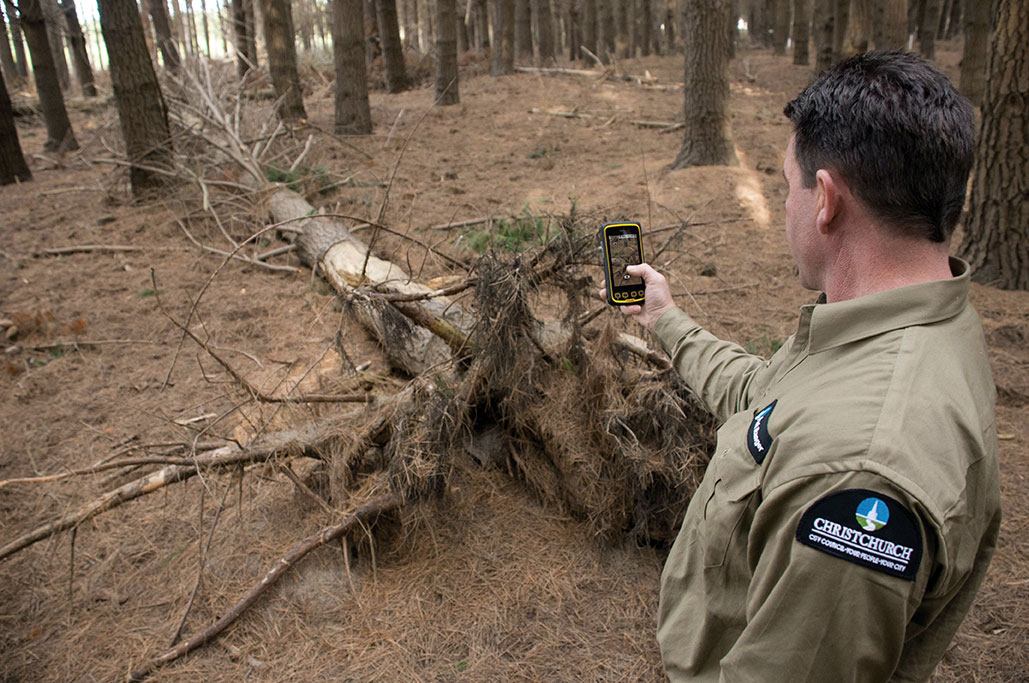
    Forestry management includes the same elements, plus it has a particular problem with fire changing the landscape. In heavily forested parts of the world, handhelds with GPS capability are tremendously helpful in lessening the “pack-in” weight and safety potential for staff assessing damage after destructive fires that may fundamentally alter hundreds, or even thousands, of acres.

    Seismic Instrumentation. Precise scientific data is logged with sensitive equipment housed in small form factors. Annual or more frequent data collection must re-find the collection boxes in overgrown, remote locations. Similar scientific work in many fields requires finding machinery placed in out-of-the-way sites, often by different people than the ones who placed them.

    Ocean Buoys. Placement and monitoring is all done with GPS now, because the buoys are always shifting, and yet their location must be exact because of sonar connectibility requirements. Rugged handhelds are best for marine work because they can withstand the salt water spray and, at sufficiently high ingress protection levels, even a dunk in salt water. Smaller boats can be used for buoy work because today’s handhelds measure accuracy to a level that 10 years ago was impossible. In large rivers this is also becoming more common, as channels requiring dredging or measuring move regularly.

    Insurance. Adjusters use GPS after such disasters as the Oklahoma tornado to determine debris fields and get claims filed. This year’s Colorado wildfire destroyed 509 homes and reduced more than 22 square miles of forested acreage to ash. Mobile GPS will play a key role in assessment, re-mapping, replanting and rebuilding.

    Evacuation Planning. When hazardous materials go airborne — as in a plant explosion ­— public safety personnel must accurately predict where the cloud will travel: height, width, direction. HazMat-suited personnel equipped with rugged handhelds monitor the plume and use their GIS solution to make accurate predictions.

    Incident Command. Software enabling interoperability, staff positioning, and navigation in volatile circumstances, and communication across departments and agencies to share floorplans, organization charts, and photographs, arrives on the scene aboard rugged handhelds that can take a pounding in uncertain conditions.Civilian police and firefighting organizations increasingly turn to military-designed solutions on handhelds to enforce security.

    Mobile Inventory Management. Companies with large fleets equip delivery trucks with handhelds, so drivers report in real time exactly where they are, what’s been delivered, and when. Changes can be made on the fly.


    Fleming_ruggend
    Photo: Lee Ann Fleming

    GPS Product Design Challenges

    Small, low-cost GPS devices have proliferated in the marketplace, and the drivers and applications that support them at a consumer level are available to make GPS acquisition seem cheap and easy. Where it starts crossing over into an area of challenge is how to put a more accurate, professional-grade GPS into a device while meeting demands to keep it less expensive, sleeker, and smaller for the user.

    According to Trimble Mobile Computing Solutions director of engineering Cary Keist, “If you want to improve performance better than 2–4 meters, not just in open sky but especially under multi-path, you have to invest in a good antenna — an antenna larger than anything that’s going to fit into a sleek, thin phone. And it will have to be pointed to the sky, and it will have to have a good ground plane. That all takes up room. There’s no way around that fact.”

    “We’re seeing competitor products that are rugged and claim GPS capability and are thin, but they only offer 10-meter capability, which isn’t good enough, or 2–4 meters in open sky, but as soon as you walk up to a building your accuracy is destroyed.”

    Alternatively, Keist explained, you end up with products that have a big snout. “Some have gone the opposite direction with a big antenna that makes it bulky. We’ve tried to split the difference. We’re introducing a Juno T41 handheld with a small extended snout for more advanced, 1–2 meter performance even in multi-path environments. Not the same accuracy as the GeoExplorer 6000, but way better than many others.”

    Tablets. The tablet form factor has a double problem in housing professional-level accuracy antennas:  an antenna has to point to the sky, in addition to being of sufficient size.

    Sky-pointing requires a tablet to be vertical, but many applications designed for the tablet require it to be flat for work. So far, this has meant that tablets have been fitted with appendages that can rise at an angle. New technologies are under investigation, but none has appeared on the market yet.

    Eventually antennas will shrink, along with every other technology that prizes miniaturization, but it comes down to physics. GPS signals are weak to begin with.

    “Given the satellite system and the current signals, the larger the area of the antenna, the more reliable your signal is going to be. There’s no easy path right now to have an antenna be very tiny and very accurate. Innovation over the next few years will try to find clever ways to put as much antenna as you can in as small a form factor as is possible,” Keist said.

    Fragility. GPS receivers and antennas are not especially delicate; they can be made to handle temperature extremes, shock, and vibration. Where it does get a difficult for the makers of rugged handhelds is that as products become larger and weigh more, greater countermeasures are required to keep them rugged. The heavier the object is, the more damage it will sustain when dropped onto concrete.

    Manufacturers add plastic casings around the handheld form to cushion the shock of the landing. That in turn adds more weight. It’s like rocket science: for every added pound of weight on the rocket you have to add a half pound of rocket fuel, then you have to add more rocket fuel to boost the half pound of rocket fuel weight that was added to push the rocket, and so on.

    In building rugged handhelds that are dropped, manufacturers calculate this in reverse.

    “GPS receivers are going to be relatively heavy in comparison to any consumer device. Antennas are large, with an awkward shape, so to have them survive the drop and vibration tests, you have to do a good job of packaging within a rugged device housing to keep it as small as you can without adding mass or building a shape that would be susceptible to breaking.” Keist said. “You have to invest in clever design and modeling and trying to keep the cost low. So it’s not technically impossible, but if you do it right, the design process is expensive and requires rigorous modeling and testing.”


    Fleming-failrate_chart
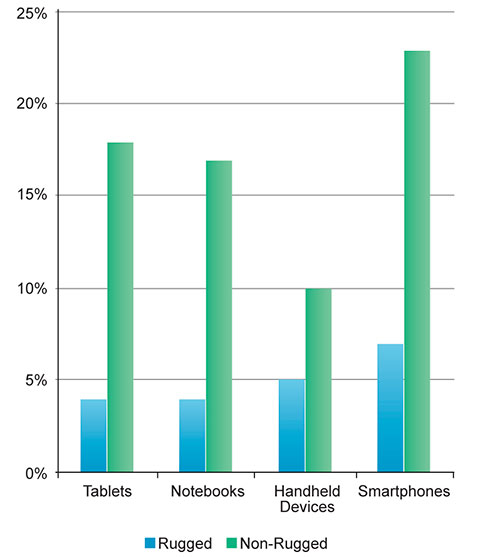
    Figure 1. Annual failure rate by form factor.

    Mobile = Vulnerable

    According to 2012 data from VDC Research, the average annual failure rate during the first year of deployment of rugged devices ranged from 4 to 7 percent, while average failure rates of non-rugged devices ranged from 10 to 23 percent. Past the first year of deployment, the fail rate for rugged devices drops while that of non-ruggeds rises, in some cases past 50 percent.

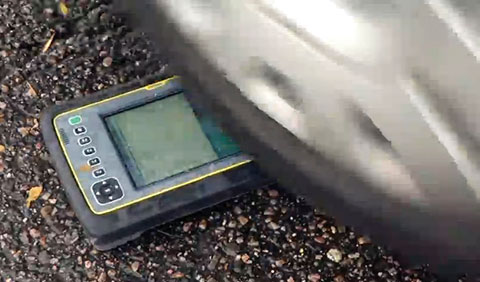
    Protective plastic casing over consumer-grade devices aids to some degree of protection against drops and a little against dust and grit; however, conditions such as temperature and altitude extremes, vibration, falls into water, or use in the rain require more than protection — they need rugged construction from the baseboard up.

    Several years ago, rugged handheld computers lagged considerably behind consumer devices in terms of processing power, memory, storage, connectivity, and other features, limiting the enterprise in what it could do with a rugged handheld. However, technology advances and more aggressive product development by rugged computer manufacturers now enable businesses to obtain cutting-edge speed, communications, and integrated features with all the protection that a rugged handheld offers.

    IP and MIL-STD-810G

    Two basic standards, Ingress Protection (IP) ratings and MIL-STD-810G, determine the ruggedness of handheld computers. The IP rating uses two numbers to describe how well the unit is protected against incursion by dust and water. The first number (1 to 6) measures dust protection; the second number (1 to 8) describes water protection.

    MIL-STD-810G consists of a series of U.S. military testing criteria that have gained acceptance in industries beyond the military for their methods of objectively determining whether a device can withstand potentially destructive elements such as drops, dust, water immersion, vibration, and altitude or temperature extremes. Initiated in 1961, MIL-STD-810 has seen seven revisions over the past 50 years.

    Semi-Rugged

    These computers can handle rougher treatment than a consumer-grade handheld, but they are not fully waterproof or dustproof, generally have a narrower temperature range, and do not meet all MIL-STD-810G specs. Most semi-rugged handhelds come with an IP rating of IP54. That means the unit is protected, though not sealed, against dust. It is resistant only to light splashing, but it cannot withstand jet sprays or immersion.

    Rugged

    These hardy warriors come with an IP65+ rating, which means they are sealed against dust. Dust cannot get inside the sealed form factor, even through the USB and serial ports. Plus, they can survive temporary immersion. They have passed a full battery of MIL-STD-810G tests, including drops, vibration, immersion, and temperature extremes. The higher the IP rating, the tougher the device. An IP68 device, for example, can survive salt-water immersion.

  • Garmin Goes Android with Monterra GPS

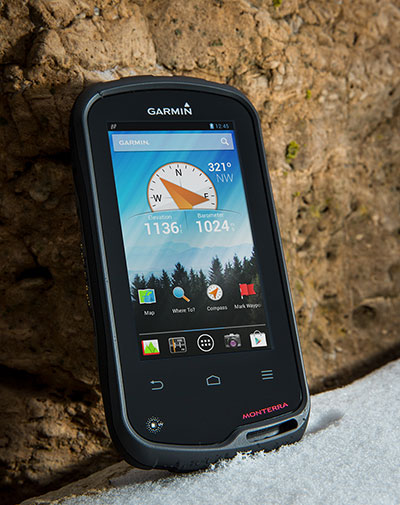
    The Garmin Monterra.
    The Garmin Monterra. Photo: Garmin

    Garmin International Inc., a unit of Garmin Ltd., maker of popular GPS devices such as the nuvi, has announced its first Wi-Fi-enabled outdoor handheld GPS running the Android operating system, Monterra.

    Monterra has a vivid, sunlight-readable touchscreen, and users can easily access the Google Play Store and download apps through an available Wi-Fi connection on the device. Developers can create new apps that are  suited for the rugged, waterproof, and sensor-loaded handheld device.

    “Monterra provides outdoor professionals and enthusiasts with the ultimate ability to customize their GPS device to perfectly suit their personal and professional needs,” said Dan Bartel, Garmin’s vice president of worldwide sales. “With a four-inch, color, multi-touch display, unique 3D MapMerge, and the ability to create new apps, Monterra takes the outdoor GPS to a whole new level, and users are able to take advantage of the features no matter how adverse the terrain may be.”

    With the Android operating system, users are able to access popular  outdoor-related Android apps, such as Peak Finder, as well as professional apps like construction estimators and ArcGIS to extend some office functions to the field. Monterra also has a built-in FM radio and NOAA weather radio with SAME alerts, so users can receive watches and warnings related to their location. Users can either listen with headphones or through the built-in speaker.

    Monterra has a built-in 3-axis compass with accelerometer and gyro, which indicates the user’s direction even when standing still or not holding the device level. Its barometric altimeter has the ability to track changes in pressure to pinpoint precise altitude, and it can also plot barometric pressure over time to monitor weather conditions. It also has a built-in UV sensor so users can monitor the intensity of the sun, and reduce exposure if necessary. With its high-sensitivity, dual-band GPS and GLONASS receiver, Monterra finds its location quickly and maintains signal lock even in heavy cover and deep canyons.

    New to the Monterra is a unique mapping feature: 3D MapMerge. With this feature, users can combine two maps — like TOPO, basemap, or BirdsEye Satellite Imagery — then view the new unique map in three dimensions. Hills, valleys, lakes, roads, and points of interest combine to give Monterra’s maps unequaled detail and richness. Combine BirdsEye with TOPO US 24K, or a GIS-based water table map with a shaded relief basemap, then zoom in, pan out, and rotate the 3D map using multi-touch.

    Monterra has a built-in 8-megapixel autofocus digital camera that takes geotagged photos, plus a 1080p HD video camera with LED flash. Users can download photos and videos to their computer for either work or sharing using Garmin Adventures. Monterra has 8 GB of internal memory built-in plus a microSD slot for even more extra storage.

    Monterra features a vivid and highly durable mineral glass display that uses sunlight in combination with the unit’s LED backlight to increase brightness and view-ability. It has an IPX7 waterproof rating and also uses a dual-battery system, which allows users the option of using the rechargeable Li-ion pack (included) or traditional AA batteries. It is also compatible with the same mounts as the Garmin Montana, so users can take Monterra anywhere.

    Wireless sharing is easy with Monterra. It has WiFi, ANT+, Bluetooth 3.0 and NFC capabilities, which allows users to share data, maps, waypoints, tracks, routes, and geocaches with other wireless compatible devices. Additionally, Monterra is compatible with BaseCamp, a free software download that lets you view and organize maps, waypoints, routes and tracks.

    The new Garmin Monterra will be available third quarter 2013 at a suggested retail price of $649.99 (Worldwide with preloaded worldwide basemap), and $699.99 (U.S. with preloaded TOPO U.S. 100K with Navteq roads).

  • Android Beats iOS, Microsoft Handily in Smartphones, Tablets

    Three-fifths of all smartphones, tablets, and notebooks shipped worldwide during the first quarter of 2013 run Google’s Android mobile operating system, independent analyst firm Canalys reports.

    Manufacturers shipped 308.7 million smart mobile devices between January and March, Canalys states. Android powers 59.5 percent of all shipments. Apple’s iOS ranks a distant second at 19.3 percent, fueled by its strength in the smartphone and tablet markets, followed by Microsoft at 18.1 percent, buoyed by its relative strength in the notebook segment. Rival platforms including BlackBerry account for the remaining 3.1 percent.

    Among the three device categories under the microscope, the tablet market continues to experience the fastest growth: Worldwide tablet shipments grew 106.1 percent year-over-year to 41.9 million units. Apple continues to lead tablet shipments with a 46.4 percent share, but Android-based rivals narrowed the iPad’s lead for the third consecutive quarter.

    “Spearheaded by Google and Amazon, the commoditization of the tablet market has happened far quicker than that of the wider PC market,” said Tim Coulling of Canalys. “Profit margins are being squeezed and vendors without a low cost structure will find it hard to compete. A solid range of must-have accessories and a software and services strategy are vital as vendors will increasingly need to make revenue around their devices.”

    Smartphone shipments eclipsed 216.3 million during the first quarter, up 47.9 percent over year-ago totals. Android accounted for 75.6 percent of all smartphone shipments, led by Samsung Electronics, which increased its volume 64.3 percent year-over-year to capture 32 percent market share. Apple’s iPhone shipment volume grew just 6.7 percent over the first quarter of 2012, the smallest increase since the launch of the original iPhone back in mid-2007.

  • skobbler Launches GPS Navigation & Maps for Android, Competes with Google Maps

    skobbler-map-T
    Skobbler app

    skobbler brings together hybrid online and offline worldwide maps and full turn-by-turn navigation in a low-priced app with the launch of GPS Navigation & Maps for Android.

    skobbler is looking to exploit the weaknesses of established Android navigation alternatives with the fully featured GPS Navigation & Maps, which offers an improved experience compared to both Google Maps and high-priced third-party alternatives, skobbler said. GPS Navigation & Maps is effectively two apps in one, with both online and offline turn-by-turn navigation and digital mapping for smartphones.

    Using open-source digital map OpenStreetMap and powered by the skobbler NGx map engine, GPS Navigation and Maps has full online and offline capability. The £1 price includes worldwide online functionality as well as an installable map of one country of choice for offline use. From here, users have the option to in-app purchase individual cities, states, countries and continents to use offline, and worldwide maps are available as standard for online use. Existing users of ForeverMap 2 will receive a free upgrade to GPS Navigation & Maps. New users can either purchase the full app or try GPS Navigation & Maps’ free app with unlimited online functionality and a 14-day navigation trial.

    While Google Maps is free to download and use, its offline functionality is restricted. Users cannot perform any searching or routing tasks without an Internet connection, which means that when abroad or in low signal areas they either have to pay expensive roaming costs or spend a significant time without map coverage, limiting its usability while traveling, skobbler said. Expensive alternatives such as Co-Pilot Live or TomTom UK & Ireland/Europe do offer premium features and offline navigation, yet none of them give users a choice of which areas they want to use online and which offline. Most premium sat nav apps generally cannot be used as travel apps at all, as their pure map functionalities are limited at best. GPS Navigation & Maps is the perfect blend. Offering the best of both worlds for a fraction of the price, it can be relied upon to deliver any place, at any time, and being two great apps in one offers a fantastic cost-to-benefit ratio and unbeatable flexibility for consumers, skobbler said. Individuals can build their own navigation and maps app depending on what resources they use the most, and more effectively manage the limited storage space on their devices, skobbler said.

    GPS Navigation and Maps has full turn-by-turn navigation, worldwide mapping and all features of the software accessible both online or offline. This unique move, and market first, is made possible thanks to skobbler’s NGx map engine, which delivers a seamless browsing experience with ultrafast real-time rendering and stunning map visuals, skobbler said. NGx also offers a range of unique map styles to, for example, accentuate color density for outdoor use to improve clarity. Maps are highly customizable with control over features such as online/offline functionality, map display (style and zoom), routing, map matching and more.

    “We’re very proud to launch the first navigation product utilising our powerful NGx mapping engine,” said skobbler CTO Philipp Kandal. “Being the first and only company on the Android platform to offer full online and offline capability for both mapping and navigation, we hope both new users and our existing customers will be won over by the high performance and flexibility GPS Navigation & Maps offers. We’re already working on future updates and have a few powerful additions lined up to improve the app’s functionality and flexibility even further in the coming months.”

    Additional maps beyond the free map provided will be available via in-app purchases for offline use. In keeping with the low price for the initial app purchase, add-ons are similary competitive and are priced at £0.77 for cities, £1.11 for states, £2.22 for a whole country, £4.44 for a continent and just £7.77 for the entire planet, so users can quickly and easily supplement their map coverage as they see fit.

    skobbler is committed to providing regular updates to users to keep maps fresh and accurate, and promises a range of new premium features in future updates. GPS Navigation & Maps is now available from the Google Play Store, with existing ForeverMap 2 users able to upgrade for free.

    The full version of GPS Navigation & Maps, including one free offline country map, can be downloaded.

  • Comodo Integrates Skyhook Wireless Location Tech into Android Anti-Theft App

    Skyhook Wireless, a provider of location positioning, announced a partnership to integrate Skyhook’s hybrid location platform into Comodo’s Anti-Theft app for Android devices.

    Comodo’s Anti-Theft for Android is a new service that enables customers to remotely locate, lock and recover a lost or stolen Android smartphone or tablet. The app can remotely capture and upload photos of whoever is operating the missing device to aid authorities in their recovery efforts and also in identifying the thief.  The product is designed to address the security, monitoring, and management needs of users with limited time and IT support.

    “Comodo selected Skyhook’s leading hybrid location service because of its precision, speed, and power efficiency, all of which are critical to Comodo in our mission to locate, track, and recover lost or stolen devices,” said Melih Abdulhayoglu of Comodo.

    Comodo Anti-Theft for Android is free and available at the Android Play Store. Skyhook provides an SDK for developers across most platforms.


  • Magellan Debuts SmartGPS Apps for Apple and Android Mobile Devices

    Magellan SmartGPS App_iPhone
    screenshot: Magellan SmartGPS App

    Magellan has announced Magellan SmartGPS Apps for iOS and Android mobile devices.

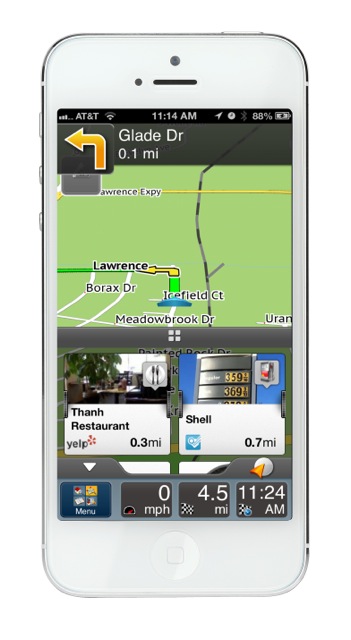
    Following the recent announcement of Magellan’s SmartGPS device, the free Magellan SmartGPS Apps for iOS and Android devices are the next key elements in Magellan’s Smart Ecosystem, a cloud platform that integrates social media and navigation content directly onto a navigation map, the company said. The SmartGPS Apps automatically deliver continually updating reviews and tips for local businesses from social media including Yelp, Foursquare, and other partners to create current, local and personalized driving and pedestrian experiences.

    The Magellan SmartGPS mobile apps display location-relevant information “squares” that graphically flip to show reviews, tips and offers from Yelp and Foursquare for nearby restaurants, stores and services. Users can then navigate to those locations directly from the SmartGPS App without needing to open an additional application or device. The cloud architecture enables new monetization of end users’ mobile search and navigation, and additional social media and content partners.

    “We architected the Smart Ecosystem to integrate with automotive infotainment and mobile network service platforms so users can enjoy a truly mobile, connected car experience now,” said Peggy Fong, president of MiTAC Digital Corporation. “SmartGPS mobile apps connect to the vehicle dash, allowing users to easily search social media and points-of-interest for destinations, and send the locations via Bluetooth or Wi-Fi to SmartGPS-enabled vehicle navigation systems.”

    Magellan’s free iOS and Android SmartGPS apps create a total-solution SmartGPS experience that is truly mobile. Magellan connects the smartphone to the vehicle dashboard, enabling location sync and sharing, hands-free operation and data connectivity. Users can pair their Magellan SmartGPS app with SmartGPS-enabled navigation systems. Using their SmartGPS App, SmartGPS enabled navigation system, or PC, users can search for a location, save the location in Magellan’s Smart Ecosystem cloud, and sync and share the location to any SmartGPS enabled device via Wi-Fi or Bluetooth.

    The free Magellan SmartGPS Apps will be available in North America this Spring, and in Europe this Summer, from iTunes and Google Play. Premium versions of both apps featuring spoken turn-by-turn navigation will also be available.

  • iOS, Android Adoption 10 Times that of PCs

    Janice Partyka
    Janice Partyka

    We are making history. The rate of iOS and Android device adoption has surpassed adoption rates for any other consumer technology in recent history, reports analytics firm Flurry. Android and iOS devices are being adopted at a rate 10 times faster than the rate of PC adoption during the 1980s. Smart device adoption is growing twice as fast as Internet adoption during the 1990s, and three times faster than that of recent social network adoption. Flurry estimates there were more than 640 million Android and iOS devices in use as of July 2012. The U.S., followed by China, has the most active iOS and Android devices. However, China had the fastest growth of active devices last year and its active user base will soon overtake the U.S. Other news this month includes security concerns with LBS offerings, developments in the indoor location market, voice navigation for bikes, and unusual election activities.

    With cause, people are concerned about the security of location-based applications. In a poll focused on LBS security, a quarter of 1,000 Americans surveyed indicated both concerns about third-party use of personal information for marketing purposes and strangers knowing too much about personal activities. Surprisingly, about 20 percent indicated a concern for their actual personal safety. The poll was conducted by the non-profit security group, ISACA. Nearly one-third of consumers in ISACA’s survey use location-based apps more than they did a year ago.

    It isn’t just LBS that carries security risks. Smartphones themselves are inherently vulnerable. “Every smartphone subscriber end-point is a potential threat to the mobile network and creates hundreds of millions of points of network vulnerability,” says Jeff Orr of ABI Research. Currently, protection is focused on hardware and end-user application security. To more ably face threats, defensive security measures will grow more sophisticated and encompass contextual information about usage, location, and user. Perversely, this is the same information sought by mobile advertisers. Today, carriers are focused on 4G roll-out and delivering the hottest handset, but they need to be just as concerned about security.

    A Whiff of Hyperbole in the Indoors. The indoors location market is going to be big, but I think that ABI Research’s forecast of indoor maps and services reaching more than $2.5 billion by 2017 is overstated. I agree with their assertion that business models are changing with the most significant indoor mapping companies increasing their scope to include more revenue enhancing activities. These still focus on indoor location, but include application development, location technologies, analytics, and advertising.

    Indoor Location Club. The In-Location Alliance has been formed by 22 companies, including Nokia, Qualcomm, and Samsung, to pursue high-accuracy indoor positioning and related services. One of their goals is to ensure a multi-vendor environment by promoting open interfaces and a standard-based approach. Members are encouraged to execute their own pilots and present their data to the Alliance. The primary solutions will be based on enhanced Bluetooth 4.0 low-energy technology and Wi-Fi standards using relevant existing or upcoming features of those technologies. Pre-commercial pilots and business model verifications will start in 2012, while 2013 is expected to bring mobile handset-based implementation, enabling the first consumer applications in the indoor mobile environment.

    Enterprise GPS Doing Well Approximately 5.5 million GPS/wireless devices are used to manage fleet vehicles, trailers, construction equipment, and mobile workers, estimates C.J. Driscoll & Associates. By 2015, this market will expand to more than nine million units and annual hardware and service revenues will grow to over $3.0 billion, predicts Driscoll. Growth is expected to be strongest in the local GPS fleet tracking market, which is expanding at a rate of 15-20 percent per year.

    Listen to Your Bike. Google has added turn-by-turn voice-guided navigation for bike riders in 10 Nordic and European bike loving countries. Bikers can either listen to the voice or view the route on a phone. In the U.S. and Canada, a beta version will be available. Google maps contain more than 330,000 miles of biking lines. These are color classified as either dedicated bike trails with no motor vehicles, streets with bike lanes, or other streets recommended for biking. Users can use Map Maker to add bike routes.

    Election Coverage. You may have heard that a group called Crossroads GPS spent $5.3 million to run ads to defend Governor Romney’s proposed tax plan. Crossroads GPS is not a new faction of the LBS industry. Crossroads GPS (Grassroots Policy Strategies) is a conservative organization with an unlikely acronym.

    Save the Date. I’ll be moderating a panel debate, “Opening up the Indoors for Location Services,” at MforMobile’s Location Business Summit 2012, being held in San Jose October 16-17. TheWhereBusiness and NFC Insight are now MforMobile.

  • Placed Adds Location Analytics

    Placed Analytics is a new service that will provide perspective on the places that people were physically nearby when interacting with specific content. Placed Analytics expands the platforms it supports beyond Android and iOS to include the mobile web.

    “We chose mobile web as our next platform because mobile site owners have been requesting the same level of insights as app developers. Additionally, the early adopters of Placed Analytics are also the same developers embracing HTML5 as an alternative to native app development,” said David Shim of Placed. “Placed has measured over 1 billion locations since launching our beta to the public back in June. This rate of adoption has surpassed all of our internal goals, and the addition of mobile web measurement should only accelerate growth.”

  • Google Maps for Android Now Works Offline

    Google announced on their Lat Lon Blog that Google Maps for Android now works when it's disconnected from the internet. Users can select and save a region of a map from more than 150 countries for use offline.

    "Having an Internet connection has always been a key requirement for using Google Maps for Android… until now," said the blog post dated June 27, 2012.

    Whether travelling internationally, carrying a WiFi-only device, heading underground on the subway or restricting your mobile data usage, you can now save up to six large metro areas (e.g., Greater London, Paris, or New York City and surrounding area) and use Google Maps for Android to find your way.

    For example, Let’s say you find yourself traveling to London this summer. Before you head off on your trip, simply find the area that you’ll be visiting. Then select “Make available offline” from the menu and verify the area that you would like to save. Below the map, you’ll see we estimate the file size for you, so you know how much space it will take on your device. Once you confirm your selection the map will immediately start downloading.

    Save an area and go to My Places to see all your offline maps

    If you have GPS enabled on the device, the blue dot will still work without a data connection so you know where you are, and if your device has a compass you can orient yourself without 3G or WiFi connectivity.  

    So whether you’re traveling internationally or underground, we hope offline maps will help you get around. 

    Google announced it is also releasing a smoother and faster Compass Mode for Street View within Google Maps for Android. The device becomes a window into a 360-degree, panoramic view of the outdoor or interior location through Business Photos. To experience the improved qualities of this feature you need a device with Google Maps for Android, Android 3.0 or higher and a gyroscope sensor plus version 1.8.1 of Street View on Google Maps.

  • Google Reveals Nexus 7 Tablet with GPS

    Google’s much-anticipated tablet computer has been revealed. The Google Nexus 7 is a 7-inch tablet powered by a Nvidia Tegra 3 quad-core processor that runs Android 4.1 Jelly Bean, 1.3-GHz quad-core Nvidia Tegra 3 processor, 1 GB of RAM, and come in 8 GB ($199) and 16 GB versions ($249). Asus built the tablet, but it will be Google branded.

    The display is high-definition at  1280 x 800, and there’s a front-facing 1.2-megapixel camera and microphone for video chatting. It has a micro USB port, GPS, near-field communication and both Wi-Fi and Bluetooth.

    At its size an price point, the tablet is expected to compete with the Kindle Fire and the Barnes & Noble Nook tablets, rather than the 9.7-inch iPad or the 10.6-inch Microsoft Surface.

    Google is offering a $25 credit for the Google Play store in an introductory offer.

  • Trimble Launches New Mapping App for Kindle Fire and Android Tablets

    Trimble released the Trimble Outdoors MyTopo Maps app for the Kindle Fire and other Android-powered tablets. Outdoor enthusiasts can now view detailed topo and aerial maps and plot their next outdoor adventure on large tablet screens.


    MyTopo Maps provides access to over 68,000 detailed topo maps in the U.S. and Canada, in addition to aerial photos, street maps, terrain maps and hybrid maps.

    MyTopo Map on Kindle Fire

    "Our ecosystem of apps continues to grow and now Android tablet users can plan outdoor trips at home using MyTopo Maps," said Rich Rudow, general manager for Trimble Outdoors. "We provide best-in-class topographic and aerial maps, and tools to answer the specific demands of hikers, off-roaders and other outdoor enthusiasts."

    The app was originally released as a beta app in the Amazon AppStore last December. It immediately generated buzz among outdoor and map enthusiasts, and over the past four months features were added and tweaked based on community feedback up to the official launch this week.

    Trimble Outdoors released the iPad version of this app in November 2011. All apps are available in a Free and Pro versions on the Apple App Store, Google Play and Amazon AppStore. To download and for more details, go to: http://www.trimbleoutdoors.com/Products/TrimbleOutdoorsMyTopoMaps.