Tag: Trimble

  • Trimble Acquires UAV Mapping Company Gatewing

    Trimble announced that it has acquired privately-held Gatewing of Gent, Belgium, a provider of lightweight unmanned aerial vehicles (UAV) for photogrammetry and rapid terrain mapping applications. The acquisition broadens Trimble’s industry-leading platforms for surveying solutions. Financial terms were not disclosed.

    According to the announcement, UAVs in combination with photogrammetry are an emerging technology providing an innovative platform for flexible aerial imagery acquisition. Easy to use and flexible, UAVs provide users the ability to create orthophotos and Digital Surface Models (DSM) from aerial imagery for mid-sized areas previously only accessible at higher costs and with longer planning cycles. UAVs are used in a variety of applications including preliminary surveys for corridors and rights-of-way, volumetric surveys, high-level topographic surveys, land fill inspection, and much more.

    Trimble reports that Gatewing’s solutions include the X100 UAV and Stretchout desktop software for digital image processing and analysis. The X100 is an ultra-light, 2 kg (approximately 4.4 lbs) class UAV that allows fast and simple image acquisition. It consists of an airframe; an integrated GPS, inertial system and a radio; a 10 megapixel camera; and battery. Using the Trimble Yuma tablet computer, a predefined area is planned and the flight of the UAV is fully automated from launch to landing. The terrain is mapped through parallel flight paths and consecutive, overlapping camera shots during flight. The ground control station (GCS) is used to monitor the mission and allows an on-site image quality check. In addition, the GCS provides the operator with the option to intervene and abort the flight if needed. The image set consists of a number of digital images that are tagged with the GPS coordinates.

    Gatewing’s Stretchout desktop software uses advanced computer vision technology which automates raw image processing to deliver georeferenced orthophotos and accurate DSM. As an alternative to the desktop software, users can upload images to Gatewing’s cloud solution, which automatically processes the images based on the users’ requirements. After a few hours, users can download their georeferenced orthophotos and DSMs from the cloud server including feedback about the results for quality assurance.

    “The combination of UAVs and low-altitude photogrammetry as an image collection platform opens up new opportunities for surveyors to use aerial imagery for the rapid acquisition of high-density geospatial data,” said Anders Rhodin, director of Trimble’s Survey Business. “We are excited to add Gatewing’s unique aerial mapping system to Trimble’s portfolio of survey solutions.”

    “The Gatewing team is excited about the new ownership,” said Maarten Vandenbroucke, CEO and one of three founders of Gatewing. ”For Trimble to see the value in unmanned aerial systems for surveying and mapping applications means that the industry is truly ready for this exciting new technology. We are enthusiastic about how UAVs can revolutionize the landscape and open a complete new spectrum in remote sensing applications. I believe that being a part of Trimble will accelerate the pace in which UAVs will further be adopted by professionals.”

    The Gatewing business will be reported as part of Trimble’s Engineering and Construction segment.


  • Product Review: The Trimble Ranger 3

    The Trimble Ranger 3 being tested in its natural environment.


    First of all, thanks to all those who wrote me about the Trimble Ranger 3 and suggested I pen a review.

    Rules of Engagement

    Many of my long time readers will know that I never write a bad review, which is why I found it interesting that an e-mail from a USAF captain fighter pilot in Afghanistan commented that I “seemed to really like” every unit I reviewed. So here again are the ROE (rules of engagement) for my reviews. I will never write a bad review, and believe me I see scores of “bad” (my evaluation) GPS units that I will never review or endorse in GPS World.

    The Trimble Ranger 3 was never of any danger of falling into the “non-review” category. The Ranger 3 impressed me from the very first moment I saw the unit. First of all, it is designated correctly by Trimble, and the military and first responder users who wrote me, as a rugged handheld GPS-enabled computer, and it certainly fulfills all the requirements for that designation.

    If you are looking for a GPS device the size of an Apple iPhone, this is not the device for you. The Trimble Ranger 3 is for the user, and many of you are warfighters and first responders who need a portable and rugged but powerful handheld computer with tightly integrated GPS capabilities that can connect and communicate, wired and wirelessly, with other users and servers. The Ranger 3 can accomplish all that and much more.

    GPS Capabilities

    As soon as I powered up the Ranger 3 for the first time, outdoors for this test, the stopwatch was running to see how long it took to figure out how to enable the unit’s GPS SiRFstar III chip and firmware and obtain an accurate position. This is the new handheld TTFF (time to first fix) scenario that I always go through, in the same geographic location, with any new unit. Some GPS units, even dedicated ones, fail miserably, but not the Ranger 3. Fortunately, the unit’s battery was fully charged when it arrived, and the green power button was obvious. The 4.2 inch TFT (thin film transistor) resistive touch, sunlight readable color screen fired up immediately with a Windows menu soft key, which led me via an iPhone like “flickable” scrolling screen to the GUI (graphical user interface) or icon labeled SatViewer, (version 1.0.4.0) which comes with every Trimble GPS unit I have ever tested or reviewed. I tapped that GUI or icon and hit connect GPS and within 40 seconds had an “unaided GPS position,” or so the voice prompt from the unit informed me. Exactly 28 seconds later I had a “GPS-aided” position, again I was informed by the voice prompt, which can be turned on and off by user input. I found the voice prompts helpful because I did not have to look back at any menus to determine what type of position I was using. The initial position “unaided” was four feet or 1.33 meters from a surveyed reference position at my home, and the “aided” position was under a meter from the surveyed position. As I said, the first unaided position was pronounced 58 seconds after removing the unit from the box for the first time and hitting the power button. The aided sub-meter position was announced at 1 minute and 26 seconds after initial power on. Very impressive, and something very few units can accomplish today. Not even the best MUE or military user equipment available today can equal this feat right out of the box.

    Afterwards I played around with the GPS advanced inputs but found very few settings that needed to be changed. It comes (default mode and with a default button) with SBAS capabilities enabled; in this case the FAA WAAS (Wide Area Augmentation System) was enabled. Had I been conducting this exercise in Europe, EGNOS or the European Geostationary Navigation Overlay would have been automatically enabled. There is also a tab for setting DGPS or differential GPS parameters, on or off or auto, and the unit software is designed for future enhancements. It incorporates an SBAS PRN designation capability, if you want to choose the SBAS PRN number manually, in case one is sending bad data and is NOTAMed (Notice to Airmen) or NANUed (Notice Advisory to NAVSTAR Users) out. Frankly, I just set the SBAS feature to auto and it worked flawlessly.

    GPS Bottom Line

    So the bottom line for the Ranger 3’s GPS capabilities is that the tightly integrated, aided GPS SiRFstar III receiver, compass, accelerometer, and 5 megapixel auto focus camera with auto flash and geotagged image capabilities enable almost endless possibilities for today’s ever-proliferating location-aware software to combine location, bearing, and motion data for use by our warfighters and first responders. Add these capabilities to the substantial communications features of the rugged handheld computer, and you have prodigious potentiality for the Trimble Ranger 3. There is not a single MUE GPS unit today that can touch the Ranger 3 for its tightly integrated GPS and subsequent capabilities and communications.

    I also tested several new windows applications that I will not name now because they require considerable testing before I review or recommend them, but the cogent message is they integrated automatically and worked flawlessly with the Ranger 3.

    Trimble SatView Software

    I will, however, comment on the installed Trimble SatView GPS software on the Ranger 3. It is just so absolutely intuitive that you never really wonder about what to do next, which button to push, or box to check. Just push the button or tap the box or icon you think is the correct one and most of the time you will be correct. And if you aren’t, nothing is undoable. I intentionally push the “wrong” buttons in my tests just to see what happens, and with SatView nothing catastrophic has ever occurred. I have always been able to navigate back to where I needed to be.

    The orbit inspired graphic depiction of the GPS satellites in view (almost always 12) and the satellites being used for your position (from 4 to 10+), to include SBAS satellites, is informative and useful. You merely tap on the PRN (pseudorandom noise code assignment) graphically designated SV (satellite vehicle) and it will open a tiny widow displaying the SVs PRN number, elevation, and azimuth. There is also a very useful graphical illustration of the current P (position), V (vertical), and H (horizontal) DOP for your position, which are also programmable simply by checking a box. Many of you say you don’t know or care about the various GPS DOP, even though Estimation of Dilution of Precision (DOP) plays an important role in determining the overall accuracy of your GPS position. For those of you who do care, the data are readily available on the Ranger 3. All the data, to include programmable mask angles and DOP parameters, can be automatically captured in a log file, saved, and downloaded for future use — a simple and intuitive task. I attached an 8 GB flash drive to the full-size USB port on the Ranger 3, and simply dumped the data log to a file on that device. The Ranger 3 saw the device as an extension of its built-in 8 GBs of flash storage (flash hard drive). You can also save data directly to the onboard flash memory. It is then a simple matter to export the data into an Excel spreadsheet and use however you see fit. Take it from me, not all datalogging programs are this simple and straightforward.

    As the CEO of MobileEpiphany, Glen Kletzky, who produces some of the most intuitive software I have ever had the pleasure of using, once informed me, “Software that is inherently useful with an intuitive interface usually seems simple to the user, but underneath is usually very powerful and sophisticated. My goal as a software provider is to ensure the user never has to deal with the complicated bit
    s.” In this regard, the Trimble SatView software as enabled on the Ranger 3 has met and exceeded the goals of simplicity, usefulness, exportability, and intuitiveness.

    Trimble Ranger 3 Specifications

    Now that we have covered the basic GPS functions, let’s look at the unit itself and all the Ranger 3’s integrated capabilities.

    As I said, the unit is physically imposing, especially if you are looking for an iPhone-type device, which the Ranger 3 is definitely not. But neither can the iPhone accomplish all the tasks of a rugged, handheld portable computer with multiple scanners, readers, and numerous ports.


    Physically the Trimble Ranger 3 is not small. It is 10.5 in × 5.2 in × 1.9 in (26.6 cm x 13.1 cm x 4.8 cm) and weighs in at 2.3 lb (1.04 kg), including battery and stylus. You don’t have to use the stylus, but for some functions it is more accurate than your fingertips. And of course, since this is a Trimble unit, to paraphrase that great entrepreneur Henry Ford, “You can have it in any color you desire as long as it is your basic black…with a yellow face.”

    The Ranger 3 has an elastic (black, of course) hand strap that stores the stylus, and enables you to hang on to the Ranger 3 during all kinds of field maneuvers. The stylus is also tethered to the back of the Ranger 3, and that is handy as well. All in all, ergonomically it is a very well-designed GPS-enabled rugged handheld computer.

    Features

    STANDARD FEATURES

    • Texas Instruments AM3715 Sitara ARM Cortex A8 superscalar processor
    • 256 MB of RAM
    • 8 GB of Flash storage (serves as hard drive)
    • Bluetooth 2.0 +EDR
    • Wi-Fi (802.11b/g)
    • GPS receiver (SiRFstarIII, SiRFInstantFixII, WAAS, EGNOS/SBAS capable)
    • Electronic compass
    • Accelerometer
    • Three tri-color notification LEDs
    • USB 2.0 full speed host port
    • USB 2.0 high speed client port
    • Serial port, 9-pin RS-232
    • Secure Digital (SD/SDHC) card slot
    • Microsoft Windows Mobile 6.5 Professional
    • 4.2 in (10.6 cm) landscape VGA display, sunlight-readable color TFT
    • Resistive touch screen
    • QWERTY keypad with number pad, directional buttons and 4 programmable buttons
    • Speaker and microphone
    • Headset jack (3.5 mm stereo audio and microphone)
    • Operating system language options: Simplified Chinese, English, French, German, Japanese, and Spanish (customer selectable on initialization)

    OPTIONAL INTEGRATED FEATURES

    • 5 MP auto focus camera with dual white LED flash
    • 3G GSM cellular data modem
    • LED Flashlight function
    • 1D barcode laser scanner

    STANDARD SOFTWARE

    • SMS Text Messaging Support
    • Microsoft Office Mobile, Mobile versions of Word, Excel, PowerPoint & Outlook
    • Internet Explorer Mobile
    • Calculator
    • Microsoft Pictures and Videos
    • Calendar/Contacts
    • Windows Media Player
    • Messenger
    • Adobe Acrobat Reader
    • Notes/Tasks
    • Trimble SatViewer (GPS interface software application)

    SOFTWARE FOR OPTIONAL FEATURES

    • Customized camera and flash control through Microsoft Pictures & Videos software
    • (Geo-tagging camera software)
    • Flashlight mode control application
    • Trimble CellStart software application (cellular connection setup)
    • Trimble ScanAgent barcode scanning software
    • Trimble Ranger 3 Software Development Kit

    STANDARD ACCESSORIES

    • Rechargeable lithium-ion battery pack
    • Black Elastic Hand strap
    • Stylus tether
    • Clear screen protectors
    • Display cleaning cloth
    • Quick Start guide sheet
    • Getting Started Guide on CD-ROM
    • International AC charging kit with four plug adapters
    • USB cable
    • Stylus with force-modulating spring tip (package of 2)
    • Audio port dust cover
    • I/O port dust cover

    OPTIONAL ACCESSORIES

    • Standard soft carry case
    • Vehicle mount (compatible with RAM mounts)
    • Spare battery charger and12 V vehicle charger

    ENVIRONMENTAL SPECIFICATION: Meets or exceeds:

    • Water: Immersed in 1 meter of water for 30 minutes
    • Water jet 12.5 mm diameter @2.5 m–3 m, 100 Liter/, min; IEC-529, IP67
    • Sand & dust: 8 hours of operation with blowing talcum powder; IEC-529, IP67
    • Drop: 26 drops at room temperature from 4 ft (1.22 m) onto plywood over concrete; 6 additional drops at –22 °F (–30 °C); 6 additional drops at 140 °F (60 °C)
    • MIL-STD-810G, Method 516.6, Procedure IV
    • Vibration: General Minimum Integrity and Loose Cargo test MIL-STD-810G, Method 514.6, Procedures I, II
    • Operating Temperature: –22 °F to 140 °F (–30 °C to 60 °C) MIL-STD-810G, Method 501.5, Procedure II MIL-STD-810G, Method 502.5, Procedure I, II, III
    • Storage Temperature: –40 °F to 158 °F (–40 °C to 70 °C) MIL-STD-810G, Method 501.5, Procedure II MIL-STD-810G, Method 502.5, Procedure I, II, III
    • Temperature shock: –31 °F/149 °F (–35 °C/65 °C) MIL-STD-810G, Method 503.5, Procedure I
    • Humidity: 90%RH temp cycle –4 °F/140 °F (–20 °C/60 °C) MIL-STD-810G, Method 507.5
    • Altitude: 15,000 ft (4,572 m) 73 °F (23 °C) 40,000 ft (12,192 m) –22 °F (–30 °C)
    • MIL-STD-810G, Method 500.5, Procedures I, II, III

    PHYSICAL

    • Size: 10.5 in × 5.2 in × 1.9 in (26.6 cm x 13.1 cm x 4.8 cm)
    • Weight: 2.3 lb (1.04 kg), including battery and stylus
    • Color: Black with Yellow face

    ELECTRICAL

    • Processor: TI AM3715 Sitara ARM Cortex–A8 Superscalar Processor at 800 MHz
    • Memory: 256 MB RAM
    • Storage: 8 GB non-volatile Flash
    • Expansion: SD/SDHC card slot, USB host port
    • Display: 4.2 in (10.6 cm), 640 x 480 pixel, VGA TFT
    • Batteries: 11.1 V, 2500 mAh, 27.8 Wh Li-ion rechargeable pack1
    • I/O: USB host and client; 15 V DC power; 3.5 mm stereo + microphone audio port; 9-pin RS-232 serial port
    • GPS accuracy: 2–4 m with SBAS correction2
    • Radios: Bluetooth 2.0 +EDR; Wi-Fi 802.11b/g
    • WWAN radios: HSDPA 3.6 Mbit/s, Tri-band; HSDPA/UMTS: 850/1900/2100 MHz, Quad-band; GSM/GPRS/EDGE: 850/900/1800/1900 MHz

    CERTIFICATIONS: FCC, CE, R&TTE, IC (Canada), C-tick, GCF compliant, RoHS compliant, Section 508 compliant, AT&T certified, Wi-Fi Alliance certified, MIL-STD-810G, IP67, MIL-STD-461.

    Torture Tests

    The Ranger 3 is already in garrison with several of our warfighters in Iraq and Afghanistan. As I said, it was letters from our warfighters and first responders that first alerted me to the Ranger 3’s capabilities for wartime and disaster-preparedness purposes.

    I have only been testing the Ranger 3 since early June, so many of you might erroneously assume that the freezing temperature, snow bank, and ice water immersion torture tests were not possible. Au contrair, mon ami —after all, this is the Rocky Mountains and there is almost always snow and ice somewhere to be found. This year, I found snow and ice and freezing water in the Snake River in Keystone and Breckenridge, Colorado, in June. Indeed, there was skiing at the A-Basin until late July. So the bottom line is the normal torture tests were inflicted upon the Ranger 3 and it passed with flying colors. And yes, before you ask, there have been several units that did not pass these torture tests, and they are dried out and mailed back to the manufacturers. A Trimble
    unit has never failed to pass the tests, even a couple that were not rated as truly rugged with MILSPEC qualifiers. Trimble makes a quality product, and the company is evidently learning more about battery technology from Apple. The battery on the Ranger 3 lasted well over 30 hours.

    Applications

    As I mentioned earlier, the software applications on the Ranger 3 make it entirely suitable for warfighters and first responders. Plus, with the Windows software and operating system, the 3G GSM (Global System for Mobile Communications) phone features and Wi-Fi (WWAN, Wireless Wide Area Network) capabilities, the Ranger 3 can communicate almost anywhere in the world you can legally travel (it won’t work in North Korea). The Ranger 3 recognized my phone’s 3G-sim chip immediately, and after loading Skype, I was able to make and receive calls and download files via Wi-Fi. By the way, if you don’t know about transferring files, and I mean large files, via Skype’s direct IP chat capability, then give it a try. It is an amazing capability, especially for handheld computers like the Ranger 3.

    While it is not necessary to use a headset with microphone for the communication capabilities on the Ranger 3, if you want any degree of privacy it is highly recommended. I tested several headsets, including a new Bose model that worked without any issues. No software downloads were required — all the headset models I tested were immediately recognized by the Microsoft Windows 6.5 mobile operating system.

    The unit I tested came complete with the optional laser scanner and bar-code reader, which worked as advertised.

    One feature that I found very useful but also one that is not aggressively marketed is the physical navigation pad with six buttons and scroll bars that can be operated with one thumb. With some practice you can use this navigation pad without ever resorting to the stylus or your fingers for inputs, other than text inputs of course. And in that regard another little touted feature is the Microsoft Word auto-completion software. The software suggests words with about, for me, 90 percent accuracy and learns as you go along. Within a particular document, the software will remember certain words and phrases and suggest them where it seems appropriate. For a rugged handheld computer with a small physical 56-key QWERTY keyboard with numeric keypad suitable only for thumb texting, the navigation panel and auto-completion software are a huge help and time savers.

    Bottom Line

    The bottom line for me echoes what Trimble says about the Ranger 3: “It has the outdoor rugged design and integrated features that users count on.” I think this is especially true for our warfighters and first responders, if my mail expounding the virtues of the Ranger 3 is an accurate barometer, and I believe it to be true.

    I am certainly taken with this unit and highly recommend it. As usual with Trimble equipment, I am going to hate to send it back. If you are currently using the Ranger 3, drop me a line and let me know how you are using it and how you like it.

    Until next time, Happy Navigating.
  • Trimble Enters into Definitive Agreement to Acquire OmniSTAR Assets for Land Applications

    Trimble today announced that it has entered into a definitive agreement to acquire certain assets related to the OmniSTAR GNSS signal corrections business from Fugro N.V. The acquisition is expected to significantly expand Trimble’s worldwide ability to provide corrections services for land based agriculture, construction, mapping, and geographic information system (GIS) and survey applications.

    Trimble and Fugro also entered into a multi-year service agreement which includes Fugro’s ongoing operation of its correction network and satellite service broadcast systems that power the OmniSTAR service. Fugro’s offshore marine business is unaffected. Closing of the transaction, anticipated in the first quarter, is subject to certain closing conditions. Financial terms were not disclosed.

    OmniSTAR provides space-based GNSS correction services that can improve the accuracy of a GNSS receiver for precise positioning applications. These are the four levels of OmniSTAR service:

    • VBS offers sub-meter positioning.
    • XP service delivers better than 20-centimeter accuracy.
    • HP service delivers greater than 10-centimeter accuracy.
    • The new OmniSTAR G2 service combines GPS-plus-GLONASS-based corrections to provide decimeter level positioning.

    Trimble pioneered RTK technology in the early 1990s, which enabled high-accuracy corrections for field applications. RTK is now recognized as the industry leading technology for centimeter-level positioning. To further improve accuracy, Trimble subsequently introduced VRS technology in 2000 and shortly after that Trimble VRS Now Service.

    “With the addition of the OmniSTAR services and our strong relationship with Fugro, we will offer a full range of high-precision positioning capabilities which now includes satellite-delivered corrections,” said Patricia Boothe, general manager of Trimble’s newly-formed Positioning Services Division. “Today, our agriculture customers use OmniSTAR services to perform planting, harvesting, variable rate application and many other operations. Our expanded portfolio will provide not only farmers, but also surveying, construction, and GIS professionals with more options to satisfy their particular accuracy, delivery, and financial needs.”

    “Trimble and OmniSTAR have enjoyed a long standing relationship,” said John Waits, president of OmniSTAR. “The transfer of land-based GNSS signal corrections assets marks the next phase of our efforts to bring a broader range of positioning services to our combined customer base, on land and offshore. The OmniSTAR and Fugro teams remain committed to providing industry leading corrections services for customers who own a variety of GNSS receivers.”

    The OmniSTAR business will be reported as part of Trimble’s Engineering and Construction segment.

  • Trimble NetR9 Reference Receiver Aimed at Infrastructure, Scientific, and Network Apps

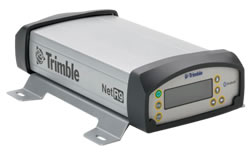
    Trimble NetR9 Photo: Trimble
    Trimble NetR9. Photo: Trimble

    Trimble has introduced an innovative Global Navigation Satellite System (GNSS) reference receiver for infrastructure, precise scientific, and network applications. The Trimble NetR9 GNSS reference receiver is a Continuously Operating Reference Station (CORS) receiver that can support the demanding applications for the earth science community and for the surveying, construction, mapping, and agricultural industries, Trimble said, adding that the NetR9 was designed to provide the user with maximum features and functionality from a single receiver.

    The Trimble NetR9 reference receiver offers 440 channels for robust GNSS constellation tracking. The receiver supports a wide range of satellite signals, including GPS and GLONASS signals. In addition, Trimble is committed to providing Galileo-compatible products in advance of Galileo system availability, the company said. In support of this plan, the Trimble receiver is capable of tracking the experimental Galileo GIOVE-A and GIOVE-B test satellites for signal evaluation and test purposes.

    The Trimble NetR9 reference receiver can be used as a standalone receiver or as part of a network solution. Specific applications include high-accuracy positioning as part of a Trimble VRS network, as a mobile field base station or CORS for real-time kinematic (RTK) corrections, as a scientific reference station collecting information for specialized studies, as a field campaign receiver for post-processing applications, and as support for Differential Global Positioning System (DGPS) coastal beacons. In addition, the Trimble NetR9 reference receiver can be used for monitoring the integrity of VRS networks as well as the deformation of physical infrastructure such as bridges, dams, mines, oil platforms, and other natural and manmade structures.

    The Trimble NetR9 reference receiver’s large internal memory (8 GB) allows post-processed results for base stations to be computed after survey completion, improving the accuracy of the survey. The highly compressed secure internal memory allows for more than 20 years of 15-second dual-frequency GPS data storage. In addition, the NetR9 also has USB logging capability for additional storage capacity, Trimble said.

    The receiver supports the new CMRx communications protocol, which provides correction compression for optimized bandwidth and full utilization of all satellites in view. This gives the customer more robust positioning data and reliable positioning performance, Trimble said.

    Optimized for field use with built-in rechargeable batteries, the NetR9 reference receiver consumes very little power and can be used for projects with remote connectivity and in extreme weather conditions. It has an IP67 rating, which means it is sealed against dust and can survive immersion in up to a meter of water for approximately 30 minutes. It also meets MIL-STD 810F standard for drops, vibration, and temperature extremes.

    The Trimble NetR9 has its physical memory built into the circuit board, providing greater protection of data, particularly under extreme conditions. Multiple built-in serial ports supply communications and power to support field use, whether connecting to a radio for RTK surveys, direct communication with a satellite phone for remote operations, or for ancillary input devices such as inclinometers and meteorological sensors, and it offers Bluetooth communication with a cell phone for real-time data streaming. In addition, both power and Ethernet can be supplied over a single cable using Power over Ethernet (PoE) technology.

  • The Business: Location-Driven Coupons on iPhone

    >> LOCATION-BASED SERVICES

    Location-Driven Coupons on iPhone

    By Gwen Cameron

    Yowza!!, an application designed for the latest GPS-enabled iPhone 3G and 3GS models and iPod Touch, brings relevant coupon offers to customers based on their location.

    “Any time you insert a concept such as location into a marketing program, you end up with a far more compelling value proposition,” states Mike Wehrs, president of the Mobile Marketing Association.

    Sales and discount offers via Yowza!! can be updated in real-time and targeted by region or store location. “The phone will deliver a list of stores within one mile that have offers on Yowza!!,” said August Trometer, co-founder of the recent startup. Users show the barcode and digital mobile coupon on their handset at checkout to redeem the discount on their purchase.Bus-2

    “We work directly with merchants; they provide us with their latitude and longitude, we get the GPS coordinates, do a database search with a proprietary algorithm,” said Trometer. “The phone constantly goes back and forth between our app, touching data from our database. When the person touches their location, it touches a new set of data in the database. The phone will work with them to keep delivering the closest store. There’s a lot of work on the database end of things.”

    One drawback of the app is that it has to be turned on to work — it does not sit in the background, waiting to be activated by incoming offers. “Users have to give the application access to their GPS coordinates,” explained Trometer. “But the power of the device and all the applications it brings make it silly to turn off the location capability.”

    Retailers that have signed with Yowza!! include Sears, McDonald’s, The Container Store, and more. Unlike traditional forms of couponing such as newspaper ads, Yowza!! offers can be updated in real time and targeted by region or store location.

    Trometer expects to announce Yowza!! capability through other GPS-equipped phones: Blackberry Storm, Google’s Android-based phone, and the Palm Pre. “All three makers allow developer access to the GPS and this is very important, it’s crucial, obviously. They also have a high-res screen, which is a requirement for our scannable barcode that the user shows to the merchant.”

    Referring to GPS handsets that lack a high-res screen, he claims “The other phone manufacturers really have an uphill battle right now.”

    Whose GPS? The source of the GPS chip within Apple’s iPhone remains a mystery. “Even people who have done teardowns of the devices, the chips are completely blank,” says Trometer.

    “There are so many possibilities, we’re just scratching the surface right now with what can be done,” Trometer said. “The mind reels with the things that can be done with that.”

    >> SURVEY & CONSTRUCTION

    Hemisphere, Juniper Jointly Offer DGPS Receiver for Demanding Environments

    Juniper Systems and Hemisphere GPS offer the XF101 DGPS receiver for the Archer Field PC, designed to deliver sub-meter DGPS to location-based applications in demanding environments.

    According to the companies, the Hemisphere GPS XF101 DGPS receiver provides: Crescent GPS technology for sub-meter accuracy; COAST technology to maintain accuracy during temporary loss of differential signal; optional external antenna for centimeter-level accuracy; low power consumption; modular connection for rapid field use; real-time or post-processed DGPS data collection; and multipath minimization.

    The XF101 with the Archer is priced at less than $2,500. It fully supports mobile GIS applications such as ESRI ArcPad and OnPoz GNSS Driver.

    >> AVIONICS

    NovAtel Receiver for Next-Gen WAAS

    NovAtel announced receipt of a contract from the U.S. Federal Aviation Administration (FAA) to develop the next generation Wide Area Augmentation System (WAAS) reference receiver, the GIII. Total contract value can go up to $9.7 million.

    NovAtel has worked with the FAA WAAS program since 1995, providing and supporting two previous generations of reference receivers for the WAAS ground network. The technology refresh will add support for new L1C, L2C, and L5 signal capabilities, on a qualified RTCA DO-178B software and DO-254 hardware platform. The WAAS GIII receiver program is scheduled to be completed over the next three years, and will include growth provision for further signal capability such as Galileo. As many as 14 receivers will be produced in the GIII development and qualification program.

    >> FLEET TRACKING

    AT&T, Trimble Fleet Management

    AT&T has broadened its fleet and mobile asset management portfolio with the latest version of Trimble’s GeoManager solution, which helps reduce fuel and maintenance costs by enabling operators to manage their vehicle assets more efficiently.

    Trimble GeoManager enables transportation and field-service fleet operators to track their mobile workers and assets through software and GPS modems running on AT&T’s wireless network. GeoManager integrates GPS, wireless data communications, and a browser interface to help manage mobile workers, the mobile worker’s work, and the mobile worker’s assets.

    AT&T and Trimble have jointly offered fleet-tracking solutions for several years. The GeoManager update features improved map and status, new landmark uploads, WLAN usage, schedule report enhancements, driver logs, and organizational hierarchy modifications.

    >> TIMING

    Timing Vulnerability Concern Grows

    Industrial and enterprise users in telecommunications and utilities privately express concern over revelations from the April Government Accounting Office (GAO) report, “Global Positioning System: Significant Challenges in Sustaining and Upgrading Widely Used Capabilities.” The GPS signal is used for synchronizing almost all global computer networks belonging to the military, utilities, banks, telecomms, television companies, and many more.

    Backup? What Backup? These same companies point to a continued lack of commitment on the part of the U.S. government to stable and reliable backup for GPS. As long ago as 2007, in comments before the Department of Transportation, wireless carrier Sprint Nextel stated: “Sprint Nextel Corporation respectfully requests that the U.S. government continue to operate and invest in the LORAN-C and eLORAN systems. Should the DOT and DHS decide to decommission the LORAN-C system, Sprint Nextel recommends that the agencies delay doing so until the eLORAN system is fully operational. Sprint Nextel and other communications providers use the frequency signals of the Global Positioning System, LORAN, and atomic clocks for multiple levels of redundancy and diversity in their networks. Therefore, Sprint Nextel urges the DOT and DHS to carefully weigh decisions which might impact LORAN’s availability to the nation’s voice and data communications networks.

    “The loss of a primary reference source (PRS) can negatively impact a telecommunications network, and those impacts can vary from minor short-term noise impairments to long-term network-wide outages. Both traditional wireline services and newer wireless services require a precise frequency reference for basic service delivery . . . . The continental U.S. portion of the Sprint Nextel network requires a PRS at thousands of switch sites, interconnection sites
    , and cell tower sites to ensure reliable service delivery.”

    Deadlock on Capitol Hill. Competing resolutions to either discontinue or adequately fund LORAN and eLORAN continue fencing in Congressional subcommittees in both chambers. Nothing has changed since Sprint commented two years ago — aside from a potential rise in the susceptibility of GPS to jamming, unintentional interference, and decreased availability.

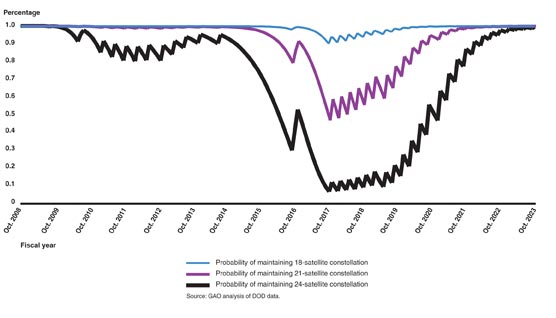
    GAO REPORT, FIGURE 5. Probability of maintaining constellation of at least 18, 21, and 24 GPS satellites based on reliability data as of March 2009 and a two-year GPS III launch delay.
    GAO REPORT, FIGURE 5. Probability of maintaining constellation of at least 18, 21, and 24 GPS satellites based on reliability data as of March 2009 and a two-year GPS III launch delay.

    >> TIMING

    Telecom Clock from EndRun

    EndRun Technologies announced a Telecom Clock Option for its Meridian Precision GPS Timebase, which provides accurate and stable GPS-synchronized outputs for military communications, aerospace, broadcast, engineering and calibration laboratories, telecommunications, and more.

    The option was designed as a plug-and-play module that can supply any combination of E1, T1, J1 and/or composite clock outputs. An alarm output is also available and single-satellite mode (SSM) is supported. The Telecom Clock Option can be installed in EndRun’s GPS or CDMA-based Meridian and Tycho product lines.

  • Trimble Introduces Handheld Data Collection Device

    Trimble has introduced the Juno ST handheld, a portable data collection solution supported by the company’s field and office software. It comes standard with a built-in GPS receiver, Microsoft Windows Mobile version 5.0 software, and Wi-Fi/Bluetooth for wireless connectivity to office networks, cameras, and mobile phones.

    The Juno ST handheld’s low price point facilitates large-scale deployment, according to Trimble, allowing a company or organization to equip a significant number of its employees; it is especially practical for use in applications where high productivity is most important. Examples include natural resources organizations, utility companies, and government agencies conducting inspection and permitting tasks. The Juno ST handheld is also fully compatible with other Trimble data collection systems, utilizing the same software and workflows as the entire range of Trimble Mapping & GIS solutions.

    Delivering a range of 2- to 5-meter positioning, real-time or postprocessed, the unit incorporates a high-sensitivity GPS receiver and has been designed to maximize yield of positions in hostile environments, such as under forest canopy and up against buildings. For use in a vehicle, an external antenna can be added.

    “The Juno ST handheld is ideal for companies and organizations that need to deploy a large number of data collection systems in the field,” said Doug Merrill, general manager of Trimble’s Mapping & GIS Division. “Small and light enough to fit in your pocket, the Juno ST can easily complement an existing field operation and can be added into your current workflow.”

    The unit weighs 4.8 ounces (133 grams) and measures approximately 4.3 in X 2.4 in X 0.7 in (10.9 cm X 6.0 cm X 1.9 cm). The handheld has 128 MB of non-volatile Flash data storage and a Secure Digital (SD) card slot for additional data storage. The removable Li-Ion battery is rechargeable and lasts for up to eight hours.

    The Juno ST provides flexibility with Windows Mobile 5.0 software and includes Microsoft productivity tools such as Word Mobile, Excel Mobile, Internet Explorer Mobile, and Outlook Mobile.

  • Trimble Offers Training for Its Engineering and Construction Solutions

    Trimble has expanded its portfolio of training products with a suite of modules for the engineering and construction industry. Facilitated through an Internet-based enterprise learning management system, the training modules will be available to distribution partners and customers.

    Utilizing virtual reality technology, the interactive training modules provide simulations of how to use Trimble solutions. The simulation modules may be used as standalone training tools or as an integral part of a blended training program that encompasses e-learning and instructor-led training. Customers can access the simulation modules online and learn through hands-on training in the office or their home. An individual’s training history is recorded in the enterprise learning management system, providing a way of managing and tracking each person’s professional development.

    “The introduction of the Trimble Knowledge Network is an important element in our overall strategy within the Engineering and Construction segment,” said Chris Gibson, general manager for Trimble’s Global Services Division of the Engineering and Construction segment. “Providing a highly innovative, cost-effective and comprehensive training program enables our customers and partners to refine their training activities to optimize productivity and maximize their return-on-investment through the use of Trimble solutions.”