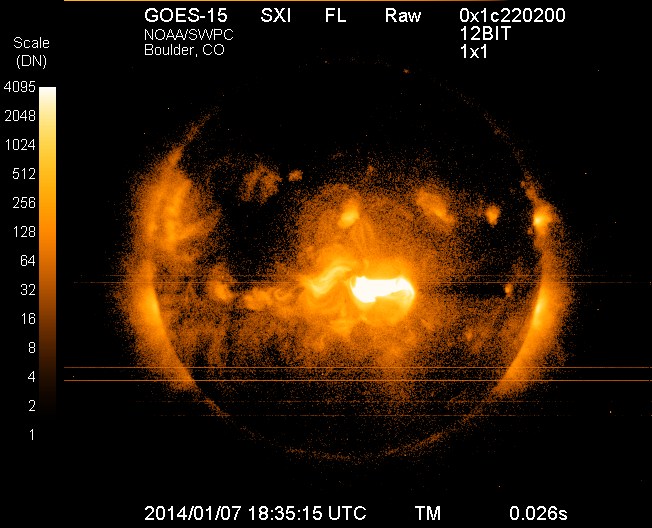
Image of the sun on Tuesday, Jan. 7, 2014, from the Solar X-Ray Imager on NOAA’s GOES satellite, taken just after the maximum emission of a solar flare. The eruption came from the middle of the sun and is directed toward Earth. This is the largest solar flare so far this year.
Forecasters at NOAA’s Space Weather Prediction Center said the sun’s coronal mass ejection (CME) that reached Earth on Jan. 9, unsettled the geomagnetic field but did not cause storm conditions to be reached due to the weak magnetic field. While there is still a chance we could see some geomagnetic storming, that threat is greatly diminished. The Space Weather Prediction Center is a division of the U.S. National Oceanic and Atmospheric Administration.
The sunspot in Region 1944 that produced the eruption at 1:32 p.m. EST Tuesday, January 7, has had no significant additional flaring and shows signs of decay.
How space weather affects real-time technology
Economies around the world have become increasingly vulnerable to the ever-changing nature of the sun. Solar flares can disrupt power grids, interfere with high-frequency airline and military communications, disrupt GPS signals, interrupt civilian communications, and blanket the Earth’s upper atmosphere with hazardous radiation.
Monitoring and forecasting solar outbursts in time to reduce their effect on space-based technologies have become new national priorities. And NOAA’s Space Weather Prediction Center (SWPC), part of NOAA’s National Weather Service, is the nation’s official source of space weather forecasts, alerts, and warnings.
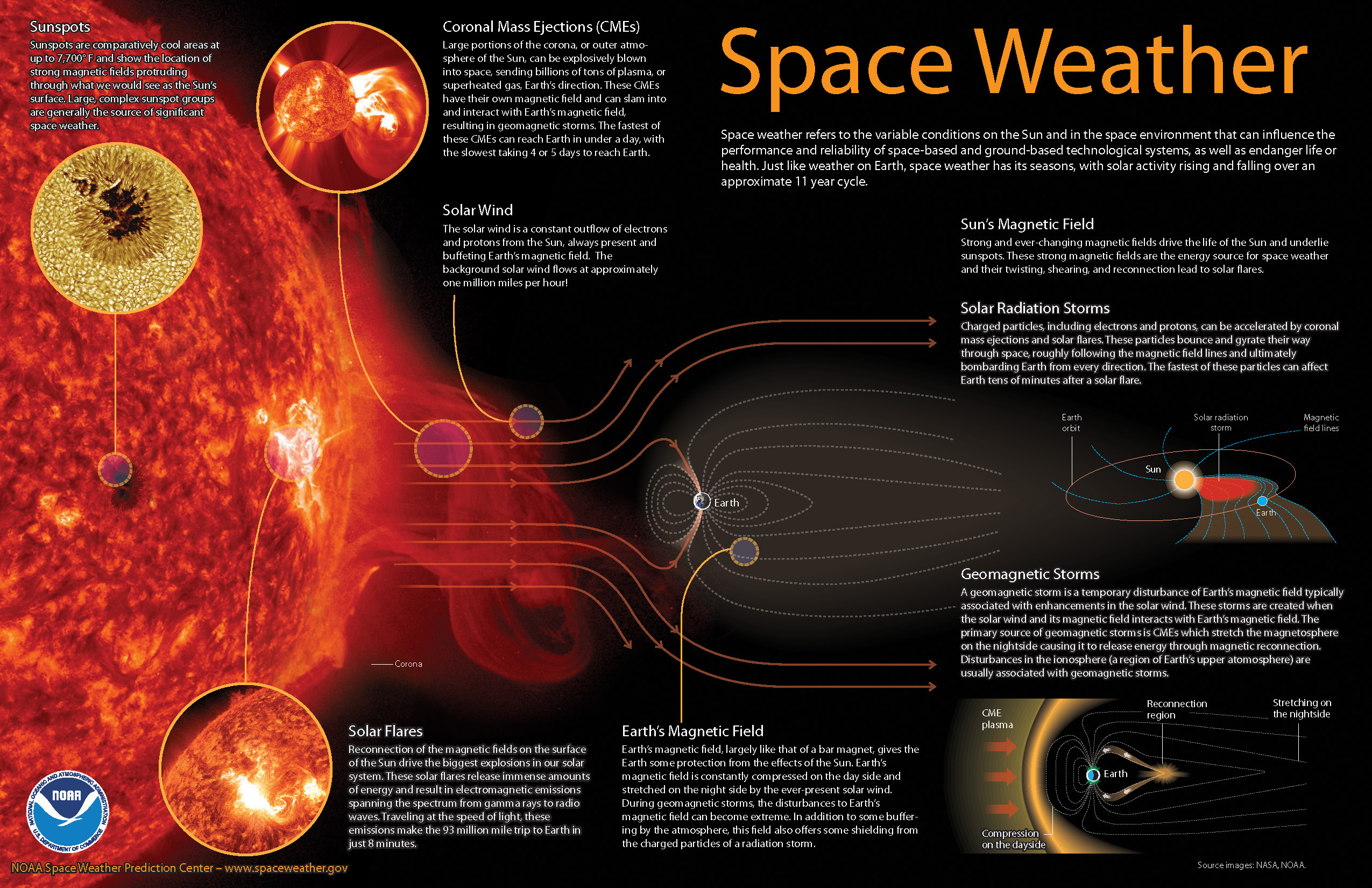
Space weather explained (source: NOAA).
Monitoring the Sun
To monitor events on the sun, SWPC staff utilize a variety of ground- and space-based sensors and imaging systems to view activity at various depths in the solar atmosphere. A worldwide network of USAF-sponsored optical observatories also provides space weather forecasters with detailed, plain-language information about activity in and around sunspot groups, as well as other areas of interest on the sun.
Space weather forecasters also analyze the 27-day recurrent pattern of solar activity. Based on a thorough analysis of current conditions, comparing these conditions to past situations, and using numerical models similar to weather models, forecasters are able to predict space weather on times scales of hours to weeks.
With effective alerts and warnings, NOAA is helping to minimize the hazards of space weather on technology. For example, satellite operations can be adjusted, power grids can be modified, and polar flights can be rerouted.
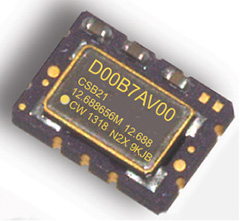
COSPAS-SARSAT beacons are battery operated emergency distress transmitters for locating ships or persons when time is critical for survival. The new Connor-Winfield series CSBxx Series are Surface Mount, 5x7mm, 3.3V, LVCMOS or Clipped Sinewave Temperature Compensated Crystal Oscillators (TCXO) designed to be emergency beacon frequency references requiring tight ± 0.2 ppm frequency stability and frequency slope control of only ±0.7 ppb/min.
The low power dissipation of 6mW allows it to power-up immediately with an accurate frequency. Class 1 devices operate over –40°C to 55°C and Class 2 devices operate–20°C to 55°C. Standard frequencies are 10.0, 12.688375, 12.688575, 12.688656, 12.68875, 16.367, and 20.0 MHz. To save time during the beacon certification process, temperature test data is available from a special on-line URL for each serialized TCXO.
Features:
3.3 Vdc Operation
Frequency Stability: ± 0.20 ppm
Mean Slope = ±0.7 ppb/min
Temperature Ranges Available:
Class I -40 to 55°C , Class II -20 to 55°C
LVCMOS or Clipped Sinewave Output
Ceramic Surface Mount Package
Tape and Reel Packaging
RoHS Compliant / Pb Free
Each unit is serialized and data is available on-line
The Director General of Civil Aviation (DGCA) of India certified on December 30 the GAGAN system to RNP0.1 (Required Navigation Performance 0.1 Nautical Mile) service level, according to The Hindu.
Now aircraft equipped with Satellite Based Augmentation System (SBAS) receivers will be able to use GPS-Aided Geo Augmented Navigation (GAGAN) signals in Indian airspace for en route navigation and non-precision approaches without vertical guidance.
Mission control centers, along with associated uplink stations, have been set up at Kundalahalli in Bangalore. Another control center and uplink station are in Delhi. A top official of the AAI said one of the Reference Stations has been housed outside the premises of the Thiruvananthapuram airport. The reference stations pick up signals from the orbiting GPS satellites. The measurements are immediately passed on to the mission control centers that then work out the necessary corrections that must be made. Messages carrying those corrections are sent via the uplink stations to the satellites in geostationary orbit that have the GAGAN payload.
The availability of the GAGAN signal in the country’s air space will bridge the gap between European Union’s European Geostationary Navigation Overlay Service (EGNOS) and Japan’s Multi-functional Satellite Augmentation System (MSAS) coverage areas.
The SBAS consists of 15 Indian Reference Stations, three Indian Navigation Land Uplink Stations, three Mission Control Centers, three Geo-Stationary Navigation Payload in C and L bands and with all the associated software and communication links.
GAGAN will provide augmentation service for GPS over India, the Bay of Bengal, South East Asia and the Middle East expanding up to Africa.
The departing Deputy Secretary of Transportation, John Porcari, wrote a letter in the closing days of 2013 opposing the U.S. Air Force’s announced plans to begin broadcasting Civil Navigation (CNAV) message-populated L2C and L5 signals as early as April 2014. Military personnel are incensed over what they see as Porcari’s impugning, when not ignoring, the Air Force 35-year track record of broadcasting the gold standard of global navigation satellite signals — something in which Transportation has zero experience.
Porcari alludes in his December 27 letter to “non-standard engineering tools” and “non-standard operations” that he believes would come into play for early CNAV broadcast. “These have the potential to inject human error, which may result in unacceptable GPS constellation operation.”
What Porcari means by “non-standard” he does not specify, although he confesses to unease as “the ability to monitor these signals, [without which] the system will not know if the L2C and LS signals are within specification. Given these risks, DOT is concerned that the CNAV messages could provide hazardously misleading information, impacting GPS safety-of-life, protection of property, and economic security applications.” The full text of the Porcari letter is available here.
In addition to questioning Air Force 2 SOPS ability to broadcast an accurate, compliant signal containing CNAV, the letter appears to ignore — or be ignorant of — the 17 official U.S. government/military monitoring sites for GPS distributed around the world, not to mention thousands of other monitoring sites run by government agencies such as the Jet Propulsion Laboratory, the National Aeronautics and Space Administration, and the National Geospatial-Intelligence Agency, and by many universities such as Stanford, Ohio State, Cal Tech, Massachusetts Institute of Technology, and many other international institutions around the world. Many of these sites collaborate under the rubric of the International GNSS Service.
Finally, two private corporations monitor and correct all GPS signals both from space and on the ground: John Deere and Trimble Navigation. Both companies run commercial, automated GPS signal monitoring systems that that report any glitch, change, power fluctuation, or anomaly in the navigation message for all GPS signals with an average two-second notification time.
“This letter is so much BS,” fumed one source who wished to remain anonymous, “coming from an agency that is in arrears in its GPS payments to the tune of more than $70 million and has no clue how to represent the global GPS user. GPS is a ubiquitous system, not just a tool for the DOT and the Federal Aviation Administration. GPS needs to implement these signals for all users and as a modernization program that was promised to be in place years ago.”
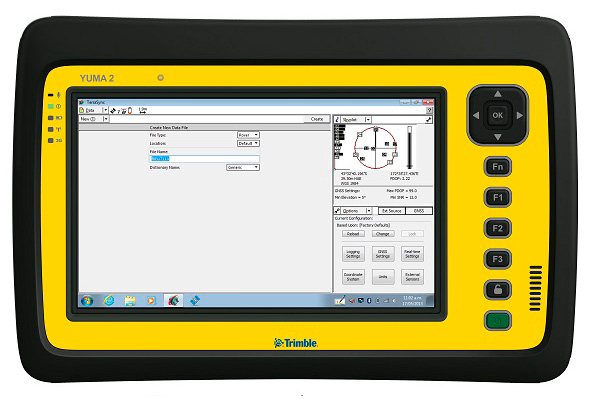
My original review of the first Yuma rugged tablet from Trimble MCS (Mobile Computing Solutions) was penned in August of 2011. My original plan was to have the review of the new Yuma 2 ready to go exactly two years later. But, as we all know, man plans and God laughs.
Actually, the problem, I must admit, is a bit more personal in nature; you see, I have been enjoying the Yuma 2 to such a degree that it was difficult to write about it because then I have to send it back. I have been selfish too long — read on for the review of the new Trimble Yuma 2 rugged tablet computer that is perfect for fieldwork, especially fieldwork involving GPS and GIS applications. Indeed, one Trimble marketing quote states:
“Bring Your Office to the Field for Efficient GPS/ GIS Data Management — The Trimble Yuma 2 rugged tablet computer is designed for ease of use and high performance mobility. Great for GIS applications — it’s like bringing a complete PC out into the field.”
While I totally agree with this assessment, the Yuma 2 is really so much more. It is not limited in any important function I could determine. As an example, I am typing part of this review on the Yuma 2 via a wireless Bluetooth keyboard and a high-definition Sony monitor hooked to the Yuma 2 via the new HDMI connector. Sweet!
Over the years, it has frequently occurred to me that oftentimes manufacturers have no idea of all the ways their equipment will be utilized in the field — although Trimble does a great job giving users ideas through the Trimble Dimensions showcase that will take place at the Mirage Hotel in Las Vegas November 3-5, 2014. If you are into rugged devices, GIS and GPS, or any of the areas listed at the Trimble Dimensions website, don’t miss this show. You will see the Yuma 2 and other Trimble devices and software put to the test and used in ways you could never imagine.
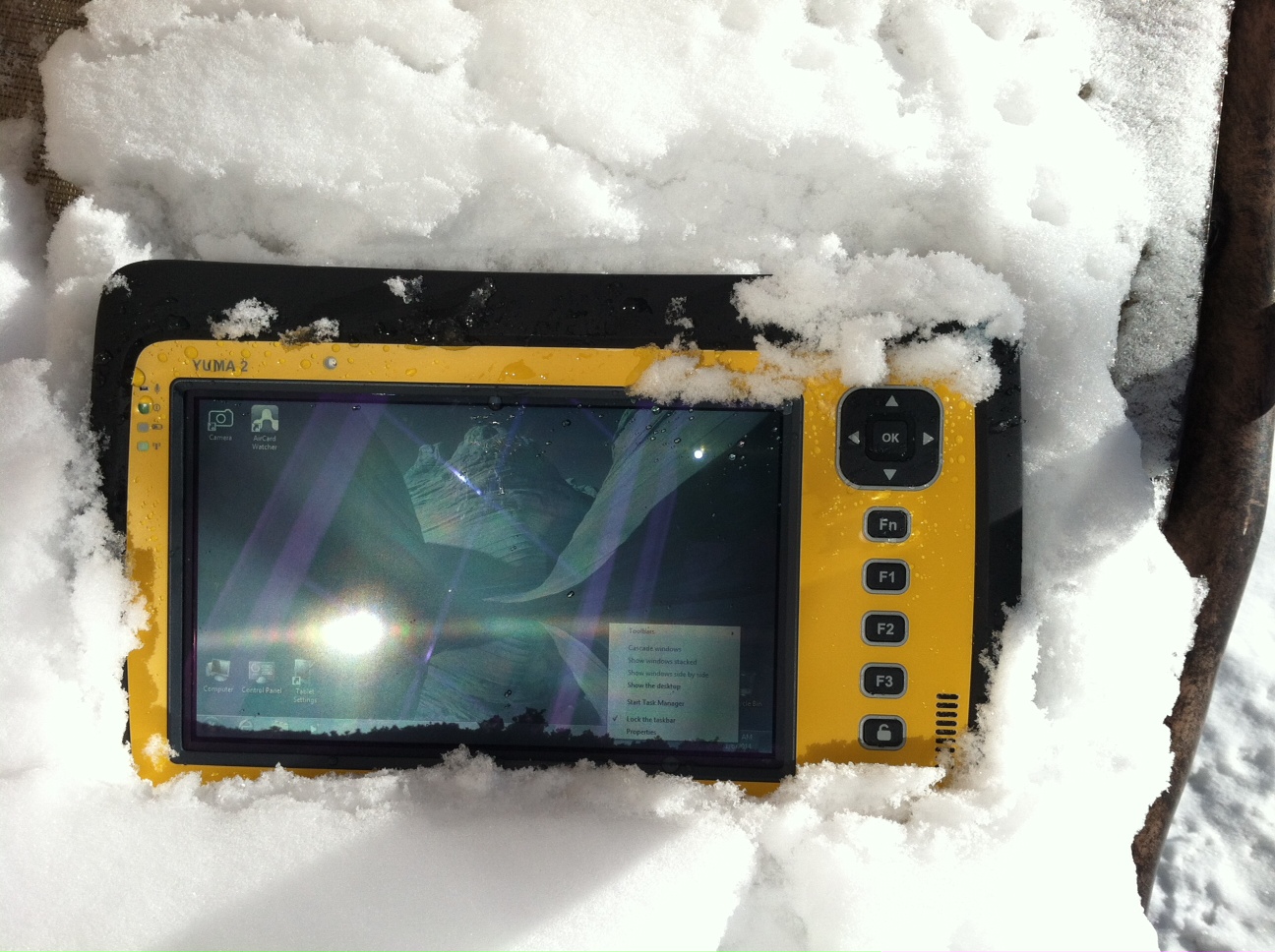
But, as usual, I digress. Let’s get back on topic and the Yuma 2 review. I put the Yuma 2 through all the normal wear-and-tear scenarios, which here in the foothills of the Rocky Mountains means severe cold (-20° F true temperature), snow, ice and altitude.
The Yuma 2 withstands tough conditions, including snow and ice.
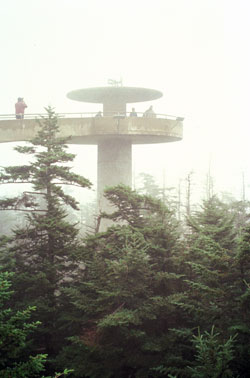
During the six months I tested and evaluated the Yuma 2, I continued to receive several emails from users of the original Yuma rugged tablet. Three of those emails came from users in the Great Smoky Mountains. All three users operate the original Yuma in their business dealings, as well as for navigating around the Great Smoky Mountains and for recreational geocaching. One user, who would only agree to be identified as “Bailey” (he assured me that although he is retired military, his first name is not Beetle), intrigued me with his assertion that he has a crucial usability test he routinely performs on his GPS devices that I cannot easily conduct here in the Rocky Mountains. Beetle and other members of the Great Smoky Mountain Geocaching Society usually perform their Great Smoky Mountain Humidity and Fog tests at or around Clingmans Dome.
Clingmans Dome in the Great Smoky Mountains.
The National Park Service describes the 6,643-foot Clingmans Dome as being the highest point in Great Smoky Mountains National Park. It is the highest point in Tennessee, and the third highest mountain east of the Mississippi. Only Mt. Mitchell (6,684 feet) and Mt. Craig (6,647 feet) — both located in Mt. Mitchell State Park in western North Carolina — rise higher. Additionally, the cool, wet conditions at the summit of Clingmans Dome make the spruce-fir forest that grows there a coniferous rainforest. By now, you are probably saying, so what?
The “so what” is that Bailey says the humidity is sometimes so high that when geocachers hit the cooler temperatures and high humidity of Clingmans Dome, some devices have water streaming from inside the device, which is never a good thing. I checked with Trimble, and indeed their devices are made to survive these conditions and much worse, such as in many mountain jungles around the world. So Bailey, have no fear, your Yuma 2 will continue to work just fine in your moist environment. Consider that the Yuma 2 was designed and built at Trimble’s MCS facility in Corvallis, Oregon, which is just due East of a rainforest along Highway 1 on the Oregon West Coast. So you can bet the Yuma 2 is tested and rated for high humidity levels. Indeed, here are the humidity specifications: Cycles between -22° F to 144° F (-30° C to +60° C) at 90% RH (relative humidity), MIL-STD-810G, Method 507.5, Procedure II (Humidity Aggravated Cycle).
While we are detailing specs, let’s list all the formal specifications, and then we can delve into more detail about how we tested the Yuma 2 and how well it performed.
Physical
Size: (LxWxH) 9.6 in x 6.3 in x 1.5 in (246 mm x 160 mm x 40 mm)
Weight: 2.6 lb (1.2 kg) with standard batteries or 3.0 lb (1.4 kg) with extended batteries
Colors: Yellow, Gray, and Gray with Yellow border
Keys: Seven keys (OK, Logon, Power, Function, 3 user-programmable function keys) and 5-way directional keypad
Hardware Specifications
Processor: 1.6 GHz Intel Atom N2600 dual-core processor
Memory: 4 GB DDR3 DRAM of volatile memory
Storage: 64 GB or 128 GB SSD-Solid State Drive (Enhanced GPS: 128 GB SSD only)
Display: 7” 1024 x 600 hybrid reflective transmissive (transflective) with capacitive touch screen
Battery Options: Smart batteries with LED power indicators – Standard battery: Two 7.5v, 3000 mAh, 21.6 Wh or optional extended battery: Two 7.5v, 6000 mAh, 43.2 Wh
I/O: 3.5 mm audio jack, USB Host (2), HDMI, docking station I/O plate, DC input power
GPS Receiver: 1-2 meter accuracy (with SBAS) or 2-4 meter accuracy (with SBAS)
Radios: Bluetooth 4.0; Wi-Fi b/g/n
WWAN: Penta-band GSM 3.75 Data only module
Standard Features
• Transflective technology (TFT) direct sunlight readable color display
• Microsoft Windows 7 Professional OS
• Intel Atom N2600 dual-core 1.6 GHz processor
• 4 GB DDR3 DRAM volatile memory
• 64 or 128 GB solid-state drive
• Multi-touch capacitive touchscreen
• Rugged design certified to IP65 and MIL-STD-810G
• 3.5 mm audio jack and integrated microphone and speaker
• Outward facing autofocus 5 MP camera with LED Flash, photo and video recording capable
• Integrated Bluetooth 4.0
• Integrated Wi-Fi b/g/n and Wi-Fi Alliance Certified
• CCX (Version 4)
• GPS receiver, Enhanced 1-2 meter accuracy or 2 – 4 meter accuracy with SBAS
• Kensington security slot
• Accelerometer and Electronic Compass
• 3.75 G WWAN data connectivity optional
• Status LEDs for power, battery charging, Wi-Fi and 3G Data
• 12-month manufacturer warranty
Standard Software
• Microsoft Windows 7 Professional with Internet Explorer
• Camera software with geo-tagging
• Trimble GPS Information receiver control software
Standard Accessories
• Standard battery set (5+ hour)
• International AC Charging Kit with 4 adapters
• Capacitive Stylus with Tether
• Hand Strap and Display Cleaning Microfiber Cloth
Now that you have all the specifications and promises from Trimble, let’s look at how it compares to the original Yuma and then let’s get into how it works in everyday life as well as the not-so-routine scenarios.
Comparative Summary of Yuma and Yuma 2 Attribute
Yuma
Yuma 2
Touchscreen
Resistive dual touch
Capacitive multi-touch
Display Technology Sunlight Readability
Very Good
Excellent
Processor
1.6 GHz single core
1.6 GHz dual core
RAM
1 GB
4 GB
Solid State Drive
32 GB then 80 GB
Choice of 64 GB or 128 GB
GPS Accuracy
4 – 6 meter
2 – 4 meter
Battery Life3
4 hours with standard batteries8 hours with extended batteries
8 hours with standard batteries16 hours with extended batteries
Digital Connectivity
ExpressCard Modules
3.75G dual-mode (CDMA and GSM) option with SIM Card and Auto Carrier Recognition.
IP Rating
IP67
IP65
Pricing
$3999 Market Price for base configuration
$2999 Market Price for base configuration
First Impressions
The first thing most people notice about the Yuma 2 is its size. It is 1.5 inches shorter than a full-size iPad, while the high-definition screen is the same size and almost the same resolution as the iPad mini. With the ingenuous hand-strap attached to the back, the Yuma 2 is very maneuverable and easy to carry with you in most any situation. With the security cable, you can also attach it to a vest, backpack or even a belt loop for security. I tried all three options and it works well. For warfighters and first responders, this is ideal, as those users don’t need to worry about what happens if they should drop it. The Yuma 2 is IP65 MilSpec rugged, and I am frankly amazed at the punishment my demo unit survived. Just like the old Timex commercial — “It takes a licking and keeps on ticking.”
Attention Getter
I carried the Yuma 2 everywhere for more than six months, and it garnered a great deal of attention from military and medical personnel of all descriptions: policemen, firefighters, delivery drivers, utility workers, and several park rangers. Even our local refuse haulers spent time looking over the Yuma 2. It is just simply hard to ignore. Interestingly, something they all had in common is that initially they were all very dubious and nervous about dropping it, even on thick carpet, grass, ice or snow. But once they saw me do it, they all wanted to have a go and they did. My demo unit has easily been dropped more than 100 times from various heights, usually from about four feet onto almost any surface you can name, and it continues to perform like the pro-gear it is and was designed to be. It was even dropped twice, unintentionally of course, with the camera in video mode and the LED flash active. I have to admit that initially gave me pause, but the Yuma 2 came through without a hitch. Camera, video and flash all still function perfectly.
Field Capability and New Test
With the Yuma 2, I had an opportunity to test an application I have never run before, but which will now be a standard in my repertoire of applications — the functionality of an audio headset along with Dragon Speaking software.
Long story short, my daughter is a PsyD, or Doctor of Psychology, in private practice, and together we have been testing various software programs that convert her spoken notes into the written word. This is a more difficult task than you might imagine, given all the specialized medical and psychological terms employed in her everyday vocabulary. But the latest professional version of Dragon Speaking was absolutely up to the task, as was the Yuma 2. I installed the Dragon software and went through the brief training routine with the headset and microphone, and the result is the paragraph you are reading. What a great way to write an article.
Now my daughter and I are Apple aficionados. We have more than 21 Apple devices in our homes, and my daughter uses a 13-inch Apple MacBook Pro with a retina display in the office, which, while it is an awesome device, is not something you want to take into the field or into a first-responder situation, whereas the Yuma 2 fulfills the same functions and fits the “rugged” bill perfectly.
While the built-in speaker on the Yuma 2 is certainly adequate for voice recognition and for GPS commands, it is not something with which you will want to listen to iTunes, so I highly recommend the optional audio headset with microphone offered by Trimble and several other suppliers. For me, the new Bose headset model with microphone works extremely well, while remaining affordable, and the resulting fidelity is…well…certainly Bose quality — what more can I say!?f you want audiophile-quality music and speech-to-text transcription capability in the field, then the Bose headset and Yuma 2 combination can’t be beat.
Docking Station and HP ePrint
The unit we tested did not arrive with the optional docking station. However, we quickly determined that if you are going to be constantly, even daily, making the transition from field to office computer and want to work on the same computer, then a docking station is a must. Next time, say for the Yuma 3 review, for instance, we will request a docking station as part of the review hardware. There were so many times we wanted to print directly from the Yuma 2 that I wished fervently for a docking station. Then I found that the HP ePrint software worked just great on the Yuma 2 as long as you are in range of a printer capable of receiving the signal.
If you are on the road and need to print, you can do that via the cloud and ePrint no matter where you are. You can also print your documents to the nearest HP Public Print Locations, which include national chain locations for FedEx Office stores, UPS stores, Walgreens, numerous hotels, airport lounges, and more. Prices vary widely per page, but if you really need a hard copy, this is an amazing option that works well with the Yuma 2.
We tested this print option at our local Walgreens, and they were not initially aware they had the capability until we printed a test page and out it popped. Now they advertise the capability. We also tried printing from the parking lot of a local FedEx store, and since I have a FedEx account (we receive a lot of packages, as you can imagine), the page was waiting for us when we walked in the door and the bill was automatically charged to our FedEx account. It was an incredibly quick and painless process.
Camera and Flash
The 5 MP (megapixel) camera with automatic geotagging and LED flash work as advertised, although with the Yuma 2 we were also able to record a short video that played back flawlessly on the Yuma 2 and via the email attachment on my Apple iMac. The only caution here is that you are definitely capable of recording a video that, due to its size, may never work its way through the normal email system. Fortunately, the GPS World magazine servers and my “other office” servers are “unlimited,” so this was not a problem for us. However, when we attempted to send a 20-MB video file to a friend, his system would not initially authorize it. When we compressed the file, it went without a hitch. So, if you are going to be shooting a lot of video in the field, a good video software compression program is highly recommended. We tried no less than five different free video compression algorithms, and they all worked without a glitch. Note: Some programs, but not all, require the same software be resident on the receiving computer as well.
Power and Data Connectors
Fortunately, the power connector on the Yuma 2 device is heavy duty. It is reminiscent of the old serial port (RS232C) connectors with the screw receptacles on the port. Consequently, you will never have to worry about the power cables being disconnected, at least not on the Yuma 2 side. There is also an USB-RS232C dongle available that comes in handy for data logging from external sensors.
GPS Applications and Accuracy
While Trimble MSC is not publishing much about the GPS specifics, from a technical point of view in the Yuma 2, Trimbe is shouting from the rooftops that you can have nominal 2-4 meter accuracy or enhanced 1-2 meter accuracy (both with SBAS or Space Based Augmentation System – in the U.S., think WAAS or Wide Area Augmentation System) depending on your requirements. There is an option for an external GPS antenna, and while the three different RTK programs we ran on the Yuma 2 produced excellent and consistent sub-meter accuracies, RTK programs can be expensive. So with the Yuma 2 you should be capable of deriving accuracies anywhere from 4 meters to 4 cm, depending on your timing requirements, how much you want to spend, and sometimes your altitude.
Altitude
Which reminds me: I really got a kick out of the correspondence from the three geocaching Trimble Yuma users in the Great Smoky Mountains, mentioned at the beginning of this column, because all three made such a big fuss about the 6,000+ feet of altitude they routinely encounter when geocaching. My initial reaction to that concern is akin to that of the old codger mountain man in the great movie Continental Divide with John Belushi and Blair Brown in 1981.
John’s city-bred character mentions that being a smoker the high altitude in the Rocky Mountains is beginning to bother him, at which point the heretofore reticent old mountain man indignantly replies, “Mountains? These here are foothills, just bumps in the ground, these ain’t mountains!” Therefore, since my home sits at an altitude 1,000 feet or more higher than any of the Great Smoky Mountain peaks, and I can be at 14,000+ feet within a 20-minute drive and cross the Continental Divide in under an hour’s driving time, I understand the old mountain man’s consternation and directly relate it to the users’ concerns about the Great Smoky Mountains, which when compared to the Rocky Mountains in Colorado, are indeed bumps in the ground. I mention this only because at 7,500 feet with no obstructions, the Yuma 2 routinely processes 8-12 GPS satellites and reports accuracies far superior to those publicized by Trimble. So, while you should not necessarily expect the same level of accuracy I have reported here, you should probably expect accuracies in between what Trimble publicizes and the sub-meter performance we observe on a regular basis.
Software
I have frankly lost count of the multiple GIS and GPS software programs I ran on the Yuma 2, but they all basically ran flawlessly, both the free apps and the more costly programs. The only issue I encountered is that some GPS programs require utilizing different ports and transmission speeds. However, since these parameters are user definable on the Yuma 2, it never presented any serious obstacles. Caveat emptor, for here I will remind users of the old axiom, “You get what you pay for!” The free GPS and GIS apps work fine, but the amount of metadata and accuracy provided by some of the more costly applications is nothing short of amazing. If you plan to use the Yuma 2 for scientific applications and desire onboard processing, then the more costly software programs are the applications I would recommend. If the Yuma 2 is just a data logger or positioning device, then the free applications work well.
Bottom Line
The Yuma 2 is an amazing machine. It is everything a high-end laptop should be and more in a ruggedized format with a Gorilla Glass high-definition display touchscreen that should be reassuring to users in the field.
For government users, the rugged Yuma 2 tablet with a Selective Availability Anti-Spoofing Module or SAASM option would be the perfect choice, and far superior to anything else in the field today, especially for our military. My sources tell me there are thousands of Yuma and Yuma 2 tablets in the field today, and the addition of a SAASM module would make them more secure and usable by our military users for all their tasks. Imagine one secure tablet that meets all your needs. I think our warfighters deserve the best, don’t you?
If you currently accomplish fieldwork and transfer data between two computers, and make use of GIS and GPS data, then the Yuma 2 is the machine of choice for you because it will do the work of both computers and display/output data through the HDMI interface or through the wireless ePrint capability, especially if you opt for the optional docking station. The SSD (solid state drives) are super fast, and since there are no moving parts on the Yuma 2, you may well find it is faster and more dependable than your current office laptop or even desktop computer. I highly recommend it.
Until next time, happy navigating and take a rugged computer out for a spin.
senseFly’s drones eBee and swinglet CAM, both designed for mapping missions, are now also capable of quickly taking oblique images to complement a mapping project or add additional documentation.
This patent-pending technology is based on a proprietary control algorithm that takes oblique images of photo targets without the need of a camera gimbal, enabling senseFly’s ultralight mapping drones to take aerial shots with an up to 45-degree inclination from the photo target.
The algorithms running on board the drone’s autopilot automatically place and orient the drone based on the defined image resolution and inclination (0-45°) selected by the operator. The drone then adapts its trajectory according to local wind and target altitude.
Having a system that positions the camera autonomously with respect to the photo target enables senseFly’s drone systems to take precise oblique images without the need for live video feedback or a camera gimbal.
As these new techniques do not require any hardware changes, this ability is freely available to the community of eBee and swinglet CAM (late 2012 model) users with the new release of eMotion 2.2.
Beside creating stunning visuals, senseFly’s latest release of Postflight Terra 3D will enable users to go one step further and add these oblique images to a standard mapping flight, adding visibility to facades and vertical surfaces.
First of all, let me wish a Happy New Year to all my friends around the world and a prosperous 2014. I’m as excited as I’ve ever been about GNSS technology.
If I may ask for forgiveness from you if you live outside of the United States, I’d like to start out answering a question I’ve been asked about for several years. The question is:
Do you have a list of free sources of RTK base station data in the United States?
What is RTK? In a nutshell, RTK is 1-2cm real-time positioning. Some refer to it as “survey-grade”. Historically, RTK users have been required to setup and maintain their own RTK base station. This is expensive and inconvenient. Many federal, state and local government agencies have setup RTK bases to increase RTK efficiency for their employees. Many of them make the RTK base data available to the public for free or for a nominal cost. If you work in an area that offers one, all you need is internet access in the field and a RTK-capable GPS L1/L2 receiver.
I’ve tried to keep track of the public RTK bases I know of, so I’ll list them here. If I’ve missed one you know of, please feel free to send me a quick email at [email protected] or list it in the Comments section at the end of this article. Furthermore, if you live outside of the U.S., I’d love to hear from you if you know of a source of free RTK base data.
Please note that in the following list there are four types of RTK bases:
I’ve used an RTK rover on all three of these services. Each of them has several mount points supporting different data formats. I typically use RTCM3 format because it’s an open standard and supported by all services I’ve used. For the Leica Spider network, you’ll be presented a choice of iMAX or MAX. Choose iMAX if you’re not running a Leica rover.
To use any of the services, you’ll need Internet connectivity. In the past, I’ve accomplished this in a few ways:
SIM card inside a data collector.
MiFi device.
Wi-Fi from a work vehicle.
You can also use a commercial RTK Bridge or Repeater such as Intuicom or Base-n-ABox. Or you can create your own RTK bridge system with a notebook computer that has internet access.
No matter how you do it, you’ll need a reliable Internet connection (speed is not important).
You’ll also need some sort of NTRIP software utility. Several data collector software packages have this built-in. For software like ArcPad, DigiTerra, gvSIG, etc. that don’t have it built-in, there are some freeware utilities on the market that run on Windows and Windows Mobile and Android (for example, SXRTN or Lefebure) that handle the NTRIP tasks in the background.
Following is a list of RTK bases in each U.S. state, along with the associated website. Please note that I only list the public (government-operated) services. Also note that while most are free, some of the public operators charge a user fee. At one point or another, I’ve used a fair number of these in various states. Once you’ve used one of each (Trimble, Leica, PBO), the rest are pretty much the same.
The difference between the Trimble and Leica networks and PBO is that the Trimble and Leica networks provide a network solution that utilizes several RTK base stations in the computation. Distance-dependent errors are reasonably modeled so the user can be farther from individual RTK bases. The PBO RTK bases provide a single baseline (like everyone used to use before RTK networks were invented) so the further you are from the RTK base, the more error is introduced into the solution (roughly 1 cm + 1 ppm).
Lastly, there are a number of commercial RTK networks in most of the states listed. I’ll save that list for another day. Again, these are just the publicly run RTK bases.
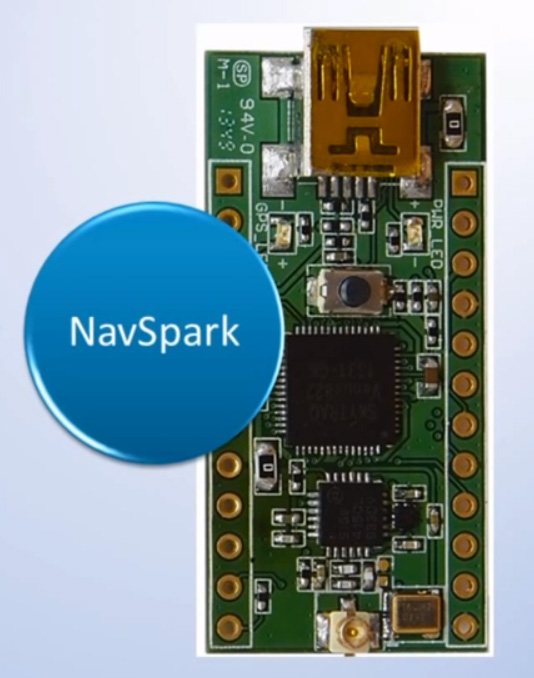
SkyTraq Technology, Inc., a fabless GNSS positioning technology company, is undertaking a crowdfunding campaign on Indiegogo to explore if there is sufficient interest in applying GPS/GNSS processor technology beyond traditional ways by offering NavSpark, a small, powerful, thumb-sized, 32-bit, microcontroller development board with GPS/GNSS receiver as onboard peripheral. With price approaching an 8-bit microcontroller development board, the GPS/GNSS receiver is effectively provided to users free of charge. They are seeking $27,000 in funding until February 6, 2014.
NavSpark features:
100MHz 32bit RISC Processor with 16Kbyte I-Cache and 2Kbyte D-Cache
IEEE-754 Compliant Floating Point Unit
1MByte Flash Memory
212Kbyte SRAM
GPS Receiver
UART x 2
SPI x 2
I2C x 1
17 Digital I/O (shared with above functional pins)
1 Pulse Per Sec Timing Reference with +/-10nsec Accuracy
Customized Arduino IDE with GPS SDK Seamlessly Integrated
NavSpark-BD model has a GPS/Beidou receiver onboard, enabling users to use the latest GPS/Beidou navigation technology just as large smartphone makers are beginning to adopt this new technology. The NavSpark-GL model has GPS/GLONASS receiver onboard, enabling users to use dual-satellite navigation technology, GPS/GLONASS as used in high-end smartphones, in their hardware projects. The NavSpark development board makes the latest global navigation satellite technology easily accessible.
SkyTraq’s 7mm x 7mm QFN56 Venus822 quad-mode GPS/GNSS processor with extended I/O pins is used on NavSpark. Venus822 is designed to simultaneously process 34 GPS/GLONASS/Beidou/Galileo/QZSS/SBAS signals in parallel, thus having much higher computation power and larger memory than conventional 8-bit or 32-bit microcontrollers. Without using GPS/GNSS function, all the 100 MIPS RISC/FPU processing power and 1 MB Flash + 212 Kb RAM memory capacity is available for user application. When just using GPS-only mode or GPS/GLONASS, GPS/Beidou dual-satellite navigation mode, the remaining MIPS and memory still far exceeds what’s available on similar small, low-cost development boards on the market.
With average price of different model variants plus active antenna in range of $15 ~ $20, NavSpark’s goal is to provide the makers an alternative powerful, small development board with location-sensing capability, and at the same time making latest GPS/Beidou or GPS/GLONASS dual-satellite navigation technology as easily accessible as GPS to the users worldwide.
NavSpark is low cost enough to leave in small hardware projects. For higher volume projects such as asset tracker, GPS fitness product, sports performance logger, toy quad-copter autopilot, etc., after rapid prototyping using NavSpark, volume usage can later change to 10mm x 10mm x 1.3mm Venus838FLPx module, a miniaturized LGA version of NavSpark. For applications benefiting from NavSpark’s high processing power and large memory without using GPS/GNSS, volume usage can later change to Venus822 chip to lower cost.
Hemisphere GNSS, Inc. today announced that Chuck Joseph has been named president and chief executive officer, effective immediately, replacing Phil Gabriel. Joseph has also been appointed to the Hemisphere GNSS Board of Directors.
Joseph has more than 30 years of executive leadership across multiple industries, serving in corporate officer and board of director capacities. He has extensive proven experience in GNSS OEM and direct sales market segments including survey and mapping, GIS, machine control, marine, avionics, personal (mobile) navigation, and tracking systems.
Before joining Hemisphere GNSS, Joseph most recently served as president and chief operating officer of nusola, Inc., an energy technology company he co-founded and where he continues to serve as executive chairman of the Board. Previously, among other roles, Joseph was senior vice president and general manager of Immersion Corporation, a tactile feedback technology company focused on GPS-centric mobile and industrial applications, corporate vice president of marketing and sales for Magellan Corporation, and executive vice president and general manager of Trimble Navigation.
“Chuck is a proven executive with the experience and expertise to lead Hemisphere GNSS as we enter our next phase of growth and development,” said Jonathan Ladd, chairman of the Hemisphere GNSS Board of Directors. “Over the course of his career, Chuck has repeatedly demonstrated the ability to develop critical corporate strategies to help innovative companies scale and grow globally. His understanding of our business, significant international experience, and deep OEM and GNSS industry experience make him ideally suited to lead Hemisphere as we seek to accelerate company growth.”
“Hemisphere has long been recognized for its pioneering and trend setting high-precision GNSS technology, and I look forward to leading the company’s talented team as we make the strategic decisions necessary to expand our market share and OEM presence globally,” Joseph said. “Leveraging our deep GNSS experience and strong, core GNSS technologies, along with UniStrong’s high quality, low-cost product design and development resources, Hemisphere is poised for significant global growth.”
In conjunction with the reported change in management, Hemisphere GNSS is also announcing the departure of Phil Gabriel, the company’s previous president, effective today. Ladd commented, “Phil was instrumental in getting our company off the ground after the acquisition from AgJunction Inc. in early 2013. We thank Phil for his contributions and dedication during the past year, and wish him good fortune and success on his next endeavor.”
How will 3D printing and the geospatial community affect each other?
Many of us in the Intelligence, Surveillance, and Reconnaissance (ISR) business chuckled at the publicity stunt Amazon pulled by demonstrating UAV doorstep delivery of packages. This was smart marketing by Amazon, and although the technology may not be farfetched, the institutional issues are and will create a long, steep hill for Amazon to climb. There is, however, a growing revolution that Amazon is not talking about that could give them some serious challenges in the not-too-distant future — 3D printing. Last August I wrote about significant improvements in 3D printing demonstrated at the Consumer Electronics Show (CES), including creation of metal parts. This technology will most likely affect the geospatial community in ways we haven’t considered, but we geospatial experts will also have an impact on the 3D printing community.
How far has 3D printing come?
The first 3D printer I saw in action was a terrain printer at the Esri User Conference about five years ago. The concept was very simple. The printer laid down a thin 12-x-12-inch layer of special powder, followed by inkjet print heads that laid down ink that both colored and fused the powder. The process took hours as layer on layer of powder and ink built the terrain model. When complete, the uninked powder was brushed away, revealing the solid 3D model. The model could have complex undercut shapes such as a highway overpass, but the material was also somewhat brittle like unfired clay. Users could create more durable objects by using the models as forms to make castings out of aluminum or epoxies.
Developers of the budding technology have not stood still. New printers use plastic filaments to build up 3D objects, and some even use exotic technology to build objects made of fused metal such as this example. Repair parts can be created by using a 3D laser scanner to create 3D CAD models that can then be modified to add reinforcement where needed to make the replacement part better than the original. Bio-medical printers are being used to create human body parts such as ear cartilage, artery sections and dental appliances like this replacement jaw. There are even some experiments planned next year as Performative Architecture to print buildings with plumbing and other components included. On a micro level, scientists are printing complex nano devices and chemical compounds to create objects that can’t be produced in any other way.
An 83-year-old woman has become the first person to have a 3D printer-created jaw fitted. (from The Telegraph).A 285 µm racecar, printed at the Vienna University of Technology (from Phys.org).
A common phase used by 3D printing practitioners is that “complexity is free” in that it takes no more effort to print something complex than it does something simple. In fact, 3D printing becomes more economical as complexity increases, because labor costs decrease and a greater number of voids reduces the amount of raw material needed to build objects. So, look for objects such as bikes or cycles that look very organic, perhaps made of titanium, with very strong and economic internal cellular construction that may mimic the bones of birds.
How fast are things moving?
Microsoft has just added a “direct pipeline” to 3D printers from 3D printing applications such as Autodesk. If you still aren’t convinced that 3D printing is going mainstream, consider this. Staples office supply is now offering 3D printing at some of its printing/shipping centers. Add to these developments the concepts of self-assembly and of use of nano devices and we are entering a very disruptive period and environment. I believe that geospatial aspects of our world will be significantly affected by this technology, but we will also play a significant part in the development and implementation of 3D printing. So let’s speculate on the possible impact on both communities.
Our impact on the 3D printing community
Those trained in geospatial tools and techniques are well positioned to develop and operate 3D manufacturing systems. Most of us have excellent computer skills as well as the ability to visualize complex 3D objects, while also working with abstract concepts. We also understand 3D modeling software, linked databases and web development tools. Many of us have sophisticated software development knowledge and the ability to manage complex systems and processes. If architectural printing actually becomes a reality, GIS/CAD/BIM will be an integral part of the total process. So whether you remain on a geospatial career path or evolve into these new technologies, your knowledge and skills will serve you well.
3D printing’s impact on the geospatial community
“The cheapest 3D printers, which print rudimentary objects, currently sell for between $500 and $1,000. Soon, we will have printers for this price that can print toys and household goods. By the end of this decade, we will see 3D printers doing the small-scale production of previously labor-intensive crafts and goods. It is entirely conceivable that in the next decade we start 3D printing buildings and electronics.” Slashdot
Transportation
My first speculation is transportation and city growth. You may remember from your geography classes that center cites and edge cities grew out of the need to centralize manufacturing, sales, specialized activity, meetings, etc. If 3D printing becomes ubiquitous, there will be less need for large manufacturing plants, little need for warehouses, and significantly less shipping activity. The primary need for shipping will be for bulk materials used in 3D printing. Since raw materials can be more efficiently shipped than finished bulky goods, there will be greater use of tankers and pipelines.
When I was at the Atlanta Regional Commission, a large portion of our efforts were geared toward regional transportation planning. Using GIS data layers that defined where people work and where they live were key components of these “Origin – Destination” models used to predict traffic patterns. Large manufacturing facilities were always key employment centers. If small local 3D print shops or even home 3D printers could manufacture almost any item, large centralized plants becomes obsolete and the transportation needs change significantly.
Retail
Commercial shipping could be relegated primarily to raw materials. What happens to WalMart or Amazon if everyone has a home 3D printer and all you need is to download a digital file and have some raw materials on hand?
Real estate
In my early GIS career, I spent considerable time doing ring studies, trade area analysis and targeted marketing. The reduced need for retail stores and corresponding warehouses could turn that process on its head. Couple this kind of manufacturing with other technology, such as video conferencing and robotic medicine, and location favoring city centers is reduced. This would certainly impact real estate values as location factors evolve away from crowded centers.
Energy, environment and resources
A very positive impact could be on the environment. Reduced transportation requirements will cut traffic and corresponding pollution. The more efficient use of raw materials and better direct recycling of many plastics is another positive factor. I’m not sure how the energy equation would work with mass production vs. individual replication and reduced transportation but my gut feeling is that it would be a net positive result.
Military and emergency responders
The U.S. Navy is already experimenting with 3D printers to reduce the number of repair parts that are stored on ships or in the supply chain. I personally experienced the early benefits of shipboard digital technology by reducing huge libraries of paper repair manuals. An average three-foot stack of international paper navigation charts on each ship recently went digital. First responders could replicate emergency equipment repair parts on demand at NIMS Area Command Centers providing logistics support for major incidents.
Geopolitics
Internationally, many large overseas manufacturing facilities could become obsolete. U.S. companies are bringing some operations back home. The geopolitical consequences could be significant. This even applies to the manufacture of clothing. Imagine having clothing that fits perfectly, printed on demand at a neighborhood 3D print store. A positive effect could be that less developed countries may have access to goods that currently are not affordable.
Unknown unknowns
Although 3D printing has made great strides in five years, it’s still far from being competitive with traditional mass production. Speed, object size and mixed materials/media are still an issue. There are many naysayers on 3D printing sites. Many believe that the technology is too slow and limited along with a myriad of other problems. I have no doubt that many if not all these issues will be resolved or augmented with other technologies. We are also viewing the technology in terms of our current knowledge and perspective. My first experience with digital mapping was a 286 PC driving a xy pen plotter that mimicked the job done by draftsmen. At the time, no one imagined that HP could spray micro drops of ink on paper to rapidly produce billboard-sized plots with color imagery as we do today.
I believe we are in for a wild ride as the technology evolves. The above speculations are just my preliminary thoughts. I’ll bet that many of you have additional observations and speculations. I’d like to hear from you in the comments section. To learn more, you may want to attend a key 3D Printing conference in New Your April 2-4.
Artist’s concept of a GPS III satellite in orbit, courtesy of Lockheed Martin.
Air Force Orders GPS III Satellites 05 and 06 from Lockheed Martin
A December 12 contract modification provided Air Force funding to Lockheed Martin to complete the fifth and sixth GPS III space vehicles (SV 05-06). Lockheeed originally received funding to procure long-lead parts for satellites five through eight (SV 05-08) in February 2013.
The $200,700,415 cost-plus-incentive-fee modification (P00276) on an existing contract (FA8807-08-C-0010) for GPS III space vehicles 05 and 06 means that work will be performed at Littleton. Colorado and Clifton, New Jersey, and is expected to be completed by Dec. 14, 2017 for space vehicle 05 and June 14, 2018 for space vehicle 06. The Air Force Space and Missile Systems Center Contracting Directorate, Los Angeles Air Force Base, California, is the contracting activity.
Galileo Achieves First Airborne Tracking
The European Space Agency’s Galileo satellites have achieved their first aerial fix of longitude, latitude, and altitude, enabling the inflight tracking of a test aircraft.
ESA’s four Galileo satellites in orbit have supported months of positioning tests on the ground across Europe since the first fix in March. Now the first aerial tracking using Galileo has taken place, determining the position of an aircraft using only its own independent navigation system.
The milestone took place on a Fairchild Metro-II above Gilze-Rijen Air Force Base in the Netherlands on November 12. It was part of an aerial campaign overseen jointly by ESA and the National Aerospace Laboratory of the Netherlands, NLR, with the support of Eurocontrol, the European Organisation for the Safety of Air Navigation, and LVNL, the Dutch Air Navigation Service Provider.
A pair of Galileo test receivers was used aboard the aircraft, the same kind employed for Galileo testing in the field and in labs across Europe. They were connected to an aeronautical-certified triple-frequency Galileo-ready antenna mounted on top of the aircraft.
Tests were scheduled during periods when all four Galileo satellites were visible in the sky. The receivers fixed the plane’s position, as well as determining key variables such as the position, velocity, and timing accuracy; time to first fix; signal-to-noise ratio; range error; and range–rate error.
Testing covered both Galileo’s publicly available Open Service and the more precise, encrypted Public Regulated Service, whose availability is limited to governmental entities.
Flights covered all major phases: take off, straight and level flight with constant speed, orbit, straight and level flight with alternating speeds, turns with a maximum bank angle of 60 degrees, pull-ups and push-overs, approaches and landings.
The flights also allowed positioning to be carried out during a wide variety of conditions, such as vibrations, speeds up to 456 km/h, accelerations up to 2 ghorizontal and 0.5–1.5 gvertical, and rapid jerks. The maximum altitude reached during the flights was 3,000 meters.
GPS III Prototype Proves Constellation Compatibility
The Lockheed Martin prototype of the next-generation GPS satellite, the GPS III, has proven that it is backwardly compatible with the existing GPS satellite constellation in orbit.
During tests concluded on October 17, Lockheed Martin’s GPS III testbed successfully communicated via cross-links to Air Force simulators of the current GPS constellation in orbit. The current GPS constellation includes GPS IIR, GPS IIR-M, and GPS IIF satellites.
Testing also demonstrated the ability of an Air Force receiver to track navigation signals transmitted by the GPS III Nonflight Satellite Testbed (GNST). The GNST is a full-sized, functional satellite prototype at Cape Canaveral Air Force Station.
“These tests represent the first time when the GNST’s flight-like hardware has communicated with flight-like hardware from the rest of the GPS constellation and with a navigation receiver,” explained Paul Miller, Lockheed Martin’s director for GPS III Development. “This provides early confidence in the GPS III’s design to bring advanced capabilities to our nation, while also being backward-compatible.”
The first flight-ready GPS III satellite is expected to arrive at Cape Canaveral in 2014, for launch by the Air Force in 2015.
GPS III satellites will be the first GPS space vehicles with a new L1C civil signal designed to make it interoperable with other international global navigation satellite systems.
The GNST has helped to identify and resolve development issues prior to integration and test of the first GPS III flight space vehicle (SV 01). It has gone through the development, test, and production process for the GPS III program first, significantly reducing risk for the flight vehicles, improving production predictability, increasing mission assurance, and lowering overall program costs.
The GPS III team is led by the Global Positioning Systems Directorate at the U.S. Air Force Space and Missile Systems Center.
Lockheed Martin is the GPS III prime contractor, with teammates including ITT Exelis, General Dynamics, Infinity Systems Engineering, Honeywell, ATK, and other subcontractors.
Good News for Users and Manufacturers
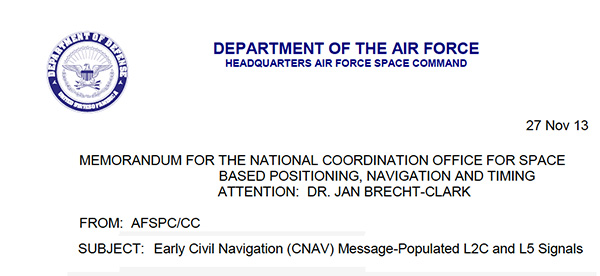
The U.S. Air Force is directing transmission of continuous CNAV message-populated L2C and L5 signals starting in April 2014. The move is designed to help development of user equipment compatible with the civil signals. Full text of the CNAV memo appears below.
Galileo FOC Satellites Endure Simulated Space Tests
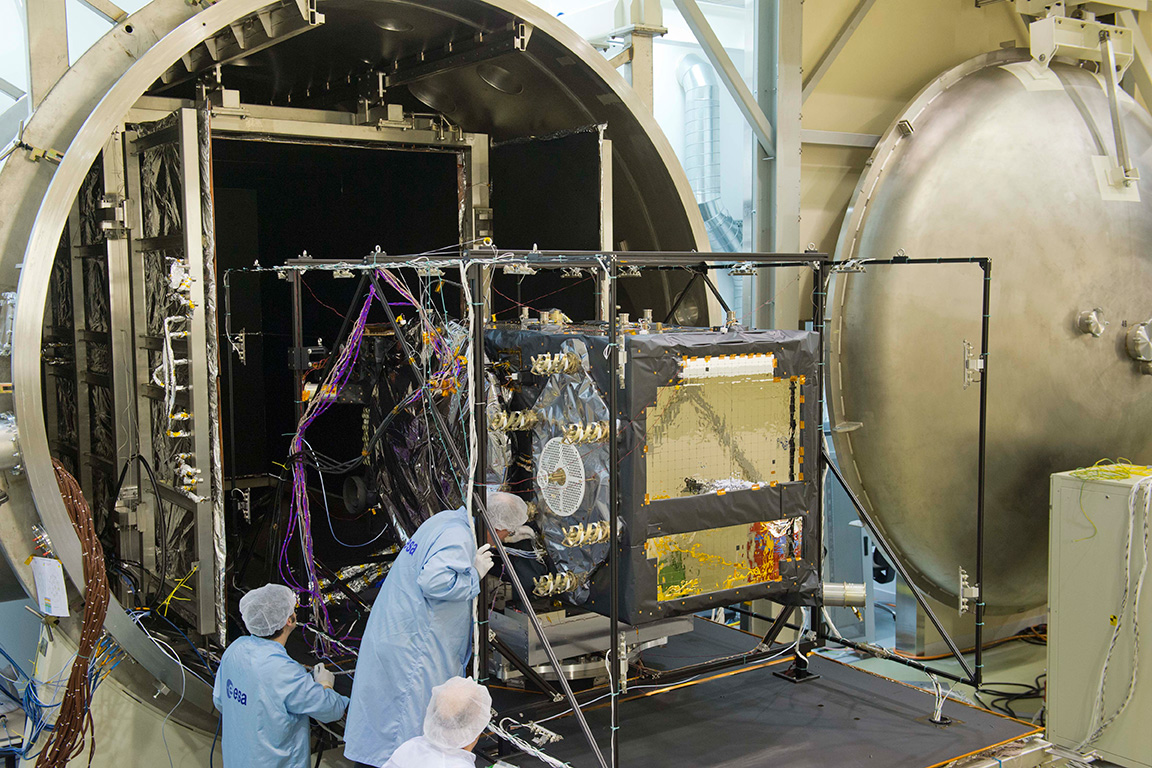
The European Space Agency’s newest Galileo satellite has emerged from five weeks of simulated space conditions. On November 29, a hatch slid open to end its thermal-vacuum test, a milestone on the way to orbit.
The satellite was placed in the 4.5-meter-diameter Phenix chamber in ESA’s ESTEC Test Centre in Noordwijk, the Netherlands, in late October. Once inside, the air was pumped out to create a space-quality vacuum. Temperature extremes were also reproduced, with the six copper walls of the thermal tent cooled by liquid nitrogen down to –180°C.
A second Galileo vehicle has been undergoing the same rigors at the site, along with a vibration and shock test to reproduce separation from the launcher. Thermal-vacuum testing on the second model will begin in early 2014. The two satellites will be launched on a Soyuz rocket from Europe’s Spaceport in French Guiana in mid-2014.
The next satellite is expected to arrive at ESTEC in March, with further satellites following every seven weeks or so. A total of 22 FOC satellites are being built by OHB in Germany, with navigation payloads being delivered from Surrey Satellite Technology Ltd. in the UK.
The first Galileo Full Operational Capability satellite emerges from the Phenix test chamber after five weeks of thermal–vacuum testing.
Raytheon Intelligence and Information Systems has been awarded a change order for work that costs up to $8.5 million on its existing contract to ensure that the new military signal, M-code, works with the GPS Operational Control System, according to an announcement from the Pentagon as reported by Space News.
Raytheon is building the ground station (OCX) for a new generation of satellites that will bring more safety and precision to GPS. The contract modification is to assure implementation of M-code capabilities across OCX Block 1 and 2. M-code is the new highly secure, anti-jam signal designed for the GPS III constellation. The current GPS ground control system lacks M-code capability.
The OCX is designed to work with the advanced GPS III positioning, navigation and timing satellites, slated to start launching in 2015, and also will be backwardly compatible with existing GPS satellites.
Raytheon won the $886.4 million prime contract to develop the OCX in February 2010. Work will be performed at Raytheon’s facility in Aurora, Colorado, and is expected to be completed by August 31, 2016.
The Air Force Space and Missile Systems Contracting Directorate, Los Angeles Air Force Base, California, is the contracting agency.
Details on the contract change order: Raytheon Intelligence and Information Systems, Aurora, Colo., has been awarded an unpriced change order (P00112) with a not-to-exceed of $8,595,748 on an existing contract (FA8807-10-C-0001) for M-Code Implementation on the Operational Control System. The contract modification is to assure implementation of M-Code Capabilities across OCX Block 1 and 2. Work will be performed at Aurora, Colo., and is expected to be completed by Aug. 31, 2016. Fiscal 2014 research and development funds will be obligated at definitization. The Air Force Space and Missile Systems Contracting Directorate, Los Angeles Air Force Base, Calif., is the contracting activity.