Category: Applications

  • Kongsberg Unveils Heading and GNSS Surface Position Options for eBird

    Kongsberg Unveils Heading and GNSS Surface Position Options for eBird

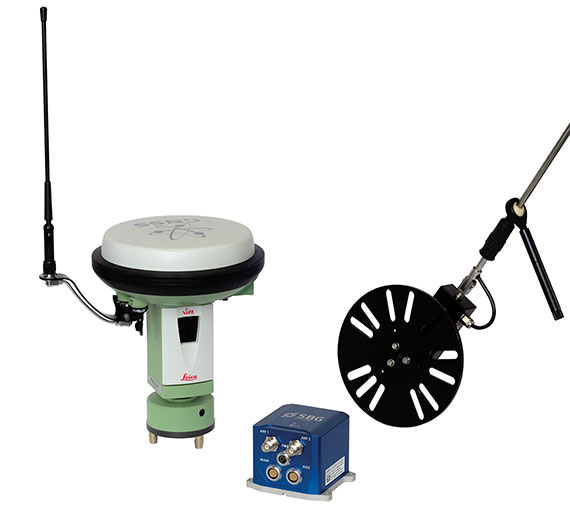
    Photo: Kongsberg Seatex

    Kongsberg Seatex has given users of the eBird System the ability to equip SmartWing instrumentation with two additional features — a compass and a GNSS receiver. eBird is a bird concept for lateral, vertical and roll streamer control in marine seismic acquisition that enables fault tolerant and efficient multi-streamer steering by employing a wide range of innovative and patented technological solutions.

    The innovative approach of placing a GNSS receiver in the wings opens new opportunities for improving the efficiency of an operation – in particular during launch and recovery but also when running lines.

    The built-in GNSS receiver has been implemented based on Kongsberg Seatex’ extensive competence within GNSS technology. Transmission of satellite data from the seismic vessel to eBird reduces the time to first position fix considerably – giving eBird a position with one wing semi-surfaced. The built-in compass has been developed based on Kongsberg Seatex’ deep knowledge and experience within sensor technology and is fully integrated with SmartWing. The compass provides heading information from a submerged eBird.

    These add-ons represent further improvements to the eBird streamer positioning and control concept.

    “We always try to find improvements to our solutions and these new features are excellent examples of how we combine our core technology and expertise to create improved value for our customers,” says Gard Ueland, President of Kongsberg Seatex AS. “This is one step further in our offering to the seismic market, and we will continue to improve our solutions in close cooperation with our customers.”

    eBird has, since its introduction at SEG in 2009, gained high attention within the seismic acquisition community with its sleek and functional design and utilisation of innovative technology together with proven performance in large seismic streamer spreads.


  • Ordnance Survey uses OpenData to Create a Minecraft Map of Great Britain

    Great Britain’s Ordnance Survey announced a  team developing ideas for future products and services at Ordnance Survey has created a map of Great Britain in the popular Minecraft video game, featuring 22 billion blocks, using their freely available digital map products in OS OpenData, and made it available for download as a new Minecraft world.

    According to the announcement, the national mapping authority have created a Minecraft world representing over 224,000 square kilometres of Great Britain using two of their OS OpenData products. The Minecraft GB terrain was created using OS Terrain 50, a three-dimensional model of the bare earth surface known as a Digital Terrain Model delivered as a grid with a resolution of 50 metres. The raster version of OS VectorMap District, a mid-scale contextual or backdrop map product, was then used to extract surface features – for example water, woodland and roads – based on pixel colours and densities. This information was then used to modify the material of individual blocks in the Minecraft GB world.

    Ordnance_Survey_RS1334_minecraftexample

    Explaining how the project started, Graham Dunlop, Innovation Lab Manager at Ordnance Survey, said, “The purpose of our Labs team is to explore and assess ideas for new products and services. When Joseph Braybrook joined the team as part of Ordnance Survey’s summer internship programme, we discovered he was an avid Minecraft fan and we decided to explore the potential educational benefits of the popular video game. We decided to build a Minecraft world using free-to-use OS OpenData products to display the landscape and terrain of Great Britain.”

    The new Minecraft GB world, which consists of over 22 billion Minecraft blocks, is now available to download by any of Minecraft’s 33 million active users with a license. Players can use the new world to fly across the country and see different environments such as Snowdonia, Poole Harbour and central London. All players will enter the virtual 3D world at our head office in Southampton and from there can add their own recreations of real-life features – such as landmarks like Stonehenge or add imagined environments such as Hogwarts castle.

    Graham continues, “We think we may have created the largest Minecraft world ever built based on real-world data. It’s impressive to know that despite never having used Java programming previously, Joseph took just two weeks to create the Minecraft GB world. The resulting map shows the massive potential, not just for using Minecraft for computer technology and geography purposes in schools, but also the huge scope of applications for OS OpenData too.”

    Recognising the need to scale the world, the team used coding to take the raw heights in Ordnance Survey’s data and scaled it down to fit within the 256 block height limit in Minecraft. A maximum height of 2,500 metres was chosen, which means Ben Nevis appears just over 128 blocks high. Although this exaggerates the real-world height, it preserves low-lying coastal features such as Bournemouth’s cliffs, adding interest to the landscape.

    Ordnance Survey has also linked the world to their popular OS getamap service to enable players to navigate to some familiar places. Players can use the service to search for a location and capture the grid reference displayed on the screen. Using this, a conversion tool can then generate the Minecraft teleport command with the correct world coordinates.

  • u-blox Releases Improved Sub-Meter GPS Positioning Module NEO-7P

    u-blox Releases Improved Sub-Meter GPS Positioning Module NEO-7P

    NEO-7P
    The NEO-7P sub-meter GPS positioning module with Precise Point Positioning (PPP) and Differential GPS.

    Swiss-based u‑blox has introduced the NEO-7P, an improved, low-power, compact, high-precision GPS module. While remaining backwards compatible with its predecessor NEO-6P, the new module achieves standalone sub-meter precision based on single-frequency precise point positioning (PPP) technology.

    Fully autonomous sub-meter performance can be realized for most outdoor applications within coverage of Satellite Based Augmentation Systems (SBAS) throughout North America (WAAS), Europe (EGNOS), and Japan (MSAS).

    In areas where SBAS is unavailable, the NEO-7P achieves high-accuracy based on Differential GPS (DGPS) positioning as an alternative to PPP. DGPS uses RTCM correction messages (correctional data defined by the Radio Technical Commission for Maritime Services) from a local reference station or aiding network to cancel out measurement error introduced by atmospheric distortion and variances in satellite orbits and clocks.

    “The NEO-7P addresses many requirements for precise positioning used in surveying, mapping, marine, and clear-sky recreational applications,” said Thomas Nigg, VP product marketing at u-blox. “The solution delivers sub-meter positioning performance based on two techniques at a fraction of the cost of other high precision solutions. The solution is compact, requires no external base station, and uses a single frequency receiver.”

    The device comes in u-blox’ compact NEO Leadless Chip Carrier (LCC) module form factor. A UART, USB and I2C interface provide flexible connections to a host processor. It can also communicate directly with u‑blox’ SARA 2G, LISA 3G and TOBY LTE cellular modules.

    The NEO-7P also provides complete GPS satellite raw data allowing further accuracy improvement based on post processing by an external host. Internal Flash memory allows simple firmware upgrades. The NEO-7P also supports Russian GLONASS Japanese QZSS positioning standards.

    The module is suitable for vehicle, industrial and consumer applications.

    Detailed information about the NEO-7P can be found on the u-blox website.


  • QGIS 2.0 (Dufour) Released

    The Open Source Geospatial Foundation (OSGeo) announced the release of QGIS 2.0. QGIS is a cross-platform free and open source desktop geographic information systems (GIS) application that provides data viewing, editing, and analysis capabilities.


    What’s new in QGIS 2.0

    User Interface

    • New icon theme: We have updated our icon theme to use the ‘GIS’ theme introducing an improved level of consistency and professionalism to the QGIS user interface.
    • Side tabs, collapsable groups: We have standardised the layout of tabs and introduced collapsible group boxes into many of our dialogs to make navigating the various options more easy, and to make better use of screen real estate.
    • Soft notifications: In many cases we want to tell you something, but we don’t want to stop your work or get in your way. With the new notification system QGIS can let you know about important information via a message bar (colour depends on the importance of the message) that appears at the top of the map canvas but doesn’t force you to deal with it if you are busy doing something else. Programmers can create these notification (e.g. from a plugin) too using our python API.
    • Application custom font and Qt stylesheet: The system font used for the application’s user interface can now be set. Any C++ or Python plugin that is a child of the QGIS GUI application or has copied/applied the application’s GUI stylesheet can inherit its styling, which is useful for GUI fixes across platforms and when using custom QGIS Qt widgets, like QgsCollapsibleGroupBox.
    • Live color chooser dialogs and buttons: Every color chooser button throughout the interface has been updated to give visual feedback on whether the current color has a transparent, or ‘alpha,’ component. The color chooser opened by the new color buttons will now always be the default for the operating system. If the user has Use live-updating color chooser dialogs checked under Options -> General -> Application, any change in the color chooser will immediately be shown in the color button and for any item currently being edited, where applicable.
    • SVG Annotations: With QGIS 2.0 you can now add SVG annotations to your map – either pinned to a specific place or in a relative position over the map canvas.

    Data Provider

    • Oracle Spatial support: QGIS 2.0 now includes Oracle Spatial support.
    • Web Coverage Service provider added: QGIS now provides native support for Web Coverage Service layers – the process for adding WCS is similar to adding a WMS layer or WFS layer.
    • Raster Data Provider overhaul: The raster data provider system has been completely overhauled. One of the best new features stemming from this work is the ability to ‘Layer -> Save As…’ to save any raster layer as a new layer. In the process you can clip, resample, and reproject the layer to a new Coordinate Reference System. You can also save a raster layer as a rendered image so if you for example have single band raster that you have applied a colour palette to, you can save the rendered layer out to a georeferenced RGB layer.
    • Raster 2% cumulative cut by default: Many raster imagery products have a large number of outliers which result in images having a washed out appearance. QGIS 2.0 intoduces much more fine grained control over the rendering behaviour of rasters, including using a 2% – 98% percent cumulative cut by default when determining the colour space for the image. The image here shows QGIS 1.8 (left) versus QGIS 2.0 (right) when rendering the same image with default settings.
    • WMS identify format: It is now possible to select the format of the identify tool result for WMS layers if multiple known formats are supported by the server. The supported formats are HTML, feature (GML) and plain text. If the feature (GML) format is selected, the result is in the same form as for vector layers, the geometry may be highlighted and the feature including attributes and geometry may be copied to clipboard and pasted to another layer.
    • WMTS Support: The WMS client in QGIS now supports WMTS (Web Mapping Tile Service) including selection of sub-datasets such as time slices. When adding a WMS layer from a compliant server, you will be prompted to select the time slice to display.

    Symbology

    • Data defined properties: With the new data defined properties, it is possible to control symbol type, size, color, rotation, and many other properties through feature attributes.
    • Improved symbol layer management: The new symbol layer overview uses a clear, tree-structured layout which allows for easy and fast access to all symbol layers.
    • Support for transparency in colour definitions: In most places where you select colours, QGIS now allows you to specify the alpha channel (which determins how transparent the colour should be). This allows you to create great looking maps and to hide data easily that you don’t want users to see.
    • Color Control for Raster Layers: QGIS 2.0 allows you to precisely control exactly how you’d like raster layers to appear. You now have complete control over the brightness, contrast and saturation of raster layers. There’s even options to allow display of rasters in grayscale or by colorising with a specified color.
    • Copy symbology between layers: Its now super easy to copy symbology from one layer to another layer. If you are working with several similar layer, you can simply right-click on one layer, choose Copy Style from the context menu and then right-click on another layer and choose Paste-Style.
    • Save styles in your database: If you are using a database vector data store, you can now store the layer style definitions directly in the database. This makes it easy to share styled layers in an enterprise or multi-user environment.
    • Colour ramp support: Colour ramps are now available in many places in QGIS symbology settings and QGIS ships with a rich, extensible set of colour ramps. You can also design your own and many cpt-city themes are included in QGIS now ‘out of the box’. Color ramps even have full support for transparency!
    • Set custom default styles for all layer types: Now QGIS lets you control how new layers will be drawn when they do not have an existing .qml style defined. You can also set the default transparency level for new layers and whether symbols should have random colours assigned to them.

    Map Composer

    • HTML Map Items: You can now place html elements onto your map.
    • Auto snap lines: Having nicely align map items is critical to making nice printed maps. Auto snapping lines have been added to allow for easy composer object alignment by simply dragging an object close to another.
    • Manual Snap Lines: Sometimes you need to align objects a curtain distance on the composer. With the new manual snapping lines you are able to add manual snap lines which allow for better align objects using a common alignment. Simply drag from the top or side ruler to add new guide line.
    • Map series generation: Ever needed to generate a map series? Of course you have. The composer now includes built in map series generation using the atlas feature. Coverage layers can be points, lines, polygons, and the current feature attribute data is available in labels for on the fly value replacement.
    • Multipage support: A single composer window can now contain more then one page.
    • Expressions in composer labels: The composer label item in 1.8 was quite limited and only allowed a single token $CURRENT_DATE to be used. In 2.0 full expression support has been added too greater power and control of the final labels.
    • Automatic overview support in map frame: Need to show the current area of the main map frame in a smaller overview window. Now you can. The map frame now contains the ability to show the extents of other and will update when moved. Using this with the atlas generation feature now core in the composer allows for some slick map generation. Overview frame style uses the same styling as a normal map polygon object so your creativity is never restricted.
    • Layer blending: Layer blending makes it possible to combine layers in new and exciting ways. While in older versions, all you could do was to make the layer transparent, you can now choose between much more advanced options such as “multiply”, “darken only”, and many more. Blending can be used in the normal map view as well as in print composer. For a short tutorial on how to use blending in print composer to make the most out of background images, see “Vintage map design using QGIS”.
    • HTML Label support: HTML support has been added map composer label item to give you even more control over your final maps. HTML labels support full css styles sheets, html, and even javascript if you are that way inclined.
    • Multicolumn composer legend: The composer legend now supports multiple columns. Splitting of a single layer with many classes into multiple columns is optional. Single symbol layers are now added by default as single line item. Three different styles may be assigned to layer/group title: Group, Subgroup or Hidden. Title styles allow arbitrary visual grouping of items. For example, a single symbol layer may be displayed as single line item or with layer title (like in 1.8), symbols from multiple following layers may be grouped into a single group (hiding titles) etc. Feature counts may be added to labels.
    • Updates to map composer management: The following improvements have been made to map composer management:
      • Composer name can now be defined upon creation, optionally choosing to start from other composer names
      • Composers can now be duplicated
      • New from Template and from Specific (in Composer Manager) creates a composer from a template located anywhere on the filesystem
      • Parent project can now be saved directly from the composer work space
      • All composer management actions now accessible directly from the composer work space

    Labeling

    • New labeling system: The labeling system has been totally overhauled – it now includes many new features such as drop shadows, ‘highway shields’, many more data bound options, and various performance enhancements. We are slowly doing away with the ‘old labels’ system, although you will still find that functionality available for this release, you should expect that it will disappear in a follow up release.
    • Expression based label properties: The full power of normal label and rule expressions can now be used for label properties. Nearly every property can be defined with an expression or field value giving you more control over the label result. Expressions can refer to a field (e.g. set the font size to the value of the field ‘font’) or can include more complex logic.
    • Older labeling engine deprecated: Use of the older labeling engine available in QGIS <= 1.8 is now discouraged (i.e. deprecated), but has not been removed. This is to allow users to migrate existing projects from the old to new labeling engine. The following guidelines for working with the older engine in QGIS 2.0 apply:
      • Deprecated labeling tab is removed from vector layer properties dialog for new projects or older opened projects that don’t use that labeling engine.
      • Deprecated tab remains active for older opened projects, if any layer uses them, and does not go away even if saving the project with no layers having the older labeling engine enabled.
      • Deprecated labeling tab can be enabled/disabled for the current project, via Python console commands. Please note: There is a very high likelihood the deprecated labeling engine will be completely removed prior to the next stable release of QGIS. Please migrate older projects.

    Programmability

    • New Python Console: The new Python console gives you even more power. Now the with auto complete support, syntax highlighting, adjustable font settings. The side code editor allows for easier entry of larger blocks of code with the ability to open and run any Python file in the QGIS session.
    • Even more expression functions: With the expression engine being used more and more though out QGIS to allow for things like expression based labels and symbol, many more functions have been added to the expression builder and are all accessible though the expression builder. All functions include comprehensive help and usage guides for ease of use.
    • Custom expression functions: If the expression engine doesn’t have the function that you need. Not to worry. New functions can be added via a plug-in using a simple Python API.
    • New cleaner Python API: The Python API has been revamped to allow for a more cleaner, more pythonic, programming experience. The QGIS 2.0 API uses SIP V2 which removes the messy toString(), toInt() logic that was needed when working with values. Types are now converted into native Python types making for a much nicer API. Attributes access is now done on the feature itself using a simple key lookup, no more index lookup and attribute maps.
    • Code compatibility with version 1.x releases: As this is a major release, it is not completely API compatible with previous 1.x releases. In most cases porting your code should be fairly straightforward – you can use this guide to get started. Please use the developer mailing list if you need further help.
    • Python project macros: A Python module, saved into a project.qgs file, can be loaded and have specific functions run on the following project events: openProject(), saveProject() and closeProject(). Whether the macros are run can be configured in the application options.

    Analysis Tools

    • Processing Commander: For quick access to geoprocessing functionality, just launch the processing commander (Ctrl + Alt + M) and start typing the name of the tool you are looking for. Commander will show you the available options and launch them for you. No more searching through menus to find tools. They are now right at your fingertips.
    • Heatmap Plug-in Improvements: The heatmap plug-in has seen numerous improvements and optimisations, resulting in much faster creation of heatmaps. Additionally, you now have the choice of which kernel function is used to create the heatmap.
    • Processing Support: The SEXTANTE project has been ported to and incorporated into QGIS as core functionality. SEXTANTE has been renamed to ‘Processing’ and introduces a new menu in QGIS from where you can access a rich toolbox of spatial analysis tools. The processing toolbox has incredibly rich functionality – with a python programming API allowing you to easily add new tools, and hooks to provide access to analysis capabilities of many popular open source tools such as GRASS, OTB, SAGA etc.
    • Processing Modeller: One of the great features of the new processing framework is the ability to combine the tools graphically. Using the Processing Modeller, you can build up complex analysis from a series of small single purpose modules. You can save these models and then use them as building blocks in even more complex models. Awesome power integrated right into QGIS and very easy to use!

    Plug-ins

    • Revamped plug-in manager: In QGIS 1.x managing plug-ins was somewhat confusing with two interfaces — one for managing already installed plug-ins and one for fetching python plug-ins from an only plug-in repository. In QGIS 2.0 we introduce a new, unified, plug-in manager which provides a one stop shop for downloading, enabling/disabling and generally managing you plug-ins. Oh, and the user interface is gorgeous too with side tabs and easy to recognize icons!
    • Application and Project Options: Define default startup project and project templates. With QGIS 2.0 you can specify what QGIS should do when it starts: New Project (legacy behaviour, starts with a blank project), Most recent (when you start QGIS it will load the last project you worked on), Specific (always load a specific project when QGIS starts). You can use the project template directory to specify where your template projects should be stored. Any project that you store in that directory will be available for use as a template when invoking the Project –> New from template menu.
    • System environment variables: Current system environment variables can now be viewed and many configured within the application Options dialog. Useful for platforms, such as Mac, where a GUI application does not necessarily inherit the user’s shell environment. Also useful for setting/viewing environment variables for the external tool sets controlled by the processing toolbox, e.g. SAGA, GRASS; and, for turning on debugging output for specific sections of the source code.
    • User-defined zoom scales: A listing of zoom scales can now be configured for the application and optionally overridden per project. The list will show up in the Scale popup combo box in the main window status bar, allowing for quick access to known scales for efficiently viewing and working with the current data sources. Defined scales can be exported to an XML file that can be imported into other projects or another QGIS application.

    General

    • Quantum GIS is now known only as ‘QGIS’: The ‘Quantum’ in ‘Quantum GIS’ never had any particular significance and the duality of referring to our project as both Quantum GIS and QGIS caused some confusion. We are streamlining our project and as part of that process we are officially dropping the use of the word Quantum – henceforth we will be known only as QGIS (spelled with all letters in upper case). We will be updating all our code and publicity material to reflect this.

    Layer Legend

    • Legend visual feedback and options
      • Total count for features in layer, as well as per symbol
      • Vector layers in edit mode now have a red pencil to indicate uncommitted (unsaved) edits
      • Active layer is now underlined, to indicate it in multi-layer selections or when there is no selection
      • Clicking in non-list-item whitespace now clears the selection
      • Right-clicks are now treated as left-clicks prior to showing the contextual menu, allowing for one click instead of two
      • Groups and layers can optionally be in a bold font style
      • Raster layer generated preview icons can now be turned off, for projects where such rendering may be slow
    • Duplicate existing map layer: Duplicate selected vector and raster layers in the map layer legend. Similar to importing the same data source again, as a separate layer, then copy/pasting style and symbology attributes.
    • Multi-layer toggle editing commands: User can now select multiple layers in legend and, if any of those are vector layers in edit mode, choose to save, rollback, or cancel current uncommitted edits. User can also choose to apply those actions across all layers, regardless of selection.

    Browser

    • Improvements to in-app browser panel: * Directories can be filtered by wildcard or regex expressions * New Project home (parent directory of current project) * View Properties of the selected directory in a dialog * Choose which directories to Fast scan * Choose to Add a directory directly to Favourites via filesystem browse dialog * New /Volumes on Mac (hidden directory for access to external drives) * New OWS group (collation of available map server connections) * Open a second browser (View -> Panels -> Browser (2)) for drag-n-drop interactions between browser panels * Icons now sorted by item group type (filesystem, databases, map servers) * Layer Properties now have better visual layout.

    QGIS 2.0 can be downloaded here.

  • New JAVAD TRIUMPH-LS Receiver Features 864 Channels

    New JAVAD TRIUMPH-LS Receiver Features 864 Channels

    The TRIUMPH-LS receiver, by JAVAD GNSS.
    The TRIUMPH-LS receiver, by JAVAD GNSS.

    JAVAD GNSS has launched a new version of the TRIUMPH GNSS receiver, which features 864 channels — more than any receiver it has yet offered. The TRIUMPH-LS land survey receiver offers, in addition to the 864 GNSS channels, three powerful processors, 256 I/O, 24 digital filters, 24 anti-jam filters and 14-MB program memory all in a single chip, which uses less power and makes the total system less expensive, according to the company.

    The announcement was made at the ION GNSS+ Conference, being held this week in Nashville, Tennessee.

    Javad Ashjaee, CEO and founder, explained the decision to incorporate 864 channels. “Some questioned the need for the 216 channels. They now realize the need for 440 channels. We assign multiple channels to each satellite for redundancy and reliability. We use more than 100 channels to scan GNSS bands for interference — 864 channels is the key to reliable performance.”

    The TRIUMPH-LS provides visual stake-out, six parallel RTK engines, more than 3,000 coordinate conversions, advanced coordinate geometry features, and rich attribute tagging on a high-resolution 800 x 480 pixel display. When used in photogrammetry, offsets can be calculated using the internal camera for 10-centimeter accuracy, or an external camera for 5-centimenter accuracy. TRIUMPH-LS is the first JAVAD GNSS receiver to offer photogrammetry for land survey.

    Other features include versatile attribute tagging, feature coding, automatic photo and voice documentation, and an interference monitoring and reporting feature.

    The TRIUMPH-LS  has a battery life of 25 hours in RTK rover mode with full screen brightness and UHF/GSM. Two hours of charge equals two days of surveying. The internal batteries are field serviceable and can be easily replaced by the user when needed.

    The TRIUMPH-LS, including batteries and pole, is the lightest GNSS RTK receiver in its class, according to JAVAD GNSS. The total weight of the system — including radio, controller, pole and 25 hours of internal battery — is 2.5 kilograms.

    Built on a tough magnesium alloy chassis, all connectors, SIM cards, and micro-SD cards are protected against harsh environmental conditions. The pole can be collapsed and the unit can easily fit in a car seat — there are no long poles and no separate controller or brackets to disassemble.

    The TRIUMPH-LS automatically updates all firmware when connected to the Internet via Wi-Fi. The built-in GNSS full tracking antenna has a large ground place and excellent centering and rotational performance.

    To learn more about the TRIUMPH-LS, stop by the JAVAD GNSS booth (Booth D) in the ION GNSS+ Exhibit Hall now through Friday.Presentation will be given Thursday at the conference room of the exhibition hall at 2:00 pm.


  • Trimble Introduces Compact OEM Module with Triple Frequency GNSS Support

    The Trimble BD930 chip.
    The Trimble BD930 chip.

    Trimble today introduced the Trimble BD930 module as part of its GNSS OEM portfolio. This small module features triple-frequency support for GPS and GLONASS plus dual-frequency support for BeiDou and Galileo constellations. Capable of receiving a wide range of commercially available GNSS signals, the 220-channel BD930 takes advantage of all available signals to provide optimal and reliable RTK centimeter positioning.

    The announcement was made today at ION GNSS 2013 Conference and Exhibition.

    “The OEM and system integrator communities trust Trimble to supply high performance, accurate and reliability positioning solutions for their systems,” said Ed Norse, portfolio manager of Trimble’s GNSS OEM modules. “The Trimble BD930 delivers the latest GNSS technology in an easy-to-integrate form factor for demanding conditions and applications such as high-precision navigation and control, robotics and lightweight unmanned vehicles.”

    The triple-frequency Trimble BD930 (measuring 41 x 51 millmeters) is a small, yet powerful GNSS module specifically designed for applications requiring high accuracy in a compact package. Form-Fit-Function compatible with the Trimble BD920 receiver, the module tracks all available GNSS constellations including GPS, GLONASS, Galileo and BeiDou.

    The BD930 is designed for all levels of accuracy with an advanced engine that provides GNSS, DGNSS and RTK positioning in challenging environments such as under tree canopy and urban canyons. The BD930 allows for easy integration and rugged dependability. Flexible connectivity options — Ethernet, RS232 or USB — provide fast data transfer and easy configuration via standard Web browsers. External 10 MHz frequency input is supported for advanced applications.

    The Trimble BD930 module is expected to be available in the fourth quarter of 2013 through the Trimble Precision GNSS + Inertial worldwide sales channel.


  • Exelis Signal Sentry Test Locates GPS Jamming Threats

    The Signal Sentry 1000.
    The Signal Sentry 1000.

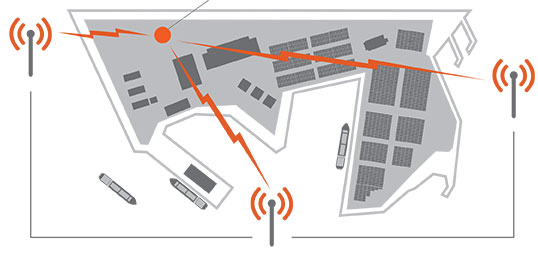
    Signal Sentry 1000, an Exelis product that detects and locates GPS interference sources in 3-D by using longitude, latitude and altitude has demonstrated successful results during a planned field testing event held last week at the Vidsel Test Range in Sweden.

    Taking advantage of the range’s remote location, Exelis was able to conduct tests of its Signal Sentry 1000 product using controlled jamming. The test was conducted without disrupting the GPS signal relied upon by civilian and military operations outside of the test range location. The test employed eight sensors positioned in an array pattern and showed that Signal Sentry was able to successfully detect and locate the jamming source. Having demonstrating interference detection and location capability, Signal Sentry 1000 can be deployed to collect actionable intelligence for law enforcement and protect GPS signal-dependent critical infrastructures.

    Signal Sentry 1000 technology is a network of threat-detection sensors, which is part of a centralized server executing Exelis-developed proprietary location algorithms. These sensors can be strategically located around different types of critical infrastructure, such as shipping ports, utilities and government facilities to automatically sense and locate any intentional or unintentional GPS jamming source. Should a threat be detected, users would receive location information and actionable intelligence in order to determine an interference-mitigation plan.

    “Exelis developed Signal Sentry 1000 to help protect critical infrastructure and to deliver intelligence to law enforcement operations that depend upon GPS availability,” said Mark Pisani, vice president and general manager of precision instruments and positioning, navigation and timing for Exelis Geospatial Systems. “Achieving this field test milestone proves that our detection technology works. The next step is to evolve this technology for our military customers.”

    Signal Sentry 1000 builds upon Exelis expertise in the field of GPS and positioning, navigation and timing. Exelis payloads and payload components have been on board every GPS satellite for nearly 40 years. Today, Exelis is involved in GPS modernization initiatives, building tomorrow’s GPS III satellite constellation by developing and integrating the navigation payloads. Exelis is also providing navigation processing components, precision monitor station receivers, and key components of the system security design for the GPS Operational Control System, known as OCX.

  • Rx Networks Announces Zed, a Precise Indoor Vertical Location Service for Mobile Devices

    Rx Networks, Inc., a mobile location technology and services company, today announced a new z-axis determination capability called Zed. This new solution, comprised of a client software library and associated cloud-based data services, is targeted at chipset vendors, device OEMs and application developers seeking to integrate reliable floor-level detection. The announcement came at ION GNSS 2013 in Nashville, Tennessee.

    Whether for emergency or consumer applications, the determination of a mobile device’s vertical position while indoors presents unique challenges. Given the environment, even when a GNSS receiver attains a fix, a mobile device cannot reliably use the reported altitude. Beacon-based techniques, such as those derived from Wi-Fi or Bluetooth, remain challenging as they often rely on GNSS-based crowd sourcing or costly venue characterization. The built-in barometric pressure sensors in recent  smartphones bring a new ability to estimate altitude, but they have  unique and variable characteristics that prevent floor-level accuracy without further assistance.

    Rx Networks’ new Zed solution combines accurate geo-reference barometric pressure data (from Custom Weather, a global provider of real-time weather information), automatic device characterization, and pressure crowdsourcing along with existing location services to determine a device’s altitude within 1 to 3 meters.

    The Zed solution will be commercially available at the start of 2014 and will be available either on its own, or as an optional feature alongside Rx Networks’ GPStream Assisted-GNSS and XYBRID hybrid location solutions.

    For more information a demonstration of Zed, visit Rx Networks booth at ION GNSS+ 2013.

  • Trimble Adds Galileo and BeiDou MEO Satellite Preview to CenterPoint RTX

    Trimble Adds Galileo and BeiDou MEO Satellite Preview to CenterPoint RTX

    The preview version of Trimble's CenterPoint RTX post-processing service, enabling GNSS observations using available Galileo and BeiDou MEO satellites.
    The preview version of Trimble’s CenterPoint RTX post-processing service, enabling GNSS observations using available Galileo and BeiDou MEO satellites.

    Trimble announced today a Preview version of its CenterPoint RTX post-processing service, enabling GNSS observations using available Galileo and BeiDou Middle Earth Orbit (MEO) satellites. Powered by Trimble RTX technology, the free CenterPoint RTX post-processing service provides better than centimeter level positions.

    The announcement was made today at ION GNSS 2013 Conference and Exhibition.

    The existing CenterPoint RTX post-processing site uses data from the GPS, GLONASS, and QZSS satellite systems. Through a link accessible from the post-processing website, users can enter a Preview site and derive positions that also use data from available open service Galileo and BeiDou MEO satellites.

    “With the addition of Galileo and BeiDou MEO support, we offer researchers, scientists and academics the opportunity to evaluate and experiment with results from these evolving satellite constellations,” said Patricia Boothe, general manager of Trimble’s Positioning Services Division. “We are committed to continuing to advance CenterPoint RTX post-processing and the underlying Trimble RTX technology to enable ever higher accuracy positioning solutions.”

    Trimble CenterPoint RTX post-processing is a cloud-based service accessed through www.TrimbleRTX.com. Users around the globe can upload static GNSS observation data and receive positioning corrections calculated in the well-defined International Terrestrial Reference System (ITRF) 2008 reference frame. The post-processed solution can be transformed to a variety of regional reference frames by selecting a coordinate system and tectonic plate.

  • Rockwell Collins Awarded Contract to Develop Secure Software-Defined Radio GNSS Receiver Capability

    Rockwell Collins has received a 2 million contract from the Air Force Research Laboratory (AFRL) to develop and demonstrate a secure software-defined radio (SDR) GNSS receiver capability.

    GNSS typically refers to equipment that can receive signals from multiple navigation satellite systems including GPS, GLONASS, Galileo, and the Chinese BeiDou system. By utilizing multiple available satellite signals, a GNSS receiver can provide improved navigation performance and signal availability.

    Hosted in a software-defined radio, this AFRL program will develop the security architecture required for the receiver equipment certifications. The arrival of modernized GPS signals and other constellations is changing the way the U.S. military accomplishes GNSS-based positioning, navigation and timing.

    “Rockwell Collins is actively researching GNSS capability as it applies to the U.S. and global customer base,” said John Borghese, vice president of the Rockwell Collins Advanced Technology Center. “We’re leveraging decades of GPS experience and leading edge security architectures to produce a navigation receiver that will meet global needs.”

  • PCTEL Launches Antennas for GPS, GLONASS, BeiDou, and Galileo Apps

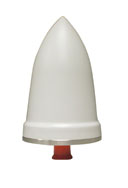
    PCTEL's new timing antenna, the GNSS1-TMG-26N.
    PCTEL’s new timing antenna, the GNSS1-TMG-26N.

    PCTEL, Inc. announced the launch of its next generation multi-band GNSS antennas for global timing and precision tracking applications at the ION GNSS Conference being held this week in Nashville, Tennessee.

    The new antennas, which are designed for use with GPS, GLONASS, BeiDou, and Galileo systems, are being showcased along with other PCTEL antennas at the PCTEL booth in the Exhibit Hall, Booth 318/320. All models of the new antennas are available for sale.

    Equipment providers for carrier network timing, precision agriculture, and global asset tracking applications need a single antenna solution for global deployment. PCTEL’s new GNSS1-TMG-26N and GPS-LB12GL-MAG antennas address global compatibility issues for two of the industry’s most crucial applications.

    For critical timing applications for macro and small cell deployments, PCTEL has developed the GNSS1-TMG-26N antenna. The GNSS1-TMG-26N is a fixed mount network timing antenna covering GPS, GLONASS, Beidou, and Galileo system frequencies in one single unit, making it a true global solution.

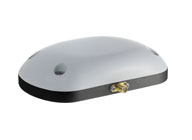
    PCTEL's  GPS-LB12GL-MAG antenna is designed for precision agriculture.
    PCTEL’s GPS-LB12GL-MAG antenna is designed for precision agriculture.

    For global precision navigation applications, PCTEL has developed the GPS-LB12GL-MAG to cover GPS L1, GPS L2, GLONASS, and L-BAND constellations. The GPS-LB12GL-MAG’s multi-band coverage addresses the precision market in the USA as well as differential correction signals needed across Europe and Asia.

    “PCTEL will meet the GNSS market requirements for our global customers while maintaining PCTEL’s high standards for quality and performance,” said Jeff Miller, president of PCTEL Connected Solutions. “We understand that our products need global compatibility to support our customers around the world. We are proud to showcase our design excellence in this highly technical area,” added Miller.

  • SBG Systems Releases Ekinox Land Solution

    SBG Systems Releases Ekinox Land Solution

    The Ekinox Land Solution by SBG Systems.
    The Ekinox Land Solution by SBG Systems.

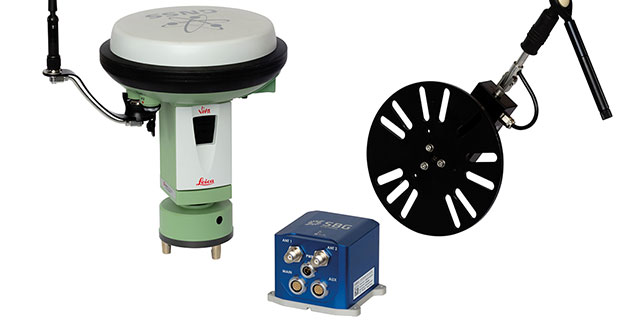
    At ION GNSS+ this week, SBG Systems announced the release of the Ekinox Land Solution, an all-in-one solution combining the cost-effective inertial navigation system with an odometer, and a GNSS RTK reference station for smooth positioning in land applications. GPS positioning in urban canyons, forests, or tunnels has always been challenging. By taking the best of these complementary technologies, Ekinox Land Solution provides reliable positioning in an affordable package, the company said.

    SBG Systems is exhibiting the system Wednesday through Friday at Booth 519/521 at ION GNSS+ in the Nashville Convention Center.

    The combination of the Ekinox inertial navigation system with complementary technologies such as wheel-speed sensor (DMI) and RTK GNSS is the key to providing smooth vehicle positioning, even during GPS outages, SBG Systems said. To save users and integrators both time and money, the best equipment has been tested and selected to build a cost-effective and all-in-one package — Ekinox Land Solution.

    Ekinox Land Solution is an integrated package built from the Ekinox Series, a range of inertial navigation systems based on robust and cost-effective MEMS technology. Mounted on a vehicle, Ekinox Land Solution provides real-time roll, pitch, and true heading (0.05° accuracy) while delivering a smooth position (2 cm). Data is output at 200 Hz and recorded in an 8-GB datalogger. Post-processing software is offered to increase attitude accuracy (up to 0.02°).

    Ekinox Land Solution is designed to answer the growing need of vehicle real-time positioning, imagery sensor triggering, and data georeferencing at an affordable price. Examples of applications include mobile mapping, machine control, car motion analysis, and unmanned ground vehicle navigation.

    The Ekinox series includes the Ekinox-A, and Attitude and Heading Reference System; the Ekinox-E, an Inertial Navigation System (INS) whose position feature depends on aiding equipment; the Ekinox-N, an INS with an embedded L1/L2 GNSS receiver; and the Ekinox-D, an INS with an integrated Dual Antenna GNSS receiver.

    SBG Systems is a French supplier of MEMS-based inertial motion sensing solutions. The company provides a wide range of inertial solutions from miniature to high accuracy. Combined with calibration techniques and advanced embedded algorithms, SBG Systems products are designed for defense, industrial and research projects, such as unmanned vehicle control, antenna tracking, camera stabilization, and surveying applications.