Tag: mapping

  • Safe Software Adds Support For ArcGIS 10.1 and AutoCAD Map 3D 2013

    Safe Software announced the release of FME 2012 Service Pack 3 (SP3), which features compatibility with Esri’s newly released ArcGIS 10.1 and support of Autodesk’s 2013 version of AutoCAD Map 3D. FME 2012 SP3’s timely support of the latest versions of these industry-leading programs ensures that FME users can upgrade without issues or delays.


    According to the announcement, FME 2012 SP3 allows users dependent on both FME and ArcGIS to upgrade to the newest version of Esri’s software without having to worry about losing functionality of either program. The update will also provide access to several new features including Windows 64bit support for more Geodatabase formats and the ability to write out LAS files produced in FME for use within ArcGIS.

    Safe says it continues to assist AutoCAD Map 3D users through its support of the newly released FDO 3.7 in FME 2012 SP3. This allows the AutoCAD Map 3D 2013 user to directly read and display dozens of FME-supported formats.

    “As with every new version, this latest release of FME demonstrates our commitment to supporting the latest technologies as quickly as possible so that our customers always have access to the most advanced spatial data applications,” says Dale Lutz, Vice President of Development at Safe Software.

    Safe reports that it maintains comprehensive format compatibility and FME remains backwards compatible for users of earlier versions of ArcGIS and FDO. To download FME 2012 SP3 visit www.safe.com/downloads

  • Trimble Expands Its Positions Software to Streamline Esri Workflows for Mapping and GIS Applications

    Trimble introduced today the Trimble Positions Mobile extension — a new streamlined choice for integrating Trimble’s GNSS professional field solutions and data verification into the Esri ArcGIS for Windows Mobile environment.

    The Trimble Positions software was first introduced as a development kit to Trimble’s GIS developer community in late 2011. Today, the software suite has expanded to provide a streamlined option for users who wish to work directly with Esri’s ArcGIS for Windows Mobile technology.

    “Now, common Trimble and Esri users have a streamlined workflow between their Trimble devices and the Esri mobile software environment,” said Daniel Wallace, general manager of Trimble’s GIS Data Collection Division. “Because all data is verified and validated before it reaches Esri’s Enterprise GIS, each update adds value, making the geodatabase more reliable and more useful.”

    Using Trimble GNSS receivers, field workers can collect reliable GNSS data for all feature geometries while leveraging the high performance features of Trimble handhelds such as Trimble Floodlight for better productivity in tough GNSS environments. Data can be automatically posted to the enterprise server from the field where Trimble Positions Desktop add-in is used to process and validate the data coming in from field crews. Office administrators can easily check for new sessions, differentially correct the data, and verify that the data meets accuracy requirements before updating the enterprise database at the touch of button, Trimble said.

    This release adds real time and postprocessed corrections support for Trimble’s market-leading GNSS receivers, including the Trimble GeoExplorer, Juno, Nomad and Pro series receivers and is available to order now through authorized Trimble Mapping and GIS resellers. For more information, visit www.trimble.com/positions.

  • Google Releases Indoor Maps for More than Twenty Museums Including Smithsonian

    Google announced on its official blog that it has released more than twenty popular U.S. museums to its collection of over 10,000 indoor maps that they launched in November: the de Young Museum in San Francisco, the Philadelphia Museum of Art, Cincinnati Museum Center, the Indianapolis Museum of Art, the American Museum of Natural History and 17 Smithsonian museums and a zoo.

    American Museum of Natural History, New York City

    National Air and Space Museum—Smithsonian Institution, Washington, D.C.

    Google reports that to access the floor plans, simply open Google Maps on your Android phone or tablet and zoom in on the museum of interest. To find the museum, either search for it by name using the magnifying glass icon or, if you’re already there, use the “My location” feature to orient yourself. With the “My location” feature enabled you can even get indoor walking directions.

    According to the announcement, more museums are adding their floor plans to Google Maps for Android soon, including the SFMOMA, The Phillips Collection, the Nelson-Atkins Museum of Art and the National WWII Museum in New Orleans. If you’re interested in getting your museum’s floor plan included in Google Maps, visit the Google Maps Floor Plans tool.


  • On the Edge: Sensing the Rivers

    Photo courtesy of Jérôme Thai
    UC Berkeley researchers have developed a method to provide real-time, high-resolution data in hard-to-map waterways, using GPS. Tossing a robot is Andrew Tinka, with Kevin Weekly. (Photo courtesy of Jérôme Thai.)

    By Tracy Cozzens

    A fleet of 100 robots equipped with GPS and sensors were released May 9 into California rivers to measure water flow, salinty levels, and pollution. The Floating Sensor Network is a project by the University of California, Berkeley, to improve the way water quality and flows are monitored.

    About two-thirds of California’s fresh water is in the Sacramento-San Joaquin river system where the test took place. This water supplies about two-thirds of the state’s population with drinking water and irrigation. The initiative is led by associate professor Alexandre Bayen at the Center for Informatin Technology Research in the Interest of Society (CITRIS).

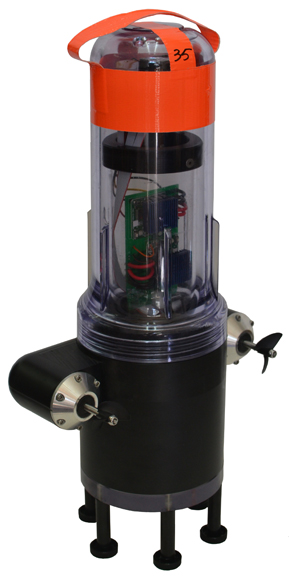
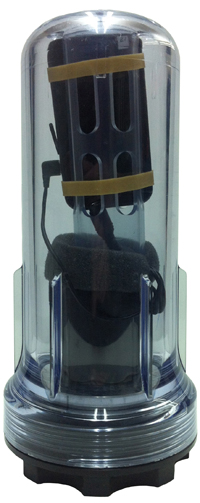
    The robots each have a sensor to test salinity and a GPS unit from a smartphone. Some have propellers so they can maneuver around obstacles and reach specific destinations. The robots also sent Tweets to @fsnandroid61.

    The robots drifted through the area of the river being measured, then were retrieved by boat. “One advantage of our real-time communication system is that we can see where all our sensors are on a map, which makes it very easy to chase them down and retrieve them,” said graduate student researcher Andrew Tinka.

    With the first test completed, the team’s efforts over the summer have two priorities, Tinka explained. “First, we’re using the flow data that we gathered on May 9 to understand how this ‘mobile’ data can be best used for river hydrodynamics studies. We’re learning how to turn the individual traces of water that each sensor gives us into a big-picture view of the entire river region, sort of how like meteorologists take the data from a few weather stations and turn it into an overall view of what the weather is doing over a large area. Second, we’re working with other hydrodynamics research groups to expand the use of this kind of mobile sensor. We’re loaning our equipment to other groups, doing pilot projects with others, and basically trying to get these sensors into researchers’ toolboxes throughout the water community.”

    There are two types of devices in the fleet, active and passive. The active sensors have a twin-propeller drive system that lets them move through the water to avoid obstacles or stay in the correct region of the river. “We developed the internal electronics for this device ourselves,” Tinka said. “We integrated a Magellan AC12 GPS receiver along with a Gumstix embedded computer and a Motorola GSM module. Our passive sensors don’t have a propulsion system; they do exactly what the water does. We developed this system with a focus on cost and ease of assembly.” The team used a waterproof consumer smartphone, the Motorola Defy, for the GPS positioning, computation, and comunications.

    So far, the test has proven the usefulness of such a network. The devices were developed to be easily deployable, especially where a lot of flexibility is needed, such as in disaster response. “The ability to quickly and easily put these sensors into new inland environments, by just about any method (throw them from a boat, drop them from a helicopter, toss them from a dock or a bridge) makes them a really useful new tool,” Tinka said.

    photos courtesy of Jonathan Beard
    photos courtesy of Jonathan Beard
    photos courtesy of Jonathan Beard
    photos courtesy of Jonathan Beard

    A hundred robots, 40 with propellers, were released into the Sacramento River near Walnut Grove (photos courtesy of Jonathan Beard).


  • CoreLogic Maps 63,000 Completed Foreclosures in May

    CoreLogic released its National Foreclosure Report for May, which provides monthly data on completed foreclosures and the overall foreclosure inventory. According to the report, there were 63,000 completed foreclosures in the U.S. in May 2012 compared to 77,000 in May 2011 and 62,000* in April 2012.

    According to the announcement, since the financial crisis began in September 2008, there have been approximately 3.6 million completed foreclosures across the country. Completed foreclosures are an indication of the total number of homes actually lost to foreclosure.

    Approximately 1.4 million homes, or 3.4 percent of all homes with a mortgage, were in the national foreclosure inventory as of May 2012 compared to 1.5 million, or 3.5 percent, in May 2011 and 1.4 million, or 3.4 percent, in April 2012. The foreclosure inventory is the share of all mortgaged homes in some stage of the foreclosure process.

    “There were more than 819,000 completed foreclosures over the past year, or an average of 2,440 completed foreclosures every day over the last 12 months,” said Mark Fleming, chief economist for CoreLogic. “Although the level of completed foreclosures remains high, it is down 27 percent from a peak of 1.1 million in all of 2010.”

    “Though the national foreclosure inventory levels remain steady, around 1.4 million homes, there have been dramatic shifts at the state level,” said Anand Nallathambi, president and CEO of CoreLogic. “Nevada, Arizona and Michigan, for example, each experienced at least a 20-percent decline in the foreclosure inventory from a year ago. While foreclosure inventories in most states are declining, the foreclosure inventory is still rising in many judicial states, such as Hawaii, New York and Connecticut.”

    Highlights as of May 2012

    The five states with the highest number of completed foreclosures for the 12 months ending in May 2012 were: California (133,000), Florida (92,000), Michigan (60,000), Texas (58,000) and Georgia (57,000). These five states account for 48.8 percent of all completed foreclosures nationally.

    The five states with the lowest number of completed foreclosures for the 12 months ending in May 2012 were: South Dakota (48), District of Columbia (74), North Dakota (547), West Virginia (620) and Hawaii (623).

    The five states with the highest foreclosure inventory as a percentage of all mortgaged homes were: Florida (11.9 percent), New Jersey (6.6 percent), Illinois (5.3 percent), New York (5.0 percent) and Nevada (4.9 percent).

    The five states with the lowest foreclosure inventory were: Wyoming (0.7 percent), Alaska (0.8 percent), North Dakota (0.8 percent), Nebraska (1.0 percent) and South Dakota (1.3 percent).

    *April data was revised. Revisions are standard, and to ensure accuracy CoreLogic incorporates newly released data to provide updated results.

    To download a copy of the National Foreclosure Report, please visit www.corelogic.com/ForeclosureReport-May2012.

    Methodology

    The data in this report represents foreclosure activity reported through May 2012.

    This report separates state data into judicial vs. non-judicial foreclosure state categories. In judicial foreclosure states, lenders must provide evidence to the courts of delinquency in order to move a borrower into foreclosure, while in non-judicial foreclosure states lenders can issue notices of default directly to the borrower without court intervention. This is an important distinction since judicial states as a rule have longer foreclosure timelines thus affecting foreclosure statistics.

    A completed foreclosure occurs when a property is auctioned and results in the purchase of the home at auction by either a third party, such as an investor, or by the lender.  If the home is purchased by the lender, it is moved into the lender’s Real Estate Owned (REO) inventory.  In “foreclosure by advertisement” states, a redemption period begins after the auction and runs for a statutory period, e.g., six months.  During that period the borrower may regain the foreclosed home by paying all amounts due as calculated under the statute.  For purposes of this Foreclosure Report, because so few homes are actually redeemed following an auction, it is assumed that the foreclosure process ends in “foreclosure by advertisement” states at the completion of the auction. 

    The foreclosure inventory represents the number and share of mortgaged homes that have been placed into the process of foreclosure by the mortgage servicer.  Mortgage servicers start the foreclosure process when the mortgage reaches a specific level of serious delinquency as dictated by the investor for the mortgage loan.  Serious delinquency is typically defined as 90, 120, or 150 days delinquent (sometimes more), in foreclosure or in REO. Once a foreclosure is “started,” and absent the borrower paying all amounts necessary to halt the foreclosure, the home remains in foreclosure until the completed foreclosure results in the sale to a third party at auction or the home enters the lender’s REO inventory. The data in this report accounts for only first liens against a property and does not include secondary liens. The foreclosure inventory is measured only against homes that have an outstanding mortgage. Homes with no mortgage liens can never be in foreclosure and are therefore excluded from the analysis. Approximately one-third of homes nationally are owned outright and do not have a mortgage. CoreLogic has approximately 85 percent coverage of U.S. foreclosure data.

    1The number of mortgages per completed foreclosure nationally is calculated by dividing the number of homes with a mortgage by the number of completed foreclosures in the month. By State and CBSA, it’s calculated by dividing the number of homes with a mortgage in each area by the sum of completed foreclosures for the prior 12 months. The slight difference in the calculation between national and state and CBSA helps to account for data volatility.

  • Google Lowers Pricing and Simplified Limits with Google Maps API

    In it's developers blog, Google announced that it will lower API usage fees and simplifying limits for both Styled and regular maps. According to the announcement:


    • Changes to pricing. While the Maps API remains free for the vast majority of sites, some developers were worried about the potential costs. In response, we have lowered the online price from US $4 per 1,000 map loads to 50¢ per 1,000 map loads.
    • Simplified limits. We’re eliminating the previous distinction between Styled Maps and regular unstyled maps. The same usage limits and pricing now apply to applications using Styled Maps and the default Google Maps style.

    Google reports they're beginning to monitor Maps API usage starting today, June 22, 2012, and based on current usage, fees will only apply to the top 0.35% of sites regularly exceeding the published limits of 25,000 map loads every day for 90 consecutive days. The application of these limits is not automated, so if your site consistently uses more than the free maps allowance we’ll contact you to discuss your options. Your map will not stop working due to a sudden surge in popularity.

    We hope the changes we’re announcing today will help you continue to deliver the most innovative maps experience to your users. If you have any questions or concerns please post to the Google Maps API forums or contact the Google Maps API for Business Sales team using this form. We look forward to helping you build great Maps applications for many years to come.

    Posted by Thor Mitchell, Product Manager, Google Maps API

  • Esri Releases ArcGIS for Windows Mobile 3.0

    Esri announced the release of ArcGIS for Windows Mobile 3.0 and its availability for download from the Esri Customer Care site.

    According to the announcement, with a new name and a new version number, ArcGIS for Windows Mobile 3.0 includes significant enhancements and improvements to the user experience, architecture and deployment of mobile solutions.
     
     
    Here are a just a few highlights of 3.0:
     
    Creating and Managing Field Projects
     
    • Simplified Project Management – with the 3.0 release you can include mobile caches, basemaps and project extensions inside the mobile projects you create. So all you need to do is pull or push the project to your device and it will unpack and manage the offline data content as well as any and all extensions.
    • Project and Service Validation – the Mobile Project Center includes a validation framework that will ensure the integrity of your field projects by detecting, notifying and recommending changes before you publish out to your field workers.
    • Qualify Map Layers for Synchronization – 3.0 simplifies the way you synchronize changes between the client and server. You can fully qualify the behavior of map layers inside of the project so your field workers need not worry about the details of synchronizing edits/changes.

    Using the ArcGIS Application (Windows Mobile)

    • GPS – the integration and use of GPS has improved considerably. First time install walks you through a process of configuring GPS for use with your device, now you can view GPS position info on top of the map using the GPS info bar, navigate to a feature using a GPS compass, auto-populate GPS information when creating new features, and create new features using a simplified collection process (single shot GPS collection).
    • Attachments – now you can attach media to your features. Using Geodatabase Attachments you can capture many photos per feature and you can attach other media types to features that are both editable and read-only (pdfs, docs, videos, etc). Attachments are fully supported for offline use on your device and special consideration is taken during the synchronization process as well.
    • Feature Editing – now you can update the location of existing features and in a field-savvy way! Explore new workflows for data capture/editing with the ability to extend a line or replace the portion of a feature using GPS.
    • Auto-populate and user identity – with 3.0 you can greatly simplify the collection of attributes by automatically populating values such as GPS information, the user identity and date/time of capture, and more.
    According to the ArcGIS Resource Center Blog, ArcGIS for Windows Mobile 3.0 is a really big release and there is a lot to discuss. Look for more articles on focused enhancements, workflow improvements and more coming soon. For a list of what is new, check out the documentation available on the Resource Center.
  • Trimble Launches New Mapping App for Kindle Fire and Android Tablets

    Trimble released the Trimble Outdoors MyTopo Maps app for the Kindle Fire and other Android-powered tablets. Outdoor enthusiasts can now view detailed topo and aerial maps and plot their next outdoor adventure on large tablet screens.


    MyTopo Maps provides access to over 68,000 detailed topo maps in the U.S. and Canada, in addition to aerial photos, street maps, terrain maps and hybrid maps.

    MyTopo Map on Kindle Fire

    "Our ecosystem of apps continues to grow and now Android tablet users can plan outdoor trips at home using MyTopo Maps," said Rich Rudow, general manager for Trimble Outdoors. "We provide best-in-class topographic and aerial maps, and tools to answer the specific demands of hikers, off-roaders and other outdoor enthusiasts."

    The app was originally released as a beta app in the Amazon AppStore last December. It immediately generated buzz among outdoor and map enthusiasts, and over the past four months features were added and tweaked based on community feedback up to the official launch this week.

    Trimble Outdoors released the iPad version of this app in November 2011. All apps are available in a Free and Pro versions on the Apple App Store, Google Play and Amazon AppStore. To download and for more details, go to: http://www.trimbleoutdoors.com/Products/TrimbleOutdoorsMyTopoMaps.

  • Magellan eXplorist GIS Pro 10 GPS Now Offers Effigis OnPOZ Data Collection and Post-Processing Software

    Magellan and Effigis announced a partnership and reseller agreement to create a comprehensive out-of-the-box solution for Magellan customers to collect and post-process geo-localized data using Effigis OnPOZ software on the Magellan eXplorist GIS Pro 10.


    According to the announcement, as part of the partnership, three Effigis OnPOZ precision positioning software products are available for the Magellan eXplorist GIS Pro 10, a rugged, lightweight and waterproof handheld GPS device specifically designed for professional GPS/GIS data collection.   

    • EZTag CE, geospatial data acquisition software, facilitates the collection of geospatial data including points, lines and polygons plus their specific attributes, and valuable GNSS observations necessary for post-processing.  Users can customize the data capture properties to match their office database structure. 
    • GNSS Driver for ArcPad, software extension that improves the quality of data collected using ESRI ArcPad GIS software.
    • EZSurv, GNSS post-processing software, provides a reliable, efficient RTK offline solution for data integrity. Users can play back their RTK survey for QA control, make corrections to non-RTK GNSS field data, or significantly improve GIS data accuracy.  

    “The combination of Effigis OnPOZ software and the Magellan eXplorist GIS Pro 10 device creates a powerful and accurate, yet cost-effective solution for collecting and post-processing GIS data,” said Stig Pedersen, Associate Vice President of Product Management for Magellan. “Our partnership with Effigis enables Magellan to continue providing GIS professionals with complete GIS data collection solutions to facilitate their biggest GIS mobile application challenges.”   

    Magellan reports that with its rugged IPX-7 waterproof casing, the eXplorist GIS Pro 10 device is designed for GIS professionals who need to collect GPS/GIS data. The GPS device can deliver 3 to 5 meters accuracy in real-time using its internal GPS receiver and works with supported Bluetooth-enabled GPS receivers to achieve 1 to 3 meter accuracy. Powered by Windows Mobile v6.5 OS, the Pro 10 GPS device allows GIS professionals to run powerful GIS data collection software, such as Effigis, and a wide range of Windows Mobile data collection applications.

    “Partnering with a leading GPS manufacturer like Magellan will allow Effigis to reach a wider range of GNSS users,” said Denis Parrot, President of Effigis. “With this agreement, we are very pleased to continue to bring an enhanced level of data accuracy and reliability to users.”

    Effigis OnPOZ software for the Magellan eXplorist GIS Pro 10 is available now from Magellan’s authorized GIS resellers as a bundled option with the GPS device, or as a software-only add-on for users who previously purchased the Pro 10 model. More details are available at www.MagellanGPS.com/GIS.

  • Juniper Systems Introduces Microsoft Windows Embedded Handheld 6.5 Upgrade for the Mesa Notepad

    Juniper Systems introduced Microsoft Windows Embedded Handheld 6.5 for the Mesa Rugged Notepad. This latest operating system version includes operating system updates from Microsoft, several new features requested by customers, and other various improvements. The new operating system is now shipping on new Mesa Rugged Notepads and is available to download for all existing Mesa Rugged Notepads on the Juniper Systems website. 

    “As senior product manager at Juniper Systems, I am constantly looking for ways to further improve our rugged handheld computers and enhance the data collection experience for our customers,” said John Florio. “This new operating system upgrade for the Mesa includes several new user-requested features and I believe the Mesa is now better positioned to lead the rugged handheld industry as the most rugged and unique mobile device on the market.” 

    One of the most significant changes to the operating system is the renaming of Microsoft Windows Mobile 6.5 to Microsoft® Windows Embedded Handheld 6.5, solidifying the commitment by Microsoft to this platform. Additionally, Microsoft Office Mobile has been upgraded to Office Mobile 2010 and supports Office 2010 file formats for simplified compatibility.

    New additions and feature enhancements have been added, including the new finger-friendly “Mega Keys” on-screen keyboard with larger keys and more special characters available. This keyboard is specially designed to run on the Mesa and is available to use in any text-entry field. The GPS function of the Mesa has been improved to allow enabling/disabling of WAAS/SBAS corrections, as well as an increased GPS breadcrumb trail point size to 36,000 points. The integrated camera application now allows users to emboss the image file name directly on to the photo and to embed a user note into an image file. Portuguese (Brazil version) has been added as an available language on the new Mesa operating system.

    The Mesa Rugged Notepad is a rugged handheld computer designed for dedicated field data collection in extreme environments. Described as featuring the combined advantages of a handheld computer and a tablet PC without the disadvantages of either, the Mesa’s large 5.7 inch display and compact design create the ultimate, one-of-a-kind data collection companion.

  • City of Edmonton Launches Pilot for Intergraph and Leica Geosystems GIS Solution

    Intergraph announced that the City of Edmonton, Canada, has implemented a pilot program that will use Intergraph and Leica Geosystems combined products for enhanced tracking of assets within its expansive network of public parks. The City of Edmonton is utilizing the Leica CS25 ultra rugged tablet and the GG02+ GNSS Smart Antenna, the most accurate data collection and update system available today for GIS professionals, in conjunction with Intergraph's GeoMedia, a powerful GIS management product. Together, Intergraph and Leica Geosystems contribute to Hexagon's comprehensive portfolio, addressing all aspects of the geospatial life cycle – from capture to delivery.

    Leica Zeno GG02 with CS25 Tablet

    Managed by the Parks Branch within the City of Edmonton, the pilot program will allow city workers and officials to track the condition of park-related assets through the use of a Leica Geosystems device running Intergraph's GeoMedia software. For the past five years, the Parks Branch has been collecting information in the field regarding these assets. This integrated solution provides a means to easily track and better perform maintenance and condition assessments for all of its properties.

    "We have spent a significant amount of time collecting data regarding all of our assets, and now we need to continually assess their condition," said Michael Boychuk, GIS Coordinator, Parks Branch. "By running this pilot program, we now have a mechanism for our workers in the field to report back the condition of any asset within our expansive park system."

    The Parks Branch is currently using devices to download the existing asset data from its GIS database. The new mobile data will be updated when field workers perform condition inspections, as well as add on new data regarding new assets – streamlining the entire workflow.

    GeoMedia enables users to realize the maximum value of their geospatial resources, integrating them to present clear, actionable information. It provides simultaneous access to geospatial data in almost any form, uniting them in a single map view for efficient processing, analysis, presentation and sharing. GeoMedia's intuitive, dynamic analysis functionality enables concatenation of analysis processes so the results of one operation feed directly into the next process, as well as automatic updating of results in response to data changes.

    The Leica CS25 is a versatile tablet computer combining a 7'' screen, fully rugged and lightweight. It provides a highly useable means for accomplishing data collection tasks efficiently, taking the office to the field. The GG02+ Smart Antenna is the most accurate system for GIS data collection and update. It brings high-accuracy RTK positions to the GIS user in a seamless way. Centimeter accuracy can be achieved either in post-process or real time by using the Leica SmartNet correction service or radio links. Coupled with GeoMedia's flexible architecture, the two products provide a dynamic solution.

    "This pilot is a prime example of how two Hexagon companies can be fully integrated to provide real-world solutions for any organization that is tracking assets in the field," said Mladen Stojic, Vice President, Geospatial at Intergraph SG&I. "The combined offering provides a complete end-to-end solution for making data relevant and actionable, allowing any organization to be more efficient and effective."

    The City of Edmonton has more than 460 parks and hosts the largest expanse of urban parkland in North America with its North Saskatchewan River Valley parks.

  • Esri Releases ArcGIS Online for Organizations

    Esri officially released ArcGIS Online for organizations, a groundbreaking service that offers expanded collaboration tools for cataloging, visualizing, and sharing geospatial information.

    "ArcGIS Online is a new cloud-based mapping system for organizations that is essentially changing how GIS managers, as well as IT managers, think about mapping and GIS," said Jack Dangermond, president, Esri. "ArcGIS Online works with all types of data and is built on a powerful enterprise mapping platform that lets users simply manage their geospatial content, such as data, maps, images, applications, and other geographic information."

    According to the announcement, early adopters of ArcGIS Online have realized immediate benefits from extending their existing geographic information to reach more people across the enterprise and the public. The system supports better collaboration among teams and departments by allowing data to be easily integrated and shared. ArcGIS Online provides on-demand, self-serve mapping and is closely integrated with Excel for making maps from spreadsheet data commonly accessible. ArcGIS Online provides new insights and opportunities for organizations to visualize their information spatially and quickly turn these visualizations into web services that can be shared anywhere. Organizations can mash up map services coming from a variety of sources and configure an array of ready-to-use applications that can be embedded and run in browsers and on mobile devices.

    Through the purchase of an annual subscription, an organization can obtain a private and secure instance in Esri's cloud that's scalable and ready to use. No additional hardware or software has to be purchased or installed. An organization has access to tools for mapping and location analytics, global basemaps and imagery, demographic information, a library of templates, and applications for browsers and mobile devices.

    Users can catalog and discover maps and applications, set up groups to collaborate, and share items with each other, the entire organization, or publicly. For example, without any programming, any user that's part of an ArcGIS Online subscription can quickly share maps by embedding them in a website or blog, through social media, or using a preconfigured web application template.

    Because ArcGIS Online is integrated with ArcGIS for Desktop and ArcGIS for Server, maps created by GIS professionals can now be made accessible to others in the organization using the same system. Everyone in the organization can view and interact with these maps via a browser, smartphone, tablet, or other mobile device.

    Registering ArcGIS for Server services in ArcGIS Online only takes a few steps and puts them into the hands of those who need this information to get their work done. In addition, non-GIS professionals, such as knowledge workers who have a need for GIS, now have a way to quickly create maps from the unstructured information they work with in spreadsheets and text files and share these maps with others who can access them on any device.

    This type of on-demand and self-serve mapping frees up GIS professionals from having to respond to constant requests for maps and instead concentrate on making and publishing authoritative information products. An ArcGIS Online subscription also includes access to an API that developers in the organization can use to extend the system or integrate a custom solution with the ArcGIS system.

    A flexible, annual subscription plan structured to accommodate different sizes of organizations or departments is available—from small workgroups to an enterprise-wide implementation. What plan to purchase depends on the size of an organization and the online resources it plans to consume. You can purchase separate subscriptions for each department or one large subscription for the entire organization.

    The subscription plans start as small as 5 users and 2,500 service credits all the way to a multidepartment plan with 1,000 users and 110,000 service credits or even larger for enterprise plans. Regardless of which plan your organization chooses, more users and service credits can be added to the plan at any time.

    Service credits are the currency of the ArcGIS Online system. Each service credit entitles your organization to consume a set amount of ArcGIS Online services, such as storing features or tiled map services and geocoding. Providing a pool of credits gives your organization flexibility to use the system to fit your organizational workflows and other needs. Organizations that have an existing enterprise license agreement (ELA) with Esri receive an ArcGIS Online subscription as part of their agreement with a certain number of service credits allocated and unlimited users.

    There are three roles in ArcGIS Online: administrators, publishers, and users. Administrators of the ArcGIS Online subscription have the ability to publish and use content and also monitor service consumption through a dashboard. If the dashboard indicates that the service credits are at a low level, more credits can be purchased either online or by contacting Esri. Administrators also have the ability to invite and add users, remove users, assign user roles, delete content and groups, and set and manage the security policy.

    Administrators also have the ability to customize an organization's ArcGIS Online home page to represent the organization's brand and identity. Customization options include adding a logo and banner, creating a custom URL, and featuring maps and applications important to the organization.

    Publishers do not have administrative privileges but can publish content and use content published by others. Users can interact with and consume content but not publish it. It is important to note that organizations retain all the rights and title to, and interest in, any content they publish in ArcGIS Online.

    For organizations that didn't have the opportunity to participate in the ArcGIS Online beta program or be part of the early adopters program, a 30-day evaluation is available. To get more details about ArcGIS Online and sign up for the free 30-day trial, visit esri.com/agol.