Tag: product showcase

  • Trimble Takes the Leap with GNSS Bluetooth Device

    Trimble Takes the Leap with GNSS Bluetooth Device

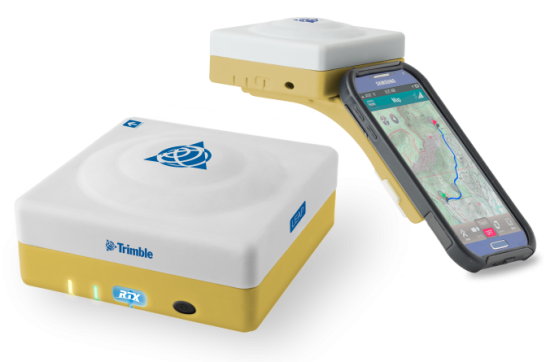
    The Trimble Leap, also shown with a smartphone. Photo: Trimble
    The Trimble Leap, also shown with a smartphone. Photo: Trimble

    Trimble is making available the Trimble Leap, a Trimble RTX compatible GNSS Bluetooth device. When enabled with the ViewPoint RTX correction service, Leap delivers submeter accuracy directly to the Terrain Navigator Pro (TNP) Mobile app for iOS and Android devices. The TNP Mobile app allows users to collect markers, tracks and geo-stamped photos in the field, and then sync all the GNSS data into the Terrain Navigator Pro office software.

    The TNP Mobile app enables users to:

    • Display and navigate routes created in TNP desktop.
    • Collect field data such as markers, tracks, photos, videos and audio clips.
    • Near real-time sync between phone and TNP map software via WiFi or cellular data connection.
    • View data on topo, aerial, and street maps downloaded to phone for offline use. Terrain Navigator Pro offers 1-meter aerial photos for the 48 contiguous United States. The seamless USGS topo graphic maps are based off 1:24K, 1:100K, 1:250K map scales. Alaska is 1:63K and 1:250K.
    • Access a compass and other geo-information such as lat/long, elevation, and direction on phone.
    • Collect data offline. The TNP mobile app uses the GPS built into the smartphones, so users can collect field data in areas without a cellular or data signal.

    Trimble Leap is compact and portable, weighing 9.5 ounces. It snaps to a smartphone or tablet to use as a handheld, can be mounted on a monopole or tripod, or can be magnet mounted to a vehicle. Leap has 16 hours of battery life and uses Bluetooth communication to connect to smart devices for ease of use and flexibility. An onboard micro SD card stores the GNSS observables data for use in the field or the office.

    A micro USB port can provide power to Trimble Leap for continuous fixed-mount applications, or it can be used with battery-booster products to extend field work. Trimble Leap is charged by a standard cell phone vehicle accessory charger, a USB connection to a PC, or from a USB AC adapter.

    Based on Trimble RTX (Real Time eXtended) technology, ViewPoint RTX delivers better than 1 meter horizontal accuracy 95 percent of the time without the use of a traditional RTK base station or virtual reference station network. ViewPoint RTX is delivered into the TNP Mobile app via cellular data network and is available nearly anywhere in the world.

    “Trimble Leap enhances the Terrain Navigator Pro solution by adding a simple way to collect submeter accurate geolocation data with standard Android or iOS devices. Adding accuracy to TNP’s robust field-to-office data collection solution provides a value-add where low-resolution collection is not sufficient. Trimble Leap with TNP Mobile is configured and operational in minutes with little training,” said Larry Fox, business area manager for Terrain Navigator Pro.

    Terrain Navigator Pro integrates powerful desktop mapping software, a cloud connected mobile data collection platform (compatible with GPS-enabled iOS and Android devices) and a robust Web portal. TNP users can plan projects in the office, collect data in the field and access projects from the Web—simultaneously. Geo-referenced data such as tracks, waypoints, photographs and video can be shared, updated in near real-time and displayed on the included topographic, aerial/satellite or street base maps.

  • Trimble Launches Leap, a GNSS Bluetooth Device

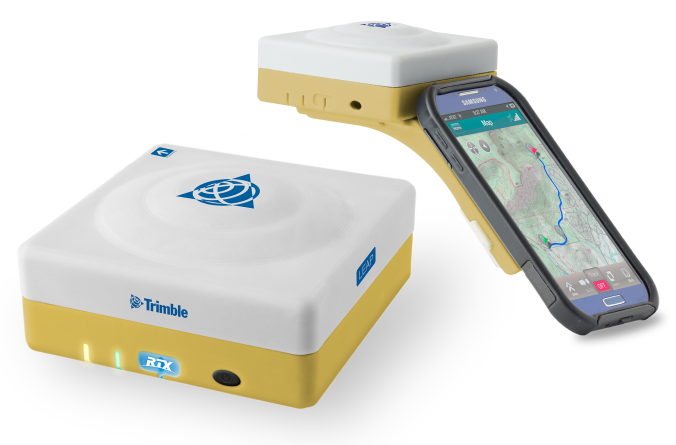
    The Trimble Leap, also shown with a smartphone.
    The Trimble Leap, also shown with a smartphone.

    Trimble is making available the Trimble Leap, a Trimble RTX compatible GNSS Bluetooth device. When enabled with the ViewPoint RTX correction service, Leap delivers submeter accuracy directly to the Terrain Navigator Pro (TNP) Mobile app for iOS and Android devices. The TNP Mobile app allows users to collect markers, tracks and geo-stamped photos in the field, and then sync all the GNSS data into the Terrain Navigator Pro office software.

    The TNP Mobile app enables users to:

    • Display and navigate routes created in TNP desktop.
    • Collect field data such as markers, tracks, photos, videos and audio clips.
    • Near real-time sync between phone and TNP map software via WiFi or cellular data connection.
    • View data on topo, aerial, and street maps downloaded to phone for offline use. Terrain Navigator Pro offers 1-meter aerial photos for the 48 contiguous United States. The seamless USGS topo graphic maps are based off 1:24K, 1:100K, 1:250K map scales. Alaska is 1:63K and 1:250K.
    • Access a compass and other geo-information such as lat/long, elevation, and direction on phone.
    • Collect data offline. The TNP mobile app uses the GPS built into the smartphones, so users can collect field data in areas without a cellular or data signal.

    Trimble Leap is compact and portable, weighing 9.5 ounces. It snaps to a smartphone or tablet to use as a handheld, can be mounted on a monopole or tripod, or can be magnet mounted to a vehicle. Leap has 16 hours of battery life and uses Bluetooth communication to connect to smart devices for ease of use and flexibility. An onboard micro SD card stores the GNSS observables data for use in the field or the office.

    A micro USB port can provide power to Trimble Leap for continuous fixed-mount applications, or it can be used with battery-booster products to extend field work. Trimble Leap is charged by a standard cell phone vehicle accessory charger, a USB connection to a PC, or from a USB AC adapter.

    Based on Trimble RTX (Real Time eXtended) technology, ViewPoint RTX delivers better than 1 meter horizontal accuracy 95 percent of the time without the use of a traditional RTK base station or virtual reference station network. ViewPoint RTX is delivered into the TNP Mobile app via cellular data network and is available nearly anywhere in the world.

    “Trimble Leap enhances the Terrain Navigator Pro solution by adding a simple way to collect submeter accurate geolocation data with standard Android or iOS devices. Adding accuracy to TNP’s robust field-to-office data collection solution provides a value-add where low-resolution collection is not sufficient. Trimble Leap with TNP Mobile is configured and operational in minutes with little training,” said Larry Fox, business area manager for Terrain Navigator Pro.

    Terrain Navigator Pro integrates powerful desktop mapping software, a cloud connected mobile data collection platform (compatible with GPS-enabled iOS and Android devices) and a robust Web portal. TNP users can plan projects in the office, collect data in the field and access projects from the Web—simultaneously. Geo-referenced data such as tracks, waypoints, photographs and video can be shared, updated in near real-time and displayed on the included topographic, aerial/satellite or street base maps.
  • Trimble Releases SketchUp 2015 for Intuitive Information Modeling Process

    Trimble V10 Export to SketchUp
    Trimble V10 Export to SketchUp.

    Trimble has released SketchUp 2015, the latest version of its 3D modeling software for architects, engineers, design and construction professionals. The release marks Trimble’s second update to the SketchUp software this year and underscores the company’s continued focus on enhancing the platform to make SketchUp faster, more user-friendly and reliable, Trimble said.

    The announcement was made at Trimble Dimensions.

    With a SketchUp user community expanding by more 30 million unique activations in the past year, enhancements to SketchUp 2015 have been designed to deepen and enrich the user experience, while keeping it intuitive. New features make it easier and faster to create, access, share and collaborate on 2D drawings and 3D models, Trimble said.

    SketchUp 2015 offers 64-bit support for Windows or Mac, while IFC file import capabilities allows back-and-forth sharing of IFC files between SketchUp Pro and any other application.

    “For the second release of SketchUp this year, we set out to make enhancements to the platform that might seem simple, but go a long way toward making SketchUp more enjoyable and impactful for our user community,” said John Bacus, director of SketchUp product management at Trimble. “For example, as interoperability continues to be the cornerstone of collaboration among architecture, engineering and construction professionals, the IFC file import is an important addition because it opens up the options for professionals to participate in the information modeling process, sharing files with ease, regardless of the software program.”

    Fast, Flexible and Powerful

    • 64-bit Support: In addition to continued support for 32-bit systems, SketchUp Pro 2015 is available in a 64-bit version for Windows and Mac. Trimble also now offers cross-platform support for all licenses, along with cloud-based license management and checkout capabilities for network licenses.
    • IFC Import: In addition to export, SketchUp Pro users can now share models between Building Information Modeling (BIM) tools and apply industry standard types that stay with the model as it travels with SketchUp 2015’s new IFC file import.
    • Ruby API and Extension Warehouse Enhancements: A variety of improvements to SketchUp’s Ruby API (application programming interface) and to the Extension Warehouse of SketchUp plug-ins and add-ons makes it easier than ever for developers to build and share great new tools. Developers can now access and modify information modeling classifications via the Ruby API.
    • Faster Core: Models render faster with core modeling performance improvements including faster explode, intersect and Fast Styles.

    More Easy-to-Use Tools

    • Professional Drafting: Using SketchUp’s LayOut 2D drawing and documentation tool, users can manage drawings more easily and display more data from their information models, applying object classifications in SketchUp and easily accessing that info in LayOut using an enhanced annotation tool.  
    • Modeling Tools: With the addition of a 3-point Arc tool, users can now draw arced edges four different ways. A new Rotated Rectangle tool allows for drawing precise rectangles unbound by default axes.
    • Expanded 3D Warehouse: New models of popular brand-name building products are added to 3D Warehouse every day, greatly expanding SketchUp’s free content offering. With over 2.5 million models, 3D Warehouse offers SketchUp users a vast array of free models to choose from. A new “Likes” feature lets users tell the world when they’ve found a great model.  

    SketchUp 2015 also facilitates collaboration with data and files from other Trimble products.

    • As a “Trimble Connected” product, SketchUp Pro 2015 leverages the new Trimble Connect collaboration environment for design, engineering and construction projects. Based on recently acquired Gehry Technologies’ GTeam™ software, Trimble Connect enables teams to access and manage project data via a cloud platform. A Trimble Connect extension is available in the Extension Warehouse.
    • SketchUp Pro 2015 also supports 3D CAD and BIM services for mechanical, electrical and plumbing (MEP) contractors through the new Trimble MEPdesigner for SketchUp platform, which enables contractors to quickly and easily migrate from a 2D to 3D work environment.  
    • Calibrated panoramic photos can be loaded directly into SketchUp 2015 from the Trimble V10 Imaging Rover to quickly model as-built conditions.

    Every SketchUp 2015 download starts with a 30-day trial of Pro features. Pro licenses can be used on a Mac or a PC.

  • Standalone Positioning Module by u-blox Designed for Cost-Effective Performance

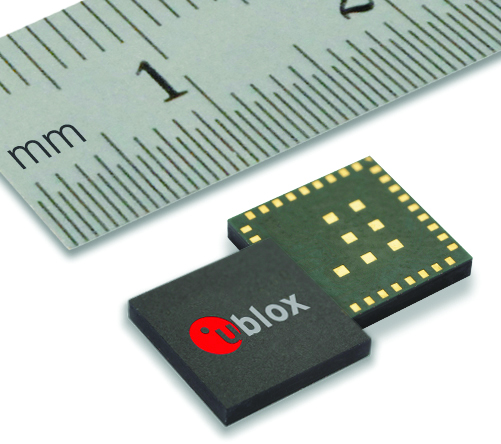
     EVA‑M8M stand-alone positioning module. Photo: u-box
    EVA‑M8M stand-alone positioning module. Photo: u-box

    Swiss-based u‑blox has introduced the EVA‑M8M stand-alone positioning module. The EVA-M8M GNSS module brings concurrent multi-GNSS performance into the ultra-compact EVA footprint.

    Designed for cost- and space-sensitive applications, the highly integrated 7 x 7 x 1.1 mm LGA module comprises all necessary components, including crystal and passives. EVA-M8M only requires an external antenna to provide an accurate position without the need for host integration. Components have been selected for reliable operation in the field over the full operating temperature range. The module is also compatible with the EVA-7M GPS module, allowing for easy upgrading of existing designs at minimal cost, u-blox said.

    The module supports GPS, GLONASS, BeiDou, QZSS, and SBAS augmentation systems. Based on u‑blox M8 performance, the module achieves -164 dBm tracking sensitivity, fast acquisition time and low power consumption. EVA-M8M can track any two GNSS systems simultaneously and output a GNSS position up to 18 Hz.

    “The EVA-M8M sets a new industry benchmark for compact, stand-alone global positioning performance. The module has been designed for the absolute lowest eBOM costs and ease-of-manufacturing. It is a perfect solution for cost-sensitive industrial and wearable devices,” said Thomas Nigg, vice president of product strategy at u-blox.

    A UART, USB, SPI and I2C interface provide flexible connections to a host processor. EVA-M8M can also communicate directly with u‑blox’ SARA 2G, LISA 3G and TOBY 4G cellular modules to support advanced tracking and location-aware products.

    Detailed information about the EVA-M8M can be found on the u-blox website. Samples are available now. For existing designs using a NEO module, the C88-M8M adaptor board can be used for easy evaluation of the EVA-M8M in existing NEO-xM designs.

  • Tallysman TW5340 Smart Antenna Designed for Urban Canyons

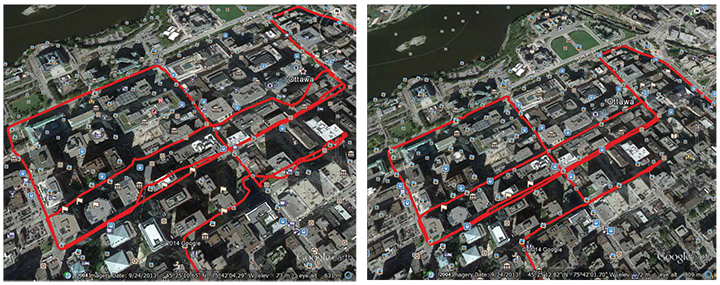
    A single-feed smart antenna (left) compared to the multipath rejection results of the new TW5340 smart antenna. Photo: Tallysman
    A single-feed smart antenna (left) compared to the multipath rejection results of the new TW5340 smart antenna with Accutenna technology. Photo: Tallysman

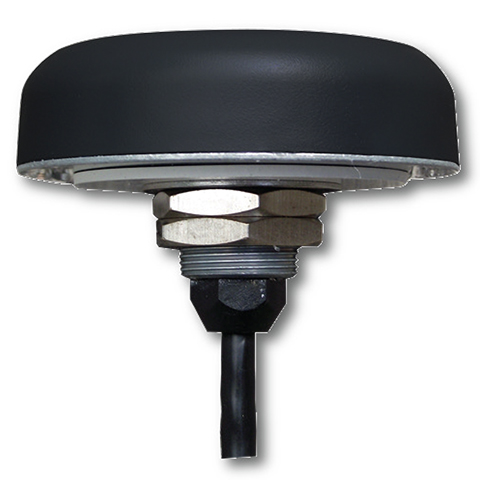
    Tallysman’s new TW5340 smart antenna is designed to pair Tallysman‘s Accutenna technology antenna with STMicroelectronics’ Teseo II receiver. The combination makes the smart antenna accurate for use in all environments, including urban canyons, according to the company.

    The TW5340 is a multi-constellation GNSS Smart Antenna that provides simultaneous GPS/GLONASS/SBAS reception. It is designed for use in professional-grade applications such as precision timing, network synchronization, low current applications, and tracking/positioning applications.

    To illustrate the advantages of this technology coupling, simultaneous recordings of vehicle position were conducted using two smart antennas — one with and one without Tallysman’s Accutenna technology — in an area of downtown Ottawa, Canada, notorious for high levels of multipath signals. Results show how the high multipath signal rejection capabilities of Tallysman’s Accutenna technology greatly improves accuracy, the company said.

    The Tallysman TW5340 smart antenna.
    The Tallysman TW5340 smart antenna.

    The TW5340 supports STMicroelectronics Autonomous A-GPS, which accelerates GPS positioning by predicting satellite ephemeris data based on previous observations. This results in extremely fast time-to-first-fix. The TW5340 can be configured to output up to three NMEA 0183 message lists with navigation update rates up to 10 Hz. RS232, CMOS, and USB interfaces are available with input voltage options of 3,3V, 5.0V, and 12V. A standby-mode feature provides for very low current consumption (<100uA) and is particularly useful in battery-operated applications.

    A standard one pulse-per-second 1PPS synchronized to UTC time is available as a single ended output or as a differential output at RS422 levels.

    Tallysman’s Windows-based Configurator enables simple configuration of parameters such a baud rates, output message rates, constellation, tracking parameters, 1 PPS configuration and standby-mode parameters.

    The TW5340 is housed in an IP67 housing and is REACH and ROHS compliant. A non-magnetic version is also available as Part Number TW5341.

  • Carlson GIS360 for Android Gives 3D Views on Site

    Carlson GIS360 Android app.
    Carlson GIS360 Android app.

    Carlson GIS360 for Android, new from Carlson Software and Carlson EMEA, is a mobile field GIS-GPS tool that uses both GIS and surveying technologies for field data collection. The app is designed to be easy to learn and easy to use, Carlson said.

    “Taking advantage of the graphics processing power of Android devices, GIS360 now includes an innovative 3D viewer so the user can see data and models in 3D on site,” said David Loescher, Carlson U.K. sales director and director of GIS360 development.

    In addition to allowing field crews to navigate maps and collect and report data in the field, GIS360 provides the data and fully rendered models of mines, earthworks and pipe networks that can be viewed in 3D. The software’s Siteview function uses the Android devices’ built-in GPS, compass and gyros to give the user the view of the site in front of him.

    Carlson GIS360 provides a wireless connection to any map server of choice, so users are never without a map. This saves considerable time and effort as field crews can verify that all of the data collected is accurate before leaving the site, Carlson said. No costly site revisits are necessary and no office work is needed.

    The software’s cloud options provide backup for users’ data, enabling it to be shared between field and office in real time. GIS360 goes beyond positioning with a range of tools for mobile workforce management, GPS data collection, tracking and asset maintenance.

    On an Android tablet or smartphone, Carlson GIS360 for Android can take GIS data anywhere. The built-in GPS and compass instantly calculate what the user is looking at and then displays the data automatically.

    “The GIS360 development team set out to make the collection of asset information easier and more efficient by combining the power of GIS360 with affordable Android devices,” added Loescher. “The result not only saves a lot of field time, but also makes the process far easier for everyone concerned.”

  • Trimble’s Smart Water Software Adds GNSS for 3D Accuracy

    Trimble has introduced the latest version of its smart water infrastructure mapping and work management cloud software — Trimble Connect for Water version 1.9.

    The latest release of the geographic information system (GIS) centric software-as-a-service (SaaS) adds real-time, high-accuracy centimeter-level horizontal and vertical GNSS accuracy for capturing 3D asset positions. The new release includes a suite of applications that allow water, wastewater and stormwater utilities to accurately locate, inventory and visualize their infrastructure assets and increase operations and maintenance efficiency.

    The announcement was made at Trimble Dimensions.

    Trimble Connect for Water cloud software leverages Trimble’s GNSS rugged mobile devices and Esri’s GIS technologies to accurately map, locate and assess the condition of critical infrastructure assets, allowing utilities to keep their field infrastructure data up-to-date and accurate.

    The new release now supports Trimble’s Geo 7 Centimeter Edition rugged handheld, integrating 3D mapping into utility field workflows and enabling mobile workers to precisely locate and map the horizontal position and elevation of buried infrastructure.

    Trimble Connect for Water version 1.9 can be configured and deployed quickly on a variety of Trimble and non-Trimble mobile devices, laptops, tablets and smartphones, including Apple iPads, iPhones, Android, Windows and Windows Mobile devices to automate fieldwork and eliminate paper-based maps.

    Trimble Connect uses the latest Esri ArcGIS for Server, Mobile and ArcGIS Online basemap services. The software is designed to automate a variety of specific water, wastewater and stormwater industry workflows through individual pre-configured “apps” offered within the product and as part of a subscription.

    The new version provides standard core apps including Map Book, Manhole Inspector, Leak Repair, Hydrant Inspector, Valve Inspector, Meter Changeout, Incident Repair, Water Mapper, Wastewater Mapper and Stormwater Mapper. In addition, an optional partner app developed for American Flow Control (AFC) hydrant and valve data collection, “AFC Mapper,” can be purchased from AFC and their distributors for use with Trimble rugged handhelds.

    Trimble Connect for Water version 1.9:

    • Offers centimeter-level real-time GNSS accuracy to improve the quality and accuracy of the utility’s GIS data to precisely locate hard to find assets.
    • Allows capturing accurate vertical elevations in real-time. Combined with horizontal precision, the solution provides high-accuracy GIS data that can be used to measure pipeline slopes, perform flow analysis and generate 3D and hydraulic models.
    • Supports the Trimble Geo 7 Centimeter edition with an integrated laser rangefinder.
    • Offers pre-configured Water, Wastewater and Stormwater mapping apps, allowing utilities to quickly start mapping network infrastructure and updating their asset data.
    • Provides the capability to export data in a variety of formats including Esri File Geodatabase, Shapefiles and MS Excel, which allows users to update the utility’s enterprise GIS or visualize and analyze the collected data using third-party systems.

    Trimble Connect for Water version 1.9 is expected to be available in December 2014 from Trimble’s Water Division and its authorized distribution partners.

  • Trimble’s Smart Water Software Adds GNSS Capabilities

    Trimble has introduced the latest version of its smart water infrastructure mapping and work management cloud software — Trimble Connect for Water version 1.9.

    The latest release of the geographic information system (GIS) centric software-as-a-service (SaaS) adds real-time, high-accuracy centimeter-level horizontal and vertical GNSS accuracy for capturing 3D asset positions. The new release includes a suite of applications that allow water, wastewater and stormwater utilities to accurately locate, inventory and visualize their infrastructure assets and increase operations and maintenance efficiency.

    The announcement was made at Trimble Dimensions.

    Trimble Connect for Water cloud software leverages Trimble’s GNSS rugged mobile devices and Esri’s GIS technologies to accurately map, locate and assess the condition of critical infrastructure assets, allowing utilities to keep their field infrastructure data up-to-date and accurate.

    The new release now supports Trimble’s Geo 7 Centimeter Edition rugged handheld, integrating 3D mapping into utility field workflows and enabling mobile workers to precisely locate and map the horizontal position and elevation of buried infrastructure.

    Trimble Connect for Water version 1.9 can be configured and deployed quickly on a variety of Trimble and non-Trimble mobile devices, laptops, tablets and smartphones, including Apple iPads, iPhones, Android, Windows and Windows Mobile devices to automate fieldwork and eliminate paper-based maps.

    Trimble Connect uses the latest Esri ArcGIS for Server, Mobile and ArcGIS Online basemap services. The software is designed to automate a variety of specific water, wastewater and stormwater industry workflows through individual pre-configured “apps” offered within the product and as part of a subscription.

    The new version provides standard core apps including Map Book, Manhole Inspector, Leak Repair, Hydrant Inspector, Valve Inspector, Meter Changeout, Incident Repair, Water Mapper, Wastewater Mapper and Stormwater Mapper. In addition, an optional partner app developed for American Flow Control (AFC) hydrant and valve data collection, “AFC Mapper,” can be purchased from AFC and their distributors for use with Trimble rugged handhelds.

    Trimble Connect for Water version 1.9:

    • Offers centimeter-level real-time GNSS accuracy to improve the quality and accuracy of the utility’s GIS data to precisely locate hard to find assets.
    • Allows capturing accurate vertical elevations in real-time. Combined with horizontal precision, the solution provides high-accuracy GIS data that can be used to measure pipeline slopes, perform flow analysis and generate 3D and hydraulic models.
    • Supports the Trimble Geo 7 Centimeter edition with an integrated laser rangefinder.
    • Offers pre-configured Water, Wastewater and Stormwater mapping apps, allowing utilities to quickly start mapping network infrastructure and updating their asset data.
    • Provides the capability to export data in a variety of formats including Esri File Geodatabase, Shapefiles and MS Excel, which allows users to update the utility’s enterprise GIS or visualize and analyze the collected data using third-party systems.

    Trimble Connect for Water version 1.9 is expected to be available in December 2014 from Trimble’s Water Division and its authorized distribution partners.

  • Trimble Updates Aerial Imaging Application

    Trimble Access Aerial Imaging 3

    Trimble has added enhancements to its Trimble Access Aerial Imaging 2.0 application to make it more robust, intuitive and easier to use. Part of the Trimble Access field software suite of applications, the Aerial Imaging application is a software tool used with the Trimble Tablet Rugged PC for planning aerial missions, performing pre-flight checks, and monitoring flights for the Trimble UX5 Aerial Imaging Rover.

    The software enhancements include a full redesign of the user interface for a streamlined workflow, and major upgrades to flight design and control. These improvements provide greater flight planning flexibility in applications such as boundary and topographic surveying, mining assessment and exploration, heavy construction modeling and much more.

    The announcement was made at Trimble Dimensions.

    Trimble Access Aerial Imaging 2.0 enhanced user interface enables Trimble UX5 pilots to prepare a flight in minutes and quickly begin collecting data, such as orthophotos, point clouds or surface models. The full interface redesign simplifies the user experience for flight planning by using a step-by-step, tabular navigation to guide the user through the flight process from planning to completion.

    Project management is also easier with new project overview thumbnails and detailed project properties. These interface enhancements are designed to save time in the field, and provide users with an optimal flight planning and monitoring experience.

    The new Trimble Access Aerial Imaging 2.0 functionality optimizes flight times and enables corridor mapping along rivers, roads, and railways that have areas not connected to each other. Pilots can now import multiple map layers, such as georeferenced background maps, ground control point locations, and areas of interest. The software also enables users to fly irregular shaped areas, cover multiple areas and heights in a single flight, and plan multiple takeoff and landing locations. Once a plan has been established, users can perform flight simulations to confirm the flight plan, give a demonstration to clients and aviation authorities, and export the flight plan to a KML file to check terrain clearances. These new enhancements benefit pilots by saving time in flight planning, increasing safety, and meeting requirements of their mission through customized planning before takeoff, Trimble said.

    New features with in flight control build an additional level of viewing options and safety for landing when air traffic or weather conditions suddenly change. Pilots can now check flight settings, view or hide map layers, adjust landing properties, select an alternative landing, and execute pre-programmed interventions while the system is in-flight.

    “Delivering the premium UAV experience for trained geospatial professionals means we need to have the most advanced flight planning and inflight control capabilities to offer, and Trimble Access Aerial Imaging 2.0 shows our commitment to doing just that,” said Phil Sawarynski, business area director of Imaging Solutions for Trimble’s Geospatial Division. “Our customers can feel confident that we are committed to providing tools to streamline flight operations and automate capabilities for safe and successful use of their Trimble UAV systems.”

    Trimble Access Aerial Imaging 2

  • Satlab Launches SL600 on-the-Pole Survey Receiver

    Satlab Launches SL600 on-the-Pole Survey Receiver

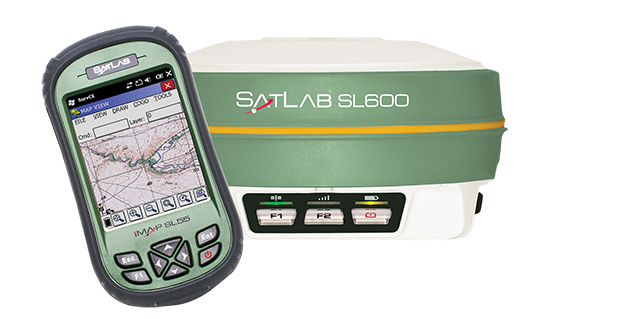
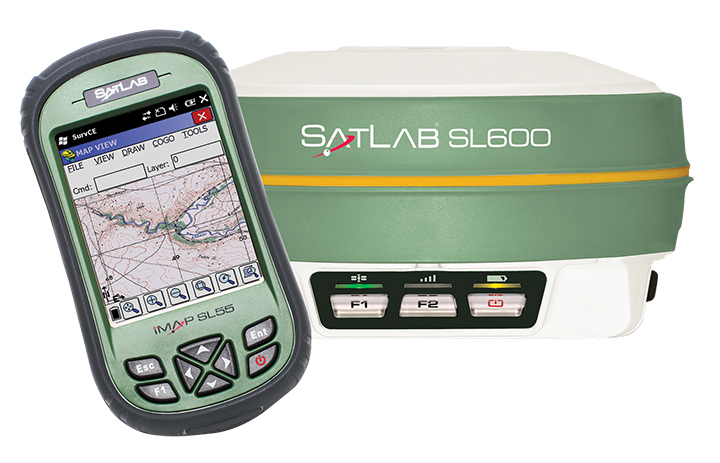
    The SatLab SL600 GNSS survey receiver.
    The SatLab SL600 GNSS survey receiver. Photo: SatLab Geosolutions AB

    SatLab Geosolutions AB is now shipping its new SL600 on-the-pole GNSS survey receiver.

    SatLab announced the unit earlier this year as the replacement of its SL500 on-the-pole surveying receiver. After a summer of testing and a premiere showing at InterGeo 2014, held in Berlin in October, SatLab is ready to ship the SL600 to its dealer network and customers.

    The new receiver is designed to meet the evolving needs of the surveying market, and is designed for general land, marine and construction applications. At the heart of the rugged unit is a 6G GNSS receiver capable of using all six GNSS satellite networks (GPS, GLONASS, BeiDou, Galileo, QZSS and SBAS), providing reliable operation in demanding conditions, SatLab said.

    The SL600 is lightweight at 1.2 kg. Its Xenoy housing holds up well to real-world use, according to test results by SatLab, resistant to 3-meter drops and 2 meters of water submersion. The dual hot swappable batteries provide 18-24 hours of continuous field use, depending on the mode of operation.

    The SL600 receiver has a new onboard computer running the LINUX operating system, which ensures easy implementation of new functionalities, often a result of customer-specific requirements. Over time, over-the-air firmware updates will be automatically available, adding new features at no additional charge. Users will be notified by the unit to accept the new firmware updates, or refuse them if they wish to keep their units as is.

    The SL600 system is available with various communication capabilities. Cellular 3G and Bluetooth as well USB and RS232 connectivity are standard, and an optional internal 2W Pacific Crest XDL radio is also available. Voice notifications notify the user of issues without the need to watch the status LEDs.

    The SL600 system kit includes a compact hard carrying case with the SL55 field controller, which can handle large data files with its high-speed processor and expandable memory. Furthermore, the SL55 has an onboard GPS/GLONASS L1 receiver as well as a GSM modem, which makes the unit a good and rugged companion to use in GIS data collection applications.

    As part of the close cooperation between Carlson Software and SatLab Geosolutions AB, the SL600 comes with Carlson SurvCE pre-installed and activated. This ensures an “out of the box” experience for the end customer, SatLab said.


  • Teletrac’s Fleet Director Improvements Designed for Mobile

    Teletrac-fleet-director Photo: Teletrac, Inc.
    Photo: Teletrac, Inc.

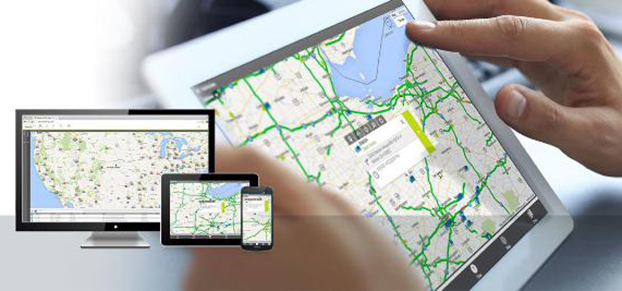
    Teletrac, Inc., a GPS tracking and fleet management provider, is offering a new version of its Fleet Director GPS fleet tracking system that provides users with greater control and flexibility, Teletrac said.

    Users now have full access to Fleet Director’s management features via mobile device, in addition to desktop functionality. Also, the latest update offers robust fleet management tools, such as the ability to monitor fuel consumption, increase driver safety, and meet compliance mandates.

    “In the current climate, businesses have the ability to achieve high levels of profitability and growth with the help of an advanced fleet management platform,” said Tony Eales, president, Teletrac. “The latest version of Fleet Director churns millions of data transactions daily, providing vital information to help meet company goals across multiple industries and workforce sizes. Businesses are equipped with the actionable data necessary to cultivate and develop their company on multiple levels and gain a competitive advantage in their market.”

    Teletrac has modernized Fleet Director in four key fleet management areas: anywhere, anytime mobile access; deeper driver and vehicle behavioral data; enhanced mapping functionality; and advanced safety analytics.

    “Fleet management has historically been an at-a-desk job, limiting companies in their productivity and communication. The added flexibility of using modern devices — such as smartphones, laptops and tablets — to do business has increased productivity while also adding expectations from customers,” said Sid Nair, director of Product Management, Teletrac. “As the industry has evolved, so have we.”

    Enhancements include:

    Mobility: Fleet Director allows users to manage their vehicles from any mobile device or browser through new HTML 5 functionality. The software’s clear and user-friendly interface lets users navigate easily to a targeted location regardless of whether the manager is in the office or on a mobile phone in the field.

    Actionable Data: The updated software allows managers to move beyond basic track-and-trace functionality, offering an in-depth look at the overall health of a business. The new Fleet Director is built with more robust driver and vehicle behavioral data, providing businesses with insight into performance areas such as fuel management, power take-off time, engine performance and job-site delivery tracking.

    Cutting-Edge Mapping Technology: Mapping has moved beyond location tracking with Fleet Director’s enhanced interactive features. Vehicle and asset mapping is now accessible on easy-to-use Google Maps that toggle between single and multiple views. Managers can consult Fleet Director to pinpoint the exact road their drivers are on while using Google Street View to zoom into the terrain and makeup of the road. These added map enhancements provide fleet managers with tools to have better control of their business.

    Advanced Safety Behavior Data: Fleet Director Safety Analytics helps managers get closer to their fleet through insight into key driver safety events, such as speeding, harsh braking, accelerating, stop sign violations and fast cornering. New data-rich dashboards display relevant information that shows the time and date of each event and the number of infractions per vehicle and driver, including the best and worst performance rankings. Safety infractions can be replayed on the map interface to show how an unsafe driving incident occurred in real-time, providing useful data that can prevent the risk of a crash.

  • Trimble Improves Geospatial Data Collection on Geo 7X Handhelds

    The Trimble Geo 7 series are rugged, high-accuracy GNSS handhelds.
    The Trimble Geo 7 series are rugged, high-accuracy GNSS handhelds.

    Trimble’s RTX technology-based correction services — Trimble CenterPoint RTX, Trimble RangePoint RTX, and the new Trimble ViewPoint RTX — will be available for Trimble Geo 7X handhelds. Trimble made the announcement at Trimble Dimensions.

    Trimble RTX technology provides compatible GNSS receivers with correction services that significantly improve accuracy and reliability in obtaining positions worldwide. Geospatial professionals now have more flexibility to achieve the accuracy required by their highly mobile workflows in real-time, without being tied to a base station or local VRS network, Trimble said.

    Available worldwide through an IP connection where cellular communication is available, Trimble RTX offers geospatial professionals flexibility in where and when they are able to work. Operational efficiency and productivity in the field is improved by delivering real-time DGNSS corrections directly to the Trimble Geo 7X handheld. Field challenges, such as obstructed satellites and inaccessible locations, are also minimized with Trimble Floodlight and Trimble Flightwave technology options for the Trimble Geo7X.

    The handheld solution is designed for a variety of industries — such as utility companies, municipalities, and environmental management agencies — in which workers are highly mobile and require a reliable, flexible data-collection and asset management solution.

    “We have eliminated the complexities of managing multiple correction sources across a large geographically dispersed project or organization,” said Alain Samaha, business area director of GIS and Software for Trimble’s Geospatial Division. “By offering RTX-based correction services, we simplify their work and deliver the accuracy that our customers require.”

    A choice of RTX correction services ranging from 4 centimeters to submeter-level horizontal accuracies is available. Customers can choose the appropriate Geo 7X handheld configuration with the RTX-based correction service that meets the accuracy level and capability required for their job.