Trimble’s Stephanie Michaud discusses the company’s SiteVision augmented reality system at the 2019 Esri User Conference in San Diego. According to the company, SiteVision uses Trimble’s Catalyst softGNSS receiver, combined with Google ARCore technology, to produce a handheld high accuracy outdoor augmented reality system.
Tag: Trimble
-
Trimble launches usage-based service plan for Catalyst GNSS receiver
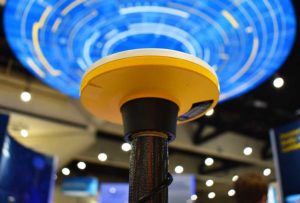
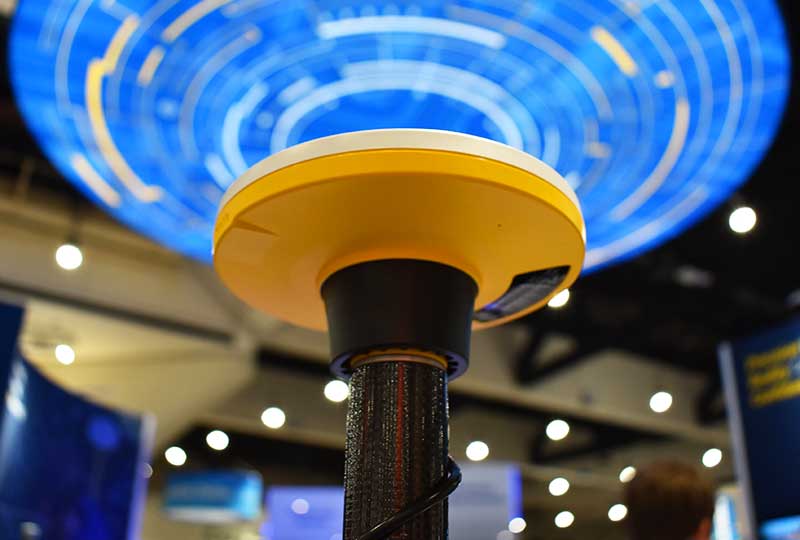
Trimble Catalyst On Demand enables automated domain-level email address access, which streamlines license allocation for organizations with a large number of users. (Photo: Allison Barwacz) Trimble’s Catalyst software-defined Global Navigation Satellite System (GNSS) receiver for Android phones and tablets is now available with a usage-based service plan: Trimble Catalyst On Demand.
According to the company, the new service plan is focused on satisfying the requirements of a growing number of industries and organizations who recognize the benefits of using high-accuracy GNSS technology in the field, but need a more flexible payment model.
Trimble Catalyst On Demand provides scalable access to RTK-quality GNSS positioning using an affordable pay-per-use hourly pricing model in addition to the current Catalyst monthly plans, the company added. The service also enables automated domain-level email address access, which streamlines license allocation for organizations with a large number of users.
“Catalyst On Demand is Trimble’s response to the growing number of individuals and organizations needing flexible access to high-accuracy GNSS technology,” said Rachel Blair Winkler, business area manager, mapping and GIS, for Trimble. “By providing a usage-based payment model for Catalyst, we are empowering more users inside and outside the geospatial profession to record positions, navigate to points, measure relative distance and create digital maps. This results in better work and better decisions.”
Trimble Catalyst service subscriptions and the Catalyst DA1 antenna are available through Trimble’s Authorized GIS Distribution Network.
-
Topcon launches rotary-wing UAV flight-planning software
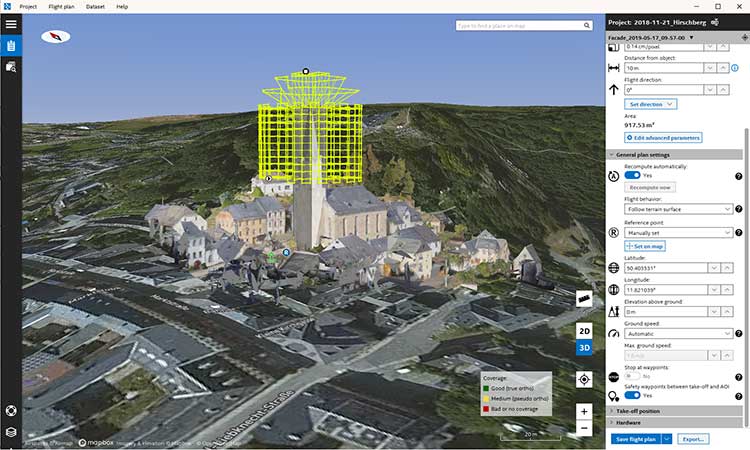
Screenshot: Topcon Topcon Positioning Group has released its next-generation flight-planning system for its rotary-wing aerial UAV offering.
The new Intel Mission Control Software is designed to facilitate automated flight planning, managing missions and data handling for the Intel Falcon 8+ drone – Topcon Edition and its available payload options.
The software is designed to increase accuracy with advanced mapping features that allow operators to easily set project parameters and prepare missions using presets for 2D areas such as polygon, corridor and city grid, as well as 3D structures like towers, buildings and facades.
“Operators can take advantage of 2D and 3D map views with the ability to import more precise project details and parameters, including restricted airspace, and support to adapt flight planning over difficult terrain,” said Charles Rihner, vice president of planning for Topcon Emerging Business.
“It features the ability to import elevation, KML, GeoTIFF and Shapefiles for real life visualizations targeted for accurate planning. Plus, expanded preset options support automated flight including circle of interest, panorama, and 2D and 3D missions with automatic elevation and terrain adoption,” Rihner said.
Additionally, the software includes automatic pre-flight safety and system checks while in mission planning. “Operators will receive detailed communication such as estimated battery life, airspace integration, ground and object safety limits, maximum dive and climb rate, minimum and maximum altitude, camera speed, number of images, camera storage, GSD check, and target photo coverage and quality,” Rihner said.
The flight-planning software is also designed to improve data handling and export to support easier data processing.
“It includes automated image matching and geotagging of images during data import, for increased time saving. Operators can preview and inspect the quality of the collected data, including individual images, as well as an overview of data coverage. Then, they can quickly and easily access and export flight data, and filter datasets for easier processing,” Rihner said.
-
Trimble TDC600 integrates smartphone and GIS data collector
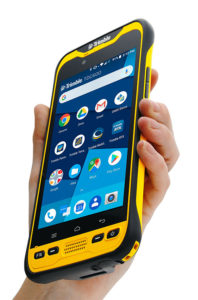
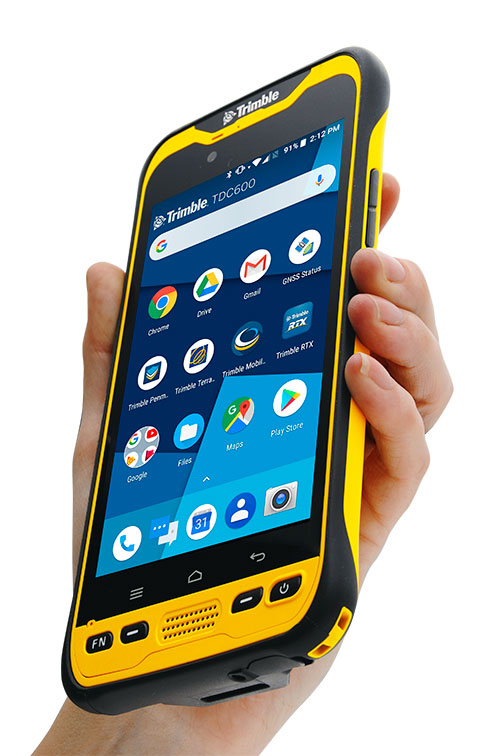
Photo: Trimble Trimble has introduced the TDC600 handheld, an ultra-rugged, all-in-one smartphone and GNSS data collector for geographic information system (GIS) and field inspection applications.
The next-generation smartphone data collector runs on an Android 8.0 operating system. It has a bright sunlight-readable 6-inch display, 2.2-GHz processor, 4-GB memory and an enhanced capacity all-day battery.
More powerful and with a longer lasting battery than its predecessor, the TDC600 handheld supports the Trimble Catalyst GNSS positioning service that delivers subscription-based accuracy on demand for Android devices.
In addition, the TDC600 can be used with external receivers such as the Trimble R2 and R1 GNSS receivers, and also features a built-in GNSS receiver that supports GPS, GLONASS and BeiDou constellations plus satellite-based augmentation system (SBAS) capabilities for real-time positioning.
The TDC600 is built for GIS users in organizations across a variety of industries —environmental management, utilities and government agencies. With Wi-Fi, Bluetooth 4.1 and 4G LTE cellular connectivity that supports data and voice calls, field workers are able to use the TDC600 as they would any consumer smartphone, communicating between the field and office, sending emails and texting.
Featuring a slim, lightweight and ergonomic pocket-size form factor, the TDC600 fits in a user’s hand with a fitted strap providing extra security. Constructed to meet military (MIL-STD-810G) specifications, the durable design absorbs drops and shocks, and works in harsh weather conditions, without the need for a protective case.
The TDC600 integrates seamlessly with Trimble’s data collection applications —Trimble TerraFlex] software and Trimble Penmap for Android software — as well as third-party apps such as Esri Collector for ArcGIS.
With its Google Mobile Services certification, users can run Google core applications and access apps on the Google Play Store to personalize their device.
“The global mobile workforce is growing, and field personnel are constantly tasked with capturing and computing large amounts of data in more places with greater accuracy, requiring powerful and reliable data collection methods,” said Rachel Blair-Winkler, business area manager for Trimble Mapping & GIS.
“A professional turnkey solution such as the TDC600 handheld running Trimble data collection apps paired with the Trimble Catalyst service fulfills this requirement,” Blair-Winkler said. “Our customers now have a powerful, comprehensive and cost-effective entry-level system to collect and retrieve highly accurate GIS data virtually anywhere in the world.”
-

Surveying and BYOD: Yes, you can use your smartphone
BRING YOUR OWN DEVICE (BYOD) is not just an industry buzzword. It can change the way professional surveyors work every day. The idea of using a smartphone or tablet instead of a dedicated device is appealing. But is it good enough?
Surveyors and mappers are challenged with the arduous task of data collection that meets accuracy and precision standards and provides adequate attribute information for the project. Before the invention of the electronic data collector, handwritten notes in field books were the norm. Every note keeper’s style varied in content, neatness and thoroughness. Calculations for determining survey data values were completed longhand on paper and were very time consuming.
Index
Click on a headline and be automatically directed to it.
• History of Surveyors and Data Collectors
• Trending Away from Proprietary Data Collectors
• How Good Is It?
• Post-Processing (OPUS and DPOS)
• Do You Need a Base Station?
• Adaptation of the Industry
• Receiver, Software Ready for Mobile
• TerraStar Gives Assist to RTK
• Trimble Offers Web-Based Post-Processing
• Atlas Corrections Ready for BYOD
History of Surveyors and Data Collectors
Like its personal computer counterpart, the electronic data collector was introduced in the late 1970s with minimal adoption by the average surveyor because of cost and complexity. Storage methods for the era included magnetic modules and tape; both forms of media were expensive and fragile with little storage for the cost.
Data collection was limited to numeric values only, with horizontal and vertical angles, slope distance, point number and point code being the extent of the information. Couple this process with the limited availability of printers and plotters capable of depicting the data for the surveyor’s use, and one can see why few practitioners invested in these systems.
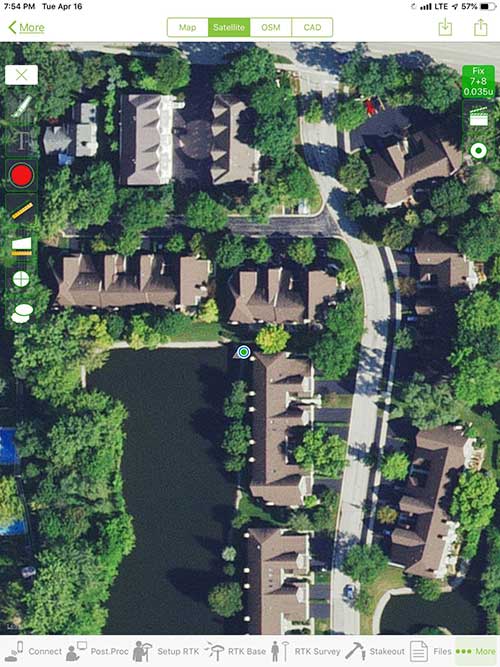
iOS aerial viewer. (Screenshot: Tim Burch) The 1980s and 1990s brought significant changes to surveying with the advancing technology of electronic computing and measuring. The introduction of robotic total stations, various methods of GNSS, and even leveling took advantage of significant computer power and measuring processes, and the data collector stayed in lockstep with the advancing instrumentation. Almost every equipment manufacturer developed their own proprietary data collector and software system because of the unique design and programming of their systems.
In the 2000s and later, third-party manufacturers began producing data collectors with advanced computing power and the ability to connect to varying brands of equipment. Most of the programming for these collectors are still proprietary in nature to this day.
Also during the 2000s, a new wave in mobile communications was taking place. Cellular phone and data signals were now being used to transmit an abundance of information between users.
The rapid development of handheld communication devices has led to the meteoric rise of two specific mobile operating systems: one by a radical startup that concentrated on dominating the search engine market, and the other by an avant garde computer company looking to expand its unique customer base.
By the end of the decade, the world had been introduced to the Android operating system by Google, and the iOS operating system by Apple. The combined market share for the two operating systems at press time was just under 98 percent of all mobile devices worldwide.
Trending Away from Proprietary Data Collectors
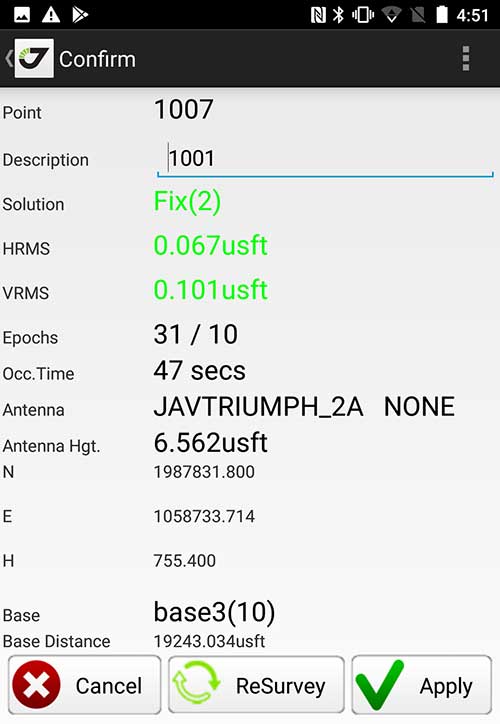
Android Point Info: Confirmation of collected data, including equipment and base station. (Screenshot: Tim Burch) Because data collection by surveyors and mappers have traditionally been performed on proprietary systems designed and produced by equipment manufacturers for use with only their instruments, these collectors, while very powerful and robust, are costly for the equipment manufacturers to produce because of the limited market of surveyors and mappers.
Many suppliers, before the introduction of the iPhone and Android operating systems, attempted to adapt their data-collection platforms to wider recognized mobile operating systems (for example, Windows CE/Pocket PC/Mobile) on a bevy of mobile devices (HP/iPAQ, Sony Eriksson, HTC) with little success. Various versions of Windows are still being used today by GNSS equipment manufacturers’ proprietary data collectors, including Trimble, Hemisphere GNSS, Topcon and CHC Navigation.
However, the field of operating environments has become more crowded as technology continues to advance. The proliferation of Windows-based data collectors are now on the decline.
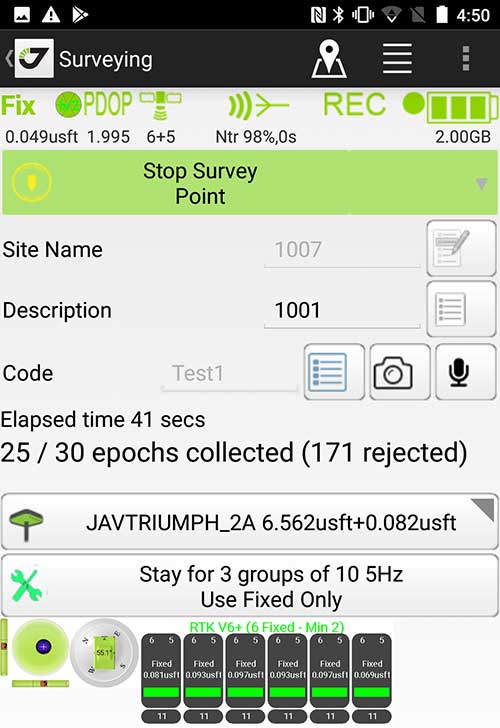
Survey Point: Status of survey data collection and GNSS engine signal reception. (Screenshot: Tim Burch) Enter Android and iOS. Driving the decline of the previously popular Windows mobile platform is the rapid adoption of the iOS and Android operating systems. These two environments have also led to a substantial number of devices and applications for users.
Part of the reason for the speedy acceptance of the devices and operating systems has been the ease of programming. It is estimated that each operating system has more than two million applications in their respective online stores, with more being introduced daily.
Because of the proliferation of smartphones, nearly everyone is familiar with the look, feel and operation of touchscreen devices and their various applications. This familiarity is driving a new trend in data collection: the concept of “bring your own device” (otherwise known in IT security circles as “BYOD”). BYOD is being introduced by several surveying and mapping equipment manufacturers as an alternative to their proprietary data-collection devices.
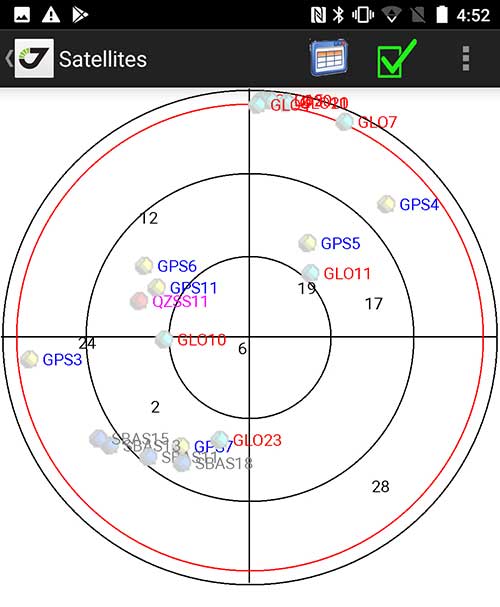
Sky Plot: Where the ‘birds’ are in the sky. (Screenshot: Tim Burch) These manufacturers are pairing iOS and Android developers with their hardware and firmware specialists to create a user-friendly interface that will function on most of the most popular handheld devices on the market today. From Apple iPhones and iPads to Samsung Galaxy phones and tablets, these applications give the surveyor the best of two worlds — sophisticated data-collection capability on a well-known and reliable mobile operating system platform.
The Android platform is becoming especially popular in the handheld mapping market segment. Current users of this environment include Hemisphere GNSS, CHC Navigation, Tersus GNSS and Trimble.
The iOS applications, while not quite as prevalent as Android, are being embraced by several significant GNSS manufacturers, including JAVAD GNSS and Eos Positioning Systems.
These companies are creating iOS and Android apps that embrace the BYOD market, providing their users with affordability and creating a comfort level simply because of the familiarity of the device and its environment.
How Good Is It?
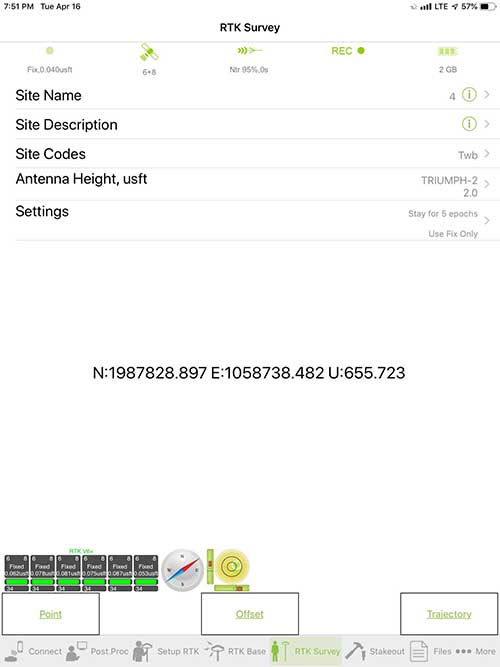
iOS Position. Status of survey data collection and GNSS engine signal reception. (Screenshot: Tim Burch) For the surveyor to be satisfied with the operation, the collection process must be efficient, cost-effective and easy to use. For this explanation of key items within a well-rounded data-collection application, we are using the JAVAD Mobile Tools (now J-Mobile) application built specifically for the Android and iOS operating systems.
The Android system (Version 7.0) was installed on a rugged CAT S41 cellphone made Bullitt Group from the United Kingdom, while the iOS app was used on the author’s iPad Air 2 running Version 12.2. Both apps were utilized in conjunction with the JAVAD Triumph-2 GNSS receiver.
After putting both versions through trial testing and checking against values on known monuments, here is the results of our findings:
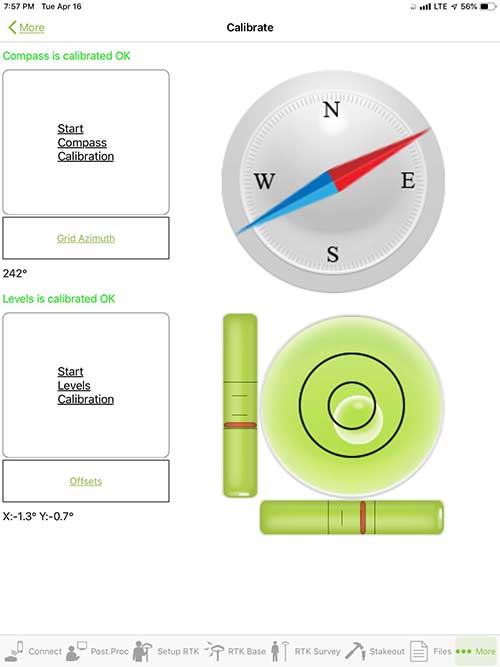
Receiver Setup. Visual reference for leveling and direction of GNSS receiver. (Screenshot: Tim Burch) Data Organization. Easy to comprehend and flexible for most naming conventions.
Corrections and Sources. Easily connects to base receiver and radio or available NTRIP correction service for real-time network (RTN) capability.Sky Plot. Because the Triumph-2 is equipped to receive most of the available satellites in service, the Sky Plot feature is beneficial to the user for assessing potential interference.
File Management, Import and Export. Covers the typical file management and transfer functions used by the surveyor.
RTK Survey Operations. Robust telemetry keeps the users informed of specific satellite data and correction status.
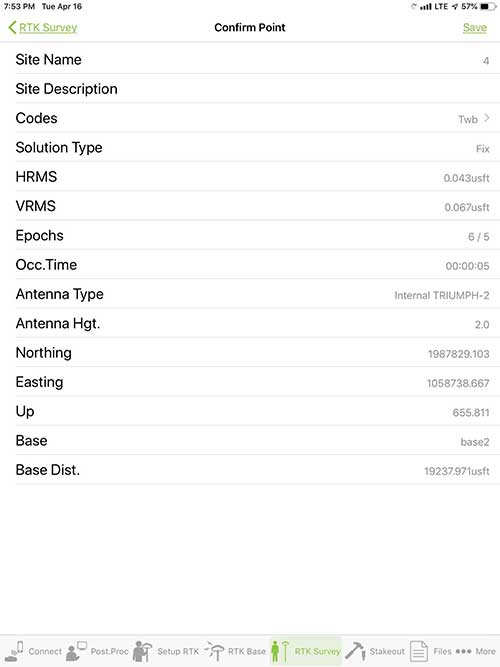
Point Confirmation. Survey point information with metadata and equipment listing. (Screenshot: Tim Burch) Coordinate Systems. All standard coordinate systems are included with features to allow the user to customize their own systems.
Localization. Creation of a local coordinate system is a simple routine, providing strong quality checks for data integrity.
Lift and Tilt. This feature provides the user with a useful procedure to end data collection without the need to press a button. This feature significantly increases the user’s productivity.
Compass and Level Calibration. With the Triumph-2 having an internal compass and level system, status of the receiver is graphically displayed to help the user keep a close watch on the accuracy of the survey point.
Survey Points and Linework. Most point naming systems and line-coding procedures are easily adapted. Total Station Point Transfer. The creation of control point files for transfer to total stations is simple and easy to use.
Stakeout. Graphical status screens provide the user with simple plotting capability of the desired stakeout point to increase efficiency and accuracy.
These apps are good at providing the surveyor with a solid tool for data collection and staking capability. They are especially good when paired with a real-time kinematic
(RTK) base station or NTRIP correction service.But what happens when cell service is not readily available, or there are no published monument coordinates to establish site control? These apps have the surveyor covered for that situation as well.
Post-Processing (OPUS and DPOS)
Today’s surveyor works in an environment where geographic-based data is a key component to the services they render to their clients. While most of the world’s developed nations have access to cellular networks in which most GNSS receivers can communicate with an RTN providing corrective solutions, the places where this is not possible relies on other means of data correction.
In the U.S. we rely on OPUS (Online Post-Processing User System) to provide that service. But, as good as it is, it has limitations. Currently, it only utilizes GPS satellite data from the U.S. Department of Defense and is subject to sporadic government shutdowns.
Other services, from both public and private sources, are in place around the world to provide a service similar to OPUS. These include, but are not limited to:
- AUSPOS. Geoscience Australia (free)
- APPS. Jet Propulsion Laboratory at California Institute of Technology (free)
- CSRS-PPP. Natural Resources Canada (free)
- GAPS. University of New Brunswick (free)
- magicGNSS. GMV (free)
- Centerpoint RTX Post Processing. Trimble (free)
- JAVAD Data Processing Service (DPOS). JAVAD (free, processes any JAVAD GNSS jps file)
These correction services utilize other satellite constellations (GLONASS, Galileo, BeiDou and QZSS) for their solutions and can provide additional coverage, depending on the location of the user. Because of these services, geographic-based data is at the fingertips of surveyors worldwide.
JAVAD’s DPOS system is has the ability to collect static survey data and send it to the proprietary service for establishing new coordinate values for base-station use. This process is a function of the app and can be completed in a few short steps.
Once the base station values are calculated, the surveyor can make use of this information for establishing a base station for correction broadcasting.
Do You Need a Base Station?
The establishment of RTNs has greatly enhanced surveying capability as cellular service has increased in coverage and speed. However, there are still instances and locales that do not allow for the reliable use of cell signals to provide those corrections accurately.
Various manufacturers’ tests have proven the accuracy of using an RTN subscription versus the traditional GNSS base and rover RTK setup. But cell-signal strength can be an Achilles heel, crippling those who choose not to set up a base station.
The UHF radio, even in its reduced power state from regulatory changes, is still more powerful and reliable than most cell services. 5G technology and coverage is anticipated to revolutionize cellular service, but it has yet to be realized.
Adaptation of the Industry
Other GNSS manufacturers (including NovAtel, Navcom, ComNav, Unicore, Emcore, Suzhou, TeleOrbit and Geneq) are producing receivers that can be adapted to a variety of existing data collectors and connect to iOS/Android mobile devices through various software developers.
The future of communications remains the smartphone or tablet device, with foldable units expected to be the next big thing.
As processors get more powerful, as chip memory becomes more abundant, and as more satellite constellations orbit in our sky, surveyors and their data collectors will continue to evolve. The future remains bright for technology and the surveyor has a front-row seat.
TIM BURCH is GPS World’s contributing editor for Survey. A professional land surveyor with more than 30 years of experience, he is director of surveying at SPACECO Inc. in the Chicago area. For several years he has been secretary and was recently named vice-president of the Board of Directors of the National Society of Professional Surveyors. He writes a bi-monthly column in the Survey Scene e-newsletter. Subscribe free at env-gpsworld-integration.kinsta.cloud/subscribe.
Receiver, Software Ready for Mobile
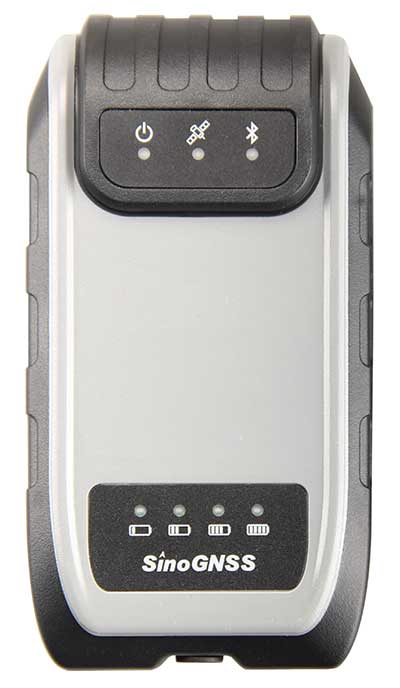
Photo: ComNav ComNav receivers offer multiple data-collection device choices via Bluetooth connection, as well as an Android app.
For instance, the G200 provides centimeter-accuracy positioning to any connected mobile devices for RTK field surveying. It is able to delivery robust survey workflows with the SinoGNSS Android-based Survey Master, so that surveyors can collect quality high-accuracy positions no matter what mobile device they are using.
The G200 is a rugged, compact, wearable GNSS receiver. Combined with the high-performance SinoGNSS OEM board tracking GPS L1/L2, BeiDou B1/B2, GLONASS L1/L2, Galileo and QZSS, the G200 enables reliable high-precision GNSS performance for land survey tasks anywhere in the world.
TerraStar Gives Assist to RTK
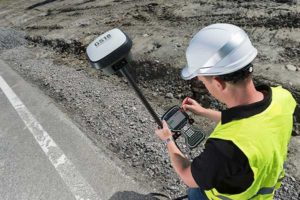
Photo: Leica Geosystems NovAtel offers several levels of corrections via its TerraStar service. For surveying applications, the RTK Assist service provides correction data to bridge surveyors through any real-time kinematic (RTK) correction outages. TerraStar services work on NovAtel’s OEM6 and OEM7 receivers..
RTK Assist, available on OEM6/OEM7 receivers, provides 20 minutes of RTK assistance, enabling surveyors to maintain centimeter-level accuracy. A higher service level, RTK Assist Pro, is available on OEM7 receivers. It provides unlimited RTK assistance with stand-alone centimeter-level positioning when RTK is not available.
Trimble Offers Web-Based Post-Processing
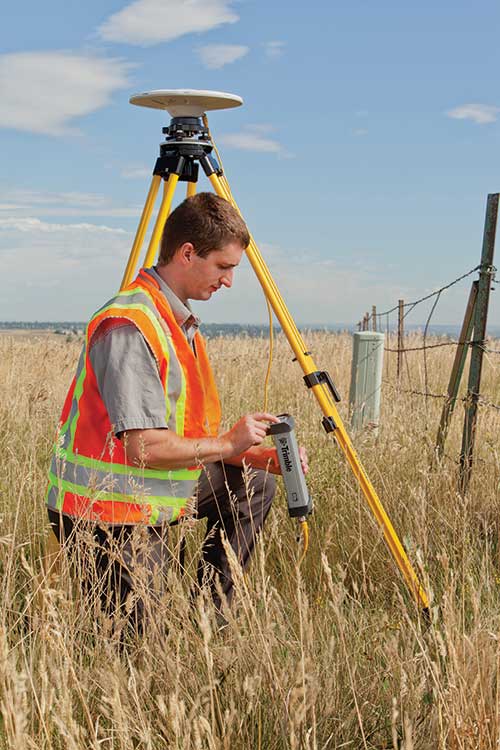
Photo: Trimble Trimble’s CenterPoint RTX Post-Processing Service is a free, web-based solution that provides rigorous processing of GNSS data for users around the globe.
Powered by advanced algorithms for processing static observations, CenterPoint RTX Post-Processing supports data including GPS, GLONASS, Galileo, BeiDou and QZSS. With the service, users can upload GNSS data using Trimble formats or industry-standard RINEX 2 and RINEX 3. The service supports all dual-frequency GNSS receivers and more than 400 different antennas.
The post-processing service computes single-station static observation sessions ranging in length from 10 minutes up to 24 hours, with longer observation sessions recommended to produce the highest accuracy. Using data from the global RTX tracking network, the CenterPoint RTX Post-Processing service computes the position of the observed point with centimeter accuracy.
Results are delivered via email in ITRF coordinates at the current epoch and can be transformed to a fixed epoch by use of a standard tectonic-plate model.
Atlas Corrections Ready for BYOD
The Atlas GNSS global correction service, offered by Hemisphere GNSS, provides correction data for GPS, GLONASS, BeiDou and Galileo constellations. Its global L-band corrections allow for accuracies ranging from sub-meter to sub-decimeter levels. The network has more than 200 reference stations worldwide and covers virtually the entire globe.
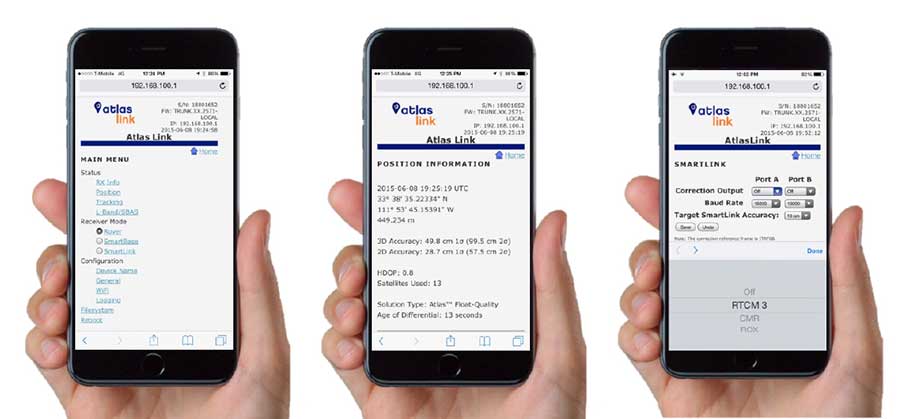
Examples of how the AtlasLink webUI looks on a smartphone. (Image: Hemisphere GNSS) The Atlas platform was conceived to enable as many people as possible to have access to the correction service technology, either as an end-user or as part of their business. Several features are designed to enable customers who use non-Hemisphere positioning systems to have access to Atlas.
For instance, Hemisphere’s SmartLink technology allows an AtlasLink GNSS smart antenna to be used as an Atlas signal extension for any GNSS system compliant with open communication standards.
Hemisphere’s GNSS smart antennas including AtlasLink, A326, C321+ and S321+ offer a user-friendly web user interface (WebUI) that can be used to configure, monitor and manage the receiver from virtually any modern computing device, including computers, phones and tablets.
-
Anatomy of a centimeter-level precise point positioning service
By Markus Brandl, Xiaoming Chen, Herbert Landau, Carlos Rodriguez-Solano and Ulrich Weinbach
This article updates a July 2012 feature in GPS World, “Real-Time Extended GNSS Positioning: A New Generation of Centimeter-Accurate Networks.”
The Trimble CenterPoint RTX correction service, enabling centimeter-level absolute positioning around the world without the need for RTK reference-station infrastructure, is now available to many users, including integrators of professional high-precision equipment and consumer products such as in the automotive sector. Access is provided via a software library compatible with any GNSS device. The corrections now contain detailed integrity information for safety-critical applications.
The RTX infrastructure is made up of approximately 120 globally distributed RTX reference stations. Receivers at these stations transmit measurement data at 1 Hz to the RTX server centers, where the correction data is computed. For redundancy purposes, multiple servers in the United States and Europe are operated. A failsafe architecture avoiding any single point of failure in the processing chain has produced a very high availability of corrections. Today the system supports GPS, GLONASS, Galileo, BeiDou and QZSS satellites. It is a multi-frequency system supporting two or more frequencies for each satellite system.
The correction stream is available to users using L-band signals broadcast via geostationary satellites and IP connections. The L-band transmitted RTX data stream uses a bandwidth of 600–2400 baud, and a highly compressed data format with a resolution of 1 millimeter, with an average latency of 8 seconds in L-band mode and 5 seconds in IP mode. The data stream is encrypted via an Advanced Encryption Standard (AES) with a key length of 256 bits to guarantee safe transmission. Data transmission integrity is assured with a 32-bit cyclic redundancy check attached to every message. The RTX correction stream provides information on satellite position, satellite clock, ionospheric and tropospheric models, and code and phase biases.
The orbit determination is done in real time using a reduced dynamic approach with dynamic models and exploiting the accuracy of the phase measurements after ambiguity fixing. Based on the computed orbits, the satellite clocks are estimated at 1 Hz, where integer ambiguity fixing is performed for the different satellite systems.
Next, a single-layer global ionospheric model is computed and represented through spherical harmonics. There are currently two areas with a denser network than the global network; these cover Europe and the mainland U.S. with more than 1,000 base stations. Using these stations, regional ionospheric and tropospheric models are computed, which then provide a fast convergence (RTX-Fast service).
The satellite position and clock information has centimeter accuracy and allows the client to compute precise point positioning (PPP) with carrier-phase ambiguity resolution. Table 1 shows service accuracy.
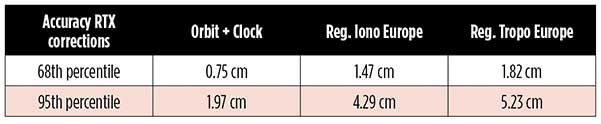
Table 1. Accuracy of the RTX corrections from more than three years (June 2015–July 2018) of residuals computation in the European RTX-Fast network. (Table data: authors) Once the ambiguities are resolved, the position solution is accurate to a few centimeters. The global RTX-Standard service provides convergence times of 7 minutes to 20 centimeters (cm) horizontal error (95%) and to 2.5 cm (95%) in 13 minutes as shown in Figure 2. The regional RTX-Fast service (U.S., Europe) provides convergence times of less than a minute with centimeter accuracy. The warmstart convergence time is approximately 13 seconds.
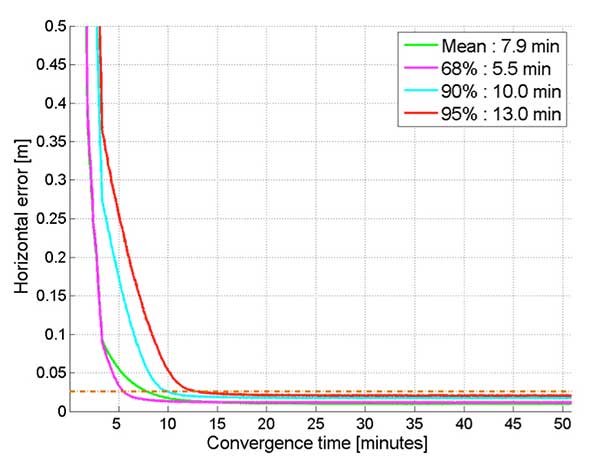
Figure 2. Global convergence of RTX out of 52 globally distributed stations covering one month of data. (Image: Trimble) The accuracies specified are achievable with precise Trimble GNSS positioning hardware. For integration into non-Trimble devices, an RTX software library is offered, which gives the user real-time access to the individual data in the RTX correction stream. For use of this library in safety-critical systems such as advanced driving-assisted systems (ADAS) or semi-automated driving, this library was certified to follow the ASIL-B ISO 26262 standard and the automotive ASPICE standard. This library is available for easy integration into third-party applications.
In addition to the real-time RTX solution, a web-based post-processing solution is available for public use free of charge. It is possible to upload static Trimble or RINEX files to the server, post-process the measurement data, and retrieve a precise position in various coordinate frames.
Service integrity is continuously monitored at independent stations from the RTX tracking networks in Europe and the US. The integrity of the service is provided at the correction data domain. The integrity monitoring part of the RTX system minimizes the risk due to events such as unplanned satellite maneuvers or wrong broadcast ephemeris; satellite signal or clock anomalies; ionospheric storms; or problems in transmitting the RTX correction stream.
The monitoring stations compute phase observation residuals (with ambiguity fixing) using the station measurements and the received RTX corrections. These residuals represent the actual errors of the corrections as seen by the monitoring stations at the line-of-sight (Table 1). The thresholds at which corrections are considered as faulty are the following: 0.5 m + QI (quality indicator) for orbit + clock corrections and regional tropospheric models, and 1.0 m + QI for regional ionospheric models.
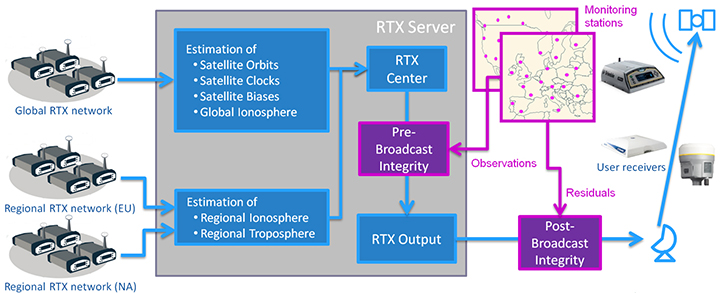
The integrity monitoring consists of two steps (Figure 1): a pre-broadcast check, where potentially faulty corrections are detected and filtered out before leaving the computing server, and a post-broadcast check, where additional errors in the transmission channel are detected and alarms are issued to the users.
Figure 1. Generation and transmission of RTX global and regional corrections, including pre- and post-broadcast integrity monitoring. (Image: Trimble) Integrity flags and alarms are constantly inserted into the correction stream and output by the RTX client library. The integrity information notifies clients of the presence of integrity monitoring and provides timely alerts in case of detected correction-data integrity violations. The time-to-alert limit goals are 17 seconds for L-band transmission and 13 seconds for IP transmission for the RTX service.
The RTX corrections includes quality indicators. In particular, the quality indicator for the satellite clock includes a “DoNotUse” flag to indicate potential problems with the given satellite. This flag prevents the use of the satellite for positioning when received by the user. The quality indicators of the corrections are indeed a first integrity layer. In 2017 the pre-broadcast integrity monitoring was added to act as a second layer. In 2019, with the addition of the post-broadcast integrity monitoring, a third integrity layer was added to the RTX correction data stream.
The RTX system provides access to centimeter-level corrections allowing centimeter positioning on a global basis. RTX-Fast services are available in Europe and the U.S. with pre- and post-broadcast integrity monitoring currently being deployed.
The authors are engineers with Trimble Terrasat GmbH, Germany.
-
MicroPilot integrates Trimble receivers into its product line
At Xponential 2019, MicroPilot President Howard Loewen discusses how the company has integrated the Trimble MB-Two receiver and Trimble BD940 receiver into its product line.
-
Trimble Siteworks Software adds GNSS tilt compensation, Android support
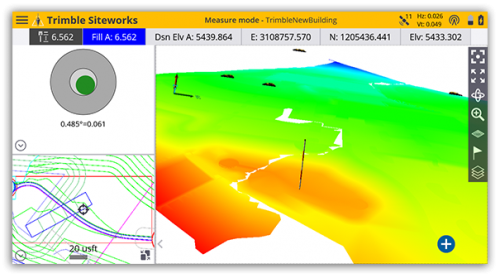
Screenshot: Trimble Trimble has introduced Siteworks Software version 1.1, featuring full GNSS tilt compensation functionality in standing, walking and vehicle modes, and support for the Android operating system.
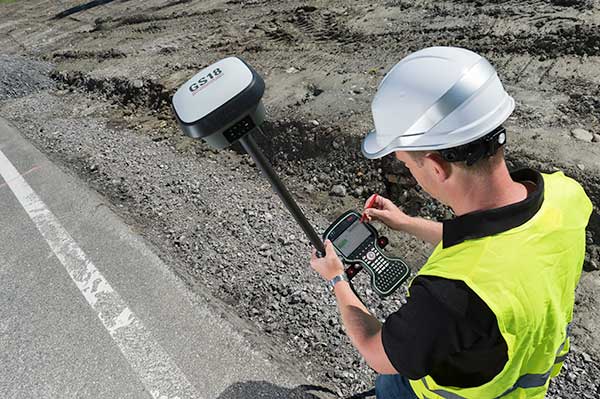
Construction surveyors can now capture accurate points without leveling the pole, making surveying in areas such as building corners accurate, fast and easy.
In addition, Siteworks version 1.1 now supports the Android operating system, giving contractors the flexibility to choose the field device that best fits their needs and budget.
The announcement was made at the bauma 2019 trade fair for construction machinery, building material machines, mining machines, construction vehicles and construction equipment. Bauma 2019 takes place this week in Munich.
“GNSS tilt compensation makes site positioning more accessible and easier to learn for beginners, while experienced surveyors can see significant time savings,” said Scott Crozier, general manager for Trimble’s Civil Engineering and Construction Division. “And now Trimble Siteworks gives contractors more choices. They can run Siteworks on either Windows 10 or Android.”
GNSS Tilt Compensation
Using Trimble Siteworks and a Trimble SPS986 GNSS smart antenna, construction surveyors can take measurements faster and perform more efficient stakeouts.
The solution was designed to shield magnetic interference, and it can be used effectively anywhere on a construction site.
There are three modes available that support tilt compensation, so contractors can record accurate points while standing, walking or driving the site in a vehicle. Tilt compensation in vehicle mode is designed to capture higher accuracy measurements on steeper slopes from a moving vehicle, and more accurate volume measurements to save time and money on material planning.
Easy to use for beginners and users without traditional training, tilt compensation allows points to be recorded more safely, eliminating the need to stand in the road to measure a traffic lane, for example. Surveyors can also measure points that they couldn’t before, such as building corners, edges of trenches and utility flowlines.
Trimble Siteworks for Android
Trimble Siteworks can now support a contractor’s bring-your-own-device (BYOD) strategy with Android compatibility. This is helpful for price-conscious users such as owner operators and utility contractors, or users who need a less rugged solution for lighter use.
The option gives contractors the freedom to choose the device that works best for them, increasing the flexibility and affordability of the Trimble Siteworks Positioning System.
Availability
Trimble Siteworks Software version 1.1 is expected to be available through the worldwide SITECH distribution channel in the second quarter of 2019.
-
Trimble expands CenterPoint RTX Fast correction service in North America
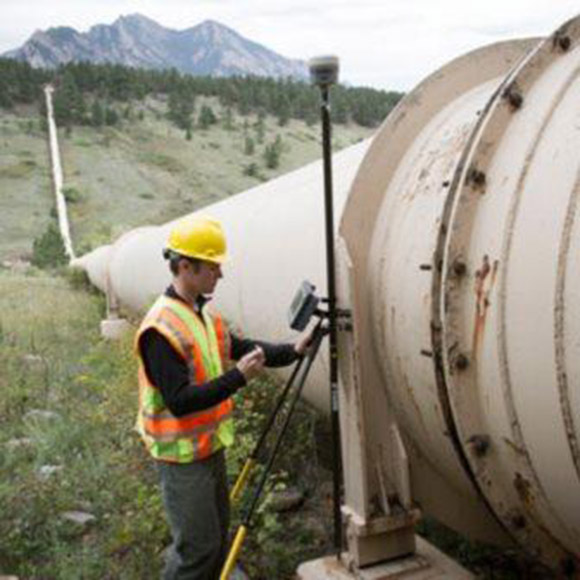
(Photo: Trimble) Trimble has expanded its CenterPoint RTX Fast GNSS correction service coverage area in North America.
Additional states and provinces now covered by Trimble RTX Fast include Alabama, California, Florida, Georgia, Michigan, Mississippi, New Mexico, North Carolina, Ohio, Oregon, South Carolina and Washington, and Alberta and Ontario Canada.
View the full coverage map.
Trimble RTX Fast reduces convergence time, allowing customers to achieve horizontal positioning accuracy of better than one inch (2 centimeters), in as fast as one minute.
Now, with CenterPoint RTX more farmers, surveyors, GIS professionals and construction contractors can experience the RTK-level accuracy of traditional cellular-based Virtual Reference Station (VRS) networks, while benefiting from the versatility of a satellite-delivered correction service, Trimble said.
“Trimble RTX technology has continually evolved since its launch in 2011 with improving accuracy and reduced convergence times,” said Patricia Boothe, vice president of Trimble’s Advanced Positioning Division. “This network expansion demonstrates our commitment to bringing the market-leading performance of Trimble RTX Fast to more users, in more geographies around the world.”
Trimble’s RTX network is currently available throughout most of the world, with the RTX-Fast network coverage available in select geographies in the U.S., Canada and throughout most of Europe, when using Trimble RTX compatible GNSS receivers. Subscriptions are available through Trimble’s Authorized Business Partners or Trimble’s online store.
-
Trimble donates to Colorado State construction program
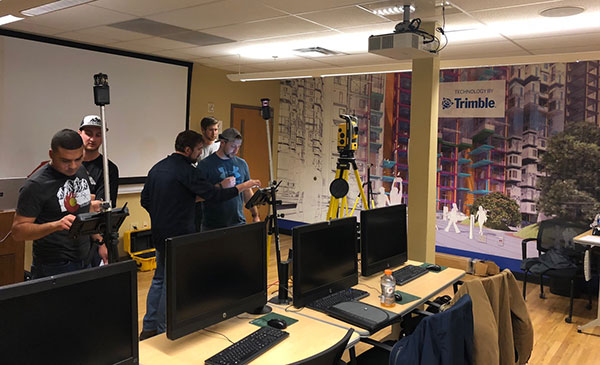
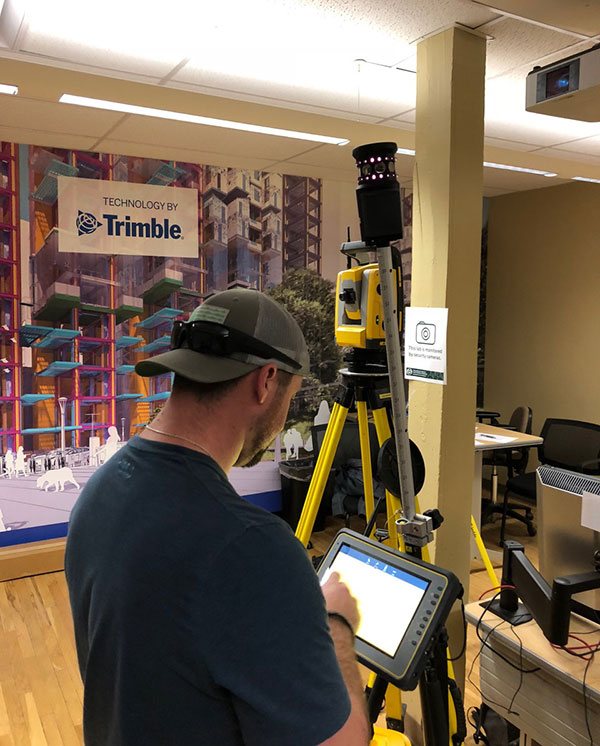
Photo: Trimble Trimble has awarded a significant in-kind gift to the Department of Construction Management at Colorado State University (CSU) that will expand the university’s leadership in training and research for 3D building design, construction management, digital fabrication, civil infrastructure, geomatics and the sustainable built environment.
The gift will enable CSU to integrate across its curricula Trimble solutions that are rapidly transforming how building and living environments are designed and constructed.
Trimble’s portfolio of building construction solutions support the Constructible Process, Trimble’s approach for enabling digital transformation of architecture, engineering and construction (AEC) workflows. This process empowers disparate teams across the construction lifecycle with actionable data to improve productivity and reduce waste.
The gift will be recognized as “Technologies by Trimble” throughout the Department of Construction Management.
Photo: Trimble The department’s labs will include Trimble laser scanning, Trimble Field Link and Rapid Positioning Systems, UAS and surveying systems, and GNSS receivers. Trimble’s software packages will include RealWorks scanning software, Trimble Business Center, Vico Office Suite, Tekla Structures, Sefaira Architecture and its 3D modeling software SketchUp Pro, along with MEP software such as AutoBid SheetMetal and Mechanical, Sysque and AccuBid Electrical estimating packages.
Potential applications of these technologies include scanning historic and other buildings to ensure their preservation as well as planning future renovations; designing and 3D printing of architectural building models; surveying and layout; and improving construction estimating and scheduling to reduce costs.
“Working with Trimble represents the culmination of a fruitful, multi-year collaboration between CSU’s Department of Construction Management and Trimble,” said Jon Elliott, assistant department head and undergraduate program coordinator in the Department of Construction Management.
“Through numerous pieces of Trimble hardware and software applications, students gain important exposure to cutting edge technologies in surveying, virtual design and construction (VDC)-based estimating, site logistics, 3D modeling, building energy performance analysis, laser scanning, photogrammetry, and so on.
“Beyond the applications, Trimble’s dedicated employees provide outstanding educational opportunities through software demonstration and training. Through this exciting collaboration, Trimble is making significant contributions to our goal of preparing construction management students for a technologically advanced and dynamic construction industry.”
“Collaborating with CSU’s Department of Construction Management has been exciting. Trimble’s portfolio is highly relevant for students at the university,” said Roz Buick, Trimble vice president. “It will be rewarding to see the next generation of architecture, engineering, construction and building operations professionals experience the breadth and depth of our construction lifecycle solutions. We also look forward to supporting and learning from these new professionals as they experience and apply our solutions to real-world applications in their curricula.”
The gift was made to CSU’s Construction Management Program in the College of Health and Human Sciences.
-
Drilling and piling operators tighten control with Trimble
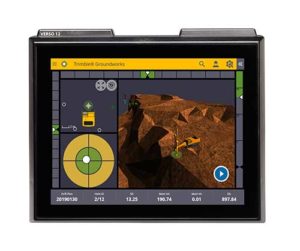
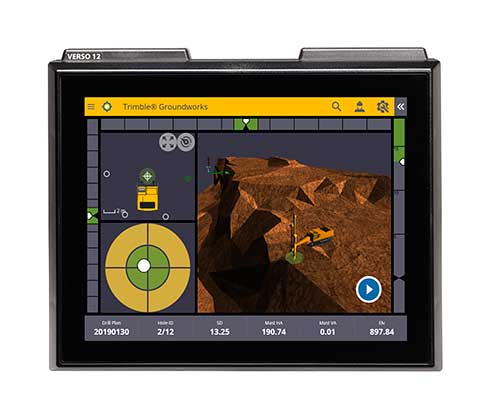
Photo: Trimble Trimble has introduced its Groundworks Machine Control System, a solution for drilling and piling operations. The next generation system that enables contractors to perform drilling and piling operations quickly, safely and accurately: with centimeter-level accuracy.
Using the large touch-screen display, operators can personalize the interface to match their workflow. In addition, a variety of configurable views make it easier for users to achieve maximum productivity. The software aligns with other solutions in the Trimble Civil Engineering and Construction portfolio to make company-wide training faster and easier.
“Engineered for ease of use, Trimble Groundworks features an updated, intuitive user interface designed for construction environments,” said Scott Crozier, general manager for Trimble’s Civil Engineering and Construction Division. “Contractors can achieve centimeter-level accuracy with stakeless navigation, which reduces rework and decreases the need for personnel working near the machine during operation.”
Drilling. Trimble Groundworks Machine Control System for Drilling gives contractors the ability to drill to the specified location, depth, orientation and inclination angle. Better rock fragmentation and lower hauling costs can be achieved by optimizing drill hole spacing, angles, and the location of the machine for a more even blasting pattern, according to the company. The auto stop feature automatically stops drilling at target elevation to reduce overdrilling, leading to flatter benches and reduced wear and tear on machines, which can result in significant cost savings.
Minimizing the need for stakes and construction surveying, Trimble Groundworks can help promote jobsite safety by reducing the number of people working near the machine while drilling. Also, avoidance zones can be set to keep operators from entering hazardous areas. With Trimble Groundworks, machines can operate 24 hours a day, 7 days a week in almost any conditions, decreasing the chance of delays due to darkness or inclement weather.Piling. The system enables contractors to increase operational efficiency and reduce surveying costs associated with staking and as-built checks. Navigation time between piles is reduced. Less time moving the machine and more time piling maximizes daily production, which can increase revenue.
Built-in, automated quality assurance and quality control reporting includes the capture of start and end positions, time and elevation as well as actual embedment depth, blow count reporting, and inclination and orientation control. In addition, unique system logins allow managers to filter reports by operator for better accountability, production optimization and forecasting.
-
Rugged Trimble T7 tablet designed for survey and construction
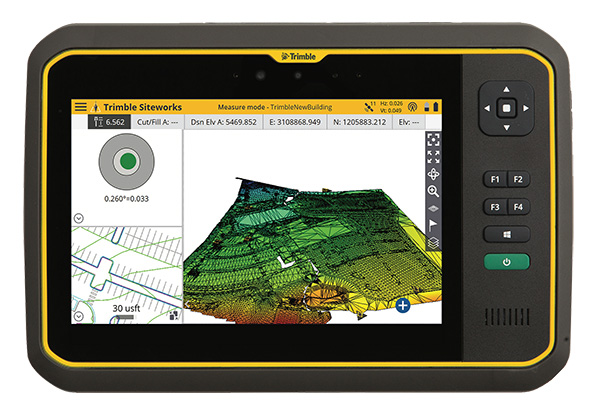
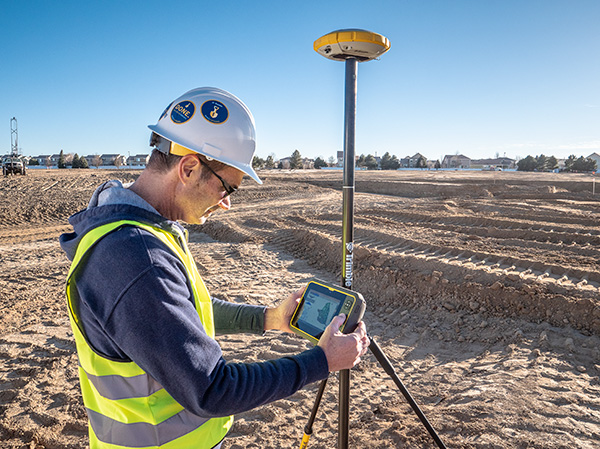
Photo: Trimble Trimble has introduced its T7 Tablet, a rugged, lightweight and versatile device designed for construction surveying applications.
Using Trimble Siteworks Software for construction surveying, the Trimble T7 provides real-time data to visualize cut/fill levels, calculate material volumes, check grade and communicate work orders to increase productivity and enable better decision-making.
The T7 brings powerful processing to the field — a sunlight readable 7-inch touchscreen that supports pinch, tap and slide gestures and a digital keyboard. Users can interact with the T7 intuitively — zooming, panning and selecting items on the touchscreen.
The T7 also leverages the power of Windows 10 Professional, driven by an Intel Pentium 64-bit quad-core processor. The processor and operating system make it easy to process data in spreadsheets and run office software programs. Using third-party apps, front- and rear-facing cameras allow contractors to video conference from the field for on-the-job support and capture of high-definition videos and images, the company said.
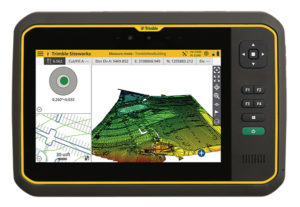
The Trimble T7 tablet. (Photo: Trimble) The lightweight T7 is built to withstand the wear-and-tear of daily construction work in various weather conditions. It meets stringent MIL-STD-810G for drops, vibration, immersion and temperature extremes and with IP65 and IP68 ratings, is sealed against water and dust. The full-color, 7-inch screen uses a Gorilla Glass display that is scratch and impact resistant.
“The Trimble T7 Tablet is the next step in the evolution of our data collection portfolio,” said Scott Crozier, general manager for Trimble’s Civil Engineering and Construction Division. “Surveyors, supervisors and inspectors can complete tasks with less downtime, combining Trimble reliability with the flexibility to adapt to a variety of configurations and jobsite conditions.”
Optional, user-interchangeable Trimble Empower modules make the T7 a flexible solution for a variety of applications. The Empower platform is a modular expansion system that gives users the power to customize their mobile computing solution to their workflow. Optional modules such as barcode imager, a barcode imager/RFID combo and sub-meter GNSS give users the confidence of knowing that that their investment is scalable for future needs.
The T7 is optimized for use with Trimble Siteworks Software, survey software tailored for construction workflows. Siteworks Software features an interface optimized for ease-of-use and productivity. Configurable views, colorful graphics and natural interactions and gestures make Siteworks Software intuitive and easy to learn. The release of the T7 increases the available hardware configuration options for Siteworks users.