Blog

  • Precision Timekeeping with Chip-Scale Atomic Clocks

    Broadcast Date: Thursday, March 7, 2013
    Speaker: Steve Fossi, Director of New Business Development, Symmetricom
    Panelist: Ravi Pragasam, Marketing Manager, Embedded Solutions, Symmetricom

    Webinar Topic/Abstract:  Precision timekeeping with all the benefits of Size, Weight and Power (SWaP) – Quantum(tm) SA.45c Chip Scale Atomic Clock (CSAC)

    Atomic clocks have enabled a world where ultra-precise timekeeping is now mandatory for communications, navigation, signal processing and many other applications critical to a modern functioning society. While smaller, lighter and more energy efficient solutions have been introduced to serve the above markets, the atomic clocks used in these systems have not kept in pace and continue to use more power and retain their large form factors. Symmetricom, the industry leader in precise time solutions, has utilized leading edge technology and multiple innovations in various disciplines such as semiconductor laser technology, silicon processing, vacuum-packaging and firmware algorithms to deliver the Quantum SA.45c CSAC (Chip Scale Atomic Clock). The CSAC is small in size, has low weight and consumes very little power. Such an atomic clock with excellent precision in time keeping is ideal for applications that have a constrained power budget and demand a very low-power clock.

    Attend this webinar and learn how the CSAC can address your requirements for a precise clock without consuming excessive power or taking up too much space in your application.

  • Trimble Introduces All-In-One Device for Mobile Communications and Surveying Data Collection

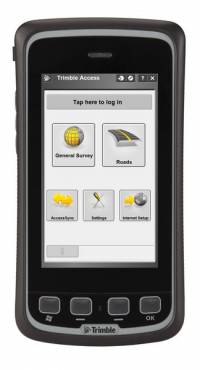
    Trimble Slate Controller.
    Trimble Slate Controller.

    Trimble has introduced an all-in-one device for mobile communications and surveying data collection — the Trimble Slate Controller. The Trimble Slate Controller combines the convenience and ease-of-use of a smartphone with rugged durability. Optimized for Trimble Access field software and the Trimble R4 GNSS receiver, the Trimble Slate Controller supports a surveyor’s everyday workflows.

    “Surveyors require mobile, rugged solutions that can readily withstand and perform in the toughest of conditions,” said Erik Arvesen, vice president of Trimble’s Survey Division. “With the introduction of the Trimble Slate Controller, we are providing a rugged handheld device designed to run survey workflows while also delivering the capabilities and convenience of a smartphone.”

    Offering voice, SMS text, and 3.75G cellular data transfer capabilities on GSM cellular networks worldwide, the rugged Trimble Slate Controller enables enhanced connectivity in the field. Its wireless communication capabilities keep surveyors connected to the office. An integrated 8-megapixel camera offers enhanced job documentation and point attribution by providing geotagged, high-quality digital photos. 

    The Trimble Slate Controller’s slim, ergonomic design is easy to hold while its screen provides superior sunlight readability enabling all-day use by survey professionals. Designed to withstand even tough conditions, a 4.3-inch capacitive touch Gorilla glass display covers the entire front surface, increasing readability without sacrificing durability.

    Trimble Access field software available on the Trimble Slate Controller offers a variety of features and capabilities to streamline topographic, stakeout, control and other surveying applications. Partnered with Trimble Access and the Trimble R4 GNSS receiver, the Trimble Slate Controller provides a dedicated GNSS solution that is effective for both real time and post-processed GNSS surveys, Trimble said.


  • New Generation GeoPDF Maps: TerraGo Evolves with GIS and Big Data

    By Art Kalinksi

    Three weeks ago I had a chance to visit the offices of TerraGo Technologies in Atlanta. I first used their technology in the early 2000s, when I was the GIS manager for the Atlanta Regional Commission. For those of you that may not remember GIS and mapping before GeoPDF maps, it was a real challenge to provide interactive maps to users outside your organization. A GIS author had to ship the data layers, attribute tables, symbol sets and layouts as a package to a user who had to have compatible GIS software. One then had to hope that the user pointed to each data layer correctly and had a good sense of cartography to create maps that told the story. If the user chose inappropriate lines, colors or symbology, the resultant map could look terrible at best, misleading at worst.

    Esri tried to solve the problem with Map Publisher which maintained the author’s cartography, but if any data layers were corrupted or not pointed to correctly, the map failed. GeoPDF maps solved that problem since all the data layers and even the map layout/cartography were preserved as one single PDF file that could be read and interactively queried by anyone using a simple Adobe Acrobat reader. A user could turn layers on or off, zoom in/out and query attributes. TerraGo also added the TerraGo Toolbar that enhanced the map with measurements, geo-locations and the ability to collaborate with others on the same GeoPDF map.

    GeoPDF maps and imagery were quite a leap in map publishing capability and soon became ubiquitous with key federal users and a de facto standard for map publishing within the Department of Defense (DOD) and the U.S. Geological Survey (USGS). Anyone can download many GeoPDF maps free of charge, including U.S. topo maps from the USGS Store.

    For federal and DOD users, the U.S. Army Geospatial Center (AGC) has published more than 200,000 maps of locations around the world. Some samples, including 3D GeoPDF maps, can be viewed by the public. In 2009 TerraGo opened “geospatial PDF” technology to all users. As a result you can create “geospatial PDFs” directly from ArcGIS and other geospatial software and display them with the TerraGo Toolbar. TerraGo, however, retained the enhanced functionality of GeoPDFs, including many new additional features and enhancements.

    The term “GeoPDF” refers to map and imagery products created by TerraGo software applications. GeoPDF maps and imagery use a geospatial PDF as the container for maps, imagery, and other data used to deliver an enhanced user experience in TerraGo applications. However, GeoPDF products conform to published specifications, including both the OGC best practice for PDF georegistration as well as Adobe’s proposed geospatial extensions to ISO 32000, making them consumable by applications such as Adobe Acrobat, Adobe Reader, Global Mapper, and others. GeoPDF products often include other advanced PDF features such as layers and object data that can add significant GIS functionality to the file, particularly when used with the TerraGo plugin to Adobe Reader or other TerraGo clients. TerraGo even has the capability to create navigable 3D GeoPDF models. Here is an example of a 3D GeoPDF model of the Bin Laden compound. Click to experience the interactive PDF (requires TerraGo Toolbar.)

    bin laden

    TerraGo’s geospatial collaboration software and GeoPDF maps and imagery are a powerful solution to produce, access, update and share geospatial information and applications with anyone, anywhere. TerraGo solutions enable enterprises to extend, exchange, collaborate and exploit georeferenced maps, imagery, audio, video, forms and other intelligence in connected or offline environments. I repeat: connected or offline. This is a key GeoPDF capability that cannot be overemphasized.

    I learned the hard way during numerous emergency response exercises and events that as the number of responders ramps up, local internet connectivity degrades to the point that it’s difficult to send and receive even simple emails, let alone large data sets such as imagery. GeoPDF technology permits users to collect and assemble large data sets at the early stage of an event, use them and collaborate on the GeoPDF map locally without the need to continually reload the same data from a remote server. Building on this strength, TerraGo developed numerous related products, but the company is evolving in a more fundamental way. According to TerraGo CEO Rick Cobb, the company is moving from a product-centric organization to a workflow solutions company by expanding some of its technology, providing its solutions as APIs and SDKs for integration with high-end systems and using innovative methods to bring its capabilities to remote users even in fringe, disconnected environments.

    Part of this evolution included expansion of three technologies:

    • increased emphasis on use of locally connected mobile devices,
    • enhancing the capabilities of “Composer 3D” that integrates 3D data such as LiDAR point clouds with 2D data in the GeoPDF environment, and
    • the acquisition of GeoXray, a “big data” exploitation tool that automates the process of discovering, geospatially visualizing, monitoring and sharing relevant unstructured information from any source.

    GeoXray is a web-based software application that allows users to search the Internet and social media sites for content relating to a geographic area and filtering the results by place, time and topic. TerraGo demonstrated interoperability by allowing a user to access GeoXray directly from a GeoPDF map. TerraGo’s Michael Bufkin indicated that the next step in this interoperability will be to cache the GeoXray-discovered content within the GeoPDF map when it is created, thus enabling access to the content directly from the TerraGo Toolbar. Users would then be able to discover GeoXray content even if not connected to the Internet, while using the same tools that they use for map display and collaboration.

    GeoXray

    It’s hard to fully describe the GeoPDF/GeoXray integration in this short column but picture a sample scenario which was demonstrated for me at GeoINT 2012. A hypothetical analyst needed to determine a probable location of a kidnap victim in a remote country. The analyst first used the general mapping capabilities of the GeoPDF map to identify key geographic locations. Then, using a broad array of “big data” contents such as news, blogs and social media, the analyst was able to narrow his efforts to a few key locations through the discovery and filtering capabilities of GeoXray. Combining and layering the physical geography with mapped locations of relevant GeoXray data, the analyst was able to significantly narrow sites of interest. Further viewing and local collaboration by agents in the field using mobile devices to view and collect additional data could refine the location even more.

    This was quite an elegant and robust merging of GIS and “big data” in an easy-to-use application. I look forward to this tool set being a valuable addition for DOD, businesses and any agency that needs fast collaboration in complex environments both domestically and in remote locations.

    TerraGo will be an exhibitor at the ESRI Federal Users Conference this week. I’m looking forward to seeing what other new developments exhibitors will be showing at the UC.  Please stop me and say hello.

  • GPSTrackIt Releases Fleet Productivity Tool for Tablets

    GPSTrackIt has released a fleet management tool called Driver, a website that enables drivers using tablet devices such as iPads and Androids to send and receive messages and plan routes.

    The site provides drivers with two-way communication by chat or forms with dispatchers and fleet managers. It also provides them with route management and timekeeping utilities. Driver compliments GPSTrackIt’s recent releases for smartphones and tablet apps for dispatchers and fleet managers.

    According to Eddie Bermudez, product manager, GPSTrackIt’s vehicle tracking system has been enhanced with Field Service Manager (FSM). “The FSM is the control center for all of the mobile workforce management tools available through the Driver website. Dispatchers and fleet managers use the Field Service Manager to create and send messages. The can build Quick Messages and Quick Responses that drivers can select from a list. They can also create forms with multiple questions, and multiple choice answers that streamline the communications process.”

    Dispatchers enter stops and build routes using the FSM. The routes can be rearranged as new stops are added, saving drivers time and reducing the need for them to call in. The routes are pushed out to the drivers, who can then display them on maps and list out the directions. They can also use a third-party navigation app to render true turn-by-turn directions.

    Soon Driver will provide route optimization. “Driver will look at all the stops and do the arranging for you,” said Bermudez. “It will evaluate the relative distances and calculate the most efficient route.”

    In addition, the FSM also provides a mobile time clock. “This enables drivers to clock in and out using the tablet,” Bermudez said. “That data, as with the chats, stops, and forms, can be reported on using Fleet Manager’s reports. It provides fleet managers with a verification tool for employee timekeeping.”

    One of the other advantages to using a tablet device is that it offers users a wide variety of useful mobile apps.

    “Tablet devices provide our customers with a platform that not only connects them to the Fleet Manager system, but many other productivity tools,” adds John Stull, President and founder of GPSTrackIt. “Drivers can make use of other apps and peripherals to do credit card transactions, scan and transmit contracts, and perform many other important tasks.”

  • Averna Wins 2013 DesignVision Award

    Averna, developer of test solutions and services for communications and electronics device makers worldwide, today announced that its Proligent Analytics has been honored with a DesignVision award for most innovative verification tool of the year.

    The awards ceremony took place on January 29, in Santa Clara, California, during the 2013 DesignCon show. The DesignVision awards, handed out annually, honor the most innovative design tools in the electronics industry. Winners were selected based on three criteria: how well the product met the market’s vision and offered unique insight into customer needs; the originality of the solution and if it offered a new approach to meeting market needs; and the quality of the implementation and how well it fits the market requirements.

    Proligent Analytics gives OEMs a tool to centrally monitor and control manufacturing test operations across their supply chain. Version 6.0, released in August 2012, includes enhancements that provide easier navigation of test and quality data, broader reporting, and alarm capabilities for improved and quicker root-cause analysis.

    “We had quite a challenging time choosing these winners among all of the innovative products we judged,” said Patrick Mannion, Content Director and Brand Director EDN, Test & Measurement World & Planet Analog. “Ultimately, our 2013 winners represent the best of the best in each of their respective industries.”

    “With contract manufacturers and service centers dispersed across the globe, test data is often scattered across multiple sites and can require months to gather and transform it into useful information. Such delays can lead to significant quality-related issues. Proligent Analytics was designed specifically to offer product designers better access to their test data and give them important visibility regarding product development,” said Eric Lamontagne, Team Leader Proligent Analytics for Averna. “We are honored that Proligent Analytics was recognized with this prestigious award. It is a validation of our efforts.”

    Be sure to check out Averna’s White Paper, “Expanding GNSS Testing,” offered by GPS World.

  • GLONASS 743 Set Healthy, Constellation Back to Full Strength

    News courtesy of CANSPACE Listserv.

    GLONASS 743, recently moved from orbital slot 2 to orbital slot 8, was set healthy on March 5 at 07:28 Moscow Time according to NAGU 017-130305. Although the NAGU states that Moscow Time is three hours ahead of UTC (and this is the time difference normally used for GLONASS as stipulated in the GLONASS ICD), officially, it is actually four hours and has been since the switch to year-round daylight saving time on 27 March 2011. In this case, the NAGU appears to be in error since GLONASS 743 was actually set healthy at 03:28 UTC and not at 04:28 UTC. This is confirmed by Roscomos monitoring and by the navigation data collected by stations of the International GNSS Service (IGS).

    There are once again 24 healthy GLONASS satellites on orbit.

    For those keeping track of frequency channel changes, GLONASS 743 was switched from frequency channel 6 to channel -6 on 1 March some minutes before 10:45 UTC and back to channel 6 on 2 March, again some minutes before 10:45 UTC as determined from IGS navigation files. Although a NAGU was issued for the first frequency change (stating that it occurred at “1344 MT (UTC+0300)”), no NAGU has been issued to document the second frequency shift although the set-healthy NAGU does give the frequency channel as 6.

    Meanwhile, in other GLONASS news, a single GLONASS-M satellite (Block 47s) is to be launched from the Plesetsk Cosmodrome on April 26 at 05:23:41 UTC according to the NASA Forum blog.

  • Spectracom Simulators Add Channels, Signals

    Spectracom announces its ability to simulate up to 64 RF channels in four frequency bands for testing the integration of most advanced GNSS receivers.

    The GSG series of GNSS simulators are designed to offer as much capability as needed by developers, integrators, and manufacturers of applications for global satellite navigation. “We understand the needs for simulating GPS and GNSS signals varies as much as the applications themselves,” said Spectracom CTO John Fischer. “Now the diversity of GNSS signals enables a new generation of receivers requiring a new set of test tools. We designed our simulators to grow along with the GNSS eco-system while maintaining the affordability and ease-of-use that has been our hallmark.”

    Spectracom offers two fully configurable and upgradeable platforms. For common single frequency applications, the GSG-5 series simulates up to 16 GPS satellites in the L1 band. Users can start with a single-channel RF generator and upgrade their unit in the field when their needs change. For more advanced applications, the GSG-6 series offers up to 64 channels in four different frequency bands simultaneously. Current firmware generates GPS and GLONASS satellites in L1, L2, L2C, and L5. Customers will receive firmware updates when they need to simulate Galileo and Beidou satellites in the E1/B1, E5/B2, E6/B3 bands.

    In addition to generating satellite signals, these GPS and GNSS simulators include other advanced capability in every unit such as simulating satellite-based augmentation systems (SBAS), dynamic motion characteristics (trajectories), multipath, white noise, and interference. Tests can be performed anywhere, anytime, from the convenience of the test bench, Spectracom said.

    “Comprehensive testing and validation of high-reliability positioning, navigation and timing applications has been a natural extension of our rich heritage in delivering precision time and frequency products and systems,” said Spectracom CEO Lisa Withers. “As we continue to expand our GNSS signal management offerings, we are excited to introduce synchronization, simulation and test  solutions that are geared to be readily adaptable to our customers’ unique applications.”

  • Nightmare on GIS Street: Accuracy, Datums, and Geospatial Data

    This subject scares me. I’m not a trained geodesist. I’m not a mathematician. Yet, I’d be derelict in my duty if I didn’t write about this subject. I know enough to be dangerous, and enough to know this subject is going to be a nightmare for people managing geospatial databases.

    Headache today, nightmare tomorrow

    The only reason it’s not a nightmare today is because most of you don’t know it’s even a problem. Or, you know it’s a problem, but let it slide because dealing with it is not easy. It’s going to get worse in the future, much worse. It’s going to get worse because sensors (GPS, GNSS, imagery, etc.) are getting much more accurate. The cost of acquiring high-precision (centimeter-level) data, whether it’s via GNSS, scanning or ?? is falling hard and fast. As I’ve written before, high-precision GNSS receivers are getting much cheaper. Geodata 2.0 is coming, and it is making existing geospatial databases look like my kids’ coloring books.

    It reminds me of an experience I had nearly 20 years ago.

    I was traveling through the southeastern U.S. demonstrating a new GPS mapping handheld that I helped develop. Mind you, this was in the early days of GPS mapping. WAAS/SBAS didn’t exist, sub-meter receivers didn’t exist, CORS didn’t exist, and real-time corrections were only a dream so almost everyone post-processed using a local base station, if they could find one — and achieving 1-3 meter accuracy was pretty dang good.

    I was showing this new GPS mapping receiver to a forestry company that owned a lot of land in the southeast. We traversed a ~40 acre parcel of land, brought it back to the office and post-processed the data against a nearby GPS base station. After post-processing, the data looked very clean and I was eager to see it inserted into the company’s GIS, hoping it would slide into the right spot in the GIS and they would purchase a bunch of GPS units. No dice. When it was inserted into their GIS, the perfectly shaped polygon fit imperfectly into the GIS. It didn’t match up with the orthophotos and it didn’t match up with their existing vector data (point/line/polygon). It was offset enough to make you raise your eyebrows and think to yourself — hmmm, that’s a problem.

    Of course, I did my due diligence by checking the integrity of the GPS base station data I used and verified its surveyed antenna location. Everything checked out. I was confident that my data was accurate. I started questioning the GIS manager about the horizontal datum used in their GIS database. It quickly became clear to me that the enterprise GIS database was referenced to something different than the modern horizontal datum of that era. It was also clear that there were varying types of accurate and less accurate data in the GIS. A mish-mash of geographic data with some of it based on the legacy NAD27 horizontal datum that was transformed to NAD83/86 using NADCON or something similar.

    After discussing this a bit with the GIS manager, he admitted that my GPS data was likely more accurate than his GIS database, but he was clear that “I’m not going to readjust my entire GIS database for your GPS unit.” My counter-argument that “you’re going to have to do it eventually anyway” was met with “I honestly don’t see this happening anytime soon.”

    I may have won the battle, but lost the war.

    Later that same year, I had a similar experience in California. A major environmental consulting company wanted to delve into using GPS for mapping. I sent them one of my GPS units to try. After a few days of the company collecting GPS data and post-processing, I got the call.

    “Your GPS unit isn’t accurate enough for our work.”

    Whaaaat? From the outset, I was clear to them that the GPS unit would deliver accuracy within 1-3 meters, and they stated this was acceptable accuracy to them. I looked at the data. It was clean and point averages were tight. It looked very good. I verified the GPS base station they were using. No problems there.

    “What are you comparing the GPS data to?” I asked.

    USGS 7.5’, 1:24,000 scale topo maps,” he replied.

    Ruh roh.

    Me: Wellllll, you know that USGS 7.5’ topos are referenced to NAD27 and have gross errors up to hundreds of feet in some places, especially rural areas, don’t you?

    Him: We’ve used 7.5’ topo maps for many years and feel good about the accuracy they provide. Your GPS data is on the wrong side of the creek.

    Me: Hmmm, how about you go occupy a survey mark with known coordinate and compare the GPS data to the survey mark coordinates? That will tell you how accurate the GPS is performing.

    Him: We need it to work where we work, and it’s giving us data on the wrong side of the creek. Thanks for your time. Click.

    Sigh, lost the battle, and lost the war.

    After nearly 25 years in the GPS/GNSS and GIS industries, data mismatch (“my data doesn’t line up”) is still the #1 question I get from people.

    The problem is two-fold.

    1. People, even educated geospatial professionals, have a general lack of understanding of the different horizontal datums being used (not to mention vertical datums).
    2. Software vendors (even the major ones), have generally done a poor job of keeping up with modern datum transformations. While most software makes it easy to transform data from one horizontal datum to another, they mostly do it wrong.

    The errors can vary from a few centimeters to a few meters to tens of meters. In the world of GPS data collection, the most common datum transformation error is when software considers WGS-84 equivalent to NAD 83 and applies no transformation when, in reality, the difference between the latest version of NAD83 differs from the latest version of WGS-84 by more than a meter in most parts of the USA.

    In this day of ever-increasing availability of public GIS data, it’s soooo easy to download an orthphoto (ortho-rectified aerial photograph), or GIS vector data from a public website and import it into your GIS. When importing, you’ll likely be asked to select the horizontal datum and the measurement units of the new data. More than likely, information about the new GIS data (metadata) isn’t readily obvious or available so you make your best guess from the list of choices presented. Is the data referenced to NAD83/86? Is it referenced to NAD83/HARN? Is it referenced to WGS-84? If so, which version of WGS-84? Your selection might significantly affect the accuracy of imported features of your GIS. What if you make the wrong selection with an aerial photo, then months or years later you have someone digitize (heads-up with a mouse) road centerlines, fire hydrants, manhole covers, etc., based on that aerial photo? Any transformation error you introduced when importing the original aerial photo will carry through to the digitized features.

    The good news is that GIS software makes it very easy to import raster (images) and vector (points/polylines/polygons) data. That’s also the bad news. With a few clicks of a mouse, your GIS database can be infected with data you think is accurate to a certain level, but it’s really not, maybe due to the way you imported the data. I’m not saying that every piece of data imported into a GIS needs to be a certain (or the same) accuracy level. The problem is if you don’t keep track of the metadata for items that you import into your database, you will quickly lose a grip on the accuracy integrity of your GIS. As GIS data becomes more accurate, as I discussed above, the accuracy disparity among different layers in your GIS will increase. In other words, the problem will become bigger than it is today.

    I’ll give you a scenario I’m involved with now that highlights this challenge. I used a pseudo-name for the company and have embellished a bit to emphasize some points, but the basic facts are correct.

    ABC Company has tens of thousands of small infrastructure assets in the field across the U.S. It already has the desired location accuracy on some (within 30 cm, or 1 foot) on some of them. For the remaining assets, the company wants to improve the accuracy of the features. To do this, the company plans to use GPS/GNSS receivers to collect position and attribute information on the assets. A second requirement is to deploy GPS/GNSS receivers capable of sub-meter accuracy to navigate back to assets when necessary.

    They are now in initial phase of testing various GPS/GNSS receivers.

    Their first try was using a handheld GNSS receiver capable of “sub-foot” accuracy and post-processing against GPS CORS. It didn’t take long for them to figure out the workflow was a headache. I agree, the whole GPS post-processing workflow is so last decade (and mind you, I helped design one of the first Windows-based GPS post-processing software programs back in the 1990s).

    For the second iteration, the workflow was much smoother. They used a GNSS receiver that utilized real-time WAAS corrections for sub-meter accuracy. The workflow was smooth due to real-time GNSS data being brought directly into ArcGIS Mobile in the field. The problem was accuracy. All of the coordinates collected during the testing were offset to the northwest by about 3 feet. Precision was great, but accuracy was unacceptable. Was it a problem with the GNSS receiver? No. When GPS/GNSS data is shifted consistently in one direction when compared to other data, it is almost always due to a difference in horizontal datums. In this case, it didn’t take long to determine that the difference was data referenced to ITRF (WAAS) vs. NAD83 (basemap). However, we had to do a little more investigation to understand which version of NAD83 was being used in order to find the best horizontal datum transformation choice in ArcGIS Mobile. It wasn’t obvious, not by a long shot. In fact, it was downright cryptic. There wasn’t a datum transformation labeled “WAAS” or anything close to it. As an example, one of the transformation names was cryptically named NAD_1983_To_WGS_1984_5. What does that mean? Which version of NAD83? Which version of WGS-1984? What does _5 mean?

    With some investigation and experimenting with different transformation choices, we finally got it dialed in to a reasonable level. Remember, we were only looking for sub-meter accuracy so ~10 cm of datum transformation error here or there wasn’t significant. Even if we didn’t make the perfect transformation choice, we were close enough. However the investigation and experimenting drill was painfully time-consuming (locate a high-integrity survey mark nearby and occupy it), more than it should have been.

    The next step, setting up the workflow for the “sub-foot” mapping GPS/GNSS receivers, wasn’t as easy. First of all, instead of using WAAS as a correction source (not accurate enough), they used an RTK network. The network base stations were tied to the latest version of NAD83, which is NAD83/2011. They really wanted to dial in the correct horizontal datum transformation. The challenges were a bit different than testing the datum transformation for the sub-meter equipment. They wanted to dial in the datum transformation as close as possible. Again, the datum transformation selection choices in ArcGIS Mobile were cryptic. But, this wasn’t the only challenge. Since they were using RTK GPS/GNSS receiver capable of 1-2 cm accuracy, errors within the different GIS layers emerged. Some layers were referenced to NAD83/2011, which was perfect, while other layers were referenced to much older versions of NAD83. To the software’s credit, an alarm popped up noting the difference in datums of the older layers, but didn’t give them any guidance as to how they should proceed. In that case, Cancel is the normal response and is what they selected.

    After experimenting and testing the different datum transformations in ArcGIS Mobile, they found the one that seemed to produce the best results (confirmed by testing against a high-integrity survey mark). All in all, a very time-consuming process spread out over a few weeks.

    A challenge that still remains is “hot-swapping” between using the RTK Network (NAD83/2011) or WAAS (ITRF08) as a source of GPS/GNSS corrections. ArcGIS Mobile doesn’t seem to deal with switching GPS/GNSS incoming datum changes very well on the fly (in the field).

    If, after reading the above, you’re confused or feel the need to read it again to understand it, welcome to the club. Plenty of brainpower was spent sorting out this problem and verifying the solution. When your GIS has plenty of slop in it, no worries. When you start dissecting it at the centimeter level, you’ll really be forced to take a microscope to each data layer and all of the sudden metadata becomes very important.

    This article is just an introduction to the challenge of dealing with disparate horizontal datums in your GIS. As the programmer for datum transformation at a major GIS software manufacturer said, “We are moving into a new era” in dealing with datum transformations. Although I mention Esri software in this article, other leading software vendors aren’t doing any better. I discussed the issue of supporting the 14-parameter transformation between NAD83/2011 and ITRF08 with another major software vendor late last year. Their CEO’s response? “Yeah, we just had an internal meeting on that and need to support it.” Whaaaat? I wonder how his thousands of users utilizing WAAS as a source of GPS corrections have been  handling this in the past 10 years. Not surprisingly, they aren’t the only major geospatial software that is falling down in this area. More than likely the software you use isn’t handling this correctly.

    Lastly, in speaking with Michael Dennis at the U.S. National Geodetic Survey, he said that while the 14-parameter transformation algorithm is important, the step that people are leaving out is reconciling epoch dates of the data. Why is a date stamp of the data important? That’s the focus of my next article on this subject.

    Follow me on Twitter by clicking here.

    Thanks, and see you next time.
  • Shark in the Water! Find out Where

    Shark in the Water! Find out Where

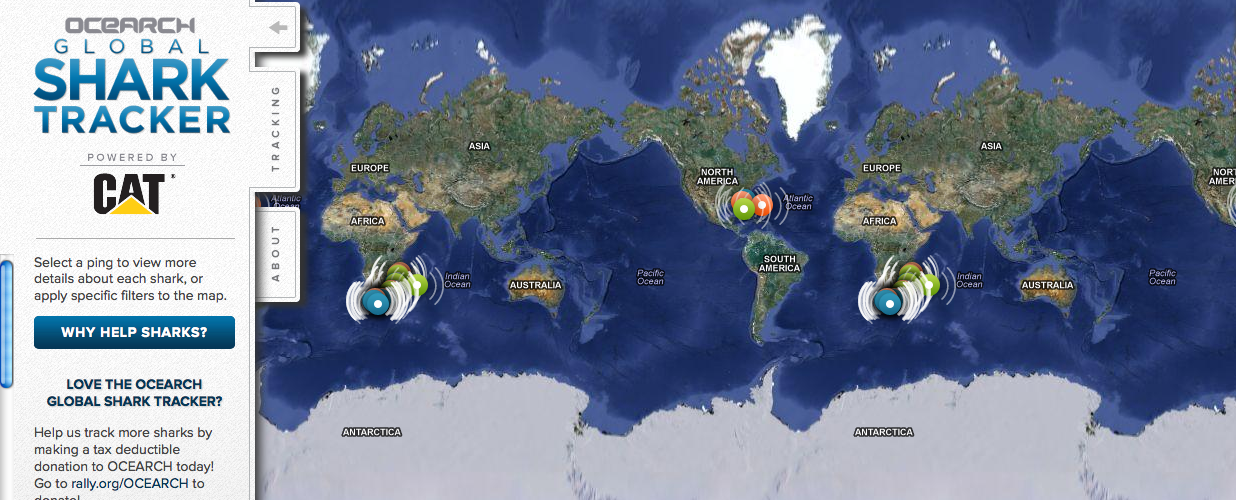
    Did you just watch Jaws? Are you worried your trip to the beach might be interrupted by an unwelcome guest? Now you can go online and see if any great white sharks are visiting nearby waters (the tagged sharks, at least.)

    The Ocearch Global Shark Tracker is a global project to tag and track the navigational patterns of great white sharks in the world’s oceans. The team is currently tracking nearly 40 sharks. The team of scientists have 15 minutes to pull a shark from the water, tag it, and release it, a process which was highlighted in an ABC Nightline feature.

    Ocearch’s founder is Chris Fischer, former star of the History Channel reality TV show “Shark Wranglers.” Ocearch is “seeking to attain groundbreaking data on the biology and health of sharks, in conjunction with basic research on shark life history and migration,” according to its website.

    On the Shark Tracker, sharks that have been tagged appear as bright colored dots. Orange means a ping is less than 72 hours old, green means a ping is less than 30 days old and blue means a ping is more than 30 days old.


  • Fujitsu Shows off High-Tech Walking Cane with GPS

    Fujitsu has revealed a walking cane with built-in GPS. Fujitsu displayed the cane at Mobile World Congress 2013 in Barcelona, Spain, reports engadget. No launch date has been set for the device.

    Fujitsu’s GPS cane allows users to set a route and get directions through an LED display in the handle, and follow directions along with a large arrow. If the walker turns the wrong way, the handle vibrates to alert him or her. The cane also allows friends and family to track a user’s location, and send an email alert if the user has fallen down.

    The cane include medical monitoring features, with a sensor that monitors the heart rate and skin temperature of the user. This information can be viewed online in real time, giving caregivers peace of mind while allowing the cane user greater independence.

    Read more about the device, and engadget’s hands-on demo, at the blog’s website.

  • Wake up! Smartphone App Aims to Alert Drowsy Drivers

    A new technology to combat dozing off when driving is being developed by two universities with industry partner Ficosa. The drowsiness alerter, Somnoalert, is a smartphone application that uses inertial sensors and GPS data to detect movements that are characteristic of nodding off at the wheel, such as deviation from the driving lane or sudden corrections. A later prototype also incorporates biomedical sensors to analyze respiration data.

    The patented software is the result of a collaborative project between Institute for Bioengineering of Catalonia’s Signal and Information Processing for Sensing Systems group led by Santiago Marco, the Universitat Politecnica de Catalunya’s Department of Electronic Engineering and Ficosa, a Barcelona-based multinational that researches, develops, produces and commercializes automobile systems and parts.

    “One of the main causes of car accidents is drowsiness, especially on long highway trips,” explains Santiago. “Most monitoring systems developed in the last few years have been integrated systems that need to be connected to the car’s system. Our device combines our group’s expertise in sensors and biological data analysis with FICOSA’s vehicle know-how, and is completely portable.”

    “Accidents related with drowsiness have a very high social and economical impact, that the key automotive industry players are facing as a whole, in order to reduce current accident statistics,” said Alan Montesi, who heads the project for FICOSA.

    Here is a video of the app:

    Another video shows the use of the sensor:

  • Pole Star Offers ‘in the Box’ Indoor Location Platform

    Pole Star has launched its new indoor location platform, NAO Cloud. NAO Cloud simplifies the deployment of indoor location solutions by introducing an automated deployment process that dramatically reduces time-to-market and the costs of indoor location-based services, Pole Star said.

    NAO Cloud integrates the NAO Campus Software Deployment Kit (SDK), and enables customers and partners to deploy NAO Campus, Pole Star’s indoor location solution, in just a few hours, by using cloud-based software tools as well as positioning databases already available and shared by worldwide partner program members.

    In addition, third parties will have access to NAO Cloud’s crowdsourcing capabilities, eliminating field interventions for a simpler, faster and more affordable deployment and maintenance process, Pole Star said. Behavioral analytics or geofencing are also supported by NAO Cloud to maximize the monetization of value added location-based services.

    The NAO Cloud platform targets a wide range of businesses such as venue owners, advertising platform providers, application developers, global solution integrators or network operators. NAO Cloud makes deployment, integration in mobile apps and maintenance of indoor positioning services a simple process, from a single venue to a worldwide multi-site coverage, Pole Star said.

    “The indoor location services market has reached maturity. Multi-venue owners, marketing agencies and major telcos understand the challenges and the value of hyper-local information and real-time interactions with customers and related Indoor Location Analytics. Indoor positioning is the core technology that brings high value,” said Christian Carle, CEO of Pole Star. “NAO Cloud is the result of years of innovation and deep market experience through very large and complex field deployments around the world.”

    In 2012, Pole Star achieved several major innovation milestones, such as the integration of Bluetooth Low Energy and Inertial Sensors in its NAO Campus fusion engine, in addition to Map Data, Wi-Fi and GPS signals. The dynamic combination of these technologies provides today the best indoor location performance results in the market, while addressing any type of building and minimizing network infrastructure, deployment and maintenance costs, Pole Star said.

    The NAO Campus solution is now available for more than 80% of the smartphone market, compliant with Android and iPhone devices and embedded in consumer applications on the Google Play Marketplace and the Apple App Store.

    Today, Pole Star’s indoor location solutions have been deployed in more than 43 million square feet, in 15 countries such as airports (Paris Charles de Gaulle), shopping centers in Europe and North-America, museums and department stores. In 2011, Pole Star opened its North American headquarters in Palo Alto and has expanded its international presence in 2012, building deep partnerships with companies in Europe, North-America, Asia, Australia and the Middle East. Finally, at the end of 2012, in time for the holiday season, Pole Star launched, its “living lab” mobile application, Mall Buddy, that covers 9 of the biggest malls in Silicon Valley, from San Francisco to San Jose and demonstrates the worldwide extension capability of Indoor location services.