Includes: KVH Inertial Aboard UAVs via Geodetics, NovAtel; Trimble UX5 Unmanned Craft Captures Images, Maps; Spirent Enables Multi-GNSS Integration in Consumer Devices; MobileMapper 20 Extends GIS in the Field; Indoor Research Employs Spectra Precision Equipment; NovAtel CORRECT with TerraStar PPP Service Now Available; SatNav Can Make European Rail More Affordable; More Airports Across Europe Add EGNOS Approaches; General Dynamics Awarded $26M for GPS III Communications; Braxton LADO System Supports 10th GPS Satellite Initialization; Briefs; Events
Disy Informationssysteme GmbH, a provider of GIS and reporting solutions for spatial and non-spatial data, is offering a new app and service for offline maps for tablets.
GIS 2go allows users to save Esri’s ArcGIS Desktop maps to their tablets (iPad or Android). The GIS 2go add-in for ArcGIS Desktop supports data selection, map export and re-import via the cloud. With the app Cadenza Mobile GIS 2go installed on a tablet, users have immediate access to their maps, including all attribute data and media — even if they are offline in the field. Graphic notes and media created on the go can also be imported back into ArcGIS Desktop.
Users can interactively navigate on the map while on the go. Moreover, it is possible to show attribute data and use the graphic notebook to add points, lines and areas or track them via GPS. This information can be complemented with photos and audio/video recordings or text notes. Data captured on the go can be imported into ArcGIS Desktop and stored to the local database or file system.
How to save and use mobile maps on a tablet is described in 4 easy steps is at www.gis2go.com. The website also provides information on features and pricing, as well as tutorials and an FAQ.
A personal demo account is offered for interested users interesting in testing GIS 2go their mobile devices. The demo account is free of charge and without any obligation.
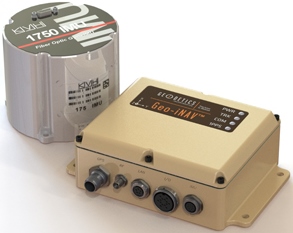
The Geo-iNAV Advanced is a fully integrated GPS-aided inertial navigation system that utilizes KVH’s 1750 IMU to provide a high-performance navigation solution.
KVH Industries, Inc., has entered into a strategic partnership with Geodetics Inc., developer of real-time, high-precision position and navigation solutions. The goal is to provide high-performance positioning and navigation products for commercial applications requiring high levels of precision, from unmanned platforms to terrestrial navigation.
Geodetics is integrating the KVH 1750 inertial measurement unit (IMU) into two solutions: Geo-iNAV Advanced, a GPS-aided inertial navigation system; and Geo-RelNAV, a high-accuracy relative navigation, positioning, and orientation system. The KVH 1750 IMU provides highly accurate 6-degrees-of-freedom angular rate and acceleration data, contributing to the high performance of the Geodetics products while also providing a commercial off-the-shelf (COTS) solution. The COTS designation means the Geo-iNAV Advanced system is available for commercial applications such as manned and unmanned aircraft and control, security platforms on land, air and sea, surface or subsea unmanned vehicles, mobile mapping systems, and photogrammetry and terrestrial navigation.
As reported April 9, NovAtel, Inc., has added the KVH 1750 as an inertial measurement unit (IMU) option in its SPAN GNSS/INS line of positioning products.
“Geodetics evaluated a number of IMU technologies, and based on our desire to address the needs of the commercial marketplace worldwide without sacrificing performance, we chose the KVH 1750 IMU, says Dr. Jeffrey Fayman, vice president, planning and development for Geodetics Inc. “With the integration of the KVH 1750 IMU in Geo-iNAV Advanced, you have the best inertial navigation system Geodetics can provide worldwide.” The navigation, position, and orientation accuracy of the Geo-iNAV Advanced is centimeter level, according to Fayman, thanks in part to the high accuracy of the KVH 1750 IMU.
“KVH is proud to have a strategic relationship with Geodetics,” says Jay Napoli, vice president, FOG/OEM sales at KVH. “The high performance of the 1750 IMU helps enable Geodetics’ systems to deliver ground-breaking accuracy while remaining available to the commercial marketplace.”
For navigation challenges such as collision avoidance and vehicle-to-vehicle navigation and communication (V2V), the Geodetics Geo-RelNAV system offers a highly accurate, real-time relative positioning and orientation solution that utilizes single- or dual-frequency GPS receivers and the high performance KVH 1750 IMU. The Geo-RelNAV provides precise relative position and orientation between moving platforms such as manned or unmanned air, marine, and ground vehicles. This relative position data is used for such applications as autonomous aerial refueling, autonomous landing, and collision avoidance.
KVH is one of the only fiber optic gyro manufacturers to control the entire production process, from creating its own specially designed polarization-maintaining optical fiber to packaging its gyros together in advanced systems for inertial measurement, inertial navigation, and attitude heading and reference systems. As a result, KVH’s inertial sensors and gyros offer outstanding accuracy and excellent durability at a lower cost than competing systems.
Spirent Communications today introduced the GSS6300M range of multi-channel GPS and multi-GNSS simulators for receiver integrators, application developers, aftercare and production testing environments. This entry-level test system readily enables laboratory evaluation of GPS performance across different locations and routes, Spirent said. In addition to being easy-to-use even for non-GPS experts, the GSS6300M range features competitive pricing for engineering teams looking to integrate positioning functionality to new classes of consumer electronic devices.
The GSS6300M is a “one-box” solution with everything required to start testing immediately and can be controlled from a tablet or smartphone, or via remote commands across multiple interfaces. It enables a variety of fundamental test and compliance to industry standard. Users can create custom trajectories using a Google Maps interface to help evaluate receiver performance.
The GSS6300M offers the same preeminent signal quality as other Spirent test systems, which are used by governments and space agencies around the world. High fidelity test equipment ensures the highest user experiences, leading to improved customer satisfaction, reduced product returns and greater market success for integrators and application teams.
“Positioning is of key importance to a wide range of new applications and consumer devices. As navigation and GPS test experts, Spirent wants to help developers build high-performing positioning functionality into their systems quickly and easily,” said John Pottle, marketing director of Spirent Positioning Technology. “Spirent provides test equipment that our customers rely on to achieve accurate results they can trust. The GSS6300M continues this tradition and is priced to be widely accessible.”
The GSS6300M is designed to for the huge and growing range of applications and technologies that incorporate location features — from vehicles and mobile devices to wearable technology, security tracking and other new market segments. In addition to GPS, the GSS6300M fully supports GLONASS, BeiDou and Galileo, the Russian, Chinese and European navigation systems.
Aerial photograph of the Oso mudslide, taken by the Washington State Patrol.
The March 22 mudslide in Oso, Washington, has drawn national attention to the danger of landslides. So far, the Snohomish County Medical Examiner’s office confirmed that 39 people had died and seven people remain missing.
Esri provides an interactive map for users to see where the risk of landslides is low, moderate, or high in the United States.
The map shows landslide suspectibility and incidence data from the USGS, which says this 1982 map was not intended to show landslide areas. Areas with low landslide incidence have been omitted.
Users can click any feature on the map for detailed information about the people living in that area.
Aerial photograph of the Oso mudslide, taken by the Washington State Patrol.
The March 22 mudslide in Oso, Washington, has drawn national attention to the danger of landslides. So far, the Snohomish County Medical Examiner’s office confirmed that 39 people had died and seven people remain missing.
Esri provides an interactive map for users to see where the risk of landslides is low, moderate, or high in the United States.
The map shows landslide suspectibility and incidence data from the USGS, which says this 1982 map was not intended to show landslide areas. Areas with low landslide incidence have been omitted.
Users can click any feature on the map for detailed information about the people living in that area.
Trimble has released the Trimble Scan Explorer Extension for SketchUp Pro, what it calls a powerful, easy-to-use tool enabling architects, engineers and geospatial professionals to create models from 3D scanning data.
The new software connects the high-resolution field data from Trimble scanners with intuitive and powerful professional modeling software, to simplify the process of creating, accessing and sharing precise 3D models of the real-world environment.
The Trimble Scan Explorer Extension dramatically reduces the time required to generate a SketchUp Pro 3D model from scan data, the company said. Streamlined tools and one-touch features allow users to quickly extract construction points and lines that are used as a guide to simplify and expedite the modeling process. Automated plane extraction tools further increase modeling efficiency, particularly when modeling building interiors and facades.
For improved visual references when working with point clouds, the extension includes a simple-to-use edge extraction tool, allowing users to easily decipher important cues from the scan data directly into their model building space. Structural edges are brought into SketchUp as guidelines, and one button push displays the shell of the structure.
“By seamlessly integrating powerful tools across our broad range of best-in-class solutions, Trimble is helping transform the way our customers work and accomplish more every day. The integrated workflow provided by Scan Explorer brings the accessibility of 3D modeling to more users for as-built analysis and design changes,” said Alain Samaha, business area director of GIS and Software for Trimble’s Geospatial Division. “Professionals can now easily create visual 3D models that provide a true representation of the environment they are working in—improving the communication, collaboration and quality of deliverable that they can provide to their clients.”
“SketchUp’s enormous popularity as a design tool is rooted in its capacity to make many complex processes easier and more efficient,” said Chris Keating, director of the Architecture Division within Trimble Buildings Group. ”The Trimble Scan Explorer Extension for SketchUp Pro reinforces our mission to deliver SketchUp’s benefits to new users and for new uses.”
The release was announced at SPAR International 2014, a conference for 3D data capture, processing and delivery technologies.
Trimble Scan Explorer Extension for SketchUp Pro is available through Trimble’s Geospatial distribution network and online.
LizardTech will conduct defense-oriented demonstrations of its recently launched Express Server software product next week at the GEOINT 2013* Symposium in booth number 4079. The symposium will take place April 14 – 17 at the Tampa Convention Center in Tampa, Florida. LizardTech is a provider of software solutions for managing and distributing geospatial content.
Express Server is image-delivery software for compressed raster imagery, including multispectral imagery. The latest version includes the ExpressZip web application for browsing, finding, and exporting imagery straight from the web browser. Users can view all of their collections and query by location, by keyword, by projection, and more. If users need to take their imagery on the go, they can use the built-in selection tools to export regions of interest. The ExpressZip application is open source and customizable.
“We look forward to sharing Express Server 9 with the intelligence community at GEOINT next week,” said Jon Skiffington, director of product management at LizardTech. “Most LizardTech users know MrSID and how it can be used to drastically reduce image sizes while retaining visual quality. What they may not be aware of is that Express Server is the fastest, easiest, and most stable way to distribute compressed, high-resolution raster imagery via standard protocols. And now with ExpressZip, our customers will be able to access all of their collections in one place and export imagery straight from the web browser.”
LizardTech will also showcase its GeoExpress software for compressing and manipulating satellite and aerial imagery, and its LiDAR Compressor software, which turns giant point cloud datasets into efficient MrSID files.
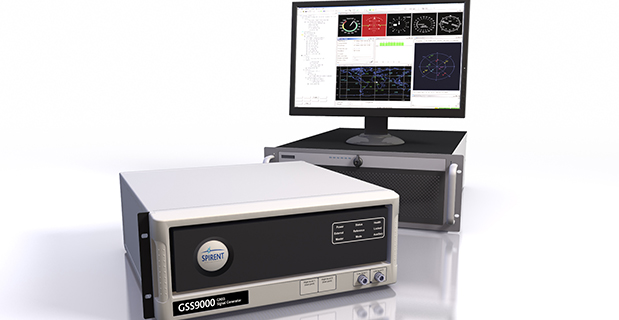
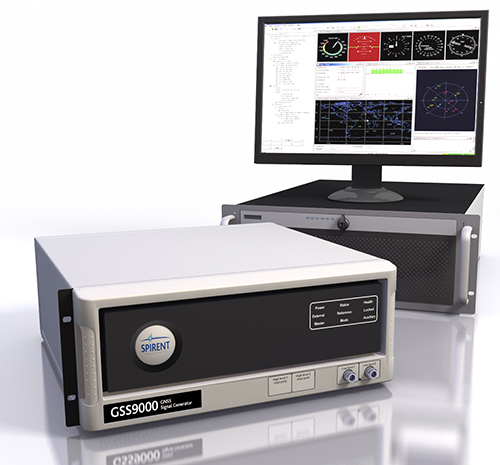
Spirent Communications, provider of testing solutions for positioning and navigations systems, has introduced the Spirent GSS9000 Multi-Frequency, Multi-GNSS RF Constellation Simulator. The GSS9000 offers a new benchmark in performance, capability and flexibility that includes the ability to simulate signals from all GNSS and regional navigation systems.
The GSS9000 offers new levels of performance, enabled by a four-fold increase in RF signal iteration rate (SIR) over Spirent’s current GSS8000 product. The GSS9000 SIR is 1000Hz (1ms), enabling higher dynamic simulations with even more accuracy and fidelity, Spirent said. It also includes support for restricted and classified signals from the GPS and Galileo systems as well as advanced capabilities for ultra-high dynamics. The GSS9000 can evaluate resilience of navigation systems to interference and spoofing attacks.
GSS9000 has the flexibility to reconfigure constellations, channels and frequencies, between test runs or test cases. In addition, the GSS9000 has been designed to be backward compatible, enabling the use of existing test cases and remote control/motion from existing Spirent simulators. Hardware changes can now be done in the field, supported by the new on-board calibrator module.
“The GSS9000 raises the performance bar and addresses the future challenges of improving accuracy and resilience for end users of GNSS technology,” said Martin Foulger, managing director of Spirent’s Positioning division. “The GSS9000 solution is a result of almost thirty years of unrivalled expertise, innovation and leadership.”
The GSS9000 is extensible and can support the widest range of carriers, ranging codes and data streams for the GPS, GLONASS, Galileo and BeiDou GNSS systems as well as regional/augmentation systems. Multi-antenna/multi-vehicle simulation, for differential-GNSS and attitude determination, and interference/jamming and spoofing testing are also supported.
March 2014 US Topo map of the Moab, Utah area, 1:24,000 scale. Orthoimage layer is turned on, contour and woodland layers turned off. Map: USGS
Newly released US Topo maps for Utah now feature a new commercial road data provider. The latest highway, road and street data from HERE has been added to the 1,476 revised US Topo quadrangles for the state.
“HERE, a Nokia business, is proud to provide fresh, robust and comprehensive map content to the State of Utah and the US Topo Maps program,” said Roy Kolstad, VP Sales Enterprise Americas, HERE. “We are excited for users to experience the benefits HERE brings with our more than 25 years of experience in cartography, drawing on more than 80,000 sources of data.”
The new maps also include Public Land Survey System (PLSS). These data are added to the growing list of states west of the Mississippi River. PLSS is a way of subdividing and describing land in the United States. All lands in the public domain are subject to subdivision by this rectangular system of surveys, which is regulated by the U.S. Department of the Interior. Other selected states will begin getting PLSS map data during the next respective revision cycle.
The new design for US Topo maps improves readability of maps for online and printed use, while retaining the look and feel of the traditional USGS topographic map. Map symbols are easy to read when the digital aerial photograph layer imagery is turned on.
Other re-design enhancements and new features:
New shaded relief layer for enhanced view of the terrain
Military installation boundaries, post offices and cemeteries
New road classification
A slight screening (transparency) has been applied to some features to enhance visibility of multiple competing layers
New PDF legend attachment
Metadata formatted to support multiple browsers
1885 historical USGS map of the Moab, Utah area, 1:250,000 scale. Map: USGS
US Topo maps are created from geographic datasets in The National Map, and deliver visible content such as high-resolution aerial photography, which was not available on older paper-based topographic maps. The new US Topo maps provide modern technical advantages that support wider and faster public distribution and on-screen geographic analysis tools for users.
The new digital topographic maps are PDF documents with geospatial extensions (GeoPDF) image software format and may be viewed using Adobe Reader, available as a no-cost download.
US Topo maps are updated every three years. The initial round of the 48 conterminous state coverage was completed in September of 2012. Hawaii and Puerto Rico maps have recently been added. More than 400 new US Topo maps for Alaska have been added to the USGS Map Locator & Downloader, but will take several years to complete the vast state.
The Collector for ArcGIS app can be used offline to collect and edit maps and data regardless of network availability.
Esri has released new versions of Collector for ArcGIS and Operations Dashboard for ArcGIS. The Collector app now includes the ability to download maps to your smartphone or tablet device to collect and edit data when working offline. Operations Dashboard has added support for browsers so users can view operations on their iPad, Android tablet, or from their desktop. Both apps are available at no cost to ArcGIS Online subscribers and Portal for ArcGIS customers.
Collector for ArcGIS is a configurable field data collection app for iOS and Android devices. With the latest release, maps can be used anywhere regardless of network availability. Users can take map areas offline and work with them in remote locations where network availability is either nonexistent or unreliable. Users can download Esri basemaps as well as their own basemaps managed within their ArcGIS organization.
Operations Dashboard for ArcGIS provides a common operational picture for monitoring, tracking, and reporting events within your organization. The new version of Operations Dashboard now supports web browsers. That means you can have the same real-time view of operations on your tablet that you see on your Windows desktop.
Data sources inside Operations Dashboard have also been improved in the 10.2.2 version of the app. Users can now power operation views using dynamic map services as well as feature services, and other types of layers including real-time weather, traffic, and social media feeds.
Collector for ArcGIS can be downloaded from the Apple App Store and Google Play. Operations Dashboard is available through ArcGIS Online. Portal for ArcGIS users can access the Operations Dashboard app from the Customer Care portal.