Blog

  • Position: 20 Kilometers, Heavy Construction

    World’s Longest Immersed Tunnel, 40 Meters Underwater

    By Anna Jensen, Dirk Hermsmeyer, Bastian Huck, Jürgen Rüffer, and Peter Skjellerup

    The Fehmarnbelt Positioning System between Denmark and Germany includes a geodetic basis, four permanent GNSS stations, and a real-time kinematic (RTK) service for construction of a road and rail causeway between the islands of Fehmarn, Germany, and Lolland, Denmark, across the Fehmarnbelt, a 20-kilometer stretch of open water in the Baltic Sea. This homogeneous, consistent, coherent, highly accurate GNSS-based positioning system exemplifies comparable systems and services that can be established for any major construction site or infrastructure project. Now in use for environmental, geotechnical, and geophysical investigations, it provides cost-efficient operations and facilitates the precise navigation of large, costly offshore equipment.


    A fixed road-and-rail link across the Fehmarnbelt body of water in the Baltic Sea will by 2020 connect the German island of Fehmarn and the Danish island of Lolland. It will provide a critical time- and cost-efficient trade and traffic link between north-central Europe and Scandinavia.

    Geophysical and geotechnical pre-investigations have been completed as well as an environmental assessment of the fixed link. Initially proposed as either a bridge or a tunnel (Figure 1), an immersed tunnel is now the preferred solution. It will be placed in a trench excavated on the sea floor, and covered with a layer of stones. It will be the longest immersed tunnel in the world at 17.6 kilometers, excluding peninsulas on both sides to be constructed for easier entrance to the tunnel. The strait is 20 kilometers wide at the site. The immersed depth is up to 40 meters.

    During planning and construction of the fixed link, it is very important to be able to perform reliable positioning with high accuracy. This requires a well defined geodetic basis — a 3D reference system and a reference frame for GNSS positioning, a height system and a geoid model for working with heights, and a map projection for plane maps and drawings. The ability to determine positions with high accuracy in real time within the project area is also very important. Therefore a carrier phase-based GNSS positioning service, a real-time kinematic (RTK) service, has been established.

    Altogether, we refer to the geodetic basis and the RTK service as the Fehmarnbelt Positioning System (FBPS), and the geodetic basis as the Fehmarnbelt Coordinate System (FCS). In this article we describe the geodetic basis and the RTK service, including four new permanent GNSS stations established for the purpose.

    Geodetic Reference Frame

    The reference system for the FCS is the International Terrestrial Reference System, realized by the ITRF2005, the newest and to date most accurate realization of the ITRS.

    Four permanent GNSS stations were established around Fehmarnbelt during the autumn and winter of 2009/2010: two on Fehmarn and two on Lolland (Figure 2).

    After establishment of the GNSS stations, seven days of GNSS data were collected in February 2010. Coordinates for the stations were determined by the National Survey and Cadastre-Denmark, using the Bernese GPS software. Data from six GNSS stations of the network of the International GNSS Service (IGS) was included in the data processing, and these stations with coordinates in the ITRF2005 were used as reference stations. Hereby, the ITRF2005 was introduced in the Fehmarnbelt area, and a reference frame for positioning in three dimensions has been established.

    Height System and Map Projection

    The height difference between Germany and Denmark is known from a 1987 hydrostatic levelling between Puttgarden and Rødbyhavn. For the Fehmarnbelt Fixed Link, precise levelling has been carried out between the connecting points of the hydrostatic levelling and stable point groups further inland. Levelling points with a large displacement since 1987 were eliminated, and the hydrostatic levelling was then used for transfer of the height difference between Germany and Denmark.

    The next step was determination of present mean sea level (MSL) in the Fehmarnbelt and establishment of a project-specific height system with the zero-level as close as possible to the actual MSL of Fehmarnbelt. In this area of the Baltic Sea, a slow rise of MSL relative to the neighboring land is taking place, and therefore water-level data from Heiligenhafen on the German mainland, and from Puttgarden and Rødbyhavn, was analyzed in cooperation with the Danish National Survey and Cadastre and the Danish National Space Institute.

    Analyses of the last 20 years of water-level data show an increase in the water level of approximately 2 millimeters per year at Rødbyhavn. Data from Heiligenhafen was also analyzed; as Heiligenhafen is not directly adjacent to the site, the time series was not used directly for establishing the MSL datum but instead used as an independent control.

    Water-level data was used for estimation of the present MSL in Fehmarnbelt, and the zero level for the FCS Vertical Reference 2010 (FCSVR10) coincides with MSL at Rødbyhavn in 2010. The zero level of FCSVR10 thus deviates from both the German and the Danish height systems.

    The Danish National Survey and Cadastre conducted precise levelling to determine FCSVR10 heights to the four new permanent GNSS stations, and determined FCSVR10 heights to a number of existing height benchmarks on Fehmarn and Lolland. Local land uplift on Fehmarn and Lolland causes differences between the FCSVR10, the national German DHHN92 height system, and the national Danish Vertical Reference 1990 height system. Differences between the height systems are not constant values but vary within the area, so it is very important to use the geoid models when converting heights for high-accuracy applications.

    To determine heights relative to MSL with GNSS it is necessary to utilize a geoid model. The Danish National Space Institute performed new gravity readings to supplement the existing gravity database. Then all existing gravity data from the area was used for development of a local geoid model for the Fehmarnbelt. The geoid model is fitted to the height system FCSVR10 and to the ITRF2005 by the four new permanent GNSS stations, and the model can be used for conversion between MSL heights and ellipsoidal heights.

    The last item of the geodetic basis is the definition of a map projection, using a transverse Mercator projection. The projection is fitted to the area to obtain a scale factor as small as possible within the construction area. Also, a false Easting value was chosen to provide FCS Easting values within the construction area which are different from Easting values of the ITM, UTM, or Gauss-Krüger projections used in Germany and Denmark. Table 1 gives the defining parameters for the map projection.


    Permanent GNSS Stations

    The four permanent GNSS stations are established as geodetic-grade stations, as shown in the photo. Individually calibrated GNSS choke ring antennae are mounted on 3-meter tall concrete pillars, with foundations 3 meters into the ground at stations 1, 2, and 4, with predominantly silty glacial till of stiff consistency at about 0.70 (stations 1 and 2) and 1.70 meters (station 4) below soil surface. At station 3, foundations for the antenna monument are built 9 meters into the ground. Soil conditions are sandy at this location to about 7 meters below soil surface, where stiff glacial till is met. In geotechnical investigations and analyses carried out before establishment of the GNSS stations, the glacial till at the station locations was rated as a good to very good foundation ground, with little tendency to settlement.

    The concrete antenna monuments are surrounded with about 0.30 meters of styrofoam for thermal insulation. The monument head is bevelled with an angle of 30° from vertical, reflecting GNSS satellite signals striking the monument head underneath the antenna away from it, to further minimize signal multipath effects.

    The GNSS reference station receivers are capable of processing GPS and GLONASS L1 and L2, GPS L5, and Galileo E1, E5a, E5b, and Alt-BOC frequency band signals. Galileo signals can be processed when Galileo satellites are available; a firmware update on the receivers will be required. In view of the long-term demand for the FBPS (until 2020 or longer), its compatibility with Galileo signals in particular makes the system future-proof.

    GNSS reference station receivers, access points to power grids, and uninterruptible power supply are mounted in cabinets adjacent to the antenna pillars. Additional equipment in each cabinet comprises an industrial PC, Internet router, GSM/UMTS router, satellite communication equipment, transmitting and receiving radio modems, and a heat exchanger to cool the in-cabin room if required.

    At each station, a radio mast of about 10 meters height carries a satellite dish for wireless Internet access, and a Yagi antenna to broadcast GNSS correction data into the proposed construction area in the Fehmarnbelt. Radio masts are located directly north of the GNSS antennae.

    RTK Service

    To ensure accurate GNSS positioning, an RTK GNSS service has been established, based on GNSS data from the four new permanent GNSS stations (primary stations) as well as four GNSS stations located further away in Germany and Denmark (secondary stations), which existed previous to our work. Figure 3 shows the locations of the eight stations used for the RTK service. The stations relay GNSS data to the control center, which derives and transmits RTK correction data to surveyors in the project area with RTK rovers.

    The RTK service has been developed with focus on robustness, with two control centers at different addresses in Germany. Three different communication carriers provide data communication between the GNSS stations and the control centers, and RTK correction data is distributed to users in two different ways, via ultra-high frequency (UHF) radio and mobile Internet. Figure 4 shows the communication lines of the RTK service.

    FBPS RTK users who wish to receive RTK corrections via UHF radio require a UHF radio modem and antenna, in addition to an RTK rover. The four primary GNSS stations broadcast RTK correction data on four separate radio frequencies. By switching their radio modem to one of the frequencies, users receive the correction signal from the control center via the respective station. RTK corrections via UHF radio can be used where radio signals from one of the four primary GNSS stations can be received.

    From the users’ point of view an advantage of using UHF radio over using a mobile Internet connection is that the UHF connection is free-of-charge and can be collected from four different sources.

    Users who wish to receive RTK corrections via mobile Internet must connect via General Packet Radio Service (GPRS) and require a GPRS modem, antenna, and a subscriber identity module (SIM-card) in addition to their RTK rover. GPRS connections will be charged according to tariffs of the respective mobile phone network provider.

    Figure 5 shows areas of signal coverage. Areas 1 and 2 are covered by UHF radio and mobile Internet. Area 3 is covered by mobile Internet.

    The FBPS RTK service generates and broadcasts RTK corrections in two different modes: master-auxiliary corrections (MAX) mode, and virtual reference station (VRS) mode. MAX and VRS are two different calculation methods to generate RTK corrections in a standard format defined by the Radio Technical Commission for Maritime Services (the RTCM format). The version used for the FBPS RTK service is the RTCM version 3.1.

    With MAX corrections, the RTK rover does not send its position to the reference network software. The GNSMART reference network software calculates and sends MAX corrections to the rover. These contain the measurements from a master station and correction data from the auxiliary reference stations. The rover individualizes the corrections for its position, which means it determines the best suitable RTK corrections. RTK data in MAX mode can be received by users of RTK rovers via both possible types of connection, UHF radio and GPRS.

    With the VRS concept, the user’s RTK rover transmits its approximate position to the control centre, which returns to the rover observations or corrections of an individual VRS near the user’s position. Data is transmitted back and forth between the RTK rover and the control center. Therefore a two-way communication link must be established with VRS. Because the UHF radio connection is one-way, GNSS correction data in VRS mode can be received via digital cellular phone (GPRS) only. For data transmission via GPRS, the FBPS RTK service uses the networked transport of RTCM via Internet protocol (NTRIP).

    Multiple RTK rovers (that is, multiple users) can receive RTK corrections from the FBPS simultaneously with any of the connections described above, while every user may select his or her favourite connection type. The RTK service can be used with any commercially available geodetic GNSS receiver that is capable of processing RTK data.

    System Test and Results

    The RTK service was established during the spring of 2010 and was run in test mode May 12–July 31 to test system accuracy, signal coverage area, and signal availability.

    Accuracy. An error budget of the RTK service is provided including all known error sources and latencies in the system, and a description of how these errors are handled. The accuracy obtainable by end users is better than 1.0 centimeters in the horizontal and better than 1.8 centimeters in the vertical. Values are provided as one sigma, and are valid during normal ionospheric activity. Applying an RTK rover and RTK corrections received from the FBPS RTK service, users inside the coverage area can determine the coordinates of a marked survey point repeatedly with these accuracies.

    System inspection is carried out monthly. Part of monthly inspection is the visit of marked control points with an RTK rover. ISO 17123-8:2007 (ANSI, 2007) standard procedures are applied to determine control point coordinates.

    Coverage Area. The RTK service coverage area shown in Figure 5 is defined as the geographic area where the described accuracy can be obtained for end users at any time. Test measurements of UHF radio signal strengths from the four primary GNSS stations have been carried out onshore Lolland and Fehmarn, as well as offshore across the Fehmarnbelt (see photo). Modelled UHF radio signal broadcasting areas are closely verified during these tests.

    Availability. The positioning system and the RTK service are designed using necessary technology, redundancy, and back-up to ensure that the system is operational and available in the entire coverage area for more than 99 percent of the time. Availability is defined as the time where all elements of the positioning system are available for end users and where the described accuracy can be obtained for all users within the coverage area. Availability is evaluated in percent of time per day: the system must be available for at least 23 hours and 45 minutes per day. During the first year of operation it is accepted that RTK correction data from the system are available to end users for 97 percent of the time or more per day.

    A control segment has been established to constantly monitor RTK service accuracy and the availability of the system. The control segment is installed in such a way that all relevant output and data streams from the GNSS stations are available through the system’s website.

    Evaluation of availability is carried out automatically by the control segment, and an overall evaluation of availability is performed every month. Results from evaluation of availability during the test operation are listed in Table 2. During test operation, the required availability of 97 percent per day during the first year of operation was reached on all days. Availability only fell below 99 percent, as is the required availability during following years, for 5 out of 81 days (5.6 percent) of the test period.

    Conclusions and Outlook

    System tests results regarding accuracy, coverage area, and availability show that the positioning system and the RTK service fulfil all specifiecation requirements.The first RTK user was registered in July 2010, and the complete system is now being used for environmental, geotechnical, and geophysical investigations.

    User benefits of the FBPS include:

    • ensured consistent and uniform geodetic reference throughout the planning, construction and operation phases of the Fehmarnbelt Fixed Link, available to all stakeholders at any time;
    • seamless, real-time data flow from the point measurement at the construction site into computer-aided design (CAD) or geographic information systems (GIS);
    • simplified geodata transfer across interfaces between project stakeholders and project phases;
    • cost efficiency, reducing costs in both surveying and data management, particularly in precise operation of large, expensive offshore equipment, including during critical procedures in the construction phase.

    The positioning system for the Fehmarnbelt Fixed Link is an example of a homogeneous, consistent, coherent, and highly accurate GNSS-based positioning system. Comparable systems and services can be established and used for any major construction site or infrastructure project.

    Acknowledgments

    This work is funded by Femern A/S. The authors acknowledge contributions from the National Survey and Cadastre, Denmark, Danish National Space Institute, Land Survey Office of Schleswig-Holstein in Germany, German Federal Agency for Cartography and Geodesy, Richter Deformationsmesstechnik GmbH, Günther Steimann, and Ohms Nachtigall Engineering GbR. Also Mr. and Ms. Thomsen, Stadt Fehmarn, Mr. Henriksen, and Mr. Boserup for permitting establishment of FBPS GNSS stations on their property.

    Establishment, operation and maintenance of the GNSS stations and RTK service was entrusted by Femern A/S to AXIO-NET GmbH, with ALLSAT as subcontractor for implementation of the four GNSS stations (both companies in Hannover, Germany). Ramboll Arup JV was entrusted by Femern A/S with project coordination and geodetic consultancy, using AJ Geomatics as subcontractor. More information about the fixed link is available, and more on the RTK service.

    Manufacturers

    The RTK service is based on GNSMART software (GEO++ GmbH). The permanent GNSS stations are equipped with Leica Geosystems AR25 antennas and GRX1200+ receivers.


    Anna Jensen is owner and CEO of AJ Geomatics in Denmark. She holds a Ph.D. in geodesy and has worked with research and development within GNSS and geodesy for more than 15 years.

    Dirk Hermsmeyer holds a Ph.D. from the University of Hannover, and is a project management professional. He previously worked at ALLSAT and is now with the Chamber of Commerce in Lübeck, Germany.

    Bastian Huck is head of operations and quality management with AXIO-NET. He is a university-level geodesist and certificated project management practitioner with 10 years of experience in RTK projects.

    Jürgen Rüffer is co-owner and CEO of ALLSAT and AXIO-NET. He is a university-level geodesist, a publicly certified expert for GNSS positioning at the chamber of engineers in Germany, working with GPS and GNSS since 1977.

    Peter Skjellerup is chief advisor on geotechnology with Ramboll Denmark. He has worked with ground engineering for many years, and holds a M.Sc. in physics-geophysics from the University of Copenhagen.


    Note from author Anna Jensen (2/27/13):

    “Since publication of the article, the opening year for the Fehmarnbelt tunnel has been changed to 2021.”
  • On the Edge: Driving Reality Home

    By Tracy Cozzens

    A new navigation system looks to make driving safer by removing the need for drivers to look away from the road at their navigation device. With Wikitude Drive, as a driver moves down the road, the route is “drawn” onto the live video screen of an Android smartphone.

    How is this possible? Augmented reality.

    Augmented reality (AR) is a term for a live direct or indirect view of a physical real-world environment whose elements are augmented by virtual computer-generated imagery. The idea to blend augmented reality with navigation struck Philipp Breuss-Schneeweis, founder of Mobilizy, in 2008 when he was developing the Wikitude World Browser for the first Android Developer Challenge. Considering the awards Wikiude Drive has received so far, including being named Global Champion in the 2010 Navteq Challenge, it could be considered the next big advance in consumer navigation.

    Wikitude Drive, which launched at the end of 2010, works by attaching a mobile phone on top of a dashboard looking at the road. The application then overlays video captured through the camera with driving instructions. This allows users to drive through their phone, watching the road even while they are looking at directions.

    “With Wikitude Drive I don’t find myself looking for directions; the device itself guides me along the way,” said Nicola Radacher, product manager at Mobilizy.

    According to Breuss-Schneeweis, Wikitude Drive distinguishes itself from other navigation systems in two ways: First, due to the overlaying of the route onto the live video stream of the surroundings, the driver can easily recognize and follow the suggested route. Instead of looking at an abstract map, the driver is looking at the real world. The navigation system leads the driver through unfamiliar territory in a natural, real, and easy way.

    Second, Wikitude Drive solves a key problem that all other navigation systems have. These systems require the driver to take his eyes off the road to look at the abstract navigation map. Just by looking at the map screen for one second when driving at 100 km/h (62 mph), the driver is actually “blind” for 28 meters (92 feet).

    “Think about how much can happen in those precious meters. Since Wikitude Drive provides you with driving directions on top of the live video stream, you still see what is happening in front of you when looking at the display of your mobile AR navigation system,” Breuss-Schneeweis said.

    The AR system uses data from a smartphone’s GPS, compass, and movement sensors, retrieves information from its database, then displays the information over the camera feed. The company says millions of points of interest will also be displayed when a future version is integrated with Wikitude World Browser, the company’s AR browser for smartphone users.

    Wikitude Drive still can be used the traditional way. In some driving conditions — for example when driving in the dark — a drawn map is advantageous, and a driver can switch to the 3D map view by tapping the screen. Voice commands are also provided.

  • Opening Up Indoors: Japan’s Indoor Messaging System, IMES

    By Dinesh Manandhar and Hideyuki Torimoto, GNSS Technologies, Inc. Japan

    An indoor messaging system (IMES) has been developed to meet the challenges of indoor and deep indoor positioning, as a system that can be implemented in any device that has a GPS/GNSS receiver without hardware modification. IMES can provide reliable 3D position data with a single transmitter device without performing range calculation.

    The cost of embedding location data in portable electronic devices is so low that universal penetration can be foreseen in the next five years. Roughly 70 percent of the world’s population now uses approximately five billion cell phones. This number has doubled in the last four years. Future growth is expected at the same or even a higher growth rate.

    Due to the emergence of smart phones and location-based services (LBS), mobile phones are used not only for communications but also for many applications related to LBS, entertainment, and games. GPS/GNSS devices are included in mobile phones due to compulsory requirement of E911 and safety-and-rescue services by law in many countries for security and safety.

    Access to map data and value-added services using these map data is getting cheaper and eventually will be freely available. Major service providers like Google, Nokia, and Apple already provide access free of cost, and they increasingly focus on location as a core business construct.

    GPS/GNSS devices were designed to work outdoors, and most GNSS applications are limited to outdoor environments. However, GNSS reliability, availability, and accuracy have led to development of many new and innovative applications that are designed for use in both outdoors and indoors in a seamless fashion. Today, GNSS receivers are integrated in many other devices like mobile phones, navigation systems, personal navigation devices, game devices, security devices, and many LBS-related devices. These devices are increasingly used in indoor environments. Indeed, people generally spend much more time indoors than outdoors. Hence, it is extremely important to have a reliable system that can provide fairly accurate position data even in indoor and deep indoor locations.

    Current GNSS systems do not provide solutions for indoor and deep indoor environment with reliable accuracy of 10–20 meters. New modernized signals such as L5 do provide better position accuracy and better signal reception in indoor areas, but achievable positioning will still vary, and will continue to require more than four visible satellites with some assist data — and still be limited to soft indoors environments such as rooms with glass windows or walls. Limitations remain for hard and deep indoor environments.

    To surmount these obstacles and provide indoor navigation, various technologies such as pseudolites, assisted GPS, wireless networks (Wi-Fi), Bluetooth, RF tagging, and so on have been developed. However, these technologies have their own limitations and are not the most suitable tools for seamless positioning and navigation. Except for pseudolite and A-GPS, they are designed for communication, not for positioning or navigation purposes, but are used for navigation purposes since no other suitable technology exist.

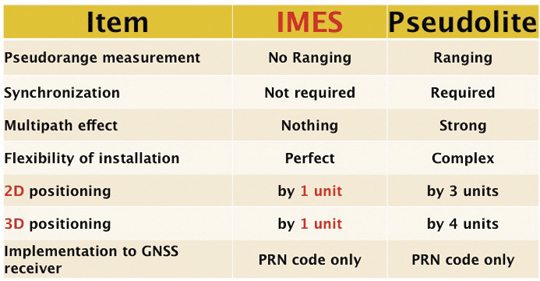
    Pseudolite systems are currently in use for indoor positioning. While technically sound, a system needs at least four signal transmitting units. To cover a large area, it needs many transmitters suitably located and time-synchronized to one other, or their clock errors must be known. Pseudolite systems provide position data based on range calculation from the receiver to a number of transmitters, and this calculation is heavily affected by signal multipath. Table 1 compares IMES and pseudolites.

    IMES-Table1 Source: Dinesh Manandhar and Hideyuki Torimoto, GNSS Technologies, Inc. Japan
    Table 1. Comparison between IMES and pseudolite.

    A-GPS is widely used in mobile phones to compute position data. A-GPS technology includes high-sensitivity signal processing to acquire weak signals and external assistance of data like time, approximate position, and satellite-orbit related parameters. Provision of assistance data requires a communication link between the receiver and the data source, for example, the mobile phone network itself. Thus, A-GPS will not be possible if there is no communication link.

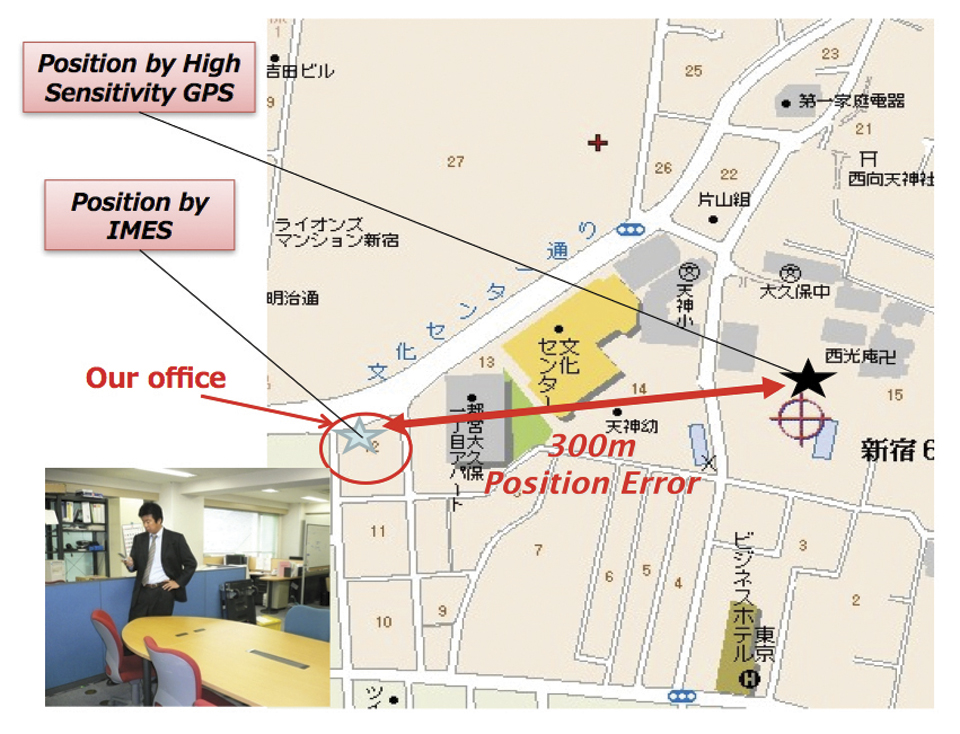
    Normally, A-GPS provides 2D position data. The height data (if 3D output is available) will be highly erroneous. The accuracy of such position data varies from few tens of meters to few hundreds of meters. Also, the position data is heavily affected by signal multipath. Figure 2 compares IMES position and mobile phone position inside an office building. The A-GPS position error is about 300 meters in this case.

    IMES-2-B Source: Dinesh Manandhar and Hideyuki Torimoto, GNSS Technologies, Inc. Japan
    FIGURE 2. Indoor position from high-sensitivity GPS and IMES.

    Wi-Fi is used for indoor positioning in many mobile phone devices. The phone provides position data from a built-in GPS receiver, a Wi-Fi device, cell ID, or a combination of any of these. Recently, position data from Wi-Fi has become popular for indoor as well as outdoor position, since Wi-Fi signals are so freely available. However, using these Wi-Fi signals requires registering the signal power and availability at reference locations. To do this, a huge number of Wi-Fi devices are registered driving around the city. Since these devices are basically installed for communication purposes, they can be relocated, removed, or new devices may be installed without any information to the users or service providers. Thus, continuous maintenance and updating of all these devices are necessary at certain time intervals. The coverage of Wi-Fi devices is not uniform and may vary widely from area to area, affecting position accuracy.

    Telecom service providers are considering the possibilities of seamless positioning technologies. They would like to have one single device that can provide 3D position data both indoors and outdoors, without additional power or cost, and with satisfactory 3D position information. If such a seamless positioning technology is available, it will undoubtedly generate a huge global commercial market. The availability of such technology will also aid development of new applications in location-based services, advertising, marketing, entertainment, and gaming.

    We have conducted research in indoor positioning for the past few years, beginning with pseudolite systems. We have developed IMES to meet the shortcomings of the technologies described earlier for indoor and deep indoor positioning. IMES for a seamless positioning environment can be implemented in any device that has a GPS/GNSS receiver, without hardware modification. IMES can provide satisfactory and reliable 3D position data with a single transmitter device without performing range calculation.

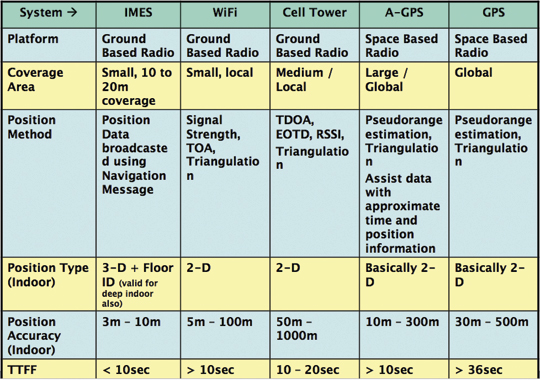
    Table 2 compares IMES with other indoor-position capable devices. IMES can provide the same accuracy even in deep indoor locations, whereas cell tower, A-GPS, and GPS cannot work in such areas. All other systems except IMES provide only 2D position data indoors. The height data from A-GPS is very unreliable and hence cannot be used.

    IMES-Table2 Source: Dinesh Manandhar and Hideyuki Torimoto, GNSS Technologies, Inc. Japan
    Table 2. Comparison of IMES with other indoor positioning systems.

    IMES Concept

    The main concept of IMES is to transmit position and floor ID of the transmitter with the same RF signal as GPS. IMES transmits latitude, longitude, height, and floor ID by replacing the ephemeris and clock data in the navigation mes
    sage of GPS. A single unit of IMES is enough to get the position data, since the position itself is directly transmitted.

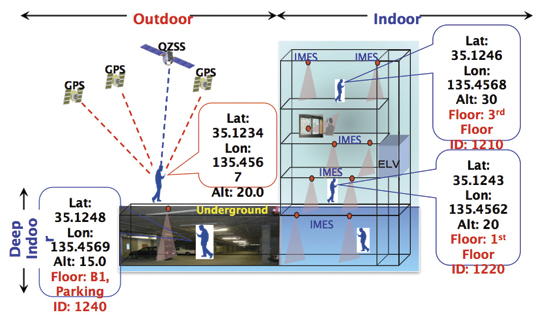
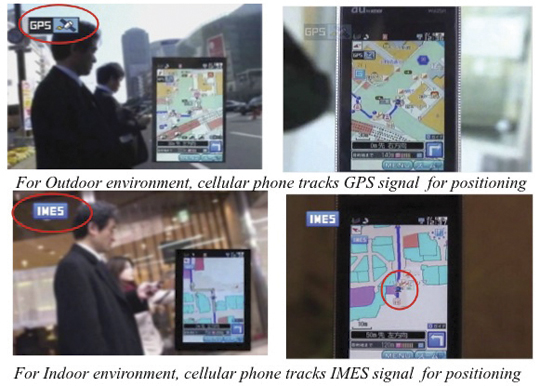
    Figure 3 shows the concept of seamless position data using IMES, where the same receiver can be used both indoors and outdoors without interruption. GNSS satellites provide positioning and navigations outdoors, while IMES provides indoor navigation. Since the signal structures of GPS satellites and IMES is the same except for the navigation message contents, the same receiver can be used for both cases. Current GPS receivers will be capable of receiving IMES signals with modification of firmware only to decode the navigation message. Figure 3shows the concept of seamless 3D route guidance.

    IMES-3 Source: Dinesh Manandhar and Hideyuki Torimoto, GNSS Technologies, Inc. Japan
    Figure 3. Seamless 3D route guidance using IMES.

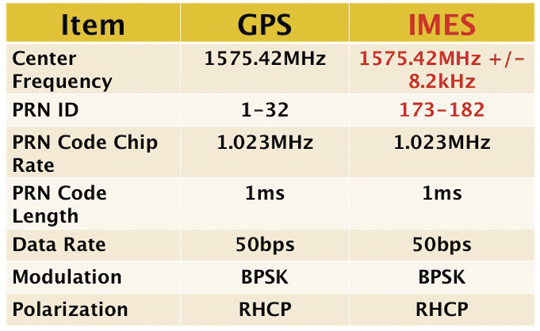
    Signal Properties. The IMES signal is designed much like the GPS signal. It uses the same center frequency as GPS with an offset of +/– 8.2 kHz to minimize the possible interference from IMES to GPS signal. Ten PRN codes from 173 to 182 are assigned for IMES. These codes are provided by the U.S. government. Other signal-related parameters are the same as the GPS L1 C/A code signal. Table 3 shows IMES signal properties with respect to the GPS signal.

     Table 3. IMES signal properties with respect to GPS. Source: Dinesh Manandhar and Hideyuki Torimoto, GNSS Technologies, Inc. Japan
    Table 3. IMES signal properties with respect to GPS.

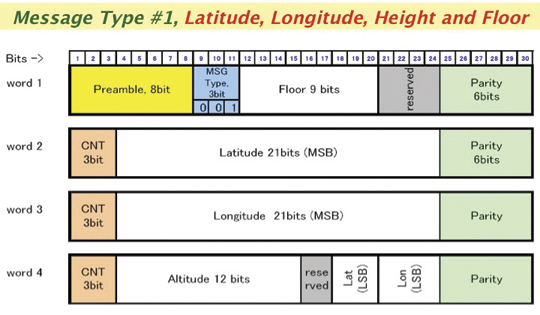
    IMES has four different types of navigation message. The most significant is Type 1 as shown in Figure 4. It transmits latitude, longitude, height, and floor ID. The transmission of floor ID is a key factor for perfect 3D position data. Other message types are Type 0 (2-D position data with floor ID), Type 3 (short ID), and Type 4 (medium ID).

    Figure 4. IMES Message type 1, 3D position, and floor. Source: Dinesh Manandhar and Hideyuki Torimoto, GNSS Technologies, Inc. Japan
    Figure 4. IMES Message type 1, 3D position, and floor

    Interference Issue

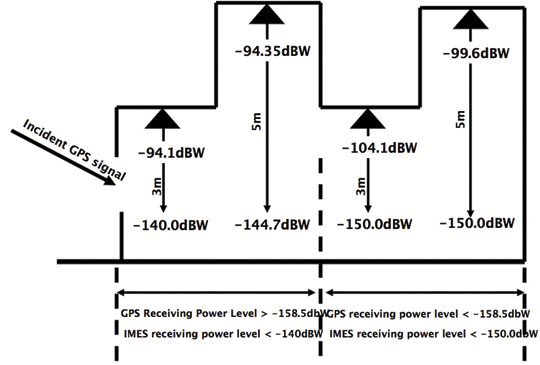
    Since IMES shares the same frequency as GPS L1 band (1575.42 MHz), there is an interference level that IMES may have on GPS signals. This interference has been studied in detail by conducting experiments and simulations. Based on these studies and analysis, various methods have been considered to avoid harmful interference to GPS signal. To avoid such interference, IMES center frequency is shifted by +/– 8.2 Khz from GPS L1 band. This will have the least impact on the GPS L1 band signal. For example, if the IMES signal is –110 dBm (very strong) and the GPS signal is –142 dBm (very weak), the loss of GPS signal (C/N0) due to IMES is less than 2 dB. If the IMES signal is –120 dBm and the GPS signal is –142 dBm, there is no loss of GPS signal (C/N0). Based on this analysis, the IMES transmitter power must be controlled such that the maximum power to the receiver does not exceed –110 dBm at a distance of 3 meters from the transmitter. Figure 5 shows the guideline specified in the QZSS IS document for setting the transmitter effective isotropic radiated power (EIRP)based on location.

    Figure 5. IMES transmitter power setup guideline in QZSS IS document. Source: Dinesh Manandhar and Hideyuki Torimoto, GNSS Technologies, Inc. Japan
    Figure 5. IMES transmitter power setup guideline in QZSS IS document.

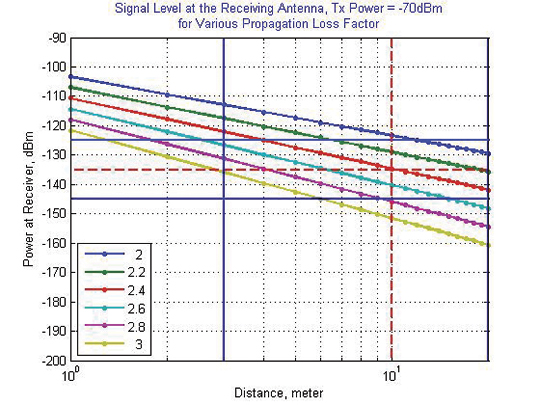
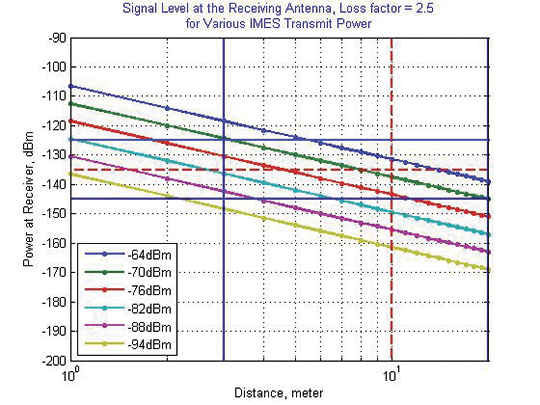
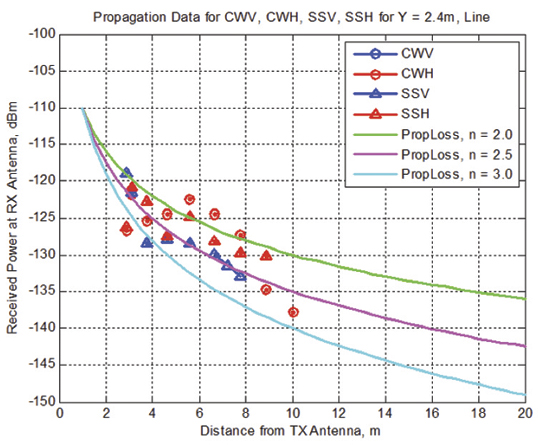
    Figure 6 shows the signal propagation loss for transmitter power of –70 dBm for various propagation loss-factor values of n. Figure 7 shows path loss for various transmitter power for the same loss factor, n = 2.5. These graphs shows the maximum power that shall be used to cover an area without exceeding the maximum power level. If a single unit of IMES cannot cover the complete area, then multiple IMES units will be deployed to cover the entire area with suitable power level. These graphs serve as a guideline for setting transmitter power.

    Figure 6. Signal path loss for –70 dBm signal for different path loss coefficient, n. Source: Dinesh Manandhar and Hideyuki Torimoto, GNSS Technologies, Inc. Japan
    Figure 6. Signal path loss for –70 dBm signal for different path loss coefficient, n.
    IMES-7 Source: Dinesh Manandhar and Hideyuki Torimoto, GNSS Technologies, Inc. Japan
    Figure 7. Signal path loss for path loss coefficient, n = 2.5, for different transmitter power levels.

    The signal propagation loss is calculated using the following equation; the gain of transmitter and receiver antennas is considered as unit gain (0 dB).

    IMES-E1 Source: Dinesh Manandhar and Hideyuki Torimoto, GNSS Technologies, Inc. Japan

    Hence, the equation depends on distance from the transmitter, d, and the propagation loss factor, n. The value of n is 2 for free space and increases for areas with objects that obstruct the signal. An office with soft partitions may use n = 2.5. The graphs can be used as a guideline to estimate the transmitter power to cover an area within the allowed power levels.

    Application Areas

    IMES can be used wherever indoor position data is required. It depends upon the application for that particular location as well. For example, an infrastructure-related safety application should have IMES installed at all elevators, escalators, staircases, emergency exits and routes, fire-fighting unit locations, and so on. Here are some of places where IMES might be used:

    • Every room of a building, to provide exact room location.
    • At entrances, exits, elevators, escalators, staircases, public facilities, and corridors for indoor navigation.
    • At every emergency exit for guidance.
    • Along hallways and lobbies at set intervals to guide the user.
    • In front of shops for advertising and information.
    • In sign posts to provide user’s location and guidance.
    • Complement other positioning systems like Wi-Fi, RF Tag, UWB, and so on.
    • As an indoor ground control point for surveying of large and multi-storey buildings.
    • With security cameras to provide accurate position data.
    • In factory production lines for automated control of moving objects.

    Business Perspective

    IMES technology was developed with the guiding concepts of low-cost global implementation and ease of installation and use. Low cost on the transmitter side is achieved by developing large-scale integratin (LSI) chips and IMES installation, setup, and database management tools. At the receiver side it is achieved by design of IMES signal so that existing GPS receivers in mobile phones, PDAs, or any other devices can use IMES by modifying only the firmware. The signal is designed so that it can adapt to other GNSS signals available in the future, for example, Galileo, QZSS, or Compass signals, requiring only firmware modification. Global implementation is made possible by signal design compatibility with existing GPS or GNSS signals. Ease of use is achieved again by signal design: one IMES transmitter can provide 3D position data, including floor information, with reliability and accuracy of a few meters even in deep indoor locations.

    The development of IMES LSI chips (IMES transmitter) will also lead to development of value-added products for many consumer household appliances. For example, the green energy concept produced low-power LED lightbulbs. IMES chips can be installed in LED bulbs at very low additional cost. Similarly, it can be built in many other products like power socket devices, security devices, timing devices, and sensors where position data is also critical. This will provide an opportunity for the manufacturers to provide value-added products to users with indoor positioning devices. Not only electrical products but some construction materials or interior decoration materials like gypsum (dry
    wall) boards can be made with built-in IMES chips. Installation of one piece of wallboard with an IMES built-in chip can provide position data in the room, reducing installation cost while not affecting the interior design of the room.

    Implementation of IMES will also lead to new applications in the field of location-based services and applications where position data are necessary. It can also lead to new applications using IMES as an indoor electronic ground control point (GCP) in large buildings and indoor areas.

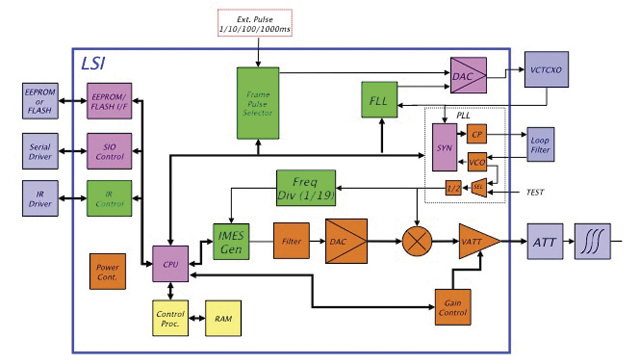
    Chip Development. To reduce IMES transmitter cost, the IMES LSI chip has been developed and will be available by the end of the third quarter of 2011. This will reduce overall cost and size, and create platforms to develop value-added products integrating with other devices and systems. The chip is designed for global communications systems like personal handy-phone system (PHS, a mobile phone communication system developed in Japan), CDMA, and GSM. Figure 8 shows a block diagram of the chip transmitter.

    Figure 8. IMES large-scale integration chip block diagram. Source: Dinesh Manandhar and Hideyuki Torimoto, GNSS Technologies, Inc. Japan
    Figure 8. IMES large-scale integration chip block diagram.

    The basic specifications of the LSI chip are: size, 12 x 12 millimeters; power, to be determined; maximum transmit power, –30 dBm or –60 dBm (user selectable); frequency, L1 band, 1575.4282 MHz or 1575.4118 MHz (user selectable); PRN codes, 173–182 (user selectable); signal type, GPS L1C/A, with upgrade capability to other GNSS signals.

    Installation and Management

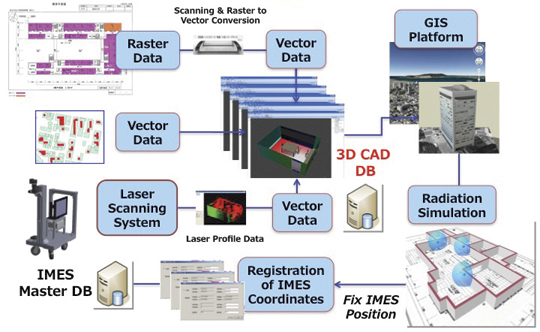
    An IMES installation, setting, and management system has been developed to facilitate deployment. The main purpose of the system is to provide IMES transmitter position data (latitude, longitude, height) without conducting precision surveys, thus reducing installation, setting, and management costs. The system helps locate optimum locations for IMES transmitter siting, control transmitter EIRP power, set PRN IDs, and assign position data. The system can also use various types of map data sources to generate necessary floor data or indoor maps in 3D. The inputs can be either 3D vector data or 2D raster images, or even paper maps.

    The overall system consists of four sub-systems:

    IMES Setup Tool (ISET). This tool is used to set up the IMES transmitter. It provides two basic functions: to set up signal-related data (setting PRN code, transmitter power, navigation message rate, and so on) and to set up message-related data (position data, floor data, message types and their contents, message sequence, and so on). The R&D version of IMES also allows transmitting some special data for research and development purpose. It is possible to change the preamble value different from GPS, load a different PRN code table than IMES, change the navigation message data rate, generate a BOC(1,1) signal to test L1C-like signals, and change the RF frequency. The setup tool also has user-access management so that only authorized users can change certain sensitive data like PRN code, position data, and transmitter power.

    IMES Database Management Tool (IDBM). This tool simplifies installation and management by providing a necessary database including a building-related database, a service-provider database, a device-related database, other integrated sensors database (if any), and a signal-related database. Since IMES is controlled and managed, guaranteed and authorized services can be provided for dedicated applications. This enhances the reliability of an IMES-based positioning system for infrastructure, security, and safety-related applications.

    3D Mapping Tool (IMAP). This tool, shown in Figure 9, provides a 3D map database for IMES either for implementation or end-user applications. The mapping tool can use 3D vector data (for example, existing DXF files), raster image data, or direct user input. A laser scanning system with CCD camera is used to generate 3D data if existing data is not available. The tool creates walls, windows, doors, ceilings and other smaller objects from the laser data. If data are available in paper drawings, they are scanned to create raster images before digitizing them into vector format.

    IMES-9 Source: Dinesh Manandhar and Hideyuki Torimoto, GNSS Technologies, Inc. Japan
    Figure 9. 3D Map Database Development System.
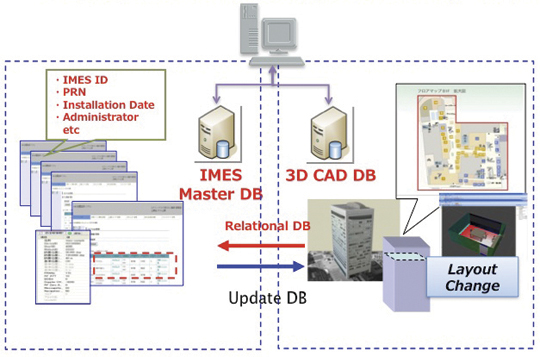
    Figure 10. Concept of IMES database for implementation, setting and management. Source: Dinesh Manandhar and Hideyuki Torimoto, GNSS Technologies, Inc. Japan
    Figure 10. Concept of IMES database for implementation, setting and management.

    The system will ultimately create a 3D database of a building at floor level that can be linked with external databases. Figure 10 shows the overall concept of the IMES database system that includes both IMES database and 3D map database. The two database systems are linked by a relational database system. Any update in the map database can be reflected into the IMES database.

    Signal Propagation Loss Tool (IPMODEL). This tool simulates the signal level where IMES will be set up. It is necessary to have optimum deployment of the transmitter to cover the area as large as possible within the allowed power level. Although the allowed maximum EIRP power level is –64 dBm for Japan, the approach is always to use the least power possible to cover the area, to avoid any possible harmful interference to other systems as well as to limit the availability of the signal to only the desired area.

    The following equation is used to calculate the signal path loss which is based on Frii’s free-space path-loss model.

    IMES-E2 Source: Dinesh Manandhar and Hideyuki Torimoto, GNSS Technologies, Inc. Japan

    GT is the transmitter antenna gain. The receiver antenna gain is assumed to have unit gain (0 dB) and hence not included in the model.

    L0 is the power loss at 1 m distance and is given by 20 x log10(signal wavelength) — 20 x log10(4*pi).

    N is the path-loss factor, which is 2 for free space, 2.5 for office room with soft partition, and 3.0 for rooms with hard partition.

    Ri is loss due to i number of reflections by objects.

    Pj is loss due to j number of penetrations through objects.

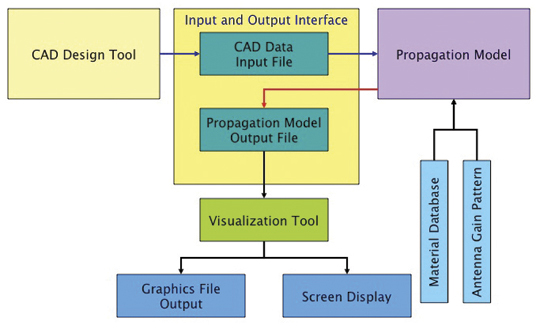
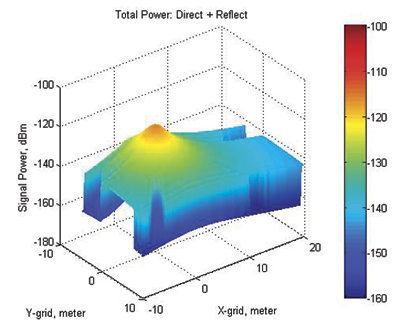
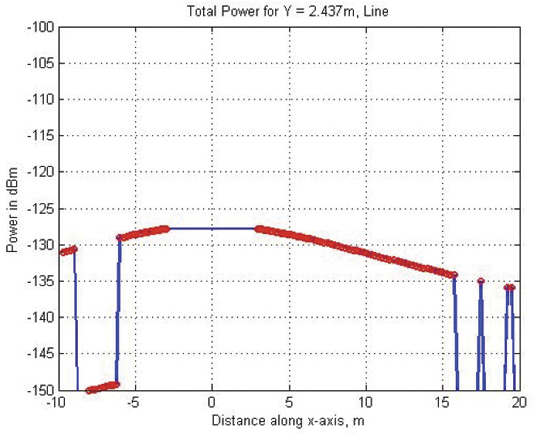
    Figure 11 shows the propagation-loss tool flowchart. It uses 3D map database provided by the 3D mapping tool and database from the database management tool. It also uses antenna gain pattern and material electrical properties to compute the power loss due to reflection and penetration. Figure 12 shows the signal propagation output from the model for a building lobby. Figure 13 and Figure 14 show the output from the propagation loss results from the actual measurement and model output, respectively. The results match within a difference of few dBs.

    IMES-11 Source: Dinesh Manandhar and Hideyuki Torimoto, GNSS Technologies, Inc. Japan
    Figure 11. Path Loss Tool flowchart.
    Figure 12. 3D view of signal power in a building lobby. Source: Dinesh Manandhar and Hideyuki Torimoto, GNSS Technologies, Inc. Japan
    Figure 12. 3D view of signal power in a building lobby.
    Figure 13. Actual signal power measured at different locations in the lobby shown in Figure 12 Source: Dinesh Manandhar and Hideyuki Torimoto, GNSS Technologies, Inc. Japan
    Figure 13. Actual signal power measured at different locations in the lobby shown in Figure 12
    Figure 14. Signal power output from the propagation loss tool at the same location shown in Figure 13 Source: Dinesh Manandhar and Hideyuki Torimoto, GNSS Technologies, Inc. Japan
    Figure 14. Signal power output from the propagation loss tool at the same location shown in Figure 13

    Experiments and Demonstrations

    Experiments and demonstrations have been conducted to validate the IMES concept, uses, and applications. Early experiments validated the
    concept, message design, and interference analysis. Later experiments focused on actual implementation for infrastructure, and social-network and location-based applications. Pilot projects have been conducted in collaboration with the Japanese government to test IMES capabilities for seamless positioning and navigation and for social infrastructure platform.

    The Free Mobility Project in Kobe is the biggest social experiment using IMES for seamless navigation under the sponsorship by the Ministry of Land, Infrastructure, Transport, and Tourism. The project was conducted in an underground shopping mall of Kobe railway station. Shopping mall visitors were asked to participate in the navigation using IMES-capable mobile phones. Most visitors could follow the route they had chosen or find the destination point using the IMES set-up.

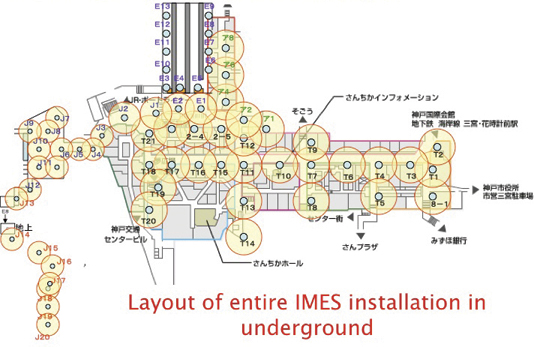
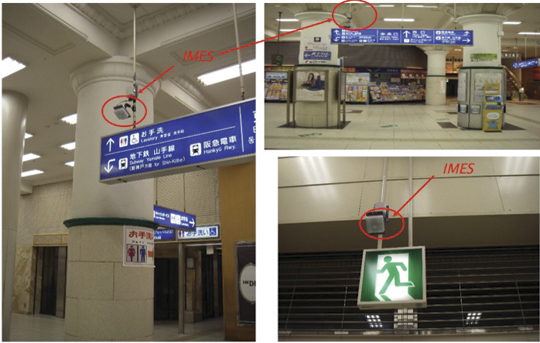
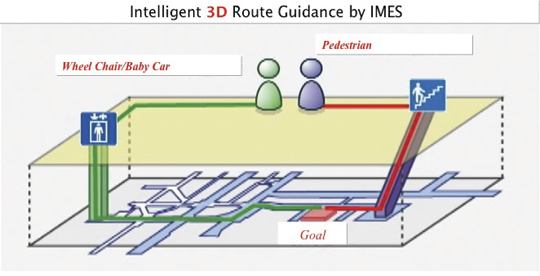
    A total of 70 IMES transmitter units were installed at locations including ticket counters, elevator entrances, emergency exits, fire-extinguisher locations, staircases, station entrances, and alleys of the shopping mall. Figure 15 shows a part of the IMES transmitter location map. It covers one of the sections of the shopping mall. Figure 16 shows various locations where IMES transmitter devices were installed. As shown in Figure 17, intelligent 3D route guidance can be performed based on user preference. For example, a user in a wheelchair must be guided by a route that has no staircases, shown by green route in the figure, to reach the destination. A pedestrian can be guided by red route, which is the most direct route to the destination.

    Figure 15. IMES transmitter location map to cover the underground shopping mall in Kobe Station. Source: Dinesh Manandhar and Hideyuki Torimoto, GNSS Technologies, Inc. Japan
    Figure 15. IMES transmitter location map to cover the underground shopping mall in Kobe Station.
    Figure 16. Installation of IMES near the station entrance and emergency exit. Source: Dinesh Manandhar and Hideyuki Torimoto, GNSS Technologies, Inc. Japan
    Figure 16. Installation of IMES near the station entrance and emergency exit.

     Figure 17. Intelligent 3D route guidance using IMES. Source: Dinesh Manandhar and Hideyuki Torimoto, GNSS Technologies, Inc. Japan
    Figure 17. Intelligent 3D route guidance using IMES.
    Figure 18. Seamless navigation by mobile phone using GPS and IMES. Source: Dinesh Manandhar and Hideyuki Torimoto, GNSS Technologies, Inc. Japan
    Figure 18. Seamless navigation by mobile phone using GPS and IMES.

    The distribution of each IMES transmitter is done in such a way that it covers a radial distance of 10 to 20 meters. The deployment density of IMES depends on the location environment. If an IMES device is located near the entrance, the coverage distance will be around 10 meters to minimize transmitted power. IMES devices in deep indoor locations can cover a radial distance of about 15 to 20 meters.

    Commercially available mobile phones with a firmware update for IMES were used to receive the IMES position data. The phones also included the shopping mall and station map including related databases for various applications.

    Conclusions

    IMES can provide reliable and guaranteed 3D position accuracy, including floor information. IMES signal design is done in such a way that it can use existing as well future GPS/GNSS receivers without any hardware modifications. Necessary implementation, setup, and management tools are also developed to facilitate IMES installation and to minimize the cost so that large-scale global implementation is possible. IMES LSI chips are being developed for large-scale implementation. IMES will also help in developing many other location-based applications and services. IMES evaluation kits will soon be available for joint R&D projects.

    IMES technology-related patents have been filed in Japan and many other countries. The basic patents have already been approved in Japan. GNSS Technologies invites academic institutions to participate in joint R&D projects.


    Dinesh Manandhar is a visiting researcher at the University of Tokyo, where he received his Ph. D, and a senior researcher at GNSS Technologies Inc. He is one of the designers of IMES message structure and involved in developing indoor navigation system based on IMES for seamless navigation environment. He can be reached at [email protected].

    Hideyuki Torimoto is the president of GNSS Technologies Inc. Japan. He established Trimble Navigation Japan and Weathernews Inc. in 1986. He also established the Research Forum on Social Infrastructure for Advanced Positioning (NPO) in 2003 and the Satellite Technology Laboratory in Tokyo University of Marine Science in 2004. He served as Satellite Division Member of ION for 2003-04. He can be reached at torimoto @ gnss.co.jp.

  • Indoor Location on the Move

    It’s coming. Indoor location, which has been stymied by the limitations of GPS and lack of mapping, is finally getting some legs and is heading us towards seamless navigation. A shopper is guided from home to an empty parking space at the mall, and the navigation doesn’t miss a beat as he heads inside and gets directions to a particular store, and perhaps to a given shelf. Today, the location of a wireless device usually cannot be determined more precisely than the building it is within. In tall or sprawling venues like arenas, malls, dormitories, or apartments this is a critical problem for emergency personnel trying to locate a person who has dialed 911. Mobile marketing and social network applications have also been constrained by problems in obtaining indoor location.

    Finding Cherries. Aisle 411 is a shopping app with local search and navigation that helps users find a particular item within a store. The app navigates to the threshold of a store and then provides a diagram of the interior (essentially a paper map) with a drawn path to the desired item, for instance, a jar of maraschino cherries. Apps like this provide a good service, but are held back by the nascent state of indoor navigation. Geo-coded locations of indoor stores often aren’t available. Apps that are more granular and attempt to locate goods within a store face greater challengers. Inventory is moved around and geo-coding is infrequent, hence the diagrams of Aisle 411. Some applications like Aisle 411 utilize crowd-sourced maps, in addition to venue-provided maps.

    Height Counts. Products are being introduced to determine the elusive “z” plane, or in layman’s terms, height. Location systems work well at determining the “x” and “y” axis but can’t distinguish between a location on the first floor and one on the twentieth floor. Polaris is releasing an indoor location offering in the second half of this year. In addition to Polaris’ existing location technology, the solution also uses femtocell and distributed antennas without necessitating a client on the handset. Polaris can distinguish a position within a range of five floors. Infrastructure provider CommScope introduced GeoLENS Indoor, a solution that integrates with wireless indoor coverage systems including distributed antenna systems (DAS), repeaters, and other RF equipment.

    Inside Job. Micello, a small start-up, has been addressing the indoor mapping issue. The free Micello app contains the maps of the insides of large structures including shopping malls, airports, hospitals, and business campuses. So far, Micello has mapped 215,545 structures in 2,200 locations.

    3D Indoors. Navteq showed off Destination Maps’ indoor navigation system at the International CTIA Wireless 2011 show, held in Orlando March 22-24 . The maps are available in 200 U.S. shopping malls and provide detailed 3D guidance and information within indoor structures. The system will use transmitters within buildings that communicate via Bluetooth and Wi-Fi.

    Monster in the Room. Mobile users aren’t satisfied by industry privacy measures. “About half the people in a study of 1,500 consumers we interviewed are concerned about who knows their location, particularly businesses,” says Kristi Crum of Verizon. Subscribers want to understand how their data is being used, whether is it being aggregated, or if it is being shared personally or kept totally private. It will only take one or two high-profile events involving misuse of data before there is fallout on our industry, warns Crum.

    Monetize, Monetize, Monetize. Mobile payment systems will become ubiquitous. Google is collaborating with MasterCard and Citigroup to embed contactless near-field communication (NFC) payment technologies in Android. Financial service companies are becoming players in mobile advertising and will likely provide advertising networks like Google with consumer data that will enable more targeted advertising. Google is starting a pilot in New York and San Francisco and is paying for thousands of point-of-sales readers for stores in the regions. Google will go head-to-head against ISIS, a nationwide mobile commerce NFC venture that includes Verizon, AT&T, and T-Mobile. ISIS plans to introduce services within the next 18 months.

    GPS Interference Concerns Grow. The Department of Defense and the Department of Transportation have added their voices to concerns over LightSquared’s hybrid satellite-terrestrial LTE network, which they think may interfere with GPS systems. In a letter to FCC Chairman Julius Genachowski, the agencies state they were “not sufficiently included” in the development of LightSquared’s initial work plan to address potential GPS interference issues caused by its network. An FCC spokesman tried to ease concerns by indicating that LightSquared will not be permitted to go forward until potential GPS interference issues are addressed.

    At CTIA, LightSquared acted as though there were no hurdles in its way. CEO Sanjiv Ahuja asserted that the company will beat its build-out goals with a commitment to cover 100 million POPs by the end of 2012, 145 million by the end of 2013, and 260 million by the end of 2015. “We are not only committed to meeting these milestones, we are today positioned to exceed them,” Ahuja said.

    DoCoMo. There was a large empty space where Japan’s NTT DoCoMo’s CTIA booth would have stood. DoCoMo issued a statement that it was skipping CTIA to focus fully on delivery of mobile services for relief efforts. In the bare exhibit space, a solitary vase stood filled with cherry blossoms.

  • A Free GIS Tool Just Got Better

    A few months ago, I wrote a little about ArcGIS Explorer (AE), a free GIS viewer from Esri. It’s a nice tool for non-GIS users who want to view GIS data. Looks like another feature is creeping into AE to make it a bit more powerful. Bern Szukalski, product strategist and evangelist at Esri, blogged earlier this week about new functionality in AE that will allow direct GPS support. In other words, you can connect a GPS receiver (Bluetooth or otherwise) to a device running AE and be able to visualize and record GPS data as its tracking.

    Borrowing from Bern’s Blog, following is a 2D map as he was driving, showing the waypoints and tracks as he was moving. He said he set AE to collect a GPS point every 10 seconds, centering the map as he moved. GPS waypoints and tracks are stored as notes.

    (Click to enlarge.)


    The next screen shot shows his path in 3D. Green represents GPS points/paths collected by mouse click. Yellow represents GPS points/paths collected at 10-second intervals.


    (Click to enlarge.)


    Bern blogged that he was using a borrowed $18 USB GPS receiver in this example. Don’t pay much attention to the accuracy (or inaccuracy) of the GPS positioning. He could have just as easily connected a sub-meter or centimeter-level GPS receiver (outputing NMEA 0183 messages) and had enough precision to accurately position the center of a 6-inch water meter cover plate on the sidewalk. That’s where this is headed, folks.

    A Quick Note on the Annual GITA Conference

    I didn’t attend the annual GITA (Geospatial Infrastructure Technology Association) conference this year, but I received several reports that this was the last GITA annual conference. That’s pretty sobering (but not surprising), given that it was the 34th such conference that started in the late 1970s. I blogged last year that I thought this years was going to be a really tough one because it wasn’t co-locating with another conference as it was last year with ACSM (American Congress on Surveying and Mapping). Although the demise of the GITA annual conference was predictable, it’s still sad to see it go. Last year, I thought the technical presentations were quite good and clearly demonstrated a need for continuing promoting and developing geospatial apps in the world of infrastructure. Without the GITA conference, I wonder where these folks will go to share their knowledge and experiences. I’d like to reiterate that there are too many niche conferences related to GIS. GIS folks can’t afford the time or expense, and neither can GIS sponsors/vendors, to attend three different small GIS conferences in a 90-day window. What I wrote a year ago is just as relevant today.


    Let’s discuss conferences for a minute

    As good as the content was for both the GITA and ACSM conferences, the attendance was horrible. If there were 1,000 people there (for both), I’d be surprised. At this pace of decline, something’s got to give. I attended the annual GITA conference in Seattle in 2008. If I recall correctly, there were about 1,400 attendees. This year, in 2010, there were maybe half of that including exhibitors. Next year, the GITA conference is operating as a stand-alone conference in a suburb of Dallas, Texas. I predict it might be even worse than this year. The ACSM annual conference is not doing any better, but rumor has it will co-locate in 2011. The two conferences won’t be co-located next year. It’s a time for conferences to start working together.
    Size Matters

    It’s a vicious cycle. The fewer attendees there are, the less interested vendors are in exhibiting and sponsoring the event. Each year, attendance erodes until it doesn’t make sense any longer. Now is the time for conference consolidation, especially in the GIS industry. GIS is tough to segment because it stretches across so many industry boundaries. In April alone, there was the GIS-T (GIS in Transportation) conference in West Virginia, the GITA/ACSM co-located conference in Phoenix and the ASPRS (American Society for Photogrammetry and Remote Sensing) conference in San Diego. All of these are small conferences that are becoming increasingly difficult to justify, financially, for both the operators and the attendees. I can safely say that attendees and vendors certainly would prefer to attend one conference in one location that includes GIS-T, GITA and ASPRS rather than three separate conferences spread out all over the US. They need to consolidate at the same time in a single location.


    I suppose the demise of the annual GITA conference is part of the consolidation I wrote about. Being accelerated by the current economy, people will just stop attending some conferences and pick/choose the conference(s) they feel fit their needs the best.


    Upcoming Events/Publications:

    Following are a few upcoming events you might be interested in:

    Webinar: April 21st. “LightSquared and GPS: Our Story So Far”. I’ll be participating in a moderated discussion about this issue. If your organization relies on GPS, I strongly encourage you to register. If you aren’t available during that time, register anyway and you’ll be provided a link to view the webinar at a time that’s convenient to you.

    Space Weather Workshop: April 26-29. I’ll be presenting at this conference and blogging about what I hear in order to keep you informed about space weather as the next solar cycle warms up.

    Western Forester: April issue. Look for my article and accompanying articles on Lidar, laser rangefinders, GPS and other emerging technologies that concern the forester and other natural resource professionals.


    Thanks, and see you next week.

    Follow me on Twitter at http://twitter.com/GPSGIS_Eric

  • Mobile Epiphany – Round Two

    Don Jewell
    Headshot: Don Jewell

    Many of you may remember my one and only software review of a product called Touch Inspect back in December 2009, by a Denver, Colorado (Aurora)-based company called Mobile Epiphany. At the time this is how I began my initial brief review of the software program:

    “The software is called Touch Inspect, and it is essentially a computerized, geospatially aware, data-collection application with an amazing user interface. But having said that, just so you understand the basic intent of the program, I have to also say that it is so much more than a computerized data-collection application. Calling Touch Inspect a typical computerized data-collection application is like comparing a skateboard to a Ferrari.”

    At the time I promised an in-depth review the software “real soon.” Well, real soon has turned into 16 months, and not a single week has gone by that I have not received several e-mails wanting to know more about the software and asking when the next review would be published. So for all of you who have been waiting, this is the promised in-depth review of Touch Inspect version 2.0, which the company now promotes as customizable software tools under the more apt heading of “Mobile Business Process Software.” But the base program is still known as Touch Inspect.

    Bottom Line Up Front — BLUF

    When you brief senior military officers today, as I have occasion to do, it seems that they all want the first chart to be the BLUF chart. It is a version of the old military briefing idiom that goes like this: Tell me what you are going to tell me and then tell me and then at the end tell me what you told me. So I will start by saying that my original assessment of Touch Inspect has not changed, unless it is to have become even more enamored with this incredible software. I have an even broader vision of its uses, especially for warfighters, whether their primary function is combat, maintenance, inspection or logistics. This software applies to first responders as well. You be the judge.

    Versatility and Visions

    When I was first briefed on this unique software program back in 2009, my first thoughts were that this is indeed a great inspection software program, but I can think of so many more uses for it. My first thought was that it would be wonderfully useful as a mobile IED (Improvised Explosive Device) database, inspection, and information-gathering program. In fact, it was so obvious that I was off wool-gathering about IED databases during the briefing that the CEO of Mobile Epiphany, Dr. Glenn Kletzky, stopped his presentation until I rejoined the real world. But this is what hearing about this incredible software does to you. It makes you think of all the possibilities and capabilities it makes available to our warfighters and first responders. I was happy to hear from Glenn that my reaction, thinking that Touch Inspect is so much more than a top-notch mobile inspection tool, was to become a commonplace reaction amongst almost everyone who saw or heard about the software.


    Today, Touch Inspect, running under numerous pseudonyms, is being utilized by our government and others in ways we just can’t discuss in this venue. It is being tested and/or used in the construction industry, in oil and gas operations and exploration, in utility related industries, in the telecommunications industry, in human services and tracking, as well as in healthcare, just to name a few of the myriad user communities. There are other users that I am not allowed to list because this software really gives you an unfair advantage over those not utilizing its considerable and unique capabilities. Suffice it to say that almost everyone who views a demonstration of this extremely flexible asset and process/procedure-focused software thinks of something useful for it to accomplish, and sometimes it even involves inspecting something.

    My first thoughts of using Touch Inspect for activities surrounding IEDs has evolved considerably. Not only can the Mobile Epiphany software be used to house an interactive mobile database with all the knowledge we have gained about IEDs, but when the software is running on a rugged mobile device with GPS, communications, and cameras, as well as other sensors, it enables the user to:

    • Take a picture of the device and annotate that image
    • Look up other items in the database with automatic prompting of what the user should look for
    • Instruct the user how to interact with the IED (other than the obvious precaution of ‘run’ or proceed very carefully)
    • Assist users in identifying the type of IED and the associated dangers
    • Automatically gather data such as location to include GPS or specific grid coordinates, altitude, and heading and whether other IEDs have been found on the same site previously or in the surrounding area and can automatically identify those locations on an internal or externally obtained map
    • Record the time of the observation and the position of the observer, for review at a later date.

    If the IED is a common type or one seen previously by EOD or Explosive Ordnance Disposal personnel, the software can be configured to instruct the user on disarming the device, if he/she is crazy enough to do that, and if disarming is indeed an option; it does all this with preprogrammed software that ensures all the necessary data is collected. If the user is a novice, which can be automatically determined by the user’s login and granted permissions, the software can automatically prompt the user at every step, or in the case of an experienced user, the software can make use of an accelerated or “fast-flow” mode that eliminates many of the more basic steps or procedures and gets to the required data collection and instructional screens without delay.

    In short, the software is flexible in the extreme, to the point that I can make the statement that I see uses for it every day, especially for our warfighters and first responders, and I sincerely hope that it makes its way into the .mil applications store for the DoD soon. It is a software product and capability/advantage our warfighters desperately need.

    Platforms

    When I wrote my first review, the Touch Inspect software (version 1.0) ran only on handheld devices that used the Windows Mobile Operating System. Today, it runs on all versions of Windows Mobile (5, 6, 6.1 and 6.5) as well as running on all versions of the full Windows operating systems (XP, Vista, and W7). Furthermore, the full Windows version of Touch Inspect runs on all PC-based slates and tablets in either orientation (portrait or landscape) and can be resized from full screen to a minimal window size, thus sharing the screen with other applications.

    Today the software is also in the process of being ported to Android and Apple platforms. The Android operating system versions will be released in the third quarter of 2011 and the Apple versions will be released in the fourth quarter of 2011.

    Although Mobile Epiphany is growing by leaps and bounds, according to Dr. Kletzky, I predict that the company will really take off when the Android and Apple versions hit the street. If you can’t tell, I am as excited about this software as I am about my iPad and
    iPhone because it will take the usability of these highly desired and much utilized mobile platforms, especially for warfighters and first responders, to new heights. The software and hardware combined will present an awesome potential that will greatly enhance our warfighters’ and first responders’ productivity and safety. For example, since these are the most popular and prevalently used devices in theater, the U.S. Army is considering a plan to provide Android and Apple mobile devices to the warfighters. So why not provide the warfighters with the very best and most flexible software, along with its very friendly user interface as well? Provide the warfighter with devices and software that they will actually use and customize to their needs. The combination of top-of-the-line mobile devices and Mobile Epiphany software will save time, money, and lives. But, of course, Windows is already in very wide use today throughout our armed forces, and this software is ready right now to help those existing users.

    I’m convinced the combination will prove to be an invaluable tool for mission planning, data collection, intelligence gathering, and post mission debriefs, as well as a tool for the everyday tasks that must be conducted in a prescribed manner — such tasks as pre-flights, repair procedures, facility and equipment inspections, and anything else that requires a complex procedure or checklist today. I don’t want to dumb down this versatile product and call it an automated and/or interactive checklist, because that is just one of the more mundane but important uses of the software. And I don’t want you to forget the instructional capability of the software. You can have complex procedures where every step is accompanied by multiple reference high-definition media to ensure success at your task, like a parts blow-out or a wiring diagram, right on your mobile device. Whether you need to learn a new complicated business process or a new series of military procedures, the Mobile Epiphany software has the ability to take you through it step-by-step flawlessly, with seemingly endless potential branches in any scenario, until you are confident that you have mastered your task. Glenn Kletzky explained it this way: “Once you have procedures or processes of any sort established, and you have users who perform and confirm those steps on paper or on screens, it is then just another small step to convert those steps, complete with branching logic based on a user’s input, into Touch Inspect.”

    “Although it is critical to ensure quality data collection and disciplined procedural adherence to process, it is also a step ignored by most software programs,” Kletzky said. “Once these steps are rapidly configured into the Touch Inspect’s Business Process design tool in combination with the available branching logic capabilities, viola! you have a process that can be customized to the user’s needs.”

    The Algiz 7 running Touch Inspect.


    The Real Deal

    Never being one to totally trust marketing hype, I showed up at Mobile Epiphany’s facility a few weeks ago with three very different GPS-enabled mobile computers. I brought the latest Trimble NOMAD, being used by thousands of our warfighters today, a borrowed first-generation GD (General Dynamics) rugged MR-1 computer, which I reviewed for our readers two years ago in April 2009, and the most recent computer I reviewed, just last month in fact, the Handheld Algiz 7. I then challenged Glenn to load version 2.0 of the Touch Inspect software on all three machines and we would see how they fared.

    So while Glenn was giving me the latest updated briefing on and future plans for the Mobile Epiphany software, his technicians loaded the software and the results were amazing. The rugged GD computer was the oldest machine, being a very early version (Hint: there is a much more modern and totally waterproof version of the MR-1 available today from GD). My borrowed device is several years old and still operating with an antiquated version of the Microsoft XP operating system, with a small amount of RAM, compared to today’s latest machines. But once loaded, the Mobile Epiphany software screamed on the machine. Everything from zooming in on annotated images, slipping and zooming in on maps, rolling through flick lists of assets, etc., all animated smoothly. It ran as fast, once loaded, as the two newer machines, which sported much faster processors and double or triple the RAM. This just goes to prove that the software does adapt well to various platforms and operating systems. You don’t need to have the latest and greatest hardware and tons of RAM to run this software. That to me is a testament to the hard work the Mobile Epiphany software engineers have put into making this a truly adaptable mobile software tool, that really comes alive on a PNT-enabled device.


    The GD MR-1 running Touch Inspect.


    Adaptability

    For those of you who are saying, yeah, great, sure it is customizable, but I don’t have millions of dollars and months or years to customize the Touch Inspect software to make it do what I need it to do. Oh contraire, mon ami. On-the-fly process and workflow customization is another major strong suit of this software, and it differentiates it from any other software I have ever used.

    Dr. Glenn Kletzky is actually the CEO of two very successful IT companies, Mobile Epiphany and iBeta. iBeta is a 12-year-old software quality assurance and testing laboratory for software ranging from enterprise class applications for government all the way to the video game industry. And he and his team have been at this for some time, and they have experienced the agony of the software development life-cycle (SDLC). It is not uncommon for robust mobile applications which include geospatial and process capabilities to require no less than 18 months to design, develop, test, and fix prior to being ready for deployment. Additionally, the SDLC requires a team of skilled programmers and testers to meet those deadlines. And even that speed can only be achieved using tools known as Rapid Application Development or RAD tools. Glenn likes to say, we (Mobile Epiphany) took that process from 18 months to 18 hours, and the 18 hours requires no software developers. All that is required is a subject matter expert (SME) in the field for which you are customizing the software and a single person who knows how to configure the process using the technology’s easy-to-use configuration toolset. Yes, you heard me right: just 18 hours versus 18 months. Talk about time, cost savings, and flexibility.

    Mobile Epiphany accomplishes this feat through a process known as Rapid Application Configuration or RAC, and it is possible because of Mobile Epiphany’s new approach to rapid application creation and deployment. You do not have to go through the traditional lengthy process of designing the application itself and the screen appearances, or even the work flows. This is because the application and all the relevant workflows required for a geospatial, process-based application already exists. The software has already been designed, developed, and tested. The person in charge of configuration simply “configures” the application (easy to learn — no programming at all) with a rapid customization tool included in the
    configuration tool set, known as the “Business Process Designer.” And this configuration tool, along with others, can be learned by non-programmers in a matter of a few hours. This means our warfighters, who already customize and download specialized applications on their non-government mobile devices, can now totally customize Touch Inspect software via the RAC process, on the fly, in the field, in less than a day, to do exactly what they need it to do. And after one person configures the work flow or process required, it can be sent wirelessly or by wire to two or two thousands other users. I know this sounds impossible and too good to be true, but I have personally observed the process and then customized the software myself, and believe me if I can do it, anyone can. And the beauty is that the customization process and version control are seamless. They appear to the user to just be another part of the application because they are, and that is a large part of the appeal of the Mobile Epiphany software.

    What makes Mobile Epiphany Software So Different?

    When I asked Glenn how he had managed to develop software with such incredible and user-friendly capabilities, he simply said: “We listened to our customers and our users, and we figured out a way to simplify the process of giving them what they need. They asked for powerful and flexible software with a friendly user interface that could be customized in the field, on the fly and that’s what we gave them.” It should be noted that Glenn worked with video-game designers in his company, who are not programmers, to develop the entire interface.

    Now- anyone in the software business knows that in order for a powerful software program to accomplish useful work and still be simple to operate, there must be a tremendous amount of capability hidden inside an intuitive interface with a definable hierarchical process and this is what Mobile Epiphany software epitomizes.

    So indeed Mobile Epiphany has built a very useful business process software tool that incorporates:

    • Robust hierarchical lists with image and data lookup built-in. After all, images can be a big part of the procedural discipline and data collection and process.
    • A powerful and advanced branching logic engine: think Boolean logic and powerful and/or <> = rules and searches made easy.
    • Using math as a method to determine branching logic requirements, and making math easy and natural for the user.
    • Ensuring there is a hierarchical approach to everything (if you require it) with drill downs at every level to ensure you won’t get lost in the process.

    To add authenticity, intended use specificity, and ownership for the user, Mobile Epiphany spent hundreds of programming hours making it easy for the user to “skin” or customize his own application’s appearance. It is all Touch Inspect underneath, but it can make the interface appear to be user purpose specific, with art placed onto the interface not only as a user trademark, but also as an integral part of the buttons they press to complete their unique workflow and process. Indeed, with the Mobile Epiphany software, customer branding can be displayed in many ways, obvious or subtle, on every screen if necessary, and it can all be accomplished within the confines of the original software. As the saying goes today, there is a GUI (graphical user interface) and/or an app for that, and in this case they are built-in.

    For example, if a fire department is using the software, the program displays an almost endless variation of maps and/or floor plans plus a database of chemicals that have toxic fumes when exposed to heat. Both maps and encrypted data can be stored directly on the device (no network connection required in order to keep working) or it can be brought in through secured online connections (real-time) to map and data servers. The software readily accommodates PNT (position, navigation and timing) inputs, as well as geospatial information system data, from numerous sources, and seamlessly incorporates those inputs and displays the information as needed by the user, in more ways than you would imagine. The system’s server even has a complete set of web services and APIs (application programming interfaces) so that the data trapped in legacy systems and only accessible through fixed terminals can now be made mobile through integration to the Mobile Epiphany servers.

    If you want or need more diversity, then rapid customization on the fly is only a few hours away. You don’t need a separate development team or costly software development program. All the customization capabilities are built into the Mobile Epiphany software, and you can test the results of your changes as you go along. Remember, all that’s required are the subject-matter experts who have a process that needs to be made mobile. The software also features a powerful report-building and report-running tool, a business process design tool for rapid application configuration (RAC), an enterprise description and security administration tool so that you can decide who in the organization (or what group of people) can gain access to which data, as well as a data exploration tool for rapid look-up of data via an easy-to-use query engine.

    Reports

    All the customization and rapid configuration tools and capabilities sound great, but what about the reporting tools? What happens when you need to interface with the office IBM mainframe or a distributed military server network and then need to print or produce reports in a standard format with legacy reporting requirements? Not a problem; the Mobile Epiphany software can integrate to any legacy system on the company server or network seamlessly and produce reports in most all required formats.

    There are web services and APIs (application programming interface), which allow the software to be integrated to any other existing system or network. It is a combination push-and-pull process. While the software does not need any other back-end system to function (it is a full, end-to-end system), it can also function as powerful middleware for existing systems. The way Touch Inspect collects data and tracking geospatial metadata, it retains a rich layer of metadata on the assets and users in the system (as well as images and signatures that are also date, time, and geotagged) that most systems may not be designed to store and report on. Therefore, the integration of data from a legacy system into the Mobile Epiphany servers acts not only to mobilize the data, but to extend the capability of the legacy system, storing the geospatial metadata and other aspects of data that the legacy system was not designed to retain.

    Integration to other systems is certainly not a requirement to make use of the software. As stated previously, it is a full stand-alone, end-to-end system. But the Mobile Epiphany software works in such a unique way that customers can take advantage of the capability until their systems can be modified to store and forward the encrypted data as needed. Although Mobile Epiphany hosts their clients’ data in their servers in the cloud, the server technology need not be hosted by Mobile Epiphany. The Mobile Epiphany server technology is also available to customers who want to host and secure their own data behind their own firewalls. Like the new IBM commercial says, “We have to start thinking about data differently,” and once you experience the amount of rich metadata that the Touch Inspect software produces, you will understand why this is a popular capability.


    Bottom Line at the End – BLATE

    The Mobile Epiphany software is a valuable tool that our warfighters and fir
    st responders need to have in their arsenal now. The software by itself is a revelation, and when combined with real-time GPS data, it becomes a true force multiplier. The Mobile Epiphany software provides the warfighter and first responder with a capability that, once used, they will not want to be without.

    The Mobile Epiphany software is so easy to use and customize, and the user interface is so intuitive, that users are typically up and running and customizing the software in a matter of hours. When contrasted with the horrible user interface and proprietary software on the current MGUE (Mobile Government User Equipment) issued today, the Mobile Epiphany software is a simple no-brainer. Let’s make sure we provide our warfighters and first responders with the latest and greatest software and most friendly user interface available today; in my opinion, that is software from Mobile Epiphany. I will go so far as to say that if the current version of the handheld DAGR (Defense Advanced GPS Receiver) were running Mobile Epiphany software, it would be a valuable tool that warfighters would actually enjoy using, despite all its other shortcomings. I can say this because reportedly all the embedded DAGRs that are currently in use perform their tasks well, as long as the user does not actually have to interface directly with the device. What our warfighters actually say about the current DAGR user interface and operating system, we can’t print. But you can imagine. So it’s nice to know there could be a fix. Now I just need to get Rockwell Collins and Mobile Epiphany in the same room.

    But, hey. You don’t have to take my word for it. Just go to the Mobile Epiphany website and view the numerous video demos and tutorials. Or call the company and request a test drive. I am convinced you will agree with my assessment. Please click on the e-mail address below, and then drop us a line and let us know what you think at[email protected].

    This week (11-15 April 2011) I will be attending the 27th Annual National Space Symposium, the largest space symposium and exhibit in the world today, in Colorado Springs, Colorado, at the beautiful Broadmoor Resort. Tough duty, but somehow I will prevail. Be sure and check the GPS World website for my daily blogs, as I am sure the LightSquared debacle will be a focal point of many discussions. (For a list of all GPS World blogs, click here.)

    Until next time, happy navigating.


  • How Does the Potential AT&T Acquisition of T-Mobile Affect the Location Industry?

    Now that CTIA is over, and without a lot of location-based services news at the Orlando show, the time is ripe to examine the potential blockbuster AT&T acquisition of T-Mobile and how it affects the location industry. In the meantime, is Apple trying to get its mapping initiatives stronger to compete with other heavyweights? Does this include trying to be its own map database provider?


    The potential blockbuster acquisition of T-Mobile by AT&T raises some eyebrows in the location industry, not because of the consolidation of two major wireless carriers with navigation programs, but for spectrum availability issues. At least one analyst believes so.

    “I think AT&T has been very open in indicating that one of the major reasons for the acquisition of T-Mobile was a response to the spectrum crunch,” said Michael Dobson, TeleMapics president. “According to Ralph de la Vega, president and CEO of AT&T Mobility, their customers’ data usage has grown 8,000 percent over the last four years and is predicted to grow 8 to 10 times larger over the next five years. During the CEO Roundtable at CTIA, de la Vega indicated that the proposed deal will help to alleviate the spectrum crunch that both AT&T and T-Mobile are experiencing in key markets by allowing them to more efficiently use the allocated spectrum. I should note that details on how the spectrum would be used more efficiently as a result of the potential acquisition were not addressed at CTIA.”

    Dobson said Robert Roche of CTIA’s comment were illuminating. Roche indicated that data usage in 2010 grew by 110 percent compared to 2009 and totaled 388 billion megabytes of data. Note that this “data” total does not include the more than two trillion minutes of air-time generated by wireless users or the 2 trillion text messages sent by them during the same period, Dobson said.

    “In 2010 data accounted for approximately $50 billion of the total $160 billion, or services revenues realized by the wireless carriers. In 2000, data revenues for carriers were $211 million out of $55 billion in wireless service revenues,” he said. “In essence, data revenues have increased from less than one-percent of the revenue pie to almost one-third of present revenues over the last 10 years.”

    While it is impossible to ferret out the size of the data usage total that could be attributed to location services, Dobson says there is little reason to assume that it does not mirror the trend in data growth in general. “If AT&T can advantage itself by easing its spectrum crunch through the acquisition of T-Mobile, it could result in the company being more interested in navigation and LBS than in the past, especially if the action takes the heat off of them in the cellular call performance horse race with Verizon — for instance, fewer dropped calls,” he said.

    As an interesting side note, CTIA’s Roche indicated that texting has grown from an average of 14 million messages a month in 2000 to 187.7 billion messages during the 31 days of December 2010, Dobson said. “How many of these were related, in some manner, to location services or casual navigation — not a formal navigation service — remains unclear, but it is likely that many of these messages are about the user, where the user is, and where you can meet them,” he said. “Location and navigation are at the core of many social interactions, but finding the business strategy to unearth the value remains the problem for both the industry and the carriers.”

    Is Apple Trying to Improve Mapping?

    According to a number of recently published reports, Apple is starting to recognize that Google may have its stuff together on mapping technology and use. Recently, Apple had a job opening for an iOS Maps application developer — with rumors that it plans to redesign the iOS application — and even create its own maps database.

    “It is always difficult to know what Apple’s corporate strategy is in any area, much less one, like mapping, that is not in the limelight. While it is quite apparent that Apple will make some strategic move in mapping/location services, the nature of the strategy will likely be determined by Apple’s goals for its nascent advertising business aimed at mobile handsets,” Dobson said. “Those who use an iPhone have probably used the resident map app that is linked with a contact list. While the map data is provided by Google, the rest of the application was designed and developed by Apple. Clearly, they have experience in working with location data, as well as having augmented these skills through two modest acquisitions of companies who knew how to ‘munge’ data.”

    Dobson suspects that Apple will come out with some enhanced location software, featuring its usual slick interface and well-thought-out application. “However, the interesting question for the industry is whether or not Apple needs to be a map database provider in order to differentiate itself and its phones from the competition,” he said. “Android (Google) phones are powered by Google Maps, Nokia phones by Ovi Maps, and Windows phones by Bing Maps and soon by OVI Maps (Nokia) — although each of these is merely an instance of Navteq, which is, of course, owned by Nokia.”

    Dobson isn’t sure whether Apple needs to be a map supplier to be successful in the mobile advertising business. He said that the question, however, is whether or not Apple would be comfortable having a potentially substantial revenue streams dependent on the good will of a “foreign,” and possibly antagonistic, map supplier who is also a mobile competitor, or owned by one.

    “On the other hand, Apple is always upsetting the applecart. For example, I understand that one of the major traffic providers in the U.S. is developing a street-level database for the country’s top 20 urban areas,” he said. “When I first heard about this, it did not make much sense to me, since it is difficult to get into the navigation business with a piece of data here and a piece of data there. However, when I thought of this development as a strategy supporting an advertising play, it became a little more sensible. Unfortunately, there is no way of knowing what Apple intends until someone spills the beans, but it sure is fun speculating.”

    Is CTIA Becoming a Throw-away Show?

    Some industry observers have noticed the lack of real news at the CTIA conferences…and Dobson is one of those folks. “I have become disenchanted with CTIA and consider the show a throw-away. Anything interesting at CTIA must occur behind closed doors, because it certainly does not appear on the stage or on the exhibit floor,” he said. “On the other hand, perhaps I am too harsh; after all, these folks want to sell services and hardware and are not particularly interested in the details, as long as whatever it is, is hot,” he said. “My disdain for the lack of inquisitiveness at CTIA was sparked by a former Verizon President Denny Strigl, who has written a book about how to be a good manager.”

    At the conference Strigl said a manager needs to focus on four things — and only four things — to be successful as a manager. His recommendations: 1) grow your revenues, 2) add new customers, 3) retain old customers, and 4) cut costs. I realize that Mr. Strigl was generalizing, but it often seems that the CTIA audience sees data as a product to sell, but does not have a clear idea about the companies that provide quality data and the markets they serve, especially the location and navigation markets.

    “Please note that this is not sour grapes. Apparently unlike Mr. Strigl, I think that innovation in product development needs to be near the top of a manager’s to-do list. However,
    the innovation at CTIA seems to have come from Apple, Google, and others who decided how to take advantage of this weakness in the carriers’ philosophy,” Dobson said.

    In other LBS news:

    • I will be reporting at the O’Reilly Where 2.0 conference in Santa Clara, California, this month. If there are location topics you think I should know about and cover, please send me an e-mail.
  • Nano Hummingbird

    The concept demonstrator has a wingspan of 6.5 inches and weighs just 19 grams – a little less than an AA battery. The bot carries onboard a motor, video camera, network communications and a battery, and the whole thing is housed in a light weight plastic humming bird-esque disguise. Image Credit: AeroVironment, 2011
    The concept demonstrator has a wingspan of 6.5 inches and weighs just 19 grams – a little less than an AA battery. The bot carries onboard a motor, video camera, network communications and a battery, and the whole thing is housed in a light weight plastic humming bird-esque disguise.
    Image Credit: AeroVironment, 2011

    By Art Kalinski, GISP

    U.S. military archives hold 24 million minutes of video collected by Predators and other remotely piloted aircraft that have become an essential tool for commanders. But the library is largely useless because analysts often have no way of knowing exactly what they have, or any way to search for information that is particularly valuable.

    To help solve that problem, the Air Force and government spy satellite experts have begun working with industry experts to adapt the methods that enable the NFL and other broadcasters to quickly find and show replays, display on-field first-down markers and jot John Madden-style notations on the screen.

    “The NFL has the technology so you can pull an instant replay of any Brett Favre touchdown over his career,” said Carl Rhodes, a researcher with RAND Corp. “The idea is maybe the Air Force could use similar technology to look at what has happened at a particular corner in Afghanistan in the past week or past year.”

    Sports television broadcasters mark video with embedded text “tags” that later can be searched to find footage of a particular player or play. Such tags can help editors compile a highlight reel of the day’s most exciting home runs, or a retrospective of the year’s best dunks.

    The military is seeking to use similar technology to track possible insurgents in theaters thousands of miles away.

    Drones are used by the CIA to attack suspected insurgent sites in Pakistan’s tribal areas along the Afghan border. In Afghanistan and Iraq, they are operated by the military, and are used more for spying and observation.

    “We are used to having the cutting-edge technology: reconnaissance satellites and unmanned vehicles,” said Maj. Gen. James Poss, who helps oversee the Air Force’s reconnaissance programs. “And this is the first time industry is really way ahead of us.”

    Unmanned aircraft have been used for reconnaissance since the 1990s. The first armed drones were rushed to Afghanistan with a minimum of testing days after the Sept. 11, 2001, terrorist attacks.

    The military is still refining the aircraft, but more than 7,000 drones of all types are now in use over Afghanistan and Iraq. The Air Force is spending $3 billion a year to buy and operate the aircraft, and is training more pilots to fly unmanned than manned vehicles.

    Pilots can fly them remotely from bases in the U.S., with others in the theater of action handling takeoffs and landings. The pilots are assisted by camera operators — some of them technicians as young as 19 or 20 — and intelligence coordinators.

    They may be called upon to watch over a U.S. military vehicle stranded in the Afghan desert until help arrives, or launch a missile strike. Mistakes can be deadly. Results of a U.S. military investigation released last month criticized a drone crew based in Nevada and ground commanders in Afghanistan for misidentifying civilians as insurgents. Using their information, a helicopter airstrike was authorized. As many as 23 civilians were killed.

    The CIA does not publicly acknowledge the existence of its program in Pakistan, but officials say it received permission two years ago to launch attacks on the basis of “pattern of life” analysis — without knowing the names of its targets. Officials say that they may conduct surveillance for days before deciding they have enough evidence to launch an attack, and that they gather so much detail that they can watch for the routine arrival of particular vehicles or the characteristics of individual people.

    The military once stored Predator video in much the same way it handled photos from a U-2 spy plane or a satellite: It chopped the video into short clips and filed it by date and location.

    But new technologies developed by firms such as Harris and Lockheed Martin record the observations of analysts who monitor the video feeds, creating a database of terms and footage that can later be searched.

    For instance, every time a white truck appears on video, an analyst will type “white truck.” The observation automatically tags that portion of the video. Later, if someone wants to find all the white trucks that passed by a particular building, all they need to do is designate the area of interest and the time frame and search for “white truck.”

    The Air Force hopes that eventually, such emerging technology will automatically give people, places and vehicles more unique identifiers. Then the database will be able to search for specific white trucks, such as one with a dented fender or any other unique mark.

    In addition to improving archives, the new tools also may help analysts combine live video feeds with other sources of intelligence to better understand the situation on the ground.

    Analysts soon may be able to view Predator video feeds alongside intercepted phone calls from the area under surveillance. They also could view area maps or other information.

    “We are creating situational awareness in real time,” said John Delay, a director of strategy for Harris, a defense contractor that also equips broadcasters.

    The drive to change began in earnest four years ago, when Michael O’Neal, a civilian working for the Air Force, went to the National Association of Broadcasters symposium in Las Vegas, a trade show where companies that help the television industry manage video exhibit their products.

    Some businesses thought the military would be too small of a market. Harris, however, showed an interest, and O’Neal began working with the firm’s executives.

    Two years later, Harris had a working version of its technology, the Full-Motion Video Asset Management Engine, or FAME.

    An early version of the system, developed by Lockheed Martin and Harris, is being tested in Afghanistan on a limited number of smaller unmanned planes flown by the Army. The Air Force hopes to do its own tests with larger Predator and Reaper planes.

    It is not known whether the CIA is using the technology yet, but it is likely to eventually employ some version of it. The National Geospatial-Intelligence Agency has established standards for the new archiving technology so that all surveillance video can be easily searched.

    In addition to news and sports technologies, the Air Force has examined video applications used by reality TV. At the request of the Air Force, one RAND Corp. analyst spent time last fall on the set of a reality show to see what lessons the military might glean from its production techniques. The think tank is prohibited from disclosing which show it visited.

    Reality television is of limited usefulness because the setting is a “controlled environment,” said Poss, the Air Force major general. The range of expected actions on a reality show set is far more limited than that of possible insurgents in Afghanistan.

    But it is instructive: Instead of monitoring a single camera that captures a range of images, television editors can use a variety of cameras and angles to track a single subject.

    “In reality TV, there could be 20 cameras. Instead of each person watching a camera in each room, you have a camera following each individual around,” said Rhodes of the RAND Corp. “That doesn’t exactly translate to the Air Force’s job, but there are things they can learn.”

    Read more about it.


  • Galileo Masters Competition Seeks Innovative Satellite Nav Applications

    The European Satellite Navigation Competition (ESNC) — also known as the Galileo Masters — is looking for applications based on satellite navigation that use the technology in a new and innovative way. The deadline for entering is June 30.

    No matter whether you are an individual or a team from a company, research institute, university, or start-up, what counts is your idea, say organizers.

    The competition began in 2004 with three partner regions. Since then, the ESNC has grown into a global network of innovation and expertise, say organizers. In 2010, 23 regions competed against one another, 548 participants registered, and the 357 ideas turned in were evaluated by 186 experts. Many of the ideas submitted in previous years have been implemented and successfully launched into the market, according to the Galileo Masters team: "The key to our success is close collaboration with regional, institutional, and industrial partners with whom we share one common goal: promoting innovation and entrepreneurial spirit on Europe’s GNSS markets."

    Ideas can be submitted via an online form.

    The ESNC 2011 offers special topic prizes:

    New regions to enter the competition this year include Catalonia, Estonia, Latvia, Macedonia, and Medjimurje.

    The ESNC International Kick-Off Conference will be held on May 11 and is hosted by the Institute of Engineering and Technology (IET) in London.

  • GPS Surveying/Mapping Current Events

    Trimble Navigation has made a fair number of strategic acquisitions in the past ten years. Spectra-Precision and Tripod Data Systems were acquired early last decade. Applanix, Seco Manufacturing are some you’ve heard of, but there’s been a fair number of companies that you’ve never heard of, typically ones that allow Trimble to entrench themselves deeper into their core vertical markets (engineering, construction, GIS, MRM, etc.). Trimble has always strived at providing a complete solution (hardware, software, sensors, etc.) and it’s one of the reasons they’ve been so successful.

    Within the past 30 days, they announced two acquisitions that are higher profile and you may have noticed.

    The first acquisition was Measurement Devices, a UK-based company specializing in laser rangefinders. The acquisition is not surprising as the ground-based (terrestrial) laser scanning business is growing. Actually, I should clarify, I’m not sure it was an acquisition or what kind of acquisition it was since there’s been no press announcement on it that I’ve seen, but it doesn’t matter. Obviously, something happened because this week Trimble announced the Trimble LaserAce 1000 handheld laser rangefinder, which is clearly based on MDL technology.

    Trimble LaserAce 1000

    The second acquisition was a bit more surprising to me and some of you, but probably a smart move on Trimble’s part. Trimble announced they acquired certain assets of OmniSTAR’s land applications business. OmniSTAR also has a significant offshore client base (oil & gas) so apparently that wasn’t included in the sale. The acquisition does include OmniSTAR’s land business for North/South America, Europe/North Africa/Middle East/India, Asia Pacific, and South Africa.

    The OmniSTAR acquisition is pretty smart, at least for the medium-term. Trimble has been quietly (until now) growing their GPS correction service business. Their VRS Now service, a subscription-based RTK Network, provides both RTK and decimeter corrections in many parts of the world already. OmniSTAR will only enhance Trimble’s subscription offering. In the short-term, they will have a strong portfolio in the real-time corrections business with Deere/Navcom being the only other major player offering satellite-based world-wide subscription services. However, the Deere/Navcom system (StarFire) is focus on agriculture and doesn’t have much support from receiver manufacturers/integrators outside of the agriculture market like OmniSTAR does. With Trimble’s acquisition of OmniSTAR’s land business, Deere/Navcom might look at the non-ag markets differently. It will be interesting to watch.

    The longer-term competition for real-time decimeter correction are the public (free) SBAS such as WAAS (North America), EGNOS(Western Europe/No Africa), MSAS (Japan), and GAGAN (India). They are all slated to implement the new civil L5 signal. Once that happens, albeit 5-10 years from now, decimeter accuracy will be at your fingertips, free of charge, if you’re using an L1/L5 capable receiver and in an SBAS coverage area.

    Speaking of Deere/Navcom, just this week they showed signs of non-agriculture life by taking a step to enter markets outside of agriculture with the introduction of their pole-mount SF-3040 GNSS receiver. Although somewhat of a “me too” product, it does include the capability of accessing their StarFire network, which makes it unique.

    Deere/Navcom’s SF-3040 Pole-Mount GNSS Receiver


    Seeing how OmniSTAR seems to be a popular subject this week, newcomer Geneq added another OmniSTAR receiver to their product like this week. Claiming to be the smallest GPS L1/L2 OmniSTAR receiver in the world, they introduced the SXBlue III-L GPS that’s able to use OmniSTAR’s HP and XP corrections services. If you recall, a few months ago, Mike Whitehead and I collected 24 hrs. of OmniSTAR HP-corrected data as part of some experimenting we did for the January webinar. I ran the data through a rigorous statistical software program that randomly tested the accuracy of the data. The horizontal accuracy (at the NSSDA 95% confidence level) was 9cm.

    Geneq SXBlue III-L GPS


    LightSquared Saga

    I feel I need to keep you up-to-date on what’s going on with LightSquared. As crazy as it sounds, I could see the FCC pushing this through unless the GPS community makes a lot of noise. Bear in mind, I don’t think it’s an ‘all or nothing” deal. LightSquared is not going to rollover. For sure, the testing will show it jams GPS to some extent. I’m confident of that. At the end of the day, I think they will push for some sort of compromise, a compromise that would likely mean that GPS functionality would be degraded, possibly signal strength degradation. The high-precision users (sub-meter and below) will take the hit because those receivers try to squeeze as much from GPS as possible, so a few dB of signal strength is very important.

    On April 21, we are hosting a free webinar entitled “LightSquared and GPS: Our Story So Far”. I’ll be on the webinar dicussion panel as well as some people who are a lot more intelligent than me. My role is to bring a high-precision user community perspective to the discussion. If you want to gear up on the LightSquared issue, the webinar is a good opportunity.

    To help visualize the issue, following is a graphic I lifted from the Federal Communications Commission (FCC) website. I’ve inserted the GPS center frequencies (L1, L2, L5) as well as frequencies that LightSquared wants to use. If radios worked with nice, clean lines, we’d be in good shape. LightSquared would stay below 1559 MHz and GPS would stay above 1559 MHz. But it doesn’t work that way. High-precision GPS receivers use a wide radio front-end for improved performance. It can be as much as 25 MHz wide. 1575 MHz (GPS L1 center frequency) minus 25 MHz = 1550 MHz. LightSquared base stations are broadcasting at 1,500 watts. A certain amount of noise is going to invade the 1559-1610 MHz range that GPS uses. Furthermore, mobile devices built to use LightSquared’s signal may also invade the 1559-1610 MHz range. The water starts to become muddy very quickly. Bear that in mind when viewing the chart below.


    Source: FCC


    Click here
    to view the latest article from GPS World on LigthtSquared and GPS.

    Lastly, it’s not too late to take action. Following is a response I received from Oregon U.S. Senator Jeff Merkley after contacting his office about my concerns.

    I haven’t heard anything more since I received this letter on March 25, 2011, but I trust Mr. Merkley’s staff is querying the FCC about this. The more attention we draw to the issue, the better.

    Thanks, and see you next time.

    Follow me on Twitter at http://twitter.com/GPSGIS_Eric


  • New Technology in Forestry: Are You Ready?

    In the early 1990s, I recall being tasked with training a group of foresters on how to use a new-fangled handheld data collector the company I worked for had developed, along with various pieces of software on it for traversing, timber cruising, vegetation surveys, profiling, etc. Being fairly young and somewhat inexperienced, I didn’t fully understand the challenge of trying to convince a group of seasoned foresters to put away their pencils and “Rite in the Rain” tally cards and pick up an electronic gizmo in which they punched in their cruise plot info, traverse bearings, and various other pieces of field data. Of course, being involved in the development of the new-fangled handheld data collector, I thought it was the best thing since sliced bread. Who could deny the value of error-checking to check for typos, graphic plot of traverses, and no transcribing back in the office?

    It’s too bad none (of mostly none) of the foresters in the room felt the same way.

    “I see how it will help the office people, but what’s in it for me?” questioned one.

    “It takes longer for me to punch it in the data collector than it does to write it down,” argued another.

    Upon sensing the building resentment, the HFIC (Head Forester In Charge) stood up in front of the room full of 40 or so foresters and said, “Well, folks, this is the direction we are going, so you need to get with the program.”

    Eventually, most of them adopted the new technology and some even embraced it. But some of the more technologically-resistant folks would go as far as using “Rite in the Rain” paper to record data in the woods only to return to their truck and enter it into the data collector. However, I believe after a period of time they became quite adept at data entry in their truck, so much so that the data collector eventually made its way into the woods with them.

    That was 20 years ago. The 80386 was the mainstream computer CPU, e-mail was still a novelty, websites were few and far between, and a mobile phone was about the size of lunch box.

    DuraRite “Rite in the Rain” Pocket Notebook

    Since that time, it seems like the forester has been bombarded with one mind-bending technology after another.

    Sorry to break the news to you, but technology is not settling down anytime soon. Following is a taste of where I think some of the technology is heading. In this issue, you’ll also read from my colleagues their take on the various technologies they work with on a regular basis.
    GPS

    Of course, GPS is close to my heart as I have written for GPS World magazine for many years and have been involved with GPS for more than 20 years. My first 10 years in GPS were spent developing GPS mapping products while the past 10 years have been spent as a power user of all sizes and shapes of GPS receivers, from ultra-miniature receivers giving mediocre accuracy to some of the highest -precision receivers ever made.

    Since GPS has been around a long time, you may think that is has reached a level of technological maturity. In some respects, you would be right. It’s been used by foresters since the late 1980s, albeit it has evolved significantly since then.

    In the early 1990s, GPS mapping receivers used for forestry were backpack configurations with handheld data recorders. WAAS didn’t exist, DGPS/beacons didn’t exist, Bluetooth didn’t exist, RTK Networks didn’t exist, and Selective Availability (SA) was active. SA meant that GPS autonomous accuracy (without any sort of correction) was about 100 meters. To improve accuracy, users had to post-process their GPS data using GPS base-station data. Public GPS base stations were virtually non-existent, and the Internet access was not commonplace, so most folks had to install, manage, and maintain their own GPS base stations.

    In May 2000, one of the most significant events in GPS history took place. The U.S. Government turned off SA. Overnight, the autonomous accuracy of GPS receivers increased ten-fold. It was never turned on again, and years later it was announced the feature wouldn’t be designed into future GPS satellites. It is gone forever.

    Since then, GPS availability and accuracy has increased due to a number of GPS system advancements as well as GPS receiver advancements. The price of GPS receivers have also dropped significantly. In 1990, a GPS receiver designed for 2-5 meter accurate mapping was priced at more than $10,000. Today, a sub-meter accurate GPS receiver can be purchased for under $2,000. That trend is going to continue. In fact, GPS is going to change a lot more in the next 10 years than it has in the last 10 years.

    Last year, the U.S. government launched a new generation satellite (model IIF) that adds another signal for civilians called L5. Once enough satellites are in orbit broadcasting L5 (as soon as 2015), you’ll likely see very inexpensive, high-accuracy GPS receivers.

    The beauty of the L5 signal is that it’s supported by other GPS-like systems such as Europe’s Galileo. The European Union is scheduled to launch its first two operational satellites this summer with the second pair scheduled for launch in early 2012. The first 18 Galileo satellites are projected to be in orbit by 2015. Since Galileo satellites use the same L1 and L5 frequencies as GPS satellites, a receiver designed for GPS is easily designed for Galileo, too. One advantage of a GPS/Galileo receiver is that you’ll have more satellites in view, and for foresters working under tree canopy or on steep terrain, this will make mapping a lot easier and quicker. For example, today you might have 6-7 GPS satellites in view while you’re in the woods. With future GPS and Galileo satellites, you might have 12 or 13 satellites in view.

    GPS receivers are becoming cheaper, better, and faster. Similar to personal computers, GPS receivers have declined in price and will continue to decline in price. Don’t be surprised if you see high-precision GPS receivers for mapping being sold for $100-200 in the future. WAAS is going to support L5, too. Today, the best accuracy you can get from WAAS is around two feet. Once WAAS supports L5 (around 2020), it will be able to provide accuracy of around four inches to inexpensive L1/L5 dual-frequency receivers.

    The Russian satellite system (GLONASS) has brought a lot to the table for surveyors and engineers in the past 10 years. In 2000, it seemed the GLONASS program was dead in the water and heading for extinction. The Russian Federation has done a fantastic job of revitalizing GLONASS to the point that GLONASS has become a standard feature on high-accuracy GNSS receivers across the surveying and engineering industries. The value of GLONASS is not accuracy, but rather availability. If you’re in the woods and having trouble tracking enough GPS satellites, GLONASS can add another 5-6 satellite signals, which can be the difference between getting a shot or not in dense tree canopy.

    While GLONASS used to be a feature only offered in high-accuracy surveying receivers due to its complex design, you will start to see mid-range GPS mapping receivers utilizing GLONASS. It’s also likely you’ll see consumer GPS receivers offering GLONASS as well because in the past couple of months, two of the GPS chipset companies introduced GPS/GLONASS chips for the consumer market.

    Bottom line: GPS receivers are going to get significantly more accurate, cheaper, and work in more places than they do today.
    Satellite Imagery

    At the Esri conference la
    st summer, Lawrie Jordan, Esri’s director of Imagery Solutions and founder of ERDAS, said this is the most exciting time to be involved in imagery in his 40-year career.

    Commercial satellite imagery quality and availability is the best it’s ever been. It wasn’t that long ago that five-year-old, three-meter-pixel resolution, black/white satellite imagery was the norm. Today, GeoEye, DigitalGlobe, RapidEye, and Spot Image are delivering an amazing amount of digital imagery at even more amazing resolutions on a regular basis. Jordan predicts that in less than five years, every square inch of the Earth will be imaged (by satellites) constantly. He said we are already half-way there.

    There is no better technology than satellite imagery for capturing the devastating impact of large-scale natural disasters such as the March 11, 2011, earthquake/tsunami in Japan.

    The following image (half-meter resolution) of Miniami Sanriku Cho, Japan, was captured by the GeoEye-1 satellite on November 15, 2009, prior to the earthquake/tsunami.

    Courtesy: GeoEye

    The next image (one-meter resolution) was taken on March 12, 2011, a day after the fifth strongest earthquake in recorded history struck off the coast of Japan, creating a massive tsunami that caused devastating flooding and resulted in extensive infrastructure damage and loss of life.

    Courtesy: GeoEye

    The following one-meter resolution image was shot by GeoEye’s IKONOS satellite on March 23, 2011. According to GeoEye, this is the Indian Gulch fire burning near Golden, Colorado. As of March 24, the fire had consumed 1,500 acres and was 25 percent contained. GeoEye says this type of imagery may be used to assess and measure damage to forest and other types of land cover — especially when compared to a false-color image of the same area.

    Courtesy: GeoEye

    Bottom line: Commercial satellite imagery is becoming more readily available and at higher resolutions than ever before. Look for that trend to continue.


    Lidar

    Lidar (Light Detection and Ranging) is a remote sensing technology that is sometimes referred to as 3D scanning. Traditionally, LiDAR is thought of as an airborne technology with a scanner mounted in an aircraft that can map huge swaths of ground, collecting elevation data in order to create a digital elevation model (DEM) for topographic surveys and other types of analysis. While collecting the data is relatively quick (albeit expensive), a huge amount of data is collected and must be processed.

    According to the US Geological Survey (USGS), two problems have hindered Lidar for scientific applications beyond creating bare-earth DEMs.

    1. The high cost of collecting Lidar data.
    2. The steep learning curve on research and understanding how to use the entire point cloud.

    While airborne Lidar has been around for quite some time, terrestrial (land-based) Lidar has made a strong push in recent years, and has even made its appearance on mainstream television (Crime Scene Investigation – CSI on CBS, 2005). Working on the same concept of 3D scanning, terrestrial Lidar is not used from thousands of feet in the air looking down, but rather on a tripod scanning a room, or scanning a bridge from 200 feet in the distance.

    Courtesy: Wikipedia

    Personally, I coordinated a 3D scanning project many years to create a 3D model of a wrecked SAAB 9000 as part of an accident reconstruction project. The process of scanning was very quick. It was completed within a couple of hours. The process of creating a deliverable (this was circa. 2003), however, was another story. It was a very labor-intensive project that took weeks. Today, software to create a deliverable from these big “point cloud” files has improved dramatically and more increasingly, third party software developers are creating software tools that assist users in working with these data sets.


    Terrestrial 3D scanners first started making their appearance in the land surveying and civil engineering professions. 3D scanners are an efficient way to create complex as-built maps such as in refineries.

    Courtesy: Wikipedia

    They still have somewhat of a steep price tag today, but they were especially expensive when they were first introduced, well over $100,000 at that time.

    But terrestrial 3D scanning is hitting its stride and finding its way into other industries besides surveying and engineering. Yes, even forestry. Albeit in its early stages of development, 3D scanners are being hauled into the woods.

    Take a look at the following illustration courtesy of TreeMetrics of Ireland.

    Courtesy: TreeMetrics Ltd

    According to TreeMetrics, millions of points are collected with each 30 meter scan. After downloading the scan data, software filters irrelevant data and creates a 3D profile of each tree. The DBH, height, taper, straightness and volume are calculated for each tree. Trees that weren’t scanned due to heavy branches or other obstructions are modeled. Stem data files are then produced from which simulation models can be developed that will be used to estimate the product value before a tree is harvested. If harvesting is not done at that time, data is recorded and can be compared to future scans to monitor growth and health.

    Bottom line: 3D scanning, especially terrestrial 3D scanning, is a technology you’ll see in the not-so-distant future, maybe even in the woods. Prices of 3D scanning equipment will continue to decline while software to handle the massive point clouds will continue to become more powerful.

    GPS, satellite imagery, and Lidar are only three of a number of advancing technologies that foresters will see working their way into their toolkit. Mobile phones are also advancing at a rapid pace, becoming significantly more powerful and performing many more tasks than just a phone. The more advanced mobile phones have a GPS chip built inside as well as street maps and aerial photos a la Google and Microsoft. If you look back at mobile phones 10 years ago and compare them to today’s phone, it’s hard to imagine where they will be 10 years from now. They could quite possibly be the central piece of office equipment for all your communications and document management.


    Thanks, and see you next week.

    Follow me on Twitter at http://twitter.com/GPSGIS_Eric