Esri has provided an interactive state taxes story map. Using the map, you can view tax rates by state for income tax, sales tax, and property tax to see how each state raises money from its residents. You can also explore demographic information in the popups to see whether the state’s population and relative wealth affects how it chooses to tax its citizens. See below:
Tag: product showcase
-
Trimble Delivers 3D Scanning Extension for SketchU

Trimble has released the Trimble Scan Explorer Extension for SketchUp Pro, what it calls a powerful, easy-to-use tool enabling architects, engineers and geospatial professionals to create models from 3D scanning data.
The new software connects the high-resolution field data from Trimble scanners with intuitive and powerful professional modeling software, to simplify the process of creating, accessing and sharing precise 3D models of the real-world environment.
The Trimble Scan Explorer Extension dramatically reduces the time required to generate a SketchUp Pro 3D model from scan data, the company said. Streamlined tools and one-touch features allow users to quickly extract construction points and lines that are used as a guide to simplify and expedite the modeling process. Automated plane extraction tools further increase modeling efficiency, particularly when modeling building interiors and facades.
For improved visual references when working with point clouds, the extension includes a simple-to-use edge extraction tool, allowing users to easily decipher important cues from the scan data directly into their model building space. Structural edges are brought into SketchUp as guidelines, and one button push displays the shell of the structure.
“By seamlessly integrating powerful tools across our broad range of best-in-class solutions, Trimble is helping transform the way our customers work and accomplish more every day. The integrated workflow provided by Scan Explorer brings the accessibility of 3D modeling to more users for as-built analysis and design changes,” said Alain Samaha, business area director of GIS and Software for Trimble’s Geospatial Division. “Professionals can now easily create visual 3D models that provide a true representation of the environment they are working in—improving the communication, collaboration and quality of deliverable that they can provide to their clients.”
“SketchUp’s enormous popularity as a design tool is rooted in its capacity to make many complex processes easier and more efficient,” said Chris Keating, director of the Architecture Division within Trimble Buildings Group. ”The Trimble Scan Explorer Extension for SketchUp Pro reinforces our mission to deliver SketchUp’s benefits to new users and for new uses.”
The release was announced at SPAR International 2014, a conference for 3D data capture, processing and delivery technologies.
Trimble Scan Explorer Extension for SketchUp Pro is available through Trimble’s Geospatial distribution network and online.


-
Septentrio Offers Multi-Constellation Receiver for Space Weather Monitoring
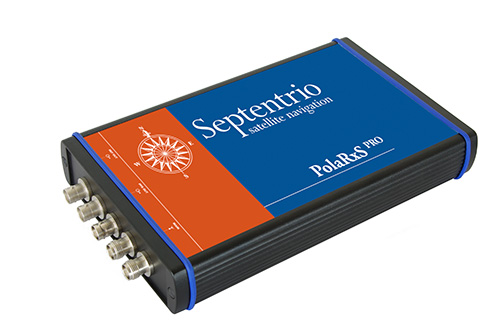
 The PolaRxS by Septentrio is a multi-frequency, multi-constellation receiver dedicated to ionospheric monitoring and space weather applications. It features simultaneous high-quality tracking of all visible signals (L1, L2, L5, E5ab/AltBOC GPS/GLONASS/Galileo/Beidou/SBAS) at low noise levels. The receiver outputs an extensive set of GNSS measurements, including signal phase and intensity at up to 100 Hz, with a phase noise standard deviation (phi60) as low as 0.03 rad.
The A Posteriori Multipath Estimator (APME+) tackles short-delay multipath to enhance the measurement quality, while LOCK+ tracking guarantees robust tracking of rapid signal dynamics during scintillation events. Included tools provide continuous total electron content (TEC) and scintillation indices logging for space weather and ionosphere monitoring.
Learn about more Galileo-ready products in our Galileo Product Showcase from the April 2014 issue.
-
LizardTech to Showcase Express Server at the GEOINT

GeoExpress Previewer with Infrared. LizardTech will conduct defense-oriented demonstrations of its recently launched Express Server software product next week at the GEOINT 2013* Symposium in booth number 4079. The symposium will take place April 14 – 17 at the Tampa Convention Center in Tampa, Florida. LizardTech is a provider of software solutions for managing and distributing geospatial content.
Express Server is image-delivery software for compressed raster imagery, including multispectral imagery. The latest version includes the ExpressZip web application for browsing, finding, and exporting imagery straight from the web browser. Users can view all of their collections and query by location, by keyword, by projection, and more. If users need to take their imagery on the go, they can use the built-in selection tools to export regions of interest. The ExpressZip application is open source and customizable.
“We look forward to sharing Express Server 9 with the intelligence community at GEOINT next week,” said Jon Skiffington, director of product management at LizardTech. “Most LizardTech users know MrSID and how it can be used to drastically reduce image sizes while retaining visual quality. What they may not be aware of is that Express Server is the fastest, easiest, and most stable way to distribute compressed, high-resolution raster imagery via standard protocols. And now with ExpressZip, our customers will be able to access all of their collections in one place and export imagery straight from the web browser.”
LizardTech will also showcase its GeoExpress software for compressing and manipulating satellite and aerial imagery, and its LiDAR Compressor software, which turns giant point cloud datasets into efficient MrSID files.
-
Scene Sharp USA to Unveil Fuze Go V2.0 Image Fusion Software at GEOINT
Scene Sharp USA will introduce Version 2.0 of its Fuze Go universal image fusion technology April 14-17, 2014, at the GEOINT 13* Symposium in Tampa, Florida. Scene Sharp will be hosted in Global Marketing Insights booth #2091 where it will demonstrate the new Fuze Go MS Sharp and Fuze Go SAR Sharp image fusion processing tools.
Scene Sharp is division of PraEis Ltd., a geospatially focused technology transfer organization with offices in Ohio and New Hampshire USA.
“Fuze Go is a fully automated technology that enables users to quickly and easily fuse data sets to add color to non-colorized satellite and aerial imagery with just a few mouse clicks,” said Scene Sharp CEO Ian Lucas. “By colorizing image data, GIS users can visualize and extract richer information content from remotely sensed data to make better informed decisions.”
In one simple step, the Fuze Go MS Sharp software fuses high-resolution panchromatic image data with lower-resolution multispectral data to generate a high-resolution color image. The full information content of the multispectral bands is retained in the fused image. More importantly, Fuze Go MS Sharp is the only fusion software capable of simultaneously merging up to 30 bands of multispectral data with a panchromatic image.
“Fuze Go MS Sharp runs at least five times faster and yields more consistent results than pan-sharpening applications that can only process four bands of data,” said Lucas. “As is true with the entire line of existing and planned Fuze Go products from Scene Sharp, no expertise in GIS or image processing is needed to use Fuze Go MS Sharp.”
As a universal image fusion tool, Fuze Go MS Sharp can handle data formats from any commercial image processing and enterprise GIS software packages. In cooperation with Exelis Inc., Scene Sharp created a Fuze Go MS Sharp plugin for the popular Exelis ENVI 5.0 and 5.1 image processing package.
“The plugin enables ENVI users to access the Fuze Go MS Sharp tool either within the ENVI workflow or outside of it so that fusion can be performed as a stand-alone application, freeing up the ENVI software license for other image processing activities,” said Lucas. “We are developing similar plugin capabilities for other major GIS and image processing packages.”
Fuze Go SAR Sharp was designed by Scene Sharp for more effective exploitation of data captured by satellite-based synthetic aperture radar (SAR) sensors. Fuze Go SAR Sharp fuses gray-scale radar data with optical multispectral bands to colorize the SAR data set. This image fusion presents the unique SAR data, which is captured through darkness and clouds, in a color context that greatly enhances the user’s ability to interpret the radar data and extract actionable intelligence from it.
Fuze Go MS Sharp and SAR Sharp are available for purchase for an annual license fee. Batch processing versions of the software packages are also offered to perform automatic fusion of multiple optical or SAR scenes.
“The ease of use and attractive pricing of Fuze Go software products make them far superior solutions to any other applications in the geospatial market today,” said Dr. Shawana Johnson, President of Global Marketing Insights. “With their seamless integration into existing image exploitation workflows, Fuze Go products can have immediate impacts in defense/intelligence, homeland security, mining, agriculture, forestry and oil & gas applications.”
-
Spectracom Offers GNSS Signal Generator for Production Testing
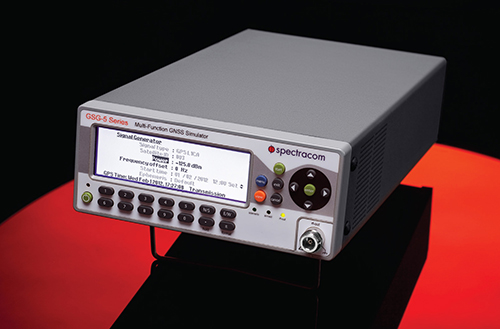
 The GSG-51 GNSS signal generator provides a fast and cost-effective solution for production testing for Galileo and other GNSS. It emulates a single GNSS signal and can be upgraded for Galileo, as well as to increase the channel count, add receiver trajectory control, and add advanced features such as SBAS (WAAS, EGNOS,MSAS, or GAGAN), white noise generation, or multipath simulation. Its main application is a simple but very fast manufacturing test, to assure that the assembly is correct, that the antenna is properly connected, and that the receiver can receive and identify a satellite signal, for instance, in mobile phones with integrated GNSS receivers.
With a wide RF level range from –65 to –160 dBm, the sensitivity of all types of GNSS receivers can be verified with a minimum of delay. The 60-dB of extra power from normal test scenarios allows for splitting the signal many times.
Contact Spectracom to learn more.
For more products ready for Galileo, see our Galileo Product Showcase.
-
SuperGIS Engine 3.2 Released for Customizing GIS Applications

Supergeo Technologies, a global provider of GIS software and solutions, officially released SuperGIS Engine 3.2 to assists GIS developers in customizing GIS applications to meet diverse requirements of each project.
Developed by Supergeo through integrating mapping and GIS technologies, SuperGIS Engine 3.2, as the COM-structured development component, provides developers with complete GIS core components. The developed applications can be seamlessly embedded into programming language in Windows developing environment and integrated with other systems for strong system development, Supergeo said.
SuperGIS Engine 3.2 offers complete development resources. GIS programmers or developers are allowed to efficiently develop applications with GIS functionalities such as Display Layer, Edit, Query, Access Spatial Database, etc. Hundreds of GIS-related objects, diverse controls, comprehensive developing samples and object diagram are given to technical users, to effectively build programs and deploy to multiple end-users.
A variety of new components are contained in SuperGIS Engine 3.2. For example, “Internet Connection Component” for Proxy Server settings and “Data Exclusion” for excluding specified vector data for better map display are newly supported. In terms of mapping, point symbols can be rotated and resized according to their attributes for more flexible displaying effect.
To know more information and download the free trial, visit www.supergeotek.com/ProductPage_SE.aspx.
-
Autodesk Unveils 2015 Suites for Building and Civil Infrastructure
Autodesk has announced the Autodesk 2015 software portfolio of design, engineering, and construction solutions to help drive a global transformation to Building Information Modeling (BIM). The 2015 Suites for buildings, civil infrastructure, and oil & gas projects offer hundreds of improvements and new capabilities for Autodesk Building Design Suite, Autodesk Infrastructure Design Suite and Autodesk Plant Design Suite.
In addition to the Suites enhancements, the Autodesk InfraWorks 360 family of offerings now includes enhanced roads and highways capabilities and new features to help civil engineers to model and visualize more realistic bridge design concepts.
“The architects, engineers, and contractors who use our products told us that they needed solutions to meet their real-world challenges, and we are responding. The 2015 Suites meet requests for greater productivity, improved collaboration, and more complete, better integrated BIM workflows,” said Amar Hanspal, senior vice president, IPG Product Group, Autodesk. “We also continue to offer more flexible ways to license our software, as well as more cloud services to improve customer collaboration and efficiency. Together with our customers, we are transforming the way buildings and infrastructure will be designed and built going forward.”
Here are the new features available in all of the 2015 Design Suites.
- Productivity and design improvements including:
- An updated, modern interface for Autodesk AutoCAD 2015 and AutoCAD 2015-based products: Helps building designers and civil engineers quickly open new and existing drawings with New Tab, visually access drawing content with Ribbon Galleries, and easily find tool locations with new Help Window functionality
- Integrated 2D and 3D quantification capabilities in Autodesk Navisworks Simulate 2015 and Autodesk Navisworks Manage 2015
- Better integration with the cloud: New one-button access to Autodesk BIM 360 from Autodesk Navisworks Manage 2015, Autodesk Navisworks Simulate 2015, Autodesk Revit 2015, and Autodesk AutoCAD 2015 helps customers collaborate and manage their BIM project workflow and data
- Enhanced point cloud capabilities include improved control over point cloud datasets and enhanced display settings in AutoCAD 2015-based products, as well as Autodesk Navisworks Manage 2015, Autodesk Navisworks Simulate 2015, Autodesk Revit 2015, Autodesk 3ds Max Design 2015, and Autodesk InfraWorks 2015, provide more realistic visualizations and walk-throughs
Building Design
Autodesk Revit 2015 software offers customer requested improvements to help make it easier for architects, and engineers to:
- Apply a hand-sketched, graphic style to models, using the sketchy lines feature.
- Include imagery in schedules to better convey graphical information.
- Create and manage changes with improved tools to sketch and control revision cloud shapes.
- Create more accurate documentation in 3D views using enhanced hidden lines capability.
New sketchy lines feature for Autodesk Revit 2015 software enables designers to apply a hand-sketched graphic style to views of a model to encourage client feedback and input when reviewing a design. Image courtesy of Autodesk. A full rundown of additional 2015 enhancements for the Autodesk Building Design Suite can be found here.
“As we’ve grown, we’ve committed more and more to Autodesk Building Design Suite because it gives us the complete digital toolbox we need not just to complete projects, but to innovate as well. While Revit is our design workhorse, and we use Navisworks to coordinate building systems, we also use many other tools in the Suite as well as Autodesk 360 cloud services,” said Andrew Watkins, Associate Principal, Ayers Saint Gross, a top 300 global design firm according to ENR Magazine.
Civil Engineering
Autodesk AutoCAD Civil 3D 2015 software (included in various editions of the Autodesk Infrastructure Design Suite 2015) includes these improvements:
- Greater flexibility for designing and displaying corridor models.
- More efficient creation of profile layouts.
- Better production drafting to create deliverables more efficiently.
- More consistency between the AutoCAD Civil 3D and AutoCAD ribbon/command set.
- Simpler ways to create custom subassemblies.
- Streamlined geographic location functionality includes ability to capture and embed Online Map Data (such as aerial map information) for offline viewing and plotting.
- Better interoperability and data exchange functionality for DWG and DGN files.
AutoCAD Civil 3D 2015 corridor modeling enhancements provide greater flexibility when designing and displaying corridor models. A full rundown of additional 2015 enhancements for the Autodesk Infrastructure Design Suite can be found here.
Autodesk InfraWorks 2015 (which is included in various editions of the Autodesk Infrastructure Design Suite 2015 and Ultimate edition of the Autodesk Building Design Suite 2015) and Autodesk InfraWorks 360 (which offers additional cloud services that add collaboration and analysis for large-scale preliminary designs) offer new features and capabilities including:
- An updated user interface for quicker access to the tool you need.
- Support for additional data formats including AutoCAD 3D DWG, AutoCAD Civil 3D DWG, 3D DGN, IFC, and Sketchup (SKP).
- CityGML import now supports schema location, building asset mapping, and self-intersecting geometry.

Autodesk InfraWorks 2015 and Autodesk InfraWorks 360 now offer a new, more intuitive user interface to help speed workflows. Key updates for Roadway Design for InfraWorks 360 include style zones within road sections and fixed width parametric grading for roads with discrete control over grading, cut slope, and fill slope.
The new Bridge Design for InfraWorks 360 helps civil engineers explore preliminary bridge design options more effectively by modeling and visualizing realistic civil structures in the context of the surrounding proposed site. This new application helps simplify, accelerate, and focus the layout of girder bridge design concepts, and maintain consistent data and context.
Autodesk also released previews today for upcoming industry-specific applications for InfraWorks 360 including Drainage Design for InfraWorks 360 and cloud services including Model Builder for InfraWorks 360 and Corridor Optimization for InfraWorks 360.
Oil & GAS: Plant Design
Key customer requested enhancements to the Autodesk Plant Design Suite 2015 include:
- Center of Gravity (COG) functionality to identify and edit COG for piping models, spools or components and produce COG reports.
- Fixed-length pipe modeling capability helps route fixed-length piping more easily.
- Bill of Materials capability to create tables and linked annotation when composing orthographic drawings.
New Center of Gravity functionality for AutoCAD Plant 3D 2015 software provides the ability to identify and edit center of gravity for piping models, spools or components. A full rundown of additional 2015 enhancements for the Autodesk Plant Design Suite can be found here.
Availability
Autodesk Building Design Suite 2015, Autodesk Infrastructure Design Suite 2015, Autodesk Plant Design Suite 2015 and Autodesk InfraWorks 360 availability and related cloud services vary by country. Details and purchasing options are available at www.autodesk.com/purchaseoptions, with subscription options outlined at www.autodesk.com/subscription/overview.
- Productivity and design improvements including:
-
Earth Observation Data Report Assesses Distribution Methods
Data distributors and services providers have established themselves as a key component of the Earth Observation (EO) value-chain and an important partner of the EO satellite operators in order to disseminate data to the largest number of end-users possible, according to a new report. This is particularly apparent in accessing key fast growing regional markets and being able to do business with government and private end-users locally.
According to Euroconsult’s new research report, “Earth Observation: Data Distribution,” an estimated 12-17 percent of the $1.5 billion commercial data market flows through the distributors. It is considered that all major vertical market sectors are procuring from the data distributors to varying degrees.
“While this percentage may seem low, it should be recalled that the majority of the total market is to defense end-users [65%] who prefer a more direct approach to receive imagery, such as through direct receiving stations. Business for the data distributor reflects this, with a far greater emphasis on enterprise markets,” said Philippe Campenon, deputy director, Space and Earth Observation at Euroconsult.
Revenue through data services from the distributors is first from civil governments, totaling 47 percent of distributor data business. This highlights the need to be local in accessing civil contracts, an important consideration given the growing demand globally for EO solutions. Data provision to the private sector through distribution is also disproportionality higher than the total data market, representing 37 percent of the distributors business.
The relatively small figure of 16 percent data revenues associated to defense users demonstrates the more direct approach preferred by this user community. Most operating companies with very high resolution satellites offer direct receiving stations solutions to defense end-users in order to meet their requirements of secure, continuous data supply with degrees of autonomy in satellite tasking and data acquisition, and short delivery time.
To reach out to all user sectors it is therefore considered a necessity to have a diverse approach in mechanisms for data distribution, the report said. This is reflecting in the type of distribution offering. In total, there are more than 550 active data distribution agreements signed globally with local companies. These contracts are classified in five categories within the report, addressing the rationale, contract conditions and key metrics for the following:
- Data Resellers
- Value-Added Resellers (VARs)
- Exclusive Distributors (or Channel Partners)
- Business Partners
- Direct Receiving Station Partners
Interviews were conducted with 15 data distributors with a mean presence in the sector of 19 years. Companies ranged from data distribution being their primary business to organizations active in other parts of the EO value-chain. The following topics are reviewed in detail:
- Motivation for setting up a data distribution business line
- The distributors’ offer to the satellite operators
- The relationship between satellites operators and the distributors
- Data distributor customer mix
- Importance of key client requirements
- Technology as a market driver/inhibitor
- Ranking the vertical markets driving data sales and services
-
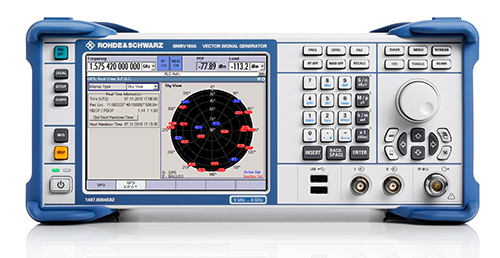
Vector Signal Generator Covers BeiDou
 The R&S SMBV100A vector signal generator can generate Galileo, GPS, and GLONASS signals for up to 24 satellites in real time. With the SMBV-K107 option, the simulator covers the BeiDou standard as well.
The R&S SMBV-K101 option allows developers in the automotive and wireless communications industries to test GNSS receivers for specific effects such as obscuration and multipath propagation. If the GNSS receiver of a navigation instrument or smartphone is located inside a vehicle, testing must also take into account the obscuring effect of the vehicle’s metal body. The R&S SMBV-K102 option can simulate this obscuration and, if required, the additional antenna pattern.
In addition to test scenarios for A-GPS, smartphone developers have the Assisted Galileo (R&S SMBV-K67) and Assisted GLONASS (R&S SMBV-K95) options at their disposal.
Contact Rohde & Schwarz to learn more.
For more products ready for Galileo, see our Galileo Product Showcase.
-
Trax Personal Tracker Integrates u-blox GNSS and Cellular Technologies
Swedish WTS (Wonder Technology Solutions) and u-blox have announced that WTS has launched Trax, a personal tracking device for children and pets. Based on u-blox’ GNSS smart antenna and cellular module, the tiny tracker can be located anywhere, anytime via a free Android or iPhone mobile phone app.
In addition to real time tracking, Trax provides flexible geofence alerts, and can even monitor how fast your teenager is driving. It also works indoors thanks to a proprietary dead reckoning algorithm that delivers a position even when satellites are out of sight. Accurate down to 1.5 meters, the robust, water-resistant device also provides an “augmented reality” mode that helps users locate their trackers using a Smartphone’s built-in camera view.
To achieve the smallest possible size, Trax takes advantage of u-blox’ CAM-M8Q GNSS receiver module, which has a built-in antenna. CAM-M8Q (chip antenna module) provides both small size (9.6 x 14.0 x 1.95 mm) and multi-GNSS capability. It is based on a u-blox M8 chip and incorporates a chip antenna, SAW filter, LNA, TCXO and RTC crystal. The surface-mount module is also extremely low in height, making thin customer designs possible.
“Trax is the world’s smallest and most versatile personal tracking device available, packed with features designed to provide peace of mind to parents and pet owners almost anywhere in the world,” said Fredrik Danelius, managing director at WTS. “By combining the leading GNSS and cellular technologies from u‑blox, we have designed a tiny, reliable, low-cost device that protects our most valuable family members: children and pets.”
Trax comes with an integrated SIM-card and two years of free data and roaming in 33 countries. It is charged via USB and typically lasts between two and four days on a full battery. For wireless connectivity, the device contains u‑blox’ SARA-G3 GSM/GPRS module which is footprint compatible with u-blox’ 3G SARA-U2 module for easy 2G to 3G upgrade.
“Trax is an elegant and sophisticated example of our embedded GNSS and cellular modules combined to protect people’s loved ones”, said Pasi Alajoki, area sales manager at u-blox. “It is an important application of our mobile communications and global positioning technology where performance, size and power consumption play a critical role. We are proud WTS chose u-blox for Trax.”