Trimble and Infinicon, Inc., are offering a portable Infinicon DataFID Flame Ionization Detector and Trimble SEMonitor software as a solution for surface methane monitoring of landfills. The landfill gas solution provides a more streamlined workflow for the environmental services professional, improving efficiency and reducing rework.
The announcement was made at WasteExpo 2014, a North American solid waste and recycling tradeshow.
In the past, field technicians had to carry notebooks, maps, plans and the sensor to locate, mitigate and audit trouble points on site. The Trimble SEMonitor and Infinicon DataFID solution combine to eliminate the need for pen and paper, increase communication capabilities in the field and improve work flow demands for field technicians, maximizing productivity and streamlining the workflow.
By leveraging Trimble’s innovation and expertise in geospatial software solutions with Infinicon’s proficiency in portable, intrinsic safe detection equipment, environmental professionals can see increased efficiency in conducting their landfill methane surface emission monitoring, analysis and reporting.
“Collaborating with Infinicon allows us to offer a more robust software solution while simultaneously addressing the entire environmental workflow from data collection through analysis for compliance and operational optimization,” said John Rice, general manager of Trimble’s Environmental Solutions Division. “Together, we offer the environmental industry a complete end-to-end solution for landfill methane monitoring.”
“The Trimble SEMonitor adds a unique dimension to traditional monitoring practices by streamlining surface landfill gas data collection, analysis and compliance reporting. Communicating via the Bluetooth connection, the hardware and software solutions combine to improve efficiency, accuracy and effectiveness of surface methane monitoring,” said ChingYue Yeung, product manager for the INFICON DataFID.
Trimblehas released a new GNSS-based machine control solution to improve efficiency of bulk earthworks and landfill compaction operations. Installed on a four-drum soil or landfill compactor, the Trimble CCS900 Compaction Control System allows a machine operator to make more uniform and efficient passes, report compaction production data in the field, and ensure target compaction is reached with minimal fuel usage and machine wear.
The announcement was made at WasteExpo 2014, North America’s largest solid waste and recycling tradeshow.
CCS900 for Bulk Earthworks. The CCS900 system tracks compaction passes in real time with easy-to-read color mapping on the in-cab display. It improves bulk earthworks operations by ensuring fill material is adequately balanced and uniformly compacted from the bottom up.
CCS900 for Landfills. Landfill operations require contractors to compact the maximum amount of waste into the smallest area of vertical and horizontal cell space. Using CCS900, landfill owners can ensure that cell space is optimized, voids are eliminated and layers are compacted to their target density more efficiently. With real-time mapping on the in-cab display, the operator can avoid unnecessary passes that waste fuel and cause additional wear on the machine. The system also collects as-built layer information for in-field reporting and tracking of daily volumes.
In-Field Reporting and Printing for Quality Control. For both soil and landfill applications, Trimble CCS900 offers extensive in-field reporting options, including in-cab report generation and printing. This functionality allows compaction production analysis to be carried out in the field instead of waiting until data is transferred back to the office. Compaction progress and problem areas are indicated on the in-cab graphical control box and listed in the in-field report so they can be addressed immediately, instead of at project completion when re-work is more costly. An optional serial printer in the compactor cab also enables supervisors to sign off on the completion of the compaction work in the field.
From a weather perspective, Aberdeen, Scotland, may not be the most inviting location in the world in which to live. Nevertheless, Aberdeen is the leading European oil & gas business hub and is one of eight “super cities” spearheading the UK’s economy. But it’s waaaaay up north of the border with England on the east coast of Scotland — winter conditions can be difficult, even inhospitable at times. But if you want to transmit differential corrections out to shipping and oil rigs in the North Sea, it’s an ideal location.
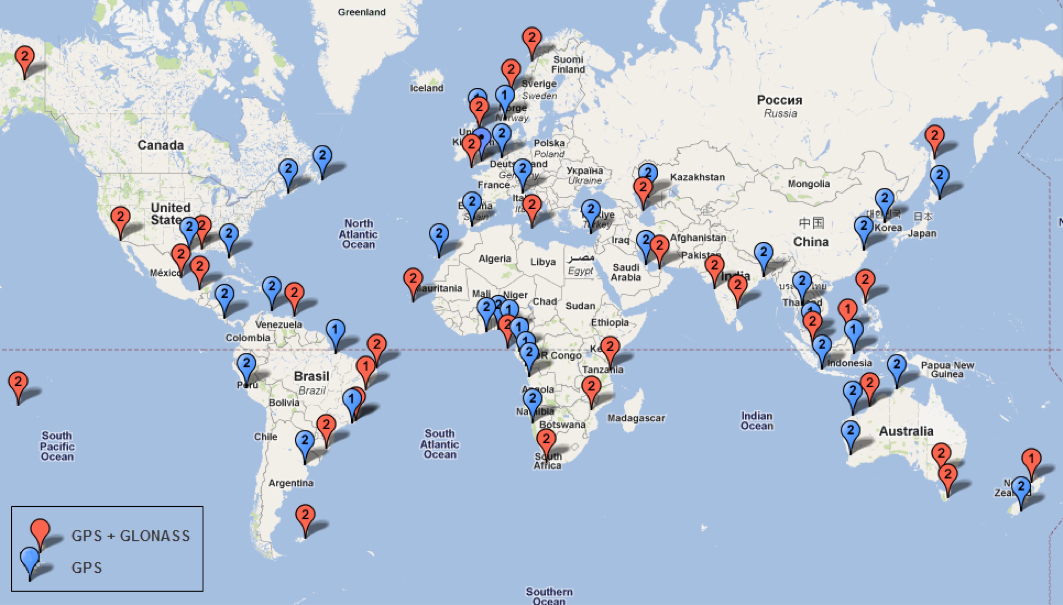
Since its first beginnings in Aberdeen, Veripos has evolved to become a major worldwide business for marine, and now also for “precise land navigation, positioning and guidance solutions.” Veripos is now delivering augmentation services on a global basis, employs more than 130 specialist personnel based in 11 sites around the world, and in 2013 had revenues of more than $45 million. With a global ground network of more than 80 dual-redundant receiver base stations, Veripos now provides not only traditional differential GNSS transmissions, but also precise GPS and GLONASS orbit and clock corrections over seven Inmarsat GEOs and also via the Internet — we now call Precise Point Positioning (PPP).
Veripos ground receiver station network.
Veripos began in March 1989 as a joint venture between Brown & Root Survey and Ormston Technology, a specialist marine electronics company based in Hull, England. Initially, Veripos provided a conventional Differential Global Positioning Service (DGPS) for users in the North Sea based on HF radio transmitters.
Introducing a much broader satellite-based DGPS service in 1994, coverage was extended to cover the Gulf of Mexico followed by further expansion of the network/coverage into Brazil, West Africa, Mediterranean and Caspian Sea. Veripos became a wholly-owned subsidiary of Subsea 7 in the same period. Following a major expansion in late 2004, full global service coverage was achieved in 2005, and ultimately Veripos became the second largest precise satellite positioning services supplier in the world to the marine industry, with leading clients in exploration, seismic, construction, survey, offshore supply vessels (OSV) and offshore drilling. In late October 2012, Veripos diversified further, launching its TerraStar business to address the land and near-shore sector.
Achieving global accuracies of 5-10 centimeters using relatively small amounts of data, users worldwide are mostly able to accommodate the initial convergence time needed to achieve these higher accuracies. Veripos claims that using multiple constellations, convergence time can be down to less than 10 minutes — even lower for hot starts.
The “free” IGS data that competes with Veripos and other subscription correction providers is also pretty good, but it’s not generally used by commercial operations.
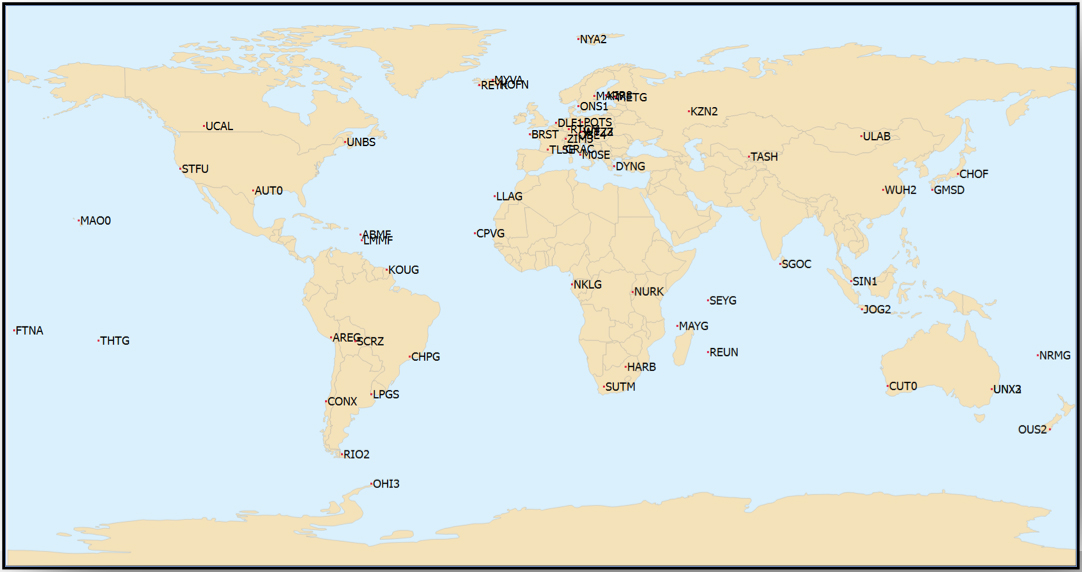
IGS Multi-GNSS Experiment Tracking Network.
IGS data is provided by academic and government sources around the world, and the advantage is not only free access, but also open data and multiple open-source software tools and data, all built to published open standards. But the IGS system is not a 24/7 reliable data source, and support can be a problem. It’s not designed for companies who must have service guarantees in order for them to consistently operate profitably in difficult conditions — it’s more experimental, for research and testing for the academic and government outfits that produce the data, along with a whole bunch of engineering teams who take advantage of free data and can cope with system hiccups for their R&D and for comparison purposes.
So Veripos and other commercial providers overcome the weaknesses of IGS by providing a worldwide network that is well maintained — an infrastructure designed for high reliability and availability. Each base station has dual-redundant receiver and communications links. There are three processing centers, two active and one on warm standby, that can each operate the whole system, and each of the processing centers has dual-redundant equipment. There are seven geostationary satellites with a large degree of coverage overlap, and Internet data feeds also provide a backup. More than these system design features, Veripos works directly with its customers to ensure successful integration of their corrections with customer operations and, above all, supports the customer directly during these operations. If the customer is not operational, Veripos recognizes that down time means lost profits for its customers, so its staff work hard to avoid any service interruptions.
It’s not clear what would happen to this currently stable marketplace if and when Galileo begins selling a commercial service on E6, but the existing commercial service providers are pretty sure that competition in their segment from a government provider that is publicly funded is not in their best interests. At the recent Munich Satellite Navigation Summit, Gian-Gherardo Calini from the European GNSS Agency certainly received a clear message from Trimble, NovAtel, Veripos and Fugro (to a lesser extent) that these companies do not believe that Galileo should be entering their market. However, Calini did state several times that the GNSS agency did not want to disrupt this market. How to do that when the Galileo infrastructure, control systems and satellites are wholly government funded remains unclear. Even if the service were wholesaled to a commercial provider, it’s unlikely that the retailer would have to bear the full cost of maintenance and support of the entire Galileo ground and space infrastructure, so their service would in effect be hugely subsidized.
Veripos recognized that focusing on its marine service alone is ignoring the land segment. So the company established a new business called TerraStar to address the land segment, just as Fugro had spun off OminSTAR for the land segment many years ago. TerraStar is still a division of Veripos, and the PPP infrastructure and distribution system it uses is the same. TerraStar is focused entirely on land and close-to-shore operations, so its business development and marketing is aimed at wholesaling its services through OEMs for these segments, while Veripos continues in parallel solely with marine and offshore.
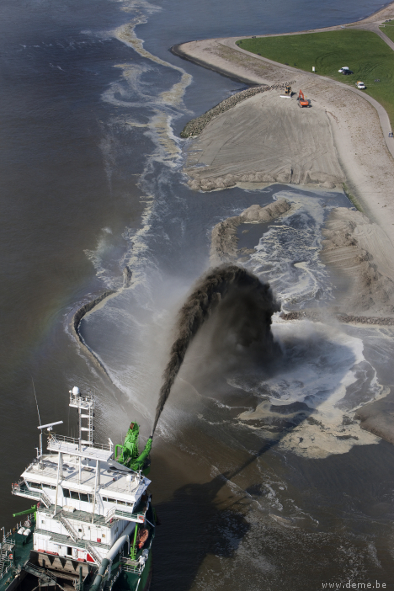
Initial OEMs to sign up were Septentrio and Altus, which is a subsidiary of Septentrio that focuses on survey products and applications. Septentrio had a number of successes with DEME dredging and land reclamation in Belgium and terrascan airborne geophysical survey in South Africa and Germany.
Terrascan airborne geophysical survey.DEME land reclamation.
And here we arrive at the place where these companies all start to come together. In mid-March this year, Hexagon acquired Veripos, along with TerraStar. Hexagon is, of course, the parent that has NovAtel and Leica in its thoroughbred stable of GNSS industry leaders. Could this acquisition have something to do with John Deere/NavCom operating its own StarFire PPP system, or Trimble acquiring OmniSTAR from Fugro and now providing its own range of PPP correction services?
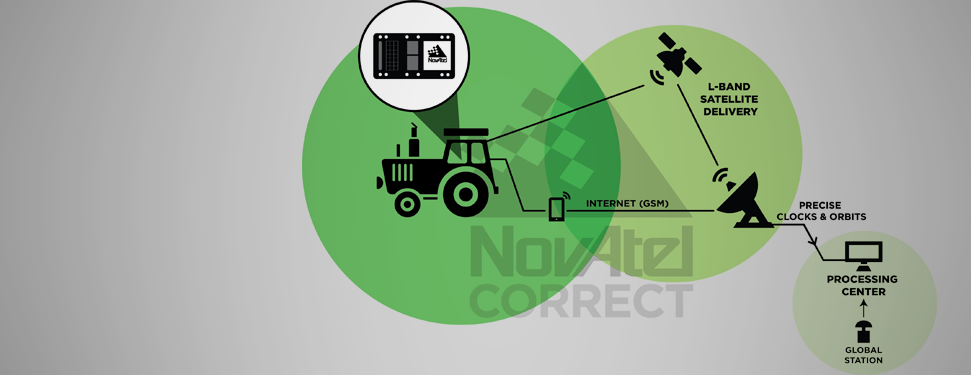
Well, NovAtel rolled out NovAtel Correct and new software at the end of March for its OEM6 high-precision receivers, which includes TerraStar’s precise point positioning (PPP) corrections. And NovAtel now has a closely associated company within the Hexagon stable, so a long-term association between NovAtel and Veripos/TerraStar is just about assured. And, with a big company group like Hexagon and many potential connections between group members with common interests, the prospect for continued investment as revenues increase means Veripos should be even better positioned going forward.
And, of course, adding NovAtel customers, including other potential OEM third parties, to the Veripos/TerraStar user base all helps both companies’ revenue and keeps their parent Hexagon happy too. So actually, it’s all about increasing the bottom line!
Trimble announced today comprehensive updates to its powerful suite of geospatial office software, including Trimble Business Center, RealWorks and Trident solutions. Together, these updates provide increased data interoperability between Trimble office software platforms, enabling users to easily combine data generated through traditional survey methods, laser scanning and mobile mapping workflows, to produce richer and more intuitive deliverables, the company said.
“Data interoperability across Trimble software platforms provide users with seamless and efficient workflows and the flexibility to focus first on the output needed for each job,” said Alain Samaha, business area director of GIS and software for Trimble’s Geospatial Division. “Whether it is a stakeout design or a precise as-built model, users can select the best software environment to get the job done right and deliver that information in the most useable format.”
The announcement was made at SPAR International 2014, a conference for 3D data capture, processing and delivery technologies.
Trimble Business Center Version 3.20. Geospatial professionals now have access to an improved processing and analysis experience. With an integrated and powerful new point cloud engine, users can visualize and edit large point clouds while simultaneously working with high- resolution imagery. Combining these rich data sets into a single workflow saves time and potential conversion errors.
Trimble RealWorks Version 8.1. The latest release of Trimble RealWorks provides surveyors and laser scanning professionals with enhanced tools that make it easier to visualize and interpret scan data. Point clouds can now be easily colorized using high-resolution and High Dynamic Range (HDR) images from professional grade external cameras, significantly reducing measurement and modeling times.
Trimble Trident Version 6.1. Mobile mapping professionals can now combine the rich datasets captured using spherical cameras with laser scanner and inertial measurements from the Trimble MX2, to easily determine the location of surveyed features and automatically classify imaged objects.
The new office software versions are expected to be available in April 2014 through Trimble’s worldwide Geospatial distribution network.
Trimble has announced the latest version of its eCognition software for geospatial data analysis. Trimble eCognition software is a powerful solution for the analysis and extraction of information from geospatial data collected via aerial, satellite and mobile mapping platforms, the company said.
The new version 9.0 release simplifies and reduces the time taken to classify objects in imagery data sets using the new template matching function. With eCognition 9, users can define objects graphically to streamline the template creation process. These templates are used to automatically identify objects of interest in imagery.
In addition, Remote Sensing and GIS professionals can now integrate data layers more efficiently through improved GIS tools within eCognition 9. These capabilities provide a framework for advanced analysis that allows professionals to use eCognition to resolve a larger range of geospatial queries and obtain more accurate results.
“With the fast growth of imaging and remote sensing data collection, geospatial professionals need faster and simpler methods to analyze and extract meaningful information from the data,” said Alain Samaha, business area director of Trimble’s Geospatial Software Solutions Division. “eCognition 9 takes simplification and integration to a new level while augmenting the precision and accuracy of results. This opens the door to a wider range of applications across multiple industries.”
This month I am writing to you from Munich, where I have just attended the Munich Satellite Navigation Conference. I have written up the full Summit proceedings for GPS World’s new European GNSS & Earth Obersvation Report (EAGER) newsletter. You can read that (much longer) column here and while you’re at it, sign up for the new quarterly newsletter. What follows is an excerpt of it, specially focused on professional GNSS OEM interests.
I used to spend quite a lot of time in Munich working on a multi-national, multi-role fighter aircraft program, so returning for this year’s Munich Satellite Navigation Summit stirred some good memories for me. Held in the opulent Residenz Muenchen March 25-27, the conference always has a special atmosphere that these historic 1385 surroundings convey to the attendees.
Munich is in the Southern German state of Bavaria, and Bavaria has taken a real interest in the promotion and success of Galileo; witness the extensive Bavarian booth at recent European and North American GNSS conferences. Germany has, of course, been one of the principle nations providing significant funding for Galileo from its inception.
So with this backdrop, the summit brings together people involved with GNSS from around the world to report on the current status of GNSS and to relate how their participation in satellite navigation has progressed. And, of course, Europe, Germany, Bavaria and the European GNSS industry, which is now recognized around the world, all take the opportunity to present their capabilities and successes.
The first day’s session contained constellation updates from GPS, Galileo, Beidou and the UN International Committee on GNSS (ICG) — GLONASS delegates were notably absent. There was much speculation that they declined to attend due to the Crimean situation, and one U.S. delegate even inferred that they were “uninvited.” For the constellation updates, see the longer article referenced above.
Munich Highlights
A collection of examples of Bavarian GNSS innovations followed in a very interesting session led off by an overview of Business Incubation Centers and their collaboration with government agencies and research centers. Small business start-ups are apparently encouraged to apply during four annual time-slots, and receive two years’ incubation support and cash incentives. This has lead to 81 new ventures and has apparently been the source of the 1,000 new jobs mentioned by the Minister of Economic Affairs. The annual European Satellite Navigation Competition and Galileo Masters competition have also generated a whole bunch of ideas and concepts (8,000), some of which have found support through this incubation process.
Airbus Defence gave a short overview of the testing work it accomplished in supporting the first Galileo fix and has prepared several vehicle test platforms, ready to take the next phase of Galileo testing to the streets in realistic, real-world environments.
DLR provided insights into a number of its activities, namely:
Iono mapping
Signal distortion
Multipath
Jammer mitigation – adaptive antenna and processing
GNSS repeaters – how they can become unintentional jammers
Spoofer and Multipath inbvestigations
Antenna designs
GNSS evolution – Maser and clock combination benefits
Army University of Munich discussed radio science experiments in the Solar System and experiments using Mars Express (above) in polar orbit around Mars and resulting measurements of the moon Phobos. Internal and external outreach efforts with numerous organizations were also mentioned.
IFEN provided more down-to-Earth information on the on-going activities at the GATE ground-based pseudolite range, which has enabled realistic outdoors testing of Galileo receivers, well in advance of signals from orbiting satellites. Recent testing has now been able to include the four operating Galileo SVs on orbit with GATE pseudolite signals. GATE will continue to evolve over the next few years to keep up as more Galileo orbital signals come on-line.
Fraunhofer presented information on its 40-channel GPS/Galileo/GLONASS chip-receiver (above) – claiming 1-meter accuracy, low-cost, robust reliable position solution, small form-factor and low-power. Following PRS test-bed development efforts, Fraunhofer has now received a contract to also deliver 20 pre-operational Galileo PRS receivers for use in initial pilot projects.
GNSS Interference
Vidal Ashkenazi, in his inimitable form, lead a panel discussion on interference, jamming (in particular Personal Privacy Devices, or PPD) and spoofing, and coaxed his panel members to provide a whole bunch of information on what’s being done, mitigation capabilities and potential enforcement. Unlike all the other sessions, Vidal’s panel members didn’t use presentations, but rather responded to wide-ranging questions on the subject from the session chair. For a complete view of this, as well as a subsequent session on “Legal Impacts of Personal Privacy Devices (PPDs),” see the EAGER newsletter column.
Precise Point Positioning (PPP)
The group discussing PPP options consisted of the the European GNSS Agency (GSA, charged with exploitation of Galileo services), several principle industry service providers of PPP, and the federal agency, which provides PPP-like services in Germany.
The GSA presented its ideas concerning the provision of high-accuracy PPP corrections over the Galileo E6 signal – the so-called Commercial Service (CS). The intent, however, would not be to disrupt the commercial marketplace. Nevertheless, GSA is proposing a public-funded service to be sold to users within a market that is already well served by commercial worldwide service providers who charge users for cm-level PPP service.
And while Trimble made a polite presentation on the many levels of capabilities of its TerraSat services, as did Veripos and to some extent Fugro, it was clear that the commercial providers are not eager to find competition in their market from a government entity. NovAtel also chimed in on this conflict as it will be involved in Veripos/TerraStar, following its acquisition by Hexagon. Fugro appeared to be interested in acquiring rights to distribute CS on behalf of GSA.
The German federal agency promoted open data, source and standards from the IGS network to which it contributes: IGS is supported by numerous national agencies around the world. Orbit and clock PPP service is available 24/7 from multiple sources. However, the service is offered on a best efforts basis without a service guarantee, and cannot achieve the accuracies or convergence times of commercial services.
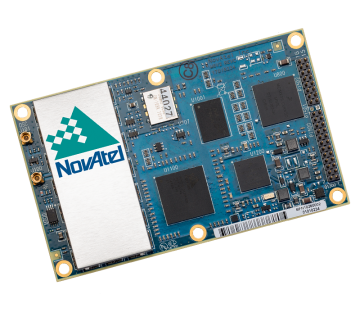
I talked subsequently with Michael Ritter, CEO of NovAtel, to learn the background to the Veripos/TerraStar acquisition. It’s clear that providing PPP services means added value to NovAtel when they sell receivers with PPP capability, so they will quickly discontinue offering Omnistar subscriptions and will shortly launch NovAtel Correct, offering Veripos (marine) and TerraStar (land) PPP subscription services. NovAtel is making significant inroads in the agriculture segment, and they see PPP service as an essential element of this and other businesses. The acquisition was worth something on the order of $200 million, so there is a vested interest in making these services pay and discouraging GSA entry into this market. Veripos will continue supplying other GNSS OEM receiver manufacturers — notably Septentrio, who use TerraStar services, now also NovAtel, and potentially another major GNSS manufacturer.
Future of GNSS in User Segment
Chaired by Greg Turetzky of Intel, this session opened the third day of the Summit. The presenters offered their concepts for current and future GNSS equipment and systems.
Stanford University outlined its work with FAA on an alternate PNT system to be used as a back-up to GNSS. It used to be that GNSS systems were designed to overcome space-weather effects and faults in equipment design or manufacture — nowadays, there are “bad guys” out there and we need to “protect, toughen and augment” these systems. Antennas can be built that impart a specific signature to the signals they transmit, and this may aid in finding and prosecuting the bad guys, but the main focus of work is development of a hybrid system using Distance Measuring Equipment (DME) and a pseudolite.
Tests have demonstrated good performance, and these prototype efforts could lead to aviation requirements (MOPS) development by 2018 and deployment by 2020.
Septentrio has been involved in Galileo since it began and was the first company with Galileo receivers. Nowadays, they have receivers fielded in multiple commercial applications, including machine control, maritime, aviation, automation, and measurement, delivering accuracies from a meter down to a centimeter. They will add E6 to their AsteRx family of multiple-channel, multi-frequency, multi-constellation receivers, and have developed a number of hardware and software mitigation techniques to combat jamming, interference and multipath, and to integrate receivers with inertial units for aiding.
Furuno is interested in resilient PNT for marine applications, and has examined the use of eLoran as an alternative to GPS, but has moved towards a system of radar beacons that detect radar pulses from passing ships and transmit their positions, enabling position determination. In tests, accuracies of around 2 meters have been obtained with two beacons.
Quascom’s approach is to add firewalls inside receivers, which toughen the processing and prevent distortion of position information. Quascom believes this will be necessary until authentication can be added into the GNSS system itself, so that any data received is validated and is known to be good.
Chris Rizos from the University of New South Wales, Australia, drew attention to the “holes” that exist in GNSS, and reviewed a number of possible “Band-Aid” fixes, such as Wi-Fi especially for indoor location. However, his solution seems to be to establish terrestrial networks transmitting GNSS-like signals.
Eurocontrol indicated that aircraft currently use inertial and DME extensively as a back-up to GNSS navigation. By 2030, there will be multiple constellations, and dual-frequency use should become commonplace in aviation, so GNSS navigation should be much more robust. Aircraft approaches are required to be in conformance with Required Navigation Performance (RNP), so would it be possible to develop RNP procedures for DME and inertial to be used as back-up during approaches in the event GNSS is disrupted?
To conclude the session, Airbus provided a “starter course” overview on inertial systems – how they work, the range of different types available, what they can achieve, costs, strengths and weaknesses and integration with GNSS.
The summit continued with subsequent sessions on:
Space technologies and users
GNSS monitoring of Earth and disaster management
Copernicus – Earth Observation
GNSS Education
Unfortunately, my deadline didn’t allow me to attend these equally interesting presentations.
There is also a manufacturers’ exhibit area at the summit that just fits into a couple of corridors near the main hall – around 20 booths. I talked with several of the manufacturers, including Spirent who has launched its latest GSS9000 multi-frequency-constellation simulator, with a four-fold increase in system iteration rate over the previous model. Exhibitors appeared to be pleased to be at the summit and by the level of interest shown by the attendees.
So, as this year’s Munich Summit concludes, where does this leave us? We’ve learned some new things about several GNSS topics and heard some interesting new concepts. Europe appears to be now focused on users and applications, to ensure there is market growth and use of Galileo. What stands out for me is the contrast between how European governments go about GNSS and how North America and the commercial world does the same thing without as much direct influence. This is nothing new, of course, it’s just the European way…
PeopleNet, a Trimble company and provider of fleet mobility technology that optimizes performance and decision-making management, has launched a mapping and navigation solution for its Energy Services suite, serving U.S. fleets in the upstream and midstream sectors.
“Our Energy Services suite capitalizes on our proven fleet mobility solutions that increase efficiency, safety and compliance for all oilfield service segments, including producers, oilfield construction and well service companies, as well as haulers of fluid and crude oil. In addition, we’re leveraging our parent and sister companies’ industry-standard lone-worker, mapping and navigation technologies to fast-track development of new services to continue improving operations for Energy Services fleets,” said David Buhl, leader of PeopleNet’s dedicated Energy Services Division.
PeopleNet’s new Energy Services mapping and navigation solutions are based on exclusive, detailed maps of private and leased oilfield roads that facilitate vehicle navigation to and from well sites, coordination of disparate workforces to promote efficiency, location monitoring of equipment to ensure vehicles are on the correct route for least-cost routing. The Oil and Gas Map Portal is a web-based application used by back-office dispatch personnel to manage the navigation needs of vehicles and includes reporting, dashboards, and scorecards that help manage compliance with producer-landowner road-usage agreements.
CoPilot Oil and Gas Navigation is an in-cab application that uses oil and gas field mapping for providing turn-by-turn directions to the driver to enable on-time arrivals and scheduling. Location data, including wells, is installed onto the in-cab device and is accessible in the points of interest menu. When a location is selected, the application provides turn-by-turn directions to the driver.
A growing number of energy services fleets are using PeopleNet technology to promote on-time schedules, enhance service levels and improve safety/compliance, including Gibson, Missouri Basin Well Service, Nuverra Environmental Solutions, Rockwater, and Tankstar USA.
These new services are based on reliable two-way messaging and GPS, supported by tri-mode communications (cellular, satellite and Wi-Fi). They are being added to PeopleNet’s current Energy Services offerings, which include: Crude Workflow for improving driver efficiency; eDriverLogs HOS application with oil field regulations; Speed Gauge speed monitoring; and Automated Fuel Tax reporting for eliminating manual trip sheets.
CompassTools Inc., a distributor of mapping and GIS products for field data collection, has installed a GPS reference station in Durango, Colorado, to provide freely available differential correction data to GPS users in the Four Corners area of Colorado, New Mexico, Utah and Arizona. The correction data can significantly enhance the accuracy of location coordinates captured by GPS receivers used in mapping and surveying applications.
“We have many clients involved in GIS mapping projects for energy development, utility asset location and local government applications in the Four Corners region,” said CompassTools CEO Steve Chiles. “CompassTools set up the Durango reference station to help them complete their mapping projects with greater efficiency and accuracy and at less expense.”
CompassTools is a value-added reseller of hardware and software mapping solutions from Trimble, Laser Technology, Ricoh, GeoSpatial Experts, Esri, and CartoPac. Since 1994, CompassTools has sold, leased, repaired, and offered training on the latest GPS and GIS mapping products in an eight-state region that includes Colorado, Wyoming, New Mexico, Minnesota, Nebraska, the Dakotas and parts of Texas. In addition, the firm provides expert GPS/GIS consulting and creates customized bundled packages to meet the specific needs of complex data collection projects.
The Trimble NetR9 GNSS reference station installed by CompassTools in Durango is capable of receiving location signals from GPS, GLONASS, and Galileo. CompassTools established the unit as a Continuously Operating Reference Station (CORS) accepted by the National Geodetic Survey (NGS) and part of Mesa County Colorado’s Real Time Virtual Reference Network.
“The Trimble NetR9 broadcasts differential correction data in real time via a cellular signal,” said Chiles. “And the correction data is also posted automatically to the CompassTools website for post-processing.”
Chiles explained that this means the GPS user has the option — usually depending on the capabilities of their portable GPS receiver — to correct their location data and improve its accuracy in real time as they collect it in the field. Or the GPS user can download the correction data from the CompassTools website when they return to the office and process the data after the fact. An advantage of real-time correction is the user knows the accuracy of the GPS data being collected while still in the field.
“The ultimate accuracy of the collected location data depends on the quality of GPS receiver being used,” said Chiles. “We have many clients in Durango using mapping-grade handheld GPS data collection devices achieving accuracy better than 10 centimeters using the reference station data.”
Trimble is adding to its airborne LiDAR portfolio with the Trimble AX60i and AX80. Both are highly capable, versatile systems that meet the demands of aerial survey operators for corridor and wide area mapping projects, Trimble said.
The new airborne systems, together with flight planning and analysis software tools, have been designed to provide rapid and efficient point cloud capture as well as high-resolution images and proven workflows with high productivity. The systems can be installed on either fixed wing or rotary aircraft.
Designed for low-altitude corridor mapping applications, the Trimble AX60i is an entry-level LiDAR system built on the same versatile platform as the high-altitude AX60 system, Trimble said. The platform allows AX60i users to upgrade to an AX60 in the future. The AX60i can be operated up to 5,000 feet above ground level (AGL) while offering a 400-kHz laser pulse repetition rate (PRR) with a single-channel, downward-looking laser.
The Trimble AX80 is a dual-channel LiDAR system that can be operated up to 15,500 feet AGL and is designed for the most demanding survey applications from high-altitude wide area mapping to detailed low-altitude corridor mapping. The AX80 offers an 800-kHz PRR with revolutionary forward- and backward-looking capability to enhance point density on the ground and improve image resolution. This two-dimensional oblique view offers unparalleled scanning of vertical facades of structures.
Trimble’s AX80 aerial imaging system.
An optional, fully-calibrated 80-Megapixel camera with forward motion compensation can be added to the AX60i and AX80 systems. The camera is integrated into the sensor head package and harmonized with the laser sub-system so that it does not need re-calibration each time the system is fitted to an aircraft.
These systems are optimized for precision applications, providing a uniform distribution of laser points across the entire field-of-view to widen the usable swath width. Operators can reduce track overlap or duplication, or fly at higher altitudes to achieve a given resolution. Together with a high-precision positioning system, integral power supplies and an in-flight monitoring tool, the Trimble AX60i and AX80 can allow operators to lower the complexity of airborne LIDAR surveys while increasing the quality of the output.
“The Trimble AX60i and AX80 systems extend our portfolio of aerial imaging solutions to meet a variety of mapping applications,” said Phil Sawarynski, business area director of Imaging Solutions for Trimble’s Geospatial Division. “They have been designed as true end-to-end solutions and are delivered with Trimble flight planning software and Trimble Inpho analysis software. Because everything is supplied by Trimble, operators can have confidence that the complete solution works together properly, and that the flight planning and post-mission analysis suites will enable them to provide a high-quality service to their customers.”
Trimble has introduced the Juno T41 rugged handheld computer with integrated Ultra-High Frequency RFID capabilities. In addition to high-speed 1D/2D barcode imaging technology, smartphone capability and enhanced, real-time 1-2 meter GPS accuracy, the Juno T41 series now offers new models that provide more functionality and configuration choices for data collection and mobile workforce management, Trimble said.
“Often the RFID tag is specifically used because the item being tracked is in difficult or harsh environments where a barcode won’t survive,” said Jim Sheldon, general manager of Trimble’s Mobile Computing Solutions Division. “The rugged design of this handheld computer is an ideal solution for reading RFID in outdoor and extreme situations.”
The RFID capability can be combined with Enhanced GPS and/or smartphone connectivity so customers can choose a specific handheld model that meets their needs.
The Juno T41 R will automatically recognize tags across a variety of frequencies and work with any size or style of RFID tag that is designed for customized solutions. UHF RFID is an increasingly commonplace technology using the 860 to 960 MHz frequency range.
Using the latest EPCglobal Gen 2 RFID technology from Trimble’s ThingMagic Division, the device uses two different antenna ranges to read or recognize the unique identification of an asset anywhere in the world.
FCC Certified (North America): 902-928 MHz bands
ETSI Certified (EU): 865.6-867.6 MHz bands
ACMA Certified (AU/NZ): 920-926 MHz bands
Trimble Juno T41 RFID handheld computers feature a 1-GHz processor and 512-MB RAM and 32-GB onboard storage with either Android 4.1 or Microsoft WEHH 6.5 operating systems. Other standard features include an 8-MP integrated camera, multi-touch capacitive 4.3-inch sunlight-readable display, all-day battery life and 2-4 meter GPS accuracy capability. Other features include:
Rapid-read, high-accuracy performance on multiple tags with multiple orientations, even in crowded conditions.
Consistent read-range over 3.5 meters for 5 cm2 (2″) UHF tags in unobstructed space.
Integrated antenna with the ability to transmit up to +30 dBm (1 Watt) power for demanding applications.
>Configurable performance settings and use-case parameters in the pre-loaded Trimble SearchLight application.
Software Development Kit to customize all settings including read-range, power-consumption and other features.
The Juno T41 models are built to meet military-grade standards of ruggedness for drops, temperature, altitude, humidity extremes, vibration, chemical exposure and shock with either an IP65 or IP68 rating for water and dust.
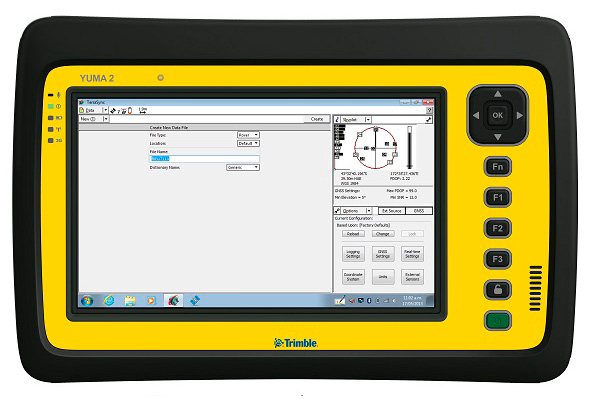
My original review of the first Yuma rugged tablet from Trimble MCS (Mobile Computing Solutions) was penned in August of 2011. My original plan was to have the review of the new Yuma 2 ready to go exactly two years later. But, as we all know, man plans and God laughs.
Actually, the problem, I must admit, is a bit more personal in nature; you see, I have been enjoying the Yuma 2 to such a degree that it was difficult to write about it because then I have to send it back. I have been selfish too long — read on for the review of the new Trimble Yuma 2 rugged tablet computer that is perfect for fieldwork, especially fieldwork involving GPS and GIS applications. Indeed, one Trimble marketing quote states:
“Bring Your Office to the Field for Efficient GPS/ GIS Data Management — The Trimble Yuma 2 rugged tablet computer is designed for ease of use and high performance mobility. Great for GIS applications — it’s like bringing a complete PC out into the field.”
While I totally agree with this assessment, the Yuma 2 is really so much more. It is not limited in any important function I could determine. As an example, I am typing part of this review on the Yuma 2 via a wireless Bluetooth keyboard and a high-definition Sony monitor hooked to the Yuma 2 via the new HDMI connector. Sweet!
Over the years, it has frequently occurred to me that oftentimes manufacturers have no idea of all the ways their equipment will be utilized in the field — although Trimble does a great job giving users ideas through the Trimble Dimensions showcase that will take place at the Mirage Hotel in Las Vegas November 3-5, 2014. If you are into rugged devices, GIS and GPS, or any of the areas listed at the Trimble Dimensions website, don’t miss this show. You will see the Yuma 2 and other Trimble devices and software put to the test and used in ways you could never imagine.
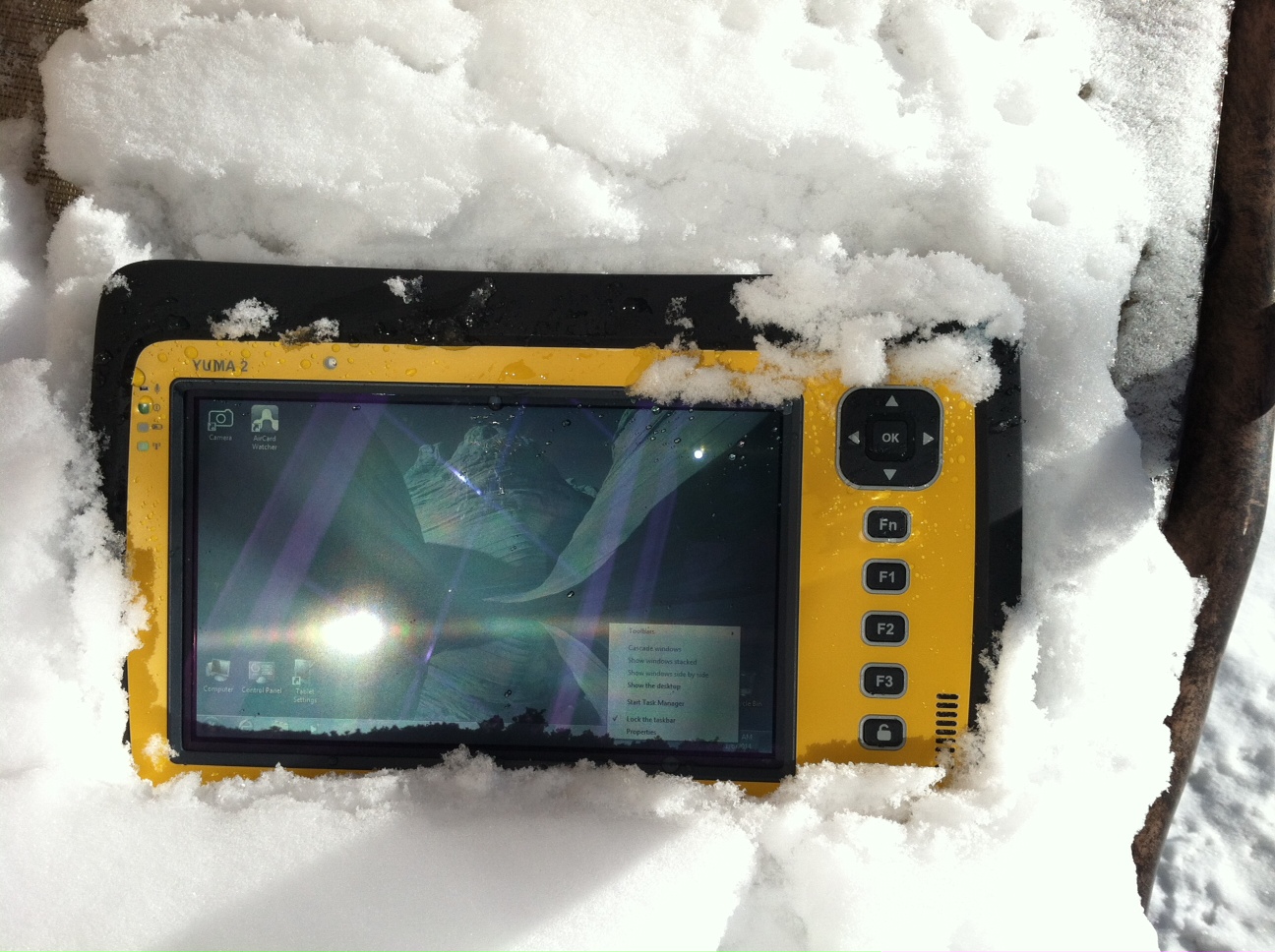
But, as usual, I digress. Let’s get back on topic and the Yuma 2 review. I put the Yuma 2 through all the normal wear-and-tear scenarios, which here in the foothills of the Rocky Mountains means severe cold (-20° F true temperature), snow, ice and altitude.
The Yuma 2 withstands tough conditions, including snow and ice.
During the six months I tested and evaluated the Yuma 2, I continued to receive several emails from users of the original Yuma rugged tablet. Three of those emails came from users in the Great Smoky Mountains. All three users operate the original Yuma in their business dealings, as well as for navigating around the Great Smoky Mountains and for recreational geocaching. One user, who would only agree to be identified as “Bailey” (he assured me that although he is retired military, his first name is not Beetle), intrigued me with his assertion that he has a crucial usability test he routinely performs on his GPS devices that I cannot easily conduct here in the Rocky Mountains. Beetle and other members of the Great Smoky Mountain Geocaching Society usually perform their Great Smoky Mountain Humidity and Fog tests at or around Clingmans Dome.
Clingmans Dome in the Great Smoky Mountains.
The National Park Service describes the 6,643-foot Clingmans Dome as being the highest point in Great Smoky Mountains National Park. It is the highest point in Tennessee, and the third highest mountain east of the Mississippi. Only Mt. Mitchell (6,684 feet) and Mt. Craig (6,647 feet) — both located in Mt. Mitchell State Park in western North Carolina — rise higher. Additionally, the cool, wet conditions at the summit of Clingmans Dome make the spruce-fir forest that grows there a coniferous rainforest. By now, you are probably saying, so what?
The “so what” is that Bailey says the humidity is sometimes so high that when geocachers hit the cooler temperatures and high humidity of Clingmans Dome, some devices have water streaming from inside the device, which is never a good thing. I checked with Trimble, and indeed their devices are made to survive these conditions and much worse, such as in many mountain jungles around the world. So Bailey, have no fear, your Yuma 2 will continue to work just fine in your moist environment. Consider that the Yuma 2 was designed and built at Trimble’s MCS facility in Corvallis, Oregon, which is just due East of a rainforest along Highway 1 on the Oregon West Coast. So you can bet the Yuma 2 is tested and rated for high humidity levels. Indeed, here are the humidity specifications: Cycles between -22° F to 144° F (-30° C to +60° C) at 90% RH (relative humidity), MIL-STD-810G, Method 507.5, Procedure II (Humidity Aggravated Cycle).
While we are detailing specs, let’s list all the formal specifications, and then we can delve into more detail about how we tested the Yuma 2 and how well it performed.
Physical
Size: (LxWxH) 9.6 in x 6.3 in x 1.5 in (246 mm x 160 mm x 40 mm)
Weight: 2.6 lb (1.2 kg) with standard batteries or 3.0 lb (1.4 kg) with extended batteries
Colors: Yellow, Gray, and Gray with Yellow border
Keys: Seven keys (OK, Logon, Power, Function, 3 user-programmable function keys) and 5-way directional keypad
Hardware Specifications
Processor: 1.6 GHz Intel Atom N2600 dual-core processor
Memory: 4 GB DDR3 DRAM of volatile memory
Storage: 64 GB or 128 GB SSD-Solid State Drive (Enhanced GPS: 128 GB SSD only)
Display: 7” 1024 x 600 hybrid reflective transmissive (transflective) with capacitive touch screen
Battery Options: Smart batteries with LED power indicators – Standard battery: Two 7.5v, 3000 mAh, 21.6 Wh or optional extended battery: Two 7.5v, 6000 mAh, 43.2 Wh
I/O: 3.5 mm audio jack, USB Host (2), HDMI, docking station I/O plate, DC input power
GPS Receiver: 1-2 meter accuracy (with SBAS) or 2-4 meter accuracy (with SBAS)
Radios: Bluetooth 4.0; Wi-Fi b/g/n
WWAN: Penta-band GSM 3.75 Data only module
Standard Features
• Transflective technology (TFT) direct sunlight readable color display
• Microsoft Windows 7 Professional OS
• Intel Atom N2600 dual-core 1.6 GHz processor
• 4 GB DDR3 DRAM volatile memory
• 64 or 128 GB solid-state drive
• Multi-touch capacitive touchscreen
• Rugged design certified to IP65 and MIL-STD-810G
• 3.5 mm audio jack and integrated microphone and speaker
• Outward facing autofocus 5 MP camera with LED Flash, photo and video recording capable
• Integrated Bluetooth 4.0
• Integrated Wi-Fi b/g/n and Wi-Fi Alliance Certified
• CCX (Version 4)
• GPS receiver, Enhanced 1-2 meter accuracy or 2 – 4 meter accuracy with SBAS
• Kensington security slot
• Accelerometer and Electronic Compass
• 3.75 G WWAN data connectivity optional
• Status LEDs for power, battery charging, Wi-Fi and 3G Data
• 12-month manufacturer warranty
Standard Software
• Microsoft Windows 7 Professional with Internet Explorer
• Camera software with geo-tagging
• Trimble GPS Information receiver control software
Standard Accessories
• Standard battery set (5+ hour)
• International AC Charging Kit with 4 adapters
• Capacitive Stylus with Tether
• Hand Strap and Display Cleaning Microfiber Cloth
Now that you have all the specifications and promises from Trimble, let’s look at how it compares to the original Yuma and then let’s get into how it works in everyday life as well as the not-so-routine scenarios.
Comparative Summary of Yuma and Yuma 2 Attribute
Yuma
Yuma 2
Touchscreen
Resistive dual touch
Capacitive multi-touch
Display Technology Sunlight Readability
Very Good
Excellent
Processor
1.6 GHz single core
1.6 GHz dual core
RAM
1 GB
4 GB
Solid State Drive
32 GB then 80 GB
Choice of 64 GB or 128 GB
GPS Accuracy
4 – 6 meter
2 – 4 meter
Battery Life3
4 hours with standard batteries8 hours with extended batteries
8 hours with standard batteries16 hours with extended batteries
Digital Connectivity
ExpressCard Modules
3.75G dual-mode (CDMA and GSM) option with SIM Card and Auto Carrier Recognition.
IP Rating
IP67
IP65
Pricing
$3999 Market Price for base configuration
$2999 Market Price for base configuration
First Impressions
The first thing most people notice about the Yuma 2 is its size. It is 1.5 inches shorter than a full-size iPad, while the high-definition screen is the same size and almost the same resolution as the iPad mini. With the ingenuous hand-strap attached to the back, the Yuma 2 is very maneuverable and easy to carry with you in most any situation. With the security cable, you can also attach it to a vest, backpack or even a belt loop for security. I tried all three options and it works well. For warfighters and first responders, this is ideal, as those users don’t need to worry about what happens if they should drop it. The Yuma 2 is IP65 MilSpec rugged, and I am frankly amazed at the punishment my demo unit survived. Just like the old Timex commercial — “It takes a licking and keeps on ticking.”
Attention Getter
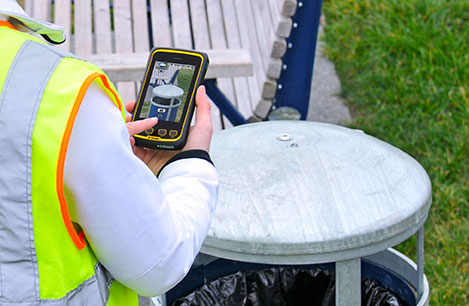
I carried the Yuma 2 everywhere for more than six months, and it garnered a great deal of attention from military and medical personnel of all descriptions: policemen, firefighters, delivery drivers, utility workers, and several park rangers. Even our local refuse haulers spent time looking over the Yuma 2. It is just simply hard to ignore. Interestingly, something they all had in common is that initially they were all very dubious and nervous about dropping it, even on thick carpet, grass, ice or snow. But once they saw me do it, they all wanted to have a go and they did. My demo unit has easily been dropped more than 100 times from various heights, usually from about four feet onto almost any surface you can name, and it continues to perform like the pro-gear it is and was designed to be. It was even dropped twice, unintentionally of course, with the camera in video mode and the LED flash active. I have to admit that initially gave me pause, but the Yuma 2 came through without a hitch. Camera, video and flash all still function perfectly.
Field Capability and New Test
With the Yuma 2, I had an opportunity to test an application I have never run before, but which will now be a standard in my repertoire of applications — the functionality of an audio headset along with Dragon Speaking software.
Long story short, my daughter is a PsyD, or Doctor of Psychology, in private practice, and together we have been testing various software programs that convert her spoken notes into the written word. This is a more difficult task than you might imagine, given all the specialized medical and psychological terms employed in her everyday vocabulary. But the latest professional version of Dragon Speaking was absolutely up to the task, as was the Yuma 2. I installed the Dragon software and went through the brief training routine with the headset and microphone, and the result is the paragraph you are reading. What a great way to write an article.
Now my daughter and I are Apple aficionados. We have more than 21 Apple devices in our homes, and my daughter uses a 13-inch Apple MacBook Pro with a retina display in the office, which, while it is an awesome device, is not something you want to take into the field or into a first-responder situation, whereas the Yuma 2 fulfills the same functions and fits the “rugged” bill perfectly.
While the built-in speaker on the Yuma 2 is certainly adequate for voice recognition and for GPS commands, it is not something with which you will want to listen to iTunes, so I highly recommend the optional audio headset with microphone offered by Trimble and several other suppliers. For me, the new Bose headset model with microphone works extremely well, while remaining affordable, and the resulting fidelity is…well…certainly Bose quality — what more can I say!?f you want audiophile-quality music and speech-to-text transcription capability in the field, then the Bose headset and Yuma 2 combination can’t be beat.
Docking Station and HP ePrint
The unit we tested did not arrive with the optional docking station. However, we quickly determined that if you are going to be constantly, even daily, making the transition from field to office computer and want to work on the same computer, then a docking station is a must. Next time, say for the Yuma 3 review, for instance, we will request a docking station as part of the review hardware. There were so many times we wanted to print directly from the Yuma 2 that I wished fervently for a docking station. Then I found that the HP ePrint software worked just great on the Yuma 2 as long as you are in range of a printer capable of receiving the signal.
If you are on the road and need to print, you can do that via the cloud and ePrint no matter where you are. You can also print your documents to the nearest HP Public Print Locations, which include national chain locations for FedEx Office stores, UPS stores, Walgreens, numerous hotels, airport lounges, and more. Prices vary widely per page, but if you really need a hard copy, this is an amazing option that works well with the Yuma 2.
We tested this print option at our local Walgreens, and they were not initially aware they had the capability until we printed a test page and out it popped. Now they advertise the capability. We also tried printing from the parking lot of a local FedEx store, and since I have a FedEx account (we receive a lot of packages, as you can imagine), the page was waiting for us when we walked in the door and the bill was automatically charged to our FedEx account. It was an incredibly quick and painless process.
Camera and Flash
The 5 MP (megapixel) camera with automatic geotagging and LED flash work as advertised, although with the Yuma 2 we were also able to record a short video that played back flawlessly on the Yuma 2 and via the email attachment on my Apple iMac. The only caution here is that you are definitely capable of recording a video that, due to its size, may never work its way through the normal email system. Fortunately, the GPS World magazine servers and my “other office” servers are “unlimited,” so this was not a problem for us. However, when we attempted to send a 20-MB video file to a friend, his system would not initially authorize it. When we compressed the file, it went without a hitch. So, if you are going to be shooting a lot of video in the field, a good video software compression program is highly recommended. We tried no less than five different free video compression algorithms, and they all worked without a glitch. Note: Some programs, but not all, require the same software be resident on the receiving computer as well.
Power and Data Connectors
Fortunately, the power connector on the Yuma 2 device is heavy duty. It is reminiscent of the old serial port (RS232C) connectors with the screw receptacles on the port. Consequently, you will never have to worry about the power cables being disconnected, at least not on the Yuma 2 side. There is also an USB-RS232C dongle available that comes in handy for data logging from external sensors.
GPS Applications and Accuracy
While Trimble MSC is not publishing much about the GPS specifics, from a technical point of view in the Yuma 2, Trimbe is shouting from the rooftops that you can have nominal 2-4 meter accuracy or enhanced 1-2 meter accuracy (both with SBAS or Space Based Augmentation System – in the U.S., think WAAS or Wide Area Augmentation System) depending on your requirements. There is an option for an external GPS antenna, and while the three different RTK programs we ran on the Yuma 2 produced excellent and consistent sub-meter accuracies, RTK programs can be expensive. So with the Yuma 2 you should be capable of deriving accuracies anywhere from 4 meters to 4 cm, depending on your timing requirements, how much you want to spend, and sometimes your altitude.
Altitude
Which reminds me: I really got a kick out of the correspondence from the three geocaching Trimble Yuma users in the Great Smoky Mountains, mentioned at the beginning of this column, because all three made such a big fuss about the 6,000+ feet of altitude they routinely encounter when geocaching. My initial reaction to that concern is akin to that of the old codger mountain man in the great movie Continental Divide with John Belushi and Blair Brown in 1981.
John’s city-bred character mentions that being a smoker the high altitude in the Rocky Mountains is beginning to bother him, at which point the heretofore reticent old mountain man indignantly replies, “Mountains? These here are foothills, just bumps in the ground, these ain’t mountains!” Therefore, since my home sits at an altitude 1,000 feet or more higher than any of the Great Smoky Mountain peaks, and I can be at 14,000+ feet within a 20-minute drive and cross the Continental Divide in under an hour’s driving time, I understand the old mountain man’s consternation and directly relate it to the users’ concerns about the Great Smoky Mountains, which when compared to the Rocky Mountains in Colorado, are indeed bumps in the ground. I mention this only because at 7,500 feet with no obstructions, the Yuma 2 routinely processes 8-12 GPS satellites and reports accuracies far superior to those publicized by Trimble. So, while you should not necessarily expect the same level of accuracy I have reported here, you should probably expect accuracies in between what Trimble publicizes and the sub-meter performance we observe on a regular basis.
Software
I have frankly lost count of the multiple GIS and GPS software programs I ran on the Yuma 2, but they all basically ran flawlessly, both the free apps and the more costly programs. The only issue I encountered is that some GPS programs require utilizing different ports and transmission speeds. However, since these parameters are user definable on the Yuma 2, it never presented any serious obstacles. Caveat emptor, for here I will remind users of the old axiom, “You get what you pay for!” The free GPS and GIS apps work fine, but the amount of metadata and accuracy provided by some of the more costly applications is nothing short of amazing. If you plan to use the Yuma 2 for scientific applications and desire onboard processing, then the more costly software programs are the applications I would recommend. If the Yuma 2 is just a data logger or positioning device, then the free applications work well.
Bottom Line
The Yuma 2 is an amazing machine. It is everything a high-end laptop should be and more in a ruggedized format with a Gorilla Glass high-definition display touchscreen that should be reassuring to users in the field.
For government users, the rugged Yuma 2 tablet with a Selective Availability Anti-Spoofing Module or SAASM option would be the perfect choice, and far superior to anything else in the field today, especially for our military. My sources tell me there are thousands of Yuma and Yuma 2 tablets in the field today, and the addition of a SAASM module would make them more secure and usable by our military users for all their tasks. Imagine one secure tablet that meets all your needs. I think our warfighters deserve the best, don’t you?
If you currently accomplish fieldwork and transfer data between two computers, and make use of GIS and GPS data, then the Yuma 2 is the machine of choice for you because it will do the work of both computers and display/output data through the HDMI interface or through the wireless ePrint capability, especially if you opt for the optional docking station. The SSD (solid state drives) are super fast, and since there are no moving parts on the Yuma 2, you may well find it is faster and more dependable than your current office laptop or even desktop computer. I highly recommend it.
Until next time, happy navigating and take a rugged computer out for a spin.
Hemisphere GNSS, Inc. today announced that Chuck Joseph has been named president and chief executive officer, effective immediately, replacing Phil Gabriel. Joseph has also been appointed to the Hemisphere GNSS Board of Directors.
Joseph has more than 30 years of executive leadership across multiple industries, serving in corporate officer and board of director capacities. He has extensive proven experience in GNSS OEM and direct sales market segments including survey and mapping, GIS, machine control, marine, avionics, personal (mobile) navigation, and tracking systems.
Before joining Hemisphere GNSS, Joseph most recently served as president and chief operating officer of nusola, Inc., an energy technology company he co-founded and where he continues to serve as executive chairman of the Board. Previously, among other roles, Joseph was senior vice president and general manager of Immersion Corporation, a tactile feedback technology company focused on GPS-centric mobile and industrial applications, corporate vice president of marketing and sales for Magellan Corporation, and executive vice president and general manager of Trimble Navigation.
“Chuck is a proven executive with the experience and expertise to lead Hemisphere GNSS as we enter our next phase of growth and development,” said Jonathan Ladd, chairman of the Hemisphere GNSS Board of Directors. “Over the course of his career, Chuck has repeatedly demonstrated the ability to develop critical corporate strategies to help innovative companies scale and grow globally. His understanding of our business, significant international experience, and deep OEM and GNSS industry experience make him ideally suited to lead Hemisphere as we seek to accelerate company growth.”
“Hemisphere has long been recognized for its pioneering and trend setting high-precision GNSS technology, and I look forward to leading the company’s talented team as we make the strategic decisions necessary to expand our market share and OEM presence globally,” Joseph said. “Leveraging our deep GNSS experience and strong, core GNSS technologies, along with UniStrong’s high quality, low-cost product design and development resources, Hemisphere is poised for significant global growth.”
In conjunction with the reported change in management, Hemisphere GNSS is also announcing the departure of Phil Gabriel, the company’s previous president, effective today. Ladd commented, “Phil was instrumental in getting our company off the ground after the acquisition from AgJunction Inc. in early 2013. We thank Phil for his contributions and dedication during the past year, and wish him good fortune and success on his next endeavor.”